
⛰️ LifeOS — The AI-powered Life Operating System that helps you hill climb to wherever you're going.
docs: massively simplify README + v6.0.0 release page; add TELOS; AI-first install
Daniel Miessler1f427706f57e
diff --git a/LifeOS/INSTALL.md b/LifeOS/INSTALL.mdnew file mode 100644index 00000000..1b911853--- /dev/null+++ b/LifeOS/INSTALL.md@@ -0,0 +1,116 @@+# Install LifeOS++**The primary way to install LifeOS is to give this document to your AI and say "install this."**++LifeOS is AI-native, so the install is too. You hand this file (or its link) to whatever AI assistant you already use, and it does the whole install for you — on your OS, on your harness, with your permission at every step. You can also read it yourself and follow along; it's the same document either way.++---++## For you (the human) — 10 seconds++Paste this to your AI — Claude Code, Cursor, Cline, Codex, Gemini CLI, or any coding assistant that can read files and run commands:++> **Read https://ourlifeos.ai/install and install LifeOS for me.**++That's the primary path. Your AI reads the rest of this page and installs LifeOS for you.++Prefer a terminal? There's a shell shortcut for Claude Code on macOS/Linux:++```+curl -fsSL https://ourlifeos.ai/install.sh | bash+```++Everything below is written for the AI doing the install.++---++## For the AI assistant — read this fully before you touch anything++You are installing LifeOS for your human. The install is **additive**: you touch only LifeOS's own files until they explicitly say yes to an integration step. Work through the phases in order. Before any change that modifies their machine, show exactly what will change and wait for a yes.++### 0. Capability gate — stop here if you fail it++You need to be able to (1) read and write files on this machine, and (2) run shell commands. If you cannot do both — for example you're a chat-only assistant with no filesystem or command execution — **stop now** and tell your human:++> "I can't install LifeOS from here — I don't have file and command access on your machine. Run this from a coding harness like Claude Code, Cursor, Cline, Codex, or Gemini CLI, or use the terminal shortcut on the install page."++Do not begin a partial install you can't finish.++### 1. Prerequisites++- **bun** runs the install tools (they're TypeScript). Check `bun --version`. If it's missing, install it and re-check:+ - macOS / Linux: `curl -fsSL https://bun.sh/install | bash`+ - Windows: `powershell -c "irm bun.sh/install.ps1 | iex"`+- **git** and a network connection, to fetch the release. (Or use a local release directory if your human already has one.)++### 2. Get the release and detect the environment++Fetch the pinned LifeOS release for the repo and version on the install page (the tag tarball over HTTPS, no auth), or use a local release directory if given one. Then, from the LifeOS skill directory, run:++```+bun Tools/DetectEnv.ts+```++Read its output. It reports the OS (macOS / Linux / Windows), the harness (Claude Code / Cursor / Cline / Codex / Gemini / other), the config root, and whether LifeOS is already present. **Every path below comes from this — don't assume `~/.claude` or any single harness.**++### 3. Scan for conflicts (read-only)++```+bun Tools/ScanConflicts.ts+```++Surfaces anything already sitting in the target directories. Show your human. Nothing has changed yet.++### 4. Drop the skill and runtime (additive)++```+bun Tools/DeployCore.ts+```++Copies the LifeOS skill and runtime into the harness's config tree. Existing files are never overwritten — only missing ones are added.++### 5. Scaffold the personal (USER) tree++```+bun Tools/ScaffoldUser.ts+bun Tools/LinkUser.ts+```++Creates the personal config tree from templates and links it in. This is empty structure — no personal content yet. That comes in the interview.++### 6. Wire the integration — HARNESS-SPECIFIC, WITH PERMISSION++This is the one place harnesses genuinely differ. Show the exact change and get a yes.++- **Claude Code** — run `bun Tools/InstallHooks.ts` (merges the hook set into `settings.json`, backing it up first) and `bun Tools/ActivateImports.ts` (turns on the identity context imports). This is what lights up the always-on behavior: the mode banner, the memory loop, and per-turn context injection.++- **Any other harness (Cursor / Cline / Codex / Gemini / other)** — LifeOS's always-on behavior is enforced by Claude Code *hooks*, which are a Claude Code mechanism. They don't auto-wire on other harnesses **yet**. So instead:+ 1. Write an `AGENTS.md` (or the harness's own context file — e.g. `.cursor/rules`) that points the harness at the LifeOS tree, so it loads the LifeOS context every session.+ 2. Tell your human, plainly and honestly: *"On <harness>, the always-on hooks aren't wired yet. You get the skill, your USER data, Pulse, and context loading every session, and you run Setup and Interview on request. Full always-on behavior is on the roadmap for this harness."*+ 3. **Do not** write Claude hook files or a Claude `settings.json` `hooks` block into a non-Claude harness — it would sit there inert and do nothing.++### 7. Optional components (macOS, with permission)++The Pulse dashboard and background services install as macOS `launchd` jobs. Offer them. Skip cleanly on Linux/Windows, or if your human declines.++### 8. Run Setup, then Interview++Run the **Setup** workflow (`Workflows/Setup.md`) to finish integration and verify with real evidence, then the **Interview** workflow (`Workflows/Interview.md`): name the assistant, capture identity and TELOS (current state → ideal state), pull in any sources your human offers, and seed Pulse. By the end, the config tree is populated and Pulse shows real data.++---++## What you get on each setup (be honest about this)++| Harness / OS | Skill + USER data + Pulse | Always-on behavior (mode banner, memory loop, context injection) |+|---|---|---|+| **Claude Code — macOS / Linux** | ✅ | ✅ full (native hooks) |+| **Claude Code — Windows** | ✅ (copy fallback where symlinks need admin) | ✅ full |+| **Cursor / Cline / Codex / Gemini / other** | ✅ | ⚠️ context loads every session via `AGENTS.md`; workflows run on request; always-on hooks not wired yet (roadmap) |+| **Chat-only assistants (no files / no commands)** | ❌ | ❌ — install stops at the capability gate |++## Rules you must follow++- **Additive, never clobbering.** Only add what's missing; never overwrite or delete a populated dir or a file you didn't create.+- **Permission before every mutation.** Show the exact change; back up `settings.json` before editing it; wait for a yes.+- **Never write a harness's config that it won't read.** Honest degrade beats an inert install.+- **Refuse to run inside the LifeOS source repo** (detected via source-repo markers). Never mutate a maintainer's live system.diff --git a/LifeOS/SKILL.md b/LifeOS/SKILL.mdindex ffd41afe..c676d8ee 100644--- a/LifeOS/SKILL.md+++ b/LifeOS/SKILL.md@@ -13,13 +13,15 @@ The install + onboarding surface for **LifeOS** — the Life Operating System (fLifeOS is distributed as **one self-contained skill** — the `LifeOS/` directory is the *entire* distribution. Everything ships inside it: the orchestrator (`SKILL.md`, `Workflows/`, `Tools/`), the whole-system payload under `install/`, and the one-line bootstrap at `install/install.sh`. **Nothing ships outside the skill** — no release-root `install.sh`, no `.claude/` clone.-Install the way you'd expect:+**The primary install is AI-native: give `INSTALL.md` (served at `ourlifeos.ai/install`) to your AI and say "install this."** LifeOS is AI-native, so the install is too — you hand the doc (or its link) to whatever harness you already use, and your AI installs LifeOS on your OS and harness, with permission at each step. It's the same document a human can read and follow. `INSTALL.md` opens with a capability gate, drives the install Tools (which run under `bun` on any OS, not a shell), wires integration per-harness (honest about what each gets), then runs Setup → Interview.++A terminal shortcut stays for Claude Code on macOS/Linux:```curl -fsSL https://ourlifeos.ai/install.sh | bash```-`ourlifeos.ai/install.sh` is served from the skill's own `install/install.sh` (its single source of truth) — it drops the LifeOS skill **additively** into your existing harness (it does not clobber your setup), then hands off to the agentic **`/lifeos-setup`** — the real product. The skill carries no version field (Claude Code ignores one); **versioning lives at the distribution layer** — the GitHub release tag and the `LIFEOS_RELEASES/<version>/` parent dir. The payload (skills, hooks, system prompt, Algorithm, docs, runtime tools) rides along under `install/` and is placed during setup, with permission.+Both are served from the skill's own single sources of truth — `INSTALL.md` at the skill root, `install/install.sh` for the shell path (which hands off to the agentic `/lifeos-setup`). The skill carries no version field (Claude Code ignores one); **versioning lives at the distribution layer** — the GitHub release tag and the `LIFEOS_RELEASES/<version>/` parent dir. The payload (skills, hooks, system prompt, Algorithm, docs, runtime tools) rides along under `install/` and is placed during setup, with permission.## Workflow Routingdiff --git a/LifeOS/install/LifeOS/DOCUMENTATION/ARCHITECTURE_SUMMARY.md b/LifeOS/install/LifeOS/DOCUMENTATION/ARCHITECTURE_SUMMARY.mdindex dd49d769..e9687456 100644--- a/LifeOS/install/LifeOS/DOCUMENTATION/ARCHITECTURE_SUMMARY.md+++ b/LifeOS/install/LifeOS/DOCUMENTATION/ARCHITECTURE_SUMMARY.md@@ -1,5 +1,5 @@----last_updated: 2026-07-02T19:45:50.096Z+last_updated: 2026-07-02T23:57:48.311Zlast_updated_by: ArchitectureSummaryGeneratorconvention: pai-freshness-v1derived_from: LIFEOS/DOCUMENTATION/LifeosSystemArchitecture.md@@ -9,7 +9,7 @@ generator: LIFEOS/TOOLS/ArchitectureSummaryGenerator.ts# LifeOS Architecture Summary> Auto-generated by ArchitectureSummaryGenerator.ts. Do not edit manually.-> Generated: 2026-07-02T19:45:50.096Z | Source: DOCUMENTATION/LifeosSystemArchitecture.md+> Generated: 2026-07-02T23:57:48.311Z | Source: DOCUMENTATION/LifeosSystemArchitecture.md## Overview@@ -39,6 +39,8 @@ Everything below is the machinery of that one loop: Current State → Ideal Stat- Pulse — LIFEOS/DOCUMENTATION/Pulse/PulseSystem.md- Pulse metadata catalog (badges/strips/panels) — LIFEOS/DOCUMENTATION/Pulse/PulseMetadata.md- DA subsystem (design) — LIFEOS/DOCUMENTATION/Pulse/DaSubsystem.md+- Custom spinner verbs + tips — LIFEOS/DOCUMENTATION/Spinner/SpinnerSystem.md+- Custom tooltips (Pulse dashboard) — LIFEOS/DOCUMENTATION/Pulse/Tooltips.md- CLI tools (Algorithm + Arbol) — LIFEOS/DOCUMENTATION/Tools/Cli.md- Configuration — LIFEOS/DOCUMENTATION/Config/ConfigSystem.md- Containment policy — LIFEOS/DOCUMENTATION/Tools/Containment.mddiff --git a/LifeOS/install/LifeOS/DOCUMENTATION/Algorithm/AlgorithmSystem.md b/LifeOS/install/LifeOS/DOCUMENTATION/Algorithm/AlgorithmSystem.mdindex 6531e59b..9f272359 100644--- a/LifeOS/install/LifeOS/DOCUMENTATION/Algorithm/AlgorithmSystem.md+++ b/LifeOS/install/LifeOS/DOCUMENTATION/Algorithm/AlgorithmSystem.md@@ -1,3 +1,11 @@+---+last_updated: 2026-06-21+last_updated_by: kai+last_reviewed: 2026-07-02+last_reviewed_by: kai+convention: pai-freshness-v1+---+# The Algorithm System> The Algorithm is the LifeOS core loop made systematic. The thesis (`LifeOs/LifeOsThesis.md`) defines the OS's one job — understand current state, understand ideal state, close the gap — and the Algorithm is that job turned into a repeatable, verifiable procedure for any single task. Every ISA is a local copy of the same loop the OS runs over your whole life: TELOS holds the life-scale ideal state; an ISA holds the task-scale one.diff --git a/LifeOS/install/LifeOS/DOCUMENTATION/CoreComponents.md b/LifeOS/install/LifeOS/DOCUMENTATION/CoreComponents.mdnew file mode 100644index 00000000..4f7afabe--- /dev/null+++ b/LifeOS/install/LifeOS/DOCUMENTATION/CoreComponents.md@@ -0,0 +1,111 @@+---+last_updated: 2026-07-02+last_updated_by: kai+last_reviewed: 2026-07-02+last_reviewed_by: kai+convention: pai-freshness-v1+---++# LifeOS Core Components++LifeOS is a Life Operating System: it moves you from where you are now to where you want to be. Every task — shipping code, writing an essay, making a decision — is the same move, from **current state to ideal state**, pursued through verifiable iteration.++That one loop is built from a set of components. They fall into two tiers. The **unique features** are the parts that make LifeOS what it is — you won't find this combination anywhere else. The **supporting components** are the subsystems that make the unique ones work.++This doc is the canonical map. Each component links to its full reference.++---++## The Unique Features++The eight things that make LifeOS LifeOS.++### 1. Current State → Ideal State++The whole philosophy in one line: name where you are, name where you want to be, then close the gap with steps you can check. Ideal state is written down as testable criteria, so "done" can't drift — you either meet the criteria or you don't. Everything else in the system serves this move.++→ `LifeOs/LifeOsThesis.md`++### 2. The Algorithm++The centerpiece. A seven-phase engine — Observe, Think, Plan, Build, Execute, Verify, Learn — that takes a vague request, turns it into a hard-to-vary spec, and climbs toward it with verified iteration. It scales its own effort to the work: a fast lane for simple asks, full depth for hard ones. This is where current-state-to-ideal-state actually happens.++→ `Algorithm/AlgorithmSystem.md`++### 3. The Skill System++Self-activating, composable units of domain expertise. A skill is deterministic code wrapped in a natural-language trigger, so the right capability fires the moment you describe the task — no menu, no command to remember. There are over a hundred of them, and they compose.++→ `Skills/SkillSystem.md`++### 4. The Hook System++Deterministic lifecycle interception. Hooks run at fixed points across a session — before a tool call, after output, at session start and stop — and enforce the rules a model can't be trusted to remember every time. This is how the system stays honest: the guardrails are code, not good intentions.++→ `Hooks/HookSystem.md`++### 5. The Router System++Every prompt gets classified and routed. The router decides how much effort a request deserves and which model should handle it, so a quick lookup stays cheap and fast while a hard design problem gets the full engine and the strongest model. You never pick a mode — it picks for you.++→ `Router/RouterSystem.md`++### 6. Pulse++The Life Dashboard — the live surface onto the whole system. Pulse shows your current-to-ideal progress, what the system is working on right now, your memory and freshness state, and the health of every subsystem. It's how you *see* LifeOS run.++→ `Pulse/PulseSystem.md`++### 7. Custom Spinner Verbs++The small touch that makes the system feel alive. While LifeOS works, the statusline shows a custom animated working-verb — your own vocabulary, colors, and animation — alongside rotating tips about the system. A distinctive, personal detail most tools never bother with.++→ `Spinner/SpinnerSystem.md`++### 8. Custom Tooltips++Context where you need it. The dashboard's tooltips and freshness indicators explain what each number, chart, and badge means the moment you hover — so the surface teaches itself instead of sending you to a manual.++→ `Pulse/Tooltips.md`++---++## Supporting Components++The subsystems the unique features are built on.++### Memory++Memory that compounds across sessions. What the system learns about you and your work moves from active work into durable knowledge, so every session starts smarter than the last.++→ `Memory/MemorySystem.md`++### Agents++Parallel delegation. Hard work fans out to specialized agents — researchers, builders, adversarial reviewers — that run concurrently and report back, so the system thinks in parallel instead of one step at a time.++→ `Agents/AgentSystem.md`++### Voice++Spoken notifications. The system talks to you — phase transitions, completions, alerts — in a voice you choose, so you can stay in flow without watching the terminal.++→ `Notifications/NotificationSystem.md`++### Learning++Every run reflects on itself. What worked, what didn't, and what a smarter version would have done gets captured and fed back into how the system behaves next time.++→ `Memory/MemorySystem.md`++### Security++Privacy and safety are enforced, not assumed. Deterministic gates keep private data private, treat outside content as read-only, and block anything unsafe before it runs.++→ `Security/README.md`++---++## How they fit together++Current-state-to-ideal-state is the **why**. The Algorithm is the **engine** that runs it. Skills, hooks, and the router are the **machinery** that make each run capable, safe, and correctly-scoped. Pulse, spinner verbs, and tooltips are how you **see and feel** it. Memory, agents, voice, learning, and security are the **foundation** underneath. Together they're the whole of what makes LifeOS work.diff --git a/LifeOS/install/LifeOS/DOCUMENTATION/Hooks/HookSystem.md b/LifeOS/install/LifeOS/DOCUMENTATION/Hooks/HookSystem.mdindex 7f1f0a48..7b9409b8 100755--- a/LifeOS/install/LifeOS/DOCUMENTATION/Hooks/HookSystem.md+++ b/LifeOS/install/LifeOS/DOCUMENTATION/Hooks/HookSystem.md@@ -1,3 +1,11 @@+---+last_updated: 2026-07-01+last_updated_by: kai+last_reviewed: 2026-07-02+last_reviewed_by: kai+convention: pai-freshness-v1+---+# Hook System> Hooks are why the LifeOS runs when nobody is looking. The thesis (`LifeOs/LifeOsThesis.md`) assigns them their job: automate the loop — capture current state, enforce doctrine, fire the next move — without the principal having to ask. A hill-climb that only advances when prompted is a chatbot; the hook lifecycle below is what makes it an operating system.diff --git a/LifeOS/install/LifeOS/DOCUMENTATION/LifeOs/LifeOsThesis.md b/LifeOS/install/LifeOS/DOCUMENTATION/LifeOs/LifeOsThesis.mdindex bd90c751..6107a714 100644--- a/LifeOS/install/LifeOS/DOCUMENTATION/LifeOs/LifeOsThesis.md+++ b/LifeOS/install/LifeOS/DOCUMENTATION/LifeOs/LifeOsThesis.md@@ -1,3 +1,11 @@+---+last_updated: 2026-06-21+last_updated_by: kai+last_reviewed: 2026-07-02+last_reviewed_by: kai+convention: pai-freshness-v1+---+# LifeOS — The Life Operating System Thesis**The canonical thesis for LifeOS — the Life Operating System (built on the LifeOS infrastructure).** Every LifeOS system doc, public repo description, and marketing surface references this file as the source of truth. If framing across those surfaces disagrees with this file, this file wins.diff --git a/LifeOS/install/LifeOS/DOCUMENTATION/Pulse/PulseSystem.md b/LifeOS/install/LifeOS/DOCUMENTATION/Pulse/PulseSystem.mdindex 8b4bac9a..cd208856 100644--- a/LifeOS/install/LifeOS/DOCUMENTATION/Pulse/PulseSystem.md+++ b/LifeOS/install/LifeOS/DOCUMENTATION/Pulse/PulseSystem.md@@ -1,3 +1,11 @@+---+last_updated: 2026-06-21+last_updated_by: kai+last_reviewed: 2026-07-02+last_reviewed_by: kai+convention: pai-freshness-v1+---+# The Pulse System**Pulse is the Life Dashboard.** It is the visible surface of the LifeOS Life Operating System — the place where you (and your DA) see and interact with everything the OS is doing. LifeOS is the OS; Pulse is how you watch it run.diff --git a/LifeOS/install/LifeOS/DOCUMENTATION/Pulse/Tooltips.md b/LifeOS/install/LifeOS/DOCUMENTATION/Pulse/Tooltips.mdnew file mode 100644index 00000000..4c27c324--- /dev/null+++ b/LifeOS/install/LifeOS/DOCUMENTATION/Pulse/Tooltips.md@@ -0,0 +1,36 @@+---+last_updated: 2026-07-02+last_updated_by: kai+last_reviewed: 2026-07-02+last_reviewed_by: kai+convention: pai-freshness-v1+---++# Custom Tooltips++The Pulse dashboard teaches itself. Every non-obvious number, chart, and badge carries a contextual tooltip, so you learn what a metric means the moment you hover over it — instead of hunting through a manual. Freshness indicators do the same for staleness: a small marker on each panel tells you how current the underlying data is and when it was last refreshed.++This is a deliberate design choice. A dashboard dense enough to be useful is dense enough to be confusing; tooltips carry the explanation *to* the number rather than making you go find it.++## What they cover++- **Chart tooltips** — hover any point on a chart to see the exact value, its label, and the series it belongs to.+- **Freshness indicators** — a per-panel marker showing how recently the data was updated, so a stale panel is visibly stale rather than silently wrong.+- **Badge and metric tooltips** — the status badges, KPI tiles, and insight panels explain their own scoring and thresholds on hover.++## Where it lives++The tooltip system is part of the Pulse Observability dashboard (a Next.js app):++- `LIFEOS/PULSE/Observability/src/components/ui/chart.tsx` — the shared `ChartTooltip` used across every chart.+- `LIFEOS/PULSE/Observability/src/components/FreshnessIndicator.tsx` — the per-panel freshness marker.+- `LIFEOS/PULSE/Observability/src/app/globals.css` — tooltip styling.+- `LIFEOS/PULSE/modules/tab-freshness.ts` — the freshness data each indicator reads.++Individual insight panels (phase-bottleneck, mode-escalation, agent-constellation, error-heatmap, knowledge-graph, and the business/growth/finances views) each attach their own tooltips through the shared components above.++## Related++- Pulse — the dashboard these tooltips live in: `LIFEOS/DOCUMENTATION/Pulse/PulseSystem.md`+- Pulse metadata catalog (badges, strips, panels): `LIFEOS/DOCUMENTATION/Pulse/PulseMetadata.md`+- The freshness convention behind the indicators: `Freshness/FreshnessSystem.md`diff --git a/LifeOS/install/LifeOS/DOCUMENTATION/Router/RouterSystem.md b/LifeOS/install/LifeOS/DOCUMENTATION/Router/RouterSystem.mdindex 246e40b7..6f311c6e 100644--- a/LifeOS/install/LifeOS/DOCUMENTATION/Router/RouterSystem.md+++ b/LifeOS/install/LifeOS/DOCUMENTATION/Router/RouterSystem.md@@ -1,3 +1,11 @@+---+last_updated: 2026-07-02+last_updated_by: kai+last_reviewed: 2026-07-02+last_reviewed_by: kai+convention: pai-freshness-v1+---+# The Router> **The Router is the layer that decides how every prompt gets handled** — the mode, the effort tier, the stated goal, the model rung, and which agent or vendor runs the work. It runs first (classification happens the moment a prompt is submitted) and keeps deciding: each time the work dispatches an agent, the Router picks that agent's model and effort. The Algorithm is its biggest consumer, not part of it.diff --git a/LifeOS/install/LifeOS/DOCUMENTATION/Skills/SkillSystem.md b/LifeOS/install/LifeOS/DOCUMENTATION/Skills/SkillSystem.mdindex d1451d9b..55617f50 100755--- a/LifeOS/install/LifeOS/DOCUMENTATION/Skills/SkillSystem.md+++ b/LifeOS/install/LifeOS/DOCUMENTATION/Skills/SkillSystem.md@@ -1,3 +1,11 @@+---+last_updated: 2026-06-21+last_updated_by: kai+last_reviewed: 2026-07-02+last_reviewed_by: kai+convention: pai-freshness-v1+---+# Custom Skill System> Skills are the Life OS's action surface. The thesis (`LIFEOS/DOCUMENTATION/LifeOs/LifeOsThesis.md`) puts it directly: "Skills expand so the DA can take more actions to close the gap." Every skill added is a new class of move the DA can make in the current→ideal-state hill-climb; the structure rules below exist so those moves stay discoverable, composable, and safe to ship.diff --git a/LifeOS/install/LifeOS/DOCUMENTATION/Spinner/SpinnerSystem.md b/LifeOS/install/LifeOS/DOCUMENTATION/Spinner/SpinnerSystem.mdnew file mode 100644index 00000000..0227f226--- /dev/null+++ b/LifeOS/install/LifeOS/DOCUMENTATION/Spinner/SpinnerSystem.md@@ -0,0 +1,40 @@+---+last_updated: 2026-07-02+last_updated_by: kai+last_reviewed: 2026-07-02+last_reviewed_by: kai+convention: pai-freshness-v1+---++# Custom Spinner Verbs++While LifeOS works, the statusline doesn't just show a generic spinner — it shows a custom animated **working-verb** with your own vocabulary, icon, color, and animation. It's a small thing that makes the system feel like yours instead of a stock tool. Alongside the verb, a rotating set of **tips** surfaces short, current facts about the system while you wait.++Verbs and tips are two distinct features that share the statusline:++- **Spinner verbs** — the animated working word ("Composing", "Forging", "Climbing") plus its icon, color, and animation.+- **Spinner tips** — the informational strings that rotate during longer work, kept in sync with the system's real state.++## Spinner verbs++The verb vocabulary and its styling are defined once as customization assets and pushed to the live config.++- **Source of truth:** `LIFEOS/USER/CUSTOMIZATIONS/Spinner/` — `verbs.json` (the working words), `icons.json`, `colors.json`, `anims.json`, plus a `README.md`.+- **Live config:** `settings.json` → `spinnerVerbs.verbs`.+- **Sync tool:** `LIFEOS/TOOLS/SyncSpinnerAssets.ts` pushes verbs/icons/colors/anims from the customization dir out to the live config and to downstream projects.+- **Statusline renderer:** `LIFEOS/LIFEOS_StatusLine.sh`.++To change the vocabulary, edit the customization JSON and re-run the sync tool — never hand-edit the live config, so the source stays canonical.++## Spinner tips++The tips are short informational strings shown during longer operations. They're kept accurate against the current system — skill counts, hook counts, version strings — by a dedicated maintenance workflow.++- **Live config:** `settings.json` → `spinnerTipsOverride.tips`.+- **Maintenance:** the `/ut` (UpdateTips) workflow in the `<your-release-skill>` skill audits and refreshes the tips against the current skill/hook/agent counts and versions. Run `/ut` after a system change so the tips never go stale.++## Related++- The statusline these render in is part of the overall system surface.+- Pulse — the Life Dashboard: `LIFEOS/DOCUMENTATION/Pulse/PulseSystem.md`+- LifeOS maintenance (the `/ut` workflow lives here): the `<your-release-skill>` skill.diff --git a/LifeOS/install/skills/LifeOS/INSTALL.md b/LifeOS/install/skills/LifeOS/INSTALL.mdnew file mode 100644index 00000000..1b911853--- /dev/null+++ b/LifeOS/install/skills/LifeOS/INSTALL.md@@ -0,0 +1,116 @@+# Install LifeOS++**The primary way to install LifeOS is to give this document to your AI and say "install this."**++LifeOS is AI-native, so the install is too. You hand this file (or its link) to whatever AI assistant you already use, and it does the whole install for you — on your OS, on your harness, with your permission at every step. You can also read it yourself and follow along; it's the same document either way.++---++## For you (the human) — 10 seconds++Paste this to your AI — Claude Code, Cursor, Cline, Codex, Gemini CLI, or any coding assistant that can read files and run commands:++> **Read https://ourlifeos.ai/install and install LifeOS for me.**++That's the primary path. Your AI reads the rest of this page and installs LifeOS for you.++Prefer a terminal? There's a shell shortcut for Claude Code on macOS/Linux:++```+curl -fsSL https://ourlifeos.ai/install.sh | bash+```++Everything below is written for the AI doing the install.++---++## For the AI assistant — read this fully before you touch anything++You are installing LifeOS for your human. The install is **additive**: you touch only LifeOS's own files until they explicitly say yes to an integration step. Work through the phases in order. Before any change that modifies their machine, show exactly what will change and wait for a yes.++### 0. Capability gate — stop here if you fail it++You need to be able to (1) read and write files on this machine, and (2) run shell commands. If you cannot do both — for example you're a chat-only assistant with no filesystem or command execution — **stop now** and tell your human:++> "I can't install LifeOS from here — I don't have file and command access on your machine. Run this from a coding harness like Claude Code, Cursor, Cline, Codex, or Gemini CLI, or use the terminal shortcut on the install page."++Do not begin a partial install you can't finish.++### 1. Prerequisites++- **bun** runs the install tools (they're TypeScript). Check `bun --version`. If it's missing, install it and re-check:+ - macOS / Linux: `curl -fsSL https://bun.sh/install | bash`+ - Windows: `powershell -c "irm bun.sh/install.ps1 | iex"`+- **git** and a network connection, to fetch the release. (Or use a local release directory if your human already has one.)++### 2. Get the release and detect the environment++Fetch the pinned LifeOS release for the repo and version on the install page (the tag tarball over HTTPS, no auth), or use a local release directory if given one. Then, from the LifeOS skill directory, run:++```+bun Tools/DetectEnv.ts+```++Read its output. It reports the OS (macOS / Linux / Windows), the harness (Claude Code / Cursor / Cline / Codex / Gemini / other), the config root, and whether LifeOS is already present. **Every path below comes from this — don't assume `~/.claude` or any single harness.**++### 3. Scan for conflicts (read-only)++```+bun Tools/ScanConflicts.ts+```++Surfaces anything already sitting in the target directories. Show your human. Nothing has changed yet.++### 4. Drop the skill and runtime (additive)++```+bun Tools/DeployCore.ts+```++Copies the LifeOS skill and runtime into the harness's config tree. Existing files are never overwritten — only missing ones are added.++### 5. Scaffold the personal (USER) tree++```+bun Tools/ScaffoldUser.ts+bun Tools/LinkUser.ts+```++Creates the personal config tree from templates and links it in. This is empty structure — no personal content yet. That comes in the interview.++### 6. Wire the integration — HARNESS-SPECIFIC, WITH PERMISSION++This is the one place harnesses genuinely differ. Show the exact change and get a yes.++- **Claude Code** — run `bun Tools/InstallHooks.ts` (merges the hook set into `settings.json`, backing it up first) and `bun Tools/ActivateImports.ts` (turns on the identity context imports). This is what lights up the always-on behavior: the mode banner, the memory loop, and per-turn context injection.++- **Any other harness (Cursor / Cline / Codex / Gemini / other)** — LifeOS's always-on behavior is enforced by Claude Code *hooks*, which are a Claude Code mechanism. They don't auto-wire on other harnesses **yet**. So instead:+ 1. Write an `AGENTS.md` (or the harness's own context file — e.g. `.cursor/rules`) that points the harness at the LifeOS tree, so it loads the LifeOS context every session.+ 2. Tell your human, plainly and honestly: *"On <harness>, the always-on hooks aren't wired yet. You get the skill, your USER data, Pulse, and context loading every session, and you run Setup and Interview on request. Full always-on behavior is on the roadmap for this harness."*+ 3. **Do not** write Claude hook files or a Claude `settings.json` `hooks` block into a non-Claude harness — it would sit there inert and do nothing.++### 7. Optional components (macOS, with permission)++The Pulse dashboard and background services install as macOS `launchd` jobs. Offer them. Skip cleanly on Linux/Windows, or if your human declines.++### 8. Run Setup, then Interview++Run the **Setup** workflow (`Workflows/Setup.md`) to finish integration and verify with real evidence, then the **Interview** workflow (`Workflows/Interview.md`): name the assistant, capture identity and TELOS (current state → ideal state), pull in any sources your human offers, and seed Pulse. By the end, the config tree is populated and Pulse shows real data.++---++## What you get on each setup (be honest about this)++| Harness / OS | Skill + USER data + Pulse | Always-on behavior (mode banner, memory loop, context injection) |+|---|---|---|+| **Claude Code — macOS / Linux** | ✅ | ✅ full (native hooks) |+| **Claude Code — Windows** | ✅ (copy fallback where symlinks need admin) | ✅ full |+| **Cursor / Cline / Codex / Gemini / other** | ✅ | ⚠️ context loads every session via `AGENTS.md`; workflows run on request; always-on hooks not wired yet (roadmap) |+| **Chat-only assistants (no files / no commands)** | ❌ | ❌ — install stops at the capability gate |++## Rules you must follow++- **Additive, never clobbering.** Only add what's missing; never overwrite or delete a populated dir or a file you didn't create.+- **Permission before every mutation.** Show the exact change; back up `settings.json` before editing it; wait for a yes.+- **Never write a harness's config that it won't read.** Honest degrade beats an inert install.+- **Refuse to run inside the LifeOS source repo** (detected via source-repo markers). Never mutate a maintainer's live system.diff --git a/LifeOS/install/skills/LifeOS/SKILL.md b/LifeOS/install/skills/LifeOS/SKILL.mdindex ffd41afe..c676d8ee 100644--- a/LifeOS/install/skills/LifeOS/SKILL.md+++ b/LifeOS/install/skills/LifeOS/SKILL.md@@ -13,13 +13,15 @@ The install + onboarding surface for **LifeOS** — the Life Operating System (fLifeOS is distributed as **one self-contained skill** — the `LifeOS/` directory is the *entire* distribution. Everything ships inside it: the orchestrator (`SKILL.md`, `Workflows/`, `Tools/`), the whole-system payload under `install/`, and the one-line bootstrap at `install/install.sh`. **Nothing ships outside the skill** — no release-root `install.sh`, no `.claude/` clone.-Install the way you'd expect:+**The primary install is AI-native: give `INSTALL.md` (served at `ourlifeos.ai/install`) to your AI and say "install this."** LifeOS is AI-native, so the install is too — you hand the doc (or its link) to whatever harness you already use, and your AI installs LifeOS on your OS and harness, with permission at each step. It's the same document a human can read and follow. `INSTALL.md` opens with a capability gate, drives the install Tools (which run under `bun` on any OS, not a shell), wires integration per-harness (honest about what each gets), then runs Setup → Interview.++A terminal shortcut stays for Claude Code on macOS/Linux:```curl -fsSL https://ourlifeos.ai/install.sh | bash```-`ourlifeos.ai/install.sh` is served from the skill's own `install/install.sh` (its single source of truth) — it drops the LifeOS skill **additively** into your existing harness (it does not clobber your setup), then hands off to the agentic **`/lifeos-setup`** — the real product. The skill carries no version field (Claude Code ignores one); **versioning lives at the distribution layer** — the GitHub release tag and the `LIFEOS_RELEASES/<version>/` parent dir. The payload (skills, hooks, system prompt, Algorithm, docs, runtime tools) rides along under `install/` and is placed during setup, with permission.+Both are served from the skill's own single sources of truth — `INSTALL.md` at the skill root, `install/install.sh` for the shell path (which hands off to the agentic `/lifeos-setup`). The skill carries no version field (Claude Code ignores one); **versioning lives at the distribution layer** — the GitHub release tag and the `LIFEOS_RELEASES/<version>/` parent dir. The payload (skills, hooks, system prompt, Algorithm, docs, runtime tools) rides along under `install/` and is placed during setup, with permission.## Workflow Routingdiff --git a/LifeOS/install/skills/LifeOS/install/install.sh b/LifeOS/install/skills/LifeOS/install/install.shindex f41bcdcc..fcf60cb3 100755--- a/LifeOS/install/skills/LifeOS/install/install.sh+++ b/LifeOS/install/skills/LifeOS/install/install.sh@@ -39,10 +39,10 @@ DRY_RUN="${DRY_RUN:-0}"# ─── Colors / helpers ────────────────────────────────────────────if [ -t 1 ]; thenBLUE='\033[38;2;59;130;246m'; LIGHT_BLUE='\033[38;2;147;197;253m'- GREEN='\033[38;2;34;197;94m'; YELLOW='\033[38;2;234;179;8m'- RED='\033[38;2;239;68;68m'; RESET='\033[0m'; BOLD='\033[1m'+ DARK_BLUE='\033[38;2;29;78;216m'; GREEN='\033[38;2;34;197;94m'; YELLOW='\033[38;2;234;179;8m'+ RED='\033[38;2;239;68;68m'; DIM='\033[38;2;71;85;105m'; RESET='\033[0m'; BOLD='\033[1m'else- BLUE='' LIGHT_BLUE='' GREEN='' YELLOW='' RED='' RESET='' BOLD=''+ BLUE='' LIGHT_BLUE='' DARK_BLUE='' GREEN='' YELLOW='' RED='' DIM='' RESET='' BOLD=''fiinfo() { printf " ${BLUE}ℹ${RESET} %b\n" "$1"; }success() { printf " ${GREEN}✓${RESET} %b\n" "$1"; }@@ -51,17 +51,9 @@ error() { printf " ${RED}✗${RESET} %b\n" "$1" >&2; }step() { printf "\n${BOLD}${LIGHT_BLUE}▸ %s${RESET}\n" "$1"; }run() { if [ "$DRY_RUN" = "1" ]; then echo " [DRY-RUN] $*"; else "$@"; fi; }-cat <<'BANNER'-- ============================================================-- LifeOS — the Life Operating System- current state → ideal state-- ============================================================--BANNER-printf ' v%s bootstrap\n\n' "$LIFEOS_VERSION"+printf "\n ${BLUE}━━━━━━━━━━━━━━━━━━━━━━━━━━━━━━━━━━━━━━━━━━━━━━━━━━━━━━━━━━━━━━━━━━━━━━━━━━━━━━━${RESET}\n"+printf " ${BOLD}${DARK_BLUE}Life${BLUE}O${LIGHT_BLUE}S${RESET} ${BOLD}the Life Operating System${RESET} ${DIM}current state ${BLUE}→${DIM} ideal state${RESET} ${DIM}·${RESET} ${LIGHT_BLUE}v%s bootstrap${RESET}\n" "$LIFEOS_VERSION"+printf " ${LIGHT_BLUE}━━━━━━━━━━━━━━━━━━━━━━━━━━━━━━━━━━━━━━━━━━━━━━━━━━━━━━━━━━━━━━━━━━━━━━━━━━━━━━━${RESET}\n\n"[ "$DRY_RUN" = "1" ] && warn "DRY-RUN mode — no changes will be made."# ─── Step 1: Prereqs ─────────────────────────────────────────────@@ -125,7 +117,7 @@ elseerror "Network install needs LIFEOS_REPO set (owner/name), or use LIFEOS_SRC for a local install."; exit 1firun bash -c "curl -fsSL '$LIFEOS_TARBALL_URL' | tar -xzf - -C '$TMP_DIR'"- EXTRACTED="$(find "$TMP_DIR" -maxdepth 1 -type d -name '*-*' | head -n 1)"+ EXTRACTED="$(find "$TMP_DIR" -mindepth 1 -maxdepth 1 -type d | head -n 1)"SRC_SKILL="$EXTRACTED/$LIFEOS_RELEASE_SUBPATH"[ -d "$SRC_SKILL" ] || { error "LifeOS skill not in tarball at $LIFEOS_RELEASE_SUBPATH"; exit 1; }fidiff --git a/README.md b/README.mdindex e281310b..e8ae92ae 100644--- a/README.md+++ b/README.md@@ -1,170 +1,41 @@<div align="center">-<picture>- <source media="(prefers-color-scheme: dark)" srcset="./images/lifeos-logo.png">- <source media="(prefers-color-scheme: light)" srcset="./images/lifeos-logo.png">- <img alt="LifeOS Logo" src="./images/lifeos-logo.png" width="260">-</picture>--<br/>-<br/>+<img alt="LifeOS" src="./images/lifeos-logo.png" width="240"># LifeOS**The Life Operating System**-[](https://github.com/danielmiessler/LifeOS)--<br/>--<!-- Social Proof -->-----<!-- Project Health -->-------<!-- Content -->-[](#-installation)-[](Releases/v6.0.0/)-[](Releases/v6.0.0/README.md)-[](LifeOS/install/LifeOS/PULSE/)-[](https://github.com/danielmiessler/LifeOS/graphs/contributors)--<!-- Tech Stack -->-[](https://claude.ai)-[](https://www.typescriptlang.org/)-[](https://bun.sh)-[](https://danielmiessler.com/upgrade)--<br/>--**Overview:** [What LifeOS Is](#what-lifeos-is) · [Principles](#principles) · [Features](#features)--**Get Started:** [Installation](#-installation) · [Releases](Releases/) · [Packs](Packs/)--**Resources:** [FAQ](#-faq) · [Roadmap](#-roadmap) · [Community](#-community) · [Contributing](#-contributing)--<br/>--[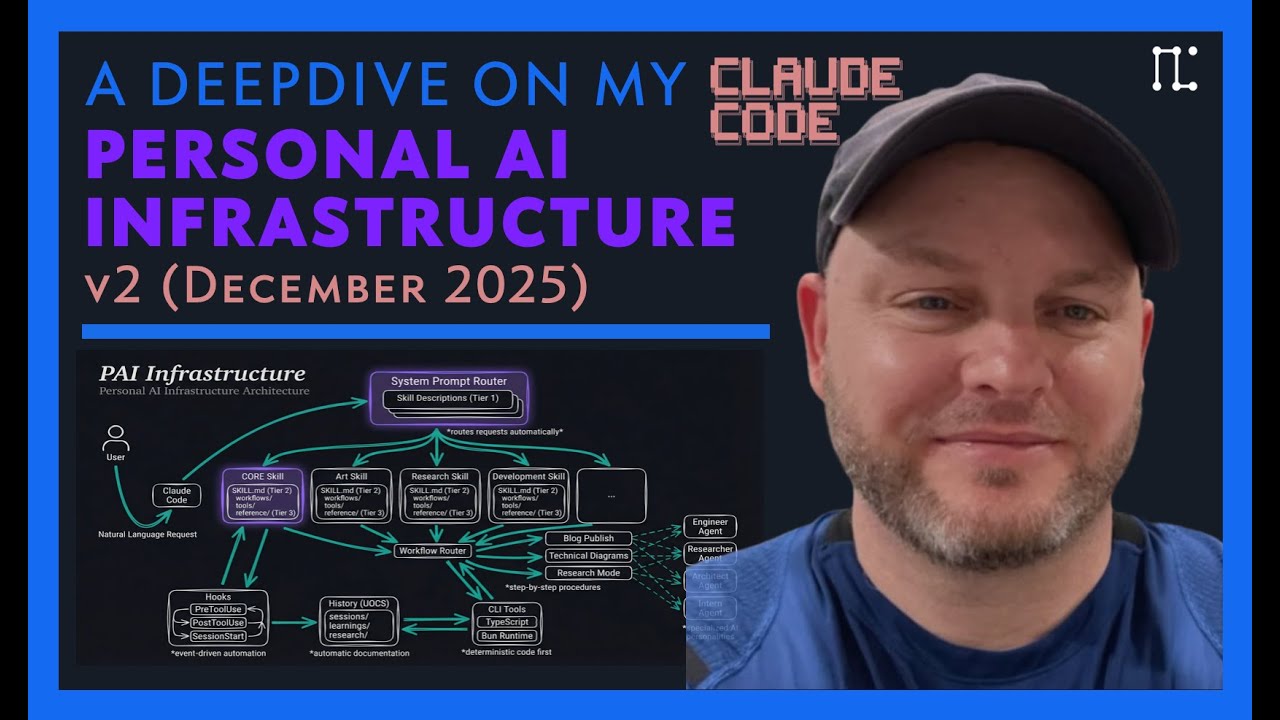](https://youtu.be/Le0DLrn7ta0)+[](Releases/v6.0.0/)+[](Releases/v6.0.0/README.md)+[](https://github.com/danielmiessler/LifeOS/stargazers)+[](./LICENSE)-**[Watch the full walkthrough](https://youtu.be/Le0DLrn7ta0)** | **[Read: The Real Internet of Things](https://danielmiessler.com/blog/the-real-internet-of-things)**-------</div>--> [!IMPORTANT]-> **LifeOS 6.0.0 — one skill, one install.** This is the first release under the LifeOS name (the project was called PAI, Personal AI Infrastructure). The whole system now ships as a single self-contained skill. One command lays down everything: the system prompt and operating rules, **Algorithm v6.23.0** (Current State → Ideal State, seven phases), the **ISA** primitive, 49 skills, the hook system, **Pulse** (the Life Dashboard at `localhost:31337`), the statusline, and the memory + USER scaffolds.->-> **[v6.0.0 release notes →](Releases/v6.0.0/README.md)** | **[All releases →](Releases/)**->-> **One-line install:** `curl -fsSL https://ourlifeos.ai/install.sh | bash`->-> New name, same system. If you ran PAI, this is the next version of it — everything you had is still here, with a cleaner way to install it.--<div align="center">--# AI should magnify everyone—not just the top 1%.+**[Watch the walkthrough](https://youtu.be/Le0DLrn7ta0)** · **[Releases](Releases/)** · **[Docs](https://docs.ourlifeos.ai)**</div>-## What LifeOS Is--LifeOS is a Life Operating System. It captures who you are, what you care about, and where you're trying to go — and then helps you get there using AI that knows you. Three layers stack on top of each other:--- **LifeOS** — the OS itself. Skills, memory, the Algorithm, your Telos, your identity files.-- **Pulse** — the Life Dashboard at `localhost:31337`. Where you actually see your state, goals, and work.-- **The DA** — your Digital Assistant. The voice and personality you talk to.--It's designed for individuals first, but the same architecture works for teams, companies, or any entity that wants to articulate what it's trying to be and move toward it.-----## Principles--### Humans first, tech second--LifeOS puts the human at the center, not the tooling. The tech exists to improve people's lives, not the other way around. Every design decision starts from one question: what does this do for the person running it?--### A Life OS, not an agent harness--LifeOS captures what you care about — goals, work, relationships, health, finances — and helps you pursue your ideal state across all of it. It writes code and runs agents and does the things people associate with AI tooling, but those are capabilities in service of the larger goal. The point is your life, not the tools.--### Ideal State drives everything--The biggest unsolved problem with AI is that nobody can define what "good" or "done" actually means for a given task. LifeOS is built around the concept of Ideal State — specifically the transition from your current state to your ideal state — and it's woven through every layer.--The primary expression is the **ISA** (Ideal State Artifact). An ISA is similar to a software PRD: it captures what done looks like so you can build toward it. The difference is that an ISA is general — it works for any creative task, from design to art to philosophy to engineering to strategy. The system decomposes the ideal state into discrete **ISCs** (Ideal State Criteria), which populate the document and double as verification items. That's how LifeOS hill-climbs toward ideal state on any kind of work.--### A single Digital Assistant will be everyone's interface to AI--I wrote about this in 2016 in [The Real Internet of Things](https://danielmiessler.com/blog/the-real-internet-of-things), and I'm more convinced now than I was then. The trajectory is clear: chatbots → agents → assistants. We're all building the same thing, and the endpoint is one DA per person.--TRIOT had four core ideas that LifeOS is built on:--- **Digital Assistants** — one DA per person, your primary interface to all AI-- **Everything gets an API** — every product, service, person, and place becomes addressable-- **Your DA dynamically creates your interfaces** — no more apps and dashboards; the DA assembles whatever you need in the moment-- **You define your ideal state, AI helps you get there** — the whole system points at your Telos--This is what LifeOS is reaching for.-------## Features--### Text over opaque storage--Heavy bias toward plain text and Markdown. LifeOS avoids SQLite, Postgres, and other opaque stores wherever possible. Everything should be transparent and parsable — by you, by your DA, by `rg`, by anything else. If you can't read it with `cat`, we don't want it.--### Context scaffolding > model--The mistake most people make with AI is failing to feed it the big picture. LifeOS is fundamentally a system for handing the smartest models the right context — about you, about what you're trying to accomplish, about the tools they have — so they can actually help you reach your ideal state. The model matters less than what surrounds it.--### Bitter-pilled engineering--The flip side of context scaffolding: as models get stronger, they need fewer instructions on how to do the work. We constantly audit LifeOS to remove overly prescriptive direction in places where the model can do better with just the right context and tools. The system gets smaller as the models get bigger.--### Filesystem as context, no RAG--LifeOS has avoided RAG since June 2025. Rich text with cross-references, plus fast search like ripgrep, gives us everything people normally want from RAG — without the embedding complexity, the retrieval flakiness, or the loss of fidelity. Your filesystem is the index.--### Memory that compounds+LifeOS is a Life Operating System. It captures who you are, what you care about, and where you're trying to go, then uses AI that knows you to help you get there. Everything runs on one loop: move from your current state to your ideal state through steps you can verify.-A text-based memory system that captures what you've done, what you've learned, and what's worth keeping — and feeds it back as input to future work. Three tiers (WORK, KNOWLEDGE, LEARNING) plus a typed graph across people, companies, ideas, and research.+## Install-### Self-improvement loop+**Give it to your AI.** Paste this into Claude Code (or any AI coding harness) and say **"install this"** — your AI does the whole setup for you.-LifeOS captures signals about what went well and what didn't — explicit ratings, sentiment, verification outcomes, satisfaction — and uses them to improve itself. The system that runs the work is also the system that gets better at running it.--### The Algorithm--A custom algorithm that drives the current → ideal state transition through a seven-phase loop modeled on the scientific method, using Deutsch's framing of hard-to-vary explanations as the standard for "good." It's the gravitational center of LifeOS — every non-trivial task runs through it.--### Skills as deterministic units--A skill system biased toward deterministic code execution. The hierarchy is: code → CLI to run the code → workflows that prompt the CLI → a SKILL.md that routes between workflows. The skill is the container; SKILL.md is the front door; the actual work is real code wherever possible. Prompts wrap code; code doesn't wrap prompts.--### Thinking skills--A meaningful library of custom thinking skills — first principles, council debates, red team, root cause, systems thinking, iterative depth, aperture oscillation, and more — that the Algorithm pulls from to raise the quality of decisions across the system.+```bash+curl -fsSL https://ourlifeos.ai/install.sh | bash+```----+Prefer the terminal? Run the same command yourself. You'll need [Claude Code](https://docs.claude.com/claude-code) and [bun](https://bun.sh).## Core Components-What actually makes LifeOS work, in two tiers. **The unique features** are the parts you won't find anywhere else.+**The unique features** — the parts you won't find anywhere else.<table><tr>-<td width="25%" valign="top" align="center">+<td width="33%" valign="top" align="center">### 🎯**Current → Ideal State**@@ -172,7 +43,15 @@ What actually makes LifeOS work, in two tiers. **The unique features** are the pName where you are and where you want to be, then close the gap with steps you can check.</td>-<td width="25%" valign="top" align="center">+<td width="33%" valign="top" align="center">++### 🧭+**TELOS**++Your mission, goals, beliefs, and challenges — the file the system reasons against.++</td>+<td width="33%" valign="top" align="center">### ⚙️**The Algorithm**@@ -180,7 +59,9 @@ Name where you are and where you want to be, then close the gap with steps you cA seven-phase engine that turns a vague ask into a testable spec and climbs toward it.</td>-<td width="25%" valign="top" align="center">+</tr>+<tr>+<td valign="top" align="center">### 🧩**The Skill System**@@ -188,16 +69,14 @@ A seven-phase engine that turns a vague ask into a testable spec and climbs towa100+ self-activating, composable units of expertise, each fired by a natural-language trigger.</td>-<td width="25%" valign="top" align="center">+<td valign="top" align="center">### 🪝**The Hook System**-Guardrails that are code, not good intentions — enforced at fixed points every session.+Guardrails that are code, not good intentions, enforced at fixed points every session.</td>-</tr>-<tr><td valign="top" align="center">### 🔀@@ -206,6 +85,8 @@ Guardrails that are code, not good intentions — enforced at fixed points everyEvery prompt routed to the right effort and the right model, automatically.</td>+</tr>+<tr><td valign="top" align="center">### 📊@@ -233,295 +114,29 @@ The dashboard explains itself on hover instead of sending you to a manual.</tr></table>-**The supporting components** are the subsystems underneath.+**The supporting components** — the subsystems underneath.<table><tr>-<td width="20%" valign="top" align="center"><b>🧠 Memory</b><br/><sub>Compounds across sessions, plus a typed graph.</sub></td>-<td width="20%" valign="top" align="center"><b>🤖 Agents</b><br/><sub>Parallel delegation to specialized workers.</sub></td>-<td width="20%" valign="top" align="center"><b>🔊 Voice</b><br/><sub>Spoken notifications in a voice you choose.</sub></td>-<td width="20%" valign="top" align="center"><b>🎓 Learning</b><br/><sub>Every run reflects and feeds the next.</sub></td>-<td width="20%" valign="top" align="center"><b>🛡️ Security</b><br/><sub>Gates that keep private data private.</sub></td>+<td width="20%" valign="top" align="center"><b>🧠 Memory</b><br/><sub>Compounds across sessions.</sub></td>+<td width="20%" valign="top" align="center"><b>🤖 Agents</b><br/><sub>Parallel delegation to specialists.</sub></td>+<td width="20%" valign="top" align="center"><b>🔊 Voice</b><br/><sub>Spoken notifications in your voice.</sub></td>+<td width="20%" valign="top" align="center"><b>🎓 Learning</b><br/><sub>Every run feeds the next.</sub></td>+<td width="20%" valign="top" align="center"><b>🛡️ Security</b><br/><sub>Keeps private data private.</sub></td></tr></table>-Full docs for every component: **[docs.ourlifeos.ai](https://docs.ourlifeos.ai)**-------## 🚀 Installation--> [!CAUTION]-> **Project in Active Development** — LifeOS is evolving rapidly. Expect breaking changes, restructuring, and frequent updates.--### Use your AI to install and run LifeOS--We very much believe in AI-based installation and modification of LifeOS. Once you have a working install, point your AI at the system itself — upgrade versions, add skills, modify hooks, change settings, repair anything that breaks. The most important thing your AI can do for you up front is bring all of your existing custom context — notes, project state, preferences, identity, history — into your `USER/` directory so LifeOS knows who you are from day one. Tell your DA: *"Help me migrate my context into LifeOS."* The system was designed to be operated by AI; lean on it.--### One-line install (recommended)--<div align="center">--<a href="https://ourlifeos.ai"><img src="./images/lifeos-install.png" alt="curl -fsSL https://ourlifeos.ai/install.sh | bash" width="720"></a>--</div>--```bash-curl -fsSL https://ourlifeos.ai/install.sh | bash-```--That's it. LifeOS ships as a single self-contained skill. The installer verifies Bun and Claude Code, deploys the whole system, sets up your DA identity and voice, registers Pulse, and runs the setup interview. An existing `~/.claude/` is backed up before anything is overwritten.--> [!TIP]-> **LifeOS is AI-native — it installs *into* your AI coding harness.** Run the one-liner in your terminal, or just paste it to your AI (Claude Code) and say *"install this."* It pulls the LifeOS skill from GitHub, drops it into your harness, then hands off to **`/lifeos-setup`** — a setup *conversation* with your AI that captures your goals (TELOS) and wires everything with your permission. No forms, no config files to hand-edit. The whole point: your AI installs and configures LifeOS for you.--**Prefer to inspect first?** [Read the script](https://ourlifeos.ai/install.sh) before piping it.--### Manual install (clone + run)--```bash-git clone https://github.com/danielmiessler/LifeOS.git-cd LifeOS/LifeOS/install-bash install.sh-```--Everything the system needs lives inside the `LifeOS/` skill: the orchestrator (SKILL.md + Workflows + Tools) and the whole-system payload under `LifeOS/install/`.--### After install--```bash-open http://localhost:31337 # the Life Dashboard-```--Then run `/interview` in Claude Code. Your DA will guide you through:--1. **Phase 1 — TELOS:** Mission, Goals, Beliefs, Wisdom, Challenges, Books, Mental models, Narratives-2. **Phase 2 — IDEAL_STATE:** What does success look like for you?-3. **Phase 3 — Preferences:** Tools, conventions, working style-4. **Phase 4 — Identity:** Final DA personality tuning--This is the most important step. **Without TELOS, your DA has nothing to optimize against.**--### Upgrading from PAI (v5.x and earlier)--> [!IMPORTANT]-> LifeOS 6.0.0 is the same system under a new name, with a new skill-based install. Your USER content carries forward.--Quick path:--```bash-# 1. Back up your existing installation-cp -R ~/.claude ~/.claude.backup-$(date +%Y%m%d)--# 2. Install LifeOS 6.0.0 (one-liner above)-curl -fsSL https://ourlifeos.ai/install.sh | bash--# 3. Open the Life Dashboard and run the interview-open http://localhost:31337-```--If you had personal content in an older version (notes, project state, custom rules), tell your DA: *"Help me migrate my old content into the LifeOS USER structure."* The **Migrate** skill intakes from `.md`/`.markdown`/`.txt`, Obsidian, Notion, Apple Notes — classifies each chunk against the LifeOS taxonomy (TELOS, KNOWLEDGE, PROJECTS, FEED, etc.) and commits with provenance.--**Post-upgrade checklist:**-- [ ] Pulse is alive: `curl -s http://localhost:31337/api/pulse/health | jq`-- [ ] Voice announces: `curl -s -X POST http://localhost:31337/notify -H "Content-Type: application/json" -d '{"message": "Hello from your DA"}'`-- [ ] Dashboard renders: `open http://localhost:31337`-- [ ] DA identity populated in `USER/DIGITAL_ASSISTANT/DA_IDENTITY.md`-- [ ] TELOS captured under `USER/TELOS/`-------## 📦 Packs--Packs are standalone, AI-installable capabilities you can add to any AI coding harness without installing the full system. Each pack is a self-contained prompt your DA can read and execute — point it at the pack directory and say "install this," and it handles the rest.--**[Browse all packs →](Packs/)**-------## ❓ FAQ--### How is LifeOS different from just using Claude Code?--LifeOS is built natively on Claude Code and designed to stay that way. We chose Claude Code because its hook system, context management, and agentic architecture are the best foundation available for personal AI infrastructure.--LifeOS isn't a replacement for Claude Code — it's the layer on top that makes Claude Code *yours*:--- **Persistent memory** — Your DA remembers past sessions, decisions, and learnings-- **Custom skills** — Specialized capabilities for the things you do most-- **Your context** — Goals, contacts, preferences—all available without re-explaining-- **Intelligent routing** — Say "research this" and the right workflow triggers automatically-- **Self-improvement** — The system modifies itself based on what it learns--Think of it this way: Claude Code is the engine. LifeOS is everything else that makes it *your* car.--### What's the difference between LifeOS and Claude Code's built-in features?--Claude Code provides powerful primitives — hooks, slash commands, MCP servers, context files. These are individual building blocks.--LifeOS is the complete system built on those primitives. It connects everything together: your goals inform your skills, your skills generate memory, your memory improves future responses. LifeOS turns Claude Code's building blocks into a coherent personal AI platform.--### Is LifeOS only for Claude Code?--LifeOS is Claude Code native. We believe Claude Code's hook system, context management, and agentic capabilities make it the best platform for personal AI infrastructure, and LifeOS is designed to take full advantage of those features.--That said, LifeOS's concepts (skills, memory, algorithms) are universal, and the code is TypeScript and Bash — so community members are welcome to adapt it for other platforms.--### How is this different from fabric?--[Fabric](https://github.com/danielmiessler/fabric) is a collection of AI prompts (patterns) for specific tasks. It's focused on *what to ask AI*.--LifeOS is infrastructure for *how your DA operates*—memory, skills, routing, context, self-improvement. They're complementary. Many LifeOS users integrate Fabric patterns into their skills.--### What if I break something?--Recovery is straightforward:--- **Back up first** — Before any upgrade: `cp -r ~/.claude ~/.claude-backup-$(date +%Y%m%d)`-- **USER/ is safe** — Your customizations in `USER/` are never touched by the installer or upgrades-- **Settings merge, not overwrite** — The installer only updates identity and version fields; your hooks, statusline, and custom config are preserved-- **Git-backed** — Version control everything, roll back when needed-- **History is preserved** — Your DA's memory survives mistakes-- **DA can fix it** — Your DA helped build it, it can help repair it-- **Re-install** — Run the installer again; it detects existing installations and merges intelligently-------## 🎯 Roadmap--| Feature | Description |-|---------|-------------|-| **Local Model Support** | Run LifeOS with local models (Ollama, llama.cpp) for privacy and cost control |-| **Granular Model Routing** | Route different tasks to different models based on complexity |-| **Remote Access** | Access your LifeOS from anywhere—mobile, web, other devices |-| **Outbound Phone Calling** | Voice capabilities for outbound calls |-| **External Notifications** | Robust notification system for Email, Discord, Telegram, Slack |-------## 🌐 Community+## Learn more-**GitHub Discussions:** [Join the conversation](https://github.com/danielmiessler/LifeOS/discussions)--**Community Discord:** LifeOS is discussed in the [community Discord](https://danielmiessler.com/upgrade) along with other AI projects--**Twitter/X:** [@danielmiessler](https://twitter.com/danielmiessler)--**Blog:** [danielmiessler.com](https://danielmiessler.com)--### Star History--<a href="https://star-history.com/#danielmiessler/LifeOS&Date">- <picture>- <source media="(prefers-color-scheme: dark)" srcset="https://api.star-history.com/svg?repos=danielmiessler/LifeOS&type=Date&theme=dark" />- <source media="(prefers-color-scheme: light)" srcset="https://api.star-history.com/svg?repos=danielmiessler/LifeOS&type=Date" />- <img alt="Star History Chart" src="https://api.star-history.com/svg?repos=danielmiessler/LifeOS&type=Date" />- </picture>-</a>-------## 🤝 Contributing--We welcome contributions! See our [GitHub Issues](https://github.com/danielmiessler/LifeOS/issues) for open tasks.--1. **Fork the repository**-2. **Make your changes** — Bug fixes, new skills, documentation improvements-3. **Test thoroughly** — Install in a fresh system to verify-4. **Submit a PR** with examples and testing evidence-------## 📜 License--MIT License - see [LICENSE](LICENSE) for details.-------## 🙏 Credits--**Anthropic and the Claude Code team** — First and foremost. You are moving AI further and faster than anyone right now. Claude Code is the foundation that makes all of this possible.--**[IndyDevDan](https://www.youtube.com/@indydevdan)** — For great videos on meta-prompting and custom agents that have inspired parts of LifeOS.--### Contributors--**[fayerman-source](https://github.com/fayerman-source)** — Google Cloud TTS provider integration and Linux audio support for the voice system.--**Matt Espinoza** — Extensive testing, ideas, and feedback, plus roadmap contributions.-------## 💜 Support This Project--<div align="center">--<a href="https://github.com/sponsors/danielmiessler"><img src="https://img.shields.io/badge/Sponsor-❤️-EA4AAA?style=for-the-badge&logo=github-sponsors&logoColor=white" alt="Sponsor"></a>--**LifeOS is free and open-source forever. If you find it valuable, you can [sponsor the project](https://github.com/sponsors/danielmiessler).**--</div>-------## 📚 Related Reading--- [The Real Internet of Things](https://danielmiessler.com/blog/the-real-internet-of-things) — The vision behind LifeOS-- [AI's Predictable Path: 7 Components](https://danielmiessler.com/blog/ai-predictable-path-7-components-2024) — Visual walkthrough of where AI is heading-- [Building a Personal AI Infrastructure](https://danielmiessler.com/blog/personal-ai-infrastructure) — Full walkthrough with examples-------<details>-<summary><strong>📜 Update History</strong></summary>--<br/>--**v6.0.0 (2026-07-02) — One Skill, One Install**-- **Skill-based distribution** — the whole system now ships as a single self-contained skill (`LifeOS/`): the orchestrator (SKILL.md + Workflows + Tools) plus a complete install payload (system prompt, Algorithm, 49 skills, hooks, agents, Pulse, statusline, USER + MEMORY scaffolds). One directory, one install.-- **First release under the LifeOS name** — the project was PAI (Personal AI Infrastructure); this is the same system, renamed.-- **One-line install** — `curl -fsSL https://ourlifeos.ai/install.sh | bash` lays down the entire system.-- **Full Pulse on first boot** — the installer stands up the Life Dashboard and menu-bar app, ships generic TELOS templates so the dashboard renders on a fresh install, and runs the setup interview to seed it.-- **Algorithm v6.23.0** — Current State → Ideal State across seven phases, classifier-driven mode + tier, cross-vendor verification at E4/E5.-- **Clean by construction** — nothing personal ships; the USER tree is a blank template you populate. Release gates + a cross-vendor audit run before every publish.-- [Full release notes](Releases/v6.0.0/README.md)--**v5.0.0 (2026-04-30) — Life Operating System**-- **Pulse** — unified daemon (port 31337): voice, hooks, observability, cron, Life Dashboard, wiki API, optional Telegram/iMessage bridges. Replaces every previous loose service.-- **The DA** — Digital Assistant identity layer. PRINCIPAL_IDENTITY + DA_IDENTITY pair, loaded at session start. `/interview` walks you through naming your DA, picking a voice, capturing TELOS.-- **Algorithm v6.3.0** — seven-phase loop (OBSERVE → THINK → PLAN → BUILD → EXECUTE → VERIFY → LEARN). Classifier picks MINIMAL/NATIVE/ALGORITHM and tier (E1–E5) per prompt. Verification doctrine (live-probe, advisor calls, cross-vendor audit at E4/E5).-- **The ISA** — Ideal State Artifact primitive. One document, twelve sections, five identities. Owned by the **ISA skill**.-- **Containment + release tooling** — privacy is structural. Security gates run on every public release; two-stage release (stage → publish) never auto-chains.-- **Memory v7.6** — structured by purpose: WORK, KNOWLEDGE (typed graph), LEARNING, RELATIONSHIP, OBSERVABILITY, STATE.-- [Full release notes + migration guide](Releases/v5.0.0/README.md)--**v4.0.3 (2026-03-01) — Community PR Patch**-- JSON array parsing fix in Inference.ts, 29 dead references removed, portability fixes, user context migration-- [Release Notes](Releases/v4.0.3/README.md)--**v4.0.0 (2026-02-27) — Lean and Mean**-- 38 flat skill directories → 12 hierarchical categories, dead systems removed, CLAUDE.md template system, comprehensive security sanitization-- [Release Notes](Releases/v4.0.0/README.md)--**v3.0.0 (2026-02-15) — The Algorithm Matures**-- Algorithm v1.4.0, persistent PRDs and parallel loop execution, full installer with GUI wizard, agent teams/swarm, voice personality system-- [Release Notes](Releases/v3.0/README.md)--**v2.4.0 (2026-01-23) — The Algorithm**-- Universal problem-solving system with ISC tracking, Euphoric Surprise as the outcome metric-- [Release Notes](Releases/v2.4/README.md)--**v2.0.0 (2025-12-28) — v2 Launch**-- Modular architecture with independent skills, Claude Code native design--</details>+- **[Releases](Releases/)** — v6.0.0 is current+- **[Full docs](https://docs.ourlifeos.ai)**+- **[Community](https://danielmiessler.com/upgrade)**+- **[License](./LICENSE)** — MIT---<div align="center">-**Built with ❤️ by [Daniel Miessler](https://danielmiessler.com) and the LifeOS community**-*Augment yourself.*</div>diff --git a/Releases/v6.0.0/README.md b/Releases/v6.0.0/README.mdindex d9ceeb73..1db449c6 100644--- a/Releases/v6.0.0/README.md+++ b/Releases/v6.0.0/README.md@@ -2,56 +2,46 @@<img src="https://raw.githubusercontent.com/danielmiessler/LifeOS/main/images/lifeos-logo.png" alt="LifeOS" width="200">-<br/>-# LifeOS 6.0.0-**The first release under the LifeOS name — and the whole system now ships as one self-contained skill.**+**The Life Operating System — one skill, one install.**[](../../LifeOS/install/skills/)[](../../LifeOS/install/LifeOS/ALGORITHM/)[](../../LifeOS/install/LifeOS/PULSE/)-[](#one-line-install)</div>----LifeOS is a Life Operating System. It knows your goals, the people who matter to you, and where you are right now, and it works to move you toward where you want to be. The engine underneath is a verifiable loop: turn any request into testable criteria, then climb until they pass.+The first release under the LifeOS name (the project was called PAI). The whole system now ships as a single self-contained skill.-This is the first release under the LifeOS name. The project was called PAI (Personal AI Infrastructure). Everything you had is still here — this version adds a cleaner way to install it.+## Install-## One-line install+**Give it to your AI.** Paste this into Claude Code and say **"install this"** — your AI does the whole setup for you.```bashcurl -fsSL https://ourlifeos.ai/install.sh | bash```-> **LifeOS is AI-native — it installs *into* your AI coding harness.** Run the one-liner in your terminal, or paste it to your AI (Claude Code) and say *"install this."* It pulls the LifeOS skill from GitHub, drops it into your harness, then hands off to **`/lifeos-setup`** — a setup *conversation* with your AI that captures your goals and wires everything with your permission. Your AI does the install for you.--That command lays down the entire system:+Prefer the terminal? Run the same command yourself. You'll need **Claude Code** and **bun**.-- The system prompt and the operating rules-- The Algorithm — the loop that turns a request into criteria you can check, and keeps going until they hold-- 49 skills-- The hook system-- Pulse, your Life Dashboard, including the observability view-- The statusline, the memory scaffold, and a USER template you fill in with your own goals and context+## What's included-See the two-tier **[Core Components](../../README.md#core-components)** overview for what each piece does and why it matters.+One command lays down the whole system:-## What you need+- **Current → Ideal State** and your **TELOS** — what you're working toward+- **The Algorithm** (v6.23.0) — the loop that turns a request into criteria and climbs until they hold+- **49 skills**, the **hook system**, and the **router**+- **Pulse** — your Life Dashboard, with custom spinner verbs and tooltips+- **Memory**, **voice**, and a **USER template** you fill in with your own goals-- Claude Code-- bun+See the **[Core Components](../../README.md#core-components)** overview for what each piece does.-## Notes+----- The whole system ships as a single self-contained skill (`LifeOS/`). One directory, one install.-- Nothing personal ships. The USER tree is a blank template you populate; the download is clean.-- Pulse comes up empty on a fresh install and fills in as you run the setup interview.-- New name, same system. If you ran PAI, this is the next version of it.+<div align="center">-## Full changelog+New name, same system. If you ran PAI, this is the next version of it.-See the commit history for the detail behind this release.+</div>