
⛰️ LifeOS — The AI-powered Life Operating System that helps you hill climb to wherever you're going.
docs: Major README improvements with video embed and canonical links
Daniel Miessler3ad19708e91e
diff --git a/.claude/skills/CORE/SKILL-STRUCTURE-AND-ROUTING.md b/.claude/skills/CORE/SKILL-STRUCTURE-AND-ROUTING.mddeleted file mode 100644index 3919000d..00000000--- a/.claude/skills/CORE/SKILL-STRUCTURE-AND-ROUTING.md+++ /dev/null@@ -1,2377 +0,0 @@-# Skill Structure and Routing Guide--**Canonical reference for Kai skill organization, routing patterns, ecosystem, and management**-------## 🚨 MANDATORY SKILL STRUCTURE REQUIREMENTS--**READ THIS FIRST - FAILURE TO FOLLOW THESE RULES BREAKS THE ENTIRE SKILL SYSTEM**--### Rule 1: EVERY Workflow MUST Be Routed in SKILL.md--**MANDATORY:** Create a "Workflow Routing (SYSTEM PROMPT)" section immediately after the YAML frontmatter.--**For EVERY workflow file in the skill:**-```markdown-When user requests [action]:-Examples: "actual user phrases", "variations they say", "synonyms"-→ READ: ${PAI_DIR}/skills/[skill]/workflows/[workflow-file].md-→ EXECUTE: Brief description of what to do-```--**If you don't route a workflow, it will NEVER be used. Period.**--### Rule 2: EVERY Secondary File MUST Be Linked from Main Body--**MANDATORY:** Every .md file in your skill directory MUST be referenced in the main body sections of SKILL.md.--**For each file:**-- Link it from the appropriate Extended Context section-- Include the file path-- Explain what it contains-- Explain when to use it--**If you don't link a file, it's invisible and useless.**--### Rule 3: Workflow Routing Goes FIRST in SKILL.md Content--**Structure order (MANDATORY):**-1. YAML frontmatter (name, description)-2. **Workflow Routing (SYSTEM PROMPT)** section ← THIS GOES FIRST-3. "When to Activate This Skill" section-4. Main body content / Extended Context sections--**Why:** Claude sees workflow routing immediately when skill loads.--### Consequences of Violating These Rules--❌ **No workflow routing** = Workflows never execute-❌ **No file links** = Files never discovered-❌ **Wrong order** = Claude misses critical routing logic--**These aren't suggestions. These are requirements.**-------## 📝 Canonical SKILL.md Structure Template--**For a regular skill (not CORE), this is the complete structure:**--```markdown-----name: skill-name-description: |- What this skill does and when to use it.-- USE WHEN: user says "trigger phrase", "another trigger", or any related request.------## Workflow Routing (SYSTEM PROMPT)--**When user requests [action 1]:**-Examples: "actual user phrases", "variations", "synonyms"-→ **READ:** ${PAI_DIR}/skills/skill-name/workflows/workflow1.md-→ **EXECUTE:** What to do with this workflow--**When user requests [action 2]:**-Examples: "actual user phrases", "variations", "synonyms"-→ **READ:** ${PAI_DIR}/skills/skill-name/workflows/workflow2.md-→ **EXECUTE:** What to do with this workflow--[Route EVERY workflow file in workflows/ directory]-------## When to Activate This Skill--- Condition 1 for activating this skill-- Condition 2 for activating this skill-- Specific triggers and use cases-------## Extended Context / Main Body--[Detailed information about using the skill]-[Links to any secondary documentation files]-[Examples, configuration, additional context]-```--**Key Points:**-1. **YAML description** = What skill does (appears in system prompt)-2. **Workflow Routing** = First section, routes EVERY workflow-3. **When to Activate** = Detailed activation conditions-4. **Main Body** = Everything else--**CORE skill is different** (it's the base context loaded at every session start), but for regular skills this is the mandatory structure.-------## Table of Contents--1. [Introduction](#introduction)-2. [The 4-Level Routing Hierarchy](#the-4-level-routing-hierarchy)-3. [Canonical Directory Structure](#canonical-directory-structure)-4. [Routing Patterns](#routing-patterns)-5. [Workflow Organization](#workflow-organization)-6. [Practical Guides](#practical-guides)-7. [Quick Reference](#quick-reference)-8. [Skill Ecosystem Reference](#skill-ecosystem-reference)-9. [Skill Management Operations](#skill-management-operations)-10. [Summary](#summary)-------## Introduction--### What is a Skill?--In Kai's architecture, **skills are the primary organizational primitive** - self-contained packages of context, workflows, and capabilities that enable specialized functionality.--**Skills are NOT just documentation.** They are **active orchestrators** that:-- Route user requests to appropriate workflows-- Provide context for task execution-- Manage domain-specific state and tools-- Integrate with external services and applications--### What is Routing?--**Routing** is the multi-level process of directing a user request from initial input to final execution:--```-User Request- ↓-System Prompt Routing (Level 1: Which skill?)- ↓-Skill Activation (Level 2: Should this skill load?)- ↓-Internal Context Routing (Level 3: What section of SKILL.md?)- ↓-Workflow Invocation (Level 4: Which specific procedure?)- ↓-Execution-```--This guide explains **how to structure skills** to enable effective routing at all levels.-------## The 4-Level Routing Hierarchy--### Level 1: System Prompt Routing--**Where:** Claude Code's system prompt-**What:** Skill descriptions that trigger activation-**How:** Natural language pattern matching--**Example:**-```markdown-research:- description: |- Comprehensive research, analysis, and content extraction system.- USE WHEN user says 'do research', 'extract wisdom', 'analyze content',- 'can't get this content', 'use fabric', or any research/analysis request.-```--**Routing Decision:**-- User says "do research on AI trends" → Matches "do research" trigger-- Kai activates `research` skill → Loads context from research/SKILL.md--**Best Practices:**-- 5-10 distinct triggers covering synonyms and variations-- Use natural language patterns (what users actually say)-- Include both explicit ("use research skill") and implicit ("analyze this") triggers-- Avoid overly broad triggers that match everything--**The 8-Category Routing Pattern:**--For comprehensive skill activation, include these pattern categories in your skill description:--**1. Core Skill Name (Noun)**-- The skill name itself and all variations-- Abbreviations if applicable-- Example: "OSINT", "open source intelligence"--**2. Action Verbs**-- "do [skill]", "run [skill]", "perform [skill]", "execute [skill]", "conduct [skill]"-- Example: "do OSINT on X", "run pentest on Y"--**3. Modifiers (Scope/Intensity)**-- "basic [skill]", "quick [skill]", "simple [skill]"-- "comprehensive [skill]", "deep [skill]", "full [skill]", "thorough [skill]"-- Example: "basic OSINT lookup", "comprehensive research"--**4. Prepositions (Target Connection)**-- "[skill] on [target]", "[skill] for [target]", "[skill] against [target]"-- "[skill] of [target]", "[skill] about [target]"-- Example: "OSINT on person X", "research about topic Z"--**5. Synonyms & Alternative Phrasings**-- Industry jargon variations-- Casual vs formal phrasings-- Example: "investigate", "look up", "background check", "find information"--**6. Use Case Oriented**-- Why would someone use this skill?-- What problem are they trying to solve?-- Example: "background check on person", "find vulnerabilities in app"--**7. Result-Oriented Phrasing**-- "find [thing]", "discover [thing]", "identify [thing]", "get [information]"-- Example: "find public information about X", "identify vulnerabilities"--**8. Tool/Method Specific (If Applicable)**-- Specific tools or techniques within the skill-- Technology names, framework-specific triggers-- Example: "fuzz with ffuf", "Perplexity research"--**Anti-Patterns to Avoid:**--❌ **Too Formulaic**-```markdown-- User says "OSINT lookup on [person]"-- User says "research [person] background"-```-**Problem:** Only matches exact phrases, misses natural variations--❌ **Too Vague**-```markdown-- Any security testing request-- When user needs intelligence-```-**Problem:** Not specific enough for pattern matching--❌ **Missing Action Verbs**-```markdown-- "OSINT on person"-- "pentest application"-```-**Problem:** Misses "do OSINT", "run pentest" patterns--❌ **No Modifiers**-```markdown-- "do OSINT"-```-**Problem:** Misses "basic OSINT", "quick OSINT", "comprehensive OSINT"--**Testing Your Level 1 Routing:**--After creating skill descriptions, test with these patterns:--1. **The "Do" Test**- - "do [skill]" should match- - "do basic [skill]" should match- - "do [skill] on [target]" should match--2. **The "Casual" Test**- - "just [skill] this"- - "quick [skill]"- - "super basic [skill]"--3. **The "Result" Test**- - "find [information using skill]"- - "get [result from skill]"- - "show me [skill output]"--4. **The "Why" Test**- - Does it cover the WHY someone uses this skill?- - Does it match use cases?--### Level 2: Skill Activation--**Where:** SKILL.md "When to Activate This Skill" section-**What:** Detailed conditions for loading full skill context-**How:** Conditional logic based on request characteristics--**Example:**-```markdown-## When to Activate This Skill--- User requests creative output or thinking-- User says "be creative", "UltraThink", "think deeply"-- Tasks involving creative writing (stories, poems, jokes)-- Idea generation or brainstorming sessions-- Requests for "diverse ideas", "different perspectives"-- Need to avoid formulaic or typical responses-```--**Routing Decision:**-- Request matches Level 1 trigger → Skill loads SKILL.md-- SKILL.md checks activation conditions-- If conditions match → Full skill context becomes available-- If conditions don't match → Skill may suggest alternative--**Best Practices:**-- List specific user request patterns-- Include task type categories (e.g., "creative writing", "code generation")-- Specify when NOT to use this skill (boundary conditions)-- Provide examples of matching vs non-matching requests--**Comprehensive Template Structure:**--Use this structure for "When to Activate This Skill" sections:--```markdown-## When to Activate This Skill--**Core Triggers - Use this skill when user says:**--### Direct [Skill Name] Requests-- "do [skill] on [target]" or "do some [skill]"-- "run [skill] on [target]" or "perform [skill]"-- "conduct [skill]" or "execute [skill]"-- "basic [skill]", "quick [skill]", "simple [skill]", "super basic [skill]"-- "comprehensive [skill]", "deep [skill]", "full [skill]", "thorough [skill]"-- "[skill] [target]" (just skill + target name)-- "[skill] lookup", "[skill] investigation", "[skill] research"--### [Category 1: Primary Use Case]-- "synonym 1 [target]", "synonym 2 [target]"-- "use case phrase 1", "use case phrase 2"-- "result-oriented phrase 1", "result-oriented phrase 2"-- "[skill] with [method/tool]"--### [Category 2: Secondary Use Case]-- Similar pattern as above-- Cover all major use cases for the skill--### [Category 3: Specific Scenarios]-- Edge cases and less common patterns-- Tool-specific triggers if applicable--### Use Case Indicators-- Describe WHY someone would use this skill-- What problems it solves-- What outcomes it enables-```--**Quality Checklist for Activation Triggers:**--Before finalizing "When to Activate This Skill" section, verify:--- [ ] **Action verbs covered** - Includes "do", "run", "perform", "conduct", "execute"-- [ ] **Modifiers covered** - Includes "basic", "quick", "simple", "comprehensive", "deep", "full"-- [ ] **Prepositions covered** - Includes "on", "for", "against", "of", "about"-- [ ] **Casual phrasing** - Includes how humans actually talk ("super basic X", "just do X")-- [ ] **Synonyms included** - All common alternative names for the skill-- [ ] **Use cases clear** - Describes WHY someone would use this skill-- [ ] **Result-oriented** - Includes "find X", "discover X", "get X" patterns-- [ ] **Tool-specific** - If applicable, includes tool/method names-- [ ] **Natural language test** - Read triggers aloud - do they sound like real requests?--**Real-World Example: security-OSINT**--**BEFORE (Formulaic, Too Specific):**-```markdown-### People Intelligence-- User says "OSINT lookup on [person]"-- User says "research [person] background"-```--**AFTER (Comprehensive, Natural):**-```markdown-### Direct OSINT Requests-- "do OSINT on [target]" or "do some OSINT"-- "run OSINT on [target]" or "perform OSINT"-- "basic OSINT", "quick OSINT", "super basic OSINT"-- "comprehensive OSINT", "deep OSINT", "full OSINT"-- "OSINT [target]" (just OSINT + target name)--### Investigation & Research Requests-- "investigate [person/company/entity]"-- "research [target]" or "research [target] background"-- "background check on [person]"-- "find information about [target]"-- "who is [person]" (when seeking intelligence)-```--**Real-World Example: blogging**--Good example from production:-```markdown-## When to Activate This Skill--- User says "write a blog post", "create a blog post", "blog about X"-- User says "publish blog", "deploy blog", "push blog live"-- User mentions "blog post creation", "blog writing", "blogging"-- User requests "canonicalize post", "rewrite blog in my voice"-```--This is comprehensive because it covers:-- Action verbs: "write", "create", "publish", "deploy"-- Casual phrasing: "blog about X"-- Synonyms: "blog post creation", "blogging"-- Use cases: "canonicalize", "rewrite in my voice"--**When to Update Existing Skills:**--Update skills when:-- User says "why didn't you use skill X?" after a routing failure-- You catch yourself manually activating a skill instead of automatic routing-- User request clearly matches skill purpose but didn't route-- New use cases emerge for the skill--### Level 3: Internal Context Routing--**Where:** Within SKILL.md content sections-**What:** Routing to specific context, methods, or capabilities within the skill-**How:** Section headers, keyword triggers, state-based logic--**Example (Keyword-based):**-```markdown-## Core Technique: UltraThink--**Purpose:** Enable deep, extended thinking...--## Usage Modes--### Mode 1: Standard UltraThink-**When to use:** Most creative tasks requiring depth and quality--### Mode 2: Maximum Creativity UltraThink-**When to use:** Need maximum creative diversity and unconventional thinking-```--**Example (State-based):**-```markdown-## Workflows by Development Phase--### Phase 1: Specification-- Use `sdd-specify.md` when creating feature specs-- Use `sdd-constitution.md` for constitutional principles--### Phase 2: Implementation-- Use `sdd-implement.md` for TDD execution-- Use `sdd-plan.md` for breaking down tasks-```--**Routing Decision:**-- Request: "I need maximum creativity for this story"-- Skill reads SKILL.md, identifies "maximum creativity" keyword-- Routes to "Mode 2: Maximum Creativity UltraThink" section-- Loads that specific context and methodology--**Best Practices:**-- Use clear section headers that map to request language-- Provide "When to use" guidance for each major section-- Include decision trees for complex routing logic-- Reference specific workflows by name with links--### Level 4: Workflow Invocation--**Where:** SKILL.md references to workflow files-**What:** Specific procedures, tools, or executable workflows-**How:** Direct file reads, script execution, or step-by-step instructions--**Example:**-```markdown-## Available Workflows--### Research Workflows-- **perplexity-research.md** - Use Perplexity API for web research-- **claude-research.md** - Use Claude's WebSearch for multi-query research-- **extract-alpha.md** - Extract key insights and wisdom from content--### Content Workflows-- **enhance.md** - Enhance content with fabric patterns-- **retrieve.md** - Retrieve difficult-to-access content-```--**Routing Decision:**-- Request: "Do research on quantum computing using Perplexity"-- Levels 1-3 route to research skill-- Level 4 identifies "Perplexity" keyword → Routes to `perplexity-research.md`-- Kai reads workflow file and executes steps--**Best Practices:**-- Organize workflows by category in SKILL.md-- Provide clear workflow names that indicate purpose-- Include brief description of when to use each workflow-- Reference actual workflow file names for discoverability-------## Canonical Directory Structure--### Overview: Three Skill Archetypes--Based on analysis of 29 production skills in Kai, three clear organizational patterns emerged:--| Archetype | File Count | Complexity | Use Case |-|-----------|-----------|------------|----------|-| **Minimal** | 3-7 files | Low | Single-purpose, 1-3 workflows |-| **Standard** | 10-50 files | Medium | Multi-workflow, clear domain |-| **Complex** | 40-7000+ files | High | Multi-domain, stateful, embedded apps |--### Archetype 1: Minimal Skill--**Use Case:** Simple, single-purpose skills with 1-3 workflows--**Examples:** `be-creative`, `social-xpost`, `newsletter-content`--```-skill-name/-├── SKILL.md # REQUIRED - Skill definition-└── [OPTIONAL ONE OF:]- ├── assets/ # For templates/resources- │ └── *.md- └── workflows/ # For 1-3 workflows- └── *.md-```--**Required Elements:**-- `SKILL.md` - Skill definition, description, usage triggers--**Optional Elements:**-- `assets/` OR `workflows/` (pick one based on skill type)-- Maximum 2-3 workflow files if using workflows-- Maximum 2-3 template files if using assets--**When to Use:**-- Single clear purpose-- 1-3 primary workflows-- No complex state management-- No external dependencies--**Real Example: be-creative**-```-be-creative/-├── SKILL.md-└── assets/- ├── creative-writing-template.md- └── idea-generation-template.md-```--**Routing Pattern:** Direct keyword routing in SKILL.md to template assets-------### Archetype 2: Standard Skill--**Use Case:** Multi-workflow skills with clear domain boundaries--**Examples:** `research`, `blogging`, `media`, `story-explanation`, `images-ulart`--```-skill-name/-├── SKILL.md # REQUIRED - Skill definition-├── [OPTIONAL: MIGRATION-*.md] # Migration documentation-├── tools/ # OPTIONAL - TypeScript/executable tools-│ └── *.ts-├── examples/ # OPTIONAL - Example files-│ └── *.json-├── documentation/ # OPTIONAL - Structured docs-│ └── *.md-├── workflows/ # REQUIRED - Primary workflows-│ ├── *.md # Flat for <10 workflows-│ └── category/ # Nested for 10+ workflows-│ └── *.md-└── [OPTIONAL ONE OF:]- ├── tools/ # Executable automation- ├── assets/ # Templates/resources- └── references/ # Reference documentation-```--**Required Elements:**-- `SKILL.md` - Skill definition-- `workflows/` - At least 3-15 workflow files--**Optional Elements:**-- `documentation/` - For complex documentation needs-- `tools/` - For executable automation scripts-- `assets/` - For templates and resources-- `references/` - For reference documentation-- `MIGRATION-*.md` - For change tracking--**Workflow Organization:**-- **Flat** (<10 workflows): All .md files in workflows/-- **Nested** (10+ workflows): Subdirectories by category--**When to Use:**-- 3-15 distinct workflows-- Clear domain boundaries-- Minimal external state-- Some documentation needs--**Real Example: research**-```-research/-├── SKILL.md-├── MIGRATION-NOTES.md-└── workflows/- ├── analyze-ai-trends.md- ├── claude-research.md- ├── conduct.md- ├── enhance.md- ├── extract-alpha.md- ├── extract-knowledge.md- ├── fabric.md- ├── interview-research.md- ├── perplexity-research.md- ├── retrieve.md- ├── web-scraping.md- └── youtube-extraction.md-```--**Routing Pattern:** SKILL.md lists workflows by category, routes based on request keywords-------### Archetype 3: Complex Skill--**Use Case:** Multi-domain, stateful, or application-embedded skills--**Examples:** `system`, `development`, `business`, `CORE`, `telos`--```-skill-name/-├── SKILL.md # REQUIRED - Skill definition-├── CONSTITUTION.md # OPTIONAL - System architecture and philosophy-├── METHODOLOGY.md # OPTIONAL - Process methodology-├── *.md # OPTIONAL - Root reference docs-├── .archive/ # OPTIONAL - Historical artifacts-│ └── [dated-directories]/-├── documentation/ # RECOMMENDED - Organized docs-│ ├── README.md-│ ├── [category]/ # Nested by topic (DEPRECATED for CORE)-│ │ └── *.md-│ └── *.md # CORE uses flat structure ONLY-├── references/ # OPTIONAL - Reference docs-│ └── *.md-├── workflows/ # REQUIRED - Nested workflows-│ ├── *.md # Core workflows (flat)-│ └── [category]/ # Specialized workflows-│ └── *.md-├── state/ # OPTIONAL - Runtime state-│ └── *.json, *.cache-├── tools/ # OPTIONAL - Automation scripts-│ └── *.ts, *.sh-├── testing/ # OPTIONAL - Test infrastructure-│ └── *.md-├── [domain-directories]/ # OPTIONAL - Domain-specific tools-│ └── [domain structure]-└── [app-directory]/ # OPTIONAL - Embedded applications- ├── package.json- ├── src/- └── [app structure]-```--**Required Elements:**-- `SKILL.md` - Skill definition-- `workflows/` - Nested structure with 15+ workflows--**Recommended Elements:**-- `documentation/` - Organized documentation tree-- Root-level reference .md files for key concepts--**Optional Elements:**-- `CONSTITUTION.md` - For system architecture and philosophy-- `METHODOLOGY.md` - For development methodology-- `.archive/` - For historical artifacts (dated subdirectories)-- `references/` - For reference documentation-- `state/` - For runtime state (.json, .cache files)-- `tools/` - For executable automation-- `testing/` - For test infrastructure-- Domain-specific directories (e.g., `consulting-templates/`)-- Embedded applications (e.g., `dashboard-template/`)--**When to Use:**-- 15+ workflows across multiple domains-- Requires state management-- Has embedded applications or tools-- Needs extensive documentation-- Complex methodology or architecture-- Long-term skill with evolution history--**Real Example: development**-```-development/-├── SKILL.md-├── METHODOLOGY.md-├── TESTING-PHILOSOPHY.md-├── MIGRATION-2025-10-31.md-├── .archive/-│ └── [old-implementations]/-├── design-standards/-│ ├── design-principles.md-│ ├── saas-dashboard-checklist.md-│ └── style-guide.md-├── references/-│ ├── cli-testing-standards.md-│ ├── plan-subagent-guide.md-│ └── stack-integrations.md-└── workflows/- ├── sdd-workflow.md- ├── sdd-specify.md- ├── sdd-implement.md- ├── product-discovery.md- └── [15+ more workflows]-```--**Routing Pattern:** Multi-level routing with state awareness, methodology phases, and workflow categories--**CRITICAL ARCHITECTURAL REQUIREMENT (CORE Skill Only):**--The CORE skill uses a **completely flat structure** - ALL documentation files are at the CORE root:--```-CORE/-├── SKILL.md-├── CONSTITUTION.md # PRIMARY - System architecture and philosophy-├── MY_DEFINITIONS.md # Canonical definitions-├── agent-protocols.md-├── contacts.md-├── history-system.md-├── hook-system.md-├── TESTING.md-├── VOICE.md # Reference pointer to ${PAI_DIR}/voice-server/-├── ... (all other docs at CORE root)-└── workflows/- └── ... (flat or nested as needed)-```--**Why Completely Flat Structure for CORE:**-- CORE documentation is reference material, not workflow-based-- Simpler to maintain and discover-- Files organized by naming convention only-- Reduces path complexity in skill references (no subdirectories)-- Easier to link and reference from other skills--**Other Complex Skills:** May use nested documentation/ structure (with subdirectories) as shown in examples above-------### Naming Conventions--#### Files--- **Root skill definition:** `SKILL.md` (UPPERCASE, singular)-- **Root documentation:** `UPPERCASE.md` (METHODOLOGY, ARCHITECTURE, etc.)-- **Workflows:** `kebab-case.md` (lowercase with hyphens)-- **Migrations:** `MIGRATION-YYYY-MM-DD.md`-- **Scripts:** `kebab-case.ts` or `kebab-case.sh`--#### Directories--- **Single word:** `lowercase` (workflows, tools, state, testing)-- **Compound:** `lowercase-with-hyphens` (design-standards, consulting-templates)-- **Always plural for containers:** workflows, references, tools, assets-- **Always singular for specific items:** state, documentation--#### Special Cases--- `.archive/` - Hidden directory with dated subdirectories-- `documentation/` vs `references/` - documentation is nested, references is flat-- Backup files: `.bak`, `.bak2` suffixes (prefer archiving instead)-------## Routing Patterns--Three distinct routing patterns emerge from production skills:--### Pattern 1: Semantic Routing--**How it works:** Semantic matching of user intent to specific workflow files (not rigid keyword matching)--**Best for:** Skills with distinct capabilities that map to different user intents--**CRITICAL:** Skills must contain **explicit routing instructions** that map user intent patterns to specific workflow files with full file paths. Use semantic understanding, not just exact keyword matches.--**Example: security-OSINT skill**--```markdown-## Workflow Routing--**When user requests person/individual research:**-Examples: "do OSINT on [person]", "research [person]", "background check on [person]", "who is [person]", "find info about [person]", "investigate this person"-→ **READ:** ${PAI_DIR}/skills/security-OSINT/workflows/people/lookup.md-→ **EXECUTE:** Complete person OSINT workflow--**When user requests company due diligence:**-Examples: "due diligence on [company]", "check out [company] before partnership", "vet [company]", "should we work with [company]", "is [company] legitimate"-→ **READ:** ${PAI_DIR}/skills/security-OSINT/workflows/company/due-diligence.md-→ **EXECUTE:** Comprehensive company due diligence workflow--**When user requests company research (general):**-Examples: "do OSINT on [company]", "research [company]", "company intelligence on [company]", "what can you find about [company]", "look up [company]"-→ **READ:** ${PAI_DIR}/skills/security-OSINT/workflows/company/lookup.md-→ **EXECUTE:** Complete company OSINT workflow--**When user requests entity/domain investigation:**-Examples: "investigate [domain]", "threat intelligence on [entity]", "is this domain malicious", "research this threat actor", "look up [domain]"-→ **READ:** ${PAI_DIR}/skills/security-OSINT/workflows/entity/lookup.md-→ **EXECUTE:** Complete entity OSINT workflow-```--**Routing Flow:**-```-User: "Check out Acme Corp before we partner with them"- ↓-Level 1: Semantic match ("check out...before partnership") → Activates security-OSINT skill- ↓-Level 2: Loads SKILL.md, activation conditions match- ↓-Level 3: Semantic understanding (vetting/validation intent) → Routes to company due diligence- ↓-Level 4: READ ${PAI_DIR}/skills/security-OSINT/workflows/company/due-diligence.md- ↓-EXECUTE workflow steps-```--**Implementation (MANDATORY):**-1. **Place routing section AT THE TOP** of SKILL.md (immediately after header, before any other content)-2. **Title it "Workflow Routing (SYSTEM PROMPT)"** to indicate this is critical routing logic-3. **Define user intent categories** (not just keyword lists) - describe what user wants-4. **Provide example phrases** showing natural language variations (5-10 examples per intent)-5. **Specify exact workflow file path** to READ (absolute path required)-6. **State the action** to take (READ and EXECUTE workflow)-7. **Use arrow notation (→)** to show: user intent → file path → action-8. **Include all workflow files** - every workflow needs explicit routing rule-9. **Emphasize semantic matching** - agent should understand intent, not just match keywords--**CRITICAL PLACEMENT:** This routing section must be the FIRST thing in the skill content (after YAML frontmatter and title) so Claude sees it immediately when the skill loads. Think of it as the "system prompt" for the skill itself.--**Why This Matters:**-- Without explicit routing, Claude may guess or spin up generic research/interns instead-- Semantic matching handles natural language variations ("check out before partnership" = "due diligence")-- Makes workflow selection deterministic based on user intent-- Prevents skill activation without proper workflow execution-- Enables proper Level 4 routing to specific workflow files-------### Pattern 2: State-Based Routing--**How it works:** Routing decisions based on current task state or development phase--**Best for:** Process-driven skills with sequential workflows (e.g., spec → implement → test)--**Example: development skill**--```markdown-## Spec-Driven Development Workflow--### Phase 1: Specification-**Current State:** No spec exists-**Use:** sdd-specify.md to create feature specification--### Phase 2: Planning-**Current State:** Spec exists, no implementation plan-**Use:** sdd-plan.md to break down into tasks--### Phase 3: Implementation-**Current State:** Plan exists, ready to code-**Use:** sdd-implement.md for TDD execution--### Phase 4: Validation-**Current State:** Implementation complete-**Use:** validate-mvp.md to verify requirements-```--**Routing Flow:**-```-User: "Implement the user authentication feature"- ↓-Level 1: Matches "implement" → Activates development skill- ↓-Level 2: Loads SKILL.md, checks task state- ↓-Level 3: No spec exists → Routes to Phase 1 (Specification)- ↓-Level 4: Loads sdd-specify.md → Creates spec first- ↓-(After spec complete) Routes to Phase 2 → sdd-plan.md- ↓-(After plan complete) Routes to Phase 3 → sdd-implement.md-```--**Implementation:**-1. Define clear state transitions (what exists, what's next)-2. Check for prerequisite artifacts (specs, plans, tests)-3. Route to earliest incomplete phase-4. Provide state transition guidance in SKILL.md-------### Pattern 3: Agent-Delegated Routing--**How it works:** Skill provides context and capabilities, agent makes intelligent routing decisions--**Best for:** Complex skills with many possible workflows where context determines best path--**Example: system skill**--```markdown-## Available Capabilities--### Website Management-- get-analytics.md - Fetch Cloudflare analytics-- search-content.md - Search published content-- sync-content.md - Sync content to MCP vector database-- troubleshoot-cloudflare.md - Debug deployment issues--### Security-- check-sensitive.md - Scan for exposed secrets-- security-scan.md - Run security audit--### Observability-- observability/update-dashboard.md - Update monitoring dashboard-- observability/check-metrics.md - View system metrics--### Configuration-- create-cloudflare-mcp.md - Create new MCP server-- update-kai-repo.md - Commit and push changes-```--**Routing Flow:**-```-User: "The blog post isn't showing up on the website"- ↓-Level 1: Matches "website" → Activates system skill- ↓-Level 2: Loads SKILL.md, presents all website capabilities- ↓-Level 3: Agent analyzes problem (deployment issue)- ↓-Level 4: Agent chooses troubleshoot-cloudflare.md (most relevant)- ↓-Execution (may chain to sync-content.md if needed)-```--**Implementation:**-1. Organize workflows into clear capability categories-2. Provide descriptive workflow names and purposes-3. Trust agent to select most appropriate workflow-4. Enable workflow chaining for multi-step solutions-------### Pattern 4: Cross-Skill Delegation (CRITICAL)--**How it works:** One skill recognizes a request is better handled by another skill and IMMEDIATELY delegates via Skill tool invocation--**Best for:** Skills with overlapping trigger domains where specialized skills provide better execution--**CRITICAL IMPORTANCE:** This pattern prevents routing errors where the agent activates a skill but fails to delegate to the correct specialized skill when needed.--**Example: research skill delegating to security-OSINT skill**--```markdown-## Workflow Routing (SYSTEM PROMPT)--**CRITICAL: Check if request should be delegated to specialized skills FIRST, before activating research workflows.**--**When user requests due diligence, comprehensive company research, or background checks:**-Examples: "due diligence on [company]", "do due diligence", "comprehensive research on [company/person]", "vet [company]", "background check on [person]", "investigate [company/person]"-→ **INVOKE SKILL:** security-OSINT-→ **REASON:** Due diligence and comprehensive entity research require OSINT methodology with technical reconnaissance, not just web research--**Otherwise, proceed with research skill workflows below.**-```--**Routing Flow:**-```-User: "I need due diligence on Rise Capital"- ↓-Level 1: Matches "due diligence" OR "research" → Activates research skill- ↓-Level 2: Research skill SKILL.md loads- ↓-Level 3: IMMEDIATE CHECK: Does "due diligence" match delegation rule?- ↓-YES → DELEGATE: Invoke security-OSINT skill (Skill tool)- ↓-Security-OSINT skill activates with full context- ↓-Security-OSINT routes to due-diligence.md workflow- ↓-Execution with proper OSINT methodology-```--**WITHOUT Cross-Skill Delegation (FAILURE MODE):**-```-User: "I need due diligence on Rise Capital"- ↓-Level 1: Matches "research" → Activates research skill- ↓-Level 2: Research skill loads, sees "research" request- ↓-Level 3: Routes to general research workflows- ↓-Level 4: Launches researcher agents (wrong approach)- ↓-FAILURE: Missing specialized OSINT methodology, domain discovery, technical recon-```--**Implementation (MANDATORY for Skills with Delegation):**--1. **Place delegation section FIRST** in SKILL.md (immediately after header, before any other content)-2. **Title it "Workflow Routing (SYSTEM PROMPT)"** to indicate critical routing logic-3. **Check delegation BEFORE proceeding** to internal workflows-4. **Use semantic pattern matching** (not just keywords) - understand user intent-5. **Explicitly INVOKE the specialized skill** using Skill tool-6. **Provide clear reasoning** for why delegation is required-7. **Examples must be comprehensive** - cover all variations of user phrasing--**Template for Delegation Section:**--```markdown-## Workflow Routing (SYSTEM PROMPT)--**CRITICAL: Check if request should be delegated to specialized skills FIRST, before activating [this-skill] workflows.**--**When user requests [specific use case that needs delegation]:**-Examples: "[phrase 1]", "[phrase 2]", "[phrase 3]", "[phrase 4]", "[phrase 5]"-→ **INVOKE SKILL:** [specialized-skill-name]-→ **REASON:** [Why the specialized skill is required - specific capabilities it provides]--**When user requests [another use case needing delegation]:**-Examples: "[phrase 1]", "[phrase 2]", "[phrase 3]"-→ **INVOKE SKILL:** [another-specialized-skill]-→ **REASON:** [Why this delegation is needed]--**Otherwise, proceed with [this-skill] workflows below.**-------[Rest of SKILL.md continues normally]-```--**Real-World Examples of Cross-Skill Delegation:**--**Example 1: research → security-OSINT**-- **Trigger:** "due diligence", "background check", "comprehensive company research"-- **Why:** OSINT methodology includes domain discovery, technical recon, investment-specific vetting-- **Result:** Proper 5-phase due diligence with quality gates--**Example 2: system → development**-- **Trigger:** "add feature to observability dashboard", "implement new workflow"-- **Why:** Feature development requires spec-driven development and TDD methodology-- **Result:** Proper specification, planning, implementation with tests--**Example 3: business → security-OSINT**-- **Trigger:** "vet potential client", "research consulting prospect"-- **Why:** Client vetting requires comprehensive background checks and OSINT-- **Result:** Due diligence before accepting consulting engagement--**When to Use Cross-Skill Delegation:**--✅ **USE DELEGATION WHEN:**-- Specialized skill has comprehensive methodology the general skill lacks-- Request matches specific use case requiring technical expertise-- General skill would produce incomplete or incorrect results-- Specialized skill has quality gates and validation that ensure completeness--❌ **DON'T USE DELEGATION WHEN:**-- General skill workflows are sufficient-- No specialized methodology required-- Cross-skill invocation adds unnecessary complexity-- Both skills would produce equivalent results--**Why This Pattern Is Critical:**--1. **Prevents routing failures** - Ensures requests reach the RIGHT skill, not just A skill-2. **Maintains expertise boundaries** - Specialized skills have domain-specific workflows-3. **Ensures methodology compliance** - Specialized skills have quality gates and validation-4. **Reduces duplication** - One comprehensive implementation instead of multiple partial ones-5. **Makes routing deterministic** - Clear rules prevent agent confusion--**Failure Mode Prevention:**--The Rise Capital due diligence failure (2025-11-12) occurred because:-- User requested "due diligence on Rise Capital"-- research skill activated (correct Level 1 routing)-- BUT research skill did NOT delegate to security-OSINT (missing Level 3 routing)-- Result: Generic research instead of comprehensive OSINT methodology-- Consequence: Missed risecapital.partners domain and investor-facing content--**This pattern prevents that failure mode by making delegation EXPLICIT and FIRST.**-------## Workflow Organization--### Workflow Discovery Mechanisms--**How Kai finds and invokes workflows:**--1. **Explicit Reference in SKILL.md**- ```markdown- Use `perplexity-research.md` for web research with Perplexity API- ```- → Kai reads the workflow file and executes steps--2. **Category Listing**- ```markdown- ### Research Workflows- - perplexity-research.md- - claude-research.md- - extract-alpha.md- ```- → Agent selects appropriate workflow from list--3. **Directory Scanning**- ```markdown- See workflows/ directory for all available research workflows- ```- → Kai scans directory and presents options--4. **Paired Documentation**- ```- workflows/- ├── post-to-x.md # Documentation- └── post-to-x.ts # Implementation- ```- → Kai reads .md for instructions, executes .ts for automation--### Flat vs Nested Workflows--**Flat Workflows** (All files in workflows/ directory)--**Use when:**-- 5-10 workflows-- All workflows at similar abstraction level-- No natural category groupings--**Example: research skill**-```-workflows/-├── analyze-ai-trends.md-├── claude-research.md-├── conduct.md-├── extract-alpha.md-└── perplexity-research.md-```--**Nested Workflows** (Subdirectories by category)--**Use when:**-- 10+ workflows-- Clear category boundaries-- Different abstraction levels--**Example: business skill**-```-workflows/-├── consulting/-│ ├── create-proposal.md-│ └── generate-deliverable.md-├── finances/-│ ├── check-balance.md-│ └── track-expenses.md-└── hormozi/- ├── create-offer.md- └── value-equation.md-```--**Hybrid Workflows** (Core flat + specialized nested)--**Use when:**-- Some workflows are core/universal-- Others are category-specific--**Example: system skill**-```-workflows/-├── check-sensitive.md # Core (flat)-├── update-kai-repo.md # Core (flat)-├── website/ # Category (nested)-│ ├── get-analytics.md-│ └── sync-content.md-└── observability/ # Category (nested)- └── update-dashboard.md-```--### Workflow File Structure--**Standard workflow format:**--```markdown-# Workflow Name--**Purpose:** One-line description of what this workflow does--**When to Use:**-- Specific trigger condition 1-- Specific trigger condition 2--**Prerequisites:**-- Required tool or configuration-- Required state or artifact--**Steps:**--1. First action- - Sub-step or detail- - Expected outcome--2. Second action- - Sub-step or detail- - Expected outcome--3. Final action- - Verification step- - Success criteria--**Outputs:**-- What this workflow produces-- Where outputs are stored--**Related Workflows:**-- next-workflow.md - What to do after this-- alternative-workflow.md - Alternative approach-```--**Code + Markdown Workflows:**--When workflow includes automation:--```-workflows/-├── post-to-x.md # Human-readable documentation-└── post-to-x.ts # Executable implementation-```--The .md file explains WHAT and WHEN, the .ts file provides HOW (executable code).-------## Practical Guides--### Creating a New Skill--**Step 1: Choose Archetype**--Ask yourself:-- How many workflows? (1-3 = Minimal, 3-15 = Standard, 15+ = Complex)-- Does it need state management? (Yes = Standard/Complex)-- Does it have embedded applications? (Yes = Complex)--**Step 2: Create Directory Structure**--**For Minimal Skill:**-```bash-mkdir ${PAI_DIR}/skills/skill-name-touch ${PAI_DIR}/skills/skill-name/SKILL.md-mkdir ${PAI_DIR}/skills/skill-name/workflows-```--**For Standard Skill:**-```bash-mkdir ${PAI_DIR}/skills/skill-name-touch ${PAI_DIR}/skills/skill-name/SKILL.md-mkdir ${PAI_DIR}/skills/skill-name/workflows-mkdir ${PAI_DIR}/skills/skill-name/documentation # if needed-```--**For Complex Skill:**-```bash-mkdir ${PAI_DIR}/skills/skill-name-touch ${PAI_DIR}/skills/skill-name/SKILL.md-mkdir ${PAI_DIR}/skills/skill-name/{workflows,documentation,references,state,tools}-```--**Step 3: Write SKILL.md**--```markdown-# Skill Name--## Description-Brief description of what this skill does.--## When to Activate This Skill-- Trigger pattern 1-- Trigger pattern 2-- Task type 1-- Task type 2--## Core Capabilities-- Capability 1-- Capability 2--## Available Workflows-- workflow-1.md - Description-- workflow-2.md - Description--## Examples-**Example 1:**-User: "request example"-Skill: Routes to workflow-1.md--**Example 2:**-User: "another request"-Skill: Routes to workflow-2.md-```--**Step 4: Create First Workflow**--```bash-touch ${PAI_DIR}/skills/skill-name/workflows/primary-action.md-```--Follow workflow file structure (see above)--**Step 5: Register Skill**--Skills are automatically discovered from the `${PAI_DIR}/skills/` directory based on their SKILL.md files. The skill description in the YAML frontmatter determines when the skill activates.--No manual registration is required - PAI discovers skills at runtime by scanning the skills directory.--**Step 6: Test Activation**--```-User: "trigger pattern from description"-Expected: Kai activates skill-name, loads SKILL.md-```-------### Extending an Existing Skill--**Adding a New Workflow:**--1. Create workflow file in appropriate location- ```bash- touch ${PAI_DIR}/skills/skill-name/workflows/new-action.md- ```--2. Update SKILL.md to reference new workflow- ```markdown- ## Available Workflows- ...- - new-action.md - Description of new workflow- ```--3. Add routing logic if needed- ```markdown- ### When to Use new-action.md- - Specific condition or keyword- ```--**Reorganizing Workflows (Flat → Nested):**--When you hit 10+ workflows, consider nesting:--```bash-# Create category directories-mkdir ${PAI_DIR}/skills/skill-name/workflows/{category1,category2}--# Move workflows to categories-mv ${PAI_DIR}/skills/skill-name/workflows/category1-*.md \- ${PAI_DIR}/skills/skill-name/workflows/category1/--# Update SKILL.md-```--```markdown-## Available Workflows--### Category 1-- workflows/category1/action1.md-- workflows/category1/action2.md--### Category 2-- workflows/category2/action1.md-- workflows/category2/action2.md-```--**Adding Documentation:**--When SKILL.md becomes too large (>500 lines):--```bash-mkdir ${PAI_DIR}/skills/skill-name/documentation-```--Move extended documentation to documentation/, keep SKILL.md as routing hub--**Adding State Management:**--When workflow needs to persist state:--```bash-mkdir ${PAI_DIR}/skills/skill-name/state-touch ${PAI_DIR}/skills/skill-name/.gitignore-```--Add to .gitignore:-```-state/*.json-state/*.cache-logs/-```-------### Refactoring a Complex Skill--**When to Refactor:**-- Workflows exceed archetype guidelines (10+ flat, 20+ nested)-- SKILL.md exceeds 1000 lines-- Documentation is scattered across multiple root files-- Workflows have inconsistent naming or organization--**Refactoring Process:**--**Step 1: Archive Current State**-```bash-mkdir ${PAI_DIR}/skills/skill-name/.archive/$(date +%Y%m%d)-# Copy current structure to archive-```--**Step 2: Design New Structure**-- Choose target archetype-- Plan category boundaries for nested workflows-- Plan documentation organization--**Step 3: Migrate Incrementally**-1. Start with documentation (move to documentation/)-2. Then workflows (reorganize into categories)-3. Then tools/state/references-4. Update SKILL.md last--**Step 4: Document Migration**-```bash-touch ${PAI_DIR}/skills/skill-name/MIGRATION-$(date +%Y-%m-%d).md-```--Include:-- What changed and why-- Old structure → new structure mapping-- Any breaking changes-- Migration date--**Step 5: Update References**-- Search for hardcoded paths in other skills-- Update slash commands that reference this skill-- Update agent configurations--**Step 6: Test Thoroughly**-- Verify all workflows still accessible-- Test routing from various entry points-- Confirm documentation is findable-------## Quick Reference--### Skill Structure Decision Tree--```-How many workflows?-├─ 0-3 → MINIMAL SKILL-│ └─ SKILL.md + (assets/ OR workflows/)-│-├─ 3-15 → STANDARD SKILL-│ ├─ <10 workflows → Flat workflows/-│ └─ 10-15 workflows → Nested workflows/-│-└─ 15+ → COMPLEX SKILL- ├─ documentation/- ├─ workflows/ (nested)- └─ Optional: state/, tools/, references/, etc.-```--### Routing Pattern Selection--```-What determines workflow choice?-├─ Need specialized skill → CROSS-SKILL DELEGATION (PATTERN 4)-│ └─ Delegate to specialized skill via Skill tool-│-├─ Specific keywords → SEMANTIC ROUTING (PATTERN 1)-│ └─ List modes/techniques with "when to use"-│-├─ Task state/phase → STATE-BASED ROUTING (PATTERN 2)-│ └─ Define phases and state transitions-│-└─ Complex context → AGENT-DELEGATED ROUTING (PATTERN 3)- └─ List capabilities, trust agent to choose-```--### File Naming Cheat Sheet--| Element | Format | Example |-|---------|--------|---------|-| Root skill file | `SKILL.md` | `SKILL.md` |-| Root docs | `UPPERCASE.md` | `METHODOLOGY.md` |-| Workflows | `kebab-case.md` | `create-blog-post.md` |-| Tools | `kebab-case.ts` | `update-content.ts` |-| Migrations | `MIGRATION-DATE.md` | `MIGRATION-2025-11-10.md` |-| State files | `kebab-case.json` | `content-state.json` |-| Container dirs | `plural-lowercase` | `workflows/`, `tools/` |-| Content dirs | `singular-lowercase` | `state/`, `documentation/` |--### Common Patterns Reference--**Minimal Skill (be-creative):**-```-skill/-├── SKILL.md-└── assets/- └── *.md-```--**Standard Skill (research):**-```-skill/-├── SKILL.md-└── workflows/- └── *.md-```--**Complex Skill (development):**-```-skill/-├── SKILL.md-├── METHODOLOGY.md-├── documentation/-│ └── category/-│ └── *.md-├── workflows/-│ └── category/-│ └── *.md-└── references/- └── *.md-```--### Workflow Organization Rules--| Workflow Count | Organization | Structure |-|----------------|--------------|-----------|-| 0-5 | Flat | `workflows/*.md` |-| 5-10 | Flat (consider categories) | `workflows/*.md` |-| 10-20 | Nested by category | `workflows/category/*.md` |-| 20+ | Nested + hybrid | `workflows/*.md` + `workflows/category/*.md` |-------## Skill Ecosystem Reference--**Quick Reference: All Kai Skills**--This section provides a comprehensive directory of all skills in the Kai ecosystem, organized by category with capabilities and usage guidance.--### Overview--Kai is organized around **topic-based skills** following the Skills-as-Containers architecture. Each skill is a self-contained domain with workflows, documentation, and references organized using **progressive disclosure** - load only what you need, when you need it.--### Architecture Principles--**Skills-as-Containers:**-- **Self-contained** - Each skill has everything needed for its domain-- **Progressive disclosure** - SKILL.md → workflows → documentation → references-- **Workflow-based** - Executable processes, not just documentation-- **Reference-oriented** - Deep documentation for complex capabilities-- **Consistent structure** - Predictable organization across all skills-------### Skills by Category--#### Core Infrastructure--**CORE**-Personal AI Infrastructure core context skill - loads at every session start.--**Domain:** Kai identity, contacts, preferences, security, architecture-**Key Capabilities:**-- Daniel's complete context (contacts, preferences, voice IDs)-- Repository safety protocols (private ${PAI_DIR}/ vs public ~/Projects/PAI/)-- Response format standards (structured emoji format with voice)-- Architectural references (Skills/Commands/Agents/MCPs framework)-- Extended security procedures (prompt injection defense, sanitization)--**When to use:** Automatically loaded - provides foundation for all Kai operations-**Location:** `${PAI_DIR}/skills/CORE/`-------**system**-Complete Kai system infrastructure and operational tooling.--**Domain:** Infrastructure management, communications, monitoring-**Key Capabilities:**-- **Skill Management** - Create/discover skills with Anthropic standards-- **Agent Observability** - Real-time monitoring dashboard at localhost:5172-- **Communications** - Email (AWS SES), Discord alerts, SMS (Twilio), UL community posts-- **Website Management** - Content sync, search via MCP, analytics, Cloudflare deployment-- **Browser Automation** - Mandatory visual testing with browser-automation skill (PRIMARY) / Chrome MCP fallback-- **Prompting & Creativity** - Context engineering + UltraThink for enhanced creative output-- **Infrastructure Ops** - Secret scanning (TruffleHog), Cloudflare MCP deployment, health data--**When to use:** System operations, communications, website work, creative prompting-**Workflows:** 17 workflows + 3 reference guides-**Location:** `${PAI_DIR}/skills/system/`-------#### Development & Engineering--**development**-Build applications using spec-driven development with test-driven methodology.--**Domain:** Full-stack application development from specs to MVP-**Key Capabilities:**-- **Spec-Driven Development (SDD)** - 7-phase methodology (Constitution → Specify → Plan → Tasks → Implement)-- **Agent Orchestration** - Architect (specs/plans) → Engineer (TDD) → Browser (validation) → Designer (UX) → QATester (final QA)-- **Parallel Execution** - MANDATORY parallel agent deployment for independent tasks-- **Product Lifecycle** - Discovery → Working Backwards (PR/FAQ) → SDD → MVP validation-- **Visual Testing** - Browser agent validation MANDATORY for all web work-- **Design Standards** - Tokyo Night Storm theme, accessibility (WCAG 2.1 AA), visual quality checklist--**When to use:** "add a feature", "build app", "implement", any feature/app development-**Workflows:** 15 SDD workflows + product discovery + utilities-**Critical:** NEVER do work directly - always orchestrate specialized agents-**Location:** `${PAI_DIR}/skills/development/`-------**security**-Complete offensive security testing infrastructure.--**Domain:** Penetration testing, web fuzzing, bug bounty, web app testing-**Key Capabilities:**-- **Penetration Testing** - 6-phase methodology (Scoping → Recon → Mapping → Analysis → Exploitation → Reporting)-- **Web Fuzzing (FFUF)** - Directory discovery, subdomain enum, parameter fuzzing, authenticated testing-- **Bug Bounty** - Program tracking, automated recon, responsible disclosure-- **Web App Testing** - Playwright framework, reconnaissance-then-action pattern-- **Tool Inventory** - Complete security tooling reference (Haddix + WAHH + Miessler methodology)--**When to use:** "test for vulnerabilities", "pentest", "fuzz with ffuf", security assessments-**Workflows:** 10 workflows (pentest 4, ffuf 2, bug-bounty 2, webapp 2)-**Critical:** ALWAYS have authorization before testing-**Location:** `${PAI_DIR}/skills/security/`-------#### Content & Communication--**writing**-Complete content creation workflow from drafting to publication.--**Domain:** Blog publishing, newsletter content, narrative storytelling-**Key Capabilities:**-- **Blog Publishing** - Full workflow (write → edit → publish) for danielmiessler.com-- **Newsletter Suggestions** - Comprehensive work history analysis for content ideas-- **Story Explanations** - UltraThink-powered compelling narratives (5 formats)-- **Content MCP Integration** - Related posts discovery, quote finding, opinion characterization-- **VitePress Stack** - Vue 3 + TypeScript + TailwindCSS + Cloudflare Pages deployment-- **Voice & Style** - Direct, conversational, Daniel's authentic voice with custom components--**When to use:** "write blog post", "publish blog", "newsletter suggestions", storytelling-**Workflows:** 13 workflows (blog 5, newsletter 3, storytelling 5)-**Critical:** ALWAYS verify repository before git operations-**Location:** `${PAI_DIR}/skills/writing/`-------**social**-Create social media posts with casual, community-focused tone.--**Domain:** X (Twitter) and LinkedIn content creation-**Key Capabilities:**-- **X (Twitter) Posts** - Single posts and multi-post threads (casual, direct, ~280 chars)-- **LinkedIn Posts** - Professional but conversational (~5 tweet equivalent)-- **Tone Guidelines** - Community-focused, practical value, not corporate/promotional-- **Style** - Emphasis on being helpful over selling--**When to use:** "create tweet", "x post", "twitter thread", "linkedin post"-**Workflows:** 6 workflows (3 X platform, 3 LinkedIn platform)-**Location:** `${PAI_DIR}/skills/social/`-------**media**-Complete media creation and curation system.--**Domain:** AI image generation, video creation, music discovery-**Key Capabilities:**-- **Image Generation** - Dual-mode: art prompts (100-150 words) + image creation (publication-ready)- - Models: Flux 1.1 Pro (highest quality), Nano Banana (character consistency), Seed Dream 4 (budget), GPT-Image-1 (technical diagrams)-- **Visualizations** - ASCII/text, D3.js, Mermaid diagrams, embedding viz, animations (Manim, anime.js)-- **Video Generation** - Sora 2 Pro via Replicate (text-to-video, image-to-video, 4-12 seconds)-- **Music Discovery** - Curated playlists (Dark Techno, Hackery EDM), personalized recommendations--**When to use:** "create image", "generate video", "find music", "make diagram"-**Workflows:** 14 workflows (images 8, video 2, music 4)-**Location:** `${PAI_DIR}/skills/media/`-------#### Business & Research--**business**-Complete business operations infrastructure.--**Domain:** Consulting, Hormozi frameworks, finances, benefits, project management-**Key Capabilities:**-- **Consulting Services** - AI transition advisory, holistic security assessments, professional proposals-- **Hormozi Frameworks** - $100M Offers methodology, value equation, pitch creation, guarantee framework-- **Financial Management** - Real-time tracking, UL Analytics integration, multi-account aggregation-- **Benefits Tracking** - Amex Platinum optimization ($2000+ annually), subscription management-- **Project Management** - Linear integration, pragmatic startup estimation (2-day max, 80/20 rule, MVP first)--**When to use:** "consulting proposal", "hormozi framework", "check finances", "create linear ticket"-**Workflows:** 16 workflows (consulting 1, hormozi 10, finances 1, benefits 1, project-management 3)-**Location:** `${PAI_DIR}/skills/business/`-------**research**-Comprehensive research, analysis, and content extraction system.--**Domain:** Multi-source research, intelligent retrieval, Fabric patterns, content enhancement-**Key Capabilities:**-- **Multi-Source Research** - Parallel agent deployment (perplexity, claude, gemini, grok)- - Quick mode: 1 per type, 2min timeout- - Standard mode: 3 per type, 3min timeout- - Extensive mode: 8 per type, 10min timeout-- **Intelligent Retrieval** - 3-layer escalation: WebFetch → BrightData MCP → Apify MCP-- **Fabric Patterns** - 242+ specialized prompts (threat modeling, summarization, wisdom extraction, analysis)-- **Content Enhancement** - Improvement and knowledge extraction workflows-- **YouTube Extraction** - IMMEDIATE fabric -y for video transcripts--**When to use:** "do research", "analyze content", "can't get this content", "use fabric", YouTube URLs-**Workflows:** 12 workflows (parallel research 5, deep analysis 1, retrieval 1, fabric 1, enhancement 2, web/youtube 2)-**Location:** `${PAI_DIR}/skills/research/`-------**extract-alpha**-Extract highest-alpha insights with optional count specification.--**Domain:** Deep content analysis, novelty detection, insight extraction-**Key Capabilities:**-- **Embedded Foundry Prompt** - Deep UltraThink analysis with configurable insight count (default 24)-- **Command Interface** - `/ea`, `/ea15`, `/ea 30` for quick extraction-- **Shannon's Information Theory** - Focus on what's different, not what's the same-- **Low-Probability Insights** - Captures subtle profound observations standard patterns miss-- **Cross-Domain Patterns** - Reveals same principles across different fields (human/AI, biology/ML, physics/economics)-- **Paul Graham Style** - 8-12 word bullets, approachable and conversational-- **URL Support** - YouTube (fabric -y) and web URLs (WebFetch) automatic content extraction--**When to use:** "extract alpha", "EA", "/ea", "highest-alpha ideas", "EA15", "/ea 30"-**Workflows:** Single skill file (no workflows directory - skill itself is the workflow)-**Philosophy:** Real information is what's different - prioritize novelty and surprise over comprehensiveness-**Location:** `${PAI_DIR}/skills/extract-alpha/`-------**personal**-Daniel's personal context and knowledge management.--**Domain:** Life philosophy, life logs (Limitless.ai), learning capture-**Key Capabilities:**-- **Life Philosophy** - Human 3.0 framework, world model, background, values (material, evolutionary, flourishing-focused)-- **Life Logs** - Limitless.ai pendant recording retrieval, transcript extraction, blog post creation from ideas-- **Learning Capture** - 6-element narrative framework (Problem → Assumption → Reality → Journey → Solution → Takeaway)- - Automatic capture from conversation context- - Permanent storage in `${PAI_DIR}/history/learnings/YYYY-MM/`- - Searchable, cross-referenced, UFC-integrated knowledge base--**When to use:** Life philosophy discussions, "get life log", "capture this learning"-**Workflows:** 6 workflows (life-logs 1, learning 5)-**Location:** `${PAI_DIR}/skills/personal/`-------#### Documentation & Reference--**projects**-Overview of Daniel's active projects.--**Domain:** Project-specific context and documentation-**Key Projects:**-- **PAI** - Personal AI Infrastructure public repository-- **Website** - danielmiessler.com VitePress blog-- **TELOS** - Life operating system project-- **Alma, Conan** - Active development projects-- **human3** - Human 3.0 initiative-- **uldocs** - Unsupervised Learning documentation-- **dashboard** - Dashboard system architecture--**When to use:** Need project-specific context, understanding project structure-**Location:** `${PAI_DIR}/skills/projects/`-------**news**-Stay current with AI industry news and updates.--**Domain:** AI news monitoring, Anthropic updates, competitor intelligence-**Key Capabilities:**-- **AI News Monitoring** - Multi-source synthesis (smol.ai, Wes Roth's Natural 20)-- **Anthropic Tracking** - Monitor product changes, actionable recommendations for Kai-- **Industry Intelligence** - Competitor tracking, trend analysis, historical tracking-- **Output Analysis** - Trends, takeaways, model releases, partnerships, tools, innovative ideas--**When to use:** "get ai news", "check smol.ai", "anthropic updates", "latest ai news"-**Workflows:** 7 workflows (news monitoring + anthropic tracking + industry intelligence)-**Location:** `${PAI_DIR}/skills/news/`-------**documents**-Comprehensive document processing toolkit.--**Domain:** Word (.docx), PDF, PowerPoint (.pptx), Excel (.xlsx) processing-**Key Capabilities:**-- **DOCX** - Create with docx-js, edit with tracked changes (redlining), OOXML manipulation-- **PDF** - Create (reportlab), extract (pdfplumber), merge/split (pypdf), form filling-- **PPTX** - Create from HTML (html2pptx), edit with OOXML, professional design, templates-- **XLSX** - Create with formulas (openpyxl), financial modeling, formula recalculation, zero-error delivery--**When to use:** Document creation/editing, "tracked changes", "fill PDF form", "create presentation", spreadsheets-**Workflows:** Reference-based organization by document type (4 complete guides)-**Location:** `${PAI_DIR}/skills/documents/`-------### When to Use Each Skill--#### Quick Decision Guide--**Starting a new project or feature?**-→ **development** skill (spec-driven, agent orchestration)--**Need to research something?**-→ **research** skill (multi-source parallel research)--**Extract highest-alpha insights from content?**-→ **extract-alpha** skill (novelty detection, Shannon's information theory, /ea command)--**Writing content?**-→ **writing** skill (blog posts, newsletters, storytelling)--**Creating visual/audio content?**-→ **media** skill (images, videos, music)--**Security testing?**-→ **security** skill (pentesting, fuzzing, bug bounty)--**Business operations?**-→ **business** skill (consulting, finances, Hormozi frameworks)--**System infrastructure work?**-→ **system** skill (communications, observability, website management)--**Social media content?**-→ **social** skill (X/Twitter, LinkedIn)--**Working with documents?**-→ **documents** skill (DOCX, PDF, PPTX, XLSX)--**Personal context or knowledge capture?**-→ **personal** skill (philosophy, life logs, learnings)--**Need project-specific context?**-→ **projects** skill (active project documentation)--**AI industry news?**-→ **news** skill (multi-source monitoring, Anthropic updates)-------### Skill Invocation Pattern--#### How Skills Work--Skills are **descriptor documents** that provide context and workflow guidance:--```-User request → Main Agent (Kai) analyzes intent- ↓- Loads appropriate skill (reads SKILL.md)- ↓- Routes to specific workflow- ↓- Invokes specialized agents (if needed)- ↓- Executes workflow steps- ↓- Returns results-```--#### Example Invocation--```-User: "Add authentication to my app"--Kai: 1. Recognizes "add" trigger- 2. Loads development skill- 3. Routes to sdd-specify workflow (Phase 2)- 4. Invokes architect agent to create spec- 5. After approval, routes to sdd-implement- 6. Invokes engineer agent(s) with TDD- 7. Invokes browser agent for validation- 8. Invokes qatester for final QA-```-------### Progressive Disclosure--**Tier 1: Skill Overview (SKILL.md)**-- When to activate the skill-- Routing logic for workflows-- Key capabilities summary-- Integration points--**Tier 2: Workflow Execution**-- Detailed step-by-step processes-- Tool usage and commands-- Success criteria-- Common patterns--**Tier 3: Deep Documentation**-- Reference materials-- Advanced techniques-- Troubleshooting guides-- Best practices--**Load what you need, when you need it** - Skills don't bloat context with unnecessary details.-------### Skills-as-Containers Architecture--#### Before (Commands-as-Files)--68 individual command files scattered across `.claude/commands/`-- Hard to discover related functionality-- Inconsistent organization-- No progressive disclosure-- Difficult maintenance--#### After (Skills-as-Containers v1.2.0)--Topic-based skills with predictable structure:-- Self-contained domains-- Workflow-based execution-- Progressive disclosure (load on demand)-- Easy to discover and maintain-- Reference-oriented for depth-------### Relationship to Other Primitives--#### Skills vs Commands--**Skills:** Topic-based containers (invoked via Skill tool)-**Commands:** System-level slash commands (invoked via SlashCommand tool)--Remaining commands:-- `/anthropic-changes` - Monitor Anthropic updates (system maintenance)-- `/fabric` - Intelligent Fabric pattern selection (content processing)--#### Skills vs Agents--**Skills:** Context and workflow knowledge-**Agents:** Autonomous execution with specialized roles--Agents **use** skills to access domain knowledge and workflows.--#### Skills vs MCPs--**Skills:** Kai-specific domain knowledge-**MCPs:** External service integrations (APIs, tools, data sources)--Skills **leverage** MCPs for external capabilities (BrightData, Apify, Chrome, etc.)-------## Skill Management Operations--**Complete skill lifecycle system for creating, updating, discovering, and managing skills.**--This section covers comprehensive skill management including creation frameworks based on Anthropic standards and research capabilities to discover latest/popular skills.--### Two Primary Modes--#### Mode 1: Create & Update Skills--Complete framework for creating new skills or updating existing ones, following Anthropic standards and Kai-specific patterns.--**Quick Start:**-```bash-# Automated skill creation (recommended)-${PAI_DIR}/skills/create-skill/scripts/init-skill.sh my-skill --type simple-${PAI_DIR}/skills/create-skill/scripts/init-skill.sh my-skill --type complex-${PAI_DIR}/skills/create-skill/scripts/init-skill.sh my-skill --type with-agents-```--**Key Creation Steps:**-1. **Understand Purpose** - What does this skill do? When should it activate?-2. **Choose Structure** - Simple (SKILL.md only) or Complex (SKILL.md + components)-3. **Write SKILL.md** - Clear description with activation triggers-4. **Add Components** - References, scripts, assets as needed-5. **Update mcp_settings.json** - Add to available_skills-6. **Validate** - Test with natural language triggers-7. **Iterate** - Refine based on usage--**Quality Standards:**-- Clear activation triggers in description-- Imperative form instructions (verb-first)-- Progressive disclosure (SKILL.md → workflows → documentation → references)-- No duplication of global context-- Self-contained but inherits Kai context-- Template-driven consistency-------#### Mode 2: Discover & Research Skills--Research the latest and most popular skills from multiple sources, with personalized recommendations.--**When to Use:**-- Need inspiration for new skills-- Want to stay current with skill ecosystem-- Looking for specific domain capabilities-- Curious about trending patterns-- Building skill library--**Research Process:**--##### Step 1: Define Research Scope--Ask user:-- **Domain/Area**: What type of skills? (development, security, creative, automation, etc.)-- **Depth**: Quick overview or comprehensive research?-- **Specific needs**: Any particular problems to solve?--##### Step 2: Launch Multi-Source Research--Execute parallel research across:--**Source 1: Anthropic Official Skills Repository**-- URL: https://github.com/anthropics/skills-- Focus: Official, well-maintained, quality-assured-- Categories: Creative, Development, Enterprise, Communication, Meta--**Source 2: Popular GitHub Repositories**-- Search for: "claude skills", "anthropic skills", "claude code skills"-- Filter by: Stars, recent activity, comprehensive README-- Look for: Skill collections, community-created skills, specialized domains--**Source 3: Skill Aggregator Websites**-- Search for: Claude skill marketplaces, directories, rating sites-- Community forums and discussions-- Blog posts about skill collections--**Source 4: Claude Code Documentation**-- Official docs for skill creation best practices-- Example skills and templates-- Latest features and capabilities--##### Step 3: Analyze & Filter Results--**Evaluation Criteria:**-1. **Quality Indicators**- - Official vs community- - Documentation completeness- - Active maintenance- - User feedback/stars--2. **Relevance to Daniel's Needs**- - Matches Kai technology stack (TypeScript, bun, modern tools)- - Security and infrastructure focus (pentesting, AWS, cloud)- - Content creation (blogging, newsletters, social media)- - Development workflows (spec-driven, TDD, agent orchestration)- - Business automation (finances, CRM, analytics)--3. **Integration Compatibility**- - Works with existing Kai infrastructure- - Compatible with MCP servers- - Supports agent-based workflows- - TypeScript/bun compatible (avoid Python-heavy skills)--##### Step 4: Generate Recommendations Report--**Report Structure:**--```markdown-# Skill Research Report - [Date]--## 📊 Research Summary-- Total skills discovered: [N]-- Sources searched: [N]-- Recommended skills: [N]-- Highly relevant skills: [N]--## 🎯 Top Recommendations for Daniel--### Tier 1: Highly Recommended (Immediate Value)-[Skills that solve current Kai gaps or enhance existing workflows]--**Skill Name**-- **Source**: [Anthropic/GitHub/Community]-- **Category**: [Development/Security/Creative/etc.]-- **Description**: What it does-- **Why for Daniel**: Specific value proposition-- **Integration Effort**: [Low/Medium/High]-- **Link**: [URL]--### Tier 2: Valuable Additions (Near-term)-[Skills that expand capabilities or support future plans]--### Tier 3: Interesting Exploration (Long-term)-[Innovative or emerging skills worth monitoring]--## 📚 Skill Sources Discovered--### Anthropic Official Skills-- Total skills: [N]-- Categories covered: [List]-- Highlights: [Key findings]-- Link: https://github.com/anthropics/skills--### GitHub Community Skills-- Repositories found: [N]-- Top repositories: [List with stars/activity]-- Trending patterns: [Observations]--### Skill Aggregators & Resources-- Websites/directories found: [List]-- Quality rating: [Assessment]-- Useful for: [Use cases]--## 🔍 Domain-Specific Findings--### [Domain 1 - e.g., Development]-[Relevant skills and patterns]--### [Domain 2 - e.g., Security]-[Relevant skills and patterns]--### [Domain 3 - e.g., Creative/Content]-[Relevant skills and patterns]--## 💡 Installation Priority--**Immediate (Now):**-1. [Skill name] - [One-line value]-2. [Skill name] - [One-line value]--**Short-term (This Week):**-1. [Skill name] - [One-line value]--**Evaluate (This Month):**-1. [Skill name] - [One-line value]--## 🚀 Next Steps--1. Review top recommendations-2. Test high-priority skills in isolated environment-3. Adapt to Kai patterns (TypeScript, structured format, etc.)-4. Install and validate-5. Update mcp_settings.json available_skills-```--##### Step 5: Execute Research--**Quick Research (Default):**-```bash-# Launch 3 parallel research agents (claude-researcher)-# Focus: Anthropic official + top GitHub repos + skill aggregators-# Duration: ~2-3 minutes-# Depth: Surface-level survey-```--**Comprehensive Research:**-```bash-# Launch 10 parallel research agents (mix of claude, perplexity, gemini)-# Focus: Deep dive into each source + community analysis-# Duration: ~5-10 minutes-# Depth: Detailed analysis with comparisons-```--**Domain-Specific Research:**-```bash-# Launch 5-10 agents focused on specific domain-# Focus: Domain expertise + integration patterns-# Duration: ~3-5 minutes-# Depth: Specialized analysis-```-------### Skill Categories to Explore--Based on Daniel's Kai needs, prioritize these categories:--**High Priority:**-- **Security & Pentesting**: Vulnerability analysis, OSINT, recon automation-- **Development**: Advanced TDD patterns, architecture documentation, code analysis-- **Infrastructure**: AWS automation, Cloudflare management, monitoring-- **Content Creation**: SEO optimization, social media automation, video editing-- **Business Intelligence**: Analytics dashboards, financial modeling, metrics tracking--**Medium Priority:**-- **Communication**: Email templates, meeting automation, CRM integration-- **Research**: Academic paper analysis, competitive intelligence, trend analysis-- **Data Processing**: PDF/document handling, data transformation, ETL workflows-- **AI/ML**: Model training, prompt optimization, RAG system enhancement--**Explore:**-- **Creative**: Advanced image generation, video creation, design systems-- **Automation**: Workflow orchestration, scheduling, notification systems-- **Integration**: Third-party APIs, webhook handlers, event processing-------### Research Agent Orchestration--**Preferred Research Agents:**-1. **claude-researcher** - Best for comprehensive web research with nuanced analysis-2. **perplexity-researcher** - Best for up-to-date information and current trends-3. **gemini-researcher** - Best for diverse perspectives and creative connections--**Parallel Execution Pattern:**-```bash-# Launch multiple research agents in parallel (up to 10)-# Each agent focuses on different source or category-# Aggregate results for comprehensive report-```-------### Skill Discovery Workflow--```-User Request → Define Scope → Launch Research → Analyze Results → Generate Report → Review with User → Install Recommendations-```--**Timeline:**-- Quick Research: 2-3 minutes-- Comprehensive Research: 5-10 minutes-- Domain-Specific: 3-5 minutes-- Report Generation: 1-2 minutes-------### Personalization for Daniel--**Technology Stack Alignment:**-- ✅ Prioritize: TypeScript, bun, modern tools-- ✅ Favor: MCP-compatible, agent-friendly-- ⚠️ Review carefully: Python-heavy (convert to TypeScript if valuable)-- ❌ Avoid: Deprecated tools, npm/yarn dependencies--**Use Case Alignment:**-- Security research and pentesting-- Content creation and distribution-- Business operations automation-- Development workflow optimization-- Infrastructure management--**Quality Standards:**-- Well-documented with examples-- Active maintenance (recent commits)-- Clear activation triggers-- Follows Anthropic standards-- No duplication of existing Kai capabilities-------### Installation Workflow--After research, install recommended skills:--1. **Clone/Download** - Get skill files-2. **Review** - Audit code and configuration-3. **Adapt** - Modify for Kai patterns if needed-4. **Test** - Validate in isolated environment-5. **Install** - Copy to `${PAI_DIR}/skills/`-6. **Register** - Add to mcp_settings.json available_skills-7. **Validate** - Test activation and workflow-8. **Document** - Add to skill inventory-------### Key Principles--1. **Creation**: Follow Anthropic standards + Kai patterns-2. **Discovery**: Multi-source research with quality filtering-3. **Personalization**: Align with Daniel's stack and needs-4. **Quality**: Prioritize well-maintained, documented skills-5. **Integration**: Ensure Kai compatibility-6. **Iteration**: Continuously update and improve skills-7. **Community**: Learn from Anthropic and community best practices-------### Success Metrics--**For Skill Creation:**-- Skill activates correctly with natural language-- All instructions execute without errors-- Examples work as documented-- Integrated into mcp_settings.json-- Validated with user testing--**For Skill Discovery:**-- Relevant, high-quality skills identified-- Clear recommendations with rationale-- Actionable installation guidance-- Aligned with Daniel's needs-- Sources are current and reliable-------## Summary--**Key Principles:**--1. **Routing is hierarchical** - System prompt → Skill → Context → Workflow-2. **Structure follows complexity** - Minimal → Standard → Complex archetypes-3. **Patterns match use cases** - Cross-skill delegation vs Semantic vs State vs Agent-delegated routing-4. **Consistency enables scaling** - Standard naming and organization across skills-5. **Delegation prevents failures** - Skills delegate to specialized skills when needed (Pattern 4)-6. **Progressive disclosure** - Load only what's needed, when it's needed-7. **Skills-as-Containers** - Self-contained domains with workflow-based execution-8. **Lifecycle management** - Creation, discovery, updating, and maintenance are all supported--**Essential Files:**-- `SKILL.md` - ALWAYS required (skill definition and routing)-- `workflows/` - Required for Standard/Complex skills-- `documentation/` - Recommended for Complex skills--**Essential Patterns:**-- Uppercase for root definitions (`SKILL.md`, `METHODOLOGY.md`)-- Kebab-case for workflows and tools-- Plural for container directories, singular for content directories-- Flat workflows until 10, then nest by category--**Skill Ecosystem:**-- 13+ topic-based skills organized into 5 categories-- 100+ executable workflows across all skills-- Skills-as-Containers architecture with progressive disclosure-- Skills provide knowledge, agents provide execution, MCPs provide external capabilities--**When in Doubt:**-- Start with Minimal archetype, grow to Standard, then Complex-- Prefer semantic routing for clarity-- Keep SKILL.md as the routing hub, move details to documentation/-- Follow existing patterns from production skills (research, development, CORE)-- Use skill management operations for discovery and creation-- Research Anthropic official skills before creating new ones-------**Related Documentation:**-- `${PAI_DIR}/skills/CORE/CONSTITUTION.md` - Overall Kai architecture and philosophy-- Skill-specific METHODOLOGY.md files for workflow processes--**Last Updated:** 2025-11-16--**Consolidation Note:**-This document consolidates three previously separate files:-- `SKILL-STRUCTURE-AND-ROUTING.md` - Structure and routing patterns (original canonical guide)-- `skill-ecosystem.md` - Complete skills directory and quick decision guide-- `skill-management.md` - Skill creation and management operations--This unified reference provides comprehensive coverage of all skill-related concerns in a single canonical location.diff --git a/README.md b/README.mdindex 664268e1..2cafd6fb 100644--- a/README.md+++ b/README.md@@ -25,6 +25,12 @@<br/>+[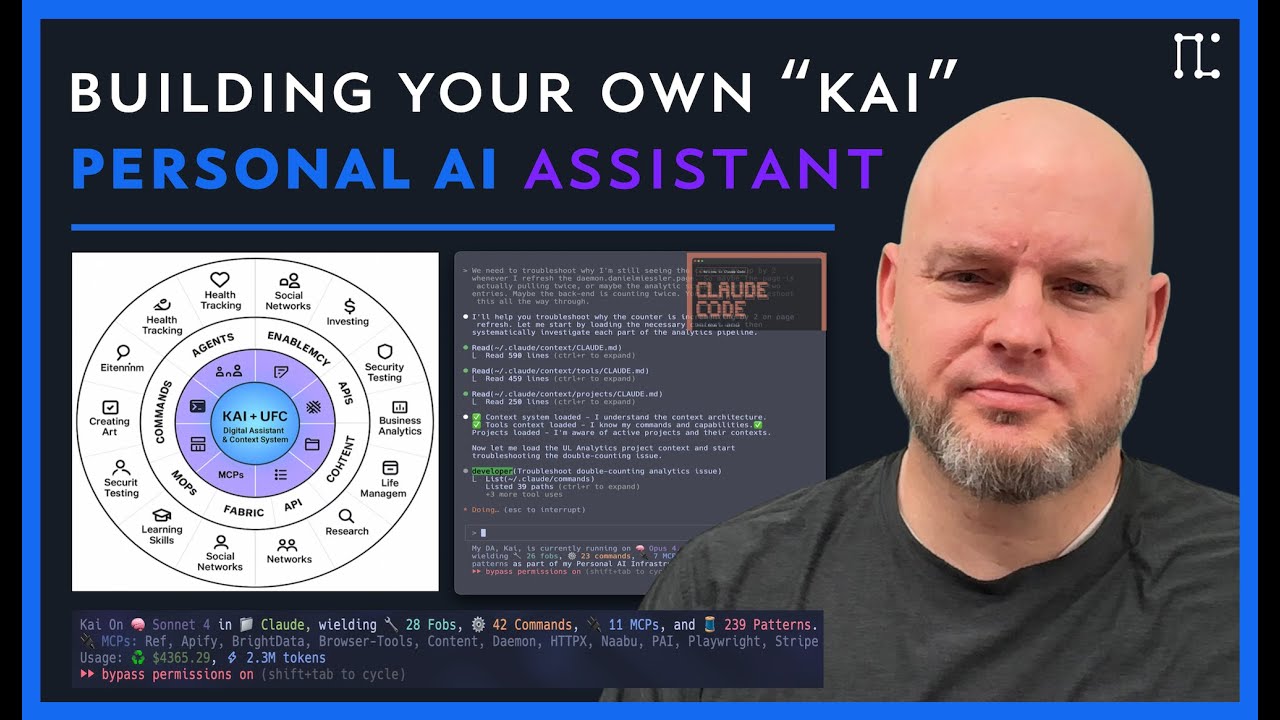](https://youtu.be/iKwRWwabkEc)++**[Watch the full PAI walkthrough](https://youtu.be/iKwRWwabkEc)** | **[Read the blog post](https://danielmiessler.com/blog/personal-ais-will-mediate-everything)**++<br/>+---<br/>@@ -41,6 +47,10 @@ That's all good, but I think the purpose of technology is to serve humans—notThat's what PAI is. It's the foundation for building a Personal AI System that understands your larger goals and context, gets better over time, and that works for *you* because it's *yours*. Not some generic chatbot. Not some common assistant. A full platform for magnifying yourself and your impact on the world.+**Related reading:**+- [Personal AIs Will Mediate Everything](https://danielmiessler.com/blog/personal-ais-will-mediate-everything) — The vision behind PAI+- [Personal AI Assistants Will Soon Be Our Interfaces to the World](https://danielmiessler.com/blog/personal-ai-assistants-will-soon-interfaces-world) — Why this matters+<br/>## What is PAI?@@ -138,36 +148,22 @@ claudeAll documentation lives in the CORE skill (`.claude/skills/CORE/`):-<details open>-<summary><strong>📖 Essential Reading</strong></summary>-| Document | Description ||----------|-------------|| [**CONSTITUTION.md**](.claude/skills/CORE/CONSTITUTION.md) | System philosophy, architecture, operating principles |+| [**SkillSystem.md**](.claude/skills/CORE/SkillSystem.md) | **How to create your own skills** — the canonical skill structure guide || [**SKILL.md**](.claude/skills/CORE/SKILL.md) | Main PAI skill with identity, preferences, quick reference |-| [**SKILL-STRUCTURE-AND-ROUTING.md**](.claude/skills/CORE/SKILL-STRUCTURE-AND-ROUTING.md) | How to create your own skills |--</details>--<details>-<summary><strong>🔧 System Guides</strong></summary>--| Document | Description |-|----------|-------------|| [hook-system.md](.claude/skills/CORE/hook-system.md) | Event-driven automation |-| [history-system.md](.claude/skills/CORE/history-system.md) | Automatic work documentation |-| [voice-server/README.md](.claude/voice-server/README.md) | Text-to-speech feedback |--</details>+| [history-system.md](.claude/skills/CORE/history-system.md) | Automatic work documentation (UOCS) |<details>-<summary><strong>📋 Reference</strong></summary>+<summary><strong>Additional Reference</strong></summary>| Document | Description ||----------|-------------|-| [prosody-guide.md](.claude/skills/CORE/prosody-guide.md) | Voice emotion system || [prompting.md](.claude/skills/CORE/prompting.md) | Prompt engineering patterns |-| [terminal-tabs.md](.claude/skills/CORE/terminal-tabs.md) | Terminal management |+| [aesthetic.md](.claude/skills/CORE/aesthetic.md) | Visual design system |+| [voice-server/README.md](.claude/voice-server/README.md) | Text-to-speech feedback |</details>@@ -304,28 +300,16 @@ Everything is captured, nothing is lost. Session work, tool outputs, and agent r<br/>-## 🔐 Security--> [!CAUTION]-> This is a **PUBLIC** template repository with sanitized examples.--**DO NOT commit:**-- ❌ API keys or secrets-- ❌ Personal email addresses-- ❌ Private repository references-- ❌ Any sensitive personal data--See [`SECURITY.md`](SECURITY.md) for complete security protocols.--<br/>-## 💬 Community+Kai and I work hard to address issues and PRs throughout the week — we try not to get too far behind!+| Channel | Link ||---------|------|| 🐛 **Issues** | [Report bugs or request features](https://github.com/danielmiessler/Personal_AI_Infrastructure/issues) || 💬 **Discussions** | [Ask questions and share ideas](https://github.com/danielmiessler/Personal_AI_Infrastructure/discussions) |-| 🎥 **Video** | [Watch PAI Overview](https://youtu.be/iKwRWwabkEc) |+| 🎥 **Video** | [Watch the full PAI walkthrough](https://youtu.be/iKwRWwabkEc) |+| 📝 **Blog** | [Personal AIs Will Mediate Everything](https://danielmiessler.com/blog/personal-ais-will-mediate-everything) |<br/>diff --git a/docs/images/pai-architecture.png b/docs/images/pai-architecture.pngindex d8634267..e92d17f5 100644Binary files a/docs/images/pai-architecture.png and b/docs/images/pai-architecture.png differ