
⛰️ LifeOS — The AI-powered Life Operating System that helps you hill climb to wherever you're going.
docs: Improve README clarity and add caution note
Daniel Miessler45f2ad27d203
diff --git a/README.md b/README.mdindex 00765ee7..e07616ca 100644--- a/README.md+++ b/README.md@@ -22,6 +22,7 @@<!-- Content Badges -->+[](#-quick-start)[](Packs/)[](Bundles/)[](https://github.com/danielmiessler/PAI/graphs/contributors)@@ -44,6 +45,20 @@<br/>+> [!CAUTION]+> **Project in Active Development** — PAI is evolving rapidly. Expect breaking changes, restructuring, and frequent updates. If you prefer stability, consider waiting for v2.1. If you're comfortable with flux and want to help shape the project, dive in!++<br/>++### ⚡ TL;DR - Get Started in 60 Seconds++```bash+git clone https://github.com/danielmiessler/PAI.git+cd PAI/Bundles/Official && bun run install.ts+```++<br/>+[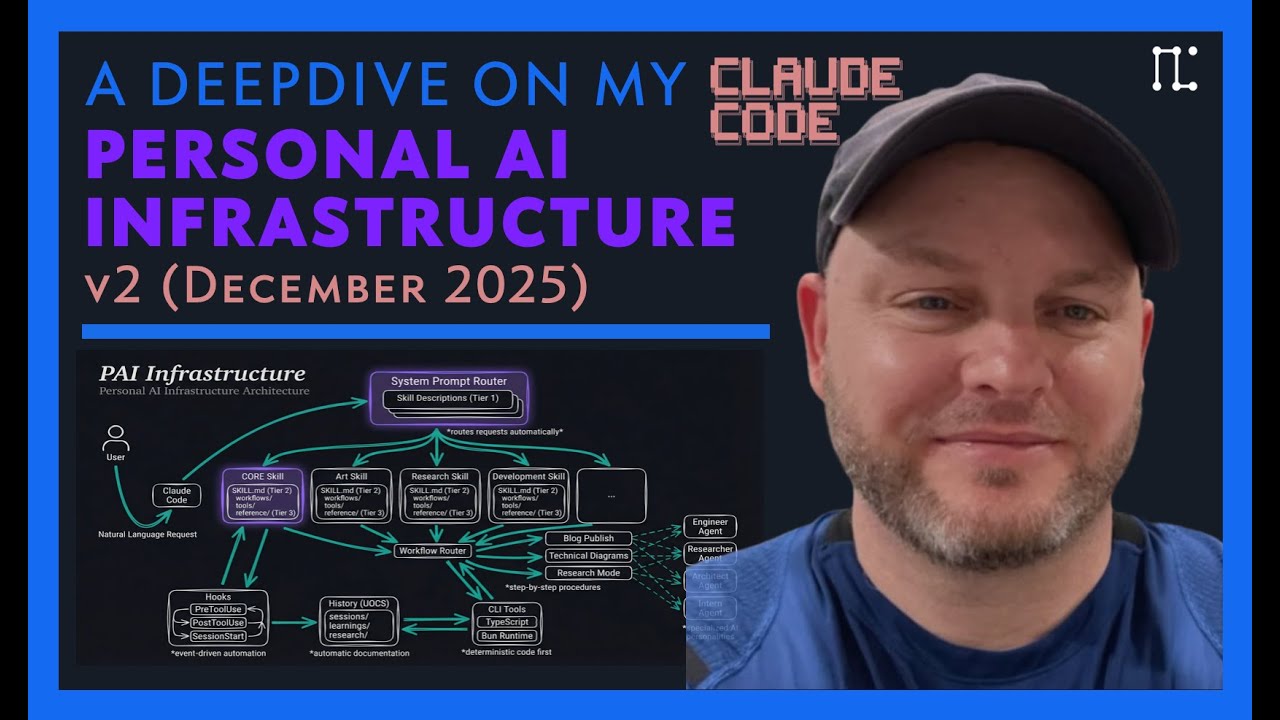](https://youtu.be/Le0DLrn7ta0)**[Watch the full PAI walkthrough](https://youtu.be/Le0DLrn7ta0)** | **[Read: The Real Internet of Things](https://danielmiessler.com/blog/real-internet-of-things)**@@ -62,24 +77,24 @@ PAI exists to democratize access to world-class AI infrastructure. Not a chatbotThis is open-source. This is free. This is for everyone.+**Who is PAI for?**+- **Developers** using AI coding assistants who want persistent memory and custom workflows+- **Power users** who want their AI to know their goals, preferences, and context+- **Teams** building shared AI infrastructure with consistent capabilities+- **Experimenters** interested in AI system design and personal AI patterns+---**What makes PAI powerful technically:** It's built on a universal algorithm (Current → Ideal via verifiable iteration) that works at every scale—from fixing a typo to building a company to figuring out what to do with your life. But the mission comes first: giving everyone access to the kind of AI infrastructure that was previously only available to the privileged few.----> [!IMPORTANT]-> ## 🤖 This README Is For Your AI Assistant->-> **Manually reading READMEs is pre-2026 behavior.** In 2026+, software gets installed by your AI assistant.->-> **Here's how to use this:**-> 1. Give this URL to your AI: `https://github.com/danielmiessler/PAI`-> 2. Say: *"Look at this system and walk me through installing it. Customize it for me."*+> [!TIP]+> ## 🤖 This README Works Great with AI Assistants>-> The PAI documentation will guide your AI on how best to install it for your specific needs.+> **Try AI-assisted installation:** Give this URL to your AI assistant and say *"Walk me through installing PAI and customize it for me."*>-> **Feel free to read on yourself**—this README explains the full system. But these instructions are primarily designed for AI consumption.+> The documentation is designed for both humans and AI. Read on to understand the system, or let your AI guide you through setup—whichever works best for you.---@@ -638,7 +653,7 @@ cd PAI/Bundles/Official && bun run install.ts### Option 1: Install the Complete PAI Bundle (Recommended)-The fastest way to get started is with the interactive bundle wizard:+⏱️ **~15-30 minutes** — The fastest way to get started is with the interactive bundle wizard:```bash# Clone the repo@@ -658,7 +673,7 @@ bun run install.ts### Option 2: AI-Assisted Pack Installation-Install individual packs by giving them to your AI:+⏱️ **~5-10 minutes per pack** — Install individual packs by giving them to your AI:1. **Browse packs** - Find a pack you want in [Packs/](Packs/)2. **Give it to your AI** - Provide the entire pack markdown file@@ -678,11 +693,11 @@ Your AI will:### Option 3: Manual Installation-Each pack includes detailed manual installation instructions. Open the pack file and follow the "Installation → Manual" section.+⏱️ **~10-20 minutes per pack** — Each pack includes detailed manual installation instructions. Open the pack file and follow the "Installation → Manual" section.### Option 4: Browse and Cherry-Pick-Packs are self-contained markdown files. You can:+⏱️ **Varies** — Packs are self-contained markdown files. You can:- Read the code directly in the pack- Copy specific functions or workflows- Adapt the approach to your own system@@ -1020,9 +1035,6 @@ If a pack becomes unmaintained, the community can fork and maintain a new versio### Recognition-**Top pack contributors** (packs submitted/maintained):-- (List will be populated as packs are submitted)-**Special thanks:**- All early PAI users who provided feedback- The Claude Code team for building an incredible platform@@ -1089,18 +1101,6 @@ No. PAI packs are designed to be **platform-agnostic**. While the examples use CThe code is TypeScript, Python, and Bash. The concepts are universal. The integration points vary by platform, but the core value transfers.-### Do I need to install everything?--No. That was the mistake of PAI v1.x—trying to install everything at once.--PAI v2.0 is modular by design:-- **Start with one pack** — History System is a good first choice-- **Add more as needed** — Each pack is independent-- **Use the PAI Bundle** if you want the full experience (but even that installs one pack at a time)-- **Cherry-pick** — Read a pack, extract the ideas, adapt them yourself--There's no "all or nothing." Take what's useful, leave the rest.-### How do I contribute a pack?1. **Solve a real problem** — Packs should come from actual use, not theoretical ideas@@ -1207,7 +1207,7 @@ The packs are extracted from Kai—real capabilities that have been running in p## 📜 Update History-<details open>+<details><summary><strong>v2.1.1 (2026-01-09) — MEMORY System Migration</strong></summary><br/>