
🤯 LobeHub - Super-Agents on Your Team. Add super-agents to the chats your team already uses.They take on work by themselves and get better every week.
TypeScript agentagent-collaborationagent-harnessloop-engineeringmcppersonal-assistantproactive-agentskillssuper-agenttask-management
---
title: Resolving AI Image Generation Timeout on Vercel
description: >-
Learn how to resolve timeout issues when using AI image generation models like
gpt-image-1 on Vercel by enabling Fluid Compute for extended execution time.
tags:
- Vercel
- AI Image Generation
- Timeout
- Fluid Compute
- gpt-image-1
---
# Resolving AI Image Generation Timeout on Vercel
## Problem Description
When using AI image generation models (such as `gpt-image-1`) on Vercel, you may encounter timeout errors. This occurs because AI image generation typically requires more than 1 minute to complete, which exceeds Vercel's default function execution time limit.
Common error symptoms include:
- Function timeout errors during image generation
- Failed image generation requests after approximately 60 seconds
- "Function execution timed out" messages
### Typical Log Symptoms
In your Vercel function logs, you may see entries like this:
```plaintext
JUL 16 18:39:09.51 POST 504 /trpc/async/image.createImage
Provider runtime map found for provider: openai
```
The key indicators are:
- **Status Code**: `504` (Gateway Timeout)
- **Endpoint**: `/trpc/async/image.createImage` or similar image generation endpoints
- **Timing**: Usually occurs around 60 seconds after the request starts
## Solution: Enable Fluid Compute
For projects created before Vercel's dashboard update, you can resolve this issue by enabling Fluid Compute, which extends the maximum execution duration to 300 seconds.
### Steps to Enable Fluid Compute (Legacy Vercel Dashboard)
1. Go to your project dashboard on Vercel
2. Navigate to the **Settings** tab
3. Find the **Functions** section
4. Enable **Fluid Compute** as shown in the screenshot below:
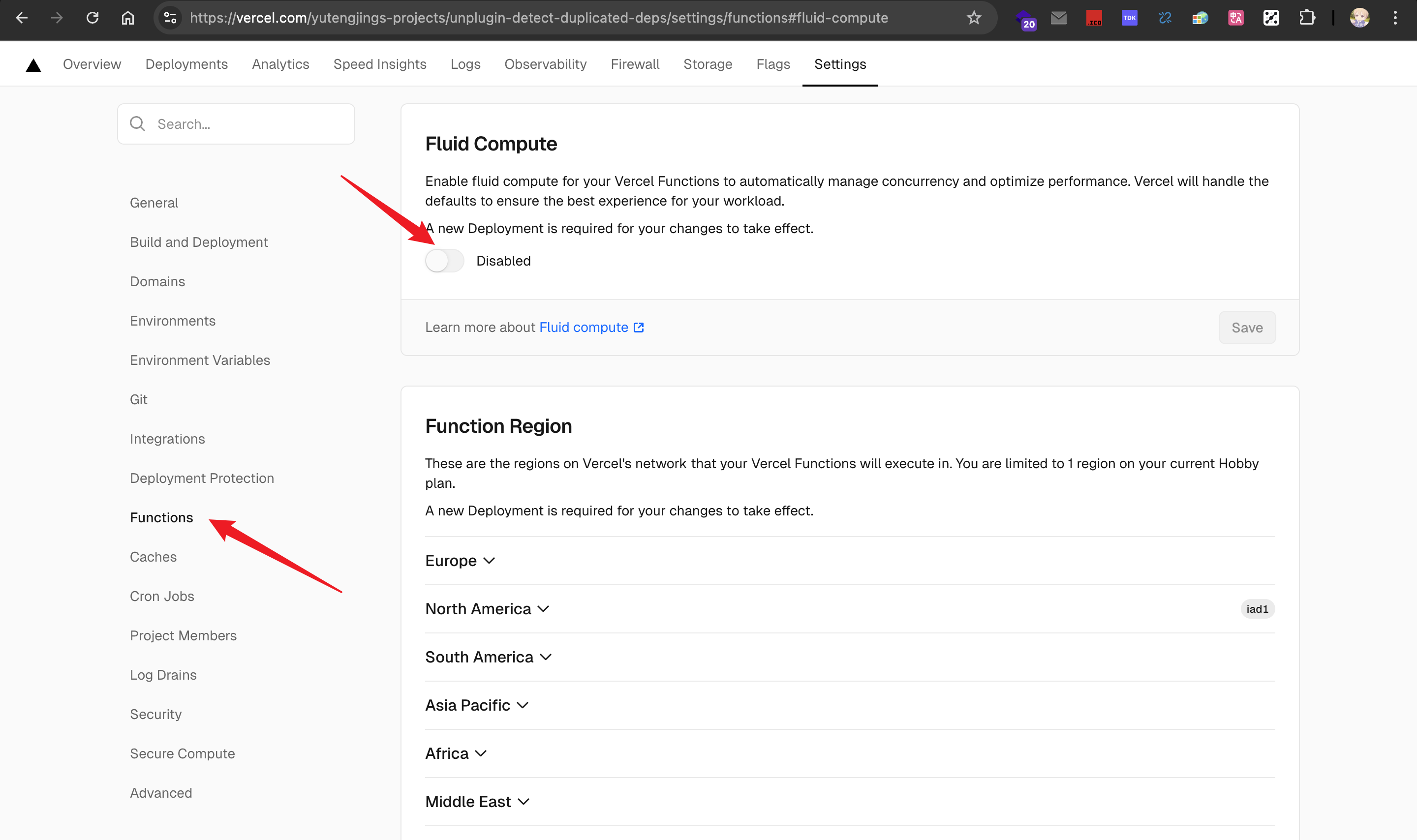
5. After enabling, the maximum execution duration will be extended to 300 seconds by default
### Important Notes
- **For new projects**: Newer Vercel projects have Fluid Compute enabled by default, so this issue primarily affects legacy projects
## Additional Resources
For more information about Vercel's function limitations and Fluid Compute:
- [Vercel Fluid Compute Documentation](https://vercel.com/docs/fluid-compute)
- [Vercel Functions Limitations](https://vercel.com/docs/functions/limitations#max-duration)