
Reverse-engineer any video, shot by shot: filmed, AI-generated or coded, and how to remake it. Breakdowns in the open VIDEO.md format. 逆向一切视频,逐个镜头看是拍的、AI 生成的还是代码做的,再告诉你怎么复刻;拆解结果按 VIDEO.md 格式输出。
Python agent-skillsai-videoaigc-detectionclaude-codecodexffmpegprompt-engineeringremotionreverse-engineeringshort-videoshot-detectionsubtitlesvideo-analysisvideo-breakdownvideo-editingvideo-generationvideomdvlm
README: lead with 'reverse-engineer any video', add video-type table, restructure community section
june66095df518a4
diff --git a/README.md b/README.mdindex 8538d45..bd27d96 100644--- a/README.md+++ b/README.md@@ -2,7 +2,10 @@# rea-video-给一条视频,逐个镜头告诉你它是实拍、AI 生成、3D 还是代码做的,再给出照着做一条的方案。+逆向一切视频。++实拍口播、桌拍、AI 视频、3D、代码动效、混剪都能拆,<br>+逐个镜头告诉你画面、花字、剪辑和声音是怎么做的,再给出照着做一条的方案。中文 | [English](README_en.md)@@ -17,14 +20,26 @@ rea-video 判断:左边全部实拍,一个场景、两个机位就能拍完</div>-## 它能告诉你什么+## 能拆哪些视频-- 画面:每个镜头是实拍、AI 生成、数字人、3D、2D 动画、代码 / 模板、录屏还是静图推拉。实拍镜头还会拆出机位、打光和调色。-- 素材:哪些是录屏、截图、产品图这类真实素材,复刻时要你自己准备。+| 视频类型 | 常见例子 | 拆出什么 |+|---|---|---|+| 实拍 | 口播、桌拍、手持带货、vlog、探店 | 拍摄场次和机位,景别、运镜、布光(12 种方案附器材)、调色 |+| AI 视频 | 文生 / 图生视频、AI 短剧、AI MV | 判断依据,每镜反推的提示词,合并成几次生成、用哪个模型 |+| 数字人 | 人像被声音驱动说话、对口型 | 哪些镜头是数字人,需要的人像和音频 |+| 3D / 动画 | Blender / C4D 科普、产品动画、2D 动画、定格动画 | 用视频模型生成还是写 3D 代码渲染 |+| 代码 / 模板 | 文字动效、UI 演示、图表、PPT 式卡片 | 文字、版式、动效节奏,可以写成 Remotion 工程 |+| 录屏 / 截图 | 软件教程、网页演示 | 哪些是真实素材,复刻时要你自己录 |+| 混合 / 混剪 | AI 人物 + 代码界面 + 真实录屏,实拍 + AI 加工 | 每一镜分开判断,再按原时间线拼回 |++不管哪类视频,都会另外拆出这几层:++- 花字和字幕:文字的位置和出现时间,区分字幕、标题和物体上的字(包装、招牌);字体、描边、颜色、逐字高亮等样式。+- 剪辑:切点和节奏,跳切、推近切、多机位切换、剪气口,插入素材的比例,是否卡节拍。+- 真实素材:录屏、截图、产品图这类复刻时要你自己准备的东西。- 声音:真人还是 AI 配音,BGM 是 AI 生成还是曲库,BPM 和调性,每个音效的时间点。-- 复刻方案:哪些镜头交给视频模型(附提示词,连在一起的镜头合成一次生成),哪些要实拍(分几场、怎么布光),哪些写代码就能做。-每个结论都附可以复查的证据,拿不准的会标「待确认」。+每个结论都附可以复查的证据,拿不准的会标「待确认」。完整检测项见 [docs/what-it-detects.md](docs/what-it-detects.md)。## 快速开始@@ -167,10 +182,10 @@ AI 人物对话 + 代码界面 + 8 秒真实录屏。5 个对话镜头被界面- [capabilities/](capabilities/README.md):各家视频 / 图像 / 音频模型的能力表,复刻方案按它选模型- [eval/RESULTS.md](eval/RESULTS.md):评测结果-## 致谢与交流+## 社区-思路来自 [REA(Reverse Engineer Anything)](https://github.com/morluto/rea):从现象追到实现,结论附证据,用可测量的方式验证。+欢迎来 [linux.do](https://linux.do/) 交流使用体验、拆解案例和复刻思路。-使用体验、拆解案例和复刻思路,欢迎在 [Issues](https://github.com/JuneYaooo/rea-video/issues) 或 [linux.do](https://linux.do/) 交流。+## 致谢-[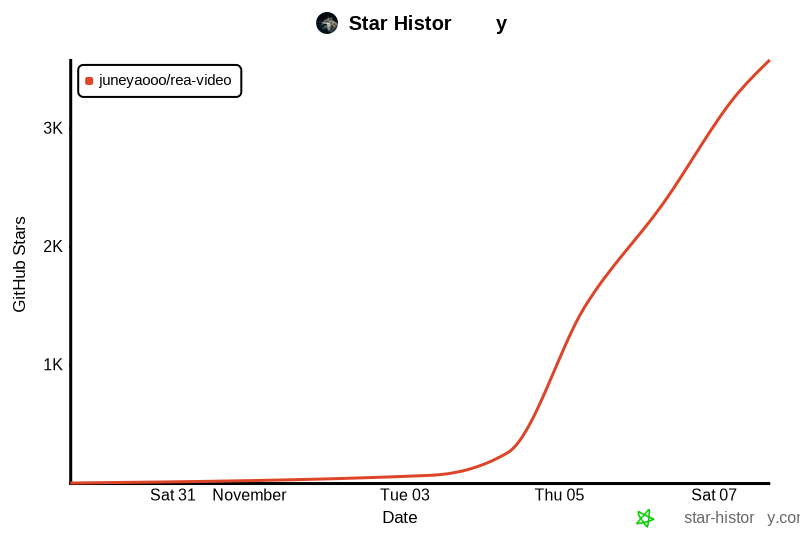](https://star-history.com/#JuneYaooo/rea-video&Date)+思路来自 [REA(Reverse Engineer Anything)](https://github.com/morluto/rea):从现象追到实现,结论附证据,用可测量的方式验证。diff --git a/README_en.md b/README_en.mdindex f4f9fe6..072ba8c 100644--- a/README_en.md+++ b/README_en.md@@ -2,7 +2,10 @@# rea-video-Give it a video. It tells you, shot by shot, whether each shot was filmed, AI-generated, 3D-rendered or built with code, then gives you a plan to make one yourself.+Reverse-engineer any video.++Talking-head, tabletop, AI video, 3D, motion graphics, mixed edits: give it any of them,<br>+and it tells you shot by shot how the visuals, styled text, editing and audio were made, then gives you a plan to make one yourself.[中文](README.md) | English@@ -19,14 +22,26 @@ rea-video's verdict: the left is all live footage, one set and two camera positi> The reports and detailed docs are currently in Chinese. Your agent can read them and answer in English.-## What it tells you+## What it can break down-- Visuals: whether each shot is live footage, AI video, a talking-head avatar, 3D, 2D animation, code/template, screen recording or a pan-and-zoom on a still. For live footage it also works out framing, camera, lighting and color grade.-- Assets: which parts are real material (screen recordings, screenshots, product photos) that you'll need to supply yourself.+| Video type | Examples | What you get |+|---|---|---|+| Live footage | Talking-head, tabletop, handheld product demo, vlog, store visit | Setups and camera positions, framing, camera moves, lighting (12 setups with gear lists), color grade |+| AI video | Text/image-to-video, AI short drama, AI music video | Evidence, a reverse-engineered prompt per shot, how to batch into generations and which model to use |+| Avatar | A portrait driven by audio, lip-sync | Which shots are avatar shots, what portrait and audio you need |+| 3D / animation | Blender / C4D explainers, product animation, 2D animation, stop-motion | Whether to generate with a video model or render from 3D code |+| Code / template | Kinetic type, UI demos, charts, slide-style cards | Text, layout and motion timing, ready to rebuild as a Remotion project |+| Screen recording | Software tutorials, web demos | Which parts are real material you'll need to record yourself |+| Mixed / edits | AI characters + code UI + real screen capture; live footage with AI edits | Each shot judged separately, then reassembled on the original timeline |++For every video type it also breaks out:++- Styled text and captions: where and when text appears, telling captions, titles and on-object text (packaging, signs) apart; font, outline, color, word-by-word highlight and other styling.+- Editing: cut points and pacing, jump cuts, punch-ins, multi-camera switching, cuts on pauses, share of inserted material, whether cuts land on the beat.+- Real assets: screen recordings, screenshots, product photos and other material you'll need to supply yourself.- Audio: human or AI voice-over, AI-generated or library music, BPM and key, and when each sound effect hits.-- Remake plan: which shots go to a video model (with prompts, and consecutive shots grouped into one generation), which need to be filmed (how many setups, how to light them), and which can be done in code.-Every call comes with evidence you can check. When it isn't sure, it says so.+Every call comes with evidence you can check. When it isn't sure, it says so. Full list: [docs/what-it-detects.md](docs/what-it-detects.md).## Quick start@@ -171,10 +186,10 @@ No. rea-video is for learning a video's structure, pacing and techniques, then rThe docs are in Chinese for now.-## Credits and community+## Community-Inspired by [REA (Reverse Engineer Anything)](https://github.com/morluto/rea): trace from what you see back to how it was made, back every claim with evidence, and verify by measurement.+Come share breakdowns and remake ideas on [linux.do](https://linux.do/) (Chinese-language community).-Questions, breakdowns and remake ideas are welcome in [Issues](https://github.com/JuneYaooo/rea-video/issues).+## Credits-[](https://star-history.com/#JuneYaooo/rea-video&Date)+Inspired by [REA (Reverse Engineer Anything)](https://github.com/morluto/rea): trace from what you see back to how it was made, back every claim with evidence, and verify by measurement.diff --git a/docs/what-it-detects.md b/docs/what-it-detects.mdindex 230d822..3ef7140 100644--- a/docs/what-it-detects.md+++ b/docs/what-it-detects.md@@ -19,7 +19,7 @@同一个镜头上还会分开标出:-- 后期叠加:字幕、标题、贴片、版式模板。物体上的字(包装、招牌)会尽量和字幕分开。+- 后期叠加:字幕、花字、标题、贴片、版式模板。文字的位置和出现时间用 OCR 测;字体、描边、颜色、逐字高亮等样式靠看图描述。物体上的字(包装、招牌)会尽量和字幕分开。- 真实素材:画面里嵌入的录屏、截图、照片、视频片段,复刻时要用原文件;AI 画面里的产品、Logo、人物,列为复刻时的参考图。- 实拍上的 AI 加工(看图判断):换脸、对口型、风格化重绘、AI 换装、抠像换背景、加删物体、美颜。复刻方案会写成「先拍,拍完再做哪步 AI 加工、用哪个模型」。