
🙌 OpenHands: AI-Driven Development
Add comprehensive frontend testing documentation with example links (#7327)
Jason Burt838e3d5ae465
diff --git a/docs/modules/usage/key-features.md b/docs/modules/usage/key-features.mdnew file mode 100644index 0000000000..74a075f40e--- /dev/null+++ b/docs/modules/usage/key-features.md@@ -0,0 +1,60 @@++# OpenHands Feature Overview++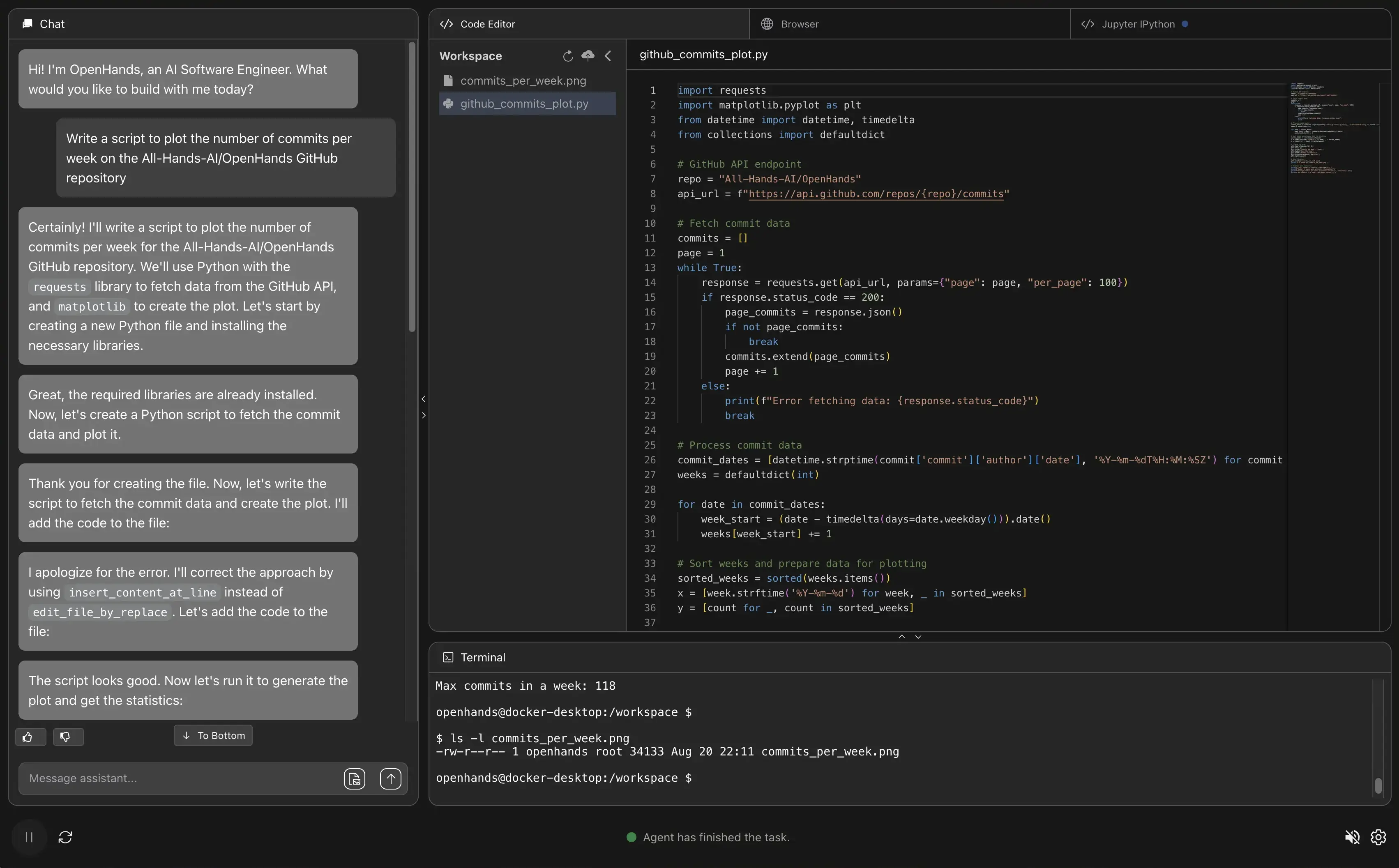++## 1. Workspace+The Workspace feature provides a comprehensive development environment with the following key capabilities:+- File Explorer: Browse, view, and manage project files and directories+- Project Management: Import, create, and navigate between different projects+- Integrated Development Tools: Seamless integration with various development workflows+- File Operations:+ * View file contents+ * Create new files and folders+ * Upload and download files+ * Basic file manipulation++## 2. Jupyter Notebook+The Jupyter Notebook feature offers an interactive coding and data analysis environment:+- Interactive Code Cells: Execute Python code in a cell-based interface+- Input and Output Tracking: Maintain a history of code inputs and their corresponding outputs+- Persistent Session: Preserve code execution context between cells+- Supports various Python operations and data analysis tasks+- Real-time code execution and result visualization++## 3. Browser (Beta)+The Browser feature provides web interaction capabilities:+- Web Page Navigation: Open and browse websites within the application+- Screenshot Capture: Automatically generate screenshots of web pages+- Interaction Tools:+ * Click elements+ * Fill out forms+ * Scroll pages+ * Navigate through web content+- Supports 15 different browser interaction functions++## 4. Terminal+The Terminal feature offers a command-line interface within the application:+- Execute Shell Commands: Run bash and system commands+- Command History: Track and recall previous commands+- Environment Interaction: Interact directly with the system's command line+- Support for various programming and system administration tasks++## 5. Chat / AI Conversation+The Chat interface provides an AI-powered conversational experience:+- Interactive AI Assistant: Engage in natural language conversations+- Context-Aware Responses: AI understands and responds to development-related queries+- Action Suggestions: Provides actionable recommendations for tasks+- Conversation Management: Create, delete, and manage different conversation threads++## 6. App (Beta)+The main application interface combines all these features:+- Integrated Workspace: Seamless integration of workspace, browser, terminal, and AI chat+- Configurable Layout: Customize the arrangement of different feature panels+- State Management: Maintain context and state across different features+- Security and Privacy Controls: Manage application settings and permissions++### Additional Notes+- The application is currently in beta, with ongoing improvements and feature additions+- Supports various development workflows and AI-assisted coding+- Designed to enhance developer productivity through integrated tools and AI assistancediff --git a/docs/sidebars.ts b/docs/sidebars.tsindex 86f5d20405..3c72cef136 100644--- a/docs/sidebars.ts+++ b/docs/sidebars.ts@@ -13,6 +13,11 @@ const sidebars: SidebarsConfig = {label: 'Getting Started',id: 'usage/getting-started',},+ {+ type: 'doc',+ label: 'Key Features',+ id: 'usage/key-features',+ },{type: 'category',label: 'Prompting',diff --git a/frontend/README.md b/frontend/README.mdindex 65493728aa..c6f74ecd4d 100644--- a/frontend/README.md+++ b/frontend/README.md@@ -50,27 +50,29 @@ This will start the application in development mode. Open [http://localhost:3001### Running the Application with the Actual Backend (Production Mode)-There are two ways to run the application with the actual backend:+To run the application with the actual backend:```sh# Build the application from the root directorymake build# Start the application-make start+make run```--OR+Or to run backend and frontend seperately.```sh# Start the backend from the root directorymake start-backend-# Build the frontend-cd frontend && npm run build-# Serve the frontend-npm start -- --port 3001+make start-frontend or+cd frontend && npm start -- --port 3001+```++Start frontend with Mock Service Worker (MSW), see testing for more info.+```sh+npm run dev:mock or npm run dev:mock:saas```### Environment Variables@@ -121,12 +123,113 @@ components## Testing-We use `Vitest` for testing. To run the tests, run the following command:+### Testing Framework and Tools+We use the following testing tools:+- **Test Runner**: Vitest+- **Rendering**: React Testing Library+- **User Interactions**: @testing-library/user-event+- **API Mocking**: [Mock Service Worker (MSW)](https://mswjs.io/)+- **Code Coverage**: Vitest with V8 coverage++### Running Tests++To run all tests:```shnpm run test```+To run tests with coverage:+```sh+npm run test:coverage+```++### Testing Best Practices++1. **Component Testing**+ - Test components in isolation+ - Use our custom [`renderWithProviders()`](https://github.com/All-Hands-AI/OpenHands/blob/ce26f1c6d3feec3eedf36f823dee732b5a61e517/frontend/test-utils.tsx#L56-L85) that wraps the components we want to test in our providers. It is especially useful for components that use Redux+ - Use `render()` from React Testing Library to render components+ - Prefer querying elements by role, label, or test ID over CSS selectors+ - Test both rendering and interaction scenarios++2. **User Event Simulation**+ - Use `userEvent` for simulating realistic user interactions+ - Test keyboard events, clicks, typing, and other user actions+ - Handle edge cases like disabled states, empty inputs, etc.++3. **Mocking**+ - We test components that make network requests by mocking those requests with Mock Service Worker (MSW)+ - Use `vi.fn()` to create mock functions for callbacks and event handlers+ - Mock external dependencies and API calls (more info)[https://mswjs.io/docs/getting-started]+ - Verify mock function calls using `.toHaveBeenCalledWith()`, `.toHaveBeenCalledTimes()`++4. **Accessibility Testing**+ - Use `toBeInTheDocument()` to check element presence+ - Test keyboard navigation and screen reader compatibility+ - Verify correct ARIA attributes and roles++5. **State and Prop Testing**+ - Test component behavior with different prop combinations+ - Verify state changes and conditional rendering+ - Test error states and loading scenarios++6. **Internationalization (i18n) Testing**+ - Test translation keys and placeholders+ - Verify text rendering across different languages++Example Test Structure:+```typescript+import { render, screen } from "@testing-library/react";+import userEvent from "@testing-library/user-event";+import { describe, it, expect, vi } from "vitest";++describe("ComponentName", () => {+ it("should render correctly", () => {+ render(<Component />);+ expect(screen.getByRole("button")).toBeInTheDocument();+ });++ it("should handle user interactions", async () => {+ const mockCallback = vi.fn();+ const user = userEvent.setup();++ render(<Component onClick={mockCallback} />);+ const button = screen.getByRole("button");++ await user.click(button);+ expect(mockCallback).toHaveBeenCalledOnce();+ });+});+```++### Example Tests in the Codebase++For real-world examples of testing, check out these test files:++1. **Chat Input Component Test**:+ [`__tests__/components/chat/chat-input.test.tsx`](https://github.com/All-Hands-AI/OpenHands/blob/main/frontend/__tests__/components/chat/chat-input.test.tsx)+ - Demonstrates comprehensive testing of a complex input component+ - Covers various scenarios like submission, disabled states, and user interactions++2. **File Explorer Component Test**:+ [`__tests__/components/file-explorer/file-explorer.test.tsx`](https://github.com/All-Hands-AI/OpenHands/blob/main/frontend/__tests__/components/file-explorer/file-explorer.test.tsx)+ - Shows testing of a more complex component with multiple interactions+ - Illustrates testing of nested components and state management++### Test Coverage++- Aim for high test coverage, especially for critical components+- Focus on testing different scenarios and edge cases+- Use code coverage reports to identify untested code paths++### Continuous Integration++Tests are automatically run during:+- Pre-commit hooks+- Pull request checks+- CI/CD pipeline+## ContributingPlease read the [CONTRIBUTING.md](../CONTRIBUTING.md) file for details on our code of conduct, and the process for submitting pull requests to us.