
Clone any website with one command using AI coding agents
TypeScript aiai-agentsai-toolsautomationboilerplateclaudeclaude-codeclonedeveloper-toolsnextjsreactreverse-engineeringshadcn-uiskillstailwindcsstemplatetypescriptweb-scrapingwebsite-clone
docs: add Chinese README (README.zh-CN.md)
ZijieZh30357de5d020
diff --git a/README.md b/README.mdindex 3f8c6937..026bd42f 100644--- a/README.md+++ b/README.md@@ -2,6 +2,8 @@<a href="https://github.com/JCodesMore/ai-website-cloner-template/blob/master/LICENSE"><img src="https://img.shields.io/badge/license-MIT-blue" alt="MIT License" /></a> <a href="https://github.com/JCodesMore/ai-website-cloner-template/stargazers"><img src="https://img.shields.io/github/stars/JCodesMore/ai-website-cloner-template?style=flat" alt="Stars" /></a> <a href="https://discord.gg/hrTSX5yTpB"><img src="https://img.shields.io/discord/1400896964597383279?label=discord" alt="Discord" /></a> <img src="https://img.shields.io/endpoint?url=https://gittokens.rsamf.com/badge/JCodesMore/ai-website-cloner-template" alt="tokens" />+> English README | [中文说明](README.zh-CN.md)+A reusable template for reverse-engineering any website into a clean, modern Next.js codebase using AI coding agents.**Recommended: [Claude Code](https://docs.anthropic.com/en/docs/claude-code) with Opus 5 for best results** — but works with a variety of AI coding agents.diff --git a/README.zh-CN.md b/README.zh-CN.mdnew file mode 100644index 00000000..4376bd57--- /dev/null+++ b/README.zh-CN.md@@ -0,0 +1,176 @@+# AI Website Cloner Template 中文版++<p align="left">+ <a href="https://github.com/JCodesMore/ai-website-cloner-template/blob/master/LICENSE"><img src="https://img.shields.io/badge/license-MIT-blue" alt="MIT License" /></a>+ <a href="https://github.com/JCodesMore/ai-website-cloner-template/stargazers"><img src="https://img.shields.io/github/stars/JCodesMore/ai-website-cloner-template?style=flat" alt="Stars" /></a>+ <a href="https://discord.gg/hrTSX5yTpB"><img src="https://img.shields.io/discord/1400896964597383279?label=discord" alt="Discord" /></a>+</p>++> 简体中文文档 | [English README](README.md)++一套可复用的模板,借助 AI 编程代理将任意网站反向工程为干净、现代的 Next.js 代码库。++**推荐:使用 [Claude Code](https://docs.anthropic.com/en/docs/claude-code) + Opus 4.7 以获得最佳效果**,同时也支持其他多种 AI 编程代理。++只需给定目标 URL,运行 `/clone-website`,AI 代理就会自动完成站点检查、设计 token 与资源提取、组件规格编写,并派出并行构建器逐个还原页面区块。++## 演示++[](https://youtu.be/O669pVZ_qr0)++> 点击上方图片即可在 YouTube 观看完整演示。++## 快速开始++> **重要提示:** 请先使用 GitHub 的 **Use this template** 按钮创建自己的副本。不要直接克隆本模板仓库用于你的实际网站项目,也不要在此提交你生成的网站代码。++1. **从模板创建自己的仓库**++ 在本项目的 GitHub 页面点击 **Use this template**,然后点击 **Create a new repository**。++ 为新仓库命名,选择公开或私有,再点击 **Create repository**。如果出现 **Include all branches** 选项,可保持关闭。++ 这样你就能拥有一个独立的项目空间,你的网站修改会保留在你自己的账号下,而不会回到模板仓库。++2. **在本地打开新仓库**++ GitHub 创建副本后,打开该仓库。点击 **Code**,用你喜欢的工具打开或克隆。++ 如果使用终端,命令大致如下:++ ```bash+ git clone https://github.com/YOUR-USERNAME/YOUR-NEW-REPOSITORY.git+ cd YOUR-NEW-REPOSITORY+ ```++3. **安装依赖**+ ```bash+ npm install+ ```+4. **启动你的 AI 代理** — 推荐使用 Claude Code:+ ```bash+ claude --chrome+ ```+5. **运行克隆指令**:+ ```+ /clone-website <目标网址1> [<目标网址2> ...]+ ```+6. **按需定制**(可选) — 基础克隆完成后,可进一步修改。++> 使用其他 AI 代理?打开 `AGENTS.md` 查看项目指令 — 大多数代理会自动读取。++## 支持的平台++| 代理 | 状态 |+| ------------------------------------------------------------- | --------------------------- |+| [Claude Code](https://docs.anthropic.com/en/docs/claude-code) | **推荐** — Opus 4.7 |+| [Codex CLI](https://github.com/openai/codex) | 已支持 |+| [OpenCode](https://opencode.ai/) | 已支持 |+| [GitHub Copilot](https://github.com/features/copilot) | 已支持 |+| [Cursor](https://cursor.com/) | 已支持 |+| [Windsurf](https://codeium.com/windsurf) | 已支持 |+| [Gemini CLI](https://github.com/google-gemini/gemini-cli) | 已支持 |+| [Cline](https://github.com/cline/cline) | 已支持 |+| [Roo Code](https://github.com/RooCodeInc/Roo-Code) | 已支持 |+| [Continue](https://continue.dev/) | 已支持 |+| [Amazon Q](https://aws.amazon.com/q/developer/) | 已支持 |+| [Augment Code](https://www.augmentcode.com/) | 已支持 |+| [Aider](https://aider.chat/) | 已支持 |++## 前置要求++- [Node.js](https://nodejs.org/) 24++- 一个 AI 编程代理(见[支持的平台](#支持的平台))++## 技术栈++- **Next.js 16** — App Router、React 19、TypeScript strict+- **shadcn/ui** — Radix 基础组件 + Tailwind CSS v4+- **Tailwind CSS v4** — oklch 设计 token+- **Lucide React** — 默认图标(克隆过程中会替换为提取的 SVG)++## 工作原理++`/clone-website` 指令会运行一个多阶段流水线:++1. **侦察(Reconnaissance)** — 截图、提取设计 token、扫描交互行为(滚动、点击、悬停、响应式)+2. **基础搭建(Foundation)** — 更新字体、颜色、全局样式,下载全部资源+3. **组件规格(Component Specs)** — 编写详细的规格文件(`docs/research/components/`),包含精确的计算 CSS 值、状态、行为和内容+4. **并行构建(Parallel Build)** — 在 git worktree 中分派构建器代理,每个代理负责一个区块或组件+5. **组装与 QA(Assembly & QA)** — 合并 worktree、拼接页面、与原站进行视觉对比++每个构建器代理都会收到完整的组件规格内联说明 —— 精确的 `getComputedStyle()` 值、交互模型、多状态内容、响应式断点、资源路径,无需猜测。++## 使用场景++- **平台迁移** — 将你自己拥有的 WordPress / Webflow / Squarespace 站点重建为现代 Next.js 代码库+- **源码丢失** — 站点仍在线上,但仓库丢失、开发者离职或技术栈过时,用现代格式把代码拿回来+- **学习研究** — 通过真实代码拆解生产站点如何实现特定布局、动画和响应式行为++## 不适用于++- **钓鱼或冒充** — 本项目严禁用于欺骗、冒充或任何违法活动。+- **将他人设计据为己有** — 徽标、品牌资产和原始文案均归其所有者所有。+- **违反服务条款** — 部分站点明确禁止抓取或复制,请先确认相关规定。++## 项目结构++```+src/+ app/ # Next.js 路由+ components/ # React 组件+ ui/ # shadcn/ui 基础组件+ icons.tsx # 提取的 SVG 图标+ lib/utils.ts # cn() 工具函数+ types/ # TypeScript 接口+ hooks/ # 自定义 React hooks+public/+ images/ # 从目标站点下载的图片+ videos/ # 从目标站点下载的视频+ seo/ # Favicon、OG 图片+docs/+ research/ # 提取产物与组件规格+ design-references/ # 截图参考+scripts/+ sync-agent-rules.sh # 重新生成各代理指令文件+ sync-skills.mjs # 为所有平台重新生成 /clone-website 指令+AGENTS.md # 代理指令(单一事实来源)+CLAUDE.md # Claude Code 配置(引用 AGENTS.md)+GEMINI.md # Gemini CLI 配置(引用 AGENTS.md)+```++## 常用命令++```bash+npm run dev # 启动开发服务器+npm run build # 生产构建+npm run lint # ESLint 检查+npm run typecheck # TypeScript 检查+npm run check # 同时运行 lint + typecheck + build+```++### 使用 Docker++```bash+docker compose up app --build # 构建并运行应用+docker compose up dev --build # 在开发模式下运行,端口 3001+```++## 为其他平台更新指令++有两个单一事实来源文件驱动所有平台支持。编辑源文件后运行同步脚本即可:++| 内容 | 事实来源 | 同步命令 |+| ---------------------- | ---------------------------------------- | -------------------------------------- |+| 项目指令 | `AGENTS.md` | `bash scripts/sync-agent-rules.sh` |+| `/clone-website` 指令 | `.claude/skills/clone-website/SKILL.md` | `node scripts/sync-skills.mjs` |++每个脚本会自动重新生成各平台对应的副本。能够直接读取源文件的代理无需重新生成。++## Star 历史++[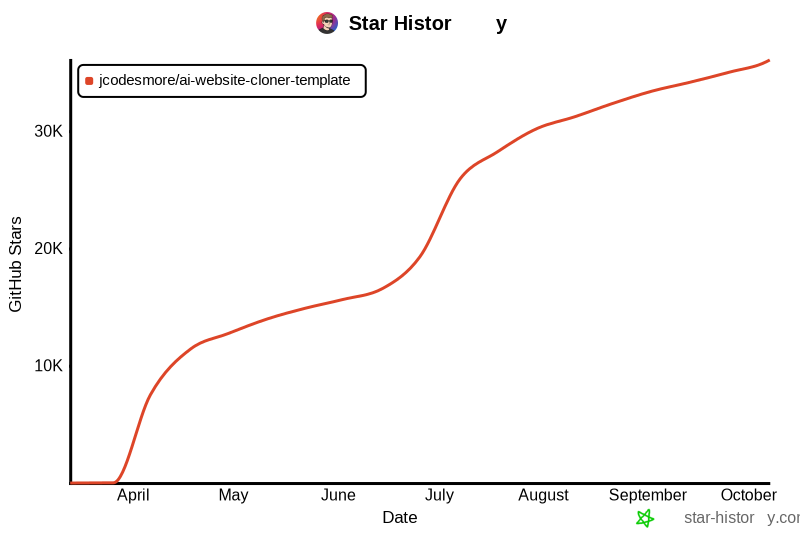](https://star-history.com/#JCodesMore/ai-website-cloner-template&Date)++## 许可证++MIT