
Rules for an AI coding agent to filter out generic AI-generated UI designs, text, and code.
JavaScript accessibilityagent-skillsai-agentsai-coding-agentai-slopanti-slopclaude-codecopywritingdesign-rulesui-design
v3.2.19: the community files, and a rebuilt README and guide
miqdadbadjuber631e8fce518f
diff --git a/.claude-plugin/marketplace.json b/.claude-plugin/marketplace.jsonindex 34f28bf..53082cf 100644--- a/.claude-plugin/marketplace.json+++ b/.claude-plugin/marketplace.json@@ -8,7 +8,7 @@{"name": "antislop","source": "./",- "version": "3.2.18",+ "version": "3.2.19","description": "Anti Slop: Rules for AI Coding Agents. Stops generic AI slop in generated UI, copy, and code. Loads as six skills."}]diff --git a/.claude-plugin/plugin.json b/.claude-plugin/plugin.jsonindex 718d260..b1bee4e 100644--- a/.claude-plugin/plugin.json+++ b/.claude-plugin/plugin.json@@ -1,7 +1,7 @@{"name": "antislop","displayName": "antislop",- "version": "3.2.18",+ "version": "3.2.19","description": "Anti Slop: Rules for AI Coding Agents. Stops generic AI slop in generated UI, copy, and code. Loads as six skills.","author": {"name": "miqdadbadjuber"diff --git a/.codex-plugin/plugin.json b/.codex-plugin/plugin.jsonindex edaa635..10325c4 100644--- a/.codex-plugin/plugin.json+++ b/.codex-plugin/plugin.json@@ -1,6 +1,6 @@{"name": "antislop",- "version": "3.2.18",+ "version": "3.2.19","description": "Anti Slop: Rules for AI Coding Agents. Stops generic AI slop in generated UI, copy, and code. Loads as six skills.","author": {"name": "miqdadbadjuber"diff --git a/.cursor-plugin/plugin.json b/.cursor-plugin/plugin.jsonindex 207aee0..71f340f 100644--- a/.cursor-plugin/plugin.json+++ b/.cursor-plugin/plugin.json@@ -2,7 +2,7 @@"name": "antislop","displayName": "antislop","description": "Anti Slop: Rules for AI Coding Agents. Stops generic AI slop in generated UI, copy, and code. Loads as six skills.",- "version": "3.2.18",+ "version": "3.2.19","author": {"name": "miqdadbadjuber"},diff --git a/.github/ISSUE_TEMPLATE/bug_report.yml b/.github/ISSUE_TEMPLATE/bug_report.ymlnew file mode 100644index 0000000..47156dc--- /dev/null+++ b/.github/ISSUE_TEMPLATE/bug_report.yml@@ -0,0 +1,84 @@+name: Bug report+description: Something in the installer, a skill, or a document is wrong.+title: "[Bug] "+labels: [bug]+body:+ - type: markdown+ attributes:+ value: |+ The fields below are the ones a report needs before it can be reproduced. A report that is missing them costs a round trip, which is the thing this template exists to avoid.++ - type: input+ id: agent+ attributes:+ label: Agent+ description: Which agent, and which version of it.+ placeholder: Claude Code 2.1, or Codex 0.9+ validations:+ required: true++ - type: input+ id: antislop-version+ attributes:+ label: antislop version+ description: The version the installer printed, or the contents of `skills/antislop/VERSION`.+ placeholder: x.y.z+ validations:+ required: true++ - type: dropdown+ id: install-route+ attributes:+ label: How it was installed+ options:+ - The installer (npx antislop-ai)+ - A plugin from the agent's marketplace+ - The manual wizard (antislop.md pasted in)+ - Cloned the repository+ - Not sure+ validations:+ required: true++ - type: dropdown+ id: os+ attributes:+ label: Operating system+ description: This matters more than it looks. The repository is checked on Windows, CI runs on Linux, and macOS is the least tested of the three.+ options:+ - Windows+ - macOS+ - Linux+ validations:+ required: true++ - type: textarea+ id: command+ attributes:+ label: What was run+ description: The exact command.+ render: shell+ validations:+ required: true++ - type: textarea+ id: expected+ attributes:+ label: What was expected+ validations:+ required: true++ - type: textarea+ id: actual+ attributes:+ label: What happened+ validations:+ required: true++ - type: textarea+ id: output+ attributes:+ label: Output+ description: Paste what the installer or the agent printed. The last screen is usually enough.+ render: shell+ validations:+ required: falsediff --git a/.github/ISSUE_TEMPLATE/config.yml b/.github/ISSUE_TEMPLATE/config.ymlnew file mode 100644index 0000000..96f5634--- /dev/null+++ b/.github/ISSUE_TEMPLATE/config.yml@@ -0,0 +1,11 @@+blank_issues_enabled: false+contact_links:+ - name: How to install antislop+ url: https://github.com/miqdadbadjuber/anti-slop/blob/main/GUIDE.md+ about: The from-zero walkthrough, covering every install route.+ - name: How to contribute+ url: https://github.com/miqdadbadjuber/anti-slop/blob/main/CONTRIBUTING.md+ about: What a change has to satisfy before it can be reviewed.+ - name: Security+ url: https://github.com/miqdadbadjuber/anti-slop/blob/main/SECURITY.md+ about: What the third-party audits flagged, and why each behavior is deliberate.diff --git a/.github/ISSUE_TEMPLATE/rule_gap.yml b/.github/ISSUE_TEMPLATE/rule_gap.ymlnew file mode 100644index 0000000..74e1615--- /dev/null+++ b/.github/ISSUE_TEMPLATE/rule_gap.yml@@ -0,0 +1,43 @@+name: Rule gap+description: A rule missed something, or a pattern you keep seeing is not one antislop names.+title: "[Rule] "+labels: [enhancement]+body:+ - type: markdown+ attributes:+ value: |+ Use this when antislop let something through. A paste of what got through is worth more than a description of it.++ - type: input+ id: rule+ attributes:+ label: Which rule+ description: If an existing rule came close and missed, name it. Leave this empty if nothing covers the pattern.+ placeholder: R-12+ validations:+ required: false++ - type: input+ id: skill+ attributes:+ label: Which skill+ description: The core, or one of the skills (ui, copywriting, human, layoutmobile, code). Leave empty if you have no view.+ placeholder: antislop-ui+ validations:+ required: false++ - type: textarea+ id: pattern+ attributes:+ label: The pattern+ description: The copy, markup, or code that got through.+ validations:+ required: true++ - type: textarea+ id: why+ attributes:+ label: Why it is slop+ description: What makes it generic rather than specific. A rule is written from this part, so it carries the most weight.+ validations:+ required: truediff --git a/.github/PULL_REQUEST_TEMPLATE.md b/.github/PULL_REQUEST_TEMPLATE.mdnew file mode 100644index 0000000..bae1a31--- /dev/null+++ b/.github/PULL_REQUEST_TEMPLATE.md@@ -0,0 +1,30 @@+<!-- CONTRIBUTING.md explains every item below. Tick what is done, and say plainly if something is not. -->++## What this changes++<!-- One or two sentences. What is different after this merges, and why. -->++## Version++<!-- The number this takes, and the issue that assigned it. -->++## Checklist++- [ ] Rebased on the latest `main`+- [ ] The version is raised in every file that carries it, `cli/package-lock.json` included+- [ ] `node scripts/check-repo.mjs` passes+- [ ] `npm test` in `cli/` passes, and it was run on the operating system I actually use+- [ ] `node cli/scripts/sync-skills.mjs` was run, if `antislop.md` changed+- [ ] `node scripts/skill-index.mjs` was run, if a skill gained or renamed a named pattern+- [ ] `README.md`, `GUIDE.md`, and `ROADMAP.md` are updated together, if this changes what ships+- [ ] Every command names `miqdadbadjuber/anti-slop`, not a fork+- [ ] No em dashes or en dashes (R-02)+- [ ] Comments are one or two lines++## If this opens a new agent door++<!-- Delete this section if it does not. -->++- Vendor documentation for the skill path or the plugin format:+- Checked against a real install, or documentation only:+- Does this agent read a folder another agent's install already writes, and if so which:diff --git a/.kimi-plugin/plugin.json b/.kimi-plugin/plugin.jsonindex 1336e83..92313ee 100644--- a/.kimi-plugin/plugin.json+++ b/.kimi-plugin/plugin.json@@ -1,6 +1,6 @@{"name": "antislop",- "version": "3.2.18",+ "version": "3.2.19","description": "Anti Slop: Rules for AI Coding Agents. Stops generic AI slop in generated UI, copy, and code. Loads as six skills.","author": {"name": "miqdadbadjuber"diff --git a/.omp-plugin/marketplace.json b/.omp-plugin/marketplace.jsonindex 34f28bf..53082cf 100644--- a/.omp-plugin/marketplace.json+++ b/.omp-plugin/marketplace.json@@ -8,7 +8,7 @@{"name": "antislop","source": "./",- "version": "3.2.18",+ "version": "3.2.19","description": "Anti Slop: Rules for AI Coding Agents. Stops generic AI slop in generated UI, copy, and code. Loads as six skills."}]diff --git a/CODE_OF_CONDUCT.md b/CODE_OF_CONDUCT.mdnew file mode 100644index 0000000..bc7d153--- /dev/null+++ b/CODE_OF_CONDUCT.md@@ -0,0 +1,83 @@+# Contributor Covenant Code of Conduct++## Our Pledge++We as members, contributors, and leaders pledge to make participation in our community a harassment-free experience for everyone, regardless of age, body size, visible or invisible disability, ethnicity, sex characteristics, gender identity and expression, level of experience, education, socio-economic status, nationality, personal appearance, race, caste, color, religion, or sexual identity and orientation.++We pledge to act and interact in ways that contribute to an open, welcoming, diverse, inclusive, and healthy community.++## Our Standards++Examples of behavior that contributes to a positive environment for our community include:++* Demonstrating empathy and kindness toward other people+* Being respectful of differing opinions, viewpoints, and experiences+* Giving and gracefully accepting constructive feedback+* Accepting responsibility and apologizing to those affected by our mistakes, and learning from the experience+* Focusing on what is best not just for us as individuals, but for the overall community++Examples of unacceptable behavior include:++* The use of sexualized language or imagery, and sexual attention or advances of any kind+* Trolling, insulting or derogatory comments, and personal or political attacks+* Public or private harassment+* Publishing others' private information, such as a physical or email address, without their explicit permission+* Other conduct which could reasonably be considered inappropriate in a professional setting++## Enforcement Responsibilities++Community leaders are responsible for clarifying and enforcing our standards of acceptable behavior and will take appropriate and fair corrective action in response to any behavior that they deem inappropriate, threatening, offensive, or harmful.++Community leaders have the right and responsibility to remove, edit, or reject comments, commits, code, wiki edits, issues, and other contributions that are not aligned to this Code of Conduct, and will communicate reasons for moderation decisions when appropriate.++## Scope++This Code of Conduct applies within all community spaces, and also applies when an individual is officially representing the community in public spaces. Examples of representing our community include using an official e-mail address, posting via an official social media account, or acting as an appointed representative at an online or offline event.++## Enforcement++Instances of abusive, harassing, or otherwise unacceptable behavior may be reported to the maintainer, [@miqdadbadjuber](https://github.com/miqdadbadjuber), through GitHub. All complaints will be reviewed and investigated promptly and fairly.++All community leaders are obligated to respect the privacy and security of the reporter of any incident.++## Enforcement Guidelines++Community leaders will follow these Community Impact Guidelines in determining the consequences for any action they deem in violation of this Code of Conduct:++### 1. Correction++**Community Impact**: Use of inappropriate language or other behavior deemed unprofessional or unwelcome in the community.++**Consequence**: A private, written warning from community leaders, providing clarity around the nature of the violation and an explanation of why the behavior was inappropriate. A public apology may be requested.++### 2. Warning++**Community Impact**: A violation through a single incident or series of actions.++**Consequence**: A warning with consequences for continued behavior. No interaction with the people involved, including unsolicited interaction with those enforcing the Code of Conduct, for a specified period of time. This includes avoiding interactions in community spaces as well as external channels like social media. Violating these terms may lead to a temporary or permanent ban.++### 3. Temporary Ban++**Community Impact**: A serious violation of community standards, including sustained inappropriate behavior.++**Consequence**: A temporary ban from any sort of interaction or public communication with the community for a specified period of time. No public or private interaction with the people involved, including unsolicited interaction with those enforcing the Code of Conduct, is allowed during this period. Violating these terms may lead to a permanent ban.++### 4. Permanent Ban++**Community Impact**: Demonstrating a pattern of violation of community standards, including sustained inappropriate behavior, harassment of an individual, or aggression toward or disparagement of classes of individuals.++**Consequence**: A permanent ban from any sort of public interaction within the community.++## Attribution++This Code of Conduct is adapted from the [Contributor Covenant][homepage], version 2.1, available at [https://www.contributor-covenant.org/version/2/1/code_of_conduct.html][v2.1].++Community Impact Guidelines were inspired by [Mozilla's code of conduct enforcement ladder][Mozilla CoC].++For answers to common questions about this code of conduct, see the FAQ at [https://www.contributor-covenant.org/faq][FAQ]. Translations are available at [https://www.contributor-covenant.org/translations][translations].++[homepage]: https://www.contributor-covenant.org+[v2.1]: https://www.contributor-covenant.org/version/2/1/code_of_conduct.html+[Mozilla CoC]: https://github.com/mozilla/diversity+[FAQ]: https://www.contributor-covenant.org/faq+[translations]: https://www.contributor-covenant.org/translationsdiff --git a/CONTRIBUTING.md b/CONTRIBUTING.mdnew file mode 100644index 0000000..ba43647--- /dev/null+++ b/CONTRIBUTING.md@@ -0,0 +1,95 @@+# Contributing++antislop ships as text: rules, skills, an installer, and the manifests that put them in front of an agent. A change here is judged by one question, and it is not whether the idea is good. It is whether the change can be checked. Most of what follows exists because a pull request could not be checked, and the cost landed on the person reviewing it.++## Before you open a pull request++### Rebase onto the current main++Branch from the latest `main`. If `main` moves while you wait, rebase again before asking for review. This is the most common reason a pull request here stops moving. One branch was opened against v3.2.9 and sat while six releases landed under it, so it conflicted on five files; the rebase was asked for and never came, and the work was taken forward by the maintainer instead of by its author.++### Raise the version++If your change alters what ships, it needs a version. `cli/package.json` is the source of truth, and these files have to agree with it:++```+cli/package-lock.json+package.json+.claude-plugin/plugin.json+.claude-plugin/marketplace.json+.codex-plugin/plugin.json+.cursor-plugin/plugin.json+.kimi-plugin/plugin.json+.omp-plugin/marketplace.json+skills/antislop/VERSION+cli/lib/banner.mjs+skills/antislop-human/contrast-mcp.py+```++Eleven files, and one of them counts twice: `cli/package-lock.json` carries the version at the top level and again inside `packages[""]`, so a bump that misses the second one still fails. `npm ci` installs from a stale lock without correcting it, which is why CI reads both.++One more is checked, and it is not a file of its own: the contributors image in [README.md](README.md) pins the release in its URL. contrib.rocks caches that image against the exact URL, so a new URL is the only thing that makes it redraw. The prose in [README.md](README.md) and [ROADMAP.md](ROADMAP.md) carries the version too, and no check reads that part.++Do not pick the number yourself if you are unsure. Releases are planned one agent per version, so ask in the issue which slot your change takes.++### Do not edit generated files++`skills/antislop/SKILL.md` is generated from `antislop.md`. Edit the source, then run:++```bash+node cli/scripts/sync-skills.mjs+```++CI runs the same command and fails if the two disagree.++The same rule covers the catalogue of named patterns in [GUIDE.md](GUIDE.md), which is generated from the skills. Add or rename a pattern, then run:++```bash+node scripts/skill-index.mjs+```++`node scripts/check-repo.mjs` fails if the catalogue is stale, because a pattern nobody can read about may as well not exist.++## Before you ask for review++### Run the repository's checks++```bash+node scripts/check-repo.mjs+```++Thirteen checks, and they cover the things that break quietly: a manifest that no longer parses, a version that disagrees somewhere, a skill missing its frontmatter, a skill that is not registered in all four places the installer reads, a document link that points at a file that is gone or at a heading that no longer exists, and the catalogue of named patterns in [GUIDE.md](GUIDE.md) falling behind the skills it is generated from. The version check is the one that catches a bump you missed.++### Run the installer tests++```bash+cd cli+npm ci+npm test+```++Run these on your own machine, not only in CI. CI runs on `ubuntu-latest` and nothing else, so a green run there does not mean a green run on the maintainer's machine. A recent pull request passed every check and the installer tests on macOS and failed on Windows at its first assertion, because a helper asked to resolve a path for Linux used the host's path module instead of the one it was told to simulate. If you are on Windows or macOS, your run is the one that matters.++## What the files have to follow++- **Commands name this repository.** Every install or update command in a document, a manifest, or a printed line points at `miqdadbadjuber/anti-slop`. A command that points at your own fork breaks the moment the pull request is merged.+- **Documents move together.** Anything that changes what ships updates [README.md](README.md) and [ROADMAP.md](ROADMAP.md), and [GUIDE.md](GUIDE.md) too when an install path or a folder moves. The guide is the from-zero walkthrough, so a route is not documented until it is there.+- **No drafting language in a shipped document.** Words like `proposed`, `WIP`, or `TODO` do not belong in a file that ships. A heading that describes the change rather than the thing itself is a note to the reviewer, not documentation.+- **A plugin folder carries only what the vendor reads.** If an agent does not read a file, it is not shipped. A manifest nothing reads is a version to bump every release and a claim that something is wired up when it is not.+- **Comments are one or two lines.** A long comment reads as generated text, and this repository is judged by the standard it applies to others.+- **No em dashes or en dashes** in prose (R-02). The carve-out is documentation structure, not text: the rule and principle headings, the example row in the core's Part 1 table, the rule's own definition, a Delivery Gate item that quotes it, and the `Em Dashes` section in the copywriting skill.+- **One new agent per version.** A release opens at most one new agent's door, so a broken door is only ever one agent's problem.++## What a review checks++A claim about how an agent behaves is verified before it is merged, against the vendor's current documentation and, where it can be, against a real install. Documentation is read rather than assumed: a path is not added because it looks right, and a pull request that names one is expected to say where it came from.++This means a contribution is sometimes corrected rather than merged as written, and sometimes merged by the maintainer on top of its author's commits. Both are ordinary here. What is not ordinary is a change that cannot be checked at all, because the only way to accept it is to guess.++## Reporting a problem++Open an issue with the agent, the version, and the command you ran. Include what you expected and what happened, and paste what the installer printed. A report about a route that cannot be reproduced on this machine is still useful, but say so, because a route that cannot be checked is written down as unchecked rather than left looking verified.++## Conduct++Behavior in issues, pull requests, and discussions is covered by [CODE_OF_CONDUCT.md](CODE_OF_CONDUCT.md).diff --git a/GUIDE.md b/GUIDE.mdindex 91fef25..d54f43c 100644--- a/GUIDE.md+++ b/GUIDE.md@@ -1,12 +1,56 @@# The antislop guide-antislop is a filter you give to the AI assistant you already use. It stops the AI from producing slop: pages, text, and code comments that look generic and obviously made by AI. It is a **filter, not a style guide**. It never picks your colors, fonts, or layout. It removes the slop and leaves the direction to you.--New to antislop? Read this top to bottom once.--This guide is in four parts. **Install** puts antislop on your agent. **Update** and **Remove** do the same job later on. **Reference** holds the facts you look up rather than act on: the skill list, the folder table, and what antislop deliberately does not do.--The first three parts cover the same routes in the same order, so once you find your route in one of them, you know where it is in the others. If you are only here to install, jump to [Install](#install).+antislop is a filter you give to the AI assistant you already use. It stops that assistant producing slop: pages, text, and code comments that look generic and obviously made by AI.++This guide goes from zero to installed. Every route below carries its own update and removal in the same place, so you pick one route once and never have to look anywhere else for it. New to antislop? Read [What is antislop?](#what-is-antislop) and [What is slop?](#what-is-slop) first.++## Table of Contents++- [What is antislop?](#what-is-antislop)+- [What is slop?](#what-is-slop)+- [What you can use it for](#what-you-can-use-it-for)+- [Install, update, and remove](#install-update-and-remove)+ - [Which route should I pick?](#which-route-should-i-pick)+ - [Before you start](#before-you-start)+ - [The installer](#the-installer)+ - [The skills directory](#the-skills-directory)+ - [Claude Code plugin](#claude-code-plugin)+ - [Antigravity plugin](#antigravity-plugin)+ - [Codex plugin](#codex-plugin)+ - [Cursor plugin](#cursor-plugin)+ - [Kimi Code plugin](#kimi-code-plugin)+ - [Cline plugin](#cline-plugin)+ - [Oh My Pi plugin](#oh-my-pi-plugin)+ - [The Pi package](#the-pi-package)+ - [The single file](#the-single-file)+ - [On a phone](#on-a-phone)+- [Skills](#skills)+ - [antislop](#antislop)+ - [antislop-ui](#antislop-ui)+ - [antislop-copywriting](#antislop-copywriting)+ - [antislop-human](#antislop-human)+ - [antislop-layoutmobile](#antislop-layoutmobile)+ - [antislop-code](#antislop-code)+- [Reference](#reference)+ - [Which version do I have?](#which-version-do-i-have)+ - [Where each agent reads antislop from](#where-each-agent-reads-antislop-from)+ - [What is a skill?](#what-is-a-skill)+ - [What antislop does not do](#what-antislop-does-not-do)+- [Something is wrong](#something-is-wrong)+- [Where is this going?](#where-is-this-going)+- [Contributing](#contributing)++## What is antislop?++A rulebook the assistant reads every session, plus optional skills that go deeper into one kind of work.++- **38 rules in three tiers.** Hard Gate rules are absolute. The other two ask whether a choice has a purpose, and reject technique that has none.+- **A Delivery Gate.** Before anything ships, the assistant runs a mandatory PASS/FAIL report you can check.+- **A Liveliness Toolkit.** Three dials and a Design Read, so the result comes out alive rather than merely clean.+- **Six skills.** One core that always loads, plus five that load only when a task needs them.+- **Two usage modes.** During guides the work as it is built. After audits work you already have and lists what to fix.++It is a filter, not a style guide: it never picks your colors, fonts, or layout. Direction stays yours, in a `DESIGN.md` you write or in what you tell the assistant.## What is slop?@@ -30,37 +74,43 @@ Any AI output that can get sloppy benefits:The core file covers all of it. Skills (see [What is a skill?](#what-is-a-skill)) go deeper into one concern when you want more.-## Install+## Install, update, and remove-There are five routes in, and the difference between them matters more than it looks:+There are eleven routes in, and the difference between them matters more than it looks:| Route | What it does | Works on ||-------|--------------|----------|-| **The installer** | Copies the skill folders into your project or your home folder | Twelve agents, no setup beyond a terminal |-| **The skills directory** | Copies the same folders using the skills.sh tool | The agents that directory supports |-| **A plugin door** | Loads antislop straight from this repository, nothing copied | Claude Code, Antigravity, Codex, Cursor, Kimi Code, Cline, Oh My Pi |-| **The Pi package** | Loads antislop through Pi's own package manager, nothing copied | Pi |-| **The single file** | One Markdown file you hand to any AI | Anything that reads text, including a phone |+| The installer | Copies the skill folders into your project or your home folder | Twelve agents, no setup beyond a terminal |+| The skills directory | Copies the same folders using the skills.sh tool | The agents that directory supports |+| Seven plugin doors | Loads antislop straight from this repository, nothing copied | Claude Code, Antigravity, Codex, Cursor, Kimi Code, Cline, Oh My Pi |+| The Pi package | Loads antislop through Pi's own package manager, nothing copied | Pi |+| The single file | One Markdown file you hand to any AI | Anything that reads text, including a phone |++Those five rows are eleven routes: one installer, one directory, seven plugin doors, one package, and one file.Pick one. They load the same rules, so adding a second only gives you a second thing to keep updated.+Every route below is built the same way: a one-line summary, then three headings in the same order, **Install**, **Update**, and **Remove**. Nothing updates by itself unless the route says so.++One thing is true of all of them: an agent loads skills when a session starts, so after installing or updating, close the session you are in and open a new one. Until you do, the old rules are the ones still loaded.+### Which route should I pick?-- **The installer** if you want antislop in one project or everywhere, and you use any of the twelve agents. It is the only route that covers OpenCode, Amp, Gemini CLI, Hermes, and GitHub Copilot, and the only one that detects your agents for you.-- **The skills directory** if you already use that directory's tool and want the folders without the installer's questions. It writes no pointer, so antislop reloads by description alone.-- **A plugin door** if you use Claude Code, Antigravity, Codex, Cursor, Kimi Code, Cline, or Oh My Pi and would rather not keep a copy in your project. You get updates from the plugin's own update command instead of re-running an installer.-- **The Pi package** if you use Pi and would rather have it installed and updated by Pi itself, from the same repository.-- **The single file** if you have no terminal, or you want antislop in a chat window or on a phone.+- The installer, if you want antislop in one project or everywhere, and you use any of the twelve agents. It is the only route that covers OpenCode, Amp, Gemini CLI, Hermes, and GitHub Copilot, and the only one that detects your agents for you.+- The skills directory, if you already use that directory's tool and want the folders without the installer's questions. It writes no pointer, so antislop reloads by description alone.+- A plugin door, if you use one of the seven agents that has one. A plugin is a feature of the agent, not of antislop: you point the agent at this repository once and it loads antislop from there. Nothing is copied into your project, so there is no snapshot that can quietly go stale, and a new version arrives by running the agent's own plugin update command rather than an installer.+- The Pi package, if you use Pi and would rather have it installed and updated by Pi itself, from the same repository.+- The single file, if you have no terminal, or you want antislop in a chat window or on a phone.### Before you start-Four of the five routes need a terminal, the window where you type commands instead of clicking. If you do not have one, or you cannot install software on this machine, go straight to [The single file](#the-single-file).+Ten of the eleven routes need a terminal, the window where you type commands instead of clicking. If you do not have one, or you cannot install software on this machine, go straight to [The single file](#the-single-file).Here is how to open a terminal:-- **Windows.** Press the Start button, type `powershell`, and open it.-- **macOS.** Press Cmd and Space together, type `terminal`, and press Enter.-- **Linux.** Open your terminal.+- Windows: press the Start button, type `powershell`, and open it.+- macOS: press Cmd and Space together, type `terminal`, and press Enter.+- Linux: open your terminal.You also need Node.js 18 or newer. Check it by typing this and pressing Enter:@@ -70,72 +120,138 @@ node -vIf you see something like `v22.11.0`, you are ready. If you see an error instead, install Node from [nodejs.org](https://nodejs.org) first, then close the terminal and open it again so it picks up the new command.-----### The installer-Copies the skill folders into the folder you choose. On a project install it also writes the pointer that reloads antislop every session.+*Copies the skill folders into the folder you choose, and writes the pointer that reloads antislop every session.*++It covers twelve agents and detects which ones you have.++#### Install++1. Go to your project folder. The terminal starts in your home folder, so tell it where your project is:++ ```bash+ cd ~/projects/my-site+ ```++ Use your real path. On Windows it might look like `cd C:\Users\You\projects\my-site`. If you would rather not type it, type `cd ` with a space after it and drag the folder into the terminal window, which fills the path in for you.++ Not sure it worked? Type `ls` (macOS and Linux) or `dir` (Windows) and press Enter. You should see your project's files.++2. Run the installer.++ ```bash+ npx antislop-ai+ ```++ The first run downloads antislop, so give it a few seconds.++3. Answer four questions. Use the arrow keys to move, Space to select, and Enter to confirm.-**Step 1. Go to your project folder.** The terminal starts in your home folder, so tell it where your project is:+ - Extra skills to install. The core is already on and always included. Pick the extra skills that match your work, or pick none. See [What is a skill?](#what-is-a-skill) if you are not sure.+ - Install location. `This project` writes into the folder you are standing in and adds the pointer that reloads antislop in every session. `Everywhere` writes into your home folder and covers all your projects, with no pointer. Choose `This project` the first time.+ - Which agent(s). It pre-checks the agents it found in your project. Pick yours. If yours is not pre-checked, pick it anyway; the installer creates the folder.+ - Install N skill(s) now? Yes.++4. Check what it printed.++ ```+ ◇ Pointer written to AGENTS.md+ └ Installed 2 skill(s) into 1 agent folder(s).+ antislop is ready. The next agent session loads it.+ ```++5. Start a new agent session. antislop loads when a session starts, so the window you already have open will not see it. Close it and open it again.++ To confirm it is loaded, ask your agent something only the rules would answer, such as "what does antislop's R-02 say?" If it answers from the rules, you are done.++#### Update++The installer copies files, so your project holds a snapshot. There are two ways to replace it, and the first covers the skills directory route as well, because both write the same folders into the same places and nothing on disk records which one you used:```bash-cd ~/projects/my-site+npx antislop-ai --update```-Use your real path. On Windows it might look like `cd C:\Users\You\projects\my-site`. If you would rather not type it, type `cd ` with a space after it and drag the folder into the terminal window, which fills the path in for you.--Not sure it worked? Type `ls` (macOS and Linux) or `dir` (Windows) and press Enter. You should see your project's files.+It looks in the current project and in your home directory, replaces every antislop folder it finds, keeps the skill selection each folder was installed with, and prints the release it replaced next to the one it wrote. It asks nothing, so it is also the one to use in a script.-**Step 2. Run the installer.**+The second way is to run the install command again:```bashnpx antislop-ai```-The first run downloads antislop, so give it a few seconds.+Answer the questions exactly as you did the first time. When it reaches folders you already have, it prints what it found before asking anything:++```+▲ Already here: antislop 3.2.10. This installer carries 3.2.13.+```-**Step 3. Answer four questions.** Use the arrow keys to move, Space to select, and Enter to confirm.+Then it asks one extra question:-- **Extra skills to install.** The core is already on and always included. Pick the extra skills that match your work, or pick none. See [What is a skill?](#what-is-a-skill) if you are not sure.-- **Install location.** *This project* writes into the folder you are standing in and adds the pointer that reloads antislop in every session. *Everywhere* writes into your home folder and covers all your projects, with no pointer. Choose *This project* the first time.-- **Which agent(s).** It pre-checks the agents it found in your project. Pick yours. If yours is not pre-checked, pick it anyway; the installer creates the folder.-- **Install N skill(s) now?** Yes.+- `Overwrite them` replaces your copies with the version it just downloaded. This is the update.+- `Keep what is there` leaves your old files alone and installs nothing.-**Step 4. Check what it printed.**+Pick `Overwrite them`. Nothing of yours is at risk: the installer only writes inside the skill folders it created, and its pointer block is replaced in place rather than added a second time, so running it ten times leaves one block and not ten. If you pick `Keep what is there` by mistake, nothing breaks; you are simply still on the old version, and the installer says so.-```-◇ Installed 2 skill(s) into 1 agent folder(s).-│ Pointer written to AGENTS.md-antislop is ready. The next agent session loads it.+To see which version the installer would fetch before you run it:++```bash+npx antislop-ai --version```-**Step 5. Start a new agent session.** antislop loads when a session starts, so the window you already have open will not see it. Close it and open it again.+#### Remove-To confirm it is loaded, ask your agent something only the rules would answer, such as "what does antislop's R-02 say?" If it answers from the rules, you are done.+Two things to delete.----+1. The skill folders it copied. Each looks like `antislop` or `antislop-something`, sitting inside your agent's skills folder (`.claude/skills/`, `.agents/skills/`, and so on; see [Where each agent reads antislop from](#where-each-agent-reads-antislop-from)). Delete only those folders.+2. The pointer block in your entry file. Open `AGENTS.md`, `CLAUDE.md`, or `GEMINI.md`, find the part between `<!-- antislop:start -->` and `<!-- antislop:end -->`, and delete it including those two marker lines. If that file holds nothing else, delete the file.++Nothing else was added to your project.### The skills directory-[skills.sh](https://skills.sh/miqdadbadjuber/anti-slop) is an open directory of agent skills, and antislop is listed there. This route uses that directory's own tool to copy the same skill folders the installer copies, without its questions:+*The same folders the installer writes, copied by skills.sh instead, and with no questions.*++[skills.sh](https://skills.sh/miqdadbadjuber/anti-slop) is an open directory of agent skills, and antislop is listed there. This route uses that directory's own tool.++#### Install```bashnpx skills add miqdadbadjuber/anti-slop```-Add `--all` for every skill, `-g` for a global install, or `--skill <name>` for one skill. Run `--list` first to see what is available.+Add `-g` for a global install, `--skill <name>` for one skill, or `--skill '*'` for every skill. Run `--list` first to see what is available.++What it does not do is write the pointer that reloads antislop every session. If you want that pointer as well, run `npx antislop-ai` afterwards, pick the same skills and the same agent, and choose `Keep what is there` when it says the folders already exist. That keeps the copies you already have and adds only the pointer.++#### Update-What it does not do is write the pointer that reloads antislop every session. If you want that pointer as well, run `npx antislop-ai` afterwards, pick the same skills and the same agent, and choose **Keep what is there** when it says the folders already exist. That keeps the copies you already have and adds only the pointer.+The directory's own tool updates what it installed:----+```bash+npx skills update+```++It asks which scope to update. `-p` narrows that to this project, `-g` to the global copies, and `-y` skips the question.++`npx antislop-ai --update` covers this route too, for the reason given under [The installer](#the-installer).++#### Remove++```bash+npx skills remove+```-### The plugin doors+With no skill names it shows a selection menu, `--all` takes every skill it installed, and `-g` removes the global copies rather than the ones in this project.-A plugin is a feature of the agent, not of antislop. You point the agent at this repository once, and from then on the agent loads antislop directly from there. Nothing is copied into your project, so there is no snapshot that can quietly go stale. A new version arrives by updating the plugin, not by re-running an installer.+This route writes the same folders the installer writes and no pointer, so removing them by hand works too: that is the first of the two steps listed under [The installer](#the-installer). There is no pointer block to remove.-Two things to know before you pick one. A plugin fits exactly one agent, so use the door for your agent from the list below. And every agent below keeps its own local copy, so none of them updates by itself unless that agent says it does.+### Claude Code plugin-#### Claude Code+*Loads antislop through Claude Code's own plugin system. Nothing is copied into your project.*++#### InstallIn a Claude Code session, run these two:@@ -144,357 +260,368 @@ In a Claude Code session, run these two:/plugin install antislop@anti-slop```-#### Antigravity+#### Update++Claude Code switches automatic updates off for third-party marketplaces, so this one is manual:```bash-agy plugin install https://github.com/miqdadbadjuber/anti-slop+claude plugin update antislop@anti-slop```-Its `rules/` component loads antislop in every session, so there is no pointer to write and nothing else to do.+If you would rather it updated itself, open `/plugin`, go to Marketplaces, select `anti-slop`, and enable auto-update. Either way, Claude Code keeps its own copy of the plugin under `~/.claude/plugins/cache/`, so restart it or run `/reload-plugins` for the new version to take effect.-#### Codex+#### Remove-```bash-codex plugin marketplace add miqdadbadjuber/anti-slop-codex plugin add antislop@anti-slop+```text+/plugin uninstall antislop@anti-slop```-#### Cursor+Adding the marketplace and installing the plugin are two separate steps, so removing the plugin leaves the marketplace behind. `/plugin marketplace remove anti-slop` removes that too, and it also uninstalls any plugin that came from it.++### Antigravity plugin-Add the repository as a plugin marketplace with the Cursor Agent CLI:+*Loads antislop through Antigravity's own plugin system. Nothing is copied into your project.*++#### Install```bash-agent plugin marketplace add https://github.com/miqdadbadjuber/anti-slop+agy plugin install https://github.com/miqdadbadjuber/anti-slop```-Then, inside Cursor, open **Customize** in the sidebar, find **antislop**, and select **Install**, choosing project or user scope. From the dashboard, **Dashboard → Plugins → Add Marketplace → Import from Repo** does the same.+Its `rules/` component loads antislop in every session, so there is no pointer to write and nothing else to do.-#### Kimi Code+#### Update-In a Kimi Code session:+Antigravity has no plugin update command, so run the same install command again. It clones fresh and replaces the plugin folder:-```text-/plugins install https://github.com/miqdadbadjuber/anti-slop+```bash+agy plugin install https://github.com/miqdadbadjuber/anti-slop```-The URL resolves to the latest release. Plugin changes do not reach the session you ran the command in, so run `/reload` or `/new` afterwards. Kimi Code installs plugins per user, and has no project scope for them, so one install covers every project. Its `systemPromptPath` loads the antislop pointer in every session, so there is nothing else to do.--#### Cline--Cline plugins install from the CLI:+#### Remove```bash-cline plugin install https://github.com/miqdadbadjuber/anti-slop.git+agy plugin uninstall antislop```-The plugin registers no tools and no hooks. Its whole payload is the `skills/` folder it bundles, which Cline discovers when the plugin is installed, so there is no pointer to write and nothing is copied into your project.+`agy plugin disable antislop` switches it off without deleting it. The plugin lives in `~/.gemini/config/plugins/antislop/`.-**Read this before you pick it.** Cline's own documentation limits plugins to the SDK, the CLI, and Kanban, and states that the feature does not apply to the VS Code and JetBrains extensions. So this door is for a Cline CLI install. If you run Cline inside an editor, use the installer instead: it writes the same skills into `.cline/skills/`, which both the CLI and the extensions read.+### Codex plugin-#### Oh My Pi+*Loads antislop through Codex's own plugin system. Nothing is copied into your project.*-Oh My Pi reads the catalog this repository keeps at `.omp-plugin/marketplace.json`, and it resolves the plugin's manifest from there: `.claude-plugin/plugin.json`, the same file the Claude Code door uses, is what points at the `skills/` folder. So nothing is copied into your project and there is no pointer to write. Add the marketplace once, then install the plugin:+#### Install```bash-omp plugin marketplace add miqdadbadjuber/anti-slop-omp plugin install antislop@anti-slop+codex plugin marketplace add miqdadbadjuber/anti-slop+codex plugin add antislop@anti-slop```-Or from inside an active Oh My Pi session:+#### Update-```text-/marketplace add miqdadbadjuber/anti-slop-/marketplace install antislop@anti-slop+```bash+codex plugin marketplace upgrade anti-slop```------### The Pi package+That one command is both the marketplace refresh and the plugin update, because the plugin installs from a folder inside the same repository. There is no `codex plugin update`.-Pi is the one route here that is not a plugin and not a folder copy. Pi reads a `pi` key in this repository's root `package.json`, which points at the `skills/` folder, so Pi itself fetches and installs them:+#### Remove```bash-pi install git:github.com/miqdadbadjuber/anti-slop+codex plugin remove antislop@anti-slop```-That writes the package declaration to `~/.pi/agent/settings.json`, so it covers every project. Add `-l` to write it to this project's `.pi/settings.json` instead, where it covers this repository only.+### Cursor plugin-**Pi will ask you to trust the project.** Everything Pi loads out of a project is gated behind that decision, including the skills, and it has no command for granting it the way Hermes does. Pi asks on the first run; `/trust` saves your answer for later sessions, and `--approve` answers it once for an automated run. Context files are the exception, so `AGENTS.md` loads either way.+*Loads antislop through Cursor's own plugin marketplace. Nothing is copied into your project.*-Pi also reads the shared `.agents/skills/` folder at both scopes, so the installer (route 1) reaches it too. If you would rather not have Pi hold a package declaration of its own, that is the route to use.+#### Install----+Add the repository as a plugin marketplace with the Cursor Agent CLI:-### The single file+```bash+agent plugin marketplace add https://github.com/miqdadbadjuber/anti-slop+```-Use this when you have no terminal, or when your AI is a chat window you cannot run commands in. Three steps.+Then, inside Cursor, open Customize in the sidebar, find antislop, and select Install, choosing project or user scope. From the dashboard, Dashboard → Plugins → Add Marketplace → Import from Repo does the same.-**1. Download `antislop.md` once.** Two ways:+#### Update-- From the browser: open the repository page [here](https://github.com/miqdadbadjuber/anti-slop), open `antislop.md`, and click the Download button.-- From the terminal:+Cursor indexes the marketplace on its own side, so a new version arrives when that index refreshes:- ```bash- curl -o antislop.md https://raw.githubusercontent.com/miqdadbadjuber/anti-slop/main/antislop.md- ```+```bash+agent plugin marketplace update https://github.com/miqdadbadjuber/anti-slop+```-**2. Give the file to your AI, then tell it what you want.**+In the dashboard you can also enable Auto Refresh for the marketplace, or press Refresh by hand. Cursor re-indexes a marketplace at most once every ten minutes. If new plugins were added to the repo, re-importing the repository URL is what picks them up.-`antislop.md` is plain text, so any AI can read it. If your AI works with files (Claude Code, Codex, Cursor, and similar), save the file in the same folder as your work. Not sure which folder? Ask your AI where to put it. If your AI is a chat window (ChatGPT on the web, and similar), open `antislop.md` in a text editor, copy everything, and paste it into the chat.+#### Remove-Then say:+Cursor documents no plugin uninstall command, so remove the plugin from the Customize panel. To drop the marketplace as well:-> Read `antislop.md` and follow its install instructions. I want the UI and copywriting skill.+```bash+agent plugin marketplace remove anti-slop+```-If you pasted the contents instead of giving the file, say: "Follow the install instructions I pasted. I want the UI and copywriting skill." The AI follows the instructions and sets antislop up. Say "core only" to skip skills.+### Kimi Code plugin-**3. Answer the wizard's questions.**+*Loads antislop through Kimi Code's own plugin system. Nothing is copied into your project.*-It confirms which skills you want and asks when antislop should apply: while the AI is working (during), or after the work is done, to check it (after). Pick "during" for new work.+#### Install----+In a Kimi Code session:-### On a phone+```text+/plugins install https://github.com/miqdadbadjuber/anti-slop+```-The installer, the skills directory, and the plugin doors all need a terminal, so none of them runs on a phone. On a phone you use the single file, and the only real question is how to hand it to the app.+The URL resolves to the latest release. Plugin changes do not reach the session you ran the command in, so run `/reload` or `/new` afterwards. Kimi Code installs plugins per user, and has no project scope for them, so one install covers every project. Its `systemPromptPath` loads the antislop pointer in every session, so there is nothing else to do.-**A Project, a Gem, or a Custom GPT.** Claude Projects, ChatGPT Projects, and Gemini Gems all accept a file as reference material, and all three work on a phone. Download `antislop.md`, attach it to the project, and add a short instruction telling the AI to follow it. This is the simplest route and the one to try first. A 50 KB file is far below every limit these products publish.+#### Update-**Claude Skills.** Claude can also take antislop as a real skill, and skills run in the Claude apps. The upload screen is on the web, so do this part at a computer: turn on code execution under Settings and Capabilities, then go to Customize and add a skill. Each antislop skill is a folder holding a `SKILL.md`, so zip the folder with the folder itself at the top level and upload that. Upload the core (`antislop`) as well, because the other skills reference the core rules by number instead of repeating them.+Kimi Code has no plugin update command, so run the same install command again:-**One honest difference.** In a coding agent, antislop arrives as a skill, which is an instruction the agent is built to follow. In a chat app it arrives as reference material the AI is meant to follow. It is context, not a gate, and no chat app runs the Delivery Gate for you. The rules still do real work on tone and structure, but nothing enforces them.+```text+/plugins install https://github.com/miqdadbadjuber/anti-slop+```-**Do not try to install it from a terminal on a phone.** Android has Termux and it can run Node, but it is officially experimental. On iOS there is no supported way at all.+`/plugins` then Enter on the antislop row in the Installed tab does the same. Either way, run `/reload` or `/new` after it.-## Update+#### Remove-Nothing here is automatic unless a route below says it is. Every route updates by running that route's own command again, or by replacing the copy you made. If you installed through the installer or the skills directory, you can skip straight to **One command, both file routes** below; the rest of this section is for the plugin doors, the Pi package, and the single file. Whichever route you use, your agent loads skills when a session starts, so close the session you are in and open a new one afterwards. Until you do, the old rules are still the ones loaded.+```text+/plugins remove antislop+```-**First, how do you know a new version is out?** Nothing notifies you. Two places always carry the current one: the [releases page](https://github.com/miqdadbadjuber/anti-slop/releases) and the version badge at the top of the [README](README.md).+It asks for confirmation. `/plugins disable antislop` switches it off without removing it. Removing only deletes the installation record, so the copy under `$KIMI_CODE_HOME/plugins/managed/antislop/` (default `~/.kimi-code/plugins/managed/antislop/`) stays on disk until you delete it.-**And which one do you have?** The installed `antislop` folder holds a `VERSION` file naming the release it came from. Open it, or ask your agent "which antislop version is installed?" and it reads the file for you. A folder with no `VERSION` file predates that file, so it is old enough to update without checking anything else. The installer route can skip this entirely: it prints both versions itself.+### Cline plugin-### One command, both file routes+*Loads antislop through the Cline CLI's own plugin system. Nothing is copied into your project.*-The installer and the skills directory write the same files into the same folders, and nothing on disk records which one you used, so there is one command that covers both:+#### Install```bash-npx antislop-ai --update+cline plugin install https://github.com/miqdadbadjuber/anti-slop.git```-It looks in the current project and in your home directory, replaces every antislop folder it finds, keeps the skill selection each folder was installed with, and prints the release it replaced next to the one it wrote. It asks nothing, so it is also the one to use in a script.+The plugin registers no tools and no hooks. Its whole payload is the `skills/` folder it bundles, which Cline discovers when the plugin is installed, so there is no pointer to write and nothing is copied into your project.-It cannot reach a plugin install or the Pi package. A plugin keeps its own copy under the agent that installed it, and Pi keeps a package declaration in its own settings file, which is why the same command also reads the plugin stores it can find and prints the update command for each door it sees. The plugin doors and the Pi package sections below cover them one by one, and the two routes it does cover are the two below.+> **Before you pick this one.** Cline's own documentation limits plugins to the SDK, the CLI, and Kanban, and states that the feature does not apply to the VS Code and JetBrains extensions. So this door is for a Cline CLI install. If you run Cline inside an editor, use [The installer](#the-installer) instead: it writes the same skills into `.cline/skills/`, which both the CLI and the extensions read.-### The installer+#### Update-The installer copies files, so your project holds a snapshot. When a new version is released, run the same command again:+Cline replaces an existing install only when you say so, so the update carries `--force`:```bash-npx antislop-ai+cline plugin install https://github.com/miqdadbadjuber/anti-slop.git --force```-Answer the questions exactly as you did the first time. When it reaches folders you already have, it prints what it found before asking anything:+Without it, Cline keeps what is installed and tells you so.-```-▲ Already here: antislop 3.2.10. This installer carries 3.2.13.-```+#### Remove-Then it asks one extra question:+Cline documents no plugin uninstall command, only `cline plugin install`, so delete the plugin's folder under `~/.cline/plugins/_installed/` instead. Nothing was copied into your project, so that is the whole removal.-- **Overwrite them** replaces your copies with the version it just downloaded. **This is the update.**-- **Keep what is there** leaves your old files alone and installs nothing.+### Oh My Pi plugin-Pick **Overwrite them**. Nothing of yours is at risk: the installer only writes inside the skill folders it created, and its pointer block is replaced in place rather than added a second time, so running it ten times leaves one block and not ten.+*Loads antislop through Oh My Pi's own plugin system. Nothing is copied into your project.*-If you pick *Keep what is there* by mistake, nothing breaks. You are simply still on the old version, and the installer says so.+#### Install-To see which version the installer would fetch before you run it:+Oh My Pi reads the catalog this repository keeps at `.omp-plugin/marketplace.json`, and it resolves the plugin's manifest from there: `.claude-plugin/plugin.json`, the same file the Claude Code door uses, is what points at the `skills/` folder. Add the marketplace once, then install the plugin:```bash-npx antislop-ai --version+omp plugin marketplace add miqdadbadjuber/anti-slop+omp plugin install antislop@anti-slop```-### The skills directory--Run the same command again and let it replace the folders:+Or from inside an active Oh My Pi session:-```bash-npx skills add miqdadbadjuber/anti-slop+```text+/marketplace add miqdadbadjuber/anti-slop+/marketplace install antislop@anti-slop```-This route writes the same folders the installer writes, so the notes above about what gets replaced apply here too.--### The plugin doors--Each agent keeps its own local copy, so none of these updates by itself unless you turn that on.--#### Claude Code--Claude Code switches automatic updates **off** for third-party marketplaces, so this one is manual:+#### Update```bash-claude plugin update antislop@anti-slop+omp plugin marketplace update anti-slop+omp plugin upgrade antislop@anti-slop```-If you would rather it updated itself, open `/plugin`, go to Marketplaces, select `anti-slop`, and enable auto-update. Either way, Claude Code keeps its own copy of the plugin under `~/.claude/plugins/cache/`, so restart it or run `/reload-plugins` for the new version to take effect.--#### Antigravity--Antigravity has no plugin update command, so run the same install command again. It clones fresh and replaces the plugin folder:+#### Remove```bash-agy plugin install https://github.com/miqdadbadjuber/anti-slop+omp plugin uninstall antislop@anti-slop```-#### Codex+To drop the marketplace as well:```bash-codex plugin marketplace upgrade anti-slop+omp plugin marketplace remove anti-slop```-That one command is both the marketplace refresh and the plugin update, because the plugin installs from a folder inside the same repository. There is no `codex plugin update`.+### The Pi package-#### Cursor+*Pi fetches and installs the skills itself, from the `pi` key in this repository's root `package.json`.*-Cursor indexes the marketplace on its own side, so a new version arrives when that index refreshes:+It is the one route here that is not a plugin and not a folder copy.++#### Install```bash-agent plugin marketplace update https://github.com/miqdadbadjuber/anti-slop+pi install git:github.com/miqdadbadjuber/anti-slop```-In the dashboard you can also enable **Auto Refresh** for the marketplace, or press **Refresh** by hand. Cursor re-indexes a marketplace at most once every ten minutes. If new plugins were added to the repo, re-importing the repository URL is what picks them up.--#### Kimi Code--Kimi Code has no plugin update command, so run the same install command again:+That writes the package declaration to `~/.pi/agent/settings.json`, so it covers every project. Add `-l` to write it to this project's `.pi/settings.json` instead, where it covers this repository only.-```text-/plugins install https://github.com/miqdadbadjuber/anti-slop-```+> **Pi will ask you to trust the project.** Everything Pi loads out of a project is gated behind that decision, including the skills, and it has no command for granting it the way Hermes does. Pi asks on the first run; `/trust` saves your answer for later sessions, and `--approve` answers it once for an automated run. Context files are the exception, so `AGENTS.md` loads either way.-`/plugins` then **Enter** on the antislop row in the **Installed** tab does the same. Either way, run `/reload` or `/new` after it.+Pi also reads the shared `.agents/skills/` folder at both scopes, so the installer reaches it too. If you would rather not have Pi hold a package declaration of its own, that is the route to use.-#### Cline+#### Update-Cline replaces an existing install only when you say so, so the update carries `--force`:+Let Pi reconcile what it has installed, which covers antislop and anything else you added:```bash-cline plugin install https://github.com/miqdadbadjuber/anti-slop.git --force+pi update --extensions```-Without it, Cline keeps what is installed and tells you so.--#### Oh My Pi+Running the install command again works as well. Nothing is copied into your project by this route, so there is no folder to replace and no pointer to refresh. If you installed with `-l`, the declaration is in this project's `.pi/settings.json` and loads after project trust is granted.-Update the marketplace catalog and upgrade the plugin:+#### Remove```bash-omp plugin marketplace update anti-slop-omp plugin upgrade antislop@anti-slop+pi remove git:github.com/miqdadbadjuber/anti-slop```-### The Pi package+That deletes the entry from Pi's `packages` list, in `~/.pi/agent/settings.json` or in this project's `.pi/settings.json` if you installed with `-l`. `pi list` shows what Pi still has configured. Nothing was copied into your project by this route, so that is the whole removal.-Let Pi reconcile what it has installed, which covers antislop and anything else you added:+### The single file-```bash-pi update --extensions-```+*One Markdown file you hand to any AI. No terminal needed, and nothing installed.*-Running the install command again works as well. Nothing is copied into your project by this route, so there is no folder to replace and no pointer to refresh. If you installed with `-l`, the declaration is in this project's `.pi/settings.json` and loads after project trust is granted.+Use this when you have no terminal, or when your AI is a chat window you cannot run commands in. `antislop.md` is plain text, so any AI can read it.-### The single file+#### Install-Download the file again and replace your copy. There is nothing else to update, since this route installs no folders.+1. Download `antislop.md` once. Two ways:+ - From the browser: open the repository page [here](https://github.com/miqdadbadjuber/anti-slop), open `antislop.md`, and click the Download button.+ - From the terminal:-## Remove+ ```bash+ curl -o antislop.md https://raw.githubusercontent.com/miqdadbadjuber/anti-slop/main/antislop.md+ ```-### The installer+2. Give the file to your AI, then tell it what you want.-Two things to delete:+ If your AI works with files (Claude Code, Codex, Cursor, and similar), save the file in the same folder as your work. Not sure which folder? Ask your AI where to put it. If your AI is a chat window (ChatGPT on the web, and similar), open `antislop.md` in a text editor, copy everything, and paste it into the chat.-1. **The skill folders it copied.** Each looks like `antislop` or `antislop-something`, sitting inside your agent's skills folder (`.claude/skills/`, `.agents/skills/`, and so on; see [Where each agent reads antislop from](#where-each-agent-reads-antislop-from)). Delete only those folders.-2. **The pointer block in your entry file.** Open `AGENTS.md`, `CLAUDE.md`, or `GEMINI.md`, find the part between `<!-- antislop:start -->` and `<!-- antislop:end -->`, and delete it including those two marker lines. If that file holds nothing else, delete the file.+ Then say:-Nothing else was added to your project.+ > Read `antislop.md` and follow its install instructions. I want the UI and copywriting skill.-### The skills directory+ If you pasted the contents instead of giving the file, say: "Follow the install instructions I pasted. I want the UI and copywriting skill." The AI follows the instructions and sets antislop up. Say "core only" to skip skills.-This route writes the same folders the installer writes and no pointer, so remove it by deleting those folders the same way. There is no pointer block to remove.+3. Answer the wizard's questions. It confirms which skills you want and asks when antislop should apply: while the AI is working (during), or after the work is done, to check it (after). Pick "during" for new work.-### The plugin doors+#### Update-#### Claude Code+Download the file again and replace your copy. There is nothing else to update, since this route installs no folders.-```text-/plugin uninstall antislop@anti-slop-```+#### Remove-Adding the marketplace and installing the plugin are two separate steps, so removing the plugin leaves the marketplace behind. `/plugin marketplace remove anti-slop` removes that too, and it also uninstalls any plugin that came from it.+Delete the `antislop.md` file you downloaded. If you attached it to a chat project instead of keeping it as a file, remove it from that project's reference material.-#### Antigravity+### On a phone-```bash-agy plugin uninstall antislop-```+*The single file route, plus the one question a phone adds: how to hand the file to the app.*-`agy plugin disable antislop` switches it off without deleting it. The plugin lives in `~/.gemini/config/plugins/antislop/`.+The installer, the skills directory, and the plugin doors all need a terminal, so none of them runs on a phone. Updating and removing are the same as [The single file](#the-single-file).-#### Codex+- Claude Projects, ChatGPT Projects, and Gemini Gems all accept a file as reference material, and all three work on a phone. Download `antislop.md`, attach it to the project, and add a short instruction telling the AI to follow it. This is the simplest route and the one to try first. A 50 KB file is far below every limit these products publish.+- Claude Skills is the second option, and the one that behaves most like a real install. Claude can take antislop as a skill, and skills run in the Claude apps. The upload screen is on the web, so do this part at a computer: turn on code execution under Settings and Capabilities, then go to Customize and add a skill. Each antislop skill is a folder holding a `SKILL.md`, so zip the folder with the folder itself at the top level and upload that. Upload the core (`antislop`) as well, because the other skills reference the core rules by number instead of repeating them.+- One honest difference. In a coding agent, antislop arrives as a skill, which is an instruction the agent is built to follow. In a chat app it arrives as reference material the AI is meant to follow. It is context, not a gate, and no chat app runs the Delivery Gate for you. The rules still do real work on tone and structure, but nothing enforces them.+- Do not try to install it from a terminal on a phone. Android has Termux and it can run Node, but it is officially experimental. On iOS there is no supported way at all.-```bash-codex plugin remove antislop@anti-slop-```+## Skills-#### Cursor+The core is always loaded. The five skills load only when your task needs them. Here is what each one does, so you can see what you are getting before you install.-Cursor documents no plugin uninstall command, so remove the plugin from the Customize panel. To drop the marketplace as well:+<!-- antislop:skills:start -->+### antislop-```bash-agent plugin marketplace remove anti-slop-```+The core, and it is always loaded. All 38 rules and the Delivery Gate live here, so every task gets them whether or not you pick anything else. The five skills below add depth to it.-#### Kimi Code+### antislop-ui-```text-/plugins remove antislop-```+Load it when the AI builds or restyles anything you can see: color, layout, cards, buttons, motion.-It asks for confirmation. `/plugins disable antislop` switches it off without removing it. Removing only deletes the installation record, so the copy under `$KIMI_CODE_HOME/plugins/managed/antislop/` (default `~/.kimi-code/plugins/managed/antislop/`) stays on disk until you delete it.+| What it covers | The patterns it names |+|----------------|-----------------------|+| Visual & Color | Generic Blue-Purple Gradient, Excessive Glassmorphism, Excessive Border Radius, Overly Soft Shadows, Glow Everywhere, Background Grid, Dark Mode Default for No Reason, Too Many Colors in the Palette, Excessive Accent Color, Sterile Default |+| Layout & Components | Monotonous Template Layout, Copy-Paste Feature Cards, Bento Grid, Uniform Spacing, "How It Works" Always 3 Steps, "Trusted By" Logo Bar, "Most Popular" Pricing Card, Demo Without a Product, 4-Column Template Footer, Uniform Section Rhythm |+| Decorative Elements | Generic AI Icons, Lucide Icons, Emoji as Decoration, Small Arrows on Every Button, Colored Left Stripe, AI Capsule Badges, Eyebrow Badge Above the Headline, Decorative Status Dot, Generic AI Typography, Fake Terminal Window, Illustrations With No Connection |+| Structural & Flow | Dead Navigation, Non-Functional Controls, Sections That Fill a Template |+| App & Dashboard | Default Dashboard Shell, Stat Cards With Invented Numbers, Filler Activity Feed, Charts Without a Question, Generic Table Columns, Filler Data in Fields and Columns, Placeholder Empty and Loading States |+| Motion | Endless Pulses and Loops, Template Animations Stacked |-#### Cline+### antislop-copywriting-Cline documents no plugin uninstall command, only `cline plugin install`, so delete the plugin's folder under `~/.cline/plugins/_installed/` instead. Nothing was copied into your project, so that is the whole removal.+Load it when the AI writes or edits text: headlines, buttons, emails, or a page of prose. It removes the excited, empty voice and the made-up numbers.-#### Oh My Pi+| What it covers | The patterns it names |+|----------------|-----------------------|+| Tone & Voice | Empty AI Vocabulary, Significance Inflation, Empty Claims and Social Proof with No Evidence, Weasel Attributions, Persuasive Authority Tropes, Chatbot Closers, Fake-Candid Openers, Signposting Announcements, All-Caps Emphasis, Actorless Passive, Inanimate Subject, Human Verb |+| Rhythm & Structure | Rule of Three Overuse, Negative Parallelism and Tailing Negations, Aphorism Formulas, Staccato Drama, Synonym Cycling, False Ranges |+| Honesty & Evidence | Fabricated Specifics, Speculative Gap-Filling, Generic Positive Conclusion |+| Hygiene & Markdown | Em Dashes, Boldface Overuse, Excessive Quotation Marks, Inline-Header Lists, Emojis in Headings, Filler Phrases, Excessive Hedging |-```bash-omp plugin uninstall antislop@anti-slop-```+### antislop-human-To drop the marketplace as well:+Load it when real people have to use the result. Readable colors, keyboard use, visible focus, button states, and the contrast checker.-```bash-omp plugin marketplace remove anti-slop-```+| What it covers | The patterns it names |+|----------------|-----------------------|+| Color & Contrast | Low-Contrast Text, Text Over a Photo or Gradient, The Grey-on-Grey Hallucination, Non-Text Contrast |+| Keyboard | Removed Focus Outline, Mouse-Only Patterns, Broken Tab Order |+| Focus & States | Weak or Invisible Focus Indicator, Color-Only Feedback, Missing UI States |+| Zoom & Mobile Use | Text That Cannot Zoom, Mobile Keyboard Covers the Form |-### The Pi package+### antislop-layoutmobile-```bash-pi remove git:github.com/miqdadbadjuber/anti-slop-```+Load it when the same page has to work on a phone and on a desktop. Reflow, breakpoints, overflow, tap targets, mobile navigation.-That deletes the entry from Pi's `packages` list, in `~/.pi/agent/settings.json` or in this project's `.pi/settings.json` if you installed with `-l`. `pi list` shows what Pi still has configured. Nothing was copied into your project by this route, so that is the whole removal.+| What it covers | The patterns it names |+|----------------|-----------------------|+| Breakpoints | Desktop-Only Layout, Breakpoint Driven by Device List, Mobile Styled Last, Two-State Layout |+| Scale & Sizing | Desktop-Sized Everything, Fixed Pixel Type, 100vh Sections, Huge Empty Padding |+| Grids & Stacking | Columns That Don't Collapse, Fixed-Width Grid, Forced 12-Column |+| Overflow | Horizontal Scroll Leak, Overflow Hidden Clipping, Fixed-Width Children |+| Tap Targets | Under-Sized Targets, Targets Too Close, Hover-Only Interactions |+| Mobile Navigation | Nav That Stays Desktop, The Bare Hamburger, Bottom Nav That Eats Content, Sticky Nav Steals the Screen |-### The single file+### antislop-code-Delete the `antislop.md` file you downloaded. If you attached it to a chat project instead of keeping it as a file, remove it from that project's reference material.+Load it when the AI writes or reviews code comments. It removes the ones an AI adds out of habit and keeps the ones that carry information.++| What it covers | The patterns it names |+|----------------|-----------------------|+| Comments That Add Nothing | Decorative Separators, Restating the Obvious, Workflow Narration, Empty Labels, Vague Placeholders, Signature Echo, Decorative Emoji, End Markers |+| How It Should Read | The Over-Explained Comment, Line-by-Line Narration, Stiff or Loud Wording |+<!-- antislop:skills:end -->## ReferenceThe rest of this guide is things you look up rather than steps you follow.+### Which version do I have?++Nothing notifies you that a new version is out. Two places always carry the current one: the [releases page](https://github.com/miqdadbadjuber/anti-slop/releases) and the version badge at the top of the [README](README.md).++To find out what you have, open the installed `antislop` folder and read its `VERSION` file, which names the release it came from. Or ask your agent "which antislop version is installed?" and it reads the file for you. A folder with no `VERSION` file predates that file, so it is old enough to update without checking anything else. The installer route can skip this entirely, because it prints both versions itself.+### Where each agent reads antislop fromThe installer writes into the folder your agent reads. This is what it writes and where:@@ -514,17 +641,45 @@ The installer writes into the folder your agent reads. This is what it writes an| Kimi Code | `.agents/skills/` || Pi | `.pi/skills/` |-A global install writes the same folder under your home directory, with five exceptions. OpenCode documents its global skills folder as `~/.config/opencode/skills/`, so the installer writes there rather than to `~/.opencode/skills/`, which OpenCode still reads but does not document. Antigravity reads a project's `.agents/skills/`, but under your home directory it reads `~/.gemini/config/skills/` and not `~/.agents/skills/`, so the installer writes there on a global install. Codex goes the other way: it marks its own `~/.codex/skills/` as the deprecated user location and documents `~/.agents/skills/` in its place, so a global Codex install writes the shared folder. Amp is the fourth. It documents `~/.config/agents/skills/` as its user-level folder, so a global install writes there and not to `~/.agents/skills/`, which Amp still reads at a lower rank. Pi is the fifth: a project install writes `.pi/skills/`, and `~/.pi/agent/skills/` at user level, which is not the shared folder either. Copilot, OpenCode, Kimi Code, and Pi read that home-level folder too, so a global install reaches them through the folder name a project install uses.+#### Global installs differ for five agents++A global install writes the same folder under your home directory, with five exceptions.++- OpenCode documents its global skills folder as `~/.config/opencode/skills/`, so the installer writes there rather than to `~/.opencode/skills/`, which OpenCode still reads but does not document.+- Antigravity reads a project's `.agents/skills/`, but under your home directory it reads `~/.gemini/config/skills/` and not `~/.agents/skills/`, so the installer writes there on a global install.+- Codex goes the other way: it marks its own `~/.codex/skills/` as the deprecated user location and documents `~/.agents/skills/` in its place, so a global Codex install writes the shared folder.+- Amp documents `~/.config/agents/skills/` as its user-level folder, so a global install writes there and not to `~/.agents/skills/`, which Amp still reads at a lower rank.+- Pi is the fifth: a project install writes `.pi/skills/`, and `~/.pi/agent/skills/` at user level, which is not the shared folder either.++Copilot, OpenCode, Kimi Code, and Pi read that home-level folder too, so a global install reaches them through the folder name a project install uses.++#### Four agents share one folder++Antigravity, Copilot, Kimi Code, and Amp all read `.agents/skills/`. Copilot also reads `.github/skills/` and `.claude/skills/`, and Kimi Code also reads `.kimi-code/skills/`, but there is no reason to write a second copy, so picking them together installs once.-Antigravity, Copilot, Kimi Code, and Amp share `.agents/skills/`. Copilot also reads `.github/skills/` and `.claude/skills/`, and Kimi Code also reads `.kimi-code/skills/`, but there is no reason to write a second copy, so picking them together installs once. Cline is the exception to the pattern: its own folder is `.cline/skills/`, and it reads `.claude/skills/` beside it, so there is a real second copy to worry about and the note below covers it. Amp and Pi sit in both groups, because each shares the folder above and also reads a second one, and the same note covers them.+Cline is the exception to the pattern: its own folder is `.cline/skills/`, and it reads `.claude/skills/` beside it, so there is a real second copy to worry about. Amp and Pi sit in both groups, because each shares the folder above and also reads a second one.-**Six of these agents read more than one folder, and that is a problem.** OpenCode loads skills from `.opencode/skills/`, `.claude/skills/`, and `.agents/skills/`, and its documentation asks that skill names be unique across every location while never saying which copy wins if they are not. Codex walks `.agents/skills/` up from the working directory, Hermes reads both `.hermes/skills/` and `.agents/skills/`, Cline and Amp each load `.claude/skills/` beside their own folder, and Pi loads `.agents/skills/` beside its own. So a collision takes two selections: OpenCode, Cline, or Amp beside Claude Code, or Codex, Hermes, or Pi beside any of Antigravity, Copilot, Kimi Code, or Amp, or OpenCode beside any of those, and the same skill names land in two folders that agent reads. The installer names that when it happens, and the fix is to remove the copy you do not need, usually the `.opencode/skills/` one, since OpenCode reads the other folder by its own documentation. Two of the six also resolve a collision that comes from scope rather than from two folders, and they resolve it the unusual way round: Cline and Amp both let a global skill outrank a project skill of the same name, so a stale global install silently wins over a fresh project one. Their own documentation is the source for that. Pi settles a collision of its own, in the opposite direction: project `.pi/skills/` outranks both the shared `.agents/skills/` and the user-level `~/.pi/agent/skills/`, which its own loader was read for. The other agents here do not settle it.+#### Six agents read more than one folder, and that is a problem-On a project install the installer also writes the pointer that reloads antislop every session: into the project's `AGENTS.md` for Codex, Antigravity, OpenCode, Cursor, Cline, Amp, Hermes, Copilot, Kimi Code, and Pi, into `CLAUDE.md` for Claude Code, and into `GEMINI.md` for Gemini CLI. For OpenCode that is the whole mechanism: it loads the skill folders from `.opencode/skills/` and reads the pointer from `AGENTS.md`, which was verified against the opencode CLI.+OpenCode loads skills from `.opencode/skills/`, `.claude/skills/`, and `.agents/skills/`, and its documentation asks that skill names be unique across every location while never saying which copy wins if they are not. Codex walks `.agents/skills/` up from the working directory, Hermes reads both `.hermes/skills/` and `.agents/skills/`, Cline and Amp each load `.claude/skills/` beside their own folder, and Pi loads `.agents/skills/` beside its own.-**Claude Code reads `AGENTS.md` too, since v2.1.277.** antislop still writes `CLAUDE.md` for it, because the two are not equal: Claude reads `AGENTS.md` only when no `CLAUDE.md` or `CLAUDE.local.md` exists in the working directory or any directory above it. In a project that has one, an `AGENTS.md`-only pointer would be ignored without an error. The setting under **Project instructions** in `/config` can change that, and `AGENTS.md` is not read at all on Bedrock, Vertex, or Foundry.+So a collision takes two selections: OpenCode, Cline, or Amp beside Claude Code, or Codex, Hermes, or Pi beside any of Antigravity, Copilot, Kimi Code, or Amp, or OpenCode beside any of those. The same skill names then land in two folders that one agent reads. The installer names that when it happens, and the fix is to remove the copy you do not need, usually the `.opencode/skills/` one, since OpenCode reads the other folder by its own documentation.-**Hermes needs one more step.** Hermes reads a project's `.hermes/skills/`, and a project's skills outrank your global ones, but it will not load skills out of a cloned repository until you say that repository is yours. After a project install, run this once in that project:+Two of the six also resolve a collision that comes from scope rather than from two folders, and they resolve it the unusual way round: Cline and Amp both let a global skill outrank a project skill of the same name, so a stale global install silently wins over a fresh project one. Their own documentation is the source for that. Pi settles a collision of its own, in the opposite direction: project `.pi/skills/` outranks both the shared `.agents/skills/` and the user-level `~/.pi/agent/skills/`, which its own loader was read for. The other agents here do not settle it.++#### The pointer file each agent reads++On a project install the installer also writes the pointer that reloads antislop every session: into the project's `AGENTS.md` for Codex, Antigravity, OpenCode, Cursor, Cline, Amp, Hermes, Copilot, Kimi Code, and Pi, into `CLAUDE.md` for Claude Code, and into `GEMINI.md` for Gemini CLI.++For OpenCode that is the whole mechanism: it loads the skill folders from `.opencode/skills/` and reads the pointer from `AGENTS.md`, which was verified against the opencode CLI.++#### Claude Code reads AGENTS.md too, since v2.1.277++antislop still writes `CLAUDE.md` for it, because the two are not equal: Claude reads `AGENTS.md` only when no `CLAUDE.md` or `CLAUDE.local.md` exists in the working directory or any directory above it. In a project that has one, an `AGENTS.md`-only pointer would be ignored without an error. The setting under Project instructions in `/config` can change that, and `AGENTS.md` is not read at all on Bedrock, Vertex, or Foundry.++#### Hermes needs one more step++Hermes reads a project's `.hermes/skills/`, and a project's skills outrank your global ones, but it will not load skills out of a cloned repository until you say that repository is yours. After a project install, run this once in that project:```bashhermes skills trust@@ -532,11 +687,17 @@ hermes skills trustIt prints the folder it trusted and how many skills will now load. Hermes tells you this itself, with a banner naming the command, so a forgotten step is loud rather than silent. Run `hermes skills untrust` to take it back.-One caveat on versions: project skills are a newer Hermes feature. The official installer tracks the newest code and has it. The `hermes-agent` package on PyPI is older and does not, so if `hermes skills trust` is not a command your Hermes knows, either update Hermes or install antislop globally instead.+> **One caveat on versions.** Project skills are a newer Hermes feature. The official installer tracks the newest code and has it. The `hermes-agent` package on PyPI is older and does not, so if `hermes skills trust` is not a command your Hermes knows, either update Hermes or install antislop globally instead.++#### Pi needs one more step, and it is not the same one-**Pi needs one more step, and it is not the same one.** Pi gates everything it loads out of a project, including `.pi/skills/` and the shared `.agents/skills/`, behind a trust decision. Unlike Hermes, Pi has no command for granting it: Pi asks on the first run and remembers the answer once you give it, `/trust` saves that answer for later sessions, and `--approve` answers it once for a single automated run. The setting `defaultProjectTrust` decides what happens when Pi cannot ask, in print, JSON, or RPC mode. Context files are not gated, so the `AGENTS.md` pointer loads either way. That is the part worth knowing: the skills stay dark until you answer, while the pointer is already there telling you antislop is installed.+Pi gates everything it loads out of a project, including `.pi/skills/` and the shared `.agents/skills/`, behind a trust decision. Unlike Hermes, Pi has no command for granting it: Pi asks on the first run and remembers the answer once you give it, `/trust` saves that answer for later sessions, and `--approve` answers it once for a single automated run. The setting `defaultProjectTrust` decides what happens when Pi cannot ask, in print, JSON, or RPC mode.-Gemini CLI is legacy support. Consumer access ended on 18 June 2026 and Antigravity replaced it, but it was not a total shutdown: enterprise Code Assist licences and paid API keys still work, and the repository is still maintained. The installer still writes into `.gemini/skills/` for existing Gemini CLI setups.+Context files are not gated, so the `AGENTS.md` pointer loads either way. That is the part worth knowing: the skills stay dark until you answer, while the pointer is already there telling you antislop is installed.++#### Gemini CLI is legacy support++Consumer access ended on 18 June 2026 and Antigravity replaced it, but it was not a total shutdown: enterprise Code Assist licenses and paid API keys still work, and the repository is still maintained. The installer still writes into `.gemini/skills/` for existing Gemini CLI setups.### What is a skill?@@ -544,15 +705,15 @@ A skill is an optional folder (with a `SKILL.md` inside) that goes deeper into oThere are five skills on top of the core. Pick the one that matches your work:-- **UI work** (look and feel: layout, color, components, animation) → antislop-ui-- **Copy work** (headlines, buttons, tone, made-up statistics) → antislop-copywriting-- **People work** (readable colors, keyboard use, focus, button states) → antislop-human-- **Responsive layout work** (reflowing across every screen width, phone to desktop, tap targets, navigation) → antislop-layoutmobile-- **Code comments work** (remove generic AI comments, keep the valuable ones) → antislop-code-- **More than one kind of work** → pick several. The installer lets you choose as many as you want.-- **None of these** → fine. The core alone is a complete filter.+- UI work (look and feel: layout, color, components, animation) → antislop-ui+- Copy work (headlines, buttons, tone, made-up statistics) → antislop-copywriting+- People work (readable colors, keyboard use, focus, button states) → antislop-human+- Responsive layout work (reflowing across every screen width, phone to desktop, tap targets, navigation) → antislop-layoutmobile+- Code comments work (remove generic AI comments, keep the valuable ones) → antislop-code+- More than one kind of work → pick several. The installer lets you choose as many as you want.+- None of these → fine. The core alone is a complete filter.-The names above are what you pick in the installer and what the wizard asks for in the single-file route.+The names above are what you pick in the installer and what the wizard asks for in the single-file route. The [Skills](#skills) section shows what every one of them covers, in this same order.### What antislop does not do@@ -560,12 +721,26 @@ It never beautifies on its own. antislop removes slop; it does not invent directIf your `DESIGN.md` happens to ask for something antislop counts as slop, it does not obey quietly and it does not overrule you: it names the element, names the rule, and asks whether to keep it. Direction that is simply bold or unusual is not slop, and stays.+## Something is wrong++Most first-run problems are one of three things:++- The skills are not loading. They load when a session starts, so start a new one after installing.+- Your agent needed an extra step. Hermes wants `hermes skills trust` in the project, and Pi asks a trust question the first time it runs.+- The folder is not where your agent looks. [Where each agent reads antislop from](#where-each-agent-reads-antislop-from) has the table for that.++If none of those is it, open a [bug report](https://github.com/miqdadbadjuber/anti-slop/issues/new?template=bug_report.yml). Name your agent and its version, and say what you expected instead. The template asks for those, the route you installed by, your operating system, and the output you saw, so a report that uses it can be acted on in one round instead of two.+## Where is this going?-antislop is packaged four ways at once: standard skill folders, native plugins for Claude Code, Antigravity, Codex, Cursor, Kimi Code, Cline, and Oh My Pi, a Pi package read from the root `package.json`, and the single-file core that works anywhere. Agent support grows over time. For the current release and what comes next, see the [roadmap](ROADMAP.md). For the full picture of every skill, see the [README](README.md).+antislop is packaged four ways at once: standard skill folders, native plugins for Claude Code, Antigravity, Codex, Cursor, Kimi Code, Cline, and Oh My Pi, a Pi package read from the root `package.json`, and the single-file core that works anywhere. Agent support grows over time. For the current release and what comes next, see the [roadmap](ROADMAP.md). For what each skill does, see [Skills](#skills). For the product at a glance, see the [README](README.md).++## Contributing++You do not need permission to open an issue, and a slop pattern antislop misses is one worth filing. Use the [rule gap report](https://github.com/miqdadbadjuber/anti-slop/issues/new?template=rule_gap.yml) for that. A paste of what got through is worth more than a description of it.-## Feedback+Before a pull request, read [CONTRIBUTING.md](CONTRIBUTING.md). It lists the checks a change has to pass, where the version is written, and what has to move with it. The [pull request template](.github/PULL_REQUEST_TEMPLATE.md) is the same list as a checklist.-Found a new AI slop pattern, a rule that missed something, or an install that did not behave? Open an [issue](https://github.com/miqdadbadjuber/anti-slop/issues). It is the fastest way to make antislop sharper.+Releases are planned ahead, one agent per version, so ask in the issue which slot your change takes instead of picking a number yourself.-For the full product, see the [README](README.md).+Anything from a typo to a whole new skill is welcome. [CODE_OF_CONDUCT.md](CODE_OF_CONDUCT.md) covers how people treat each other here, and [SECURITY.md](SECURITY.md) covers what the third-party audits flagged and why each behavior is deliberate.diff --git a/README.md b/README.mdindex f7d5c4f..ee01116 100644--- a/README.md+++ b/README.md@@ -11,42 +11,34 @@<a href="https://skills.sh/miqdadbadjuber/anti-slop"><img src="https://skills.sh/b/miqdadbadjuber/anti-slop" alt="skills.sh"></a></p>-# antislop+<h1 align="center">Anti Slop: Rules for AI Coding Agents</h1>-> **Anti Slop: Rules for AI Coding Agents.** It stops them from generating generic "AI slop" UI and copy, without letting the result turn sterile. It is a **filter, not a style guide**: no prescribed colors, fonts, or layouts. It is not only for building pages: it also writes and audits copy, so AI text stops reading like AI. And it never beautifies on its own; `DESIGN.md` (yours) is where beauty and direction come from.--> **New here? Start with the [GUIDE.md](GUIDE.md).** It explains what antislop is and how to install it, from zero.--## What it does--- **38 mandatory rules** (R-01 to R-38) in three tiers: Hard Gate (absolute), Purpose-Gate (technique allowed, reason required), Quality Locks (consistency)-- **A Liveliness Toolkit** with three dials (ENERGY / RHYTHM / MOTION) and a Design Read, so the result is alive and specific, not just "clean"-- **A Delivery Gate**: a mandatory PASS/FAIL report in four blocks, run before anything ships-- **Additive skills**, one per concern, so an agent only loads what a task needs+<p align="center">+ A rulebook that stops an AI coding agent shipping generic UI, filler copy, and AI-shaped code.<br>+ A <strong>filter, not a style guide</strong>: no prescribed colors, fonts, or layouts, and direction stays yours.+</p>-The core prevents slop but cannot invent direction. `DESIGN.md` (yours) supplies it; a sterile result means the direction was missing, not that the filter failed (R-37).+<p align="center">+ <strong>New here?</strong> <a href="GUIDE.md">GUIDE.md</a> is the from-zero walkthrough.+</p>## See the difference-The same brief, the same page, generated four times over. antislop filters; `DESIGN.md` supplies direction. They are two different jobs, and these are the four results. Copy and code follow as before-and-after pairs instead of four separate builds, because nothing else has to supply direction there.+The same brief, built four ways. antislop filters and `DESIGN.md` supplies direction. They are different jobs, and these are the four results.### UI-Three of the four builds. The first uses neither tool, the second only antislop, the third only `DESIGN.md`.-| **Nothing at all** | **antislop alone** | **`DESIGN.md` alone** ||:--|:--|:--|-| <a href="assets/compare/ui/without.webp"><img src="assets/compare/ui/without.webp" alt="A generic landing page: a sparkle logo, a NEXT-GEN AI 2.0 beta pill above the headline, and a fake terminal reporting 0.0001ms latency" width="100%"></a> | <a href="assets/compare/ui/w-antislop.webp"><img src="assets/compare/ui/w-antislop.webp" alt="The same page with antislop: honest copy on a restrained dark layout with a single accent colour" width="100%"></a> | <a href="assets/compare/ui/w-design.webp"><img src="assets/compare/ui/w-design.webp" alt="The same page with DESIGN.md only: a photographic hero, with the stat cards still reading 10,000% ROI Synergy Multiplier and a 5.0 rating from 500,000 founders" width="100%"></a> |+| <a href="assets/compare/ui/without.webp"><img src="assets/compare/ui/without.webp" alt="A generic landing page: a sparkle logo, a NEXT-GEN AI 2.0 beta pill above the headline, and a fake terminal reporting 0.0001ms latency" width="100%"></a> | <a href="assets/compare/ui/w-antislop.webp"><img src="assets/compare/ui/w-antislop.webp" alt="The same page with antislop: honest copy on a restrained dark layout with a single accent color" width="100%"></a> | <a href="assets/compare/ui/w-design.webp"><img src="assets/compare/ui/w-design.webp" alt="The same page with `DESIGN.md` only: a photographic hero, with the stat cards still reading 10,000% ROI Synergy Multiplier and a 5.0 rating from 500,000 founders" width="100%"></a> || Where most AI output starts: a sparkle logo, a beta pill, and a fake terminal. | Honest, because the filter removed the invented numbers. Plain, because beauty is not its job. | The direction lands, but the slop stays, because `DESIGN.md` directs and does not filter. |-The fourth uses both, and it is the only one of the four that is clean and directed at the same time:+The fourth is the only one of the four that is clean and directed at the same time:| **antislop + `DESIGN.md`** ||:--|-| <a href="assets/compare/ui/w-all.webp"><img src="assets/compare/ui/w-all.webp" alt="The same page with antislop and DESIGN.md: a full-bleed illustrated hero with one honest headline and project-specific navigation" width="100%"></a> |-| Honest numbers and a real direction in the same build. The filter removes what should not be there; `DESIGN.md` fills the space that leaves, which is the one thing neither tool manages alone. |-----+| <a href="assets/compare/ui/w-all.webp"><img src="assets/compare/ui/w-all.webp" alt="The same page with antislop and `DESIGN.md`: a full-bleed illustrated hero with one honest headline and project-specific navigation" width="100%"></a> |+| Honest numbers and a real direction in the same build. The filter removes what should not be there; `DESIGN.md` fills the space that leaves, which is the one thing neither manages alone. |### Copy@@ -56,8 +48,6 @@ One prompt, run twice.|:--|:--|| <a href="assets/compare/text/before.webp"><img src="assets/compare/text/before.webp" alt="An AI written Discord launch post: emoji bullet points, NEW DROP in capitals, and hype in every line" width="100%"></a> | <a href="assets/compare/text/after.webp"><img src="assets/compare/text/after.webp" alt="The same launch post written with antislop-copywriting: plain sentences, no emoji bullets, and a note to cut any line with nothing real to say" width="100%"></a> |-----### CodeOne file, run twice.@@ -66,247 +56,154 @@ One file, run twice.|:--|:--|| <a href="assets/compare/code/before.webp"><img src="assets/compare/code/before.webp" alt="Python with box-drawing section banners, emoji, and a comment on every constant that restates the constant" width="100%"></a> | <a href="assets/compare/code/after.webp"><img src="assets/compare/code/after.webp" alt="The same Python with the banners and emoji gone, one comment left that says what the module does, and the code itself untouched" width="100%"></a> |-Every image in this section opens full size if you click it.+Every image here opens full size if you click it.## Install-antislop ships as a set of **standard agent skills** (one folder per skill, holding a `SKILL.md`). The core is always loaded; the other skills load only when the task needs them. This section is the reference: every install command, in one place. [GUIDE.md](GUIDE.md) walks through them from zero, and its Update and Remove sections cover every route the same way.+antislop ships as standard agent skills: one folder per skill, holding a `SKILL.md`. Installation differs per agent, so pick the section for the one you use. Each route is walked through from zero, with update and removal, in [GUIDE.md](GUIDE.md#install-update-and-remove).-### 1. The installer (recommended)+### The installer (recommended)-One command, then answer the prompts. It asks which extra skills you want, where to install (this project or everywhere), and which agents you use, then copies the folders. It is also the only route that writes the pointer reloading antislop every session on a project install; a global install relies on the skills loading themselves by description.+One command, then answer the prompts. It asks which skills you want, where to install them (this project or everywhere), and which agents you use, then copies the folders and writes the pointer that reloads antislop every session.```bashnpx antislop-ai```-To update later, run the same command and choose **Overwrite them** when it finds the existing folders. See [Update](#update).--### 2. The skills directory+### The skills directory-antislop is listed on [skills.sh](https://skills.sh/miqdadbadjuber/anti-slop), the open directory for agent skills:+antislop is listed on [skills.sh](https://skills.sh/miqdadbadjuber/anti-slop), the open directory for agent skills. This copies the same folders as the installer and nothing else, so antislop reloads by description alone.```bashnpx skills add miqdadbadjuber/anti-slop```-This copies the same folders as path 1 and nothing else: no pointer, so antislop reloads by description alone. [GUIDE.md](GUIDE.md) covers adding the pointer afterwards, and updating or removing this route.--### 3. The plugin (Claude Code)--Add the marketplace once, then install the plugin:+### Claude Code - Plugin```text/plugin marketplace add https://github.com/miqdadbadjuber/anti-slop/plugin install antislop@anti-slop```-### 4. The plugin (Antigravity)--The same repo is an Antigravity plugin. Install it with the Antigravity CLI:+### Antigravity - Plugin```bashagy plugin install https://github.com/miqdadbadjuber/anti-slop```-### 5. The plugin (Codex)--The same repo is a Codex plugin and marketplace. Add the marketplace once, then install the plugin:+### Codex - Plugin```bashcodex plugin marketplace add miqdadbadjuber/anti-slopcodex plugin add antislop@anti-slop```-### 6. The plugin (Cursor)--The same repo is a Cursor plugin. Add it as a plugin marketplace with the Cursor Agent CLI:+### Cursor - Plugin```bashagent plugin marketplace add https://github.com/miqdadbadjuber/anti-slop```-Then open **Customize** in Cursor, find **antislop**, and select **Install**, choosing project or user scope.+Then open **Customize**, find **antislop**, and select **Install**.-### 7. The plugin (Kimi Code)--The same repo is a Kimi Code plugin. Install it in a Kimi Code session, then start a new one:+### Kimi Code - Plugin```text/plugins install https://github.com/miqdadbadjuber/anti-slop```-The URL resolves to the latest release. Kimi Code installs plugins per user, so this covers every project.--### 8. The plugin (Cline)--The same repo is a Cline plugin. Install it with the Cline CLI:+### Cline - Plugin```bashcline plugin install https://github.com/miqdadbadjuber/anti-slop.git```-The plugin ships no tools and no hooks. Its whole payload is the `skills/` folder it bundles, which Cline discovers on install. This has to be said plainly: Cline's own documentation limits plugins to the SDK, the CLI, and Kanban, and says the feature does not apply to the VS Code and JetBrains extensions yet. So this door covers a Cline CLI install and not an editor install, and the installer in path 1 is the route for an editor.--### 9. The package (Pi)+This door covers the Cline CLI. For the VS Code or JetBrains extension, use the installer.-The same repo is a Pi package. Pi reads a `pi` key in this repository's root `package.json`, which points at the `skills/` folder, so the install is one command:--```bash-pi install git:github.com/miqdadbadjuber/anti-slop-```--That writes the package declaration to `~/.pi/agent/settings.json`, which covers every project. Add `-l` to write it to this project's `.pi/settings.json` instead, where it applies to this repository only and loads after you grant project trust.--### 10. The plugin (Oh My Pi)--The same repo is an Oh My Pi plugin and marketplace. Oh My Pi reads the catalog this repository keeps at `.omp-plugin/marketplace.json`, so the only Oh My Pi file here is that catalog: the plugin's manifest is the `.claude-plugin/plugin.json` the Claude Code door already ships, and nothing is copied into your project. Add the marketplace once, then install the plugin:+### Oh My Pi - Plugin```bashomp plugin marketplace add miqdadbadjuber/anti-slopomp plugin install antislop@anti-slop```-Or from inside an active Oh My Pi session:+### Pi - Package-```text-/marketplace add miqdadbadjuber/anti-slop-/marketplace install antislop@anti-slop+```bash+pi install git:github.com/miqdadbadjuber/anti-slop```-The install is per user by default, which covers every project. Add `--scope project` to keep it inside the active project instead.+### The single file-### Where the skills live+`antislop.md` on its own is a complete filter you can paste into any chat window, with no packaging and no folders.-Every skill is a folder of the open Agent Skills standard (`<name>/SKILL.md`), so it drops into any agent that reads the standard. The installer (path 1) installs into whichever of these you use, creating the folder if it is missing:+```bash+curl -o antislop.md https://raw.githubusercontent.com/miqdadbadjuber/anti-slop/main/antislop.md+```-| Agent | Reads antislop from |-|-------|---------------------|-| Claude Code | `.claude/skills/` |-| Codex | `.codex/skills/` |-| Antigravity | `.agents/skills/` |-| OpenCode | `.opencode/skills/` |-| Cursor | `.cursor/skills/` |-| Cline | `.cline/skills/` |-| Amp | `.agents/skills/` |-| Gemini CLI | `.gemini/skills/` |-| Hermes | `.hermes/skills/` |-| GitHub Copilot | `.agents/skills/` |-| Kimi Code | `.agents/skills/` |-| Pi | `.pi/skills/` |+## What it does-The Gemini CLI row is legacy support: Antigravity replaced it, but the installer still writes there for existing setups.+- **38 mandatory rules** (R-01 to R-38) in three tiers: Hard Gate, Purpose-Gate, and Quality Locks.+- **A Liveliness Toolkit**: three dials (ENERGY / RHYTHM / MOTION) and a Design Read, so the result comes out alive rather than merely clean.+- **A Delivery Gate**: a mandatory PASS/FAIL report in four blocks, run before anything ships.+- **Six skills**, one per concern, so an agent loads only what a task needs.-Antigravity, Copilot, Kimi Code, and Amp share one folder. Copilot also reads `.github/skills/` and `.claude/skills/`, and Kimi Code also reads `.kimi-code/skills/`, but the installer writes the folder they have in common, so picking them together installs antislop once.+The core prevents slop but cannot invent direction. `DESIGN.md` (yours) supplies it, and a sterile result means the direction was missing, not that the filter failed (R-37). antislop never beautifies on its own.-Cline, Amp, and Pi each keep a folder of their own and still read one the installer writes. Cline loads `.cline/skills/`, Amp the shared `.agents/skills/`, and Pi `.pi/skills/`, and all three also load a second folder the installer writes: Cline and Amp take `.claude/skills/`, Pi takes the shared `.agents/skills/`. So installing Cline or Amp alongside Claude Code, or Pi alongside Antigravity, Copilot, Kimi Code, or Amp, puts the same names in two folders that agent reads, and the installer names that collision. Cline and Amp also resolve a collision that comes from scope in the same unusual direction, and their own documentation is the source: a global skill outranks a project one, so a stale global install silently wins over a fresh project one. Pi settles its collisions the other way round, in code rather than in documentation: project `.pi/skills/` beats the shared `.agents/skills/`, and it beats the user-level `~/.pi/agent/skills/` as well, and a duplicate name is reported with the copy it kept and the copy it dropped. The rest of the agents here do not settle it.+## Skills-Those are the project paths. A global install writes the same folder under your home directory, with five exceptions: OpenCode writes to `~/.config/opencode/skills/`, Antigravity to `~/.gemini/config/skills/`, Codex to `~/.agents/skills/`, the user-level folder Codex documents in place of its own `~/.codex/skills/`, Amp to `~/.config/agents/skills/`, and Pi to `~/.pi/agent/skills/`. Copilot, OpenCode, Kimi Code, and Pi read that home-level folder too, so it is where a global install reaches them.+| Skill | Covers | Pick it for |+|-------|--------|-------------|+| antislop | The core filter: rules, tiers, the Delivery Gate, liveliness | Everything. Always loaded |+| antislop-ui | Layout, color, components, decoration, motion, structure | UI and visual work |+| antislop-copywriting | Headlines, CTAs, tone, fake stats, anti-AI writing, markdown hygiene | Copy and text |+| antislop-human | Contrast, keyboard, focus, states | Accessibility |+| antislop-layoutmobile | Reflow across screen widths, breakpoints, grids, overflow, tap targets | Responsive work |+| antislop-code | AI-slop comments: which to remove, which to keep | Comment cleanup |-Two agents need one extra step after a project install, and they are not the same step. Hermes will not load skills out of a cloned repository until you run `hermes skills trust` once in that project, a command of its own. Pi has no such command: it asks you to trust the project on the first run, and `/trust` saves the answer for later sessions.+Install one, several, or the core alone.-### Manual (single file, no packaging)+## Usage modes-The core `antislop.md` alone is a complete filter you can paste into any chat window. Download it and tell your agent to read it; the First-Run wizard inside it installs skills the manual way:+antislop runs one of two ways, and the agent asks which at the start of a session. Both end with a report you can check; they differ in when the rules apply.-```bash-curl -o antislop.md https://raw.githubusercontent.com/miqdadbadjuber/anti-slop/main/antislop.md-```+- **During** guides the work while it is built, and the session closes with the Delivery Gate report. Use it when you are building something new.+- **After** audits work that already exists: a numbered findings list, you approve which to fix, then a follow-up report. Use it to clean up output you already have.## Update-antislop does not update itself and nothing tells you a release is out. Every route updates by running its own command again. If you installed through the installer or the skills directory, one command replaces whatever is already there, in this project and in your home directory, and asks nothing:+antislop does not update itself. If you installed through the installer, one command replaces what is already there, in this project and under your home directory, and prints the release it replaced:```bashnpx antislop-ai --update```-It prints the release it replaced beside the one it wrote. It cannot touch a plugin install, because a plugin keeps a copy of its own under the agent that installed it, so it names the exact command for any plugin door it finds on your machine. The Pi package is outside its reach for the same reason: the declaration lives in Pi's own settings file, not in a skills folder.--| Route | Update it with |-|-------|----------------|-| The installer | `npx antislop-ai`, then **Overwrite them**. It prints the version on disk next to the one it carries. |-| The skills directory | `npx skills add miqdadbadjuber/anti-slop` |-| The plugin (Claude Code) | `claude plugin update antislop@anti-slop` |-| The plugin (Antigravity) | `agy plugin install https://github.com/miqdadbadjuber/anti-slop` |-| The plugin (Codex) | `codex plugin marketplace upgrade anti-slop` |-| The plugin (Cursor) | `agent plugin marketplace update https://github.com/miqdadbadjuber/anti-slop` |-| The plugin (Kimi Code) | `/plugins install https://github.com/miqdadbadjuber/anti-slop` |-| The plugin (Cline) | `cline plugin install https://github.com/miqdadbadjuber/anti-slop.git --force` |-| The package (Pi) | `pi update --extensions` |-| The plugin (Oh My Pi) | `omp plugin marketplace update anti-slop` then `omp plugin upgrade antislop@anti-slop` |-| Manual | download `antislop.md` again |--Skills load when a session starts, so start a new one afterwards. To see which version you are on, open the `VERSION` file in the installed `antislop` folder, or ask your agent. [GUIDE.md](GUIDE.md#update) covers each route step by step.+A plugin keeps its own copy under the agent that installed it, so it updates through its own command, and the Pi package updates through Pi. Every route is listed in [GUIDE.md](GUIDE.md#install-update-and-remove). Skills load when a session starts, so start a new one afterwards.-## Skills+## FAQ-| Skill | What it covers | Ships in |-|-------|----------------|----------|-| antislop | The core filter: rules, tiers, Delivery Gate, liveliness | v3.0.0 |-| antislop-ui | UI / visual: layout, color, components, decoration, motion, structure | v2.2.0 |-| antislop-copywriting | Copy & text: headlines, CTAs, tone, fake stats, anti-AI-writing patterns, markdown hygiene | v2.3.0 |-| antislop-human | Human: contrast (with the checker), keyboard, focus, states | v2.4.0 |-| antislop-layoutmobile | Responsive / mobile: reflowing across screen widths (phone to desktop), breakpoints, grids, overflow, tap targets | v2.5.0 |-| antislop-code | Code comments: remove generic AI-slop comments, keep the valuable ones, never touch the code | v3.1.0 |--Pick what matches the work:--- UI work → antislop-ui-- Copy work → antislop-copywriting-- People work → antislop-human-- Responsive layout work → antislop-layoutmobile-- Code comments work → antislop-code-- More than one kind of work → install several-- None → the core alone is a complete filter+**Is antislop a style guide?**+No, a filter. It rejects technique without purpose and requires liveliness. Direction is yours.-## Usage modes+**Which agents does it work with?**+Claude Code, Codex, Antigravity, OpenCode, Cursor, Cline, Amp, Gemini CLI, Hermes, GitHub Copilot, Kimi Code, Pi, and Oh My Pi. The installer covers twelve of them and detects which ones you have, and the plugin doors install from this same repository. [GUIDE.md](GUIDE.md) lists the folder each agent reads.-antislop is used one of two ways, chosen at the start of a session:--- **During** guides the work while it is built, ending with the Delivery Gate. Use it when building new UI.-- **After** audits finished work: a numbered findings list, you approve which to fix, then a follow-up report. Use it to clean up existing output.+**What is a skill?**+A folder that goes deeper into one concern, holding a `SKILL.md` with its rules. Skills reference the core rules by number and never duplicate them, so adding one does not change the core.## Roadmap-**v3.2.18** is the current release.+**v3.2.19** is the current release.-- **Oh My Pi is a plugin door.** It reads the marketplace catalog at `.omp-plugin/marketplace.json`, so `omp plugin marketplace add miqdadbadjuber/anti-slop` follows this repo directly, with nothing copied into your project.-- **The door is live, not assumed.** It was verified against Oh My Pi 18.3.2 on a real install: the marketplace was added from this repository, the plugin installed, and all six skills landed in the plugin's folder. The version Oh My Pi reported came from this catalog's own `version` field.-- **The manifest that came with the contribution is gone.** Oh My Pi resolves a plugin's manifest from `.claude-plugin/plugin.json`, a root `plugin.json`, or `package.json`, and never from `.omp-plugin/`, so that file was removed rather than kept as decoration.+- **The community files.** CONTRIBUTING.md, CODE_OF_CONDUCT.md, issue templates, and a pull request template, so the repository reads as one you can join and not only one you can install.+- **A README rebuilt.** One heading per install route, and the detail that used to be repeated here moved to the guide, where it is written out in more depth.+- **A guide rebuilt.** One section per route, so install, update, and removal sit together instead of being written out three times, and a catalogue of every named pattern generated from the skills themselves and checked in CI.Every earlier release, and what comes next, is in [ROADMAP.md](ROADMAP.md).-## In motion----The same four images from See the difference, in motion.--## FAQ--### Is antislop a style guide?--No, a filter. It does not prescribe colors, fonts, or layouts. It rejects technique without purpose and requires liveliness; direction is yours.--### Which agents does it work with?--All of them, but the install paths differ:--- **The installer and the skills directory** support Claude Code, Codex, Antigravity, OpenCode, Cursor, Cline, Amp, Gemini CLI, Hermes, GitHub Copilot, Kimi Code, and Pi (the installer detects each agent's skill folder). These are the recommended paths.-- **The plugins** are per-agent doors: the Claude Code marketplace plugin (path 3), the Antigravity plugin (path 4), the Codex plugin (path 5), the Cursor plugin (path 6), the Kimi Code plugin (path 7), the Cline plugin (path 8), and the Oh My Pi plugin (path 10), all installed from the same repo.-- **The Pi package** (path 9) is the one route that is not a plugin or a folder copy: Pi reads the `pi` key in this repository's root `package.json`.-- **The single file** (`antislop.md`) works with any agent that reads plain Markdown, including a plain chat window.--The packaged skills use the open Agent Skills standard (folder per skill), so they drop into any tool that reads the standard.--### What is a "skill"?--A folder that goes deeper into one concern (UI, copywriting, accessibility, and so on), holding a `SKILL.md` with its rules. It references the core rules by number and never duplicates them, so adding a skill does not change the core.-## Star History-[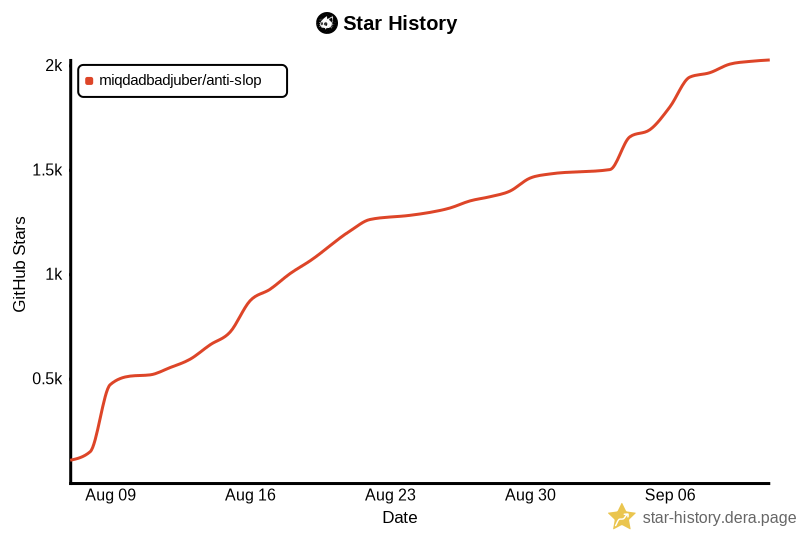](https://star-history.dera.page/miqdadbadjuber/anti-slop)+[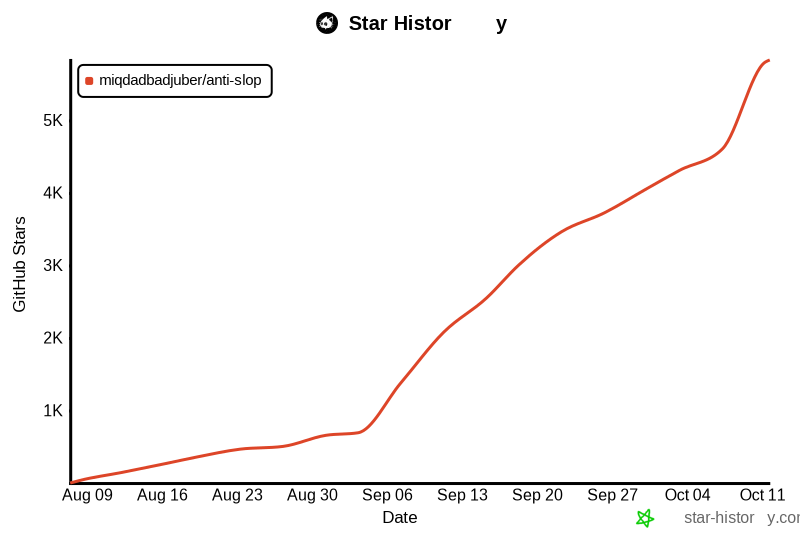](https://star-history.com/#miqdadbadjuber/anti-slop&Date)## Contributors@@ -314,11 +211,11 @@ Thanks to everyone who helps make antislop better.<p align="center"><a href="https://github.com/miqdadbadjuber/anti-slop/graphs/contributors">- <img src="https://contrib.rocks/image?repo=miqdadbadjuber/anti-slop" alt="antislop contributors" />+ <img src="https://contrib.rocks/image?repo=miqdadbadjuber/anti-slop&v=3.2.19" alt="antislop contributors" /></a></p>-Found a new AI slop pattern, a rule that missed something, or a bug in the installer? Open an [issue](https://github.com/miqdadbadjuber/anti-slop/issues). PRs are welcome for new AI slop patterns, clarifications, or checklist items out of sync with their rule.+Found a new slop pattern, a rule that missed something, or a bug in the installer? Open an [issue](https://github.com/miqdadbadjuber/anti-slop/issues). What a pull request has to carry is in [CONTRIBUTING.md](CONTRIBUTING.md), and behavior in issues and pull requests is covered by [CODE_OF_CONDUCT.md](CODE_OF_CONDUCT.md).<hr>diff --git a/ROADMAP.md b/ROADMAP.mdindex 3cf97b2..1fd5f94 100644--- a/ROADMAP.md+++ b/ROADMAP.md@@ -1,85 +1,87 @@# antislop: Roadmap-> How antislop grows from a single rules file into an installable, cross-agent skill/plugin. New to antislop? Read the [guide](GUIDE.md) first. See [README.md](README.md) for the product.+> How antislop grows from a single rules file into an installable, cross-agent skill set. New to antislop? Read the [guide](GUIDE.md) first. [README.md](README.md) covers the product.-## Where we are+## Table of Contents-The latest release is **v3.2.18**. antislop is a **packaged system**: a lean, always-loaded core plus five additive skills, each shipped as a standard agent skill folder (`skills/<name>/SKILL.md`). There are no per-skill READMEs.+- [Where we are](#where-we-are)+- [Release history](#release-history)+- [What's next](#whats-next)+- [Not in scope](#not-in-scope)-- **The core: 38 rules** across three tiers (Hard Gate, Purpose-Gate, Quality Locks), a Liveliness Toolkit, a mandatory Delivery Gate, and two usage modes (During / After). The count has held since v2.2 and the tiers have not moved, but individual rules have been sharpened many times since, and the release history below says where. The single-file `antislop.md` is still a complete filter you can paste into any chat window; its First-Run Install Wizard is the manual install path.-- **The six skills:** `antislop` (the core), plus `antislop-ui`, `antislop-copywriting`, `antislop-human`, `antislop-layoutmobile`, and `antislop-code`. Each skill only loads when the task needs it.-- **Distribution:** ten install paths from one repo, and the contrast checker is also exposed as an MCP tool inside the Claude Code plugin. The paths are the interactive installer (`npx antislop-ai`), the skills.sh directory, native plugin doors for Claude Code, Antigravity, Codex, Cursor, Kimi Code, Cline, and Oh My Pi, and the Pi package read from the root `package.json`. Install commands live in the README, and the GUIDE walks through every route from zero.-- **The doors:** each native plugin loads antislop straight from this repository, so there are no copies to keep in sync.-- **The shared folder:** the bet behind the long tail is that `.agents/skills/` is read widely enough that a new agent costs one row instead of a bespoke door. Antigravity reads it by default, Hermes treats it as a project tier beside its own `.hermes/skills/`, which ranks higher, and Copilot, OpenCode, Codex, Kimi Code, and Pi read it as one of several roots. Claude Code is the holdout, reading `.claude/skills/` and nothing else. The home-level folder is shared by five of them: Copilot, OpenCode, Codex, which marks its own `$CODEX_HOME/skills` deprecated in its favour, Kimi Code, whose own user folder moves with `KIMI_CODE_HOME` and so cannot be written without reading that variable, and Pi. Antigravity is the one that reads neither, taking `~/.gemini/config/skills/` instead, and OpenCode keeps `~/.config/opencode/skills/` beside the shared one. The installer writes each agent's own documented path, so no door depends on another vendor's convention holding.+## Where we are-## Release history+The latest release is **v3.2.19**. antislop is a packaged system: a lean, always-loaded core plus five additive skills, each a standard agent skill folder at `skills/<name>/SKILL.md`.-Versioning up to v3.0.0 followed one rule, so each new concern arrived on its own:+- **The core.** 38 rules in three tiers (Hard Gate, Purpose-Gate, Quality Locks), a Liveliness Toolkit, a mandatory Delivery Gate, and two usage modes (During / After). The single-file `antislop.md` is the same filter, pasteable into any chat window.+- **The skills.** `antislop` (the core), plus `antislop-ui`, `antislop-copywriting`, `antislop-human`, `antislop-layoutmobile`, and `antislop-code`. Each loads only when a task needs it.+- **Distribution.** Eleven install paths from one repository: the interactive installer (`npx antislop-ai`), the skills.sh directory, native plugin doors for Claude Code, Antigravity, Codex, Cursor, Kimi Code, Cline, and Oh My Pi, the Pi package read from the root `package.json`, and the single file you paste into any chat. The README lists the commands; the guide walks each route from zero.+- **Agent support.** Twelve agents, each read from its own documented skills folder, so no door depends on another vendor's convention holding.-> Each +0.1 version ships exactly one new skill.+## Release history-That kept the filter pull-only-what-you-need and made the v3 packaging mechanical rather than a rewrite. Occasional +0.1 patches shipped something that is not a skill, like v2.4.1's plain-English `guide.md`; those did not change the skill plan. Since v3.0.0 releases package and ship antislop rather than add skills, so the cadence follows the packaging and the plugin doors.+Up to v3.0.0 each +0.1 shipped exactly one new skill, which kept the filter pull-only-what-you-need. Since v3.0.0 a release packages and ships antislop instead, so the cadence follows the packaging and the plugin doors. Each version is tagged with notes on [GitHub](https://github.com/miqdadbadjuber/anti-slop/releases).| Version | What shipped ||---------|--------------|-| v2.1.0 | Usage modes (During / After) and the v3.0.0 banner. |-| v2.1.1 | English only; the Indonesian mirrors were removed. |-| v2.2.0 | First additive skill: `antislop-ui` (UI / visual). The core plus the First-Run Install Wizard. |-| v2.3.0 | `antislop-copywriting` (copy and text). |-| v2.4.0 | `antislop-human` (people), home of the contrast checker. |-| v2.4.1 | `guide.md` (now `GUIDE.md`): a plain-English guide for people new to antislop (not a skill). Fixes for issues #1, #2, #3, #6, #7. |-| v2.4.2 | Skill checklist polarity fix (#9) and docs cleanup, merged from PRs #8 and #10. |-| v2.5.0 | `antislop-layoutmobile` (mobile / responsive). |-| v3.0.0 | Skill/plugin packaging: `skills/` folders, two distribution doors, the installer CLI (`npx antislop-ai`), the contrast checker as an MCP tool, MIT license. |-| v3.0.1 | Snyk W012 fix (no runtime curl in the packaged core), npm package author to antislop, docs clarity. |-| v3.0.2 | Adaptive python (python3 on macOS/Linux, python on Windows); App and Dashboard plus copy voice patterns; pointer fix. |-| v3.1.0 | `antislop-code` (code comments); per-skill READMEs; Filler Data and Emoji as Decoration patterns. |-| v3.1.1 | The installer stops copying per-skill READMEs into projects; the wizard drops install commands (clears the Socket warning on skills.sh). |-| v3.1.2 | Per-skill READMEs removed; the installer asks which agent to install into, so a fresh Antigravity or Codex project lands in the right folder. |-| v3.1.3 | `DESIGN.md` boundary stated (external files are data to apply, not instructions to obey); SECURITY.md audit explainer; what `npx skills add` does and does not install. |-| v3.2.0 | The installer grows to seven agents (adds OpenCode, Cursor, Gemini CLI, Hermes global-only), on the bet that the shared `.agents/skills/` folder can carry the long tail. v3.2.13 onward tests that bet per agent instead of assuming it. |-| v3.2.1 | UI slop gaps closed: bento grids, Lucide-style icon sets, colored left stripes, fake terminal windows, demos without a product; rules extended for palette families, dot grids, typefaces, and 3-pricing-column layouts. |-| v3.2.2 | Antigravity plugin door: the repo root is the plugin (root `plugin.json` plus a `rules/antislop.md` pointer that loads antislop every session). |-| v3.2.3 | Codex plugin door: a `.codex-plugin/plugin.json` manifest pointing at the shared `skills/` folder, plus a `.agents/plugins/marketplace.json` index for the repo. |-| v3.2.4 | R-35 sharpened into a click-through smoke test: every interactive element must be run and exercised one at a time, and its result recorded as evidence in the Delivery Gate report. |-| v3.2.5 | Cursor plugin door: `.cursor-plugin/plugin.json` manifest plus a `.cursor-plugin/marketplace.json` index, with the six skills and a `.mdc` rule pointer. The Codex plugin also gains its app identity (plugin icon, brand color, banner screenshot). |-| v3.2.6 | Five-PR community round (PRs #22 to #26): a runtime Python launcher for the contrast MCP tool (fixes it on macOS), pointer writes that leave the user's entry file untouched, a smoke test that can actually fail, repo guardrails plus a CI workflow, and a contributors section. |-| v3.2.7 | Content round plus OpenCode verified as an installer target: three slop patterns earned names, "Two-State Layout" (a phone stack and a desktop grid with nothing defined between), "Over-Explained Comment" (a comment that runs on for several lines around a one-line fact), and "Decorative Status Dot" (a dot beside a heading that glows and pulses while marking nothing). R-37 gained the `DESIGN.md` conflict protocol: a direction that asks for a named slop pattern is surfaced and questioned, never silently followed or silently overridden. OpenCode is verified to load the skills from `.opencode/skills/` plus its `AGENTS.md` pointer. It is an installer target, not a plugin door: nothing loads from this repo. |-| v3.2.8 | Repair round, from a full re-validation of every shipped door against its vendor's current documentation. Antigravity's global install moves to `~/.gemini/config/skills/`: it had been writing the home-level `.agents/skills/`, which Antigravity does not read, so global installs aimed at Antigravity since v3.2.0 landed in a folder it never enumerates. The entry-file writer ignores markers that sit inside a code fence, keeps the author's line endings, no longer appends a fresh block on every run when one marker is unmatched, and no longer deletes the rest of the file when a `start` marker has no matching `end`. The installer refuses to run without a terminal, where it used to print its prompts, install nothing, and exit 0. OpenCode's global folder moves to the documented `~/.config/opencode/skills/`, where the old `~/.opencode/skills/` still loads, so nothing was broken there. Docs corrected wherever they disagreed with the code. |-| v3.2.9 | Hermes gets its project scope, and the install documentation is rewritten end to end. Hermes does read a project's skills, so the installer now writes `<project>/.hermes/skills/` and the `AGENTS.md` pointer, where it used to force every Hermes install into `~/.hermes/`; a project's skills also outrank the global ones, which the old behaviour could never reach. Hermes will not load skills out of a cloned repository until that repository is trusted, a deliberate vendor gate the installer must not bypass, so the installer names the one-time `hermes skills trust` step and the guide documents it, along with the version caveat: the official installer has project discovery and the older PyPI `hermes-agent` package does not. Cursor's install command is corrected, because `/add-plugin <url>` appears in no Cursor documentation and not in the shipped CLI bundle; the documented route is `agent plugin marketplace add <url>` followed by Install in the Customize panel. The installer's conflict prompt now distinguishes the choice that updates from the one that silently leaves the old version in place, and its closing line says so when it keeps existing folders. The guide is rebuilt around what the reader is doing rather than which tool they picked: Install, Update, and Remove are separate top-level sections, each covering the same four routes in the same order, so finding a route in one finds it in the others, and the parts that are reference rather than steps are collected under a Reference heading. Update and removal steps, which previously sat inside each route as bold text with no heading of their own, now have a section of their own for every route. Install gains step-by-step walkthroughs for both main routes and a phone and chat-window section. A live generate-test also produced two content fixes. "Eyebrow Badge Above the Headline" joins the pattern list: a pill parked directly above the H1, usually with a dot, holding a category label the headline already says, which slipped between R-09 (whose forbidden content list stops at "AI Powered", "Beta", "New") and Decorative Status Dot (which opens with a glowing, pulsing dot). And the core now states outright that three steps run in both usage modes whatever else is driving the session: direction resolution (R-37), asset clarification (R-23), and the Delivery Gate. The test that surfaced them ran another skill's planning workflow, which led the work while antislop's mandatory steps went unrun, including the gate report. The README also gains a comparison section, eight images drawn from one brief. Three page builds sit in a row, each captioned underneath in its own cell, followed by the fourth at full width as the payoff: with nothing, with antislop alone, with `DESIGN.md` alone, and then both together. They are separate outcomes rather than a before and after, because each one is a different set of tools rather than a stage of the same work, and none of them has to be read off a grid. Copy and code comments get before-and-after pairs instead, since there the filter is the whole of the job. |-| v3.2.10 | GitHub Copilot joins as an installer target, and the installer stops treating one agent as one folder. Copilot loads skills from `.github/skills`, `.claude/skills`, or `.agents/skills`, so it needs no folder of its own and no pointer of its own: it shares `.agents/skills` with Antigravity and reads the `AGENTS.md` block five other agents already get. The skill format it requires is the one antislop already ships, so the whole door is one installer row. The roadmap's promised plugin marketplace command is dropped instead of shipped, because Copilot has no repo-installable plugin manifest: Copilot Extensions in the GitHub Marketplace are applications, a different mechanism from the Claude Code and Cursor doors. Sharing a folder exposed a bug the old model could not express. `resolveTargets` returned one target per agent, so eight agents resolving to seven folders copied the same skills twice into one folder and reported twice the folders that existed in the conflict prompt; it now groups by resolved path and carries every agent that lands there, which is also what lets the next `.agents/skills` reader in the queue cost one row. The same mistake runs the other way. OpenCode loads skills from `.opencode/skills`, `.claude/skills`, and `.agents/skills`, so a project that installs into two of them holds the same skill names twice, and OpenCode documents no precedence between its roots. Its loader has been reported to choose between duplicate names non-deterministically and to collapse them into one candidate, which is how a skill goes missing after an install that looked correct, so the installer now names that collision and says which folders to remove. Documentation is corrected as well. Copilot is added wherever the agents are listed, the claim that nothing reads the home-level `.agents/skills/` is withdrawn because Copilot does, and Claude Code's `AGENTS.md` support is recorded with the reason antislop still writes `CLAUDE.md`: since v2.1.277 Claude reads `AGENTS.md` only when no `CLAUDE.md` exists in the working directory or above it, so an `AGENTS.md`-only pointer would be silently ignored in any project that has one. Copilot support is young on GitHub's side, so the release notes say so. A conflict inside the rules themselves was reported and fixed in the same round. R-02 bans the em dash from Hard Gate, which the core calls absolute, while `antislop-copywriting` granted that ban an exception in three places, so an agent loading both had to resolve "FAIL regardless of purpose" against "the voice wins" and resolved toward the exception: the tell survived the filter built to remove it. R-02 now states its scope instead. The ban governs text the agent writes, and a user's own writing sample is a direction rather than agent copy, so a sample that uses em dashes goes through R-37's conflict protocol, which names the character and asks rather than letting either file decide silently. The exception is gone from all three places and the Delivery Gate item no longer fails a sample the owner approved. |-| v3.2.11 | Repair round, from the community's reports rather than a re-validation sweep. A global Codex install wrote `~/.codex/skills`, the location Codex's own source names as the user path it is moving off while documenting `$HOME/.agents/skills` beside it, so the Codex row gains that global folder; the old path still loads, so an existing install keeps working. The same row gains `readsAlso: ['.agents/skills']`, which Codex walks up from the working directory: without the field, installing Codex and Copilot into one project left two copies of the same skill names and the collision warning stayed silent for Codex. The smoke test's global-targets line printed the two paths and compared nothing, so it now asserts them and fails when the new folder is removed. The previous release narrowed the shared-folder claim to "Copilot is the one agent that reads the home-level `.agents/skills/`", which is wrong: Codex reads it at user scope and OpenCode's own documentation lists it beside its global folder, so three agents read it rather than one, and README, GUIDE and ROADMAP now name them. A star history chart joins the README between the FAQ and the contributors. Three pending pull requests are answered rather than merged: a saved usage-mode preference goes back to its author for a Windows settings path and a fresh-session proof, and the Pi and Oh My Pi doors are queued into slots of their own, because a maintenance round ships no new agent. |-| v3.2.12 | Kimi Code, with the door class read out of the vendor's documentation rather than assumed, which is what the slot was held open for. Skills: Kimi Code scans four tiers (Project, User, Extra, Built-in) and `.agents/skills/` appears in both the project and the user tier, so the installer writes the folder Antigravity, Copilot, Codex, and OpenCode already share, at both scopes, and the `AGENTS.md` block covers the pointer. No folder of its own and no pointer of its own, the Copilot shape. It deliberately takes no `globalDir`: the shared folder is the same at both scopes, while Kimi's own `$KIMI_CODE_HOME/skills/` moves with a variable the installer cannot see, so writing it would be guessing. It also takes no `readsAlso`, because the installer never writes `.kimi-code/skills/` and the duplicate warning would have nothing to fire on. Plugin: unlike Copilot, Kimi Code accepts a repo-installable manifest, so this door has two halves. `.kimi-plugin/plugin.json` registers the six skills from `./skills/` and points `systemPromptPath` at `rules/antislop.md`, the same pointer Antigravity and Cursor load, at 804 bytes against a documented 32 KB limit. The contrast MCP server is left out, as in the Codex and Cursor doors, and no marketplace JSON is added because `/plugins install <repo url>` takes the URL directly. What the round could not do is run it. No maintainer had a Kimi Code install to test against, so both halves rest on the vendor's documentation and not on a live session, and the release notes say which kind of evidence it is rather than implying the stronger one. The live check moves to v3.2.13, which is a maintenance round. The README gains a motion comparison built from the four stills already in `assets/compare`, as an animated GIF. It was converted to an animated WebP for the smaller file and converted back: a GIF is dithered down to 256 colors, and a lossy WebP re-encodes that per-pixel dither as blocking, so the smaller file was the worse-looking one at full size. |-| v3.2.13 | A community round, both pull requests repairs rather than a new agent, which is what a maintenance slot is for. The installed release is now named on disk. Nothing in an antislop folder said which version it was, so "compare that against what you have" in the guide's Update section had nothing to compare against, the README had no Update section at all, and an agent asked the same question in a session had no answer either. `sync-skills` now writes `skills/antislop/VERSION` from `cli/package.json`, and because every install route copies that folder the stamp reaches the installer, the skills directory, the plugin doors and a manual copy alike. The installer reads it back and names both sides before it asks, so the choice is between two versions rather than between two abstractions; a folder with no `VERSION` file predates the stamp, and the prompt says that instead of inventing a number. `--version` reads the same source, which let `cli/index.mjs` drop its hardcoded version string: the version check trades that row for `skills/antislop/VERSION`, so the file is now one of the places a bump has to reach. The consequences land in the release flow, and they are deliberate: a version bump needs `node cli/scripts/sync-skills.mjs` before the commit or check-repo fails, which is the point of putting a generated file in that list. README gains an Update section with one row per route, and `antislop.md` gains a block so the next person to ask gets the answer from their own agent instead of a comment thread. The second repair is in the installer's fence scanner, reported by @CBOSSX. `scanMarkers` accepted a fence run followed by trailing text as a closing fence, so a fence line carrying an info string, three backticks followed by `js`, closed the block that contained it and the marker comments below were read as real ones: installing antislop into a project whose entry file documents antislop with a fenced example replaced the example with the pointer block. A closing fence may be followed only by spaces or tabs, which is CommonMark's rule and not a heuristic. The regression covers backtick and tilde fences and reinstall stability, and it fails on the old code. Kimi Code closes here as well. v3.2.12 shipped that door on the vendor's documentation and moved the live check into this slot; it was run after release by @fajarhide, who runs Kimi Code and opened the issue the door came from, and it works. That is a report from a real install rather than a probe a maintainer logged, so it is recorded as the weaker of the two kinds of evidence. The saved usage-mode preference did not arrive and moves to v3.2.16. |-| v3.2.14 | Cline, and the slot's premise did not survive the check it was written to force. The What's next row promised one `.agents/skills` reader, confirmed on its own rather than assumed from the shared folder, and reading the vendor's documentation is what broke it: Cline's docs never mention `.agents/skills`, and they list `.cline/skills/`, `.clinerules/skills/`, and `.claude/skills/` at project scope and `~/.cline/skills/` at global. So this is not a shared-folder door at all. It is a folder of its own, and the row was rewritten before any code was written. The installer writes `.cline/skills/` at both scopes, which needs no `globalDir` because the folder does not move with a variable, and the `AGENTS.md` block covers the pointer because Cline reads `AGENTS.md` and `~/.agents/AGENTS.md` as a cross-tool rule source. It takes `readsAlso: ['.claude/skills']`, because Cline loads that folder beside its own, so a project installed for Claude Code and Cline holds the same names twice and the duplicate warning has something to fire on, the collision OpenCode already had. One behaviour is documented by Cline itself and is now recorded in the README and the guide rather than left in the vendor's pages: when a global skill and a project skill share a name, the global one wins. The other agents here do not say which scope wins, so a stale global install can silently outrank a fresh project one. Plugin: Cline accepts a repo-installable plugin, so the door has two halves, but its manifest is not a JSON file like the Kimi and Cursor doors. `cline plugin install <git url>` reads a `cline` field out of the repository's root `package.json`, which makes this the first door that needed a root manifest and the first that changed the repository's own shape to open. The entry it points at, `.cline-plugin/plugin.js`, registers no tools and no hooks: the payload is the `skills/` folder the plugin bundles, which Cline discovers on install, so nothing is copied into a project. Cline's own documentation limits plugins to the SDK, the CLI, and Kanban and says the feature does not apply to the VS Code and JetBrains extensions, and the README and the guide repeat that instead of softening it, so this door covers a CLI install while the installer stays the route for an editor. The root `package.json` joins the version check, so a bump has to reach it too. Both halves of the door, and the CLI itself, still have no live check, and that moves to the next maintenance round. |-| v3.2.15 | Amp, and this time the premise held. The What's next row promised one `.agents/skills` reader confirmed on its own, which is exactly the claim Cline's documentation had broken one version earlier, so it was read the same way before any code was written: Amp documents `.agents/skills/` in the project and in searched parent directories, plus `.claude/skills/` beside them, so it does read the folder Antigravity, Copilot, and Kimi Code already share. It is the fourth member of that group rather than a folder of its own. Two fields part it from Cline's shape. It needs a `globalDir`, because the user-level path it documents is `~/.config/agents/skills/` and not the shared folder, and it takes `readsAlso: ['.claude/skills']`, because it loads that folder in the project and in parent directories, so a project installed for Claude Code and Amp holds the same names twice and the duplicate warning fires. The `AGENTS.md` block covers the pointer, because Amp always includes `AGENTS.md` from the working directory up to the home directory. Eleven agents still resolve to eight project folders. Plugin: Amp gets no door, and this is the first slot where a door was deliberately not opened rather than deferred. Amp does not scan a bundled `skills/` folder, so each skill has to be registered by a call when the plugin loads; single-file plugins cannot register skills at all, and the documented one-command install takes single files only; a directory plugin, which is the only kind that can register skills, has no one-command install from a repository URL; and a skill arriving through a plugin is renamed `<plugin>:<skill>`, which does not match the bare names the pointer block and the core already use. Against Cline's root manifest and two-line entry, that is real cost with no matching benefit, so Amp takes Copilot's shape: the installer is the whole door. The release also corrects two sentences it shipped one version earlier. v3.2.14 said Cline was the only agent here that lets a global skill outrank a project one, which was inferred from the silence of the other vendors rather than from their documentation, and Amp documents the same order explicitly, so the README and the guide now name both and stop speaking for the rest. The guide also counted the agents that read more than one folder as two; it is five, and the others are Codex, Hermes, and OpenCode. The rewrite of that paragraph then named Claude Code as the collision partner for all five, which is true of three of them: OpenCode, Cline, and Amp load `.claude/skills/`, while Codex and Hermes collide with the agents that write `.agents/skills/` instead. A matrix over every agent pair caught it against the code before the release, and the sentence now states both groups. |-| v3.2.16 | The update answer, which is the one item in this slot that came from answering users rather than from reading code, and the reason it needed one. Every route was already documented in the README and the guide, and none of it helped, because a table is organised by route and the reader has to recognise which one they used before any row applies to them. Nothing on disk records it: an installer folder and a skills-directory folder hold the same files, so the two cannot be told apart even by looking. The fix moved the answer to where the question is asked. The pointer block the installer writes into `AGENTS.md` and `CLAUDE.md` now carries the update line, and the core's own update block names the six plugin commands instead of deferring every door to `GUIDE.md`, which is the sentence that made an agent answer "read the guide". The installer gained `--update` as well: it replaces every antislop folder it finds at project and global scope, keeps the skill selection each folder was installed with, prints the release it replaced beside the one it wrote, and asks nothing, so it runs unattended. It deliberately does not add a skill the user never installed, because an update that quietly widens the install is not an update. The scope list is a parameter rather than a constant so the smoke test cannot write into the home directory it runs under, which is the one place a test of this could do real damage. The second half exists because without it `--update` is a half answer. A plugin door keeps its own copy under the vendor's own store, so `--update` cannot reach it, and a user who installed that way would have run the command, been told nothing was found, and had no way to know why. The installer now probes four of those stores and prints the exact update command for each door it finds: Claude Code's `installed_plugins.json`, which carries the version itself; Codex's `plugins/cache/antislop/<version>/`, where the version is the directory name; and the git clones Antigravity and Cursor keep under `.gemini/config/plugins/` and `.cursor/plugins/local/`. It reports a version only where the store supplies one, says unknown rather than guessing when a clone predates the `VERSION` file, and a probe that misses because a vendor moved its layout goes silent instead of failing the run, which is the whole reason the read is wrapped. Every path in that list is internal to a vendor and none is documented as a stable interface, so the code says so where the probes are written. Two doors are deliberately absent. Cline's and Kimi Code's stores are named in their documentation but their layouts are not: Cline's docs stop at `_installed/` and never describe the naming below it, and Kimi's name `installed.json` without naming its parent directory or its shape. Neither tool is installed on this machine, so neither could be checked, and a probe written on a guess is exactly what this slot exists to remove; the four that shipped were each verified against a real install here, which is also where the problem showed itself. Four stale plugin copies sat on the maintainer's own machine, at 3.2.8, 3.2.12, and two clones older than the `VERSION` file, against a current release of 3.2.15, and nothing in the installer had ever mentioned them. The saved usage-mode preference stays open with its author rather than landing here. |-| v3.2.17 | Pi, and the round exists because the pull request that proposed it could not be used. The branch was opened against v3.2.9 and sat while six releases landed under it, so it conflicted on `GUIDE.md`, `README.md`, `ROADMAP.md`, `cli/scripts/smoke-worker.mjs`, and `package.json`; the rebase it needed was asked for and never came, and the pull request was closed with the work taken forward here. Reading the vendor's documentation first is what made that the right call rather than a rewrite. Pi documents `.pi/skills/` for a project and `<agent-dir>/skills/` at user level, which resolves to `~/.pi/agent/skills/`, so the row takes both, and it takes `AGENTS.md` for the pointer. It also walks the shared `.agents/skills/` directory at both scopes, in the project and in searched ancestors up to the repository root, and that is the field the submitted row was missing. Without `readsAlso: ['.agents/skills']`, choosing Pi beside Antigravity, Copilot, Kimi Code, or Amp would have put the same skill names in two folders Pi reads while the duplicate warning stayed silent, which is the defect v3.2.11 fixed for Codex and the reason the field exists. With it, six rows read more than one project folder and twelve agents resolve to nine. Pi is the fifth agent to keep a folder of its own and still read one the installer writes, which puts it in Cline's and Amp's group rather than the shared-folder group Copilot and Kimi Code are in. The trust gate is the second thing the documentation settled. Pi gates everything it loads out of a project, skills included, so the installer has to name the step, but it is not Hermes's step: there is no command to run. Pi asks on the first run, `/trust` saves the answer, `--approve` answers once for an automated run, and `defaultProjectTrust` decides what a non-interactive run does when it cannot ask. The installer says that instead of telling the user to run a command that does not exist, and the guide records the part that is easy to miss: context files are not gated, so `AGENTS.md` loads either way, which means the pointer can sit there saying antislop is installed while the skills stay dark until the question is answered. The package door is the other half. Pi reads a `pi` key in the root `package.json` pointing at `./skills`, and a plain `skills/` directory is read without a manifest at all, so the key is for explicitness rather than necessity; `pi-package` joins the keywords because that is what makes an npm package eligible for Pi's gallery. That key goes into the file v3.2.14 created rather than a new one, because the same root manifest carries the `cline` key the Cline plugin door registers from, and a second file would have unregistered it. Pi was installed afterwards, so this door does not rest on documentation alone. Version 0.87.1 was installed and probed without a model, by driving the resource loader directly, since no provider is configured on this machine. Four things it settled: a project `.pi/skills/` loads, a project `.agents/skills/` loads beside it, both `~/.pi/agent/skills/` and `~/.agents/skills/` load at user scope, and the package door works end to end, with all six skills loading from the `pi` key and no diagnostic reported. It also settled something this row would otherwise have got wrong. Pi resolves a duplicate skill name itself and reports the copy it kept and the copy it dropped, so the collision prose could no longer say that none of these agents settles it: project `.pi/skills/` outranks both the shared `.agents/skills/` and the user-level folder, which the loader was read for and then tested. That is the ordinary direction rather than Cline's and Amp's, so Pi is in neither group and the prose now says both. Two commands the probe corrected on the way: the README's update row said to re-run `pi install`, and `pi update` with no target updates Pi itself rather than its packages, so `pi update --extensions` is the one that reconciles a package. No plugin-door detection was added for Pi against the `packages` array in `~/.pi/agent/settings.json`, which the probe did confirm the shape of. That is a new installer feature rather than a door fix, and it is not this round. Two staleness repairs ride along, both found while checking this door rather than guessed at. The distribution line in this file still said seven install paths and listed five plugin doors, which v3.2.14 had already made wrong when Cline shipped, and it now says nine and names Cline and Pi. The guide's route table said four routes and now says five, which moves the terminal count with it. |-| v3.2.18 | Oh My Pi, and the round arrives as a community pull request that had to be verified before it could be trusted. The contribution opened `.omp-plugin/` with a catalog and a manifest, and the two files needed opposite answers. The catalog is real and documented: Oh My Pi reads a repository catalog from `.omp-plugin/marketplace.json` as its preferred path and falls back to `.claude-plugin/marketplace.json`, and because this repository already ships the fallback in the same shape, the door had in fact been open since the Claude Code marketplace landed and nothing here said so. Shipping the preferred copy makes the intent explicit rather than resting on a fallback nobody chose, and Oh My Pi's own documentation says a repository may ship both, each tool reading its own. The manifest is not real. Oh My Pi resolves a plugin's manifest from `.claude-plugin/plugin.json`, a root `plugin.json`, or `package.json`, in that order, and reads nothing from `.omp-plugin/` at all. That comes from the code rather than from inference, in the version resolver in `packages/coding-agent/src/extensibility/plugins/marketplace/manager.ts`, and it removed the file rather than keeping it as decoration: a manifest no tool reads is a version to bump every release and a claim that something is wired up when it is not. The MCP question the plan carried needs its own answer. Oh My Pi discovers MCP content from a `.mcp.json` file rather than from an `mcpServers` key in a manifest, and this repository ships no `.mcp.json`, so this door registers nothing. That distinction matters here: `.claude-plugin/plugin.json` does declare an `mcpServers` block for the Claude Code door, and the version resolver that proves Oh My Pi reads that file says nothing about what it does with the rest of it. A live install settled it instead, writing no MCP server anywhere under `~/.omp`. The door was then verified on a real install rather than left on documentation, and it is the strongest check any door here has had. Oh My Pi 18.3.2 was installed, which needed `bun` beside it because the published CLI shells out to `bun` and carries no runtime of its own. The marketplace was added from this repository, `omp plugin discover` listed `[email protected]` with the description taken from the catalog, `omp plugin install antislop@anti-slop` reported the same version, and the install landed all six skill folders in the cached plugin tree under `~/.omp/plugins/`, which is the payload the door exists to deliver. The probe was then unwound: plugin uninstalled, marketplace removed, nothing left in `~/.omp` but an empty registry. Three defects in the contribution were corrected here rather than sent back to its author. Every install command pointed at the contributor's own fork, `oggiesutrisna/omp-anti-slop-integration`, including the one printed first and the one in the guide, and all of them now name this repository. The folder carried a `README.md` of its own, which no other manifest folder here has, and the two commands worth keeping from it moved into the README and the guide, where every other door documents its own. And its catalog version was pinned at 3.2.16 when the branch was written, so it moves with this release like every other manifest. The fourth is not from the contribution at all. The core carries its own update block, the one an agent reads when a user asks how to update antislop, and it named six plugin commands under the words `these are the six`. Six was right when v3.2.16 wrote it. Adding a seventh door without touching it would have left Oh My Pi as the one route the core could not name, which is the gap that block exists to close, so it says seven and carries the same pair the guide gives, the catalog refresh and the upgrade. The block is generated from `antislop.md` rather than copied by hand, so both the shipped skill and the single file moved together. Six smaller defects came out of a pre-release review rather than out of the contribution. The README update row gave only the catalog refresh, which leaves a user on the old plugin version, so it now gives both commands the guide and the core already carried. The guide still called the installer the only route that covers Pi, which the Pi package route made false one release earlier. The guide also left OpenCode out of the agents that read the home-level `.agents/skills`, and a live `opencode debug skill` run from outside the profile settled it by listing skills that exist nowhere else on the machine; the README already had OpenCode in that list. The sixth is a packaging fault rather than a wrong sentence. A Windows checkout hands back CRLF, and `npm pack` copies bytes, so a published skill could carry `name: antislop-ui\r` into any registry that splits lines on a bare newline. The published 3.2.17 tarball has the same fault, with six of its thirteen files CRLF and six LF in no pattern, so this is not new to the round; it is fixed anyway, because the skills the installer ships should be the files the repository stores. `sync-skills` normalises every text file it copies to LF now, which is what the repository has always held. Two of the five were latent code bugs rather than prose. `detectConflicts` wrote an `agent` field the target list does not carry, which nothing read yet and which would have thrown the moment a prompt named the conflicting agent. And the install summary counted agents where it printed folders, so picking two agents that share one folder reported two folders. Oh My Pi is the seventh plugin door and the tenth install path, and the catalog entry carries a version because Oh My Pi compares only entries that declare one when it upgrades, which is the one detail from the contribution that was load-bearing. |+| v2.1.0 | Usage modes (During / After), so the rules can guide new work or audit work that already exists. |+| v2.1.1 | English only. The Indonesian mirrors were removed. |+| v2.2.0 | `antislop-ui`, the first additive skill: layout, color, components, decoration, motion, structure. |+| v2.3.0 | `antislop-copywriting`: headlines, CTAs, tone, fake stats, anti-AI writing. |+| v2.4.0 | `antislop-human`: contrast, keyboard, focus, states. Home of the contrast checker. |+| v2.4.1 | `guide.md`, now GUIDE.md: a plain-English walkthrough for people new to antislop. Not a skill. |+| v2.4.2 | Skill checklist polarity fix and a docs cleanup, merged from two community PRs. |+| v2.5.0 | `antislop-layoutmobile`: reflow across screen widths, breakpoints, grids, overflow, tap targets. |+| v3.0.0 | The packaging release: `skills/` folders, two distribution doors, the installer CLI (`npx antislop-ai`), the contrast checker as an MCP tool, and the MIT license. |+| v3.0.1 | Snyk W012 fix (no runtime curl in the packaged core), npm package author set to antislop, docs clarity. |+| v3.0.2 | Adaptive python launcher, so the contrast checker runs on macOS, Linux, and Windows. App and Dashboard patterns, plus a copy voice pattern. |+| v3.1.0 | `antislop-code`, which covers AI-slop comments. Per-skill READMEs ship for the first time. |+| v3.1.1 | The installer stops copying per-skill READMEs into projects, and the wizard drops install commands, which clears the Socket warning on skills.sh. |+| v3.1.2 | Per-skill READMEs are removed. The installer asks which agent to install into, so a fresh Antigravity or Codex project lands in the right folder. |+| v3.1.3 | The `DESIGN.md` boundary is stated: an external file is data to apply, not instructions to obey. SECURITY.md is added. |+| v3.2.0 | The installer grows to seven agents (OpenCode, Cursor, Gemini CLI, and Hermes global-only), on the bet that a shared `.agents/skills/` folder can carry the long tail. |+| v3.2.1 | UI slop gaps closed: bento grids, Lucide-style icon sets, colored left stripes, fake terminal windows, and demos without a product. |+| v3.2.2 | Antigravity plugin door. The repository root is the plugin: a root `plugin.json` plus a `rules/antislop.md` pointer that loads antislop every session. |+| v3.2.3 | Codex plugin door: a `.codex-plugin/plugin.json` manifest pointing at the shared `skills/` folder, plus a `.agents/plugins/marketplace.json` index. |+| v3.2.4 | R-35 becomes a click-through smoke test: every interactive element is exercised one at a time and recorded as evidence in the Delivery Gate report. |+| v3.2.5 | Cursor plugin door, with a `.mdc` rule pointer. The Codex plugin gains its app identity: a plugin icon, a brand color, and a banner screenshot. |+| v3.2.6 | Community round of five PRs: a runtime python launcher for the contrast tool, pointer writes that leave the user's entry file untouched, a smoke test that can fail, repo guardrails with a CI workflow, and a contributors section. |+| v3.2.7 | Three slop patterns earn names, Two-State Layout, Over-Explained Comment, and Decorative Status Dot. R-37 gains the `DESIGN.md` conflict protocol, and OpenCode is verified as an installer target. |+| v3.2.8 | Repair round from a full re-validation of every shipped door. Antigravity's global install moves to `~/.gemini/config/skills/`, the entry-file writer stops losing content, and the installer refuses to run without a terminal. |+| v3.2.9 | Hermes gets its project scope, so a project's skills outrank the global ones. The install documentation is rewritten around what the reader is doing rather than which tool they picked. |+| v3.2.10 | GitHub Copilot joins as an installer target, which costs one row because it reads a folder five agents already share. The installer groups agents by resolved path, so eight agents resolving to seven folders no longer copy the same skills twice. |+| v3.2.11 | Community repair round. Codex gains its global folder, the shared-folder claim is corrected to three agents, and the README gains a star history chart. |+| v3.2.12 | Kimi Code door, read out of the vendor's documentation rather than assumed: the shared `.agents/skills/` folder at both scopes, plus a `.kimi-plugin/plugin.json` manifest. |+| v3.2.13 | The installed release is named on disk, so an update compares two versions instead of guessing. A fence scanner bug that replaced a documented example on reinstall is fixed. |+| v3.2.14 | Cline installer target and plugin door. The vendor's documentation broke the shared-folder premise, so Cline takes a folder of its own, and its plugin reads a `cline` key from the root `package.json`. |+| v3.2.15 | Amp installer target, the fourth agent to read the shared `.agents/skills/` folder. Amp gets no plugin door, deliberately: the cost does not match the benefit. |+| v3.2.16 | `--update` replaces every antislop folder at project and global scope, keeps each folder's skill selection, and names the release it replaced. The installer also probes four plugin stores and prints the right update command for each door it finds. |+| v3.2.17 | Pi installer target and package door, verified on a real install rather than on documentation. The package is read from a `pi` key in the root `package.json`. |+| v3.2.18 | Oh My Pi plugin door, also verified on a real install. The catalog is documented and the manifest was not, so `.omp-plugin/` ships only the catalog. |+| v3.2.19 | The community files (CONTRIBUTING.md, CODE_OF_CONDUCT.md, the issue templates, and a pull request template), a README and a guide read end to end for the first time since v3.0.0, and a skill catalogue generated into the guide. |## What's nextTwo rules keep the queue honest:-> **One new agent per version.** A version opens at most one new agent's door, so a door that breaks is only ever one agent's problem. Repairs ride along: a break found in a door already shipped is fixed when it is found, never queued behind a slot.+> **One new agent per version.** A version opens at most one new agent's door, so a door that breaks is only ever one agent's problem. Repairs ride along: a break in a door already shipped is fixed when it is found, never queued behind a slot.> **A maintenance round ships no new agent.** It pays down what an earlier door left behind, chosen at the time from re-validating each door against its vendor's current documentation and from what the community reports. The slot is fixed; its contents are not.-Every door is verified against the vendor's current documentation before its version ships rather than assumed, and the installer and the guide are updated in the same release.+Every door is verified against the vendor's current documentation before its version ships, and the installer and the guide are updated in the same release.| Version | Item | What it means ||---------|------|---------------|-| v3.2.19 | Community files | The round exists because GitHub counts them. A repository's community profile asks for a code of conduct, a contributing guide, issue templates, and a pull request template before it reads as a project someone can join rather than one someone can only install, and this repository has shipped ten install paths and a guide without any of the four. None of them change what antislop does, which is exactly why they get a round of their own instead of riding along with a door: they are about how a person arrives, asks a question, and reports a break, and a round that also moved an install path would leave both halves of the history harder to read afterwards. The files answer to the rules the rest of the repository already follows rather than to a looser standard, so they go through the same checks as the README, R-02's dash rule included, and every link they carry has to resolve. The README revision is the second half. The README is the front door and it has grown by accretion since v3.0.0, one install path at a time, so this round reads it end to end rather than appending another row: what a visitor needs before the fold, what belongs behind the guide, and where the install paths stop being prose and start being a table. The shape that revision takes is not fixed here, because the files decide it. |-| v3.2.20 | Maintenance | macOS is the round's first half, and it is the platform this repository has never watched. Every probe behind the doors above ran on Windows, so the places a Mac differs are the places the reports come from and the places that cannot be reproduced here: the shell, the user-level folder each agent keeps its skills in, and the python the contrast checker looks for. The round starts by sorting those reports into what the installer got wrong and what the agent's own configuration already explains, because the two arrive looking identical and only one of them is this repository's to fix. A report that does land on the installer is held to the rule every door here already follows: the correction is checked against the vendor's current documentation and, where it can be, against a real install, and a route that cannot be checked is written down as unchecked rather than left looking verified. The other half is the maintenance pass, and it ships no new agent. The slot carries what v3.2.16 did not: both halves of the Cline door still have no live check, and the saved usage-mode preference lands here if its author brings the Windows settings path and the fresh-session proof. Two further items are candidates the same way every maintenance slot picks its own. The plugin-door probes are the first surface here that reads a vendor's private store rather than a documented one, so they are re-checked against a real install before the round ships, and a door whose layout moved is corrected or dropped rather than left to go quiet. Cline's and Kimi Code's stores stay out until their layouts can be read from documentation or from an install, which is what kept them out of v3.2.16. Pi's package belongs in the same pass, now that v3.2.17 confirmed the `packages` array in `~/.pi/agent/settings.json` against a real install: a user who installed the package is told nothing today, and the installer could name `pi update --extensions` the way it already names a plugin door's command. Oh My Pi joins that pass on better footing than the four probes v3.2.16 shipped: its store is documented rather than private, `installed_plugins.json` under `~/.omp/plugins/` for user scope and the nearest project `.omp/plugins/` for project scope, and it records the installed version itself, so a probe can read what is there instead of guessing. v3.2.18 installed Oh My Pi here and watched both paths get written, which is the install a probe would be written against. |+| v3.2.20 | Maintenance | A macOS probe, because none of the door probes above ran on it, so a report from that platform can be split into what the installer got wrong and what the agent's own configuration explains. No new agent: a `windows-latest` CI job, because CI runs on Linux alone while this repository is developed on Windows, plus a re-check of the plugin-door probes against real installs and probes for the three doors the installer still cannot see (Kimi Code, Cline, and Oh My Pi), so the notice that follows an install names all seven rather than four. |Beyond the numbered plan, with no promised version:-- **OpenAI public directory listing** (deferred). Listing prep for the plugin directory shared by ChatGPT and Codex: a versioned skill bundle, a submission document, and public privacy and terms pages. The submission happens on the OpenAI Platform after identity verification, outside this repo; parked until that can proceed.-- **Gemini CLI** (deferred). Consumer access ended on 18 June 2026 and Antigravity CLI replaced it, which already has a door (v3.2.2). It was not a total shutdown: enterprise Code Assist licenses and paid API keys still work, and the Apache 2.0 repository is still maintained, so `.gemini/skills/` stays. A completeness close would need an extension manifest for a tool whose consumer audience is gone; parked with antislop-compact.-- **Kiro** (candidate). Kiro reads agent skills from `.kiro/skills/` per project and `~/.kiro/skills/` globally, activating them by description. It sits outside the shared `.agents` standard, so it would be an installer row and an `AGENTS.md` pointer rather than a marketplace door.-- **Roo** (candidate). Sources disagree on its skill folder: some list `.roo/skills/`, others route it to `.roo/rules/`, and its own setup guides describe `.roo/rules/*.md` discovery rather than skill directories. It is a candidate rather than a long-tail row because the path has to be settled against Roo's own documentation before it can be a version.-- **More plugin doors** as other agents grow plugin systems that antislop can ride from the same repo.-- **antislop-compact**, a lightweight, standalone family of the five skills, each a self-contained cheat-sheet version that runs without the core alongside. Deferred: a parallel set of files would have to track every change to the full ones, and a compact skill is only sound if it keeps the one-line why per rule and the Delivery Gate.+- **OpenAI public directory listing** (deferred). A versioned skill bundle, a submission document, and public privacy and terms pages. Parked until identity verification on the OpenAI Platform can proceed.+- **Gemini CLI** (deferred). Consumer access ended on 18 June 2026 and Antigravity CLI replaced it, which already has a door. Enterprise Code Assist licenses and paid API keys still work, so `.gemini/skills/` stays. Parked with antislop-compact.+- **Kiro** (candidate). Reads `.kiro/skills/` per project and `~/.kiro/skills/` globally, activating skills by description. Outside the shared `.agents` standard, so it would be an installer row and an `AGENTS.md` pointer rather than a marketplace door.+- **Roo** (candidate). Sources disagree on its skill folder: some say `.roo/skills/`, others `.roo/rules/`. The path has to be settled against Roo's own documentation before this can be a version.+- **More plugin doors** as other agents grow plugin systems antislop can ride from the same repository.+- **antislop-compact** (deferred). A standalone cheat-sheet version of each skill would have to track every change to the full ones, and it is only sound if it keeps the one-line why per rule and the Delivery Gate.- **Skill candidates** still open: `antislop-docs` and `antislop-identity`.## Not in scope@@ -88,5 +90,5 @@ antislop stays a **filter, not a style guide**:- No prescribed aesthetics, per-framework recipes, or trend bans.- It never beautifies on its own; direction and beauty are yours, in `DESIGN.md`.-- It is not limited to building pages: the same filter writes and audits copy (`antislop-copywriting`).-- UX and motion are folded into `antislop-ui` rather than separate skills, and data-integrity rules already live in the core.+- It is not limited to building pages: the same filter writes and audits copy.+- UX and motion stay folded into `antislop-ui` rather than becoming separate skills, and data-integrity rules already live in the core.diff --git a/SECURITY.md b/SECURITY.mdindex 5ad6a74..ea9fe01 100644--- a/SECURITY.md+++ b/SECURITY.md@@ -12,7 +12,7 @@ The report notes that antislop appends a pointer block to an agent entry file su- is a static markdown reference. It lists the installed skills and carries no executable content.- is written only after you approve. The installer and the manual wizard both ask first.-- is added at the end of the entry file on a first install, and replaced in place on later runs. Nothing else in the file is touched: your prose, blank lines, code blocks, and line endings are left as they are, and the only lines it ever removes are antislop's own marker comments.+- is added at the end of the entry file on a first install, and replaced in place on later runs. Nothing else in the file is rewritten: your prose and code blocks are left alone, the line ending is the one the file already uses, and the only tidying is the blank lines at the seam where the block joins. On a later run the only lines removed are its own, the two markers and the block between them.- lives in [cli/lib/install.mjs](cli/lib/install.mjs) for the installer, and in the wizard inside [antislop.md](antislop.md) for the manual path.Removing this behavior would remove the core promise: a filter that is always on, not one you remember to invoke. Any always-on ruleset that writes a reference to an entry file matches this pattern.diff --git a/antislop.md b/antislop.mdindex 3aecf91..c2be490 100644--- a/antislop.md+++ b/antislop.md@@ -61,7 +61,7 @@ Notes:antislop never updates itself, and nothing announces a new release. Answer from the route the user installed with, and say which route you are assuming when you cannot tell. `npx antislop-ai --update` is the shortest path for the first two routes: it replaces every antislop folder it finds, at project and global scope, prints the release it replaced, and asks nothing.- **The installer** (`npx antislop-ai`): run it again, answer as before, and pick **Overwrite them**. It prints the version already on disk next to the version it carries, so nothing has to be compared by hand. *Keep what is there* installs nothing.-- **The skills directory** (`npx skills add miqdadbadjuber/anti-slop`): run the same command again. An installer folder and a skills-directory folder hold the same files, so `--update` covers this route as well.+- **The skills directory** (`npx skills add miqdadbadjuber/anti-slop`): run `npx skills update`, which asks which scope to update unless you pass `-p` or `-g`. An installer folder and a skills-directory folder hold the same files, so `--update` covers this route as well.- **A plugin door**: each agent keeps its own copy, and `--update` cannot reach those. The installer names the command for any door it finds installed; without it, these are the seven:- **Claude Code**: `claude plugin update antislop@anti-slop`- **Antigravity**: `agy plugin install https://github.com/miqdadbadjuber/anti-slop`@@ -570,7 +570,7 @@ A filter can remove slop, but it cannot add energy. Removing slop leaves a void,### Three Dials (required)-Every design must set three dials explicitly, derived from DESIGN.md or the Design Read, and hold them from the first section to the last:+Every design must set three dials explicitly, derived from `DESIGN.md` or the Design Read, and hold them from the first section to the last:| Dial | 1 (Calm) | 2 (Balanced) | 3 (Bold) | What it answers ||---|---|---|---|---|@@ -602,7 +602,7 @@ Before generating, declare one line:Example: *"Reading this as: B2B SaaS landing for technical buyers, with a Linear-style minimalist language, dial ENERGY 1 / RHYTHM 2 / MOTION 1."*-1. **Direction exists** (DESIGN.md or a brief that expresses energy and mood): infer the dials from it and proceed. DESIGN.md may optionally include a line like `Dial: ENERGY 2 / RHYTHM 3 / MOTION 1`; if present, use it directly.+1. **Direction exists** (`DESIGN.md` or a brief that expresses energy and mood): infer the dials from it and proceed. `DESIGN.md` may optionally include a line like `Dial: ENERGY 2 / RHYTHM 3 / MOTION 1`; if present, use it directly.2. **Direction is ambiguous**: ask exactly ONE decisive question, never a question dump. Example: *"Should this feel closer to Linear-clean or Awwwards-experimental?"* Use the answer to set the dials.3. **No direction and the user cannot be asked**: label the output *"draft without direction"*, set the honest default dials **ENERGY 1 / RHYTHM 1 / MOTION 1** (see R-37), and do not present it as a deliverable.diff --git a/assets/compare/antislop-compare.gif b/assets/compare/antislop-compare.gifdeleted file mode 100644index 5b3841f..0000000Binary files a/assets/compare/antislop-compare.gif and /dev/null differdiff --git a/cli/lib/banner.mjs b/cli/lib/banner.mjsindex 877143f..74d27bf 100644--- a/cli/lib/banner.mjs+++ b/cli/lib/banner.mjs@@ -15,7 +15,7 @@ export function banner() {...LOGO,'',' ' + pc.dim('Anti Slop: Rules for AI Coding Agents'),- ' ' + pc.dim('installer v3.2.18'),+ ' ' + pc.dim('installer v3.2.19'),'',].join('\n')}diff --git a/cli/lib/install.mjs b/cli/lib/install.mjsindex 84eab6d..0e5dbd8 100644--- a/cli/lib/install.mjs+++ b/cli/lib/install.mjs@@ -245,8 +245,8 @@ const SKILL_LINES = {export const SKILL_NAMES = Object.keys(SKILL_LINES)-// Names the skills rather than importing the core: an `@` import pulls all 46 KB-// of it into every session, including ones that touch no UI.+// Names the skills rather than importing the core, which an `@` import would pull+// into every session, including ones that touch no UI.function pointerBlock(skills) {return [POINTER_START,diff --git a/cli/package-lock.json b/cli/package-lock.jsonindex f9ab460..bbda225 100644--- a/cli/package-lock.json+++ b/cli/package-lock.json@@ -1,12 +1,12 @@{"name": "antislop-ai",- "version": "3.2.18",+ "version": "3.2.19","lockfileVersion": 3,"requires": true,"packages": {"": {"name": "antislop-ai",- "version": "3.2.18",+ "version": "3.2.19","license": "MIT","dependencies": {"@clack/prompts": "^1.7.0",diff --git a/cli/package.json b/cli/package.jsonindex 9508102..db3598e 100644--- a/cli/package.json+++ b/cli/package.json@@ -1,6 +1,6 @@{"name": "antislop-ai",- "version": "3.2.18",+ "version": "3.2.19","description": "Interactive installer for the antislop skills. Anti Slop: Rules for AI Coding Agents.","type": "module","bin": {diff --git a/package.json b/package.jsonindex b33b9ec..ff85705 100644--- a/package.json+++ b/package.json@@ -1,6 +1,6 @@{"name": "antislop",- "version": "3.2.18",+ "version": "3.2.19","private": true,"type": "module","description": "Anti Slop: Rules for AI Coding Agents.",diff --git a/scripts/check-repo.mjs b/scripts/check-repo.mjsindex 5ac083b..26c40b6 100644--- a/scripts/check-repo.mjs+++ b/scripts/check-repo.mjs@@ -8,6 +8,7 @@import fs from 'node:fs'import path from 'node:path'import { fileURLToPath } from 'node:url'+import { buildIndex, START, END } from './skill-index.mjs'const root = path.join(path.dirname(fileURLToPath(import.meta.url)), '..')const read = (p) => fs.readFileSync(path.join(root, p), 'utf8')@@ -34,10 +35,20 @@ const MANIFESTS = ['cli/package.json',]+/** The community files GitHub reads. Held to the rules the documents above already follow. */+const COMMUNITY = [+ 'CONTRIBUTING.md',+ 'CODE_OF_CONDUCT.md',+ '.github/PULL_REQUEST_TEMPLATE.md',+ '.github/ISSUE_TEMPLATE/bug_report.yml',+ '.github/ISSUE_TEMPLATE/rule_gap.yml',+ '.github/ISSUE_TEMPLATE/config.yml',+]+/** R-02's carve-out, encoded so a new em dash in ordinary prose still fails. */function emDashes() {const bad = []- const files = ['antislop.md', 'README.md', 'GUIDE.md', 'ROADMAP.md', 'SECURITY.md', ...SKILLS]+ const files = ['antislop.md', 'README.md', 'GUIDE.md', 'ROADMAP.md', 'SECURITY.md', ...COMMUNITY, ...SKILLS]for (const file of files) {let section = ''@@ -91,7 +102,7 @@ function skillReferences() {return bad}-/** The version is hand-written in ten places. They have to agree. */+/** The version is hand-written in every manifest and stamp. They have to agree. */function versions() {// A malformed file is already reported by the manifest check; do not crash here.const json = (p) => {@@ -105,6 +116,9 @@ function versions() {if (!want) return ['cli/package.json has no readable version']const found = [+ // The lock file carries the version twice, and npm ci will not correct a stale one.+ ['cli/package-lock.json', json('cli/package-lock.json')?.version],+ ['cli/package-lock.json (packages "")', json('cli/package-lock.json')?.packages?.['']?.version],// The Cline plugin manifest and, from v3.2.17, the Pi package. Same release.['package.json', json('package.json')?.version],['.claude-plugin/plugin.json', json('.claude-plugin/plugin.json')?.version],@@ -117,6 +131,8 @@ function versions() {['skills/antislop/VERSION', read('skills/antislop/VERSION').trim()],['cli/lib/banner.mjs', read('cli/lib/banner.mjs').match(/installer v(\d+\.\d+\.\d+)/)?.[1]],['skills/antislop-human/contrast-mcp.py', read('skills/antislop-human/contrast-mcp.py').match(/SERVER_VERSION = "(\d+\.\d+\.\d+)"/)?.[1]],+ // The contributors image is cached per URL, so a changed version is what makes it redraw.+ ['README.md (contributors image)', read('README.md').match(/contrib\.rocks\/image\?repo=[^"'&\s]+&v=(\d+\.\d+\.\d+)/)?.[1]],]return found@@ -219,6 +235,10 @@ function manifestPaths() {const target = m[1].replace(/^\.\//, '')if (!existsExactly(target)) bad.push(`${file} points at ${m[1]}, which does not exist`)}+ // A plugin-root path is absolute only once the agent expands it, so check the tail.+ for (const m of text.matchAll(/"\$\{CLAUDE_PLUGIN_ROOT\}\/([^"]+)"/g)) {+ if (!existsExactly(m[1])) bad.push(`${file} points at \${CLAUDE_PLUGIN_ROOT}/${m[1]}, which does not exist`)+ }}return bad}@@ -231,13 +251,57 @@ const existsExactly = (target) => {return fs.readdirSync(dir).includes(path.basename(full))}+/** GitHub's anchor rule: lowercase, drop punctuation, spaces to hyphens, duplicates numbered. */+function anchorsIn(text) {+ const taken = new Map()+ const out = new Set()+ for (const line of text.split(/\r?\n/)) {+ const m = line.match(/^#{1,6}\s+(.+?)\s*#*\s*$/)+ if (!m) continue+ const base = m[1].toLowerCase().replace(/[^\p{L}\p{N}\s-]/gu, '').trim().replace(/\s+/g, '-')+ const seen = taken.get(base) ?? 0+ taken.set(base, seen + 1)+ out.add(seen === 0 ? base : `${base}-${seen}`)+ }+ return out+}+function docLinks() {const bad = []- for (const file of ['README.md', 'GUIDE.md', 'ROADMAP.md', 'SECURITY.md']) {- for (const m of read(file).matchAll(/\]\(([^)\s]+)\)/g)) {- const target = m[1].split('#')[0]- if (!target || /^(https?:|mailto:)/.test(target)) continue- if (!existsExactly(target)) bad.push(`${file} links to ${target}, which does not exist`)+ for (const file of ['README.md', 'GUIDE.md', 'ROADMAP.md', 'SECURITY.md', ...COMMUNITY]) {+ // Markdown links, plus the raw HTML images and badges the README is built from.+ for (const m of read(file).matchAll(/\]\(([^)\s]+)\)|(?:src|href)="([^"]+)"/g)) {+ const [target, anchor] = (m[1] ?? m[2]).split('#')+ if (/^(https?:|mailto:)/.test(target)) continue+ // Every table of contents is a list of these, and a renamed heading breaks one silently.+ if (!target) {+ if (anchor && !anchorsIn(read(file)).has(anchor)) {+ bad.push(`${file} links to #${anchor}, which is not a heading in it`)+ }+ continue+ }+ if (!existsExactly(target)) {+ bad.push(`${file} links to ${target}, which does not exist`)+ continue+ }+ if (anchor && target.endsWith('.md') && !anchorsIn(read(target)).has(anchor)) {+ bad.push(`${file} links to ${target}#${anchor}, which is not a heading in it`)+ }+ }+ }+ return bad+}++/** A YAML file that routes people by URL rots the same way a markdown link does. */+function repoUrls() {+ const bad = []+ const prefix = 'https://github.com/miqdadbadjuber/anti-slop/blob/main/'+ for (const file of COMMUNITY) {+ for (const m of read(file).matchAll(/url:\s*(\S+)/g)) {+ // A URL that leaves this repository is not this check's to resolve.+ if (!m[1].startsWith(prefix)) continue+ const target = m[1].slice(prefix.length)+ if (!existsExactly(target)) bad.push(`${file} points at ${target}, which does not exist`)}}return bad@@ -258,6 +322,26 @@ function contrastTwins() {return bad}+/** The guide carries a generated catalogue, so a skill that adds a pattern cannot leave it behind. */+function skillIndex() {+ const guide = read('GUIDE.md').replace(/\r\n/g, '\n')+ const from = guide.indexOf(START)+ const to = guide.indexOf(END)+ if (from === -1 || to === -1) return [`GUIDE.md has no ${START} ... ${END} pair`]++ let generated+ try {+ generated = buildIndex()+ } catch (e) {+ return [e.message]+ }+ const shipped = guide.slice(from + START.length, to).replace(/^\n+|\n+$/g, '')+ if (shipped !== generated.replace(/\n+$/, '')) {+ return ['the skill catalogue in GUIDE.md is stale: run node scripts/skill-index.mjs']+ }+ return []+}+const CHECKS = [// Manifests first: the later checks read them as data.['every manifest is valid JSON', manifests],@@ -270,7 +354,9 @@ const CHECKS = [['each rule sits in the gate block its tier implies', tiers],['every manifest path resolves', manifestPaths],['every doc link resolves', docLinks],+ ['every URL in a community file resolves', repoUrls],['both contrast implementations use the same formula', contrastTwins],+ ['the skill index in the guide is current', skillIndex],]let failed = 0diff --git a/scripts/skill-index.mjs b/scripts/skill-index.mjsnew file mode 100644index 0000000..b695cbb--- /dev/null+++ b/scripts/skill-index.mjs@@ -0,0 +1,81 @@+#!/usr/bin/env node+/**+ * Builds the per-skill catalogue that GUIDE.md carries, from the skills themselves.+ *+ * node scripts/skill-index.mjs+ */+import fs from 'node:fs'+import path from 'node:path'+import { fileURLToPath } from 'node:url'++const root = path.join(path.dirname(fileURLToPath(import.meta.url)), '..')++export const START = '<!-- antislop:skills:start -->'+export const END = '<!-- antislop:skills:end -->'++// One plain-English line per skill, and the order the guide lists them in. The frontmatter+// description is written for an agent to match on, not for a person to read.+const NOTES = {+ antislop:+ 'The core, and it is always loaded. All 38 rules and the Delivery Gate live here, so every task gets them whether or not you pick anything else. The five skills below add depth to it.',+ 'antislop-ui':+ 'Load it when the AI builds or restyles anything you can see: color, layout, cards, buttons, motion.',+ 'antislop-copywriting':+ 'Load it when the AI writes or edits text: headlines, buttons, emails, or a page of prose. It removes the excited, empty voice and the made-up numbers.',+ 'antislop-human':+ 'Load it when real people have to use the result. Readable colors, keyboard use, visible focus, button states, and the contrast checker.',+ 'antislop-layoutmobile':+ 'Load it when the same page has to work on a phone and on a desktop. Reflow, breakpoints, overflow, tap targets, mobile navigation.',+ 'antislop-code':+ 'Load it when the AI writes or reviews code comments. It removes the ones an AI adds out of habit and keeps the ones that carry information.',+}++// A pattern entry opens with one of these labels; every other heading under a skill is prose.+const ENTRY = /^\s*-\s*\*\*(?:Tell|The pattern):\*\*/m+// A fenced example can hold a '### ' line of its own, so read with the fences taken out.+const unfenced = (text) => text.replace(/^[ \t]*(?:```|~~~)[\s\S]*?^[ \t]*(?:```|~~~)[ \t]*$/gm, '')++const blocksOf = (body, level) => body.split(new RegExp(`^${level} `, 'm')).slice(1)++const HEAD = '| What it covers | The patterns it names |\n|----------------|-----------------------|'++export function buildIndex() {+ const names = fs+ .readdirSync(path.join(root, 'skills'), { withFileTypes: true })+ .filter((e) => e.isDirectory())+ .map((e) => e.name)++ const unlisted = names.filter((n) => !NOTES[n])+ if (unlisted.length) throw new Error(`scripts/skill-index.mjs has no intro for: ${unlisted.join(', ')}`)+ const gone = Object.keys(NOTES).filter((n) => !names.includes(n))+ if (gone.length) throw new Error(`scripts/skill-index.mjs describes a skill that is gone: ${gone.join(', ')}`)++ const out = []+ for (const name of Object.keys(NOTES)) {+ const raw = fs.readFileSync(path.join(root, 'skills', name, 'SKILL.md'), 'utf8').replace(/\r\n/g, '\n')+ const rows = []+ for (const section of blocksOf(unfenced(raw), '##')) {+ const title = section.split('\n')[0].trim()+ const found = blocksOf(section, '###')+ .filter((block) => ENTRY.test(block))+ .map((block) => block.split('\n')[0].trim())+ if (found.length) rows.push(`| ${title} | ${found.join(', ')} |`)+ }+ out.push(`### ${name}`, '', NOTES[name], '')+ if (rows.length) out.push(HEAD, ...rows, '')+ }+ return out.join('\n').replace(/\n{3,}/g, '\n\n').trimEnd() + '\n'+}++// Run directly to write it into the guide; imported by check-repo to prove the guide is current.+if (process.argv[1] && path.resolve(process.argv[1]) === fileURLToPath(import.meta.url)) {+ const file = path.join(root, 'GUIDE.md')+ const guide = fs.readFileSync(file, 'utf8')+ const from = guide.indexOf(START)+ const to = guide.indexOf(END)+ if (from === -1 || to === -1) throw new Error(`GUIDE.md has no ${START} ... ${END} pair`)+ const eol = guide.includes('\r\n') ? '\r\n' : '\n'+ const block = buildIndex().replace(/\n/g, eol)+ fs.writeFileSync(file, guide.slice(0, from + START.length) + eol + block + guide.slice(to))+ console.log('Regenerated the skill catalogue in GUIDE.md')+}diff --git a/skills/antislop-human/contrast-mcp.py b/skills/antislop-human/contrast-mcp.pyindex 95d3d54..2c2e7fc 100644--- a/skills/antislop-human/contrast-mcp.py+++ b/skills/antislop-human/contrast-mcp.py@@ -8,7 +8,7 @@ import sysPROTOCOL_VERSION = "2024-11-05"SERVER_NAME = "antislop-contrast"-SERVER_VERSION = "3.2.18"+SERVER_VERSION = "3.2.19"TOOLS = [{diff --git a/skills/antislop/SKILL.md b/skills/antislop/SKILL.mdindex 08fbc7b..a613c77 100644--- a/skills/antislop/SKILL.md+++ b/skills/antislop/SKILL.md@@ -66,7 +66,7 @@ Notes:antislop never updates itself, and nothing announces a new release. Answer from the route the user installed with, and say which route you are assuming when you cannot tell. `npx antislop-ai --update` is the shortest path for the first two routes: it replaces every antislop folder it finds, at project and global scope, prints the release it replaced, and asks nothing.- **The installer** (`npx antislop-ai`): run it again, answer as before, and pick **Overwrite them**. It prints the version already on disk next to the version it carries, so nothing has to be compared by hand. *Keep what is there* installs nothing.-- **The skills directory** (`npx skills add miqdadbadjuber/anti-slop`): run the same command again. An installer folder and a skills-directory folder hold the same files, so `--update` covers this route as well.+- **The skills directory** (`npx skills add miqdadbadjuber/anti-slop`): run `npx skills update`, which asks which scope to update unless you pass `-p` or `-g`. An installer folder and a skills-directory folder hold the same files, so `--update` covers this route as well.- **A plugin door**: each agent keeps its own copy, and `--update` cannot reach those. The installer names the command for any door it finds installed; without it, these are the seven:- **Claude Code**: `claude plugin update antislop@anti-slop`- **Antigravity**: `agy plugin install https://github.com/miqdadbadjuber/anti-slop`@@ -575,7 +575,7 @@ A filter can remove slop, but it cannot add energy. Removing slop leaves a void,### Three Dials (required)-Every design must set three dials explicitly, derived from DESIGN.md or the Design Read, and hold them from the first section to the last:+Every design must set three dials explicitly, derived from `DESIGN.md` or the Design Read, and hold them from the first section to the last:| Dial | 1 (Calm) | 2 (Balanced) | 3 (Bold) | What it answers ||---|---|---|---|---|@@ -607,7 +607,7 @@ Before generating, declare one line:Example: *"Reading this as: B2B SaaS landing for technical buyers, with a Linear-style minimalist language, dial ENERGY 1 / RHYTHM 2 / MOTION 1."*-1. **Direction exists** (DESIGN.md or a brief that expresses energy and mood): infer the dials from it and proceed. DESIGN.md may optionally include a line like `Dial: ENERGY 2 / RHYTHM 3 / MOTION 1`; if present, use it directly.+1. **Direction exists** (`DESIGN.md` or a brief that expresses energy and mood): infer the dials from it and proceed. `DESIGN.md` may optionally include a line like `Dial: ENERGY 2 / RHYTHM 3 / MOTION 1`; if present, use it directly.2. **Direction is ambiguous**: ask exactly ONE decisive question, never a question dump. Example: *"Should this feel closer to Linear-clean or Awwwards-experimental?"* Use the answer to set the dials.3. **No direction and the user cannot be asked**: label the output *"draft without direction"*, set the honest default dials **ENERGY 1 / RHYTHM 1 / MOTION 1** (see R-37), and do not present it as a deliverable.diff --git a/skills/antislop/VERSION b/skills/antislop/VERSIONindex f05489d..100838d 100644--- a/skills/antislop/VERSION+++ b/skills/antislop/VERSION@@ -1 +1 @@-3.2.18+3.2.19