
50+ open-source generative AI apps you can clone, deploy, and monetize — image generators, video tools, virtual try-ons, AI SaaS templates, and platform integrations. One-click Vercel deploy on every template.
🐶 Pet Product Studio — Open-Source AI Pet Brand Ad Generator (Free Pebblely Alternative for Pet Brands)
Generate photorealistic ads placing your pet products alongside dogs, cats, and other pets in seconds. A production-ready, self-hostable Next.js SaaS boilerplate purpose-built for pet brands, dropshippers, and DTC pet e-commerce. A free open-source alternative to Pebblely, Booth.ai, and Flair.ai — powered by the MuAPI AI engine.
Tech stack: Next.js 14 (App Router) · Prisma · PostgreSQL · NextAuth (Google OAuth) · Stripe · Tailwind CSS · MuAPI Use cases: Pet food packaging ads · Dog toy lifestyle shots · Cat treat product scenes · Pet supplement campaigns · Shopify pet store imagery · Amazon pet listings · Chewy seller ads · Instagram pet brand content

https://github.com/user-attachments/assets/75cbc455-024c-493a-9f14-7df4747d4c79
🌐 Project Repository
GitHub Repository: github.com/SamurAIGPT/pet-product-studio
Sign in with Google to upload product reference images (up to 14 angles), define descriptive prompts, inspect billing options, and view generation history.
Pet Product Studio is a production-ready, highly-optimized AI web application. Out of the box, it seamlessly manages User Authentication, Credits & Billing, Image Persistence, and asynchronous AI generation polling using a sleek Next.js (App Router) architecture. It empowers e-commerce brands and marketing agencies to position commercial pet products next to dogs, cats, and other pets in diverse environments.
Why use Pet Product Studio?
- Production-Ready SaaS — Complete with Google OAuth and Stripe Checkout workflows built-in.
- Multi-Image Reference Node — Upload up to 14 product reference snaps from multiple angles to maintain exact product packaging and logo integrity.
- Historical Gallery — All creations are securely persisted to a PostgreSQL database for a custom user workspace.
- Responsive & Constrained UX — Layout height constraints prevent page overflow, creating an elegant webapp interface that scrolls properly on both desktop and mobile.
- Extensible API — Easily swap or adapt underlying model features without breaking layout styling.
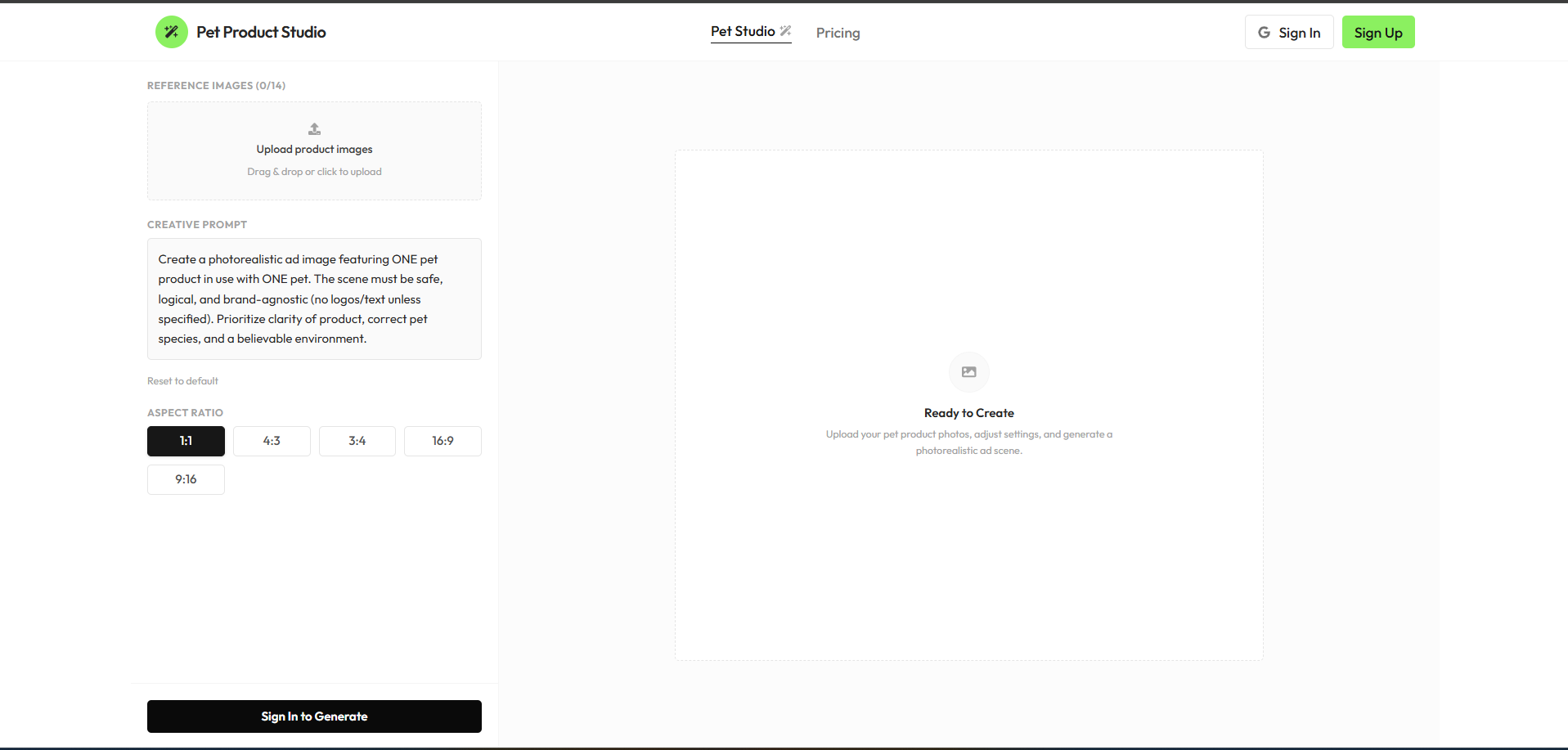
✨ Core Features
- Pet Ad Creative Studio — Instantly place your packaging or physical pet products into stunning, high-res scenes featuring pets.
- Multi-Angle Reference Uploads — Supports up to 14 reference product photos to feed into the compositing engine for unmatched accuracy.
- My Creations Archive — A dedicated history vault for logged-in users. Displays past generations securely fetched from the database, viewable in a detailed inspector panel with 1-click downloads.
- Credit Tiers & Billing — Complete Stripe integration. Standard Pack ($5.00) offers 1,000 credits and Pro Pack ($10.00) offers 2,000 credits (exchanging at a high-value rate of $1 = 200 credits). Each photo generation costs exactly 12 credits.
- Premium Interface — Designed with clean grids, modern typography, micro-interactions, and quick project switching capabilities.
⚡ Deployment: Vercel & Production
This architecture is engineered explicitly for Vercel serverless environments.
🔑 Required Environment Variables
To successfully deploy and run, you must populate the following environment variables in your Vercel project settings:
| Service | Variable | Description & Source |
|---|---|---|
| Database | DATABASE_URL |
PostgreSQL connection string (Supabase or Neon) |
DIRECT_URL |
Direct DB connection for Prisma migrations | |
| NextAuth / Google | NEXTAUTH_SECRET |
Secure random string generated via openssl rand -base64 32 |
NEXTAUTH_URL |
Your production domain (e.g. https://my-app.vercel.app) |
|
GOOGLE_CLIENT_ID |
Get from Google Cloud Console | |
GOOGLE_CLIENT_SECRET |
Get from Google Cloud Console | |
| Stripe Billing | STRIPE_SECRET_KEY |
Get from Stripe Dashboard |
NEXT_PUBLIC_STRIPE_PUBLISHABLE_KEY |
Get from Stripe Dashboard | |
STRIPE_WEBHOOK_SECRET |
Webhook secret for resolving credit purchases | |
| AI Generator | MUAPIAPP_API_KEY |
Create an account and get key from muapi.ai/access-keys |
🚀 Launching on Vercel: Step-by-Step
- Database Provisioning: Create a new Postgres database (via free tiers on Vercel Postgres, Supabase, or Neon). Retrieve the connection strings.
- Project Creation: Import your GitHub fork into the Vercel dashboard.
- Configure Environment Variables: Copy the variables above into the Vercel project settings environment tab.
- Deploy: Hit "Deploy". Vercel will automatically run the build steps (
npm run build). - Database Push: Run
npx prisma db pushto generate the client and synchronize database models before launching.
🛠️ Local Development
Prerequisites
- Node.js (v18 or higher)
- A local/cloud PostgreSQL instance.
Setup
# 1. Clone the repository
git clone https://github.com/SamurAIGPT/pet-product-studio
cd pet-product-studio

# 2. Install dependencies
npm install

# 3. Setup Environment
cp .env.example .env
# Open .env and insert your specific keys.

# 4. Initialize Database Schema
npx prisma generate
npx prisma db push

# 5. Start the Development Server
npm run dev
The console should now be active on http://localhost:3000.
🏗️ Technical Architecture
pet-product-studio/
├── prisma/
│   └── schema.prisma           # Postgres tables: Users, Accounts, Creations, PetCreations
├── src/
│   ├── app/                    # Next.js App Router
│   │   ├── api/                # Backend API Routes (Stripe, Auth, Uploads, Creations)
│   │   ├── pricing/            # Interactive tier and credit purchase view
│   │   └── page.js             # Main AI Pet Studio Interface
│   ├── components/
│   │   └── saas/               # Reusable Modular UI Components
│   └── lib/
│       ├── prisma.js           # Shared ORM client singleton
│       └── config.js           # Application plans, endpoints, and configs
└── next.config.mjs             # Next Configuration
📄 License
MIT Licensed.