
50+ open-source generative AI apps you can clone, deploy, and monetize — image generators, video tools, virtual try-ons, AI SaaS templates, and platform integrations. One-click Vercel deploy on every template.
🏋️ AI Fitness Body Simulator — Open-Source AI Body Transformation & Physique Simulator SaaS (Free BodyApp / SimScale Alternative)
Visualize your fitness transformation goals with photorealistic AI body simulation in seconds. A production-ready, self-hostable Next.js SaaS boilerplate with photo upload, target physique configuration, and high-fidelity AI body transformation — powered by the MuAPI AI engine. A free open-source alternative to BodyApp AI, Evolt 360, and fitness transformation preview tools.
Tech stack: Next.js 14 (App Router) · Prisma · PostgreSQL · NextAuth (Google OAuth) · Stripe · Tailwind CSS · MuAPI nano-banana-pro-edit Use cases: Personal trainers · Fitness app marketing · Gym membership sales · Weight loss coaching · Athletic training programs · Fitness influencer content · Body transformation challenges · Health & wellness SaaS

https://github.com/user-attachments/assets/4ff474a8-319e-4e7a-ae72-e603f83d8957
🌐 Try the Live Engine
Hosted Demo: ai-fitness-body-simulator.vercel.app
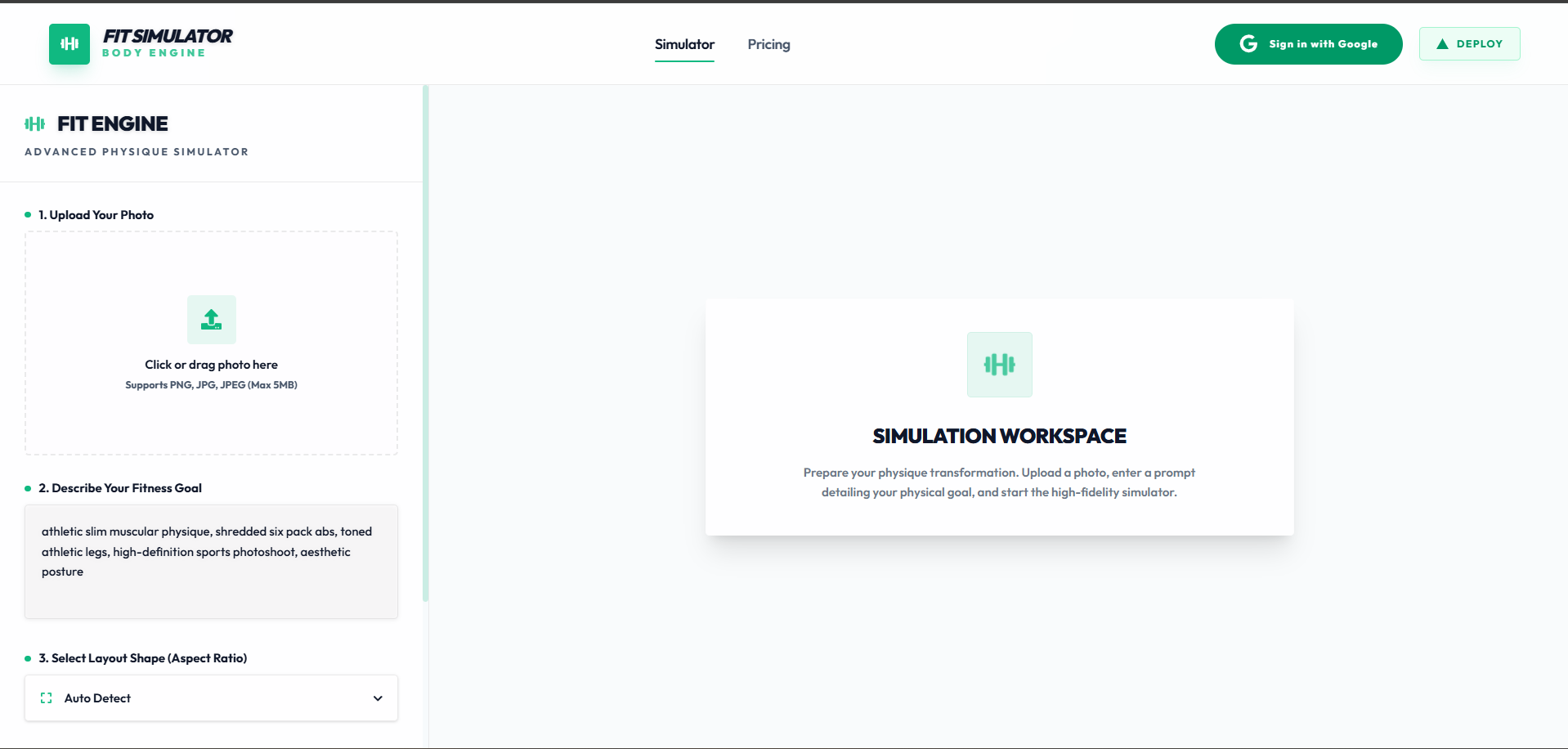
Experience the full minimal light-mode, responsive interface. Sign in with Google to explore the Physique Simulation Studio, Choose Layout Shape sliders, tiered quality resolutions, and credit packs directly from your browser.
AI Fitness Body Simulator is not just another wrapper — it's a production-ready, highly-optimized AI web application. Out of the box, it seamlessly manages User Authentication, Credits & Billing, Creations Persistence, and asynchronous AI image generation using a sleek Next.js (App Router) architecture. It empowers you to build professional-grade AI workflows with built-in mobile optimization, making it the perfect starting point for your next AI SaaS.
Why use AI Fitness Body Simulator?
- Production-Ready SaaS — Complete with Google OAuth and Stripe Checkout workflows built-in.
- Physique Reconfiguration Workstation — Configure custom fitness prompts, select resolutions (1K/2K/4K), and select aspect ratio shapes.
- Single Image Input — Strictly enforced dropzone with instant visual thumbnails.
- History Archive & Comparison — Review previous simulations in a unified archive list, view them in a side-by-side comparison slider, and download high-resolution output files.
- Responsive UX & Clean Light Theme — Simple minimal style borders, micro-animations, and full mobile responsiveness.
✨ Core Features
- Kinetic Physique Simulator — Reconfigure body assets using detailed prompts. Choose between 1K Resolution (24 credits), 2K Resolution (24 credits), and 4K Resolution (36 credits) quality tiers.
- Single-Image Dropzone — Drag-and-drop subject photo input that enforces single image constraint at both UI and API levels.
- Before/After Inspector — A detailed comparison overlay displaying the original subject image alongside the simulated high-fidelity output.
- History Archive & Live Sync — Persist all physique simulations to PostgreSQL. Features a self-healing pipeline where periodic list fetches automatically synchronize
"processing"entries against MuAPI upstream predictions. - Stripe Credit Top-ups — Fully integrated Stripe checkout workflows mapping standard plans (Basic, Standard, Professional, Business) to flexible pricing packages.
- Minimalist Light UI — Super-clean minimalist borders, flat rounded containers, and interactive elements utilizing Tailwind CSS and React Icons.
⚡ Deployment: Vercel & Production
Deploying an instance of AI Fitness Body Simulator to the web requires minimal configuration. The architecture is engineered explicitly for Vercel serverless environments.
One-Click Deploy
Pro Tip: Fork this repository, replace
YOUR_GITHUB_USERin the link above, to streamline deployments for your private forks.
🔑 Required Environment Variables
To successfully deploy and run, populate the following environment variables in your Vercel project settings:
| Service | Variable | Description & Source |
|---|---|---|
| Database | DATABASE_URL |
PostgreSQL connection string (Supabase or Neon) |
DIRECT_URL |
Direct DB connection for Prisma migrations | |
| NextAuth / Google | NEXTAUTH_SECRET |
Secure random string generated via openssl rand -base64 32 |
NEXTAUTH_URL |
Your production domain (e.g. https://ai-fitness-body-simulator.vercel.app) |
|
GOOGLE_CLIENT_ID |
Get from Google Cloud Console | |
GOOGLE_CLIENT_SECRET |
Get from Google Cloud Console | |
| Stripe Billing | STRIPE_SECRET_KEY |
Get from Stripe Dashboard |
NEXT_PUBLIC_STRIPE_PUBLISHABLE_KEY |
Get from Stripe Dashboard | |
STRIPE_WEBHOOK_SECRET |
Webhook secret for resolving credit purchases | |
| AI Generator | MUAPIAPP_API_KEY |
Create an account and get key from muapi.ai/access-keys |
🚀 Launching on Vercel: Step-by-Step
- Database Provisioning: Create a new Postgres database (via free tiers on Supabase or Neon). Retrieve the pooling connection string (
DATABASE_URL) and direct connection string (DIRECT_URL). - Project Creation: Import your GitHub fork into the Vercel dashboard.
- Configure Environment Variables: Copy the variables above into the Vercel project settings environment tab.
- Deploy: Hit "Deploy". Vercel will automatically run the build steps (
npm run build). - Database Push: Since Prisma does not automatically migrate via Vercel builds by default, you may want to append
npx prisma db push &&to your Vercel build command, or manually run it locally pointing to your production database URL. - Integrations Setup:
- Establish a Google Cloud OAuth app, enabling the callback URL:
https://ai-fitness-body-simulator.vercel.app/api/auth/callback/google - Setup a Stripe Webhook, pointing to
https://ai-fitness-body-simulator.vercel.app/api/stripe/webhookand selecting thecheckout.session.completedevent to grab your webhook signing secret.
- Establish a Google Cloud OAuth app, enabling the callback URL:
🛠️ Local Development
Ready to iterate locally? Setup is straightforward.
Prerequisites
- Node.js (v18 or higher)
- A local PostgreSQL instance or a free cloud Database URL.
Setup
# 1. Clone the repository
git clone https://github.com/SamurAIGPT/ai-fitness-body-simulator
cd ai-fitness-body-simulator

# 2. Install dependencies
npm install

# 3. Setup Environment
cp .env.example .env
# Open .env and insert your specific keys. You can use a local DB or your dev cloud DB.

# 4. Initialize Database Schema
npx prisma generate
npx prisma db push

# 5. Start the Development Server
npm run dev
The graphical console should now be heavily responsive on http://localhost:3000.
🗄️ Database Setup (Prisma Introspection Cycle)
⚠️ Database Safety Warning: This application shares a single PostgreSQL database instance on Supabase with other applications in this workspace. Follow the cycle below to synchronize models safely:
- Pull all existing tables:
npx prisma db pull(introspects all 20+ active tables) - Declare relation changes: Inject the
FitnessCreationmodel in your localschema.prismaand link it inside theUsermodel. - Push to database: Run
npx prisma db pushto merge changes safely. - Local Schema Cleanup: Strip away other applications' models from your local
schema.prisma, leaving onlyAccount,Session,User,VerificationToken, andFitnessCreation. - Compile local client: Run
npx prisma generateto build your local Prisma client.
🏗️ Technical Architecture
This application decouples visually rich UI elements from core business logic layers, emphasizing modularization.
ai-fitness-body-simulator/
├── prisma/
│   └── schema.prisma           # Postgres tables: Users, Accounts, Sessions, FitnessCreations
├── src/
│   ├── app/                    # Next.js 16 App Router
│   │   ├── api/                # Backend API Routes (Stripe, MuAPI, Auth, Uploads)
│   │   │   ├── auth/           # NextAuth credentials handling
│   │   │   ├── fitness/        # Credit deduction and MuAPI simulator call endpoint
│   │   │   ├── creations/      # GET (fetch history and check polling sync)
│   │   │   └── stripe/         # Stripe checkout and webhook callback routes
│   │   ├── gallery/            # Detailed visual simulations archive
│   │   ├── pricing/            # Interactive packaging tier selection page
│   │   └── page.js             # Main Studio physique simulation workspace
│   ├── components/
│   │   └── saas/               # Reusable Modular UI Components
│   │       ├── AuthButtons.jsx # Reusable secure auth buttons
│   │       └── Navbar.jsx      # Sticky responsive navigation component
│   └── lib/
│       ├── prisma.js           # Shared ORM client singleton
│       ├── stripe.js           # Stripe instance client
│       ├── config.js           # Central config mapping Google, Stripe, MuAPI keys
│       └── services/
│           ├── user.js         # Credit management service
│           └── billing.js      # Stripe checkout and payment webhook parser
├── next.config.mjs             # Next Configuration
└── package.json
🔗 Related Templates
Check out other open-source SaaS templates from the same ecosystem:
| Template | Description | GitHub |
|---|---|---|
| My Podcast Studio | Lifelike speech generation & narration workstation | github.com/SamurAIGPT/my-podcast |
| TryOn AI | AI Virtual Try-On & Outfit Fitting SaaS | github.com/SamurAIGPT/ai-tryon |
| AI Social Post Generator | High-conversion AI social feed manager | github.com/SamurAIGPT/social-post |
| Nano Banana Generator | Multi-model AI image generator platform | github.com/SamurAIGPT/nano-banana-generator |
📄 License
MIT Licensed. Fork it, brand it, and start earning.
AI Fitness Body Simulator: A premium, minimal light-mode, fully responsive physique simulation workstation built for athletes, coaches, and creators.