
Open-source Python library for AI browser agents, plus Browser Use Cloud: stealth browsers and a hosted agent API.
Python ai-agentsai-toolsbrowser-agentbrowser-automationbrowser-usecdpcloud-browsercomputer-useheadless-browserllmmcpplaywrightpythonremote-browserstealth-browserweb-automationweb-scraping
Shopping example
magmueller3731c24d7647
diff --git a/README.md b/README.mdindex 58ef6f4a1..e3dcd0848 100644--- a/README.md+++ b/README.md@@ -80,6 +80,10 @@ python examples/ui/gradio_demo.py# Demos++++[Prompt](https://github.com/browser-use/browser-use/blob/main/examples/browser/real_browser.py): Write a letter in Google Docs to my Papa, thanking him for everything, and save the document as a PDF.@@ -102,6 +106,16 @@ Prompt: Find flights on kayak.com from Zurich to Beijing from 25.12.2024 to 02.0https://github.com/user-attachments/assets/de73ee39-432c-4b97-b4e8-939fd7f323b3++<br/><br/>++[Prompt](https://github.com/browser-use/browser-use/blob/main/examples/use-cases/shopping.py): Add grocery items to cart, and checkout.+++[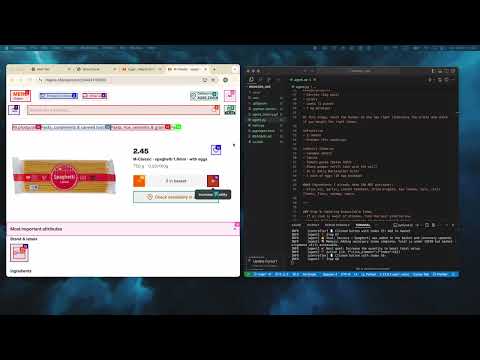](https://www.youtube.com/watch?v=L2Ya9PYNns8)++<br/><br/>+## More examplesFor more examples see the [examples](examples) folder or join the [Discord](https://link.browser-use.com/discord) and show off your project.diff --git a/examples/use-cases/shopping.py b/examples/use-cases/shopping.pynew file mode 100644index 000000000..1328aabd8--- /dev/null+++ b/examples/use-cases/shopping.py@@ -0,0 +1,119 @@+from langchain_openai import ChatOpenAI+from browser_use import Agent, Browser, BrowserConfig+from dotenv import load_dotenv+load_dotenv()++import asyncio++task="""+ ### Prompt for Shopping Agent – Migros Online Grocery Order++**Objective:**+Visit [Migros Online](https://www.migros.ch/en), search for the required grocery items, add them to the cart, select an appropriate delivery window, and complete the checkout process using TWINT.++**Important:**+- Make sure that you don't buy more than it's needed for each article.+- After your search, if you click the "+" button, it adds the item to the basket.+- if you open the basket sidewindow menu, you can close it by clicking the X button on the top right. This will help you navigate easier.+---++### Step 1: Navigate to the Website+- Open [Migros Online](https://www.migros.ch/en).+- You should be logged in as Nikolaos Kaliorakis++---++### Step 2: Add Items to the Basket++#### Shopping List:++**Meat & Dairy:**+- Beef Minced meat (1 kg)+- Gruyère cheese (grated preferably)+- 2 liters full-fat milk+- Butter (cheapest available)++**Vegetables:**+- Carrots (1kg pack)+- Celery+- Leeks (1 piece)+- 1 kg potatoes++At this stage, check the basket on the top right (indicates the price) and check if you bought the right items.++**Fruits:**+- 2 lemons+- Oranges (for snacking)++**Pantry Items:**+- Lasagna sheets+- Tahini+- Tomato paste (below CHF2)+- Black pepper refill (not with the mill)+- 2x 1L Oatly Barista(oat milk)+- 1 pack of eggs (10 egg package)++#### Ingredients I already have (DO NOT purchase):+- Olive oil, garlic, canned tomatoes, dried oregano, bay leaves, salt, chili flakes, flour, nutmeg, cumin.++---++### Step 3: Handling Unavailable Items+- If an item is **out of stock**, find the best alternative.+- Use the following recipe contexts to choose substitutions:+ - **Pasta Bolognese & Lasagna:** Minced meat, tomato paste, lasagna sheets, milk (for béchamel), Gruyère cheese.+ - **Hummus:** Tahini, chickpeas, lemon juice, olive oil.+ - **Chickpea Curry Soup:** Chickpeas, leeks, curry, lemons.+ - **Crispy Slow-Cooked Pork Belly with Vegetables:** Potatoes, butter.+- Example substitutions:+ - If Gruyère cheese is unavailable, select another semi-hard cheese.+ - If Tahini is unavailable, a sesame-based alternative may work.++---++### Step 4: Adjusting for Minimum Order Requirement+- If the total order **is below CHF 99**, add **a liquid soap refill** to reach the minimum. If it;s still you can buy some bread, dark chockolate.+- At this step, check if you have bought MORE items than needed. If the price is more then CHF200, you MUST remove items.+- If an item is not available, choose an alternative.+- if an age verification is needed, remove alchoholic products, we haven't verified yet.++---++### Step 5: Select Delivery Window+- Choose a **delivery window within the current week**. It's ok to pay up to CHF2 for the window selction.+- Preferably select a slot within the workweek.++---++### Step 6: Checkout+- Proceed to checkout.+- Select **TWINT** as the payment method.+- Check out.+-+- if it's needed the userename is: [email protected]+- and the password is : TheCircuit.Migros.dev!+---++### Step 7: Confirm Order & Output Summary+- Once the order is placed, output a summary including:+ - **Final list of items purchased** (including any substitutions).+ - **Total cost**.+ - **Chosen delivery time**.++**Important:** Ensure efficiency and accuracy throughout the process."""++browser = Browser()++agent = Agent(+ task=task,+ llm=ChatOpenAI(model="gpt-4o"),+ browser=browser,+ )++async def main():+ await agent.run()+ input("Press Enter to close the browser...")+ await browser.close()++if __name__ == '__main__':+ asyncio.run(main())