
A visual, example-driven guide to Claude Code — from basic concepts to advanced agents, with copy-paste templates that bring immediate value.
docs: sync to Claude Code v2.1.285 (#188)
Luong NGUYEN556af8d52327
diff --git a/.claude/skills/lesson-quiz/SKILL.md b/.claude/skills/lesson-quiz/SKILL.mdindex 3a8a535..66920fd 100644--- a/.claude/skills/lesson-quiz/SKILL.md+++ b/.claude/skills/lesson-quiz/SKILL.md@@ -3,13 +3,13 @@ name: lesson-quizdescription: "Test a learner on a single Claude Code tutorial lesson (01-10) with 10 questions, scoring answers and flagging weak spots. Use before, during, or after a lesson. Don't use for whole-tutorial assessment or explaining a topic instead of testing it."effort: highmetadata:- version: 1.4.0+ version: 1.5.0author: Luong NGUYEN---# Lesson Quiz-Interactive quiz that tests understanding of a specific Claude Code lesson with 8-10 questions, provides per-question feedback, and identifies areas to review.+Interactive quiz that tests understanding of a specific Claude Code lesson with 10 questions, provides per-question feedback, and identifies areas to review.## Prerequisitesdiff --git a/.claude/skills/lesson-quiz/references/question-bank.md b/.claude/skills/lesson-quiz/references/question-bank.mdindex ae0c7cd..7180b7d 100644--- a/.claude/skills/lesson-quiz/references/question-bank.md+++ b/.claude/skills/lesson-quiz/references/question-bank.md@@ -279,15 +279,15 @@- **Question**: Which built-in subagent is optimized for read-only codebase exploration?- **Options**: A) general-purpose | B) Plan | C) Explore | D) Bash- **Correct**: C-- **Explanation**: The Explore subagent is the read-only codebase search agent. Since v2.1.198 it inherits the session model, capped at Opus — `model: haiku` is opt-in, not the default. It supports three thoroughness levels: quick, medium, very thorough.+- **Explanation**: The Explore subagent is the read-only codebase search agent. Since v2.1.198 it inherits the session model, capped at Opus on the Claude API — `model: haiku` is opt-in, not the default. It supports three thoroughness levels: quick, medium, very thorough.- **Review**: Built-in subagents section### Q4- **Category**: practical- **Question**: How do you restrict which subagents a coordinator agent can spawn?-- **Options**: A) Use `allowed-agents:` field | B) Use `Task(agent_name)` syntax in the `tools` field | C) Set `spawn-limit: 2` | D) Use `restrict-agents: [name1, name2]`+- **Options**: A) Use `allowed-agents:` field | B) Use `Agent(agent_name)` syntax in the `tools` field | C) Set `spawn-limit: 2` | D) Use `restrict-agents: [name1, name2]`- **Correct**: B-- **Explanation**: Adding `Task(worker, researcher)` in the tools field creates an allowlist — the agent can only spawn subagents named "worker" or "researcher".+- **Explanation**: For an agent running as the main thread with `claude --agent`, `tools: Agent(worker, researcher)` creates an allowlist — it can only spawn subagents named "worker" or "researcher". `Task(...)` still works as an alias (the Task tool was renamed Agent in v2.1.63).- **Review**: Restrict spawnable subagents section### Q5@@ -456,7 +456,7 @@- **Options**: A) Return modified JSON on stderr | B) Return JSON with `updatedInput` field on stdout (exit code 0) | C) Write to a temp file | D) Hooks cannot modify inputs- **Correct**: B- **Explanation**: A PreToolUse hook can output JSON with `"updatedInput": {...}` on stdout (with exit 0) to modify the tool's parameters before Claude uses them.-- **Review**: PreToolUse output section+- **Review**: PreToolUse section### Q5- **Category**: conceptual@@ -553,9 +553,9 @@### Q6- **Category**: practical- **Question**: How do you install a plugin from GitHub?-- **Options**: A) `claude plugin add github:username/repo` | B) `/plugin install github:username/repo` | C) `npm install @claude/username-repo` | D) `git clone` then `claude plugin register`+- **Options**: A) `claude plugin add github:username/repo` | B) `/plugin marketplace add username/repo`, then `/plugin install plugin-name@marketplace-name` | C) `npm install @claude/username-repo` | D) `git clone` then `claude plugin register`- **Correct**: B-- **Explanation**: Use `/plugin install github:username/repo` to install directly from a GitHub repository.+- **Explanation**: Add the GitHub repo as a marketplace with `/plugin marketplace add username/repo`, then install with `/plugin install plugin-name@marketplace-name`. Since v2.1.275 you can do both in one step inside a session: `/plugin install plugin-name --marketplace username/repo`. There is no `github:` install form.- **Review**: Installation methods section### Q7@@ -707,7 +707,7 @@- **Question**: On a model where thinking can be turned off (for example Sonnet 5), how do you toggle extended thinking on or off during a session?- **Options**: A) Type `/effort max` | B) Press `Option+T` (macOS) or `Alt+T` | C) Include "ultrathink" in prompt | D) It's always enabled and cannot be toggled- **Correct**: B-- **Explanation**: Option+T (macOS) or Alt+T toggles extended thinking on/off for the session. (`Ctrl+O` toggles verbose mode to show/hide the reasoning text.) On Opus 5.5 (the default model since v2.1.280) and the Fable models, thinking can't be turned off: the toggle, `alwaysThinkingEnabled` and `MAX_THINKING_TOKENS=0` have no effect there. For one-off deep reasoning, include "ultrathink" in your prompt; for session-level control, use the `/effort` command.+- **Explanation**: Option+T (macOS) or Alt+T toggles extended thinking on/off for the session. (`Ctrl+O` toggles verbose mode to show/hide the reasoning text.) On Opus 5.5 (the default model since v2.1.280), Sonnet 5.5 (what the `sonnet` alias resolves to on the Anthropic API since v2.1.284), and the Fable models, thinking can't be turned off: the toggle, `alwaysThinkingEnabled` and `MAX_THINKING_TOKENS=0` have no effect there. For one-off deep reasoning, include "ultrathink" in your prompt; for session-level control, use the `/effort` command.- **Review**: Extended Thinking section### Q5@@ -821,9 +821,9 @@### Q8- **Category**: practical- **Question**: How do you fork an existing session to try a different approach without losing the original?-- **Options**: A) Use `/fork` command | B) Use `--resume session-name --fork-session "branch name"` | C) Use `--clone session-name` | D) Use `/branch session-name`+- **Options**: A) Use `/fork` command | B) Use `--resume session-name --fork-session` | C) Use `--clone session-name` | D) Use `/branch session-name`- **Correct**: B-- **Explanation**: `--resume` with `--fork-session` creates a new independent branch from the resumed session, preserving the original conversation.+- **Explanation**: `--fork-session` (used with `--resume` or `--continue`) creates a new session ID instead of reusing the original, so the original conversation is preserved.- **Review**: Session management section### Q9@@ -844,8 +844,8 @@----**Last Updated**: September 26, 2026-**Claude Code Version**: 2.1.283+**Last Updated**: September 30, 2026+**Claude Code Version**: 2.1.285**Sources**:- https://code.claude.com/docs/en/hooks- https://code.claude.com/docs/en/skills@@ -857,3 +857,4 @@- https://code.claude.com/docs/en/plugins-reference- https://code.claude.com/docs/en/cli-reference- https://code.claude.com/docs/en/model-config#extended-thinking+- https://code.claude.com/docs/en/plugins/installdiff --git a/.claude/skills/self-assessment/SKILL.md b/.claude/skills/self-assessment/SKILL.mdindex 679cda6..c862a5f 100644--- a/.claude/skills/self-assessment/SKILL.md+++ b/.claude/skills/self-assessment/SKILL.md@@ -1,6 +1,6 @@---name: self-assessment-version: 2.5.1+version: 2.5.2description: Comprehensive Claude Code self-assessment and learning path advisor. Runs a multi-category quiz covering 10 feature areas, produces a detailed skill profile with per-topic scores, identifies specific gaps, and generates a personalized learning path with prioritized next steps. Use when asked to "assess my level", "take the quiz", "find my level", "where should I start", "what should I learn next", "check my skills", "skill check", or "level up".---@@ -111,7 +111,7 @@ Options:Options:1. "Used checkpoints for safe experimentation" — Created checkpoints, used Esc+Esc or /rewind, restored code and/or conversation, or used either Summarize option (summarize from here / summarize up to here)2. "Used planning mode or extended thinking" — Activated planning via /plan, Shift+Tab, or --permission-mode plan; toggled extended thinking with Alt+T/Option+T-3. "Configured permission modes" — Used any of the six modes — manual (renamed from default in v2.1.200), acceptEdits, plan, auto, dontAsk, or bypassPermissions — via CLI flags, keyboard shortcuts, or settings+3. "Configured permission modes" — Used any of the six modes — manual (renamed from default in v2.1.200), acceptEdits, plan, auto, dontAsk, or bypassPermissions — via CLI flags, keyboard shortcuts, or settings (just starting in the built-in auto default doesn't count)4. "Used remote/desktop/web features" — Used `claude --remote-control`, `claude --cloud`, `/teleport`, `/desktop`, or worktrees with `claude -w`**Scoring for Round 4:**@@ -348,7 +348,7 @@ Use these specific recommendations when a topic is a gap:**Advanced Features (score 0)**:- Tutorial: [09-advanced-features/](../../../09-advanced-features/)-- Focus on: Planning mode (/plan or Shift+Tab), permission modes (6 types: manual — renamed from default in v2.1.200 — acceptEdits, plan, auto, dontAsk, bypassPermissions), extended thinking (Alt+T/Option+T toggle — no effect on Opus 5.5, the default model, where thinking stays on)+- Focus on: Planning mode (/plan or Shift+Tab), permission modes (6 types: manual — renamed from default in v2.1.200 — acceptEdits, plan, auto, dontAsk, bypassPermissions), extended thinking (Alt+T/Option+T toggle — no effect on Opus 5.5 (the default model), Sonnet 5.5, or the Fable models, where thinking stays on)- Key exercise: Use planning mode to design a feature, then implement it- Done when: You can switch between planning and implementation modes fluentlydiff --git a/.claude/skills/self-assessment/references/deep-assessment-rounds.md b/.claude/skills/self-assessment/references/deep-assessment-rounds.mdindex 915fb3a..52ac0b7 100644--- a/.claude/skills/self-assessment/references/deep-assessment-rounds.md+++ b/.claude/skills/self-assessment/references/deep-assessment-rounds.md@@ -49,7 +49,7 @@ Options:Options:1. "Used checkpoints for safe experimentation" — Created checkpoints, used Esc+Esc or /rewind, restored code and/or conversation, or used either Summarize option (summarize from here / summarize up to here)2. "Used planning mode or extended thinking" — Activated planning via /plan, Shift+Tab, or --permission-mode plan; toggled extended thinking with Alt+T/Option+T-3. "Configured permission modes" — Used any of the six modes — manual (renamed from default in v2.1.200), acceptEdits, plan, auto, dontAsk, or bypassPermissions — via CLI flags, keyboard shortcuts, or settings+3. "Configured permission modes" — Used any of the six modes — manual (renamed from default in v2.1.200), acceptEdits, plan, auto, dontAsk, or bypassPermissions — via CLI flags, keyboard shortcuts, or settings (just starting in the built-in auto default doesn't count)4. "Used remote/desktop/web features" — Used `claude --remote-control`, `claude --cloud`, `/teleport`, `/desktop`, or worktrees with `claude -w`**Scoring:** Option 1 → **Checkpoints** (0-1); Options 2-4 → **Advanced Features** (0-3)@@ -69,11 +69,12 @@ Options:----**Last Updated**: September 2, 2026-**Claude Code Version**: 2.1.257+**Last Updated**: September 30, 2026+**Claude Code Version**: 2.1.285**Sources**:- https://code.claude.com/docs/en/memory- https://code.claude.com/docs/en/sub-agents- https://code.claude.com/docs/en/permission-modes- https://code.claude.com/docs/en/checkpointing- https://code.claude.com/docs/en/plugins-reference+- https://code.claude.com/docs/en/permission-modes#which-mode-a-session-starts-indiff --git a/.claude/skills/self-assessment/references/topic-recommendations.md b/.claude/skills/self-assessment/references/topic-recommendations.mdindex 31af852..06f44ea 100644--- a/.claude/skills/self-assessment/references/topic-recommendations.md+++ b/.claude/skills/self-assessment/references/topic-recommendations.md@@ -70,7 +70,7 @@ Use these specific recommendations when a topic is a gap. Paths are relative to**Advanced Features (score 0)**:- Tutorial: [09-advanced-features/](../../../../09-advanced-features/)-- Focus on: Planning mode (/plan or Shift+Tab), permission modes (6 types: manual — renamed from default in v2.1.200 — acceptEdits, plan, auto, dontAsk, bypassPermissions), extended thinking (Alt+T/Option+T toggle — no effect on Opus 5.5, the default model, where thinking stays on)+- Focus on: Planning mode (/plan or Shift+Tab), permission modes (6 types: manual — renamed from default in v2.1.200 — acceptEdits, plan, auto, dontAsk, bypassPermissions), extended thinking (Alt+T/Option+T toggle — no effect on Opus 5.5 (the default model), Sonnet 5.5, or the Fable models, where thinking stays on)- Key exercise: Use planning mode to design a feature, then implement it- Done when: You can switch between planning and implementation modes fluently@@ -100,8 +100,8 @@ Use these specific recommendations when a topic is a gap. Paths are relative to----**Last Updated**: September 26, 2026-**Claude Code Version**: 2.1.283+**Last Updated**: September 30, 2026+**Claude Code Version**: 2.1.285**Sources**:- https://code.claude.com/docs/en/hooks- https://code.claude.com/docs/en/memorydiff --git a/01-slash-commands/README.md b/01-slash-commands/README.mdindex 03797ce..7b84bb4 100644--- a/01-slash-commands/README.md+++ b/01-slash-commands/README.md@@ -43,7 +43,7 @@ Built-in commands are shortcuts for common actions. There are **60+ built-in com| `/desktop` | Continue in Desktop app (alias: `/app`) || `/diff` | Interactive diff viewer for uncommitted changes. In fullscreen rendering it instead opens a diff panel beside the conversation that stays open while you keep working — it lists changed files with added/removed line counts and refreshes every time Claude edits a file or runs a shell command; run `/diff` again or click `✕` to close it (v2.1.260+). The classic renderer opens the viewer in place of the prompt || `/doctor` | Diagnose installation health — openable while Claude is responding; shows status icons; press `f` to auto-fix issues (enhanced in v2.1.116; layout refreshed to a flat tree with clearer icons in v2.1.178); `/doctor prompt-audit` (also `/checkup prompt-audit`) audits CLAUDE.md files, skills, agents, and commands for prompting patterns written for older models (v2.1.283) |-| `/effort [low\|medium\|high\|xhigh\|max\|auto]` | Set effort level via interactive arrow-key slider. Levels: `low` → `medium` → `high` → `xhigh` (new in v2.1.111) → `max`. Default is `medium` on Opus 5.5 (the default model since v2.1.280), `high` on Opus 5, Sonnet 5, and Opus 4.8, and `xhigh` on Opus 4.7; `xhigh` needs Opus 5.5, Opus 5, Sonnet 5, Opus 4.8, or Opus 4.7; `max` works on Opus 5.5, Opus 5, Sonnet 5, Opus 4.8/4.7/4.6 and Sonnet 4.6. A level saved before `/effort` became per-model doesn't apply to newly released models such as Opus 5.5 (v2.1.280). The menu also offers `ultracode` (not a model effort level — it sends `xhigh` and has Claude orchestrate dynamic workflows; session-only) |+| `/effort [low\|medium\|high\|xhigh\|max\|auto\|ultracode [on\|off]]` | Set effort level via interactive arrow-key slider. Levels: `low` → `medium` → `high` → `xhigh` (new in v2.1.111) → `max`. Default is `medium` on Opus 5.5 (the default model since v2.1.280) and Sonnet 5.5, `high` on Opus 5, Sonnet 5, and Opus 4.8, and `xhigh` on Opus 4.7; `xhigh` needs Opus 5.5, Sonnet 5.5, Opus 5, Sonnet 5, Opus 4.8, or Opus 4.7; `max` works on Opus 5.5, Sonnet 5.5, Opus 5, Sonnet 5, Opus 4.8/4.7/4.6 and Sonnet 4.6. A level saved before `/effort` became per-model doesn't apply to newly released models such as Opus 5.5 (v2.1.280). The slider also has an **Ultracode** toggle (Tab, or `/effort ultracode [on\|off]`) — not a model effort level: it has Claude orchestrate dynamic workflows at whichever effort level the session runs at. Since v2.1.284 it no longer forces `xhigh` and stays on when you change the level; `/effort ultracode` lasts for the session, and the `ultracode` setting makes it persist || `/exit` | Exit the REPL (alias: `/quit`) || `/export [filename]` | Export the current conversation to a file or clipboard || `/usage-credits` | Configure extra usage for rate limits (renamed from `/extra-usage` in v2.1.144; `/extra-usage` still works as an alias) |@@ -135,6 +135,7 @@ These skills ship with Claude Code and are invoked like slash commands:- `/fork` and `/subtask` swapped roles in **v2.1.212**. `/fork` now copies the conversation into a new independent background session; the forked-subagent behavior it used to have moved to the new `/subtask` command. History: `/fork` was an alias for `/branch` from v2.1.77 to v2.1.161; from v2.1.161 to v2.1.211 it started a forked subagent (what `/subtask` does now). When agent view is turned off, `/subtask` is unavailable and `/fork` keeps the forked-subagent behavior- `/resume` (no arguments) opens a picker of past sessions — including ones removed from the visible list — and resumes the chosen one as a background session (v2.1.212)+- `/resume` and `claude --resume` on a session that is running in the background open that session instead of refusing, and `claude --resume <id> "prompt"` sends the prompt as its next turn (v2.1.285)- `/output-style` was deprecated (v2.1.73) and removed (v2.1.91), then **re-added in v2.1.269** — it is a live command again in v2.1.278, and works in headless and Remote Control sessions. Output styles also remain available via `/config` → Output style or the `outputStyle` setting; the built-ins are Default, Proactive, Explanatory, Learning, and Concise (added in v2.1.237)- `/review` became a full alias of `/code-review` — same targets, effort levels, and flags (v2.1.223). History: it first moved onto the `/code-review medium` engine in v2.1.186 while remaining PR-only- `/effort` command added; `max` level available on Opus 4.6+ (originally Opus 4.6-only)@@ -650,8 +651,8 @@ If both exist with the same name, the **skill takes precedence**. Remove one or----**Last Updated**: September 26, 2026-**Claude Code Version**: 2.1.283+**Last Updated**: September 30, 2026+**Claude Code Version**: 2.1.285**Sources**:- https://code.claude.com/docs/en/output-styles- https://code.claude.com/docs/en/skills@@ -671,6 +672,8 @@ If both exist with the same name, the **skill takes precedence**. Remove one or- https://github.com/anthropics/claude-code/releases/tag/v2.1.281- https://code.claude.com/docs/en/fast-mode- https://github.com/anthropics/claude-code/releases/tag/v2.1.283+- https://code.claude.com/docs/en/workflows#let-claude-decide-with-ultracode+- https://github.com/anthropics/claude-code/releases/tag/v2.1.285**Compatible Models**: Claude Fable 5, Claude Opus 5, Claude Sonnet 5, Claude Sonnet 4.6, Claude Opus 4.8, Claude Haiku 4.5*Part of the [Claude How To](../) guide series*diff --git a/02-memory/README.md b/02-memory/README.mdindex 040e1c8..23a764f 100644--- a/02-memory/README.md+++ b/02-memory/README.md@@ -450,7 +450,7 @@ paths: src/api/**/*.tsRules in `.claude/rules/` support two organizational features:- **Subdirectories**: Rules are discovered recursively, so you can organize them into topic-based folders (e.g., `rules/api/`, `rules/testing/`, `rules/security/`)-- **Symlinks**: Symlinks are supported for sharing rules across multiple projects. For example, you can symlink a shared rule file from a central location into each project's `.claude/rules/` directory+- **Symlinks**: Symlinks are supported for sharing rules across multiple projects. For example, you can symlink a shared rule file from a central location into each project's `.claude/rules/` directory. Since v2.1.284, a rule symlinked from outside the project — or a `.claude` directory symlinked from outside — shows the same external-imports approval prompt as an `@path` import## Memory Locations Table@@ -1244,10 +1244,11 @@ Auto Memory is a separate mechanism (`~/.claude/projects/<project>/memory/`), no----**Last Updated**: September 26, 2026-**Claude Code Version**: 2.1.283+**Last Updated**: September 30, 2026+**Claude Code Version**: 2.1.285**Sources**:- https://code.claude.com/docs/en/memory- https://code.claude.com/docs/en/memory#agents-md- https://code.claude.com/docs/en/memory#when-agents-md-support-is-unavailable+- https://github.com/anthropics/claude-code/releases/tag/v2.1.284**Compatible Models**: Claude Fable 5, Claude Opus 5, Claude Sonnet 5, Claude Sonnet 4.6, Claude Opus 4.8, Claude Haiku 4.5diff --git a/03-skills/README.md b/03-skills/README.mdindex 635a112..1753fd4 100644--- a/03-skills/README.md+++ b/03-skills/README.md@@ -183,7 +183,7 @@ paths: "src/api/**/*.ts" # Glob patterns limiting when skill activ| `allowed-tools` | Comma-separated list of tools the skill may use without permission prompts. || `disallowed-tools` | Comma-separated list of tools to remove while the skill is active (complements `allowed-tools`). Added v2.1.152. || `model` | Model override while the skill is active (e.g., `opus`, `sonnet`). |-| `effort` | Effort level override while the skill is active: `low`, `medium`, `high`, `xhigh`, or `max` — all five are supported on Opus 5.5, Opus 5, Sonnet 5, Opus 4.8, and Opus 4.7. The default effort is `high` on every model that supports effort, except Opus 5.5, which defaults to `medium`, and Opus 4.7, which defaults to `xhigh`. |+| `effort` | Effort level override while the skill is active: `low`, `medium`, `high`, `xhigh`, or `max` — all five are supported on Opus 5.5, Sonnet 5.5, Opus 5, Sonnet 5, Opus 4.8, and Opus 4.7. The default effort is `high` on every model that supports effort, except Opus 5.5 and Sonnet 5.5, which default to `medium`, and Opus 4.7, which defaults to `xhigh`. || `context` | `fork` to run the skill in a forked subagent context with its own context window. || `agent` | Subagent type when `context: fork` (e.g., `Explore`, `Plan`, `general-purpose`). || `background` | Only meaningful with `context: fork`. Defaults to `true` for `context: fork` skills, so they run in the background; set `false` to run them in the foreground. Added v2.1.218. |@@ -897,8 +897,8 @@ Once you start building skills seriously, two things become essential: a library----**Last Updated**: September 26, 2026-**Claude Code Version**: 2.1.283+**Last Updated**: September 30, 2026+**Claude Code Version**: 2.1.285**Sources**:- https://code.claude.com/docs/en/skills- https://code.claude.com/docs/en/slash-commandsdiff --git a/05-mcp/README.md b/05-mcp/README.mdindex 8f2bed2..d1edddb 100644--- a/05-mcp/README.md+++ b/05-mcp/README.md@@ -146,7 +146,7 @@ Because `--transport` does not accept `ws`, configure it in `.mcp.json` or throuThe `type: "ws"` entry accepts the same `url`, `headers`, `headersHelper`, `timeout`, and `alwaysLoad` fields as `http`. Authentication is **header-only** — there is no OAuth flow for WebSocket servers.-> **Note**: WebSocket servers don't appear in `claude mcp list` output. Use `claude mcp get <name>` or the `/mcp` panel to check them.+> **Note**: Since v2.1.285, `claude mcp list` lists WebSocket (`ws`) servers with their URL and health status (earlier versions left them out). You can also check them with `claude mcp get <name>` or the `/mcp` panel.Like HTTP and SSE, WebSocket connections use a 5-minute idle window; stdio and WebSocket have no per-request timer. A `url` entry with no `type` is an error naming `"http"`, `"sse"`, and `"ws"` as the valid values.@@ -1300,8 +1300,8 @@ export GITHUB_TOKEN="your_token"----**Last Updated**: September 26, 2026-**Claude Code Version**: 2.1.283+**Last Updated**: September 30, 2026+**Claude Code Version**: 2.1.285**Sources**:- https://code.claude.com/docs/en/mcp- https://code.claude.com/docs/en/managed-mcp@@ -1312,4 +1312,5 @@ export GITHUB_TOKEN="your_token"- https://code.claude.com/docs/en/model-config- https://code.claude.com/docs/en/mcp#configure-tool-search- https://code.claude.com/docs/en/env-vars+- https://github.com/anthropics/claude-code/releases/tag/v2.1.285**Compatible Models**: Claude Fable 5, Claude Opus 5, Claude Sonnet 5, Claude Sonnet 4.6, Claude Opus 4.8, Claude Haiku 4.5diff --git a/07-plugins/README.md b/07-plugins/README.mdindex 7fda0d0..85260dd 100644--- a/07-plugins/README.md+++ b/07-plugins/README.md@@ -804,6 +804,7 @@ claude plugin tag [path] # Create a {name}--v{version} releaclaude plugin prune # Remove orphaned auto-installed plugin dependencies (v2.1.121+)claude plugin uninstall <name> --prune # Uninstall and cascade-clean orphaned dependencies (v2.1.121+)claude plugin details <name> # Show inventory + projected per-turn token cost (v2.1.139+)+claude plugin configure <name> # Show a plugin's options and which are unset; save values from stdin with --values-stdin (v2.1.285+)claude plugin init <name> # Scaffold a new plugin (alias: claude plugin new)```@@ -815,7 +816,7 @@ claude plugin init <name> # Scaffold a new plugin (alias: cla|---------|------|---------|| `plugin init` | `--with <components...>` | Scaffold specific component folders: `skills`, `agents`, `hooks`, `mcp`, `lsp`, `output-style`, `channel` || `plugin init` | `-f`, `--force` | Overwrite an existing `.claude-plugin/` directory |-| `plugin install` | `--config <key=value>` | Set a `userConfig` option at install time |+| `plugin install` | `--config <key=value>` | Set a `userConfig` option at install time; since v2.1.285, `<server>.<key>=<value>` sets a bundled `.mcpb` MCP server's own setting so it starts without visiting `/plugin` → Configure || `plugin install` | `-y`, `--yes` | Accept commands without a confirmation prompt || `plugin list` | `--available` | Also list plugins available from marketplaces (requires `--json`) || `plugin tag` | `--push` | Push the tag to the remote after creating it |@@ -931,7 +932,9 @@ claude --plugin-url https://example.com/releases/my-plugin-0.3.0.zip### From Git Repository```bash-/plugin install github:username/repo+/plugin marketplace add username/repo # Add the GitHub repo as a marketplace+/plugin install plugin-name@marketplace-name # Then install a plugin from it+/plugin install plugin-name --marketplace username/repo # Or both in one step (v2.1.275+)```## Auto-Update@@ -1194,7 +1197,9 @@ Complete PR review workflow with security, testing, and documentation checks.### Installing from GitHub```bash-/plugin install github:username/repo+/plugin marketplace add username/repo # Add the GitHub repo as a marketplace+/plugin install plugin-name@marketplace-name # Then install a plugin from it+/plugin install plugin-name --marketplace username/repo # Or both in one step (v2.1.275+)```### Listing Installed Plugins@@ -1305,8 +1310,8 @@ The following Claude Code features work together with plugins:----**Last Updated**: September 26, 2026-**Claude Code Version**: 2.1.283+**Last Updated**: September 30, 2026+**Claude Code Version**: 2.1.285**Sources**:- https://code.claude.com/docs/en/plugins- https://code.claude.com/docs/en/plugins-reference@@ -1330,4 +1335,6 @@ The following Claude Code features work together with plugins:- https://code.claude.com/docs/en/plugin-evals- https://github.com/anthropics/claude-code/releases/tag/v2.1.281- https://github.com/anthropics/claude-code/releases/tag/v2.1.283+- https://code.claude.com/docs/en/plugins/install+- https://github.com/anthropics/claude-code/releases/tag/v2.1.285**Compatible Models**: Claude Fable 5, Claude Opus 5, Claude Sonnet 5, Claude Sonnet 4.6, Claude Opus 4.8, Claude Haiku 4.5diff --git a/09-advanced-features/README.md b/09-advanced-features/README.mdindex fb47d43..d2972d6 100644--- a/09-advanced-features/README.md+++ b/09-advanced-features/README.md@@ -225,11 +225,11 @@ Extended thinking is a deliberate, step-by-step reasoning process where Claude:### Activating Extended Thinking**Keyboard shortcut**:-- `Option + T` (macOS) / `Alt + T` (Windows/Linux) - Toggle extended thinking. On Opus 5.5 (the default model since v2.1.280) and the Fable models, thinking can't be turned off — the toggle, `alwaysThinkingEnabled`, and `MAX_THINKING_TOKENS=0` have no effect there.+- `Option + T` (macOS) / `Alt + T` (Windows/Linux) - Toggle extended thinking. On Opus 5.5 (the default model since v2.1.280), Sonnet 5.5, and the Fable models, thinking can't be turned off — the toggle, `alwaysThinkingEnabled`, and `MAX_THINKING_TOKENS=0` have no effect there.**Automatic activation**:- Enabled by default for all models (Opus 5, Opus 4.8, Opus 4.7, Sonnet 4.6, Haiku 4.5)-- Opus 5 / Opus 4.8: Adaptive reasoning with effort levels: `low` (○), `medium` (◐), `high` (●), `xhigh`, `max`. The default is `medium` on Opus 5.5 (the default model since v2.1.280), `high` on Opus 5 (v2.1.219), Opus 4.8 (v2.1.154), Opus 4.6, and Sonnet 4.6, and `xhigh` on Opus 4.7. `xhigh` is available on Opus 5.5, Opus 5, Opus 4.8, and Opus 4.7 (it falls back to `high` on Opus 4.6 / Sonnet 4.6). `max` works on Opus 5.5, Opus 5, and Opus 4.8/4.7/4.6 and Sonnet 4.6 (session-only). Haiku 4.5 has no effort levels. Opus 5, Opus 4.8, and Opus 4.7 have a 1M-token native context window (1M context fix landed in v2.1.117 — before that, `/context` miscounted Opus 4.7 against a 200K window and triggered premature autocompact). Since v2.1.129, `/context` shows its visualization in-UI only; the ASCII viz no longer leaks into the conversation context (~1.6k tokens saved per call), so `/context` is safe to invoke freely.+- Opus 5 / Opus 4.8: Adaptive reasoning with effort levels: `low` (○), `medium` (◐), `high` (●), `xhigh`, `max`. The default is `medium` on Opus 5.5 (the default model since v2.1.280) and Sonnet 5.5, `high` on Opus 5 (v2.1.219), Sonnet 5, Opus 4.8 (v2.1.154), Opus 4.6, and Sonnet 4.6, and `xhigh` on Opus 4.7. `xhigh` is available on Opus 5.5, Sonnet 5.5, Opus 5, Sonnet 5, Opus 4.8, and Opus 4.7 (it falls back to `high` on Opus 4.6 / Sonnet 4.6). `max` works on Opus 5.5, Sonnet 5.5, Opus 5, Sonnet 5, and Opus 4.8/4.7/4.6 and Sonnet 4.6 (session-only). Haiku 4.5 has no effort levels. Opus 5, Opus 4.8, and Opus 4.7 have a 1M-token native context window (1M context fix landed in v2.1.117 — before that, `/context` miscounted Opus 4.7 against a 200K window and triggered premature autocompact). Since v2.1.129, `/context` shows its visualization in-UI only; the ASCII viz no longer leaks into the conversation context (~1.6k tokens saved per call), so `/context` is safe to invoke freely.- Pro/Max subscribers on Opus 4.6 / Sonnet 4.6: default effort was raised from `medium` to `high` in v2.1.117.- Other models: Fixed budget up to 31,999 tokens@@ -243,9 +243,9 @@ Extended thinking is a deliberate, step-by-step reasoning process where Claude:export MAX_THINKING_TOKENS=1024```-**Effort level** (supported on Opus 5, Opus 4.8, Opus 4.7, Opus 4.6, and Sonnet 4.6 — not Haiku 4.5):+**Effort level** (supported on Opus 5.5, Sonnet 5.5, Opus 5, Sonnet 5, Opus 4.8, Opus 4.7, Opus 4.6, and Sonnet 4.6 — not Haiku 4.5):```bash-export CLAUDE_CODE_EFFORT_LEVEL=high # low (○), medium (◐), high (●), xhigh (Opus 5/4.8/4.7), or max — default is high on Opus 5 and Opus 4.8+export CLAUDE_CODE_EFFORT_LEVEL=high # low (○), medium (◐), high (●), xhigh (Opus 5.5, Sonnet 5.5, Opus 5, Sonnet 5, Opus 4.8/4.7), or max — default is high on Opus 5 and Opus 4.8```**CLI flag**:@@ -258,7 +258,7 @@ claude --effort high "complex architectural review"/effort high```-> **Note:** The keyword "ultrathink" in prompts activates deep reasoning mode. Effort levels `low`, `medium`, `high`, and `max` are supported on Opus 5, Opus 4.8, Opus 4.7, Opus 4.6, and Sonnet 4.6 (Haiku 4.5 has none). `xhigh` is available on Opus 5, Opus 4.8, and Opus 4.7. The default effort is `high` on Opus 5, Opus 4.8 (and Opus 4.6 / Sonnet 4.6) and `xhigh` on Opus 4.7. Unlike Opus 4.8 and Opus 4.7, which pin their default effort on first run, Opus 5 has no such hold — a level you previously set carries over. The `/effort` menu also offers `ultracode`, which is **not** a model effort level — it sends `xhigh` and has Claude orchestrate dynamic workflows (session-only).+> **Note:** The keyword "ultrathink" in prompts activates deep reasoning mode. Effort levels `low`, `medium`, `high`, and `max` are supported on Opus 5.5, Sonnet 5.5, Opus 5, Sonnet 5, Opus 4.8, Opus 4.7, Opus 4.6, and Sonnet 4.6 (Haiku 4.5 has none). `xhigh` is available on Opus 5.5, Sonnet 5.5, Opus 5, Sonnet 5, Opus 4.8, and Opus 4.7. The default effort is `medium` on Opus 5.5 and Sonnet 5.5, `high` on Opus 5, Sonnet 5, Opus 4.8 (and Opus 4.6 / Sonnet 4.6) and `xhigh` on Opus 4.7. Unlike Opus 4.8 and Opus 4.7, which pin their default effort on first run, Opus 5 has no such hold — a level you previously set carries over. The `/effort` slider also has an **Ultracode** toggle (Tab, or `/effort ultracode [on|off]`), which is **not** a model effort level — it has Claude orchestrate dynamic workflows at whichever effort level the session runs at. Since v2.1.284 it no longer forces `xhigh` and stays on when you change the level; `--effort ultracode` and the Agent SDK's `effortLevel: "ultracode"` still set `xhigh`.### Safety-Classifier Fallback on Opus 5@@ -363,7 +363,7 @@ Extended thinking is controlled via environment variables, keyboard shortcuts, a# Set thinking token budgetexport MAX_THINKING_TOKENS=16000-# Set effort level (Opus 5, Opus 4.8, Opus 4.7, Opus 4.6, Sonnet 4.6): low (○), medium (◐), high (●), xhigh (Opus 5/4.8/4.7), or max — default is high on Opus 5 and Opus 4.8+# Set effort level (Opus 5.5, Sonnet 5.5, Opus 5, Sonnet 5, Opus 4.8, Opus 4.7, Opus 4.6, Sonnet 4.6): low (○), medium (◐), high (●), xhigh (Opus 5.5, Sonnet 5.5, Opus 5, Sonnet 5, Opus 4.8/4.7), or max — default is high on Opus 5 and Opus 4.8export CLAUDE_CODE_EFFORT_LEVEL=high```@@ -375,7 +375,7 @@ Toggle during a session with `Alt+T` / `Option+T`, set effort with `/effort`, or## Auto Mode-Auto Mode is a permission mode that uses a background safety classifier to review each action before execution. It allows Claude to work autonomously while blocking dangerous operations. It's available on all plans, but requires an eligible model (Claude Opus 5, Opus 4.6+, Sonnet 4.6+, or Fable 5 on the Anthropic API and Claude Platform on AWS; Opus 5, Sonnet 5, Opus 4.7, Opus 4.8, or Fable 5 on Bedrock, Vertex, Foundry, and signed-in Claude apps gateway sessions). On Team and Enterprise it is on by default — administrators can turn it off for the organization in managed settings.+Auto Mode is a permission mode that uses a background safety classifier to review each action before execution. It allows Claude to work autonomously while blocking dangerous operations. It's available on all plans, but requires an eligible model (Claude Opus 4.6 or later, Sonnet 4.6 or later, or a Fable model on the Anthropic API and Claude Platform on AWS; Sonnet 5 or later, Opus 4.7 or later, or a Fable model on Bedrock, Vertex, Foundry, and signed-in Claude apps gateway sessions). On Team and Enterprise it is on by default — administrators can turn it off for the organization in managed settings.### Requirements@@ -383,17 +383,18 @@ Auto mode is available only when your account meets all of these requirements:- **Plan**: all plans.- **Organization**: on Team and Enterprise, auto mode is available by default. Administrators can turn it off for the organization by setting `permissions.disableAutoMode` to `"disable"` in managed settings.-- **Model**: on the Anthropic API and Claude Platform on AWS — Claude Opus 4.6 or later (Opus 5 included), Sonnet 4.6 or later, or Fable 5. On Amazon Bedrock, Google Cloud's Agent Platform (Vertex AI), Microsoft Foundry, and signed-in Claude apps gateway sessions — only Claude Sonnet 5, Opus 4.7 or later (Opus 5 included), and Fable 5. Older models — Sonnet 4.5, Opus 4.5, Haiku, and claude-3 models — are not supported on any provider.+- **Model**: on the Anthropic API and Claude Platform on AWS — Claude Opus 4.6 or later, Sonnet 4.6 or later, or a Fable model. On Amazon Bedrock, Google Cloud's Agent Platform (Vertex AI), Microsoft Foundry, and signed-in Claude apps gateway sessions — only Claude Sonnet 5 or later, Opus 4.7 or later, and the Fable models. Older models — Sonnet 4.5, Opus 4.5, Haiku, and claude-3 models — are not supported on any provider.- **Provider**: available by default on the Anthropic API, Claude Platform on AWS, Amazon Bedrock, Google Cloud's Agent Platform (Vertex AI), Microsoft Foundry, and signed-in Claude apps gateway sessions. In v2.1.158 through v2.1.206, auto mode was off on all of these except the Anthropic API and Claude Platform on AWS until you set `CLAUDE_CODE_ENABLE_AUTO_MODE=1`; v2.1.207 removed the requirement. The variable is still accepted for compatibility and has no effect from v2.1.207 onward.- **Classifier**: adds extra token cost, except on Enterprise plans and Claude API accounts, where v2.1.278+ runs the check server-side at no charge### Enabling Auto Mode```bash-# Unlock auto mode with CLI flag (no longer required for Max subscribers on Opus 4.7 — access it directly)-claude --enable-auto-mode+# Interactive sessions start in auto mode when no permission mode is configured (v2.1.284+)+# To pick it explicitly, for example when your settings default to another mode:+claude --permission-mode auto-# Then cycle to it with Shift+Tab in the REPL+# Or cycle to it with Shift+Tab in the REPL```> **v2.1.112 update**: Auto mode no longer requires the `--enable-auto-mode` flag. Max subscribers access it directly on Opus 4.7.@@ -693,6 +694,8 @@ export CLAUDE_CODE_DISABLE_BACKGROUND_TASKS=trueConcurrency is not a background-task setting either — how many agents run at once is governed by `CLAUDE_CODE_MAX_CONCURRENT_SUBAGENTS` (default `20`).+Background Bash and PowerShell commands have a time limit (v2.1.285): a command started with `run_in_background` stops after its `timeout` — 30 minutes by default, at most 2 hours — and Claude is notified when one is stopped.+---## Monitor Tool (Event-Driven Streams)@@ -754,7 +757,7 @@ For a one-off task you already understand, a single agent (or a direct edit) is- **Launch**: ask Claude to create a workflow for the task (e.g. "run a workflow to review every file in `src/`"). Claude authors the orchestration script and runs it in the background.- **View**: the `/workflows` command shows running and completed workflow runs with live progress.-- **`ultracode`**: selecting `ultracode` in the `/effort` menu turns this on for the session — it sends `xhigh` to the model *and* has Claude orchestrate dynamic workflows by default. It is session-only and not accepted in the settings file. (As of v2.1.160 the trigger keyword is `ultracode`; the bare word "workflow" no longer triggers a run.)+- **`ultracode`**: turn it on with the Ultracode toggle in the `/effort` slider (Tab) or `/effort ultracode [on|off]` — Claude then orchestrates dynamic workflows by default, at whichever effort level the session runs at. Since v2.1.284 the toggle leaves the effort level unchanged (it used to force `xhigh`); `--effort ultracode` and the Agent SDK's `effortLevel: "ultracode"` still set `xhigh`. `/effort ultracode` lasts for the session; set the `ultracode` key in settings to start every session with it (`effortLevel` and `CLAUDE_CODE_EFFORT_LEVEL` don't accept `ultracode`). (As of v2.1.160 the trigger keyword is `ultracode`; the bare word "workflow" no longer triggers a run.)Workflows build on the subagent model — see [Subagents](../04-subagents/README.md) for how individual agents are defined and scoped.@@ -851,13 +854,13 @@ Permission modes control what actions Claude can take without explicit approval.| `manual` | Read files only; prompts for all other actions. Renamed from `default` in v2.1.200 — `default` is still accepted as an alias || `acceptEdits` | Read and edit files; prompts for commands || `plan` | Read files only (research mode, no edits) |-| `auto` | All actions with background safety classifier checks. Requires an eligible model (Opus 5.5, Opus 5, Sonnet 5, Opus 4.7/4.8, or Fable 5 on most providers) and provider — available on all plans, see [Auto Mode](#auto-mode) |+| `auto` | All actions with background safety classifier checks. Requires an eligible model (Sonnet 5 or later, Opus 4.7 or later, or a Fable model on every provider; Opus 4.6 and Sonnet 4.6 also qualify on the Anthropic API and Claude Platform on AWS) and provider — available on all plans, see [Auto Mode](#auto-mode) || `bypassPermissions` | All actions, no permission checks (dangerous) || `dontAsk` | Only pre-approved tools execute; all others denied |-> **Note**: The interactive default mode was renamed from `default` to **Manual** in v2.1.200 (across the CLI, `--help`, VS Code, and JetBrains), and a grey ⏸ badge appears in the footer while it is active (v2.1.203). Both `--permission-mode manual` and `--permission-mode default` work, as do `"defaultMode": "manual"` and `"defaultMode": "default"` in settings. Note that the settings key is `permissions.defaultMode` — there is no `permissions.mode` key, so the examples below use the canonical spelling.+> **Note**: The `default` permission mode was renamed to **Manual** in v2.1.200 (across the CLI, `--help`, VS Code, and JetBrains), and a grey ⏸ badge appears in the footer while it is active (v2.1.203). Both `--permission-mode manual` and `--permission-mode default` work, as do `"defaultMode": "manual"` and `"defaultMode": "default"` in settings. Note that the settings key is `permissions.defaultMode` — there is no `permissions.mode` key, so the examples below use the canonical spelling.-Cycle through modes with `Shift+Tab` in the CLI. Set a default with the `--permission-mode` flag or the `permissions.defaultMode` setting. Since v2.1.283, an interactive session on a third-party provider (Bedrock, Google Cloud's Agent Platform, Foundry) or with telemetry off starts in auto mode when no permission mode is configured; `permissions.defaultMode` still overrides it.+Cycle through modes with `Shift+Tab` in the CLI. Set a default with the `--permission-mode` flag or the `permissions.defaultMode` setting. When no permission mode is configured, interactive terminal and VS Code sessions start in auto mode on every plan and provider since v2.1.284 (v2.1.283 did this only on third-party providers such as Bedrock, Google Cloud's Agent Platform, and Foundry, or with telemetry off); `permissions.defaultMode` still overrides it, and a session where auto mode isn't available starts in Manual instead. `claude -p` and the Agent SDK start in `default` when nothing is configured, except that since v2.1.285 `claude -p` and Python Agent SDK sessions on third-party providers or with telemetry off also start in auto mode; `--permission-mode` still overrides it.> **Plan mode defers shell commands to the classifier (v2.1.218)**: When [auto mode](#auto-mode) is available and the `useAutoModeDuringPlan` setting is on — which it is by default — the classifier reviews shell commands during planning instead of prompting you. Approved commands run, and rejected ones are blocked. Plan mode still blocks file writes unconditionally.@@ -2460,7 +2463,7 @@ export ANTHROPIC_API_KEY=sk-ant-...# Thinking configurationexport MAX_THINKING_TOKENS=16000-export CLAUDE_CODE_EFFORT_LEVEL=high # low, medium, high, xhigh (Opus 5/4.8/4.7), or max — default is high on Opus 5 and Opus 4.8 (supported on Opus 5, Opus 4.8, Opus 4.7, Opus 4.6, Sonnet 4.6)+export CLAUDE_CODE_EFFORT_LEVEL=high # low, medium, high, xhigh (Opus 5.5, Sonnet 5.5, Opus 5, Sonnet 5, Opus 4.8/4.7), or max — default is high on Opus 5 and Opus 4.8 (supported on Opus 5.5, Sonnet 5.5, Opus 5, Sonnet 5, Opus 4.8, Opus 4.7, Opus 4.6, Sonnet 4.6)# Feature togglesexport CLAUDE_CODE_DISABLE_AUTO_MEMORY=true@@ -2532,7 +2535,7 @@ export CLAUDE_CODE_PROJECT_DIR_NAME=my-app # (v2.1.234) Short nexport CLAUDE_CODE_GOAL_CHECKIN_MINUTES=30 # (v2.1.234) Minutes a background task may stall before Claude checks in while a /goal is active. Set 0 to disable check-ins.# Newer variables (v2.1.268-v2.1.278) - changelog-sourced-export CLAUDE_CODE_MCP_STARTUP_WAIT_MS=5000 # (v2.1.274) How long the first non-interactive turn waits for MCP servers that are still connecting. 0 = do not wait.+export CLAUDE_CODE_MCP_STARTUP_WAIT_MS=5000 # (v2.1.274) How long the first non-interactive turn waits for MCP servers that are still connecting. 0 = do not wait, except for servers named by --allowedTools or an mcp_tool hook (still up to 2s, v2.1.284+).export CLAUDE_CODE_WEBFETCH_DEADLINE_MS=300000 # (v2.1.268) Overrides WebFetch's new 300-second deadline. 0 disables the deadline.export CLAUDE_CODE_WORKFLOW_MAX_CONCURRENT_AGENTS=32 # (v2.1.269) Raises the Workflow tool's per-run concurrent agent limit. Accepts 1-256.export CLAUDE_CODE_AUTO_MODE_SERVER=0 # (v2.1.278; direct Anthropic API since v2.1.281) Opt out of server-side auto-mode classifier review@@ -2738,8 +2741,8 @@ For more information about Claude Code and related features:----**Last Updated**: September 26, 2026-**Claude Code Version**: 2.1.283+**Last Updated**: September 30, 2026+**Claude Code Version**: 2.1.285**Sources**:- https://code.claude.com/docs/en/output-styles- https://raw.githubusercontent.com/anthropics/claude-code/main/CHANGELOG.md@@ -2765,4 +2768,9 @@ For more information about Claude Code and related features:- https://github.com/anthropics/claude-code/releases/tag/v2.1.281- https://github.com/anthropics/claude-code/releases/tag/v2.1.283- https://code.claude.com/docs/en/permission-modes#critical-paths+- https://code.claude.com/docs/en/settings-reference#ultracode+- https://code.claude.com/docs/en/permission-modes#which-mode-a-session-starts-in+- https://code.claude.com/docs/en/permission-modes#eliminate-prompts-with-auto-mode+- https://github.com/anthropics/claude-code/releases/tag/v2.1.284+- https://github.com/anthropics/claude-code/releases/tag/v2.1.285**Compatible Models**: Claude Fable 5, Claude Opus 5, Claude Sonnet 5, Claude Sonnet 4.6, Claude Opus 4.8, Claude Haiku 4.5diff --git a/10-cli/README.md b/10-cli/README.mdindex 6e2febb..06529ce 100644--- a/10-cli/README.md+++ b/10-cli/README.md@@ -91,6 +91,7 @@ The older JavaScript bundle is still produced for Windows and for environments t| `--channels` | Subscribe to MCP channel plugins. Entries must be tagged `plugin:<name>@<marketplace>`; bare names are rejected | `claude --channels plugin:discord@my-marketplace` || `--chrome` / `--no-chrome` | Enable/disable Chrome browser integration | `claude --chrome` || `--effort` | Set thinking effort level | `claude --effort high` |+| `--desktop` | Open the session in the Claude desktop app on the current directory; add `--continue` or `--resume <id>` to pick the session (v2.1.285) | `claude --desktop --continue` || `--init` / `--init-only` | Run initialization hooks | `claude --init` || `--maintenance` | Run maintenance hooks and exit | `claude --maintenance` || `--disable-slash-commands` | Disable all skills and slash commands | `claude --disable-slash-commands` |@@ -179,6 +180,8 @@ claude --model opusplan "design and implement the caching layer"> **Gateway model discovery (v2.1.129+, opt-in)**: When `ANTHROPIC_BASE_URL` points at an Anthropic-compatible gateway, set `CLAUDE_CODE_ENABLE_GATEWAY_MODEL_DISCOVERY=1` to populate `/model` from the gateway's `/v1/models` endpoint. Without the env var, `/model` falls back to the built-in static list. The flag is opt-in (changed in v2.1.129) because the discovery call can surface models a user may not be entitled to use; v2.1.126 made it implicit and that behavior was reverted.+> **1M context behind a custom base URL (v2.1.285)**: Sessions whose `ANTHROPIC_BASE_URL` points at a custom endpoint now use the 1M context window of models that have one (Opus 4.7+, Sonnet 5+, Fable). If your gateway stops at 200K, run `/autocompact 200k`.+> **Org default model (v2.1.196)**: When an org admin sets a default model, `/model` labels it as "Org default" (or "Role default").## System Prompt Customization@@ -790,6 +793,7 @@ Claude Code supports multiple models with different capabilities:| Model | ID | Context Window | Notes ||-------|-----|----------------|-------|| Opus 5.5 | `claude-opus-5-5` | 1M tokens | Default model and default Opus model since v2.1.280 on Pro, Max, Team, Enterprise, the Anthropic API, Claude Platform on AWS, Amazon Bedrock, and Google Cloud's Agent Platform (Pro and Team Standard previously defaulted to Sonnet 5); Microsoft Foundry still resolves `opus` to Opus 4.6 and `default` to Sonnet 4.5. Adaptive effort levels `low → max`, default effort `medium`; thinking can't be turned off. Requires v2.1.280+ |+| Sonnet 5.5 | `claude-sonnet-5-5` | 1M tokens | Default Sonnet model on the Anthropic API since v2.1.284 (the `sonnet` alias resolves to it there); adaptive effort levels `low → max`, default effort `medium`; thinking can't be turned off; not available in fast mode. Requires v2.1.284+ || Sonnet 5 | `claude-sonnet-5` | 1M tokens | Default on Pro / Team Standard seats from v2.1.197 until v2.1.280, when those plans moved to Opus 5.5; native 1M-token context window || Opus 5 | `claude-opus-5` | 1M tokens | Default Opus model from v2.1.219 until v2.1.280 (now Opus 5.5); still selectable; adaptive effort levels `low → max`, default effort `high` || Opus 4.8 | `claude-opus-4-8` | 1M tokens | Previous flagship Opus, still selectable; adaptive effort levels `low → max`; default effort `high` (v2.1.154) |@@ -819,7 +823,7 @@ claude --model opusplan "design and implement the API"### Effort Levels (Opus 5 / Sonnet 5 / Opus 4.8 / Opus 4.7)-Opus 5, Sonnet 5, Opus 4.8, and Opus 4.7 support adaptive reasoning with effort levels, ordered from lightest to heaviest: `low` (○), `medium` (◐), `high` (●), `xhigh`, and `max`. Opus 5.5 supports all five levels too. The **default** is `medium` on Opus 5.5 (the default model since v2.1.280) and `high` on Opus 5, Sonnet 5, Opus 4.8 (since v2.1.154), Opus 4.6, and Sonnet 4.6, and `xhigh` on Opus 4.7. `xhigh` is available on Opus 5.5, Opus 5, Sonnet 5, Opus 4.8, and Opus 4.7; `max` works on Opus 5.5, Opus 5, Sonnet 5, Opus 4.8/4.7/4.6 and Sonnet 4.6 (session-only). Haiku 4.5 has no effort levels. On Opus 4.6 / Sonnet 4.6, the default effort for Pro/Max subscribers was raised from `medium` to `high` in v2.1.117.+Opus 5, Sonnet 5, Opus 4.8, and Opus 4.7 support adaptive reasoning with effort levels, ordered from lightest to heaviest: `low` (○), `medium` (◐), `high` (●), `xhigh`, and `max`. Opus 5.5 and Sonnet 5.5 support all five levels too. The **default** is `medium` on Opus 5.5 (the default model since v2.1.280) and Sonnet 5.5, `high` on Opus 5, Sonnet 5, Opus 4.8 (since v2.1.154), Opus 4.6, and Sonnet 4.6, and `xhigh` on Opus 4.7. `xhigh` is available on Opus 5.5, Sonnet 5.5, Opus 5, Sonnet 5, Opus 4.8, and Opus 4.7; `max` works on Opus 5.5, Sonnet 5.5, Opus 5, Sonnet 5, Opus 4.8/4.7/4.6 and Sonnet 4.6 (session-only). Haiku 4.5 has no effort levels. On Opus 4.6 / Sonnet 4.6, the default effort for Pro/Max subscribers was raised from `medium` to `high` in v2.1.117.```bash# Set effort level via CLI flag@@ -829,10 +833,10 @@ claude --effort high "complex review"/effort high# Set effort level via environment variable-export CLAUDE_CODE_EFFORT_LEVEL=high # low, medium, high, xhigh (Opus 5, Sonnet 5, Opus 4.8/4.7), or max — default is high on Opus 5+export CLAUDE_CODE_EFFORT_LEVEL=high # low, medium, high, xhigh (Opus 5.5, Sonnet 5.5, Opus 5, Sonnet 5, Opus 4.8/4.7), or max — default is high on Opus 5```-The "ultrathink" keyword in prompts activates deep reasoning. The `/effort` menu also offers `ultracode`, which is **not** a model effort level — it sends `xhigh` and has Claude orchestrate dynamic workflows (session-only).+The "ultrathink" keyword in prompts activates deep reasoning. The `/effort` slider also has an **Ultracode** toggle (Tab, or `/effort ultracode [on|off]`), which is **not** a model effort level — it has Claude orchestrate dynamic workflows at whichever effort level the session runs at. Since v2.1.284 it no longer forces `xhigh` and stays on when you change the level; `--effort ultracode` and the Agent SDK's `effortLevel: "ultracode"` still set `xhigh`.---@@ -848,7 +852,7 @@ The "ultrathink" keyword in prompts activates deep reasoning. The `/effort` menu| `ANTHROPIC_DEFAULT_SONNET_MODEL` | Override default Sonnet model ID || `ANTHROPIC_DEFAULT_HAIKU_MODEL` | Override default Haiku model ID || `MAX_THINKING_TOKENS` | Set extended thinking token budget |-| `CLAUDE_CODE_EFFORT_LEVEL` | Set effort level (`low`/`medium`/`high`/`xhigh`/`max`) — default is `medium` on Opus 5.5, `high` on Opus 5, Sonnet 5, and Opus 4.8 (`xhigh` on Opus 4.7); `xhigh` needs Opus 5.5, Opus 5, Sonnet 5, or Opus 4.8/4.7; `max` works on Opus 5.5, Opus 5, Sonnet 5, Opus 4.8/4.7/4.6 and Sonnet 4.6 |+| `CLAUDE_CODE_EFFORT_LEVEL` | Set effort level (`low`/`medium`/`high`/`xhigh`/`max`) — default is `medium` on Opus 5.5 and Sonnet 5.5, `high` on Opus 5, Sonnet 5, and Opus 4.8 (`xhigh` on Opus 4.7); `xhigh` needs Opus 5.5, Sonnet 5.5, Opus 5, Sonnet 5, or Opus 4.8/4.7; `max` works on Opus 5.5, Sonnet 5.5, Opus 5, Sonnet 5, Opus 4.8/4.7/4.6 and Sonnet 4.6 || `CLAUDE_CODE_SIMPLE` | Minimal mode, set by `--bare` flag || `CLAUDE_CODE_SAFE_MODE` | Set to `1` to start with all customizations disabled (CLAUDE.md, plugins, skills, hooks, MCP) — env-var form of `--safe-mode`, for isolating config problems (v2.1.169) || `CLAUDE_CODE_DISABLE_BUNDLED_SKILLS` | Set to `1` to hide the bundled skills, workflows, and commands from the model (v2.1.169) |@@ -900,7 +904,9 @@ The "ultrathink" keyword in prompts activates deep reasoning. The `/effort` menu| `CLAUDE_ENABLE_STREAM_WATCHDOG` | Streaming idle watchdog (aborts/retries after 5 min with no stream events) is on by default for all providers; set to `0` to disable (v2.1.196). || `CLAUDE_CODE_MCP_TOOL_IDLE_TIMEOUT` | Override the 5-minute idle abort for remote MCP tool calls that hang with no response (v2.1.187+). || `CLAUDE_CODE_OPUS_4_6_FAST_MODE_OVERRIDE` | **Removed (no-op as of v2.1.160).** Previously pinned Fast Mode (`/fast`) to Opus 4.6. As of v2.1.219, `/fast` applies to **Opus 5 and Opus 4.8** only — Opus 4.6 and Opus 4.7 are no longer fast-mode targets. |-| `CLAUDE_CODE_MCP_STARTUP_WAIT_MS` | Bounds how long the first non-interactive turn waits for MCP servers that are still connecting. Set `0` to not wait at all (v2.1.274) |+| `CLAUDE_CODE_MCP_STARTUP_WAIT_MS` | Bounds how long the first non-interactive turn waits for MCP servers that are still connecting. Set `0` to not wait (v2.1.274), except that since v2.1.284 the first turn still waits up to 2 s for servers named by `--allowedTools` or an `mcp_tool` hook |+| `CLAUDE_CODE_DISABLE_WEB_FETCH` | Turns off the WebFetch tool (v2.1.285) |+| `CLAUDE_CODE_NONSTREAMING_TIMEOUT_RETRIES` | Caps how many times a timed-out non-streaming fallback request is re-sent (v2.1.285) || `CLAUDE_CODE_WEBFETCH_DEADLINE_MS` | Overrides WebFetch's 300-second deadline, introduced in v2.1.268. Set `0` to disable the deadline (v2.1.268) || `CLAUDE_CODE_WORKFLOW_MAX_CONCURRENT_AGENTS` | Raises the Workflow tool's per-run concurrent agent limit. Accepts 1–256 (v2.1.269) || `CLAUDE_CODE_AUTO_MODE_SERVER` | Set to `0` to use Claude Code's own auto-mode classifier requests instead of server-side review — on Bedrock, Vertex, Foundry, and gateways since v2.1.278, and on a direct Anthropic API connection since v2.1.281 (there the local classifier then counts toward usage, and `1` opts in) |@@ -1067,8 +1073,8 @@ claude -p --output-format json "query"----**Last Updated**: September 26, 2026-**Claude Code Version**: 2.1.283+**Last Updated**: September 30, 2026+**Claude Code Version**: 2.1.285**Sources**:- https://raw.githubusercontent.com/anthropics/claude-code/main/CHANGELOG.md- https://code.claude.com/docs/en/workflows#set-a-size-guideline@@ -1100,4 +1106,7 @@ claude -p --output-format json "query"- https://github.com/anthropics/claude-code/releases/tag/v2.1.281- https://github.com/anthropics/claude-code/releases/tag/v2.1.282- https://github.com/anthropics/claude-code/releases/tag/v2.1.283+- https://code.claude.com/docs/en/settings-reference#ultracode+- https://github.com/anthropics/claude-code/releases/tag/v2.1.284+- https://github.com/anthropics/claude-code/releases/tag/v2.1.285**Compatible Models**: Claude Fable 5, Claude Opus 5, Claude Sonnet 5, Claude Sonnet 4.6, Claude Opus 4.8, Claude Haiku 4.5diff --git a/CATALOG.md b/CATALOG.mdindex 2a66f41..0820ec4 100644--- a/CATALOG.md+++ b/CATALOG.md@@ -502,7 +502,7 @@ cp 02-memory/personal-CLAUDE.md ~/.claude/CLAUDE.md| **Plugin LSP Support** | Language Server Protocol integration via plugins | Configure LSP servers in `plugin.json` for editor features || **Managed Drop-ins** | Organization-managed drop-in configurations (v2.1.83) | Admin-configured via managed policies; auto-applied to all users || **`claude plugin init`** | Scaffold a new plugin in `.claude/skills`; such plugins auto-load with no marketplace (v2.1.157) | Run `claude plugin init <name>` |-| **Auto Mode on third-party providers** | Available by default on Amazon Bedrock, Google Cloud's Agent Platform, Microsoft Foundry, and signed-in Claude apps gateway sessions, where the supported models are Claude Sonnet 5, Opus 4.7 or later (which includes Opus 5), and Fable 5 (opt-in required v2.1.158–v2.1.206; removed in v2.1.207 — `CLAUDE_CODE_ENABLE_AUTO_MODE` is still accepted but has no effect) | `Shift+Tab` to cycle to it, or `--permission-mode auto` |+| **Auto Mode on third-party providers** | Available by default on Amazon Bedrock, Google Cloud's Agent Platform, Microsoft Foundry, and signed-in Claude apps gateway sessions, where the supported models are Claude Sonnet 5 or later, Opus 4.7 or later, and the Fable models (opt-in required v2.1.158–v2.1.206; removed in v2.1.207 — `CLAUDE_CODE_ENABLE_AUTO_MODE` is still accepted but has no effect) | `Shift+Tab` to cycle to it, or `--permission-mode auto` || **Immediate Dialog Commands** | `/permissions` can be opened while Claude is working (rule changes apply to the rest of the turn), and the `/add-dir`, `/autocompact`, `/theme`, `/help`, `/config`, and `/advisor` dialogs open mid-turn **in the fullscreen TUI** instead of queuing until Claude finishes responding (`/bug` already did this since v2.1.232) (v2.1.234) | Run one of these commands while Claude is working. See [Slash Commands](01-slash-commands/README.md) || **`CLAUDE_CODE_PROJECT_DIR_NAME`** | Env var controlling per-project transcript directory naming (v2.1.234) | Set in your shell/env before launching Claude Code. See [CLI](10-cli/README.md) || **Goal Check-In Threshold** | While a `/goal` is active, Claude checks in with a status update if a background task makes no progress for 30+ minutes, instead of continuing silently; tune with `CLAUDE_CODE_GOAL_CHECKIN_MINUTES`, or set to `0` to disable (v2.1.234) | Set `CLAUDE_CODE_GOAL_CHECKIN_MINUTES=<n>` alongside an active `/goal`. See [Slash Commands](01-slash-commands/README.md) |@@ -573,8 +573,8 @@ chmod +x ~/.claude/hooks/*.sh----**Last Updated**: September 26, 2026-**Claude Code Version**: 2.1.283+**Last Updated**: September 30, 2026+**Claude Code Version**: 2.1.285**Sources**:- https://code.claude.com/docs/en/sub-agents- https://github.com/anthropics/claude-code/blob/main/CHANGELOG.md@@ -596,4 +596,5 @@ chmod +x ~/.claude/hooks/*.sh- https://code.claude.com/docs/en/plugins-reference- https://code.claude.com/docs/en/slash-commands- https://code.claude.com/docs/en/fast-mode+- https://code.claude.com/docs/en/permission-modes#eliminate-prompts-with-auto-mode**Compatible Models**: Claude Fable 5.1, Claude Fable 5, Claude Opus 5, Claude Sonnet 5, Claude Sonnet 4.6, Claude Opus 4.8, Claude Haiku 4.5diff --git a/INDEX.md b/INDEX.mdindex 49a6438..44edd5e 100644--- a/INDEX.md+++ b/INDEX.md@@ -405,7 +405,7 @@ Advanced capabilities for complex workflows.### Dynamic Workflows (v2.1.154)- Deterministic orchestration of tens-to-hundreds of background subagents- Fan-out / pipeline / parallel stages for comprehensive coverage-- View runs with `/workflows`; `ultracode` `/effort` turns it on for a session+- View runs with `/workflows`; the Ultracode toggle in `/effort` (`/effort ultracode [on|off]`) turns it on for a session without changing the effort level (v2.1.284); the `ultracode` setting makes it persist- Default size guideline is medium (aim for fewer than 10 agents) as of v2.1.219 — change it with **Dynamic workflow size** in `/config`### Permission Modes@@ -482,7 +482,7 @@ Command-line interface usage patterns and reference.- `claude` - Start interactive session- `claude -p "prompt"` - Headless/non-interactive mode- `claude web` - Launch web session-- `claude --model` - Select model (Opus 5.5, Opus 5, Sonnet 5, Sonnet 4.6, Opus 4.8, Haiku 4.5)+- `claude --model` - Select model (Opus 5.5, Sonnet 5.5, Opus 5, Sonnet 5, Sonnet 4.6, Opus 4.8, Haiku 4.5)- `claude --permission-mode` - Set permission mode- `claude --remote` - Enable remote control via WebSocket@@ -897,8 +897,8 @@ Want to add more examples? Follow the structure:----**Last Updated**: September 26, 2026-**Claude Code Version**: 2.1.283+**Last Updated**: September 30, 2026+**Claude Code Version**: 2.1.285**Sources**:- https://code.claude.com/docs/en/tools-reference#task-tool-availability- https://code.claude.com/docs/en/workflows#set-a-size-guideline@@ -911,6 +911,7 @@ Want to add more examples? Follow the structure:- https://github.com/anthropics/claude-code/releases/tag/v2.1.154- https://github.com/anthropics/claude-code/blob/main/CHANGELOG.md- https://code.claude.com/docs/en/model-config+- https://code.claude.com/docs/en/workflows#let-claude-decide-with-ultracode**Compatible Models**: Claude Fable 5, Claude Opus 5, Claude Sonnet 5, Claude Sonnet 4.6, Claude Opus 4.8, Claude Haiku 4.5**Total Examples**: 100+ files**Categories**: 10 featuresdiff --git a/README.md b/README.mdindex ccb4c97..74b3106 100644--- a/README.md+++ b/README.md@@ -12,7 +12,7 @@[](https://github.com/luongnv89/claude-howto/stargazers)[](https://github.com/luongnv89/claude-howto/network/members)[](LICENSE)-[](CHANGELOG.md)+[](CHANGELOG.md)[](https://code.claude.com)🌐 **Language / Ngôn ngữ / 语言 / Мова:** [English](README.md) | [Tiếng Việt](vi/README.md) | [中文](zh/README.md) | [Українська](uk/README.md) | [日本語](ja/README.md)@@ -102,7 +102,7 @@ Run `/lesson-quiz [topic]` after each module. The quiz pinpoints what you missed- **GitHub stars** from developers who use Claude Code daily- **Forks** from teams adapting this guide for their own workflows-- **Actively maintained** — synced with every Claude Code release (latest: v2.1.283, September 2026)+- **Actively maintained** — synced with every Claude Code release (latest: v2.1.285, September 2026)- **Community-driven** — contributions from developers who share their real-world configurations[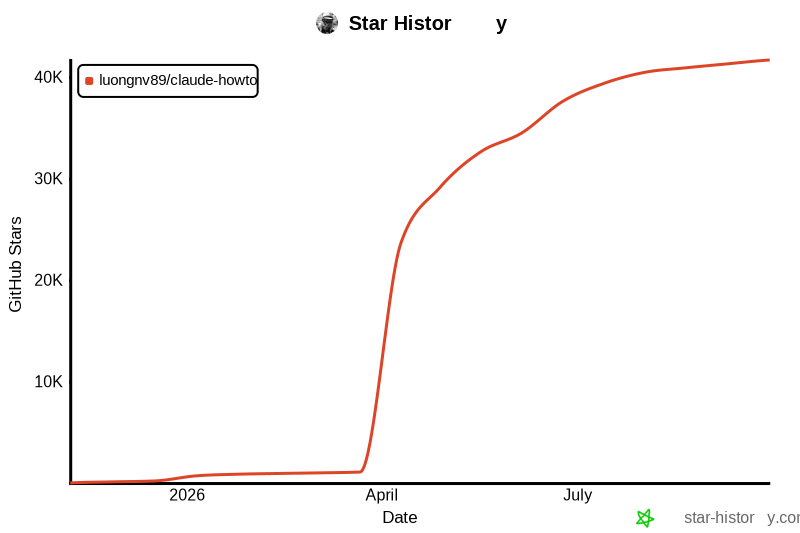](https://star-history.com/#luongnv89/claude-howto&Date)@@ -201,7 +201,7 @@ cp -r 03-skills/code-review-specialist ~/.claude/skills/Yes. MIT licensed, free forever. Use it in personal projects, at work, in your team — no restrictions beyond including the license notice.**Is this maintained?**-Actively. The guide is synced with every Claude Code release. Current version: v2.1.283 (September 2026), compatible with Claude Code 2.1+.+Actively. The guide is synced with every Claude Code release. Current version: v2.1.285 (September 2026), compatible with Claude Code 2.1+.**How is this different from the official docs?**The official docs are a feature reference. This guide is a tutorial with diagrams, production-ready templates, and a progressive learning path. They complement each other — start here to learn, reference the docs when you need specifics.@@ -873,8 +873,8 @@ MIT License - see [LICENSE](LICENSE). Free to use, modify, and distribute. The o----**Last Updated**: September 26, 2026-**Claude Code Version**: 2.1.283+**Last Updated**: September 30, 2026+**Claude Code Version**: 2.1.285**Sources**:- https://code.claude.com/docs/en/tools-reference#task-tool-availability- https://code.claude.com/docs/en/hooks@@ -886,4 +886,5 @@ MIT License - see [LICENSE](LICENSE). Free to use, modify, and distribute. The o- https://github.com/anthropics/claude-code/releases/tag/v2.1.154- https://code.claude.com/docs/en/model-config- https://github.com/anthropics/claude-code/blob/main/CHANGELOG.md+- https://github.com/anthropics/claude-code/releases/tag/v2.1.285**Compatible Models**: Claude Fable 5.1, Claude Fable 5, Claude Opus 5, Claude Sonnet 5, Claude Sonnet 4.6, Claude Opus 4.8, Claude Haiku 4.5diff --git a/claude_concepts_guide.md b/claude_concepts_guide.mdindex a82a8d3..4fe75f4 100644--- a/claude_concepts_guide.md+++ b/claude_concepts_guide.md@@ -1454,6 +1454,7 @@ Claude Code supports the following models with adaptive reasoning effort:| Model | Context Window | Effort Levels | Default Effort (Claude Code) ||-------|----------------|---------------|------------------------------|| Claude Opus 5.5 | 1M tokens (native) | `low`, `medium`, `high`, `xhigh`, `max` | `medium` — default model and default Opus model since v2.1.280 (requires Claude Code v2.1.280+) |+| Claude Sonnet 5.5 | 1M tokens (native) | `low`, `medium`, `high`, `xhigh`, `max` | `medium` — default Sonnet model on the Anthropic API since v2.1.284 (requires Claude Code v2.1.284+) || Claude Opus 5 | 1M tokens (native) | `low`, `medium`, `high`, `xhigh`, `max` | `high` — default Opus model from v2.1.219 until v2.1.280 (requires Claude Code v2.1.219+) || Claude Sonnet 5 | 1M tokens (native) | `low`, `medium`, `high`, `xhigh`, `max` | `high` — default model for Pro/Team Standard from v2.1.197 until v2.1.280 (now Opus 5.5) || Claude Opus 4.8 | 1M tokens (native) | `low`, `medium`, `high`, `xhigh`, `max` | `high` (since v2.1.154) |@@ -1461,7 +1462,7 @@ Claude Code supports the following models with adaptive reasoning effort:| Claude Sonnet 4.6 | 1M tokens | `low`, `medium`, `high`, `max` | `high` for Pro/Max subscribers (raised from `medium` in v2.1.117) || Claude Haiku 4.5 | 200K tokens | — (no effort support) | — |-> **Note**: `xhigh` is available on Opus 5.5, Opus 5, Sonnet 5, Opus 4.8, and Opus 4.7; `max` works on Opus 5.5, Opus 5, Sonnet 5, Opus 4.8/4.7/4.6 and Sonnet 4.6 (session-only). Haiku 4.5 does not support effort levels.+> **Note**: `xhigh` is available on Opus 5.5, Sonnet 5.5, Opus 5, Sonnet 5, Opus 4.8, and Opus 4.7; `max` works on Opus 5.5, Sonnet 5.5, Opus 5, Sonnet 5, Opus 4.8/4.7/4.6 and Sonnet 4.6 (session-only). Haiku 4.5 does not support effort levels.> **Note**: v2.1.117 fixed a bug where Opus 4.7 sessions computed `/context` against 200K instead of the native 1M window — upgrade to v2.1.117 or later to actually get the 1M context on Opus 4.7. Opus 5 and Opus 4.8 also have a native 1M-token window.@@ -1475,8 +1476,8 @@ Claude Code supports the following models with adaptive reasoning effort:- [Anthropic Cookbook](https://github.com/anthropics/anthropic-cookbook)----**Last Updated**: September 26, 2026-**Claude Code Version**: 2.1.283+**Last Updated**: September 30, 2026+**Claude Code Version**: 2.1.285**Sources**:- https://code.claude.com/docs/en/tools-reference#task-tool-availability- https://www.anthropic.com/news/claude-sonnet-5diff --git a/ja/05-mcp/README.md b/ja/05-mcp/README.mdindex b2ed449..1f7e91e 100644--- a/ja/05-mcp/README.md+++ b/ja/05-mcp/README.md@@ -127,7 +127,7 @@ WebSocket サーバーは持続的な双方向接続を保つため、Claude に`type: "ws"` のエントリは `http` と同じ `url`、`headers`、`headersHelper`、`timeout`、`alwaysLoad` フィールドを受け付ける。認証は**ヘッダーのみ**で、WebSocket サーバー向けの OAuth フローは存在しない。-> **注意**: WebSocket サーバーは `claude mcp list` の出力に表示されない。確認するには `claude mcp get <名前>` または `/mcp` パネルを使うこと。+> **注意**: v2.1.285 以降、`claude mcp list` は WebSocket(`ws`)サーバーを URL とヘルスステータス付きで一覧表示する(それ以前のバージョンでは表示されなかった)。`claude mcp get <名前>` または `/mcp` パネルでも確認できる。HTTP や SSE と同様に、WebSocket 接続のアイドル時間は 5 分。stdio と WebSocket にはリクエスト単位のタイマーはない。`type` のない `url` エントリはエラーとなり、有効な値として `"http"`、`"sse"`、`"ws"` が示される。@@ -1168,12 +1168,13 @@ export GITHUB_TOKEN="your_token"----**最終更新:** 2026 年 9 月 26 日-**Claude Code バージョン:** 2.1.283+**最終更新:** 2026 年 9 月 30 日+**Claude Code バージョン:** 2.1.285**情報源:**- https://code.claude.com/docs/en/mcp- https://code.claude.com/docs/en/mcp#configure-tool-search- https://code.claude.com/docs/en/managed-mcp- https://code.claude.com/docs/en/changelog- https://github.com/anthropics/claude-code/releases/tag/v2.1.117+- https://github.com/anthropics/claude-code/releases/tag/v2.1.285**対応モデル:** Claude Sonnet 4.6、Claude Opus 4.7、Claude Haiku 4.5diff --git a/ja/07-plugins/README.md b/ja/07-plugins/README.mdindex bdc87c2..d1f4e6e 100644--- a/ja/07-plugins/README.md+++ b/ja/07-plugins/README.md@@ -705,7 +705,9 @@ claude --plugin-dir ./plugin-a --plugin-dir ./plugin-b### Git リポジトリから```bash-/plugin install github:username/repo+/plugin marketplace add username/repo # GitHub リポジトリをマーケットプレイスとして追加+/plugin install plugin-name@marketplace-name # 次にそこからプラグインをインストール+/plugin install plugin-name --marketplace username/repo # または 1 ステップで両方を実行(v2.1.275+)```## 自動更新@@ -947,7 +949,9 @@ Complete PR review workflow with security, testing, and documentation checks.### GitHub からインストール```bash-/plugin install github:username/repo+/plugin marketplace add username/repo # GitHub リポジトリをマーケットプレイスとして追加+/plugin install plugin-name@marketplace-name # 次にそこからプラグインをインストール+/plugin install plugin-name --marketplace username/repo # または 1 ステップで両方を実行(v2.1.275+)```### インストール済みプラグインの一覧@@ -1058,8 +1062,8 @@ claude plugin update plugin-name----**最終更新**: 2026 年 9 月 2 日-**Claude Code バージョン**: 2.1.257+**最終更新**: 2026 年 9 月 30 日+**Claude Code バージョン**: 2.1.285**出典**:- https://code.claude.com/docs/en/discover-plugins- https://code.claude.com/docs/en/plugins-reference@@ -1069,4 +1073,6 @@ claude plugin update plugin-name- https://github.com/anthropics/claude-code/releases/tag/v2.1.117- https://github.com/anthropics/claude-code/releases/tag/v2.1.118- https://github.com/anthropics/claude-code/releases/tag/v2.1.119+- https://code.claude.com/docs/en/plugins/install+- https://code.claude.com/docs/en/plugins/cli-reference**対応モデル**: Claude Fable 5、Claude Opus 5、Claude Sonnet 5、Claude Sonnet 4.6、Claude Opus 4.8、Claude Haiku 4.5diff --git a/ja/09-advanced-features/README.md b/ja/09-advanced-features/README.mdindex 1a3c27c..06ef439 100644--- a/ja/09-advanced-features/README.md+++ b/ja/09-advanced-features/README.md@@ -365,10 +365,11 @@ export CLAUDE_CODE_EFFORT_LEVEL=xhigh### オートモードの有効化```bash-# Unlock auto mode with CLI flag (no longer required for Max subscribers on Opus 4.7 — access it directly)-claude --enable-auto-mode+# Interactive sessions start in auto mode when no permission mode is configured (v2.1.284+)+# To pick it explicitly, for example when your settings default to another mode:+claude --permission-mode auto-# Then cycle to it with Shift+Tab in the REPL+# Or cycle to it with Shift+Tab in the REPL```> **v2.1.112 アップデート:** オートモードに `--enable-auto-mode` フラグは不要になった。Max サブスクライバは Opus 4.7 で直接アクセスできる。@@ -750,7 +751,7 @@ export CLAUDE_CODE_DISABLE_CRON=1| `bypassPermissions` | 全操作、権限チェックなし(危険) || `dontAsk` | 事前承認済みツールのみ実行、その他はすべて拒否 |-CLI では `Shift+Tab` でモードを切り替える。デフォルトは `--permission-mode` フラグまたは `permissions.defaultMode` 設定で指定する。v2.1.283 以降、サードパーティプロバイダー(Bedrock、Google Cloud の Agent Platform、Foundry)上またはテレメトリをオフにした対話セッションは、パーミッションモードが未設定の場合 auto モードで開始する。`permissions.defaultMode` は引き続きこれより優先される。+CLI では `Shift+Tab` でモードを切り替える。デフォルトは `--permission-mode` フラグまたは `permissions.defaultMode` 設定で指定する。パーミッションモードが未設定の場合、v2.1.284 以降は対話型のターミナルセッションと VS Code セッションがすべてのプランとプロバイダーで auto モードで開始する(v2.1.283 では Bedrock、Google Cloud の Agent Platform、Foundry などのサードパーティプロバイダー上、またはテレメトリをオフにした場合に限られていた)。`permissions.defaultMode` は引き続きこれより優先され、auto モードを利用できないセッションは代わりに `default`(Manual)で開始する。`claude -p` と Agent SDK は何も設定されていない場合 `default` で開始するが、v2.1.285 以降はサードパーティプロバイダー上またはテレメトリをオフにした `claude -p` と Python Agent SDK のセッションも auto モードで開始する。`--permission-mode` は引き続きこれより優先される。### 起動方法@@ -2107,8 +2108,8 @@ Claude Code および関連機能の詳細:----**最終更新:** 2026 年 9 月 26 日-**Claude Code バージョン:** 2.1.283+**最終更新:** 2026 年 9 月 30 日+**Claude Code バージョン:** 2.1.285**情報源:**- https://code.claude.com/docs/en/permissions- https://code.claude.com/docs/en/auto-mode-classifier-billing@@ -2122,5 +2123,8 @@ Claude Code および関連機能の詳細:- https://code.claude.com/docs/en/keybindings#modifiers- https://code.claude.com/docs/en/permission-modes- https://github.com/anthropics/claude-code/releases/tag/v2.1.283+- https://code.claude.com/docs/en/permission-modes#which-mode-a-session-starts-in+- https://github.com/anthropics/claude-code/releases/tag/v2.1.284+- https://github.com/anthropics/claude-code/releases/tag/v2.1.285**互換モデル:** Claude Sonnet 4.6、Claude Opus 4.7、Claude Haiku 4.5diff --git a/uk/05-mcp/README.md b/uk/05-mcp/README.mdindex fdbc5cb..4bef098 100644--- a/uk/05-mcp/README.md+++ b/uk/05-mcp/README.md@@ -127,7 +127,7 @@ WebSocket-сервери тримають постійне двонаправлЗапис `type: "ws"` приймає ті самі поля `url`, `headers`, `headersHelper`, `timeout` і `alwaysLoad`, що й `http`. Автентифікація **лише через заголовки** — потоку OAuth для WebSocket-серверів немає.-> **Примітка**: WebSocket-сервери не зʼявляються у виводі `claude mcp list`. Для перевірки використовуйте `claude mcp get <назва>` або панель `/mcp`.+> **Примітка**: Починаючи з v2.1.285, `claude mcp list` показує WebSocket-сервери (`ws`) з їхньою URL-адресою та станом справності (попередні версії їх пропускали). Також їх можна перевірити через `claude mcp get <назва>` або панель `/mcp`.Як і HTTP та SSE, WebSocket-зʼєднання використовує 5-хвилинне вікно простою; stdio і WebSocket не мають таймера на окремий запит. Запис `url` без `type` призводить до помилки, яка називає `"http"`, `"sse"`, `"ws"` як допустимі значення.@@ -1139,10 +1139,11 @@ export GITHUB_TOKEN="your_token"- [Документація Claude API](https://docs.anthropic.com)----**Останнє оновлення**: 26 вересня 2026-**Версія Claude Code**: 2.1.283+**Останнє оновлення**: 30 вересня 2026+**Версія Claude Code**: 2.1.285**Джерела**:- https://code.claude.com/docs/en/mcp- https://code.claude.com/docs/en/mcp#configure-tool-search- https://code.claude.com/docs/en/managed-mcp+- https://github.com/anthropics/claude-code/releases/tag/v2.1.285**Сумісні моделі**: Claude Sonnet 4.6, Claude Opus 4.6, Claude Haiku 4.5diff --git a/uk/07-plugins/README.md b/uk/07-plugins/README.mdindex 1feffc8..260672b 100644--- a/uk/07-plugins/README.md+++ b/uk/07-plugins/README.md@@ -640,7 +640,9 @@ claude --plugin-dir ./plugin-a --plugin-dir ./plugin-b### З Git-репозиторію```bash-/plugin install github:username/repo+/plugin marketplace add username/repo # Додайте GitHub-репозиторій як маркетплейс+/plugin install plugin-name@marketplace-name # Потім встановіть із нього плагін+/plugin install plugin-name --marketplace username/repo # Або обидва кроки за один раз (v2.1.275+)```## Коли створювати плагін@@ -859,7 +861,9 @@ Complete PR review workflow with security, testing, and documentation checks.### Встановлення з GitHub```bash-/plugin install github:username/repo+/plugin marketplace add username/repo # Додайте GitHub-репозиторій як маркетплейс+/plugin install plugin-name@marketplace-name # Потім встановіть із нього плагін+/plugin install plugin-name --marketplace username/repo # Або обидва кроки за один раз (v2.1.275+)```### Список встановлених плагінів@@ -969,10 +973,12 @@ claude plugin update plugin-name- [Довідник системи хуків](../06-hooks/README.md)----**Останнє оновлення**: 2 вересня 2026-**Версія Claude Code**: 2.1.257+**Останнє оновлення**: 30 вересня 2026+**Версія Claude Code**: 2.1.285**Джерела**:- https://code.claude.com/docs/en/discover-plugins- https://code.claude.com/docs/en/plugins-reference- https://code.claude.com/docs/en/settings+- https://code.claude.com/docs/en/plugins/install+- https://code.claude.com/docs/en/plugins/cli-reference**Сумісні моделі**: Claude Fable 5, Claude Opus 5, Claude Sonnet 5, Claude Sonnet 4.6, Claude Opus 4.8, Claude Haiku 4.5diff --git a/uk/09-advanced-features/README.md b/uk/09-advanced-features/README.mdindex 7a28f3a..e4f880f 100644--- a/uk/09-advanced-features/README.md+++ b/uk/09-advanced-features/README.md@@ -356,10 +356,11 @@ Auto Mode — це режим дозволів, який використову### Увімкнення Auto Mode```bash-# Розблокування auto mode за допомогою прапорця CLI-claude --enable-auto-mode+# Інтерактивні сесії запускаються в auto mode, якщо режим дозволів не налаштовано (v2.1.284+)+# Щоб вибрати його явно, наприклад коли ваші налаштування задають інший режим за замовчуванням:+claude --permission-mode auto-# Потім перемикайте через Shift+Tab у REPL+# Або перемикайтеся на нього через Shift+Tab у REPL```Або встановіть як режим дозволів за замовчуванням:@@ -674,7 +675,7 @@ export CLAUDE_CODE_DISABLE_CRON=1| `bypassPermissions` | Усі дії, без перевірки дозволів (небезпечно) || `dontAsk` | Виконуються лише попередньо затверджені інструменти; всі інші відхиляються |-Перемикайте режими через `Shift+Tab` у CLI. Встановіть режим за замовчуванням через прапорець `--permission-mode` або налаштування `permissions.defaultMode`. Починаючи з v2.1.283, інтерактивна сесія у стороннього провайдера (Bedrock, Agent Platform від Google Cloud, Foundry) або з вимкненою телеметрією запускається в режимі auto, якщо режим дозволів не налаштовано; `permissions.defaultMode` і далі має пріоритет.+Перемикайте режими через `Shift+Tab` у CLI. Встановіть режим за замовчуванням через прапорець `--permission-mode` або налаштування `permissions.defaultMode`. Якщо режим дозволів не налаштовано, інтерактивні сесії в терміналі та VS Code починаючи з v2.1.284 запускаються в режимі auto на будь-якому плані та в будь-якого провайдера (у v2.1.283 так було лише у сторонніх провайдерів, як-от Bedrock, Agent Platform від Google Cloud і Foundry, або з вимкненою телеметрією); `permissions.defaultMode` і далі має пріоритет, а сесія, де режим auto недоступний, натомість запускається в режимі `default` (Manual). `claude -p` та Agent SDK запускаються в `default`, якщо нічого не налаштовано, за винятком того, що починаючи з v2.1.285 сесії `claude -p` і Python Agent SDK у сторонніх провайдерів або з вимкненою телеметрією також запускаються в режимі auto; `--permission-mode` і далі має пріоритет.### Методи активації@@ -1932,8 +1933,8 @@ claude --teammate-mode in-process- [Офіційна документація Agent Teams](https://code.claude.com/docs/en/agent-teams)----**Останнє оновлення**: 26 вересня 2026-**Версія Claude Code**: 2.1.283+**Останнє оновлення**: 30 вересня 2026+**Версія Claude Code**: 2.1.285**Джерела**:- https://code.claude.com/docs/en/permissions- https://code.claude.com/docs/en/auto-mode-classifier-billing@@ -1941,4 +1942,7 @@ claude --teammate-mode in-process- https://code.claude.com/docs/en/keybindings#modifiers- https://code.claude.com/docs/en/permission-modes- https://github.com/anthropics/claude-code/releases/tag/v2.1.283+- https://code.claude.com/docs/en/permission-modes#which-mode-a-session-starts-in+- https://github.com/anthropics/claude-code/releases/tag/v2.1.284+- https://github.com/anthropics/claude-code/releases/tag/v2.1.285**Сумісні моделі**: Claude Sonnet 4.6, Claude Opus 4.6, Claude Haiku 4.5diff --git a/vi/05-mcp/README.md b/vi/05-mcp/README.mdindex 1e6821b..c546094 100644--- a/vi/05-mcp/README.md+++ b/vi/05-mcp/README.md@@ -123,7 +123,7 @@ Vì `--transport` không chấp nhận `ws`, hãy cấu hình trong `.mcp.json`Mục `type: "ws"` chấp nhận cùng các trường `url`, `headers`, `headersHelper`, `timeout` và `alwaysLoad` như `http`. Xác thực **chỉ qua header** — không có luồng OAuth cho máy chủ WebSocket.-> **Lưu ý**: Máy chủ WebSocket không xuất hiện trong đầu ra của `claude mcp list`. Hãy dùng `claude mcp get <tên>` hoặc bảng `/mcp` để kiểm tra chúng.+> **Lưu ý**: Từ v2.1.285, `claude mcp list` liệt kê các máy chủ WebSocket (`ws`) cùng URL và trạng thái sức khỏe của chúng (các phiên bản trước bỏ sót chúng). Bạn cũng có thể kiểm tra chúng bằng `claude mcp get <tên>` hoặc bảng `/mcp`.Giống HTTP và SSE, kết nối WebSocket dùng cửa sổ nhàn rỗi 5 phút; stdio và WebSocket không có bộ đếm thời gian cho từng yêu cầu. Một mục `url` không có `type` sẽ báo lỗi và liệt kê `"http"`, `"sse"`, `"ws"` là các giá trị hợp lệ.@@ -1158,10 +1158,11 @@ export GITHUB_TOKEN="your_token"----**Cập Nhật Lần Cuối**: Ngày 26 tháng 9 năm 2026-**Phiên Bản Claude Code**: 2.1.283+**Cập Nhật Lần Cuối**: Ngày 30 tháng 9 năm 2026+**Phiên Bản Claude Code**: 2.1.285**Nguồn**:- https://code.claude.com/docs/en/mcp- https://code.claude.com/docs/en/managed-mcp- https://code.claude.com/docs/en/mcp#configure-tool-search+- https://github.com/anthropics/claude-code/releases/tag/v2.1.285**Các Mô Hình Tương Thích**: Claude Sonnet 4.6, Claude Opus 4.6, Claude Haiku 4.5diff --git a/vi/07-plugins/README.md b/vi/07-plugins/README.mdindex f3f9837..f52fe3b 100644--- a/vi/07-plugins/README.md+++ b/vi/07-plugins/README.md@@ -644,7 +644,9 @@ claude --plugin-dir ./plugin-a --plugin-dir ./plugin-b### Từ Git Repository```bash-/plugin install github:username/repo+/plugin marketplace add username/repo # Thêm repo GitHub làm marketplace+/plugin install plugin-name@marketplace-name # Sau đó cài một plugin từ marketplace đó+/plugin install plugin-name --marketplace username/repo # Hoặc làm cả hai trong một bước (v2.1.275+)```## Khi Nào Tạo Một Plugin / When to Create a Plugin@@ -854,7 +856,9 @@ Workflow PR review hoàn chỉnh với các kiểm tra bảo mật, testing, và### Cài Đặt Từ GitHub```bash-/plugin install github:username/repo+/plugin marketplace add username/repo # Thêm repo GitHub làm marketplace+/plugin install plugin-name@marketplace-name # Sau đó cài một plugin từ marketplace đó+/plugin install plugin-name --marketplace username/repo # Hoặc làm cả hai trong một bước (v2.1.275+)```### Liệt Kê Các Plugins Đã Cài Đặt@@ -965,10 +969,12 @@ Các tính năng Claude Code sau hoạt động cùng với plugins:----**Cập Nhật Lần Cuối**: Ngày 2 tháng 9 năm 2026-**Phiên Bản Claude Code**: 2.1.257+**Cập Nhật Lần Cuối**: Ngày 30 tháng 9 năm 2026+**Phiên Bản Claude Code**: 2.1.285**Nguồn**:- https://code.claude.com/docs/en/discover-plugins- https://code.claude.com/docs/en/plugins-reference- https://code.claude.com/docs/en/settings+- https://code.claude.com/docs/en/plugins/install+- https://code.claude.com/docs/en/plugins/cli-reference**Các Mô Hình Tương Thích**: Claude Fable 5, Claude Opus 5, Claude Sonnet 5, Claude Sonnet 4.6, Claude Opus 4.8, Claude Haiku 4.5diff --git a/vi/09-advanced-features/README.md b/vi/09-advanced-features/README.mdindex 74077e4..cd10515 100644--- a/vi/09-advanced-features/README.md+++ b/vi/09-advanced-features/README.md@@ -354,10 +354,11 @@ Auto Mode is a permission mode that uses a background safety classifier to revie### Enabling Auto Mode```bash-# Unlock auto mode with CLI flag-claude --enable-auto-mode+# Interactive sessions start in auto mode when no permission mode is configured (v2.1.284+)+# To pick it explicitly, for example when your settings default to another mode:+claude --permission-mode auto-# Then cycle to it with Shift+Tab in the REPL+# Or cycle to it with Shift+Tab in the REPL```Or set it as the default permission mode:@@ -672,7 +673,7 @@ Permission modes control what actions Claude can take without explicit approval.| `bypassPermissions` | All actions, no permission checks (dangerous) || `dontAsk` | Only pre-approved tools execute; all others denied |-Cycle through modes with `Shift+Tab` in the CLI. Set a default with the `--permission-mode` flag or the `permissions.defaultMode` setting. Since v2.1.283, an interactive session on a third-party provider (Bedrock, Google Cloud's Agent Platform, Foundry) or with telemetry off starts in auto mode when no permission mode is configured; `permissions.defaultMode` still overrides it.+Cycle through modes with `Shift+Tab` in the CLI. Set a default with the `--permission-mode` flag or the `permissions.defaultMode` setting. When no permission mode is configured, interactive terminal and VS Code sessions start in auto mode on every plan and provider since v2.1.284 (v2.1.283 did this only on third-party providers such as Bedrock, Google Cloud's Agent Platform, and Foundry, or with telemetry off); `permissions.defaultMode` still overrides it, and a session where auto mode isn't available starts in Manual instead. `claude -p` and the Agent SDK start in `default` when nothing is configured, except that since v2.1.285 `claude -p` and Python Agent SDK sessions on third-party providers or with telemetry off also start in auto mode; `--permission-mode` still overrides it.### Activation Methods@@ -1869,12 +1870,15 @@ For more information about Claude Code and related features:----**Cập Nhật Lần Cuối**: Ngày 26 tháng 9 năm 2026-**Phiên Bản Claude Code**: 2.1.283+**Cập Nhật Lần Cuối**: Ngày 30 tháng 9 năm 2026+**Phiên Bản Claude Code**: 2.1.285**Nguồn**:- https://code.claude.com/docs/en/permissions- https://code.claude.com/docs/en/auto-mode-classifier-billing- https://code.claude.com/docs/en/keybindings#modifiers- https://code.claude.com/docs/en/permission-modes- https://github.com/anthropics/claude-code/releases/tag/v2.1.283+- https://code.claude.com/docs/en/permission-modes#which-mode-a-session-starts-in+- https://github.com/anthropics/claude-code/releases/tag/v2.1.284+- https://github.com/anthropics/claude-code/releases/tag/v2.1.285**Các Mô Hình Tương Thích**: Claude Sonnet 4.6, Claude Opus 4.6, Claude Haiku 4.5diff --git a/zh/07-plugins/README.md b/zh/07-plugins/README.mdindex 369ccda..20eab74 100644--- a/zh/07-plugins/README.md+++ b/zh/07-plugins/README.md@@ -631,7 +631,9 @@ claude --plugin-dir ./plugin-a --plugin-dir ./plugin-b### 从 Git 仓库安装```bash-/plugin install github:username/repo+/plugin marketplace add username/repo # 将 GitHub 仓库添加为市场+/plugin install plugin-name@marketplace-name # 然后从该市场安装插件+/plugin install plugin-name --marketplace username/repo # 或一步完成两者(v2.1.275+)```## 何时创建插件@@ -841,7 +843,9 @@ claude --plugin-dir ./my-plugin --plugin-dir ./another-plugin### 从 GitHub 安装```bash-/plugin install github:username/repo+/plugin marketplace add username/repo # 将 GitHub 仓库添加为市场+/plugin install plugin-name@marketplace-name # 然后从该市场安装插件+/plugin install plugin-name --marketplace username/repo # 或一步完成两者(v2.1.275+)```### 列出已安装插件@@ -952,9 +956,11 @@ claude plugin update plugin-name----**最后更新**: 2026 年 9 月 2 日-**Claude Code 版本**: 2.1.257+**最后更新**: 2026 年 9 月 30 日+**Claude Code 版本**: 2.1.285**来源**:- https://code.claude.com/docs/en/discover-plugins- https://code.claude.com/docs/en/plugins-reference- https://code.claude.com/docs/en/settings+- https://code.claude.com/docs/en/plugins/install+- https://code.claude.com/docs/en/plugins/cli-referencediff --git a/zh/09-advanced-features/README.md b/zh/09-advanced-features/README.mdindex 50c4df6..1d89c4c 100644--- a/zh/09-advanced-features/README.md+++ b/zh/09-advanced-features/README.md@@ -257,10 +257,11 @@ Auto mode 是一种权限模式,会在每个动作执行前用后台安全分### 启用方式```bash-# 用 CLI 解锁 auto mode-claude --enable-auto-mode+# 未配置权限模式时,交互式会话会以 auto mode 启动(v2.1.284+)+# 如需显式选择它,例如当你的设置默认使用其他模式时:+claude --permission-mode auto-# 然后在 REPL 中用 Shift+Tab 切换到它+# 或者在 REPL 中用 Shift+Tab 切换到它```### 分类器如何工作@@ -953,3 +954,10 @@ worktree 场景下依然可以配合工具和 hooks 自动化流程。- [Checkpoints 中文指南](../08-checkpoints/README.md)- [Plugins 中文指南](../07-plugins/README.md)- [CLI 中文参考](../10-cli/README.md)++---++**最后更新**: 2026 年 9 月 30 日+**Claude Code 版本**: 2.1.285+**来源**:+- https://code.claude.com/docs/en/permission-modes#which-mode-a-session-starts-in