
A visual, example-driven guide to Claude Code — from basic concepts to advanced agents, with copy-paste templates that bring immediate value.
docs: sync to Claude Code v2.1.310 (#209)
Luong NGUYENba721a3abc00
diff --git a/.claude/skills/lesson-quiz/README.md b/.claude/skills/lesson-quiz/README.mdindex 9db5de4..92a1b43 100644--- a/.claude/skills/lesson-quiz/README.md+++ b/.claude/skills/lesson-quiz/README.md@@ -33,12 +33,12 @@ graph TD## Usage-```+```text/lesson-quiz [lesson-name-or-number]```Examples:-```+```text/lesson-quiz hooks/lesson-quiz 03/lesson-quiz advanced-features@@ -67,3 +67,12 @@ For each incorrect answer:| Path | Description ||---|---|| `references/question-bank.md` | 100 pre-written questions (10 per lesson) with answers, explanations, and review pointers |++---++**Last Updated**: October 26, 2026+**Claude Code Version**: 2.1.310+**Sources**:+- https://code.claude.com/docs/en/mcp#tool-search-through-an-llm-gateway+- https://code.claude.com/docs/en/sub-agents#resume-subagents+- https://code.claude.com/docs/en/permission-modesdiff --git a/.claude/skills/lesson-quiz/SKILL.md b/.claude/skills/lesson-quiz/SKILL.mdindex 46a5a71..ebf0215 100644--- a/.claude/skills/lesson-quiz/SKILL.md+++ b/.claude/skills/lesson-quiz/SKILL.md@@ -3,7 +3,7 @@ name: lesson-quizdescription: "Test a learner on a single Claude Code tutorial lesson (01-10) with 10 questions, scoring answers and flagging weak spots. Use before, during, or after a lesson. Don't use for whole-tutorial assessment or explaining a topic instead of testing it."effort: highmetadata:- version: 1.6.2+ version: 1.6.3author: Luong NGUYEN---diff --git a/.claude/skills/lesson-quiz/references/question-bank.md b/.claude/skills/lesson-quiz/references/question-bank.mdindex 77b477d..8063d72 100644--- a/.claude/skills/lesson-quiz/references/question-bank.md+++ b/.claude/skills/lesson-quiz/references/question-bank.md@@ -93,9 +93,9 @@### Q1- **Category**: conceptual- **Question**: How do CLAUDE.md memory files relate to each other, and what has the highest authority?-- **Options**: A) Higher tiers override lower tiers entirely | B) They are concatenated into context; Managed Policy loads first and cannot be excluded | C) The most recently modified file wins | D) Project Memory has the highest priority+- **Options**: A) Higher tiers override lower tiers entirely | B) They are concatenated into context; Managed Policy loads first and can't be skipped with `claudeMdExcludes` | C) The most recently modified file wins | D) Project Memory has the highest priority- **Correct**: B-- **Explanation**: CLAUDE.md files are concatenated into context rather than overriding each other — load order sets position in context, not precedence. Managed Policy (admin-managed) loads first and cannot be excluded by individual settings. Auto memory is a separate mechanism.+- **Explanation**: CLAUDE.md files are concatenated into context rather than overriding each other — load order sets position in context, not precedence. Managed Policy (admin-managed) loads first and can't be skipped with `claudeMdExcludes`, but a session started with CLAUDE.md loading turned off doesn't load it either — enforce hard rules with managed `permissions.deny`. Auto memory is a separate mechanism.- **Review**: Memory hierarchy section### Q2@@ -159,7 +159,7 @@- **Question**: Can a lower-priority memory tier override rules from a higher-priority tier?- **Options**: A) Yes, the most recent rule always wins | B) No — CLAUDE.md files are concatenated into context, not overridden; load order sets position, not precedence | C) Yes, if the lower tier uses the `!important` flag | D) It depends on the rule type- **Correct**: B-- **Explanation**: CLAUDE.md files (user, project, local, rules) are concatenated into context rather than overriding each other — later files appear later in context, not "instead of" earlier ones. Only Managed Policy is special: it loads first and cannot be excluded by individual settings. Auto memory is a separate mechanism, not part of the concatenation order.+- **Explanation**: CLAUDE.md files (user, project, local, rules) are concatenated into context rather than overriding each other — later files appear later in context, not "instead of" earlier ones. Only Managed Policy is special: it loads first and can't be skipped with `claudeMdExcludes`, but a session started with CLAUDE.md loading turned off doesn't load it either — enforce hard rules with managed `permissions.deny`. Auto memory is a separate mechanism, not part of the concatenation order.- **Review**: Memory hierarchy section### Q10@@ -303,7 +303,7 @@- **Question**: How do you force a subagent to always run in the background (never inline)?- **Options**: A) Set `background: true` in the agent config | B) Use `async: true` in the agent config | C) Press Ctrl+D after starting it | D) Use `--background` CLI flag- **Correct**: A-- **Explanation**: `background: true` in the agent configuration makes the subagent always run as a background task and prevents it from running inline. Subagents Claude spawns from the main conversation already run in the background by default (v2.1.198; always, in the desktop app and VS Code, since v2.1.302), but a subagent's own nested Agent calls run in the foreground by default in `claude -p`, the Agent SDK, the desktop app and VS Code. Users can also press Ctrl+B to send a running foreground task to the background.+- **Explanation**: `background: true` keeps this subagent in the background even when Claude asks to wait for it. With nothing configured, subagents Claude spawns from the main conversation already start in the background. In `claude -p` and the Agent SDK, Claude can still choose to wait for one. In interactive terminal, VS Code and desktop sessions, Claude can't wait while fork mode is on, which is the default (v2.1.302; v2.1.232 in the terminal); set `CLAUDE_CODE_FORK_SUBAGENT=0` to let it wait. Users can also press Ctrl+B to send a running foreground task to the background.- **Review**: Background subagents section### Q7@@ -335,7 +335,7 @@- **Question**: How do you resume a subagent that returned an agentId from a previous run?- **Options**: A) Use `/resume agent-id` | B) Ask Claude to resume it — Claude messages the subagent with the SendMessage tool, using its agent ID or name | C) Use `claude -r agent-id` | D) Subagents cannot be resumed- **Correct**: B-- **Explanation**: Each invocation starts a new instance. To continue earlier work, ask Claude to resume the subagent: Claude uses the SendMessage tool with the agent's ID or name, and the subagent resumes with its full conversation history. The built-in Explore and Plan agents are one-shot and can't be resumed.+- **Explanation**: Each invocation starts a new instance. To continue earlier work, ask Claude to resume the subagent: Claude uses the SendMessage tool with the agent's ID (or its name, if the session started with agent teams enabled and Claude named it), and the subagent resumes with its full conversation history. The built-in Explore and Plan agents are one-shot and can't be resumed.- **Review**: Resumable agents section---@@ -363,7 +363,7 @@- **Question**: With `ENABLE_TOOL_SEARCH=auto`, what happens when MCP tool definitions reach 10% of the context window?- **Options**: A) They are truncated | B) Tool search kicks in: MCP tools are deferred and discovered on demand | C) Claude shows an error | D) Extra tools are disabled- **Correct**: B-- **Explanation**: By default (`ENABLE_TOOL_SEARCH` unset) tool search is already on and all MCP tools are deferred. `auto` is threshold mode: tools load upfront until their definitions reach 10% of the context window, then all are deferred (`auto:N` sets a custom percentage). Tool search needs a model that supports `tool_reference` blocks: Opus 4, Sonnet 4, Haiku 4.5 and later.+- **Explanation**: By default (`ENABLE_TOOL_SEARCH` unset) tool search is already on and all MCP tools are deferred. `auto` is threshold mode: tools load upfront until their definitions reach 10% of the context window, then all are deferred (`auto:N` sets a custom percentage). Tool search needs a model that supports `tool_reference` blocks: Opus 4, Sonnet 4, Haiku 4.5 and later. Tool search is on by default, including behind a custom `ANTHROPIC_BASE_URL` gateway since v2.1.304 (since v2.1.305 a gateway that rejects it with a 400 or 422 is retried without it); set `ENABLE_TOOL_SEARCH=false` to load every tool upfront.- **Review**: MCP Tool Search section### Q4@@ -620,10 +620,10 @@### Q4- **Category**: practical-- **Question**: You used `rm -rf temp/` via Bash in Claude Code, then want to rewind. Will the checkpoint restore those files?-- **Options**: A) Yes, checkpoints capture everything | B) No, Bash filesystem operations (rm, mv, cp) are not tracked by checkpoints | C) Only if you used the Edit tool instead | D) Only if autoCheckpoint was enabled+- **Question**: Claude created `temp/` with Bash commands only (it never edited those files with its Write or Edit tools), then ran `rm -rf temp/`. Will `/rewind` restore them?+- **Options**: A) Yes, checkpoints capture everything | B) No — a file that only Bash commands changed isn't tracked, so rewind leaves it as it is | C) Only if you rewind within 5 minutes | D) Only if autoCheckpoint was enabled- **Correct**: B-- **Explanation**: Checkpoints track file changes made by Claude's own Write/Edit tools in the main thread. Bash commands (rm, mv, cp), subagent edits (except a foreground `context: fork` skill), edits made outside Claude Code, and symlinked/hardlinked paths are all outside checkpoint tracking.+- **Explanation**: Checkpoints track edits made by Claude's file editing tools. Once Claude has edited a file with its file editing tools, `/rewind` also undoes changes that Bash commands make to that file afterward. A file that only Bash commands changed, like `temp/` here, isn't tracked and stays as it is, so use Git to recover it. Since v2.1.309, `sed -i` is treated like any other Bash edit. Edits by a subagent (other than a foreground `context: fork` skill) are restored only for files Claude had already edited in the conversation. Symlinked and hard-linked paths are skipped on restore.- **Review**: Limitations section### Q5@@ -723,7 +723,7 @@- **Question**: How do you run Claude in a CI/CD pipeline with structured JSON output and a turn limit?- **Options**: A) `claude --ci --json --limit 3` | B) `claude -p --output-format json --max-turns 3 "review code"` | C) `claude --pipeline --format json` | D) `claude run --json --turns 3`- **Correct**: B-- **Explanation**: Print mode (`-p`) with `--output-format json` and `--max-turns` is the standard CI/CD integration pattern.+- **Explanation**: Print mode (`-p`) with `--output-format json` and `--max-turns` is the standard CI/CD integration pattern. Since v2.1.302, a `claude -p` or Agent SDK run with no permission mode set starts in Manual mode (config value `default`) and denies tool calls that need approval; pass `--permission-mode` (for example `auto` or `acceptEdits`) or `--allowedTools`.- **Review**: Headless Mode### Q7@@ -747,7 +747,7 @@- **Question**: What is the difference between `dontAsk` and `bypassPermissions` modes?- **Options**: A) They are the same | B) `dontAsk` auto-denies unless pre-approved; `bypassPermissions` skips all checks entirely | C) `dontAsk` is for files; `bypassPermissions` is for commands | D) `bypassPermissions` is safer- **Correct**: B-- **Explanation**: dontAsk auto-denies permission requests unless they match pre-approved patterns. bypassPermissions skips all safety checks entirely — it's dangerous for routine use.+- **Explanation**: dontAsk auto-denies permission requests unless they match pre-approved patterns (a mod you installed can still approve some of those calls). bypassPermissions skips all safety checks entirely — it's dangerous for routine use.- **Review**: Permission Modes section### Q10@@ -844,8 +844,8 @@----**Last Updated**: October 18, 2026-**Claude Code Version**: 2.1.302+**Last Updated**: October 26, 2026+**Claude Code Version**: 2.1.310**Sources**:- https://code.claude.com/docs/en/hooks- https://code.claude.com/docs/en/skills@@ -869,3 +869,9 @@- https://code.claude.com/docs/en/mcp#example-connect-to-github-for-code-reviews- https://code.claude.com/docs/en/changelog#2-1-302- https://code.claude.com/docs/en/interactive-mode+- https://code.claude.com/docs/en/checkpointing#bash-command-changes-not-tracked+- https://code.claude.com/docs/en/changelog#2-1-309+- https://code.claude.com/docs/en/memory#deploy-organization-wide-claude-md+- https://code.claude.com/docs/en/sub-agents#which-subagents-run-in-the-background+- https://code.claude.com/docs/en/mcp#tool-search-through-an-llm-gateway+- https://code.claude.com/docs/en/sub-agents#resume-subagentsdiff --git a/.claude/skills/self-assessment/SKILL.md b/.claude/skills/self-assessment/SKILL.mdindex 2375af3..f2a7e5d 100644--- a/.claude/skills/self-assessment/SKILL.md+++ b/.claude/skills/self-assessment/SKILL.md@@ -1,6 +1,6 @@---name: self-assessment-version: 2.5.5+version: 2.5.6description: Comprehensive Claude Code self-assessment and learning path advisor. Runs a multi-category quiz covering 10 feature areas, produces a detailed skill profile with per-topic scores, identifies specific gaps, and generates a personalized learning path with prioritized next steps. Use when asked to "assess my level", "take the quiz", "find my level", "where should I start", "what should I learn next", "check my skills", "skill check", or "level up".---@@ -297,7 +297,7 @@ Use these specific recommendations when a topic is a gap:- Done when: Claude remembers your preferences across sessions**Memory (score 1 — review)**:-- Focus on: the 7 memory locations and how they are concatenated into context (loaded root-down, not overridden), .claude/rules/ directory with path-specific rules, `@import` syntax (max depth 4), Auto Memory MEMORY.md (Claude loads its first 200 lines or 25 KB, whichever comes first — a load cap, not a file-size limit)+- Focus on: the 7 memory locations and how they are concatenated into context (loaded root-down, not overridden), .claude/rules/ directory with path-specific rules, `@import` syntax (max depth 4), Auto Memory MEMORY.md (Claude loads its first 200 lines or 25 KB, whichever comes first — a load cap, not a file-size limit), on-demand files (subdirectory CLAUDE.md, path-scoped rules) truncated past a per-file size limit since v2.1.309- Done when: You have modular rules for different directories and understand how every memory file is concatenated into context**Skills (score 0)**:@@ -327,7 +327,7 @@ Use these specific recommendations when a topic is a gap:- Done when: You can query live data from an external service via MCP**MCP (score 1 — review)**:-- Focus on: Project-scope .mcp.json (each user approves it on first use; workspace trust applies), OAuth 2.0 auth, MCP resources with `@server:resource` mentions, Tool Search (ENABLE_TOOL_SEARCH), `claude mcp serve`, output limits (10,000 tokens warning; 25,000 tokens default max via `MAX_MCP_OUTPUT_TOKENS`; 50,000 characters disk-persistence threshold)+- Focus on: Project-scope .mcp.json (each user approves it on first use; workspace trust applies), OAuth 2.0 auth, MCP resources with `@server:resource` mentions, Tool Search (ENABLE_TOOL_SEARCH; on by default, including behind a custom `ANTHROPIC_BASE_URL` gateway since v2.1.304), `claude mcp serve`, output limits (10,000 tokens warning; 25,000 tokens default max via `MAX_MCP_OUTPUT_TOKENS`; 50,000 characters disk-persistence threshold)- Done when: You have a project .mcp.json and understand how tool search defers MCP tools by default and what `ENABLE_TOOL_SEARCH=auto`/`false` change**Subagents (score 0)**:@@ -342,7 +342,7 @@ Use these specific recommendations when a topic is a gap:**Checkpoints (score 0)**:- Tutorial: [08-checkpoints/](../../../08-checkpoints/)-- Focus on: Esc+Esc and /rewind access, 6 rewind options (restore code and conversation, restore conversation, restore code, summarize from here, summarize up to here, never mind), limitations — bash filesystem ops, subagent edits (except a foreground `context: fork` skill), edits made outside Claude Code are untracked, and symlinked/hard-linked paths are skipped on restore+- Focus on: Esc+Esc and /rewind access, 6 rewind options (restore code and conversation, restore conversation, restore code, summarize from here, summarize up to here, never mind), limitations — files changed only by Bash commands are untracked (once Claude has edited a file with its file editing tools, `/rewind` also undoes changes that Bash commands make to that file afterward; since v2.1.309, `sed -i` is treated like any other Bash edit), subagent edits (except a foreground `context: fork` skill), edits made outside Claude Code are untracked, and symlinked/hard-linked paths are skipped on restore- Key exercise: Make experimental changes, then rewind to restore- Done when: You can confidently experiment knowing you can rewind@@ -373,7 +373,7 @@ Use these specific recommendations when a topic is a gap:- Done when: You can use Claude non-interactively in a script**CLI (score 1 — review)**:-- Focus on: --agents flag with JSON config, --json-schema for structured output, --fallback-model, --from-pr, --strict-mcp-config, batch processing with for loops, `claude mcp serve`+- Focus on: --agents flag with JSON config, --json-schema for structured output, --fallback-model, --from-pr, --strict-mcp-config, `--permission-mode`/`--allowedTools` for `claude -p` (a run with no mode set starts in Manual mode, config value `default`, and denies calls that need approval), batch processing with for loops, `claude mcp serve`- Done when: You have a CI/CD script that uses Claude with structured JSON output---diff --git a/.claude/skills/self-assessment/references/topic-recommendations.md b/.claude/skills/self-assessment/references/topic-recommendations.mdindex 377e55f..0439528 100644--- a/.claude/skills/self-assessment/references/topic-recommendations.md+++ b/.claude/skills/self-assessment/references/topic-recommendations.md@@ -19,7 +19,7 @@ Use these specific recommendations when a topic is a gap. Paths are relative to- Done when: Claude remembers your preferences across sessions**Memory (score 1 — review)**:-- Focus on: the 7 memory locations and how they are concatenated into context (loaded root-down, not overridden), .claude/rules/ directory with path-specific rules, `@import` syntax (max depth 4), Auto Memory MEMORY.md (Claude loads its first 200 lines or 25 KB, whichever comes first — a load cap, not a file-size limit)+- Focus on: the 7 memory locations and how they are concatenated into context (loaded root-down, not overridden), .claude/rules/ directory with path-specific rules, `@import` syntax (max depth 4), Auto Memory MEMORY.md (Claude loads its first 200 lines or 25 KB, whichever comes first — a load cap, not a file-size limit), on-demand files (subdirectory CLAUDE.md, path-scoped rules) truncated past a per-file size limit since v2.1.309- Done when: You have modular rules for different directories and understand how every memory file is concatenated into context**Skills (score 0)**:@@ -49,7 +49,7 @@ Use these specific recommendations when a topic is a gap. Paths are relative to- Done when: You can query live data from an external service via MCP**MCP (score 1 — review)**:-- Focus on: Project-scope .mcp.json (each user approves it on first use; workspace trust applies), OAuth 2.0 auth, MCP resources with `@server:resource` mentions, Tool Search (ENABLE_TOOL_SEARCH), `claude mcp serve`, output limits (10,000 tokens warning; 25,000 tokens default max via `MAX_MCP_OUTPUT_TOKENS`; 50,000 characters disk-persistence threshold)+- Focus on: Project-scope .mcp.json (each user approves it on first use; workspace trust applies), OAuth 2.0 auth, MCP resources with `@server:resource` mentions, Tool Search (ENABLE_TOOL_SEARCH; on by default, including behind a custom `ANTHROPIC_BASE_URL` gateway since v2.1.304), `claude mcp serve`, output limits (10,000 tokens warning; 25,000 tokens default max via `MAX_MCP_OUTPUT_TOKENS`; 50,000 characters disk-persistence threshold)- Done when: You have a project .mcp.json and understand how tool search defers MCP tools by default and what `ENABLE_TOOL_SEARCH=auto`/`false` change**Subagents (score 0)**:@@ -64,7 +64,7 @@ Use these specific recommendations when a topic is a gap. Paths are relative to**Checkpoints (score 0)**:- Tutorial: [08-checkpoints/](../../../../08-checkpoints/)-- Focus on: Esc+Esc and /rewind access, 6 rewind options (restore code and conversation, restore conversation, restore code, summarize from here, summarize up to here, never mind), limitations — bash filesystem ops, subagent edits (except a foreground `context: fork` skill), edits made outside Claude Code are untracked, and symlinked/hard-linked paths are skipped on restore+- Focus on: Esc+Esc and /rewind access, 6 rewind options (restore code and conversation, restore conversation, restore code, summarize from here, summarize up to here, never mind), limitations — files changed only by Bash commands are untracked (once Claude has edited a file with its file editing tools, `/rewind` also undoes changes that Bash commands make to that file afterward; since v2.1.309, `sed -i` is treated like any other Bash edit), subagent edits (except a foreground `context: fork` skill), edits made outside Claude Code are untracked, and symlinked/hard-linked paths are skipped on restore- Key exercise: Make experimental changes, then rewind to restore- Done when: You can confidently experiment knowing you can rewind@@ -95,13 +95,13 @@ Use these specific recommendations when a topic is a gap. Paths are relative to- Done when: You can use Claude non-interactively in a script**CLI (score 1 — review)**:-- Focus on: --agents flag with JSON config, --json-schema for structured output, --fallback-model, --from-pr, --strict-mcp-config, batch processing with for loops, `claude mcp serve`+- Focus on: --agents flag with JSON config, --json-schema for structured output, --fallback-model, --from-pr, --strict-mcp-config, `--permission-mode`/`--allowedTools` for `claude -p` (a run with no mode set starts in Manual mode, config value `default`, and denies calls that need approval), batch processing with for loops, `claude mcp serve`- Done when: You have a CI/CD script that uses Claude with structured JSON output----**Last Updated**: October 18, 2026-**Claude Code Version**: 2.1.302+**Last Updated**: October 26, 2026+**Claude Code Version**: 2.1.310**Sources**:- https://code.claude.com/docs/en/hooks- https://code.claude.com/docs/en/memory@@ -119,3 +119,7 @@ Use these specific recommendations when a topic is a gap. Paths are relative to- https://code.claude.com/docs/en/plugins/cli-reference- https://code.claude.com/docs/en/mcp#configure-tool-search- https://code.claude.com/docs/en/mcp#project-server-approvals-and-workspace-trust+- https://code.claude.com/docs/en/checkpointing#bash-command-changes-not-tracked+- https://code.claude.com/docs/en/changelog#2-1-309+- https://code.claude.com/docs/en/permission-modes#tool-calls-denied-in-claude-p-and-agent-sdk-runs+- https://code.claude.com/docs/en/mcp#tool-search-through-an-llm-gatewaydiff --git a/01-slash-commands/README.md b/01-slash-commands/README.mdindex b01adcd..a855fac 100644--- a/01-slash-commands/README.md+++ b/01-slash-commands/README.md@@ -27,6 +27,8 @@ Built-in commands are shortcuts for common actions. There are **60+ built-in com| `/add-dir <path>` | Add working directory || `/advisor [model\|off]` | Configure the advisor. Opens as an interactive dialog; in the desktop app, Remote Control, and headless (`-p` / Agent SDK) sessions it takes a text form instead — bare `/advisor`, `/advisor <model>`, or `/advisor off` (v2.1.260+) || `/agents` | No longer a working command: the interactive wizard was removed in v2.1.198, and since v2.1.281 `/agents` no longer appears in the `/` menu or `/help` — typing it only explains where the wizard went. Ask Claude to create or manage subagents, or edit `.claude/agents/` files directly |+| `/artifacts` | List artifacts you own or that are shared with you, then attach one to the session, open it in your browser, or copy its link (v2.1.208+). Deleting one with `d` asks to confirm: 1 or Enter keeps it, 2 deletes it, Esc cancels (v2.1.305) |+| `/auto-mode-setup` | Draft `autoMode.environment` entries from your project and recent sessions, review the draft, and save it to your user settings. Pro/Max/Team: v2.1.228+ (v2.1.233+ on native Windows); Enterprise or Console API key: v2.1.283+. Also available on Bedrock, Vertex, Foundry, the Claude apps gateway and telemetry-off sessions since v2.1.304 || `/branch [name]` | Switch into a copy of the conversation at this point, preserving the original (return to it with `/resume`) || `/fork [prompt]` | Copy the current conversation into a new **background session** and keep working here; the two are independent from that point on and the copy gets its own row in `claude agents` (v2.1.212+). Except when the copy edits in place, Claude Code instructs it to create a worktree of its own before making code changes (isolation instruction requires v2.1.221+) || `/subtask <task>` | Spawn a **forked subagent** that inherits the full conversation and works on the task while you keep going; its result returns to this conversation when it finishes (v2.1.212+) |@@ -42,7 +44,7 @@ Built-in commands are shortcuts for common actions. There are **60+ built-in com| `/cost` | Typing-shortcut alias for `/usage` — opens the cost tab (v2.1.118+) || `/desktop` | Continue in Desktop app (alias: `/app`) || `/diff` | Interactive diff viewer for uncommitted changes. In fullscreen rendering it instead opens a diff panel beside the conversation that stays open while you keep working — it lists changed files with added/removed line counts and refreshes every time Claude edits a file or runs a shell command; run `/diff` again or click `✕` to close it (v2.1.260+). The classic renderer opens the viewer in place of the prompt |-| `/doctor` | Diagnose installation health — openable while Claude is responding; a bundled skill: Claude checks your setup and proposes fixes it applies after you confirm (`claude doctor` runs read-only diagnostics); `/doctor prompt-audit` (also `/checkup prompt-audit`) audits CLAUDE.md files, skills, agents, and commands for prompting patterns written for older models (v2.1.283) |+| `/doctor` | Diagnose installation health — openable while Claude is responding; a bundled skill: Claude checks your setup and proposes fixes it applies after you confirm (`claude doctor` runs read-only diagnostics); on Pro, Max, Team, and Enterprise plans the checkup also proposes the changes `/usage` recommends (v2.1.305; skipped while Remote Control is connected); `/doctor prompt-audit` (also `/checkup prompt-audit`) audits CLAUDE.md files, skills, agents, and commands for prompting patterns written for older models (v2.1.283) || `/effort [low\|medium\|high\|xhigh\|max\|auto\|ultracode [on\|off]]` | Set effort level via interactive arrow-key slider. Levels: `low` → `medium` → `high` → `xhigh` (new in v2.1.111) → `max`. Default is `medium` on Opus 5.5 (the default model since v2.1.280), Sonnet 5.5, and Haiku 5.5, `high` on Opus 5, Sonnet 5, and Opus 4.8, and `xhigh` on Opus 4.7; `xhigh` needs Fable 5.1, Fable 5, Opus 5.5, Sonnet 5.5, Haiku 5.5, Opus 5, Sonnet 5, Opus 4.8, or Opus 4.7; `max` works on Fable 5.1, Fable 5, Opus 5.5, Sonnet 5.5, Haiku 5.5, Opus 5, Sonnet 5, Opus 4.8/4.7/4.6 and Sonnet 4.6. A level saved before `/effort` became per-model doesn't apply to newly released models such as Opus 5.5 (v2.1.280). The slider also has an **Ultracode** toggle (Tab, or `/effort ultracode [on\|off]`) — not a model effort level: it has Claude orchestrate dynamic workflows at whichever effort level the session runs at. Since v2.1.284 it no longer forces `xhigh` and stays on when you change the level; `/effort ultracode` lasts for the session, and the `ultracode` setting makes it persist || `/exit` | Exit the REPL (alias: `/quit`) || `/export [filename]` | Export the current conversation to a file or clipboard |@@ -77,7 +79,7 @@ Built-in commands are shortcuts for common actions. There are **60+ built-in com| `/release-notes` | View changelog || `/recap` | Show session recap / summary when returning to a session (added v2.1.108) || `/reload-plugins` | Reload active plugins. Since v2.1.221 most installs activate immediately, so this is only needed when the install summary says `Run /reload-plugins to activate.` Available in headless sessions as of v2.1.260, so it also appears in the Claude Code Desktop and SDK command lists |-| `/reload-skills` | Re-scan skill directories without restarting the session (added v2.1.152). Re-sends the full skill list to Claude, which restores skills after compaction (v2.1.299) |+| `/reload-skills` | Re-scan skill directories without restarting the session (added v2.1.152). Since v2.1.304 it sends Claude only new or changed skills; compaction now re-sends the skill list by itself, so you don't need `/reload-skills` after compacting || `/remote-control` | Remote control from claude.ai (alias: `/rc`) || `/remote-env` | Configure default remote environment || `/rename [name]` | Rename session |@@ -85,7 +87,7 @@ Built-in commands are shortcuts for common actions. There are **60+ built-in com| `/review [low\|medium\|high\|xhigh\|max\|ultra] [--fix] [--comment] [pr#\|branch\|path]` | Alias of `/code-review` (v2.1.223): reviews the current diff, or a PR number, branch, or path you pass — e.g. `/review 1234`. Takes the same effort levels and flags. With no level given, it reuses the last `low`–`max` level you typed || `/rewind` | Rewind conversation and/or code (aliases: `/checkpoint`, `/undo`) || `/sandbox` | Toggle sandbox mode |-| `/schedule [description]` | Create/manage Cloud scheduled tasks |+| `/schedule [description]` | Create, update, list, or run cloud scheduled tasks (formerly routines). Alias: `/routines` || `/scroll-speed` | Open an interactive dialog to tune mouse-wheel scroll speed in fullscreen mode: press ←/→ to adjust, `r` to reset, Enter to save. Saved to `~/.claude/settings.json` (added v2.1.139). || `/security-review` | Analyze branch for security vulnerabilities || `/skill-doctor` | Show which loaded skills go unused and what each one costs in context, so you can decide which to turn off. The report opens in the `/plugin` manager's **Stats** tab; in non-interactive `-p` mode it prints as text. Over Remote Control it replies `Skill usage reports are not available on this connection.` — run it in the terminal on the machine hosting the session (requires v2.1.252+) |@@ -95,14 +97,14 @@ Built-in commands are shortcuts for common actions. There are **60+ built-in com| `/status` | Show version, model, account, and a `Session kind` row reading `background job · attached`, `background job · unattended`, or `interactive` (row added v2.1.221). Openable while Claude is responding || `/statusline` | Configure status line || `/tasks` | List/manage background tasks |-| `/team-onboarding` | Generate a teammate ramp-up guide from your last 30 days of Claude Code sessions, commands, and MCP usage, and return a share link (new in v2.1.101) |+| `/team-onboarding` | Generate a teammate ramp-up guide from your last 30 days of Claude Code sessions, commands, and MCP usage; on Team and Enterprise plans it also returns a share link (new in v2.1.101) || `/teleport` | Resume a Claude Code on the web session in this terminal; opens a picker of your web sessions (alias: `/tp`). Requires a claude.ai subscription || `/terminal-setup` | Configure terminal keybindings || `/theme` | Open theme picker / manage custom themes (v2.1.118). Define custom themes via JSON in `~/.claude/themes/<name>.json` || `/tui [default\|fullscreen]` | Set the terminal UI renderer (`fullscreen` gives flicker-free rendering) and relaunch into it; a bare `/tui` prints the current renderer (added v2.1.110) || `/ultrareview` | Comprehensive cloud-based multi-agent code review (added v2.1.111). The preferred invocation is now `/code-review ultra`; `/ultrareview` remains as an alias. Includes 3 free runs on Pro and Max, then requires usage credits || `/upgrade` | Open upgrade page for higher plan tier |-| `/usage` | Canonical usage dashboard (v2.1.118) — combines plan usage limits, rate limits, cost, and daily session stats. `/cost` and `/stats` are typing-shortcut aliases that open specific tabs. Warns about max effort, workflows, always-on context and large tool results (v2.1.299) |+| `/usage` | Canonical usage dashboard (v2.1.118) — combines plan usage limits, rate limits, cost, and daily session stats. `/cost` and `/stats` are typing-shortcut aliases that open specific tabs. Warns about max effort, workflows, always-on context and large tool results (v2.1.299); since v2.1.305 each warning is a one-line fix and pressing `f` applies the ones Claude Code can make || `/voice` | Toggle push-to-talk voice dictation || `/workflows` | View running and completed dynamic workflow runs (added v2.1.154). See [Dynamic Workflows](../09-advanced-features/README.md#dynamic-workflows) |@@ -115,10 +117,10 @@ These skills ship with Claude Code and are invoked like slash commands:| Skill | Purpose ||-------|---------|| `/batch <instruction>` | Orchestrate large-scale parallel changes using worktrees |-| `/claude-api` | Load Claude API reference for project language |+| `/claude-api` | Load Claude API reference for project language. Subcommands include `api-version` (move code to a newer API version, v2.1.307+) and `managed-agents-secure` (audit a Managed Agent's settings, v2.1.304+) || `/dataviz` | Chart and dashboard design guidance with a runnable color-palette validator (v2.1.198) || `/debug [description]` | Enable debug logging |-| `/design [description]` | Create a **design canvas** — a multi-artboard visual design (UI mockups, screen flows, landing pages, posters) published as an artifact and refined visually rather than in code. Use it instead of hand-writing HTML when the layout is what you want to iterate on. Requires v2.1.265+, a session where artifacts are available, and an account with the Design template; not available on Bedrock, Vertex, Foundry, or Claude Platform on AWS. Standalone Claude Design (claude.ai/design) closes December 14, 2026. |+| `/design [description]` | Create a **design canvas** — a multi-artboard visual design (UI mockups, screen flows, landing pages, posters) published as an artifact and refined visually rather than in code. Use it instead of hand-writing HTML when the layout is what you want to iterate on. Requires v2.1.265+, a session where artifacts are available, and an account with the Design template; not available on Bedrock, Vertex, Foundry, or Claude Platform on AWS. Standalone Claude Design (claude.ai/design) closes by December 14, 2026. `/design consent` and `/design revoke` grant or withdraw Claude's access to Claude Design; when Claude asks you to run `/design consent`, type it at the prompt yourself. || `/loop [interval] [prompt]` | Run prompt repeatedly on interval || `/code-review [low\|medium\|high\|xhigh\|max\|ultra] [--fix] [--comment] [--max-findings n\|all\|default] [pr#\|branch\|path]` | Review the current diff — or a PR number, branch, or path you pass — for correctness bugs. Pass `--fix` to apply findings, `--comment` to post them as inline GitHub PR comments, or `ultra` to run a deep cloud review; with `ultra` on a `github.com` PR target, `--post` preselects posting the findings to the PR. With no effort level given, the review reuses the last level you typed (v2.1.223). Originally absorbed `/simplify` in v2.1.147, but `/simplify` returned as a distinct command in v2.1.154. Pass `--max-findings <n>\|all` to report more or fewer findings than the usual limit; the choice is reused until you pass `--max-findings default` (v2.1.288) || `/simplify` | Run a cleanup-only review (reuse / simplification / efficiency / altitude) and apply the fixes; does **not** hunt for bugs — use `/code-review` for that. Briefly an alias of `/code-review --fix` (v2.1.152), it became cleanup-only in v2.1.154 |@@ -196,7 +198,7 @@ Claude: [does the work, panel updates]> **New in v2.1.101**-Use `/team-onboarding` to generate a teammate ramp-up guide from your project's local Claude Code usage. Claude analyzes your sessions, commands, and MCP server usage from the past 30 days, then produces an onboarding guide that helps new developers become productive quickly and returns a share link to it.+Use `/team-onboarding` to generate a teammate ramp-up guide from your project's local Claude Code usage. Claude analyzes your sessions, commands, and MCP server usage from the past 30 days, then produces an onboarding guide that helps new developers become productive quickly. For claude.ai subscribers on Team and Enterprise plans, it also returns a share link teammates can open directly in Claude Code.It's a built-in command — nothing to install.@@ -652,8 +654,8 @@ If both exist with the same name, the **skill takes precedence**. Remove one or----**Last Updated**: October 18, 2026-**Claude Code Version**: 2.1.302+**Last Updated**: October 26, 2026+**Claude Code Version**: 2.1.310**Sources**:- https://code.claude.com/docs/en/output-styles- https://code.claude.com/docs/en/skills@@ -681,6 +683,17 @@ If both exist with the same name, the **skill takes precedence**. Remove one or- https://code.claude.com/docs/en/hooks#hook-lifecycle- https://code.claude.com/docs/en/fullscreen- https://support.claude.com/en/articles/17440474-migrate-from-standalone-claude-design-to-claude+- https://code.claude.com/docs/en/changelog#2-1-304+- https://code.claude.com/docs/en/commands#all-commands+- https://code.claude.com/docs/en/context-window#what-survives-compaction+- https://code.claude.com/docs/en/changelog#2-1-305+- https://code.claude.com/docs/en/changelog#2-1-307+- https://code.claude.com/docs/en/skills#work-on-claude-api-projects+- https://code.claude.com/docs/en/costs#apply-recommendations-with-the-fix-shortcut+- https://code.claude.com/docs/en/skills#check-your-setup-with-/doctor+- https://code.claude.com/docs/en/routines#where-the-name-routines-still-appears+- https://code.claude.com/docs/en/artifacts#find-an-artifact-again+- https://code.claude.com/docs/en/auto-mode-config#generate-environment-entries-with-auto-mode-setup**Compatible Models**: Claude Fable 5, Claude Opus 5, Claude Sonnet 5, Claude Sonnet 4.6, Claude Opus 4.8, Claude Haiku 4.5*Part of the [Claude How To](../) guide series*diff --git a/02-memory/README.md b/02-memory/README.mdindex b17b1a8..d294477 100644--- a/02-memory/README.md+++ b/02-memory/README.md@@ -217,16 +217,16 @@ Claude Code has two complementary memory systems, both loaded at the start of ev| Scope | Location | Purpose ||-------|----------|---------|-| Managed policy | macOS: `/Library/Application Support/ClaudeCode/CLAUDE.md`<br>Linux/WSL: `/etc/claude-code/CLAUDE.md`<br>Windows: `C:\Program Files\ClaudeCode\CLAUDE.md` | Organization-wide instructions managed by IT/DevOps. Cannot be excluded by individual settings. |+| Managed policy | macOS: `/Library/Application Support/ClaudeCode/CLAUDE.md`<br>Linux/WSL: `/etc/claude-code/CLAUDE.md`<br>Windows: `C:\Program Files\ClaudeCode\CLAUDE.md` | Organization-wide instructions managed by IT/DevOps. Managed CLAUDE.md loads first and can't be skipped with `claudeMdExcludes`, but a session started with CLAUDE.md loading turned off doesn't load it either — enforce hard rules with managed `permissions.deny`. || User instructions | `~/.claude/CLAUDE.md` | Personal preferences for all projects || Project instructions | `./CLAUDE.md` or `./.claude/CLAUDE.md` | Team-shared instructions, version controlled. Since v2.1.277, `./AGENTS.md` loads at this same tier instead, when no `CLAUDE.md` or `CLAUDE.local.md` exists at or above the working directory — controlled by **Project instructions** in `/config` || Local instructions | `./CLAUDE.local.md` | Personal project-specific preferences; add to `.gitignore` |-Within the directory tree, Claude Code walks up from your working directory: `foo/CLAUDE.md` loads before `foo/bar/CLAUDE.md` if you launch from `foo/bar/`, so instructions closer to where you launched are read *last* — not "highest priority" in an override sense, just most recent in context. Within each directory, `CLAUDE.local.md` is appended after `CLAUDE.md`. CLAUDE.md and CLAUDE.local.md files in subdirectories *under* your working directory load on demand, when Claude reads files in those subdirectories, rather than at launch.+Within the directory tree, Claude Code walks up from your working directory: `foo/CLAUDE.md` loads before `foo/bar/CLAUDE.md` if you launch from `foo/bar/`, so instructions closer to where you launched are read *last* — not "highest priority" in an override sense, just most recent in context. Within each directory, `CLAUDE.local.md` is appended after `CLAUDE.md`. CLAUDE.md and CLAUDE.local.md files in subdirectories *under* your working directory load on demand, when Claude reads files in those subdirectories, rather than at launch. Since v2.1.309, an on-demand file over a per-file size limit loads only its start, ending with a note telling Claude to Read the rest. This covers subdirectory `CLAUDE.md`/`CLAUDE.local.md` and their `@` imports, rules in a subdirectory's `.claude/rules/`, and path-scoped rules in `.claude/rules/` or `~/.claude/rules/`. The limit is 40,000 characters with a 200K context window. With a 1M window it is 200,000 characters on Opus 4.6 and Sonnet 4.6, and 150,000 on later models. Check a file with `wc -m path/to/CLAUDE.md`.Organizations can also put managed CLAUDE.md content directly inside `managed-settings.json` via the `claudeMd` key, instead of deploying a separate file. This is honored only in managed/policy settings — setting `claudeMd` in user or project settings has no effect.-**`.claude/rules/*.md`** — modular, topic-specific instructions, optionally scoped to file paths via `paths` frontmatter. Rules without a `paths` field load unconditionally with the same priority as `.claude/CLAUDE.md`; path-scoped rules load on demand when Claude reads, writes, or edits a matching file — including viewing it with a single-file Bash read such as `cat`, `head`, `tail`, `sed -n`, or `grep` (Write/Edit since v2.1.288, Bash reads since v2.1.293). User-level rules (`~/.claude/rules/`) load before project rules.+**`.claude/rules/*.md`** — modular, topic-specific instructions, optionally scoped to file paths via `paths` frontmatter. Rules without a `paths` field load unconditionally with the same priority as `.claude/CLAUDE.md`; path-scoped rules load on demand when Claude reads, writes, or edits a matching file — including viewing it with a single-file Bash read such as `cat`, `head`, `tail`, `sed -n`, or `grep` (Write/Edit since v2.1.288, Bash reads since v2.1.293). User-level rules (`~/.claude/rules/`) load before project rules. Each `paths` pattern is relative to the rule's base directory: for project rules, the directory that contains the rule's `.claude` folder; for user-level rules, the session's primary working directory. To have path-scoped rules load for files in a sibling git worktree, start Claude Code in that worktree or move the session there with `/cd`.**Auto memory** (`~/.claude/projects/<project>/memory/`) is a separate system: Claude's own notes, not CLAUDE.md content, and not part of the concatenation order above. See [Auto Memory](#auto-memory) below.@@ -1003,7 +1003,7 @@ graph LR- **Don't be vague**: Avoid generic statements like "follow best practices" or "write good code"-- **Don't make it too long**: Target **under 200 lines** per CLAUDE.md. Longer files still load in full, but adherence drops — see [Keeping CLAUDE.md small](#keeping-claudemd-small) below+- **Don't make it too long**: Target **under 200 lines** per CLAUDE.md. Longer files at launch still load in full, but adherence drops — see [Keeping CLAUDE.md small](#keeping-claudemd-small) below- **Don't over-organize**: Use hierarchy strategically; don't create excessive subdirectory overrides@@ -1015,7 +1015,7 @@ graph LRAnthropic's current guidance is the opposite of "put everything in CLAUDE.md". The file loads into **every** session, so every line you add is a line that competes for attention on tasks it has nothing to do with.-**Rule of thumb: keep CLAUDE.md under 200 lines.** Longer files still load in full, but instruction adherence degrades as the file grows.+**Rule of thumb: keep CLAUDE.md under 200 lines.** A CLAUDE.md that loads at launch still loads in full (up to 4 MiB; Claude Code skips a larger file), but instruction adherence degrades as the file grows. Subdirectory CLAUDE.md files and path-scoped rules, which load on demand, are cut at a per-file limit (v2.1.309): see [Memory Hierarchy in Claude Code](#memory-hierarchy-in-claude-code).When it starts growing, move content out rather than trimming prose:@@ -1209,7 +1209,7 @@ For the most up-to-date information, refer to the official Claude Code documenta**Memory Loading:**-- All memory files are automatically loaded when Claude Code launches+- CLAUDE.md files at and above the working directory, unscoped rules, and the start of `MEMORY.md` load automatically when Claude Code launches- Claude traverses upward from the current working directory to discover CLAUDE.md files- Subtree files are discovered and loaded contextually when accessing those directories@@ -1246,8 +1246,8 @@ Auto Memory is a separate mechanism (`~/.claude/projects/<project>/memory/`), no----**Last Updated**: October 18, 2026-**Claude Code Version**: 2.1.302+**Last Updated**: October 26, 2026+**Claude Code Version**: 2.1.310**Sources**:- https://code.claude.com/docs/en/memory- https://code.claude.com/docs/en/memory#agents-md@@ -1258,4 +1258,11 @@ Auto Memory is a separate mechanism (`~/.claude/projects/<project>/memory/`), no- https://code.claude.com/docs/en/sub-agents#enable-persistent-memory- https://code.claude.com/docs/en/settings-reference- https://code.claude.com/docs/en/claude-directory+- https://code.claude.com/docs/en/memory#deploy-organization-wide-claude-md+- https://code.claude.com/docs/en/memory#exclude-specific-claude-md-files+- https://code.claude.com/docs/en/changelog#2-1-309+- https://code.claude.com/docs/en/memory#claude-ignores-the-end-of-my-subdirectory-claude-md+- https://code.claude.com/docs/en/memory#how-it-works+- https://code.claude.com/docs/en/memory#path-specific-rules+- https://code.claude.com/docs/en/memory#how-claude-md-files-load**Compatible Models**: Claude Fable 5, Claude Opus 5, Claude Sonnet 5, Claude Sonnet 4.6, Claude Opus 4.8, Claude Haiku 4.5diff --git a/03-skills/README.md b/03-skills/README.mdindex c0dd7b4..202d444 100644--- a/03-skills/README.md+++ b/03-skills/README.md@@ -101,7 +101,7 @@ When skills share the same name across levels, higher-priority locations win: ****Nested directories**: When you work with files in subdirectories, Claude Code automatically discovers skills from nested `.claude/skills/` directories. For example, if you're editing a file in `packages/frontend/`, Claude Code also looks for skills in `packages/frontend/.claude/skills/`. This supports monorepo setups where packages have their own skills. When a nested skill has the same name as a repo-root skill, **both load**: for a `deploy` skill at the root and in `apps/web/.claude/skills/`, `/deploy` runs the root one and `/apps/web:deploy` runs the nested one.-**`--add-dir` directories**: Skills from directories added via `--add-dir` are loaded automatically with live change detection. Any edits to skill files in those directories take effect immediately without restarting Claude Code.+**`--add-dir` directories**: Skills from directories added via `--add-dir` are loaded automatically with live change detection. Any edits to skill files in those directories take effect immediately without restarting Claude Code. If an added directory's skill has the same name as an enterprise, personal, or project skill, or one from a directory added earlier, it runs under a prefixed name instead. For example, with `--add-dir ../cli` and a `verify` skill in both places, `/verify` runs your project's skill and `/cli:verify` runs the one from `../cli` (v2.1.309+).**Reloading skills**: The `/reload-skills` command (added v2.1.152) re-scans all skill directories without restarting the session — useful after adding or editing a skill that isn't picked up by live detection. A `SessionStart` hook can trigger the same re-scan by returning `reloadSkills: true` (see [Hooks](../06-hooks/README.md)).@@ -180,7 +180,7 @@ paths: "src/api/**/*.ts" # Glob patterns limiting when skill activ| `argument-hint` | Hint shown in the `/` autocomplete menu (e.g., `"[filename] [format]"`). || `disable-model-invocation` | `true` = only the user can invoke via `/name`. Claude will never auto-invoke. || `user-invocable` | `false` = hidden from the `/` menu. Only Claude can invoke it automatically. |-| `allowed-tools` | Comma-separated list of tools the skill may use without permission prompts. |+| `allowed-tools` | Comma-separated list of tools the skill may use without permission prompts. When managed settings list `hooks` in `strictPluginOnlyCustomization`, a personal or project skill whose frontmatter declares `hooks` loses this pre-approval (v2.1.304); remove its `hooks` or move it into a plugin. || `disallowed-tools` | Comma-separated list of tools to remove while the skill is active (complements `allowed-tools`). Added v2.1.152. || `model` | Model override while the skill is active (e.g., `opus`, `sonnet`). || `effort` | Effort level override while the skill is active: `low`, `medium`, `high`, `xhigh`, or `max` — all five are supported on Fable 5.1, Fable 5, Opus 5.5, Sonnet 5.5, Haiku 5.5, Opus 5, Sonnet 5, Opus 4.8, and Opus 4.7. The default effort is `high` on every model that supports effort, except Opus 5.5, Sonnet 5.5, and Haiku 5.5, which default to `medium`, and Opus 4.7, which defaults to `xhigh`. |@@ -188,8 +188,8 @@ paths: "src/api/**/*.ts" # Glob patterns limiting when skill activ| `agent` | Subagent type when `context: fork` (e.g., `Explore`, `Plan`, `general-purpose`). || `background` | Only meaningful with `context: fork`. Defaults to `true` for `context: fork` skills, so they run in the background; set `false` to run them in the foreground. Added v2.1.218. || `shell` | Shell used for `` !`command` `` substitutions and scripts: `bash` (default) or `powershell`. |-| `hooks` | Hooks registered when the skill is invoked (same format as settings hooks; any event). They stay active for the rest of the session. |-| `paths` | Glob patterns that limit when the skill is auto-activated. Comma-separated string or YAML list. Same format as path-specific rules. |+| `hooks` | Hooks registered when the skill is invoked (same format as settings hooks; any event). They stay active for the rest of the session. Since v2.1.304 the skills of one source (your project, your personal skills folder, or a plugin) can register at most 1,024 hooks and 16,384 matcher characters per session; past that, a skill runs without its frontmatter hooks (check with `/hooks`). |+| `paths` | Glob patterns that limit when the skill is auto-activated. Comma-separated string or YAML list. Patterns are relative to Claude's current working directory, and files outside it, such as a sibling worktree added with `/add-dir`, don't match (start Claude Code there or use `/cd`). Same format as path-specific rules. || `arguments` | Declares the arguments the skill accepts, for autocomplete and argument substitution. Only the first 64 names, each up to 64 characters, are filled in (v2.1.301). || `metadata` | Free-form key/value map for your own bookkeeping (e.g. `version`, `author`). Claude Code passes it through. || `license` | License identifier for the skill (e.g. `MIT`). |@@ -845,7 +845,7 @@ Claude Code ships with a set of built-in skills that are always available withou| Skill | Description ||-------|-------------|| `/batch <instruction>` | Orchestrate large-scale parallel changes across codebase using git worktrees |-| `/claude-api` | Load Claude API/SDK reference; auto-activates on `anthropic`/`@anthropic-ai/sdk` imports |+| `/claude-api` | Load Claude API/SDK reference; auto-activates on `anthropic`/`@anthropic-ai/sdk` imports. `/claude-api api-version` updates your code to a newer API version such as `2026-10-21` (v2.1.307+); `/claude-api managed-agents-secure [<agent-id>]` checks a Managed Agent's settings against Anthropic's security guide, without changing anything (needs the `ant` CLI, v2.1.304+) || `/dataviz` | Chart and dashboard design guidance with a runnable color-palette validator (v2.1.198) || `/debug [description]` | Troubleshoot current session by reading debug log || `/deep-research <question>` | A bundled **workflow**, not a skill: fans out web searches and synthesizes a cited report (explicit invocation only since v2.1.218 — Claude won't trigger this on its own) |@@ -906,8 +906,8 @@ Once you start building skills seriously, two things become essential: a library----**Last Updated**: October 18, 2026-**Claude Code Version**: 2.1.302+**Last Updated**: October 26, 2026+**Claude Code Version**: 2.1.310**Sources**:- https://code.claude.com/docs/en/skills- https://code.claude.com/docs/en/slash-commands@@ -926,4 +926,15 @@ Once you start building skills seriously, two things become essential: a library- https://code.claude.com/docs/en/memory- https://code.claude.com/docs/en/changelog#2-1-301- https://code.claude.com/docs/en/code-review+- https://code.claude.com/docs/en/changelog#2-1-304+- https://code.claude.com/docs/en/changelog#2-1-307+- https://code.claude.com/docs/en/changelog#2-1-309+- https://code.claude.com/docs/en/commands#all-commands+- https://code.claude.com/docs/en/hooks#limits-on-skill-hooks+- https://code.claude.com/docs/en/skills#how-a-skill-gets-its-command-name+- https://code.claude.com/docs/en/skills#run-a-same-named-skill-from-an-added-directory+- https://code.claude.com/docs/en/skills#when-managed-settings-lock-hooks-to-plugins+- https://code.claude.com/docs/en/skills#frontmatter-reference+- https://code.claude.com/docs/en/skills#skill-not-triggering+- https://code.claude.com/docs/en/skills#work-on-claude-api-projects**Compatible Models**: Claude Fable 5, Claude Opus 5, Claude Sonnet 5, Claude Sonnet 4.6, Claude Opus 4.8, Claude Haiku 4.5diff --git a/04-subagents/README.md b/04-subagents/README.mdindex 2a68857..8783ef8 100644--- a/04-subagents/README.md+++ b/04-subagents/README.md@@ -131,15 +131,15 @@ to solving problems.| `name` | Yes | Unique identifier (lowercase letters and hyphens). Lookup is normalized (case- and separator-insensitive — see below), but a name containing `:` is **rejected** as of v2.1.218: `:` is reserved for plugin namespacing || `description` | Yes | Natural language description of purpose. Include "use PROACTIVELY" to encourage automatic invocation || `tools` | No | Comma-separated list of specific tools. Omit to inherit all tools. Supports `Agent(agent_name)` syntax to restrict spawnable subagents when the agent runs as the main thread with `claude --agent`; inside a subagent the type list is ignored. MCP: `mcp__<server>__*` grants a whole server (v2.1.299+: matches only that exact server name). |-| `disallowedTools` | No | Comma-separated list of tools the subagent must not use |+| `disallowedTools` | No | Comma-separated list of tools the subagent must not use. For MCP servers whose names contain `__`: `mcp__reports__*` here also withholds every `reports__v2` tool, so list `reports` tools one by one instead; in `tools`, grant such a server as `mcp__reports__v2__*` || `model` | No | Model to use: `sonnet`, `opus`, `haiku`, full model ID, or `inherit`. Defaults to configured subagent model |-| `permissionMode` | No | `default` (Manual mode; `manual` accepted as an alias since v2.1.200), `acceptEdits`, `dontAsk`, `bypassPermissions`, `plan`, `auto`. As of v2.1.212, the Task tool's `mode` invocation parameter is deprecated and ignored — subagents inherit the parent session's permission mode by default unless overridden here. When the parent runs in `bypassPermissions`, `acceptEdits` or `auto`, the subagent's `permissionMode` is ignored |+| `permissionMode` | No | `default` (Manual mode; `manual` accepted as an alias since v2.1.200), `acceptEdits`, `dontAsk`, `bypassPermissions`, `plan`, `auto`. As of v2.1.212, the Task tool's `mode` invocation parameter is deprecated and ignored — subagents inherit the parent session's permission mode by default unless overridden here. When the parent runs in `bypassPermissions`, `acceptEdits` or `auto`, the subagent's `permissionMode` is ignored. When the parent is in `plan` mode, the subagent stays in plan mode whatever `permissionMode` says (unless it runs as an agent-team teammate); if you set `dontAsk`, actions plan mode would ask about are denied instead || `maxTurns` | No | Maximum number of agentic turns the subagent can take || `skills` | No | Comma-separated list of skills to preload. Injects full skill content into the subagent's context at startup. **v2.1.133+:** subagents also discover project, user, and plugin skills via the Skill tool — same catalog as the main session, no longer limited to their own embedded set. At most 32 skills are preloaded, each once; a subagent with the Skill tool can still invoke the rest (v2.1.295). || `mcpServers` | No | MCP servers to make available to the subagent || `hooks` | No | Hooks that run only while this subagent is active. All hook events are supported; most common are `PreToolUse`, `PostToolUse`, `Stop` (runs as `SubagentStop`) || `memory` | No | Persistent memory directory scope: `user`, `project`, or `local` |-| `background` | No | Subagents already run in the background by default (v2.1.198). Since v2.1.302 the desktop app and VS Code also always run the main conversation's subagents in the background; a subagent's own Agent calls in `claude -p`, the Agent SDK, the desktop app and VS Code run in the foreground by default. Set to `true` to *force* background always and prevent inline execution |+| `background` | No | Subagents already run in the background by default (v2.1.198). Since v2.1.302 the main conversation's subagents in the desktop app and VS Code also start in the background. While fork mode is on (the default), Claude can't wait for them. A subagent's own Agent calls in `claude -p`, the Agent SDK, the desktop app and VS Code run in the foreground by default. Set to `true` to *force* background always and prevent inline execution || `effort` | No | Reasoning effort level: `low`, `medium`, `high`, `xhigh`, or `max`. Overrides the session effort level; available levels depend on the model. Claude can also pass an `effort` value when it calls the Agent tool (v2.1.292). || `isolation` | No | Set to `worktree` to give the subagent its own git worktree || `initialPrompt` | No | Auto-submitted first turn when the subagent runs as the main agent |@@ -530,7 +530,7 @@ graph LR## Background Subagents-Subagents run in the background by default (v2.1.198). Since v2.1.302 the desktop app and VS Code also always run the main conversation's subagents in the background; a subagent's own Agent calls in `claude -p`, the Agent SDK, the desktop app and VS Code run in the foreground by default. Claude keeps working on the main conversation while a subagent runs and is notified when it finishes, so you no longer wait on a subagent to return before continuing.+Subagents run in the background by default (v2.1.198). Since v2.1.302 the main conversation's subagents in the desktop app and VS Code also start in the background. While fork mode is on (the default), Claude can't wait for them. A subagent's own Agent calls in `claude -p`, the Agent SDK, the desktop app and VS Code run in the foreground by default. Claude keeps working on the main conversation while a subagent runs and is notified when it finishes, so you no longer wait on a subagent to return before continuing. In VS Code (v2.1.304+), a background subagent shows as one status line under its Agent card instead of streaming every step into the chat; open `/tasks` and click it to see its tool calls and transcript.### Configuration@@ -559,6 +559,20 @@ Set the environment variable to disable background task support entirely:export CLAUDE_CODE_DISABLE_BACKGROUND_TASKS=1```+### Let Claude Wait for a Subagent++With nothing configured, a subagent Claude spawns from the main conversation starts in the background. In `claude -p` and the Agent SDK, Claude can still wait for one on its own judgment or when you ask. In an interactive terminal, VS Code or desktop session, Claude can wait only after you turn fork mode off (v2.1.302+):++```json+{+ "env": {+ "CLAUDE_CODE_FORK_SUBAGENT": "0"+ }+}+```++Start `claude` again (or open a new VS Code conversation), then ask, for example "run the reviewer subagent and wait for its report". `Ctrl+B` still moves a wait to the background. Setting `CLAUDE_CODE_DISABLE_BACKGROUND_TASKS=1` instead makes Claude wait for every subagent, and also turns off background commands.+---## Worktree Isolation@@ -602,9 +616,9 @@ graph TBA forked subagent inherits the parent's whole conversation at the moment of forking — system prompt, tools, model, message history and prompt cache — rather than starting with a clean slate. This is useful for exploring alternative paths without losing the work done so far.-> **Availability**: GA in v2.1.117. **Since v2.1.232, fork mode is on by default in interactive sessions** — on every build, first-party or not. Since v2.1.302 it is also on by default in non-interactive mode (`claude -p`), the Agent SDK, the desktop app and VS Code; `claude mcp serve` never offers fork subagents. On Claude Code older than v2.1.232, or to turn it on where it is off by default, set `CLAUDE_CODE_FORK_SUBAGENT=1`.+> **Availability**: GA in v2.1.117. **Since v2.1.232, fork mode is on by default in interactive sessions** — on every build, first-party or not. Since v2.1.302 it is also on by default in non-interactive mode (`claude -p`), the Agent SDK, the desktop app and VS Code; `claude mcp serve` never offers fork subagents. On Claude Code older than v2.1.232, set `CLAUDE_CODE_FORK_SUBAGENT=1` to turn it on.-> **Fork-mode subagents run in the background.** Where fork mode is on — as it is by default in an interactive session — Claude Code runs the subagent in the background, forked and non-forked subagents alike.+> **Fork-mode subagents run in the background.** Where fork mode is on — as it is by default everywhere since v2.1.302 — Claude Code runs the subagent in the background, forked and non-forked subagents alike. In an interactive terminal, VS Code or desktop session Claude then can't wait for a subagent; to let it wait, turn fork mode off (see [Let Claude Wait for a Subagent](#let-claude-wait-for-a-subagent)).### Configuration@@ -815,7 +829,7 @@ The team lead breaks work into tasks and assigns them to teammates. The shared t### Plan approval workflow-For complex tasks, the team lead creates an execution plan before teammates begin work. The user reviews and approves the plan, ensuring the team's approach aligns with expectations before any code changes are made.+For complex or risky tasks, switch the lead into plan mode before asking for a teammate: a teammate spawned while the lead is in plan mode works read-only until its plan is ready, then sends a plan approval request to the lead. If you haven't changed that teammate's permission mode since it was spawned, Claude Code approves the plan as soon as the request arrives (you aren't asked), and the teammate's edits and commands still go through the normal permission prompts. If you put a running in-process teammate in plan mode with `Shift+Tab`, the lead reviews that plan instead.### Hook events for teams@@ -841,6 +855,7 @@ Agent Teams introduce two additional [hook events](../06-hooks/):- **One team per session**: Cannot create nested teams or multiple teams in a single session- **Fixed leadership**: The team lead role cannot be transferred to a teammate- **Split-pane restrictions**: tmux/iTerm2 required; not available in VS Code terminal, Windows Terminal, or Ghostty+- **Split-pane permissions**: a split-pane teammate starts with the lead's `--disallowedTools` and `--tools` (v2.1.309+) but not `--allowedTools`; to pre-approve actions there, start the lead with `claude --settings '{"permissions":{"allow":["Bash(npm *)"]}}'`. In-process teammates use the lead's live rules- **No cross-session teams**: Teammates exist only within the current session> **Warning**: Agent Teams is experimental. Test with non-critical work first and monitor teammate coordination for unexpected behavior.@@ -1336,8 +1351,8 @@ See the OpenTelemetry section in [Advanced Features → Telemetry](../09-advance----**Last Updated**: October 18, 2026-**Claude Code Version**: 2.1.302+**Last Updated**: October 26, 2026+**Claude Code Version**: 2.1.310**Sources**:- https://code.claude.com/docs/en/sub-agents- https://github.com/anthropics/claude-code/blob/main/CHANGELOG.md@@ -1359,4 +1374,13 @@ See the OpenTelemetry section in [Advanced Features → Telemetry](../09-advance- https://code.claude.com/docs/en/sub-agents#available-tools- https://code.claude.com/docs/en/mcp- https://code.claude.com/docs/en/changelog#2-1-302+- https://code.claude.com/docs/en/sub-agents#turn-fork-mode-on-or-off+- https://code.claude.com/docs/en/sub-agents#which-subagents-run-in-the-background+- https://code.claude.com/docs/en/agent-teams#have-teammates-plan-before-implementing+- https://code.claude.com/docs/en/sub-agents#let-claude-wait-for-a-subagent+- https://code.claude.com/docs/en/sub-agents#mcp-server-names-that-contain-a-double-underscore+- https://code.claude.com/docs/en/agent-teams#permissions+- https://code.claude.com/docs/en/changelog#2-1-309+- https://code.claude.com/docs/en/changelog#2-1-304+- https://code.claude.com/docs/en/vs-code#see-a-background-subagents-tool-calls**Compatible Models**: Claude Fable 5, Claude Opus 5, Claude Sonnet 5, Claude Sonnet 4.6, Claude Opus 4.8, Claude Haiku 4.5diff --git a/05-mcp/README.md b/05-mcp/README.mdindex 8463857..d36c78b 100644--- a/05-mcp/README.md+++ b/05-mcp/README.md@@ -261,7 +261,7 @@ Type `/mcp` inside a session to list connected servers, trigger OAuth flows, and## MCP Tool Search-Tool search is on by default: MCP tools are deferred and discovered on demand, so their definitions don't fill the model context. Claude Code turns it off when `ANTHROPIC_BASE_URL` points to a non-first-party host, since most proxies don't forward the blocks it needs.+Tool search is on by default: MCP tools are deferred and discovered on demand, so their definitions don't fill the model context. Since v2.1.304 it also stays on behind a custom `ANTHROPIC_BASE_URL` gateway, which must forward `defer_loading` tool fields and `tool_reference` blocks; from v2.1.305 Claude Code retries a request the gateway rejects with a 400 or 422 without tool search. Set `ENABLE_TOOL_SEARCH=false` to load every tool upfront and skip those rejected requests. Before v2.1.304, tool search was off behind a gateway unless `ENABLE_TOOL_SEARCH` was `true`, `auto`, or `auto:N`.| Setting | Value | Description ||---------|-------|-------------|@@ -302,6 +302,8 @@ an individual tool by setting `"anthropic/alwaysLoad"` in that tool's`_meta` object, and the server-level `alwaysLoad` setting in yourconfiguration can override it.+Server authors: mark tools that are safe to call twice with the `idempotentHint` or `readOnlyHint` annotation in their `tools/list` entry. Since v2.1.307, Claude Code repeats a call that was pending when an HTTP or claude.ai connector connection closed only for those tools; other calls fail with `connection closed before the tool call was answered`.+## Dynamic Tool UpdatesClaude Code supports MCP `list_changed` notifications. When an MCP server dynamically adds, removes, or modifies its available tools, Claude Code receives the update and adjusts its tool list automatically -- no reconnection or restart required.@@ -824,6 +826,8 @@ For enterprise deployments, IT administrators enforce MCP server policy throughAny user on the machine can read this file, so never put credentials in an `env` block. Use `${VAR}` expansion, OAuth, or `headersHelper` instead.+> **Note (v2.1.305):** Servers in `managed-mcp.json` need no `allowedMcpServers` entry. The allowlist checks a managed server only when it uses `${VAR}` expansion outside `env`; before v2.1.305 it also checked servers that used `${VAR}` only in `env`. If you relied on `allowedMcpServers` to keep such a server off, it now loads on upgrade with no prompt; add a `deniedMcpServers` entry for it instead.+**Filtering: allowlists and denylists**`allowedMcpServers`, `deniedMcpServers`, and `allowAllClaudeAiMcps` are **settings keys, not fields of `managed-mcp.json`**. Put them in a managed settings source — server-managed settings, `managed-settings.json`, an MDM profile, or the registry — for them to be enforceable:@@ -928,6 +932,12 @@ MCP tool calls that run longer than 2 minutes now move to the background automatexport CLAUDE_CODE_MCP_AUTO_BACKGROUND_MS=300000```+Set it to `0` to turn automatic backgrounding off; `CLAUDE_CODE_DISABLE_BACKGROUND_TASKS=1` turns it off together with background commands and background subagents. To cap how long a call may run, add a per-server `timeout` in milliseconds (a hard wall-clock limit) or set `MCP_TOOL_TIMEOUT` across servers (default about 28 hours).++### MCP Tasks (public beta, v2.1.304+)++A server that supports the MCP tasks extension can run a long job itself: Claude's tool call returns as soon as the server accepts the job, the footer shows a count such as `1 MCP task`, and Claude gets the result when the job ends. Stop one in `/tasks` with `x`. A task on a remote server keeps running after you exit; resume the same session to follow it again. Tasks need protocol revision 2026-07-28, feature-flag fetching (so not Bedrock, Vertex, Foundry or telemetry off) and a terminal CLI, Agent SDK or GitHub Actions session. A non-interactive run gets them only from the Agent SDK or `claude -p --input-format stream-json`, and either needs `CLAUDE_AUTO_BACKGROUND_TASKS=1` (a plain `claude -p "<prompt>"` doesn't get them). VS Code and the desktop app don't get them, and calls from subagents never become tasks. To make Claude wait for a task's result, set `CLAUDE_CODE_DISABLE_MCP_TASK_BACKGROUND=1` (or `CLAUDE_CODE_MCP_AUTO_BACKGROUND_MS=0` to wait for every MCP call).+## Solving Context Bloat with Code ExecutionAs MCP adoption scales, connecting to dozens of servers with hundreds or thousands of tools creates a significant challenge: **context bloat**. This is arguably the biggest problem with MCP at scale, and Anthropic's engineering team has proposed an elegant solution — using code execution instead of direct tool calls.@@ -1314,7 +1324,7 @@ export GITHUB_PERSONAL_ACCESS_TOKEN="your_token"- Check network connectivity: `ping api.github.com`- Verify API endpoint is accessible- Check rate limits on API-- Try increasing timeout in config+- Raise the server's `timeout` (milliseconds) in its config entry, or `MCP_TOOL_TIMEOUT` for all servers- Check for firewall or proxy issues### MCP Server Crashes@@ -1352,8 +1362,8 @@ export GITHUB_PERSONAL_ACCESS_TOKEN="your_token"----**Last Updated**: October 18, 2026-**Claude Code Version**: 2.1.302+**Last Updated**: October 26, 2026+**Claude Code Version**: 2.1.310**Sources**:- https://code.claude.com/docs/en/mcp- https://code.claude.com/docs/en/managed-mcp@@ -1369,4 +1379,15 @@ export GITHUB_PERSONAL_ACCESS_TOKEN="your_token"- https://code.claude.com/docs/en/mcp#tool-search-for-mcp-server-authors- https://code.claude.com/docs/en/mcp#environment-variable-expansion-in-mcp-json- https://code.claude.com/docs/en/sub-agents+- https://code.claude.com/docs/en/changelog#2-1-304+- https://code.claude.com/docs/en/changelog#2-1-305+- https://code.claude.com/docs/en/mcp#tool-search-through-an-llm-gateway+- https://code.claude.com/docs/en/managed-mcp#how-allowlists-and-denylists-apply-to-the-managed-set+- https://code.claude.com/docs/en/mcp#mcp-tasks-that-run-on-the-server+- https://code.claude.com/docs/en/mcp#what-a-call-needs-to-become-an-mcp-task+- https://code.claude.com/docs/en/mcp#make-claude-wait-for-the-result-of-an-mcp-task+- https://code.claude.com/docs/en/mcp#automatic-backgrounding-of-long-tool-calls+- https://code.claude.com/docs/en/mcp#time-limits-on-mcp-tool-calls+- https://code.claude.com/docs/en/changelog#2-1-307+- https://code.claude.com/docs/en/mcp#mark-tools-that-are-safe-to-call-twice**Compatible Models**: Claude Fable 5, Claude Opus 5, Claude Sonnet 5, Claude Sonnet 4.6, Claude Opus 4.8, Claude Haiku 4.5diff --git a/06-hooks/README.md b/06-hooks/README.mdindex a037591..4d978b1 100644--- a/06-hooks/README.md+++ b/06-hooks/README.md@@ -61,7 +61,7 @@ Hooks are configured in settings files with a specific structure:| `once` | If `true`, the hook is removed after its first successful run (failed/blocked/timed-out runs keep it). Skill frontmatter only; ignored in settings and agent frontmatter | `true` || `async` | If `true`, runs in the background without blocking | `true` || `asyncRewake` | If `true`, runs in the background and wakes Claude on exit code 2. Implies `async`. | `true` |-| `shell` | Accepts `"bash"` or `"powershell"`. Defaults to `"bash"`, or to `"powershell"` on Windows when Git Bash isn't installed. | `"bash"` |+| `shell` | Accepts `"bash"` or `"powershell"`. Defaults to `"bash"`, or to `"powershell"` on Windows when Git Bash isn't installed. A PowerShell hook's exit code 2 blocks only from v2.1.309; upgrade before relying on a PowerShell guard hook. | `"bash"` || `statusMessage` | Custom spinner message displayed while the hook runs | `"Formatting…"` || `onFailure` | What happens to the action when a command or HTTP hook fails (can't start, times out, exits with an unexpected code): `"continue"` (default) or `"block"` (v2.1.295+) | `"block"` |@@ -330,10 +330,10 @@ Runs after Claude creates tool parameters and before processing. Use this to val- `"allow"` skips the permission prompt (except for tools that require user interaction, and connector tools your organization set to `ask`)- `"deny"` prevents the tool call- `"ask"` prompts the user to confirm; the prompt names the plugin or skill the hook comes from (v2.1.301)- - `"defer"` exits gracefully so the tool can be resumed later; `permissionDecisionReason`, `updatedInput` and `additionalContext` are all ignored for this value+ - `"defer"` ends the turn so the tool can be resumed later, and works only in non-interactive mode with `-p` (interactive sessions log a warning and ignore it); the result carries `stop_reason: "tool_deferred"`. `permissionDecisionReason`, `updatedInput` and `additionalContext` are all ignored for this value- Deny and ask rules are still evaluated regardless of what the hook returns. When multiple `PreToolUse` hooks disagree, precedence is `deny` > `defer` > `ask` > `allow`- `permissionDecisionReason`: Explanation for decision. Shown to the user (not Claude) for `"ask"`; shown to Claude for `"deny"`; for `"allow"` and `"defer"`, written to the debug log only-- `updatedInput`: Replacement tool input (replaces the whole input object). Since v2.1.300 it is validated like Claude's own input — unknown keys are dropped, and input the tool rejects denies the call.+- `updatedInput`: Replacement tool input (replaces the whole input object). Since v2.1.300 it is validated like Claude's own input — unknown keys are dropped, and input the tool rejects denies the call. When several `PreToolUse` hooks return `updatedInput` for the same call, Claude Code doesn't merge the rewrites or guarantee which one the tool runs with, so let only one hook rewrite a given tool's input.### PostToolUse@@ -554,6 +554,7 @@ Updated matchers for notification events:- `agent_needs_input` - Background agent needs input (v2.1.198)- `agent_completed` - Background agent finished (v2.1.198)- `quota_auto_resume_fired` / `quota_auto_resume_stale` / `quota_auto_resume_disabled` - Usage-limit auto-resume outcomes (v2.1.234)+- `plugin_notification` - A mod raised a notification with `$.ui.notify`; the hook's `title` is the mod's name unless the mod set one### PreModelSwitch@@ -661,7 +662,7 @@ hooks:---```-**Supported events:** all hook events. Subagent hooks run only while the subagent is active (`Stop` → `SubagentStop`); skill hooks register when the skill is invoked and stay active for the rest of the session.+**Supported events:** all hook events. Subagent hooks run only while the subagent is active (`Stop` → `SubagentStop`); skill hooks register when the skill is invoked and stay active for the rest of the session. Since v2.1.304, the skills of one source (your project, your personal skills folder, or one plugin) can register at most 1,024 hooks and 16,384 matcher characters per session; a skill past the limit registers none of its hooks (search the `claude --debug` log for `registers none of its hooks`).This allows defining hooks directly in the component that uses them, keeping related code together.@@ -1648,8 +1649,8 @@ Edit `~/.claude/settings.json` or `.claude/settings.json` with the hook configur----**Last Updated**: October 18, 2026-**Claude Code Version**: 2.1.302+**Last Updated**: October 26, 2026+**Claude Code Version**: 2.1.310**Sources**:- https://code.claude.com/docs/en/hooks- https://github.com/anthropics/claude-code/blob/main/CHANGELOG.md@@ -1666,4 +1667,11 @@ Edit `~/.claude/settings.json` or `.claude/settings.json` with the hook configur- https://code.claude.com/docs/en/changelog#2-1-300- https://code.claude.com/docs/en/changelog#2-1-301- https://code.claude.com/docs/en/changelog#2-1-302+- https://code.claude.com/docs/en/hooks#defer-a-tool-call-for-later+- https://code.claude.com/docs/en/hooks-guide#limitations+- https://code.claude.com/docs/en/hooks#notification+- https://code.claude.com/docs/en/changelog#2-1-304+- https://code.claude.com/docs/en/hooks#limits-on-skill-hooks+- https://code.claude.com/docs/en/changelog#2-1-309+- https://code.claude.com/docs/en/hooks#failed-hooks-on-windows-without-git-bash**Compatible Models**: Claude Fable 5, Claude Opus 5, Claude Sonnet 5, Claude Sonnet 4.6, Claude Opus 4.8, Claude Haiku 4.5diff --git a/07-plugins/README.md b/07-plugins/README.mdindex 0d198dc..6f8e052 100644--- a/07-plugins/README.md+++ b/07-plugins/README.md@@ -58,7 +58,7 @@ sequenceDiagramTools-->>Claude: Plugin installed ✅```-> **No marketplace required (v2.1.157+)**: Plugins placed in `.claude/skills` directories now auto-load without a marketplace. Scaffold a new one with `claude plugin init <name>`, which creates it at `~/.claude/skills/<name>/` (user-global) and auto-loads it in the next session as `<name>@skills-dir`.+> **No marketplace required (v2.1.157+)**: Plugins placed in `.claude/skills` directories now auto-load without a marketplace. Scaffold a new one with `claude plugin init <name>`, which creates it at `~/.claude/skills/<name>/` (user-global) and auto-loads it in the next session as `<name>@skills-dir`. Managed settings can block skills-directory plugins: `strictPluginOnlyCustomization` stops them even when an allowlist has a `{ "source": "skills-dir" }` entry, and a marketplace allowlist without that entry stops them too. A blocked folder shows no plugin and no error in `/plugin` or `claude plugin list`.## Plugin Types & Distribution@@ -124,7 +124,7 @@ my-plugin/│ └── hooks.json├── .mcp.json # MCP server configurations├── .lsp.json # LSP server configurations for code intelligence-├── bin/ # Executables added to Bash tool's PATH while plugin is enabled (the PowerShell tool finds them too, v2.1.302)+├── bin/ # Executables added to Bash tool's PATH while plugin is enabled (unsandboxed PowerShell commands find them too, v2.1.302)├── settings.json # Default settings applied when plugin is enabled (only the `agent` and `subagentStatusLine` keys take effect)├── themes/ # Optional: ship custom Claude Code themes (v2.1.118+)├── templates/@@ -235,7 +235,7 @@ Once configured, LSP servers provide:### `bin/` directory on `PATH`-When a plugin is enabled, its `bin/` directory is added to the session's `PATH`, after your own `PATH` entries, so a plugin can't shadow `git`, `ls`, or another system command. Any executable shipped there can be invoked directly from the Bash tool by name — no qualified path required (the PowerShell tool finds them too, v2.1.302).+When a plugin is enabled, its `bin/` directory is added to the session's `PATH`, after your own `PATH` entries, so a plugin can't shadow `git`, `ls`, or another system command. Any executable shipped there can be invoked directly from the Bash tool by name — no qualified path required (a PowerShell tool command outside the sandbox finds them too, v2.1.302; a sandboxed one doesn't).```bash# In a plugin layout:@@ -329,6 +329,8 @@ Unknown keys are rejected and the plugin doesn't load. A top-level `monitors` keMonitors use the same Monitor tool under the hood, streaming stdout lines as events Claude can react to.+Plugin monitors don't start in non-interactive `-p` runs. On Amazon Bedrock, Claude Platform on AWS, Google Cloud's Agent Platform, or Microsoft Foundry, or with `DISABLE_TELEMETRY` or `CLAUDE_CODE_DISABLE_NONESSENTIAL_TRAFFIC` set, they need v2.1.310+ (earlier versions didn't start them there). When managed settings set `allowManagedHooksOnly`, only monitors from plugins your managed settings force-enable start (v2.1.310+).+## Inline Plugin via Settings (`source: 'settings'`) (v2.1.80+)Plugins can be defined inline in settings files as marketplace entries using the `source: 'settings'` field. This allows embedding a plugin definition directly without requiring a separate repository or marketplace. Declare it under `extraKnownMarketplaces.<name>.source`; the `name` must match the marketplace key, and its plugins must reference external sources such as GitHub or npm (relative paths are rejected):@@ -367,9 +369,9 @@ A mod is a plugin that changes how Claude Code looks and behaves. Its code is a| React to events | Follow tool calls, prompts, and turns; a mod's hooks share variables, so one can count tool calls while another shows the count beside the spinner || Call the mods API | Call a model, read and write files, start processes, or make network requests (a hook can do these only through the mods API) |-To create a mod, describe what you want in a Claude Code session: Claude works from the built-in `plugin-authoring` skill (or run `/plugin-authoring` yourself), writes the mod, and, once you enable hot reloading for the session, reloads it at the end of each turn that changes it; `claude plugin validate` checks a mod without running it. Administrators decide whether mods run, and which ones, through managed settings — for example, `allowManagedModsOnly` lets only your organization's mods and the mods built into Claude Code run their hooks.+To create a mod, describe what you want in a Claude Code session: Claude works from the built-in `plugin-authoring` skill (or run `/plugin-authoring` yourself), writes the mod, and, once you enable hot reloading for the session, reloads it at the end of each turn that changes it; `claude plugin validate` checks a mod without running it. Administrators decide whether mods run, and which ones, through managed settings — for example, `allowManagedModsOnly` lets only your organization's mods and the mods built into Claude Code run their hooks. With managed settings, or a Team or Enterprise `/login` as the session's credential, a built-in guard stops a user's mod from approving a call that a `deny` or `ask` rule or any `PreToolUse` hook would stop; without either, a mod can approve such a call.-> **Note**: v2.1.299–2.1.300 add `Text` props `size`, `weight`, `mono`, `tabular`, `dir` (RTL) — `bold` is deprecated in favor of `weight` — `Box` spacing steps `xs`–`xl`, prompt `virtualText`, `$.ui.view({ agentId })`, and the `prompt.change` hook; v2.1.301 adds `Input` `rows` for a multi-line field (Enter submits, Shift+Enter adds a line).+> **Note**: v2.1.299–2.1.300 add `Text` props `size`, `weight`, `mono`, `tabular`, `dir` (RTL) — `bold` is deprecated in favor of `weight` — `Box` spacing steps `xs`–`xl`, prompt `virtualText`, `$.ui.view({ agentId })`, and the `prompt.change` hook; v2.1.301 adds `Input` `rows` for a multi-line field (Enter submits, Shift+Enter adds a line). v2.1.304 adds `e.isReadOnly` on `tool.check` (plus an `isReadOnly: true` matcher), `settings.read` hooks that see each settings layer (`e.layers`) on Claude Code's own reads — so a managed mod can cap an organization's setting — and a `key` argument for `$.settings.read()`; v2.1.305 keeps a docked pane within 45% of the terminal's width and draws `Image` in iTerm2 3.5+ (fullscreen rendering); v2.1.310 draws `Image` inside tmux 3.3+ with `allow-passthrough` and `focus-events` on.> **Note**: See the official [Mods overview](https://code.claude.com/docs/en/plugins/mods/overview), [Create a mod](https://code.claude.com/docs/en/plugins/mods/create), and [Mods reference](https://code.claude.com/docs/en/plugins/mods/reference).@@ -609,6 +611,7 @@ A **catalog entry's** helper runs only on install or update, and only after its- **Custom npm registries**: Plugins can specify custom npm registry URLs for dependency resolution- **Version pinning**: Lock plugins to specific versions for reproducible environments- **Projected context cost in the browse pane (v2.1.143)**: The `/plugin` marketplace browser shows each plugin's projected per-turn context-token cost — the sum of always-loaded skills, hooks, and MCP server descriptors. Use it to size plugin adoption before installing. The same projection is available post-install via [`claude plugin details <name>`](#claude-plugin-details-name-v21139).+- **Only plugin submodules are cloned (v2.1.295)**: when Claude Code clones a marketplace repository, it fetches only the git submodules that hold plugin files (a root plugin with `"source": "./"` gets all or none, and `--sparse`/`sparsePaths` fetch none). Earlier versions fetched every submodule and could run past the clone timeout.Example browse row with the cost column:@@ -749,7 +752,7 @@ the full `https://gitlab.com/company/plugins.git` form. v2.1.232 also added GitLtoken-family secret redaction and gave the `glab` CLI the same sandbox and credential-pathprotection `gh` already had.-**Private repositories**: Supported via git credential helpers or environment tokens. Users must have read access to the repository.+**Private repositories**: Supported via git credential helpers or environment tokens. Users must have read access to the repository. Over HTTPS, Claude Code turns off git's prompts and askpass programs (including `GIT_ASKPASS`), so the credential must already be stored, for example with `gh auth login` and `gh auth setup-git`.**Directory submission**: Submit plugins to Anthropic's directory for broader distribution from the developer portal at [claude.ai/directory/manage](https://claude.ai/directory/manage). Anthropic's official marketplace, `claude-plugins-official`, doesn't take submissions through the directory portal.@@ -1111,7 +1114,7 @@ Plugin subagents **ignore** the following frontmatter keys (the agent still load- `permissionMode` -- Subagents cannot override the permission model- `initialPrompt` -- Plugin agents cannot auto-submit a first prompt-An agent file can't add hooks or MCP servers on its own; ship those as plugin-level hooks and MCP servers instead.+An agent file can't add hooks or MCP servers on its own; ship those as plugin-level hooks and MCP servers instead. A frontmatter `name` longer than 256 characters is ignored too, and the agent is named after its file.## Publishing a Plugin@@ -1331,6 +1334,10 @@ The following Claude Code features work together with plugins:- Check whether it's active yet — see the install summary guidance in [Installation Methods](#installation-methods): `Plugin is now active.` needs no action, `Run /reload-plugins to activate.` means run that command (a restart is not required)- Check for naming conflicts with existing commands+### Plugin Shows Version `unknown`++If `claude plugin list` shows `Version: unknown` for a git-sourced plugin, update Claude Code to v2.1.302+ (`claude update`), then run `claude plugin marketplace update <marketplace>` and `claude plugin update <plugin>@<marketplace>`. `plugin update` rewrites one scope per run, so rerun it with `--scope project` (or the block's other `Scope:` value) for any block still showing `unknown`.+### Hook Execution Issues- Verify hook files have correct permissions- Check hook syntax and event names@@ -1349,8 +1356,8 @@ The following Claude Code features work together with plugins:----**Last Updated**: October 18, 2026-**Claude Code Version**: 2.1.302+**Last Updated**: October 26, 2026+**Claude Code Version**: 2.1.310**Sources**:- https://code.claude.com/docs/en/plugins- https://code.claude.com/docs/en/plugins-reference@@ -1392,4 +1399,22 @@ The following Claude Code features work together with plugins:- https://code.claude.com/docs/en/plugins/overview- https://code.claude.com/docs/en/changelog#2-1-301- https://code.claude.com/docs/en/changelog#2-1-302+- https://code.claude.com/docs/en/plugins/components#executables+- https://code.claude.com/docs/en/plugins/security+- https://code.claude.com/docs/en/changelog#2-1-310+- https://code.claude.com/docs/en/plugins/components#monitors+- https://code.claude.com/docs/en/plugins/manifest-reference#monitors+- https://code.claude.com/docs/en/settings-reference#what-runs-under-allowmanagedhooksonly+- https://code.claude.com/docs/en/plugins/loading#skills-directory-plugins-blocked-by-managed-settings+- https://code.claude.com/docs/en/plugins/org#keep-skills-directory-plugins-loading+- https://code.claude.com/docs/en/changelog#2-1-304+- https://code.claude.com/docs/en/plugins/mods/events#change-or-refuse-a-settings-read+- https://code.claude.com/docs/en/plugins/mods/events#check-whether-a-tool-call-is-read-only+- https://code.claude.com/docs/en/plugins/mods/gallery#draw-an-image-inside-tmux+- https://code.claude.com/docs/en/plugins/mods/admin#know-what-happens-by-default+- https://code.claude.com/docs/en/plugins/create-marketplace#keep-unused-submodules-out-of-the-clone+- https://code.claude.com/docs/en/plugins/marketplace-reference#git-submodules-in-the-marketplace-repository+- https://code.claude.com/docs/en/plugins/troubleshooting#a-plugin-installed-from-a-git-repository-shows-version-unknown+- https://code.claude.com/docs/en/plugins/host-marketplace+- https://code.claude.com/docs/en/plugins/components#frontmatter-fields-in-plugin-agents**Compatible Models**: Claude Fable 5, Claude Opus 5, Claude Sonnet 5, Claude Sonnet 4.6, Claude Opus 4.8, Claude Haiku 4.5diff --git a/08-checkpoints/README.md b/08-checkpoints/README.mdindex 16f380a..6347670 100644--- a/08-checkpoints/README.md+++ b/08-checkpoints/README.md@@ -56,6 +56,8 @@ When you rewind, you are presented with a menu of six options:> **Note**: After restoring the conversation or choosing **Summarize from here**, the original prompt from the selected message is restored into the input field so you can re-send or edit it. Choosing **Summarize up to here** leaves you at the end of the conversation with the input empty.+> **Tip**: Send Claude a prompt before you exit after a rewind. Claude Code saves the rewound conversation together with that prompt, so if you exit first, the rewound messages can come back. To remove them again, run `/rewind`, select the same prompt, and choose **Restore conversation**. Restored files stay as the rewind left them.+> **`/clear` is no longer a hard boundary (v2.1.191+)**: `/rewind` can resume from a checkpoint taken *before* you ran `/clear`. Clearing the conversation no longer permanently discards the state that preceded it — you can rewind back across the clear if you need that earlier code or context again.## Automatic Checkpoints@@ -243,10 +245,10 @@ Claude Code keeps snapshots for the **100 most recent checkpoints**; older onesCheckpoints have the following limitations:-- **Bash command changes NOT tracked** - Operations like `rm`, `mv`, `cp` on the filesystem are not captured in checkpoints+- **Bash-only file changes NOT tracked** - Once Claude has edited a file with its file editing tools, `/rewind` also undoes changes that Bash commands make to that file afterward; a file that only Bash commands changed isn't tracked. Since v2.1.309, `sed -i` is treated like any other Bash edit- **External changes NOT tracked** - Changes made outside Claude Code (in your editor, terminal, etc.) are not captured- **Not a replacement for version control** - Use git for permanent, auditable changes to your codebase-- **Subagent edits NOT restored** - Files edited by a subagent are untracked, so `/rewind` leaves them as they are; the exception is a foreground `context: fork` skill, whose edits are restored like the main session's+- **Subagent edits NOT restored** - A subagent's edits to files Claude hadn't already edited in your conversation are untracked, so `/rewind` leaves them as they are (revert them with git); the exception is a foreground `context: fork` skill, whose edits are restored like the main session's> **v2.1.216 update**: `/rewind` no longer restores or deletes files through symlinks or hard links at tracked paths. If a tracked path resolves through a symlink or hard link, rewind skips it rather than following the link, and it reports how many paths it skipped for this reason.@@ -337,8 +339,8 @@ Remember: checkpoints are not a replacement for git. Use checkpoints for rapid e----**Last Updated**: October 18, 2026-**Claude Code Version**: 2.1.302+**Last Updated**: October 26, 2026+**Claude Code Version**: 2.1.310**Sources**:- https://code.claude.com/docs/en/checkpointing- https://code.claude.com/docs/en/settings@@ -346,4 +348,8 @@ Remember: checkpoints are not a replacement for git. Use checkpoints for rapid e- https://code.claude.com/docs/en/model-config- https://code.claude.com/docs/en/commands- https://code.claude.com/docs/en/claude-directory+- https://code.claude.com/docs/en/changelog#2-1-309+- https://code.claude.com/docs/en/checkpointing#bash-command-changes-not-tracked+- https://code.claude.com/docs/en/checkpointing#subagent-edits-not-restored+- https://code.claude.com/docs/en/checkpointing#rewound-messages-can-return-if-you-exit-before-your-next-prompt**Compatible Models**: Claude Fable 5, Claude Opus 5, Claude Sonnet 5, Claude Sonnet 4.6, Claude Opus 4.8, Claude Haiku 4.5diff --git a/09-advanced-features/README.md b/09-advanced-features/README.mdindex 3bc457f..3383408 100644--- a/09-advanced-features/README.md+++ b/09-advanced-features/README.md@@ -440,7 +440,7 @@ Auto mode blocks the following by default:| IAM changes | Permission and role modifications || Force push to main | `git push --force origin main` |-> **More decisions moved to the classifier (v2.1.218)**: The classifier also decides removals targeting the filesystem root or home directory, such as `rm -rf /` and `rm -rf ~`, including when the removal sits inside command or process substitution. Before v2.1.218, the plain forms prompted for approval instead, and the substitution forms prompted in v2.1.208 through v2.1.217. The background-`&` and suspicious-Windows-path checks likewise no longer open permission dialogs — the classifier judges them.+> **More decisions moved to the classifier (v2.1.218)**: The classifier also decides removals targeting the filesystem root or home directory, such as `rm -rf /` and `rm -rf ~`, including when the removal sits inside command or process substitution. Before v2.1.218, the plain forms prompted for approval instead, and the substitution forms prompted in v2.1.208 through v2.1.217. The background-`&` and suspicious-Windows-path checks likewise no longer open permission dialogs — the classifier judges them. Since v2.1.281, recognized critical-path removals such as these prompt again in auto mode, with a 2-minute countdown in the terminal and an immediate denial elsewhere; the classifier decides them only with `CLAUDE_CODE_DISABLE_DANGEROUS_RM_TIMEOUT=1`.### Default Allowed Actions@@ -466,6 +466,8 @@ claude auto-mode reset --yes**Configure trusted infrastructure** via the `autoMode.environment` managed setting for enterprise deployments. This allows administrators to define trusted CI/CD environments, deployment targets, and infrastructure patterns.+**Draft environment entries with `/auto-mode-setup`**: the guided command reads your project and recent sessions and proposes `autoMode.environment` (and sometimes rule) entries, which it writes to `~/.claude/settings.json` if you accept. Pro, Max, and Team need v2.1.228+ (v2.1.233+ on native Windows); Enterprise and Claude Console API keys need v2.1.283+. Since v2.1.304 it also works on Bedrock, Vertex, Foundry, and with telemetry off.+#### Extending defaults with `"$defaults"` (v2.1.118)Since v2.1.118, `autoMode.allow`, `autoMode.soft_deny`, and `autoMode.environment` accept a `"$defaults"` token that **appends** your rules to the built-in list instead of replacing it. Before v2.1.118, any user-defined array silently clobbered the built-ins.@@ -661,8 +663,8 @@ Claude: [Shows linter output from bg-5002]There is no `settings.json` block for background tasks. The feature is controlled by an environment variable:```bash-# Turn background tasks off entirely-export CLAUDE_CODE_DISABLE_BACKGROUND_TASKS=true+# Turn off background Bash/subagent runs and Ctrl+B (MCP tasks and the Monitor tool still run in the background)+export CLAUDE_CODE_DISABLE_BACKGROUND_TASKS=1```Concurrency is not a background-task setting either — how many agents run at once is governed by `CLAUDE_CODE_MAX_CONCURRENT_SUBAGENTS` (default `20`).@@ -679,6 +681,8 @@ Monitor attaches to any shell command that writes to stdout. Each stdout line fr> **Deadlines (v2.1.271)**: every Monitor watch now carries a deadline — at most 30 minutes, or 10 minutes in single-prompt `-p` runs. When the deadline passes, Claude is notified so it can re-arm the watch. There is no longer a way to arm a watch that never times out.+> **Availability (v2.1.310)**: on Amazon Bedrock, Claude Platform on AWS, Google Cloud's Agent Platform, or Microsoft Foundry, or with `DISABLE_TELEMETRY` or `CLAUDE_CODE_DISABLE_NONESSENTIAL_TRAFFIC` set, Monitor needs Claude Code v2.1.310 or later. On Windows it needs Git Bash.+### Why It MattersPolling with `/loop` or `sleep` burns a full API round-trip every cycle, whether or not anything changed. Monitor stays silent until an event fires, consuming **zero tokens** while the command is quiet. When an event does occur, Claude reacts immediately — no delayed discovery waiting for the next poll tick. For anything that runs longer than a few minutes, this is both cheaper and faster than poll loops.@@ -740,7 +744,7 @@ Workflows build on the subagent model — see [Subagents](../04-subagents/READMEScheduled Tasks let you run prompts automatically on a recurring schedule or as one-time reminders. Tasks are session-scoped — they run while Claude Code is active and are cleared when the session ends. Available since v2.1.72+.-> **Marketed as "Routines" on claude.com (2026-05-14)**: Anthropic's product blog introduces this surface as **Routines**. The CLI command stays `/schedule`; this guide uses the original "Scheduled Tasks" naming for continuity. If you see "Routines" in claude.com docs or the desktop app, it refers to the same feature.+> **"Routines" are now "cloud scheduled tasks" (October 2026)**: Anthropic's docs renamed Routines, the cloud tasks you create with `/schedule` (alias `/routines`; see below), to **cloud scheduled tasks (formerly routines)**, and call the `/loop` and cron tasks on this page **session-scoped scheduled tasks**. The old name survives in the `claude.ai/code/routines` URL, the `/fire` API and the admin toggle **Scheduled tasks (Was Routines)**.### The `/loop` command@@ -794,7 +798,7 @@ Use `/schedule` to create Cloud scheduled tasks that run on Anthropic infrastruc/schedule daily at 9am run the test suite and report failures```-Cloud scheduled tasks persist across restarts and do not require Claude Code to be running locally.+Cloud scheduled tasks persist across restarts and do not require Claude Code to be running locally. Each run starts in auto mode unless auto mode is unavailable, so a classifier approves or blocks actions; a run still stops and waits in its session for an answer when an ask rule matches or blocks reach auto mode's repeated-block thresholds. On Enterprise plans that use custom roles, you also need a role with the scheduled tasks permission.### Disabling scheduled tasks@@ -833,13 +837,13 @@ Permission modes control what actions Claude can take without explicit approval.> **Note**: The `default` permission mode was renamed to **Manual** in v2.1.200 (across the CLI, `--help`, VS Code, and JetBrains), and a grey ⏸ badge appears in the footer while it is active (v2.1.203). Both `--permission-mode manual` and `--permission-mode default` work, as do `"defaultMode": "manual"` and `"defaultMode": "default"` in settings. Note that the settings key is `permissions.defaultMode` — there is no `permissions.mode` key, so the examples below use the canonical spelling.-Cycle through modes with `Shift+Tab` in the CLI. Set a default with the `--permission-mode` flag or the `permissions.defaultMode` setting. When no permission mode is configured, interactive terminal and VS Code sessions start in auto mode on every plan and provider since v2.1.284 (v2.1.283 did this only on third-party providers such as Bedrock, Google Cloud's Agent Platform, and Foundry, or with telemetry off); `permissions.defaultMode` still overrides it, and a session where auto mode isn't available starts in Manual instead. Since v2.1.302, `claude -p` and Agent SDK sessions that set no permission mode start in `default` mode on third-party providers, with telemetry off, or on a fresh install; pass `--permission-mode auto` to keep auto mode.+Cycle through modes with `Shift+Tab` in the CLI. Set a default with the `--permission-mode` flag or the `permissions.defaultMode` setting. When no permission mode is configured, interactive terminal and VS Code sessions start in auto mode on every plan and provider since v2.1.284 (v2.1.283 did this only on third-party providers such as Bedrock, Google Cloud's Agent Platform, and Foundry, or with telemetry off); `permissions.defaultMode` still overrides it, and a session where auto mode isn't available starts in Manual instead. Since v2.1.302, a `claude -p` or Agent SDK run with no permission mode set starts in Manual mode (config value `default`) and denies tool calls that need approval; pass `--permission-mode` (for example `auto` or `acceptEdits`) or `--allowedTools`.> **Plan mode defers shell commands to the classifier (v2.1.218)**: When [auto mode](#auto-mode) is available and the `useAutoModeDuringPlan` setting is on — which it is by default — the classifier reviews shell commands during planning instead of prompting you. Approved commands run, and rejected ones are blocked. Plan mode still blocks file writes unconditionally.As of v2.1.160, even `acceptEdits` prompts before writing shell-startup files (`.zshenv`, `.zlogin`, `.bash_login`, `~/.config/git/`) and code-executing build configs (`.npmrc`, `.yarnrc*`, `bunfig.toml`, `.bazelrc`, `.pre-commit-config.yaml`, `.devcontainer/`, …), which could otherwise lead to unintended command execution.-> **`--dangerously-skip-permissions` extended path coverage (v2.1.121, v2.1.126)**: The `--dangerously-skip-permissions` CLI flag (and equivalent `bypassPermissions` mode) now bypasses prompts for writes to a much broader allowlist — `.claude/skills/`, `.claude/agents/`, `.claude/commands/`, `.claude/`, `.git/`, `.vscode/`, and shell config files. Catastrophic removal commands (`rm -rf /`, etc.) still prompt in this mode — since v2.1.281 that prompt waits 2 minutes, then denies the command with a rewrite hint so unattended sessions keep going (`CLAUDE_CODE_DISABLE_DANGEROUS_RM_TIMEOUT=1` turns this off) (in auto mode, critical-path removals go to the classifier instead, while other dangerous `rm` forms such as `rm -rf "$(pwd)"` still prompt — see [Auto Mode](#auto-mode)). Treat the flag as a sharper tool than before; use it only in throwaway sandboxes.+> **`--dangerously-skip-permissions` extended path coverage (v2.1.121, v2.1.126)**: The `--dangerously-skip-permissions` CLI flag (and equivalent `bypassPermissions` mode) now bypasses prompts for writes to a much broader allowlist — `.claude/skills/`, `.claude/agents/`, `.claude/commands/`, `.claude/`, `.git/`, `.vscode/`, and shell config files. Catastrophic removal commands (`rm -rf /`, etc.) still prompt in this mode — since v2.1.281 the terminal prompt waits 2 minutes, then denies the command with a rewrite hint so unattended sessions keep going, and since v2.1.309 the Desktop app and VS Code deny it at once with that hint (`CLAUDE_CODE_DISABLE_DANGEROUS_RM_TIMEOUT=1` turns the timeout off). Auto mode handles these critical-path removals the same way — a 2-minute prompt in the terminal, an immediate denial elsewhere — and sends them to the classifier only when that variable is set. Since v2.1.304 a recursive `rm` of a mounted drive path such as `/Volumes/USB` or WSL's `/mnt/c/Users` gets the same treatment even with an `rm` allow rule; start Claude Code with `CLAUDE_CODE_DISABLE_MOUNTED_DRIVE_RM_PROMPT=1` to turn that prompt off (a settings `env` block is ignored). Treat the flag as a sharper tool than before; use it only in throwaway sandboxes.> **Windows shell detection (v2.1.120, v2.1.126)**: Git for Windows / Git Bash is no longer required. When Git Bash is absent, Claude Code uses PowerShell as the shell tool. From v2.1.126 PowerShell is the *primary* shell when the PowerShell tool is enabled, and detection covers PowerShell 7 installed via the Microsoft Store, MSI without PATH, or as a `.NET global tool`.@@ -954,7 +958,7 @@ Print mode enables:```bash# Run specific task-claude -p "Run all tests"+claude -p "Run all tests" --permission-mode auto# Process piped contentcat error.log | claude -p "Analyze these errors"@@ -968,7 +972,7 @@ cat error.log | claude -p "Analyze these errors"```bash# Run a specific task with output capture-claude -p "Run all tests and generate coverage report"+claude -p "Run all tests and generate coverage report" --permission-mode auto# With structured outputclaude -p --output-format json "Analyze code quality"@@ -1092,6 +1096,8 @@ claude -r "auth-refactor" "finish this PR"> **v2.1.212 update**: Typing `/resume` (with no arguments) in the agent view now opens a picker of past sessions — including sessions removed from the visible list — and resumes the chosen one as a background session.+> **v2.1.304 update**: On Pro and Max plans, resuming a long inactive conversation that would use a noticeable share of your 5-hour usage limit shows a **Resume this conversation?** dialog: resume anyway, or start a new conversation (Claude can still look up the earlier one if you refer to it).+### Forking and Branching SessionsThree commands make copies of a conversation, and they differ in *where the copy runs*:@@ -1152,6 +1158,10 @@ When you return to a session after being away, Claude can show a brief recap of> **OTEL telemetry — `tool_decision` attributes (v2.1.301)**: `tool_decision` events add `classifier_verdict` and `permission_mode`.+> **OTEL telemetry — `safety_event` (v2.1.307)**: a new `claude_code.safety_event` log event fires for each tool call that a permission rule, auto mode, a safety check, a hook, or the sandbox refused, prompted for, or sent back, with `category`, `decision` (`accept`/`reject`/`sent_back`) and `decision_source` attributes. It carries no command text, file paths, or host names.++> **OTEL telemetry — join attributes (v2.1.310)**: `tool_decision` and `tool_result` events add `request_id`, to join a call to its API response, and subagent events carry `parent_agent_id`.+**Control recap behavior:**```bash@@ -1293,7 +1303,7 @@ Claude Code supports keyboard shortcuts for efficiency. Here's the complete refe### Accessibility-Screen reader mode (v2.1.208+) switches the CLI to a plain-text rendering mode designed for screen readers. Enable it with the CLI flag, an environment variable, or a settings key:+Screen reader mode (v2.1.208+) switches the CLI to a plain-text rendering mode designed for screen readers. Enable it with the CLI flag, an environment variable, or the `axScreenReader` key in your user settings (`~/.claude/settings.json`), managed settings, or a file passed with `--settings` — since v2.1.305 Claude Code ignores the key, and `CLAUDE_AX_*` variables in an `env` block, in project and local settings:```bashclaude --ax-screen-reader@@ -1785,7 +1795,7 @@ Claude Code controls the browser in a visible window — you can watch actions h## Remote Control-Remote Control lets you continue a locally running Claude Code session from your phone, tablet, or any browser. Your local session keeps running on your machine — nothing moves to the cloud. Available on Pro, Max, Team, and Enterprise plans (v2.1.51+).+Remote Control lets you continue a locally running Claude Code session from your phone, tablet, or any browser. Your local session keeps running on your machine — nothing moves to the cloud. Available on Pro, Max, Team, and Enterprise plans (v2.1.51+). If Enterprise custom roles govern your access, you need a role with both the cloud sessions permission and the **Claude Code remote control** permission.Remote Control is **no longer a research preview** — the label was dropped in week 34 of 2026. Any machine running `claude remote-control` now shows up as a **device card** in the Code tab of the Claude app, so you can start a session on that machine straight from your phone rather than having to start one on the machine first and then connect to it.@@ -1892,7 +1902,7 @@ Web Sessions allow you to run Claude Code directly in the browser at claude.ai/c```bash# Create a new web session from the CLI-claude --remote "implement the new API endpoints"+claude --cloud "implement the new API endpoints" # --remote is a deprecated alias```This starts a Claude Code session on claude.ai that you can access from any browser.@@ -1954,7 +1964,7 @@ Transfer your current CLI session to the Desktop App:|---------|-------------|| **Diff view** | File-by-file visual review with inline comments; Claude reads comments and revises || **App preview** | Auto-starts dev servers with an embedded browser for live verification |-| **PR monitoring** | GitHub CLI integration with auto-fix CI failures and auto-merge when checks pass |+| **PR monitoring** | **Auto-fix** has Claude fix failing CI checks and review comments; **Merge when ready** turns on GitHub auto-merge (squash in local sessions unless the base branch uses a merge queue). Both are in the **⋮** menu of the pull request in the session's **Changes** card || **Parallel sessions** | Multiple sessions in the sidebar with automatic Git worktree isolation || **Scheduled tasks** | Recurring tasks (hourly, daily, weekdays, weekly) that run while the app is open || **Rich rendering** | Code, markdown, and diagram rendering with syntax highlighting; GitHub-Flavored-Markdown task-list checkboxes (`- [ ]` / `- [x]`) render as checkboxes (v2.1.149+) |@@ -2132,7 +2142,7 @@ As of v2.1.157, worktrees managed by Claude are left unlocked when the agent fin### Auto-Cleanup-If no changes are made in the worktree, it is automatically cleaned up when the session ends.+When you exit an interactive worktree session and the worktree has no changes, Claude removes it and its branch automatically (a named session asks first). If it has changes or new commits, or another branch with new commits is checked out in it (since v2.1.304), Claude asks whether to keep or remove it. Non-interactive `-p` runs leave their worktrees in place.### Use Cases@@ -2181,6 +2191,8 @@ claude --settings '{"sandbox": {"enabled": true}}'| `sandbox.credentials` | (v2.1.187+) Block sandboxed commands from reading credential files and secret environment variables. || `sandbox.allowAppleEvents` | (v2.1.181+, macOS) Opt in to let sandboxed commands send Apple Events. || `sandbox.filesystem.disabled` | (v2.1.216+) Skip filesystem isolation entirely while keeping network isolation enforced — useful when file sandboxing breaks tooling but network egress control must stay active. Only honored from user settings, managed settings, or `--settings`; project settings can't set it. |+| `sandbox.excludedCommands` | Command patterns in `Bash(...)` rule syntax, such as `"docker compose *"`, that run outside the sandbox and go through the regular permission flow. Since v2.1.309, while the sandbox is enabled but can't run, they ask before writing to the sandbox's write-list paths |+| `sandbox.allowNestedUserNamespaces` | (v2.1.305+, Linux/WSL2) Let sandboxed commands create user namespaces (Chromium/Electron sandboxes, nested bubblewrap, `unshare`). This turns off a security boundary; honored only from user or managed settings or `--settings`. For rootless Podman, use `excludedCommands` instead |**Linux/WSL binary paths** (v2.1.133+) — point Claude Code at non-standard install locations:@@ -2513,7 +2525,7 @@ export CLAUDE_CODE_MAX_WEB_SEARCHES_PER_SESSION=200 # Cap on WebSearch texport CLAUDE_CODE_WEB_SEARCH_REFILLS_PER_HOUR=100 # (v2.1.290) Refill rate for that budget, in calls/hour. Default 100 interactive, 0 (no refill) with -p.# Accessibility (v2.1.208)-export CLAUDE_AX_SCREEN_READER=1 # Enable plain-text screen reader rendering mode. Same effect as --ax-screen-reader or "axScreenReader": true in settings.+export CLAUDE_AX_SCREEN_READER=1 # Enable plain-text screen reader rendering mode. Same effect as --ax-screen-reader or "axScreenReader": true in user or managed settings (ignored in project/local settings since v2.1.305).# Newer variables (v2.1.221–v2.1.234) — changelog-sourced; the CLI reference has no env-var sectionexport CLAUDE_CODE_ENABLE_TODO_TOOLS=1 # (v2.1.233) Restore the todo/task-tracking tools (TaskCreate/Get/Update/List, TodoWrite), which are available by default only on Claude 3.x models, Opus 4 through 4.7, Sonnet 4 through 4.6, and Haiku 4.5 (v2.1.268)@@ -2539,8 +2551,16 @@ export CLAUDE_CODE_GZIP_REQUEST_BODIES=0 # (v2.1.300) Turn ofexport CLAUDE_CODE_ARTIFACT_PUBLISH_EDITS=0 # (v2.1.300) Edit artifact files with file tools, then publish as a separate step, instead of in-publish edits.# Newer variables (v2.1.301-v2.1.302)-export CLAUDE_CODE_AUTO_MODE_MODEL=claude-sonnet-5-5 # client-side auto mode classifier model (v2.1.302)+export CLAUDE_CODE_AUTO_MODE_MODEL=claude-sonnet-4-6 # client-side auto mode classifier model (v2.1.302); ignored for Opus 5, Sonnet 5.5, Opus 5.5 or a model your policy excludesexport CLAUDE_CODE_RETRY_WATCHDOG_MAX_USAGE_LIMIT_WAIT_MS=3600000 # stop waiting on far-off usage-limit resets (v2.1.301)++# Newer variables (v2.1.304-v2.1.310) — set in the launching shell+export CLAUDE_CODE_AUTO_COMPACT_WINDOW=200k # (v2.1.304) Auto-compact window, 100000-1000000 tokens; k/M suffixes need v2.1.304+, a bare number is read as tokens+export CLAUDE_CODE_DISABLE_MOUNTED_DRIVE_RM_PROMPT=1 # (v2.1.304) Turn off the recursive-rm prompt for mounted drives such as /Volumes/USB or /mnt/c; ignored in a settings env block+export CLAUDE_CODE_WARN_DISK_FREE_GIB=10 # (v2.1.304) Warn Claude when free disk space on the working directory's filesystem drops below N GiB+export CLAUDE_CODE_DISABLE_MCP_TASK_BACKGROUND=1 # (v2.1.304) Make Claude wait for an MCP task's result in an interactive session+export CLAUDE_CODE_RETRY_WATCHDOG_USAGE_LIMIT_RECHECK_MS=600000 # (v2.1.305) With CLAUDE_CODE_RETRY_WATCHDOG, re-check a usage limit this often (60000-10800000 ms) so a lifted limit resumes early+export CLAUDE_CODE_DISABLE_ULTRAREVIEW_TRUST_CHECK=1 # (v2.1.309) Let `claude ultrareview` run in an untrusted folder it can't ask about (CI); only where you trust the checkout```> **v2.1.223 — `CLAUDE_CODE_DISABLE_1M_CONTEXT` widened**: the variable now holds **every**@@ -2607,6 +2627,8 @@ Put the project's MCP servers in `.mcp.json` at the project root:}```+Use a read-only database user for `PROJECT_DB_URL`; see the read-only setup in [MCP → Database example](../05-mcp/README.md).+---## Trust and Permission Scoping@@ -2751,8 +2773,8 @@ For more information about Claude Code and related features:----**Last Updated**: October 18, 2026-**Claude Code Version**: 2.1.302+**Last Updated**: October 26, 2026+**Claude Code Version**: 2.1.310**Sources**:- https://code.claude.com/docs/en/output-styles- https://raw.githubusercontent.com/anthropics/claude-code/main/CHANGELOG.md@@ -2802,4 +2824,33 @@ For more information about Claude Code and related features:- https://code.claude.com/docs/en/fullscreen- https://code.claude.com/docs/en/changelog#2-1-301- https://code.claude.com/docs/en/changelog#2-1-302+- https://code.claude.com/docs/en/permission-modes#which-mode-a-non-interactive-run-starts-in+- https://code.claude.com/docs/en/permission-modes#choose-the-classifier-model+- https://code.claude.com/docs/en/changelog#2-1-309+- https://code.claude.com/docs/en/permission-modes#critical-path-removals-in-each-permission-mode+- https://code.claude.com/docs/en/permission-modes#the-mounted-drive-prompt+- https://code.claude.com/docs/en/permission-modes#time-limits-and-denials-in-auto-and-bypasspermissions-modes+- https://code.claude.com/docs/en/changelog#2-1-307+- https://code.claude.com/docs/en/settings-reference#axscreenreader+- https://code.claude.com/docs/en/routines#where-the-name-routines-still-appears+- https://code.claude.com/docs/en/scheduled-tasks+- https://code.claude.com/docs/en/desktop#monitor-pull-request-status+- https://code.claude.com/docs/en/changelog#2-1-281+- https://code.claude.com/docs/en/mcp#example-query-your-postgresql-database+- https://code.claude.com/docs/en/routines#permission-prompts-during-a-run+- https://code.claude.com/docs/en/changelog#2-1-310+- https://code.claude.com/docs/en/tools-reference#monitor-tool+- https://code.claude.com/docs/en/monitoring-usage#safety-event+- https://code.claude.com/docs/en/monitoring-usage#standard-attributes+- https://code.claude.com/docs/en/monitoring-usage#tool-decision-event+- https://code.claude.com/docs/en/changelog#2-1-304+- https://code.claude.com/docs/en/sessions#the-resume-this-conversation-dialog+- https://code.claude.com/docs/en/worktrees#clean-up-worktrees+- https://code.claude.com/docs/en/sandboxing#run-commands-outside-the-sandbox-with-excludedcommands+- https://code.claude.com/docs/en/settings-reference#sandbox-allownestedusernamespaces+- https://code.claude.com/docs/en/env-vars#variables+- https://code.claude.com/docs/en/model-config#values-and-warnings-for-claude_code_auto_compact_window+- https://code.claude.com/docs/en/auto-mode-config#generate-environment-entries-with-auto-mode-setup+- https://code.claude.com/docs/en/remote-control#requirements+- https://code.claude.com/docs/en/cli-reference#cli-flags**Compatible Models**: Claude Fable 5, Claude Opus 5, Claude Sonnet 5, Claude Sonnet 4.6, Claude Opus 4.8, Claude Haiku 4.5diff --git a/10-cli/README.md b/10-cli/README.mdindex 02cd0ee..c0cff29 100644--- a/10-cli/README.md+++ b/10-cli/README.md@@ -62,8 +62,8 @@ The older JavaScript bundle is still produced for Windows and for environments t| `claude install [version]` | Install a specific native-binary version. Accepts `stable`, `latest`, or an explicit version string | `claude install 2.1.131` || `claude purge [path]` | Delete all local Claude Code state for a project (transcripts, tasks, debug logs, file-edit history, prompt history, and `~/.claude.json` entry). Omit `[path]` for an interactive picker. Flags: `--dry-run` to preview, `-y/--yes` to skip confirmation, `-i/--interactive` to confirm each item, `--all` for every project (v2.1.126+) — renamed from `claude project purge` in v2.1.288; the old name still works and prints a notice | `claude purge ~/work/repo --dry-run` || `claude plugin prune` | Remove orphaned auto-installed plugin dependencies (parent plugin gone). `plugin uninstall --prune` does the same cascade after uninstalling a target (v2.1.121+) | `claude plugin prune` |-| `claude ultrareview [target]` | Run `/ultrareview` non-interactively. Prints findings to stdout, exits 0 on success / 1 on failure. Use `--json` for raw payload, `--timeout <minutes>` to override the 45-minute default (since v2.1.260), and `--post` / `--no-post` to control whether findings are posted back to the PR. **Requires Claude Code v2.1.227 or later** | `claude ultrareview 1234 --json --no-post` |-| `claude self-hosted-runner [setup\|doctor\|orchestrator]` | Start a runner that hosts Claude Code cloud sessions on your own machine or container. `setup` is a guided operator walkthrough, `doctor` diagnoses a deployed runner, `orchestrator` spawns on-demand runners (its `--shutdown-drain-sec`, v2.1.299, lets the in-flight poll and spawn hooks finish on SIGTERM). **Team and Enterprise plans; requires Claude Code v2.1.224 or later.** On Windows, startup requires an explicit `--base-dir` (v2.1.229) | `claude self-hosted-runner setup` |+| `claude ultrareview [target]` | Run `/ultrareview` non-interactively. Prints findings to stdout, exits 0 on success / 1 on failure / 130 if interrupted with Ctrl-C. Use `--json` for raw payload, `--timeout <minutes>` to override the 45-minute default (since v2.1.260), and `--post` / `--no-post` to control whether findings are posted back to the PR. In a folder you haven't trusted it asks on a terminal and otherwise exits 1; in scripts and CI, append `--trust-workspace` after the target (v2.1.309+). **Requires Claude Code v2.1.227 or later** | `claude ultrareview 1234 --json --no-post` |+| `claude self-hosted-runner [setup\|doctor\|orchestrator]` | Start a runner that hosts Claude Code cloud sessions on your own machine or container. `setup` is a guided operator walkthrough, `doctor` diagnoses a deployed runner, `orchestrator` spawns on-demand runners (its `--shutdown-drain-sec`, v2.1.299, lets the in-flight poll and spawn hooks finish on SIGTERM). **Team and Enterprise plans; requires Claude Code v2.1.224 or later.** On Windows, startup requires an explicit `--base-dir` (v2.1.229). Since v2.1.307 checkout hooks are stopped after 30 minutes by default, which fails the session's setup; raise `--checkout-hook-timeout-min` or set it to `0` | `claude self-hosted-runner setup` || `claude auth login` | Log in (supports `--email`, `--sso`). Since v2.1.126, accepts the OAuth code pasted into the terminal as a fallback when the browser callback can't reach localhost (WSL2, SSH, containers) | `claude auth login --email [email protected]` || `claude auth logout` | Log out of current account | `claude auth logout` || `claude auth status` | Check auth status (exit 0 if logged in, 1 if not) | `claude auth status` |@@ -229,7 +229,7 @@ claude -p --system-prompt-file ./prompts/code-reviewer.txt "review main.py"| `--disallowedTools` | Tools removed from context | `"Bash(rm:*)" "Edit"` || `--dangerously-skip-permissions` | Skip all permission prompts | `claude --dangerously-skip-permissions` || `--permission-mode` | Begin in specified permission mode | `claude --permission-mode auto` |-| `--permission-prompt-tool` | MCP tool for permission handling | `claude -p --permission-prompt-tool mcp_auth "query"` |+| `--permission-prompt-tool` | MCP tool that answers permission prompts in print mode; pass its full `mcp__<server>__<tool>` name, from a server the run loads | `claude -p --mcp-config ./mcp.json --permission-prompt-tool mcp__permissions__approve "query"` || `--permission-prompts` | (v2.1.259) Who answers permission prompts in print mode. Default `host` sends them to the Agent SDK host or the `--permission-prompt-tool` tool; pass `none` when nobody can answer and Claude Code denies them instead | `claude -p --permission-prompts none "query"` |> **v2.1.111 update**: `--enable-auto-mode` was removed; auto mode is now in the `Shift+Tab` cycle by default — use `--permission-mode auto` to start in it directly.@@ -609,15 +609,17 @@ pipeline {}```-**Headless `ultrareview` (requires v2.1.227+):**+**Headless `ultrareview` (requires v2.1.227+; `--trust-workspace` requires v2.1.309+):**```yaml# .github/workflows/ultrareview.yml+# Check out a branch you trust, e.g. actions/checkout with `ref: ${{ github.base_ref }}`;+# ultrareview clones the pull request itself in the cloud.- name: Claude ultrareview- run: claude ultrareview ${{ github.event.pull_request.number }} --json --no-post > review.json+ run: claude ultrareview ${{ github.event.pull_request.number }} --trust-workspace --json --no-post > review.json```-`claude ultrareview` exits 0 on a clean review and 1 when findings are reported, so it's a drop-in PR gate. Use `--timeout <minutes>` to override the 45-minute default (since v2.1.260). `--post` posts the finished findings to the pull request; `--no-post` keeps them in stdout only, which is what you want when a later CI step formats the report itself.+`claude ultrareview` exits 0 when the review completes, with or without findings, 1 when it fails to launch, errors, times out, or the folder isn't trusted, and 130 when you press Ctrl-C while it's launching the review, waiting for findings, or posting the `--post` comment, so gate a PR on the findings in `review.json`, not on the exit code. In CI the run can't ask whether you trust the checkout, so since v2.1.309 it exits 1 with `Error: Workspace not trusted` unless you pass `--trust-workspace` after the PR number or base branch (it takes no value) or set `CLAUDE_CODE_DISABLE_ULTRAREVIEW_TRUST_CHECK=1` in the job's environment. Use either only on a checkout you trust. Use `--timeout <minutes>` to override the 45-minute default (since v2.1.260). `--post` posts the finished findings to the pull request; `--no-post` keeps them in stdout only, which is what you want when a later CI step formats the report itself.### 2. Script Piping@@ -814,7 +816,7 @@ Claude Code supports multiple models with different capabilities:| Fable 5.1 | `claude-fable-5-1` | — | Current Fable model; the `fable` alias resolves to it (v2.1.257) || Fable 5 | `claude-fable-5` | — | Mythos-class model, made safe for general use (v2.1.170) |-> **Note**: Sonnet 4.5 retires on November 30, 2026 on the Claude API, Claude Platform on AWS and Microsoft Foundry. On Foundry, where `default` and `sonnet` still resolve to Sonnet 4.5, set a newer model explicitly.+> **Note**: Sonnet 4.5 retires on November 30, 2026 on the Claude API, Claude Platform on AWS, Claude Models on Google Cloud (Anthropic managed) and Microsoft Foundry; Amazon Bedrock and Google Cloud's Agent Platform set their own dates. On Foundry, where `default` and `sonnet` still resolve to Sonnet 4.5, set a newer model explicitly.### Model Selection@@ -833,7 +835,7 @@ claude --model opusplan "design and implement the API"> **Fable 5.1 and the `fable` alias (v2.1.257)**: Fable 5.1 (`claude-fable-5-1`) ships in **v2.1.257**, and the `fable` alias now resolves to it rather than to Fable 5. The official model-config page says Fable 5.1 "requires Claude Code v2.1.255 or later", but 2.1.255 was never published — v2.1.257 is the first release users can actually install it with. On a Claude apps gateway, `fable` and `best` still resolve to **Fable 5**; pick 5.1 explicitly in `/model` there. If the newest Fable model isn't available to your organization, `fable` and `best` retry once on the previous Fable model (v2.1.301).-> **Fast Mode runs on Opus 5.5, Opus 5, and Opus 4.8 (v2.1.280)**: As of v2.1.219, `/fast` applies to **Opus 5 and Opus 4.8** — Opus 4.7 was removed from fast mode. Opus 5's fast mode is billed at $10/$50 per Mtok. Fast mode first moved to Opus 4.8 in v2.1.154 (about 2× the standard rate for ~2.5× the output speed), having flipped from Opus 4.6 to Opus 4.7 in v2.1.142. The `CLAUDE_CODE_OPUS_4_6_FAST_MODE_OVERRIDE` env var was **deprecated in v2.1.154 and removed on 2026-06-01**; fast mode is no longer available on Opus 4.6 — select Opus 5 or Opus 4.8 instead. **Since v2.1.280, fast mode defaults to Opus 5.5** ($8/$40 per Mtok); Opus 5 and Opus 4.8 remain supported at $10/$50.+> **Fast Mode runs on Opus 5.5, Opus 5, and Opus 4.8 (v2.1.280)**: As of v2.1.219, `/fast` applies to **Opus 5 and Opus 4.8** — Opus 4.7 was removed from fast mode. Opus 5's fast mode is billed at $10/$50 per Mtok. Fast mode first moved to Opus 4.8 in v2.1.154 (about 2× the standard rate for ~2.5× the output speed), having flipped from Opus 4.6 to Opus 4.7 in v2.1.142. The `CLAUDE_CODE_OPUS_4_6_FAST_MODE_OVERRIDE` env var was **deprecated in v2.1.154 and removed on 2026-06-01**; fast mode is no longer available on Opus 4.6 — select Opus 5 or Opus 4.8 instead. **Since v2.1.280, fast mode defaults to Opus 5.5** ($8/$40 per Mtok); Opus 5 and Opus 4.8 remain supported at $10/$50. Fast mode and standard speed keep separate prompt caches: the first switch to fast mode re-reads the conversation uncached at fast-mode rates, and each later toggle, including the automatic fallback after a rate limit, re-reads what that speed hasn't cached, so turn it on at the start of a session.### Effort Levels (Opus 5 / Sonnet 5 / Opus 4.8 / Opus 4.7)@@ -872,7 +874,7 @@ The "ultrathink" keyword in prompts activates deep reasoning. The `/effort` slid| `CLAUDE_CODE_DISABLE_BUNDLED_SKILLS` | Set to `1` to hide the bundled skills, workflows, and commands from the model (v2.1.169) || `CLAUDE_CODE_DISABLE_AUTO_MEMORY` | Set to `1` to disable auto memory (no auto memory files are created or loaded) || `CLAUDE_CODE_DISABLE_BACKGROUND_TASKS` | Disable background task execution |-| `CLAUDE_CODE_DISABLE_CRON` | Disable scheduled/cron tasks |+| `CLAUDE_CODE_DISABLE_CRON` | Disable session-scoped scheduled tasks (`/loop`, cron tools); cloud scheduled tasks are unaffected || `CLAUDE_CODE_DISABLE_GIT_INSTRUCTIONS` | Disable git-related instructions || `CLAUDE_CODE_DISABLE_TERMINAL_TITLE` | Disable terminal title updates || `CLAUDE_CODE_DISABLE_1M_CONTEXT` | Disable 1M token context window |@@ -887,7 +889,10 @@ The "ultrathink" keyword in prompts activates deep reasoning. The `/effort` slid| `CLAUDE_CODE_PLUGIN_SEED_DIR` | Directory for plugin seed files || `CLAUDE_CODE_SUBPROCESS_ENV_SCRUB` | Env vars to scrub from subprocesses || `CLAUDE_AUTOCOMPACT_PCT_OVERRIDE` | Override auto-compaction percentage |+| `CLAUDE_CODE_AUTO_COMPACT_WINDOW` | Auto-compact window, from `100000` to `1000000` tokens. Accepts `k`/`M` suffixes such as `200k` since v2.1.304 (earlier versions read `200k` as 200 and clamped to 100K) and warns on out-of-range values || `CLAUDE_STREAM_IDLE_TIMEOUT_MS` | Stream idle timeout in milliseconds |+| `API_TIMEOUT_MS` | Time each API request attempt has to receive its response headers (default 600000). `0` removes the limit since v2.1.305; a non-streaming attempt still stops after 300 s locally |+| `CLAUDE_CODE_WARN_DISK_FREE_GIB` / `CLAUDE_CODE_WARN_MEMORY_FREE_GIB` | Whole GiB thresholds below which Claude is warned about free disk space on the working directory's filesystem / available memory (memory: Linux and WSL); launch environment only (v2.1.304) || `SLASH_COMMAND_TOOL_CHAR_BUDGET` | Character budget for slash command tools || `ENABLE_TOOL_SEARCH` | Enable tool search capability || `MAX_MCP_OUTPUT_TOKENS` | Maximum tokens for MCP tool output |@@ -913,12 +918,14 @@ The "ultrathink" keyword in prompts activates deep reasoning. The `/effort` slid| `CLAUDE_CODE_MAX_CONCURRENT_SUBAGENTS` | Cap on subagents running concurrently. Default 20 (v2.1.217) || `CLAUDE_CODE_MAX_SUBAGENT_SPAWN_DEPTH` | Controls how deep nested subagent spawns can go. Since v2.1.219 the default is **3 layers** (was 1); set to `1` to disable nesting entirely || `CLAUDE_CODE_MCP_AUTO_BACKGROUND_MS` | Threshold, in milliseconds, before a long-running MCP tool call auto-backgrounds. Default 120000 (2 minutes) (v2.1.212) |-| `CLAUDE_AX_SCREEN_READER` | Set to `1` to enable plain-text screen reader rendering mode. Same effect as `--ax-screen-reader` or `"axScreenReader": true` in settings (v2.1.208) |+| `CLAUDE_CODE_DISABLE_MCP_TASK_BACKGROUND` | Set to `1` so Claude waits for an MCP task's result in an interactive session; automatic backgrounding still applies after two minutes (v2.1.304) |+| `CLAUDE_AX_SCREEN_READER` | Set to `1` to enable plain-text screen reader rendering mode, or `0` to force it off. Same effect as `--ax-screen-reader` or `"axScreenReader": true` in user or managed settings (v2.1.208). Since v2.1.305 the key, and this variable in a settings `env` block, are ignored in project and local settings || `CLAUDE_CLIENT_PRESENCE_FILE` | Point at a marker file to suppress mobile push notifications while you're at the machine (v2.1.181+). Note: the name is `CLAUDE_CLIENT_PRESENCE_FILE`, not `CLAUDE_CODE_CLIENT_PRESENCE_FILE`. || `CLAUDE_CODE_MAX_RETRIES` | Maximum number of API retry attempts. Capped at 15 as of v2.1.186. || `CLAUDE_CODE_RETRY_WATCHDOG` | Retry control recommended for unattended sessions, as an alternative to raising `CLAUDE_CODE_MAX_RETRIES` (v2.1.186+). || `CLAUDE_CODE_RETRY_WATCHDOG_MAX_WAIT_MS` | Maximum time in milliseconds that each API request spends waiting out `429` and `529` errors when `CLAUDE_CODE_RETRY_WATCHDOG` is set; once it's spent, the next such error ends the request. Positive whole number in plain digits (e.g. `1800000` for 30 minutes); unset means no limit (v2.1.295) || `CLAUDE_CODE_RETRY_WATCHDOG_MAX_USAGE_LIMIT_WAIT_MS` | Longest usage-limit reset that unattended retry mode (`CLAUDE_CODE_RETRY_WATCHDOG`) waits for; a request at a limit that resets later ends instead of waiting (v2.1.301) |+| `CLAUDE_CODE_RETRY_WATCHDOG_USAGE_LIMIT_RECHECK_MS` | Minimum interval between checks of whether a claude.ai usage limit was lifted early while `CLAUDE_CODE_RETRY_WATCHDOG` waits for its reset; plain digits from `60000` to `10800000`. Unset means no checks (v2.1.305) || `CLAUDE_CODE_OVERLOADED_RETRY_BASE_DELAY_MS` | Starting delay in milliseconds, in place of the default 500, of the exponential backoff between automatic retries of a request rejected with a `529` overloaded error. Whole milliseconds from 500 to 32000 in plain digits; no effect when `CLAUDE_CODE_RETRY_WATCHDOG=1` or in fast mode (v2.1.292) || `CLAUDE_ENABLE_STREAM_WATCHDOG` | Streaming idle watchdog (aborts/retries after 5 min with no stream events) is on by default for all providers; set to `0` to disable (v2.1.196). || `CLAUDE_CODE_MCP_TOOL_IDLE_TIMEOUT` | Override the 5-minute idle abort for remote MCP tool calls that hang with no response (v2.1.187+). |@@ -930,8 +937,10 @@ The "ultrathink" keyword in prompts activates deep reasoning. The `/effort` slid| `CLAUDE_CODE_WEBFETCH_DEADLINE_MS` | Overrides WebFetch's 300-second deadline, introduced in v2.1.268. Set `0` to disable the deadline (v2.1.268) || `CLAUDE_CODE_WORKFLOW_MAX_CONCURRENT_AGENTS` | Raises the Workflow tool's per-run concurrent agent limit. Accepts 1–256 (v2.1.269) || `CLAUDE_CODE_AUTO_MODE_SERVER` | Set to `0` to use Claude Code's own auto-mode classifier requests instead of server-side review — on Bedrock, Vertex, Foundry, and gateways since v2.1.278, and on a direct Anthropic API connection since v2.1.281 (there the local classifier then counts toward usage, and `1` opts in) |-| `CLAUDE_CODE_AUTO_MODE_MODEL` | Model the client-side auto mode classifier uses; does not change server-side auto mode's model (v2.1.302) |+| `CLAUDE_CODE_AUTO_MODE_MODEL` | Full model ID, such as `claude-sonnet-4-6`, for the client-side auto mode classifier, which otherwise uses Sonnet 5; does not change server-side auto mode's model. Ignored for Opus 5, Sonnet 5.5, Opus 5.5 or a model your organization's policy excludes (v2.1.302) || `CLAUDE_CODE_DISABLE_DANGEROUS_RM_TIMEOUT` | Set to `1` to turn off the 2-minute timeout on the dangerous `rm` prompt in `--dangerously-skip-permissions` and auto mode, which otherwise denies the command with a rewrite hint so unattended sessions keep going (v2.1.281) |+| `CLAUDE_CODE_DISABLE_MOUNTED_DRIVE_RM_PROMPT` | Set to `1` in the launching environment (ignored in a settings `env` block) to turn off the prompt for a recursive `rm` of a mounted drive path such as `/Volumes/USB` or WSL's `/mnt/c` (v2.1.304) |+| `CLAUDE_CODE_DISABLE_ULTRAREVIEW_TRUST_CHECK` | Set to `1` in the launching environment so `claude ultrareview` doesn't exit with `Error: Workspace not trusted` in a folder it can't ask about, such as in CI; use only where every run starts in a folder you trust (v2.1.309) || `CLAUDE_CODE_DISABLE_FILE_MENTIONS` | Set to `1` to stop expanding `@` mentions of files and directories; Claude gets the mentioned paths with a note to read them with its file tools. Ignored in project and local settings (v2.1.299) || `CLAUDE_CODE_IDLE_COMPACT_MIN_TOKENS` | Context size, in tokens, at which idle compaction applies (default `200000`; values below `100000` are raised to `100000`). Turn idle compaction off with `"idleCompaction": false`, or turn it off from the `Idle compaction` row in `/config` (v2.1.302). Added in v2.1.299; requires v2.1.290+ || `CLAUDE_CODE_GZIP_REQUEST_BODIES` | Set to `0` to turn off gzip compression of large API, telemetry, and artifact-publish request bodies sent to `api.anthropic.com`. Compression is skipped automatically behind a proxy, with a client certificate, or with `NODE_EXTRA_CA_CERTS`; use `0` if a TLS-inspecting proxy Claude Code can't detect mishandles compressed requests. Since v2.1.300 compression applies even when telemetry is disabled (v2.1.300) |@@ -951,7 +960,7 @@ The "ultrathink" keyword in prompts activates deep reasoning. The `/effort` slid> **`CLAUDE_CODE_DISABLE_1M_CONTEXT` widened in v2.1.223**: it now holds **every** Claude model with a native 1M-token window to 200K via auto-compaction, not just a fixed list of model IDs.-> **`ENABLE_TOOL_SEARCH` on Vertex AI (v2.1.119+)**: Tool search is **disabled by default on Google Cloud Vertex AI** deployments. Users who want the tool-search capability on Vertex must explicitly opt in with `export ENABLE_TOOL_SEARCH=true`. On direct Anthropic API it remains enabled by default.+> **`ENABLE_TOOL_SEARCH` on Agent Platform (Vertex AI) and gateways**: Before v2.1.221, tool search was off on Google Cloud's Agent Platform unless you set `ENABLE_TOOL_SEARCH=true`; it is now on there for Claude Opus 4.5, Sonnet 4.5, Haiku 4.5 and later models (earlier models load all MCP tools upfront, and `true` doesn't change that). Tool search is on by default, including behind a custom `ANTHROPIC_BASE_URL` gateway since v2.1.304 (since v2.1.305 a gateway that rejects it with a 400 or 422 is retried without it); set `ENABLE_TOOL_SEARCH=false` to load every tool upfront.> **OpenTelemetry variables in project settings (v2.1.282)**: project and local settings ignore OpenTelemetry variables that turn on export, set its endpoint, or capture content, such as `CLAUDE_CODE_ENABLE_TELEMETRY` and `OTEL_LOG_*`.@@ -1078,6 +1087,7 @@ claude -p --output-format json "query"**Solutions:**- Check `--permission-mode` setting+- Since v2.1.302, a `claude -p` or Agent SDK run with no permission mode set starts in Manual mode (config value `default`) and denies tool calls that need approval; pass `--permission-mode` (for example `auto` or `acceptEdits`) or `--allowedTools`.- Review `--allowedTools` and `--disallowedTools` flags- Use `--dangerously-skip-permissions` for automation (with caution)@@ -1099,8 +1109,8 @@ claude -p --output-format json "query"----**Last Updated**: October 18, 2026-**Claude Code Version**: 2.1.302+**Last Updated**: October 26, 2026+**Claude Code Version**: 2.1.310**Sources**:- https://raw.githubusercontent.com/anthropics/claude-code/main/CHANGELOG.md- https://code.claude.com/docs/en/workflows#set-a-size-guideline@@ -1154,4 +1164,19 @@ claude -p --output-format json "query"- https://code.claude.com/docs/en/changelog#2-1-302- https://github.com/anthropics/claude-code- https://platform.claude.com/docs/en/about-claude/model-deprecations+- https://code.claude.com/docs/en/changelog#2-1-309+- https://code.claude.com/docs/en/errors#workspace-not-trusted-when-running-claude-ultrareview+- https://code.claude.com/docs/en/ultrareview#trust-the-folder-before-the-review-runs+- https://code.claude.com/docs/en/env-vars#variables+- https://code.claude.com/docs/en/ultrareview#run-ultrareview-non-interactively+- https://code.claude.com/docs/en/settings-reference#axscreenreader+- https://code.claude.com/docs/en/cli-reference#cli-flags+- https://code.claude.com/docs/en/changelog#2-1-304+- https://code.claude.com/docs/en/mcp#configure-tool-search+- https://code.claude.com/docs/en/mcp#tool-search-through-a-gateway+- https://code.claude.com/docs/en/permission-modes#default-classifier-model+- https://code.claude.com/docs/en/permission-modes#which-mode-a-non-interactive-run-starts-in+- https://code.claude.com/docs/en/prompt-caching#turning-on-fast-mode+- https://code.claude.com/docs/en/changelog#2-1-307+- https://code.claude.com/docs/en/scheduled-tasks**Compatible Models**: Claude Fable 5, Claude Opus 5, Claude Sonnet 5, Claude Sonnet 4.6, Claude Opus 4.8, Claude Haiku 4.5diff --git a/CATALOG.md b/CATALOG.mdindex b5d114a..9d53352 100644--- a/CATALOG.md+++ b/CATALOG.md@@ -67,20 +67,22 @@ Commands are user-invoked shortcuts that execute specific actions.| `/sandbox` | Toggle sandbox mode | Safe command execution || `/doctor` | Run diagnostics | Troubleshoot issues || `/reload-plugins` | Reload installed plugins. Since v2.1.221 most installs activate immediately; only needed when the install summary says `Run /reload-plugins to activate.` Available in headless sessions since v2.1.260+, so it appears in the Claude Code Desktop and SDK command lists | Plugin management |-| `/reload-skills` | Re-scan skill directories without restarting (v2.1.152) | Skill management |+| `/reload-skills` | Re-scan skill directories without restarting (v2.1.152); since v2.1.304 it sends Claude only new or changed skills, and compaction re-sends the skill list on its own | Skill management || `/workflows` | View running and completed dynamic workflow runs (v2.1.154) | Multi-agent orchestration || `/release-notes` | Show release notes | Check new features || `/remote-control` | Enable remote control | Remote access || `/permissions` | Manage permissions | Control access |+| `/auto-mode-setup` | Draft `autoMode.environment` entries from your project and recent sessions, review them, and save to your user settings. Pro/Max/Team v2.1.228+ (v2.1.233+ on native Windows); Enterprise or Console API key v2.1.283+; on Bedrock, Vertex, Foundry and telemetry-off sessions v2.1.304+; not in cloud sessions | Teach auto mode about your environment || `/rename` | Rename current session | Organize sessions || `/resume` | Resume previous session | Continue work || `/tui [default\|fullscreen]` | Set the terminal UI renderer (`fullscreen` = flicker-free alt-screen); bare `/tui` prints the active one | Flicker-free rendering in fullscreen/tmux || `/tasks` | View background tasks | Monitor async operations |+| `/schedule [description]` | Create, update, list, or run cloud scheduled tasks (formerly routines) that run on Anthropic's cloud on a schedule, API call, or GitHub event. Alias: `/routines` | Recurring automation that runs without your machine || `/copy` | Copy last response to clipboard | Share output quickly || `/teleport` (alias `/tp`) | Resume a Claude Code on the web session in this terminal; opens a picker. Requires a claude.ai subscription | Continue work remotely || `/desktop` | Open Claude Desktop app | Switch to desktop interface || `/theme` | Change color theme; v2.1.118 added custom named themes via `~/.claude/themes/<name>.json` (plugins can ship a `themes/` dir) | Customize appearance |-| `/usage` | Canonical command for usage/cost/stats — merged `/cost` and `/stats` into a single tabbed view (v2.1.118); as of v2.1.149 the cost view breaks spending down by category (skills, subagents, plugins, per-MCP-server). In the **VSCode extension** (v2.1.174), the `/usage` (Account & usage) dialog adds an attribution breakdown — cache misses, long-context cost, subagents, and per-skill / per-agent / per-plugin / per-MCP usage over 24h and 7d windows | Monitor quota and costs |+| `/usage` | Canonical command for usage/cost/stats — merged `/cost` and `/stats` into a single tabbed view (v2.1.118); as of v2.1.149 the cost view breaks spending down by category (skills, subagents, plugins, per-MCP-server). In the **VSCode extension** (v2.1.174), the `/usage` (Account & usage) dialog adds an attribution breakdown — cache misses, long-context cost, subagents, and per-skill / per-agent / per-plugin / per-MCP usage over 24h and 7d windows. Since v2.1.305 each `/usage` recommendation is a one-line fix and pressing `f` applies the ones it can (the same fixes appear in `/doctor` and the VS Code dialog) | Monitor quota and costs || `/focus` | Toggle focus view (distraction-free output display) | Reduce visual noise during long tasks || `/fork` | Copy the conversation into a new independent background session (v2.1.212+) | Explore alternatives in parallel || `/subtask` | Spawn a forked subagent that inherits the conversation and reports back (v2.1.212+) | Delegate a side task without losing your place |@@ -126,7 +128,7 @@ Claude Code supports 6 permission modes that control how tool use is authorized.| Mode | Description | When to Use ||------|-------------|-------------|-| `manual` | Prompt for each tool call | Reviewing every action yourself (shown as Manual since v2.1.200; config value is still `default`, `manual` is an alias). Since v2.1.283, auto is the built-in starting mode for interactive terminal and VS Code sessions |+| `manual` | Prompt for each tool call | Reviewing every action yourself (shown as Manual since v2.1.200; config value is still `default`, `manual` is an alias). Since v2.1.283, auto is the built-in starting mode for interactive terminal and VS Code sessions; `claude -p` and Agent SDK runs start in Manual since v2.1.302, so calls needing approval are denied unless something approves them || `acceptEdits` | Auto-accept file edits, prompt for others | Trusted editing workflows || `plan` | Research and propose a plan; no source edits until you approve it | Planning and exploration || `auto` | All actions, with background safety classifier checks | Long tasks, reducing prompt fatigue |@@ -245,13 +247,14 @@ cp -r 03-skills/* ~/.claude/skills/| `/artifact-capabilities` | Load the reference for the runtime capabilities a published artifact can use (connectors, file downloads) | Before building an artifact page that uses one || `/artifact-diagramming` *(v2.1.221+)* | Load diagramming guidance for artifacts: when a diagram helps, what to draw, inline SVG legible in light and dark themes | Drawing a diagram in an artifact || `/batch` | Split a large change into 5–30 independent units, each run by a background subagent in its own worktree | Large parallel refactors |-| `/claude-api` | Build apps with Claude API | API development |+| `/claude-api [subcommand]` | Build apps with Claude API. Subcommands include `migrate`, `api-version` (update code to a newer API version such as `2026-10-21`, v2.1.307+) and `managed-agents-secure` (compare a Managed Agents agent's settings with Anthropic's security guide; needs the `ant` CLI, v2.1.304+) | API development || `/claude-in-chrome [task]` | Carry out a task in your browser (test a page, fill a form, read console logs) via Claude in Chrome. Available when Chrome integration is enabled | Browser tasks || `/dataviz [request]` | Design guidance for charts, graphs, and dashboards: chart form, color by role, palette validation for colorblind safety and contrast | Building a chart or dashboard || `/debug [description]` | Turn on debug logging for the session and troubleshoot from the session debug log | Debugging Claude Code itself || `/design` *(v2.1.265+)* | Create a multi-artboard design canvas — UI mockups, screen flows, landing pages, posters — refined visually instead of in code. Pro/Max/Team/Enterprise | Designing a screen or page you would rather tweak by hand than in HTML || `/design-sync [hint]` | Convert your repo's React design system and upload it to Claude Design so its designs use your real components. Anthropic API only. Standalone Claude Design (claude.ai/design) closes December 14, 2026. | Syncing a design system to Claude Design |-| `/design-login` | Authorize design-system access for `/design-sync` | Before running `/design-sync` |+| `/design-login` | Authorize design-system access for `/design-sync` (signs in to the standalone claude.ai/design site, which closes by December 14, 2026) | Before running `/design-sync` |+| `/design consent`, `/design revoke` | Grant Claude access to Claude Design, or withdraw it. When Claude asks you to run `/design consent`, type it at the prompt yourself | Giving or removing Claude Design access || `/doctor [prompt-audit [path]]` | Setup checkup that diagnoses installation, settings, extension, and `CLAUDE.md` problems and proposes fixes. Alias: `/checkup` | Troubleshooting your setup || `/fewer-permission-prompts` | Scan transcripts and propose a prioritized allowlist | Reduce repeat permission prompts || `/loop` | Run prompts on interval | Recurring tasks |@@ -505,7 +508,7 @@ cp 02-memory/personal-CLAUDE.md ~/.claude/CLAUDE.md| **Sandboxing** | Isolated execution environments for safety | Use `/sandbox` to toggle; runs commands in restricted environments || **MCP OAuth** | OAuth authentication for MCP servers | Configure OAuth credentials in MCP server settings for secure access || **MCP Tool Search** | Search and discover MCP tools dynamically | Use tool search to find available MCP tools across connected servers |-| **Scheduled Tasks** | Set up recurring tasks with `/loop` and cron tools | Use `/loop 5m /command` or CronCreate tool |+| **Scheduled Tasks (session-scoped)** | Set up recurring tasks inside a session with `/loop` and cron tools; for cloud scheduled tasks (formerly routines) use `/schedule` | Use `/loop 5m /command` or CronCreate tool || **Chrome Integration** | Drive your own Chrome/Edge (visible window, your logins) via the Claude in Chrome extension | Use `--chrome` flag or `/chrome` command || **Keyboard Customization** | Customize keybindings including chord support | Use `/keybindings` or edit `~/.claude/keybindings.json` || **Auto Mode** | Fully autonomous operation with background safety classifier checks | `Shift+Tab` to cycle to it, or `--permission-mode auto` |@@ -588,8 +591,8 @@ chmod +x ~/.claude/hooks/*.sh----**Last Updated**: October 18, 2026-**Claude Code Version**: 2.1.302+**Last Updated**: October 26, 2026+**Claude Code Version**: 2.1.310**Sources**:- https://code.claude.com/docs/en/sub-agents- https://github.com/anthropics/claude-code/blob/main/CHANGELOG.md@@ -620,4 +623,15 @@ chmod +x ~/.claude/hooks/*.sh- https://code.claude.com/docs/en/env-vars- https://code.claude.com/docs/en/cross-session-messaging- https://support.claude.com/en/articles/17440474-migrate-from-standalone-claude-design-to-claude+- https://code.claude.com/docs/en/permission-modes#which-mode-a-session-starts-in+- https://code.claude.com/docs/en/changelog#2-1-305+- https://code.claude.com/docs/en/costs#apply-recommendations-with-the-fix-shortcut+- https://code.claude.com/docs/en/changelog#2-1-304+- https://code.claude.com/docs/en/commands#all-commands+- https://code.claude.com/docs/en/context-window#what-survives-compaction+- https://code.claude.com/docs/en/changelog#2-1-307+- https://code.claude.com/docs/en/skills#work-on-claude-api-projects+- https://code.claude.com/docs/en/routines+- https://code.claude.com/docs/en/auto-mode-config#generate-environment-entries-with-auto-mode-setup+- https://code.claude.com/docs/en/scheduled-tasks**Compatible Models**: Claude Fable 5.1, Claude Fable 5, Claude Opus 5, Claude Sonnet 5, Claude Sonnet 4.6, Claude Opus 4.8, Claude Haiku 4.5diff --git a/INDEX.md b/INDEX.mdindex e014c98..e320e08 100644--- a/INDEX.md+++ b/INDEX.md@@ -377,7 +377,7 @@ Advanced capabilities for complex workflows.| `planning-mode-examples.md` | Planning examples | REST API, database migration, refactoring || `setup-auto-mode-permissions.py` | Seed `permissions.allow` for auto mode | Idempotent, `--dry-run` and opt-in flags || Dynamic Workflows | Deterministic multi-agent orchestration via `/workflows` (v2.1.154) | Comprehensive audits, migrations, scale-out |-| Scheduled Tasks | Recurring tasks with `/loop` and cron tools | Automated recurring workflows |+| Scheduled Tasks | Recurring session-scoped tasks with `/loop` and cron tools | Automated recurring workflows || Chrome Integration | Browser automation in your own Chrome via the Claude in Chrome extension | Web testing and scraping || Remote Control (expanded) | Connection methods, security, comparison table, device cards | Remote session management (no longer a research preview) || Cross-Session Messaging | `SendMessage` / `ListAgents`, including `notify_when_idle` (v2.1.236) | Coordinating sessions on the same machine |@@ -438,7 +438,7 @@ Advanced capabilities for complex workflows.- Per-project customization### Scheduled Tasks-- Recurring tasks with `/loop` command+- Recurring session-scoped tasks with `/loop` command- Cron tools: CronCreate, CronList, CronDelete- Automated recurring workflows@@ -770,7 +770,7 @@ claude --permission-mode acceptEdits # Auto-accept editsclaude --permission-mode auto # Auto-approve safe actions# Run in headless mode for CI/CD-claude -p "Run tests and report results"+claude -p "Run tests and report results" --permission-mode auto# Run background tasksRun tests in background@@ -899,8 +899,8 @@ Want to add more examples? Follow the structure:----**Last Updated**: October 18, 2026-**Claude Code Version**: 2.1.302+**Last Updated**: October 26, 2026+**Claude Code Version**: 2.1.310**Sources**:- https://code.claude.com/docs/en/tools-reference#task-tool-availability- https://code.claude.com/docs/en/workflows#set-a-size-guideline@@ -919,6 +919,9 @@ Want to add more examples? Follow the structure:- https://code.claude.com/docs/en/checkpointing- https://code.claude.com/docs/en/remote-control- https://code.claude.com/docs/en/chrome+- https://code.claude.com/docs/en/headless#auto-approve-tools+- https://code.claude.com/docs/en/permission-modes#which-mode-a-non-interactive-run-starts-in+- https://code.claude.com/docs/en/scheduled-tasks**Compatible Models**: Claude Fable 5, Claude Opus 5, Claude Sonnet 5, Claude Sonnet 4.6, Claude Opus 4.8, Claude Haiku 4.5**Total Examples**: 100+ files**Categories**: 10 featuresdiff --git a/LEARNING-ROADMAP.md b/LEARNING-ROADMAP.mdindex 33bdfb9..e6b519d 100644--- a/LEARNING-ROADMAP.md+++ b/LEARNING-ROADMAP.md@@ -405,7 +405,7 @@ export CLAUDE_CODE_EXPERIMENTAL_AGENT_TEAMS=1# Exercise 7: Scheduled tasks/loop 5m /check-status-# Tasks are session-scoped; for persistent scheduling use Routines or Desktop scheduled tasks+# Tasks are session-scoped; for persistent scheduling use cloud scheduled tasks (formerly routines, via /schedule) or Desktop scheduled tasks# Exercise 8: Channels (research preview)# A channel is an MCP server that pushes events into your running session@@ -455,7 +455,7 @@ export CLAUDE_CODE_EXPERIMENTAL_AGENT_TEAMS=1claude --plugin-dir ./07-plugins/pr-review # from the repo root# Exercise 2: Print mode for CI/CD-claude -p "Run all tests and generate report"+claude -p "Run all tests and generate report" --permission-mode auto# Exercise 3: JSON output for scriptsclaude -p --output-format json "list all functions"@@ -707,7 +707,7 @@ Once you've completed all milestones:9. **Set up Agent Teams** - Coordinate multiple agents on complex, multi-faceted tasks10. **Use Channels** - Connect an MCP server that pushes events (CI results, chat messages, webhooks) into your running session11. **Try Voice Dictation** - Use hands-free voice input for interaction with Claude Code-12. **Use Scheduled Tasks** - Automate recurring checks with `/loop` and cron tools+12. **Use Scheduled Tasks** - Automate recurring checks with `/loop` and cron tools (session-scoped), or cloud scheduled tasks with `/schedule`13. **Contribute examples** - Share with the community14. **Mentor others** - Help teammates learn15. **Optimize workflows** - Continuously improve based on usage@@ -739,8 +739,8 @@ Once you've completed all milestones:----**Last Updated**: October 18, 2026-**Claude Code Version**: 2.1.302+**Last Updated**: October 26, 2026+**Claude Code Version**: 2.1.310**Sources**:- https://code.claude.com/docs/en/overview- https://code.claude.com/docs/en/hooks@@ -756,6 +756,9 @@ Once you've completed all milestones:- https://code.claude.com/docs/en/scheduled-tasks- https://code.claude.com/docs/en/commands- https://code.claude.com/docs/en/sub-agents+- https://code.claude.com/docs/en/routines#where-the-name-routines-still-appears+- https://code.claude.com/docs/en/headless#auto-approve-tools+- https://code.claude.com/docs/en/permission-modes#which-mode-a-non-interactive-run-starts-in**Compatible Models**: Claude Fable 5.1, Claude Fable 5, Claude Opus 5, Claude Sonnet 5, Claude Sonnet 4.6, Claude Opus 4.8, Claude Haiku 4.5**Maintained by**: Claude How-To Contributors**License**: Educational purposes, free to use and adaptdiff --git a/QUICK_REFERENCE.md b/QUICK_REFERENCE.mdindex 14369ad..569b80f 100644--- a/QUICK_REFERENCE.md+++ b/QUICK_REFERENCE.md@@ -226,7 +226,9 @@ claude --permission-mode auto -p "Refactor and test the auth module"### CI/CD Integration```bash-# Run in headless mode (non-interactive)+# Run in headless mode (non-interactive). With no permission mode, -p starts in Manual mode+# (config value "default", v2.1.302+): tool calls that need approval are denied, so add+# --allowedTools "Bash(npm test *)" or --permission-mode autoclaude -p "Run all tests and generate report"# With permission mode for CI@@ -409,7 +411,7 @@ claude --plugin-dir ./07-plugins/pr-review| **Model Selection** | Switch between Fable 5.1, Fable 5, Opus 5.5, Opus 5, Sonnet 5.5, Sonnet 5, Sonnet 4.6, Opus 4.8, Haiku 5.5, and Haiku 4.5 | `/model` (`sonnet` resolves to Sonnet 5.5 on the Anthropic API, v2.1.284+) — since v2.1.153 the choice is saved as the default for new sessions; press `s` for session-only || **Agent Teams** | Coordinate multiple agents on tasks | Enable with `CLAUDE_CODE_EXPERIMENTAL_AGENT_TEAMS=1` env var (experimental) || **Dynamic Workflows** *(v2.1.154)* | Deterministic multi-agent orchestration; since v2.1.219 the default size guideline is medium (aim for fewer than 10 agents) | `/workflows` to view runs; ask Claude to create one; change the size via **Dynamic workflow size** in `/config` |-| **Scheduled Tasks** | Recurring tasks with `/loop` | `/loop 5m /command` or CronCreate tool |+| **Scheduled Tasks (session-scoped)** | Recurring tasks with `/loop` within a session | `/loop 5m /command` or CronCreate tool || **Chrome Integration** | Browser automation | `--chrome` flag or `/chrome` command || **Keyboard Customization** | Custom keybindings | `/keybindings` command || **/usage-credits** | Configure extra usage limits (renamed from `/extra-usage` in v2.1.144; old name still works as alias) | `/usage-credits` |@@ -417,8 +419,8 @@ claude --plugin-dir ./07-plugins/pr-review| **/verify** *(v2.1.145+)* | Build, run, and observe the app to confirm a fix works (explicit invocation only since v2.1.215 — Claude won't trigger this on its own) | `/verify` || **/run-skill-generator** *(v2.1.145+)* | Teach `/run`/`/verify` how to handle a specific project | `/run-skill-generator` || **Subagent Output Scanning** *(v2.1.210+)* | Scans subagent reports for prompt-injection patterns and neutralizes them | On by default, no opt-out |-| **WebSearch Cap and Subagent Fan-Out Limits** *(v2.1.212, extended v2.1.219)* | 200 WebSearch calls per session, refilling at 100 calls/hour in interactive sessions since v2.1.290; concurrent-subagent cap (default 20) added in v2.1.217; since v2.1.219 subagents can spawn nested subagents up to **depth 3 by default** (v2.1.217 had disabled nesting). The 200-subagent-per-session spawn cap was **removed in v2.1.224** — there is no longer any limit on total subagents per session | `CLAUDE_CODE_MAX_WEB_SEARCHES_PER_SESSION` (default 200; `/clear` resets), `CLAUDE_CODE_WEB_SEARCH_REFILLS_PER_HOUR` (default 100 interactive, 0 with `-p`), `CLAUDE_CODE_MAX_CONCURRENT_SUBAGENTS` (default 20), `CLAUDE_CODE_MAX_SUBAGENT_SPAWN_DEPTH` (default 3; set 1 to disable) |-| **Screen Reader Mode** *(v2.1.208)* | Plain-text rendering mode for screen readers | `--ax-screen-reader` flag, `CLAUDE_AX_SCREEN_READER=1`, or `"axScreenReader": true` in settings |+| **WebSearch Cap and Subagent Fan-Out Limits** *(v2.1.212, extended v2.1.219)* | 200 WebSearch calls per session (per turn in `-p` and the Agent SDK), refilling at 100 calls/hour in interactive sessions since v2.1.290; concurrent-subagent cap (default 20) added in v2.1.217; since v2.1.219 subagents can spawn nested subagents up to **depth 3 by default** (v2.1.217 had disabled nesting). The 200-subagent-per-session spawn cap was **removed in v2.1.224** — there is no longer any limit on total subagents per session | `CLAUDE_CODE_MAX_WEB_SEARCHES_PER_SESSION` (default 200; `/clear` resets), `CLAUDE_CODE_WEB_SEARCH_REFILLS_PER_HOUR` (default 100 interactive, 0 with `-p`), `CLAUDE_CODE_MAX_CONCURRENT_SUBAGENTS` (default 20), `CLAUDE_CODE_MAX_SUBAGENT_SPAWN_DEPTH` (default 3; set 1 to disable) |+| **Screen Reader Mode** *(v2.1.208)* | Plain-text rendering mode for screen readers | `--ax-screen-reader` flag, `CLAUDE_AX_SCREEN_READER=1` in your shell, or `"axScreenReader": true` in user settings (`~/.claude/settings.json`), managed settings, or a `--settings` file — ignored in project and local settings since v2.1.305 || **Restricted Mode** *(v2.1.248+)* | Drops the built-in tools that run commands or code (such as Bash and PowerShell) and WebFetch unless `--tools` names them individually (not via the `default` preset); ignores user, project, and local settings (managed settings and `--settings` still apply); confines file tools to the working directories; refuses `bypassPermissions` and cloud sessions | `claude --restricted`, or `CLAUDE_CODE_RESTRICTED=1` || **Subagent Cache TTL** *(v2.1.248+)* | `experimental.cacheTtl` agent-frontmatter field sets how long the subagent's prompt cache lives | Add `experimental:` with `cacheTtl: "5m"` (or `"1h"`) to the agent's frontmatter. See [Subagents](04-subagents/README.md) || **Forced Subagent Model** *(v2.1.257+)* | `CLAUDE_CODE_SUBAGENT_MODEL_FORCE=1` makes `CLAUDE_CODE_SUBAGENT_MODEL` override agent frontmatter. Since v2.1.251 the env var no longer wins by default — frontmatter (including `model: inherit`) takes precedence unless this is set | `CLAUDE_CODE_SUBAGENT_MODEL=sonnet CLAUDE_CODE_SUBAGENT_MODEL_FORCE=1 claude` |@@ -524,8 +526,8 @@ Getting started checklist:----**Last Updated**: October 18, 2026-**Claude Code Version**: 2.1.302+**Last Updated**: October 26, 2026+**Claude Code Version**: 2.1.310**Sources**:- https://code.claude.com/docs/en/workflows#set-a-size-guideline- https://code.claude.com/docs/en/memory#agents-md@@ -545,4 +547,10 @@ Getting started checklist:- https://code.claude.com/docs/en/managed-settings- https://code.claude.com/docs/en/scheduled-tasks- https://code.claude.com/docs/en/code-review-local+- https://code.claude.com/docs/en/changelog#2-1-307+- https://code.claude.com/docs/en/settings-reference#axscreenreader+- https://code.claude.com/docs/en/headless+- https://code.claude.com/docs/en/permission-modes#tool-calls-denied-in-claude-p-and-agent-sdk-runs+- https://code.claude.com/docs/en/tools-reference#session-search-limit+- https://code.claude.com/docs/en/routines**Compatible Models**: Claude Fable 5.1, Claude Fable 5, Claude Opus 5, Claude Sonnet 5, Claude Sonnet 4.6, Claude Opus 4.8, Claude Haiku 4.5diff --git a/README.md b/README.mdindex 3079bb8..72bebf7 100644--- a/README.md+++ b/README.md@@ -12,7 +12,7 @@[](https://github.com/luongnv89/claude-howto/stargazers)[](https://github.com/luongnv89/claude-howto/network/members)[](LICENSE)-[](CHANGELOG.md)+[](CHANGELOG.md)[](https://code.claude.com)🌐 **Language / Ngôn ngữ / 语言 / Мова:** [English](README.md) | [Tiếng Việt](vi/README.md) | [中文](zh/README.md) | [Українська](uk/README.md) | [日本語](ja/README.md)@@ -102,7 +102,7 @@ Run `/lesson-quiz [topic]` after each module. The quiz pinpoints what you missed- **GitHub stars** from developers who use Claude Code daily- **Forks** from teams adapting this guide for their own workflows-- **Actively maintained** — synced with every Claude Code release (latest: v2.1.302, October 2026)+- **Actively maintained** — synced with every Claude Code release (latest: v2.1.310, October 2026)- **Community-driven** — contributions from developers who share their real-world configurations[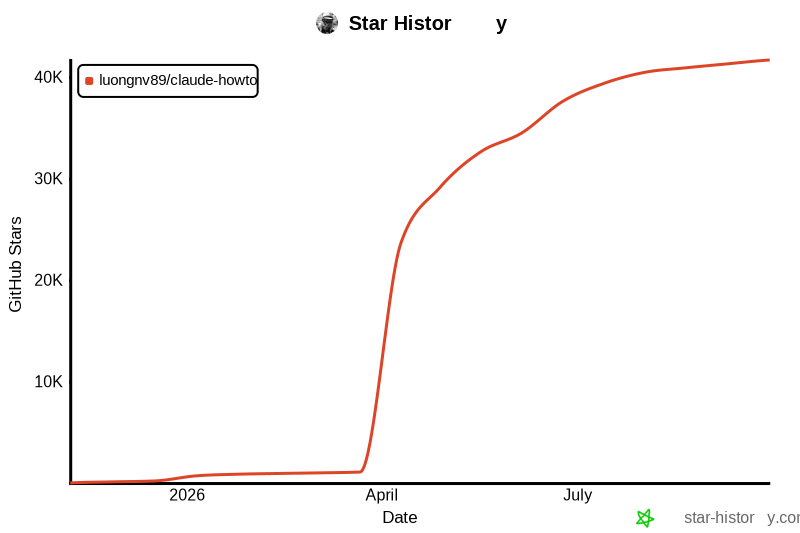](https://star-history.com/#luongnv89/claude-howto&Date)@@ -201,7 +201,7 @@ cp -r 03-skills/code-review-specialist ~/.claude/skills/Yes. MIT licensed, free forever. Use it in personal projects, at work, in your team — no restrictions beyond including the license notice.**Is this maintained?**-Actively. The guide is synced with every Claude Code release. Current version: v2.1.302 (October 2026), compatible with Claude Code 2.1+.+Actively. The guide is synced with every Claude Code release. Current version: v2.1.310 (October 2026), compatible with Claude Code 2.1+.**How is this different from the official docs?**The official docs are a feature reference. This guide is a tutorial with diagrams, production-ready templates, and a progressive learning path. They complement each other — start here to learn, reference the docs when you need specifics.@@ -421,7 +421,7 @@ cp 04-subagents/*.md /path/to/project/.claude/agents/**Examples**:- `github-mcp.json` - GitHub integration-- `database-mcp.json` - Database queries+- `database-mcp.json` - Database queries (point `DATABASE_URL` at a SELECT-only user; see [read-only setup](05-mcp/README.md#example-2-database-mcp-setup))- `filesystem-mcp.json` - File operations- `multi-mcp.json` - Multiple MCP servers@@ -563,7 +563,7 @@ claude --plugin-dir ./07-plugins/documentation- **Extended Thinking** — Deep reasoning for complex problems (toggle with `Alt+T` / `Option+T`)- **Background Tasks** — Run long operations without blocking- **Permission Modes** — `manual` (config value `default`), `acceptEdits`, `plan`, `auto`, `dontAsk`, `bypassPermissions`-- **Headless Mode** — Run Claude Code in CI/CD: `claude -p "Run tests and generate report"`+- **Headless Mode** — Run Claude Code in CI/CD: `claude -p "Run tests and generate report" --permission-mode auto`- **Session Management** — `/resume`, `/rename`, `/fork`, `/branch`, `claude -c`, `claude -r`- **Configuration** — Customize behavior in `~/.claude/settings.json`@@ -874,8 +874,8 @@ MIT License - see [LICENSE](LICENSE). Free to use, modify, and distribute. The o----**Last Updated**: October 18, 2026-**Claude Code Version**: 2.1.302+**Last Updated**: October 26, 2026+**Claude Code Version**: 2.1.310**Sources**:- https://code.claude.com/docs/en/tools-reference#task-tool-availability- https://code.claude.com/docs/en/hooks@@ -894,4 +894,8 @@ MIT License - see [LICENSE](LICENSE). Free to use, modify, and distribute. The o- https://code.claude.com/docs/en/checkpointing- https://github.com/anthropics/claude-code- https://code.claude.com/docs/en/changelog#2-1-302+- https://code.claude.com/docs/en/changelog#2-1-310+- https://code.claude.com/docs/en/headless#auto-approve-tools+- https://code.claude.com/docs/en/permission-modes#which-mode-a-non-interactive-run-starts-in+- https://code.claude.com/docs/en/mcp#example-query-your-postgresql-database**Compatible Models**: Claude Fable 5.1, Claude Fable 5, Claude Opus 5, Claude Sonnet 5, Claude Sonnet 4.6, Claude Opus 4.8, Claude Haiku 4.5diff --git a/claude_concepts_guide.md b/claude_concepts_guide.mdindex 9b3eeba..4b39e9b 100644--- a/claude_concepts_guide.md+++ b/claude_concepts_guide.md@@ -560,7 +560,7 @@ Claude Code includes bundled skills available out of the box, including:| Skill | Command | Purpose ||-------|---------|---------|| **Batch** | `/batch` | Run operations across multiple files or items |-| **Claude API** | `/claude-api` | Load Claude API and Managed Agents reference material for your project's language; activates automatically when your code imports `anthropic` or `@anthropic-ai/sdk` |+| **Claude API** | `/claude-api` | Load Claude API and Managed Agents reference material for your project's language; activates automatically when your code imports `anthropic` or `@anthropic-ai/sdk`. Subcommands include `api-version` (v2.1.307) and `managed-agents-secure` (v2.1.304) || **Code Review** | `/code-review` | Review the current diff for correctness bugs at a chosen effort level. A distinct skill from `/simplify` (quality/reuse cleanups), which was split back out in v2.1.154. Claude can also start it on its own, everywhere since v2.1.246 || **Simplify** | `/simplify` | Quality, reuse, and cleanup review — distinct from `/code-review` again since v2.1.154 || **Debug** | `/debug` | Turn on debug logging for the current session and troubleshoot by reading the session debug log |@@ -1336,8 +1336,8 @@ Run Claude Code without interactive input for automation and CI/CD using the `-p**Usage:**```bash-# Run specific task-claude -p "Run all tests"+# Run specific task (-p starts in Manual mode since v2.1.302, so pass a permission mode or --allowedTools)+claude -p "Run all tests" --permission-mode auto# Pipe input for analysiscat error.log | claude -p "explain this error"@@ -1352,7 +1352,7 @@ claude -p --output-format json "list all functions in src/"### Scheduled Tasks-Run tasks on a repeating schedule using the `/loop` command.+Run session-scoped tasks on a repeating schedule using the `/loop` command. For schedules that outlive the session, use cloud scheduled tasks (formerly routines) with `/schedule`, or Desktop scheduled tasks.**Usage:**```bash@@ -1440,8 +1440,8 @@ Claude Code supports the following models with adaptive reasoning effort:- [Anthropic Cookbook](https://github.com/anthropics/anthropic-cookbook)----**Last Updated**: October 18, 2026-**Claude Code Version**: 2.1.302+**Last Updated**: October 26, 2026+**Claude Code Version**: 2.1.310**Sources**:- https://code.claude.com/docs/en/plugins/manifest-reference- https://code.claude.com/docs/en/plugins/create@@ -1462,4 +1462,10 @@ Claude Code supports the following models with adaptive reasoning effort:- https://code.claude.com/docs/en/commands- https://code.claude.com/docs/en/remote-control- https://code.claude.com/docs/en/hooks#userpromptexpansion+- https://code.claude.com/docs/en/headless#auto-approve-tools+- https://code.claude.com/docs/en/permission-modes#which-mode-a-non-interactive-run-starts-in+- https://code.claude.com/docs/en/routines+- https://code.claude.com/docs/en/scheduled-tasks+- https://code.claude.com/docs/en/changelog#2-1-307+- https://code.claude.com/docs/en/skills#work-on-claude-api-projects**Compatible Models**: Claude Fable 5.1, Claude Fable 5, Claude Opus 5, Claude Sonnet 5, Claude Sonnet 4.6, Claude Opus 4.8, Claude Haiku 4.5diff --git a/ja/01-slash-commands/README.md b/ja/01-slash-commands/README.mdindex 185eb74..dc61c70 100644--- a/ja/01-slash-commands/README.md+++ b/ja/01-slash-commands/README.md@@ -89,7 +89,7 @@| `/status` | バージョン、モデル、アカウントを表示 || `/statusline` | ステータスラインを設定 || `/tasks` | バックグラウンドタスクを一覧/管理 |-| `/team-onboarding` | 過去 30 日間の Claude Code のセッション、コマンド、MCP 利用状況からチームメイト向けランプアップガイドを生成し、共有リンクを返す(v2.1.101 で新規) |+| `/team-onboarding` | 過去 30 日間の Claude Code のセッション、コマンド、MCP 利用状況からチームメイト向けランプアップガイドを生成する。Team / Enterprise プランでは共有リンクも返す(v2.1.101 で新規) || `/terminal-setup` | ターミナルのキーバインドを設定 || `/theme` | テーマピッカーを開く/カスタムテーマを管理(v2.1.118)。カスタムテーマは `~/.claude/themes/<name>.json` に JSON で定義 || `/tui [default\|fullscreen]` | ターミナル UI のレンダラーを設定して再起動する(`fullscreen` でちらつきのない描画)。引数なしの `/tui` は現在のレンダラーを表示(v2.1.110 で追加) |@@ -150,7 +150,7 @@> **v2.1.101 で新規追加**-`/team-onboarding` を使うと、プロジェクトのローカルな Claude Code 利用状況からチームメイト向けランプアップガイドを生成できる。Claude は過去 30 日間のセッション、コマンド、MCP サーバーの利用状況を分析し、新しい開発者がすぐに生産的になれるオンボーディングガイドを作成して、その共有リンクを返す。+`/team-onboarding` を使うと、プロジェクトのローカルな Claude Code 利用状況からチームメイト向けランプアップガイドを生成できる。Claude は過去 30 日間のセッション、コマンド、MCP サーバーの利用状況を分析し、新しい開発者がすぐに生産的になれるオンボーディングガイドを作成する。Team / Enterprise プランの claude.ai 契約者には、Claude Code で直接開ける共有リンクも返す。組み込みコマンドであり、インストール作業は不要である。@@ -604,8 +604,8 @@ Deploy the application to production:----**最終更新**: 2026 年 10 月 18 日-**Claude Code バージョン**: 2.1.302+**最終更新**: 2026 年 10 月 26 日+**Claude Code バージョン**: 2.1.310**Sources**:- https://code.claude.com/docs/en/commands- https://code.claude.com/docs/en/output-styles@@ -621,6 +621,7 @@ Deploy the application to production:- https://code.claude.com/docs/en/fullscreen- https://code.claude.com/docs/en/model-config- https://code.claude.com/docs/en/skills+- https://code.claude.com/docs/en/commands#all-commands**Compatible Models**: Claude Sonnet 4.6, Claude Opus 4.7, Claude Haiku 4.5*[Claude How To](../) ガイドシリーズの一部*diff --git a/ja/02-memory/README.md b/ja/02-memory/README.mdindex 7dd1c43..f4b592b 100644--- a/ja/02-memory/README.md+++ b/ja/02-memory/README.md@@ -1173,7 +1173,7 @@ Claude はどのメモリファイルを更新するかを尋ねる。**メモリのロード:**-- すべてのメモリファイルは Claude Code 起動時に自動でロードされる+- 作業ディレクトリとその上位にある CLAUDE.md ファイル、パス指定のないルール、`MEMORY.md` の冒頭部分は Claude Code 起動時に自動でロードされる- Claude は現在の作業ディレクトリから上位へさかのぼって CLAUDE.md ファイルを発見する- サブツリー内のファイルはそのディレクトリにアクセスする際にコンテキスト的に発見・ロードされる@@ -1209,8 +1209,8 @@ Claude はどのメモリファイルを更新するかを尋ねる。- [公式メモリドキュメント](https://code.claude.com/docs/en/memory) — Anthropic ドキュメント----**最終更新**: 2026 年 10 月 18 日-**Claude Code バージョン**: 2.1.302+**最終更新**: 2026 年 10 月 26 日+**Claude Code バージョン**: 2.1.310**Sources**:- https://code.claude.com/docs/en/memory- https://code.claude.com/docs/en/memory#agents-md@@ -1222,4 +1222,5 @@ Claude はどのメモリファイルを更新するかを尋ねる。- https://code.claude.com/docs/en/sub-agents#enable-persistent-memory- https://code.claude.com/docs/en/settings-reference- https://code.claude.com/docs/en/claude-directory+- https://code.claude.com/docs/en/memory#how-claude-md-files-load**Compatible Models**: Claude Sonnet 4.6, Claude Opus 4.7, Claude Haiku 4.5diff --git a/ja/04-subagents/README.md b/ja/04-subagents/README.mdindex 9fd6349..846a434 100644--- a/ja/04-subagents/README.md+++ b/ja/04-subagents/README.md@@ -126,7 +126,7 @@ hooks: # オプション — コンポーネントスコープのフック| `tools` | いいえ | 特定ツールのカンマ区切りリスト。省略するとすべてのツールを継承。`Agent(agent_name)` 構文で生成可能なサブエージェントを制限できる(`claude --agent` でメインスレッドとして実行する場合のみ。サブエージェント内では型リストは無視される)。MCP:`mcp__<server>__*` でサーバー全体を許可(v2.1.299+:その正確なサーバー名のみに一致) || `disallowedTools` | いいえ | サブエージェントが使用してはならないツールのカンマ区切りリスト || `model` | いいえ | 使用モデル:`sonnet`、`opus`、`haiku`、フルモデル ID、または `inherit`。デフォルトは設定済みのサブエージェントモデル |-| `permissionMode` | いいえ | `default`(Manual モード。v2.1.200 以降 `manual` もエイリアスとして有効)、`acceptEdits`、`dontAsk`、`bypassPermissions`、`plan`、`auto`。親が `bypassPermissions`、`acceptEdits`、`auto` で動作している場合、サブエージェントの `permissionMode` は無視される |+| `permissionMode` | いいえ | `default`(Manual モード。v2.1.200 以降 `manual` もエイリアスとして有効)、`acceptEdits`、`dontAsk`、`bypassPermissions`、`plan`、`auto`。親が `bypassPermissions`、`acceptEdits`、`auto` で動作している場合、サブエージェントの `permissionMode` は無視される。親が `plan` モードの場合、サブエージェントは `permissionMode` の値にかかわらずプランモードのままになる(Agent Teams のチームメイトとして実行される場合を除く)。`dontAsk` を設定した場合、プランモードなら確認を求めるアクションは代わりに拒否される || `maxTurns` | いいえ | サブエージェントが取れるエージェント的ターンの最大数 || `skills` | いいえ | プリロードするスキルのカンマ区切りリスト。起動時にスキルの全内容をサブエージェントのコンテキストに注入する || `mcpServers` | いいえ | サブエージェントから利用可能にする MCP サーバー |@@ -581,7 +581,7 @@ graph TBフォークサブエージェントは、フォーク時点の親の会話全体(システムプロンプト、ツール、モデル、メッセージ履歴、プロンプトキャッシュ)を継承し、クリーンスレートではなくその状態から開始する。これは、これまでの作業を失わずに代替案を探索する場合に有用である。-> **可用性**:v2.1.117 で GA。**v2.1.232 以降、フォークモードは対話セッションではデフォルトで有効**であり、これはファーストパーティかどうかを問わずすべてのビルドに当てはまる。v2.1.302 以降は、非対話モード(`claude -p`)、Agent SDK、デスクトップアプリ、VS Code でもデフォルトで有効である。`claude mcp serve` はフォークサブエージェントを提供しない。デフォルト無効の環境で有効化する場合、または v2.1.232 より古い Claude Code では、`CLAUDE_CODE_FORK_SUBAGENT=1` を設定する。+> **可用性**:v2.1.117 で GA。**v2.1.232 以降、フォークモードは対話セッションではデフォルトで有効**であり、これはファーストパーティかどうかを問わずすべてのビルドに当てはまる。v2.1.302 以降は、非対話モード(`claude -p`)、Agent SDK、デスクトップアプリ、VS Code でもデフォルトで有効である。`claude mcp serve` はフォークサブエージェントを提供しない。v2.1.232 より古い Claude Code では、`CLAUDE_CODE_FORK_SUBAGENT=1` を設定して有効化する。### 設定@@ -787,7 +787,7 @@ graph TB### プラン承認ワークフロー-複雑なタスクでは、チームメイトが作業を始める前にチームリードが実行プランを作成する。ユーザーがプランをレビューして承認することで、コード変更が行われる前にチームのアプローチが期待と合致していることを確認する。+複雑なタスクやリスクの高いタスクでは、チームメイトを依頼する前にチームリードをプランモードに切り替える。チームリードがプランモードのときに生成されたチームメイトは、プランが完成するまで読み取り専用で作業し、その後チームリードにプラン承認リクエストを送る。生成後にそのチームメイトの権限モードを変更していなければ、Claude Code はリクエストが届いた時点でプランを承認する(ユーザーには確認されない)。その場合も、チームメイトの編集やコマンドは通常の権限プロンプトを通る。実行中のインプロセスチームメイトを `Shift+Tab` でプランモードにした場合は、代わりにチームリードがそのプランをレビューする。### チーム向けフックイベント@@ -1273,8 +1273,8 @@ graph TD----**最終更新**:2026 年 10 月 18 日-**Claude Code バージョン**:2.1.302+**最終更新**:2026 年 10 月 26 日+**Claude Code バージョン**:2.1.310**ソース**:- https://code.claude.com/docs/en/sub-agents@@ -1290,5 +1290,7 @@ graph TD- https://code.claude.com/docs/en/sub-agents#available-tools- https://code.claude.com/docs/en/mcp- https://code.claude.com/docs/en/changelog#2-1-302+- https://code.claude.com/docs/en/sub-agents#turn-fork-mode-on-or-off+- https://code.claude.com/docs/en/agent-teams#have-teammates-plan-before-implementing**互換モデル**:Claude Sonnet 4.6、Claude Opus 4.7、Claude Haiku 4.5diff --git a/ja/05-mcp/README.md b/ja/05-mcp/README.mdindex 92a88c6..f1b2bb7 100644--- a/ja/05-mcp/README.md+++ b/ja/05-mcp/README.md@@ -222,7 +222,7 @@ sequenceDiagram## MCP ツール検索-ツール検索はデフォルトで有効。MCP ツールは遅延され、必要に応じて検出されるため、その定義がモデルコンテキストを埋めることはない。`ANTHROPIC_BASE_URL` がファーストパーティ以外のホストを指している場合、ほとんどのプロキシは必要なブロックを転送しないため、Claude Code はツール検索を無効にする。+ツール検索はデフォルトで有効。MCP ツールは遅延され、必要に応じて検出されるため、その定義がモデルコンテキストを埋めることはない。v2.1.304 以降は、カスタムの `ANTHROPIC_BASE_URL` ゲートウェイ経由でも有効のままである。ゲートウェイは `defer_loading` ツールフィールドと `tool_reference` ブロックを転送する必要がある。v2.1.305 以降、ゲートウェイが 400 または 422 で拒否したリクエストを、Claude Code はツール検索なしで再試行する。`ENABLE_TOOL_SEARCH=false` を設定すると、すべてのツールを最初から読み込み、こうした拒否されるリクエストを回避できる。v2.1.304 より前は、`ENABLE_TOOL_SEARCH` が `true`、`auto`、`auto:N` のいずれかでない限り、ゲートウェイ経由ではツール検索が無効だった。| 設定 | 値 | 説明 ||------|-----|------|@@ -1210,8 +1210,8 @@ export GITHUB_PERSONAL_ACCESS_TOKEN="your_token"----**最終更新:** 2026 年 10 月 18 日-**Claude Code バージョン:** 2.1.302+**最終更新:** 2026 年 10 月 26 日+**Claude Code バージョン:** 2.1.310**情報源:**- https://code.claude.com/docs/en/mcp- https://code.claude.com/docs/en/mcp#configure-tool-search@@ -1223,4 +1223,7 @@ export GITHUB_PERSONAL_ACCESS_TOKEN="your_token"- https://code.claude.com/docs/en/mcp#tool-search-for-mcp-server-authors- https://code.claude.com/docs/en/mcp#environment-variable-expansion-in-mcp-json- https://code.claude.com/docs/en/sub-agents+- https://code.claude.com/docs/en/changelog#2-1-304+- https://code.claude.com/docs/en/changelog#2-1-305+- https://code.claude.com/docs/en/mcp#tool-search-through-an-llm-gateway**対応モデル:** Claude Sonnet 4.6、Claude Opus 4.7、Claude Haiku 4.5diff --git a/ja/06-hooks/README.md b/ja/06-hooks/README.mdindex 9bf9d02..445579e 100644--- a/ja/06-hooks/README.md+++ b/ja/06-hooks/README.md@@ -265,7 +265,7 @@ Claude がツールパラメータを生成した後、処理開始前に動作- `"allow"` は権限プロンプトをスキップする(ユーザー操作が必須のツール、および組織が `ask` に設定したコネクタツールを除く)- `"deny"` はツール呼び出しを阻止する- `"ask"` はユーザーに確認を求める- - `"defer"` は正常終了して後でツールを再開できるようにする。この値では `permissionDecisionReason`、`updatedInput`、`additionalContext` はいずれも無視される+ - `"defer"` はターンを終了して後でツールを再開できるようにする。`-p` を使った非対話モードでのみ機能する(対話セッションでは警告をログに記録して無視する)。結果には `stop_reason: "tool_deferred"` が含まれる。この値では `permissionDecisionReason`、`updatedInput`、`additionalContext` はいずれも無視される- フックが何を返しても deny/ask のルールは引き続き評価される。複数の `PreToolUse` フックの判定が食い違う場合、優先順位は `deny` > `defer` > `ask` > `allow` となる- `permissionDecisionReason`: 判定の理由。`"ask"` では(Claude ではなく)ユーザーに表示され、`"deny"` では Claude に表示される。`"allow"` と `"defer"` ではデバッグログにのみ記録される- `updatedInput`: 置き換え用のツール入力(入力オブジェクト全体を置き換える)。v2.1.300 以降は Claude 自身の入力と同様に検証され、未知のキーは破棄され、ツールが拒否する入力では呼び出しが拒否される。@@ -1390,8 +1390,8 @@ chmod +x ~/.claude/hooks/*.sh----**最終更新:** 2026 年 10 月 18 日-**Claude Code バージョン:** 2.1.302+**最終更新:** 2026 年 10 月 26 日+**Claude Code バージョン:** 2.1.310**情報源:**- https://code.claude.com/docs/en/hooks- https://code.claude.com/docs/en/plugins/manifest-reference#quoting-and-path-separators@@ -1406,4 +1406,5 @@ chmod +x ~/.claude/hooks/*.sh- https://code.claude.com/docs/en/hooks#userpromptsubmit-input- https://code.claude.com/docs/en/changelog#2-1-299- https://code.claude.com/docs/en/changelog#2-1-300+- https://code.claude.com/docs/en/hooks#defer-a-tool-call-for-later**対応モデル:** Claude Fable 5、Claude Opus 5、Claude Sonnet 5、Claude Sonnet 4.6、Claude Opus 4.8、Claude Haiku 4.5diff --git a/ja/08-checkpoints/README.md b/ja/08-checkpoints/README.mdindex cbaac3f..dfb7769 100644--- a/ja/08-checkpoints/README.md+++ b/ja/08-checkpoints/README.md@@ -245,7 +245,7 @@ Claude Code がスナップショットを保持するのは **直近 100 件のチェックポイントには次の制限がある:-- **bash コマンドによる変更は追跡されない** - `rm`、`mv`、`cp` などのファイルシステム操作はチェックポイントに含まれない+- **bash コマンドだけによるファイル変更は追跡されない** - Claude がファイル編集ツールで一度編集したファイルについては、その後に bash コマンドが加えた変更も `/rewind` で元に戻る。bash コマンドだけで変更したファイルは追跡されない。v2.1.309 以降、`sed -i` もほかの bash による編集と同じ扱いになる- **外部の変更は追跡されない** - エディタやターミナルなど Claude Code の外で行った変更は捕捉されない- **バージョン管理の代わりにはならない** - 永続的で監査可能な変更には git を使う@@ -336,12 +336,14 @@ Claude Code がスナップショットを保持するのは **直近 100 件の----**最終更新**: 2026 年 10 月 18 日-**Claude Code バージョン**: 2.1.302+**最終更新**: 2026 年 10 月 26 日+**Claude Code バージョン**: 2.1.310**出典**:- https://code.claude.com/docs/en/checkpointing- https://code.claude.com/docs/en/settings- https://github.com/anthropics/claude-code/releases/tag/v2.1.117- https://code.claude.com/docs/en/commands- https://code.claude.com/docs/en/claude-directory+- https://code.claude.com/docs/en/changelog#2-1-309+- https://code.claude.com/docs/en/checkpointing#bash-command-changes-not-tracked**対応モデル**: Claude Sonnet 4.6、Claude Opus 4.7、Claude Haiku 4.5diff --git a/ja/09-advanced-features/README.md b/ja/09-advanced-features/README.mdindex 9184c2e..f31ebaa 100644--- a/ja/09-advanced-features/README.md+++ b/ja/09-advanced-features/README.md@@ -724,7 +724,7 @@ export CLAUDE_CODE_DISABLE_CRON=1| `bypassPermissions` | 全操作、権限チェックなし(危険) || `dontAsk` | 事前承認済みツールのみ実行、その他はすべて拒否 |-CLI では `Shift+Tab` でモードを切り替える。デフォルトは `--permission-mode` フラグまたは `permissions.defaultMode` 設定で指定する。パーミッションモードが未設定の場合、v2.1.284 以降は対話型のターミナルセッションと VS Code セッションがすべてのプランとプロバイダーで auto モードで開始する(v2.1.283 では Bedrock、Google Cloud の Agent Platform、Foundry などのサードパーティプロバイダー上、またはテレメトリをオフにした場合に限られていた)。`permissions.defaultMode` は引き続きこれより優先され、auto モードを利用できないセッションは代わりに `default`(Manual)で開始する。v2.1.302 以降、パーミッションモードを設定していない `claude -p` と Agent SDK のセッションは、サードパーティプロバイダー上、テレメトリをオフにした場合、または新規インストール直後には `default` モードで開始する。auto モードを維持するには `--permission-mode auto` を渡す。+CLI では `Shift+Tab` でモードを切り替える。デフォルトは `--permission-mode` フラグまたは `permissions.defaultMode` 設定で指定する。パーミッションモードが未設定の場合、v2.1.284 以降は対話型のターミナルセッションと VS Code セッションがすべてのプランとプロバイダーで auto モードで開始する(v2.1.283 では Bedrock、Google Cloud の Agent Platform、Foundry などのサードパーティプロバイダー上、またはテレメトリをオフにした場合に限られていた)。`permissions.defaultMode` は引き続きこれより優先され、auto モードを利用できないセッションは代わりに `default`(Manual)で開始する。v2.1.302 以降、パーミッションモードを設定していない `claude -p` または Agent SDK の実行は Manual モード(設定値は `default`)で開始し、承認が必要なツール呼び出しを拒否する。`--permission-mode`(たとえば `auto` や `acceptEdits`)または `--allowedTools` を渡す。### 起動方法@@ -835,7 +835,7 @@ Claude: [Auto-accepts file edits without asking]```bash# Run specific task-claude -p "Run all tests"+claude -p "Run all tests" --permission-mode auto# Process piped contentcat error.log | claude -p "Analyze these errors"@@ -849,7 +849,7 @@ cat error.log | claude -p "Analyze these errors"```bash# Run a specific task with output capture-claude -p "Run all tests and generate coverage report"+claude -p "Run all tests and generate coverage report" --permission-mode auto# With structured outputclaude -p --output-format json "Analyze code quality"@@ -1465,7 +1465,7 @@ Web セッションでは、claude.ai/code 上のブラウザで直接 Claude Co```bash# Create a new web session from the CLI-claude --remote "implement the new API endpoints"+claude --cloud "implement the new API endpoints" # --remote is a deprecated alias```これにより claude.ai 上で Claude Code セッションが開始され、任意のブラウザからアクセスできる。@@ -1980,6 +1980,8 @@ User: /config}```+`PROJECT_DB_URL` には読み取り専用のデータベースユーザーを使う。読み取り専用のセットアップは [MCP → データベースの例](../05-mcp/README.md) を参照のこと。+---## エージェントチーム@@ -2099,8 +2101,8 @@ Claude Code および関連機能の詳細:----**最終更新:** 2026 年 10 月 18 日-**Claude Code バージョン:** 2.1.302+**最終更新:** 2026 年 10 月 26 日+**Claude Code バージョン:** 2.1.310**情報源:**- https://code.claude.com/docs/en/permissions- https://code.claude.com/docs/en/auto-mode-classifier-billing@@ -2131,5 +2133,8 @@ Claude Code および関連機能の詳細:- https://code.claude.com/docs/en/chrome- https://code.claude.com/docs/en/env-vars- https://code.claude.com/docs/en/changelog#2-1-302+- https://code.claude.com/docs/en/permission-modes#which-mode-a-non-interactive-run-starts-in+- https://code.claude.com/docs/en/mcp#example-query-your-postgresql-database+- https://code.claude.com/docs/en/cli-reference#cli-flags**互換モデル:** Claude Sonnet 4.6、Claude Opus 4.7、Claude Haiku 4.5diff --git a/ja/10-cli/README.md b/ja/10-cli/README.mdindex 0e681f2..18bd48e 100644--- a/ja/10-cli/README.md+++ b/ja/10-cli/README.md@@ -193,7 +193,7 @@ claude -p --system-prompt-file ./prompts/code-reviewer.txt "review main.py"| `--disallowedTools` | コンテキストから除外するツール | `"Bash(rm:*)" "Edit"` || `--dangerously-skip-permissions` | 全ての権限プロンプトをスキップ | `claude --dangerously-skip-permissions` || `--permission-mode` | 指定した権限モードで開始 | `claude --permission-mode auto` |-| `--permission-prompt-tool` | 権限処理用の MCP ツール | `claude -p --permission-prompt-tool mcp_auth "query"` |+| `--permission-prompt-tool` | 権限処理用の MCP ツール | `claude -p --mcp-config ./mcp.json --permission-prompt-tool mcp__permissions__approve "query"` || `--enable-auto-mode` | 自動権限モードを解禁 | `claude --enable-auto-mode` |> **Glob / Grep 注記(v2.1.113+)**: ネイティブな macOS/Linux ビルドでは、`Glob` と `Grep` は独立したファーストクラスツールではなく、Bash ツール経由で呼び出される組み込みの `bfs` および `ugrep` バイナリとして提供される。Windows 版および npm バンドル(JS)版では引き続きスタンドアロンツールとして公開される。サブエージェントの `allowedTools` / `disallowedTools` リストでは、バックエンド側の置換は透過的なため、どのプラットフォームでも設定では引き続き `Glob` / `Grep` を参照すればよい。@@ -748,7 +748,7 @@ export CLAUDE_CODE_EFFORT_LEVEL=xhigh # low, medium, high, xhigh (default on O| `CLAUDE_CODE_SIMPLE` | 最小モード(`--bare` フラグで設定される) || `CLAUDE_CODE_DISABLE_AUTO_MEMORY` | `1` を設定すると自動メモリを無効化する(自動メモリファイルを作成も読み込みもしない) || `CLAUDE_CODE_DISABLE_BACKGROUND_TASKS` | バックグラウンドタスク実行を無効化 |-| `CLAUDE_CODE_DISABLE_CRON` | スケジュール/cron タスクを無効化 |+| `CLAUDE_CODE_DISABLE_CRON` | セッションスコープのスケジュールタスク(`/loop`、cron ツール)を無効化。クラウドスケジュールタスクには影響しない || `CLAUDE_CODE_DISABLE_GIT_INSTRUCTIONS` | git 関連の指示を無効化 || `CLAUDE_CODE_DISABLE_TERMINAL_TITLE` | ターミナルタイトル更新を無効化 || `CLAUDE_CODE_DISABLE_1M_CONTEXT` | 1M トークンコンテキストウィンドウを無効化 |@@ -772,7 +772,7 @@ export CLAUDE_CODE_EFFORT_LEVEL=xhigh # low, medium, high, xhigh (default on O| `CLAUDE_CODE_FORK_SUBAGENT` | `0` を設定するとフォークサブエージェントを無効化する。v2.1.302 以降、ターミナル、`claude -p`、Agent SDK、デスクトップアプリ、VS Code でデフォルト有効。v2.1.302 より前は、`claude -p` と Agent SDK で有効にするには `1` を設定する。 || `OTEL_LOG_TOOL_DETAILS` | `1` を設定すると OpenTelemetry イベント中のカスタムおよび MCP コマンド名のリダクションを解除する(v2.1.117+)。デフォルトはリダクション有効。 |-> **Vertex AI 上の `ENABLE_TOOL_SEARCH`(v2.1.119+)**: ツール検索は **Google Cloud Vertex AI 上のデプロイではデフォルト無効** である。Vertex 上でツール検索機能を使いたい場合は `export ENABLE_TOOL_SEARCH=true` で明示的にオプトインする必要がある。Anthropic API 直結ではデフォルト有効のままである。+> **Agent Platform(Vertex AI)とゲートウェイでの `ENABLE_TOOL_SEARCH`**: v2.1.221 より前は、`ENABLE_TOOL_SEARCH=true` を設定しない限り Google Cloud の Agent Platform ではツール検索がオフだった。現在は同プラットフォームで Claude Opus 4.5、Sonnet 4.5、Haiku 4.5 以降のモデルに対して有効である(それ以前のモデルはすべての MCP ツールを事前に読み込み、`true` を設定しても変わらない)。ツール検索はデフォルトで有効で、v2.1.304 以降はカスタムの `ANTHROPIC_BASE_URL` ゲートウェイ経由でも有効になる(v2.1.305 以降、ツール検索を 400 または 422 で拒否するゲートウェイに対してはツール検索なしで再試行される)。すべてのツールを事前に読み込むには `ENABLE_TOOL_SEARCH=false` を設定する。---@@ -878,8 +878,8 @@ claude -p --output-format json "query"----**最終更新**: 2026 年 10 月 18 日-**Claude Code バージョン**: 2.1.302+**最終更新**: 2026 年 10 月 26 日+**Claude Code バージョン**: 2.1.310**出典**:- https://code.claude.com/docs/en/cli-reference- https://code.claude.com/docs/en/model-config@@ -900,4 +900,10 @@ claude -p --output-format json "query"- https://code.claude.com/docs/en/changelog#2-1-302- https://github.com/anthropics/claude-code- https://platform.claude.com/docs/en/about-claude/models/overview+- https://code.claude.com/docs/en/cli-reference#cli-flags+- https://code.claude.com/docs/en/changelog#2-1-304+- https://code.claude.com/docs/en/mcp#configure-tool-search+- https://code.claude.com/docs/en/mcp#tool-search-through-a-gateway+- https://code.claude.com/docs/en/env-vars#variables+- https://code.claude.com/docs/en/scheduled-tasks**対応モデル**: Claude Fable 5、Claude Opus 5、Claude Sonnet 5、Claude Sonnet 4.6、Claude Opus 4.8、Claude Haiku 4.5diff --git a/ja/INDEX.md b/ja/INDEX.mdindex 7cadf79..dcb944b 100644--- a/ja/INDEX.md+++ b/ja/INDEX.md@@ -755,7 +755,7 @@ claude --permission-mode acceptEdits # 編集を自動承認claude --permission-mode auto # 安全な操作を自動承認# CI/CD のためのヘッドレスモードで実行-claude -p "Run tests and report results"+claude -p "Run tests and report results" --permission-mode auto# バックグラウンドタスクを実行Run tests in background@@ -884,8 +884,8 @@ Run tests in background----**最終更新**:2026 年 10 月 18 日-**Claude Code バージョン**:2.1.302+**最終更新**:2026 年 10 月 26 日+**Claude Code バージョン**:2.1.310**互換モデル**:Claude Sonnet 4.6、Claude Opus 4.7、Claude Haiku 4.5**例題総数**:100 ファイル超**カテゴリ**:10 機能@@ -904,3 +904,5 @@ Run tests in background- https://code.claude.com/docs/en/plugins/install- https://code.claude.com/docs/en/checkpointing- https://code.claude.com/docs/en/permission-modes+- https://code.claude.com/docs/en/headless#auto-approve-tools+- https://code.claude.com/docs/en/permission-modes#which-mode-a-non-interactive-run-starts-indiff --git a/ja/LEARNING-ROADMAP.md b/ja/LEARNING-ROADMAP.mdindex 4d1711d..1b09157 100644--- a/ja/LEARNING-ROADMAP.md+++ b/ja/LEARNING-ROADMAP.md@@ -409,7 +409,7 @@ export CLAUDE_CODE_EXPERIMENTAL_AGENT_TEAMS=1# 演習 7: スケジュールタスク/loop 5m /check-status-# タスクはセッション単位。永続的なスケジュールには Routines または Desktop のスケジュールタスクを使う+# タスクはセッション単位。永続的なスケジュールにはクラウドのスケジュールタスク(旧称 routines、/schedule で作成)または Desktop のスケジュールタスクを使う# 演習 8: チャンネル(リサーチプレビュー)# チャンネルは実行中のセッションにイベントをプッシュする MCP サーバである@@ -458,7 +458,7 @@ export CLAUDE_CODE_EXPERIMENTAL_AGENT_TEAMS=1claude --plugin-dir ./07-plugins/pr-review # リポジトリのルートから# 演習 2: CI/CD のための印字モード-claude -p "Run all tests and generate report"+claude -p "Run all tests and generate report" --permission-mode auto# 演習 3: スクリプト用 JSON 出力claude -p --output-format json "list all functions"@@ -741,8 +741,8 @@ done----**最終更新**:2026 年 10 月 18 日-**Claude Code バージョン**:2.1.302+**最終更新**:2026 年 10 月 26 日+**Claude Code バージョン**:2.1.310**情報源**:- https://code.claude.com/docs/en/overview- https://code.claude.com/docs/en/hooks@@ -755,6 +755,9 @@ done- https://code.claude.com/docs/en/scheduled-tasks- https://code.claude.com/docs/en/commands- https://code.claude.com/docs/en/sub-agents+- https://code.claude.com/docs/en/routines#where-the-name-routines-still-appears+- https://code.claude.com/docs/en/headless#auto-approve-tools+- https://code.claude.com/docs/en/permission-modes#which-mode-a-non-interactive-run-starts-in**互換モデル**:Claude Fable 5、Claude Opus 5、Claude Sonnet 5、Claude Sonnet 4.6、Claude Opus 4.8、Claude Haiku 4.5**メンテナンス**:Claude How-To Contributors**ライセンス**:教育目的、自由に使用・改変可能diff --git a/ja/QUICK_REFERENCE.md b/ja/QUICK_REFERENCE.mdindex de6e4f1..fbae931 100644--- a/ja/QUICK_REFERENCE.md+++ b/ja/QUICK_REFERENCE.md@@ -228,7 +228,9 @@ claude --enable-auto-mode -p "Refactor and test the auth module"### CI/CD 統合```bash-# ヘッドレスモードで実行 (非対話)+# ヘッドレスモードで実行 (非対話)。権限モードを指定しないと -p は Manual モード+# (設定値 "default"、v2.1.302+) で開始し、承認が必要なツール呼び出しは拒否されるため、+# --allowedTools "Bash(npm test *)" または --permission-mode auto を追加するclaude -p "Run all tests and generate report"# CI 用権限モードつき@@ -512,8 +514,8 @@ A:もちろん。カスタマイズ用のテンプレートである。**このカード**:手元に置いてクイックリファレンスとして!----**最終更新**:2026 年 10 月 18 日-**Claude Code バージョン**:2.1.302+**最終更新**:2026 年 10 月 26 日+**Claude Code バージョン**:2.1.310**情報源**:- https://code.claude.com/docs/en/overview- https://code.claude.com/docs/en/hooks@@ -527,4 +529,6 @@ A:もちろん。カスタマイズ用のテンプレートである。- https://code.claude.com/docs/en/managed-settings- https://code.claude.com/docs/en/scheduled-tasks- https://code.claude.com/docs/en/model-config+- https://code.claude.com/docs/en/headless+- https://code.claude.com/docs/en/permission-modes#tool-calls-denied-in-claude-p-and-agent-sdk-runs**互換モデル**:Claude Fable 5、Claude Opus 5、Claude Sonnet 5、Claude Sonnet 4.6、Claude Opus 4.8、Claude Haiku 4.5diff --git a/ja/README.md b/ja/README.mdindex cded76d..9582b58 100644--- a/ja/README.md+++ b/ja/README.md@@ -425,7 +425,7 @@ cp 04-subagents/*.md /path/to/project/.claude/agents/**例**:- `github-mcp.json` — GitHub 連携-- `database-mcp.json` — データベースクエリ+- `database-mcp.json` — データベースクエリ(`DATABASE_URL` には SELECT 専用ユーザーを指定する。[読み取り専用の設定](05-mcp/README.md#例-2database-mcp-のセットアップ) を参照)- `filesystem-mcp.json` — ファイル操作- `multi-mcp.json` — 複数の MCP サーバ@@ -567,7 +567,7 @@ claude --plugin-dir ./07-plugins/documentation- **拡張思考(Extended Thinking)** — 複雑な問題に対する深い推論(`Alt+T` / `Option+T` で切り替え)- **バックグラウンドタスク** — ブロックなしに長時間処理を実行- **権限モード** — `default`、`acceptEdits`、`plan`、`dontAsk`、`bypassPermissions`-- **ヘッドレスモード** — CI/CD で Claude Code を実行:`claude -p "Run tests and generate report"`+- **ヘッドレスモード** — CI/CD で Claude Code を実行:`claude -p "Run tests and generate report" --permission-mode auto`- **セッション管理** — `/resume`、`/rename`、`/fork`、`claude -c`、`claude -r`- **設定** — `~/.claude/settings.json` で挙動をカスタマイズ@@ -878,8 +878,8 @@ MIT License — [LICENSE](../LICENSE) を参照。利用、変更、再配布は----**最終更新**:2026 年 10 月 18 日-**Claude Code バージョン**:2.1.302+**最終更新**:2026 年 10 月 26 日+**Claude Code バージョン**:2.1.310**情報源**:- https://code.claude.com/docs/en/tools-reference#task-tool-availability- https://code.claude.com/docs/en/hooks@@ -893,4 +893,7 @@ MIT License — [LICENSE](../LICENSE) を参照。利用、変更、再配布は- https://code.claude.com/docs/en/checkpointing- https://code.claude.com/docs/en/model-config- https://github.com/anthropics/claude-code+- https://code.claude.com/docs/en/headless#auto-approve-tools+- https://code.claude.com/docs/en/permission-modes#which-mode-a-non-interactive-run-starts-in+- https://code.claude.com/docs/en/mcp#example-query-your-postgresql-database**互換モデル**:Claude Sonnet 4.6、Claude Opus 4.7、Claude Haiku 4.5diff --git a/ja/claude_concepts_guide.md b/ja/claude_concepts_guide.mdindex 2f19e5d..eaceccd 100644--- a/ja/claude_concepts_guide.md+++ b/ja/claude_concepts_guide.md@@ -2979,7 +2979,7 @@ claude --permission-mode dontAsk # 事前承認済みツールのみ。そ**使い方:**```bash# 特定タスクを実行-claude -p "Run all tests"+claude -p "Run all tests" --permission-mode auto# 入力をパイプして解析cat error.log | claude -p "explain this error"@@ -3080,8 +3080,8 @@ Claude Code は推論努力を調整可能な 3 モデルをサポートする*収録機能:フック、チェックポイント、プラニングモード、拡張思考、バックグラウンドタスク、権限モード(6 種)、ヘッドレスモード、セッション管理、Auto Memory、Agent Teams、定期タスク、Chrome 連携、Channels、音声入力、同梱スキル*----**最終更新:** 2026 年 10 月 18 日-**Claude Code バージョン:** 2.1.302+**最終更新:** 2026 年 10 月 26 日+**Claude Code バージョン:** 2.1.310**出典:**- https://code.claude.com/docs/en/plugins/manifest-reference- https://code.claude.com/docs/en/plugins/create@@ -3100,5 +3100,7 @@ Claude Code は推論努力を調整可能な 3 モデルをサポートする- https://code.claude.com/docs/en/commands- https://code.claude.com/docs/en/permission-modes- https://code.claude.com/docs/en/hooks#userpromptexpansion+- https://code.claude.com/docs/en/headless#auto-approve-tools+- https://code.claude.com/docs/en/permission-modes#which-mode-a-non-interactive-run-starts-in**対応モデル:** Claude Fable 5、Claude Opus 5、Claude Sonnet 5、Claude Sonnet 4.6、Claude Opus 4.8、Claude Haiku 4.5diff --git a/resources.md b/resources.mdindex 070784b..371c061 100644--- a/resources.md+++ b/resources.md@@ -16,7 +16,7 @@| Anthropic Cookbook | Code examples and tutorials | [github.com/anthropics/anthropic-cookbook](https://github.com/anthropics/anthropic-cookbook) || Claude Code Skills | Community skills repository | [github.com/anthropics/skills](https://github.com/anthropics/skills) || Agent Teams | Multi-agent coordination and collaboration | [code.claude.com/docs/en/agent-teams](https://code.claude.com/docs/en/agent-teams) |-| Scheduled Tasks | Recurring tasks with /loop and cron | [code.claude.com/docs/en/scheduled-tasks](https://code.claude.com/docs/en/scheduled-tasks) |+| Scheduled Tasks | Session-scoped recurring tasks with /loop and cron | [code.claude.com/docs/en/scheduled-tasks](https://code.claude.com/docs/en/scheduled-tasks) || Chrome Integration | Browser automation | [code.claude.com/docs/en/chrome](https://code.claude.com/docs/en/chrome) || Keybindings | Keyboard shortcut customization | [code.claude.com/docs/en/keybindings](https://code.claude.com/docs/en/keybindings) || Desktop App | Native desktop application | [code.claude.com/docs/en/desktop](https://code.claude.com/docs/en/desktop) |@@ -240,11 +240,11 @@ These steps capture the core recommendations for smooth workflows with Claude Co| **Web Sessions** | Access Claude Code through browser-based interfaces for remote development | [CLI Reference](10-cli/) || **Desktop App** | Native desktop application for Claude Code with enhanced UI | [Claude Code Docs](https://code.claude.com/docs/en/desktop) || **Extended Thinking** | Deep reasoning toggle via `Alt+T`/`Option+T`; Opus 4.7+, Sonnet 5+, Haiku 5.5 and Fable always use adaptive reasoning, so a fixed `MAX_THINKING_TOKENS` budget does not apply (control depth with `/effort`) | [Advanced Features](09-advanced-features/) |-| **Permission Modes** | Fine-grained control: manual (formerly default), acceptEdits, plan, auto, dontAsk, bypassPermissions | [Advanced Features](09-advanced-features/) |+| **Permission Modes** | Fine-grained control: manual (config value `default`), acceptEdits, plan, auto, dontAsk, bypassPermissions | [Advanced Features](09-advanced-features/) || **7-Tier Memory** | Managed Policy, Project, Project Rules, User, User Rules, Local, Auto Memory | [Memory Guide](02-memory/) || **Hook Events** | 33 events: PreToolUse, PostToolUse, PostToolUseFailure, Stop, StopFailure, SubagentStart, SubagentStop, Notification, Elicitation, and more | [Hooks Guide](06-hooks/) || **Agent Teams** | Coordinate multiple agents working together on complex tasks | [Subagents Guide](04-subagents/) |-| **Scheduled Tasks** | Set up recurring tasks with `/loop` and cron tools | [Advanced Features](09-advanced-features/) |+| **Scheduled Tasks** | Set up session-scoped recurring tasks with `/loop` and cron tools | [Advanced Features](09-advanced-features/) || **Chrome Integration** | Browser automation in your own Chrome via the Claude in Chrome extension | [Advanced Features](09-advanced-features/) || **Keyboard Customization** | Customize keybindings including chord sequences | [Advanced Features](09-advanced-features/) || **Monitor Tool** | Watch a background command's stdout stream and react to events instead of polling (v2.1.98+) | [Advanced Features](09-advanced-features/) |@@ -253,8 +253,8 @@ These steps capture the core recommendations for smooth workflows with Claude Co| **/run, /verify, /run-skill-generator** | Bundled skills to launch your project, confirm a fix works, and generate per-project run/verify skills (v2.1.145+) | [Skills Guide](03-skills/) |----**Last Updated**: October 18, 2026-**Claude Code Version**: 2.1.302+**Last Updated**: October 26, 2026+**Claude Code Version**: 2.1.310**Sources**:- https://code.claude.com/docs/en/overview- https://code.claude.com/docs/en/changelog@@ -266,4 +266,6 @@ These steps capture the core recommendations for smooth workflows with Claude Co- https://code.claude.com/docs/en/chrome- https://code.claude.com/docs/en/remote-control- https://code.claude.com/docs/en/code-review+- https://code.claude.com/docs/en/scheduled-tasks+- https://code.claude.com/docs/en/permission-modes#available-modes**Compatible Models**: Claude Fable 5, Claude Opus 5, Claude Sonnet 5, Claude Sonnet 4.6, Claude Opus 4.8, Claude Haiku 4.5diff --git a/uk/02-memory/README.md b/uk/02-memory/README.mdindex 041a0ac..9285f0b 100644--- a/uk/02-memory/README.md+++ b/uk/02-memory/README.md@@ -1123,7 +1123,7 @@ Claude запропонує обрати, який файл пам'яті оно**Завантаження пам'яті:**-- Усі файли пам'яті автоматично завантажуються при запуску Claude Code+- Файли CLAUDE.md у робочому каталозі та вище, правила без прив'язки до шляхів і початок `MEMORY.md` автоматично завантажуються при запуску Claude Code- Claude проходить вгору від поточного робочого каталогу для виявлення файлів CLAUDE.md- Файли піддерев виявляються та завантажуються контекстно при доступі до цих каталогів@@ -1159,8 +1159,8 @@ Claude запропонує обрати, який файл пам'яті оно- [Офіційна документація пам'яті](https://code.claude.com/docs/en/memory) — документація Anthropic----**Останнє оновлення**: 18 жовтня 2026-**Версія Claude Code**: 2.1.302+**Останнє оновлення**: 26 жовтня 2026+**Версія Claude Code**: 2.1.310**Джерела**:- https://code.claude.com/docs/en/memory- https://code.claude.com/docs/en/memory#agents-md@@ -1169,4 +1169,5 @@ Claude запропонує обрати, який файл пам'яті оно- https://code.claude.com/docs/en/sub-agents#enable-persistent-memory- https://code.claude.com/docs/en/settings-reference- https://code.claude.com/docs/en/claude-directory+- https://code.claude.com/docs/en/memory#how-claude-md-files-load**Сумісні моделі**: Claude Sonnet 4.6, Claude Opus 4.6, Claude Haiku 4.5diff --git a/uk/04-subagents/README.md b/uk/04-subagents/README.mdindex d426d7f..52ebc15 100644--- a/uk/04-subagents/README.md+++ b/uk/04-subagents/README.md@@ -127,7 +127,7 @@ to solving problems.| `tools` | Ні | Список інструментів через кому. Пропустіть для успадкування всіх. Підтримує синтаксис `Agent(agent_name)` для обмеження створюваних субагентів, коли агент працює як головний потік через `claude --agent`; усередині субагента список типів ігнорується. MCP: `mcp__<server>__*` надає доступ до всього сервера (v2.1.299+: збігається лише з точною назвою цього сервера). || `disallowedTools` | Ні | Список заборонених інструментів через кому || `model` | Ні | Модель: `sonnet`, `opus`, `haiku`, повний ID моделі або `inherit`. За замовч. — налаштована модель субагента |-| `permissionMode` | Ні | `default` (режим Manual; `manual` приймається як псевдонім з v2.1.200), `acceptEdits`, `dontAsk`, `bypassPermissions`, `plan`, `auto`. Коли батьківська сесія працює в `bypassPermissions`, `acceptEdits` або `auto`, `permissionMode` субагента ігнорується |+| `permissionMode` | Ні | `default` (режим Manual; `manual` приймається як псевдонім з v2.1.200), `acceptEdits`, `dontAsk`, `bypassPermissions`, `plan`, `auto`. Коли батьківська сесія працює в `bypassPermissions`, `acceptEdits` або `auto`, `permissionMode` субагента ігнорується. Коли батьківська сесія в режимі `plan`, субагент залишається в режимі планування незалежно від `permissionMode` (якщо тільки він не працює як тіммейт Agent Teams); якщо ви встановите `dontAsk`, дії, про які запитав би режим планування, натомість відхиляються || `maxTurns` | Ні | Максимальна кількість агентних кроків || `skills` | Ні | Список навичок через кому для попереднього завантаження. Вставляє повний вміст навички в контекст при запуску || `mcpServers` | Ні | MCP-сервери, доступні субагенту |@@ -694,7 +694,7 @@ graph TB### Воркфлов затвердження плану-Для складних завдань тімлід створює план виконання перед початком роботи тіммейтів. Користувач переглядає та затверджує план, забезпечуючи відповідність підходу команди очікуванням перед внесенням будь-яких змін у код.+Для складних або ризикованих завдань перемкніть тімліда в режим планування, перш ніж просити про тіммейта: тіммейт, створений, коли тімлід у режимі планування, працює лише на читання, доки його план не буде готовий, а потім надсилає тімліду запит на затвердження плану. Якщо ви не змінювали режим дозволів цього тіммейта після його створення, Claude Code затверджує план, щойно надходить запит (вас не запитують), а редагування й команди тіммейта все одно проходять звичайні запити дозволів. Якщо ви переведете запущеного in-process тіммейта в режим планування за допомогою `Shift+Tab`, план натомість переглядає тімлід.### Хук-події для команд@@ -1132,8 +1132,8 @@ graph TD- [Посібник хуків](../06-hooks/) — для автоматизації за подіями----**Останнє оновлення**: 18 жовтня 2026-**Версія Claude Code**: 2.1.302+**Останнє оновлення**: 26 жовтня 2026+**Версія Claude Code**: 2.1.310**Джерела**:- https://code.claude.com/docs/en/sub-agents- https://code.claude.com/docs/en/commands@@ -1146,4 +1146,5 @@ graph TD- https://code.claude.com/docs/en/agent-teams- https://code.claude.com/docs/en/mcp- https://code.claude.com/docs/en/changelog#2-1-302+- https://code.claude.com/docs/en/agent-teams#have-teammates-plan-before-implementing**Сумісні моделі**: Claude Sonnet 4.6, Claude Opus 4.6, Claude Haiku 4.5diff --git a/uk/05-mcp/README.md b/uk/05-mcp/README.mdindex d8e8be2..d41cc47 100644--- a/uk/05-mcp/README.md+++ b/uk/05-mcp/README.md@@ -220,7 +220,7 @@ sequenceDiagram## Пошук інструментів MCP-Пошук інструментів увімкнено за замовчуванням: інструменти MCP відкладаються й знаходяться за потреби, тож їхні визначення не заповнюють контекст моделі. Claude Code вимикає його, коли `ANTHROPIC_BASE_URL` вказує на хост, що не належить Anthropic (не first-party), оскільки більшість проксі не пересилають потрібні йому блоки.+Пошук інструментів увімкнено за замовчуванням: інструменти MCP відкладаються й знаходяться за потреби, тож їхні визначення не заповнюють контекст моделі. Починаючи з v2.1.304, він також залишається увімкненим за власним шлюзом `ANTHROPIC_BASE_URL`, який має пересилати поля інструментів `defer_loading` і блоки `tool_reference`; з v2.1.305 Claude Code повторює без пошуку інструментів запит, який шлюз відхиляє з кодом 400 або 422. Встановіть `ENABLE_TOOL_SEARCH=false`, щоб завантажувати всі інструменти одразу й уникнути таких відхилених запитів. До v2.1.304 пошук інструментів за шлюзом був вимкнений, якщо `ENABLE_TOOL_SEARCH` не мав значення `true`, `auto` або `auto:N`.| Налаштування | Значення | Опис ||-------------|----------|------|@@ -1180,8 +1180,8 @@ export GITHUB_PERSONAL_ACCESS_TOKEN="your_token"- [Документація Claude API](https://docs.anthropic.com)----**Останнє оновлення**: 18 жовтня 2026-**Версія Claude Code**: 2.1.302+**Останнє оновлення**: 26 жовтня 2026+**Версія Claude Code**: 2.1.310**Джерела**:- https://code.claude.com/docs/en/mcp- https://code.claude.com/docs/en/mcp#configure-tool-search@@ -1191,4 +1191,7 @@ export GITHUB_PERSONAL_ACCESS_TOKEN="your_token"- https://code.claude.com/docs/en/mcp#tool-search-for-mcp-server-authors- https://code.claude.com/docs/en/mcp#environment-variable-expansion-in-mcp-json- https://code.claude.com/docs/en/sub-agents+- https://code.claude.com/docs/en/changelog#2-1-304+- https://code.claude.com/docs/en/changelog#2-1-305+- https://code.claude.com/docs/en/mcp#tool-search-through-an-llm-gateway**Сумісні моделі**: Claude Sonnet 4.6, Claude Opus 4.6, Claude Haiku 4.5diff --git a/uk/06-hooks/README.md b/uk/06-hooks/README.mdindex 6e9c5a6..9ad0bc5 100644--- a/uk/06-hooks/README.md+++ b/uk/06-hooks/README.md@@ -259,7 +259,7 @@ Claude Code підтримує **33 події хуків**:- `"allow"` пропускає запит дозволу (крім інструментів, які потребують взаємодії з користувачем, та інструментів конекторів, для яких організація встановила `ask`)- `"deny"` блокує виклик інструмента- `"ask"` просить користувача підтвердити- - `"defer"` коректно завершує роботу, щоб інструмент можна було відновити пізніше; `permissionDecisionReason`, `updatedInput` та `additionalContext` для цього значення ігноруються+ - `"defer"` завершує хід, щоб інструмент можна було відновити пізніше, і працює лише в неінтерактивному режимі з `-p` (інтерактивні сесії записують попередження в журнал і ігнорують його); результат містить `stop_reason: "tool_deferred"`. `permissionDecisionReason`, `updatedInput` та `additionalContext` для цього значення ігноруються- Правила deny та ask обчислюються незалежно від того, що повертає хук. Якщо кілька хуків `PreToolUse` дають різні рішення, пріоритет такий: `deny` > `defer` > `ask` > `allow`- `permissionDecisionReason`: Пояснення рішення. Показується користувачеві (не Claude) для `"ask"`; показується Claude для `"deny"`; для `"allow"` та `"defer"` записується лише в журнал налагодження (debug log)- `updatedInput`: Замінні вхідні дані інструмента (замінюють увесь вхідний об'єкт). З v2.1.300 вони перевіряються так само, як власні вхідні дані Claude — невідомі ключі відкидаються, а вхідні дані, які інструмент відхиляє, призводять до відмови у виклику.@@ -1222,8 +1222,8 @@ chmod +x ~/.claude/hooks/*.sh- **[Посібник з памʼяті](../02-memory/)** — конфігурація постійного контексту----**Останнє оновлення**: 18 жовтня 2026-**Версія Claude Code**: 2.1.302+**Останнє оновлення**: 26 жовтня 2026+**Версія Claude Code**: 2.1.310**Джерела**:- https://code.claude.com/docs/en/hooks- https://code.claude.com/docs/en/plugins/manifest-reference#quoting-and-path-separators@@ -1235,4 +1235,5 @@ chmod +x ~/.claude/hooks/*.sh- https://code.claude.com/docs/en/hooks#userpromptsubmit-input- https://code.claude.com/docs/en/changelog#2-1-299- https://code.claude.com/docs/en/changelog#2-1-300+- https://code.claude.com/docs/en/hooks#defer-a-tool-call-for-later**Сумісні моделі**: Claude Fable 5, Claude Opus 5, Claude Sonnet 5, Claude Sonnet 4.6, Claude Opus 4.8, Claude Haiku 4.5diff --git a/uk/08-checkpoints/README.md b/uk/08-checkpoints/README.mdindex fd94250..b18efc0 100644--- a/uk/08-checkpoints/README.md+++ b/uk/08-checkpoints/README.md@@ -241,7 +241,7 @@ Claude Code зберігає знімки для **100 найновіших коКонтрольні точки мають такі обмеження:-- **Bash-команди НЕ відстежуються** — Операції `rm`, `mv`, `cp` у файловій системі не фіксуються+- **Файли, змінені лише Bash-командами, НЕ відстежуються** — Якщо Claude уже відредагував файл своїми інструментами редагування файлів, `/rewind` також скасовує зміни, які Bash-команди вносять у цей файл згодом; файл, який змінювали лише Bash-команди, не відстежується. Починаючи з v2.1.309, `sed -i` обробляється як будь-яке інше редагування через Bash- **Зовнішні зміни НЕ відстежуються** — Зміни, зроблені поза Claude Code (у редакторі, терміналі тощо), не фіксуються- **Не заміна системі контролю версій** — Використовуйте git для постійних, аудитованих змін@@ -336,9 +336,11 @@ Claude Code зберігає знімки для **100 найновіших ко----**Останнє оновлення**: 18 жовтня 2026-**Версія Claude Code**: 2.1.302+**Останнє оновлення**: 26 жовтня 2026+**Версія Claude Code**: 2.1.310**Джерела**:- https://code.claude.com/docs/en/checkpointing- https://code.claude.com/docs/en/commands+- https://code.claude.com/docs/en/changelog#2-1-309+- https://code.claude.com/docs/en/checkpointing#bash-command-changes-not-tracked**Сумісні моделі**: Claude Sonnet 4.6, Claude Opus 4.6, Claude Haiku 4.5diff --git a/uk/09-advanced-features/README.md b/uk/09-advanced-features/README.mdindex ca97828..feafc51 100644--- a/uk/09-advanced-features/README.md+++ b/uk/09-advanced-features/README.md@@ -648,7 +648,7 @@ export CLAUDE_CODE_DISABLE_CRON=1| `bypassPermissions` | Усі дії, без перевірки дозволів (небезпечно) || `dontAsk` | Виконуються лише попередньо затверджені інструменти; всі інші відхиляються |-Перемикайте режими через `Shift+Tab` у CLI. Встановіть режим за замовчуванням через прапорець `--permission-mode` або налаштування `permissions.defaultMode`. Якщо режим дозволів не налаштовано, інтерактивні сесії в терміналі та VS Code починаючи з v2.1.284 запускаються в режимі auto на будь-якому плані та в будь-якого провайдера (у v2.1.283 так було лише у сторонніх провайдерів, як-от Bedrock, Agent Platform від Google Cloud і Foundry, або з вимкненою телеметрією); `permissions.defaultMode` і далі має пріоритет, а сесія, де режим auto недоступний, натомість запускається в режимі `default` (Manual). Починаючи з v2.1.302, сесії `claude -p` та Agent SDK, у яких не задано режим дозволів, запускаються в режимі `default` у сторонніх провайдерів, з вимкненою телеметрією або на свіжій інсталяції; передайте `--permission-mode auto`, щоб зберегти режим auto.+Перемикайте режими через `Shift+Tab` у CLI. Встановіть режим за замовчуванням через прапорець `--permission-mode` або налаштування `permissions.defaultMode`. Якщо режим дозволів не налаштовано, інтерактивні сесії в терміналі та VS Code починаючи з v2.1.284 запускаються в режимі auto на будь-якому плані та в будь-якого провайдера (у v2.1.283 так було лише у сторонніх провайдерів, як-от Bedrock, Agent Platform від Google Cloud і Foundry, або з вимкненою телеметрією); `permissions.defaultMode` і далі має пріоритет, а сесія, де режим auto недоступний, натомість запускається в режимі `default` (Manual). Починаючи з v2.1.302, запуск `claude -p` або Agent SDK, у якому не задано режим дозволів, стартує в режимі Manual (значення конфігурації `default`) і відхиляє виклики інструментів, які потребують схвалення; передайте `--permission-mode` (наприклад, `auto` або `acceptEdits`) або `--allowedTools`.### Методи активації@@ -759,7 +759,7 @@ Claude: [Auto-accepts file edits without asking]```bash# Запуск конкретного завдання-claude -p "Run all tests"+claude -p "Run all tests" --permission-mode auto# Обробка переданого вмістуcat error.log | claude -p "Analyze these errors"@@ -773,7 +773,7 @@ cat error.log | claude -p "Analyze these errors"```bash# Запуск завдання з захопленням виводу-claude -p "Run all tests and generate coverage report"+claude -p "Run all tests and generate coverage report" --permission-mode auto# Зі структурованим виводомclaude -p --output-format json "Analyze code quality"@@ -1313,7 +1313,7 @@ claude remote-control --name "Auth Refactor"```bash# Створення нової веб-сесії з CLI-claude --remote "implement the new API endpoints"+claude --cloud "implement the new API endpoints" # --remote — застарілий псевдонім```Це запускає сесію Claude Code на claude.ai, до якої можна отримати доступ з будь-якого браузера.@@ -1805,6 +1805,8 @@ MCP-сервери проєкту розмістіть у `.mcp.json` у кор}```+Для `PROJECT_DB_URL` використовуйте користувача бази даних лише для читання; налаштування лише для читання див. у [MCP → приклад із базою даних](../05-mcp/README.md).+---## Agent Teams@@ -1923,8 +1925,8 @@ claude --teammate-mode in-process- [Офіційна документація Agent Teams](https://code.claude.com/docs/en/agent-teams)----**Останнє оновлення**: 18 жовтня 2026-**Версія Claude Code**: 2.1.302+**Останнє оновлення**: 26 жовтня 2026+**Версія Claude Code**: 2.1.310**Джерела**:- https://code.claude.com/docs/en/permissions- https://code.claude.com/docs/en/auto-mode-classifier-billing@@ -1949,4 +1951,7 @@ claude --teammate-mode in-process- https://code.claude.com/docs/en/chrome- https://code.claude.com/docs/en/env-vars- https://code.claude.com/docs/en/changelog#2-1-302+- https://code.claude.com/docs/en/permission-modes#which-mode-a-non-interactive-run-starts-in+- https://code.claude.com/docs/en/mcp#example-query-your-postgresql-database+- https://code.claude.com/docs/en/cli-reference#cli-flags**Сумісні моделі**: Claude Sonnet 4.6, Claude Opus 4.6, Claude Haiku 4.5diff --git a/uk/10-cli/README.md b/uk/10-cli/README.mdindex 6196851..afd0806 100644--- a/uk/10-cli/README.md+++ b/uk/10-cli/README.md@@ -177,7 +177,7 @@ claude -p --system-prompt-file ./prompts/code-reviewer.txt "review main.py"| `--disallowedTools` | Інструменти, видалені з контексту | `"Bash(rm:*)" "Edit"` || `--dangerously-skip-permissions` | Пропустити всі запити дозволів | `claude --dangerously-skip-permissions` || `--permission-mode` | Починати у вказаному режимі дозволів | `claude --permission-mode auto` |-| `--permission-prompt-tool` | MCP-інструмент для обробки дозволів | `claude -p --permission-prompt-tool mcp_auth "query"` |+| `--permission-prompt-tool` | MCP-інструмент для обробки дозволів | `claude -p --mcp-config ./mcp.json --permission-prompt-tool mcp__permissions__approve "query"` || `--enable-auto-mode` | Розблокувати auto permission mode | `claude --enable-auto-mode` |### Приклади дозволів@@ -720,7 +720,7 @@ export CLAUDE_CODE_EFFORT_LEVEL=high # low, medium, high або max (лише| `CLAUDE_CODE_SIMPLE` | Мінімальний режим, встановлюється прапорцем `--bare` || `CLAUDE_CODE_DISABLE_AUTO_MEMORY` | Встановіть `1`, щоб вимкнути auto memory (файли auto memory не створюються і не завантажуються) || `CLAUDE_CODE_DISABLE_BACKGROUND_TASKS` | Вимкнути виконання фонових завдань |-| `CLAUDE_CODE_DISABLE_CRON` | Вимкнути заплановані/cron-завдання |+| `CLAUDE_CODE_DISABLE_CRON` | Вимкнути заплановані завдання в межах сесії (`/loop`, інструменти cron); хмарних запланованих завдань це не стосується || `CLAUDE_CODE_DISABLE_GIT_INSTRUCTIONS` | Вимкнути git-інструкції || `CLAUDE_CODE_DISABLE_TERMINAL_TITLE` | Вимкнути оновлення заголовка терміналу || `CLAUDE_CODE_DISABLE_1M_CONTEXT` | Вимкнути контекстне вікно 1M токенів |@@ -842,8 +842,8 @@ claude -p --output-format json "query"*Частина серії посібників [Claude How To](../)*----**Останнє оновлення**: 18 жовтня 2026-**Версія Claude Code**: 2.1.302+**Останнє оновлення**: 26 жовтня 2026+**Версія Claude Code**: 2.1.310**Джерела**:- https://code.claude.com/docs/en/cli-reference- https://code.claude.com/docs/en/headless@@ -853,4 +853,7 @@ claude -p --output-format json "query"- https://code.claude.com/docs/en/remote-control- https://code.claude.com/docs/en/setup- https://code.claude.com/docs/en/troubleshoot-install#command-not-found-claude-after-installation+- https://code.claude.com/docs/en/cli-reference#cli-flags+- https://code.claude.com/docs/en/env-vars#variables+- https://code.claude.com/docs/en/scheduled-tasks**Сумісні моделі**: Claude Fable 5, Claude Opus 5, Claude Sonnet 5, Claude Sonnet 4.6, Claude Opus 4.8, Claude Haiku 4.5diff --git a/uk/INDEX.md b/uk/INDEX.mdindex 2bbd596..ffa5658 100644--- a/uk/INDEX.md+++ b/uk/INDEX.md@@ -790,7 +790,7 @@ claude --permission-mode acceptEdits # Автоматично прийматиclaude --permission-mode auto # Автоматично схвалювати безпечні дії# Запустити в headless-режимі для CI/CD-claude -p "Run tests and report results"+claude -p "Run tests and report results" --permission-mode auto# Запустити фонові завданняRun tests in background@@ -934,8 +934,8 @@ Run tests in background----**Останнє оновлення**: 18 жовтня 2026-**Версія Claude Code**: 2.1.302+**Останнє оновлення**: 26 жовтня 2026+**Версія Claude Code**: 2.1.310**Прикладів**: 100+ файлів**Категорій**: 10 функцій**Хуків**: 8 скриптів автоматизації@@ -950,3 +950,5 @@ Run tests in background- https://code.claude.com/docs/en/plugins/install- https://code.claude.com/docs/en/checkpointing- https://code.claude.com/docs/en/permission-modes+- https://code.claude.com/docs/en/headless#auto-approve-tools+- https://code.claude.com/docs/en/permission-modes#which-mode-a-non-interactive-run-starts-indiff --git a/uk/LEARNING-ROADMAP.md b/uk/LEARNING-ROADMAP.mdindex 21396d1..2757ff5 100644--- a/uk/LEARNING-ROADMAP.md+++ b/uk/LEARNING-ROADMAP.md@@ -426,7 +426,7 @@ export CLAUDE_CODE_EXPERIMENTAL_AGENT_TEAMS=1# Вправа 7: Заплановані завдання/loop 5m /check-status-# Завдання живуть лише в межах сесії; для постійного планування використовуйте Routines або заплановані завдання Desktop+# Завдання живуть лише в межах сесії; для постійного планування використовуйте хмарні заплановані завдання (раніше — routines, через /schedule) або заплановані завдання Desktop# Вправа 8: Канали (research preview)# Канал — це MCP-сервер, що надсилає події у вашу запущену сесію@@ -478,7 +478,7 @@ export CLAUDE_CODE_EXPERIMENTAL_AGENT_TEAMS=1claude --plugin-dir ./07-plugins/pr-review # з кореня репозиторію# Вправа 2: Print mode для CI/CD-claude -p "Run all tests and generate report"+claude -p "Run all tests and generate report" --permission-mode auto# Вправа 3: JSON-вивід для скриптівclaude -p --output-format json "list all functions"@@ -789,8 +789,8 @@ done----**Останнє оновлення**: 18 жовтня 2026-**Версія Claude Code**: 2.1.302+**Останнє оновлення**: 26 жовтня 2026+**Версія Claude Code**: 2.1.310**Джерела**:- https://code.claude.com/docs/en/hooks- https://code.claude.com/docs/en/agent-teams@@ -800,6 +800,9 @@ done- https://code.claude.com/docs/en/remote-control- https://code.claude.com/docs/en/scheduled-tasks- https://code.claude.com/docs/en/commands+- https://code.claude.com/docs/en/routines#where-the-name-routines-still-appears+- https://code.claude.com/docs/en/headless#auto-approve-tools+- https://code.claude.com/docs/en/permission-modes#which-mode-a-non-interactive-run-starts-in**Підтримується**: Контриб'ютори Claude How-To**Ліцензія**: Освітні цілі, вільне використання та адаптаціяdiff --git a/uk/QUICK_REFERENCE.md b/uk/QUICK_REFERENCE.mdindex bb5bac0..2421aab 100644--- a/uk/QUICK_REFERENCE.md+++ b/uk/QUICK_REFERENCE.md@@ -245,7 +245,9 @@ claude --enable-auto-mode -p "Refactor and test the auth module"### Інтеграція з CI/CD```bash-# Запуск у headless-режимі (неінтерактивно)+# Запуск у headless-режимі (неінтерактивно). Без режиму дозволів -p стартує в режимі Manual+# (значення конфігурації "default", v2.1.302+): виклики інструментів, що потребують схвалення, відхиляються,+# тож додайте --allowedTools "Bash(npm test *)" або --permission-mode autoclaude -p "Run all tests and generate report"# З режимом дозволів для CI@@ -544,8 +546,8 @@ echo $GITHUB_PERSONAL_ACCESS_TOKEN----**Останнє оновлення**: 18 жовтня 2026-**Версія Claude Code**: 2.1.302+**Останнє оновлення**: 26 жовтня 2026+**Версія Claude Code**: 2.1.310**Джерела**:- https://code.claude.com/docs/en/hooks- https://code.claude.com/docs/en/commands@@ -557,3 +559,5 @@ echo $GITHUB_PERSONAL_ACCESS_TOKEN- https://code.claude.com/docs/en/managed-settings- https://code.claude.com/docs/en/scheduled-tasks- https://code.claude.com/docs/en/model-config+- https://code.claude.com/docs/en/headless+- https://code.claude.com/docs/en/permission-modes#tool-calls-denied-in-claude-p-and-agent-sdk-runsdiff --git a/uk/README.md b/uk/README.mdindex 4fafa2e..395411a 100644--- a/uk/README.md+++ b/uk/README.md@@ -395,7 +395,7 @@ cp 04-subagents/*.md /path/to/project/.claude/agents/**Приклади**:- `github-mcp.json` — Інтеграція з GitHub-- `database-mcp.json` — Запити до бази даних+- `database-mcp.json` — Запити до бази даних (вкажіть у `DATABASE_URL` користувача з правом лише SELECT; див. [налаштування лише для читання](05-mcp/README.md#приклад-2-налаштування-database-mcp))- `filesystem-mcp.json` — Файлові операції- `multi-mcp.json` — Кілька MCP-серверів@@ -511,7 +511,7 @@ claude --plugin-dir ./07-plugins/documentation- **Розширене мислення** — Глибоке міркування для складних проблем (перемикання через `Alt+T` / `Option+T`)- **Фонові завдання** — Тривалі операції без блокування- **Режими дозволів** — `default`, `acceptEdits`, `plan`, `dontAsk`, `bypassPermissions`-- **Headless-режим** — Claude Code у CI/CD: `claude -p "Run tests and generate report"`+- **Headless-режим** — Claude Code у CI/CD: `claude -p "Run tests and generate report" --permission-mode auto`- **Управління сесіями** — `/resume`, `/rename`, `/fork`, `claude -c`, `claude -r`- **Конфігурація** — Налаштування поведінки в `~/.claude/settings.json`@@ -659,8 +659,8 @@ Claude:----**Останнє оновлення**: 18 жовтня 2026-**Версія Claude Code**: 2.1.302+**Останнє оновлення**: 26 жовтня 2026+**Версія Claude Code**: 2.1.310**Джерела**:- https://code.claude.com/docs/en/tools-reference#task-tool-availability- https://code.claude.com/docs/en/hooks@@ -668,4 +668,7 @@ Claude:- https://code.claude.com/docs/en/mcp- https://code.claude.com/docs/en/plugins/install- https://code.claude.com/docs/en/checkpointing+- https://code.claude.com/docs/en/headless#auto-approve-tools+- https://code.claude.com/docs/en/permission-modes#which-mode-a-non-interactive-run-starts-in+- https://code.claude.com/docs/en/mcp#example-query-your-postgresql-database**Сумісні моделі**: Claude Fable 5, Claude Opus 5, Claude Sonnet 5, Claude Sonnet 4.6, Claude Opus 4.8, Claude Haiku 4.5diff --git a/uk/claude_concepts_guide.md b/uk/claude_concepts_guide.mdindex 7e1df99..a4842f6 100644--- a/uk/claude_concepts_guide.md+++ b/uk/claude_concepts_guide.md@@ -2974,7 +2974,7 @@ claude --permission-mode dontAsk # Pre-approved tools only; deny the rest**Використання:**```bash# Run specific task-claude -p "Run all tests"+claude -p "Run all tests" --permission-mode auto# Pipe input for analysiscat error.log | claude -p "explain this error"@@ -3061,8 +3061,8 @@ claude -r "Feature" # Resume session by name/ID*Тепер включає: хуки, контрольні точки, режим планування, розширене мислення, фонові завдання, режими дозволів (6 режимів), headless-режим, управління сесіями, авто-пам'ять, команди агентів, заплановані завдання, інтеграцію з Chrome, канали, голосовий ввід та комплектні навички*----**Останнє оновлення**: 18 жовтня 2026-**Версія Claude Code**: 2.1.302+**Останнє оновлення**: 26 жовтня 2026+**Версія Claude Code**: 2.1.310**Джерела**:- https://code.claude.com/docs/en/plugins/manifest-reference- https://code.claude.com/docs/en/plugins/create@@ -3078,3 +3078,5 @@ claude -r "Feature" # Resume session by name/ID- https://code.claude.com/docs/en/commands- https://code.claude.com/docs/en/permission-modes- https://code.claude.com/docs/en/hooks#userpromptexpansion+- https://code.claude.com/docs/en/headless#auto-approve-tools+- https://code.claude.com/docs/en/permission-modes#which-mode-a-non-interactive-run-starts-indiff --git a/vi/02-memory/README.md b/vi/02-memory/README.mdindex 0ad7510..e7fa394 100644--- a/vi/02-memory/README.md+++ b/vi/02-memory/README.md@@ -1122,7 +1122,7 @@ Claude sẽ nhắc bạn chọn file bộ nhớ nào để cập nhật.**Tải Bộ Nhớ:**-- Tất cả các file bộ nhớ được tự động tải khi Claude Code khởi động+- Các file CLAUDE.md tại thư mục làm việc và các thư mục cấp trên, các quy tắc không có phạm vi đường dẫn, và phần đầu của `MEMORY.md` được tự động tải khi Claude Code khởi động- Claude duyệt lên từ thư mục làm việc hiện tại để khám phá các file CLAUDE.md- Các file subtree được khám phá và tải theo bối cảnh khi truy cập các thư mục đó@@ -1159,8 +1159,8 @@ Claude sẽ nhắc bạn chọn file bộ nhớ nào để cập nhật.----**Cập Nhật Lần Cuối**: Ngày 18 tháng 10 năm 2026-**Phiên Bản Claude Code**: 2.1.302+**Cập Nhật Lần Cuối**: Ngày 26 tháng 10 năm 2026+**Phiên Bản Claude Code**: 2.1.310**Nguồn**:- https://code.claude.com/docs/en/memory- https://code.claude.com/docs/en/memory#agents-md@@ -1169,4 +1169,5 @@ Claude sẽ nhắc bạn chọn file bộ nhớ nào để cập nhật.- https://code.claude.com/docs/en/sub-agents#enable-persistent-memory- https://code.claude.com/docs/en/settings-reference- https://code.claude.com/docs/en/claude-directory+- https://code.claude.com/docs/en/memory#how-claude-md-files-load**Các Mô Hình Tương Thích**: Claude Sonnet 4.6, Claude Opus 4.6, Claude Haiku 4.5diff --git a/vi/04-subagents/README.md b/vi/04-subagents/README.mdindex 0d39707..fd9c9d9 100644--- a/vi/04-subagents/README.md+++ b/vi/04-subagents/README.md@@ -123,7 +123,7 @@ của tác nhân con để giải quyết vấn đề.| `tools` | Không | Danh sách phân tách bằng dấu phẩy của các công cụ cụ thể. Bỏ qua để kế thừa tất cả công cụ. Hỗ trợ cú pháp `Agent(agent_name)` để hạn chế tác nhân con có thể tạo khi tác nhân chạy như luồng chính với `claude --agent`; bên trong một tác nhân con, danh sách loại bị bỏ qua. MCP: `mcp__<server>__*` cấp quyền cho toàn bộ một server (v2.1.299+: chỉ khớp đúng tên server đó). || `disallowedTools` | Không | Danh sách phân tách bằng dấu phẩy của các công cụ mà tác nhân con không được sử dụng || `model` | Không | Mô hình để sử dụng: `sonnet`, `opus`, `haiku`, ID mô hình đầy đủ, hoặc `inherit`. Mặc định là mô hình tác nhân con được cấu hình |-| `permissionMode` | Không | `default` (chế độ Manual; `manual` được chấp nhận như bí danh từ v2.1.200), `acceptEdits`, `dontAsk`, `bypassPermissions`, `plan`, `auto`. Khi tác nhân cha chạy ở `bypassPermissions`, `acceptEdits` hoặc `auto`, `permissionMode` của tác nhân con bị bỏ qua |+| `permissionMode` | Không | `default` (chế độ Manual; `manual` được chấp nhận như bí danh từ v2.1.200), `acceptEdits`, `dontAsk`, `bypassPermissions`, `plan`, `auto`. Khi tác nhân cha chạy ở `bypassPermissions`, `acceptEdits` hoặc `auto`, `permissionMode` của tác nhân con bị bỏ qua. Khi tác nhân cha ở chế độ `plan`, tác nhân con vẫn ở chế độ lập kế hoạch bất kể `permissionMode` là gì (trừ khi nó chạy như một đồng nghiệp trong Agent Teams); nếu bạn đặt `dontAsk`, những hành động mà chế độ lập kế hoạch lẽ ra sẽ hỏi sẽ bị từ chối || `maxTurns` | Không | Số lượng lượt tác nhân tối đa mà tác nhân con có thể thực hiện || `skills` | Không | Danh sách phân tách bằng dấu phẩy của các skills để tải trước. Tiêm toàn bộ nội dung skill vào bối cảnh của tác nhân con khi khởi động || `mcpServers` | Không | MCP servers để cung cấp cho tác nhân con |@@ -689,7 +689,7 @@ graph TB### Quy trình phê duyệt kế hoạch-Đối với các tác vụ phức tạp, đội trưởng tạo một kế hoạch thực thi trước khi đồng nghiệp bắt đầu làm việc. Người dùng xem xét và phê duyệt kế hoạch, đảm bảo cách tiếp cận của đội phù hợp với kỳ vọng trước bất kỳ thay đổi code nào.+Đối với các tác vụ phức tạp hoặc rủi ro, hãy chuyển đội trưởng sang chế độ lập kế hoạch trước khi yêu cầu một đồng nghiệp: đồng nghiệp được tạo khi đội trưởng đang ở chế độ lập kế hoạch sẽ làm việc ở chế độ chỉ đọc cho đến khi kế hoạch của nó sẵn sàng, rồi gửi yêu cầu phê duyệt kế hoạch tới đội trưởng. Nếu bạn chưa thay đổi chế độ quyền của đồng nghiệp đó kể từ khi nó được tạo, Claude Code phê duyệt kế hoạch ngay khi yêu cầu đến (bạn không được hỏi), và các chỉnh sửa cũng như lệnh của đồng nghiệp vẫn đi qua các lời nhắc cấp quyền thông thường. Nếu bạn chuyển một đồng nghiệp in-process đang chạy sang chế độ lập kế hoạch bằng `Shift+Tab`, thì thay vào đó đội trưởng sẽ xem xét kế hoạch.### Sự kiện hook cho đội@@ -1130,8 +1130,8 @@ graph TD----**Cập Nhật Lần Cuối**: Ngày 18 tháng 10 năm 2026-**Phiên Bản Claude Code**: 2.1.302+**Cập Nhật Lần Cuối**: Ngày 26 tháng 10 năm 2026+**Phiên Bản Claude Code**: 2.1.310**Nguồn**:- https://code.claude.com/docs/en/sub-agents- https://code.claude.com/docs/en/commands@@ -1144,4 +1144,5 @@ graph TD- https://code.claude.com/docs/en/agent-teams- https://code.claude.com/docs/en/mcp- https://code.claude.com/docs/en/changelog#2-1-302+- https://code.claude.com/docs/en/agent-teams#have-teammates-plan-before-implementing**Các Mô Hình Tương Thích**: Claude Sonnet 4.6, Claude Opus 4.6, Claude Haiku 4.5diff --git a/vi/05-mcp/README.md b/vi/05-mcp/README.mdindex f6f9176..ff24ae1 100644--- a/vi/05-mcp/README.md+++ b/vi/05-mcp/README.md@@ -216,7 +216,7 @@ sequenceDiagram## Tìm Kiếm Công Cụ MCP / MCP Tool Search-Tìm kiếm công cụ được bật theo mặc định: các công cụ MCP được hoãn lại và khám phá khi cần, nên định nghĩa của chúng không lấp đầy ngữ cảnh mô hình. Claude Code tắt tính năng này khi `ANTHROPIC_BASE_URL` trỏ tới một host không phải của bên thứ nhất, vì hầu hết các proxy không chuyển tiếp các khối mà nó cần.+Tìm kiếm công cụ được bật theo mặc định: các công cụ MCP được hoãn lại và khám phá khi cần, nên định nghĩa của chúng không lấp đầy ngữ cảnh mô hình. Từ v2.1.304, tính năng này cũng vẫn bật khi đi qua một gateway `ANTHROPIC_BASE_URL` tùy chỉnh, và gateway đó phải chuyển tiếp các trường công cụ `defer_loading` và các khối `tool_reference`; từ v2.1.305, khi gateway từ chối một yêu cầu với mã 400 hoặc 422, Claude Code gửi lại yêu cầu đó mà không dùng tìm kiếm công cụ. Đặt `ENABLE_TOOL_SEARCH=false` để tải mọi công cụ ngay từ đầu và tránh các yêu cầu bị từ chối đó. Trước v2.1.304, tìm kiếm công cụ bị tắt khi đi qua gateway trừ khi `ENABLE_TOOL_SEARCH` là `true`, `auto` hoặc `auto:N`.| Cài Đặt | Giá Trị | Mô Tả ||---------|-------|-------------|@@ -1200,8 +1200,8 @@ export GITHUB_PERSONAL_ACCESS_TOKEN="your_token"----**Cập Nhật Lần Cuối**: Ngày 18 tháng 10 năm 2026-**Phiên Bản Claude Code**: 2.1.302+**Cập Nhật Lần Cuối**: Ngày 26 tháng 10 năm 2026+**Phiên Bản Claude Code**: 2.1.310**Nguồn**:- https://code.claude.com/docs/en/mcp- https://code.claude.com/docs/en/managed-mcp@@ -1211,4 +1211,7 @@ export GITHUB_PERSONAL_ACCESS_TOKEN="your_token"- https://code.claude.com/docs/en/mcp#tool-search-for-mcp-server-authors- https://code.claude.com/docs/en/mcp#environment-variable-expansion-in-mcp-json- https://code.claude.com/docs/en/sub-agents+- https://code.claude.com/docs/en/changelog#2-1-304+- https://code.claude.com/docs/en/changelog#2-1-305+- https://code.claude.com/docs/en/mcp#tool-search-through-an-llm-gateway**Các Mô Hình Tương Thích**: Claude Sonnet 4.6, Claude Opus 4.6, Claude Haiku 4.5diff --git a/vi/06-hooks/README.md b/vi/06-hooks/README.mdindex 2af4f1d..730de6a 100644--- a/vi/06-hooks/README.md+++ b/vi/06-hooks/README.md@@ -247,7 +247,7 @@ Chạy sau khi Claude tạo tham số công cụ và trước khi xử lý. Sử- `"allow"` bỏ qua prompt quyền (trừ các công cụ yêu cầu tương tác người dùng, và các công cụ connector mà tổ chức của bạn đặt thành `ask`)- `"deny"` ngăn lệnh gọi công cụ- `"ask"` nhắc người dùng xác nhận- - `"defer"` thoát êm để công cụ có thể được tiếp tục sau; `permissionDecisionReason`, `updatedInput` và `additionalContext` đều bị bỏ qua với giá trị này+ - `"defer"` kết thúc turn để công cụ có thể được tiếp tục sau, và chỉ hoạt động ở chế độ không tương tác với `-p` (phiên tương tác ghi một cảnh báo vào log và bỏ qua nó); kết quả mang `stop_reason: "tool_deferred"`. `permissionDecisionReason`, `updatedInput` và `additionalContext` đều bị bỏ qua với giá trị này- Các quy tắc deny và ask vẫn được đánh giá bất kể hook trả về gì. Khi nhiều hook `PreToolUse` bất đồng, thứ tự ưu tiên là `deny` > `defer` > `ask` > `allow`- `permissionDecisionReason`: Giải thích cho quyết định. Hiển thị cho người dùng (không phải Claude) với `"ask"`; hiển thị cho Claude với `"deny"`; với `"allow"` và `"defer"`, chỉ được ghi vào debug log- `updatedInput`: Đầu vào công cụ thay thế (thay toàn bộ đối tượng đầu vào). Từ v2.1.300, nó được xác thực như đầu vào của chính Claude — các khóa không xác định bị loại bỏ, và đầu vào bị công cụ từ chối sẽ khiến lệnh gọi bị từ chối.@@ -882,8 +882,8 @@ Chỉnh sửa `~/.claude/settings.json` hoặc `.claude/settings.json` với c----**Cập Nhật Lần Cuối**: Ngày 18 tháng 10 năm 2026-**Phiên Bản Claude Code**: 2.1.302+**Cập Nhật Lần Cuối**: Ngày 26 tháng 10 năm 2026+**Phiên Bản Claude Code**: 2.1.310**Nguồn**:- https://code.claude.com/docs/en/hooks- https://code.claude.com/docs/en/tools-reference#task-tool-availability@@ -894,4 +894,5 @@ Chỉnh sửa `~/.claude/settings.json` hoặc `.claude/settings.json` với c- https://code.claude.com/docs/en/hooks#userpromptsubmit-input- https://code.claude.com/docs/en/changelog#2-1-299- https://code.claude.com/docs/en/changelog#2-1-300+- https://code.claude.com/docs/en/hooks#defer-a-tool-call-for-later**Các Mô Hình Tương Thích**: Claude Fable 5, Claude Opus 5, Claude Sonnet 5, Claude Sonnet 4.6, Claude Opus 4.8, Claude Haiku 4.5diff --git a/vi/08-checkpoints/README.md b/vi/08-checkpoints/README.mdindex 781f902..4d373fe 100644--- a/vi/08-checkpoints/README.md+++ b/vi/08-checkpoints/README.md@@ -227,7 +227,7 @@ Claude Code giữ snapshot cho **100 checkpoint gần nhất**; các checkpointCheckpoints có các hạn chế sau:-- **Các thay đổi lệnh Bash KHÔNG được theo dõi** - Các thao tác như `rm`, `mv`, `cp` trên hệ thống file không được ghi lại trong checkpoints+- **Các thay đổi file chỉ do lệnh Bash KHÔNG được theo dõi** - Một khi Claude đã chỉnh sửa một file bằng các công cụ chỉnh sửa file của nó, `/rewind` cũng hoàn tác các thay đổi mà lệnh Bash thực hiện sau đó trên file này; file chỉ bị thay đổi bởi lệnh Bash thì không được theo dõi. Từ v2.1.309, `sed -i` được xử lý như mọi chỉnh sửa bằng Bash khác- **Các thay đổi bên ngoài KHÔNG được theo dõi** - Các thay đổi được thực hiện bên ngoài Claude Code (trong editor của bạn, terminal, v.v.) không được ghi lại- **Không phải thay thế cho kiểm soát phiên bản** - Sử dụng git cho các thay đổi vĩnh viễn, có thể kiểm tra trong codebase của bạn@@ -306,9 +306,11 @@ Checkpoints cho phép bạn quay lại — nhưng làm thế nào bạn biết *----**Cập Nhật Lần Cuối**: Ngày 15 tháng 10 năm 2026-**Phiên Bản Claude Code**: 2.1.300+**Cập Nhật Lần Cuối**: Ngày 26 tháng 10 năm 2026+**Phiên Bản Claude Code**: 2.1.310**Nguồn**:- https://code.claude.com/docs/en/checkpointing- https://code.claude.com/docs/en/commands+- https://code.claude.com/docs/en/changelog#2-1-309+- https://code.claude.com/docs/en/checkpointing#bash-command-changes-not-tracked**Các Mô Hình Tương Thích**: Claude Sonnet 4.6, Claude Opus 4.6, Claude Haiku 4.5diff --git a/vi/09-advanced-features/README.md b/vi/09-advanced-features/README.mdindex c2ba914..2d30cf7 100644--- a/vi/09-advanced-features/README.md+++ b/vi/09-advanced-features/README.md@@ -646,7 +646,7 @@ Permission modes control what actions Claude can take without explicit approval.| `bypassPermissions` | All actions, no permission checks (dangerous) || `dontAsk` | Only pre-approved tools execute; all others denied |-Cycle through modes with `Shift+Tab` in the CLI. Set a default with the `--permission-mode` flag or the `permissions.defaultMode` setting. When no permission mode is configured, interactive terminal and VS Code sessions start in auto mode on every plan and provider since v2.1.284 (v2.1.283 did this only on third-party providers such as Bedrock, Google Cloud's Agent Platform, and Foundry, or with telemetry off); `permissions.defaultMode` still overrides it, and a session where auto mode isn't available starts in Manual instead. Since v2.1.302, `claude -p` and Agent SDK sessions that set no permission mode start in `default` mode on third-party providers, with telemetry off, or on a fresh install; pass `--permission-mode auto` to keep auto mode.+Cycle through modes with `Shift+Tab` in the CLI. Set a default with the `--permission-mode` flag or the `permissions.defaultMode` setting. When no permission mode is configured, interactive terminal and VS Code sessions start in auto mode on every plan and provider since v2.1.284 (v2.1.283 did this only on third-party providers such as Bedrock, Google Cloud's Agent Platform, and Foundry, or with telemetry off); `permissions.defaultMode` still overrides it, and a session where auto mode isn't available starts in Manual instead. Since v2.1.302, a `claude -p` or Agent SDK run with no permission mode set starts in Manual mode (config value `default`) and denies tool calls that need approval; pass `--permission-mode` (for example `auto` or `acceptEdits`) or `--allowedTools`.### Activation Methods@@ -757,7 +757,7 @@ Print mode enables:```bash# Run specific task-claude -p "Run all tests"+claude -p "Run all tests" --permission-mode auto# Process piped contentcat error.log | claude -p "Analyze these errors"@@ -771,7 +771,7 @@ cat error.log | claude -p "Analyze these errors"```bash# Run a specific task with output capture-claude -p "Run all tests and generate coverage report"+claude -p "Run all tests and generate coverage report" --permission-mode auto# With structured outputclaude -p --output-format json "Analyze code quality"@@ -1305,7 +1305,7 @@ Web Sessions allow you to run Claude Code directly in the browser at claude.ai/c```bash# Create a new web session from the CLI-claude --remote "implement the new API endpoints"+claude --cloud "implement the new API endpoints" # --remote is a deprecated alias```This starts a Claude Code session on claude.ai that you can access from any browser.@@ -1358,7 +1358,7 @@ Transfer your current CLI session to the Desktop App:|---------|-------------|| **Diff view** | File-by-file visual review with inline comments; Claude reads comments and revises || **App preview** | Auto-starts dev servers with an embedded browser for live verification |-| **PR monitoring** | GitHub CLI integration with auto-fix CI failures and auto-merge when checks pass |+| **PR monitoring** | **Auto-fix** has Claude fix failing CI checks and review comments; **Merge when ready** turns on GitHub auto-merge (squash in local sessions unless the base branch uses a merge queue). Both are in the **⋮** menu of the pull request in the session's **Changes** card || **Parallel sessions** | Multiple sessions in the sidebar with automatic Git worktree isolation || **Scheduled tasks** | Recurring tasks (hourly, daily, weekdays, weekly) that run while the app is open || **Rich rendering** | Code, markdown, and diagram rendering with syntax highlighting |@@ -1797,6 +1797,8 @@ Put the project's MCP servers in `.mcp.json` at the project root:}```+Use a read-only database user for `PROJECT_DB_URL`; see the read-only setup in [MCP → Database example](../05-mcp/README.md).+---## Best Practices@@ -1858,8 +1860,8 @@ For more information about Claude Code and related features:----**Cập Nhật Lần Cuối**: Ngày 18 tháng 10 năm 2026-**Phiên Bản Claude Code**: 2.1.302+**Cập Nhật Lần Cuối**: Ngày 26 tháng 10 năm 2026+**Phiên Bản Claude Code**: 2.1.310**Nguồn**:- https://code.claude.com/docs/en/permissions- https://code.claude.com/docs/en/auto-mode-classifier-billing@@ -1883,4 +1885,8 @@ For more information about Claude Code and related features:- https://code.claude.com/docs/en/chrome- https://code.claude.com/docs/en/env-vars- https://code.claude.com/docs/en/changelog#2-1-302+- https://code.claude.com/docs/en/permission-modes#which-mode-a-non-interactive-run-starts-in+- https://code.claude.com/docs/en/desktop#monitor-pull-request-status+- https://code.claude.com/docs/en/mcp#example-query-your-postgresql-database+- https://code.claude.com/docs/en/cli-reference#cli-flags**Các Mô Hình Tương Thích**: Claude Sonnet 4.6, Claude Opus 4.6, Claude Haiku 4.5diff --git a/vi/10-cli/README.md b/vi/10-cli/README.mdindex b7a7104..65aef61 100644--- a/vi/10-cli/README.md+++ b/vi/10-cli/README.md@@ -173,7 +173,7 @@ claude -p --system-prompt-file ./prompts/code-reviewer.txt "review main.py"| `--disallowedTools` | Các công cụ bị xóa khỏi ngữ cảnh | `"Bash(rm:*)" "Edit"` || `--dangerously-skip-permissions` | Bỏ qua tất cả các prompt quyền | `claude --dangerously-skip-permissions` || `--permission-mode` | Bắt đầu trong chế độ quyền được chỉ định | `claude --permission-mode auto` |-| `--permission-prompt-tool` | Công cụ MCP để xử lý quyền | `claude -p --permission-prompt-tool mcp_auth "query"` |+| `--permission-prompt-tool` | Công cụ MCP để xử lý quyền | `claude -p --mcp-config ./mcp.json --permission-prompt-tool mcp__permissions__approve "query"` || `--enable-auto-mode` | Mở khóa chế độ quyền tự động | `claude --enable-auto-mode` |### Ví Dụ Quyền / Permission Examples@@ -716,7 +716,7 @@ Từ khóa "ultrathink" trong prompts kích hoạt deep reasoning. Mức `max` e| `CLAUDE_CODE_SIMPLE` | Minimal mode, set by `--bare` flag || `CLAUDE_CODE_DISABLE_AUTO_MEMORY` | Set to `1` to disable auto memory (no auto memory files are created or loaded) || `CLAUDE_CODE_DISABLE_BACKGROUND_TASKS` | Disable background task execution |-| `CLAUDE_CODE_DISABLE_CRON` | Disable scheduled/cron tasks |+| `CLAUDE_CODE_DISABLE_CRON` | Disable session-scoped scheduled tasks (`/loop`, cron tools); cloud scheduled tasks are unaffected || `CLAUDE_CODE_DISABLE_GIT_INSTRUCTIONS` | Disable git-related instructions || `CLAUDE_CODE_DISABLE_TERMINAL_TITLE` | Disable terminal title updates || `CLAUDE_CODE_DISABLE_1M_CONTEXT` | Disable 1M token context window |@@ -839,8 +839,8 @@ claude -p --output-format json "query"----**Cập Nhật Lần Cuối**: Ngày 18 tháng 10 năm 2026-**Phiên Bản Claude Code**: 2.1.302+**Cập Nhật Lần Cuối**: Ngày 26 tháng 10 năm 2026+**Phiên Bản Claude Code**: 2.1.310**Nguồn**:- https://code.claude.com/docs/en/cli-reference- https://code.claude.com/docs/en/model-config@@ -849,4 +849,7 @@ claude -p --output-format json "query"- https://code.claude.com/docs/en/troubleshoot-install#command-not-found-claude-after-installation- https://code.claude.com/docs/en/headless- https://code.claude.com/docs/en/env-vars+- https://code.claude.com/docs/en/cli-reference#cli-flags+- https://code.claude.com/docs/en/env-vars#variables+- https://code.claude.com/docs/en/scheduled-tasks**Các Mô Hình Tương Thích**: Claude Fable 5, Claude Opus 5, Claude Sonnet 5, Claude Sonnet 4.6, Claude Opus 4.8, Claude Haiku 4.5diff --git a/vi/INDEX.md b/vi/INDEX.mdindex 94f32c8..8880b11 100644--- a/vi/INDEX.md+++ b/vi/INDEX.md@@ -749,7 +749,7 @@ claude --permission-mode acceptEdits # Tự động chấp nhận editsclaude --permission-mode auto # Tự động phê duyệt hành động an toàn# Chạy trong mode headless cho CI/CD-claude -p "Chạy test và báo cáo kết quả"+claude -p "Chạy test và báo cáo kết quả" --permission-mode auto# Chạy background tasksChạy test trong background@@ -878,8 +878,8 @@ Muốn thêm ví dụ nữa? Theo cấu trúc:----**Cập Nhật Lần Cuối**: Ngày 18 tháng 10 năm 2026-**Phiên Bản Claude Code**: 2.1.302+**Cập Nhật Lần Cuối**: Ngày 26 tháng 10 năm 2026+**Phiên Bản Claude Code**: 2.1.310**Tổng Số Ví Dụ**: 100+ files**Danh Mục**: 10 tính năng**Hooks**: 8 scripts tự động hóa@@ -894,3 +894,5 @@ Muốn thêm ví dụ nữa? Theo cấu trúc:- https://code.claude.com/docs/en/plugins/install- https://code.claude.com/docs/en/checkpointing- https://code.claude.com/docs/en/permission-modes+- https://code.claude.com/docs/en/headless#auto-approve-tools+- https://code.claude.com/docs/en/permission-modes#which-mode-a-non-interactive-run-starts-indiff --git a/vi/LEARNING-ROADMAP.md b/vi/LEARNING-ROADMAP.mdindex 4e4109b..4c08cc2 100644--- a/vi/LEARNING-ROADMAP.md+++ b/vi/LEARNING-ROADMAP.md@@ -400,7 +400,7 @@ export CLAUDE_CODE_EXPERIMENTAL_AGENT_TEAMS=1# Exercise 7: Tasks định kỳ/loop 5m /check-status-# Tasks chỉ tồn tại trong session; để lên lịch lâu dài hãy dùng Routines hoặc Desktop scheduled tasks+# Tasks chỉ tồn tại trong session; để lên lịch lâu dài hãy dùng cloud scheduled tasks (trước đây là routines, qua /schedule) hoặc Desktop scheduled tasks# Exercise 8: Channels (research preview)# Channel là một MCP server đẩy sự kiện vào session đang chạy của bạn@@ -449,7 +449,7 @@ export CLAUDE_CODE_EXPERIMENTAL_AGENT_TEAMS=1claude --plugin-dir ./07-plugins/pr-review # từ thư mục gốc của repo# Exercise 2: Print mode cho CI/CD-claude -p "Chạy tất cả tests và tạo báo cáo"+claude -p "Chạy tất cả tests và tạo báo cáo" --permission-mode auto# Exercise 3: Output JSON cho scriptsclaude -p --output-format json "liệt kê tất cả functions"@@ -732,8 +732,8 @@ Khi bạn đã hoàn thành tất cả milestones:----**Cập Nhật Lần Cuối**: Ngày 18 tháng 10 năm 2026-**Phiên Bản Claude Code**: 2.1.302+**Cập Nhật Lần Cuối**: Ngày 26 tháng 10 năm 2026+**Phiên Bản Claude Code**: 2.1.310**Nguồn**:- https://code.claude.com/docs/en/hooks- https://code.claude.com/docs/en/agent-teams@@ -744,6 +744,9 @@ Khi bạn đã hoàn thành tất cả milestones:- https://code.claude.com/docs/en/scheduled-tasks- https://code.claude.com/docs/en/commands- https://code.claude.com/docs/en/sub-agents+- https://code.claude.com/docs/en/routines#where-the-name-routines-still-appears+- https://code.claude.com/docs/en/headless#auto-approve-tools+- https://code.claude.com/docs/en/permission-modes#which-mode-a-non-interactive-run-starts-in**Được Duy Trì Bởi**: Những người đóng góp Claude How-To**Giấy Phép**: Mục đích giáo dục, miễn phí sử dụng và điều chỉnhdiff --git a/vi/QUICK_REFERENCE.md b/vi/QUICK_REFERENCE.mdindex b37d1db..da099e3 100644--- a/vi/QUICK_REFERENCE.md+++ b/vi/QUICK_REFERENCE.md@@ -224,7 +224,9 @@ claude --enable-auto-mode -p "Refactor và test module auth"### Tích Hợp CI/CD```bash-# Chạy ở chế độ headless (không tương tác)+# Chạy ở chế độ headless (không tương tác). Khi không đặt chế độ quyền, -p khởi động ở chế độ Manual+# (giá trị cấu hình "default", v2.1.302+): các lệnh gọi tool cần phê duyệt sẽ bị từ chối, vì vậy hãy thêm+# --allowedTools "Bash(npm test *)" hoặc --permission-mode autoclaude -p "Chạy tất cả tests và tạo báo cáo"# Với chế độ quyền cho CI@@ -510,8 +512,8 @@ Checklist bắt đầu:----**Cập Nhật Lần Cuối**: Ngày 18 tháng 10 năm 2026-**Phiên Bản Claude Code**: 2.1.302+**Cập Nhật Lần Cuối**: Ngày 26 tháng 10 năm 2026+**Phiên Bản Claude Code**: 2.1.310**Nguồn**:- https://code.claude.com/docs/en/hooks- https://code.claude.com/docs/en/commands@@ -523,3 +525,5 @@ Checklist bắt đầu:- https://code.claude.com/docs/en/managed-settings- https://code.claude.com/docs/en/scheduled-tasks- https://code.claude.com/docs/en/model-config+- https://code.claude.com/docs/en/headless+- https://code.claude.com/docs/en/permission-modes#tool-calls-denied-in-claude-p-and-agent-sdk-runsdiff --git a/zh/09-advanced-features/README.md b/zh/09-advanced-features/README.mdindex 441b595..667ff38 100644--- a/zh/09-advanced-features/README.md+++ b/zh/09-advanced-features/README.md@@ -427,7 +427,7 @@ Print mode 就是 `claude -p`:给一个任务,输出结果,然后退出。```bash# 运行指定任务-claude -p "run tests and summarize failures"+claude -p "run tests and summarize failures" --permission-mode auto# 处理管道内容cat logs.txt | claude -p "find the root cause"@@ -668,7 +668,7 @@ Web Sessions 允许你直接在浏览器里创建和恢复 Claude Code 会话。```bash# 从 CLI 创建新的 web session-claude --remote "implement API"+claude --cloud "implement API" # --remote 是已弃用的别名```### 在本地恢复 Web Session@@ -957,8 +957,9 @@ worktree 场景下依然可以配合工具和 hooks 自动化流程。----**最后更新**: 2026 年 10 月 18 日-**Claude Code 版本**: 2.1.302+**最后更新**: 2026 年 10 月 26 日+**Claude Code 版本**: 2.1.310**来源**:- https://code.claude.com/docs/en/interactive-mode- https://code.claude.com/docs/en/permission-modes#which-mode-a-session-starts-in+- https://code.claude.com/docs/en/cli-reference#cli-flagsdiff --git a/zh/10-cli/README.md b/zh/10-cli/README.mdindex 8bef2e7..987956d 100644--- a/zh/10-cli/README.md+++ b/zh/10-cli/README.md@@ -173,7 +173,7 @@ claude -p --system-prompt-file ./prompts/code-reviewer.txt "review main.py"| `--disallowedTools` | 从上下文中移除的工具 | `"Bash(rm:*)" "Edit"` || `--dangerously-skip-permissions` | 跳过所有权限提示 | `claude --dangerously-skip-permissions` || `--permission-mode` | 以指定权限模式启动 | `claude --permission-mode auto` |-| `--permission-prompt-tool` | 用于权限处理的 MCP tool | `claude -p --permission-prompt-tool mcp_auth "query"` |+| `--permission-prompt-tool` | 用于权限处理的 MCP tool | `claude -p --mcp-config ./mcp.json --permission-prompt-tool mcp__permissions__approve "query"` || `--enable-auto-mode` | 解锁 auto permission mode | `claude --enable-auto-mode` |### 权限示例@@ -645,11 +645,12 @@ claude --working-directory ./backend --mcp-config ./mcp.json----**最后更新**: 2026 年 10 月 18 日-**Claude Code 版本**: 2.1.302+**最后更新**: 2026 年 10 月 26 日+**Claude Code 版本**: 2.1.310**来源**:- https://code.claude.com/docs/en/cli-reference- https://code.claude.com/docs/en/headless- https://platform.claude.com/docs/en/about-claude/models/overview- https://code.claude.com/docs/en/model-config- https://code.claude.com/docs/en/remote-control+- https://code.claude.com/docs/en/cli-reference#cli-flagsdiff --git a/zh/INDEX.md b/zh/INDEX.mdindex dd848ff..49d8c37 100644--- a/zh/INDEX.md+++ b/zh/INDEX.md@@ -753,7 +753,7 @@ claude --permission-mode acceptEdits # 自动接受编辑claude --permission-mode auto # 自动批准安全操作# 以 headless 模式运行 CI/CD-claude -p "Run tests and report results"+claude -p "Run tests and report results" --permission-mode auto# 运行后台任务在后台运行测试@@ -896,8 +896,8 @@ claude -p "Run tests and report results"----**最后更新**:2026 年 10 月 18 日-**Claude Code 版本**:2.1.302+**最后更新**:2026 年 10 月 26 日+**Claude Code 版本**:2.1.310**总示例数**:100+ 文件**分类数**:10 个功能**Hooks**:8 个自动化脚本@@ -912,3 +912,5 @@ claude -p "Run tests and report results"- https://code.claude.com/docs/en/plugins/install- https://code.claude.com/docs/en/checkpointing- https://code.claude.com/docs/en/permission-modes+- https://code.claude.com/docs/en/headless#auto-approve-tools+- https://code.claude.com/docs/en/permission-modes#which-mode-a-non-interactive-run-starts-indiff --git a/zh/LEARNING-ROADMAP.md b/zh/LEARNING-ROADMAP.mdindex 5283e3f..b695d50 100644--- a/zh/LEARNING-ROADMAP.md+++ b/zh/LEARNING-ROADMAP.md@@ -409,7 +409,7 @@ export CLAUDE_CODE_EXPERIMENTAL_AGENT_TEAMS=1# 练习 7:定时任务/loop 5m /check-status-# 任务仅限当前会话;如需持久化调度,请使用 Routines 或 Desktop 定时任务+# 任务仅限当前会话;如需持久化调度,请使用云端定时任务(原名 routines,通过 /schedule 创建)或 Desktop 定时任务# 练习 8:通道(Channels,研究预览)# 通道是一个把事件推送到你正在运行的会话中的 MCP server@@ -458,7 +458,7 @@ export CLAUDE_CODE_EXPERIMENTAL_AGENT_TEAMS=1claude --plugin-dir ./07-plugins/pr-review # 在仓库根目录运行# 练习 2:让 print mode 服务于 CI/CD-claude -p "Run all tests and generate report"+claude -p "Run all tests and generate report" --permission-mode auto# 练习 3:为脚本输出 JSONclaude -p --output-format json "list all functions"@@ -715,8 +715,8 @@ done----**最后更新**:2026 年 10 月 18 日-**Claude Code 版本**:2.1.302+**最后更新**:2026 年 10 月 26 日+**Claude Code 版本**:2.1.310**来源**:- https://code.claude.com/docs/en/hooks- https://code.claude.com/docs/en/agent-teams@@ -727,6 +727,9 @@ done- https://code.claude.com/docs/en/scheduled-tasks- https://code.claude.com/docs/en/commands- https://code.claude.com/docs/en/sub-agents+- https://code.claude.com/docs/en/routines#where-the-name-routines-still-appears+- https://code.claude.com/docs/en/headless#auto-approve-tools+- https://code.claude.com/docs/en/permission-modes#which-mode-a-non-interactive-run-starts-in**维护者**:Claude How-To Contributors**许可证**:仅供学习与参考,免费使用和改编diff --git a/zh/QUICK_REFERENCE.md b/zh/QUICK_REFERENCE.mdindex b0b1049..3e4b90b 100644--- a/zh/QUICK_REFERENCE.md+++ b/zh/QUICK_REFERENCE.md@@ -224,7 +224,9 @@ claude --enable-auto-mode -p "重构并测试 auth 模块"### CI/CD 集成```bash-# 以 headless 模式运行(非交互)+# 以 headless 模式运行(非交互)。未指定权限模式时,-p 以 Manual 模式启动+# (配置值 "default",v2.1.302+):需要审批的工具调用会被拒绝,因此请添加+# --allowedTools "Bash(npm test *)" 或 --permission-mode autoclaude -p "运行所有测试并生成报告"# 在 CI 中搭配权限模式@@ -510,8 +512,8 @@ echo $GITHUB_PERSONAL_ACCESS_TOKEN----**最后更新**:2026 年 10 月 18 日-**Claude Code 版本**:2.1.302+**最后更新**:2026 年 10 月 26 日+**Claude Code 版本**:2.1.310**来源**:- https://code.claude.com/docs/en/hooks- https://code.claude.com/docs/en/commands@@ -523,3 +525,5 @@ echo $GITHUB_PERSONAL_ACCESS_TOKEN- https://code.claude.com/docs/en/managed-settings- https://code.claude.com/docs/en/scheduled-tasks- https://code.claude.com/docs/en/model-config+- https://code.claude.com/docs/en/headless+- https://code.claude.com/docs/en/permission-modes#tool-calls-denied-in-claude-p-and-agent-sdk-runsdiff --git a/zh/README.md b/zh/README.mdindex 59b1a99..943b100 100644--- a/zh/README.md+++ b/zh/README.md@@ -559,7 +559,7 @@ claude --plugin-dir ./07-plugins/documentation- **Extended Thinking**:用于复杂问题的深度推理(用 `Alt+T` / `Option+T` 切换)- **Background Tasks**:运行长时间操作且不阻塞当前会话- **Permission Modes**:`default`、`acceptEdits`、`plan`、`dontAsk`、`bypassPermissions`-- **Headless Mode**:在 CI/CD 中运行 Claude Code:`claude -p "Run tests and generate report"`+- **Headless Mode**:在 CI/CD 中运行 Claude Code:`claude -p "Run tests and generate report" --permission-mode auto`- **Session Management**:`/resume`、`/rename`、`/fork`、`claude -c`、`claude -r`- **Configuration**:在 `~/.claude/settings.json` 中自定义行为@@ -879,8 +879,8 @@ MIT 许可证,详见 [LICENSE](LICENSE)。你可以自由使用、修改和分----**最后更新**:2026 年 10 月 18 日-**Claude Code 版本**:2.1.302+**最后更新**:2026 年 10 月 26 日+**Claude Code 版本**:2.1.310**来源**:- https://code.claude.com/docs/en/tools-reference#task-tool-availability- https://code.claude.com/docs/en/hooks@@ -888,4 +888,6 @@ MIT 许可证,详见 [LICENSE](LICENSE)。你可以自由使用、修改和分- https://code.claude.com/docs/en/mcp- https://code.claude.com/docs/en/plugins/install- https://code.claude.com/docs/en/checkpointing+- https://code.claude.com/docs/en/headless#auto-approve-tools+- https://code.claude.com/docs/en/permission-modes#which-mode-a-non-interactive-run-starts-in**兼容模型**:Claude Fable 5、Claude Opus 5、Claude Sonnet 5、Claude Sonnet 4.6、Claude Opus 4.8、Claude Haiku 4.5diff --git a/zh/claude_concepts_guide.md b/zh/claude_concepts_guide.mdindex facd5ca..652f14f 100644--- a/zh/claude_concepts_guide.md+++ b/zh/claude_concepts_guide.md@@ -1454,7 +1454,7 @@ Opus 4.7+、Sonnet 5+、Haiku 5.5 和 Fable 始终使用自适应推理,固定使用 `-p` 标志在无交互模式下运行 Claude Code,适合自动化和 CI/CD。```bash-claude -p "Run all tests"+claude -p "Run all tests" --permission-mode autocat error.log | claude -p "explain this error"claude -p --output-format json "list all functions in src/"```@@ -1518,8 +1518,8 @@ claude -r "Feature"*适用于 Claude Fable 5、Claude Opus 5、Claude Sonnet 5、Claude Sonnet 4.6、Claude Opus 4.8、Claude Haiku 4.5**现已覆盖:Hooks、Checkpoints、Planning Mode、Extended Thinking、Background Tasks、Permission Modes、Headless Mode、Session Management、Auto Memory、Agent Teams、Scheduled Tasks、Chrome Integration、Bundled Skills 等概念。*-**最后更新**:2026 年 10 月 18 日-**Claude Code 版本**:2.1.302+**最后更新**:2026 年 10 月 26 日+**Claude Code 版本**:2.1.310**来源**:- https://code.claude.com/docs/en/plugins/manifest-reference- https://code.claude.com/docs/en/plugins/install@@ -1530,3 +1530,5 @@ claude -r "Feature"- https://code.claude.com/docs/en/hooks- https://code.claude.com/docs/en/sub-agents- https://code.claude.com/docs/en/commands+- https://code.claude.com/docs/en/headless#auto-approve-tools+- https://code.claude.com/docs/en/permission-modes#which-mode-a-non-interactive-run-starts-in