
Debloat any Android or Google TV over Wi-Fi and get an Apple TV-style home.
Prayer Times
Today's five prayer times and sunrise for one city, full screen on the TV, with the next prayer highlighted and a countdown to it, plus today's Gregorian and Hijri dates. Each prayer has its Arabic and English name. For the Clean Your TV launcher it declares a module card, so once you answer Show card its tile reads "Prayer Times" with a green glow; on any other Android TV home it is an ordinary app.
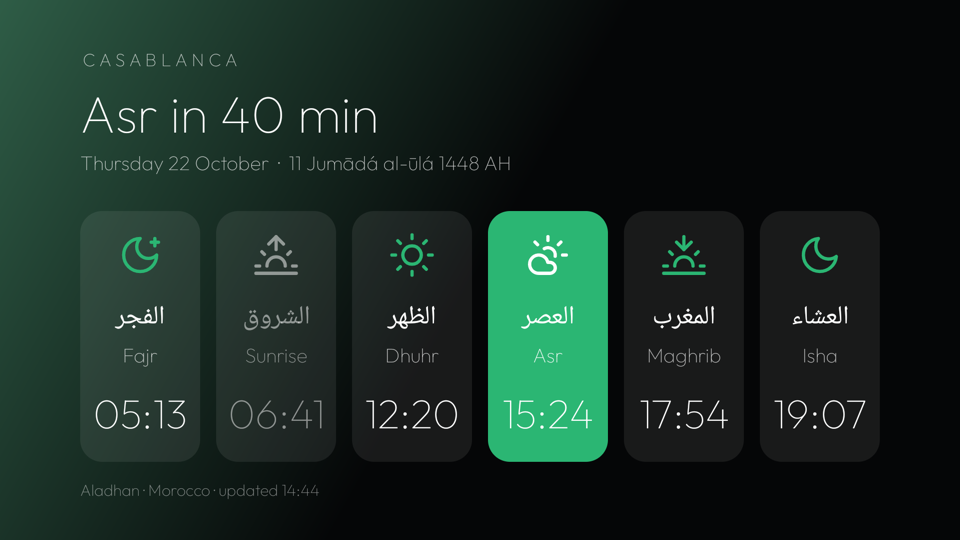
- Data comes from Aladhan, which needs no account or key.
- The city and the calculation method are set before you build, in
app/src/main/res/values/config.xml:latitude,longitude,place(the name shown) andmethod, Aladhan's method number (2 ISNA, 3 Muslim World League, 4 Umm al-Qura, 5 Egyptian, 13 Turkey, 21 Morocco...). The default is Casablanca with the Morocco method. - The Asr school is
school, Aladhan's juristic school for Asr:0Shafi (the default) or1Hanafi. Hanafi users see the later Asr time; leave it at0and nothing changes. - Reminders switch: In
app/src/main/res/values/config.xml,reminderscontrols whether to schedule on-screen alert cards and notifications when a prayer time arrives. It isfalse(off) by default. When enabled (true), an unobtrusive, frameless compact card appears at the top-right corner of the screen displaying the localized prayer name, Arabic script, time, and city, accompanied by a single notification chime. It dismisses automatically after 10 seconds or immediately on any remote button press. - It reads Aladhan when the page opens and again after midnight. The countdown updates every minute. Offline, the last times stay on screen.
- 24-hour times, localized prayer names and strings for English, Indonesian (
values-in), and Arabic (values-ar).
Permissions
| Permission | Why |
|---|---|
INTERNET |
Aladhan: today's times for the configured coordinates. |
SCHEDULE_EXACT_ALARM |
Exact alarm scheduling for prayer time reminders. |
RECEIVE_BOOT_COMPLETED |
Reschedules prayer alarms automatically when the TV boots. |
WAKE_LOCK |
Briefly wakes the screen to deliver the on-screen alert card. |
SYSTEM_ALERT_WINDOW |
Displays the unobtrusive top-right alert card over other apps and video playback on Android 10+. |
That is all. What is sent: today's date, the latitude and longitude from config.xml, the method number and the
Asr school number. No account, no telemetry, no ads, no background service, no location permission. Backups are off.
Build and install
JDK 17 and Android SDK platform 34 with build-tools 34.0.0, as for the launcher:
cd addons/prayer-times && ./gradlew assembleRelease
TV_HOST=<tv ip> ../../tools/venv/bin/python -I ../../tools/tv.py --push app/build/outputs/apk/release/app-release.apk /data/local/tmp/addon.apk
TV_HOST=<tv ip> ../../tools/venv/bin/python -I ../../tools/tv.py 'pm install -r /data/local/tmp/addon.apk; rm -f /data/local/tmp/addon.apk'
If reminders is set to true, grant the overlay permission so the on-screen alert card can display over playing video and other apps:
TV_HOST=<tv ip> ../../tools/venv/bin/python -I ../../tools/tv.py 'appops set com.majnioui.tv.prayer SYSTEM_ALERT_WINDOW allow'
On Android 14+ (API 34), exact alarms are off by default. The add-on safely falls back to setAndAllowWhileIdle, or exact timing can be explicitly granted via:
TV_HOST=<tv ip> ../../tools/venv/bin/python -I ../../tools/tv.py 'appops set com.majnioui.tv.prayer SCHEDULE_EXACT_ALARM allow'
Note: Force-stopping the app (
am force-stop com.majnioui.tv.prayer) removes all pending alarms scheduled in Android'sAlarmManager. When testing real alarms, do not force-stop the app.
Press Home: the launcher asks once whether to show the card. Change the answer later by holding OK on Settings, then Module cards.
The release build is signed with the debug key so it installs over ADB like the launcher. Sign your own builds with your own key if you hand them out; the launcher pins its Show answer to the signing key.
Credits
Prayer icons: Lucide (ISC) and Feather (MIT). Font: Outfit
(SIL Open Font License, FONT-LICENSE-OFL.txt).
Tested on
- Xiaomi TV (MiTV-MOOR2), Google TV 11, RTM5.220609.003: the page, the countdown, the card prompt and the card shown in the launcher's dock.
- TCL 43A50 (Smart TV Pro), Android 11 (build RP1A.200622.001): background prayer alarms, top-right unobtrusive alert card over active apps and home screen, and auto-dismiss after 10 seconds.