
Build Agentic workflows, RAG pipelines, with rich AI model and tool support on one collaborative workspace. Deploy on cloud, VPC, or self-hosted, so teams move from prototype to production without rebuilding the stack.
Python agentagentic-aiagentic-frameworkagentic-workflowaiautomationclaudedeepseekgenaigptllmlow-codemcpnextjsno-codeopenaipythonskillsworkflow
docs: add comprehensive Traditional Chinese contribution guide (#14816)
Bo-Yi Wu9437a1a8443b
diff --git a/CONTRIBUTING_TW.md b/CONTRIBUTING_TW.mdnew file mode 100644index 00000000000..678ea1150a8--- /dev/null+++ b/CONTRIBUTING_TW.md@@ -0,0 +1,153 @@+# 貢獻指南++您想為 Dify 做出貢獻 - 這太棒了,我們迫不及待地想看看您的成果。作為一家人力和資金有限的初創公司,我們有宏大的抱負,希望設計出最直觀的工作流程來構建和管理 LLM 應用程式。來自社群的任何幫助都非常珍貴,真的。++鑑於我們的現狀,我們需要靈活且快速地發展,但同時也希望確保像您這樣的貢獻者能夠獲得盡可能順暢的貢獻體驗。我們編寫了這份貢獻指南,目的是幫助您熟悉代碼庫以及我們如何與貢獻者合作,讓您可以更快地進入有趣的部分。++這份指南,就像 Dify 本身一樣,是不斷發展的。如果有時它落後於實際項目,我們非常感謝您的理解,也歡迎任何改進的反饋。++關於授權,請花一分鐘閱讀我們簡短的[授權和貢獻者協議](./LICENSE)。社群也遵守[行為準則](https://github.com/langgenius/.github/blob/main/CODE_OF_CONDUCT.md)。++## 在開始之前++[尋找](https://github.com/langgenius/dify/issues?q=is:issue+is:open)現有的 issue,或[創建](https://github.com/langgenius/dify/issues/new/choose)一個新的。我們將 issues 分為 2 種類型:++### 功能請求++- 如果您要開啟新的功能請求,我們希望您能解釋所提議的功能要達成什麼目標,並且盡可能包含更多的相關背景資訊。[@perzeusss](https://github.com/perzeuss) 已經製作了一個實用的[功能請求輔助工具](https://udify.app/chat/MK2kVSnw1gakVwMX),能幫助您草擬您的需求。歡迎試用。++- 如果您想從現有問題中選擇一個來處理,只需在其下方留言表示即可。++ 相關方向的團隊成員會加入討論。如果一切順利,他們會同意您開始編寫代碼。我們要求您在得到許可前先不要開始處理該功能,以免我們提出變更時您的工作成果被浪費。++ 根據所提議功能的領域不同,您可能會與不同的團隊成員討論。以下是目前每位團隊成員所負責的領域概述:++ | 成員 | 負責領域 |+ | --------------------------------------------------------------------------------------- | ------------------------------ |+ | [@yeuoly](https://github.com/Yeuoly) | 設計 Agents 架構 |+ | [@jyong](https://github.com/JohnJyong) | RAG 管道設計 |+ | [@GarfieldDai](https://github.com/GarfieldDai) | 建構工作流程編排 |+ | [@iamjoel](https://github.com/iamjoel) & [@zxhlyh](https://github.com/zxhlyh) | 打造易用的前端界面 |+ | [@guchenhe](https://github.com/guchenhe) & [@crazywoola](https://github.com/crazywoola) | 開發者體驗,各類問題的聯絡窗口 |+ | [@takatost](https://github.com/takatost) | 整體產品方向與架構 |++ 我們如何排定優先順序:++ | 功能類型 | 優先級 |+ | ------------------------------------------------------------------------------------------------------- | -------- |+ | 被團隊成員標記為高優先級的功能 | 高優先級 |+ | 來自我們[社群回饋版](https://github.com/langgenius/dify/discussions/categories/feedbacks)的熱門功能請求 | 中優先級 |+ | 非核心功能和次要增強 | 低優先級 |+ | 有價值但非急迫的功能 | 未來功能 |++### 其他事項 (例如錯誤回報、效能優化、錯字更正)++- 可以直接開始編寫程式碼。++ 我們如何排定優先順序:++ | 問題類型 | 優先級 |+ | ----------------------------------------------------- | -------- |+ | 核心功能的錯誤 (無法登入、應用程式無法運行、安全漏洞) | 重要 |+ | 非關鍵性錯誤、效能提升 | 中優先級 |+ | 小修正 (錯字、令人困惑但仍可運作的使用者界面) | 低優先級 |++## 安裝++以下是設置 Dify 開發環境的步驟:++### 1. 分叉此存儲庫++### 2. 複製代碼庫++從您的終端機複製分叉的代碼庫:++```shell+git clone [email protected]:<github_username>/dify.git+```++- [Docker](https://www.docker.com/)+- [Docker Compose](https://docs.docker.com/compose/install/)+- [Node.js v18.x (LTS)](http://nodejs.org)+- [pnpm](https://pnpm.io/)+- [Python](https://www.python.org/) version 3.11.x or 3.12.x++### 4. 安裝++Dify 由後端和前端組成。透過 `cd api/` 導航至後端目錄,然後按照[後端 README](api/README.md)進行安裝。在另一個終端機視窗中,透過 `cd web/` 導航至前端目錄,然後按照[前端 README](web/README.md)進行安裝。++查閱[安裝常見問題](https://docs.dify.ai/learn-more/faq/install-faq)了解常見問題和故障排除步驟的列表。++### 5. 在瀏覽器中訪問 Dify++要驗證您的設置,請在瀏覽器中訪問 [http://localhost:3000](http://localhost:3000)(預設值,或您自行設定的 URL 和埠號)。現在您應該能看到 Dify 已啟動並運行。++## 開發++如果您要添加模型提供者,請參考[此指南](https://github.com/langgenius/dify/blob/main/api/core/model_runtime/README.md)。++如果您要為 Agent 或工作流程添加工具提供者,請參考[此指南](./api/core/tools/README.md)。++為了幫助您快速找到您的貢獻適合的位置,以下是 Dify 後端和前端的簡要註解大綱:++### 後端++Dify 的後端使用 Python 的 [Flask](https://flask.palletsprojects.com/en/3.0.x/) 框架編寫。它使用 [SQLAlchemy](https://www.sqlalchemy.org/) 作為 ORM 工具,使用 [Celery](https://docs.celeryq.dev/en/stable/getting-started/introduction.html) 進行任務佇列處理。授權邏輯則透過 Flask-login 實現。++```text+[api/]+├── constants // 整個專案中使用的常數與設定值+├── controllers // API 路由定義與請求處理邏輯+├── core // 核心應用服務、模型整合與工具實現+├── docker // Docker 容器化相關設定檔案+├── events // 事件處理與流程管理機制+├── extensions // 與第三方框架或平台的整合擴充功能+├── fields // 資料序列化與結構定義欄位+├── libs // 可重複使用的共用程式庫與輔助工具+├── migrations // 資料庫結構變更與遷移腳本+├── models // 資料庫模型與資料結構定義+├── services // 核心業務邏輯與功能實現+├── storage // 私鑰與敏感資訊儲存機制+├── tasks // 非同步任務與背景作業處理器+└── tests+```++### 前端++網站基於 [Next.js](https://nextjs.org/) 的 Typescript 樣板,並使用 [Tailwind CSS](https://tailwindcss.com/) 進行樣式設計。[React-i18next](https://react.i18next.com/) 用於國際化。++```text+[web/]+├── app // 頁面佈局與介面元件+│ ├── (commonLayout) // 應用程式共用佈局結構+│ ├── (shareLayout) // Token 會話專用共享佈局+│ ├── activate // 帳號啟用頁面+│ ├── components // 頁面與佈局共用元件+│ ├── install // 系統安裝頁面+│ ├── signin // 使用者登入頁面+│ └── styles // 全域共用樣式定義+├── assets // 靜態資源檔案庫+├── bin // 建構流程執行腳本+├── config // 系統可調整設定與選項+├── context // 應用程式狀態共享上下文+├── dictionaries // 多語系翻譯詞彙庫+├── docker // Docker 容器設定檔+├── hooks // 可重複使用的 React Hooks+├── i18n // 國際化與本地化設定+├── models // 資料結構與 API 回應模型+├── public // 靜態資源與網站圖標+├── service // API 操作介面定義+├── test // 測試用例與測試框架+├── types // TypeScript 型別定義+└── utils // 共用輔助功能函式庫+```++## 提交您的 PR++最後,是時候向我們的存儲庫開啟拉取請求(PR)了。對於主要功能,我們會先將它們合併到 `deploy/dev` 分支進行測試,然後才會進入 `main` 分支。如果您遇到合併衝突或不知道如何開啟拉取請求等問題,請查看 [GitHub 的拉取請求教學](https://docs.github.com/en/pull-requests/collaborating-with-pull-requests)。++就是這樣!一旦您的 PR 被合併,您將作為貢獻者出現在我們的 [README](https://github.com/langgenius/dify/blob/main/README.md) 中。++## 獲取幫助++如果您在貢獻過程中遇到困難或有迫切的問題,只需通過相關的 GitHub issue 向我們提問,或加入我們的 [Discord](https://discord.gg/8Tpq4AcN9c) 進行快速交流。diff --git a/README_TW.md b/README_TW.mdnew file mode 100644index 00000000000..4bfc81a25e8--- /dev/null+++ b/README_TW.md@@ -0,0 +1,258 @@+++<p align="center">+ 📌 <a href="https://dify.ai/blog/introducing-dify-workflow-file-upload-a-demo-on-ai-podcast">介紹 Dify 工作流程檔案上傳功能:重現 Google NotebookLM Podcast</a>+</p>++<p align="center">+ <a href="https://cloud.dify.ai">Dify 雲端服務</a> ·+ <a href="https://docs.dify.ai/getting-started/install-self-hosted">自行託管</a> ·+ <a href="https://docs.dify.ai">說明文件</a> ·+ <a href="https://udify.app/chat/22L1zSxg6yW1cWQg">企業諮詢</a>+</p>++<p align="center">+ <a href="https://dify.ai" target="_blank">+ <img alt="Static Badge" src="https://img.shields.io/badge/Product-F04438"></a>+ <a href="https://dify.ai/pricing" target="_blank">+ <img alt="Static Badge" src="https://img.shields.io/badge/free-pricing?logo=free&color=%20%23155EEF&label=pricing&labelColor=%20%23528bff"></a>+ <a href="https://discord.gg/FngNHpbcY7" target="_blank">+ <img src="https://img.shields.io/discord/1082486657678311454?logo=discord&labelColor=%20%235462eb&logoColor=%20%23f5f5f5&color=%20%235462eb"+ alt="chat on Discord"></a>+ <a href="https://reddit.com/r/difyai" target="_blank">+ <img src="https://img.shields.io/reddit/subreddit-subscribers/difyai?style=plastic&logo=reddit&label=r%2Fdifyai&labelColor=white"+ alt="join Reddit"></a>+ <a href="https://twitter.com/intent/follow?screen_name=dify_ai" target="_blank">+ <img src="https://img.shields.io/twitter/follow/dify_ai?logo=X&color=%20%23f5f5f5"+ alt="follow on X(Twitter)"></a>+ <a href="https://www.linkedin.com/company/langgenius/" target="_blank">+ <img src="https://custom-icon-badges.demolab.com/badge/LinkedIn-0A66C2?logo=linkedin-white&logoColor=fff"+ alt="follow on LinkedIn"></a>+ <a href="https://hub.docker.com/u/langgenius" target="_blank">+ <img alt="Docker Pulls" src="https://img.shields.io/docker/pulls/langgenius/dify-web?labelColor=%20%23FDB062&color=%20%23f79009"></a>+ <a href="https://github.com/langgenius/dify/graphs/commit-activity" target="_blank">+ <img alt="Commits last month" src="https://img.shields.io/github/commit-activity/m/langgenius/dify?labelColor=%20%2332b583&color=%20%2312b76a"></a>+ <a href="https://github.com/langgenius/dify/" target="_blank">+ <img alt="Issues closed" src="https://img.shields.io/github/issues-search?query=repo%3Alanggenius%2Fdify%20is%3Aclosed&label=issues%20closed&labelColor=%20%237d89b0&color=%20%235d6b98"></a>+ <a href="https://github.com/langgenius/dify/discussions/" target="_blank">+ <img alt="Discussion posts" src="https://img.shields.io/github/discussions/langgenius/dify?labelColor=%20%239b8afb&color=%20%237a5af8"></a>+</p>++<p align="center">+ <a href="./README.md"><img alt="README in English" src="https://img.shields.io/badge/English-d9d9d9"></a>+ <a href="./README_TW.md"><img alt="繁體中文文件" src="https://img.shields.io/badge/繁體中文-d9d9d9"></a>+ <a href="./README_CN.md"><img alt="简体中文版自述文件" src="https://img.shields.io/badge/简体中文-d9d9d9"></a>+ <a href="./README_JA.md"><img alt="日本語のREADME" src="https://img.shields.io/badge/日本語-d9d9d9"></a>+ <a href="./README_ES.md"><img alt="README en Español" src="https://img.shields.io/badge/Español-d9d9d9"></a>+ <a href="./README_FR.md"><img alt="README en Français" src="https://img.shields.io/badge/Français-d9d9d9"></a>+ <a href="./README_KL.md"><img alt="README tlhIngan Hol" src="https://img.shields.io/badge/Klingon-d9d9d9"></a>+ <a href="./README_KR.md"><img alt="README in Korean" src="https://img.shields.io/badge/한국어-d9d9d9"></a>+ <a href="./README_AR.md"><img alt="README بالعربية" src="https://img.shields.io/badge/العربية-d9d9d9"></a>+ <a href="./README_TR.md"><img alt="Türkçe README" src="https://img.shields.io/badge/Türkçe-d9d9d9"></a>+ <a href="./README_VI.md"><img alt="README Tiếng Việt" src="https://img.shields.io/badge/Ti%E1%BA%BFng%20Vi%E1%BB%87t-d9d9d9"></a>+ <a href="./README_DE.md"><img alt="README in Deutsch" src="https://img.shields.io/badge/German-d9d9d9"></a>+</p>++Dify 是一個開源的 LLM 應用程式開發平台。其直觀的界面結合了智能代理工作流程、RAG 管道、代理功能、模型管理、可觀察性功能等,讓您能夠快速從原型進展到生產環境。++## 快速開始++> 安裝 Dify 之前,請確保您的機器符合以下最低系統要求:+>+> - CPU >= 2 核心+> - 記憶體 >= 4 GiB++</br>++啟動 Dify 伺服器最簡單的方式是透過 [docker compose](docker/docker-compose.yaml)。在使用以下命令運行 Dify 之前,請確保您的機器已安裝 [Docker](https://docs.docker.com/get-docker/) 和 [Docker Compose](https://docs.docker.com/compose/install/):++```bash+cd dify+cd docker+cp .env.example .env+docker compose up -d+```++運行後,您可以在瀏覽器中通過 [http://localhost/install](http://localhost/install) 訪問 Dify 儀表板並開始初始化過程。++### 尋求幫助++如果您在設置 Dify 時遇到問題,請參考我們的 [常見問題](https://docs.dify.ai/getting-started/install-self-hosted/faqs)。如果仍有疑問,請聯絡 [社區和我們](#community--contact)。++> 如果您想為 Dify 做出貢獻或進行額外開發,請參考我們的 [從原始碼部署指南](https://docs.dify.ai/getting-started/install-self-hosted/local-source-code)++## 核心功能++**1. 工作流程**:+在視覺化畫布上建立和測試強大的 AI 工作流程,利用以下所有功能及更多。++https://github.com/langgenius/dify/assets/13230914/356df23e-1604-483d-80a6-9517ece318aa++**2. 全面的模型支援**:+無縫整合來自數十個推理提供商和自託管解決方案的數百個專有/開源 LLM,涵蓋 GPT、Mistral、Llama3 和任何與 OpenAI API 兼容的模型。您可以在[此處](https://docs.dify.ai/getting-started/readme/model-providers)找到支援的模型提供商完整列表。++++**3. 提示詞 IDE**:+直觀的界面,用於編寫提示詞、比較模型性能,以及為聊天型應用程式添加文字轉語音等額外功能。++**4. RAG 管道**:+廣泛的 RAG 功能,涵蓋從文件擷取到檢索的全部流程,內建支援從 PDF、PPT 和其他常見文件格式提取文本。++**5. 代理功能**:+您可以基於 LLM 函數調用或 ReAct 定義代理,並為代理添加預構建或自定義工具。Dify 為 AI 代理提供 50 多種內建工具,如 Google 搜尋、DALL·E、Stable Diffusion 和 WolframAlpha。++**6. LLMOps**:+監控並分析應用程式日誌和長期效能。您可以根據生產數據和標註持續改進提示詞、數據集和模型。++**7. 後端即服務**:+Dify 的所有功能都提供相應的 API,因此您可以輕鬆地將 Dify 整合到您自己的業務邏輯中。++## 功能比較++<table style="width: 100%;">+ <tr>+ <th align="center">功能</th>+ <th align="center">Dify.AI</th>+ <th align="center">LangChain</th>+ <th align="center">Flowise</th>+ <th align="center">OpenAI Assistants API</th>+ </tr>+ <tr>+ <td align="center">程式設計方法</td>+ <td align="center">API + 應用導向</td>+ <td align="center">Python 代碼</td>+ <td align="center">應用導向</td>+ <td align="center">API 導向</td>+ </tr>+ <tr>+ <td align="center">支援的 LLM 模型</td>+ <td align="center">豐富多樣</td>+ <td align="center">豐富多樣</td>+ <td align="center">豐富多樣</td>+ <td align="center">僅限 OpenAI</td>+ </tr>+ <tr>+ <td align="center">RAG 引擎</td>+ <td align="center">✅</td>+ <td align="center">✅</td>+ <td align="center">✅</td>+ <td align="center">✅</td>+ </tr>+ <tr>+ <td align="center">代理功能</td>+ <td align="center">✅</td>+ <td align="center">✅</td>+ <td align="center">❌</td>+ <td align="center">✅</td>+ </tr>+ <tr>+ <td align="center">工作流程</td>+ <td align="center">✅</td>+ <td align="center">❌</td>+ <td align="center">✅</td>+ <td align="center">❌</td>+ </tr>+ <tr>+ <td align="center">可觀察性</td>+ <td align="center">✅</td>+ <td align="center">✅</td>+ <td align="center">❌</td>+ <td align="center">❌</td>+ </tr>+ <tr>+ <td align="center">企業級功能 (SSO/存取控制)</td>+ <td align="center">✅</td>+ <td align="center">❌</td>+ <td align="center">❌</td>+ <td align="center">❌</td>+ </tr>+ <tr>+ <td align="center">本地部署</td>+ <td align="center">✅</td>+ <td align="center">✅</td>+ <td align="center">✅</td>+ <td align="center">❌</td>+ </tr>+</table>++## 使用 Dify++- **雲端服務 </br>**+ 我們提供 [Dify Cloud](https://dify.ai) 服務,任何人都可以零配置嘗試。它提供與自部署版本相同的所有功能,並在沙盒計劃中包含 200 次免費 GPT-4 調用。++- **自託管 Dify 社區版</br>**+ 使用這份[快速指南](#快速開始)在您的環境中快速運行 Dify。+ 使用我們的[文檔](https://docs.dify.ai)獲取更多參考和深入指導。++- **企業/組織版 Dify</br>**+ 我們提供額外的企業中心功能。[通過這個聊天機器人記錄您的問題](https://udify.app/chat/22L1zSxg6yW1cWQg)或[發送電子郵件給我們](mailto:[email protected]?subject=[GitHub]Business%20License%20Inquiry)討論企業需求。</br>+ > 對於使用 AWS 的初創企業和小型企業,請查看 [AWS Marketplace 上的 Dify Premium](https://aws.amazon.com/marketplace/pp/prodview-t22mebxzwjhu6),並一鍵部署到您自己的 AWS VPC。這是一個經濟實惠的 AMI 產品,可選擇使用自定義徽標和品牌創建應用。++## 保持領先++在 GitHub 上為 Dify 加星,即時獲取新版本通知。++++## 進階設定++如果您需要自定義配置,請參考我們的 [.env.example](docker/.env.example) 文件中的註釋,並在您的 `.env` 文件中更新相應的值。此外,根據您特定的部署環境和需求,您可能需要調整 `docker-compose.yaml` 文件本身,例如更改映像版本、端口映射或卷掛載。進行任何更改後,請重新運行 `docker-compose up -d`。您可以在[這裡](https://docs.dify.ai/getting-started/install-self-hosted/environments)找到可用環境變數的完整列表。++如果您想配置高可用性設置,社區貢獻的 [Helm Charts](https://helm.sh/) 和 YAML 文件允許在 Kubernetes 上部署 Dify。++- [由 @LeoQuote 提供的 Helm Chart](https://github.com/douban/charts/tree/master/charts/dify)+- [由 @BorisPolonsky 提供的 Helm Chart](https://github.com/BorisPolonsky/dify-helm)+- [由 @Winson-030 提供的 YAML 文件](https://github.com/Winson-030/dify-kubernetes)++### 使用 Terraform 進行部署++使用 [terraform](https://www.terraform.io/) 一鍵部署 Dify 到雲端平台++### Azure 全球++- [由 @nikawang 提供的 Azure Terraform](https://github.com/nikawang/dify-azure-terraform)++### Google Cloud++- [由 @sotazum 提供的 Google Cloud Terraform](https://github.com/DeNA/dify-google-cloud-terraform)++### 使用 AWS CDK 進行部署++使用 [CDK](https://aws.amazon.com/cdk/) 部署 Dify 到 AWS++### AWS++- [由 @KevinZhao 提供的 AWS CDK](https://github.com/aws-samples/solution-for-deploying-dify-on-aws)++## 貢獻++對於想要貢獻程式碼的開發者,請參閱我們的[貢獻指南](https://github.com/langgenius/dify/blob/main/CONTRIBUTING.md)。+同時,也請考慮透過在社群媒體和各種活動與會議上分享 Dify 來支持我們。++> 我們正在尋找貢獻者協助將 Dify 翻譯成中文和英文以外的語言。如果您有興趣幫忙,請查看 [i18n README](https://github.com/langgenius/dify/blob/main/web/i18n/README.md) 獲取更多資訊,並在我們的 [Discord 社群伺服器](https://discord.gg/8Tpq4AcN9c) 的 `global-users` 頻道留言給我們。++## 社群與聯絡方式++- [Github Discussion](https://github.com/langgenius/dify/discussions):最適合分享反饋和提問。+- [GitHub Issues](https://github.com/langgenius/dify/issues):最適合報告使用 Dify.AI 時遇到的問題和提出功能建議。請參閱我們的[貢獻指南](https://github.com/langgenius/dify/blob/main/CONTRIBUTING.md)。+- [Discord](https://discord.gg/FngNHpbcY7):最適合分享您的應用程式並與社群互動。+- [X(Twitter)](https://twitter.com/dify_ai):最適合分享您的應用程式並與社群互動。++**貢獻者**++<a href="https://github.com/langgenius/dify/graphs/contributors">+ <img src="https://contrib.rocks/image?repo=langgenius/dify" />+</a>++## 星星歷史++[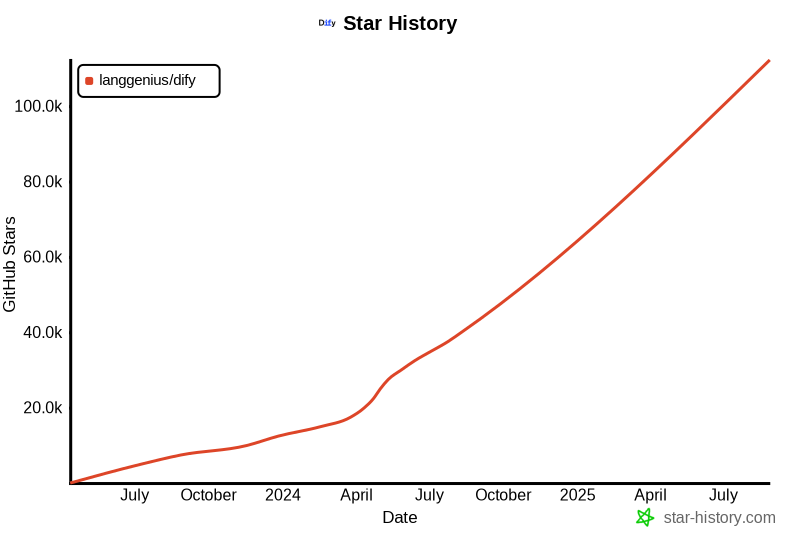](https://star-history.com/#langgenius/dify&Date)++## 安全揭露++為保護您的隱私,請避免在 GitHub 上發布安全性問題。請將您的問題發送至 [email protected],我們將為您提供更詳細的答覆。++## 授權條款++本代碼庫採用 [Dify 開源授權](LICENSE),這基本上是 Apache 2.0 授權加上一些額外限制條款。