
The modern link attribution platform. Loved by world-class engineering teams at Twilio, Zillow, Jobber, Vercel, Raycast, and more.
TypeScript clickhousemysqlnextjsopen-sourceplanetscaleprismatailwindcsstinybirdtypescriptupstashvercel
update useDynamicGuide
Steven Tey10866bec50a0
diff --git a/apps/web/app/app.dub.co/(dashboard)/[slug]/settings/analytics/use-dynamic-guide.ts b/apps/web/app/app.dub.co/(dashboard)/[slug]/settings/analytics/use-dynamic-guide.tsindex a128335267..7cf07bd185 100644--- a/apps/web/app/app.dub.co/(dashboard)/[slug]/settings/analytics/use-dynamic-guide.ts+++ b/apps/web/app/app.dub.co/(dashboard)/[slug]/settings/analytics/use-dynamic-guide.ts@@ -57,22 +57,57 @@ export function useDynamicGuide();}- if (conversionTrackingEnabled && publishableKey) {+ if (conversionTrackingEnabled && publishableKey && result) {+ // Store original result for context checks+ const originalResult = result;+result = result- // for manual installations- ?.replaceAll(- /^(\s+)(data-domains=.+)$/gm,- `$1$2\n$1data-publishable-key="${publishableKey}"`,+ // for manual installations - add data-publishable-key after src attribute+ .replaceAll(+ /(<script[\s\S]*?)(src="https:\/\/www\.dubcdn\.com\/analytics\/script[^"]+")([\s\S]*?)(>)/g,+ (match, beforeSrc, srcAttr, afterSrc, closingTag) => {+ if (match.includes("data-publishable-key")) return match;++ // Find src line in original to get indentation+ const originalLines = originalResult.split("\n");+ const srcLine =+ originalLines.find((line) => line.includes(srcAttr)) || "";+ const indent = srcLine.match(/^(\s*)/)?.[1] || " ";++ // Clean up other attributes+ const otherAttrs = afterSrc.replace(/>$/, "").trim();++ // Return: before src, src, publishable-key, other attrs, closing tag+ return `${beforeSrc}${srcAttr}\n${indent}data-publishable-key="${publishableKey}"${otherAttrs ? `\n${indent}${otherAttrs}` : ""}\n${indent}${closingTag}`;+ },)- // for React applications- ?.replaceAll(- /^(\s+)(.+)(domainsConfig={{)/gm,- `$1$2publishableKey="${publishableKey}" $3`,+ // for React applications - add publishableKey prop after <DubAnalytics+ .replaceAll(+ /^(\s+)(<DubAnalytics)(\s*\/?>|\s+[^\n>]*\/?>|)$/gm,+ (match, indent, tag, rest) => {+ if (match.includes("publishableKey")) return match;+ // Check context for multiline case+ if (rest === "") {+ const idx = originalResult.indexOf(match);+ if (idx >= 0) {+ const context = originalResult.substring(idx, idx + 300);+ if (context.includes("publishableKey")) return match;+ }+ }+ return `${indent}${tag}\n${indent} publishableKey="${publishableKey}"${rest}`;+ },)- // for GTM installations- ?.replaceAll(- /^(\s+)(script\.dataset\.domains\s*=\s*.+)$/gm,- `$1$2\n$1script.setAttribute("data-publishable-key", "${publishableKey}");`,+ // for GTM installations - add data-publishable-key after script.src+ .replaceAll(+ /^(\s+)(script\.src\s*=\s*"https:\/\/www\.dubcdn\.com\/analytics\/script[^"]+";)$/gm,+ (match, indent, srcLine) => {+ const idx = originalResult.indexOf(match);+ if (idx >= 0) {+ const context = originalResult.substring(idx, idx + 200);+ if (context.includes("data-publishable-key")) return match;+ }+ return `${indent}${srcLine}\n${indent}script.setAttribute("data-publishable-key", "${publishableKey}");`;+ },);}diff --git a/apps/web/guides/framer.md b/apps/web/guides/framer.mdindex ac461b28ef..e11ca6c0b2 100644--- a/apps/web/guides/framer.md+++ b/apps/web/guides/framer.md@@ -5,12 +5,20 @@ Follow these steps to add Dub client-side script to your Framer site:- Paste the Dub analytics script in the **Start of head tag** section.- Click on the **Save** button to save the changes.+<!-- prettier-ignore -->```html<script+ defersrc="https://www.dubcdn.com/analytics/script.js"+></script>+```++If you're using [Dub Partners](/partners/quickstart) for affiliate management, you will also need to set up the `data-domains` property to enable [client-side click-tracking](/sdks/client-side/features/client-side-click-tracking).++```html+<scriptdefer+ src="https://www.dubcdn.com/analytics/script.js"data-domains='{"refer":"yourcompany.link"}'></script>```--Read the [client-side click-tracking guide](https://dub.co/docs/sdks/client-side/features/click-tracking) for more information.diff --git a/apps/web/guides/gtm-client-sdk.md b/apps/web/guides/gtm-client-sdk.mdindex ae2ddf261b..95d2c1a243 100644--- a/apps/web/guides/gtm-client-sdk.md+++ b/apps/web/guides/gtm-client-sdk.md@@ -26,7 +26,7 @@ In the Custom HTML section, you’ll need to add the Dub client-side script. Cop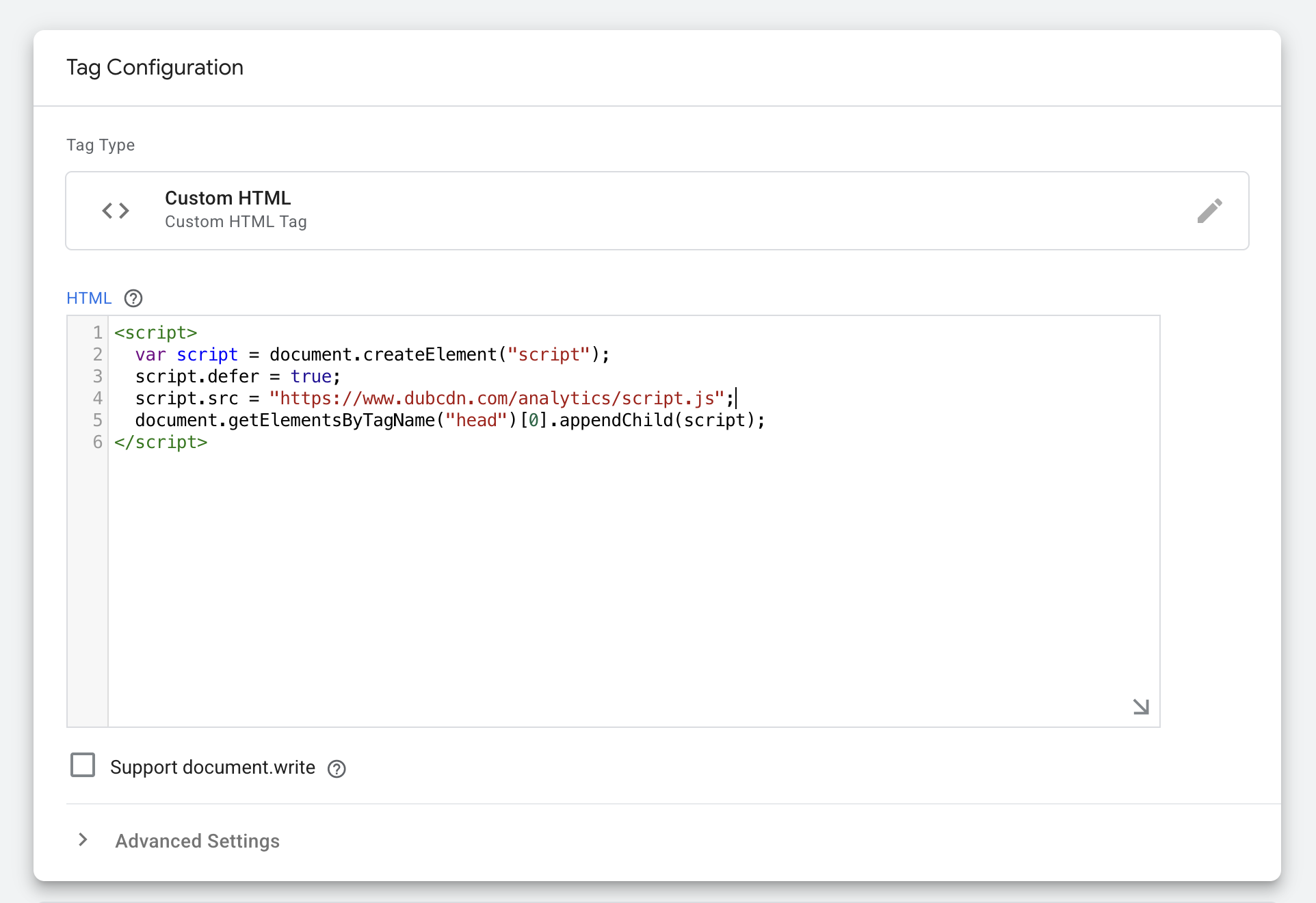-If you’re using [Dub Partners](https://dub.co/docs/partners/quickstart) for affiliate management, you will also need to set up the `data-domains` property to enable [client-side click-tracking](https://dub.co/docs/sdks/client-side/features/click-tracking).+If you’re using [Dub Partners](https://dub.co/docs/partners/quickstart) for your affiliate program, you will also need to set up the `data-domains` property to enable [client-side click-tracking](https://dub.co/docs/sdks/client-side/features/click-tracking).```js<script>@@ -38,8 +38,6 @@ If you’re using [Dub Partners](https://dub.co/docs/partners/quickstart) for af</script>```-Read the [client-side click-tracking guide](https://dub.co/docs/sdks/client-side/features/client-side-click-tracking) for more information.-## Step 3: Configure the TriggerTo ensure the analytics script loads on all pages:diff --git a/apps/web/guides/manual-client-sdk.md b/apps/web/guides/manual-client-sdk.mdindex 31321d5c59..140a579240 100644--- a/apps/web/guides/manual-client-sdk.md+++ b/apps/web/guides/manual-client-sdk.md@@ -1,15 +1,19 @@You can add the Dub client-side script to your website same way you would add Google Analytics script or any other JavaScript code – by adding it in the `<head>` section of your HTML file.+<!-- prettier-ignore -->```html-<script src="https://www.dubcdn.com/analytics/script.js" defer></script>+<script+ defer+ src="https://www.dubcdn.com/analytics/script.js"+></script>```If you're using [Dub Partners](/partners/quickstart) for affiliate management, you will also need to set up the `data-domains` property to enable [client-side click-tracking](/sdks/client-side/features/client-side-click-tracking).```html<script- src="https://www.dubcdn.com/analytics/script.js"defer+ src="https://www.dubcdn.com/analytics/script.js"data-domains='{"refer":"yourcompany.link"}'></script>```diff --git a/apps/web/guides/react.md b/apps/web/guides/react.mdindex 79a18d3cee..1107b833c1 100644--- a/apps/web/guides/react.md+++ b/apps/web/guides/react.md@@ -14,8 +14,6 @@ If you are using a React framework, you can use the `<Analytics />` component toE.g. if you're using Next.js, you can add the `<Analytics />` component to your root layout component or any other pages where you want to track conversions.-You will also need to set the [`domainsConfig.refer` property](https://dub.co/docs/sdks/client-side/installation-guides/react#param-domains-config) to the short link domain you're using on Dub to enable [client-side click-tracking](https://dub.co/docs/sdks/client-side/features/click-tracking).-```jsximport { Analytics as DubAnalytics } from '@dub/analytics/react';@@ -27,12 +25,31 @@ export default function RootLayout({return (<html lang="en"><body>{children}</body>- <DubAnalytics domainsConfig={{- refer: "yourcompany.link"- }} />+ <DubAnalytics /></html>);}```-Read the [client-side click-tracking guide](https://dub.co/docs/sdks/client-side/features/click-tracking) for more information.+If you’re using [Dub Partners](https://dub.co/docs/partners/quickstart) for your affiliate program, you will also need to set the [`domainsConfig.refer` property](https://dub.co/docs/sdks/client-side/installation-guides/react#param-domains-config) to the short link domain you're using on Dub to enable [client-side click-tracking](https://dub.co/docs/sdks/client-side/features/click-tracking).++```jsx+import { Analytics as DubAnalytics } from '@dub/analytics/react';++export default function RootLayout({+ children,+}: Readonly<{+ children: React.ReactNode;+}>) {+ return (+ <html lang="en">+ <body>{children}</body>+ <DubAnalytics+ domainsConfig={{+ refer: "yourcompany.link"+ }}+ />+ </html>+ );+}+```diff --git a/apps/web/guides/webflow.md b/apps/web/guides/webflow.mdindex cff5d5835b..411bc7fb60 100644--- a/apps/web/guides/webflow.md+++ b/apps/web/guides/webflow.md@@ -4,12 +4,20 @@ Follow these steps to add Dub client-side script to your Webflow site:- Choose **[Custom Code](https://university.webflow.com/lesson/custom-code-in-the-head-and-body-tags?topics=site-settings)** from the menu and paste the Dub analytics script in the **Head Code** section.- Click on the **Save Changes** button and then **Publish** your changes.+<!-- prettier-ignore -->```html<script+ defersrc="https://www.dubcdn.com/analytics/script.js"+></script>+```++If you're using [Dub Partners](/partners/quickstart) for affiliate management, you will also need to set up the `data-domains` property to enable [client-side click-tracking](/sdks/client-side/features/client-side-click-tracking).++```html+<scriptdefer+ src="https://www.dubcdn.com/analytics/script.js"data-domains='{"refer":"yourcompany.link"}'></script>```--Read the [client-side click-tracking guide](https://dub.co/docs/sdks/client-side/features/click-tracking) for more information.diff --git a/apps/web/guides/wordpress.md b/apps/web/guides/wordpress.mdindex f8efc35842..1a9191a708 100644--- a/apps/web/guides/wordpress.md+++ b/apps/web/guides/wordpress.md@@ -5,18 +5,20 @@ Follow these steps to add the Dub client-side script to your WordPress site:- Paste the Dub analytics script in the header area.- Click on the **Update File** button to save the changes.+<!-- prettier-ignore -->```html-<script src="https://www.dubcdn.com/analytics/script.js" defer></script>+<script+ defer+ src="https://www.dubcdn.com/analytics/script.js"+></script>```If you're using [Dub Partners](/partners/quickstart) for affiliate management, you will also need to set up the `data-domains` property to enable [client-side click-tracking](/sdks/client-side/features/client-side-click-tracking).```html<script- src="https://www.dubcdn.com/analytics/script.js"defer+ src="https://www.dubcdn.com/analytics/script.js"data-domains='{"refer":"yourcompany.link"}'></script>```--Read the [client-side click-tracking guide](/sdks/client-side/features/client-side-click-tracking) for more information.diff --git a/apps/web/ui/guides/markdown.tsx b/apps/web/ui/guides/markdown.tsxindex 66332b4703..96908222e5 100644--- a/apps/web/ui/guides/markdown.tsx+++ b/apps/web/ui/guides/markdown.tsx@@ -1,4 +1,4 @@-import { Copy } from "@dub/ui";+import { Check, Copy, useCopyToClipboard } from "@dub/ui";import { cn } from "@dub/utils";import ReactMarkdown from "react-markdown";import "react-medium-image-zoom/dist/styles.css";@@ -52,6 +52,7 @@ export function GuidesMarkdown({img: ({ node, ...props }) => <ZoomImage {...props} />,pre: ({ node, ...props }) => {const code = (node?.children?.[0] as any)?.children?.[0]?.value;+ const [copied, copyToClipboard] = useCopyToClipboard();return code ? (<div className="relative"><pre {...props}>@@ -59,7 +60,7 @@ export function GuidesMarkdown({type="button"onClick={async () => {try {- await navigator.clipboard.writeText(code);+ await copyToClipboard(code);toast.success("Copied to clipboard");} catch (error) {console.error("Failed to copy: ", error);@@ -68,7 +69,11 @@ export function GuidesMarkdown({}}className="border-border-subtle text-content-default absolute right-2 top-2 flex size-7 items-center justify-center rounded-lg border bg-white transition-transform duration-100 active:scale-95">- <Copy />+ {copied ? (+ <Check className="size-3.5" />+ ) : (+ <Copy className="size-3.5" />+ )}</button>{props.children}</pre>