
The modern link attribution platform. Loved by world-class engineering teams at Twilio, Zillow, Jobber, Vercel, Raycast, and more.
TypeScript clickhousemysqlnextjsopen-sourceplanetscaleprismatailwindcsstinybirdtypescriptupstashvercel
improve guides content/styles
Steven Tey573207ae5f80
diff --git a/apps/web/app/app.dub.co/(dashboard)/[slug]/(ee)/program/analytics/page.tsx b/apps/web/app/app.dub.co/(dashboard)/[slug]/(ee)/program/analytics/page.tsxindex fe5f1747b3..a1cec3b8a8 100644--- a/apps/web/app/app.dub.co/(dashboard)/[slug]/(ee)/program/analytics/page.tsx+++ b/apps/web/app/app.dub.co/(dashboard)/[slug]/(ee)/program/analytics/page.tsx@@ -10,7 +10,7 @@ export default function ProgramAnalytics() {title="Analytics"titleInfo={{title:- "Learn how to use Dub Analytics to track and measure your program's performance.",+ "Learn how to use Dub to track and measure your program's performance.",href: "https://dub.co/help/article/program-analytics",}}>diff --git a/apps/web/app/app.dub.co/(dashboard)/[slug]/settings/analytics/base-script-section.tsx b/apps/web/app/app.dub.co/(dashboard)/[slug]/settings/analytics/base-script-section.tsxindex c8fe36a56e..ffd510d66b 100644--- a/apps/web/app/app.dub.co/(dashboard)/[slug]/settings/analytics/base-script-section.tsx+++ b/apps/web/app/app.dub.co/(dashboard)/[slug]/settings/analytics/base-script-section.tsx@@ -19,7 +19,16 @@ export function BaseScriptSection() {Base script</label><p className="text-content-subtle text-sm font-medium">- For basic cookie-management and client-side click tracking.+ For basic cookie-management and{" "}+ <a+ href="https://dub.co/docs/sdks/client-side/features/click-tracking"+ target="_blank"+ rel="noopener noreferrer"+ className="cursor-help text-neutral-800 underline decoration-dotted underline-offset-2"+ >+ client-side click tracking+ </a>+ .</p></div></div>diff --git a/apps/web/app/app.dub.co/(dashboard)/[slug]/settings/analytics/conversion-tracking-section.tsx b/apps/web/app/app.dub.co/(dashboard)/[slug]/settings/analytics/conversion-tracking-section.tsxindex 3cb260b098..eee12e1051 100644--- a/apps/web/app/app.dub.co/(dashboard)/[slug]/settings/analytics/conversion-tracking-section.tsx+++ b/apps/web/app/app.dub.co/(dashboard)/[slug]/settings/analytics/conversion-tracking-section.tsx@@ -33,7 +33,7 @@ export function ConversionTrackingSection() {htmlFor={`${id}-switch`}className="text-content-emphasis block text-sm font-semibold">- Conversion Tracking+ Conversion tracking</label><p className="text-content-subtle text-sm font-medium">For client-side conversion tracking.{" "}@@ -41,10 +41,11 @@ export function ConversionTrackingSection() {href="https://dub.co/docs/conversions/quickstart"target="_blank"rel="noopener noreferrer"- className="underline"+ className="cursor-help text-neutral-800 underline decoration-dotted underline-offset-2">Learn more</a>+ .</p></div></div>diff --git a/apps/web/app/app.dub.co/(dashboard)/[slug]/settings/analytics/outbound-domain-tracking-section.tsx b/apps/web/app/app.dub.co/(dashboard)/[slug]/settings/analytics/outbound-domain-tracking-section.tsxindex 169759b79a..ff9f8f613b 100644--- a/apps/web/app/app.dub.co/(dashboard)/[slug]/settings/analytics/outbound-domain-tracking-section.tsx+++ b/apps/web/app/app.dub.co/(dashboard)/[slug]/settings/analytics/outbound-domain-tracking-section.tsx@@ -31,7 +31,7 @@ export function OutboundDomainTrackingSection() {href="https://dub.co/docs/sdks/client-side/features/cross-domain-tracking#cross-domain-tracking"target="_blank"rel="noopener noreferrer"- className="underline"+ className="cursor-help text-neutral-800 underline decoration-dotted underline-offset-2">Learn more</a>diff --git a/apps/web/app/app.dub.co/(dashboard)/[slug]/settings/analytics/page-client.tsx b/apps/web/app/app.dub.co/(dashboard)/[slug]/settings/analytics/page-client.tsxindex 56db65331a..0905976de4 100644--- a/apps/web/app/app.dub.co/(dashboard)/[slug]/settings/analytics/page-client.tsx+++ b/apps/web/app/app.dub.co/(dashboard)/[slug]/settings/analytics/page-client.tsx@@ -31,8 +31,8 @@ const ConnectStep = ({<Stepid="connect"step={1}- title="Connect to Dub"- subtitle="Select scripts to enable page, conversion, and outbound tracking"+ title="Install the Dub client-side script"+ subtitle="Generate and install the Dub client-side script to start tracking conversions."expanded={expanded}toggleExpanded={toggleExpanded}complete={complete}diff --git a/apps/web/app/app.dub.co/(dashboard)/[slug]/settings/analytics/publishable-key-form.tsx b/apps/web/app/app.dub.co/(dashboard)/[slug]/settings/analytics/publishable-key-form.tsxindex 7fab5259a4..e03c7d8f3b 100644--- a/apps/web/app/app.dub.co/(dashboard)/[slug]/settings/analytics/publishable-key-form.tsx+++ b/apps/web/app/app.dub.co/(dashboard)/[slug]/settings/analytics/publishable-key-form.tsx@@ -95,7 +95,7 @@ export const PublishableKeyForm = ({ className }: { className?: string }) => {<h2 className="text-content-emphasis flex-1 text-sm font-semibold">Publishable key</h2>- <InfoTooltip content="Required for conversion tracking." />+ <InfoTooltip content="For authenticating requests when tracking conversion events on the client-side. [Learn more.](https://dub.co/docs/api-reference/publishable-keys)" /></div>{!publishableKey && (diff --git a/apps/web/guides/framer.md b/apps/web/guides/framer.mdindex a1a8bc2ab0..ac461b28ef 100644--- a/apps/web/guides/framer.md+++ b/apps/web/guides/framer.md@@ -13,4 +13,4 @@ Follow these steps to add Dub client-side script to your Framer site:></script>```-Read the [client-side click-tracking guide](https://dub.co/docs/sdks/client-side/features/client-side-click-tracking) for more information.+Read the [client-side click-tracking guide](https://dub.co/docs/sdks/client-side/features/click-tracking) for more information.diff --git a/apps/web/guides/gtm-client-sdk.md b/apps/web/guides/gtm-client-sdk.mdindex e35df0a2d0..d06e385bb6 100644--- a/apps/web/guides/gtm-client-sdk.md+++ b/apps/web/guides/gtm-client-sdk.md@@ -1,4 +1,4 @@-This guide will walk you through the process of integrating Dub Analytics with Google Tag Manager (GTM).+This guide will walk you through the process of integrating Dub with Google Tag Manager (GTM).## Step 1: Create a New Tag@@ -10,21 +10,23 @@ First, navigate to your Google Tag Manager account and create a new tag: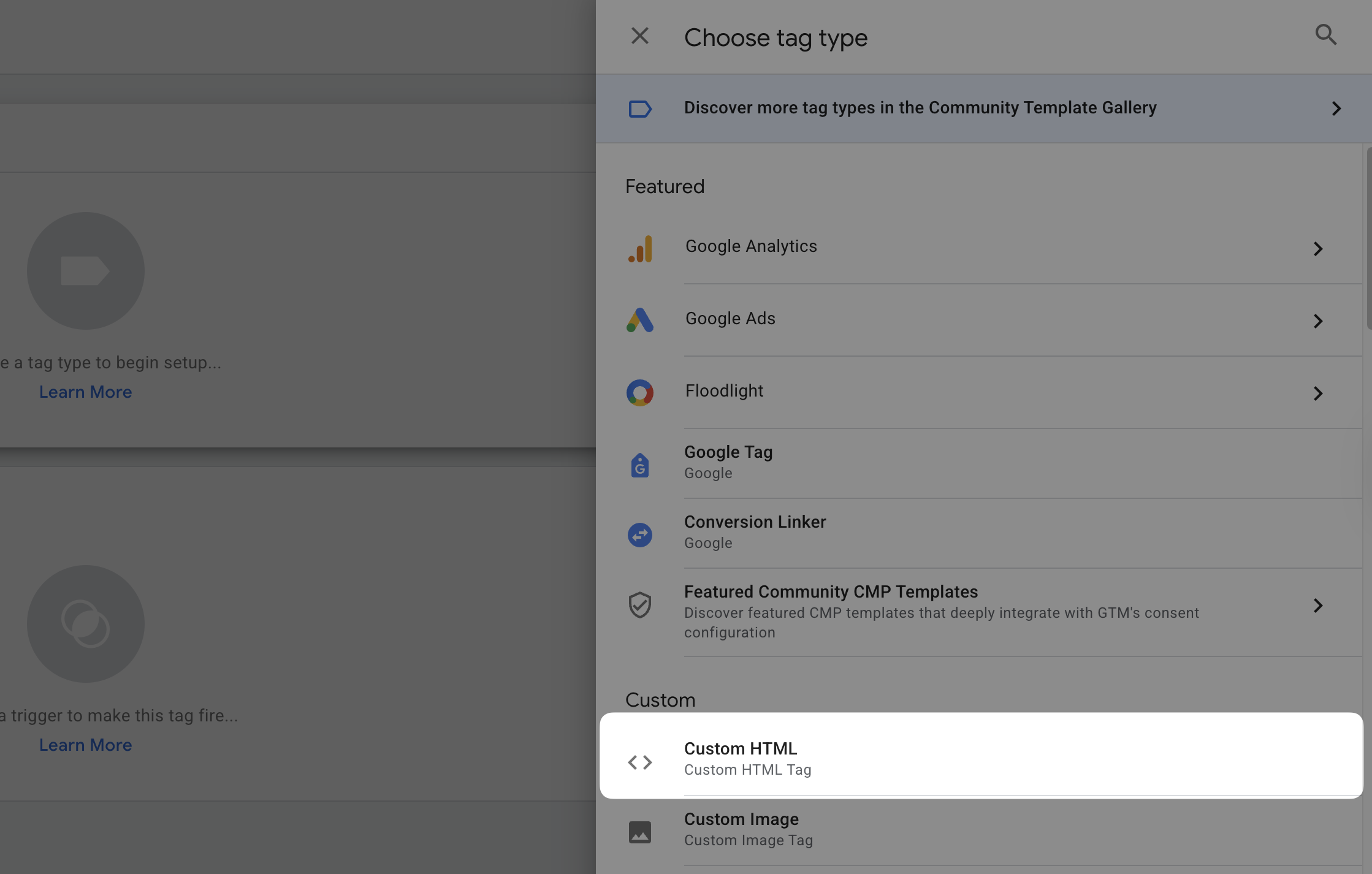-## Step 2: Add the Dub Analytics Script+## Step 2: Add the Dub client-side script-In the Custom HTML section, you’ll need to add the Dub Analytics script. Copy and paste the following code into the **HTML** field:+In the Custom HTML section, you’ll need to add the Dub client-side script. Copy and paste the following code into the **HTML** field:```js+// prettier-ignore<script>- var script = document.createElement("script"); script.defer = true; script.src- = "https://www.dubcdn.com/analytics/script.js";+ var script = document.createElement("script");+ script.defer = true;+ script.src = "https://www.dubcdn.com/analytics/script.js";document.getElementsByTagName("head")[0].appendChild(script);</script>```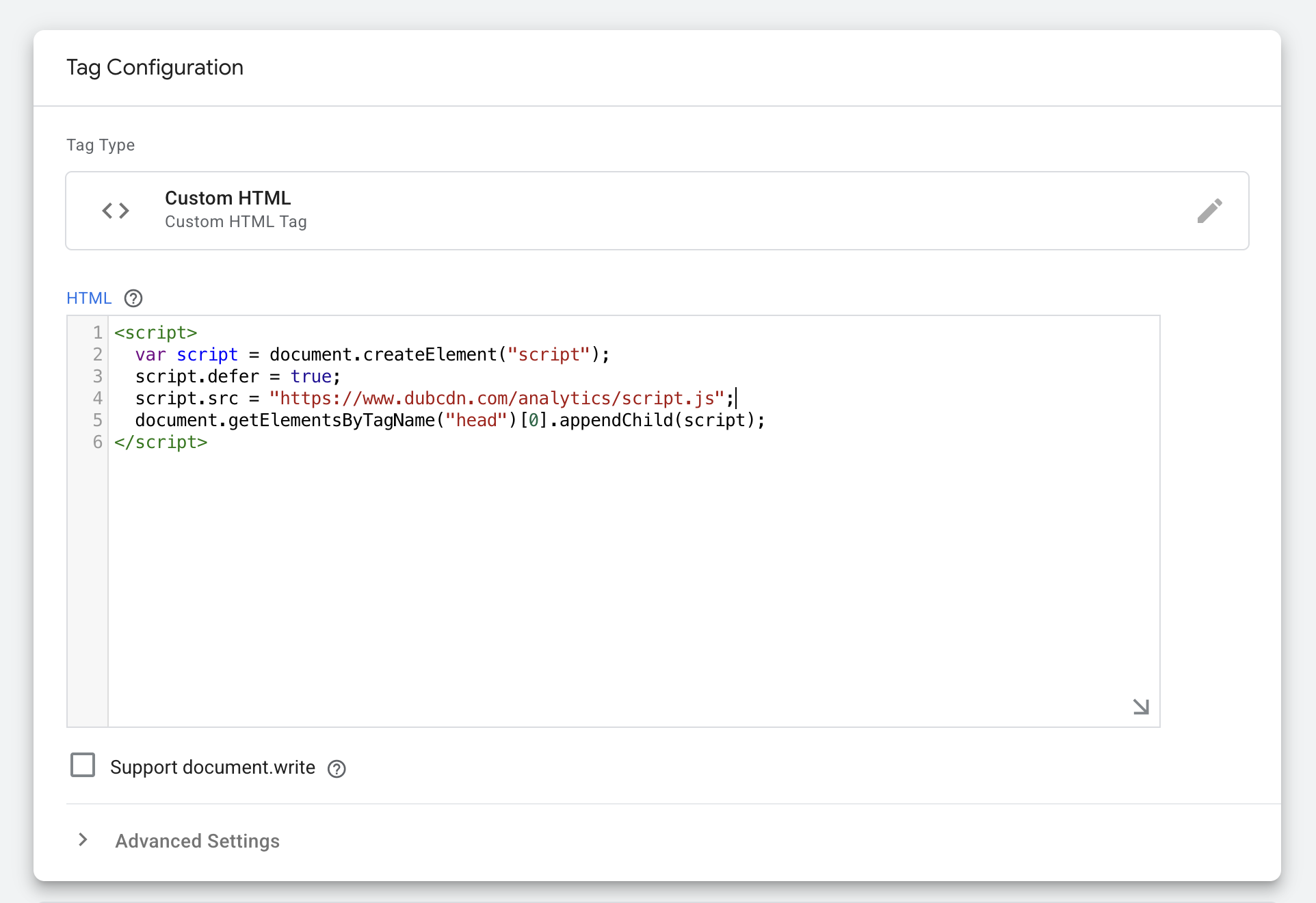-If you’re using [Dub Partners](https://dub.co/docs/partners/quickstart) for affiliate management, you will also need to set up the `data-domains` property to enable [client-side click-tracking](https://dub.co/docs/sdks/client-side/features/client-side-click-tracking).+If you’re using [Dub Partners](https://dub.co/docs/partners/quickstart) for affiliate management, you will also need to set up the `data-domains` property to enable [client-side click-tracking](https://dub.co/docs/sdks/client-side/features/click-tracking).```js<script>@@ -32,7 +34,7 @@ If you’re using [Dub Partners](https://dub.co/docs/partners/quickstart) for afvar script = document.createElement("script");script.defer = true;script.src = "https://www.dubcdn.com/analytics/script.js";- script.dataset.domains = JSON.stringify({ refer: "refer.yourdomain.com" }); // Add this line to match the short domain you're using for your referral links+ script.dataset.domains = JSON.stringify({ refer: "yourcompany.link" });document.getElementsByTagName("head")[0].appendChild(script);</script>```diff --git a/apps/web/guides/react.md b/apps/web/guides/react.mdindex e3b480ec5b..79a18d3cee 100644--- a/apps/web/guides/react.md+++ b/apps/web/guides/react.md@@ -1,4 +1,4 @@-This quick start guide will show you how to get started with Dub Analytics on your website.+This quick start guide will show you how to get started with Dub on your React website.### Step 1: Install package@@ -14,7 +14,7 @@ If you are using a React framework, you can use the `<Analytics />` component toE.g. if you're using Next.js, you can add the `<Analytics />` component to your root layout component or any other pages where you want to track conversions.-You will also need to set the [`domainsConfig.refer` property](https://dub.co/docs/sdks/client-side/installation-guides/react#param-domains-config) to the short link domain you're using on Dub to enable [client-side click-tracking](https://dub.co/docs/sdks/client-side/features/client-side-click-tracking).+You will also need to set the [`domainsConfig.refer` property](https://dub.co/docs/sdks/client-side/installation-guides/react#param-domains-config) to the short link domain you're using on Dub to enable [client-side click-tracking](https://dub.co/docs/sdks/client-side/features/click-tracking).```jsximport { Analytics as DubAnalytics } from '@dub/analytics/react';@@ -35,4 +35,4 @@ export default function RootLayout({}```-Read the [client-side click-tracking guide](https://dub.co/docs/sdks/client-side/features/client-side-click-tracking) for more information.+Read the [client-side click-tracking guide](https://dub.co/docs/sdks/client-side/features/click-tracking) for more information.diff --git a/apps/web/guides/shopify.md b/apps/web/guides/shopify.mdindex f0a34d9e98..617b82f516 100644--- a/apps/web/guides/shopify.md+++ b/apps/web/guides/shopify.md@@ -10,7 +10,7 @@ Then, make sure to activate the script by following these steps:4. In the theme editor, select the **App embeds** tab.5. Locate the **Analytics Script** for the Dub Conversions app and toggle it to activate.-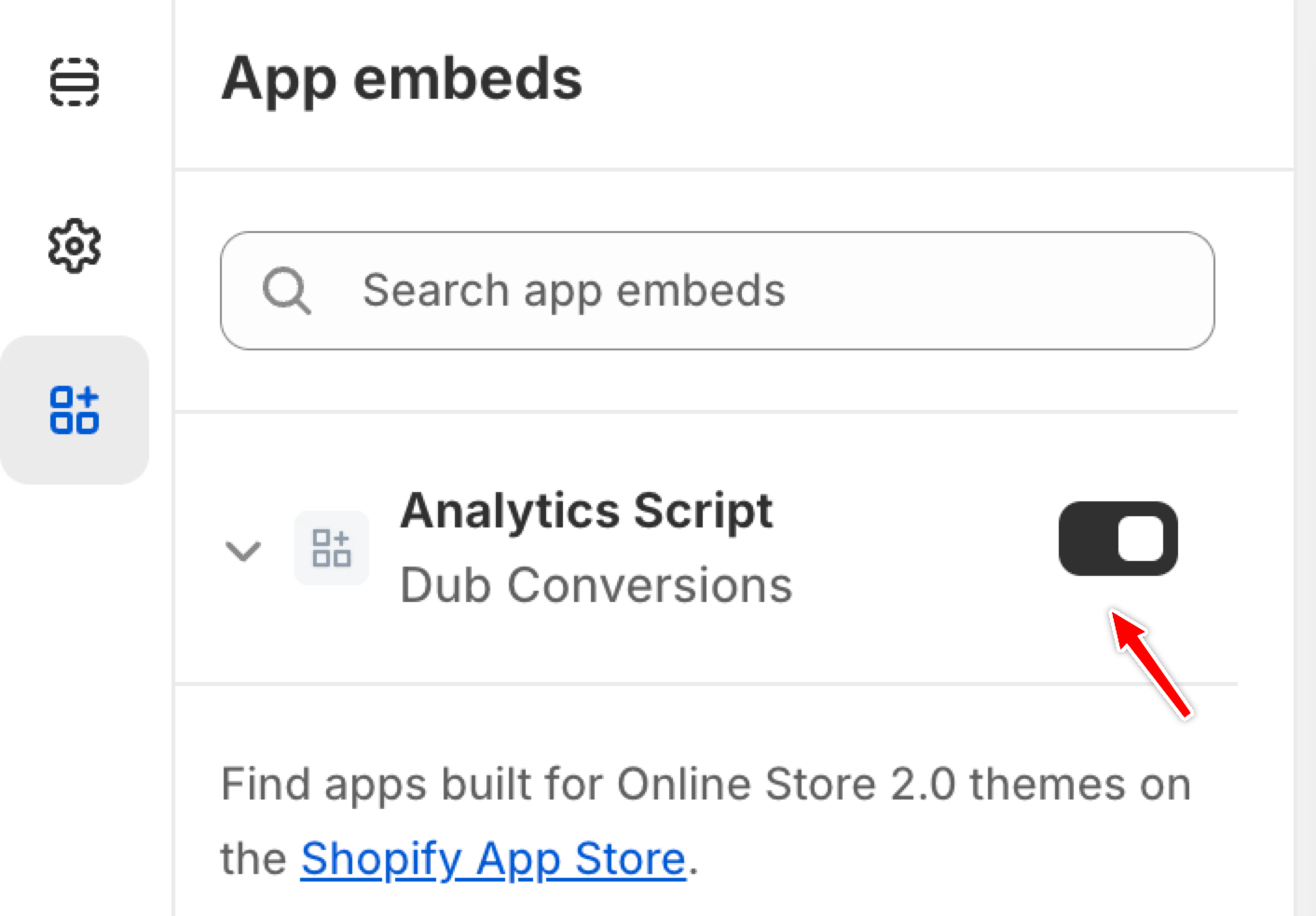+### Installation videodiff --git a/apps/web/guides/webflow.md b/apps/web/guides/webflow.mdindex 05c05e7144..cff5d5835b 100644--- a/apps/web/guides/webflow.md+++ b/apps/web/guides/webflow.md@@ -12,4 +12,4 @@ Follow these steps to add Dub client-side script to your Webflow site:></script>```-Read the [client-side click-tracking guide](https://dub.co/docs/sdks/client-side/features/client-side-click-tracking) for more information.+Read the [client-side click-tracking guide](https://dub.co/docs/sdks/client-side/features/click-tracking) for more information.diff --git a/apps/web/ui/guides/markdown.tsx b/apps/web/ui/guides/markdown.tsxindex cac0a589c1..9fcccb238e 100644--- a/apps/web/ui/guides/markdown.tsx+++ b/apps/web/ui/guides/markdown.tsx@@ -25,7 +25,7 @@ export function GuidesMarkdown({"prose-h3:text-lg prose-h3:font-semibold prose-h3:mt-4 prose-h3:mb-2","prose-h4:text-base prose-h4:font-semibold prose-h4:mt-3 prose-h4:mb-1","prose-p:text-gray-700 prose-p:leading-6 prose-p:mb-4",- "prose-a:text-neutral-600 prose-a:font-medium prose-a:underline prose-a:underline-offset-2 hover:prose-a:text-neutral-700",+ "prose-a:text-neutral-600 prose-a:font-medium prose-a:underline prose-a:cursor-help prose-a:decoration-dotted prose-a:underline-offset-2 hover:prose-a:text-neutral-700","prose-strong:text-gray-900 prose-strong:font-semibold","prose-em:text-gray-700 prose-em:italic","prose-code:text-gray-800 prose-code:px-1 prose-code:py-0.5 prose-code:rounded prose-code:text-xs prose-code:font-mono",