
Virtual whiteboard for sketching hand-drawn like diagrams
docs: Add docs for Excalidraw Element Skeleton (#6879)
Aakansha Doshi99dbc0acb9c7
diff --git a/dev-docs/docs/@excalidraw/excalidraw/api/excalidraw-element-skeleton.mdx b/dev-docs/docs/@excalidraw/excalidraw/api/excalidraw-element-skeleton.mdxnew file mode 100644index 0000000000..3c1baeeaf2--- /dev/null+++ b/dev-docs/docs/@excalidraw/excalidraw/api/excalidraw-element-skeleton.mdx@@ -0,0 +1,429 @@+# Creating Elements programmatically++We support a simplified API to make it easier to generate Excalidraw elements programmatically. This API is in beta and subject to change before stable. You can check the [PR](https://github.com/excalidraw/excalidraw/pull/6546) for more details.++For this purpose we introduced a new type [`ExcalidrawElementSkeleton`](https://github.com/excalidraw/excalidraw/blob/master/src/data/transform.ts#L133). This is the simplified version of [`ExcalidrawElement`](https://github.com/excalidraw/excalidraw/blob/master/src/element/types.ts#L134) type with the minimum possible attributes so that creating elements programmatically is much easier (especially for cases like binding arrows or creating text containers).++The [`ExcalidrawElementSkeleton`](https://github.com/excalidraw/excalidraw/blob/master/src/data/transform.ts#L133) can be converted to fully qualified Excalidraw elements by using [`convertToExcalidrawElements`](/docs/@excalidraw/excalidraw/api/excalidraw-element-skeleton#converttoexcalidrawelements).++## convertToExcalidrawElements++**_Signature_**++<pre>+ convertToExcalidrawElements(elements:{" "}+ <a href="https://github.com/excalidraw/excalidraw/blob/master/src/data/transform.ts#L133">+ ExcalidrawElementSkeleton+ </a>+ )+</pre>++**_How to use_**++```js+import { convertToExcalidrawElements } from "@excalidraw/excalidraw";+```++This function converts the Excalidraw Element Skeleton to excalidraw elements which could be then rendered on the canvas. Hence calling this function is necessary before passing it to APIs like [`initialData`](https://docs.excalidraw.com/docs/@excalidraw/excalidraw/api/props/initialdata), [`updateScene`](https://docs.excalidraw.com/docs/@excalidraw/excalidraw/api/props/ref#updatescene) if you are using the Skeleton API++## Supported Features++### Rectangle, Ellipse, and Diamond++To create these shapes you need to pass its `type` and `x` and `y` coordinates for position. The rest of the attributes are optional_.++For the Skeleton API to work, `convertToExcalidrawElements` needs to be called before passing it to Excalidraw Component via initialData, updateScene or any such API.++```jsx live+function App() {+ const elements = convertToExcalidrawElements([+ {+ type: "rectangle",+ x: 100,+ y: 250,+ },+ {+ type: "ellipse",+ x: 250,+ y: 250,+ },+ {+ type: "diamond",+ x: 380,+ y: 250,+ },+ ]);+ return (+ <div style={{ height: "500px" }}>+ <Excalidraw+ initialData={{+ elements,+ appState: { zenModeEnabled: true, viewBackgroundColor: "#a5d8ff" },+ scrollToContent: true,+ }}+ />+ </div>+ );+}+```++You can pass additional [`properties`](https://github.com/excalidraw/excalidraw/blob/master/src/element/types.ts#L27) as well to decorate the shapes.++:::info++You can copy the below test examples and replace the elements in the live editor above to test it out.++:::++```js+convertToExcalidrawElements([+ {+ type: "rectangle",+ x: 50,+ y: 250,+ width: 200,+ height: 100,+ backgroundColor: "#c0eb75",+ strokeWidth: 2,+ },+ {+ type: "ellipse",+ x: 300,+ y: 250,+ width: 200,+ height: 100,+ backgroundColor: "#ffc9c9",+ strokeStyle: "dotted",+ fillStyle: "solid",+ strokeWidth: 2,+ },+ {+ type: "diamond",+ x: 550,+ y: 250,+ width: 200,+ height: 100,+ backgroundColor: "#a5d8ff",+ strokeColor: "#1971c2",+ strokeStyle: "dashed",+ fillStyle: "cross-hatch",+ strokeWidth: 2,+ },+]);+```++++### Text Element++The `type`, `x`, `y` and `text` properties are required to create a text element, rest of the attributes are optional++```js+convertToExcalidrawElements([+ {+ type: "text",+ x: 100,+ y: 100,+ text: "HELLO WORLD!",+ },+ {+ type: "text",+ x: 100,+ y: 150,+ text: "STYLED HELLO WORLD!",+ fontSize: 20,+ strokeColor: "#5f3dc4",+ },+]);+```++++### Lines and Arrows++The `type`, `x`, and `y` properties are required, rest of the attributes are optional++```js+convertToExcalidrawElements([+ {+ type: "arrow",+ x: 100,+ y: 20,+ },+ {+ type: "line",+ x: 100,+ y: 60,+ },+]);+```++++#### With Addtional properties++```js+convertToExcalidrawElements([+ {+ type: "arrow",+ x: 450,+ y: 20,+ startArrowhead: "dot",+ endArrowhead: "triangle",+ strokeColor: "#1971c2",+ strokeWidth: 2,+ },+ {+ type: "line",+ x: 450,+ y: 60,+ strokeColor: "#2f9e44",+ strokeWidth: 2,+ strokeStyle: "dotted",+ },+]);+```++++### Text Containers++In addition to `type`, `x` and `y` properties, [`label`](https://github.com/excalidraw/excalidraw/blob/master/src/data/transform.ts#L124C7-L130C59) property is required for text containers. The `text` property in `label` is required, rest of the attributes are optional.++If you don't provide the dimensions of container, we calculate it based of the label dimensions.++```js+convertToExcalidrawElements([+ {+ type: "rectangle",+ x: 300,+ y: 290,+ label: {+ text: "RECTANGLE TEXT CONTAINER",+ },+ },+ {+ type: "ellipse",+ x: 500,+ y: 100,+ label: {+ text: "ELLIPSE\n TEXT CONTAINER",+ },+ },+ {+ type: "diamond",+ x: 100,+ y: 100,+ label: {+ text: "DIAMOND\nTEXT CONTAINER",+ },+ },+]);+```++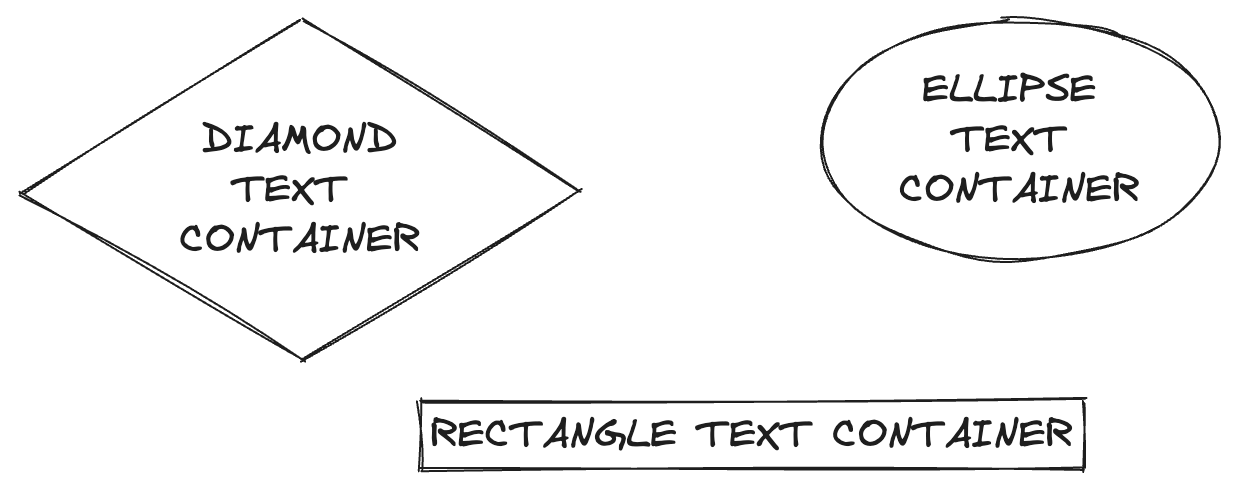++#### With Additional properties++```js+convertToExcalidrawElements([+ {+ type: "diamond",+ x: -120,+ y: 100,+ width: 270,+ backgroundColor: "#fff3bf",+ strokeWidth: 2,+ label: {+ text: "STYLED DIAMOND TEXT CONTAINER",+ strokeColor: "#099268",+ fontSize: 20,+ },+ },+ {+ type: "rectangle",+ x: 180,+ y: 150,+ width: 200,+ strokeColor: "#c2255c",+ label: {+ text: "TOP LEFT ALIGNED RECTANGLE TEXT CONTAINER",+ textAlign: "left",+ verticalAlign: "top",+ fontSize: 20,+ },+ },+ {+ type: "ellipse",+ x: 400,+ y: 130,+ strokeColor: "#f08c00",+ backgroundColor: "#ffec99",+ width: 200,+ label: {+ text: "STYLED ELLIPSE TEXT CONTAINER",+ strokeColor: "#c2255c",+ },+ },+]);+```++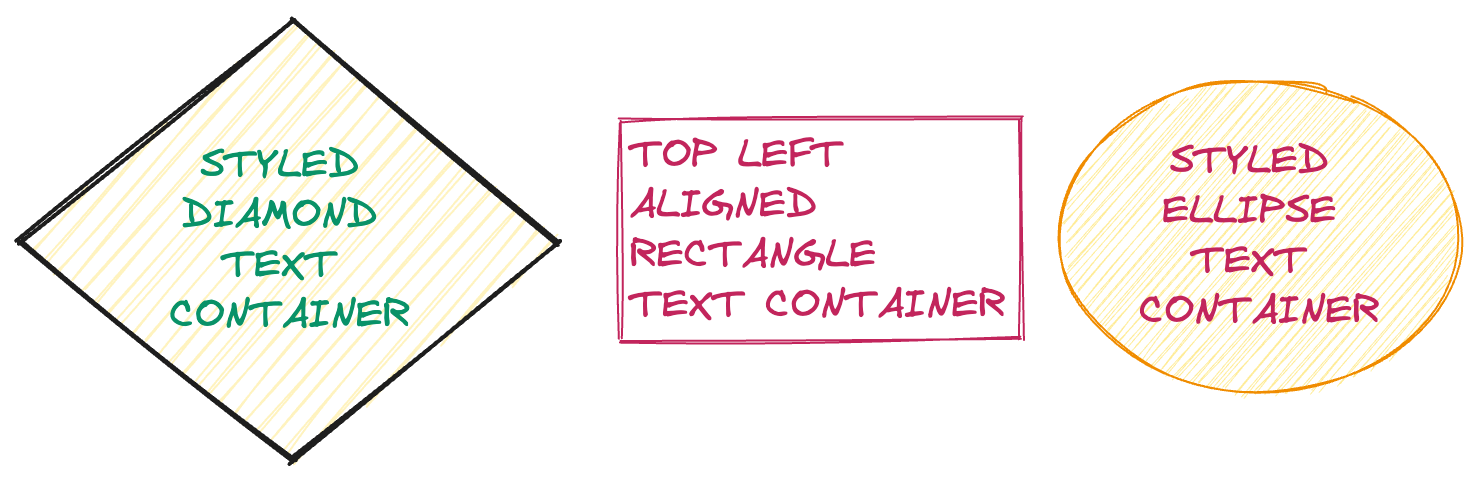++### Labelled Arrows++Similar to Text Containers, you can create labelled arrows as well.++```js+convertToExcalidrawElements([+ {+ type: "arrow",+ x: 100,+ y: 100,+ label: {+ text: "LABELED ARROW",+ },+ },+ {+ type: "arrow",+ x: 100,+ y: 200,+ label: {+ text: "STYLED LABELED ARROW",+ strokeColor: "#099268",+ fontSize: 20,+ },+ },+ {+ type: "arrow",+ x: 100,+ y: 300,+ strokeColor: "#1098ad",+ strokeWidth: 2,+ label: {+ text: "ANOTHER STYLED LABELLED ARROW",+ },+ },+ {+ type: "arrow",+ x: 100,+ y: 400,+ strokeColor: "#1098ad",+ strokeWidth: 2,+ label: {+ text: "ANOTHER STYLED LABELLED ARROW",+ strokeColor: "#099268",+ },+ },+]);+```++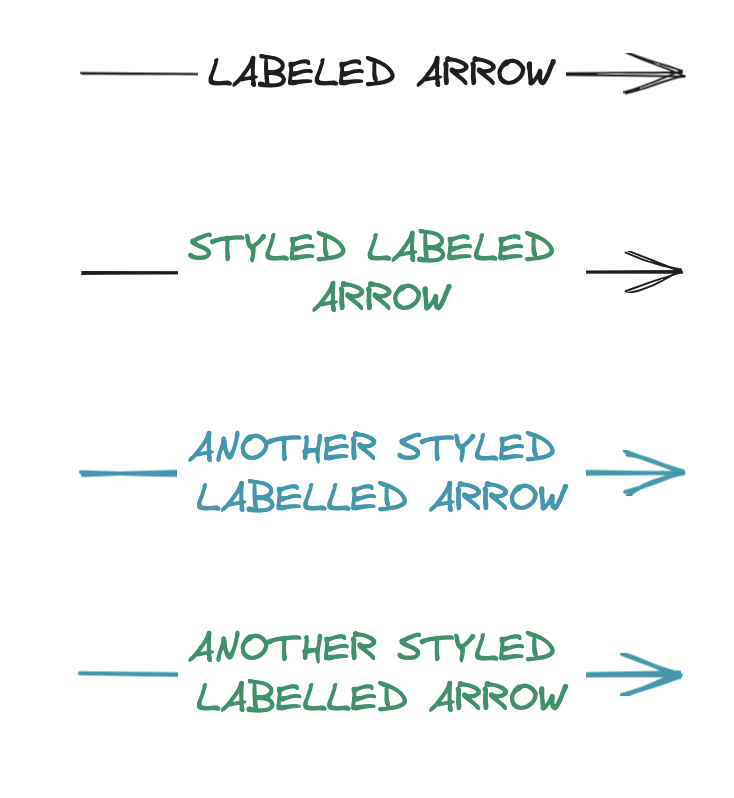++### Arrow bindings++To bind arrow to a shape you need to specify its [`start`](https://github.com/excalidraw/excalidraw/blob/master/src/data/transform.ts#L86) and [`end`](https://github.com/excalidraw/excalidraw/blob/master/src/data/transform.ts#L54) properties. You need to pass either `type` or `id` property in `start` and `end` properties, rest of the attributes are optional++```js+convertToExcalidrawElements([+ {+ type: "arrow",+ x: 255,+ y: 239,+ label: {+ text: "HELLO WORLD!!",+ },+ start: {+ type: "rectangle",+ },+ end: {+ type: "ellipse",+ },+ },+]);+```++When position for `start` and `end ` properties are not specified, we compute it according to arrow position.++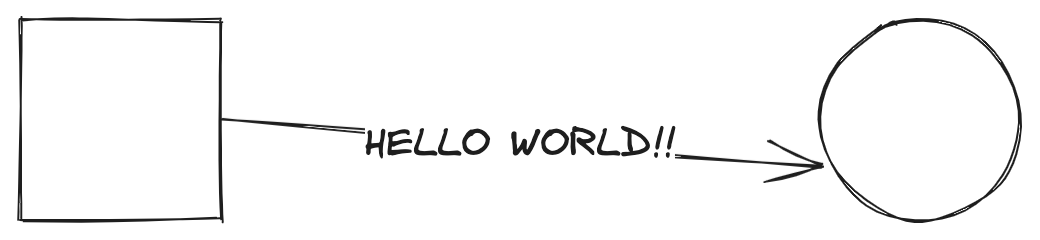++```js+convertToExcalidrawElements([+ {+ type: "arrow",+ x: 255,+ y: 239,+ label: {+ text: "HELLO WORLD!!",+ },+ start: {+ type: "text",+ text: "HEYYYYY",+ },+ end: {+ type: "text",+ text: "WHATS UP ?",+ },+ },+]);+```++++#### When passing `id`++Useful when you want to bind multiple arrows to one diagram / use some existing diagram++```js+convertToExcalidrawElements([+ {+ type: "ellipse",+ id: "ellipse-1",+ strokeColor: "#66a80f",+ x: 390,+ y: 356,+ width: 150,+ height: 150,+ backgroundColor: "#d8f5a2",+ },+ {+ type: "diamond",+ id: "diamond-1",+ strokeColor: "#9c36b5",+ width: 100,+ x: -30,+ y: 380,+ },+ {+ type: "arrow",+ x: 100,+ y: 440,+ width: 295,+ height: 35,+ strokeColor: "#1864ab",+ start: {+ type: "rectangle",+ width: 150,+ height: 150,+ },+ end: {+ id: "ellipse-1",+ },+ },+ {+ type: "arrow",+ x: 60,+ y: 420,+ width: 330,+ strokeColor: "#e67700",+ start: {+ id: "diamond-1",+ },+ end: {+ id: "ellipse-1",+ },+ },+]);+```++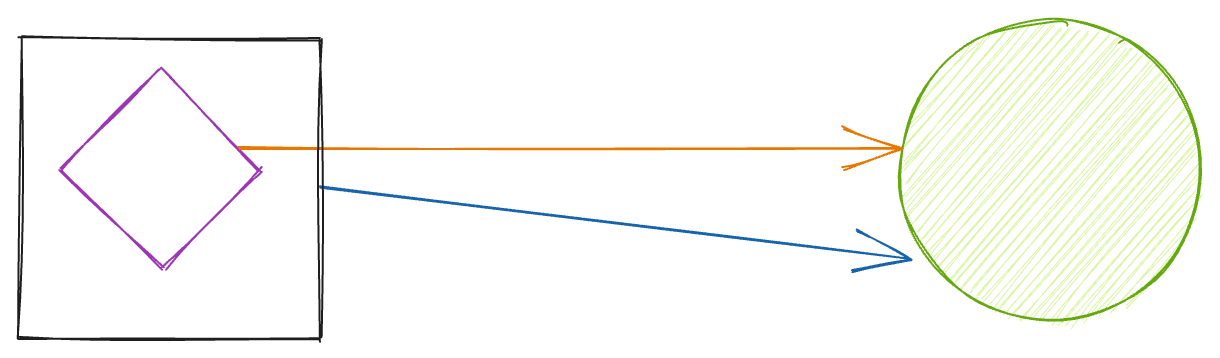diff --git a/dev-docs/package.json b/dev-docs/package.jsonindex bef57d76e7..4601891c95 100644--- a/dev-docs/package.json+++ b/dev-docs/package.json@@ -18,7 +18,7 @@"@docusaurus/core": "2.2.0","@docusaurus/preset-classic": "2.2.0","@docusaurus/theme-live-codeblock": "2.2.0",- "@excalidraw/excalidraw": "0.15.2-6546-3398d86",+ "@excalidraw/excalidraw": "0.15.2-eb020d0","@mdx-js/react": "^1.6.22","clsx": "^1.2.1","docusaurus-plugin-sass": "0.2.3",diff --git a/dev-docs/sidebars.js b/dev-docs/sidebars.jsindex 86356aeff5..257d16b540 100644--- a/dev-docs/sidebars.js+++ b/dev-docs/sidebars.js@@ -81,12 +81,8 @@ const sidebars = {"@excalidraw/excalidraw/api/utils/restore",],},- {- type: "category",- label: "Constants",- link: { type: "doc", id: "@excalidraw/excalidraw/api/constants" },- items: [],- },+ "@excalidraw/excalidraw/api/constants",+ "@excalidraw/excalidraw/api/excalidraw-element-skeleton",],},"@excalidraw/excalidraw/faq",diff --git a/dev-docs/yarn.lock b/dev-docs/yarn.lockindex 3ef8a91904..f06b9fb245 100644--- a/dev-docs/yarn.lock+++ b/dev-docs/yarn.lock@@ -1631,10 +1631,10 @@url-loader "^4.1.1"webpack "^5.73.0"-"@excalidraw/[email protected]":- version "0.15.2-6546-3398d86"- resolved "https://registry.yarnpkg.com/@excalidraw/excalidraw/-/excalidraw-0.15.2-6546-3398d86.tgz#e74d5ad944b8b414924d27ee91469a32b4f08dbf"- integrity sha512-Tzq6qighJUytXRA8iMzQ8onoGclo9CuvPSw7DMvPxME8nxAxn5CeK/gsxIs3zwooj9CC6XF42BSrx0+n+fPxaQ==+"@excalidraw/[email protected]":+ version "0.15.2-eb020d0"+ resolved "https://registry.yarnpkg.com/@excalidraw/excalidraw/-/excalidraw-0.15.2-eb020d0.tgz#25bd61e6f23da7c084fb16a3e0fe0dd9ad8e6533"+ integrity sha512-TKGLzpOVqFQcwK1GFKTDXgg1s2U6tc5KE3qXuv87osbzOtftQn3x4+VH61vwdj11l00nEN80SMdXUC43T9uJqQ=="@hapi/hoek@^9.0.0":version "9.3.0"