
🎬 火宝短剧 - 基于AI的一站式短剧生成平台 《一句话生成完整短剧,从剧本到成片全自动化》 Huobao Drama - An AI-Powered End-to-End Short Drama Generator "One Sentence to Complete Drama: Fully Automated from Script to Final Video"
TypeScript
修改readme
Connordb1853361005
diff --git a/README.md b/README.mdindex eff8381..e62f8a1 100644--- a/README.md+++ b/README.md@@ -1,108 +1,106 @@-# 🎬 Huobao Drama - AI 短剧生成平台+# 🎬 Huobao Drama - AI Short Drama Production Platform<div align="center">-**基于 Go + Vue3 的全栈 AI 短剧自动化生产平台**+**Full-stack AI Short Drama Automation Platform Based on Go + Vue3**[](https://golang.org)[](https://vuejs.org)[](https://creativecommons.org/licenses/by-nc-sa/4.0/)-[功能特性](#功能特性) • [快速开始](#快速开始) • [部署指南](#部署指南)+[Features](#features) • [Quick Start](#quick-start) • [Deployment](#deployment)-[简体中文](README.md) | [English](README-EN.md) | [日本語](README-JA.md)+[简体中文](README-CN.md) | [English](README.md) | [日本語](README-JA.md)</div>----## 📖 项目简介 / About--Huobao Drama 是一个基于 AI 的短剧自动化生产平台,实现从剧本生成、角色设计、分镜制作到视频合成的全流程自动化。+## 📖 AboutHuobao Drama is an AI-powered short drama production platform that automates the entire workflow from script generation, character design, storyboarding to video composition.-### 🎯 核心价值 / Core Features+### 🎯 Core Features-- **🤖 AI 驱动 / AI-Driven**:使用大语言模型解析剧本,提取角色、场景和分镜信息 | Parse scripts using large language models to extract characters, scenes, and storyboards-- **🎨 智能创作 / Intelligent Creation**:AI 绘图生成角色形象和场景背景 | AI-generated character portraits and scene backgrounds-- **📹 视频生成 / Video Generation**:基于文生视频和图生视频模型自动生成分镜视频 | Automatic storyboard video generation using text-to-video and image-to-video models-- **🔄 工作流 / Workflow**:完整的短剧制作工作流,从创意到成片一站式完成 | Complete production workflow from idea to final video+- **🤖 AI-Driven**: Parse scripts using large language models to extract characters, scenes, and storyboards+- **🎨 Intelligent Creation**: AI-generated character portraits and scene backgrounds+- **📹 Video Generation**: Automatic storyboard video generation using text-to-video and image-to-video models+- **🔄 Complete Workflow**: End-to-end production workflow from idea to final video-### 🛠️ 技术架构+### 🛠️ Technical Architecture-采用**DDD 领域驱动设计**,清晰分层:+Based on **DDD (Domain-Driven Design)** with clear layering:```-├── API层 (Gin HTTP)-├── 应用服务层 (Business Logic)-├── 领域层 (Domain Models)-└── 基础设施层 (Database, External Services)+├── API Layer (Gin HTTP)+├── Application Service Layer (Business Logic)+├── Domain Layer (Domain Models)+└── Infrastructure Layer (Database, External Services)```-### 🎥 作品展示 / Demo Videos+### 🎥 Demo Videos-体验 AI 短剧生成效果:+Experience AI short drama generation:<div align="center">-**示例作品 1**+**Sample Work 1**<video src="https://ffile.chatfire.site/cf/public/20260114094337396.mp4" controls width="640"></video>-**示例作品 2**+**Sample Work 2**<video src="https://ffile.chatfire.site/cf/public/fcede75e8aeafe22031dbf78f86285b8.mp4" controls width="640"></video>-[点击观看视频 1](https://ffile.chatfire.site/cf/public/20260114094337396.mp4) | [点击观看视频 2](https://ffile.chatfire.site/cf/public/fcede75e8aeafe22031dbf78f86285b8.mp4)+[Watch Video 1](https://ffile.chatfire.site/cf/public/20260114094337396.mp4) | [Watch Video 2](https://ffile.chatfire.site/cf/public/fcede75e8aeafe22031dbf78f86285b8.mp4)</div>----## ✨ 功能特性+## ✨ Features-### 🎭 角色管理+### 🎭 Character Management-- ✅ AI 生成角色形象-- ✅ 批量角色生成-- ✅ 角色图片上传和管理+- ✅ AI-generated character portraits+- ✅ Batch character generation+- ✅ Character image upload and management-### 🎬 分镜制作+### 🎬 Storyboard Production-- ✅ 自动生成分镜脚本-- ✅ 场景描述和镜头设计-- ✅ 分镜图片生成(文生图)-- ✅ 帧类型选择(首帧/关键帧/尾帧/分镜板)+- ✅ Automatic storyboard script generation+- ✅ Scene descriptions and shot design+- ✅ Storyboard image generation (text-to-image)+- ✅ Frame type selection (first frame/key frame/last frame/panel)-### 🎥 视频生成+### 🎥 Video Generation-- ✅ 图生视频自动生成-- ✅ 视频合成和剪辑-- ✅ 转场效果+- ✅ Automatic image-to-video generation+- ✅ Video composition and editing+- ✅ Transition effects-### 📦 资源管理+### 📦 Asset Management-- ✅ 素材库统一管理-- ✅ 本地存储支持-- ✅ 资源导入导出-- ✅ 任务进度追踪+- ✅ Unified asset library management+- ✅ Local storage support+- ✅ Asset import/export+- ✅ Task progress tracking----## 🚀 快速开始+## 🚀 Quick Start-### 📋 环境要求+### 📋 Prerequisites-| 软件 | 版本要求 | 说明 |-| ----------- | -------- | -------------------- |-| **Go** | 1.23+ | 后端运行环境 |-| **Node.js** | 18+ | 前端构建环境 |-| **npm** | 9+ | 包管理工具 |-| **FFmpeg** | 4.0+ | 视频处理(**必需**) |-| **SQLite** | 3.x | 数据库(已内置) |+| Software | Version | Description |+| ----------- | ------- | ------------------------------- |+| **Go** | 1.23+ | Backend runtime |+| **Node.js** | 18+ | Frontend build environment |+| **npm** | 9+ | Package manager |+| **FFmpeg** | 4.0+ | Video processing (**Required**) |+| **SQLite** | 3.x | Database (built-in) |-#### 安装 FFmpeg+#### Installing FFmpeg**macOS:**@@ -118,30 +116,30 @@ sudo apt install ffmpeg```**Windows:**-从 [FFmpeg 官网](https://ffmpeg.org/download.html) 下载并配置环境变量+Download from [FFmpeg Official Site](https://ffmpeg.org/download.html) and configure environment variables-验证安装:+Verify installation:```bashffmpeg -version```-### ⚙️ 配置文件+### ⚙️ Configuration-复制并编辑配置文件:+Copy and edit the configuration file:```bashcp configs/config.example.yaml configs/config.yamlvim configs/config.yaml```-配置文件格式(`configs/config.yaml`):+Configuration file format (`configs/config.yaml`):```yamlapp:name: "Huobao Drama API"version: "1.0.0"- debug: true # 开发环境设为true,生产环境设为false+ debug: true # Set to true for development, false for productionserver:port: 5678@@ -168,96 +166,96 @@ ai:default_video_provider: "doubao"```-**重要配置项:**+**Key Configuration Items:**-- `app.debug`: 调试模式开关(开发环境建议设为 true)-- `server.port`: 服务运行端口-- `server.cors_origins`: 允许跨域访问的前端地址-- `database.path`: SQLite 数据库文件路径-- `storage.local_path`: 本地文件存储路径-- `storage.base_url`: 静态资源访问 URL-- `ai.default_*_provider`: AI 服务提供商配置(在 Web 界面中配置具体的 API Key)+- `app.debug`: Debug mode switch (recommended true for development)+- `server.port`: Service port+- `server.cors_origins`: Allowed CORS origins for frontend+- `database.path`: SQLite database file path+- `storage.local_path`: Local file storage path+- `storage.base_url`: Static resource access URL+- `ai.default_*_provider`: AI service provider configuration (API keys configured in Web UI)-### 📥 安装依赖+### 📥 Installation```bash-# 克隆项目+# Clone the projectgit clone https://github.com/chatfire-AI/huobao-drama.gitcd huobao-drama-# 安装Go依赖+# Install Go dependenciesgo mod download-# 安装前端依赖+# Install frontend dependenciescd webnpm installcd ..```-### 🎯 启动项目+### 🎯 Starting the Project-#### 方式一:开发模式(推荐)+#### Method 1: Development Mode (Recommended)-**前后端分离,支持热重载**+**Frontend and backend separation with hot reload**```bash-# 终端1:启动后端服务+# Terminal 1: Start backend servicego run main.go-# 终端2:启动前端开发服务器+# Terminal 2: Start frontend dev servercd webnpm run dev```-- 前端地址: `http://localhost:3012`-- 后端 API: `http://localhost:5678/api/v1`-- 前端自动代理 API 请求到后端+- Frontend: `http://localhost:3012`+- Backend API: `http://localhost:5678/api/v1`+- Frontend automatically proxies API requests to backend-#### 方式二:单服务模式+#### Method 2: Single Service Mode-**后端同时提供 API 和前端静态文件**+**Backend serves both API and frontend static files**```bash-# 1. 构建前端+# 1. Build frontendcd webnpm run buildcd ..-# 2. 启动服务+# 2. Start servicego run main.go```-访问: `http://localhost:5678`+Access: `http://localhost:5678`-### 🗄️ 数据库初始化+### 🗄️ Database Initialization-数据库表会在首次启动时自动创建(使用 GORM AutoMigrate),无需手动迁移。+Database tables are automatically created on first startup (using GORM AutoMigrate), no manual migration needed.----## 📦 部署指南+## 📦 Deployment-### 🐳 Docker 部署(推荐)+### 🐳 Docker Deployment (Recommended)-#### 方式一:Docker Compose(推荐)+#### Method 1: Docker Compose (Recommended)```bash-# 启动服务+# Start servicesdocker-compose up -d-# 查看日志+# View logsdocker-compose logs -f-# 停止服务+# Stop servicesdocker-compose down```-#### 方式二:Docker 命令+#### Method 2: Docker Command-> **注意**:Linux 用户需添加 `--add-host=host.docker.internal:host-gateway` 以访问宿主机服务+> **Note**: Linux users need to add `--add-host=host.docker.internal:host-gateway` to access host services```bash-# 从 Docker Hub 运行+# Run from Docker Hubdocker run -d \--name huobao-drama \-p 5678:5678 \@@ -265,106 +263,106 @@ docker run -d \--restart unless-stopped \huobao/huobao-drama:latest-# 查看日志+# View logsdocker logs -f huobao-drama```-**本地构建**(可选):+**Local Build** (optional):```bashdocker build -t huobao-drama:latest .docker run -d --name huobao-drama -p 5678:5678 -v $(pwd)/data:/app/data huobao-drama:latest```-**Docker 部署优势:**+**Docker Deployment Advantages:**-- ✅ 开箱即用,内置默认配置-- ✅ 环境一致性,避免依赖问题-- ✅ 一键启动,无需安装 Go、Node.js、FFmpeg-- ✅ 易于迁移和扩展-- ✅ 自动健康检查和重启-- ✅ 自动处理文件权限,无需手动配置+- ✅ Ready to use with default configuration+- ✅ Environment consistency, avoiding dependency issues+- ✅ One-click start, no need to install Go, Node.js, FFmpeg+- ✅ Easy to migrate and scale+- ✅ Automatic health checks and restarts+- ✅ Automatic file permission handling-#### 🔗 访问宿主机服务(Ollama/本地模型)+#### 🔗 Accessing Host Services (Ollama/Local Models)-容器已配置支持访问宿主机服务,直接使用 `http://host.docker.internal:端口号` 即可。+The container is configured to access host services using `http://host.docker.internal:PORT`.-**配置步骤:**+**Configuration Steps:**-1. **宿主机启动服务(监听所有接口)**+1. **Start service on host (listen on all interfaces)**```bashexport OLLAMA_HOST=0.0.0.0:11434 && ollama serve```-2. **前端 AI 服务配置**+2. **Frontend AI Service Configuration**- Base URL: `http://host.docker.internal:11434/v1`- Provider: `openai`- Model: `qwen2.5:latest`----### 🏭 传统部署方式+### 🏭 Traditional Deployment-#### 1. 编译构建+#### 1. Build```bash-# 1. 构建前端+# 1. Build frontendcd webnpm run buildcd ..-# 2. 编译后端+# 2. Compile backendgo build -o huobao-drama .```-生成文件:+Generated files:-- `huobao-drama` - 后端可执行文件-- `web/dist/` - 前端静态文件(已嵌入后端)+- `huobao-drama` - Backend executable+- `web/dist/` - Frontend static files (embedded in backend)-#### 2. 准备部署文件+#### 2. Prepare Deployment Files-需要上传到服务器的文件:+Files to upload to server:```-huobao-drama # 后端可执行文件-configs/config.yaml # 配置文件-data/ # 数据目录(可选,首次运行自动创建)+huobao-drama # Backend executable+configs/config.yaml # Configuration file+data/ # Data directory (optional, auto-created on first run)```-#### 3. 服务器配置+#### 3. Server Configuration```bash-# 上传文件到服务器+# Upload files to serverscp huobao-drama user@server:/opt/huobao-drama/scp configs/config.yaml user@server:/opt/huobao-drama/configs/-# SSH登录服务器+# SSH to serverssh user@server-# 修改配置文件+# Modify configuration filecd /opt/huobao-dramavim configs/config.yaml-# 设置mode为production-# 配置域名和存储路径+# Set mode to production+# Configure domain and storage path-# 创建数据目录并设置权限(重要!)-# 注意:将 YOUR_USER 替换为实际运行服务的用户名(如 www-data、ubuntu、deploy 等)+# Create data directory and set permissions (Important!)+# Note: Replace YOUR_USER with actual user running the service (e.g., www-data, ubuntu, deploy)sudo mkdir -p /opt/huobao-drama/data/storagesudo chown -R YOUR_USER:YOUR_USER /opt/huobao-drama/datasudo chmod -R 755 /opt/huobao-drama/data-# 赋予执行权限+# Grant execute permissionchmod +x huobao-drama-# 启动服务+# Start service./huobao-drama```-#### 4. 使用 systemd 管理服务+#### 4. Manage Service with systemd-创建服务文件 `/etc/systemd/system/huobao-drama.service`:+Create service file `/etc/systemd/system/huobao-drama.service`:```ini[Unit]@@ -379,14 +377,14 @@ ExecStart=/opt/huobao-drama/huobao-dramaRestart=on-failureRestartSec=10-# 环境变量(可选)+# Environment variables (optional)# Environment="GIN_MODE=release"[Install]WantedBy=multi-user.target```-启动服务:+Start service:```bashsudo systemctl daemon-reload@@ -395,40 +393,40 @@ sudo systemctl start huobao-dramasudo systemctl status huobao-drama```-**⚠️ 常见问题:SQLite 写权限错误**+**⚠️ Common Issue: SQLite Write Permission Error**-如果遇到 `attempt to write a readonly database` 错误:+If you encounter `attempt to write a readonly database` error:```bash-# 1. 确认当前运行服务的用户+# 1. Check current user running the servicesudo systemctl status huobao-drama | grep "Main PID"ps aux | grep huobao-drama-# 2. 修复权限(将 YOUR_USER 替换为实际用户名)+# 2. Fix permissions (replace YOUR_USER with actual username)sudo chown -R YOUR_USER:YOUR_USER /opt/huobao-drama/datasudo chmod -R 755 /opt/huobao-drama/data-# 3. 验证权限+# 3. Verify permissionsls -la /opt/huobao-drama/data-# 应该显示所有者为运行服务的用户+# Should show owner as the user running the service-# 4. 重启服务+# 4. Restart servicesudo systemctl restart huobao-drama```-**原因说明**:+**Reason:**-- SQLite 需要对数据库文件 **和** 所在目录都有写权限-- 需要在目录中创建临时文件(如 `-wal`、`-journal`)-- **关键**:确保 systemd 配置中的 `User` 与数据目录所有者一致+- SQLite requires write permission on both the database file **and** its directory+- Needs to create temporary files in the directory (e.g., `-wal`, `-journal`)+- **Key**: Ensure systemd `User` matches data directory owner-**常用用户名**:+**Common Usernames:**-- Ubuntu/Debian: `www-data`、`ubuntu`-- CentOS/RHEL: `nginx`、`apache`-- 自定义部署: `deploy`、`app`、当前登录用户+- Ubuntu/Debian: `www-data`, `ubuntu`+- CentOS/RHEL: `nginx`, `apache`+- Custom deployment: `deploy`, `app`, current logged-in user-#### 5. Nginx 反向代理+#### 5. Nginx Reverse Proxy```nginxserver {@@ -442,7 +440,7 @@ server {proxy_set_header X-Forwarded-For $proxy_add_x_forwarded_for;}- # 静态文件直接访问+ # Direct access to static fileslocation /static/ {alias /opt/huobao-drama/data/storage/;}@@ -451,128 +449,129 @@ server {----## 🎨 技术栈+## 🎨 Tech Stack-### 后端技术+### Backend-- **语言**: Go 1.23+-- **Web 框架**: Gin 1.9++- **Language**: Go 1.23++- **Web Framework**: Gin 1.9+- **ORM**: GORM-- **数据库**: SQLite-- **日志**: Zap-- **视频处理**: FFmpeg-- **AI 服务**: OpenAI、Gemini、火山等+- **Database**: SQLite+- **Logging**: Zap+- **Video Processing**: FFmpeg+- **AI Services**: OpenAI, Gemini, Doubao, etc.-### 前端技术+### Frontend-- **框架**: Vue 3.4+-- **语言**: TypeScript 5+-- **构建工具**: Vite 5-- **UI 组件**: Element Plus-- **CSS 框架**: TailwindCSS-- **状态管理**: Pinia-- **路由**: Vue Router 4+- **Framework**: Vue 3.4++- **Language**: TypeScript 5++- **Build Tool**: Vite 5+- **UI Components**: Element Plus+- **CSS Framework**: TailwindCSS+- **State Management**: Pinia+- **Router**: Vue Router 4-### 开发工具+### Development Tools-- **包管理**: Go Modules, npm-- **代码规范**: ESLint, Prettier-- **版本控制**: Git+- **Package Management**: Go Modules, npm+- **Code Standards**: ESLint, Prettier+- **Version Control**: Git----## 📝 常见问题+## 📝 FAQ-### Q: Docker 容器如何访问宿主机的 Ollama?+### Q: How can Docker containers access Ollama on the host?-A: 使用 `http://host.docker.internal:11434/v1` 作为 Base URL。注意两点:+A: Use `http://host.docker.internal:11434/v1` as Base URL. Note two things:-1. 宿主机 Ollama 需监听 `0.0.0.0`:`export OLLAMA_HOST=0.0.0.0:11434 && ollama serve`-2. Linux 用户使用 `docker run` 需添加:`--add-host=host.docker.internal:host-gateway`+1. Host Ollama needs to listen on `0.0.0.0`: `export OLLAMA_HOST=0.0.0.0:11434 && ollama serve`+2. Linux users using `docker run` need to add: `--add-host=host.docker.internal:host-gateway`-详见:[DOCKER_HOST_ACCESS.md](docs/DOCKER_HOST_ACCESS.md)+See: [DOCKER_HOST_ACCESS.md](docs/DOCKER_HOST_ACCESS.md)-### Q: FFmpeg 未安装或找不到?+### Q: FFmpeg not installed or not found?-A: 确保 FFmpeg 已安装并在 PATH 环境变量中。运行 `ffmpeg -version` 验证。+A: Ensure FFmpeg is installed and in the PATH environment variable. Verify with `ffmpeg -version`.-### Q: 前端无法连接后端 API?+### Q: Frontend cannot connect to backend API?-A: 检查后端是否启动,端口是否正确。开发模式下前端代理配置在 `web/vite.config.ts`。+A: Check if backend is running and port is correct. In development mode, frontend proxy config is in `web/vite.config.ts`.-### Q: 数据库表未创建?+### Q: Database tables not created?-A: GORM 会在首次启动时自动创建表,检查日志确认迁移是否成功。+A: GORM automatically creates tables on first startup, check logs to confirm migration success.----## � 更新日志 / Changelog+## 📋 Changelog### v1.0.2 (2026-01-16)-#### 🚀 重大更新+#### 🚀 Major Updates-- SQLite 纯 Go 驱动(`modernc.org/sqlite`),支持 `CGO_ENABLED=0` 跨平台编译-- 优化并发性能(WAL 模式),解决 "database is locked" 错误-- Docker 跨平台支持 `host.docker.internal` 访问宿主机服务-- 精简文档和部署指南+- Pure Go SQLite driver (`modernc.org/sqlite`), supports `CGO_ENABLED=0` cross-platform compilation+- Optimized concurrency performance (WAL mode), resolved "database is locked" errors+- Docker cross-platform support for `host.docker.internal` to access host services+- Streamlined documentation and deployment guides### v1.0.1 (2026-01-14)#### 🐛 Bug Fixes / 🔧 Improvements-- 修复视频生成 API 响应解析问题-- 添加 OpenAI Sora 视频端点配置-- 优化错误处理和日志输出+- Fixed video generation API response parsing issues+- Added OpenAI Sora video endpoint configuration+- Optimized error handling and logging----## 🤝 贡献指南+## 🤝 Contributing-欢迎提交 Issue 和 Pull Request!+Issues and Pull Requests are welcome!-1. Fork 本项目-2. 创建特性分支 (`git checkout -b feature/AmazingFeature`)-3. 提交改动 (`git commit -m 'Add some AmazingFeature'`)-4. 推送到分支 (`git push origin feature/AmazingFeature`)-5. 开启 Pull Request+1. Fork this project+2. Create a feature branch (`git checkout -b feature/AmazingFeature`)+3. Commit your changes (`git commit -m 'Add some AmazingFeature'`)+4. Push to the branch (`git push origin feature/AmazingFeature`)+5. Open a Pull Request----## API 配置站点+## API Configuration Site-2 分钟完成配置:[API 聚合站点](https://api.chatfire.site/models)+Configure in 2 minutes: [API Aggregation Site](https://api.chatfire.site/models)----## 👨💻 关于我们+## 👨💻 About Us-**AI 火宝 - AI 工作室创业中**+**AI Huobao - AI Studio Startup**-- 🏠 **位置**: 中国南京-- 🚀 **状态**: 创业中+- 🏠 **Location**: Nanjing, China+- 🚀 **Status**: Startup in Progress- 📧 **Email**: [[email protected]](mailto:[email protected])-- 💬 **微信**: dangbao1117 (私人微信不解答任何技术问题)+- 💬 **WeChat**: dangbao1117 (Personal WeChat - No technical support)- 🐙 **GitHub**: [https://github.com/chatfire-AI/huobao-drama](https://github.com/chatfire-AI/huobao-drama)-> _"让 AI 帮我们做更有创造力的事"_+> _"Let AI help us do more creative things"_-## 项目交流群+## Community Group-+-- 提交 [Issue](../../issues)-- 发送邮件至项目维护者+- Submit [Issue](../../issues)+- Email project maintainers---<div align="center">-**⭐ 如果这个项目对你有帮助,请给一个 Star!**+**⭐ If this project helps you, please give it a Star!**## Star History[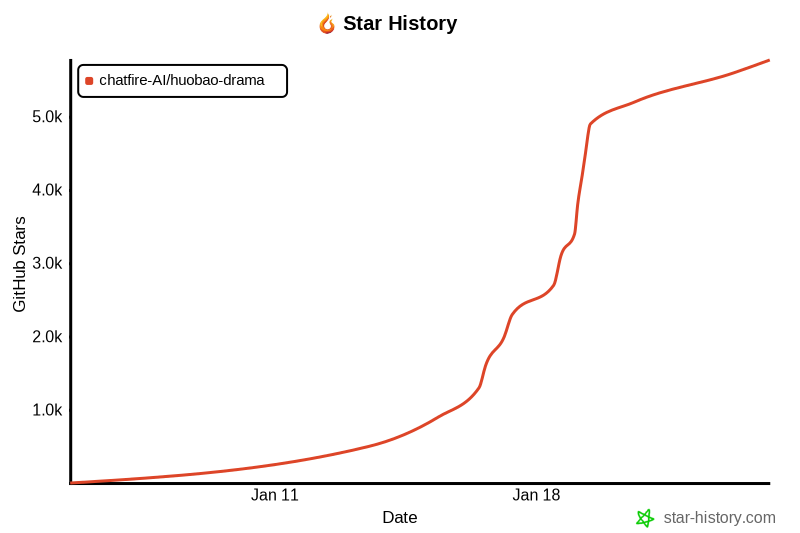](https://www.star-history.com/#chatfire-AI/huobao-drama&type=date&legend=top-left)+Made with ❤️ by Huobao Team</div>