
High performance self-hosted photo and video management solution.
TypeScript backup-toolfluttergoogle-photosgoogle-photos-alternativejavascriptmobile-appnestjsnodejsphoto-galleryphotosphotos-managementself-hostedsveltesveltekittypescriptvideos
Readme redistribution and reorganisation (#485)
r3norf35ebec7c64f
diff --git a/README.md b/README.mdindex 11289b4e05..c6d6c0bede 100644--- a/README.md+++ b/README.md@@ -1,3 +1,9 @@+<h1 align="center"> Immich </h1>+ <p align="center"> <b>High performance self-hosted photo and video backup solution.</b> </p>+<p align="center">+ <img src="design/feature-panel.png" title="Immich Logo">+</p>+<p align="center"><a href="https://opensource.org/licenses/MIT"><img src="https://img.shields.io/badge/license-MIT-green.svg?color=3F51B5&style=for-the-badge&label=License&logoColor=000000&labelColor=ececec" alt="License: MIT"></a><a href="https://github.com/alextran1502/immich"><img src="https://img.shields.io/github/stars/alextran1502/immich.svg?style=for-the-badge&logo=github&color=3F51B5&label=Stars&logoColor=000000&labelColor=ececec" alt="Star on Github"></a>@@ -14,75 +20,66 @@<img src="https://img.shields.io/discord/979116623879368755.svg?label=Immich%20Discord&logo=Discord&style=for-the-badge&logoColor=000000&labelColor=ececec" atl="Immich Discord"/></a><br/>- <br/>- <br/>- <br/>-- <p align="center">- <img src="design/feature-panel.png" title="Immich Logo">- </p>+ <br/></p>-# Immich--**High performance self-hosted photo and video backup solution.**+## Content+- [Features](#features)+- [Screenshots](#screenshots)+- [Installation](#installation)+- [Mobile App](#-mobile-app)+- [Development](#development)+- [Support](#support)+- [Known Issues](#known-issues)-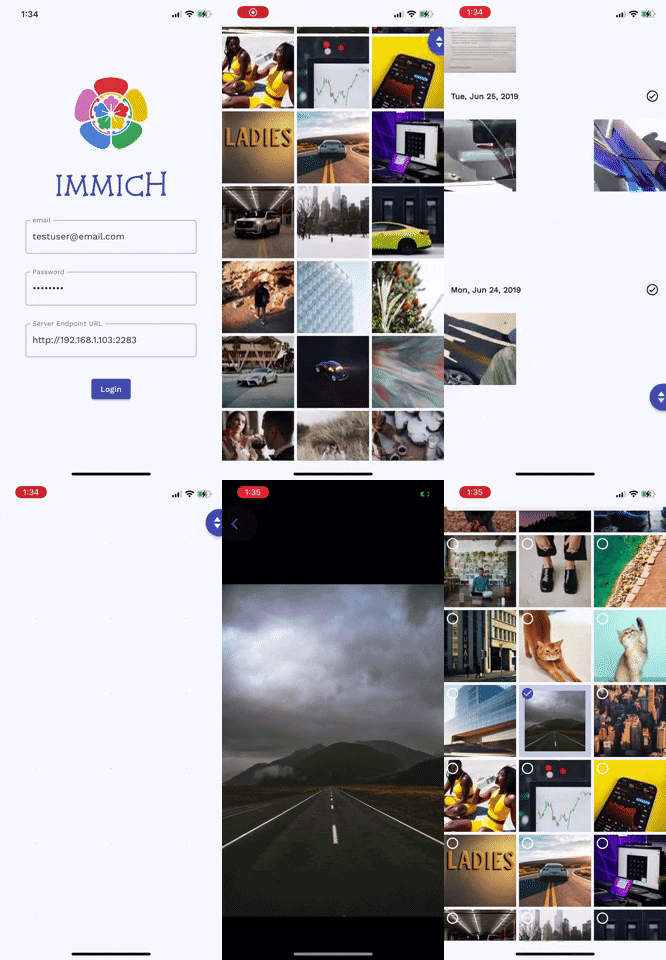--Loading ~4000 images/videos+# Features-## Screenshots+> ⚠️ WARNING: **NOT READY FOR PRODUCTION! DO NOT USE TO STORE YOUR ASSETS**. This project is under heavy development, there will be continuous functions, features and api changes.-### Mobile-<p align="left">- <img src="design/login-screen.png" width="150" title="Login With Custom URL">- <img src="design/backup-screen.png" width="150" title="Backup Setting Info">- <img src="design/selective-backup-screen.png" width="150" title="Backup Setting Info">- <img src="design/home-screen.jpeg" width="150" title="Home Screen">- <img src="design/search-screen.jpeg" width="150" title="Curated Search Info">- <img src="design/shared-albums.png" width="150" title="Shared Albums">- <img src="design/nsc6.png" width="150" title="EXIF Info">-</p>+| | Mobile | Web |+| - | - | - |+| ☁️ Upload and view videos and photos | Yes | Yes+| 🔄 Auto backup when the app is opened | Yes | N/A+| ☑️ Selective album(s) for backup | Yes | N/A+| ⬇️ Download photos and videos to local device | Yes | Yes+| 👪 Multi-user support | Yes | Yes+| 🖼️ Album | Yes | Yes+| 🤝 Shared Albums | Yes | Yes+| 🚀 Quick navigation with draggable scrollbar | Yes | Yes+| 🗃️ Support RAW (HEIC, HEIF, DNG, Apple ProRaw) | Yes | Yes+| 🧭 Metadata view (EXIF, map) | Yes | Yes+| 🔎 Search by metadata, objects and image tags | Yes | No+| ⚙️ Administrative functions (user management) | N/A | Yes-### Web-<p align="left">- <img src="design/web-home.jpeg" width="49%" title="Home Dashboard">- <img src="design/web-detail.jpeg" width="49%" title="Detail">-</p>-# Note+ <br/>-**!! NOT READY FOR PRODUCTION! DO NOT USE TO STORE YOUR ASSETS !!**+# Screenshots-This project is under heavy development, there will be continuous functions, features and api changes.+### Mobile+| | | | | |+| - | - | - | - | - |+| <img src="design/login-screen.png" width="150" title="Login With Custom URL"> <p align="center"> Login with custom URL </p> | <img src="design/backup-screen.png" width="150" title="Backup Setting Info"> <p align="center"> Backup Settings </p> | <img src="design/selective-backup-screen.png" width="150" title="Backup Setting Info"> <p align="center"> Backup selection </p> | <img src="design/home-screen.jpeg" width="150" title="Home Screen"> <p align="center"> Home Screen </p> | <img src="design/search-screen.jpeg" width="150" title="Curated Search Info"> <p align="center"> Curated search </p> |+| <img src="design/shared-albums.png" width="150" title="Shared Albums"> <p align="center"> Shared albums </p> | <img src="design/nsc6.png" width="150" title="EXIF Info"> <p align="center"> EXIF info </p> | <img src="https://media.giphy.com/media/y8ZeaAigGmNvlSoKhU/giphy.gif" width="150" title="Loading ~4000 images/videos"> <p align="center"> Loading ~4000 images/videos </p> |-# Features+### Web+| Home Dashboard | Image view |+| - | - |+|<img src="design/web-home.jpeg" width="100%" title="Home Dashboard"> | <img src="design/web-detail.jpeg" width="100%" title="Detail">|-| | Mobile | Web |-| - | - | - |-| Upload and view videos and photos | Yes | Yes-| Auto backup when the app is opened | Yes | N/A-| Selective album(s) for backup | Yes | N/A-| Download photos and videos to local device | Yes | Yes-| Multi-user support | Yes | Yes-| Album | Yes | Yes-| Shared Albums | Yes | Yes-| Quick navigation with draggable scrollbar | Yes | Yes-| Support RAW (HEIC, HEIF, DNG, Apple ProRaw) | Yes | Yes-| Metadata view (EXIF, map) | Yes | Yes-| Search by metadata, objects and image tags | Yes | No-| Administrative functions (user management) | N/A | Yes+ <br/>-# System Requirement+# Project Details+## 💾 System Requirements-**OS**: Preferred unix-based operating system (Ubuntu, Debian, MacOS...etc).+- **OS**: Preferred unix-based operating system (Ubuntu, Debian, MacOS...etc).-**RAM**: At least 2GB, preferred 4GB.+- **RAM**: At least 2GB, preferred 4GB.-**Core**: At least 2 cores, preferred 4 cores.+- **Core**: At least 2 cores, preferred 4 cores.-# Technology Stack+## 🔩 Technology StackThere are several services that compose Immich:@@ -93,15 +90,18 @@ There are several services that compose Immich:5. **Nginx** - Load balancing and optimized file uploading.6. **TensorFlow** - Object Detection (COCO SSD) and Image Classification (ImageNet).-# Installing-## One-step installation - for evaluating only+ <br/>-*Applicable system: Ubuntu, Debian, MacOS*+# Installation-*This installation method is for evaluating Immich before futher customization to meet the users' needs.*+## Testing One-step installation (not recommended for production)-In the shell, from the directory of your choice, run the following command:+> ⚠️ *This installation method is for evaluating Immich before futher customization to meet the users' needs.*++*Applicable system: Ubuntu, Debian, MacOS*++- In the shell, from the directory of your choice, run the following command:```bashcurl -o- https://raw.githubusercontent.com/immich-app/immich/main/install.sh | bash@@ -114,116 +114,70 @@ The web application will be available at `http://<machine-ip-address>:2283`, andThe directory which is used to store the backup file is `./immich-app/immich-data`.-## Customize installation - for production usage+ <br/>++## Custom installation (Recommended)### Step 1 - Download necessary files-Create a directory called `immich-app` and cd into it. Then+- Create a directory called `immich-app` and cd into it.-Get `docker-compose.yml`+- Get `docker-compose.yml````bashwget https://raw.githubusercontent.com/immich-app/immich/main/docker/docker-compose.yml```-Get `.env`+- Get `.env````bashwget -O .env https://raw.githubusercontent.com/immich-app/immich/main/docker/.env.example```-### Step 2 - Populate .env file with customed information--* Populate customised database information if necessary.-* Populate `UPLOAD_LOCATION` as prefered location for storing backup assets.-* Populate a secret value for `JWT_SECRET`-* [Optional] Populate Mapbox value.+### Step 2 - Populate .env file with custom information-**Example**+<a href="https://github.com/immich-app/immich/blob/main/docker/.env.example" target="_blank"><b>See the example <code>.env</code> file</b></a>-```bash-###################################################################################-# Database-###################################################################################-DB_USERNAME=postgres-DB_PASSWORD=postgres-DB_DATABASE_NAME=immich--###################################################################################-# Upload File Config-###################################################################################-UPLOAD_LOCATION=<put-the-path-of-the-upload-folder-here>--###################################################################################-# JWT SECRET-###################################################################################-JWT_SECRET=randomstringthatissolongandpowerfulthatnoonecanguess--###################################################################################-# MAPBOX-####################################################################################-# ENABLE_MAPBOX is either true of false -> if true, you have to provide MAPBOX_KEY-ENABLE_MAPBOX=false-MAPBOX_KEY=-```+* Populate custom database information if necessary.+* Populate `UPLOAD_LOCATION` as prefered location for storing backup assets.+* Populate a secret value for `JWT_SECRET`, you can use this command: `openssl rand -base64 128`+* [Optional] Populate Mapbox value to use reverse geocoding.### Step 3 - Start the containers-Run `docker-compose up` or `docker compose up` (based on your docker's version)+- Run `docker-compose up` or `docker compose up` (based on your docker's version)### Step 4 - Register admin user-Navigate to the web at `http://<machine-ip-address>:2283` and follow the prompts to register admin user.--<p align="left">+- Navigate to the web at `http://<machine-ip-address>:2283` and follow the prompts to register admin user.+<p align="center"><img src="design/admin-registration-form.png" width="300" title="Admin Registration">-<p/>--Additional accounts on the server can be created by the admin account.+</p>-<p align="left">- <img src="design/admin-interface.png" width="500" title="Admin User Management">-<p/>+- You can add and manage users from the administration page.+<p align="center">+ <img src="design/admin-interface.png" width="500" title="Admin User Management">+</p>### Step 5 - Access the mobile app-Login the mobile app with the server endpoint URL at `http://<machine-ip-address>:2283/api`--<p align="left">+- Login the mobile app with the server endpoint URL at `http://<machine-ip-address>:2283/api`+<p align="center"><img src="design/login-screen.jpeg" width="250" title="Example login screen">-<p/>--## Mobile app--## F-Droid-You can get the app on F-droid by clicking the image below.--[<img src="https://fdroid.gitlab.io/artwork/badge/get-it-on.png"- alt="Get it on F-Droid"- height="80">](https://f-droid.org/packages/app.alextran.immich)---## Android+</p>-#### Get the app on Google Play Store [here](https://play.google.com/store/apps/details?id=app.alextran.immich)--*The App version might be lagging behind the latest release due to the review process.*--<p align="left">- <img src="design/google-play-qr-code.png" width="200" title="Google Play Store">-<p/>--## iOS+ <br/>-#### Get the app on Apple AppStore [here](https://apps.apple.com/us/app/immich/id1613945652):+# Mobile app-*The App version might be lagging behind the latest release due to the review process.*+| F-Droid | Google Play | iOS |+| - | - | - |+| <a href="https://f-droid.org/packages/app.alextran.immich"><img src="https://fdroid.gitlab.io/artwork/badge/get-it-on.png" alt="Get it on F-Droid" height="80"></a> | <p align="left"> <img src="design/google-play-qr-code.png" width="200" title="Google Play Store"> <p/> | <p align="left"> <img src="design/ios-qr-code.png" width="200" title="Apple App Store"> <p/> |+> *The App version might be lagging behind the latest release due to the review process.*-<p align="left">- <img src="design/ios-qr-code.png" width="200" title="Apple App Store">-<p/>+ <br/># Development@@ -244,31 +198,28 @@ npm run api:generate # Run from server directory```You can find the generated client SDK in the [`web/src/api`](web/src/api) for Typescript SDK and [`mobile/openapi`](mobile/openapi) for Dart SDK.++ <br/>+# Support-If you like the app, find it helpful, and want to support me to offset the cost of publishing to AppStores, you can sponsor the project with [**one time**](https://github.com/sponsors/alextran1502?frequency=one-time&sponsor=alextran1502) or monthly donation from [**Github Sponsor**](https://github.com/sponsors/alextran1502)+If you like the app, find it helpful, and want to support me to offset the cost of publishing to AppStores, you can sponsor the project with [**one time**](https://github.com/sponsors/alextran1502?frequency=one-time&sponsor=alextran1502) or monthly donation from [**Github Sponsor**](https://github.com/sponsors/alextran1502).You can also donate using crypto currency with the following addresses:-<p align="left" style="display: flex; place-items: center; gap: 20px" title="Bitcoin(BTC)">-<img src="design/bitcoin.png" width="25" title="Bitcoin">-<code>1FvEp6P6NM8EZEkpGUFAN2LqJ1gxusNxZX</code>-</p>+<p align="" style="display: flex; place-items: center; gap: 15px" title="Bitcoin(BTC)"><img src="design/bitcoin.png" width="25" title="Bitcoin"> <b>Bitcoin</b>: <code>1FvEp6P6NM8EZEkpGUFAN2LqJ1gxusNxZX</code></p>--<p align="left" style="display: flex; place-items: center; gap: 15px" title="Cardano(ADA)">-<img src="design/cardano.png" width="30" title="Cardano">-<code>-addr1qyy567vqhqrr3p7vpszr5p264gw89sqcwts2z8wqy4yek87cdmy79zazyjp7tmwhkluhk3krvslkzfvg0h43tytp3f5q49nycc-</code>-</p>+<p align="" style="display: flex; place-items: center; gap: 15px" title="Cardano(ADA)"> <img src="design/cardano.png" width="30" title="Cardano"> <b>Cardano</b>: <code>addr1qyy567vqhqrr3p7vpszr5p264gw89sqcwts2z8wqy4yek87cdmy79zazyjp7tmwhkluhk3krvslkzfvg0h43tytp3f5q49nycc</code> </p>This is also a meaningful way to give me motivation and encouragement to continue working on the app.Cheers! 🎉-# Known Issue++ <br/>++# Known Issues## TensorFlow Build Issue