
Kepler.gl is a powerful open source geospatial analysis tool for large-scale data sets.
[Doc] Refactored doc files for better structure (#1084)
Giuseppe Macrì55a067184a03
diff --git a/README.md b/README.mdindex cbf0cf9bf..37dce10f1 100644--- a/README.md+++ b/README.md@@ -19,8 +19,8 @@</a></p>-<h1 align="center">kepler.gl | <a href="http://kepler.gl">Website</a> |-<a href="http://kepler.gl/#/demo">Demo App</a>+<h1 align="center">+ kepler.gl | <a href="http://kepler.gl">Website</a> | <a href="http://kepler.gl/#/demo">Demo App</a> | <a href="https://docs.kepler.gl/">Docs</a></h1><h3></h3>@@ -48,12 +48,12 @@ Kepler.gl is also a React component that uses [Redux](https://redux.js.org/) to## Env-Use Node 8.15.0 and above, older node versions have not been tested.+Use Node 10.15.0 or above, older node versions have not been supported/ tested.For best results, use [nvm](https://github.com/creationix/nvm) `nvm install`.## Install kepler.gl-Install node (`> 8.15.0`), yarn, and project dependencies+Install node (`> 10.15.0`), yarn, and project dependencies```shnpm install --save kepler.gl@@ -67,13 +67,13 @@ If you don't use a module bundler, it's also fine. Kepler.gl npm package includeYou can add the script tag to your html file as it follows:```html-<script src="https://unpkg.com/kepler.gl/umd/keplergl.min.js"></script>+<script src="https://unpkg.com/kepler.gl/umd/keplergl.min.js" />```or if you would like, you can load a specific version```html-<script src="https://unpkg.com/[email protected]/umd/keplergl.min.js"></script>+<script src="https://unpkg.com/[email protected]/umd/keplergl.min.js" />```## Develop kepler.gl@@ -616,7 +616,7 @@ this.props.dispatch(Read more about [addDataToMap](./docs/api-reference/actions/actions.md#adddatatomap) and [Saving and loading maps with schema manager][saving-loading-w-schema].-[contributing]: contributing/CONTRIBUTING.md+[contributing]: contributing/README.md[demo-app]: http://kepler.gl/#/demo[github]: https://github.com/keplergl/kepler.gl[github-pr]: https://help.github.com/articles/creating-a-pull-request/@@ -629,17 +629,17 @@ Read more about [addDataToMap](./docs/api-reference/actions/actions.md#adddatato[stack]: https://stackoverflow.com/questions/tagged/kepler.gl[web]: http://www.kepler.gl/[vis-academy]: http://vis.academy/#/kepler.gl/-[user-guide]: ./docs/user-guides/a-introduction.md-[user-guide-jupyter]: ./docs/keplergl-jupyter/user-guide.md-[api-reference]: ./docs/api-reference/overview.md+[user-guide]: docs/user-guides/README.md+[user-guide-jupyter]: docs/keplergl-jupyter/README.md+[api-reference]: docs/api-reference/README.md[get-started]: ./docs/api-reference/get-started.md-[reducers]: ./docs/api-reference/reducers/overview.md-[components]: ./docs/api-reference/components/overview.md-[custom-theme]: ./docs/api-reference/custom-theme/overview.md-[reducers]: ./docs/api-reference/reducers/overview.md-[actions-updaters]: ./docs/api-reference/actions/overview.md-[processors]: ./docs/api-reference/processors/overview.md-[schemas]: ./docs/api-reference/schemas/overview.md+[reducers]: docs/api-reference/reducers/README.md+[components]: docs/api-reference/components/README.md+[custom-theme]: docs/api-reference/custom-theme/README.md+[reducers]: docs/api-reference/reducers/README.md+[actions-updaters]: docs/api-reference/actions/README.md+[processors]: docs/api-reference/processors/README.md+[schemas]: docs/api-reference/schemas/README.md[using-updaters]: ./docs/api-reference/advanced-usages/using-updaters.md[forward-actions]: ./docs/api-reference/advanced-usages/forward-actions.md[replace-ui-component]: ./docs/api-reference/advanced-usages/replace-ui-component.mddiff --git a/SUMMARY.md b/SUMMARY.mdnew file mode 100644index 000000000..387e69890--- /dev/null+++ b/SUMMARY.md@@ -0,0 +1,78 @@+# Table of contents++* [Welcome](README.md)+* [Docs](docs/README.md)+ * [User guides](docs/user-guides/README.md)+ * [Get Started](docs/user-guides/j-get-started.md)+ * [Kepler.gl workflow](docs/user-guides/b-kepler-gl-workflow/README.md)+ * [Add data to layers](docs/user-guides/b-kepler-gl-workflow/b-add-data-layers/README.md)+ * [Adding Data Layers](docs/user-guides/b-kepler-gl-workflow/b-add-data-layers/a-adding-data-layers.md)+ * [Create a Layer](docs/user-guides/b-kepler-gl-workflow/b-add-data-layers/b-create-a-layer.md)+ * [Blend and Rearrange Layers](docs/user-guides/b-kepler-gl-workflow/b-add-data-layers/d-blend-and-rearrange-layers.md)+ * [Hide, Edit and Delete Layers](docs/user-guides/b-kepler-gl-workflow/b-add-data-layers/c-hide-edit-and-delete-layers.md)+ * [Add Data to the Map](docs/user-guides/b-kepler-gl-workflow/a-add-data-to-the-map.md)+ * [Layers](docs/user-guides/c-types-of-layers/README.md)+ * [Point](docs/user-guides/c-types-of-layers/a-point.md)+ * [S2 Layer](docs/user-guides/c-types-of-layers/l-s2.md)+ * [Icon](docs/user-guides/c-types-of-layers/g-icon.md)+ * [Line](docs/user-guides/c-types-of-layers/c-line.md)+ * [Cluster](docs/user-guides/c-types-of-layers/f-cluster.md)+ * [Polygon](docs/user-guides/c-types-of-layers/e-polygon.md)+ * [Hexbin](docs/user-guides/c-types-of-layers/h-hexbin.md)+ * [Grid](docs/user-guides/c-types-of-layers/d-grid.md)+ * [H3](docs/user-guides/c-types-of-layers/j-h3.md)+ * [Heatmap](docs/user-guides/c-types-of-layers/i-heatmap.md)+ * [Arc](docs/user-guides/c-types-of-layers/b-arc.md)+ * [Trip layer](docs/user-guides/c-types-of-layers/k-trip.md)+ * [Layer Attributes](docs/user-guides/d-layer-attributes.md)+ * [Color Palettes](docs/user-guides/l-color-attributes.md)+ * [Filters](docs/user-guides/e-filters.md)+ * [Map Styles](docs/user-guides/f-map-styles.md)+ * [Interactions](docs/user-guides/g-interactions.md)+ * [Map Settings](docs/user-guides/m-map-settings.md)+ * [Time Playback](docs/user-guides/h-playback.md)+ * [Save and Export](docs/user-guides/k-save-and-export.md)+ * [FAQ](docs/user-guides/i-faq.md)+ * [API Reference](docs/api-reference/README.md)+ * [ecosystem](docs/api-reference/ecosystem.md)+ * [Get Started](docs/api-reference/get-started.md)+ * [Advanced usages](docs/api-reference/advanced-usages/README.md)+ * [Saving and Loading Maps with Schema Manager](docs/api-reference/advanced-usages/saving-loading-w-schema.md)+ * [Replace UI Component with Component Dependency Injection](docs/api-reference/advanced-usages/replace-ui-component.md)+ * [Forward Dispatch Actions](docs/api-reference/advanced-usages/forward-actions.md)+ * [Reducer Plugin](docs/api-reference/advanced-usages/reducer-plugin.md)+ * [Using Updaters](docs/api-reference/advanced-usages/using-updaters.md)+ * [Custom reducer initial state](docs/api-reference/advanced-usages/custom-initial-state.md)+ * [custom-mapbox-host](docs/api-reference/advanced-usages/custom-mapbox-host.md)+ * [Components](docs/api-reference/components/README.md)+ * [Reducers](docs/api-reference/reducers/README.md)+ * [reducers](docs/api-reference/reducers/reducers.md)+ * [map-style](docs/api-reference/reducers/map-style.md)+ * [map-state](docs/api-reference/reducers/map-state.md)+ * [combine](docs/api-reference/reducers/combine.md)+ * [overview](docs/api-reference/reducers/README.md)+ * [ui-state](docs/api-reference/reducers/ui-state.md)+ * [vis-state](docs/api-reference/reducers/vis-state.md)+ * [Processors](docs/api-reference/processors/README.md)+ * [All processors](docs/api-reference/processors/processors.md)+ * [Schemas](docs/api-reference/schemas/README.md)+ * [Actions](docs/api-reference/actions/README.md)+ * [All actions](docs/api-reference/actions/actions.md)+ * [Cloud providers](docs/api-reference/cloud-providers/README.md)+ * [Provider](docs/api-reference/cloud-providers/cloud-provider.md)+ * [Custom theme](docs/api-reference/custom-theme/README.md)+ * [Localization](docs/api-reference/localization/README.md)+ * [Jupyter Notebook](docs/keplergl-jupyter/README.md)+* [Examples](examples/README.md)+ * [Node/Express](examples/node-app/README.md)+ * [Demo App](examples/demo-app/README.md)+ * [Open modal](examples/replace-component/README.md)+ * [Open modal](examples/open-modal/README.md)+ * [UMD client](examples/umd-client/README.md)+ * [Customize kepler.gl Theme](examples/custom-theme/README.md)+ * [Customize kepler.gl Reducer](examples/custom-reducer/README.md)+* [Contributing](contributing/README.md)+ * [Developing Kepler.gl](contributing/DEVELOPERS.md)+ * [Contributor Covenant Code of Conduct](contributing/CODE_OF_CONDUCT.md)+* [Change Log](CHANGELOG.md)+* [Upgrade Guide](UPGRADE-GUIDE.md)diff --git a/TODO.md b/TODO.mdindex 6dc068ab6..1a8f27170 100644--- a/TODO.md+++ b/TODO.md@@ -1,4 +1,4 @@-+# TODO### Bugs- Time playback slider sticking out after resizediff --git a/bindings/kepler.gl-jupyter/README.md b/bindings/kepler.gl-jupyter/README.mdindex f27910ca8..33f7e7058 100644--- a/bindings/kepler.gl-jupyter/README.md+++ b/bindings/kepler.gl-jupyter/README.md@@ -1,21 +1,18 @@-<h1>kepler.gl for Jupyter</h1>+# kepler.gl for JupyterThis is the [kepler.gl](http://kepler.gl) jupyter widget, an advanced geospatial visualization tool, to render large-scale interactive maps in Jupyter Notebook.![Kepler.gl for Jupyter][jupyter_widget]-<!-- TOC -->+Table of contacts- [Installation](#installation)- [Quick Start](#quick-start)- [Demo Notebooks](#demo-notebooks)- [Usage](#usage)- [Local Development Setup](#local-development-setup)- [FAQ & Troubleshoot](#faq--troubleshoot)-<!-- /TOC -->--<br></br>-# Installation+## Installation### Prerequisites- Python >= 2@@ -48,8 +45,8 @@ Then install jupyter labextension.- Python 3- JupyterLab>=1.0.0-<br></br>-# Quick Start++## Quick Start```python# Load kepler.gl with an empty map@@ -74,17 +71,17 @@ map_1.config# save map to htmlmap_1.save_to_html(file_name='keplergl_map.html')```-<br></br>-# Demo Notebooks+++## Demo Notebooks- [Load kepler.gl](https://github.com/keplergl/kepler.gl/blob/master/bindings/kepler.gl-jupyter/notebooks/Load%20kepler.gl.ipynb): Load kepler.gl widget, add data and config- [Geometry as String](https://github.com/keplergl/kepler.gl/blob/master/bindings/kepler.gl-jupyter/notebooks/Geometry%20as%20String.ipynb): Embed Polygon geometries as `GeoJson` and `WKT` inside a `CSV`- [GeoJSON](https://github.com/keplergl/kepler.gl/blob/master/bindings/kepler.gl-jupyter/notebooks/GeoJSON.ipynb): Load GeoJSON to kepler.gl- [DataFrame](https://github.com/keplergl/kepler.gl/blob/master/bindings/kepler.gl-jupyter/notebooks/DataFrame.ipynb): Load DataFrame to kepler.gl- [GeoDataFrame](https://github.com/keplergl/kepler.gl/blob/master/bindings/kepler.gl-jupyter/notebooks/GeoDataFrame.ipynb): Load GeoDataFrame to kepler.gl-<br></br>-# Usage+## Usage- [1. Load kepler.gl](https://github.com/keplergl/kepler.gl/blob/master/docs/keplergl-jupyter/user-guide.md#1-load-keplergl)- [`keplergl.KeplerGl()`](https://github.com/keplergl/kepler.gl/blob/master/docs/keplergl-jupyter/user-guide.md#keplerglkeplergl)- [2. Add Data](https://github.com/keplergl/kepler.gl/blob/master/docs/keplergl-jupyter/user-guide.md#2-add-data)@@ -103,30 +100,32 @@ map_1.save_to_html(file_name='keplergl_map.html')- [7. Save Map](https://github.com/keplergl/kepler.gl/blob/master/docs/keplergl-jupyter/user-guide.md#7-save-map)- [`.save_to_html()`](https://github.com/keplergl/kepler.gl/blob/master/docs/keplergl-jupyter/user-guide.md#save_to_html)-# Local Development Setup+## Local Development Setup-## Environment Setup+### Environment SetupYou will need to install node, yarn and Jupyter Notebook.-### 1. Node and Yarn-Install [node](https://nodejs.org/en/download/package-manager/#macos) `> 8.15.0`, and [yarn](https://yarnpkg.com/en/docs/install#mac-stable). Use [nvm](https://github.com/creationix/nvm) for better node version management e.g. `nvm install 8`.+#### 1. Node and Yarn+Install [node](https://nodejs.org/en/download/package-manager/#macos) `> 10.15.0`, and [yarn](https://yarnpkg.com/en/docs/install#mac-stable). Use [nvm](https://github.com/creationix/nvm) for better node version management e.g. `nvm install 10`.-### 2. Install Jupyter with pip+#### 2. Install Jupyter with pipPython 3-- $ python3 -m pip install --upgrade pip- $ python3 -m pip install jupyter+```bash+$ python3 -m pip install --upgrade pip+$ python3 -m pip install jupyter+```Python 2+```bash+$ python -m pip install --upgrade pip+$ python -m pip install jupyter+```- $ python -m pip install --upgrade pip- $ python -m pip install jupyter--## Download and run keplergl in your local Jupyter Notebook+### Download and run keplergl in your local Jupyter Notebook-### Clone Repo+#### Clone Repo$ git clone https://github.com/keplergl/kepler.gl.git### Setup JS@@ -176,7 +175,7 @@ This command must be run **AFTER** the `js` setup, and folder `static/` was creaYou can now start editing the .js and .py files to see changes reflected in your local notebook. After changing files in the js folder, the local start script will recompile the js files and put them in to `keplergl/static` folder. You need to reload the jupyter notebook page to reload the files.-# FAQ & Troubleshoot+## FAQ & Troubleshoot#### 1. What about windows?keplergl is currently only published to PyPI, and unfortunately I use a Mac. If you encounter errors installing it on windows. [This issue](https://github.com/keplergl/kepler.gl/issues/557) might shed some light. Follow this issue for [conda](https://github.com/keplergl/kepler.gl/issues/646) support.@@ -188,6 +187,7 @@ Make sure you are using node 8.15.0. and you have installed `@jupyter-widgets/juRun `jupyter labextension install keplergl-jupyter --debug` and copy console output before creating an issue.If you are running `install` and `uninstall` several times. You should run.+```jupyter lab cleanjupyter lab build@@ -196,14 +196,20 @@ jupyter lab build#### 2.1 JavaScript heap out of memory when installing lab extensionIf you see this error during install labextension- $ FATAL ERROR: CALL_AND_RETRY_LAST Allocation failed - JavaScript heap out of memory+```bash+$ FATAL ERROR: CALL_AND_RETRY_LAST Allocation failed - JavaScript heap out of memory+```+run- $ export NODE_OPTIONS=--max-old-space-size=4096+```bash+$ export NODE_OPTIONS=--max-old-space-size=4096+```#### 3. Is my lab extension successfully installed?Run `jupyter labextension list` You should see below. (Version may vary)-```sh++```bashJupyterLab v1.1.4Known labextensions:app dir: /Users/xxx/jupyter-python3/ENV3/share/jupyter/lab@@ -214,7 +220,7 @@ Known labextensions:#### 4. What's your python and node envPython-```+```textpython==3.7.4notebook==6.0.1jupyterlab==1.1.4@@ -222,7 +228,8 @@ ipywidgets==7.5.1```Node (Only for JupyterLab)-```++```textnode==8.15.0yarn==1.7.0```diff --git a/bindings/kepler.gl-jupyter/RELEASE.md b/bindings/kepler.gl-jupyter/RELEASE.mdindex 17eef6375..bb093026e 100644--- a/bindings/kepler.gl-jupyter/RELEASE.md+++ b/bindings/kepler.gl-jupyter/RELEASE.md@@ -1,3 +1,4 @@+# Kepler.gl Jupyter Releases## Release a new versiondiff --git a/bindings/kepler.gl-jupyter/js/lib/keplergl/components/panel-header.js b/bindings/kepler.gl-jupyter/js/lib/keplergl/components/panel-header.jsindex 9e68e3991..43229bfde 100644--- a/bindings/kepler.gl-jupyter/js/lib/keplergl/components/panel-header.js+++ b/bindings/kepler.gl-jupyter/js/lib/keplergl/components/panel-header.js@@ -20,8 +20,7 @@import {PanelHeaderFactory, Icons} from 'kepler.gl/components';-// TODO: Move the doc to public repo-const KEPLER_DOC = 'https://github.com/keplergl/kepler.gl/blob/master/docs/keplergl-jupyter/user-guide.md';+const KEPLER_DOC = 'https://docs.kepler.gl/docs/keplergl-jupyter';export function CustomPanelHeaderFactory() {const PanelHeader = PanelHeaderFactory();diff --git a/contributing/DEVELOPERS.md b/contributing/DEVELOPERS.mdindex 64e35455e..e8aec7f47 100644--- a/contributing/DEVELOPERS.md+++ b/contributing/DEVELOPERS.md@@ -1,13 +1,16 @@# Developing Kepler.gl-* [Development Setup](#setup)-* [Running Tests](#tests)-* [Coding Rules](#rules)-* [Commit Message Guidelines](#commits)-* [Writing Documentation](#documentation)-* [Developing kepler.gl Website](#website)--## <a name="setup"> Development Setup+## Table of contents+* [Development Setup](./#development-setup)+* [Running Tests](./#running-tests)+* [Coding Rules](./#coding-rules)+* [Commit Message Guidelines](./#git-commit-guidelines)+* [Writing Documentation](./#writing-documentation-this-part-is-not-available-yet)+* [Developing kepler.gl Website](./#develop-the-kepler-gl-website)+* [Publish the website](./#publish-the-website)+* [Publish a new version](./#publish-kepler-gl-package-to-npm)++## Development SetupThis document describes how to set up your development environment to build and test Kepler.gl, andexplains the basic mechanics of using `git`, `node`, `yarn`.@@ -17,8 +20,7 @@ explains the basic mechanics of using `git`, `node`, `yarn`.Before you can build Kepler.gl, you must install and configure the following dependencies on yourmachine:-* [Git](http://git-scm.com/): The [Github Guide to- Installing Git][git-setup] is a good source of information.+* [Git](http://git-scm.com/): The [Github Guide to Installing Git][git-setup] is a good source of information.* [Node.js ^6.x](http://nodejs.org): We use Node to generate the documentation, run adevelopment web server, run tests, and generate distributable files. Depending on your system,@@ -40,7 +42,7 @@ If you plan to contribute code to kepler.gl, you must have a [GitHub account](htTo develop features, debug code, run tests, we use webpack to start a local web server and serve the kepler.gl demo app from the src directory.-```shell+```bash# Clone your kepler.gl fork repository:git clone [email protected]:<github username>/kepler.gl.git@@ -79,16 +81,16 @@ npm run start:decknpm run start:deck-src```-## <a name="tests"> Running Tests+## Running TestsWe write unit and browser tests with [Tape][tape] and [Enzyme][enzyme], and lint with [ESLint][eslint]. Make sure to run test before submitting your PR. To run all of the tests once with node:-```shell+```bashyarn test```To run separately-```shell+```bash# lintyarn lint@@ -103,11 +105,11 @@ yarn fast-test```To generate a coverage report-```shell+```bashyarn cover```-## <a name="rules"></a> Coding Rules+## Coding RulesTo ensure consistency throughout the source code, keep these rules in mind as you are working:@@ -117,12 +119,12 @@ To ensure consistency throughout the source code, keep these rules in mind as yoThis project use Eslint together Prettier. The linter should automatically inform you if you break any rules (like incorrect indenting, line breaking or if you forget a semicolon). Before doing a pull request, make sure to run the linter.-```shell+```bash# To run the linteryarn lint```-## <a name="commits"></a> Git Commit Guidelines+## Git Commit GuidelinesTo commit your changes, please follow our rules over how our git commit messages can be formatted. This leads to **more readable and unified messages** that are easy to follow. But also,we use the git commit messages to **generate the kepler.gl change log**.@@ -131,7 +133,7 @@ we use the git commit messages to **generate the kepler.gl change log**.Each commit message consists of a **header** and a **body**. The header has a specialformat that includes a **type** and a **subject**. The **PR** # will be auto-generated once the PR is merged.-```shell+```[<type>]<subject>(<pr>)<BLANK LINE><body>@@ -184,7 +186,7 @@ The body should include the motivation for the change and contrast this with pre**Breaking Changes** should start with the word `BREAKING CHANGE:` with a space or two newlines.The rest of the commit message is then used for this.-## <a name="documentation"></a> Writing Documentation (THIS PART IS NOT AVAILABLE YET)+## Writing Documentation (THIS PART IS NOT AVAILABLE YET)The Kepler.gl project uses [jsdoc](http://usejsdoc.org/)@@ -200,7 +202,7 @@ version-specific documentation by simply checking out a version of Kepler.gl and### Building and viewing the docs locallyWe build Api docs from scratch using [documentation.js][documentationjs]. It generates docs from jsdoc:-```shell+```bashyarn docs```@@ -222,21 +224,22 @@ Default values are only possible with the second syntax by appending `=<value>`name, e.g. `@param {boolean} [ownPropsOnly=false]`.-## <a name="website"></a> Develop The kepler.gl Website+## Develop The kepler.gl WebsiteMake sure to export mapbox token in the same terminal before start the server.-```sh- export MapboxAccessToken=<insert_your_token>+```bash+$ export MapboxAccessToken=<insert_your_token>```In order to start-```- yarn web++```bash+$ yarn web```To checkout the build-```- cd website && yarn build+```bash+$ cd website && yarn build```## Publish the website@@ -253,7 +256,7 @@ A new production version of kepler.gl website is automatically created and deploIn order to support testing environment, NEtlify is setup to generate build every time a PR is created or updated.By generating builds for new and updated PRs we support CI/CD so developers can test their own build in a production like environment-### Publish kepler.gl package to NPM+## Publish kepler.gl package to NPMIn order to publsih a new verion of the kepler.gl package a developer must perform the following steps:1. Update __package.json__ file with the new version value.2. Update each of the example folder package.json kepler.gl dependency with the newer version specified during step 1.@@ -262,6 +265,33 @@ In order to publsih a new verion of the kepler.gl package a developer must perfo5. Once the PR is reviewed and merged, create a new git tag with the new version value.6. Once the new tag is pushed to remote, Github will automatically trgger a new Github Action flow that will automatically build and publish the new package version to NPM registry.++## Gitbook documentation+Kepler.gl documentation is hosted on [gitbook](https://kepler-gl.gitbook.io/kepler-gl/). For more information [read here](https://docs.gitbook.com/)++### Documentation structure+The documentation layout is defined by __SUMMARY.md__ file where the table of contents define each entry has the following structure+```markdown+* [ENTRY_LABEL](FILE_PATH)+e.g.+* [Welcome](README.md)+```+The above file is used by Gitbook to generate the doc navigation visible on the left-hand side of Kepler.gl doc website.+Gitbook also has the ability to show description for each folder/section of the documentation by creating an entry in __SUMMARY.md__+and create a new __README.md__ file within said folder. The README.md file is a Gitbook convention that treats README files as if they were the main entry file for each folder.++The following is an example of doc section in SUMMARY.md file:+```markdown+* [User guides](docs/user-guides/README.md)+```++### Update Documentation+The integration with Gitbook allows to update the documentation in two different ways:+- Update doc files in the Kepler.gl repo. Follow the PR flow like any other changes+- Update documentation directly on Gitbook.++For both scenarios, changes will be propagated from one system to the other and vice versa. When updating Gitbook, a new git commit will be push to the Kepler.gl master branch.+[demo-app]: http://kepler.gl/#/demo[documentationjs]: https://documentation.js.org/[eslint]: https://eslint.org/diff --git a/contributing/CONTRIBUTING.md b/contributing/README.mdsimilarity index 83%rename from contributing/CONTRIBUTING.mdrename to contributing/README.mdindex 8cabf4151..5ddc56b41 100644--- a/contributing/CONTRIBUTING.md+++ b/contributing/README.md@@ -1,21 +1,21 @@-# Contributing to kepler.gl+# CONTRIBUTINGGreat to have you here. Here are a few ways you can help make kepler.gl even better!-* [Developer Certification of Origin (DCO)](#dco)-* [Code of Conduct](#coc)-* [Questions and Problems](#question)-* [Issues and Bugs](#issue)-* [Feature Requests](#feature)-* [Improving Documentation](#docs)-* [Submitting Pull Request](#submit-pr)-* [Development Documentation][developers]+* [Developer Certification of Origin \(DCO\)](./#developer-certification-of-origin-dco)+* [Code of Conduct](./#code-of-conduct)+* [Questions and Problems](./#questions-and-problems)+* [Issues and Bugs](./#issues-and-bugs)+* [Feature Requests](./#feature-requests)+* [Improving Documentation](./#improving-documentation)+* [Submitting Pull Request](./#submit-pr)-## <a name="dco"></a> Developer Certification of Origin (DCO)+## Developer Certification of Origin (DCO)-When commiting code, kepler.gl requires [Developer Certificate of Origin (DCO)][dco] process to be followed.+When committing code, kepler.gl requires [Developer Certificate of Origin (DCO)][dco] process to be followed.The DCO is a lightweight way for contributors to certify that they wrote or otherwise have the right to submit the code they are contributing to the project. Here is the full text of the DCO, reformatted for readability:+```By making a contribution to this project, I certify that:@@ -27,26 +27,30 @@ By making a contribution to this project, I certify that:(d) I understand and agree that this project and the contribution are public and that a record of the contribution (including all personal information I submit with it, including my sign-off) is maintained indefinitely and may be redistributed consistent with this project or the open source license(s) involved.```+### DCO Sign-Off MethodsContributors sign-off that they adhere to these requirements by adding a Signed-off-by line to commit messages.+```Signed-off-by: Shan He <[email protected]>```+Use the `-s` or `--signoff` command line to append this automatically to your commit message:+```$ git commit -s -m 'This is my commit message'```-## <a name="coc"></a> Code of Conduct+## Code of ConductHelp us keep kepler.gl open and inclusive. Please read and follow our [Code of Conduct](./CODE_OF_CONDUCT.md).-## <a name="question"></a> Questions and Problems+## Questions and ProblemsWe are trying to keep our Github page for issues, bugs and feature requests only. You've got much better chances of getting supports on [Stack Overflow][stack]. Many people including our engineers are ready to answer questions on Stack Overflow. Your question might already been answered there.-## <a name="issue"></a> Issues and Bugs+## Issues and BugsIf you find a bug, you can help us by submitting an [Issue][git-iss] to our GitHub Repository. Please use the github [Bug Report Template][git-bug] and fill in as much as information as possible. Even better, you can submit a [Pull Request][git-pr] with a fix.-## <a name="feature"></a> Feature Requests+# Feature RequestsIf you want to contribute or add new features, please use [Issue][git-iss] on github projects to start a new discussion using the [Feature Request Template][git-feature]. If this receive a Go ahead, you can submit your patch as PR to the repository.@@ -62,13 +66,13 @@ If you would like to implement a new feature then consider what kind of change ifor detailed information the [core development documentation][developers].* **Let's review your code** Create a pull request-## <a name="docs"></a> Improving Documentation+## Improving DocumentationQuestions about kepler.gl? you can checkout the examples and medium articles on [kepler.gl][website].[User Guides][user-guide] and API Docs are saved in the [docs][api-docs] folder on Github. Help us improve documentation here by submitting a Pull Request.-## <a name="submit-pr"></a> Submitting Pull Request+## Submitting Pull Request<b>First, follow the [development documentation][developers] for detailed guidance on environment setup, code style, testing and commit message conventions.</b>* Search [GitHub][git-pr] for an open or closed Pull Request@@ -76,9 +80,9 @@ Questions about kepler.gl? you can checkout the examples and medium articles on* Create the [development environment][developers.setup]* Make your changes in a new git branch:- ```shell- git checkout -b my-fix-branch master- ```+```bash+$ git checkout -b my-fix-branch master+```* Create your patch commit, **including appropriate test cases**.* If the changes affect public APIs, change or add relevant [documentation][developers.documentation].@@ -98,9 +102,9 @@ Questions about kepler.gl? you can checkout the examples and medium articles on[user-guide]: https://github.com/keplergl/kepler.gl/blob/master/docs/a-introduction.md[roadmap]: https://github.com/keplergl/kepler.gl/wiki/Roadmap[developers]: DEVELOPERS.md-[developers.commits]: DEVELOPERS.md#commits-[developers.documentation]: DEVELOPERS.md#documentation-[developers.rules]: DEVELOPERS.md#rules-[developers.setup]: DEVELOPERS.md#setup-[developers.tests]: DEVELOPERS.md#tests+[developers.commits]: ./#commits+[developers.documentation]: ./#documentation+[developers.rules]: ./#rules+[developers.setup]: ./#setup+[developers.tests]: ./#tests[dco]: https://probot.github.io/apps/dco/diff --git a/docs/README.md b/docs/README.mdindex 4d798228b..e7c3b1d0b 100644--- a/docs/README.md+++ b/docs/README.md@@ -1,3 +1,6 @@-# kepler.gl+# Docs-Welcome to kepler.gl.+## Table of contents+- [API References](./api-reference/README.md)+- [User Guides](./user-guides/README.md)+- [Jupyter Notebook](./keplergl-jupyter/README.md)diff --git a/docs/api-reference/README.md b/docs/api-reference/README.mdnew file mode 100644index 000000000..4635e3fec--- /dev/null+++ b/docs/api-reference/README.md@@ -0,0 +1,39 @@+# API Reference++## Table of Content++- [Overview](./#overview)+- [Ecosystem](./ecosystem.md)+ - [Component](./ecosystem.md#component)+ - [Reducer and Forward Dispatcher](./ecosystem.md#reducer-and-forward-dispatcher)+ - [Actions and Updaters](./ecosystem.md#actions-and-updaters)+ - [Processors and Schema Manager](./ecosystem.md#processors-and-schema-manager)++- [Get Started](./get-started.md)++- Advanced Usage+ - [Using reducer plugin](./advanced-usages/reducer-plugin.md)+ - [Custom reducer initial state](./advanced-usages/custom-initial-state.md)+ - [Using updaters to modify kepler.gl state](./advanced-usages/using-updaters.md)+ - [Forward actions](./advanced-usages/forward-actions.md)+ - [Saving and loading maps with schema manager](./advanced-usages/saving-loading-w-schema.md)+ - [Replace UI component](./advanced-usages/replace-ui-component.md)+ - [Custom Mapbox Host](./advanced-usages/custom-mapbox-host.md)+ - [Localization](./localization/README.md)++- API+ - [Components](./components/README.md)+ - [Reducers](./reducers/README.md)+ - [Actions and Updaters](./actions/actions.md)+ - [Data Processor](./processors/processors.md)+ - [Schemas](./schemas/README.md)++## Overview++Kepler.gl is a __Redux-connected__ component. You can embed kepler.gl in your App, which uses redux to manage its state. The basic implementation of kepler.gl reducer is simple. However, to make the most of it, it's recommended to have basic knowledge on:++- [React](https://reactjs.org/)+- [Redux](https://redux.js.org/) state container+- [React Redux connect](https://react-redux.js.org/)++To start out with kepler.gl, you simply need to add the Kepler.gl UI component and mount the Kepler.gl reducer. To give the user full access of all the functionalities of kepler.gl, this package also includes actions, schema managers and a set of utilities to load and save map data.diff --git a/docs/api-reference/actions/overview.md b/docs/api-reference/actions/README.mdsimilarity index 100%rename from docs/api-reference/actions/overview.mdrename to docs/api-reference/actions/README.mddiff --git a/docs/api-reference/cloud-providers/overview.md b/docs/api-reference/cloud-providers/README.mdsimilarity index 100%rename from docs/api-reference/cloud-providers/overview.mdrename to docs/api-reference/cloud-providers/README.mddiff --git a/docs/api-reference/components/overview.md b/docs/api-reference/components/README.mdsimilarity index 100%rename from docs/api-reference/components/overview.mdrename to docs/api-reference/components/README.mddiff --git a/docs/api-reference/custom-theme/overview.md b/docs/api-reference/custom-theme/README.mdsimilarity index 100%rename from docs/api-reference/custom-theme/overview.mdrename to docs/api-reference/custom-theme/README.mddiff --git a/docs/api-reference/ecosystem.md b/docs/api-reference/ecosystem.mdindex ebc8ce169..1ad7fb973 100644--- a/docs/api-reference/ecosystem.md+++ b/docs/api-reference/ecosystem.md@@ -65,11 +65,11 @@ Read more about [Processors][processors] and [Schema Manager][schemas].[basic-usage]: ./basic-usage.md[advanced-usage]: ./advanced-usage.md-[components]: ./components/overview.md-[reducers]: ./reducers/overview.md-[actions-updaters]: ./actions/overview.md-[processors]: ./processors/overview.md-[schemas]: ./schemas/overview.md+[components]: components/README.md+[reducers]: reducers/README.md+[actions-updaters]: actions/README.md+[processors]: processors/README.md+[schemas]: schemas/README.md[data-flow]: https://d1a3f4spazzrp4.cloudfront.net/kepler.gl/documentation/api_data-flow.png[forward-dispatcher]: https://d1a3f4spazzrp4.cloudfront.net/kepler.gl/documentation/api_forward-dispatch.png[processor-schema]: https://d1a3f4spazzrp4.cloudfront.net/kepler.gl/documentation/api_load-save.pngdiff --git a/docs/api-reference/localization/overview.md b/docs/api-reference/localization/README.mdsimilarity index 100%rename from docs/api-reference/localization/overview.mdrename to docs/api-reference/localization/README.mddiff --git a/docs/api-reference/overview.md b/docs/api-reference/overview.mddeleted file mode 100644index a37af8eb7..000000000--- a/docs/api-reference/overview.md+++ /dev/null@@ -1,65 +0,0 @@-# Api Reference--## Table of Content--- [Overview](#overview)-- [Ecosystem][ecosystem]- - [Component][component]- - [Reducer and Forward Dispatcher][reducer-and-forward-dispatcher]- - [Actions and Updaters][actions-and-updaters]- - [Processors and Schema Manager][processors-and-schema-manager]--- [Get Started][get-started]--- Advanced Usage- - [Using reducer plugin][reducer-plugin]- - [Custom reducer initial state][custom-initial-state]- - [Using updaters to modify kepler.gl state][using-updaters]- - [Forward actions][forward-actions]- - [Saving and loading maps with schema manager][saving-loading-w-schema]- - [Replace UI component][replace-ui-component]- - [Custom Mapbox Host][custom-mapbox-host]- - [Localization][localization]--- [API]()- - [Components][components]- - [Reducers][reducers]- - [Actions and Updaters][actions-updaters]- - [Data Processor][processors]- - [Schemas][schemas]--## Overview--Kepler.gl is a __Redux-connected__ component. You can embed kepler.gl in your App, which uses redux to manage its state. The basic implementation of kepler.gl reducer is simple. However, to make the most of it, it's recommended to have basic knowledge on:--- [React][react]-- [Redux][redux] state container-- [React Redux connect][react-redux]--To start out with kepler.gl, you simply need to add the Kepler.gl UI component and mount the Kepler.gl reducer. To give the user full access of all the functionalities of kepler.gl, this package also includes actions, schema managers and a set of utilities to load and save map data.--[ecosystem]: ./ecosystem.md-[get-started]: ./get-started.md-[advanced-usage]: ./advanced-usage.md-[components]: ./components/overview.md-[reducers]: ./reducers/overview.md-[actions-updaters]: ./actions/actions.md-[processors]: ./processors/processors.md-[schemas]: ./schemas/overview.md--[replace-ui-component]: ./advanced-usages/replace-ui-component.md-[custom-initial-state]: ./advanced-usages/custom-initial-state.md-[reducer-plugin]: ./advanced-usages/reducer-plugin.md-[using-updaters]: ./advanced-usages/using-updaters.md-[forward-actions]: ./advanced-usages/forward-actions.md-[saving-loading-w-schema]: ./advanced-usages/saving-loading-w-schema.md-[custom-mapbox-host]: ./advanced-usages/custom-mapbox-host.md-[component]: ./ecosystem.md#component-[reducer-and-forward-dispatcher]: ./ecosystem.md#reducer-and-forward-dispatcher-[actions-and-updaters]: ./ecosystem.md#actions-and-updaters-[processors-and-schema-manager]: ./ecosystem.md#processors-and-schema-manager-[localization]: ./localization/overview.md--[redux]: https://redux.js.org/-[react]: https://reactjs.org/-[react-redux]: https://react-redux.js.org/diff --git a/docs/api-reference/processors/overview.md b/docs/api-reference/processors/README.mdsimilarity index 100%rename from docs/api-reference/processors/overview.mdrename to docs/api-reference/processors/README.mddiff --git a/docs/api-reference/reducers/overview.md b/docs/api-reference/reducers/README.mdsimilarity index 100%rename from docs/api-reference/reducers/overview.mdrename to docs/api-reference/reducers/README.mddiff --git a/docs/api-reference/schemas/overview.md b/docs/api-reference/schemas/README.mdsimilarity index 100%rename from docs/api-reference/schemas/overview.mdrename to docs/api-reference/schemas/README.mddiff --git a/docs/keplergl-jupyter/user-guide.md b/docs/keplergl-jupyter/README.mdsimilarity index 84%rename from docs/keplergl-jupyter/user-guide.mdrename to docs/keplergl-jupyter/README.mdindex 14e4b1955..f7ec1e723 100644--- a/docs/keplergl-jupyter/user-guide.md+++ b/docs/keplergl-jupyter/README.md@@ -1,54 +1,63 @@- <h1>kepler.gl for Jupyter User Guide</h1>-- - [Install](#install)- - [1. Load kepler.gl Map](#1-load-keplergl-map)- - [`KeplerGl()`](#keplergl)- - [2. Add Data](#2-add-data)- - [`.add_data()`](#add_data)- - [`.data`](#data)- - [3. Data Format](#3-data-format)- - [`CSV`](#csv)- - [`GeoJSON`](#geojson)- - [`DataFrame`](#dataframe)- - [`GeoDataFrame`](#geodataframe)- - [`WKT`](#wkt)- - [4. Customize the map](#4-customize-the-map)- - [5. Save and load config](#5-save-and-load-config)- - [`.config`](#config)- - [6. Match config with data](#6-match-config-with-data)- - [7. Save Map](#7-save-map)- - [`.save_to_html()`](#save_to_html)- - [Demo Notebooks](#demo-notebooks)--<br></br>+# Jupyter Notebook++## kepler.gl for Jupyter User Guide++### Table of contents+- [Install](#install)+- [1. Load kepler.gl Map](#1-load-keplergl-map)+ - [`KeplerGl()`](#keplergl)+- [2. Add Data](#2-add-data)+ - [`.add_data()`](#add_data)+ - [`.data`](#data)+- [3. Data Format](#3-data-format)+ - [`CSV`](#csv)+ - [`GeoJSON`](#geojson)+ - [`DataFrame`](#dataframe)+ - [`GeoDataFrame`](#geodataframe)+ - [`WKT`](#wkt)+- [4. Customize the map](#4-customize-the-map)+- [5. Save and load config](#5-save-and-load-config)+ - [`.config`](#config)+- [6. Match config with data](#6-match-config-with-data)+- [7. Save Map](#7-save-map)+ - [`.save_to_html()`](#save_to_html)+- [Demo Notebooks](#demo-notebooks)++## Install+### Prerequisites+- Python >= 2- ipywidgets >= 7.0.0To install use pip:-- $ pip install keplergl-+```bash+$ pip install keplergl+```If you on Mac used `pip install` and running Notebook 5.3 and above, you don't need to run the following- $ jupyter nbextension install --py --sys-prefix keplergl # can be skipped for notebook 5.3 and above-- $ jupyter nbextension enable --py --sys-prefix keplergl # can be skipped for notebook 5.3 and above+```bash+$ jupyter nbextension install --py --sys-prefix keplergl # can be skipped for notebook 5.3 and above+$ jupyter nbextension enable --py --sys-prefix keplergl # can be skipped for notebook 5.3 and above+```-If you are using Jupyter Lab, you will also need to install the JupyterLab extension. This require [node](https://nodejs.org/en/download/package-manager/#macos) `> 8.15.0`+If you are using Jupyter Lab, you will also need to install the JupyterLab extension. This require [node](https://nodejs.org/en/download/package-manager/#macos) `> 10.15.0`If you use [Homebrew](https://brew.sh/) on Mac:-- $ brew install node@8+```bash+$ brew install node@10+```Then install jupyter labextension.- $ jupyter labextension install @jupyter-widgets/jupyterlab-manager keplergl-jupyter+```bash+$ jupyter labextension install @jupyter-widgets/jupyterlab-manager keplergl-jupyter+```-**Prerequisites for JupyterLab:**-- Node > 8.15.0+### Prerequisites for JupyterLab+- Node > 10.15.0- Python 3- JupyterLab>=1.0.0@@ -56,16 +65,16 @@ Then install jupyter labextension.### `KeplerGl()`- Input:- - __`height`__ _optional_ default: `400`+ - __`height`__ _optional_ default: `400`- Height of the map display+ Height of the map display- - __`data`__ `dict` _optional_+ - __`data`__ `dict` _optional_- Datasets as a dictionary, key is the name of the dataset. Read more on [Accepted data format][data_format]+ Datasets as a dictionary, key is the name of the dataset. Read more on [Accepted data format][data_format]- - __`config`__ `dict` _optional_- Map config as a dictionary. The `dataId` in the layer and filter settings should match the `name` of the dataset they are created under+ - __`config`__ `dict` _optional_+ Map config as a dictionary. The `dataId` in the layer and filter settings should match the `name` of the dataset they are created underThe following command will load kepler.gl widget below a cell.**The map object created here is `map_1` it will be used throughout the code example in this doc.**@@ -91,8 +100,6 @@ map_2![Load map with data and config][load_map_w_data]-<br></br>-## 2. Add Data### `.add_data()`- Inputs@@ -132,8 +139,6 @@ map_1.data# 'data_3': '{"type": "FeatureCollecti...'}```-<br></br>-## 3. Data Formatkepler.gl supports **CSV**, **GeoJSON**, Pandas **DataFrame** or GeoPandas **GeoDataFrame**.@@ -231,17 +236,12 @@ df_w_wkt = pd.DataFrame({map_1.add_data(df_w_wkt, "df_w_wkt")```--<br></br>-## 4. Customize the mapInteract with kepler.gl and customize layers and filters. Map data and config will be stored locally to the widget state. To make sure the map state is saved, select `Widgets > Save Notebook Widget State`, before shutting down the kernel.![Map interaction][map_interaction]-<br></br>-## 5. Save and load config### `.config`@@ -289,7 +289,6 @@ with open('hex_config.py', 'w') as f:%run hex_config.py```-<br></br>## 6. Match config with dataAll layers, filters and tooltips are associated with a specific dataset. Therefore the `data` and `config` in the map has to be able to match each other. The `name` of the dataset is assigned to:@@ -301,7 +300,6 @@ All layers, filters and tooltips are associated with a specific dataset. TherefoYou can use the same config on another dataset with the same name and schema.-<br></br>## 7. Save MapWhen you click in the map and change settings, config is saved to widget state. Closing the notebook and reopen it will reload current map. However, you need to manually select `Widget > Save Notebook Widget State` before shut downing the kernel to make sure it will be reloaded.@@ -311,10 +309,10 @@ When you click in the map and change settings, config is saved to widget state.### `.save_to_html()`- input- - **`data`**: _optional_ A data dictionary {"name": data}, if not provided, will use current map data- - **`config`**: _optional_ map config dictionary, if not provided, will use current map config- - **`file_name`**: _optional_ the html file name, default is `keplergl_map.html`- - **`read_only`**: _optional_ if `read_only` is `True`, hide side panel to disable map customization+ - **`data`**: _optional_ A data dictionary {"name": data}, if not provided, will use current map data+ - **`config`**: _optional_ map config dictionary, if not provided, will use current map config+ - **`file_name`**: _optional_ the html file name, default is `keplergl_map.html`+ - **`read_only`**: _optional_ if `read_only` is `True`, hide side panel to disable map customizationYou can export your current map as an interactive html file.diff --git a/docs/user-guides/a-introduction.md b/docs/user-guides/README.mdsimilarity index 93%rename from docs/user-guides/a-introduction.mdrename to docs/user-guides/README.mdindex cfc7fd472..74fb4b1dc 100644--- a/docs/user-guides/a-introduction.md+++ b/docs/user-guides/README.md@@ -1,4 +1,4 @@-# Introduction+# User guidesKepler.gl is designed for geospatial data analysis. It allows technical and non-technical audiences to visualize trends in a city or region. With Kepler.gl, you can…@@ -16,14 +16,14 @@ This guide will teach you how to perform data analysis in Kepler.gl by adding da#### [Get Started](./j-get-started.md)-#### The kepler.gl workflow+#### [The kepler.gl workflow](./b-kepler-gl-workflow/README.md)* [Add data to the map](./b-kepler-gl-workflow/a-add-data-to-the-map.md)* [Adding data layers](./b-kepler-gl-workflow/b-add-data-layers/a-adding-data-layers.md)* [Create a layer](./b-kepler-gl-workflow/b-add-data-layers/b-create-a-layer.md)* [Hide, edit and delete layers](./b-kepler-gl-workflow/b-add-data-layers/c-hide-edit-and-delete-layers.md)* [Blend and rearrange layers](./b-kepler-gl-workflow/b-add-data-layers/d-blend-and-rearrange-layers.md)-#### Types of layers+#### [Layers](./c-types-of-layers/README.md)* [Point](./c-types-of-layers/a-point.md)* [Arc](./c-types-of-layers/b-arc.md)@@ -40,7 +40,7 @@ This guide will teach you how to perform data analysis in Kepler.gl by adding da#### [Layer attributes](./d-layer-attributes.md)-#### [Layer color](./d-color-attributes.md)+#### [Color Palettes](./l-color-attributes.md)#### [Filters](./e-filters.md)diff --git a/docs/user-guides/b-kepler-gl-workflow/README.md b/docs/user-guides/b-kepler-gl-workflow/README.mdnew file mode 100644index 000000000..7ddf0b067--- /dev/null+++ b/docs/user-guides/b-kepler-gl-workflow/README.md@@ -0,0 +1,10 @@+# Kepler.gl workflow++## Table of contents+* [Add data to the map](./a-add-data-to-the-map.md)+* [Adding data layers](./b-add-data-layers/a-adding-data-layers.md)+* [Create a layer](./b-add-data-layers/b-create-a-layer.md)+* [Hide, edit and delete layers](./b-add-data-layers/c-hide-edit-and-delete-layers.md)+* [Blend and rearrange layers](./b-add-data-layers/d-blend-and-rearrange-layers.md)++[Back to table of contents](../README.md)diff --git a/docs/user-guides/b-kepler-gl-workflow/a-add-data-to-the-map.md b/docs/user-guides/b-kepler-gl-workflow/a-add-data-to-the-map.mdindex 966ed164c..db677be7c 100644--- a/docs/user-guides/b-kepler-gl-workflow/a-add-data-to-the-map.md+++ b/docs/user-guides/b-kepler-gl-workflow/a-add-data-to-the-map.md@@ -223,7 +223,7 @@ To add additional datasets to your map:3. Repeat as needed. There is no limit on the number of datasets you can add. However, adding too many might cause its performance to suffer.-[Back to table of contents](../a-introduction.md)+[Back to table of contents](../README.md)[kepler.gl-data-github]: https://github.com/uber-web/kepler.gl-datadiff --git a/docs/user-guides/b-kepler-gl-workflow/b-add-data-layers/a-adding-data-layers.md b/docs/user-guides/b-kepler-gl-workflow/b-add-data-layers/a-adding-data-layers.mdindex 66aff3011..19a677d48 100644--- a/docs/user-guides/b-kepler-gl-workflow/b-add-data-layers/a-adding-data-layers.md+++ b/docs/user-guides/b-kepler-gl-workflow/b-add-data-layers/a-adding-data-layers.md@@ -8,6 +8,6 @@ Each blue dot represents the point (latitude and longitude). Layers work like pa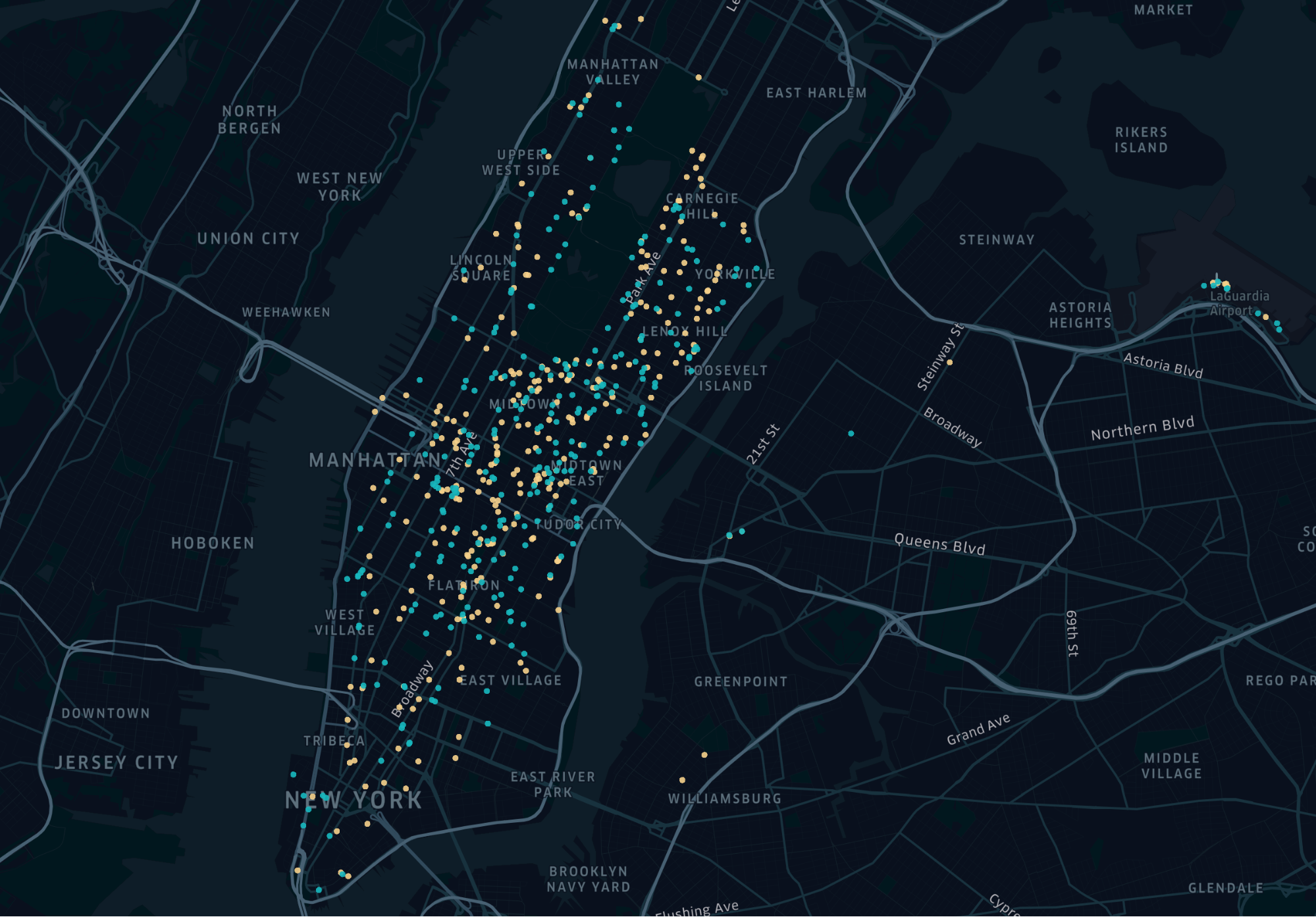-Learn more about the [types of layers](../../c-types-of-layers.md) available in Kepler.gl.+Learn more about the [types of layers](../../c-types-of-layers/README.md) available in Kepler.gl.-[Back to table of contents](../../a-introduction.md)+[Back to table of contents](../../README.md)diff --git a/docs/user-guides/b-kepler-gl-workflow/b-add-data-layers/b-create-a-layer.md b/docs/user-guides/b-kepler-gl-workflow/b-add-data-layers/b-create-a-layer.mdindex 028aa9f11..87e5e342f 100644--- a/docs/user-guides/b-kepler-gl-workflow/b-add-data-layers/b-create-a-layer.md+++ b/docs/user-guides/b-kepler-gl-workflow/b-add-data-layers/b-create-a-layer.md@@ -15,4 +15,4 @@5. Fill in the required columns and adjust the optional settings if desired.6. Collapse the layer settings menu when finished.-[Back to table of contents](../../a-introduction.md)+[Back to table of contents](../../README.md)diff --git a/docs/user-guides/b-kepler-gl-workflow/b-add-data-layers/c-hide-edit-and-delete-layers.md b/docs/user-guides/b-kepler-gl-workflow/b-add-data-layers/c-hide-edit-and-delete-layers.mdindex 8344c50af..26f484d58 100644--- a/docs/user-guides/b-kepler-gl-workflow/b-add-data-layers/c-hide-edit-and-delete-layers.md+++ b/docs/user-guides/b-kepler-gl-workflow/b-add-data-layers/c-hide-edit-and-delete-layers.md@@ -7,4 +7,4 @@ Click the __down arrow__ to open up the settings menu for that layer. Click the__Note__: The colored line on the left of each layer tab represents what dataset that layer belongs to.-[Back to table of contents](../../a-introduction.md)\ No newline at end of file+[Back to table of contents](../../README.md)diff --git a/docs/user-guides/b-kepler-gl-workflow/b-add-data-layers/d-blend-and-rearrange-layers.md b/docs/user-guides/b-kepler-gl-workflow/b-add-data-layers/d-blend-and-rearrange-layers.mdindex 9aa70932f..0603631da 100644--- a/docs/user-guides/b-kepler-gl-workflow/b-add-data-layers/d-blend-and-rearrange-layers.md+++ b/docs/user-guides/b-kepler-gl-workflow/b-add-data-layers/d-blend-and-rearrange-layers.md@@ -30,4 +30,4 @@ Additive blending adds the color values for overlapping data points. It makes laSubtractive layer blending does not alter the color values of overlapping data points.-[Back to table of contents](../../a-introduction.md)+[Back to table of contents](../../README.md)diff --git a/docs/user-guides/c-types-of-layers.md b/docs/user-guides/c-types-of-layers/README.mdsimilarity index 95%rename from docs/user-guides/c-types-of-layers.mdrename to docs/user-guides/c-types-of-layers/README.mdindex c9eae32d1..5de039059 100644--- a/docs/user-guides/c-types-of-layers.md+++ b/docs/user-guides/c-types-of-layers/README.md@@ -85,3 +85,12 @@ GeoJSON layers can display either paths, polygons or points. For example, a pathH3 layers visualize spatial data using [H3 Hexagonal Hierarchical Spatial Index](https://eng.uber.com/h3/).To use H3 layer, you need a `hex_id` in your dataset, which can be generated using [h3-js](https://github.com/uber/h3-js) from latitude, longitude and resolution.++# S2 Layer++++To use S2 layer, you need to assign a column containing S2 tokens.+++[Back to table of contents](../README.md)diff --git a/docs/user-guides/c-types-of-layers/a-point.md b/docs/user-guides/c-types-of-layers/a-point.mdindex d726db6da..9892b43c8 100644--- a/docs/user-guides/c-types-of-layers/a-point.md+++ b/docs/user-guides/c-types-of-layers/a-point.md@@ -28,4 +28,4 @@ __Layer Attributes__- Font Color- Text Anchor-[Back to table of contents](../a-introduction.md)+[Back to table of contents](../README.md)diff --git a/docs/user-guides/c-types-of-layers/b-arc.md b/docs/user-guides/c-types-of-layers/b-arc.mdindex cc9bdb50c..afbebd1a0 100644--- a/docs/user-guides/c-types-of-layers/b-arc.md+++ b/docs/user-guides/c-types-of-layers/b-arc.md@@ -6,4 +6,4 @@ Arc layers draw an arc between two points. They’re useful for visualizing theTo draw arcs, your dataset must contain the latitude and longitude of two different points for each arc.-[Back to table of contents](../a-introduction.md)+[Back to table of contents](../README.md)diff --git a/docs/user-guides/c-types-of-layers/c-line.md b/docs/user-guides/c-types-of-layers/c-line.mdindex e5adee741..07e7ab118 100644--- a/docs/user-guides/c-types-of-layers/c-line.md+++ b/docs/user-guides/c-types-of-layers/c-line.md@@ -4,4 +4,4 @@Line layers are the 2D version of arc layers. Both draw a line between two points to represent distance, but in a line layer, the drawing lies flat on the map.-[Back to table of contents](../a-introduction.md)+[Back to table of contents](../README.md)diff --git a/docs/user-guides/c-types-of-layers/d-grid.md b/docs/user-guides/c-types-of-layers/d-grid.mdindex c6758dec5..b1fd310c6 100644--- a/docs/user-guides/c-types-of-layers/d-grid.md+++ b/docs/user-guides/c-types-of-layers/d-grid.md@@ -5,4 +5,4 @@Grids layers are similar to heatmaps. They show the density of points. They provide visual discrepancy in a map where multiple heatmap-style layers are present.-[Back to table of contents](../a-introduction.md)+[Back to table of contents](../README.md)diff --git a/docs/user-guides/c-types-of-layers/e-polygon.md b/docs/user-guides/c-types-of-layers/e-polygon.mdindex b562a86bd..0a4b0f0d8 100644--- a/docs/user-guides/c-types-of-layers/e-polygon.md+++ b/docs/user-guides/c-types-of-layers/e-polygon.md@@ -23,4 +23,4 @@ A polygon GeoJSON layer is essentially a [choropleth](https://en.wikipedia.org/wTo add a polygon layer, your dataset must contain geometry data.-[Back to table of contents](../a-introduction.md)+[Back to table of contents](../README.md)diff --git a/docs/user-guides/c-types-of-layers/f-cluster.md b/docs/user-guides/c-types-of-layers/f-cluster.mdindex 55b4e340e..31eebb14e 100644--- a/docs/user-guides/c-types-of-layers/f-cluster.md+++ b/docs/user-guides/c-types-of-layers/f-cluster.md@@ -4,4 +4,4 @@Cluster layers visualize aggregated data based on a geospatial radius.-[Back to table of contents](../a-introduction.md)+[Back to table of contents](../README.md)diff --git a/docs/user-guides/c-types-of-layers/g-icon.md b/docs/user-guides/c-types-of-layers/g-icon.mdindex d3eafdd76..16b97a390 100644--- a/docs/user-guides/c-types-of-layers/g-icon.md+++ b/docs/user-guides/c-types-of-layers/g-icon.md@@ -8,4 +8,4 @@ To see the icon menu, create a new icon layer and click how to draw an icon laye-[Back to table of contents](../a-introduction.md)+[Back to table of contents](../README.md)diff --git a/docs/user-guides/c-types-of-layers/h-hexbin.md b/docs/user-guides/c-types-of-layers/h-hexbin.mdindex 1b5f40fac..5a3f7177c 100644--- a/docs/user-guides/c-types-of-layers/h-hexbin.md+++ b/docs/user-guides/c-types-of-layers/h-hexbin.md@@ -5,4 +5,4 @@Hexbin layers are similar to grid layers. They display distributions of aggregate metrics such as point count within each hexbin, average/max/min/median/sum of a numerical field, or mode/unique count of a string field. Both the color and height dimensions can encode data. Users can adjust the hexagon radius and the space between hexbins.-[Back to table of contents](../a-introduction.md)+[Back to table of contents](../README.md)diff --git a/docs/user-guides/c-types-of-layers/i-heatmap.md b/docs/user-guides/c-types-of-layers/i-heatmap.mdindex d81155976..91d20c191 100644--- a/docs/user-guides/c-types-of-layers/i-heatmap.md+++ b/docs/user-guides/c-types-of-layers/i-heatmap.md@@ -4,4 +4,4 @@Heatmap layers describe the intensity of data at geographical points through a colored overlap. The intensity can be weighted by a numerical field.-[Back to table of contents](../a-introduction.md)+[Back to table of contents](../README.md)diff --git a/docs/user-guides/c-types-of-layers/j-h3.md b/docs/user-guides/c-types-of-layers/j-h3.mdindex 172948e16..7924f2e6e 100644--- a/docs/user-guides/c-types-of-layers/j-h3.md+++ b/docs/user-guides/c-types-of-layers/j-h3.md@@ -19,4 +19,4 @@ hex_id | value |89283082c3bffff | 66 |89283082883ffff | 76 |-[Back to table of contents](../a-introduction.md)+[Back to table of contents](../README.md)diff --git a/docs/user-guides/c-types-of-layers/k-trip.md b/docs/user-guides/c-types-of-layers/k-trip.mdindex ba5527699..49dad0c69 100644--- a/docs/user-guides/c-types-of-layers/k-trip.md+++ b/docs/user-guides/c-types-of-layers/k-trip.md@@ -69,4 +69,4 @@ In order to animate the path, the `geoJSON` data needs to contain `LineString` iTo export an animated map, you can use a screen recording or gif capture tool. You can also export the map as an interactive HTML to open in the browser.-[Back to table of contents](../a-introduction.md)+[Back to table of contents](../README.md)diff --git a/docs/user-guides/c-types-of-layers/l-s2.md b/docs/user-guides/c-types-of-layers/l-s2.mdindex c2b98c88c..41a0554e2 100644--- a/docs/user-guides/c-types-of-layers/l-s2.md+++ b/docs/user-guides/c-types-of-layers/l-s2.md@@ -21,3 +21,5 @@ token | value |80858044 | 0.23470692356446143 |8085804c | 0.1580509670379684 |80858054 | 0.15992745628743954 |++[Back to table of contents](../README.md)diff --git a/docs/user-guides/d-layer-attributes.md b/docs/user-guides/d-layer-attributes.mdindex dba38b93b..2ca15f5d5 100644--- a/docs/user-guides/d-layer-attributes.md+++ b/docs/user-guides/d-layer-attributes.md@@ -23,4 +23,4 @@| Wireframe | Create outlines around extruded polygons. | GeoJSON || Stroke or radius based on | Control the radius/thickness of GeoJSON line and point features. | GeoJSON |-[Back to table of contents](./a-introduction.md)+[Back to table of contents](README.md)diff --git a/docs/user-guides/e-filters.md b/docs/user-guides/e-filters.mdindex 1cea889b5..7af6412a6 100644--- a/docs/user-guides/e-filters.md+++ b/docs/user-guides/e-filters.md@@ -17,4 +17,4 @@ To add a filter:__Note__: filters apply to all layers in the same dataset on your map.-[Back to table of contents](./a-introduction.md)+[Back to table of contents](README.md)diff --git a/docs/user-guides/f-map-styles.md b/docs/user-guides/f-map-styles.mdindex 4825faa36..c94df017e 100644--- a/docs/user-guides/f-map-styles.md+++ b/docs/user-guides/f-map-styles.md@@ -59,4 +59,4 @@ To add a custom base map style, click the add map style button to open the custo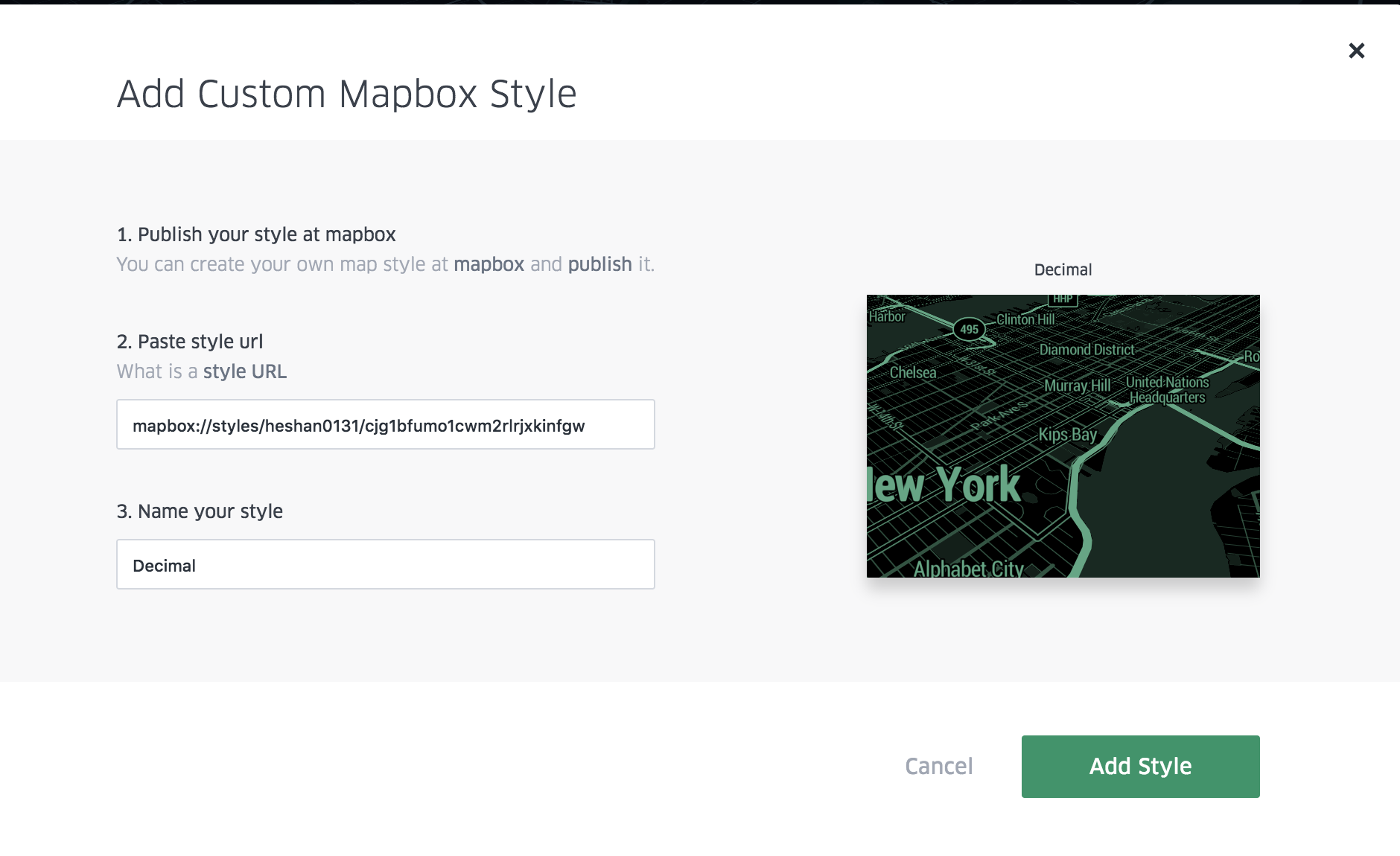-[Back to table of contents](./a-introduction.md)+[Back to table of contents](README.md)diff --git a/docs/user-guides/g-interactions.md b/docs/user-guides/g-interactions.mdindex c65881953..21d06e44a 100644--- a/docs/user-guides/g-interactions.md+++ b/docs/user-guides/g-interactions.md@@ -48,7 +48,7 @@ Tip: click a point to pin the tooltip info to the map. To unpin the tooltip, pre-[Back to table of contents](./a-introduction.md)+[Back to table of contents](README.md)## Display Coordinates@@ -57,4 +57,4 @@ Tip: click a point to pin the tooltip info to the map. To unpin the tooltip, preWhen then on coordinate, a panel contains latitude and longitude will follow your mouse-[Back to table of contents](./a-introduction.md)+[Back to table of contents](README.md)diff --git a/docs/user-guides/h-playback.md b/docs/user-guides/h-playback.mdindex 8fe51f9bc..a03824cca 100644--- a/docs/user-guides/h-playback.md+++ b/docs/user-guides/h-playback.md@@ -14,4 +14,4 @@ Follow these steps to create a playback video of an event: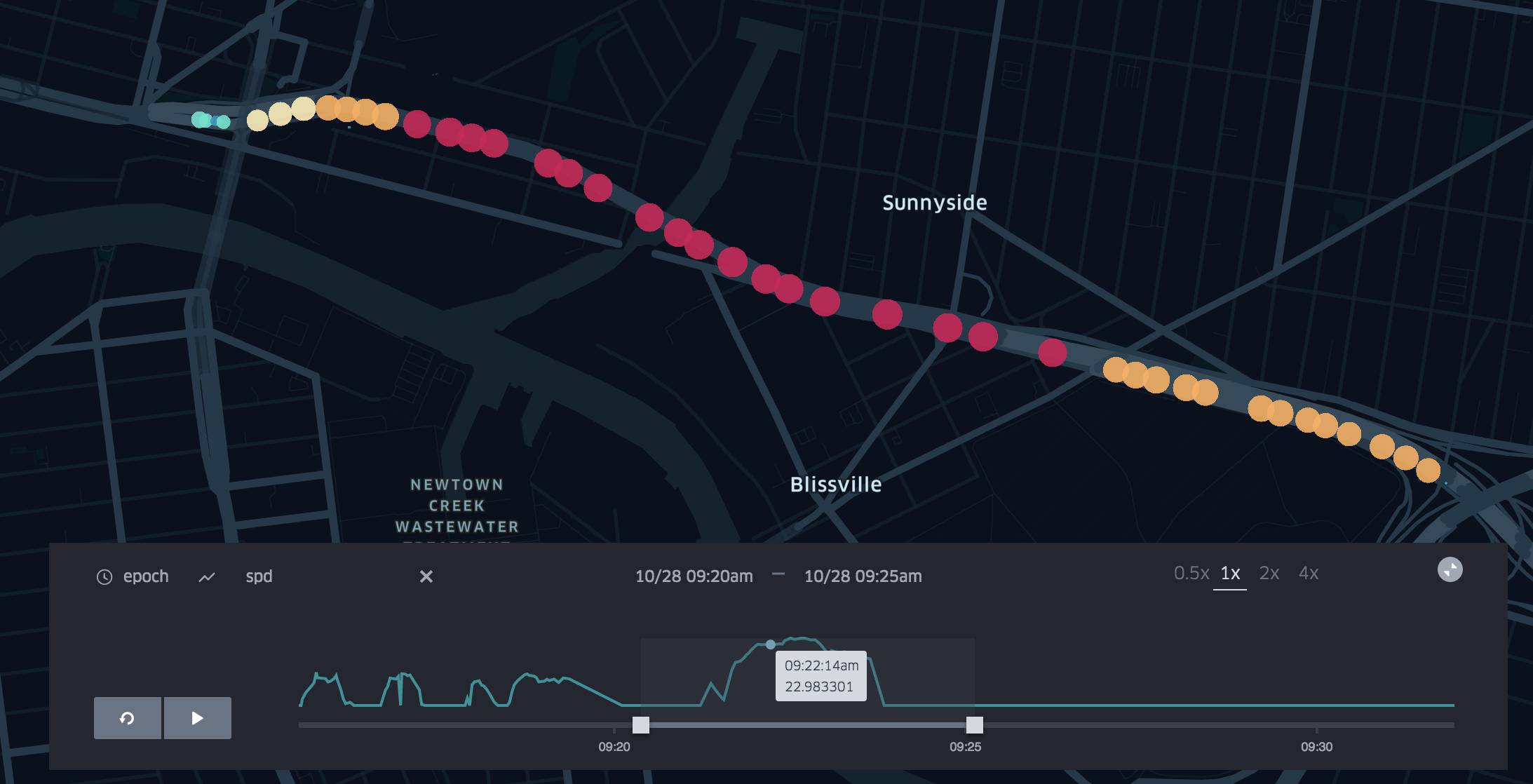-[Back to table of contents](./a-introduction.md)+[Back to table of contents](README.md)diff --git a/docs/user-guides/i-FAQ.md b/docs/user-guides/i-FAQ.mdindex d78a4da6a..de3ce9285 100644--- a/docs/user-guides/i-FAQ.md+++ b/docs/user-guides/i-FAQ.md@@ -18,4 +18,4 @@ There is no limit on the amount of layers you can add. However, note that the mo## Why does my layer color change during filtering?When layer color is based on a numerical value (e.g, trip fare, distance, ETA), Kepler.gl recalculates the color scale based on filtered data. This is not the case for categorical values such as vehicle_name, cuisine_type and app version.-[Back to table of contents](./a-introduction.md)+[Back to table of contents](README.md)diff --git a/docs/user-guides/j-get-started.md b/docs/user-guides/j-get-started.mdindex f066654ca..5384cc3d7 100644--- a/docs/user-guides/j-get-started.md+++ b/docs/user-guides/j-get-started.md@@ -46,4 +46,4 @@ Save your map as an image, export current map data, export current map as a jsonRead about [Save and export](./k-save-and-export.md).-[Back to table of contents](./a-introduction.md)+[Back to table of contents](README.md)diff --git a/docs/user-guides/k-save-and-export.md b/docs/user-guides/k-save-and-export.mdindex c3de881f0..041ab6bbe 100644--- a/docs/user-guides/k-save-and-export.md+++ b/docs/user-guides/k-save-and-export.md@@ -76,4 +76,4 @@ click on __Upload__ and Kepler.gl will push your current map onto your account.At the end of the process Kepler.gl will automatically generate a permalink for your work you can share with other users.-[Back to table of contents](./a-introduction.md)+[Back to table of contents](README.md)diff --git a/docs/user-guides/l-color-attributes.md b/docs/user-guides/l-color-attributes.mdindex a9a260744..37ce26e8f 100644--- a/docs/user-guides/l-color-attributes.md+++ b/docs/user-guides/l-color-attributes.md@@ -18,4 +18,4 @@ To choose a palette:<img src="https://d1a3f4spazzrp4.cloudfront.net/kepler.gl/documentation/l-color-attributes-3.png" alt="toggle" width="500"/>-[Back to table of contents](./a-introduction.md)+[Back to table of contents](README.md)diff --git a/docs/user-guides/m-map-settings.md b/docs/user-guides/m-map-settings.mdindex 2a4336b03..f6638c270 100644--- a/docs/user-guides/m-map-settings.md+++ b/docs/user-guides/m-map-settings.md@@ -46,4 +46,4 @@ View your map in 3D by clicking the 3D icon in the top right corner of your map:-[Back to table of contents](./a-introduction.md)+[Back to table of contents](README.md)diff --git a/examples/README.md b/examples/README.mdindex df8068d03..0183722c8 100644--- a/examples/README.md+++ b/examples/README.md@@ -28,9 +28,9 @@ yarn && yarn startCustomize kepler.gl theme by override current style properties.-[custom-reducer]: custom-reducer-[demo-app]: demo-app-[open-modal]: open-modal-[umd-client]: umd-client-[replace-component]: replace-component-[custom-theme]: custom-theme+[custom-reducer]: custom-reducer/README.md+[demo-app]: demo-app/README.md+[open-modal]: open-modal/README.md+[umd-client]: umd-client/README.md+[replace-component]: replace-component/README.md+[custom-theme]: custom-theme/README.mddiff --git a/examples/demo-app/src/factories/panel-header.js b/examples/demo-app/src/factories/panel-header.jsindex d548ca1b8..3ade06b58 100644--- a/examples/demo-app/src/factories/panel-header.js+++ b/examples/demo-app/src/factories/panel-header.js@@ -19,7 +19,7 @@// THE SOFTWARE.import {PanelHeaderFactory, Icons} from 'kepler.gl/components';-import {GITHUB_BUG_REPORT, GITHUB_USER_GUIDE} from 'kepler.gl/constants';+import {BUG_REPORT_LINK, GITHUB_USER_GUIDE} from 'kepler.gl/constants';export function CustomPanelHeaderFactory(...deps) {const PanelHeader = PanelHeaderFactory(...deps);@@ -30,7 +30,7 @@ export function CustomPanelHeaderFactory(...deps) {{id: 'bug',iconComponent: Icons.Bug,- href: GITHUB_BUG_REPORT,+ href: BUG_REPORT_LINK,blank: true,tooltip: 'Bug Report',onClick: () => {}diff --git a/src/components/common/file-uploader/file-upload.js b/src/components/common/file-uploader/file-upload.jsindex 22da1769a..fd6a3eb2e 100644--- a/src/components/common/file-uploader/file-upload.js+++ b/src/components/common/file-uploader/file-upload.js@@ -28,7 +28,7 @@ import LoadingSpinner from 'components/common/loading-spinner';import FileDrop from './file-drop';import {isChrome} from 'utils/utils';-import {GUIDES_FILE_FORMAT} from 'constants/user-guides';+import {GUIDES_FILE_FORMAT_DOC} from 'constants/user-guides';import ReactMarkdown from 'react-markdown';// Breakpointsimport {media} from 'styles/media-breakpoints';@@ -270,7 +270,7 @@ function FileUploadFactory() {<ReactMarkdownsource={`${intl.formatMessage({id: 'fileUploader.configUploadMessage'- })}(${GUIDES_FILE_FORMAT}).`}+ })}(${GUIDES_FILE_FORMAT_DOC}).`}renderers={{link: LinkRenderer}}/></StyledUploadMessage>diff --git a/src/components/modals/export-map-modal/export-html-map.js b/src/components/modals/export-map-modal/export-html-map.jsindex fbd40c50a..005a24763 100644--- a/src/components/modals/export-map-modal/export-html-map.js+++ b/src/components/modals/export-map-modal/export-html-map.js@@ -23,7 +23,7 @@ import PropTypes from 'prop-types';import {StyledExportSection, StyledType} from 'components/common/styled-components';import {StyledExportMapSection, StyledWarning, ExportMapLink} from './components';import {EXPORT_HTML_MAP_MODE_OPTIONS} from 'constants/default-settings';-import {GITHUB_EXPORT_HTML_MAP, GITHUB_EXPORT_HTML_MAP_MODES} from 'constants/user-guides';+import {EXPORT_HTML_MAP_DOC, EXPORT_HTML_MAP_MODES_DOC} from 'constants/user-guides';import styled from 'styled-components';import {FormattedMessage, injectIntl} from 'react-intl';@@ -102,7 +102,7 @@ const ExportHtmlMap = React.memo(<FormattedMessage id={'modal.exportMap.html.tokenMisuseWarning'} /></StyledWarning><FormattedMessage id={'modal.exportMap.html.tokenDisclaimer'} />- <ExportMapLink href={GITHUB_EXPORT_HTML_MAP}>+ <ExportMapLink href={EXPORT_HTML_MAP_DOC}><FormattedMessage id={'modal.exportMap.html.tokenUpdate'} /></ExportMapLink></div>@@ -115,7 +115,7 @@ const ExportHtmlMap = React.memo(</div><div className="subtitle"><FormattedMessage id={'modal.exportMap.html.modeSubtitle1'} />- <a href={GITHUB_EXPORT_HTML_MAP_MODES}>+ <a href={EXPORT_HTML_MAP_MODES_DOC}><FormattedMessage id={'modal.exportMap.html.modeSubtitle2'} /></a></div>diff --git a/src/components/modals/export-map-modal/export-json-map.js b/src/components/modals/export-map-modal/export-json-map.jsindex 5ee25777f..5d977ce76 100644--- a/src/components/modals/export-map-modal/export-json-map.js+++ b/src/components/modals/export-map-modal/export-json-map.js@@ -21,7 +21,7 @@import React from 'react';import PropTypes from 'prop-types';import JSONPretty from 'react-json-pretty';-import {GITHUB_ADD_DATA_TO_MAP} from 'constants/user-guides';+import {ADD_DATA_TO_MAP_DOC} from 'constants/user-guides';import styled from 'styled-components';import {StyledExportSection} from 'components/common/styled-components';import {StyledExportMapSection, StyledWarning, ExportMapLink} from './components';@@ -72,7 +72,7 @@ const ExportJsonMap = React.memo(({config = {}}) => (</div><div className="subtitle"><FormattedMessage id={'modal.exportMap.json.configDisclaimer'} />- <ExportMapLink href={GITHUB_ADD_DATA_TO_MAP}>addDataToMap</ExportMapLink>.+ <ExportMapLink href={ADD_DATA_TO_MAP_DOC}>addDataToMap</ExportMapLink>.</div></div><div className="selection">diff --git a/src/constants/index.js b/src/constants/index.jsindex 8e94baf99..1c11180d2 100644--- a/src/constants/index.js+++ b/src/constants/index.js@@ -61,7 +61,7 @@ export {TRIP_POINT_FIELDS} from './default-settings';-export {GITHUB_BUG_REPORT, GITHUB_USER_GUIDE} from './user-guides';+export {BUG_REPORT_LINK, USER_GUIDE_DOC} from './user-guides';export {VizColorPalette, DataVizColors} from './custom-color-ranges';export {COLOR_RANGES, DefaultColorRange} from './color-ranges';diff --git a/src/constants/user-guides.js b/src/constants/user-guides.jsindex 807f36949..1b1107d72 100644--- a/src/constants/user-guides.js+++ b/src/constants/user-guides.js@@ -18,18 +18,16 @@// OUT OF OR IN CONNECTION WITH THE SOFTWARE OR THE USE OR OTHER DEALINGS IN// THE SOFTWARE.-export const GITHUB_EXPORT_HTML_MAP =- 'https://github.com/keplergl/kepler.gl/blob/master/docs/user-guides/k-save-and-export.md#2save-and-export-current-map';-export const GITHUB_ADD_DATA_TO_MAP =- 'https://github.com/keplergl/kepler.gl/blob/master/docs/api-reference/actions/actions.md#adddatatomap';+export const USER_GUIDE_DOC = 'https://docs.kepler.gl/docs/user-guides';+export const ACTIONS_DOC = 'https://docs.kepler.gl/docs/api-reference/actions/actions';+export const API_REFERENCE_DOC = 'https://docs.kepler.gl/docs/api-reference';++export const EXPORT_HTML_MAP_DOC = `${USER_GUIDE_DOC}/k-save-and-export`;+export const ADD_DATA_TO_MAP_DOC = `${ACTIONS_DOC}#adddatatomap`;export const MAPBOX_ACCESS_TOKEN = 'https://docs.mapbox.com/help/how-mapbox-works/access-tokens/';-// TODO: create new readme section-export const GITHUB_EXPORT_HTML_MAP_MODES =- 'https://github.com/keplergl/kepler.gl/blob/master/docs/user-guides/k-save-and-export.md#2save-and-export-current-map';-export const GUIDES_FILE_FORMAT =- 'https://github.com/keplergl/kepler.gl/blob/master/docs/user-guides/b-kepler-gl-workflow/a-add-data-to-the-map.md#supported-file-formats';-export const GITHUB_BUG_REPORT =+export const EXPORT_HTML_MAP_MODES_DOC = `${USER_GUIDE_DOC}/k-save-and-export#export-html-map`;+export const GUIDES_FILE_FORMAT_DOC = `${USER_GUIDE_DOC}/b-kepler-gl-workflow/a-add-data-to-the-map#supported-file-formats`;+export const BUG_REPORT_LINK ='https://github.com/keplergl/kepler.gl/issues/new?assignees=&labels=bug&template=bug_report.md&title=%5BBug%5D';-export const GITHUB_USER_GUIDE =- 'https://github.com/keplergl/kepler.gl/blob/master/docs/user-guides/a-introduction.md';+diff --git a/src/processors/data-processor.js b/src/processors/data-processor.jsindex 5b3bab82c..d2dfc8e85 100644--- a/src/processors/data-processor.js+++ b/src/processors/data-processor.js@@ -27,7 +27,7 @@ import normalize from '@mapbox/geojson-normalize';import {ALL_FIELD_TYPES, DATASET_FORMATS} from 'constants/default-settings';import {notNullorUndefined, parseFieldValue, getSampleData} from 'utils/data-utils';import KeplerGlSchema from 'schemas';-import {GUIDES_FILE_FORMAT} from 'constants/user-guides';+import {GUIDES_FILE_FORMAT_DOC} from 'constants/user-guides';import {isPlainObject, toArray} from 'utils/utils';export const ACCEPTED_ANALYZER_TYPES = [@@ -462,7 +462,7 @@ export function processGeojson(rawData) {if (!normalizedGeojson || !Array.isArray(normalizedGeojson.features)) {const error = new Error(- `Read File Failed: File is not a valid GeoJSON. Read more about [supported file format](${GUIDES_FILE_FORMAT})`+ `Read File Failed: File is not a valid GeoJSON. Read more about [supported file format](${GUIDES_FILE_FORMAT_DOC})`);throw error;// fail to normalize geojsondiff --git a/src/utils/notifications-utils.js b/src/utils/notifications-utils.jsindex adf7fd6ae..27cdb550d 100644--- a/src/utils/notifications-utils.js+++ b/src/utils/notifications-utils.js@@ -27,7 +27,7 @@ import {DEFAULT_UUID_COUNT} from 'constants/default-settings';-import {GITHUB_BUG_REPORT} from 'constants/user-guides';+import {BUG_REPORT_LINK} from 'constants/user-guides';/*** Creates a notofication@@ -78,5 +78,5 @@ export const exportImageError = options =>errorNotification({...options,topic: DEFAULT_NOTIFICATION_TOPICS.global,- message: `Failed to export image, please take a screenshot of the javascript console, report the with [this link](${GITHUB_BUG_REPORT}) `+ message: `Failed to export image, please take a screenshot of the javascript console, report the with [this link](${BUG_REPORT_LINK}) `});diff --git a/website-gatsby/src/components/policy.js b/website-gatsby/src/components/policy.jsindex 6f44ea313..4d196a7a7 100644--- a/website-gatsby/src/components/policy.js+++ b/website-gatsby/src/components/policy.js@@ -27,7 +27,7 @@ import Header from './header';const GITHUB_PROJECT = 'https://github.com/keplergl/kepler.gl';const GITHUB_PROJECT_ISSUES = `${GITHUB_PROJECT}/issues`;const MAILING_LIST_URL = 'https://groups.google.com/d/forum/kepler-gl';-const CONTRIBUTING_URL = 'https://github.com/keplergl/kepler.gl/blob/master/contributing/CONTRIBUTING.md';+const CONTRIBUTING_URL = 'https://docs.kepler.gl/contributing';const StyledContainer = styled(Container)`background-color: black;diff --git a/website-gatsby/src/content.js b/website-gatsby/src/content.jsindex 1d15ce20a..c5f6746f3 100644--- a/website-gatsby/src/content.js+++ b/website-gatsby/src/content.js@@ -72,11 +72,11 @@ export const HERO_IMAGES_SCALED = [export const HEADER_NAVS = [{text: 'User Guide',- link: 'https://github.com/keplergl/kepler.gl/blob/master/docs/user-guides/j-get-started.md'+ link: 'https://docs.kepler.gl/docs/user-guides'},{text: 'Documentation',- link: 'https://github.com/keplergl/kepler.gl/blob/master/docs/api-reference/overview.md'+ link: 'https://docs.kepler.gl/docs/api-reference'},{text: 'Github',diff --git a/website/src/components/policy.js b/website/src/components/policy.jsindex b40d18685..b7079040d 100644--- a/website/src/components/policy.js+++ b/website/src/components/policy.js@@ -27,8 +27,7 @@ import Header from './header';const GITHUB_PROJECT = 'https://github.com/keplergl/kepler.gl';const GITHUB_PROJECT_ISSUES = `${GITHUB_PROJECT}/issues`;const MAILING_LIST_URL = 'https://groups.google.com/d/forum/kepler-gl';-const CONTRIBUTING_URL =- 'https://github.com/keplergl/kepler.gl/blob/master/contributing/CONTRIBUTING.md';+const CONTRIBUTING_URL = 'https://docs.kepler.gl/contributing';const StyledContainer = styled(Container)`background-color: black;diff --git a/website/src/content.js b/website/src/content.jsindex 6a6570667..ac40bf8da 100644--- a/website/src/content.js+++ b/website/src/content.js@@ -70,11 +70,11 @@ export const HERO_IMAGES_SCALED = [export const HEADER_NAVS = [{text: 'User Guide',- link: 'https://github.com/keplergl/kepler.gl/blob/master/docs/user-guides/j-get-started.md'+ link: 'https://docs.kepler.gl/docs/user-guides'},{text: 'Documentation',- link: 'https://github.com/keplergl/kepler.gl/blob/master/docs/api-reference/overview.md'+ link: 'https://docs.kepler.gl/docs/api-reference'},{text: 'Github',