
Kepler.gl is a powerful open source geospatial analysis tool for large-scale data sets.
feat: video export works with effects (#3373)
Igor Dykhtab0fc76059247
diff --git a/docs/user-guides/README.md b/docs/user-guides/README.mdindex e1e094e23..340ffda41 100644--- a/docs/user-guides/README.md+++ b/docs/user-guides/README.md@@ -62,6 +62,12 @@ This guide will teach you how to perform data analysis in Kepler.gl by adding da* [Display legend](./m-map-settings.md#display-legend)* [Split maps](./m-map-settings.md#split-maps)+#### [Effects](./effects.md)+* [Light & Shadow](./effects.md#light--shadow)+* [Post-processing (Ink, Blur, Sepia, …)](./effects.md#ink)+* [Distance Fog](./effects.md#distance-fog)+* [Surface Fog](./effects.md#surface-fog)+#### [SQL Data Explorer](./sql-data-explorer.md)#### [AI Assistant](./ai-assistant.md)@@ -69,5 +75,9 @@ This guide will teach you how to perform data analysis in Kepler.gl by adding da#### [Time playback](./h-playback.md)#### [Save and export](./k-save-and-export.md)+* [Export Image](./k-save-and-export.md#export-image)+* [Export Data](./k-save-and-export.md#export-data)+* [Export Map](./k-save-and-export.md#export-map)+* [Export Video](./k-save-and-export.md#export-video)#### [FAQ](./i-FAQ.md)diff --git a/docs/user-guides/effects.md b/docs/user-guides/effects.mdnew file mode 100644index 000000000..3f0d53715--- /dev/null+++ b/docs/user-guides/effects.md@@ -0,0 +1,241 @@+# Effects++Kepler.gl provides a collection of visual effects that can be applied to your map as post-processing passes. Effects range from lighting and atmospheric simulation to artistic color grading and blur filters. Each effect is configurable through its own set of parameters.++You can add an effect from the **Effects** panel in the side bar. Multiple effects can be stacked and reordered; they are applied in order from top to bottom.++> **Limitation:** Only one Light & Shadow effect and one fog effect (either Distance Fog or Surface Fog) can be active at a time.++---++## Table of contents++- [Light & Shadow](#light--shadow)+- [Ink](#ink)+- [Brightness & Contrast](#brightness--contrast)+- [Hue & Saturation](#hue--saturation)+- [Vibrance](#vibrance)+- [Sepia](#sepia)+- [Dot Screen](#dot-screen)+- [Color Halftone](#color-halftone)+- [Noise](#noise)+- [Blur (Triangle)](#blur-triangle)+- [Blur (Zoom)](#blur-zoom)+- [Blur (Tilt Shift)](#blur-tilt-shift)+- [Edge Work](#edge-work)+- [Vignette](#vignette)+- [Magnify](#magnify)+- [Hexagonal Pixelate](#hexagonal-pixelate)+- [Distance Fog](#distance-fog)+- [Surface Fog](#surface-fog)++---++## Light & Shadow++Simulates realistic sun lighting and shadow casting based on time of day and geographic location. Useful for visualizing how sunlight and shadows interact with 3D buildings or extruded layers throughout the day.++| Parameter | Type | Range | Default | Description |+| --- | --- | --- | --- | --- |+| timestamp | number | 0 – MAX | — | The point in time used to compute sun position. Controlled via the date/time picker and timezone selector in the UI. |+| shadowIntensity | number | 0 – 1 | 0.5 | Opacity of cast shadows. `0` means invisible shadows, `1` means fully opaque black shadows. |+| sunLightIntensity | number | 0 – 1 | 1 | Brightness of the directional sun light. Higher values produce stronger highlights on illuminated surfaces. |+| ambientLightIntensity | number | 0 – 1 | 1 | Brightness of the non-directional ambient fill light. Raising this reduces the overall contrast between lit and shadowed areas. |+| shadowColor | color | 0 – 255 per channel | `[0, 0, 0]` (black) | The RGB color tint applied to shadow regions. |+| sunLightColor | color | 0 – 255 per channel | `[255, 255, 255]` (white) | The RGB color of the directional sun light. Use warm tones (e.g. orange) to simulate sunrise/sunset. |+| ambientLightColor | color | 0 – 255 per channel | `[255, 255, 255]` (white) | The RGB color of the ambient fill light. |++---++## Ink++Applies an ink-wash artistic style that darkens edges and creates a hand-drawn, pen-and-ink appearance. Works well for stylized or illustrative map presentations.++| Parameter | Type | Range | Default | Description |+| --- | --- | --- | --- | --- |+| strength | number | 0 – 1 | 0 | Intensity of the ink effect. `0` leaves the image unchanged; `1` applies the strongest ink wash. |++---++## Brightness & Contrast++Adjusts the overall brightness and contrast of the map. A simple but powerful way to correct exposure or create high-contrast or washed-out looks.++| Parameter | Type | Range | Default | Description |+| --- | --- | --- | --- | --- |+| brightness | number | -1 – 1 | 0 | Shifts the luminance of every pixel. Negative values darken the image; positive values brighten it. |+| contrast | number | -1 – 1 | 0 | Adjusts the tonal range. Negative values flatten the image toward mid-gray; positive values push darks darker and lights lighter. |++---++## Hue & Saturation++Shifts the color hue and adjusts saturation across the entire map. Useful for creating color themes, correcting white balance, or completely desaturating the view.++| Parameter | Type | Range | Default | Description |+| --- | --- | --- | --- | --- |+| hue | number | -1 – 1 | 0 | Rotates all colors around the color wheel. `-1` and `1` both represent a full 180° rotation; `0` is unchanged. |+| saturation | number | -1 – 1 | 0.25 | Controls color intensity. `-1` produces a fully grayscale image; positive values make colors more vivid. |++---++## Vibrance++Selectively boosts the intensity of muted colors without oversaturating already vivid ones. Produces a more natural-looking color enhancement compared to uniform saturation.++| Parameter | Type | Range | Default | Description |+| --- | --- | --- | --- | --- |+| amount | number | -1 – 1 | 0.5 | Strength of the vibrance adjustment. Positive values boost muted colors; negative values desaturate them. |++---++## Sepia++Applies a warm brownish tone reminiscent of aged photographs. Useful for giving the map a vintage or historical aesthetic.++| Parameter | Type | Range | Default | Description |+| --- | --- | --- | --- | --- |+| amount | number | 0 – 1 | 0 | Blend factor between the original image and the sepia-toned version. `0` is unchanged; `1` is fully sepia. |++---++## Dot Screen++Converts the image into a pattern of monochrome dots, resembling classic newspaper halftone printing. Creates a pop-art or retro printed look.++| Parameter | Type | Range | Default | Description |+| --- | --- | --- | --- | --- |+| angle | number | 0 – π/2 | 0 | Rotation angle of the dot grid in radians. |+| size | number | 1 – 20 | 1 | Diameter of each dot in pixels. Larger values produce coarser patterns. |+| center | array [x, y] | 0 – 1 each | `[0.5, 0.5]` | Normalized screen position of the pattern origin. `[0, 0]` is the top-left corner; `[1, 1]` is the bottom-right. |++---++## Color Halftone++Simulates CMYK color halftone printing with separate dot patterns for each color channel. Each channel is rendered at a slightly different angle, mimicking the look of commercial print media.++| Parameter | Type | Range | Default | Description |+| --- | --- | --- | --- | --- |+| angle | number | 0 – π/2 | 0 | Base rotation angle for the halftone dot grids. |+| size | number | 1 – 20 | 1 | Diameter of each color dot in pixels. |+| center | array [x, y] | 0 – 1 each | `[0.5, 0.5]` | Normalized screen position of the pattern origin. |++---++## Noise++Adds random film-grain style noise uniformly across the map. Useful for a textured analog aesthetic, adding visual warmth, or reducing visible color banding in gradients.++| Parameter | Type | Range | Default | Description |+| --- | --- | --- | --- | --- |+| amount | number | 0 – 1 | 0 | Intensity of the noise. `0` adds no noise; `1` applies heavy grain. |++---++## Blur (Triangle)++Applies a smooth Gaussian-like blur uniformly across the entire map. The triangle filter is a fast approximation of a Gaussian blur.++| Parameter | Type | Range | Default | Description |+| --- | --- | --- | --- | --- |+| radius | number | 0 – 100 | 0 | Blur radius in pixels. Higher values produce a stronger, softer blur. |++---++## Blur (Zoom)++Creates a radial motion blur that emanates outward from a center point, simulating a camera zoom or dolly effect. Focuses attention on the center while blurring the periphery.++| Parameter | Type | Range | Default | Description |+| --- | --- | --- | --- | --- |+| strength | number | 0 – 1 | 0.05 | Intensity of the zoom blur. Higher values stretch pixels more along radial lines. |+| center | array [x, y] | 0 – 1 each | `[0.5, 0.5]` | Normalized screen position of the zoom origin. |++---++## Blur (Tilt Shift)++Simulates a tilt-shift lens effect that keeps a focal band in sharp focus while progressively blurring areas outside it. Creates an appealing miniature-model or diorama look, especially effective with overhead city views.++| Parameter | Type | Range | Default | Description |+| --- | --- | --- | --- | --- |+| blurRadius | number | 0 – 50 | 0 | Maximum blur radius in pixels applied to out-of-focus areas. |+| gradientRadius | number | 0 – 400 | 0 | Size of the transition zone between sharp and blurred regions, in pixels. |+| start | array [x, y] | 0 – 1 each | `[0.0, 0.0]` | Normalized screen position marking one end of the focal band. |+| end | array [x, y] | 0 – 1 each | `[1.0, 1.0]` | Normalized screen position marking the other end of the focal band. |++---++## Edge Work++Highlights structural edges in the image using an artistic charcoal-sketch style. Renders the map as white edges on a black background, useful for creating line-art representations or emphasizing structural patterns.++| Parameter | Type | Range | Default | Description |+| --- | --- | --- | --- | --- |+| radius | number | 1 – 50 | 1 | Detection radius for edge extraction. Larger values produce thicker, bolder edges while capturing more coarse detail. |++---++## Vignette++Darkens the corners and edges of the map, drawing the viewer's focus toward the center. A classic photographic technique for framing content.++| Parameter | Type | Range | Default | Description |+| --- | --- | --- | --- | --- |+| amount | number | 0 – 1 | 0 | Strength of the darkening at the edges. `0` is no vignette; `1` is maximum darkening. |+| radius | number | 0 – 1 | 0 | Size of the clear (unaffected) area at the center, as a fraction of the viewport. `0` starts darkening from the very center; `1` produces almost no visible vignette. |++---++## Magnify++Creates a circular magnifying-glass overlay at a configurable screen position. Everything inside the circle is rendered at a higher zoom level, allowing detailed inspection of a specific area without losing the surrounding context.++| Parameter | Type | Range | Default | Description |+| --- | --- | --- | --- | --- |+| screenXY | array [x, y] | 0 – 1 each | `[0.5, 0.5]` | Normalized screen position of the magnifying glass center. |+| radiusPixels | number | 10 – 500 | 10 | Radius of the magnifying lens in pixels. |+| zoom | number | 0.5 – 50 | 0.5 | Magnification factor inside the lens. Values above 1 zoom in; values below 1 zoom out. |+| borderWidthPixels | number | 0 – 50 | 3 | Width of the circular border around the lens, in pixels. Set to 0 for no border. |++---++## Hexagonal Pixelate++Replaces the image with a grid of hexagonal tiles, each filled with the average color of the area it covers. Creates a mosaic or stained-glass-window aesthetic.++| Parameter | Type | Range | Default | Description |+| --- | --- | --- | --- | --- |+| scale | number | 1 – 50 | 20 | Size of each hexagonal tile in pixels. Larger values produce coarser, more abstract mosaics. |++---++## Distance Fog++Fades distant objects into a fog color based on their depth from the camera. Enhances the perception of depth and distance, and can be used to de-emphasize background layers or create atmospheric haze. Requires a 3D view (pitch > 0).++| Parameter | Type | Range | Default | Description |+| --- | --- | --- | --- | --- |+| density | number | 0 – 1 | 0.5 | Overall opacity of the fog. `0` is invisible; `1` is fully opaque at maximum distance. |+| fogStart | number | 0 – 1 | 0.3 | Normalized depth at which the fog begins to appear. `0` starts the fog at the camera; `1` pushes it to the far plane. |+| fogRange | number | 0.01 – 1 | 0.5 | Normalized depth range over which the fog ramps from transparent to fully dense. Smaller values create a sharper transition. |+| fogColor | color | 0 – 255 per channel | `[217, 222, 230]` (light blue-gray) | The RGB color of the fog. |++---++## Surface Fog++Renders a fog layer at a specific elevation above the terrain surface. Unlike distance fog, surface fog stays at a fixed altitude and is visible from all camera angles. Useful for simulating low-lying clouds, ground mist, or valley fog. Requires a 3D view (pitch > 0).++| Parameter | Type | Range | Default | Description |+| --- | --- | --- | --- | --- |+| density | number | 0 – 1 | 0.6 | Overall opacity of the fog. `0` is fully transparent; `1` is fully opaque. |+| height | number | -200 – 3000 | 50 | Elevation in meters at which the center of the fog band sits above the terrain surface. Negative values place the fog below sea level. |+| thickness | number | 0 – 1000 | 50 | Vertical transition distance in meters. Controls how quickly the fog fades above and below the center elevation. Larger values produce a softer, thicker fog band. |+| fogColor | color | 0 – 255 per channel | `[230, 235, 242]` (light gray-blue) | The RGB color of the fog. |+| pattern | checkbox | on / off | off | When enabled, applies a procedural noise pattern to the fog density, creating a more natural, cloud-like appearance instead of a uniform flat layer. |++---++[Back to table of contents](README.md)diff --git a/docs/user-guides/k-save-and-export.md b/docs/user-guides/k-save-and-export.mdindex 5170fc956..486e031f0 100644--- a/docs/user-guides/k-save-and-export.md+++ b/docs/user-guides/k-save-and-export.md@@ -9,6 +9,7 @@ However, in the demo app, you can:- [Export map as an image](#export-image).- [Export filtered or unfiltered data as a csv](#export-data).- [Export Map](#export-map)+- [Export Video](#export-video)- [Share Public URL (Dropbox)](#export-dropbox)## <a href="#export-image">Export Image</a>@@ -67,6 +68,51 @@ The map config includes the current layer, filter, map style and interaction set**Note:** kepler.gl map config is coupled with loaded datasets. The __`dataId`__ key is used to bind layers, filters and tooltip settings to a specific dataset. If you try to upload a configuration with a dataset in your own kepler.gl app, you also need to make sure your dataset __`id`__ matches the __`dataId`__ in the config.+## <a href="#export-video">Export Video</a>++You can record an animated video of your map and download it directly from the browser. Open the export video dialog from the toolbar by clicking **Export Video**. The dialog has two tabs — **Animation** and **Settings** — along with a live map preview.++### Animation tab++The Animation tab controls the motion and timing of the recording.++| Setting | Description |+| --- | --- |+| **Duration** | Length of the video, from 0.1 s up to 10 s. Drag the slider or type a value. Longer recordings produce larger files. |+| **Camera** | An optional camera animation applied during the recording. Available presets: **None** (static camera), **Orbit (90°)**, **Orbit (180°)**, **Orbit (360°)**, **Zoom Out**, and **Zoom In**. When set to *None*, the camera stays exactly where you position it in the preview. |++### Settings tab++The Settings tab controls the output file format and quality.++| Setting | Description |+| --- | --- |+| **File Name** | Base name for the downloaded file. Defaults to `kepler.gl`. |+| **Media Type** | Output format: **WebM Video** (default, small file size, supported by most browsers), **GIF** (widely compatible but larger), **PNG Sequence** (lossless frame-by-frame images), or **JPEG Sequence** (compressed frame-by-frame images). |+| **Ratio** | Aspect ratio of the output: **16:9** (widescreen) or **4:3** (standard). |+| **Quality** | Resolution of the output. Options depend on the selected aspect ratio. For 16:9: Good (540p), High (720p), Highest (1080p). For 4:3: Good (480p), High (960p), Highest (1440p). Higher resolutions produce sharper video but larger files. |+| **File Size** | An estimated file size based on the current duration, resolution, and media type. |++### Preview and recording++The live preview in the dialog shows exactly what will be recorded, including all visible layers, active effects (brightness, fog, light & shadow, etc.), and the base map. You can pan, zoom, and tilt the map in the preview to set the starting camera position.++- **Play (▶)** — Preview the animation (camera movement, filter playback) without recording.+- **Stop (■)** — Stop a running preview or recording.+- **Render** — Start recording. The map plays through the configured animation and duration, then the browser downloads the resulting file automatically.++### Animated filters and trips++If your map has time-range filters in the *enlarged* (time-slider) view or filters synced with the layer timeline, the video recorder will animate them over the recording duration. Trip layers similarly animate their paths. The animation window mode of each filter (free, incremental, point, or interval) is respected during recording.++### Tips++- Use **WebM** format for the smallest file sizes and fastest rendering. Switch to **GIF** only when you need universal compatibility (e.g. embedding in documents that don't support video).+- For the sharpest results, choose the **Highest** quality setting, but be aware that 1080p or 1440p recordings take longer and produce larger files.+- Position your camera in the preview *before* clicking Render. If you selected a camera preset like *Orbit (360°)*, the orbit starts from whatever position you set.+- All active [effects](./effects.md) (post-processing filters, fog, lighting) are included in the recording.++## <a href="#export-dropbox">Share Public URL (Dropbox) </a>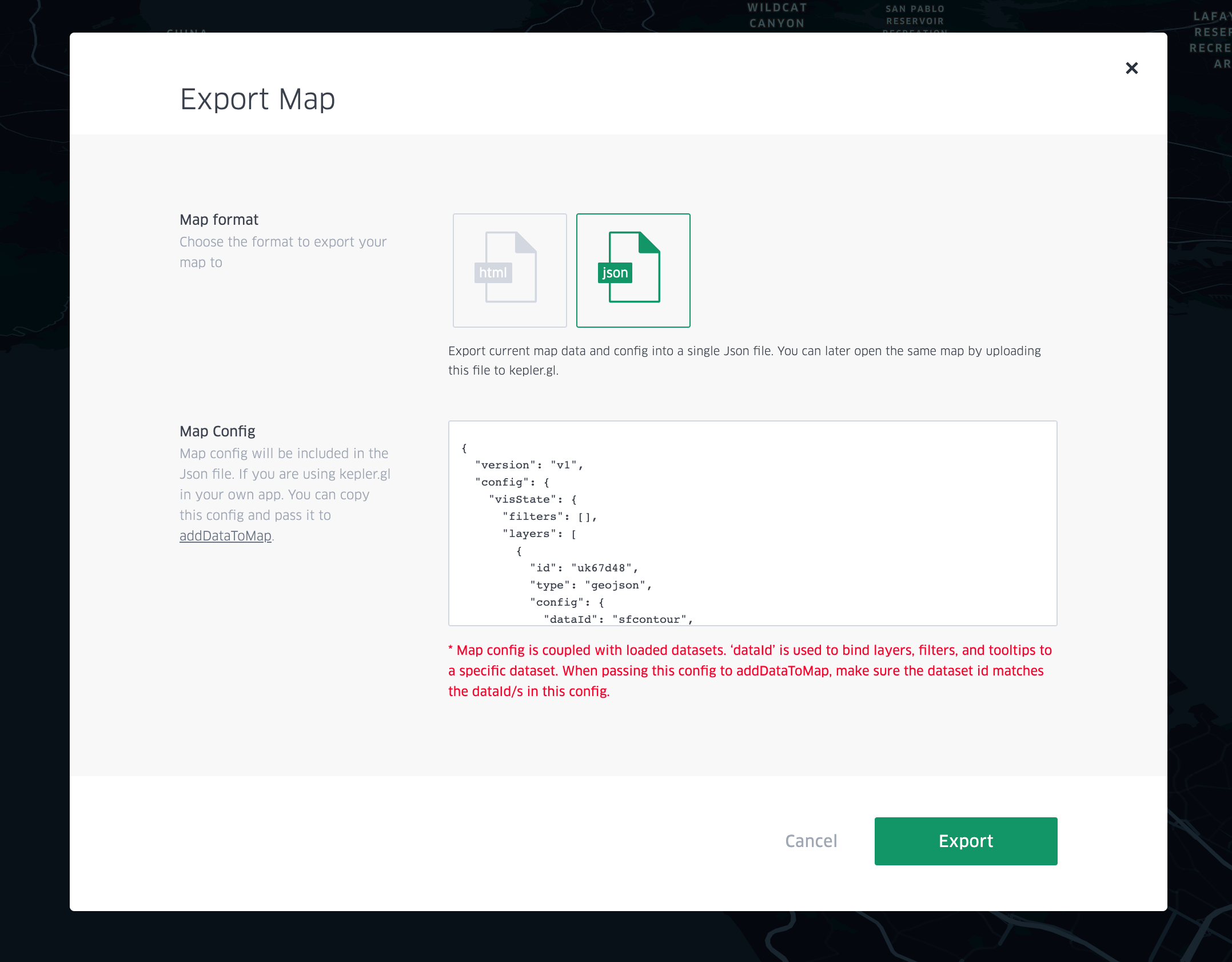diff --git a/jest.config.js b/jest.config.jsindex 982532da7..5783d9c27 100644--- a/jest.config.js+++ b/jest.config.js@@ -22,7 +22,7 @@ const config = {// Some libraries (even if transitive) are transitioning to ESM and need additional transpilation. Relevant issues:// - tiny-sdf: https://github.com/visgl/deck.gl/issues/7735transformIgnorePatterns: [- '/node_modules\\/(?!(.*@mapbox\\/tiny-sdf\\.*|@loaders\\.gl|@deck\\.gl|@deck\\.gl-community|@luma\\.gl|@hubble\\.gl|preact))',+ '/node_modules\\/(?!(.*@mapbox\\/tiny-sdf\\.*|@loaders\\.gl|@deck\\.gl|@deck\\.gl-community|@luma\\.gl|@hubble\\.gl|preact|maplibregl-mapbox-request-transformer))','\\.pnp\\.[^\\/]+$']};diff --git a/src/components/src/effects/effect-configurator.tsx b/src/components/src/effects/effect-configurator.tsxindex 2800ffa16..3086bc6a4 100644--- a/src/components/src/effects/effect-configurator.tsx+++ b/src/components/src/effects/effect-configurator.tsx@@ -367,7 +367,7 @@ export default function EffectConfiguratorFactory(const paramName = desc.name;const rawUniform = uniforms[desc.name];- if ((!rawUniform && rawUniform !== 0) || rawUniform.private) {+ if (rawUniform && rawUniform.private) {return null;}@@ -411,7 +411,7 @@ export default function EffectConfiguratorFactory(};}// the uniform description is {value: 0, min: 0, max: 1, ...}- else if (isNumber(uniform.value)) {+ else if (uniform && isNumber(uniform.value)) {const rangeMin = desc.min ?? uniform.min ?? uniform.softMin ?? 0;const rangeMax = desc.max ?? uniform.max ?? uniform.softMax ?? 1;const rangeSpan = rangeMax - rangeMin;@@ -427,6 +427,22 @@ export default function EffectConfiguratorFactory(}};}+ // Parameter defined in effect description but not in shader propTypes+ // (e.g. user-facing props that the effect maps to different GLSL uniforms)+ else if (desc.min !== undefined && desc.max !== undefined) {+ const rangeSpan = desc.max - desc.min;+ const step = rangeSpan > 10 ? 1 : 0.001;+ return {+ label,+ value1: prevValue ?? desc.defaultValue ?? 0,+ range: [desc.min, desc.max],+ value0: desc.min,+ step,+ onChange: (newValue: number[], event) => {+ updateEffectConfig(event, id, {parameters: {[paramName]: newValue[1]}});+ }+ };+ }// ignore everything else for nowreturn null;diff --git a/src/components/src/effects/effect-panel-header.tsx b/src/components/src/effects/effect-panel-header.tsxindex 467c0d82b..34d99da5d 100644--- a/src/components/src/effects/effect-panel-header.tsx+++ b/src/components/src/effects/effect-panel-header.tsx@@ -12,6 +12,7 @@ import {DISTANCE_FOG_TYPE,SURFACE_FOG_TYPE} from '@kepler.gl/constants';+import {useIntl} from 'react-intl';import PanelHeaderActionFactory, {PanelHeaderActionIcon} from '../side-panel/panel-header-action';import {@@ -41,7 +42,16 @@ import {SurfaceFogEffectIcon,BaseProps} from '../common/icons';-import {StyledPanelHeader} from '../common/styled-components';+import {StyledPanelHeader, Tooltip} from '../common/styled-components';++const MultilineTooltip = styled(Tooltip)`+ &.__react_component_tooltip {+ max-width: 280px;+ white-space: normal;+ line-height: 1.4;+ text-align: left;+ }+`;export type ActionItem = {key: string;@@ -305,16 +315,24 @@ function EffectPanelHeaderFactory(isConfigActive,isDragNDropEnabled = true,type,+ effectId,onToggleEnableConfig,listeners,showSortHandle = true} = props;- const label = useMemo(() => {- const description = EFFECT_DESCRIPTIONS.find(_description => _description.type === type);- return description?.name || 'Effect';+ const intl = useIntl();++ const effectDesc = useMemo(() => {+ return EFFECT_DESCRIPTIONS.find(_description => _description.type === type);}, [type]);+ const label = effectDesc?.name || 'Effect';+ const descriptionText = effectDesc?.description+ ? intl.formatMessage({id: effectDesc.description, defaultMessage: ''})+ : '';+ const tooltipId = `effect-header-${effectId}`;+const EffectIcon = defaultEffectIcons[type];return (@@ -335,7 +353,17 @@ function EffectPanelHeaderFactory(<EffectIconWrapper>{EffectIcon ? <EffectIcon height="18px" /> : null}</EffectIconWrapper>- <StyledEffectTitleSection>{label}</StyledEffectTitleSection>+ <StyledEffectTitleSection+ data-tip={descriptionText || undefined}+ data-for={descriptionText ? tooltipId : undefined}+ >+ {label}+ {descriptionText ? (+ <MultilineTooltip id={tooltipId} effect="solid" place="bottom" delayShow={500}>+ {descriptionText}+ </MultilineTooltip>+ ) : null}+ </StyledEffectTitleSection><EffectPanelHeaderActionSection {...props} /></StyledEffectPanelHeader>diff --git a/src/components/src/effects/effect-type-dropdown-list.tsx b/src/components/src/effects/effect-type-dropdown-list.tsxindex 9dd0bb843..21f0f3225 100644--- a/src/components/src/effects/effect-type-dropdown-list.tsx+++ b/src/components/src/effects/effect-type-dropdown-list.tsx@@ -10,6 +10,7 @@ import {classList} from '../common/item-selector/dropdown-list';export type EffectTypeDropdownListItem = {type: string;name: string;+ description?: string;disabled: boolean;};diff --git a/src/components/src/effects/effect-type-list-item.tsx b/src/components/src/effects/effect-type-list-item.tsxindex 348c5f8e8..1eacc8f31 100644--- a/src/components/src/effects/effect-type-list-item.tsx+++ b/src/components/src/effects/effect-type-list-item.tsx@@ -6,14 +6,25 @@ import styled, {withTheme} from 'styled-components';import classNames from 'classnames';import {FormattedMessage} from '@kepler.gl/localization';+import {useIntl} from 'react-intl';import {getApplicationConfig} from '@kepler.gl/utils';import {Add} from '../common/icons';+import {Tooltip} from '../common/styled-components';++const MultilineTooltip = styled(Tooltip)`+ &.__react_component_tooltip {+ max-width: 280px;+ white-space: normal;+ line-height: 1.4;+ text-align: left;+ }+`;export const DUMMY_ITEM_ID = 'dummy';export type EffectTypeListItemProps = {- value: {type: string; name: string};+ value: {type: string; name: string; description?: string};className?: string;isTile?: boolean;theme: any;@@ -82,6 +93,8 @@ const getImageUrl = type => {export function EffectTypeListItemFactory() {const EffectTypeListItem: React.FC<EffectTypeListItemProps> = ({value, isTile, className}) => {+ const intl = useIntl();+if (value?.type === DUMMY_ITEM_ID) {return (<StyledPlaceholderButton>@@ -91,11 +104,18 @@ export function EffectTypeListItemFactory() {);}+ const tooltipId = `effect-type-${value.type}`;+ const description = value.description+ ? intl.formatMessage({id: value.description, defaultMessage: ''})+ : '';+return (<StyledListItemclassName={classNames('effect-type-selector__item__inner', className, {list: !isTile})}+ data-tip={description || undefined}+ data-for={description ? tooltipId : undefined}><div className="effect-type-selector__item__icon"><img className="effect-preview" src={getImageUrl(value.type)} />@@ -103,6 +123,11 @@ export function EffectTypeListItemFactory() {<div className="effect-type-selector__item__label"><FormattedMessage id={`effect.type.${value.type}`} defaultMessage={value.name} /></div>+ {description ? (+ <MultilineTooltip id={tooltipId} effect="solid" place="bottom" delayShow={300}>+ {description}+ </MultilineTooltip>+ ) : null}</StyledListItem>);};diff --git a/src/components/src/effects/effect-type-selector.tsx b/src/components/src/effects/effect-type-selector.tsxindex b28fe0965..d361fc273 100644--- a/src/components/src/effects/effect-type-selector.tsx+++ b/src/components/src/effects/effect-type-selector.tsx@@ -9,7 +9,7 @@ import EffectTypeDropdownListFactory from './effect-type-dropdown-list';import EffectTypeListItemFactory, {DUMMY_ITEM_ID} from './effect-type-list-item';export type EffectTypeSelectorProps = {- options: {type: string; name: string; disabled: boolean}[];+ options: {type: string; name: string; description?: string; disabled: boolean}[];onSelect: (type: any) => void;theme: any;onBlur?: () => void;diff --git a/src/components/src/modals/export-video-modal.spec.tsx b/src/components/src/modals/export-video-modal.spec.tsxindex e92420c12..20f472063 100644--- a/src/components/src/modals/export-video-modal.spec.tsx+++ b/src/components/src/modals/export-video-modal.spec.tsx@@ -136,7 +136,8 @@ describe('ExportVideoModal', () => {expect(panelProps.deckProps).toEqual({parameters: {blend: true},controller: true,- views: {}+ views: {},+ effects: []});});diff --git a/src/components/src/modals/export-video-modal.tsx b/src/components/src/modals/export-video-modal.tsxindex caf0e926e..9fa0d341d 100644--- a/src/components/src/modals/export-video-modal.tsx+++ b/src/components/src/modals/export-video-modal.tsx@@ -6,8 +6,8 @@ import styled, {ThemeProvider, useTheme} from 'styled-components';import {DEFAULT_MAPBOX_API_URL} from '@kepler.gl/constants';import {FormattedMessage} from '@kepler.gl/localization';-import {Viewport, ExportVideo} from '@kepler.gl/types';-import {onViewPortChange} from '@kepler.gl/utils';+import {Viewport, ExportVideo, Effect} from '@kepler.gl/types';+import {onViewPortChange, computeDeckEffects} from '@kepler.gl/utils';import {MapStyle} from '@kepler.gl/reducers';import {UIStateActions, VisStateActions} from '@kepler.gl/actions';@@ -236,6 +236,25 @@ const ExportVideoModalFactory = () => {[keplerState, mapboxApiAccessToken, mapboxApiUrl]);+ const [videoEffects] = useState<Effect[]>(() =>+ (visState.effects || []).map((effect: Effect) => effect.clone())+ );++ const deckEffects = useMemo(() => {+ if (videoEffects.length === 0) return [];+ const effectOrder = visState.effectOrder || videoEffects.map((e: Effect) => e.id);+ return computeDeckEffects({+ visState: {...visState, effects: videoEffects, effectOrder},+ mapState,+ isExport: true+ });+ }, [visState, videoEffects, mapState]);++ const deckPropsWithEffects = useMemo(+ () => ({...hubbleDeckGlProps, effects: deckEffects}),+ [hubbleDeckGlProps, deckEffects]+ );+const onViewChange = useCallback((viewState: Record<string, any>) =>onViewPortChange(viewState as Viewport, onUpdateMap as any),@@ -320,7 +339,7 @@ const ExportVideoModalFactory = () => {exportVideoWidth={exportVideoWidth}onFilterFrameUpdate={onFilterFrameUpdate}onTripFrameUpdate={onTripFrameUpdate}- deckProps={hubbleDeckGlProps}+ deckProps={deckPropsWithEffects}mapProps={staticMapProps}disableBaseMap={false}mapboxLayerBeforeId={topLayer?.id}diff --git a/src/constants/src/default-settings.ts b/src/constants/src/default-settings.tsindex ed2bb6d09..5e6926ca8 100644--- a/src/constants/src/default-settings.ts+++ b/src/constants/src/default-settings.ts@@ -1405,6 +1405,7 @@ export const DEFAULT_LIGHT_AND_SHADOW_PROPS: {export const LIGHT_AND_SHADOW_EFFECT: EffectDescription = {type: 'lightAndShadow',name: 'Light & Shadow',+ description: 'effectDescription.lightAndShadow',parameters: [{name: 'timestamp', min: 0, max: Number.MAX_SAFE_INTEGER},{name: 'shadowIntensity', min: 0, max: 1, defaultValue: DEFAULT_SHADOW_INTENSITY},@@ -1423,11 +1424,13 @@ export const POSTPROCESSING_EFFECTS: {[key: string]: EffectDescription} = {ink: {type: 'ink',name: 'Ink',+ description: 'effectDescription.ink',parameters: [{name: 'strength', min: 0, max: 1}]},brightnessContrast: {type: 'brightnessContrast',name: 'Brightness & Contrast',+ description: 'effectDescription.brightnessContrast',parameters: [{name: 'brightness', min: -1, max: 1},{name: 'contrast', min: -1, max: 1}@@ -1436,6 +1439,7 @@ export const POSTPROCESSING_EFFECTS: {[key: string]: EffectDescription} = {hueSaturation: {type: 'hueSaturation',name: 'Hue & Saturation',+ description: 'effectDescription.hueSaturation',parameters: [{name: 'hue', min: -1, max: 1},{name: 'saturation', defaultValue: 0.25, min: -1, max: 1}@@ -1444,16 +1448,19 @@ export const POSTPROCESSING_EFFECTS: {[key: string]: EffectDescription} = {vibrance: {type: 'vibrance',name: 'Vibrance',+ description: 'effectDescription.vibrance',parameters: [{name: 'amount', defaultValue: 0.5, min: -1, max: 1}]},sepia: {type: 'sepia',name: 'Sepia',+ description: 'effectDescription.sepia',parameters: [{name: 'amount', min: 0, max: 1}]},dotScreen: {type: 'dotScreen',name: 'Dot Screen',+ description: 'effectDescription.dotScreen',parameters: [{name: 'angle',@@ -1478,6 +1485,7 @@ export const POSTPROCESSING_EFFECTS: {[key: string]: EffectDescription} = {colorHalftone: {type: 'colorHalftone',name: 'Color Halftone',+ description: 'effectDescription.colorHalftone',parameters: [{name: 'angle',@@ -1502,16 +1510,19 @@ export const POSTPROCESSING_EFFECTS: {[key: string]: EffectDescription} = {noise: {type: 'noise',name: 'Noise',+ description: 'effectDescription.noise',parameters: [{name: 'amount', min: 0, max: 1}]},triangleBlur: {type: 'triangleBlur',name: 'Blur (Triangle)',+ description: 'effectDescription.triangleBlur',parameters: [{name: 'radius', min: 0, max: 100}]},zoomBlur: {type: 'zoomBlur',name: 'Blur (Zoom)',+ description: 'effectDescription.zoomBlur',parameters: [{name: 'strength',@@ -1532,6 +1543,7 @@ export const POSTPROCESSING_EFFECTS: {[key: string]: EffectDescription} = {tiltShift: {type: 'tiltShift',name: 'Blur (Tilt Shift)',+ description: 'effectDescription.tiltShift',parameters: [{name: 'blurRadius',@@ -1566,11 +1578,13 @@ export const POSTPROCESSING_EFFECTS: {[key: string]: EffectDescription} = {edgeWork: {type: 'edgeWork',name: 'Edge work',+ description: 'effectDescription.edgeWork',parameters: [{name: 'radius', min: 1, max: 50}]},vignette: {type: 'vignette',name: 'Vignette',+ description: 'effectDescription.vignette',parameters: [{name: 'amount', min: 0, max: 1},{name: 'radius', min: 0, max: 1}@@ -1579,6 +1593,7 @@ export const POSTPROCESSING_EFFECTS: {[key: string]: EffectDescription} = {magnify: {type: 'magnify',name: 'Magnify',+ description: 'effectDescription.magnify',parameters: [{name: 'screenXY',@@ -1611,11 +1626,13 @@ export const POSTPROCESSING_EFFECTS: {[key: string]: EffectDescription} = {hexagonalPixelate: {type: 'hexagonalPixelate',name: 'Hexagonal Pixelate',+ description: 'effectDescription.hexagonalPixelate',parameters: [{name: 'scale', defaultValue: 20, min: 1, max: 50}]},distanceFog: {type: DISTANCE_FOG_TYPE,name: 'Distance Fog',+ description: 'effectDescription.distanceFog',parameters: [{name: 'density', defaultValue: 0.5, min: 0, max: 1},{name: 'fogStart', label: 'Start', defaultValue: 0.3, min: 0, max: 1},@@ -1626,6 +1643,7 @@ export const POSTPROCESSING_EFFECTS: {[key: string]: EffectDescription} = {surfaceFog: {type: SURFACE_FOG_TYPE,name: 'Surface Fog',+ description: 'effectDescription.surfaceFog',parameters: [{name: 'density', defaultValue: 0.6, min: 0, max: 1},{name: 'height', label: 'Elevation (m)', defaultValue: 50, min: -200, max: 3000},diff --git a/src/effects/src/shader-passes/distance-fog.ts b/src/effects/src/shader-passes/distance-fog.tsindex 305c950ef..436188c50 100644--- a/src/effects/src/shader-passes/distance-fog.ts+++ b/src/effects/src/shader-passes/distance-fog.ts@@ -271,8 +271,8 @@ export class DeckDistanceFogEffect {const renderPass = this.model.device.beginRenderPass({framebuffer: outputBuffer,parameters: {viewport: [0, 0, ...texSize]},- clearColor: [0, 0, 0, 0],- clearDepth: 1+ clearColor: params.clearCanvas !== false ? [0, 0, 0, 0] : false,+ clearDepth: params.clearCanvas !== false ? 1 : false});this.model.draw(renderPass);renderPass.end();diff --git a/src/effects/src/shader-passes/surface-fog.ts b/src/effects/src/shader-passes/surface-fog.tsindex 308ea3017..1ef457a81 100644--- a/src/effects/src/shader-passes/surface-fog.ts+++ b/src/effects/src/shader-passes/surface-fog.ts@@ -269,8 +269,6 @@ const surfaceFogModule = {},propTypes: {density: {value: 0.6, min: 0, max: 1},- height: {value: 50, min: -200, max: 3000},- thickness: {value: 50, min: 0, max: 1000},fogColor: {value: [230, 235, 242]},pattern: {value: 0, min: 0, max: 1},fogHeight: {value: 0, private: true},@@ -407,8 +405,8 @@ export class DeckSurfaceFogEffect {const renderPass = this.model.device.beginRenderPass({framebuffer: outputBuffer,parameters: {viewport: [0, 0, ...texSize]},- clearColor: [0, 0, 0, 0],- clearDepth: 1+ clearColor: params.clearCanvas !== false ? [0, 0, 0, 0] : false,+ clearDepth: params.clearCanvas !== false ? 1 : false});this.model.draw(renderPass);renderPass.end();diff --git a/src/localization/src/translations/en.ts b/src/localization/src/translations/en.tsindex be2248ec7..742679fa7 100644--- a/src/localization/src/translations/en.ts+++ b/src/localization/src/translations/en.ts@@ -207,6 +207,43 @@ export default {time: 'Time',timezone: 'Timezone'},+ effectDescription: {+ lightAndShadow:+ 'Simulates realistic sun lighting and shadow casting based on time of day and geographic location. Adjustable shadow intensity, sun and ambient light colors.',+ ink: 'Applies an ink-wash artistic style that darkens edges and creates a hand-drawn appearance. Adjust strength to control the intensity of the effect.',+ brightnessContrast:+ 'Adjusts the overall brightness and contrast of the map. Use positive values to brighten or increase contrast, negative values to darken or flatten the image.',+ hueSaturation:+ 'Shifts the color hue and adjusts saturation across the entire map. Useful for creating color themes or desaturating the view.',+ vibrance:+ 'Selectively boosts the intensity of muted colors without oversaturating already vivid ones. Produces a more natural-looking color enhancement than saturation.',+ sepia:+ 'Applies a warm brownish tone reminiscent of aged photographs. Control the amount to blend between the original colors and the sepia look.',+ dotScreen:+ 'Converts the image into a pattern of monochrome dots, resembling newspaper halftone printing. Adjust angle, dot size, and center position.',+ colorHalftone:+ 'Simulates CMYK color halftone printing with separate dot patterns for each color channel. Control angle, dot size, and center position.',+ noise:+ 'Adds random film-grain style noise across the map. Useful for a textured, analog aesthetic or to reduce color banding.',+ triangleBlur:+ 'Applies a smooth Gaussian-like blur uniformly across the map. Control the blur radius to adjust the level of softness.',+ zoomBlur:+ 'Creates a radial motion blur that emanates from a center point, simulating a camera zoom. Adjust strength and center position.',+ tiltShift:+ 'Simulates a tilt-shift lens effect that blurs areas outside a focal band, creating a miniature model look. Set the focal band with start/end positions.',+ edgeWork:+ 'Highlights structural edges in the image using an artistic charcoal-sketch style. Adjust the detection radius to control line thickness.',+ vignette:+ 'Darkens the corners and edges of the map, drawing focus toward the center. Control the darkening amount and the radius of the clear area.',+ magnify:+ 'Creates a circular magnifying glass overlay at a configurable position. Adjust size, zoom level, and border width.',+ hexagonalPixelate:+ 'Replaces the image with a grid of hexagonal tiles, each filled with the average color of the area it covers. Adjust the tile scale.',+ distanceFog:+ 'Fades distant objects into a fog color based on their depth from the camera, enhancing the sense of depth. Control density, start distance, range, and fog color.',+ surfaceFog:+ 'Renders a fog layer at a specific elevation above the terrain surface. Adjust elevation, transition thickness, density, color, and an optional noise pattern.'+ },layerConfiguration: {defaultDescription: 'Calculate {property} based on selected field',howTo: 'How to',diff --git a/src/types/effects.d.ts b/src/types/effects.d.tsindex 5c45d77f6..3199e9b9e 100644--- a/src/types/effects.d.ts+++ b/src/types/effects.d.ts@@ -13,6 +13,7 @@ type EffectParameterDescription = {export type EffectDescription = {type: string;name: string;+ description?: string;parameters: EffectParameterDescription[];};