
The fastest, litest AI Gateway. Rust core with Python SDK. Call 100+ LLM APIs in OpenAI (or native) format with cost tracking, guardrails, load balancing, and logging [Bedrock, Azure, OpenAI, Anthropic, OpenAI, VertexAI, vLLM, Nvidia NIM]
Python ai-gatewayanthropicazure-openaibedrockgatewaylangchainlitellmllmllm-gatewayllmopsmcp-gatewayopenaiopenai-proxyrustrust-aivertex-ai
update: ui and layout change
Arindam2009d746f7421f2
diff --git a/docs/my-website/docs/index.md b/docs/my-website/docs/index.mdindex ba605e316d3..79b1b121e99 100644--- a/docs/my-website/docs/index.md+++ b/docs/my-website/docs/index.md@@ -1,689 +1,468 @@+---+id: index+title: Getting Started+sidebar_label: Quickstart+---+import Tabs from '@theme/Tabs';import TabItem from '@theme/TabItem';+import NavigationCards from '@site/src/components/NavigationCards';+import Image from '@theme/IdealImage';-# LiteLLM - Getting Started--https://github.com/BerriAI/litellm--## **Call 100+ LLMs using the OpenAI Input/Output Format**--- Translate inputs to provider's endpoints (`/chat/completions`, `/responses`, `/embeddings`, `/images`, `/audio`, `/batches`, and more)-- [Consistent output](https://docs.litellm.ai/docs/supported_endpoints) - same response format regardless of which provider you use-- Retry/fallback logic across multiple deployments (e.g. Azure/OpenAI) - [Router](https://docs.litellm.ai/docs/routing)-- Track spend & set budgets per project [LiteLLM Proxy Server](https://docs.litellm.ai/docs/simple_proxy)--## How to use LiteLLM--You can use LiteLLM through either the Proxy Server or Python SDK. Both gives you a unified interface to access multiple LLMs (100+ LLMs). Choose the option that best fits your needs:--<table style={{width: '100%', tableLayout: 'fixed'}}>-<thead>-<tr>-<th style={{width: '14%'}}></th>-<th style={{width: '43%'}}><strong><a href="#litellm-proxy-server-llm-gateway">LiteLLM Proxy Server</a></strong></th>-<th style={{width: '43%'}}><strong><a href="#basic-usage">LiteLLM Python SDK</a></strong></th>-</tr>-</thead>-<tbody>-<tr>-<td style={{width: '14%'}}><strong>Use Case</strong></td>-<td style={{width: '43%'}}>Central service (LLM Gateway) to access multiple LLMs</td>-<td style={{width: '43%'}}>Use LiteLLM directly in your Python code</td>-</tr>-<tr>-<td style={{width: '14%'}}><strong>Who Uses It?</strong></td>-<td style={{width: '43%'}}>Gen AI Enablement / ML Platform Teams</td>-<td style={{width: '43%'}}>Developers building LLM projects</td>-</tr>-<tr>-<td style={{width: '14%'}}><strong>Key Features</strong></td>-<td style={{width: '43%'}}>• Centralized API gateway with authentication & authorization<br />• Multi-tenant cost tracking and spend management per project/user<br />• Per-project customization (logging, guardrails, caching)<br />• Virtual keys for secure access control<br />• Admin dashboard UI for monitoring and management</td>-<td style={{width: '43%'}}>• Direct Python library integration in your codebase<br />• Router with retry/fallback logic across multiple deployments (e.g. Azure/OpenAI) - <a href="https://docs.litellm.ai/docs/routing">Router</a><br />• Application-level load balancing and cost tracking<br />• Exception handling with OpenAI-compatible errors<br />• Observability callbacks (Lunary, MLflow, Langfuse, etc.)</td>-</tr>-</tbody>-</table>---## **LiteLLM Python SDK**--### Basic usage+<Image style={{padding: '10px', margin: '0 0 2.5rem'}} img={require('../img/hero.png')} />-<a target="_blank" href="https://colab.research.google.com/github/BerriAI/litellm/blob/main/cookbook/liteLLM_Getting_Started.ipynb">- <img src="https://colab.research.google.com/assets/colab-badge.svg" alt="Open In Colab"/>-</a>+**LiteLLM** is an open-source library that gives you a single, unified interface to call 100+ LLMs — OpenAI, Anthropic, Vertex AI, Bedrock, and more — using the OpenAI format.-```shell-pip install litellm-```+- Call any provider using the same `completion()` interface — no re-learning the API for each one+- Consistent output format regardless of which provider or model you use+- Built-in retry / fallback logic across multiple deployments via the [Router](./routing.md)+- Self-hosted [LLM Gateway (Proxy)](./simple_proxy) with virtual keys, cost tracking, and an admin UI-<Tabs>-<TabItem value="openai" label="OpenAI">+[](https://pypi.org/project/litellm/)+[](https://github.com/BerriAI/litellm)-```python-from litellm import completion-import os+----## set ENV variables-os.environ["OPENAI_API_KEY"] = "your-api-key"+## Installation-response = completion(- model="openai/gpt-4o",- messages=[{ "content": "Hello, how are you?","role": "user"}]-)+```shell+pip install litellm```-</TabItem>-<TabItem value="anthropic" label="Anthropic">--```python-from litellm import completion-import os+To run the full Proxy Server (LLM Gateway):-## set ENV variables-os.environ["ANTHROPIC_API_KEY"] = "your-api-key"--response = completion(- model="anthropic/claude-3-sonnet-20240229",- messages=[{ "content": "Hello, how are you?","role": "user"}]-)+```shell+pip install 'litellm[proxy]'```-</TabItem>-<TabItem value="xai" label="xAI">+----```python-from litellm import completion-import os+## Quick Start-## set ENV variables-os.environ["XAI_API_KEY"] = "your-api-key"+Make your first LLM call using the provider of your choice:-response = completion(- model="xai/grok-2-latest",- messages=[{ "content": "Hello, how are you?","role": "user"}]-)-```-</TabItem>-<TabItem value="vertex" label="VertexAI">+<Tabs>+<TabItem value="openai" label="OpenAI">```pythonfrom litellm import completionimport os-# auth: run 'gcloud auth application-default'-os.environ["VERTEXAI_PROJECT"] = "hardy-device-386718"-os.environ["VERTEXAI_LOCATION"] = "us-central1"+os.environ["OPENAI_API_KEY"] = "your-api-key"response = completion(- model="vertex_ai/gemini-1.5-pro",- messages=[{ "content": "Hello, how are you?","role": "user"}]+ model="openai/gpt-4o",+ messages=[{"role": "user", "content": "Hello, how are you?"}])+print(response.choices[0].message.content)```</TabItem>--<TabItem value="nvidia" label="NVIDIA">+<TabItem value="anthropic" label="Anthropic">```pythonfrom litellm import completionimport os-## set ENV variables-os.environ["NVIDIA_NIM_API_KEY"] = "nvidia_api_key"-os.environ["NVIDIA_NIM_API_BASE"] = "nvidia_nim_endpoint_url"+os.environ["ANTHROPIC_API_KEY"] = "your-api-key"response = completion(- model="nvidia_nim/<model_name>",- messages=[{ "content": "Hello, how are you?","role": "user"}]+ model="anthropic/claude-3-5-sonnet-20241022",+ messages=[{"role": "user", "content": "Hello, how are you?"}])+print(response.choices[0].message.content)```</TabItem>--<TabItem value="hugging" label="HuggingFace">+<TabItem value="vertex" label="Vertex AI">```pythonfrom litellm import completionimport os-os.environ["HUGGINGFACE_API_KEY"] = "huggingface_api_key"+# auth: run 'gcloud auth application-default login'+os.environ["VERTEXAI_PROJECT"] = "your-project-id"+os.environ["VERTEXAI_LOCATION"] = "us-central1"-# e.g. Call 'WizardLM/WizardCoder-Python-34B-V1.0' hosted on HF Inference endpointsresponse = completion(- model="huggingface/WizardLM/WizardCoder-Python-34B-V1.0",- messages=[{ "content": "Hello, how are you?","role": "user"}],- api_base="https://my-endpoint.huggingface.cloud"+ model="vertex_ai/gemini-1.5-pro",+ messages=[{"role": "user", "content": "Hello, how are you?"}])--print(response)+print(response.choices[0].message.content)```</TabItem>--<TabItem value="azure" label="Azure OpenAI">+<TabItem value="bedrock" label="Bedrock">```pythonfrom litellm import completionimport os-## set ENV variables-os.environ["AZURE_API_KEY"] = ""-os.environ["AZURE_API_BASE"] = ""-os.environ["AZURE_API_VERSION"] = ""+os.environ["AWS_ACCESS_KEY_ID"] = "your-key"+os.environ["AWS_SECRET_ACCESS_KEY"] = "your-secret"+os.environ["AWS_REGION_NAME"] = "us-east-1"-# azure callresponse = completion(- "azure/<your_deployment_name>",- messages = [{ "content": "Hello, how are you?","role": "user"}]+ model="bedrock/anthropic.claude-3-5-sonnet-20241022-v2:0",+ messages=[{"role": "user", "content": "Hello, how are you?"}])+print(response.choices[0].message.content)```</TabItem>-<TabItem value="ollama" label="Ollama">```pythonfrom litellm import completionresponse = completion(- model="ollama/llama2",- messages = [{ "content": "Hello, how are you?","role": "user"}],- api_base="http://localhost:11434"+ model="ollama/llama3",+ messages=[{"role": "user", "content": "Hello, how are you?"}],+ api_base="http://localhost:11434")+print(response.choices[0].message.content)```</TabItem>-<TabItem value="or" label="Openrouter">--```python-from litellm import completion-import os--## set ENV variables-os.environ["OPENROUTER_API_KEY"] = "openrouter_api_key"--response = completion(- model="openrouter/google/palm-2-chat-bison",- messages = [{ "content": "Hello, how are you?","role": "user"}],-)-```--</TabItem>-<TabItem value="novita" label="Novita AI">+<TabItem value="azure" label="Azure OpenAI">```pythonfrom litellm import completionimport os-## set ENV variables. Visit https://novita.ai/settings/key-management to get your API key-os.environ["NOVITA_API_KEY"] = "novita-api-key"+os.environ["AZURE_API_KEY"] = "your-key"+os.environ["AZURE_API_BASE"] = "https://your-resource.openai.azure.com"+os.environ["AZURE_API_VERSION"] = "2024-02-01"response = completion(- model="novita/deepseek/deepseek-r1",- messages=[{ "content": "Hello, how are you?","role": "user"}]+ model="azure/your-deployment-name",+ messages=[{"role": "user", "content": "Hello, how are you?"}])+print(response.choices[0].message.content)```</TabItem>+</Tabs>-<TabItem value="vercel" label="Vercel AI Gateway">--```python-from litellm import completion-import os--## set ENV variables. Visit https://vercel.com/docs/ai-gateway#using-the-ai-gateway-with-an-api-key for insturctions on obtaining a key-os.environ["VERCEL_AI_GATEWAY_API_KEY"] = "your-vercel-api-key"--response = completion(- model="vercel_ai_gateway/openai/gpt-4o",- messages=[{ "content": "Hello, how are you?","role": "user"}]-)-```--</TabItem>+Every response follows the OpenAI Chat Completions format, regardless of provider. ✅-</Tabs>+### Response Format-### Response Format (OpenAI Chat Completions Format)+Non-streaming responses return a `ModelResponse` object:```json{- "id": "chatcmpl-565d891b-a42e-4c39-8d14-82a1f5208885",- "created": 1734366691,- "model": "gpt-4o-2024-08-06",- "object": "chat.completion",- "system_fingerprint": null,- "choices": [- {- "finish_reason": "stop",- "index": 0,- "message": {- "content": "Hello! As an AI language model, I don't have feelings, but I'm operating properly and ready to assist you with any questions or tasks you may have. How can I help you today?",- "role": "assistant",- "tool_calls": null,- "function_call": null- }- }- ],- "usage": {- "completion_tokens": 43,- "prompt_tokens": 13,- "total_tokens": 56,- "completion_tokens_details": null,- "prompt_tokens_details": {- "audio_tokens": null,- "cached_tokens": 0- },- "cache_creation_input_tokens": 0,- "cache_read_input_tokens": 0+ "id": "chatcmpl-abc123",+ "object": "chat.completion",+ "created": 1677858242,+ "model": "gpt-4o",+ "choices": [+ {+ "index": 0,+ "message": {+ "role": "assistant",+ "content": "Hello! I'm doing well, thanks for asking."+ },+ "finish_reason": "stop"}+ ],+ "usage": {+ "prompt_tokens": 13,+ "completion_tokens": 12,+ "total_tokens": 25+ }}```-### Streaming-Set `stream=True` in the `completion` args.--<Tabs>-<TabItem value="openai" label="OpenAI">--```python-from litellm import completion-import os--## set ENV variables-os.environ["OPENAI_API_KEY"] = "your-api-key"--response = completion(- model="openai/gpt-4o",- messages=[{ "content": "Hello, how are you?","role": "user"}],- stream=True,-)-```--</TabItem>-<TabItem value="anthropic" label="Anthropic">--```python-from litellm import completion-import os--## set ENV variables-os.environ["ANTHROPIC_API_KEY"] = "your-api-key"--response = completion(- model="anthropic/claude-3-sonnet-20240229",- messages=[{ "content": "Hello, how are you?","role": "user"}],- stream=True,-)-```--</TabItem>-<TabItem value="xai" label="xAI">--```python-from litellm import completion-import os--## set ENV variables-os.environ["XAI_API_KEY"] = "your-api-key"--response = completion(- model="xai/grok-2-latest",- messages=[{ "content": "Hello, how are you?","role": "user"}],- stream=True,-)-```-</TabItem>-<TabItem value="vertex" label="VertexAI">--```python-from litellm import completion-import os--# auth: run 'gcloud auth application-default'-os.environ["VERTEX_PROJECT"] = "hardy-device-386718"-os.environ["VERTEX_LOCATION"] = "us-central1"+Streaming responses (`stream=True`) yield `ModelResponseStream` chunks:-response = completion(- model="vertex_ai/gemini-1.5-pro",- messages=[{ "content": "Hello, how are you?","role": "user"}],- stream=True,-)-```--</TabItem>--<TabItem value="nvidia" label="NVIDIA">--```python-from litellm import completion-import os--## set ENV variables-os.environ["NVIDIA_NIM_API_KEY"] = "nvidia_api_key"-os.environ["NVIDIA_NIM_API_BASE"] = "nvidia_nim_endpoint_url"--response = completion(- model="nvidia_nim/<model_name>",- messages=[{ "content": "Hello, how are you?","role": "user"}]- stream=True,-)-```-</TabItem>--<TabItem value="hugging" label="HuggingFace">--```python-from litellm import completion-import os--os.environ["HUGGINGFACE_API_KEY"] = "huggingface_api_key"--# e.g. Call 'WizardLM/WizardCoder-Python-34B-V1.0' hosted on HF Inference endpoints-response = completion(- model="huggingface/WizardLM/WizardCoder-Python-34B-V1.0",- messages=[{ "content": "Hello, how are you?","role": "user"}],- api_base="https://my-endpoint.huggingface.cloud",- stream=True,-)--print(response)-```--</TabItem>--<TabItem value="azure" label="Azure OpenAI">--```python-from litellm import completion-import os--## set ENV variables-os.environ["AZURE_API_KEY"] = ""-os.environ["AZURE_API_BASE"] = ""-os.environ["AZURE_API_VERSION"] = ""--# azure call-response = completion(- "azure/<your_deployment_name>",- messages = [{ "content": "Hello, how are you?","role": "user"}],- stream=True,-)+```json+{+ "id": "chatcmpl-abc123",+ "object": "chat.completion.chunk",+ "created": 1677858242,+ "model": "gpt-4o",+ "choices": [+ {+ "index": 0,+ "delta": {+ "role": "assistant",+ "content": "Hello"+ },+ "finish_reason": null+ }+ ]+}```-</TabItem>--<TabItem value="ollama" label="Ollama">+📖 [Full output format reference →](./completion/output)-```python-from litellm import completion--response = completion(- model="ollama/llama2",- messages = [{ "content": "Hello, how are you?","role": "user"}],- api_base="http://localhost:11434",- stream=True,-)-```--</TabItem>-<TabItem value="or" label="Openrouter">+:::tip Open in Colab+<a target="_blank" href="https://colab.research.google.com/github/BerriAI/litellm/blob/main/cookbook/liteLLM_Getting_Started.ipynb">+<img src="https://colab.research.google.com/assets/colab-badge.svg" alt="Open In Colab"/>+</a>+:::-```python-from litellm import completion-import os+----## set ENV variables-os.environ["OPENROUTER_API_KEY"] = "openrouter_api_key"+## New to LiteLLM?-response = completion(- model="openrouter/google/palm-2-chat-bison",- messages = [{ "content": "Hello, how are you?","role": "user"}],- stream=True,-)-```+**Want to get started fast?** Head to [Tutorials](/docs/tutorials) for step-by-step walkthroughs — AI coding tools, agent SDKs, proxy setup, and more.-</TabItem>-<TabItem value="novita" label="Novita AI">+**Need to understand a specific feature?** Check [Guides](/docs/guides) for streaming, function calling, prompt caching, and other how-tos.-```python-from litellm import completion-import os+----## set ENV variables. Visit https://novita.ai/settings/key-management to get your API key-os.environ["NOVITA_API_KEY"] = "novita_api_key"+## Choose Your Path-response = completion(- model="novita/deepseek/deepseek-r1",- messages = [{ "content": "Hello, how are you?","role": "user"}],- stream=True,-)-```+<NavigationCards+columns={2}+items={[+{+icon: "🐍",+title: "Python SDK",+description: "Integrate LiteLLM directly into your Python application. Drop-in replacement for the OpenAI client.",+listDescription: [+"completion(), embedding(), image_generation() and more",+"Router with retry, fallback, and load balancing",+"OpenAI-compatible exceptions across all providers",+"Observability callbacks (Langfuse, MLflow, Helicone…)",+],+to: "#litellm-python-sdk",+},+{+icon: "🖥️",+title: "Proxy Server (LLM Gateway)",+description: "Self-hosted gateway for platform teams managing LLM access across an organization.",+listDescription: [+"Virtual keys with per-key/team/user budgets",+"Centralized logging, guardrails, and caching",+"Admin UI for monitoring and management",+"Drop-in replacement for any OpenAI-compatible client",+],+to: "#litellm-proxy-server-llm-gateway",+},+]}+/>++---++## LiteLLM Python SDK-</TabItem>+### Streaming-<TabItem value="vercel" label="Vercel AI Gateway">+Add `stream=True` to receive chunks as they are generated:```pythonfrom litellm import completionimport os-## set ENV variables. Visit https://vercel.com/docs/ai-gateway#using-the-ai-gateway-with-an-api-key for insturctions on obtaining a key-os.environ["VERCEL_AI_GATEWAY_API_KEY"] = "your-vercel-api-key"+os.environ["OPENAI_API_KEY"] = "your-api-key"-response = completion(- model="vercel_ai_gateway/openai/gpt-4o",- messages = [{ "content": "Hello, how are you?","role": "user"}],+for chunk in completion(+ model="openai/gpt-4o",+ messages=[{"role": "user", "content": "Write a short poem"}],stream=True,-)-```--</TabItem>--</Tabs>--### Streaming Response Format (OpenAI Format)--```json-{- "id": "chatcmpl-2be06597-eb60-4c70-9ec5-8cd2ab1b4697",- "created": 1734366925,- "model": "claude-3-sonnet-20240229",- "object": "chat.completion.chunk",- "system_fingerprint": null,- "choices": [- {- "finish_reason": null,- "index": 0,- "delta": {- "content": "Hello",- "role": "assistant",- "function_call": null,- "tool_calls": null,- "audio": null- },- "logprobs": null- }- ]-}+):+ print(chunk.choices[0].delta.content or "", end="")```-### Exception handling+### Exception Handling-LiteLLM maps exceptions across all supported providers to the OpenAI exceptions. All our exceptions inherit from OpenAI's exception types, so any error-handling you have for that, should work out of the box with LiteLLM.+LiteLLM maps every provider's errors to the OpenAI exception types — your existing error handling works out of the box:```pythonimport litellm-from litellm import completion-import os-os.environ["ANTHROPIC_API_KEY"] = "bad-key"try:- completion(model="anthropic/claude-instant-1", messages=[{"role": "user", "content": "Hey, how's it going?"}])+ litellm.completion(+ model="anthropic/claude-instant-1",+ messages=[{"role": "user", "content": "Hey!"}]+ )except litellm.AuthenticationError as e:- # Thrown when the API key is invalid- print(f"Authentication failed: {e}")+ print(f"Bad API key: {e}")except litellm.RateLimitError as e:- # Thrown when you've exceeded your rate limitprint(f"Rate limited: {e}")except litellm.APIError as e:- # Thrown for general API errorsprint(f"API error: {e}")```-### See How LiteLLM Transforms Your Requests--Want to understand how LiteLLM parses and normalizes your LLM API requests? Use the `/utils/transform_request` endpoint to see exactly how your request is transformed internally.--You can try it out now directly on our Demo App!-Go to the [LiteLLM API docs for transform_request](https://litellm-api.up.railway.app/#/llm%20utils/transform_request_utils_transform_request_post)-LiteLLM will show you the normalized, provider-agnostic version of your request. This is useful for debugging, learning, and understanding how LiteLLM handles different providers and options.+### Logging & Observability--### Logging Observability - Log LLM Input/Output ([Docs](https://docs.litellm.ai/docs/observability/callbacks))-LiteLLM exposes pre defined callbacks to send data to Lunary, MLflow, Langfuse, Helicone, Promptlayer, Traceloop, Slack+Send input/output to Langfuse, MLflow, Helicone, Lunary, and more with a single line:```python-from litellm import completion+import litellm-## set env variables for logging tools (API key set up is not required when using MLflow)-os.environ["LUNARY_PUBLIC_KEY"] = "your-lunary-public-key" # get your public key at https://app.lunary.ai/settings-os.environ["HELICONE_API_KEY"] = "your-helicone-key"-os.environ["LANGFUSE_PUBLIC_KEY"] = ""-os.environ["LANGFUSE_SECRET_KEY"] = ""+litellm.success_callback = ["langfuse", "mlflow", "helicone"]-os.environ["OPENAI_API_KEY"]+response = litellm.completion(+ model="gpt-4o",+ messages=[{"role": "user", "content": "Hi!"}]+)+```-# set callbacks-litellm.success_callback = ["lunary", "mlflow", "langfuse", "helicone"] # log input/output to lunary, mlflow, langfuse, helicone+📖 [See all observability integrations →](/docs/observability/agentops_integration)-#openai call-response = completion(model="gpt-3.5-turbo", messages=[{"role": "user", "content": "Hi 👋 - i'm openai"}])-```+### Track Costs & Usage-### Track Costs, Usage, Latency for streaming-Use a callback function for this - more info on custom callbacks: https://docs.litellm.ai/docs/observability/custom_callback+Use a callback to capture cost per response:```pythonimport litellm-# track_cost_callback-def track_cost_callback(- kwargs, # kwargs to completion- completion_response, # response from completion- start_time, end_time # start/end time-):- try:- response_cost = kwargs.get("response_cost", 0)- print("streaming response_cost", response_cost)- except:- pass-# set callback-litellm.success_callback = [track_cost_callback] # set custom callback function--# litellm.completion() call-response = completion(- model="gpt-3.5-turbo",- messages=[- {- "role": "user",- "content": "Hi 👋 - i'm openai"- }- ],- stream=True-)-```--## **LiteLLM Proxy Server (LLM Gateway)**--Track spend across multiple projects/people+def track_cost(kwargs, completion_response, start_time, end_time):+ print("Cost:", kwargs.get("response_cost", 0))-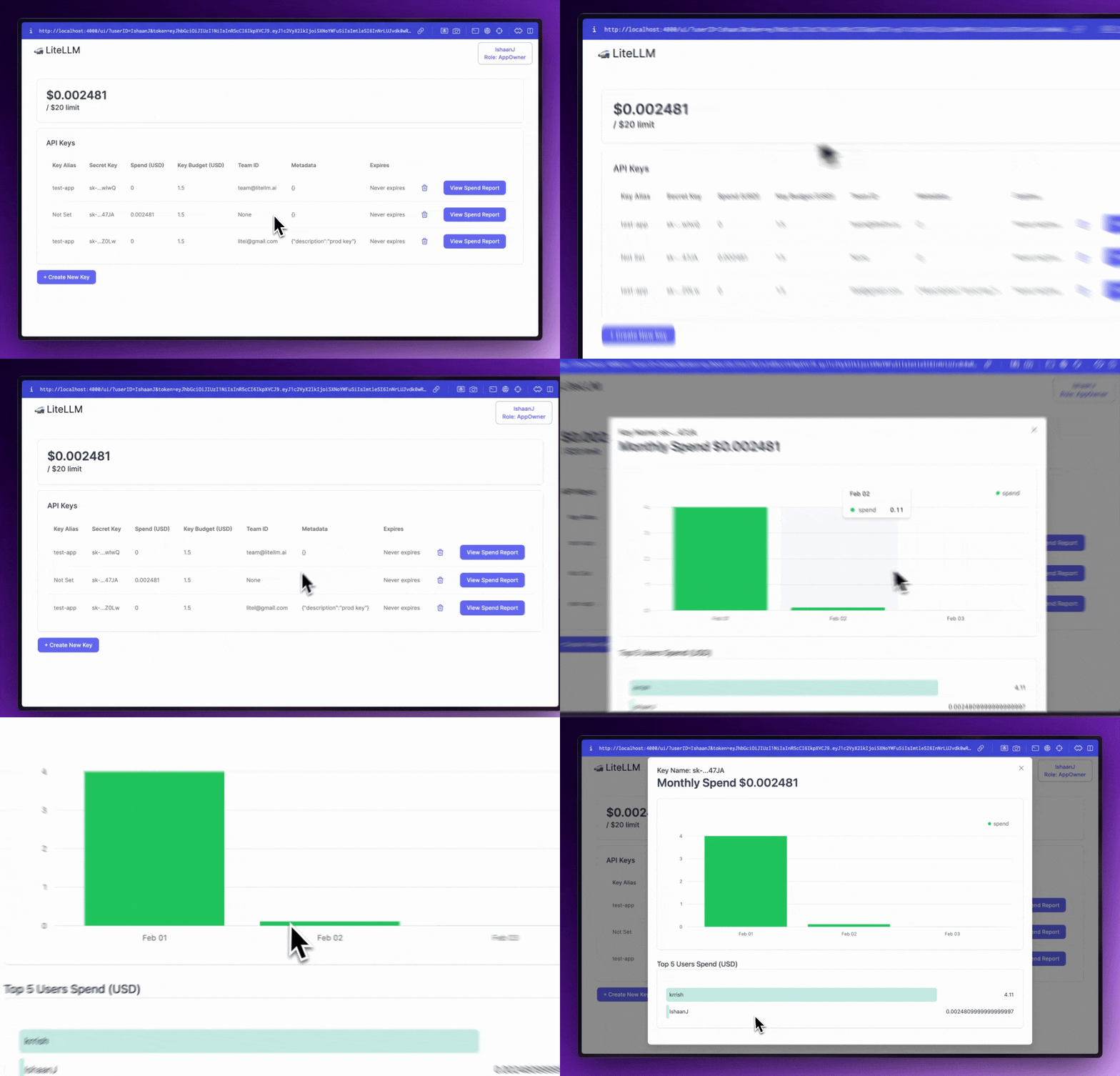+litellm.success_callback = [track_cost]-The proxy provides:+litellm.completion(+ model="gpt-4o",+ messages=[{"role": "user", "content": "Hello!"}],+ stream=True+)+```-1. [Hooks for auth](https://docs.litellm.ai/docs/proxy/virtual_keys#custom-auth)-2. [Hooks for logging](https://docs.litellm.ai/docs/proxy/logging#step-1---create-your-custom-litellm-callback-class)-3. [Cost tracking](https://docs.litellm.ai/docs/proxy/virtual_keys#tracking-spend)-4. [Rate Limiting](https://docs.litellm.ai/docs/proxy/users#set-rate-limits)+📖 [Custom callback docs →](./observability/custom_callback)-### 📖 Proxy Endpoints - [Swagger Docs](https://litellm-api.up.railway.app/)+----Go here for a complete tutorial with keys + rate limits - [**here**](./proxy/docker_quick_start.md)+## LiteLLM Proxy Server (LLM Gateway)-### Quick Start Proxy - CLI+The proxy is a self-hosted OpenAI-compatible gateway. Any client that works with OpenAI works with the proxy — no code changes needed.-```shell-pip install 'litellm[proxy]'-```+-#### Step 1: Start litellm proxy+#### Step 1 — Start the proxy<Tabs>--<TabItem label="pip package" value="pip">+<TabItem value="pip" label="pip">```shell-$ litellm --model huggingface/bigcode/starcoder--#INFO: Proxy running on http://0.0.0.0:4000+litellm --model huggingface/bigcode/starcoder+# Proxy running on http://0.0.0.0:4000```</TabItem>+<TabItem value="docker" label="Docker">-<TabItem label="Docker container" value="docker">---Step 1. CREATE config.yaml--Example `litellm_config.yaml`--```yaml+```yaml title="litellm_config.yaml"model_list:- model_name: gpt-3.5-turbolitellm_params:- model: azure/<your-azure-model-deployment>- api_base: os.environ/AZURE_API_BASE # runs os.getenv("AZURE_API_BASE")- api_key: os.environ/AZURE_API_KEY # runs os.getenv("AZURE_API_KEY")+ model: azure/your-deployment+ api_base: os.environ/AZURE_API_BASE+ api_key: os.environ/AZURE_API_KEYapi_version: "2023-07-01-preview"```-Step 2. RUN Docker Image-```shelldocker run \- -v $(pwd)/litellm_config.yaml:/app/config.yaml \- -e AZURE_API_KEY=d6*********** \- -e AZURE_API_BASE=https://openai-***********/ \- -p 4000:4000 \- docker.litellm.ai/berriai/litellm:main-latest \- --config /app/config.yaml --detailed_debug+ -v $(pwd)/litellm_config.yaml:/app/config.yaml \+ -e AZURE_API_KEY=your-key \+ -e AZURE_API_BASE=https://your-resource.openai.azure.com/ \+ -p 4000:4000 \+ docker.litellm.ai/berriai/litellm:main-latest \+ --config /app/config.yaml --detailed_debug```</TabItem>-</Tabs>-#### Step 2: Make ChatCompletions Request to Proxy+#### Step 2 — Call it with the OpenAI client```python-import openai # openai v1.0.0+-client = openai.OpenAI(api_key="anything",base_url="http://0.0.0.0:4000") # set proxy to base_url-# request sent to model set on litellm proxy, `litellm --model`-response = client.chat.completions.create(model="gpt-3.5-turbo", messages = [- {- "role": "user",- "content": "this is a test request, write a short poem"- }-])+import openai-print(response)+client = openai.OpenAI(api_key="anything", base_url="http://0.0.0.0:4000")++response = client.chat.completions.create(+ model="gpt-3.5-turbo",+ messages=[{"role": "user", "content": "Write a short poem"}]+)+print(response.choices[0].message.content)```-## More details+👉 [Full proxy quickstart with Docker →](./proxy/docker_quick_start)-- [exception mapping](./exception_mapping.md)-- [retries + model fallbacks for completion()](./completion/reliable_completions.md)-- [proxy virtual keys & spend management](./proxy/virtual_keys.md)-- [E2E Tutorial for LiteLLM Proxy Server](./proxy/docker_quick_start.md)+:::tip Debugging tool+Use [**`/utils/transform_request`**](./utils/transform_request) to inspect exactly what LiteLLM sends to any provider — useful for debugging prompt formatting, header issues, and provider-specific parameters.+:::++🔗 [Interactive API explorer (Swagger) →](https://litellm-api.up.railway.app/)++---++## Agent & MCP Gateway++LiteLLM is a unified gateway for **LLMs, agents, and MCP** — you don't need a separate agent or MCP gateway. One endpoint for 100+ models, A2A agents, and MCP tools.++<NavigationCards+columns={2}+items={[+{+icon: "🤖",+title: "Agent & MCP Gateway",+description: "What you need to know about adopting A2A or multi-MCP with LiteLLM.",+to: "./agent_mcp_gateway",+},+{+icon: "🔗",+title: "A2A Agents",+description: "Add and invoke A2A agents via the LiteLLM gateway.",+to: "./a2a",+},+{+icon: "🛠️",+title: "MCP Gateway",+description: "Central MCP endpoint with per-key access control.",+to: "./mcp",+},+]}+/>++---++## What to Explore Next++<NavigationCards+columns={3}+items={[+{+icon: "🔀",+title: "Router & Fallbacks",+description: "Load balance across deployments and set automatic fallbacks.",+to: "/docs/routing-load-balancing",+},+{+icon: "🔑",+title: "Virtual Keys",+description: "Manage access, budgets, and rate limits per team or user.",+to: "/docs/proxy/virtual_keys",+},+{+icon: "📊",+title: "Spend Tracking",+description: "Track costs per key, team, and user across all providers.",+to: "/docs/proxy/cost_tracking",+},+{+icon: "🛡️",+title: "Guardrails",+description: "Add content filtering, PII masking, and safety checks.",+to: "/docs/proxy/guardrails/quick_start",+},+{+icon: "📡",+title: "Observability",+description: "Integrate with Langfuse, MLflow, Helicone, and more.",+to: "/docs/observability/agentops_integration",+},+{+icon: "🏭",+title: "Enterprise",+description: "SSO/SAML, audit logs, and advanced security for production.",+to: "/docs/enterprise",+},+]}+/>diff --git a/docs/my-website/docusaurus.config.js b/docs/my-website/docusaurus.config.jsindex 32d5d800b71..1b46ed107d1 100644--- a/docs/my-website/docusaurus.config.js+++ b/docs/my-website/docusaurus.config.js@@ -2,9 +2,9 @@// Note: type annotations allow type checking and IDEs autocompletion// @ts-ignore-const lightCodeTheme = require('prism-react-renderer/themes/github');+const lightCodeTheme = require('prism-react-renderer/themes/vsLight');// @ts-ignore-const darkCodeTheme = require('prism-react-renderer/themes/dracula');+const darkCodeTheme = require('prism-react-renderer/themes/nightOwl');const inkeepConfig = {baseSettings: {@@ -87,18 +87,83 @@ const config = {},],[- '@docusaurus/plugin-content-blog',+ '@docusaurus/plugin-content-docs',{- id: 'release_notes',+ id: 'release-notes',path: './release_notes',routeBasePath: 'release_notes',- blogTitle: 'Release Notes',- blogSidebarTitle: 'Releases',- blogSidebarCount: 'ALL',- postsPerPage: 'ALL',- showReadingTime: false,- sortPosts: 'descending',- include: ['**/*.{md,mdx}'],+ sidebarPath: require.resolve('./sidebars-release-notes.js'),+ async sidebarItemsGenerator({defaultSidebarItemsGenerator, docs, ...args}) {+ const items = await defaultSidebarItemsGenerator({docs, ...args});++ // Build map of doc id -> year from frontmatter date+ const docYearMap = {};+ for (const doc of docs) {+ const date = doc.frontMatter && doc.frontMatter.date;+ if (date) {+ const year = new Date(date).getFullYear();+ docYearMap[doc.id] = year;+ }+ }++ function parseVersion(str) {+ const match = (str || '').match(/v?(\d+)\.(\d+)\.(\d+)/);+ if (!match) return [0, 0, 0];+ return [parseInt(match[1]), parseInt(match[2]), parseInt(match[3])];+ }+ function compareVersionsDesc(a, b) {+ const [aMaj, aMin, aPatch] = parseVersion(a.label || a.id || '');+ const [bMaj, bMin, bPatch] = parseVersion(b.label || b.id || '');+ if (bMaj !== aMaj) return bMaj - aMaj;+ if (bMin !== aMin) return bMin - aMin;+ return bPatch - aPatch;+ }++ // Flatten and transform doc items (filter index, shorten labels)+ function flattenDocs(list) {+ const result = [];+ for (const item of list) {+ if (item.type === 'doc' && item.id === 'index') continue;+ if (item.type === 'doc') {+ const label = item.id.replace(/\/index$/, '');+ result.push({...item, label});+ } else if (item.type === 'category') {+ if (item.link && item.link.type === 'doc' && item.link.id !== 'index') {+ const id = item.link.id;+ const label = id.replace(/\/index$/, '');+ result.push({type: 'doc', id, label});+ } else {+ result.push(...flattenDocs(item.items));+ }+ }+ }+ return result;+ }++ const docItems = flattenDocs(items);++ // Group by year+ const byYear = {};+ for (const item of docItems) {+ const year = docYearMap[item.id] || 'Other';+ if (!byYear[year]) byYear[year] = [];+ byYear[year].push(item);+ }++ // Sort each year's items by version descending+ for (const year of Object.keys(byYear)) {+ byYear[year].sort(compareVersionsDesc);+ }++ // Build categories sorted by year descending+ const years = Object.keys(byYear).sort((a, b) => b - a);+ return years.map(year => ({+ type: 'category',+ label: String(year),+ collapsed: year !== String(years[0]),+ items: byYear[year],+ }));+ },},],[@@ -181,33 +246,29 @@ const config = {label: 'Docs',},{+ type: 'docSidebar',sidebarId: 'integrationsSidebar',position: 'left',label: 'Integrations',- to: "docs/integrations"},{- sidebarId: 'tutorialSidebar',position: 'left',label: 'Enterprise',to: "docs/enterprise"},{ to: '/release_notes', label: 'Release Notes', position: 'left' },{ to: '/blog', label: 'Blog', position: 'left' },- {- href: 'https://models.litellm.ai/',- label: '💸 LLM Model Cost Map',- position: 'right',- },{href: 'https://github.com/BerriAI/litellm',- label: 'GitHub',position: 'right',+ className: 'header-github-link',+ 'aria-label': 'GitHub repository',},{href: 'https://www.litellm.ai/support',- label: 'Slack/Discord',position: 'right',+ className: 'header-discord-link',+ 'aria-label': 'Discord / Slack community',}],},diff --git a/docs/my-website/img/hero.png b/docs/my-website/img/hero.pngnew file mode 100644index 00000000000..9f77a28d718Binary files /dev/null and b/docs/my-website/img/hero.png differdiff --git a/docs/my-website/release_notes/index.md b/docs/my-website/release_notes/index.mdnew file mode 100644index 00000000000..44d6d39ba0c--- /dev/null+++ b/docs/my-website/release_notes/index.md@@ -0,0 +1,51 @@+---+title: Release Notes+sidebar_label: Overview+slug: /+---++# Release Notes++LiteLLM ships new releases regularly with new provider support, performance improvements, and enterprise features. Use the sidebar to browse all releases.++## Latest Release++### [v1.82.0 — Realtime Guardrails, Projects Management, and 10+ Performance Optimizations](/release_notes/v1-82-0)++_February 28, 2026_++Real-time guardrail enforcement, a new Projects Management UI, and over 10 backend performance optimizations.++---++## Recent Releases++| Version | Date | Highlights |+| ----------------------------------- | ------------ | ---------------------------------------------------------- |+| [v1.81.14](/release_notes/v1-81-14) | Feb 21, 2026 | New Gateway Level Guardrails & Compliance Playground |+| [v1.81.12](/release_notes/v1-81-12) | Feb 14, 2026 | Guardrail Policy Templates & Action Builder |+| [v1.81.9](/release_notes/v1-81-9) | Feb 7, 2026 | Control which MCP Servers are exposed on the Internet |+| [v1.81.6](/release_notes/v1-81-6) | Jan 31, 2026 | Logs v2 with Tool Call Tracing |+| [v1.81.3](/release_notes/v1-81-3) | Jan 26, 2026 | Performance — 25% CPU Usage Reduction |+| [v1.81.0](/release_notes/v1-81-0) | Jan 18, 2026 | Claude Code — Web Search Across All Providers |+| [v1.80.15](/release_notes/v1-80-15) | Jan 10, 2026 | Manus API Support |+| [v1.80.8](/release_notes/v1-80-8) | Dec 6, 2025 | Introducing A2A Agent Gateway |+| [v1.80.5](/release_notes/v1-80-5) | Nov 22, 2025 | Gemini 3.0 Support |+| [v1.80.0](/release_notes/v1-80-0) | Nov 15, 2025 | Introducing Agent Hub: Register, Publish, and Share Agents |+| [v1.79.3](/release_notes/v1-79-3) | Nov 8, 2025 | Built-in Guardrails on AI Gateway |+| [v1.79.0](/release_notes/v1-79-0) | Oct 26, 2025 | Search APIs |+| [v1.78.5](/release_notes/v1-78-5) | Oct 18, 2025 | Native OCR Support |+| [v1.78.0](/release_notes/v1-78-0) | Oct 11, 2025 | MCP Gateway: Control Tool Access by Team, Key |+| [v1.77.7](/release_notes/v1-77-7) | Oct 4, 2025 | 2.9x Lower Median Latency |+| [v1.77.5](/release_notes/v1-77-5) | Sep 29, 2025 | MCP OAuth 2.0 Support |+| [v1.77.3](/release_notes/v1-77-3) | Sep 21, 2025 | Priority Based Rate Limiting |++---++## Stay Updated++- **GitHub**: Watch the [BerriAI/litellm](https://github.com/BerriAI/litellm) repository for release notifications+- **Discord**: Join our [community](https://discord.com/invite/wuPM9dRgDw) for announcements+- **Twitter**: Follow [@LiteLLM](https://twitter.com/LiteLLM)++Use the sidebar to browse the full release history.diff --git a/docs/my-website/sidebars-release-notes.js b/docs/my-website/sidebars-release-notes.jsnew file mode 100644index 00000000000..6ed29003ce1--- /dev/null+++ b/docs/my-website/sidebars-release-notes.js@@ -0,0 +1,14 @@+// @ts-check++/** @type {import('@docusaurus/plugin-content-docs').SidebarsConfig} */+const sidebars = {+ releaseNotesSidebar: [+ { type: 'doc', id: 'index', label: 'Release Notes' },+ {+ type: 'autogenerated',+ dirName: '.',+ },+ ],+};++module.exports = sidebars;diff --git a/docs/my-website/sidebars.js b/docs/my-website/sidebars.jsindex 1362745a91f..93f692d88f6 100644--- a/docs/my-website/sidebars.js+++ b/docs/my-website/sidebars.js@@ -212,7 +212,20 @@ const sidebars = {],// But you can create a sidebar manuallytutorialSidebar: [- { type: "doc", id: "index", label: "Getting Started" },+ // ════════════════════════════════════════════════════════════+ // GET STARTED+ // ════════════════════════════════════════════════════════════+ {+ type: "category",+ label: "Get Started",+ collapsible: false,+ collapsed: false,+ items: [+ { type: "doc", id: "index", label: "Quickstart" },+ { type: "link", label: "Models & Pricing", href: "https://models.litellm.ai" },+ { type: "link", label: "Changelog", href: "/release_notes" },+ ],+ },{type: "category",@@ -1181,22 +1194,6 @@ const sidebars = {"troubleshoot",],},- {- type: "category",- label: "Blog",- items: [- {- type: "link",- label: "Day 0 Support: Claude Sonnet 4.6",- href: "/blog/claude_sonnet_4_6",- },- {- type: "link",- label: "Incident: Broken Model Cost Map",- href: "/blog/model-cost-map-incident",- },- ],- },],};diff --git a/docs/my-website/src/components/NavigationCards/index.js b/docs/my-website/src/components/NavigationCards/index.jsnew file mode 100644index 00000000000..1d5d3e577ac--- /dev/null+++ b/docs/my-website/src/components/NavigationCards/index.js@@ -0,0 +1,43 @@+import React from 'react';+import styles from './styles.module.css';++export default function NavigationCards({ items, columns = 2 }) {+ return (+ <div+ className={styles.grid}+ style={{ '--nav-columns': columns }}+ >+ {items.map((item, i) => {+ const isExternal =+ item.to && (item.to.startsWith('http://') || item.to.startsWith('https://'));+ return (+ <a+ key={i}+ href={item.to}+ className={styles.card}+ target={isExternal ? '_blank' : undefined}+ rel={isExternal ? 'noopener noreferrer' : undefined}+ >+ {item.icon && (+ <div className={styles.icon}>{item.icon}</div>+ )}+ <div className={styles.title}>{item.title}</div>+ {item.description && (+ <div className={styles.description}>{item.description}</div>+ )}+ {item.listDescription && (+ <ul className={styles.list}>+ {item.listDescription.map((line, j) => (+ <li key={j}>{line}</li>+ ))}+ </ul>+ )}+ {isExternal && (+ <span className={styles.externalIcon}>↗</span>+ )}+ </a>+ );+ })}+ </div>+ );+}diff --git a/docs/my-website/src/components/NavigationCards/styles.module.css b/docs/my-website/src/components/NavigationCards/styles.module.cssnew file mode 100644index 00000000000..64f5a42374b--- /dev/null+++ b/docs/my-website/src/components/NavigationCards/styles.module.css@@ -0,0 +1,82 @@+.grid {+ display: grid;+ grid-template-columns: repeat(var(--nav-columns, 2), 1fr);+ gap: 0.75rem;+ margin: 1.25rem 0;+}++@media (max-width: 768px) {+ .grid {+ grid-template-columns: 1fr;+ }+}++.card {+ position: relative;+ display: flex;+ flex-direction: column;+ padding: 1rem 1.1rem;+ border: 1px solid var(--ifm-color-emphasis-200);+ border-radius: 6px;+ text-decoration: none !important;+ color: inherit !important;+ background: var(--ifm-background-surface-color);+ transition: border-color 0.15s ease, box-shadow 0.15s ease;+}++.card:hover {+ border-color: var(--ifm-color-primary);+ box-shadow: 0 0 0 1px var(--ifm-color-primary);+ text-decoration: none !important;+}++[data-theme='dark'] .card {+ background: var(--ifm-background-surface-color);+ border-color: #2d3748;+}++[data-theme='dark'] .card:hover {+ border-color: var(--ifm-color-primary);+ box-shadow: 0 0 0 1px var(--ifm-color-primary);+}++.icon {+ font-size: 1.4rem;+ margin-bottom: 0.5rem;+ line-height: 1;+}++.title {+ font-size: 14px;+ font-weight: 600;+ margin-bottom: 0.35rem;+ color: var(--ifm-heading-color);+}++.description {+ font-size: 13px;+ line-height: 1.5;+ color: var(--ifm-color-emphasis-700);+ margin-bottom: 0.5rem;+}++.list {+ margin: 0.35rem 0 0 0;+ padding-left: 1.1rem;+ list-style: disc;+}++.list li {+ font-size: 12.5px;+ color: var(--ifm-color-emphasis-700);+ line-height: 1.6;+ margin-bottom: 0;+}++.externalIcon {+ position: absolute;+ top: 0.75rem;+ right: 0.75rem;+ font-size: 12px;+ color: var(--ifm-color-emphasis-500);+}diff --git a/docs/my-website/src/css/custom.css b/docs/my-website/src/css/custom.cssindex 9fa4443afc9..d0702fcc57c 100644--- a/docs/my-website/src/css/custom.css+++ b/docs/my-website/src/css/custom.css@@ -1,10 +1,16 @@/**- * Any CSS included here will be global. The classic template- * bundles Infima by default. Infima is a CSS framework designed to- * work well for content-centric websites.+ * Global CSS overrides for LiteLLM docs.+ * Infima (Docusaurus CSS framework) variables + custom styling.*/-/* You can override the default Infima variables here. */+/* =========================================+ FONTS+ ========================================= */+@import url('https://fonts.googleapis.com/css2?family=Inter:wght@300;400;500;600;700&display=swap');++/* =========================================+ ROOT — Light Mode Variables+ ========================================= */:root {--ifm-color-primary: #2e8555;--ifm-color-primary-dark: #29784c;@@ -13,11 +19,22 @@--ifm-color-primary-light: #33925d;--ifm-color-primary-lighter: #359962;--ifm-color-primary-lightest: #3cad6e;- --ifm-code-font-size: 95%;- --docusaurus-highlighted-code-line-bg: rgba(0, 0, 0, 0.1);+ --ifm-code-font-size: 85%;+ --ifm-menu-color: #6b7280;+ --docusaurus-highlighted-code-line-bg: rgba(0, 0, 0, 0.08);+ --ifm-font-family-base: 'Inter', -apple-system, BlinkMacSystemFont, 'Segoe UI', Roboto, sans-serif;+ --ifm-heading-font-weight: 600;+ --ifm-font-size-base: 15px;+ --ifm-line-height-base: 1.65;+ --ifm-border-radius: 6px;+ /* Wider reading column — reduces excessive whitespace on large monitors */+ --ifm-container-width: 1380px;+ --ifm-container-width-xl: 1560px;}-/* For readability concerns, you should choose a lighter palette in dark mode. */+/* =========================================+ DARK MODE Variables+ ========================================= */[data-theme='dark'] {--ifm-color-primary: #25c2a0;--ifm-color-primary-dark: #21af90;@@ -26,10 +43,710 @@--ifm-color-primary-light: #29d5b0;--ifm-color-primary-lighter: #32d8b4;--ifm-color-primary-lightest: #4fddbf;- --docusaurus-highlighted-code-line-bg: rgba(0, 0, 0, 0.3);+ --ifm-background-color: #0d1117;+ --ifm-background-surface-color: #161b22;+ --docusaurus-highlighted-code-line-bg: rgba(255, 255, 255, 0.07);+}++/* =========================================+ TYPOGRAPHY+ ========================================= */+.theme-doc-markdown h1 {+ font-size: 2.2rem;+ letter-spacing: -0.02em;+ line-height: 1.2;+}++.theme-doc-markdown h2 {+ font-size: 1.6rem;+ letter-spacing: -0.01em;+ line-height: 1.3;+}++.theme-doc-markdown h3 {+ font-size: 1.25rem;+ line-height: 1.4;+}++.theme-doc-markdown p,+.theme-doc-markdown ul,+.theme-doc-markdown ol {+ font-size: 0.9rem;+}++.theme-doc-markdown table {+ font-size: 0.875rem;+}++.theme-doc-markdown td {+ font-size: 0.85rem;+}++/* =========================================+ NAVBAR+ ========================================= */+[data-theme='light'] .navbar {+ background-color: #ffffff;+ box-shadow: 0 1px 0 0 #e5e7eb;+}++[data-theme='dark'] .navbar {+ background-color: var(--ifm-background-color);+ border-bottom: 1px solid #21262d;+ box-shadow: none;+}++.navbar__link {+ font-weight: 400 !important;+ font-size: 14px !important;+ border-bottom: 2px solid transparent !important;+ padding-bottom: 2px;+}++.navbar__link--active {+ font-weight: 500 !important;+ border-bottom: 2px solid var(--ifm-color-primary) !important;+}++@media (max-width: 1330px) {+ .navbar__link {+ font-size: 13px !important;+ }+}++/* Three-column navbar: logo | center nav | right icons */+@media (min-width: 997px) {+ .navbar__inner {+ display: flex !important;+ align-items: center;+ justify-content: space-between;+ }++ .navbar__brand-col {+ display: flex;+ align-items: center;+ flex: 0 0 auto;+ margin-left: 1rem;+ }++ .navbar__brand-col .navbar__brand {+ font-size: 1.25rem;+ }++ .navbar__brand-col .navbar__logo {+ height: 2rem;+ width: auto;+ }++ .navbar__center-col {+ display: flex;+ align-items: center;+ justify-content: center;+ flex: 1;+ }++ .navbar__right-col {+ display: flex;+ align-items: center;+ flex: 0 0 auto;+ gap: 0.25rem;+ margin-right: 2rem;+ }+}++/* =========================================+ ALERTS / ADMONITIONS+ ========================================= */+.alert {+ padding: 0.75rem 1rem;+ font-size: 14px;+ border-radius: var(--ifm-border-radius);+ border-left-width: 3px;+}++/* Light mode */+.alert--info {+ --ifm-alert-background-color: #f0f7ff !important;+ --ifm-alert-border-color: #2264ab !important;+}++.alert--success {+ --ifm-alert-background-color: #f0fff8 !important;+ --ifm-alert-border-color: #09bda8 !important;+}++.alert--secondary {+ --ifm-alert-background-color: #f8fafc !important;+ --ifm-alert-border-color: #64748b !important;+}++.alert--danger {+ --ifm-alert-background-color: #fff0f5 !important;+ --ifm-alert-border-color: #e11d48 !important;+}++.alert--warning {+ --ifm-alert-background-color: #fffbeb !important;+ --ifm-alert-border-color: #d97706 !important;+}++/* Dark mode */+[data-theme='dark'] .alert--info {+ --ifm-alert-background-color: #0c1e30 !important;+ --ifm-alert-border-color: #3b82f6 !important;+ color: #bfdbfe !important;+}++[data-theme='dark'] .alert--success {+ --ifm-alert-background-color: #022c22 !important;+ --ifm-alert-border-color: #10b981 !important;+}++[data-theme='dark'] .alert--secondary {+ --ifm-alert-background-color: #0f172a !important;+ --ifm-alert-border-color: #475569 !important;+}++[data-theme='dark'] .alert--danger {+ --ifm-alert-background-color: #2d0a14 !important;+ --ifm-alert-border-color: #f43f5e !important;+}++[data-theme='dark'] .alert--warning {+ --ifm-alert-background-color: #1c1200 !important;+ --ifm-alert-border-color: #f59e0b !important;+}++/* =========================================+ COLLAPSIBLE / DETAILS+ ========================================= */+details {+ color: #1d232e;+ background-color: #ffffff;+ border: 1px solid #e9eef2 !important;+ border-radius: var(--ifm-border-radius) !important;+ padding: 0.75rem !important;+ margin-bottom: 1rem !important;+ margin-top: 1.5rem !important;+ box-shadow: 0 1px 4px 0 rgba(0, 0, 0, 0.05) !important;+}++details summary {+ font-weight: 600 !important;+}++details [class*='collapsibleContent'] {+ border-top: 1px solid #e2e8f0 !important;+}++details [class*='collapsibleContent'] p,+details [class*='collapsibleContent'] ul {+ font-size: 13px !important;+ line-height: 1.75;+}++[data-theme='dark'] details {+ background-color: #1c2130 !important;+ color: #e5e7eb !important;+ border: 1px solid #2d3748 !important;+ box-shadow: 0 1px 6px 0 rgba(0, 0, 0, 0.3) !important;+}++[data-theme='dark'] details summary {+ color: #f3f4f6 !important;+}++[data-theme='dark'] details [class*='collapsibleContent'] {+ border-top: 1px solid #2d3748 !important;+}++/* =========================================+ TABS+ ========================================= */+.tabs-container > div {+ padding: 1rem;+ border: 1px solid #e2e8f0;+ border-radius: var(--ifm-border-radius);+}++/* Remove styling from nested tabs containers */+.tabs-container .tabs-container > div {+ padding: 0;+ border: none;+ border-radius: 0;+}++[data-theme='dark'] .tabs-container > div {+ border-color: #2d3748;+}++ul.tabs {+ border-bottom: 1px solid #e2e8f0 !important;+ column-gap: 0.5rem !important;+}++[data-theme='dark'] ul.tabs {+ border-bottom-color: #2d3748 !important;+}++li.tabs__item {+ padding: 0.5rem !important;+ font-weight: 500 !important;+ font-size: 14px !important;+ border-bottom: 2px solid transparent !important;+}++li.tabs__item--active {+ border-bottom: 2px solid var(--ifm-color-primary) !important;+}++/* =========================================+ CODE BLOCKS+ ========================================= */+.prism-code {+ border-radius: var(--ifm-border-radius);+ font-size: 12.5px !important;+ line-height: 1.6;+}++[data-theme='dark'] .prism-code {+ border: 1px solid #21262d;+}++[class*='codeLineNumber']::before {+ font-size: 12px !important;+ display: flex !important;+ align-items: center !important;+ justify-content: center !important;+}++[class*='codeBlockTitle'] {+ font-size: 13px !important;+ font-weight: 500 !important;+ padding: 0.5rem 1rem !important;+ border-bottom: 1px solid #334155 !important;+}++.theme-code-block-highlighted-line {+ background-color: rgba(0, 0, 0, 0.1) !important;+}++[data-theme='dark'] .theme-code-block-highlighted-line {+ background-color: rgba(255, 255, 255, 0.06) !important;+}++.theme-code-block-highlighted-line > span {+ background-color: transparent !important;+}++/* =========================================+ SIDEBAR / MENU+ ========================================= */+.menu {+ font-weight: 400;+ padding: 0.5rem 0.25rem !important;+ background-image: radial-gradient(rgba(0, 0, 0, 0.07) 1px, transparent 1px);+ background-size: 24px 24px;+}++[data-theme='dark'] .menu {+ background-image: radial-gradient(rgba(255, 255, 255, 0.04) 1px, transparent 1px);+ background-size: 24px 24px;+}++.menu__link {+ font-size: 14px;+ padding: 0.22rem 0.75rem !important;+ border-radius: 4px;+}++.menu__link--active {+ font-weight: 600 !important;+ background-color: rgba(46, 133, 85, 0.08) !important;+}++[data-theme='dark'] .menu__link--active {+ background-color: rgba(37, 194, 160, 0.1) !important;+}++/* ─── Sidebar collapse arrows — uniform size & alignment ────── */++/* 1. Categories WITHOUT a link prop:+ The button itself holds the text + ::after arrow.+ Make it flex so the arrow never wraps to a new line. */+.menu__link--sublist-caret {+ display: flex !important;+ align-items: center !important;+ justify-content: space-between !important;+ gap: 0.5rem;+ padding-right: 0.625rem !important;+}++.menu__link--sublist-caret::after {+ content: '' !important;+ display: block !important;+ flex-shrink: 0 !important;+ width: 1.25rem !important;+ height: 1.25rem !important;+ min-width: 1.25rem !important;+ background: var(--ifm-menu-link-sublist-icon) center / 1.25rem 1.25rem no-repeat !important;+ margin: 0 !important;+}++/* 2. Categories WITH a link prop:+ A separate <a> + <button class="menu__caret"> sit in a flex row. */+.menu__list-item-collapsible {+ display: flex !important;+ align-items: center !important;+ border-radius: 4px;+}++.menu__list-item-collapsible > .menu__link {+ flex: 1 1 auto;+ min-width: 0; /* allow text to shrink/wrap without pushing arrow */+}++.menu__caret {+ flex-shrink: 0 !important;+ width: 2rem !important;+ height: 2rem !important;+ padding: 0 !important;+ display: flex !important;+ align-items: center !important;+ justify-content: center !important;+}++.menu__caret::before {+ content: '' !important;+ display: block !important;+ width: 1.25rem !important;+ height: 1.25rem !important;+ min-width: 1.25rem !important;+ background: var(--ifm-menu-link-sublist-icon) center / 1.25rem 1.25rem no-repeat !important;+}++/* Top-level sidebar category labels */+.theme-doc-sidebar-item-category-level-1+ > .menu__list-item-collapsible+ > .menu__link:first-of-type {+ color: #111827;+ font-weight: 600 !important;+ font-size: 14px;+}++[data-theme='dark']+ .theme-doc-sidebar-item-category-level-1+ > .menu__list-item-collapsible+ > .menu__link:first-of-type {+ color: #f9fafb;+ font-weight: 600 !important;+ font-size: 14px;+}++.theme-doc-sidebar-item-category-level-1 {+ margin-bottom: 0.25rem !important;+}++/* Consistent row height for all top-level items */+.theme-doc-sidebar-item-category-level-1 > .menu__list-item-collapsible,+.theme-doc-sidebar-item-category-level-1 > .menu__list-item-collapsible--active {+ min-height: 2.5rem;+ padding: 0 0.25rem !important;+ background-color: transparent !important;+ border-radius: 6px;+}++.theme-doc-sidebar-item-category-level-1 > .menu__list-item-collapsible:hover {+ background-color: var(--ifm-menu-color-background-hover) !important;+}++/* Suppress the auto active-state background so all items look the same height */+.menu__list-item-collapsible--active {+ background-color: transparent !important;+}++.menu__list-item-collapsible--active:hover {+ background-color: var(--ifm-menu-color-background-hover) !important;+}++/* Nested menu list */+.menu__list .menu__list {+ padding-left: 4px !important;+}++/* Nested sidebar border line */+[class*='sidebar-item-'] ul:not(:first-child) {+ margin-left: 16px !important;+ border-left: 1px solid #e5e7eb;+}++[data-theme='dark'] [class*='sidebar-item-'] ul:not(:first-child) {+ border-left-color: #2d3748;}-/* Levo logo sizing and theme switching */+/* ─── Sidebar link colour & hover fixes ─────────────────────── */++/* Doc links: ensure a visible colour in both themes */+.menu__link {+ color: var(--ifm-menu-color);+}++.menu__link:hover {+ color: var(--ifm-color-primary);+ background-color: var(--ifm-menu-color-background-hover);+ text-decoration: none;+}++/* External / type:"link" items — subtle right-arrow hint */+.menu__list-item--collapsed ~ .menu__link[href^="http"],+.menu__link[href^="http"] {+ color: var(--ifm-menu-color);+}++[data-theme='dark'] .menu__link {+ color: #9ca3af;+}++[data-theme='dark'] .menu__link:hover {+ color: var(--ifm-color-primary);+}++/* =========================================+ TABLE OF CONTENTS+ ========================================= */+.table-of-contents {+ font-size: 13px;+}++.table-of-contents__link {+ color: #6b7280;+ line-height: 1.5;+}++.table-of-contents__link:hover {+ color: var(--ifm-color-primary);+}++.table-of-contents__link--active {+ font-weight: 600;+ color: var(--ifm-color-primary);+}++[data-theme='dark'] .table-of-contents__link {+ color: #9ca3af;+}++/* =========================================+ IMAGES & MEDIA+ ========================================= */+img,+video {+ border-radius: var(--ifm-border-radius);+}++/* Prevent video iframes (Loom, YouTube, etc.) from overflowing the+ content column and overlapping the right-hand TOC sidebar. */+.theme-doc-markdown iframe {+ max-width: 100%;+}++/* =========================================+ FOOTER+ ========================================= */+.footer {+ background: #0d1117;+}++.footer__copyright {+ font-size: 13px;+ color: #6b7280;+}++.footer__link-item {+ color: #8b949e;+ font-size: 14px;+}++.footer__link-item:hover {+ text-decoration: none;+ color: #c9d1d9;+}++.footer__title {+ color: #f0f6fc;+ font-size: 14px;+ font-weight: 600;+}++.footer__bottom {+ margin: 40px auto 10px auto;+}++/* =========================================+ AVATAR+ ========================================= */+.avatar__name > a {+ color: inherit;+}++/* =========================================+ NAVBAR ICON LINKS (GitHub, Discord)+ ========================================= */+.header-github-link,+.header-discord-link {+ display: flex;+ align-items: center;+}++.header-github-link:hover,+.header-discord-link:hover {+ opacity: 0.65;+}++/* Hide text label, show only the icon */+.header-github-link::before,+.header-discord-link::before {+ content: '';+ width: 22px;+ height: 22px;+ display: flex;+}++.header-github-link::before {+ background: url("data:image/svg+xml,%3Csvg viewBox='0 0 24 24' xmlns='http://www.w3.org/2000/svg'%3E%3Cpath d='M12 .297c-6.63 0-12 5.373-12 12 0 5.303 3.438 9.8 8.205 11.385.6.113.82-.258.82-.577 0-.285-.01-1.04-.015-2.04-3.338.724-4.042-1.61-4.042-1.61C4.422 18.07 3.633 17.7 3.633 17.7c-1.087-.744.084-.729.084-.729 1.205.084 1.838 1.236 1.838 1.236 1.07 1.835 2.809 1.305 3.495.998.108-.776.417-1.305.76-1.605-2.665-.3-5.466-1.332-5.466-5.93 0-1.31.465-2.38 1.235-3.22-.135-.303-.54-1.523.105-3.176 0 0 1.005-.322 3.3 1.23.96-.267 1.98-.399 3-.405 1.02.006 2.04.138 3 .405 2.28-1.552 3.285-1.23 3.285-1.23.645 1.653.24 2.873.12 3.176.765.84 1.23 1.91 1.23 3.22 0 4.61-2.805 5.625-5.475 5.92.42.36.81 1.096.81 2.22 0 1.606-.015 2.896-.015 3.286 0 .315.21.69.825.57C20.565 22.092 24 17.592 24 12.297c0-6.627-5.373-12-12-12'/%3E%3C/svg%3E")+ no-repeat center / contain;+}++[data-theme='dark'] .header-github-link::before {+ background: url("data:image/svg+xml,%3Csvg viewBox='0 0 24 24' xmlns='http://www.w3.org/2000/svg'%3E%3Cpath fill='white' d='M12 .297c-6.63 0-12 5.373-12 12 0 5.303 3.438 9.8 8.205 11.385.6.113.82-.258.82-.577 0-.285-.01-1.04-.015-2.04-3.338.724-4.042-1.61-4.042-1.61C4.422 18.07 3.633 17.7 3.633 17.7c-1.087-.744.084-.729.084-.729 1.205.084 1.838 1.236 1.838 1.236 1.07 1.835 2.809 1.305 3.495.998.108-.776.417-1.305.76-1.605-2.665-.3-5.466-1.332-5.466-5.93 0-1.31.465-2.38 1.235-3.22-.135-.303-.54-1.523.105-3.176 0 0 1.005-.322 3.3 1.23.96-.267 1.98-.399 3-.405 1.02.006 2.04.138 3 .405 2.28-1.552 3.285-1.23 3.285-1.23.645 1.653.24 2.873.12 3.176.765.84 1.23 1.91 1.23 3.22 0 4.61-2.805 5.625-5.475 5.92.42.36.81 1.096.81 2.22 0 1.606-.015 2.896-.015 3.286 0 .315.21.69.825.57C20.565 22.092 24 17.592 24 12.297c0-6.627-5.373-12-12-12'/%3E%3C/svg%3E")+ no-repeat center / contain;+}++/* Discord icon */+.header-discord-link::before {+ background: url("data:image/svg+xml,%3Csvg xmlns='http://www.w3.org/2000/svg' viewBox='0 0 24 24'%3E%3Cpath fill='%23111' d='M20.317 4.37a19.791 19.791 0 0 0-4.885-1.515.074.074 0 0 0-.079.037c-.21.375-.444.864-.608 1.25a18.27 18.27 0 0 0-5.487 0 12.64 12.64 0 0 0-.617-1.25.077.077 0 0 0-.079-.037A19.736 19.736 0 0 0 3.677 4.37a.07.07 0 0 0-.032.027C.533 9.046-.32 13.58.099 18.057a.082.082 0 0 0 .031.057 19.9 19.9 0 0 0 5.993 3.03.078.078 0 0 0 .084-.028c.462-.63.874-1.295 1.226-1.994a.076.076 0 0 0-.041-.106 13.107 13.107 0 0 1-1.872-.892.077.077 0 0 1-.008-.128 10.2 10.2 0 0 0 .372-.292.074.074 0 0 1 .077-.01c3.928 1.793 8.18 1.793 12.062 0a.074.074 0 0 1 .078.01c.12.098.246.198.373.292a.077.077 0 0 1-.006.127 12.299 12.299 0 0 1-1.873.892.077.077 0 0 0-.041.107c.36.698.772 1.362 1.225 1.993a.076.076 0 0 0 .084.028 19.839 19.839 0 0 0 6.002-3.03.077.077 0 0 0 .032-.054c.5-5.177-.838-9.674-3.549-13.66a.061.061 0 0 0-.031-.03zM8.02 15.33c-1.183 0-2.157-1.085-2.157-2.419 0-1.333.956-2.419 2.157-2.419 1.21 0 2.176 1.096 2.157 2.42 0 1.333-.956 2.418-2.157 2.418zm7.975 0c-1.183 0-2.157-1.085-2.157-2.419 0-1.333.955-2.419 2.157-2.419 1.21 0 2.176 1.096 2.157 2.42 0 1.333-.946 2.418-2.157 2.418z'/%3E%3C/svg%3E")+ no-repeat center / contain;+}++[data-theme='dark'] .header-discord-link::before {+ background: url("data:image/svg+xml,%3Csvg xmlns='http://www.w3.org/2000/svg' viewBox='0 0 24 24'%3E%3Cpath fill='white' d='M20.317 4.37a19.791 19.791 0 0 0-4.885-1.515.074.074 0 0 0-.079.037c-.21.375-.444.864-.608 1.25a18.27 18.27 0 0 0-5.487 0 12.64 12.64 0 0 0-.617-1.25.077.077 0 0 0-.079-.037A19.736 19.736 0 0 0 3.677 4.37a.07.07 0 0 0-.032.027C.533 9.046-.32 13.58.099 18.057a.082.082 0 0 0 .031.057 19.9 19.9 0 0 0 5.993 3.03.078.078 0 0 0 .084-.028c.462-.63.874-1.295 1.226-1.994a.076.076 0 0 0-.041-.106 13.107 13.107 0 0 1-1.872-.892.077.077 0 0 1-.008-.128 10.2 10.2 0 0 0 .372-.292.074.074 0 0 1 .077-.01c3.928 1.793 8.18 1.793 12.062 0a.074.074 0 0 1 .078.01c.12.098.246.198.373.292a.077.077 0 0 1-.006.127 12.299 12.299 0 0 1-1.873.892.077.077 0 0 0-.041.107c.36.698.772 1.362 1.225 1.993a.076.076 0 0 0 .084.028 19.839 19.839 0 0 0 6.002-3.03.077.077 0 0 0 .032-.054c.5-5.177-.838-9.674-3.549-13.66a.061.061 0 0 0-.031-.03zM8.02 15.33c-1.183 0-2.157-1.085-2.157-2.419 0-1.333.956-2.419 2.157-2.419 1.21 0 2.176 1.096 2.157 2.42 0 1.333-.956 2.418-2.157 2.418zm7.975 0c-1.183 0-2.157-1.085-2.157-2.419 0-1.333.955-2.419 2.157-2.419 1.21 0 2.176 1.096 2.157 2.42 0 1.333-.946 2.418-2.157 2.418z'/%3E%3C/svg%3E")+ no-repeat center / contain;+}++/* =========================================+ SEARCH BAR — hide from navbar (it lives in sidebar)+ ========================================= */+[class^='navbarSearchContainer'],+[class*='navbarSearchContainer'] {+ display: none !important;+}++/* =========================================+ INKEEP AI CHAT BUTTON — minimal floating style+ ========================================= */+.ikp-chat-button__button {+ width: 42px !important;+ height: 42px !important;+ border-radius: 50% !important;+ box-shadow: 0 2px 8px rgba(0, 0, 0, 0.18) !important;+ margin-right: 1rem !important;+ margin-bottom: 1rem !important;+}++/* =========================================+ NAVBAR — mobile fixes+ ========================================= */++/* On small screens: hide icon links (GitHub, Discord) and text links+ from the right section. Keep only the color mode toggle.+ All nav items remain accessible inside the hamburger drawer. */+@media (max-width: 996px) {+ /* Hide GitHub and Discord icon links */+ .header-github-link,+ .header-discord-link {+ display: none !important;+ }++ /* Hide anchor links in the right section (e.g. Cost Map) */+ .navbar__items--right > a.navbar__link {+ display: none !important;+ }++ /* Keep the right section visible (color mode toggle lives here) */+ .navbar__items--right {+ display: flex !important;+ flex: 0 0 auto;+ }++ /* Force navbar to stay on a single row, no wrapping */+ .navbar__inner {+ flex-wrap: nowrap !important;+ align-items: center;+ }++ /* Keep hamburger and logo side by side (not stacked) */+ .navbar__brand-col {+ display: flex !important;+ align-items: center;+ gap: 0.5rem;+ }++ /* Ensure hamburger is always shown */+ .navbar__toggle {+ display: flex !important;+ }+}++/* Hide theme toggle in mobile sidebar (slide-out drawer) */+.navbar-sidebar .navbar-sidebar__brand [class*="toggle"] {+ display: none !important;+}++/* =========================================+ BASH / SHELL CODE BLOCKS+ ========================================= */++/* Subtle grey bash/shell blocks — light mode */+[data-theme='light'] [class*='language-bash'] .prism-code,+[data-theme='light'] [class*='language-sh'] .prism-code,+[data-theme='light'] [class*='language-shell'] .prism-code,+[data-theme='light'] [class*='language-zsh'] .prism-code {+ background-color: #f3f4f6 !important;+ border: 1px solid #d1d5db !important;+ border-left: 3px solid #6b7280 !important;+ color: #1f2937 !important;+}++[data-theme='light'] [class*='language-bash'] .prism-code span,+[data-theme='light'] [class*='language-sh'] .prism-code span,+[data-theme='light'] [class*='language-shell'] .prism-code span,+[data-theme='light'] [class*='language-zsh'] .prism-code span {+ color: #1f2937 !important;+}++/* Dark mode — slightly lighter than the default near-black */+[data-theme='dark'] [class*='language-bash'] .prism-code,+[data-theme='dark'] [class*='language-sh'] .prism-code,+[data-theme='dark'] [class*='language-shell'] .prism-code,+[data-theme='dark'] [class*='language-zsh'] .prism-code {+ background-color: #1c2130 !important;+ border: 1px solid #2d3748 !important;+ border-left: 3px solid #4b5563 !important;+}++/* "$ " terminal prompt prefix on bash title bar */+[class*='language-bash'] [class*='codeBlockTitle']::before,+[class*='language-sh'] [class*='codeBlockTitle']::before,+[class*='language-shell'] [class*='codeBlockTitle']::before,+[class*='language-zsh'] [class*='codeBlockTitle']::before {+ content: '$ ';+ color: #6b7280;+ font-weight: 700;+}++/* =========================================+ LOGO (existing logo toggle logic)+ ========================================= */.levo-logo-container {position: relative;}@@ -42,7 +759,6 @@height: auto !important;}-/* Show light logo by default, hide dark logo */.levo-logo-dark {display: none !important;}@@ -51,7 +767,6 @@display: block !important;}-/* In dark mode, hide light logo and show dark logo */[data-theme='dark'] .levo-logo-light {display: none !important;}@@ -59,3 +774,23 @@[data-theme='dark'] .levo-logo-dark {display: block !important;}++/* =========================================+ DOC CONTENT — wider reading column+ ========================================= */++/* On large screens the default col--7 grid leaves too much dead space.+ Expand the content column; the TOC column fills the remainder via flex. */+@media (min-width: 1200px) {+ .docItemCol {+ --ifm-col-width: calc(8 / 12 * 100%) !important;+ max-width: calc(8 / 12 * 100%) !important;+ }+}++@media (min-width: 1600px) {+ .docItemCol {+ --ifm-col-width: calc(9 / 12 * 100%) !important;+ max-width: calc(9 / 12 * 100%) !important;+ }+}diff --git a/docs/my-website/src/theme/DocSidebar/index.js b/docs/my-website/src/theme/DocSidebar/index.jsnew file mode 100644index 00000000000..d3cc4994470--- /dev/null+++ b/docs/my-website/src/theme/DocSidebar/index.js@@ -0,0 +1,29 @@+import React from 'react';+import { useWindowSize } from '@docusaurus/theme-common';+import DocSidebarDesktop from '@theme/DocSidebar/Desktop';+import DocSidebarMobile from '@theme/DocSidebar/Mobile';+import SearchBar from '@theme/SearchBar';+import styles from './styles.module.css';++export default function DocSidebar(props) {+ const windowSize = useWindowSize();++ const shouldRenderSidebarDesktop =+ windowSize === 'desktop' || windowSize === 'ssr';++ const shouldRenderSidebarMobile = windowSize === 'mobile';++ return (+ <>+ {shouldRenderSidebarDesktop && (+ <div className={styles.sidebarContainer}>+ <div className={styles.searchBarContainer}>+ <SearchBar />+ </div>+ <DocSidebarDesktop {...props} />+ </div>+ )}+ {shouldRenderSidebarMobile && <DocSidebarMobile {...props} />}+ </>+ );+}diff --git a/docs/my-website/src/theme/DocSidebar/styles.module.css b/docs/my-website/src/theme/DocSidebar/styles.module.cssnew file mode 100644index 00000000000..e38ddace315--- /dev/null+++ b/docs/my-website/src/theme/DocSidebar/styles.module.css@@ -0,0 +1,30 @@+.sidebarContainer {+ display: flex;+ flex-direction: column;+ height: 100%;+ max-height: 100vh;+}++/* Make the sidebar content scroll inside the container */+.sidebarContainer > aside,+.sidebarContainer > div:last-child {+ flex: 1;+ min-height: 0;+ overflow-y: auto;+}++.searchBarContainer {+ flex-shrink: 0;+ padding: 0.75rem 1rem;+ padding-top: calc(var(--ifm-navbar-height) + 0.75rem);+ border-bottom: 1px solid var(--ifm-toc-border-color);+}++.searchBarContainer > div {+ width: 100%;+}++/* Remove the default top padding from the sidebar content that follows */+.searchBarContainer + div {+ padding-top: 0 !important;+}diff --git a/docs/my-website/src/theme/Navbar/Content/index.js b/docs/my-website/src/theme/Navbar/Content/index.jsnew file mode 100644index 00000000000..5c2ed916427--- /dev/null+++ b/docs/my-website/src/theme/Navbar/Content/index.js@@ -0,0 +1,71 @@+import React from 'react';+import {+ useThemeConfig,+ ErrorCauseBoundary,+} from '@docusaurus/theme-common';+import {+ splitNavbarItems,+ useNavbarMobileSidebar,+} from '@docusaurus/theme-common/internal';+import NavbarItem from '@theme/NavbarItem';+import NavbarColorModeToggle from '@theme/Navbar/ColorModeToggle';+import NavbarMobileSidebarToggle from '@theme/Navbar/MobileSidebar/Toggle';+import NavbarLogo from '@theme/Navbar/Logo';+import NavbarSearch from '@theme/Navbar/Search';+import SearchBar from '@theme/SearchBar';++function useNavbarItems() {+ return useThemeConfig().navbar.items;+}++function NavbarItems({ items }) {+ return (+ <>+ {items.map((item, i) => (+ <ErrorCauseBoundary+ key={i}+ onError={(error) =>+ new Error(+ `A theme navbar item failed to render.\n${JSON.stringify(item, null, 2)}`,+ { cause: error },+ )+ }>+ <NavbarItem {...item} />+ </ErrorCauseBoundary>+ ))}+ </>+ );+}++export default function NavbarContent() {+ const mobileSidebar = useNavbarMobileSidebar();+ const items = useNavbarItems();+ const [leftItems, rightItems] = splitNavbarItems(items);+ const searchBarItem = items.find((item) => item.type === 'search');++ return (+ <div className="navbar__inner">+ {/* Left: Logo only */}+ <div className="navbar__brand-col">+ {!mobileSidebar.disabled && <NavbarMobileSidebarToggle />}+ <NavbarLogo />+ </div>++ {/* Center: nav links */}+ <div className="navbar__center-col">+ <NavbarItems items={leftItems} />+ </div>++ {/* Right: icons + color toggle */}+ <div className="navbar__right-col">+ <NavbarItems items={rightItems} />+ <NavbarColorModeToggle />+ {!searchBarItem && (+ <NavbarSearch>+ <SearchBar />+ </NavbarSearch>+ )}+ </div>+ </div>+ );+}diff --git a/docs/my-website/src/theme/TOC/index.js b/docs/my-website/src/theme/TOC/index.jsnew file mode 100644index 00000000000..4b6adc216d8--- /dev/null+++ b/docs/my-website/src/theme/TOC/index.js@@ -0,0 +1,35 @@+import React from 'react';+import clsx from 'clsx';+import TOCItems from '@theme/TOCItems';+import styles from './styles.module.css';++const LINK_CLASS_NAME = 'table-of-contents__link toc-highlight';+const LINK_ACTIVE_CLASS_NAME = 'table-of-contents__link--active';++export default function TOC({ className, ...props }) {+ return (+ <div className={clsx(styles.tableOfContents, className)}>+ {/* Scrollable TOC items */}+ <div className={clsx(styles.tocItemsContainer, 'thin-scrollbar')}>+ <TOCItems+ {...props}+ linkClassName={LINK_CLASS_NAME}+ linkActiveClassName={LINK_ACTIVE_CLASS_NAME}+ />+ </div>++ {/* Enterprise promo card pinned at the bottom */}+ <div className={styles.promoCard}>+ <div className={styles.promoEmoji}>🚅</div>+ <div className={styles.promoHeading}>LiteLLM Enterprise</div>+ <div className={styles.promoDescription}>+ SSO/SAML, audit logs, spend tracking, multi-team management, and+ guardrails — built for production.+ </div>+ <a href="/docs/enterprise" className={styles.promoButton}>+ Learn more →+ </a>+ </div>+ </div>+ );+}diff --git a/docs/my-website/src/theme/TOC/styles.module.css b/docs/my-website/src/theme/TOC/styles.module.cssnew file mode 100644index 00000000000..40d6c2f2220--- /dev/null+++ b/docs/my-website/src/theme/TOC/styles.module.css@@ -0,0 +1,74 @@+.tableOfContents {+ max-height: calc(100vh - (var(--ifm-navbar-height) + 2rem));+ position: sticky;+ top: calc(var(--ifm-navbar-height) + 1rem);+ display: flex;+ flex-direction: column;+}++.tocItemsContainer {+ overflow-y: auto;+ flex: 1 1 auto;+ min-height: 0;+}++@media (max-width: 996px) {+ .tableOfContents {+ display: none;+ }+}++/* =========================================+ Enterprise Promo Card+ ========================================= */+.promoCard {+ flex-shrink: 0;+ margin-top: 1.5rem;+ padding: 0.875rem 1rem;+ border-radius: 6px;+ border: 1px solid rgba(46, 133, 85, 0.2);+ background-color: rgba(46, 133, 85, 0.05);+}++[data-theme='dark'] .promoCard {+ border-color: rgba(37, 194, 160, 0.2);+ background-color: rgba(37, 194, 160, 0.05);+}++.promoEmoji {+ font-size: 18px;+ margin-bottom: 0.4rem;+ line-height: 1;+}++.promoHeading {+ font-size: 13px;+ font-weight: 600;+ margin-bottom: 0.35rem;+ color: var(--ifm-heading-color);+}++.promoDescription {+ font-size: 11.5px;+ line-height: 1.55;+ margin-bottom: 0.75rem;+ color: var(--ifm-color-emphasis-700);+}++.promoButton {+ display: inline-block;+ background-color: var(--ifm-color-primary);+ color: #fff !important;+ padding: 0.28rem 0.65rem;+ border-radius: 4px;+ font-size: 12px;+ font-weight: 500;+ text-decoration: none !important;+ transition: background-color 0.15s ease;+}++.promoButton:hover {+ background-color: var(--ifm-color-primary-dark);+ color: #fff !important;+ text-decoration: none !important;+}