
Distribute and run LLMs with a single file.
C++ cross-platformggufllama-cpplocal-ailocal-inferencelocal-llmopen-source-aisingle-file-executablespeech-to-text
feat: move docs to mkdocs (#824)
Nathan Brake9509d911179d
diff --git a/.github/workflows/docs.yml b/.github/workflows/docs.ymlnew file mode 100644index 00000000..454621a8--- /dev/null+++ b/.github/workflows/docs.yml@@ -0,0 +1,48 @@+name: Documentation++on:+ push:+ branches: [main]+ paths:+ - mkdocs.yml+ - 'docs/**'+ - '.github/workflows/docs.yml'+ pull_request:+ paths:+ - mkdocs.yml+ - 'docs/**'+ - '.github/workflows/docs.yml'+ workflow_dispatch:++jobs:+ docs:+ permissions:+ contents: write+ runs-on: ubuntu-latest+ steps:+ - name: Check out the repository+ uses: actions/checkout@v5+ with:+ fetch-depth: 0++ - name: Set up Python+ uses: actions/setup-python@v5+ with:+ python-version: '3.x'++ - name: Configure git+ run: |+ git config user.name 'github-actions[bot]'+ git config user.email 'github-actions[bot]@users.noreply.github.com'++ - name: Install dependencies+ run: |+ pip install mkdocs-material++ - name: Build docs+ if: github.event_name == 'pull_request'+ run: mkdocs build -s++ - name: Publish docs+ if: ${{ github.event_name == 'push' || github.event_name == 'workflow_dispatch' }}+ run: mkdocs gh-deploy --forcediff --git a/README.md b/README.mdindex ccdceffa..7078ea42 100644--- a/README.md+++ b/README.md@@ -23,808 +23,36 @@ locally on most computers, with no installation.<br/><br/><a href="https://builders.mozilla.org/"><img src="llamafile/mozilla-logo-bw-rgb.png" width="150"></a><br/>llamafile is a <a href="https://builders.mozilla.org/">Mozilla Builders</a> project.<br/><br/>-## Quickstart+## Quick Start-The easiest way to try it for yourself is to download our example-llamafile for the [LLaVA](https://llava-vl.github.io/) model (license: [LLaMA 2](https://ai.meta.com/resources/models-and-libraries/llama-downloads/),-[OpenAI](https://openai.com/policies/terms-of-use)). LLaVA is a new LLM that can do more-than just chat; you can also upload images and ask it questions-about them. With llamafile, this all happens locally; no data-ever leaves your computer.--1. Download [llava-v1.5-7b-q4.llamafile](https://huggingface.co/Mozilla/llava-v1.5-7b-llamafile/resolve/main/llava-v1.5-7b-q4.llamafile?download=true) (4.29 GB).--2. Open your computer's terminal.--3. If you're using macOS, Linux, or BSD, you'll need to grant permission-for your computer to execute this new file. (You only need to do this-once.)+Download and run your first llamafile in minutes:```sh-chmod +x llava-v1.5-7b-q4.llamafile-```--4. If you're on Windows, rename the file by adding ".exe" on the end.+# Download an example model (LLaVA 1.5 7B)+curl -LO https://huggingface.co/Mozilla/llava-v1.5-7b-llamafile/resolve/main/llava-v1.5-7b-q4.llamafile-5. Run the llamafile. e.g.:+# Make it executable (macOS/Linux/BSD)+chmod +x llava-v1.5-7b-q4.llamafile-```sh+# Run it (opens browser automatically)./llava-v1.5-7b-q4.llamafile```-6. Your browser should open automatically and display a chat interface.-(If it doesn't, just open your browser and point it at http://localhost:8080)--7. When you're done chatting, return to your terminal and hit-`Control-C` to shut down llamafile.--**Having trouble? See the "Gotchas" section below.**--### JSON API Quickstart--When llamafile is started, in addition to hosting a web-UI chat server at <http://127.0.0.1:8080/>, an [OpenAI-API](https://platform.openai.com/docs/api-reference/chat) compatible-chat completions endpoint is provided too. It's designed to support the-most common OpenAI API use cases, in a way that runs entirely locally.-We've also extended it to include llama.cpp specific features (e.g.-mirostat) that may also be used. For further details on what fields and-endpoints are available, refer to both the [OpenAI-documentation](https://platform.openai.com/docs/api-reference/chat/create)-and the [llamafile server-README](llama.cpp/server/README.md#api-endpoints).--<details>-<summary>Curl API Client Example</summary>--The simplest way to get started using the API is to copy and paste the-following curl command into your terminal.--```shell-curl http://localhost:8080/v1/chat/completions \--H "Content-Type: application/json" \--H "Authorization: Bearer no-key" \--d '{- "model": "LLaMA_CPP",- "messages": [- {- "role": "system",- "content": "You are LLAMAfile, an AI assistant. Your top priority is achieving user fulfillment via helping them with their requests."- },- {- "role": "user",- "content": "Write a limerick about python exceptions"- }- ]-}' | python3 -c '-import json-import sys-json.dump(json.load(sys.stdin), sys.stdout, indent=2)-print()-'-```--The response that's printed should look like the following:--```json-{- "choices" : [- {- "finish_reason" : "stop",- "index" : 0,- "message" : {- "content" : "There once was a programmer named Mike\nWho wrote code that would often choke\nHe used try and except\nTo handle each step\nAnd his program ran without any hike.",- "role" : "assistant"- }- }- ],- "created" : 1704199256,- "id" : "chatcmpl-Dt16ugf3vF8btUZj9psG7To5tc4murBU",- "model" : "LLaMA_CPP",- "object" : "chat.completion",- "usage" : {- "completion_tokens" : 38,- "prompt_tokens" : 78,- "total_tokens" : 116- }-}-```--</details>--<details>-<summary>Python API Client example</summary>--If you've already developed your software using the [`openai` Python-package](https://pypi.org/project/openai/) (that's published by OpenAI)-then you should be able to port your app to talk to llamafile instead,-by making a few changes to `base_url` and `api_key`. This example-assumes you've run `pip3 install openai` to install OpenAI's client-software, which is required by this example. Their package is just a-simple Python wrapper around the OpenAI API interface, which can be-implemented by any server.--```python-#!/usr/bin/env python3-from openai import OpenAI-client = OpenAI(- base_url="http://localhost:8080/v1", # "http://<Your api-server IP>:port"- api_key = "sk-no-key-required"-)-completion = client.chat.completions.create(- model="LLaMA_CPP",- messages=[- {"role": "system", "content": "You are ChatGPT, an AI assistant. Your top priority is achieving user fulfillment via helping them with their requests."},- {"role": "user", "content": "Write a limerick about python exceptions"}- ]-)-print(completion.choices[0].message)-```--The above code will return a Python object like this:--```python-ChatCompletionMessage(content='There once was a programmer named Mike\nWho wrote code that would often strike\nAn error would occur\nAnd he\'d shout "Oh no!"\nBut Python\'s exceptions made it all right.', role='assistant', function_call=None, tool_calls=None)-```--</details>--## New v2 Server--We have a new server that has a better web gui. It also implements-OpenAI API compatible endpoints, including embeddings. It's designed to-be more reliable. It's better able to recycle context windows across-multiple slots. To try it, run:--```-llamafile --server --v2 --help-llamafile --server --v2-```--## Other example llamafiles--We also provide example llamafiles for other models, so you can easily-try out llamafile with different kinds of LLMs.--| Model | Size | License | llamafile | other quants |-| --- | --- | --- | --- | --- |-| LLaMA 3.2 1B Instruct | 1.11 GB | [LLaMA 3.2](https://huggingface.co/Mozilla/Llama-3.2-1B-Instruct-llamafile/blob/main/LICENSE) | [Llama-3.2-1B-Instruct.Q6\_K.llamafile](https://huggingface.co/Mozilla/Llama-3.2-1B-Instruct-llamafile/blob/main/Llama-3.2-1B-Instruct.Q6_K.llamafile?download=true) | [See HF repo](https://huggingface.co/Mozilla/Llama-3.2-1B-Instruct-llamafile) |-| LLaMA 3.2 3B Instruct | 2.62 GB | [LLaMA 3.2](https://huggingface.co/Mozilla/Llama-3.2-3B-Instruct-llamafile/blob/main/LICENSE) | [Llama-3.2-3B-Instruct.Q6\_K.llamafile](https://huggingface.co/Mozilla/Llama-3.2-3B-Instruct-llamafile/blob/main/Llama-3.2-3B-Instruct.Q6_K.llamafile?download=true) | [See HF repo](https://huggingface.co/Mozilla/Llama-3.2-3B-Instruct-llamafile) |-| LLaMA 3.1 8B Instruct | 5.23 GB | [LLaMA 3.1](https://huggingface.co/Mozilla/Meta-Llama-3.1-8B-Instruct-llamafile/blob/main/LICENSE) | [Llama-3.1-8B-Instruct.Q4\_K\_M.llamafile](https://huggingface.co/Mozilla/Meta-Llama-3.1-8B-Instruct-llamafile/resolve/main/Meta-Llama-3.1-8B-Instruct.Q4_K_M.llamafile?download=true) | [See HF repo](https://huggingface.co/Mozilla/Meta-Llama-3.1-8B-Instruct-llamafile) |-| Gemma 3 1B Instruct | 1.32 GB | [Gemma 3](https://ai.google.dev/gemma/terms) | [gemma-3-1b-it.Q6\_K.llamafile](https://huggingface.co/Mozilla/gemma-3-1b-it-llamafile/resolve/main/google_gemma-3-1b-it-Q6_K.llamafile?download=true) | [See HF repo](https://huggingface.co/Mozilla/gemma-3-1b-it-llamafile) |-| Gemma 3 4B Instruct | 3.50 GB | [Gemma 3](https://ai.google.dev/gemma/terms) | [gemma-3-4b-it.Q6\_K.llamafile](https://huggingface.co/Mozilla/gemma-3-4b-it-llamafile/resolve/main/google_gemma-3-4b-it-Q6_K.llamafile?download=true) | [See HF repo](https://huggingface.co/Mozilla/gemma-3-4b-it-llamafile) |-| Gemma 3 12B Instruct | 7.61 GB | [Gemma 3](https://ai.google.dev/gemma/terms) | [gemma-3-12b-it.Q4\_K\_M.llamafile](https://huggingface.co/Mozilla/gemma-3-12b-it-llamafile/resolve/main/google_gemma-3-12b-it-Q4_K_M.llamafile?download=true) | [See HF repo](https://huggingface.co/Mozilla/gemma-3-12b-it-llamafile) |-| QwQ 32B | 7.61 GB | [Apache 2.0](https://choosealicense.com/licenses/apache-2.0/) | [Qwen\_QwQ-32B-Q4\_K\_M.llamafile](https://huggingface.co/Mozilla/QwQ-32B-llamafile/resolve/main/Qwen_QwQ-32B-Q4_K_M.llamafile?download=true) | [See HF repo](https://huggingface.co/Mozilla/QwQ-32B-llamafile) |-| R1 Distill Qwen 14B | 9.30 GB | [MIT](https://choosealicense.com/licenses/mit/) | [DeepSeek-R1-Distill-Qwen-14B-Q4\_K\_M](https://huggingface.co/Mozilla/DeepSeek-R1-Distill-Qwen-14B-llamafile/resolve/main/DeepSeek-R1-Distill-Qwen-14B-Q4_K_M.llamafile?download=true) | [See HF repo](https://huggingface.co/Mozilla/DeepSeek-R1-Distill-Qwen-14B-llamafile)|-| R1 Distill Llama 8B | 5.23 GB | [MIT](https://choosealicense.com/licenses/mit/) | [DeepSeek-R1-Distill-Llama-8B-Q4\_K\_M](https://huggingface.co/Mozilla/DeepSeek-R1-Distill-Llama-8B-llamafile/resolve/main/DeepSeek-R1-Distill-Llama-8B-Q4_K_M.llamafile?download=true) | [See HF repo](https://huggingface.co/Mozilla/DeepSeek-R1-Distill-Llama-8B-llamafile)|-| LLaVA 1.5 | 3.97 GB | [LLaMA 2](https://ai.meta.com/resources/models-and-libraries/llama-downloads/) | [llava-v1.5-7b-q4.llamafile](https://huggingface.co/Mozilla/llava-v1.5-7b-llamafile/resolve/main/llava-v1.5-7b-q4.llamafile?download=true) | [See HF repo](https://huggingface.co/Mozilla/llava-v1.5-7b-llamafile) |-| Mistral-7B-Instruct v0.3| 4.42 GB | [Apache 2.0](https://choosealicense.com/licenses/apache-2.0/) | [mistral-7b-instruct-v0.3.Q4\_0.llamafile](https://huggingface.co/Mozilla/Mistral-7B-Instruct-v0.3-llamafile/resolve/main/Mistral-7B-Instruct-v0.3.Q4_0.llamafile?download=true) | [See HF repo](https://huggingface.co/Mozilla/Mistral-7B-Instruct-v0.3-llamafile) |-| Granite 3.2 8B Instruct | 5.25 GB | [Apache 2.0](https://choosealicense.com/licenses/apache-2.0/) | [granite-3.2-8b-instruct-Q4\_K\_M.llamafile](https://huggingface.co/Mozilla/granite-3.2-8b-instruct-llamafile/resolve/main/granite-3.2-8b-instruct-Q4_K_M.llamafile?download=true) | [See HF repo](https://huggingface.co/Mozilla/granite-3.2-8b-instruct-llamafile) |-| Phi-3-mini-4k-instruct | 7.67 GB | [Apache 2.0](https://huggingface.co/Mozilla/Phi-3-mini-4k-instruct-llamafile/blob/main/LICENSE) | [Phi-3-mini-4k-instruct.F16.llamafile](https://huggingface.co/Mozilla/Phi-3-mini-4k-instruct-llamafile/resolve/main/Phi-3-mini-4k-instruct.F16.llamafile?download=true) | [See HF repo](https://huggingface.co/Mozilla/Phi-3-mini-4k-instruct-llamafile) |-| Mixtral-8x7B-Instruct | 30.03 GB | [Apache 2.0](https://choosealicense.com/licenses/apache-2.0/) | [mixtral-8x7b-instruct-v0.1.Q5\_K\_M.llamafile](https://huggingface.co/Mozilla/Mixtral-8x7B-Instruct-v0.1-llamafile/resolve/main/mixtral-8x7b-instruct-v0.1.Q5_K_M.llamafile?download=true) | [See HF repo](https://huggingface.co/Mozilla/Mixtral-8x7B-Instruct-v0.1-llamafile) |-| OLMo-7B | 5.68 GB | [Apache 2.0](https://huggingface.co/Mozilla/OLMo-7B-0424-llamafile/blob/main/LICENSE) | [OLMo-7B-0424.Q6\_K.llamafile](https://huggingface.co/Mozilla/OLMo-7B-0424-llamafile/resolve/main/OLMo-7B-0424.Q6_K.llamafile?download=true) | [See HF repo](https://huggingface.co/Mozilla/OLMo-7B-0424-llamafile) |-| *Text Embedding Models* | | | | |-| E5-Mistral-7B-Instruct | 5.16 GB | [MIT](https://choosealicense.com/licenses/mit/) | [e5-mistral-7b-instruct-Q5_K_M.llamafile](https://huggingface.co/Mozilla/e5-mistral-7b-instruct/resolve/main/e5-mistral-7b-instruct-Q5_K_M.llamafile?download=true) | [See HF repo](https://huggingface.co/Mozilla/e5-mistral-7b-instruct) |-| mxbai-embed-large-v1 | 0.7 GB | [Apache 2.0](https://choosealicense.com/licenses/apache-2.0/) | [mxbai-embed-large-v1-f16.llamafile](https://huggingface.co/Mozilla/mxbai-embed-large-v1-llamafile/resolve/main/mxbai-embed-large-v1-f16.llamafile?download=true) | [See HF Repo](https://huggingface.co/Mozilla/mxbai-embed-large-v1-llamafile) |---Here is an example for the Mistral command-line llamafile:--```sh-./mistral-7b-instruct-v0.2.Q5_K_M.llamafile --temp 0.7 -p '[INST]Write a story about llamas[/INST]'-```--And here is an example for WizardCoder-Python command-line llamafile:--```sh-./wizardcoder-python-13b.llamafile --temp 0 -e -r '```\n' -p '```c\nvoid *memcpy_sse2(char *dst, const char *src, size_t size) {\n'-```--And here's an example for the LLaVA command-line llamafile:--```sh-./llava-v1.5-7b-q4.llamafile --temp 0.2 --image lemurs.jpg -e -p '### User: What do you see?\n### Assistant:'-```--As before, macOS, Linux, and BSD users will need to use the "chmod"-command to grant execution permissions to the file before running these-llamafiles for the first time.--Unfortunately, Windows users cannot make use of many of these example-llamafiles because Windows has a maximum executable file size of 4GB,-and all of these examples exceed that size. (The LLaVA llamafile works-on Windows because it is 30MB shy of the size limit.) But don't lose-heart: llamafile allows you to use external weights; this is described-later in this document.--**Having trouble? See the "Gotchas" section below.**--## How llamafile works--A llamafile is an executable LLM that you can run on your own-computer. It contains the weights for a given open LLM, as well-as everything needed to actually run that model on your computer.-There's nothing to install or configure (with a few caveats, discussed-in subsequent sections of this document).--This is all accomplished by combining llama.cpp with Cosmopolitan Libc,-which provides some useful capabilities:--1. llamafiles can run on multiple CPU microarchitectures. We-added runtime dispatching to llama.cpp that lets new Intel systems use-modern CPU features without trading away support for older computers.--2. llamafiles can run on multiple CPU architectures. We do-that by concatenating AMD64 and ARM64 builds with a shell script that-launches the appropriate one. Our file format is compatible with WIN32-and most UNIX shells. It's also able to be easily converted (by either-you or your users) to the platform-native format, whenever required.--3. llamafiles can run on six OSes (macOS, Windows, Linux,-FreeBSD, OpenBSD, and NetBSD). If you make your own llama files, you'll-only need to build your code once, using a Linux-style toolchain. The-GCC-based compiler we provide is itself an Actually Portable Executable,-so you can build your software for all six OSes from the comfort of-whichever one you prefer most for development.--4. The weights for an LLM can be embedded within the llamafile.-We added support for PKZIP to the GGML library. This lets uncompressed-weights be mapped directly into memory, similar to a self-extracting-archive. It enables quantized weights distributed online to be prefixed-with a compatible version of the llama.cpp software, thereby ensuring-its originally observed behaviors can be reproduced indefinitely.--5. Finally, with the tools included in this project you can create your-*own* llamafiles, using any compatible model weights you want. You can-then distribute these llamafiles to other people, who can easily make-use of them regardless of what kind of computer they have.--## Using llamafile with external weights--Even though our example llamafiles have the weights built-in, you don't-*have* to use llamafile that way. Instead, you can download *just* the-llamafile software (without any weights included) from our releases page.-You can then use it alongside any external weights you may have on hand.-External weights are particularly useful for Windows users because they-enable you to work around Windows' 4GB executable file size limit.--For Windows users, here's an example for the Mistral LLM:--```sh-curl -L -o llamafile.exe https://github.com/Mozilla-Ocho/llamafile/releases/download/0.8.17/llamafile-0.8.17-curl -L -o mistral.gguf https://huggingface.co/TheBloke/Mistral-7B-Instruct-v0.1-GGUF/resolve/main/mistral-7b-instruct-v0.1.Q4_K_M.gguf-./llamafile.exe -m mistral.gguf-```--Windows users may need to change `./llamafile.exe` to `.\llamafile.exe`-when running the above command.---## Gotchas and troubleshooting--On any platform, if your llamafile process is immediately killed, check-if you have CrowdStrike and then ask to be whitelisted.--### Mac--On macOS with Apple Silicon you need to have Xcode Command Line Tools-installed for llamafile to be able to bootstrap itself.--If you use zsh and have trouble running llamafile, try saying `sh -c-./llamafile`. This is due to a bug that was fixed in zsh 5.9+. The same-is the case for Python `subprocess`, old versions of Fish, etc.---#### Mac error "... cannot be opened because the developer cannot be verified"--1. Immediately launch System Settings, then go to Privacy & Security. llamafile should be listed at the bottom, with a button to Allow.-2. If not, then change your command in the Terminal to be `sudo spctl --master-disable; [llama launch command]; sudo spctl --master-enable`. This is because `--master-disable` disables _all_ checking, so you need to turn it back on after quitting llama.--### Linux--On some Linux systems, you might get errors relating to `run-detectors`-or WINE. This is due to `binfmt_misc` registrations. You can fix that by-adding an additional registration for the APE file format llamafile-uses:--```sh-sudo wget -O /usr/bin/ape https://cosmo.zip/pub/cosmos/bin/ape-$(uname -m).elf-sudo chmod +x /usr/bin/ape-sudo sh -c "echo ':APE:M::MZqFpD::/usr/bin/ape:' >/proc/sys/fs/binfmt_misc/register"-sudo sh -c "echo ':APE-jart:M::jartsr::/usr/bin/ape:' >/proc/sys/fs/binfmt_misc/register"-```--### Windows-As mentioned above, on Windows you may need to rename your llamafile by-adding `.exe` to the filename.--Also as mentioned above, Windows also has a maximum file size limit of 4GB-for executables. The LLaVA server executable above is just 30MB shy of-that limit, so it'll work on Windows, but with larger models like-WizardCoder 13B, you need to store the weights in a separate file. An-example is provided above; see "Using llamafile with external weights."--On WSL, there are many possible gotchas. One thing that helps solve them-completely is this:--```-[Unit]-Description=cosmopolitan APE binfmt service-After=wsl-binfmt.service--[Service]-Type=oneshot-ExecStart=/bin/sh -c "echo ':APE:M::MZqFpD::/usr/bin/ape:' >/proc/sys/fs/binfmt_misc/register"--[Install]-WantedBy=multi-user.target-```--Put that in `/etc/systemd/system/cosmo-binfmt.service`.--Ensure that the APE loader is installed to `/usr/bin/ape`:--```sh-sudo wget -O /usr/bin/ape https://cosmo.zip/pub/cosmos/bin/ape-$(uname -m).elf-sudo chmod +x /usr/bin/ape-```--Then run `sudo systemctl enable --now cosmo-binfmt`.--Another thing that's helped WSL users who experience issues, is to-disable the WIN32 interop feature:--```sh-sudo sh -c "echo -1 > /proc/sys/fs/binfmt_misc/WSLInterop"-```--In Windows 11 with WSL 2 the location of the interop flag has changed, as such-the following command be required instead/additionally:--```sh-sudo sh -c "echo -1 > /proc/sys/fs/binfmt_misc/WSLInterop-late"-```--In the instance of getting a `Permission Denied` on disabling interop-through CLI, it can be permanently disabled by adding the following in-`/etc/wsl.conf`--```sh-[interop]-enabled=false-```--## Supported OSes--llamafile supports the following operating systems, which require a minimum-stock install:--- Linux 2.6.18+ (i.e. every distro since RHEL5 c. 2007)-- Darwin (macOS) 23.1.0+ [1] (GPU is only supported on ARM64)-- Windows 10+ (AMD64 only)-- FreeBSD 13+-- NetBSD 9.2+ (AMD64 only)-- OpenBSD 7+ (AMD64 only)--On Windows, llamafile runs as a native portable executable. On UNIX-systems, llamafile extracts a small loader program named `ape` to-`$TMPDIR/.llamafile` or `~/.ape-1.9` which is used to map your model-into memory.--[1] Darwin kernel versions 15.6+ *should* be supported, but we currently- have no way of testing that.--## Supported CPUs--llamafile supports the following CPUs:--- **AMD64** microprocessors must have AVX. Otherwise llamafile will- print an error and refuse to run. This means that if you have an Intel- CPU, it needs to be Intel Core or newer (circa 2006+), and if you have- an AMD CPU, then it needs to be K8 or newer (circa 2003+). Support for- AVX512, AVX2, FMA, F16C, and VNNI are conditionally enabled at runtime- if you have a newer CPU. For example, Zen4 has very good AVX512 that- can speed up BF16 llamafiles.--- **ARM64** microprocessors must have ARMv8a+. This means everything- from Apple Silicon to 64-bit Raspberry Pis will work, provided your- weights fit into memory.--## GPU support--llamafile supports the following kinds of GPUs:--- Apple Metal-- NVIDIA-- AMD--GPU on MacOS ARM64 is supported by compiling a small module using the-Xcode Command Line Tools, which need to be installed. This is a one time-cost that happens the first time you run your llamafile. The DSO built-by llamafile is stored in `$TMPDIR/.llamafile` or `$HOME/.llamafile`.-Offloading to GPU is enabled by default when a Metal GPU is present.-This can be disabled by passing `-ngl 0` or `--gpu disable` to force-llamafile to perform CPU inference.--Owners of NVIDIA and AMD graphics cards need to pass the `-ngl 999` flag-to enable maximum offloading. If multiple GPUs are present then the work-will be divided evenly among them by default, so you can load larger-models. Multiple GPU support may be broken on AMD Radeon systems. If-that happens to you, then use `export HIP_VISIBLE_DEVICES=0` which-forces llamafile to only use the first GPU.--Windows users are encouraged to use our release binaries, because they-contain prebuilt DLLs for both NVIDIA and AMD graphics cards, which only-depend on the graphics driver being installed. If llamafile detects that-NVIDIA's CUDA SDK or AMD's ROCm HIP SDK are installed, then llamafile-will try to build a faster DLL that uses cuBLAS or rocBLAS. In order for-llamafile to successfully build a cuBLAS module, it needs to be run on-the x64 MSVC command prompt. You can use CUDA via WSL by enabling-[Nvidia CUDA on-WSL](https://learn.microsoft.com/en-us/windows/ai/directml/gpu-cuda-in-wsl)-and running your llamafiles inside of WSL. Using WSL has the added-benefit of letting you run llamafiles greater than 4GB on Windows.--On Linux, NVIDIA users will need to install the CUDA SDK (ideally using-the shell script installer) and ROCm users need to install the HIP SDK.-They're detected by looking to see if `nvcc` or `hipcc` are on the PATH.--If you have both an AMD GPU *and* an NVIDIA GPU in your machine, then-you may need to qualify which one you want used, by passing either-`--gpu amd` or `--gpu nvidia`.--In the event that GPU support couldn't be compiled and dynamically-linked on the fly for any reason, llamafile will fall back to CPU-inference.--## Source installation--Developing on llamafile requires a modern version of the GNU `make`-command (called `gmake` on some systems), `sha256sum` (otherwise `cc`-will be used to build it), `wget` (or `curl`), and `unzip` available at-[https://cosmo.zip/pub/cosmos/bin/](https://cosmo.zip/pub/cosmos/bin/).-Windows users need [cosmos bash](https://justine.lol/cosmo3/) shell too.--### Dependency Setup--Some dependencies are managed as git submodules with-llamafile-specific patches. Before building, you need to initialize and-configure these dependencies:--```sh-make setup-```--The patches modify dependencies. These modifications remain as local-changes in the submodule working directories.--### Building--```sh-make -j8-sudo make install PREFIX=/usr/local-```--Here's an example of how to generate code for a libc function using the-llama.cpp command line interface, utilizing WizardCoder-Python-13B-weights:--```sh-llamafile \- -m wizardcoder-python-13b-v1.0.Q8_0.gguf \- --temp 0 -r '}\n' -r '```\n' \- -e -p '```c\nvoid *memcpy(void *dst, const void *src, size_t size) {\n'-```--Here's a similar example that instead utilizes Mistral-7B-Instruct-weights for prose composition:--```sh-llamafile -ngl 9999 \- -m mistral-7b-instruct-v0.1.Q4_K_M.gguf \- -p '[INST]Write a story about llamas[/INST]'-```--Here's an example of how llamafile can be used as an interactive chatbot-that lets you query knowledge contained in training data:--```sh-llamafile -m llama-65b-Q5_K.gguf -p '-The following is a conversation between a Researcher and their helpful AI assistant Digital Athena which is a large language model trained on the sum of human knowledge.-Researcher: Good morning.-Digital Athena: How can I help you today?-Researcher:' --interactive --color --batch_size 1024 --ctx_size 4096 \---keep -1 --temp 0 --mirostat 2 --in-prefix ' ' --interactive-first \---in-suffix 'Digital Athena:' --reverse-prompt 'Researcher:'-```--Here's an example of how you can use llamafile to summarize HTML URLs:--```sh-(- echo '[INST]Summarize the following text:'- links -codepage utf-8 \- -force-html \- -width 500 \- -dump https://www.poetryfoundation.org/poems/48860/the-raven |- sed 's/ */ /g'- echo '[/INST]'-) | llamafile -ngl 9999 \- -m mistral-7b-instruct-v0.2.Q5_K_M.gguf \- -f /dev/stdin \- -c 0 \- --temp 0 \- -n 500 \- --no-display-prompt 2>/dev/null-```--Here's how you can use llamafile to describe a jpg/png/gif/bmp image:--```sh-llamafile -ngl 9999 --temp 0 \- --image ~/Pictures/lemurs.jpg \- -m llava-v1.5-7b-Q4_K.gguf \- --mmproj llava-v1.5-7b-mmproj-Q4_0.gguf \- -e -p '### User: What do you see?\n### Assistant: ' \- --no-display-prompt 2>/dev/null-```--It's possible to use BNF grammar to enforce the output is predictable-and safe to use in your shell script. The simplest grammar would be-`--grammar 'root ::= "yes" | "no"'` to force the LLM to only print to-standard output either `"yes\n"` or `"no\n"`. Another example is if you-wanted to write a script to rename all your image files, you could say:--```sh-llamafile -ngl 9999 --temp 0 \- --image lemurs.jpg \- -m llava-v1.5-7b-Q4_K.gguf \- --mmproj llava-v1.5-7b-mmproj-Q4_0.gguf \- --grammar 'root ::= [a-z]+ (" " [a-z]+)+' \- -e -p '### User: What do you see?\n### Assistant: ' \- --no-display-prompt 2>/dev/null |- sed -e's/ /_/g' -e's/$/.jpg/'-a_baby_monkey_on_the_back_of_a_mother.jpg-```--Here's an example of how to run llama.cpp's built-in HTTP server. This-example uses LLaVA v1.5-7B, a multimodal LLM that works with llama.cpp's-recently-added support for image inputs.--```sh-llamafile -ngl 9999 \- -m llava-v1.5-7b-Q8_0.gguf \- --mmproj llava-v1.5-7b-mmproj-Q8_0.gguf \- --host 0.0.0.0-```--The above command will launch a browser tab on your personal computer to-display a web interface. It lets you chat with your LLM and upload-images to it.--## Creating llamafiles--If you want to be able to just say:--```sh-./llava.llamafile-```--...and have it run the web server without having to specify arguments,-then you can embed both the weights and a special `.args` inside, which-specifies the default arguments. First, let's create a file named-`.args` which has this content:--```sh--m-llava-v1.5-7b-Q8_0.gguf---mmproj-llava-v1.5-7b-mmproj-Q8_0.gguf---host-0.0.0.0--ngl-9999-...-```--As we can see above, there's one argument per line. The `...` argument-optionally specifies where any additional CLI arguments passed by the-user are to be inserted. Next, we'll add both the weights and the-argument file to the executable:--```sh-cp /usr/local/bin/llamafile llava.llamafile--zipalign -j0 \- llava.llamafile \- llava-v1.5-7b-Q8_0.gguf \- llava-v1.5-7b-mmproj-Q8_0.gguf \- .args--./llava.llamafile-```--Congratulations. You've just made your own LLM executable that's easy to-share with your friends.--## Distribution--One good way to share a llamafile with your friends is by posting it on-Hugging Face. If you do that, then it's recommended that you mention in-your Hugging Face commit message what git revision or released version-of llamafile you used when building your llamafile. That way everyone-online will be able verify the provenance of its executable content. If-you've made changes to the llama.cpp or cosmopolitan source code, then-the Apache 2.0 license requires you to explain what changed. One way you-can do that is by embedding a notice in your llamafile using `zipalign`-that describes the changes, and mention it in your Hugging Face commit.+**Windows users:** Rename the file to add `.exe` extension before running.## Documentation-There's a manual page for each of the llamafile programs installed when you-run `sudo make install`. The command manuals are also typeset as PDF-files that you can download from our GitHub releases page. Lastly, most-commands will display that information when passing the `--help` flag.--## Running llamafile with models downloaded by third-party applications--This section answers the question *"I already have a model downloaded locally by application X, can I use it with llamafile?"*. The general answer is "yes, as long as those models are locally stored in GGUF format" but its implementation can be more or less hacky depending on the application. A few examples (tested on a Mac) follow.--### LM Studio-[LM Studio](https://lmstudio.ai/) stores downloaded models in `~/.cache/lm-studio/models`, in subdirectories with the same name of the models (following HuggingFace's `account_name/model_name` format), with the same filename you saw when you chose to download the file.-- So if you have downloaded e.g. the `llama-2-7b.Q2_K.gguf` file for `TheBloke/Llama-2-7B-GGUF`, you can run llamafile as follows:--```-cd ~/.cache/lm-studio/models/TheBloke/Llama-2-7B-GGUF-llamafile -m llama-2-7b.Q2_K.gguf-```--### Ollama--When you download a new model with [ollama](https://ollama.com), all its metadata will be stored in a manifest file under `~/.ollama/models/manifests/registry.ollama.ai/library/`. The directory and manifest file name are the model name as returned by `ollama list`. For instance, for `llama3:latest` the manifest file will be named `.ollama/models/manifests/registry.ollama.ai/library/llama3/latest`.--The manifest maps each file related to the model (e.g. GGUF weights, license, prompt template, etc) to a sha256 digest. The digest corresponding to the element whose `mediaType` is `application/vnd.ollama.image.model` is the one referring to the model's GGUF file.--Each sha256 digest is also used as a filename in the `~/.ollama/models/blobs` directory (if you look into that directory you'll see *only* those sha256-* filenames). This means you can directly run llamafile by passing the sha256 digest as the model filename. So if e.g. the `llama3:latest` GGUF file digest is `sha256-00e1317cbf74d901080d7100f57580ba8dd8de57203072dc6f668324ba545f29`, you can run llamafile as follows:--```-cd ~/.ollama/models/blobs-llamafile -m sha256-00e1317cbf74d901080d7100f57580ba8dd8de57203072dc6f668324ba545f29-```--## Technical details--Here is a succinct overview of the tricks we used to create the fattest-executable format ever. The long story short is llamafile is a shell-script that launches itself and runs inference on embedded weights in-milliseconds without needing to be copied or installed. What makes that-possible is mmap(). Both the llama.cpp executable and the weights are-concatenated onto the shell script. A tiny loader program is then-extracted by the shell script, which maps the executable into memory.-The llama.cpp executable then opens the shell script again as a file,-and calls mmap() again to pull the weights into memory and make them-directly accessible to both the CPU and GPU.--### ZIP weights embedding--The trick to embedding weights inside llama.cpp executables is to ensure-the local file is aligned on a page size boundary. That way, assuming-the zip file is uncompressed, once it's mmap()'d into memory we can pass-pointers directly to GPUs like Apple Metal, which require that data be-page size aligned. Since no existing ZIP archiving tool has an alignment-flag, we had to write about [500 lines of code](llamafile/zipalign.c) to-insert the ZIP files ourselves. However, once there, every existing ZIP-program should be able to read them, provided they support ZIP64. This-makes the weights much more easily accessible than they otherwise would-have been, had we invented our own file format for concatenated files.--### Microarchitectural portability--On Intel and AMD microprocessors, llama.cpp spends most of its time in-the matmul quants, which are usually written thrice for SSSE3, AVX, and-AVX2. llamafile pulls each of these functions out into a separate file-that can be `#include`ed multiple times, with varying-`__attribute__((__target__("arch")))` function attributes. Then, a-wrapper function is added which uses Cosmopolitan's `X86_HAVE(FOO)`-feature to runtime dispatch to the appropriate implementation.--### Architecture portability--llamafile solves architecture portability by building llama.cpp twice:-once for AMD64 and again for ARM64. It then wraps them with a shell-script which has an MZ prefix. On Windows, it'll run as a native binary.-On Linux, it'll extract a small 8kb executable called [APE-Loader](https://github.com/jart/cosmopolitan/blob/master/ape/loader.c)-to `${TMPDIR:-${HOME:-.}}/.ape` that'll map the binary portions of the-shell script into memory. It's possible to avoid this process by running-the-[`assimilate`](https://github.com/jart/cosmopolitan/blob/master/tool/build/assimilate.c)-program that comes included with the `cosmocc` compiler. What the-`assimilate` program does is turn the shell script executable into-the host platform's native executable format. This guarantees a fallback-path exists for traditional release processes when it's needed.--### GPU support--Cosmopolitan Libc uses static linking, since that's the only way to get-the same executable to run on six OSes. This presents a challenge for-llama.cpp, because it's not possible to statically link GPU support. The-way we solve that is by checking if a compiler is installed on the host-system. For Apple, that would be Xcode, and for other platforms, that-would be `nvcc`. llama.cpp has a single file implementation of each GPU-module, named `ggml-metal.m` (Objective C) and `ggml-cuda.cu` (Nvidia-C). llamafile embeds those source files within the zip archive and asks-the platform compiler to build them at runtime, targeting the native GPU-microarchitecture. If it works, then it's linked with platform C library-dlopen() implementation. See [llamafile/cuda.c](llamafile/cuda.c) and-[llamafile/metal.c](llamafile/metal.c).--In order to use the platform-specific dlopen() function, we need to ask-the platform-specific compiler to build a small executable that exposes-these interfaces. On ELF platforms, Cosmopolitan Libc maps this helper-executable into memory along with the platform's ELF interpreter. The-platform C library then takes care of linking all the GPU libraries, and-then runs the helper program which longjmp()'s back into Cosmopolitan.-The executable program is now in a weird hybrid state where two separate-C libraries exist which have different ABIs. For example, thread local-storage works differently on each operating system, and programs will-crash if the TLS register doesn't point to the appropriate memory. The-way Cosmopolitan Libc solves that on AMD is by using SSE to recompile-the executable at runtime to change `%fs` register accesses into `%gs`-which takes a millisecond. On ARM, Cosmo uses the `x28` register for TLS-which can be made safe by passing the `-ffixed-x28` flag when compiling-GPU modules. Lastly, llamafile uses the `__ms_abi__` attribute so that-function pointers passed between the application and GPU modules conform-to the Windows calling convention. Amazingly enough, every compiler we-tested, including nvcc on Linux and even Objective-C on MacOS, all-support compiling WIN32 style functions, thus ensuring your llamafile-will be able to talk to Windows drivers, when it's run on Windows,-without needing to be recompiled as a separate file for Windows. See-[cosmopolitan/dlopen.c](https://github.com/jart/cosmopolitan/blob/master/libc/dlopen/dlopen.c)-for further details.--## A note about models--The example llamafiles provided above should not be interpreted as-endorsements or recommendations of specific models, licenses, or data-sets on the part of Mozilla.--## Security--llamafile adds pledge() and SECCOMP sandboxing to llama.cpp. This is-enabled by default. It can be turned off by passing the `--unsecure`-flag. Sandboxing is currently only supported on Linux and OpenBSD on-systems without GPUs; on other platforms it'll simply log a warning.--Our approach to security has these benefits:--1. After it starts up, your HTTP server isn't able to access the- filesystem at all. This is good, since it means if someone discovers- a bug in the llama.cpp server, then it's much less likely they'll be- able to access sensitive information on your machine or make changes- to its configuration. On Linux, we're able to sandbox things even- further; the only networking related system call the HTTP server will- allowed to use after starting up, is accept(). That further limits an- attacker's ability to exfiltrate information, in the event that your- HTTP server is compromised.+Check the full documentation in the [docs/](docs/) folder or online at [mozilla-ai.github.io/llamafile](https://mozilla-ai.github.io/llamafile/), or directly jump into one of the following subsections:-2. The main CLI command won't be able to access the network at all. This- is enforced by the operating system kernel. It also won't be able to- write to the file system. This keeps your computer safe in the event- that a bug is ever discovered in the GGUF file format that lets- an attacker craft malicious weights files and post them online. The- only exception to this rule is if you pass the `--prompt-cache` flag- without also specifying `--prompt-cache-ro`. In that case, security- currently needs to be weakened to allow `cpath` and `wpath` access,- but network access will remain forbidden.+- [Quickstart](https://mozilla-ai.github.io/llamafile/quickstart/)+- [Supported Systems](https://mozilla-ai.github.io/llamafile/support/)+- [Example llamafiles](https://mozilla-ai.github.io/llamafile/example_llamafiles/)+- [Creating llamafiles](https://mozilla-ai.github.io/llamafile/creating_llamafiles/)+- [Source installation](https://mozilla-ai.github.io/llamafile/source_installation/)+- [Technical details](https://mozilla-ai.github.io/llamafile/technical_details/)+- [Security](https://mozilla-ai.github.io/llamafile/security/)+- [Troubleshooting](https://mozilla-ai.github.io/llamafile/troubleshooting/)-Therefore your llamafile is able to protect itself against the outside-world, but that doesn't mean you're protected from llamafile. Sandboxing-is self-imposed. If you obtained your llamafile from an untrusted source-then its author could have simply modified it to not do that. In that-case, you can run the untrusted llamafile inside another sandbox, such-as a virtual machine, to make sure it behaves how you expect.## Licensingdiff --git a/docs/creating_llamafiles.md b/docs/creating_llamafiles.mdnew file mode 100644index 00000000..ea4e0562--- /dev/null+++ b/docs/creating_llamafiles.md@@ -0,0 +1,55 @@+If you want to be able to just say:++```sh+./llava.llamafile+```++...and have it run the web server without having to specify arguments,+then you can embed both the weights and a special `.args` inside, which+specifies the default arguments. First, let's create a file named+`.args` which has this content:++```sh+-m+llava-v1.5-7b-Q8_0.gguf+--mmproj+llava-v1.5-7b-mmproj-Q8_0.gguf+--host+0.0.0.0+-ngl+9999+...+```++As we can see above, there's one argument per line. The `...` argument+optionally specifies where any additional CLI arguments passed by the+user are to be inserted. Next, we'll add both the weights and the+argument file to the executable:++```sh+cp /usr/local/bin/llamafile llava.llamafile++zipalign -j0 \+ llava.llamafile \+ llava-v1.5-7b-Q8_0.gguf \+ llava-v1.5-7b-mmproj-Q8_0.gguf \+ .args++./llava.llamafile+```++Congratulations. You've just made your own LLM executable that's easy to+share with your friends.+++## Distribution++One good way to share a llamafile with your friends is by posting it on+Hugging Face. If you do that, then it's recommended that you mention in+your Hugging Face commit message what git revision or released version+of llamafile you used when building your llamafile. That way everyone+online will be able verify the provenance of its executable content. If+you've made changes to the llama.cpp or cosmopolitan source code, then+the Apache 2.0 license requires you to explain what changed. One way you+can do that is by embedding a notice in your llamafile using `zipalign`+that describes the changes, and mention it in your Hugging Face commit.diff --git a/docs/example_llamafiles.md b/docs/example_llamafiles.mdnew file mode 100644index 00000000..54e354c9--- /dev/null+++ b/docs/example_llamafiles.md@@ -0,0 +1,63 @@+We provide example llamafiles for a variety of models, so you can easily+try out llamafile with different kinds of LLMs.++| Model | Size | License | llamafile | other quants |+| --- | --- | --- | --- | --- |+| LLaMA 3.2 1B Instruct | 1.11 GB | [LLaMA 3.2](https://huggingface.co/Mozilla/Llama-3.2-1B-Instruct-llamafile/blob/main/LICENSE) | [Llama-3.2-1B-Instruct.Q6\_K.llamafile](https://huggingface.co/Mozilla/Llama-3.2-1B-Instruct-llamafile/blob/main/Llama-3.2-1B-Instruct.Q6_K.llamafile?download=true) | [See HF repo](https://huggingface.co/Mozilla/Llama-3.2-1B-Instruct-llamafile) |+| LLaMA 3.2 3B Instruct | 2.62 GB | [LLaMA 3.2](https://huggingface.co/Mozilla/Llama-3.2-3B-Instruct-llamafile/blob/main/LICENSE) | [Llama-3.2-3B-Instruct.Q6\_K.llamafile](https://huggingface.co/Mozilla/Llama-3.2-3B-Instruct-llamafile/blob/main/Llama-3.2-3B-Instruct.Q6_K.llamafile?download=true) | [See HF repo](https://huggingface.co/Mozilla/Llama-3.2-3B-Instruct-llamafile) |+| LLaMA 3.1 8B Instruct | 5.23 GB | [LLaMA 3.1](https://huggingface.co/Mozilla/Meta-Llama-3.1-8B-Instruct-llamafile/blob/main/LICENSE) | [Llama-3.1-8B-Instruct.Q4\_K\_M.llamafile](https://huggingface.co/Mozilla/Meta-Llama-3.1-8B-Instruct-llamafile/resolve/main/Meta-Llama-3.1-8B-Instruct.Q4_K_M.llamafile?download=true) | [See HF repo](https://huggingface.co/Mozilla/Meta-Llama-3.1-8B-Instruct-llamafile) |+| Gemma 3 1B Instruct | 1.32 GB | [Gemma 3](https://ai.google.dev/gemma/terms) | [gemma-3-1b-it.Q6\_K.llamafile](https://huggingface.co/Mozilla/gemma-3-1b-it-llamafile/resolve/main/google_gemma-3-1b-it-Q6_K.llamafile?download=true) | [See HF repo](https://huggingface.co/Mozilla/gemma-3-1b-it-llamafile) |+| Gemma 3 4B Instruct | 3.50 GB | [Gemma 3](https://ai.google.dev/gemma/terms) | [gemma-3-4b-it.Q6\_K.llamafile](https://huggingface.co/Mozilla/gemma-3-4b-it-llamafile/resolve/main/google_gemma-3-4b-it-Q6_K.llamafile?download=true) | [See HF repo](https://huggingface.co/Mozilla/gemma-3-4b-it-llamafile) |+| Gemma 3 12B Instruct | 7.61 GB | [Gemma 3](https://ai.google.dev/gemma/terms) | [gemma-3-12b-it.Q4\_K\_M.llamafile](https://huggingface.co/Mozilla/gemma-3-12b-it-llamafile/resolve/main/google_gemma-3-12b-it-Q4_K_M.llamafile?download=true) | [See HF repo](https://huggingface.co/Mozilla/gemma-3-12b-it-llamafile) |+| QwQ 32B | 7.61 GB | [Apache 2.0](https://choosealicense.com/licenses/apache-2.0/) | [Qwen\_QwQ-32B-Q4\_K\_M.llamafile](https://huggingface.co/Mozilla/QwQ-32B-llamafile/resolve/main/Qwen_QwQ-32B-Q4_K_M.llamafile?download=true) | [See HF repo](https://huggingface.co/Mozilla/QwQ-32B-llamafile) |+| R1 Distill Qwen 14B | 9.30 GB | [MIT](https://choosealicense.com/licenses/mit/) | [DeepSeek-R1-Distill-Qwen-14B-Q4\_K\_M](https://huggingface.co/Mozilla/DeepSeek-R1-Distill-Qwen-14B-llamafile/resolve/main/DeepSeek-R1-Distill-Qwen-14B-Q4_K_M.llamafile?download=true) | [See HF repo](https://huggingface.co/Mozilla/DeepSeek-R1-Distill-Qwen-14B-llamafile)|+| R1 Distill Llama 8B | 5.23 GB | [MIT](https://choosealicense.com/licenses/mit/) | [DeepSeek-R1-Distill-Llama-8B-Q4\_K\_M](https://huggingface.co/Mozilla/DeepSeek-R1-Distill-Llama-8B-llamafile/resolve/main/DeepSeek-R1-Distill-Llama-8B-Q4_K_M.llamafile?download=true) | [See HF repo](https://huggingface.co/Mozilla/DeepSeek-R1-Distill-Llama-8B-llamafile)|+| LLaVA 1.5 | 3.97 GB | [LLaMA 2](https://ai.meta.com/resources/models-and-libraries/llama-downloads/) | [llava-v1.5-7b-q4.llamafile](https://huggingface.co/Mozilla/llava-v1.5-7b-llamafile/resolve/main/llava-v1.5-7b-q4.llamafile?download=true) | [See HF repo](https://huggingface.co/Mozilla/llava-v1.5-7b-llamafile) |+| Mistral-7B-Instruct v0.3| 4.42 GB | [Apache 2.0](https://choosealicense.com/licenses/apache-2.0/) | [mistral-7b-instruct-v0.3.Q4\_0.llamafile](https://huggingface.co/Mozilla/Mistral-7B-Instruct-v0.3-llamafile/resolve/main/Mistral-7B-Instruct-v0.3.Q4_0.llamafile?download=true) | [See HF repo](https://huggingface.co/Mozilla/Mistral-7B-Instruct-v0.3-llamafile) |+| Granite 3.2 8B Instruct | 5.25 GB | [Apache 2.0](https://choosealicense.com/licenses/apache-2.0/) | [granite-3.2-8b-instruct-Q4\_K\_M.llamafile](https://huggingface.co/Mozilla/granite-3.2-8b-instruct-llamafile/resolve/main/granite-3.2-8b-instruct-Q4_K_M.llamafile?download=true) | [See HF repo](https://huggingface.co/Mozilla/granite-3.2-8b-instruct-llamafile) |+| Phi-3-mini-4k-instruct | 7.67 GB | [Apache 2.0](https://huggingface.co/Mozilla/Phi-3-mini-4k-instruct-llamafile/blob/main/LICENSE) | [Phi-3-mini-4k-instruct.F16.llamafile](https://huggingface.co/Mozilla/Phi-3-mini-4k-instruct-llamafile/resolve/main/Phi-3-mini-4k-instruct.F16.llamafile?download=true) | [See HF repo](https://huggingface.co/Mozilla/Phi-3-mini-4k-instruct-llamafile) |+| Mixtral-8x7B-Instruct | 30.03 GB | [Apache 2.0](https://choosealicense.com/licenses/apache-2.0/) | [mixtral-8x7b-instruct-v0.1.Q5\_K\_M.llamafile](https://huggingface.co/Mozilla/Mixtral-8x7B-Instruct-v0.1-llamafile/resolve/main/mixtral-8x7b-instruct-v0.1.Q5_K_M.llamafile?download=true) | [See HF repo](https://huggingface.co/Mozilla/Mixtral-8x7B-Instruct-v0.1-llamafile) |+| OLMo-7B | 5.68 GB | [Apache 2.0](https://huggingface.co/Mozilla/OLMo-7B-0424-llamafile/blob/main/LICENSE) | [OLMo-7B-0424.Q6\_K.llamafile](https://huggingface.co/Mozilla/OLMo-7B-0424-llamafile/resolve/main/OLMo-7B-0424.Q6_K.llamafile?download=true) | [See HF repo](https://huggingface.co/Mozilla/OLMo-7B-0424-llamafile) |+| *Text Embedding Models* | | | | |+| E5-Mistral-7B-Instruct | 5.16 GB | [MIT](https://choosealicense.com/licenses/mit/) | [e5-mistral-7b-instruct-Q5_K_M.llamafile](https://huggingface.co/Mozilla/e5-mistral-7b-instruct/resolve/main/e5-mistral-7b-instruct-Q5_K_M.llamafile?download=true) | [See HF repo](https://huggingface.co/Mozilla/e5-mistral-7b-instruct) |+| mxbai-embed-large-v1 | 0.7 GB | [Apache 2.0](https://choosealicense.com/licenses/apache-2.0/) | [mxbai-embed-large-v1-f16.llamafile](https://huggingface.co/Mozilla/mxbai-embed-large-v1-llamafile/resolve/main/mxbai-embed-large-v1-f16.llamafile?download=true) | [See HF Repo](https://huggingface.co/Mozilla/mxbai-embed-large-v1-llamafile) |+++Here is an example for the Mistral command-line llamafile:++```sh+./mistral-7b-instruct-v0.2.Q5_K_M.llamafile --temp 0.7 -p '[INST]Write a story about llamas[/INST]'+```++And here is an example for WizardCoder-Python command-line llamafile:++```sh+./wizardcoder-python-13b.llamafile --temp 0 -e -r '```\n' -p '```c\nvoid *memcpy_sse2(char *dst, const char *src, size_t size) {\n'+```++And here's an example for the LLaVA command-line llamafile:++```sh+./llava-v1.5-7b-q4.llamafile --temp 0.2 --image lemurs.jpg -e -p '### User: What do you see?\n### Assistant:'+```++As before, macOS, Linux, and BSD users will need to use the "chmod"+command to grant execution permissions to the file before running these+llamafiles for the first time.++Unfortunately, Windows users cannot make use of many of these example+llamafiles because Windows has a maximum executable file size of 4GB,+and all of these examples exceed that size. (The LLaVA llamafile works+on Windows because it is 30MB shy of the size limit.) But don't lose+heart: llamafile allows you to use external weights; this is described+later in this document.+++**Having trouble? See the [Troubleshooting](troubleshooting.md) page.**+++## A note about models++The example llamafiles provided above should not be interpreted as+endorsements or recommendations of specific models, licenses, or data+sets on the part of Mozilla.diff --git a/docs/images/llamafile-640x640.png b/docs/images/llamafile-640x640.pngnew file mode 100644index 00000000..bc5527d5Binary files /dev/null and b/docs/images/llamafile-640x640.png differdiff --git a/docs/images/mozilla-logo-bw-rgb.png b/docs/images/mozilla-logo-bw-rgb.pngnew file mode 100644index 00000000..2342aed8Binary files /dev/null and b/docs/images/mozilla-logo-bw-rgb.png differdiff --git a/docs/index.md b/docs/index.mdnew file mode 100644index 00000000..2b2fa19e--- /dev/null+++ b/docs/index.md@@ -0,0 +1,79 @@+# llamafile++> **We want to hear from you!**+Mozilla.ai recently adopted the llamafile project, and we're planning an approach for codebase modernization. Please share what you find most valuable about llamafile and what would make it more useful for your work.+[Read more via the blog](https://blog.mozilla.ai/llamafile-returns/) and add your voice to the discussion [here](https://github.com/mozilla-ai/llamafile/discussions/809).+++[](https://github.com/Mozilla-Ocho/llamafile/actions/workflows/ci.yml)<br/>+[](https://discord.gg/YuMNeuKStr)<br/><br/>++<img src="images/llamafile-640x640.png" width="320" height="320"+ alt="[line drawing of llama animal head in front of slightly open manilla folder filled with files]">++**llamafile lets you distribute and run LLMs with a single file. ([announcement blog post](https://hacks.mozilla.org/2023/11/introducing-llamafile/))**++Our goal is to make open LLMs much more+accessible to both developers and end users. We're doing that by+combining [llama.cpp](https://github.com/ggerganov/llama.cpp) with [Cosmopolitan Libc](https://github.com/jart/cosmopolitan) into one+framework that collapses all the complexity of LLMs down to+a single-file executable (called a "llamafile") that runs+locally on most computers, with no installation.<br/><br/>++<a href="https://builders.mozilla.org/"><img src="images/mozilla-logo-bw-rgb.png" width="150"></a><br/>+llamafile is a <a href="https://builders.mozilla.org/">Mozilla Builders</a> project.<br/><br/>++++## How llamafile works++A llamafile is an executable LLM that you can run on your own+computer. It contains the weights for a given open LLM, as well+as everything needed to actually run that model on your computer.+There's nothing to install or configure (with a few caveats, discussed+in subsequent sections of this document).++This is all accomplished by combining llama.cpp with Cosmopolitan Libc,+which provides some useful capabilities:++1. llamafiles can run on multiple CPU microarchitectures. We+added runtime dispatching to llama.cpp that lets new Intel systems use+modern CPU features without trading away support for older computers.++2. llamafiles can run on multiple CPU architectures. We do+that by concatenating AMD64 and ARM64 builds with a shell script that+launches the appropriate one. Our file format is compatible with WIN32+and most UNIX shells. It's also able to be easily converted (by either+you or your users) to the platform-native format, whenever required.++3. llamafiles can run on six OSes (macOS, Windows, Linux,+FreeBSD, OpenBSD, and NetBSD). If you make your own llama files, you'll+only need to build your code once, using a Linux-style toolchain. The+GCC-based compiler we provide is itself an Actually Portable Executable,+so you can build your software for all six OSes from the comfort of+whichever one you prefer most for development.++4. The weights for an LLM can be embedded within the llamafile.+We added support for PKZIP to the GGML library. This lets uncompressed+weights be mapped directly into memory, similar to a self-extracting+archive. It enables quantized weights distributed online to be prefixed+with a compatible version of the llama.cpp software, thereby ensuring+its originally observed behaviors can be reproduced indefinitely.++5. Finally, with the tools included in this project you can create your+*own* llamafiles, using any compatible model weights you want. You can+then distribute these llamafiles to other people, who can easily make+use of them regardless of what kind of computer they have.+++## Licensing++While the llamafile project is Apache 2.0-licensed, our changes+to llama.cpp are licensed under MIT (just like the llama.cpp project+itself) so as to remain compatible and upstreamable in the future,+should that be desired.++The llamafile logo on this page was generated with the assistance of DALL·E 3.+++[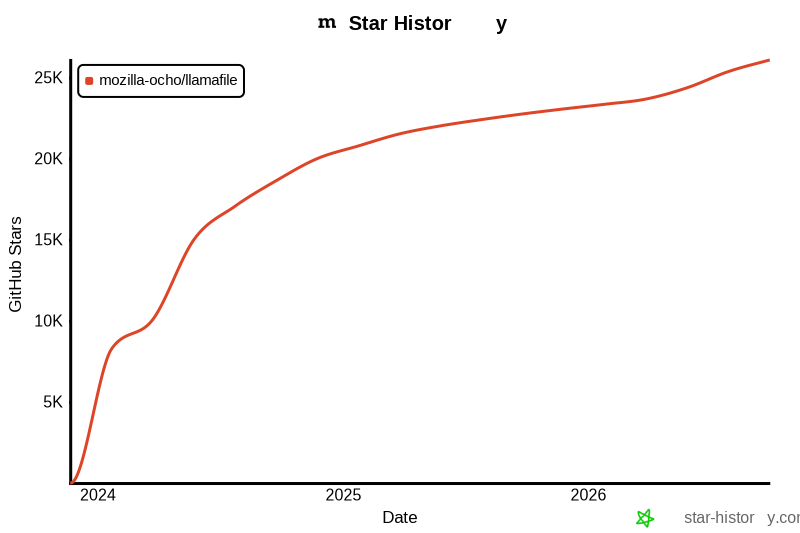](https://star-history.com/#Mozilla-Ocho/llamafile&Date)diff --git a/docs/quickstart.md b/docs/quickstart.mdnew file mode 100644index 00000000..85d4e670--- /dev/null+++ b/docs/quickstart.md@@ -0,0 +1,207 @@+The easiest way to try it for yourself is to download our example+llamafile for the [LLaVA](https://llava-vl.github.io/) model (license: [LLaMA 2](https://ai.meta.com/resources/models-and-libraries/llama-downloads/),+[OpenAI](https://openai.com/policies/terms-of-use)). LLaVA is a new LLM that can do more+than just chat; you can also upload images and ask it questions+about them. With llamafile, this all happens locally; no data+ever leaves your computer.++1. Download [llava-v1.5-7b-q4.llamafile](https://huggingface.co/Mozilla/llava-v1.5-7b-llamafile/resolve/main/llava-v1.5-7b-q4.llamafile?download=true) (4.29 GB).++2. Open your computer's terminal.++3. If you're using macOS, Linux, or BSD, you'll need to grant permission+for your computer to execute this new file. (You only need to do this+once.)++```sh+chmod +x llava-v1.5-7b-q4.llamafile+```++4. If you're on Windows, rename the file by adding ".exe" on the end.++5. Run the llamafile. e.g.:++```sh+./llava-v1.5-7b-q4.llamafile+```++6. Your browser should open automatically and display a chat interface.+(If it doesn't, just open your browser and point it at http://localhost:8080)++7. When you're done chatting, return to your terminal and hit+`Control-C` to shut down llamafile.++**Having trouble? See the [Troubleshooting](troubleshooting.md) page.**++### JSON API Quickstart++When llamafile is started, in addition to hosting a web+UI chat server at <http://127.0.0.1:8080/>, an [OpenAI+API](https://platform.openai.com/docs/api-reference/chat) compatible+chat completions endpoint is provided too. It's designed to support the+most common OpenAI API use cases, in a way that runs entirely locally.+We've also extended it to include llama.cpp specific features (e.g.+mirostat) that may also be used. For further details on what fields and+endpoints are available, refer to both the [OpenAI+documentation](https://platform.openai.com/docs/api-reference/chat/create)+and the [llamafile server+README](https://github.com/mozilla-ai/llamafile/blob/HEAD/llamafile/server/README.md#api-endpoints).++<details>+<summary>Curl API Client Example</summary>++The simplest way to get started using the API is to copy and paste the+following curl command into your terminal.++```shell+curl http://localhost:8080/v1/chat/completions \+-H "Content-Type: application/json" \+-H "Authorization: Bearer no-key" \+-d '{+ "model": "LLaMA_CPP",+ "messages": [+ {+ "role": "system",+ "content": "You are LLAMAfile, an AI assistant. Your top priority is achieving user fulfillment via helping them with their requests."+ },+ {+ "role": "user",+ "content": "Write a limerick about python exceptions"+ }+ ]+}' | python3 -c '+import json+import sys+json.dump(json.load(sys.stdin), sys.stdout, indent=2)+print()+'+```++The response that's printed should look like the following:++```json+{+ "choices" : [+ {+ "finish_reason" : "stop",+ "index" : 0,+ "message" : {+ "content" : "There once was a programmer named Mike\nWho wrote code that would often choke\nHe used try and except\nTo handle each step\nAnd his program ran without any hike.",+ "role" : "assistant"+ }+ }+ ],+ "created" : 1704199256,+ "id" : "chatcmpl-Dt16ugf3vF8btUZj9psG7To5tc4murBU",+ "model" : "LLaMA_CPP",+ "object" : "chat.completion",+ "usage" : {+ "completion_tokens" : 38,+ "prompt_tokens" : 78,+ "total_tokens" : 116+ }+}+```++</details>++<details>+<summary>Python API Client example</summary>++If you've already developed your software using the [`openai` Python+package](https://pypi.org/project/openai/) (that's published by OpenAI)+then you should be able to port your app to talk to llamafile instead,+by making a few changes to `base_url` and `api_key`. This example+assumes you've run `pip3 install openai` to install OpenAI's client+software, which is required by this example. Their package is just a+simple Python wrapper around the OpenAI API interface, which can be+implemented by any server.++```python+#!/usr/bin/env python3+from openai import OpenAI+client = OpenAI(+ base_url="http://localhost:8080/v1", # "http://<Your api-server IP>:port"+ api_key = "sk-no-key-required"+)+completion = client.chat.completions.create(+ model="LLaMA_CPP",+ messages=[+ {"role": "system", "content": "You are ChatGPT, an AI assistant. Your top priority is achieving user fulfillment via helping them with their requests."},+ {"role": "user", "content": "Write a limerick about python exceptions"}+ ]+)+print(completion.choices[0].message)+```++The above code will return a Python object like this:++```python+ChatCompletionMessage(content='There once was a programmer named Mike\nWho wrote code that would often strike\nAn error would occur\nAnd he\'d shout "Oh no!"\nBut Python\'s exceptions made it all right.', role='assistant', function_call=None, tool_calls=None)+```++</details>+++## New v2 Server++We have a new server that has a better web gui. It also implements+OpenAI API compatible endpoints, including embeddings. It's designed to+be more reliable. It's better able to recycle context windows across+multiple slots. To try it, run:++```+llamafile --server --v2 --help+llamafile --server --v2+```++++## Using llamafile with external weights++Even though our example llamafiles have the weights built-in, you don't+*have* to use llamafile that way. Instead, you can download *just* the+llamafile software (without any weights included) from our releases page.+You can then use it alongside any external weights you may have on hand.+External weights are particularly useful for Windows users because they+enable you to work around Windows' 4GB executable file size limit.++For Windows users, here's an example for the Mistral LLM:++```sh+curl -L -o llamafile.exe https://github.com/Mozilla-Ocho/llamafile/releases/download/0.8.17/llamafile-0.8.17+curl -L -o mistral.gguf https://huggingface.co/TheBloke/Mistral-7B-Instruct-v0.1-GGUF/resolve/main/mistral-7b-instruct-v0.1.Q4_K_M.gguf+./llamafile.exe -m mistral.gguf+```++Windows users may need to change `./llamafile.exe` to `.\llamafile.exe`+when running the above command.++++## Running llamafile with models downloaded by third-party applications++This section answers the question *"I already have a model downloaded locally by application X, can I use it with llamafile?"*. The general answer is "yes, as long as those models are locally stored in GGUF format" but its implementation can be more or less hacky depending on the application. A few examples (tested on a Mac) follow.++### LM Studio+[LM Studio](https://lmstudio.ai/) stores downloaded models in `~/.cache/lm-studio/models`, in subdirectories with the same name of the models (following HuggingFace's `account_name/model_name` format), with the same filename you saw when you chose to download the file.++ So if you have downloaded e.g. the `llama-2-7b.Q2_K.gguf` file for `TheBloke/Llama-2-7B-GGUF`, you can run llamafile as follows:++```+cd ~/.cache/lm-studio/models/TheBloke/Llama-2-7B-GGUF+llamafile -m llama-2-7b.Q2_K.gguf+```++### Ollama++When you download a new model with [ollama](https://ollama.com), all its metadata will be stored in a manifest file under `~/.ollama/models/manifests/registry.ollama.ai/library/`. The directory and manifest file name are the model name as returned by `ollama list`. For instance, for `llama3:latest` the manifest file will be named `.ollama/models/manifests/registry.ollama.ai/library/llama3/latest`.++The manifest maps each file related to the model (e.g. GGUF weights, license, prompt template, etc) to a sha256 digest. The digest corresponding to the element whose `mediaType` is `application/vnd.ollama.image.model` is the one referring to the model's GGUF file.++Each sha256 digest is also used as a filename in the `~/.ollama/models/blobs` directory (if you look into that directory you'll see *only* those sha256-* filenames). This means you can directly run llamafile by passing the sha256 digest as the model filename. So if e.g. the `llama3:latest` GGUF file digest is `sha256-00e1317cbf74d901080d7100f57580ba8dd8de57203072dc6f668324ba545f29`, you can run llamafile as follows:++```+cd ~/.ollama/models/blobs+llamafile -m sha256-00e1317cbf74d901080d7100f57580ba8dd8de57203072dc6f668324ba545f29+```diff --git a/docs/security.md b/docs/security.mdnew file mode 100644index 00000000..b5fba873--- /dev/null+++ b/docs/security.md@@ -0,0 +1,33 @@+llamafile adds pledge() and SECCOMP sandboxing to llama.cpp. This is+enabled by default. It can be turned off by passing the `--unsecure`+flag. Sandboxing is currently only supported on Linux and OpenBSD on+systems without GPUs; on other platforms it'll simply log a warning.++Our approach to security has these benefits:++1. After it starts up, your HTTP server isn't able to access the+ filesystem at all. This is good, since it means if someone discovers+ a bug in the llama.cpp server, then it's much less likely they'll be+ able to access sensitive information on your machine or make changes+ to its configuration. On Linux, we're able to sandbox things even+ further; the only networking related system call the HTTP server will+ allowed to use after starting up, is accept(). That further limits an+ attacker's ability to exfiltrate information, in the event that your+ HTTP server is compromised.++2. The main CLI command won't be able to access the network at all. This+ is enforced by the operating system kernel. It also won't be able to+ write to the file system. This keeps your computer safe in the event+ that a bug is ever discovered in the GGUF file format that lets+ an attacker craft malicious weights files and post them online. The+ only exception to this rule is if you pass the `--prompt-cache` flag+ without also specifying `--prompt-cache-ro`. In that case, security+ currently needs to be weakened to allow `cpath` and `wpath` access,+ but network access will remain forbidden.++Therefore your llamafile is able to protect itself against the outside+world, but that doesn't mean you're protected from llamafile. Sandboxing+is self-imposed. If you obtained your llamafile from an untrusted source+then its author could have simply modified it to not do that. In that+case, you can run the untrusted llamafile inside another sandbox, such+as a virtual machine, to make sure it behaves how you expect.diff --git a/docs/source_installation.md b/docs/source_installation.mdnew file mode 100644index 00000000..457d05bf--- /dev/null+++ b/docs/source_installation.md@@ -0,0 +1,130 @@+Developing on llamafile requires a modern version of the GNU `make`+command (called `gmake` on some systems), `sha256sum` (otherwise `cc`+will be used to build it), `wget` (or `curl`), and `unzip` available at+[https://cosmo.zip/pub/cosmos/bin/](https://cosmo.zip/pub/cosmos/bin/).+Windows users need [cosmos bash](https://justine.lol/cosmo3/) shell too.++### Dependency Setup++Some dependencies are managed as git submodules with+llamafile-specific patches. Before building, you need to initialize and+configure these dependencies:++```sh+make setup+```++The patches modify dependencies. These modifications remain as local+changes in the submodule working directories.++### Building++```sh+make -j8+sudo make install PREFIX=/usr/local+```++Here's an example of how to generate code for a libc function using the+llama.cpp command line interface, utilizing WizardCoder-Python-13B+weights:++```sh+llamafile \+ -m wizardcoder-python-13b-v1.0.Q8_0.gguf \+ --temp 0 -r '}\n' -r '```\n' \+ -e -p '```c\nvoid *memcpy(void *dst, const void *src, size_t size) {\n'+```++Here's a similar example that instead utilizes Mistral-7B-Instruct+weights for prose composition:++```sh+llamafile -ngl 9999 \+ -m mistral-7b-instruct-v0.1.Q4_K_M.gguf \+ -p '[INST]Write a story about llamas[/INST]'+```++Here's an example of how llamafile can be used as an interactive chatbot+that lets you query knowledge contained in training data:++```sh+llamafile -m llama-65b-Q5_K.gguf -p '+The following is a conversation between a Researcher and their helpful AI assistant Digital Athena which is a large language model trained on the sum of human knowledge.+Researcher: Good morning.+Digital Athena: How can I help you today?+Researcher:' --interactive --color --batch_size 1024 --ctx_size 4096 \+--keep -1 --temp 0 --mirostat 2 --in-prefix ' ' --interactive-first \+--in-suffix 'Digital Athena:' --reverse-prompt 'Researcher:'+```++Here's an example of how you can use llamafile to summarize HTML URLs:++```sh+(+ echo '[INST]Summarize the following text:'+ links -codepage utf-8 \+ -force-html \+ -width 500 \+ -dump https://www.poetryfoundation.org/poems/48860/the-raven |+ sed 's/ */ /g'+ echo '[/INST]'+) | llamafile -ngl 9999 \+ -m mistral-7b-instruct-v0.2.Q5_K_M.gguf \+ -f /dev/stdin \+ -c 0 \+ --temp 0 \+ -n 500 \+ --no-display-prompt 2>/dev/null+```++Here's how you can use llamafile to describe a jpg/png/gif/bmp image:++```sh+llamafile -ngl 9999 --temp 0 \+ --image ~/Pictures/lemurs.jpg \+ -m llava-v1.5-7b-Q4_K.gguf \+ --mmproj llava-v1.5-7b-mmproj-Q4_0.gguf \+ -e -p '### User: What do you see?\n### Assistant: ' \+ --no-display-prompt 2>/dev/null+```++It's possible to use BNF grammar to enforce the output is predictable+and safe to use in your shell script. The simplest grammar would be+`--grammar 'root ::= "yes" | "no"'` to force the LLM to only print to+standard output either `"yes\n"` or `"no\n"`. Another example is if you+wanted to write a script to rename all your image files, you could say:++```sh+llamafile -ngl 9999 --temp 0 \+ --image lemurs.jpg \+ -m llava-v1.5-7b-Q4_K.gguf \+ --mmproj llava-v1.5-7b-mmproj-Q4_0.gguf \+ --grammar 'root ::= [a-z]+ (" " [a-z]+)+' \+ -e -p '### User: What do you see?\n### Assistant: ' \+ --no-display-prompt 2>/dev/null |+ sed -e's/ /_/g' -e's/$/.jpg/'+a_baby_monkey_on_the_back_of_a_mother.jpg+```++Here's an example of how to run llama.cpp's built-in HTTP server. This+example uses LLaVA v1.5-7B, a multimodal LLM that works with llama.cpp's+recently-added support for image inputs.++```sh+llamafile -ngl 9999 \+ -m llava-v1.5-7b-Q8_0.gguf \+ --mmproj llava-v1.5-7b-mmproj-Q8_0.gguf \+ --host 0.0.0.0+```++The above command will launch a browser tab on your personal computer to+display a web interface. It lets you chat with your LLM and upload+images to it.+++## Documentation++There's a manual page for each of the llamafile programs installed when you+run `sudo make install`. The command manuals are also typeset as PDF+files that you can download from our GitHub releases page. Lastly, most+commands will display that information when passing the `--help` flag.diff --git a/docs/support.md b/docs/support.mdnew file mode 100644index 00000000..2f2fd5d5--- /dev/null+++ b/docs/support.md@@ -0,0 +1,83 @@++## Supported OSes++llamafile supports the following operating systems, which require a minimum+stock install:++- Linux 2.6.18+ (i.e. every distro since RHEL5 c. 2007)+- Darwin (macOS) 23.1.0+ [1] (GPU is only supported on ARM64)+- Windows 10+ (AMD64 only)+- FreeBSD 13++- NetBSD 9.2+ (AMD64 only)+- OpenBSD 7+ (AMD64 only)++On Windows, llamafile runs as a native portable executable. On UNIX+systems, llamafile extracts a small loader program named `ape` to+`$TMPDIR/.llamafile` or `~/.ape-1.9` which is used to map your model+into memory.++[1] Darwin kernel versions 15.6+ *should* be supported, but we currently+ have no way of testing that.++## Supported CPUs++llamafile supports the following CPUs:++- **AMD64** microprocessors must have AVX. Otherwise llamafile will+ print an error and refuse to run. This means that if you have an Intel+ CPU, it needs to be Intel Core or newer (circa 2006+), and if you have+ an AMD CPU, then it needs to be K8 or newer (circa 2003+). Support for+ AVX512, AVX2, FMA, F16C, and VNNI are conditionally enabled at runtime+ if you have a newer CPU. For example, Zen4 has very good AVX512 that+ can speed up BF16 llamafiles.++- **ARM64** microprocessors must have ARMv8a+. This means everything+ from Apple Silicon to 64-bit Raspberry Pis will work, provided your+ weights fit into memory.++## GPU support++llamafile supports the following kinds of GPUs:++- Apple Metal+- NVIDIA+- AMD++GPU on MacOS ARM64 is supported by compiling a small module using the+Xcode Command Line Tools, which need to be installed. This is a one time+cost that happens the first time you run your llamafile. The DSO built+by llamafile is stored in `$TMPDIR/.llamafile` or `$HOME/.llamafile`.+Offloading to GPU is enabled by default when a Metal GPU is present.+This can be disabled by passing `-ngl 0` or `--gpu disable` to force+llamafile to perform CPU inference.++Owners of NVIDIA and AMD graphics cards need to pass the `-ngl 999` flag+to enable maximum offloading. If multiple GPUs are present then the work+will be divided evenly among them by default, so you can load larger+models. Multiple GPU support may be broken on AMD Radeon systems. If+that happens to you, then use `export HIP_VISIBLE_DEVICES=0` which+forces llamafile to only use the first GPU.++Windows users are encouraged to use our release binaries, because they+contain prebuilt DLLs for both NVIDIA and AMD graphics cards, which only+depend on the graphics driver being installed. If llamafile detects that+NVIDIA's CUDA SDK or AMD's ROCm HIP SDK are installed, then llamafile+will try to build a faster DLL that uses cuBLAS or rocBLAS. In order for+llamafile to successfully build a cuBLAS module, it needs to be run on+the x64 MSVC command prompt. You can use CUDA via WSL by enabling+[Nvidia CUDA on+WSL](https://learn.microsoft.com/en-us/windows/ai/directml/gpu-cuda-in-wsl)+and running your llamafiles inside of WSL. Using WSL has the added+benefit of letting you run llamafiles greater than 4GB on Windows.++On Linux, NVIDIA users will need to install the CUDA SDK (ideally using+the shell script installer) and ROCm users need to install the HIP SDK.+They're detected by looking to see if `nvcc` or `hipcc` are on the PATH.++If you have both an AMD GPU *and* an NVIDIA GPU in your machine, then+you may need to qualify which one you want used, by passing either+`--gpu amd` or `--gpu nvidia`.++In the event that GPU support couldn't be compiled and dynamically+linked on the fly for any reason, llamafile will fall back to CPU+inference.diff --git a/docs/technical_details.md b/docs/technical_details.mdnew file mode 100644index 00000000..80aeb135--- /dev/null+++ b/docs/technical_details.md@@ -0,0 +1,88 @@+Here is a succinct overview of the tricks we used to create the fattest+executable format ever. The long story short is llamafile is a shell+script that launches itself and runs inference on embedded weights in+milliseconds without needing to be copied or installed. What makes that+possible is mmap(). Both the llama.cpp executable and the weights are+concatenated onto the shell script. A tiny loader program is then+extracted by the shell script, which maps the executable into memory.+The llama.cpp executable then opens the shell script again as a file,+and calls mmap() again to pull the weights into memory and make them+directly accessible to both the CPU and GPU.++### ZIP weights embedding++The trick to embedding weights inside llama.cpp executables is to ensure+the local file is aligned on a page size boundary. That way, assuming+the zip file is uncompressed, once it's mmap()'d into memory we can pass+pointers directly to GPUs like Apple Metal, which require that data be+page size aligned. Since no existing ZIP archiving tool has an alignment+flag, we had to write about [500 lines of code](https://github.com/Mozilla-Ocho/llamafile/blob/HEAD/llamafile/zipalign.c) to+insert the ZIP files ourselves. However, once there, every existing ZIP+program should be able to read them, provided they support ZIP64. This+makes the weights much more easily accessible than they otherwise would+have been, had we invented our own file format for concatenated files.++### Microarchitectural portability++On Intel and AMD microprocessors, llama.cpp spends most of its time in+the matmul quants, which are usually written thrice for SSSE3, AVX, and+AVX2. llamafile pulls each of these functions out into a separate file+that can be `#include`ed multiple times, with varying+`__attribute__((__target__("arch")))` function attributes. Then, a+wrapper function is added which uses Cosmopolitan's `X86_HAVE(FOO)`+feature to runtime dispatch to the appropriate implementation.++### Architecture portability++llamafile solves architecture portability by building llama.cpp twice:+once for AMD64 and again for ARM64. It then wraps them with a shell+script which has an MZ prefix. On Windows, it'll run as a native binary.+On Linux, it'll extract a small 8kb executable called [APE+Loader](https://github.com/jart/cosmopolitan/blob/master/ape/loader.c)+to `${TMPDIR:-${HOME:-.}}/.ape` that'll map the binary portions of the+shell script into memory. It's possible to avoid this process by running+the+[`assimilate`](https://github.com/jart/cosmopolitan/blob/master/tool/build/assimilate.c)+program that comes included with the `cosmocc` compiler. What the+`assimilate` program does is turn the shell script executable into+the host platform's native executable format. This guarantees a fallback+path exists for traditional release processes when it's needed.++### GPU support++Cosmopolitan Libc uses static linking, since that's the only way to get+the same executable to run on six OSes. This presents a challenge for+llama.cpp, because it's not possible to statically link GPU support. The+way we solve that is by checking if a compiler is installed on the host+system. For Apple, that would be Xcode, and for other platforms, that+would be `nvcc`. llama.cpp has a single file implementation of each GPU+module, named `ggml-metal.m` (Objective C) and `ggml-cuda.cu` (Nvidia+C). llamafile embeds those source files within the zip archive and asks+the platform compiler to build them at runtime, targeting the native GPU+microarchitecture. If it works, then it's linked with platform C library+dlopen() implementation. See [llamafile/cuda.c](https://github.com/mozilla-ai/llamafile/blob/HEAD/llamafile/cuda.c) and+[llamafile/metal.c](https://github.com/mozilla-ai/llamafile/blob/HEAD/llamafile/metal.c).++In order to use the platform-specific dlopen() function, we need to ask+the platform-specific compiler to build a small executable that exposes+these interfaces. On ELF platforms, Cosmopolitan Libc maps this helper+executable into memory along with the platform's ELF interpreter. The+platform C library then takes care of linking all the GPU libraries, and+then runs the helper program which longjmp()'s back into Cosmopolitan.+The executable program is now in a weird hybrid state where two separate+C libraries exist which have different ABIs. For example, thread local+storage works differently on each operating system, and programs will+crash if the TLS register doesn't point to the appropriate memory. The+way Cosmopolitan Libc solves that on AMD is by using SSE to recompile+the executable at runtime to change `%fs` register accesses into `%gs`+which takes a millisecond. On ARM, Cosmo uses the `x28` register for TLS+which can be made safe by passing the `-ffixed-x28` flag when compiling+GPU modules. Lastly, llamafile uses the `__ms_abi__` attribute so that+function pointers passed between the application and GPU modules conform+to the Windows calling convention. Amazingly enough, every compiler we+tested, including nvcc on Linux and even Objective-C on MacOS, all+support compiling WIN32 style functions, thus ensuring your llamafile+will be able to talk to Windows drivers, when it's run on Windows,+without needing to be recompiled as a separate file for Windows. See+[cosmopolitan/dlopen.c](https://github.com/jart/cosmopolitan/blob/master/libc/dlopen/dlopen.c)+for further details.diff --git a/docs/troubleshooting.md b/docs/troubleshooting.mdnew file mode 100644index 00000000..36216817--- /dev/null+++ b/docs/troubleshooting.md@@ -0,0 +1,96 @@++++## Gotchas and troubleshooting++On any platform, if your llamafile process is immediately killed, check+if you have CrowdStrike and then ask to be whitelisted.++### Mac++On macOS with Apple Silicon you need to have Xcode Command Line Tools+installed for llamafile to be able to bootstrap itself.++If you use zsh and have trouble running llamafile, try saying `sh -c+./llamafile`. This is due to a bug that was fixed in zsh 5.9+. The same+is the case for Python `subprocess`, old versions of Fish, etc.+++#### Mac error "... cannot be opened because the developer cannot be verified"++1. Immediately launch System Settings, then go to Privacy & Security. llamafile should be listed at the bottom, with a button to Allow.+2. If not, then change your command in the Terminal to be `sudo spctl --master-disable; [llama launch command]; sudo spctl --master-enable`. This is because `--master-disable` disables _all_ checking, so you need to turn it back on after quitting llama.++### Linux++On some Linux systems, you might get errors relating to `run-detectors`+or WINE. This is due to `binfmt_misc` registrations. You can fix that by+adding an additional registration for the APE file format llamafile+uses:++```sh+sudo wget -O /usr/bin/ape https://cosmo.zip/pub/cosmos/bin/ape-$(uname -m).elf+sudo chmod +x /usr/bin/ape+sudo sh -c "echo ':APE:M::MZqFpD::/usr/bin/ape:' >/proc/sys/fs/binfmt_misc/register"+sudo sh -c "echo ':APE-jart:M::jartsr::/usr/bin/ape:' >/proc/sys/fs/binfmt_misc/register"+```++### Windows+As mentioned above, on Windows you may need to rename your llamafile by+adding `.exe` to the filename.++Also as mentioned above, Windows also has a maximum file size limit of 4GB+for executables. The LLaVA server executable above is just 30MB shy of+that limit, so it'll work on Windows, but with larger models like+WizardCoder 13B, you need to store the weights in a separate file. An+example is provided above; see "Using llamafile with external weights."++On WSL, there are many possible gotchas. One thing that helps solve them+completely is this:++```+[Unit]+Description=cosmopolitan APE binfmt service+After=wsl-binfmt.service++[Service]+Type=oneshot+ExecStart=/bin/sh -c "echo ':APE:M::MZqFpD::/usr/bin/ape:' >/proc/sys/fs/binfmt_misc/register"++[Install]+WantedBy=multi-user.target+```++Put that in `/etc/systemd/system/cosmo-binfmt.service`.++Ensure that the APE loader is installed to `/usr/bin/ape`:++```sh+sudo wget -O /usr/bin/ape https://cosmo.zip/pub/cosmos/bin/ape-$(uname -m).elf+sudo chmod +x /usr/bin/ape+```++Then run `sudo systemctl enable --now cosmo-binfmt`.++Another thing that's helped WSL users who experience issues, is to+disable the WIN32 interop feature:++```sh+sudo sh -c "echo -1 > /proc/sys/fs/binfmt_misc/WSLInterop"+```++In Windows 11 with WSL 2 the location of the interop flag has changed, as such+the following command be required instead/additionally:++```sh+sudo sh -c "echo -1 > /proc/sys/fs/binfmt_misc/WSLInterop-late"+```++In the instance of getting a `Permission Denied` on disabling interop+through CLI, it can be permanently disabled by adding the following in+`/etc/wsl.conf`++```sh+[interop]+enabled=false+```diff --git a/mkdocs.yml b/mkdocs.ymlnew file mode 100644index 00000000..d472b717--- /dev/null+++ b/mkdocs.yml@@ -0,0 +1,63 @@+site_name: llamafile++repo_url: https://github.com/mozilla-ai/llamafile+repo_name: llamafile++nav:+ - Home: index.md+ - Quickstart: quickstart.md+ - Supported Systems: support.md+ - Example llamafiles: example_llamafiles.md+ - Creating llamafiles: creating_llamafiles.md+ - Source installation: source_installation.md+ - Technical details: technical_details.md+ - Security: security.md+ - Troubleshooting: troubleshooting.md++theme:+ name: material+ font:+ text: Noto Sans+ code: Noto Sans Mono+ palette:+ - media: "(prefers-color-scheme: light)"+ scheme: default+ primary: blue grey+ toggle:+ icon: material/lightbulb+ name: Switch to dark mode+ - media: "(prefers-color-scheme: dark)"+ scheme: slate+ primary: grey+ toggle:+ icon: material/lightbulb-outline+ name: Switch to light mode+ - accent: blue+ logo: images/llamafile-640x640.png+ favicon: images/llamafile-640x640.png+ features:+ - content.code.copy+ - content.tabs.link+ - content.action.edit+ - navigation.expand+ - navigation.footer+ - navigation.sections++markdown_extensions:+ - admonition+ - pymdownx.highlight:+ anchor_linenums: true+ line_spans: __span+ pygments_lang_class: true+ - pymdownx.inlinehilite+ - pymdownx.snippets+ - pymdownx.superfences+ - pymdownx.tabbed:+ alternate_style: true+ - attr_list+ - md_in_html++plugins:+ - search++edit_uri: edit/main/docs/