
The Memory Layer for AI Agents - Drop-in memory infrastructure for AI agents and apps. Context that persists. Built for production.
Python agentic-memoryagentic-memory-systemagentsaiai-agentschatgptgenaillmlong-term-memorymemorymemory-managementpythonragstate-management
Improve getting started page by adding steps (#904)
Sidharth Mohanty23c912f2b7f2
diff --git a/docs/rest-api/create.mdx b/docs/rest-api/create.mdxindex 113b7678e..5099468d4 100644--- a/docs/rest-api/create.mdx+++ b/docs/rest-api/create.mdx@@ -6,7 +6,7 @@ openapi: post /create```bash Requestcurl --request POST \- --url http://localhost:8080/create \+ --url http://localhost:8080/create?app_id=app1 \-F "config=@/path/to/config.yaml"```@@ -15,7 +15,81 @@ curl --request POST \<ResponseExample>```json Response-{ "response": "App created successfully. App ID: {app_id}" }+{ "response": "App created successfully. App ID: app1" }```</ResponseExample>++By default we will use the opensource **gpt4all** model to get started. You can also specify your own config by uploading a config YAML file.++For example, create a `config.yaml` file (adjust according to your requirements):++```yaml+app:+ config:+ id: "default-app"++llm:+ provider: openai+ config:+ model: "gpt-3.5-turbo"+ temperature: 0.5+ max_tokens: 1000+ top_p: 1+ stream: false+ template: |+ Use the following pieces of context to answer the query at the end.+ If you don't know the answer, just say that you don't know, don't try to make up an answer.++ $context++ Query: $query++ Helpful Answer:++vectordb:+ provider: chroma+ config:+ collection_name: "rest-api-app"+ dir: db+ allow_reset: true++embedder:+ provider: openai+ config:+ model: "text-embedding-ada-002"+```++To learn more about custom configurations, check out the [custom configurations docs](https://docs.embedchain.ai/advanced/configuration). To explore more examples of config yamls for embedchain, visit [embedchain/configs](https://github.com/embedchain/embedchain/tree/main/configs).++Now, you can upload this config file in the request body.++For example,++```bash Request+curl --request POST \+ --url http://localhost:8080/create?app_id=my-app \+ -F "config=@/path/to/config.yaml"+```++**Note:** To use custom models, an **API key** might be required. Refer to the table below to determine the necessary API key for your provider.++| Keys | Providers |+| -------------------------- | ------------------------------ |+| `OPENAI_API_KEY ` | OpenAI, Azure OpenAI, Jina etc |+| `OPENAI_API_TYPE` | Azure OpenAI |+| `OPENAI_API_BASE` | Azure OpenAI |+| `OPENAI_API_VERSION` | Azure OpenAI |+| `COHERE_API_KEY` | Cohere |+| `ANTHROPIC_API_KEY` | Anthropic |+| `JINACHAT_API_KEY` | Jina |+| `HUGGINGFACE_ACCESS_TOKEN` | Huggingface |+| `REPLICATE_API_TOKEN` | LLAMA2 |++To add env variables, you can simply run the docker command with the `-e` flag.++For example,++```bash+docker run --name embedchain -p 8080:8080 -e OPENAI_API_KEY=<YOUR_OPENAI_API_KEY> embedchain/rest-api:latest+```\ No newline at end of filediff --git a/docs/rest-api/getting-started.mdx b/docs/rest-api/getting-started.mdxindex dff245e68..5501792b6 100644--- a/docs/rest-api/getting-started.mdx+++ b/docs/rest-api/getting-started.mdx@@ -14,73 +14,280 @@ Navigate to [http://localhost:8080/docs](http://localhost:8080/docs) to interact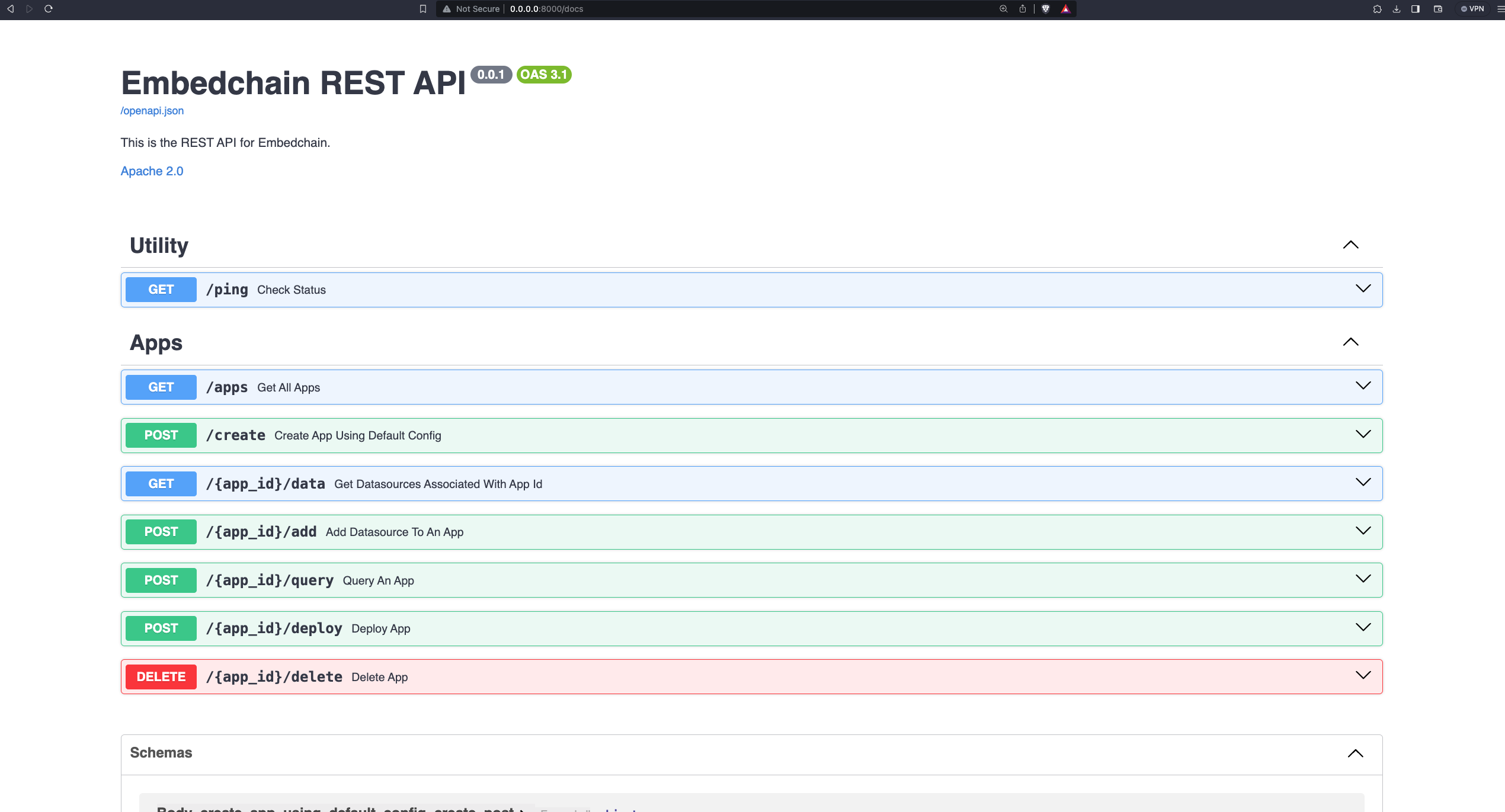-## Creating your first App--App requires an `app_id` to be created. The `app_id` is a unique identifier for your app. By default we will use the opensource **gpt4all** model to get started. You can also specify your own config by uploading a config YAML file.--For example, create a `config.yaml` file (adjust according to your requirements):--```yaml-app:- config:- id: "default-app"--llm:- provider: openai- config:- model: "gpt-3.5-turbo"- temperature: 0.5- max_tokens: 1000- top_p: 1- stream: false- template: |- Use the following pieces of context to answer the query at the end.- If you don't know the answer, just say that you don't know, don't try to make up an answer.-- $context-- Query: $query-- Helpful Answer:--vectordb:- provider: chroma- config:- collection_name: "rest-api-app"- dir: db- allow_reset: true--embedder:- provider: openai- config:- model: "text-embedding-ada-002"-```+## ⚡ Steps to get started-To learn more about custom configurations, check out the [custom configurations docs](https://docs.embedchain.ai/advanced/configuration). To explore more examples of config yamls for embedchain, visit [embedchain/configs](https://github.com/embedchain/embedchain/tree/main/configs).+<Steps>+ <Step title="⚙️ Create an app">+ <Tabs>+ <Tab title="cURL">+ ```bash+ curl --request POST "http://localhost:8080/create?app_id=my-app" \+ -H "accept: application/json"+ ```+ </Tab>+ <Tab title="python">+ ```python+ import requests-Now, you can upload this config file in the request body.+ url = "http://localhost:8080/create?app_id=my-app"-**Note:** To use custom models, an **API key** might be required. Refer to the table below to determine the necessary API key for your provider.+ payload={}-| Keys | Providers |-| -------------------------- | ------------------------------ |-| `OPENAI_API_KEY ` | OpenAI, Azure OpenAI, Jina etc |-| `OPENAI_API_TYPE` | Azure OpenAI |-| `OPENAI_API_BASE` | Azure OpenAI |-| `OPENAI_API_VERSION` | Azure OpenAI |-| `COHERE_API_KEY` | Cohere |-| `ANTHROPIC_API_KEY` | Anthropic |-| `JINACHAT_API_KEY` | Jina |-| `HUGGINGFACE_ACCESS_TOKEN` | Huggingface |-| `REPLICATE_API_TOKEN` | LLAMA2 |+ response = requests.request("POST", url, data=payload)-To add env variables, you can simply run the docker command with the `-e` flag.+ print(response)+ ```+ </Tab>+ <Tab title="javascript">+ ```javascript+ const data = fetch("http://localhost:8080/create?app_id=my-app", {+ method: "POST",+ }).then((res) => res.json());-For example,+ console.log(data);+ ```+ </Tab>+ <Tab title="go">+ ```go+ package main-```bash-docker run --name embedchain -p 8080:8080 -e OPENAI_API_KEY=<YOUR_OPENAI_API_KEY> embedchain/rest-api:latest-```+ import (+ "fmt"+ "net/http"+ "io/ioutil"+ )++ func main() {++ url := "http://localhost:8080/create?app_id=my-app"++ payload := strings.NewReader("")++ req, _ := http.NewRequest("POST", url, payload)++ req.Header.Add("Content-Type", "application/json")++ res, _ := http.DefaultClient.Do(req)++ defer res.Body.Close()+ body, _ := ioutil.ReadAll(res.Body)++ fmt.Println(res)+ fmt.Println(string(body))++ }+ ```+ </Tab>+ </Tabs>++ </Step>+ <Step title="🗃️ Add data sources">+ <Tabs>+ <Tab title="cURL">+ ```bash+ curl --request POST \+ --url http://localhost:8080/my-app/add \+ -d "source=https://www.forbes.com/profile/elon-musk" \+ -d "data_type=web_page"+ ```+ </Tab>+ <Tab title="python">+ ```python+ import requests++ url = "http://localhost:8080/my-app/add"++ payload = "source=https://www.forbes.com/profile/elon-musk&data_type=web_page"+ headers = {}++ response = requests.request("POST", url, headers=headers, data=payload)++ print(response)+ ```+ </Tab>+ <Tab title="javascript">+ ```javascript+ const data = fetch("http://localhost:8080/my-app/add", {+ method: "POST",+ body: "source=https://www.forbes.com/profile/elon-musk&data_type=web_page",+ }).then((res) => res.json());++ console.log(data);+ ```+ </Tab>+ <Tab title="go">+ ```go+ package main++ import (+ "fmt"+ "strings"+ "net/http"+ "io/ioutil"+ )++ func main() {++ url := "http://localhost:8080/my-app/add"++ payload := strings.NewReader("source=https://www.forbes.com/profile/elon-musk&data_type=web_page")++ req, _ := http.NewRequest("POST", url, payload)++ req.Header.Add("Content-Type", "application/x-www-form-urlencoded")++ res, _ := http.DefaultClient.Do(req)++ defer res.Body.Close()+ body, _ := ioutil.ReadAll(res.Body)++ fmt.Println(res)+ fmt.Println(string(body))++ }+ ```+ </Tab>+ </Tabs>++ </Step>+ <Step title="💬 Query on your data">+ <Tabs>+ <Tab title="cURL">+ ```bash+ curl --request POST \+ --url http://localhost:8080/my-app/query \+ -d "query=Who is Elon Musk?"+ ```+ </Tab>+ <Tab title="python">+ ```python+ import requests++ url = "http://localhost:8080/my-app/query"++ payload = "query=Who is Elon Musk?"+ headers = {}++ response = requests.request("POST", url, headers=headers, data=payload)++ print(response)+ ```+ </Tab>+ <Tab title="javascript">+ ```javascript+ const data = fetch("http://localhost:8080/my-app/query", {+ method: "POST",+ body: "query=Who is Elon Musk?",+ }).then((res) => res.json());++ console.log(data);+ ```+ </Tab>+ <Tab title="go">+ ```go+ package main++ import (+ "fmt"+ "strings"+ "net/http"+ "io/ioutil"+ )++ func main() {++ url := "http://localhost:8080/my-app/query"++ payload := strings.NewReader("query=Who is Elon Musk?")++ req, _ := http.NewRequest("POST", url, payload)++ req.Header.Add("Content-Type", "application/x-www-form-urlencoded")++ res, _ := http.DefaultClient.Do(req)++ defer res.Body.Close()+ body, _ := ioutil.ReadAll(res.Body)++ fmt.Println(res)+ fmt.Println(string(body))++ }+ ```+ </Tab>+ </Tabs>++ </Step>+ <Step title="🚀 (Optional) Deploy your app to Embedchain Platform">+ <Tabs>+ <Tab title="cURL">+ ```bash+ curl --request POST \+ --url http://localhost:8080/my-app/deploy \+ -d "api_key=ec-xxxx"+ ```+ </Tab>+ <Tab title="python">+ ```python+ import requests++ url = "http://localhost:8080/my-app/deploy"++ payload = "api_key=ec-xxxx"++ response = requests.request("POST", url, data=payload)++ print(response)+ ```+ </Tab>+ <Tab title="javascript">+ ```javascript+ const data = fetch("http://localhost:8080/my-app/deploy", {+ method: "POST",+ body: "api_key=ec-xxxx",+ }).then((res) => res.json());++ console.log(data);+ ```+ </Tab>+ <Tab title="go">+ ```go+ package main++ import (+ "fmt"+ "strings"+ "net/http"+ "io/ioutil"+ )++ func main() {++ url := "http://localhost:8080/my-app/deploy"++ payload := strings.NewReader("api_key=ec-xxxx")++ req, _ := http.NewRequest("POST", url, payload)++ req.Header.Add("Content-Type", "application/x-www-form-urlencoded")++ res, _ := http.DefaultClient.Do(req)++ defer res.Body.Close()+ body, _ := ioutil.ReadAll(res.Body)++ fmt.Println(res)+ fmt.Println(string(body))++ }+ ```+ </Tab>+ </Tabs>++ </Step>+</Steps>++And you're ready! 🎉If you run into issues, please feel free to contact us using below links: