
A modern and elegant dashboard for network traffic visualization and analysis.
feat: Add English README and update the main README for language selection.
luolei3151c9a44779
diff --git a/README.en.md b/README.en.mdnew file mode 100644index 0000000..ad1dbe7--- /dev/null+++ b/README.en.md@@ -0,0 +1,278 @@+# <h1 align="center">++ <img src="./assets/icon-clash-master.png" width="100" alt="Clash Master Logo" style="margin-bottom: 16px;">+ <br>+ Clash Master+</h1>++<p align="center">+ <b>A more beautiful and modern web application that lets you visualize and manage your Clash network traffic</b><br>+ <span>Real-time Monitoring · Multi-dimensional Analysis · Multi-Backend Management</span>+</p>++<p align="center">+ <a href="https://github.com/foru17/clash-master/stargazers"><img src="https://img.shields.io/github/stars/foru17/clash-master?style=flat-square&color=yellow" alt="Stars"></a>+ <a href="https://github.com/foru17/clash-master/releases"><img src="https://img.shields.io/github/v/release/foru17/clash-master?style=flat-square&color=blue" alt="Release"></a>+ <a href="https://github.com/foru17/clash-master/blob/main/LICENSE"><img src="https://img.shields.io/github/license/foru17/clash-master?style=flat-square&color=green" alt="License"></a>+ <img src="https://img.shields.io/badge/Docker-Ready-2496ED?style=flat-square&logo=docker" alt="Docker">+ <img src="https://img.shields.io/badge/Node.js-22-339933?style=flat-square&logo=node.js" alt="Node.js">+</p>++<p align="center">+ <a href="./README.md">简体中文</a> •+ <b>English</b>+</p>++++## 🤔 Preface++From concept to this complete version, this project took only **4 hours**. The core MVP was completed in just **1 hour** ([Tweet](https://x.com/luoleiorg/status/2019418455276204185)).++Thanks to [@Kai](https://x.com/real_kai42) for providing [Kimi Code](https://www.kimi.com/code/console) Allegretto subscription support.++Throughout the entire development process, I didn't write a single line of code myself (didn't even open an IDE) — all handed over to [Kimi K2.5](https://www.kimi.com/code/console). As a veteran of Vibe Coding, this experience with Kimi still surprised me: **no usage limits, no Token anxiety**. Made-in-China AI, the future is promising.++## 📋 Table of Contents++- [](#)+ - [🤔 Preface](#-preface)+ - [📋 Table of Contents](#-table-of-contents)+ - [✨ Features](#-features)+ - [🚀 Quick Start](#-quick-start)+ - [Option 1: Docker Compose (Recommended)](#option-1-docker-compose-recommended)+ - [Option 2: Docker Run](#option-2-docker-run)+ - [Option 3: Source Code](#option-3-source-code)+ - [📖 First Use](#-first-use)+ - [🐳 Docker Configuration](#-docker-configuration)+ - [Ports](#ports)+ - [Data Persistence](#data-persistence)+ - [Custom Ports](#custom-ports)+ - [Update to Latest](#update-to-latest)+ - [📁 Project Structure](#-project-structure)+ - [🔧 FAQ](#-faq)+ - [🛠️ Tech Stack](#️-tech-stack)+ - [🤝 Contributing](#-contributing)+ - [📄 License](#-license)+ - [⭐ Star History](#-star-history)++## ✨ Features++| Feature | Description |+| ------- | ----------- |+| 📊 **Real-time Monitoring** | WebSocket real-time collection with millisecond latency |+| 📈 **Trend Analysis** | Multi-dimensional traffic trends: 30min / 1h / 24h |+| 🌐 **Domain Analysis** | View traffic, associated IPs, and connection count per domain |+| 🗺️ **IP Analysis** | ASN, geo-location, and associated domain display |+| 🚀 **Proxy Statistics** | Traffic distribution and connection count per proxy node |+| 🌙 **Dark Mode** | Light / Dark / System theme support |+| 🌍 **i18n Support** | English / Chinese seamless switching |+| 🔄 **Multi-Backend** | Monitor multiple OpenClash backend instances simultaneously |++## 🚀 Quick Start++### Option 1: Docker Compose (Recommended)++```bash+# 1. Clone the repository+git clone https://github.com/foru17/clash-master.git+cd clash-master++# 2. Build and start services+docker compose up -d --build++# 3. Open http://localhost:3000 to configure+```++### Option 2: Docker Run++```bash+# 1. Clone the repository+git clone https://github.com/foru17/clash-master.git+cd clash-master++# 2. Build the image+docker build -t clash-master:latest .++# 3. Create data directory and run container+mkdir -p clash-master-data+docker run -d \+ --name clash-master \+ -p 3000:3000 \+ -p 3001:3001 \+ -p 3002:3002 \+ -v $(pwd)/clash-master-data:/app/data \+ --restart unless-stopped \+ clash-master:latest++# 4. Open http://localhost:3000 to configure+```++> 💡 **Note**: Images will soon be published to GHCR, then you can use `ghcr.io/foru17/clash-master:latest` directly.++### Option 3: Source Code++```bash+# 1. Clone the repository+git clone https://github.com/foru17/clash-master.git+cd clash-master++# 2. Install dependencies+pnpm install++# 3. Start services+./start.sh++# 4. Open http://localhost:3000 to configure+```++## 📖 First Use++1. Open <http://localhost:3000>+2. The **Backend Configuration** dialog will appear on first visit+3. Fill in your OpenClash connection info:+ - **Name**: Custom name (e.g., "Home")+ - **Host**: OpenClash backend address (e.g., `192.168.101.1`)+ - **Port**: OpenClash backend port (e.g., `9090`)+ - **Token**: Fill if Secret is configured, otherwise leave empty+4. Click "Add Backend" to save+5. The system will automatically start collecting data++> 💡 **Get OpenClash Address**: OpenClash Plugin → Enable "External Control" → Copy address++## 🐳 Docker Configuration++### Ports++| Port | Purpose | Required | Description |+|:----:|:-------:|:--------:|:------------|+| 3000 | Web UI | ✅ | Frontend access port |+| 3001 | API | ✅ | REST API port |+| 3002 | WebSocket | ✅ | Real-time data transmission |++### Data Persistence++Data is stored in `/app/data` inside the container. Mount it to host to prevent data loss:++```yaml+volumes:+ - ./data:/app/data+```++### Custom Ports++Create `docker-compose.override.yml` to customize ports:++```yaml+services:+ clash-master:+ ports:+ - "8080:3000" # Map 3000 to host's 8080+```++### Update to Latest++```bash+# Docker Compose (local build)+docker compose up -d --build++# Docker Compose (remote image, coming soon)+docker compose pull+docker compose up -d+```++## 📁 Project Structure++```+clash-master/+├── docker-compose.yml # Docker Compose config+├── Dockerfile # Docker image build+├── docker-start.sh # Docker startup script+├── start.sh # Source startup script+├── assets/ # Screenshots and icons+├── apps/+│ ├── collector/ # Data collection service (Node.js + WebSocket)+│ └── web/ # Next.js frontend app+└── packages/+ └── shared/ # Shared types and utilities+```++## 🔧 FAQ++<details>+<summary><b>Q: Failed to connect to OpenClash?</b></summary>++Check the following:++1. Is "External Control" enabled in OpenClash?+2. Is the OpenClash address correct? (Format: `IP:Port`)+3. If Secret is configured, is the Token correct?+4. Can the container access OpenClash's network? (Check firewall settings)++</details>++<details>+<summary><b>Q: How to backup data?</b></summary>++Data is stored in the mapped directory (default `./data/stats.db`). Simply backup this directory:++```bash+cp -r ./data ./data-backup-$(date +%Y%m%d)+```++</details>++<details>+<summary><b>Q: How to clean up historical data?</b></summary>++1. Click "Backend Config" at the bottom of the left sidebar+2. Switch to the "Database" tab+3. Select cleanup range: 1 day / 7 days / 30 days / All++</details>++<details>+<summary><b>Q: Support remote access?</b></summary>++Yes. Map Docker ports to public IP to access remotely. Recommendations:++- Use Nginx reverse proxy+- Enable HTTPS encryption+- Configure authentication++</details>++## 🛠️ Tech Stack++- **Frontend**: [Next.js 15](https://nextjs.org/) + [React 19](https://react.dev/) + [TypeScript](https://www.typescriptlang.org/)+- **Styling**: [Tailwind CSS](https://tailwindcss.com/) + [shadcn/ui](https://ui.shadcn.com/)+- **Charts**: [Recharts](https://recharts.org/)+- **i18n**: [next-intl](https://next-intl-docs.vercel.app/)+- **Backend**: [Node.js](https://nodejs.org/) + [Fastify](https://www.fastify.io/) + WebSocket+- **Database**: [SQLite](https://www.sqlite.org/) ([better-sqlite3](https://github.com/WiseLibs/better-sqlite3))+- **Build**: [pnpm](https://pnpm.io/) + [Turborepo](https://turbo.build/)++## 🤝 Contributing++Contributions are welcome!++- 🐛 [Submit Bug](https://github.com/foru17/clash-master/issues/new)+- 💡 [Request Feature](https://github.com/foru17/clash-master/issues/new)+- 🔧 [Contribute Code](https://github.com/foru17/clash-master/pulls)++## 📄 License++[MIT](LICENSE) © [foru17](https://github.com/foru17)++---++## ⭐ Star History++[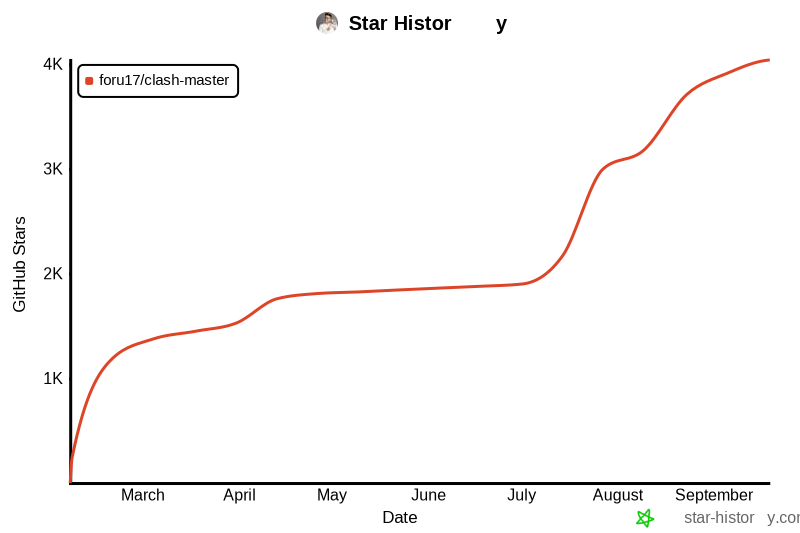](https://www.star-history.com/#foru17/clash-master&type=date&legend=top-left)++---++<p align="center">+ <sub>Made with ❤️ by <a href="https://github.com/foru17">@foru17</a></sub><br>+ <sub>If this project helps you, please consider giving it a ⭐</sub>+</p>diff --git a/README.md b/README.mdindex 65a1196..ebd6318 100644--- a/README.md+++ b/README.md@@ -1,33 +1,75 @@-# Clash Master+# <h1 align="center">++ <img src="./assets/icon-clash-master.png" width="100" alt="Clash Master Logo" style="margin-bottom: 16px;">+ <br>+ Clash Master+</h1><p align="center">- <img src="./assets/icon-clash-master.png" width="120" alt="Clash Master Logo">+ <b>优雅且现代化的 OpenClash 流量可视化分析工具</b><br>+ <span>实时监控 · 多维度分析 · 多后端管理</span></p><p align="center">- <b>现代化的 OpenClash 流量统计分析系统</b>+ <a href="https://github.com/foru17/clash-master/stargazers"><img src="https://img.shields.io/github/stars/foru17/clash-master?style=flat-square&color=yellow" alt="Stars"></a>+ <a href="https://github.com/foru17/clash-master/releases"><img src="https://img.shields.io/github/v/release/foru17/clash-master?style=flat-square&color=blue" alt="Release"></a>+ <a href="https://github.com/foru17/clash-master/blob/main/LICENSE"><img src="https://img.shields.io/github/license/foru17/clash-master?style=flat-square&color=green" alt="License"></a>+ <img src="https://img.shields.io/badge/Docker-Ready-2496ED?style=flat-square&logo=docker" alt="Docker">+ <img src="https://img.shields.io/badge/Node.js-22-339933?style=flat-square&logo=node.js" alt="Node.js"></p><p align="center">- <a href="https://github.com/foru17/clash-master/stargazers"><img src="https://img.shields.io/github/stars/foru17/clash-master?style=flat-square" alt="Stars"></a>- <a href="https://github.com/foru17/clash-master/blob/main/LICENSE"><img src="https://img.shields.io/github/license/foru17/clash-master?style=flat-square" alt="License"></a>- <img src="https://img.shields.io/badge/Docker-Ready-blue?style=flat-square&logo=docker" alt="Docker">+ <b>简体中文</b> •+ <a href="./README.en.md">English</a></p>+## 🤔 写在前面++这个项目从构思到当前这个完全体版本,仅用了 **4 小时**。核心 MVP 更是只用了 **1 小时** 就已完成([推文记录](https://x.com/luoleiorg/status/2019418455276204185))。++感谢 [@Kai](https://x.com/real_kai42) 提供的 [Kimi Code](https://www.kimi.com/code/console) Allegretto 订阅支持。++整个开发过程中,我一行代码都没有亲自写过(甚至都没打开 IDE 看过)——全部交给 [Kimi K2.5](https://www.kimi.com/code/console) 完成。作为一名 Vibe Coding 的老手,这次使用 Kimi 的体验依然让我惊喜:**没有调用限制,没有 Token 焦虑**。国产 AI,未来可期。++## 📋 目录++- [](#)+ - [🤔 写在前面](#-写在前面)+ - [📋 目录](#-目录)+ - [✨ 功能特性](#-功能特性)+ - [🚀 快速开始](#-快速开始)+ - [方式一:Docker Compose(推荐)](#方式一docker-compose推荐)+ - [方式二:Docker 直接运行](#方式二docker-直接运行)+ - [方式三:源码运行](#方式三源码运行)+ - [📖 首次使用](#-首次使用)+ - [🐳 Docker 配置](#-docker-配置)+ - [端口说明](#端口说明)+ - [数据持久化](#数据持久化)+ - [自定义端口](#自定义端口)+ - [更新到最新版本](#更新到最新版本)+ - [📁 项目结构](#-项目结构)+ - [🔧 常见问题](#-常见问题)+ - [🛠️ 技术栈](#️-技术栈)+ - [🤝 贡献](#-贡献)+ - [📄 许可证](#-许可证)+ - [⭐ Star 趋势](#-star-趋势)+## ✨ 功能特性-- 📊 **实时流量监控** - WebSocket 实时采集,延迟低至毫秒级-- 📈 **趋势分析** - 支持 30分钟/1小时/24小时 多维度流量趋势-- 🌐 **域名分析** - 查看各域名的流量、关联 IP、连接数-- 🗺️ **IP 追踪** - ASN、地理位置、所属域名关联展示-- 🚀 **代理统计** - 各代理节点流量分配、连接数统计-- 🌙 **深色模式** - 支持浅色/深色/跟随系统三种主题-- 🌍 **双语支持** - 中文/英文无缝切换-- 🔄 **多后端** - 同时监控多个 OpenClash 后端+| 功能 | 描述 |+| ------------------- | ------------------------------------------- |+| 📊 **实时流量监控** | WebSocket 实时采集,延迟低至毫秒级 |+| 📈 **趋势分析** | 支持 30分钟 / 1小时 / 24小时 多维度流量趋势 |+| 🌐 **域名分析** | 查看各域名的流量、关联 IP、连接数详情 |+| 🗺️ **IP 分析** | ASN、地理位置、所属域名关联展示 |+| 🚀 **代理统计** | 各代理节点流量分配、连接数统计 |+| 🌙 **深色模式** | 支持浅色 / 深色 / 跟随系统 三种主题 |+| 🌍 **双语支持** | 中文 / 英文 无缝切换 |+| 🔄 **多后端** | 同时监控多个 OpenClash 后端实例 |-## 🚀 快速开始(Docker)+## 🚀 快速开始### 方式一:Docker Compose(推荐)@@ -87,14 +129,14 @@ pnpm install## 📖 首次使用1. 打开 <http://localhost:3000>-2. 首次访问会弹出后端配置对话框+2. 首次访问会弹出**后端配置**对话框3. 填写 OpenClash 连接信息:- **名称**: 自定义名称(如 "Home")- **地址**: OpenClash 后端地址(如 `192.168.101.1`)- **端口**: OpenClash 后端端口(如 `9090`)- **Token**: 如果配置了 Secret 则填写,否则留空-4. 点击「添加后端」-5. 保存后开始自动采集数据+4. 点击「添加后端」保存配置+5. 系统将自动开始采集数据> 💡 **获取 OpenClash 地址**: 进入 OpenClash 插件 → 打开「外部控制」→ 复制地址@@ -102,15 +144,15 @@ pnpm install### 端口说明-| 端口 | 用途 | 必需 |-| ---- | --------- | ---- |-| 3000 | Web 界面 | ✅ |-| 3001 | API 接口 | ✅ |-| 3002 | WebSocket | ✅ |+| 端口 | 用途 | 必需 | 说明 |+| :--: | :-------: | :--: | :------------ |+| 3000 | Web 界面 | ✅ | 前端访问端口 |+| 3001 | API 接口 | ✅ | REST API 端口 |+| 3002 | WebSocket | ✅ | 实时数据传输 |### 数据持久化-数据默认存储在容器内的 `/app/data` 目录,建议映射到宿主机:+数据默认存储在容器内的 `/app/data` 目录,建议映射到宿主机以防止数据丢失:```yamlvolumes:@@ -131,12 +173,12 @@ services:### 更新到最新版本```bash-# Docker Compose+# Docker Compose(本地构建)+docker compose up -d --build++# Docker Compose(远程镜像,待发布)docker compose pulldocker compose up -d--# Docker (本地构建)-docker compose up -d --build```## 📁 项目结构@@ -145,56 +187,92 @@ docker compose up -d --buildclash-master/├── docker-compose.yml # Docker Compose 配置├── Dockerfile # Docker 镜像构建+├── docker-start.sh # Docker 启动脚本├── start.sh # 源码启动脚本├── assets/ # 预览图和图标├── apps/-│ ├── collector/ # 数据收集服务-│ └── web/ # Next.js 前端+│ ├── collector/ # 数据收集服务(Node.js + WebSocket)+│ └── web/ # Next.js 前端应用└── packages/- └── shared/ # 共享类型定义+ └── shared/ # 共享类型定义和工具```## 🔧 常见问题-### Q: 连接 OpenClash 失败?+<details>+<summary><b>Q: 连接 OpenClash 失败?</b></summary>-A: 检查以下几点:+检查以下几点:1. OpenClash 的「外部控制」是否已开启2. OpenClash 地址是否正确(格式:`IP:端口`)3. 如果配置了 Secret,Token 是否填写正确-4. 容器是否能访问到 OpenClash 所在网络+4. 容器是否能访问到 OpenClash 所在网络(建议检查防火墙设置)++</details>++<details>+<summary><b>Q: 如何备份数据?</b></summary>-### Q: 如何备份数据?+数据存储在映射的目录中(默认 `./data/stats.db`),直接备份该目录即可:-A: 数据存储在映射的目录中(默认 `./data/stats.db`),直接备份该目录即可。+```bash+cp -r ./data ./data-backup-$(date +%Y%m%d)+```-### Q: 如何清理历史数据?+</details>-A: 在 Web 界面 → 设置 → 数据库管理中,可选择清理 1天前/7天前/30天前/全部数据。+<details>+<summary><b>Q: 如何清理历史数据?</b></summary>-### Q: 支持远程访问吗?+1. 点击左侧边栏底部的「后端配置」+2. 切换到「数据库」标签页+3. 选择清理范围:1天前 / 7天前 / 30天前 / 全部-A: 支持,将 Docker 端口映射到公网 IP 即可。建议配合 Nginx 反向代理并启用 HTTPS。+</details>++<details>+<summary><b>Q: 支持远程访问吗?</b></summary>++支持。将 Docker 端口映射到公网 IP 即可访问。建议:++- 配合 Nginx 反向代理+- 启用 HTTPS 加密+- 配置身份验证++</details>## 🛠️ 技术栈-- **前端**: Next.js 15 + React 19 + TypeScript + Tailwind CSS-- **UI 组件**: shadcn/ui-- **图表**: Recharts-- **后端**: Node.js + Fastify + WebSocket-- **数据库**: SQLite (better-sqlite3)+- **前端**: [Next.js 15](https://nextjs.org/) + [React 19](https://react.dev/) + [TypeScript](https://www.typescriptlang.org/)+- **样式**: [Tailwind CSS](https://tailwindcss.com/) + [shadcn/ui](https://ui.shadcn.com/)+- **图表**: [Recharts](https://recharts.org/)+- **国际化**: [next-intl](https://next-intl-docs.vercel.app/)+- **后端**: [Node.js](https://nodejs.org/) + [Fastify](https://www.fastify.io/) + WebSocket+- **数据库**: [SQLite](https://www.sqlite.org/) ([better-sqlite3](https://github.com/WiseLibs/better-sqlite3))+- **构建**: [pnpm](https://pnpm.io/) + [Turborepo](https://turbo.build/)## 🤝 贡献欢迎提交 Issue 和 Pull Request!+- 🐛 [提交 Bug](https://github.com/foru17/clash-master/issues/new)+- 💡 [提出新功能](https://github.com/foru17/clash-master/issues/new)+- 🔧 [贡献代码](https://github.com/foru17/clash-master/pulls)+## 📄 许可证[MIT](LICENSE) © [foru17](https://github.com/foru17)---+## ⭐ Star 趋势++[](https://www.star-history.com/#foru17/clash-master&type=date&legend=top-left)++---+<p align="center">- Made with ❤️ by <a href="https://github.com/foru17">foru17</a>+ <sub>Made with ❤️ by <a href="https://github.com/foru17">@foru17</a></sub><br>+ <sub>如果这个项目对你有帮助,请考虑给它一颗 ⭐</sub></p>