Same agent Smaller bill. The tools and infrastructure to get more work from your AI. Fewer tokens. Less compute. Lower cost.
TypeScript agent-harnessagent-harness-engineeringai-engineeringai-observabilityamd-gpuclaude-codeclickhousecodexcoding-agentcoding-agentscursorgenaigpu-monitoringllm-observabilityllmopsnvidia-smiobservabilityopen-sourceopenaiopentelemetry
<Frame>
<img src="/images/grafana-cloud-dashboard-1.png" />
<img src="/images/grafana-cloud-dashboard-2.png" />
</Frame>
To directly send OpenTelemetry metrics and traces generated by OpenLIT from your AI Application to Grafana Cloud, follow the below steps.
### 1. Get your Credentials
1. Sign in to Grafana Cloud Portal and select your Grafana Cloud Stack.
1. Click **Configure** in the OpenTelemetry section.
1. In the **Password / API Token** section, click on **Generate now** to create a new API token:
- Give the API token a name, for example `openlit`
- Click on **Create token**
- Click on **Close** without copying the token
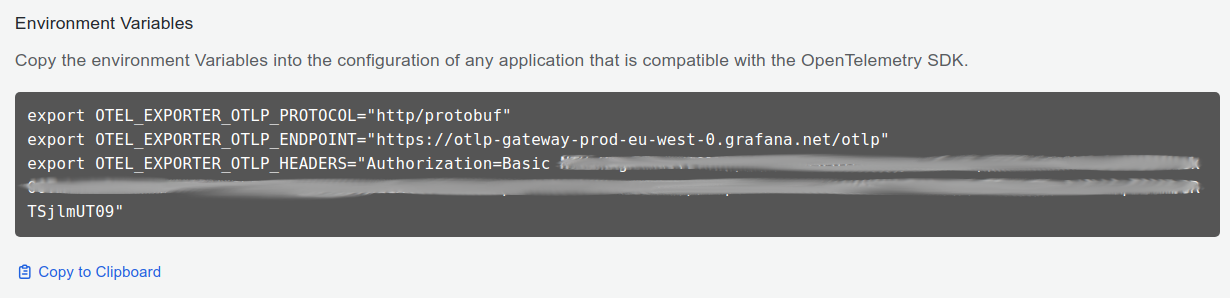
- Copy and Save the value for `OTEL_EXPORTER_OTLP_ENDPOINT` and `OTEL_EXPORTER_OTLP_HEADERS`
<Note>Replace the space after `Basic` with `%20`: OTEL_EXPORTER_OTLP_HEADERS="Authorization=Basic%20[base64 instanceID:token]"</Note>