
Same agent Smaller bill. The tools and infrastructure to get more work from your AI. Fewer tokens. Less compute. Lower cost.

Observability, Evaluations, Rule Engine, Guardrails, Prompts, Vault, Playground, FleetHub
Open Source Platform for AI Engineering
Documentation | Quickstart | Python SDK | Typescript SDK | Go SDK |
Roadmap | Feature Request | Report a Bug






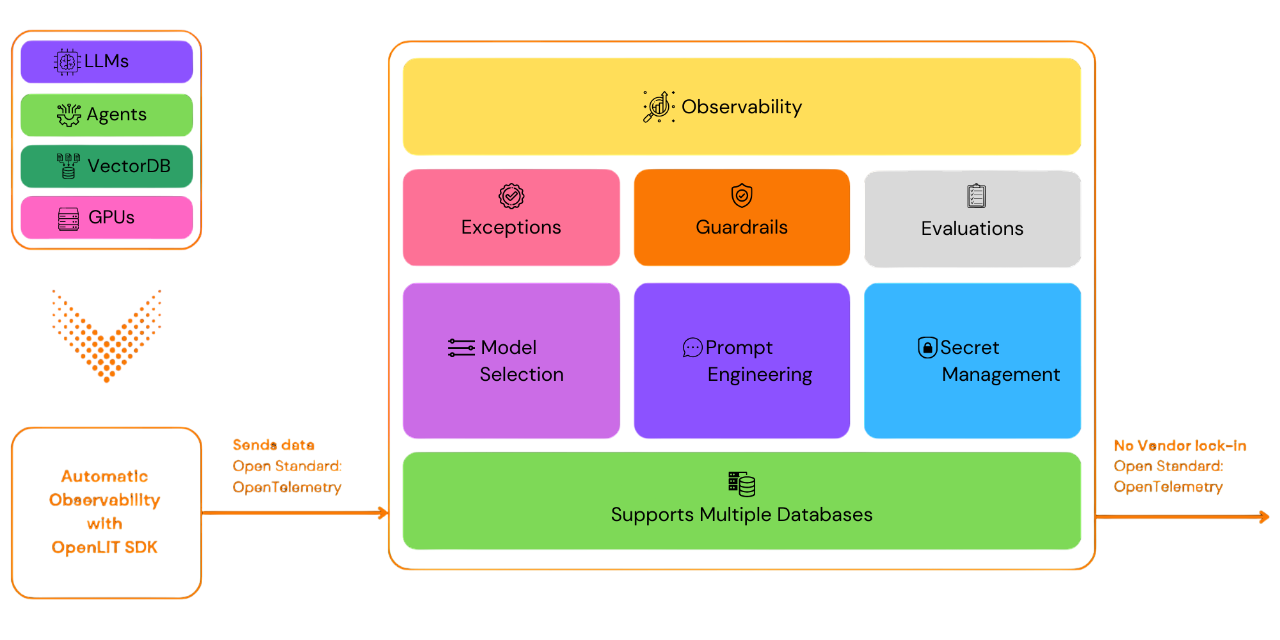
OpenLIT allows you to simplify your AI development workflow, especially for Generative AI and LLMs. It streamlines essential tasks like experimenting with LLMs, organizing and versioning prompts, and securely handling API keys. With just one line of code, you can enable OpenTelemetry-native observability, offering full-stack monitoring that includes LLMs, vector databases, and GPUs. This enables developers to confidently build AI features and applications, transitioning smoothly from testing to production.
This project proudly follows and maintains the Semantic Conventions with the OpenTelemetry community, consistently updating to align with the latest standards in Observability.
⚡ Features
📈 Analytics Dashboard: Monitor your AI application's health and performance with detailed dashboards that track metrics, costs, and user interactions, providing a clear view of overall efficiency.
🔌 OpenTelemetry-native Observability SDKs: Vendor-neutral SDKs (Python, TypeScript, Go) to send traces and metrics to your existing observability tools.
🛡️ 11 Built-in Evaluation Types: Automated LLM-as-a-Judge evaluation with hallucination, bias, toxicity, safety, instruction following, completeness, conciseness, sensitivity, relevance, coherence, and faithfulness detection.
⚙️ Rule Engine: Define conditional rules with AND/OR logic to match runtime trace attributes and dynamically retrieve contexts, prompts, and evaluation configs.
💲 Cost Tracking for Custom and Fine-Tuned Models: Tailor cost estimations for specific models using custom pricing files for precise budgeting.
🐛 Exceptions Monitoring Dashboard: Quickly spot and resolve issues by tracking common exceptions and errors with a dedicated monitoring dashboard.
💭 Prompt Management: Manage and version prompts using Prompt Hub for consistent and easy access across applications.
🔑 API Keys and Secrets Management: Securely handle your API keys and secrets centrally, avoiding insecure practices.
🎮 Experiment with different LLMs: Use OpenGround to explore, test and compare various LLMs side by side.
🚀 Fleet Hub for OpAMP Management: Centrally manage and monitor OpenTelemetry Collectors across your infrastructure.
🚀 Quick Start
Follow the steps below to get OpenLIT running in your environment. Both Docker and manual installation options are provided.
Docker
Pull the Docker image
docker pull ghcr.io/openlit/openlit-client:latestRun the container with Environment Variables Here, replace
<YourValues>with actual values for the environment variables.docker run -d -p 3000:3000 \ -e INIT_DB_HOST="<ClickHouse-URL>" \ -e INIT_DB_PORT="<ClickHouse-Port>" \ -e INIT_DB_DATABASE="<ClickHouse-Database-name>" \ -e INIT_DB_USERNAME="<ClickHouse-username>" \ -e INIT_DB_PASSWORD="<ClickHouse-password>" \ -e SQLITE_DATABASE_URL=file:/app/client/data/data.db \ --name openlit-client ghcr.io/openlit/openlit-client:latestLogin to OpenLIT at
127.0.0.1:3000using the default credentials and start monitoring and evaluating your LLM Applications- Email as
[email protected] - Password as
openlituser
- Email as
You can also use the OpenLIT Helm Chart to deploy OpenLIT Client in Kubernetes
Manual Setup (Development)
To run every service from source (UI with hot reload, OTLP receiver, realtime engine, and NATS), use the dev script from the repository root. You need Node.js 20+, Go 1.25+, Docker with Compose v2.24+, curl, openssl, and lsof.
- Clone the repository and install the dependencies
git clone https://github.com/openlit/openlit.git cd openlit/src/client npm install - Create
src/client/.env
Setcp .env.example .envNEXTAUTH_SECRET(for exampleopenssl rand -base64 32),NEXTAUTH_URL=http://localhost:3000/, andSQLITE_DATABASE_URL=file:./data.db. - Start everything
The script applies the Prisma migrations, starts ClickHouse in Docker if none is running, and stops every service oncd ../.. SEED=1 scripts/dev-realtime.sh # first run: also creates the default user scripts/dev-realtime.sh # later runsCtrl+C. - Login to OpenLIT at
127.0.0.1:3000using the default credentials- Email as
[email protected] - Password as
openlituser
- Email as
To run only the UI against ClickHouse, without the realtime services:
docker compose -f ../dev-docker-compose.yml up -d clickhouse
export INIT_DB_HOST=127.0.0.1 INIT_DB_PORT=8123 INIT_DB_USERNAME=default INIT_DB_PASSWORD=OPENLIT INIT_DB_DATABASE=openlit
npx prisma migrate deploy && npx prisma generate
npx prisma db seed   # first run only
npm run dev
See Local development for all options and troubleshooting.
Configuration
To configure OpenLIT Client, you can pass the following environment values, each tailored to suit your infrastructure and operational preferences. This customization allows OpenLIT Client to seamlessly integrate with your existing setup and respond to its demands effectively.
| Variable | Description | Required | Example |
|---|---|---|---|
INIT_DB_HOST |
Host address of the ClickHouse server to connect to. | ✓ | 127.0.0.1 |
INIT_DB_PORT |
Port on which ClickHouse listens. | ✓ | 8123 |
INIT_DB_DATABASE |
Database name in ClickHouse for OpenLIT Client. | default |
|
INIT_DB_USERNAME |
Username for authenticating with ClickHouse. | default |
|
INIT_DB_PASSWORD |
Password for authenticating with ClickHouse. | default |
|
SQLITE_DATABASE_URL |
Location of the SQLITE database for OpenLIT Client data storage. | ✓ | file:/app/client/data/data.db |
For more detailed information on configuration options and additional settings, please visit the OpenLIT documentation page: OpenLIT Configuration Details.
🛣️ Roadmap
We are dedicated to continuously improving OpenLIT. Here's a look at what's been accomplished and what's on the horizon:
| Feature | Status |
|---|---|
| OpenTelemetry-native Observability SDK for Tracing and Metrics | ✅ Completed |
| OpenTelemetry-native GPU Monitoring | ✅ Completed |
| Exceptions and Error Monitoring | ✅ Completed |
| Prompt Hub for Managing and Versioning Prompts | ✅ Completed |
| OpenGround for Testing and Comparing LLMs | ✅ Completed |
| Vault for Central Management of LLM API Keys and Secrets | ✅ Completed |
| Cost Tracking for Custom Models | ✅ Completed |
| Auto-Evaluation with 11 Built-in Types (LLM-as-a-Judge) | ✅ Completed |
| Rule Engine with SDK Support (Python, TypeScript, Go) | ✅ Completed |
| Human Feedback for LLM Events | ✅ Completed |
| Real-Time Guardrails Implementation | ✅ Completed |
| Fleet Hub for OpAMP Management | ✅ Completed |
| Dataset Generation Based on LLM Events | 🔜 Coming Soon |
🌱 Contributing
Whether it's big or small, we love contributions 💚. Check out our Contribution guide to get started
Unsure where to start? Here are a few ways to get involved:
- Join our Slack or Discord community to discuss ideas, share feedback, and connect with both our team and the wider OpenLIT community.
Your input helps us grow and improve, and we're here to support you every step of the way.


💚 Community & Support
Connect with OpenLIT community and maintainers for support, discussions, and updates:
- 🌟 If you like it, Leave a star on our GitHub
- 🌍 Join our Slack or Discord community for live interactions and questions.
- 🐞 Report bugs on our GitHub Issues to help us improve OpenLIT.
- 𝕏 Follow us on X for the latest updates and news.
License
OpenLIT is available under the Apache-2.0 license.