
The open-source full-stack studio for Opus 5.5 motion video. Reverse engineering for any video. Code video with HTML: recreate, edit and render. BYOA + BYOK · Motion.md · Images, Video, Music & Voice.
TypeScript agent-skillsagentic-aiai-agentsai-videobyokclaude-codecodexdeepseek-harnessdsh-plugingenerative-ailocal-firstmcpmotionmotion-graphicsmultimodalopenmotionreverse-engineeringvideo-editingvideo-generationworkbuddy
<!doctype html><html lang="zh-CN"><head><meta charset="utf-8"><meta name="viewport" content="width=device-width,initial-scale=1"><title>Claude Design — prototypes and slides by chat · motion.md</title><link rel="stylesheet" href="viewer/guide.css"><link rel="stylesheet" href="viewer/board.css"></head>
<body style="--paper:#f4f2eb;--brand-ink:#20201d;--accent:#c4755c;--sample-font:Georgia, serif">
<header class="shell"><a class="wordmark" href="#">ııı <strong>motion</strong><span>.md</span></a><span class="shell-divider"></span><span class="shell-name">视频风格规范</span><nav><button class="tab active" data-tab="board">样式板</button><button class="tab" data-tab="source">motion.md</button><a href="motion.md" download>下载文档 ↗</a></nav></header>
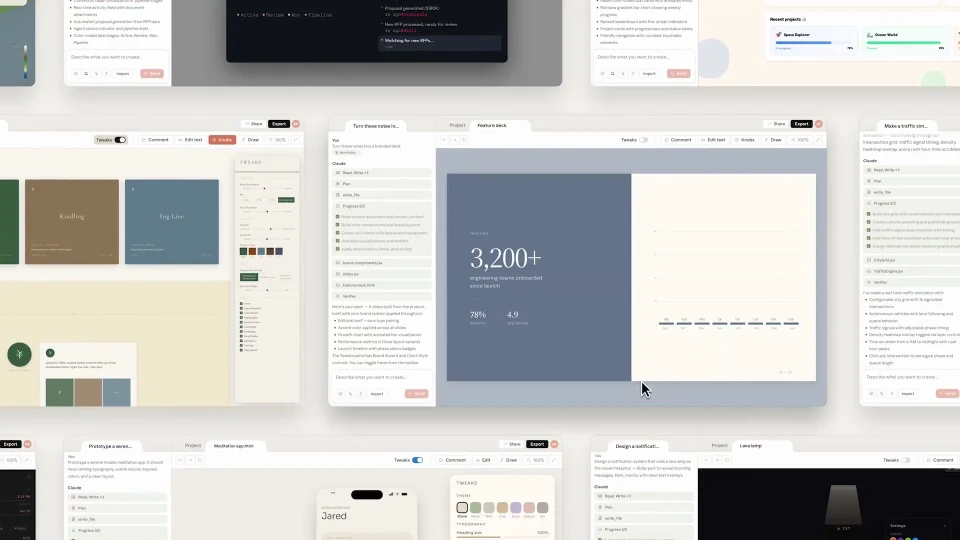
<main id="board-view"><header class="intro"><div class="kicker">Anthropic <span>/</span> V002</div><div class="intro-line"><h1>Claude Design — prototypes and slides by chat</h1><button id="allPause" class="quiet">播放编排 ▷</button></div><div class="intro-copy"><p>需求、成果和修改始终保持对应。镜头先交代工作区,再靠近当前操作,最后用成果墙展示覆盖范围。</p></div></header>
<div class="overview"><section class="hero"><div class="tile-label">构图与编排 <span>可播放 · 可替换内容</span></div><figure class="demo" id="demo-sequence" data-demo="{"id": "sequence", "title": "整体编排", "src": "demos/sequence.html", "duration": 81.5, "status": "authored", "description": "动作与构图示意", "initialTime": 12.25, "params": [{"key": "title", "label": "示例主文案", "type": "text", "value": "Design", "maxLength": 60}, {"key": "accent", "label": "强调色", "type": "color", "value": "#c4755c"}], "presets": [{"label": "默认内容", "values": {"title": "Design", "accent": "#c4755c"}}, {"label": "OpenDesign 改编", "values": {"title": "OpenDesign", "accent": "#7050da"}}]}"><div class="demo-heading"><span>整体编排</span><span class="status">规则示例</span></div><div class="demo-stage"><iframe loading="eager" sandbox="allow-scripts" title="整体编排" data-src="demos/sequence.html"></iframe></div><div class="demo-controls"><button class="play" type="button" disabled>播放</button><button class="reset" type="button" disabled aria-label="从头播放">↺</button><input class="seek" type="range" min="0" max="81.5" step="0.0166667" value="0" aria-label="动画时间" disabled><output>0.00 / 81.50 秒</output><select class="speed" aria-label="播放速度"><option value="1">1×</option><option value="0.5">0.5×</option><option value="0.25">0.25×</option></select></div><div class="demo-params"></div><figcaption>动作与构图示意 <a href="demos/sequence.html" target="_blank" rel="noopener">独立打开 ↗</a><details class="demo-source"><summary>查看 HTML 源码</summary><pre><code><!doctype html><html lang="zh-CN"><meta charset="utf-8"><meta name="viewport" content="width=device-width,initial-scale=1"><title>Claude Design — prototypes and slides by chat · sequence</title><style>html,body{margin:0;width:100%;height:100%;overflow:hidden;background:#f4f2eb}canvas{display:block;width:100%;height:100%;object-fit:contain}</style><body data-mode="sequence"><canvas width="1000" height="600"></canvas><script src="data.js"></script><script src="common.js"></script><script src="scene.js"></script><script src="bridge.js"></script></body></html></code></pre></details></figcaption></figure></section><aside class="identity"><section class="type-sheet"><div class="tile-label">字形与层级 <span>字形示意</span></div><div class="type-brand">Anthropic</div><div class="type-sample">Design</div><p>大标题衬线与界面无衬线分工;暖白工作区、浅灰工具栏、陶土色操作按钮</p><div class="type-baseline"></div></section><section class="palette"><div class="tile-label">配色 <span>点击复制色值</span></div><div class="swatches"><button class="swatch" data-color="#f4f2eb" style="--swatch:#f4f2eb" aria-label="复制色值 #f4f2eb"><span></span><code>#F4F2EB</code></button><button class="swatch" data-color="#20201d" style="--swatch:#20201d" aria-label="复制色值 #20201d"><span></span><code>#20201D</code></button><button class="swatch" data-color="#c4755c" style="--swatch:#c4755c" aria-label="复制色值 #c4755c"><span></span><code>#C4755C</code></button><button class="swatch" data-color="#d8d8cd" style="--swatch:#d8d8cd" aria-label="复制色值 #d8d8cd"><span></span><code>#D8D8CD</code></button><button class="swatch" data-color="#ffffff" style="--swatch:#ffffff" aria-label="复制色值 #ffffff"><span></span><code>#FFFFFF</code></button></div></section></aside></div>
<div class="roles"><span class="label">画面元素</span><span>工作区容器</span><span>对话面板</span><span>成果画布</span><span>控件工具栏</span><span>参数面板</span><span>指针</span></div>
<div class="board-heading"><div><span class="eyebrow">MOTION LANGUAGE</span><h2>动作与构图</h2></div><p>局部动作 · 构图规则</p></div><div class="rule-grid"><section class="rule has-reference" id="section-1"><div class="rule-label"><span>01</span><h2>让工具始终围绕成果展开</h2></div><img class="reference" loading="eager" alt="59.00s · 构图参考" src="https://r.open-design.ai/files/1b8a4aaf2790fd73ca0b5c7bd74fff663687d740ac7d82a22671e3a798ecb25e"><div class="rule-copy">
<p>大标题衬线与界面无衬线分工;暖白工作区、浅灰工具栏、陶土色操作按钮。</p>
<p>先让用户输入意图,再展示成果,最后演示局部修改与导出;成果出现必须晚于提交动作。</p>
</div></section><section class="rule has-demo" id="section-2"><div class="rule-label"><span>02</span><h2>用镜头推近当前操作</h2></div><figure class="demo" id="demo-clip-2" data-demo="{"id": "clip-2", "title": "用镜头推近当前操作", "src": "demos/clip-2.html", "duration": 9.8, "status": "authored", "description": "14.7–24.5 秒 · 动作示意", "initialTime": 0.6}"><div class="demo-heading"><span>用镜头推近当前操作</span><span class="status">规则示例</span></div><div class="demo-stage"><iframe loading="eager" sandbox="allow-scripts" title="用镜头推近当前操作" data-src="demos/clip-2.html"></iframe></div><div class="demo-controls"><button class="play" type="button" disabled>播放</button><button class="reset" type="button" disabled aria-label="从头播放">↺</button><input class="seek" type="range" min="0" max="9.8" step="0.0166667" value="0" aria-label="动画时间" disabled><output>0.00 / 9.80 秒</output><select class="speed" aria-label="播放速度"><option value="1">1×</option><option value="0.5">0.5×</option><option value="0.25">0.25×</option></select></div><div class="demo-params"></div><figcaption>14.7–24.5 秒 · 动作示意 <a href="demos/clip-2.html" target="_blank" rel="noopener">独立打开 ↗</a><details class="demo-source"><summary>查看 HTML 源码</summary><pre><code><!doctype html><html lang="zh-CN"><meta charset="utf-8"><meta name="viewport" content="width=device-width,initial-scale=1"><title>Claude Design — prototypes and slides by chat · sequence</title><style>html,body{margin:0;width:100%;height:100%;overflow:hidden;background:#f4f2eb}canvas{display:block;width:100%;height:100%;object-fit:contain}</style><body data-mode="clip" data-start="14.7" data-end="24.5"><canvas width="1000" height="600"></canvas><script src="data.js"></script><script src="common.js"></script><script src="scene.js"></script><script src="bridge.js"></script></body></html></code></pre></details></figcaption></figure><div class="rule-copy">
<p>缩放镜头跟随当前操作区域:全局布局→工具按钮→结果细节;指针与镜头不同时大幅移动。</p>
<p>参数面板附着在成果画布一侧,修改参数影响同一对象;成果墙只用于段落交接,不把不同工程关联为同一对象。</p>
</div></section><section class="rule text-only" id="section-3"><div class="rule-label"><span>03</span><h2>用短操作回合组成长片</h2></div><div class="rule-copy">
<p>按需求输入、生成成果、参数调整、批注修改、导出组织。每次放大一个操作,成果墙只在阶段结束后出现。</p>
</div></section><section class="rule text-only" id="section-4"><div class="rule-label"><span>04</span><h2>替换成果,保留操作因果</h2></div><div class="rule-copy">
<p>迁移到其他创作工具时保留输入→生成→修改→导出的证据链。</p>
<p>成果图、输入文案、按钮标签可替换;每个结果须对应前一条请求。</p>
<p>长片以多个短操作回合组成;不要把全部 81 秒压成一个弹窗动画。</p>
</div></section></div>
<section class="timeline-sheet" id="timing"><div class="board-heading"><div><span class="eyebrow">SEQUENCE</span><h2>段落与节奏</h2></div><p>点击段落,定位到上方编排示意。</p></div><div class="beats"><button class="beat" data-time="0.0"><span>0.00<small>s</small></span><b>入口标题</b></button><button class="beat" data-time="2.0"><span>2.00<small>s</small></span><b>输入需求</b></button><button class="beat" data-time="8.3"><span>8.30<small>s</small></span><b>发送与成果出现</b></button><button class="beat" data-time="14.7"><span>14.70<small>s</small></span><b>添加参数控制</b></button><button class="beat" data-time="21.0"><span>21.00<small>s</small></span><b>调整地球组件</b></button><button class="beat" data-time="28.0"><span>28.00<small>s</small></span><b>成果墙</b></button><button class="beat" data-time="31.0"><span>31.00<small>s</small></span><b>移动端原型</b></button><button class="beat" data-time="39.0"><span>39.00<small>s</small></span><b>批注与修改</b></button><button class="beat" data-time="47.0"><span>47.00<small>s</small></span><b>工具栏功能巡览</b></button><button class="beat" data-time="59.0"><span>59.00<small>s</small></span><b>批注与导出</b></button><button class="beat" data-time="70.0"><span>70.00<small>s</small></span><b>成果回顾</b></button><button class="beat" data-time="77.0"><span>77.00<small>s</small></span><b>品牌收尾</b></button></div><div class="filmstrip"><figure><img src="assets/reference-1.jpg" alt="0.00 秒的构图参考" loading="lazy"><figcaption>0.00s</figcaption></figure><figure><img src="https://r.open-design.ai/files/6db4a4790b1ead7c9331885767a282d3f1cf3d1668593cd1ed0f93b999cd9ac1" alt="8.33 秒的构图参考" loading="lazy"><figcaption>8.33s</figcaption></figure><figure><img src="assets/reference-3.jpg" alt="21.00 秒的构图参考" loading="lazy"><figcaption>21.00s</figcaption></figure><figure><img src="assets/reference-4.jpg" alt="39.00 秒的构图参考" loading="lazy"><figcaption>39.00s</figcaption></figure><figure><img src="https://r.open-design.ai/files/1b8a4aaf2790fd73ca0b5c7bd74fff663687d740ac7d82a22671e3a798ecb25e" alt="59.00 秒的构图参考" loading="lazy"><figcaption>59.00s</figcaption></figure><figure><img src="assets/reference-6.jpg" alt="77.00 秒的构图参考" loading="lazy"><figcaption>77.00s</figcaption></figure></div><p class="tiny">画面参考 · 离散静帧</p></section>
<section class="production"><div><span class="eyebrow">KEEP THE RELATIONSHIPS</span><h2>制作其他主题</h2>
<ul><li>迁移到其他创作工具时保留输入→生成→修改→导出的证据链。</li><li>成果图、输入文案、按钮标签可替换;每个结果须对应前一条请求。</li><li>长片以多个短操作回合组成;不要把全部 81 秒压成一个弹窗动画。</li></ul>
</div><div class="production-rules"><h3>制作约束</h3>
<p>工作区容器 / 对话面板 / 成果画布 / 控件工具栏 / 参数面板 / 指针</p>
<ul><li>先让用户输入意图,再展示成果,最后演示局部修改与导出;成果出现必须晚于提交动作。</li><li>缩放镜头跟随当前操作区域:全局布局→工具按钮→结果细节;指针与镜头不同时大幅移动。</li><li>参数面板附着在成果画布一侧,修改参数影响同一对象;成果墙只用于段落交接,不把不同工程关联为同一对象。</li></ul>
</div></section>
<footer>
<p><a href="style.json">视觉与对象</a> · <a href="timeline.json">段落时序</a> · <a href="tracks.json">位置数据</a> · <a href="manifest.json">文件清单</a></p>
<p>此规范根据参考视频整理。HTML 为可编辑的编排示例;具体数据的来源、精度与有效区间随文件标注。</p><span>Anthropic / MOTION.MD</span></footer></main>
<section id="source-view" hidden><pre># Claude Design — prototypes and slides by chat
需求、成果和修改始终保持对应。镜头先交代工作区,再靠近当前操作,最后用成果墙展示覆盖范围。
```motion-demo
{
"id": "sequence",
"title": "整体编排",
"src": "demos/sequence.html",
"duration": 81.5,
"status": "authored",
"description": "动作与构图示意",
"initialTime": 12.25,
"params": [
{
"key": "title",
"label": "示例主文案",
"type": "text",
"value": "Design",
"maxLength": 60
},
{
"key": "accent",
"label": "强调色",
"type": "color",
"value": "#c4755c"
}
],
"presets": [
{
"label": "默认内容",
"values": {
"title": "Design",
"accent": "#c4755c"
}
},
{
"label": "OpenDesign 改编",
"values": {
"title": "OpenDesign",
"accent": "#7050da"
}
}
]
}
```
## 让工具始终围绕成果展开
大标题衬线与界面无衬线分工;暖白工作区、浅灰工具栏、陶土色操作按钮。
先让用户输入意图,再展示成果,最后演示局部修改与导出;成果出现必须晚于提交动作。
## 用镜头推近当前操作
缩放镜头跟随当前操作区域:全局布局→工具按钮→结果细节;指针与镜头不同时大幅移动。
参数面板附着在成果画布一侧,修改参数影响同一对象;成果墙只用于段落交接,不把不同工程关联为同一对象。
```motion-demo
{
"id": "clip-2",
"title": "用镜头推近当前操作",
"src": "demos/clip-2.html",
"duration": 9.8,
"status": "authored",
"description": "14.7–24.5 秒 · 动作示意",
"initialTime": 0.6
}
```
## 用短操作回合组成长片
按需求输入、生成成果、参数调整、批注修改、导出组织。每次放大一个操作,成果墙只在阶段结束后出现。
| 时间 | 段落 |
|---|---|
| 0.00–2.00s | 入口标题 |
| 2.00–8.30s | 输入需求 |
| 8.30–14.70s | 发送与成果出现 |
| 14.70–21.00s | 添加参数控制 |
| 21.00–28.00s | 调整地球组件 |
| 28.00–31.00s | 成果墙 |
| 31.00–39.00s | 移动端原型 |
| 39.00–47.00s | 批注与修改 |
| 47.00–59.00s | 工具栏功能巡览 |
| 59.00–70.00s | 批注与导出 |
| 70.00–77.00s | 成果回顾 |
| 77.00–81.50s | 品牌收尾 |
## 替换成果,保留操作因果
迁移到其他创作工具时保留输入→生成→修改→导出的证据链。
成果图、输入文案、按钮标签可替换;每个结果须对应前一条请求。
长片以多个短操作回合组成;不要把全部 81 秒压成一个弹窗动画。
## 配色与字形
大标题衬线与界面无衬线分工;暖白工作区、浅灰工具栏、陶土色操作按钮。
#f4f2eb · #20201d · #c4755c · #d8d8cd · #ffffff
## 元素与制作规则
工作区容器 / 对话面板 / 成果画布 / 控件工具栏 / 参数面板 / 指针
- 先让用户输入意图,再展示成果,最后演示局部修改与导出;成果出现必须晚于提交动作。
- 缩放镜头跟随当前操作区域:全局布局→工具按钮→结果细节;指针与镜头不同时大幅移动。
- 参数面板附着在成果画布一侧,修改参数影响同一对象;成果墙只用于段落交接,不把不同工程关联为同一对象。
## 内容替换
- 迁移到其他创作工具时保留输入→生成→修改→导出的证据链。
- 成果图、输入文案、按钮标签可替换;每个结果须对应前一条请求。
- 长片以多个短操作回合组成;不要把全部 81 秒压成一个弹窗动画。
## 制作参数
[视觉与对象](style.json) · [段落时序](timeline.json) · [位置数据](tracks.json) · [文件清单](manifest.json)
此规范根据参考视频整理。HTML 为可编辑的编排示例;具体数据的来源、精度与有效区间随文件标注。
```motion-board
{
"version": 1,
"brand": "Anthropic",
"id": "V002",
"palette": [
"#f4f2eb",
"#20201d",
"#c4755c",
"#d8d8cd",
"#ffffff"
],
"typography": "大标题衬线与界面无衬线分工;暖白工作区、浅灰工具栏、陶土色操作按钮",
"sample": "Design",
"objects": [
"工作区容器",
"对话面板",
"成果画布",
"控件工具栏",
"参数面板",
"指针"
],
"frames": [
{
"path": "assets/reference-1.jpg",
"timeSeconds": 0.0,
"frameId": "K0001",
"role": "reference-evidence",
"status": "measured"
},
{
"path": "https://r.open-design.ai/files/6db4a4790b1ead7c9331885767a282d3f1cf3d1668593cd1ed0f93b999cd9ac1",
"timeSeconds": 8.333333333333334,
"frameId": "K0024",
"role": "reference-evidence",
"status": "measured"
},
{
"path": "assets/reference-3.jpg",
"timeSeconds": 21.0,
"frameId": "K0070",
"role": "reference-evidence",
"status": "measured"
},
{
"path": "assets/reference-4.jpg",
"timeSeconds": 39.0,
"frameId": "K0129",
"role": "reference-evidence",
"status": "measured"
},
{
"path": "https://r.open-design.ai/files/1b8a4aaf2790fd73ca0b5c7bd74fff663687d740ac7d82a22671e3a798ecb25e",
"timeSeconds": 59.0,
"frameId": "K0201",
"role": "reference-evidence",
"status": "measured"
},
{
"path": "assets/reference-6.jpg",
"timeSeconds": 77.0,
"frameId": "K0265",
"role": "reference-evidence",
"status": "measured"
}
],
"stages": [
{
"start": 0,
"label": "入口标题",
"end": 2,
"status": "inferred",
"basis": "Representative-frame review; approximate boundaries"
},
{
"start": 2,
"label": "输入需求",
"end": 8.3,
"status": "inferred",
"basis": "Representative-frame review; approximate boundaries"
},
{
"start": 8.3,
"label": "发送与成果出现",
"end": 14.7,
"status": "inferred",
"basis": "Representative-frame review; approximate boundaries"
},
{
"start": 14.7,
"label": "添加参数控制",
"end": 21,
"status": "inferred",
"basis": "Representative-frame review; approximate boundaries"
},
{
"start": 21,
"label": "调整地球组件",
"end": 28,
"status": "inferred",
"basis": "Representative-frame review; approximate boundaries"
},
{
"start": 28,
"label": "成果墙",
"end": 31,
"status": "inferred",
"basis": "Representative-frame review; approximate boundaries"
},
{
"start": 31,
"label": "移动端原型",
"end": 39,
"status": "inferred",
"basis": "Representative-frame review; approximate boundaries"
},
{
"start": 39,
"label": "批注与修改",
"end": 47,
"status": "inferred",
"basis": "Representative-frame review; approximate boundaries"
},
{
"start": 47,
"label": "工具栏功能巡览",
"end": 59,
"status": "inferred",
"basis": "Representative-frame review; approximate boundaries"
},
{
"start": 59,
"label": "批注与导出",
"end": 70,
"status": "inferred",
"basis": "Representative-frame review; approximate boundaries"
},
{
"start": 70,
"label": "成果回顾",
"end": 77,
"status": "inferred",
"basis": "Representative-frame review; approximate boundaries"
},
{
"start": 77,
"label": "品牌收尾",
"end": 81.5,
"status": "inferred",
"basis": "Representative-frame review; approximate boundaries"
}
],
"duration": 81.5,
"fontFamily": "Georgia, serif"
}
```
</pre></section><div class="toast" role="status" aria-live="polite"></div><script src="viewer/guide.js"></script><script src="viewer/board.js"></script></body></html>