
A community-supported supercharged document management system: scan, index and archive all your documents
Python aiangulararchivingdjangodmsdocument-managementdocument-management-systemllmmachine-learningocroptical-character-recognitionpdf
Documentation: update docs, screenshots ahead of Paperless-ngx v2.0 (#4542)
shamoon55f26c9c4c07
diff --git a/.prettierrc b/.prettierrcindex eb55154ad..b0d7223f8 100644--- a/.prettierrc+++ b/.prettierrc@@ -1,6 +1,16 @@-# https://prettier.io/docs/en/options.html#semicolons-semi: false-# https://prettier.io/docs/en/options.html#quotes-singleQuote: true-# https://prettier.io/docs/en/options.html#trailing-commas-trailingComma: "es5"+{+ # https://prettier.io/docs/en/options.html#semicolons+ "semi": false,+ # https://prettier.io/docs/en/options.html#quotes+ "singleQuote": true,+ # https://prettier.io/docs/en/options.html#trailing-commas+ "trailingComma": "es5",+ "overrides": [+ {+ "files": "index.md",+ "options": {+ "tabWidth": 4+ }+ }+ ]+}diff --git a/Pipfile b/Pipfileindex 876ff481c..2daf9c8b8 100644--- a/Pipfile+++ b/Pipfile@@ -75,6 +75,7 @@ imagehash = "*"daphne = "*"# Documentationmkdocs-material = "*"+mkdocs-glightbox = "*"[typing-dev]mypy = "*"diff --git a/Pipfile.lock b/Pipfile.lockindex 93cd8fa24..2f69422ae 100644--- a/Pipfile.lock+++ b/Pipfile.lock@@ -1,7 +1,7 @@{"_meta": {"hash": {- "sha256": "3c380d590439f008ec85f1d5821ed96b4ebd56fcee3f287e6e0a6f5923262229"+ "sha256": "50c21aa701dff7657a4d33764af7623e7ec19f4f3ba577cc8bab9b243b487838"},"pipfile-spec": 6,"requires": {},@@ -2746,6 +2746,14 @@"markers": "python_version >= '3.7'","version": "==1.5.3"},+ "mkdocs-glightbox": {+ "hashes": [+ "sha256:8f894435b4f75231164e5d9fb023c01e922e6769e74a121e822c4914f310a41d",+ "sha256:96aaf98216f83c0d0fad2e42a8d805cfa6329d6ab25b54265012ccb2154010d8"+ ],+ "index": "pypi",+ "version": "==0.3.4"+ },"mkdocs-material": {"hashes": ["sha256:3274a47a4e55a541b25bd8fa4937cf3f3c82a51763453511661e0052062758b9",diff --git a/README.md b/README.mdindex 53ec7d068..6573006f7 100644--- a/README.md+++ b/README.md@@ -16,8 +16,7 @@Paperless-ngx is a document management system that transforms your physical documents into a searchable online archive so you can keep, well, _less paper_.-Paperless-ngx forked from [paperless-ng](https://github.com/jonaswinkler/paperless-ng) to continue the great work and distribute responsibility of supporting and advancing the project among a team of people. [Consider joining us!](#community-support) Discussion of this transition can be found in issues-[#1599](https://github.com/jonaswinkler/paperless-ng/issues/1599) and [#1632](https://github.com/jonaswinkler/paperless-ng/issues/1632).+Paperless-ngx is the official successor to the original [Paperless](https://github.com/the-paperless-project/paperless) & [Paperless-ng](https://github.com/jonaswinkler/paperless-ng) projects and is designed to distribute the responsibility of advancing and supporting the project among a team of people. [Consider joining us!](#community-support)A demo is available at [demo.paperless-ngx.com](https://demo.paperless-ngx.com) using login `demo` / `demo`. _Note: demo content is reset frequently and confidential information should not be uploaded._@@ -36,28 +35,7 @@ A demo is available at [demo.paperless-ngx.com](https://demo.paperless-ngx.com)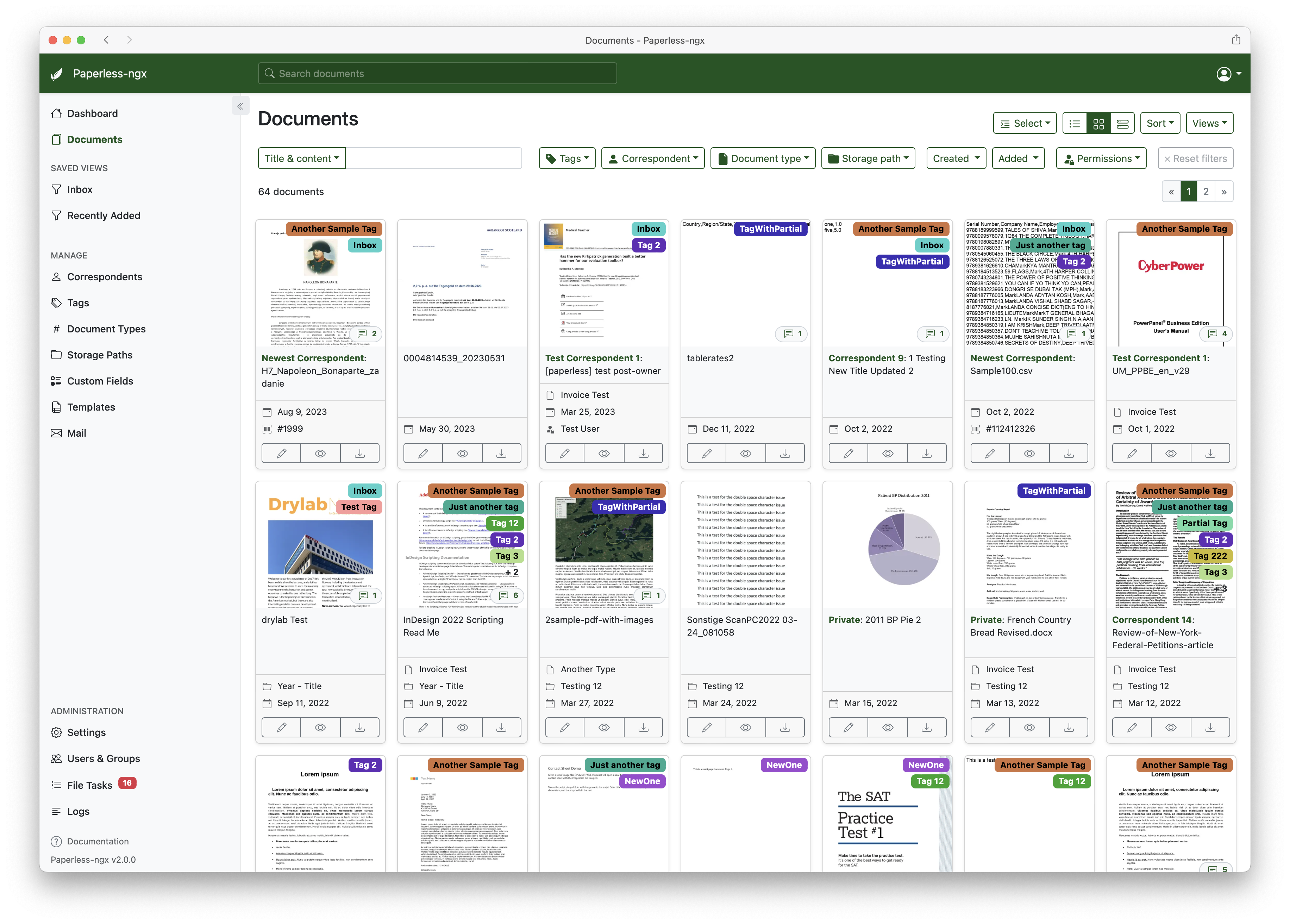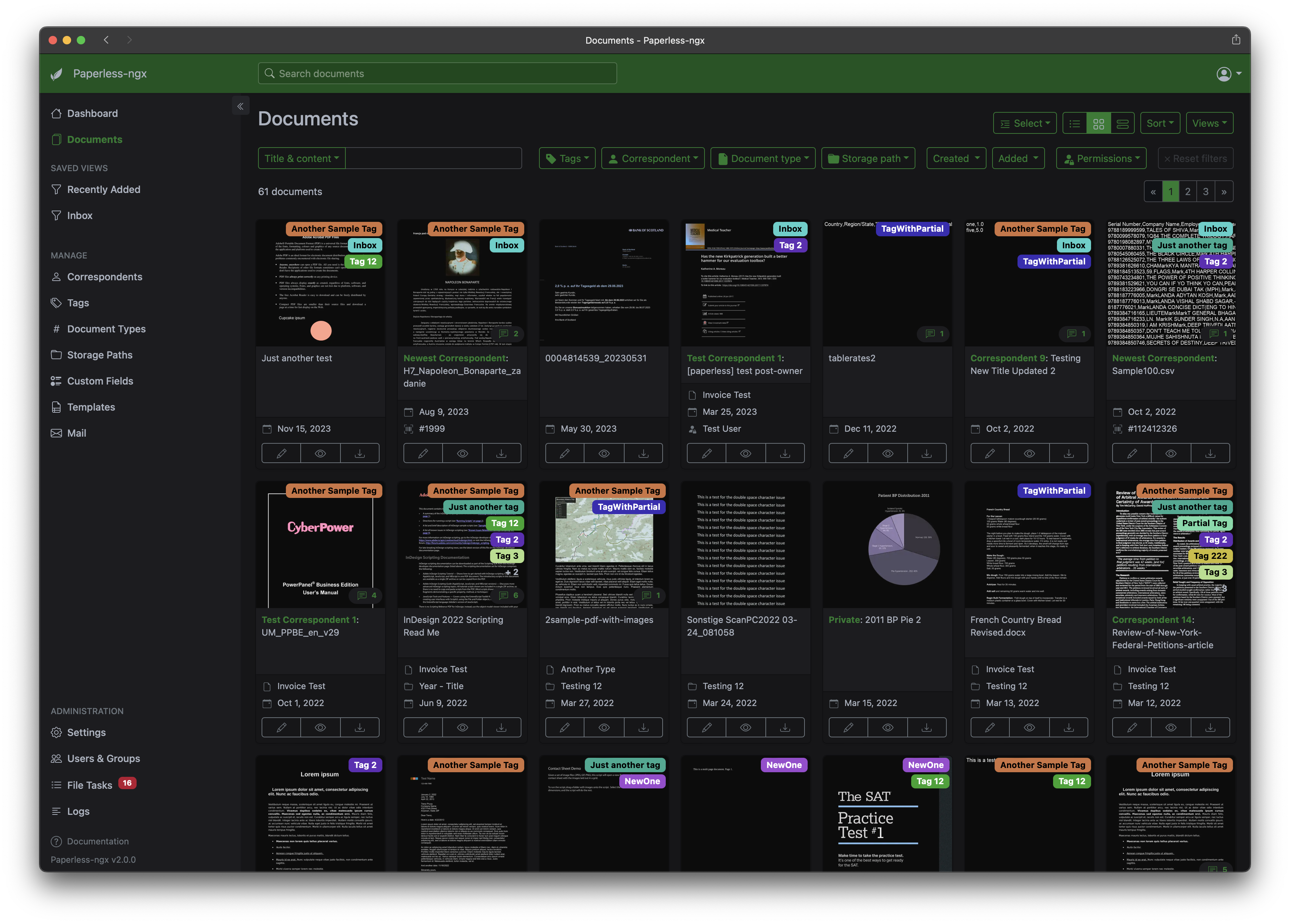-- Organize and index your scanned documents with tags, correspondents, types, and more.-- Performs OCR on your documents, adds selectable text to image only documents and adds tags, correspondents and document types to your documents.-- Supports PDF documents, images, plain text files, and Office documents (Word, Excel, Powerpoint, and LibreOffice equivalents).- - Office document support is optional and provided by Apache Tika (see [configuration](https://docs.paperless-ngx.com/configuration/#tika))-- Paperless stores your documents plain on disk. Filenames and folders are managed by paperless and their format can be configured freely.-- Single page application front end.- - Includes a dashboard that shows basic statistics and has document upload.- - Filtering by tags, correspondents, types, and more.- - Customizable views can be saved and displayed on the dashboard.-- Full text search helps you find what you need.- - Auto completion suggests relevant words from your documents.- - Results are sorted by relevance to your search query.- - Highlighting shows you which parts of the document matched the query.- - Searching for similar documents ("More like this")-- Email processing: Paperless adds documents from your email accounts.- - Configure multiple accounts and filters for each account.- - When adding documents from mail, paperless can move these mail to a new folder, mark them as read, flag them as important or delete them.-- Machine learning powered document matching.- - Paperless-ngx learns from your documents and will be able to automatically assign tags, correspondents and types to documents once you've stored a few documents in paperless.-- Optimized for multi core systems: Paperless-ngx consumes multiple documents in parallel.-- The integrated sanity checker makes sure that your document archive is in good health.-- [More screenshots are available in the documentation](https://docs.paperless-ngx.com/#screenshots).+A full list of [features](https://docs.paperless-ngx.com/#features) and [screenshots](https://docs.paperless-ngx.com/#screenshots) are available in the [documentation](https://docs.paperless-ngx.com/).# Getting starteddiff --git a/docs/administration.md b/docs/administration.mdindex 982c9e007..0fbbe577e 100644--- a/docs/administration.md+++ b/docs/administration.md@@ -139,7 +139,7 @@ following:1. Update dependencies. New paperless version may require additionaldependencies. The dependencies required are listed in the sectionabout- [bare metal installations](/setup#bare_metal).+ [bare metal installations](setup.md#bare_metal).2. Update python requirements. Keep in mind to activate your virtualenvironment before that, if you use one.@@ -287,7 +287,7 @@ other files.The filenames generated by this command follow the format`[date created] [correspondent] [title].[extension]`. If you want-paperless to use [`PAPERLESS_FILENAME_FORMAT`](/configuration#PAPERLESS_FILENAME_FORMAT) for exported filenames+paperless to use [`PAPERLESS_FILENAME_FORMAT`](configuration.md#PAPERLESS_FILENAME_FORMAT) for exported filenamesinstead, specify `-f` or `--use-filename-format`.If `-na` or `--no-archive` is provided, no archive files will be exported,@@ -444,7 +444,7 @@ task scheduler.### Managing filenames {#renamer}If you use paperless' feature to-[assign custom filenames to your documents](/advanced_usage#file-name-handling), you can use this command to move all your files after+[assign custom filenames to your documents](advanced_usage.md#file-name-handling), you can use this command to move all your files afterchanging the naming scheme.!!! warning@@ -550,7 +550,7 @@ Documents can be stored in Paperless using GnuPG encryption.!!! warning- Encryption is deprecated since [paperless-ng 0.9](/changelog#paperless-ng-090) and doesn't really+ Encryption is deprecated since [paperless-ng 0.9](changelog.md#paperless-ng-090) and doesn't reallyprovide any additional security, since you have to store the passphrasein a configuration file on the same system as the encrypted documentsfor paperless to work. Furthermore, the entire text content of the@@ -571,7 +571,7 @@ Enabling encryption is no longer supported.Basic usage to disable encryption of your document store:-(Note: If [`PAPERLESS_PASSPHRASE`](/configuration#PAPERLESS_PASSPHRASE) isn't set already, you need to specify+(Note: If [`PAPERLESS_PASSPHRASE`](configuration.md#PAPERLESS_PASSPHRASE) isn't set already, you need to specifyit here)```diff --git a/docs/advanced_usage.md b/docs/advanced_usage.mdindex 724a044da..c6bd6bac8 100644--- a/docs/advanced_usage.md+++ b/docs/advanced_usage.md@@ -107,7 +107,7 @@ document is consumed using a couple of simple hooks.Just write a script, put it somewhere that Paperless can read & execute,and then put the path to that script in `paperless.conf` or`docker-compose.env` with the variable name of either-[`PAPERLESS_PRE_CONSUME_SCRIPT`](/configuration#PAPERLESS_PRE_CONSUME_SCRIPT) or [`PAPERLESS_POST_CONSUME_SCRIPT`](/configuration#PAPERLESS_POST_CONSUME_SCRIPT).+[`PAPERLESS_PRE_CONSUME_SCRIPT`](configuration.md#PAPERLESS_PRE_CONSUME_SCRIPT) or [`PAPERLESS_POST_CONSUME_SCRIPT`](configuration.md#PAPERLESS_POST_CONSUME_SCRIPT).!!! info@@ -251,7 +251,7 @@ document. You will end up getting files like `0000123.pdf` in your mediadirectory. This isn't necessarily a bad thing, because you normallydon't have to access these files manually. However, if you wish to nameyour files differently, you can do that by adjusting the-[`PAPERLESS_FILENAME_FORMAT`](/configuration#PAPERLESS_FILENAME_FORMAT) configuration option. Paperless adds the+[`PAPERLESS_FILENAME_FORMAT`](configuration.md#PAPERLESS_FILENAME_FORMAT) configuration option. Paperless adds thecorrect file extension e.g. `.pdf`, `.jpg` automatically.This variable allows you to configure the filename (folders are allowed)@@ -344,7 +344,7 @@ value.Paperless checks the filename of a document whenever it is saved.Therefore, you need to update the filenames of your documents and movethem after altering this setting by invoking the- [`document renamer`](/administration#renamer).+ [`document renamer`](administration.md#renamer).!!! warning@@ -379,7 +379,7 @@ When a single storage layout is not sufficient for your use case,storage paths come to the rescue. Storage paths allow you to configuremore precisely where each document is stored in the file system.-- Each storage path is a [`PAPERLESS_FILENAME_FORMAT`](/configuration#PAPERLESS_FILENAME_FORMAT) and+- Each storage path is a [`PAPERLESS_FILENAME_FORMAT`](configuration.md#PAPERLESS_FILENAME_FORMAT) andfollows the rules described above- Each document is assigned a storage path using the matchingalgorithms described above, but can be overwritten at any time@@ -419,7 +419,7 @@ Insurances/ # Insurances!!! tipDefining a storage path is optional. If no storage path is defined for a- document, the global [`PAPERLESS_FILENAME_FORMAT`](/configuration#PAPERLESS_FILENAME_FORMAT) is applied.+ document, the global [`PAPERLESS_FILENAME_FORMAT`](configuration.md#PAPERLESS_FILENAME_FORMAT) is applied.## Celery Monitoring {#celery-monitoring}@@ -528,7 +528,7 @@ At this time, the library utilized for detection of barcodes supports the followYou may check for updates on the [zbar library homepage](https://github.com/mchehab/zbar).For usage in Paperless, the type of barcode does not matter, only the contents of it.-For how to enable barcode usage, see [the configuration](/configuration#barcodes).+For how to enable barcode usage, see [the configuration](configuration.md#barcodes).The two settings may be enabled independently, but do have interactions as explainedbelow.@@ -554,7 +554,7 @@ one which holds data to keep in the document.If your scanner supports double-sided scanning natively, you do not need this feature.-This feature is turned off by default, see [configuration](/configuration#collate) on how to turn it on.+This feature is turned off by default, see [configuration](configuration.md#collate) on how to turn it on.### Summary@@ -594,7 +594,7 @@ followed by the even pages.It's important that the scan files get consumed in the correct order, and one at a time.You therefore need to make sure that Paperless is running while you upload the files into-the directory; and if you're using [polling](/configuration#polling), make sure that+the directory; and if you're using [polling](configuration.md#polling), make sure that`CONSUMER_POLLING` is set to a value lower than it takes for the second scan to appear,like 5-10 or even lower.@@ -606,7 +606,7 @@ scan a completely new "odd numbered pages" one. The old staging file will get di### Interaction with "subdirs as tags"-The collation feature can be used together with the [subdirs as tags](/configuration#consume_config)+The collation feature can be used together with the [subdirs as tags](configuration.md#consume_config)feature (but this is not a requirement). Just create a correctly named double-sided subdirin the hierachy and upload your scans there. For example, both `double-sided/foo/bar` aswell as `foo/bar/double-sided` will cause the collated document to be treated as if itdiff --git a/docs/api.md b/docs/api.mdindex 27fcc7f4f..0c310d821 100644--- a/docs/api.md+++ b/docs/api.md@@ -177,7 +177,7 @@ specific query parameters cause the API to return full text searchresults:- `/api/documents/?query=your%20search%20query`: Search for a document- using a full text query. For details on the syntax, see [Basic Usage - Searching](/usage#basic-usage_searching).+ using a full text query. For details on the syntax, see [Basic Usage - Searching](usage.md#basic-usage_searching).- `/api/documents/?more_like=1234`: Search for documents similar tothe document with id 1234.diff --git a/docs/assets/extra.css b/docs/assets/extra.cssindex 95e33ec96..bfa517609 100644--- a/docs/assets/extra.css+++ b/docs/assets/extra.css@@ -20,6 +20,28 @@margin-left: 4%;float: left;}++ .grid-flipped-left {+ width: 66%;+ float: left;+ }++ .grid-flipped-right {+ width: 29%;+ margin-left: 4%;+ float: left;+ }++ .grid-half-left {+ width: 48%;+ float: left;+ }++ .grid-half-right {+ width: 48%;+ margin-left: 4%;+ float: left;+ }}.grid-left > p {@@ -31,6 +53,12 @@margin: 0;}+.clear {+ clear: both;+ margin-bottom: 20px;+ display: block;+}+.index-callout {margin-right: .5rem;}diff --git a/docs/assets/screenshots/bulk-edit.png b/docs/assets/screenshots/bulk-edit.pngindex 3d96dad24..f46460df4 100644Binary files a/docs/assets/screenshots/bulk-edit.png and b/docs/assets/screenshots/bulk-edit.png differdiff --git a/docs/assets/screenshots/consumption_template.png b/docs/assets/screenshots/consumption_template.pngnew file mode 100644index 000000000..c3802c55fBinary files /dev/null and b/docs/assets/screenshots/consumption_template.png differdiff --git a/docs/assets/screenshots/correspondents.png b/docs/assets/screenshots/correspondents.pngindex 00fa4cba8..8867cedc3 100644Binary files a/docs/assets/screenshots/correspondents.png and b/docs/assets/screenshots/correspondents.png differdiff --git a/docs/assets/screenshots/custom_field1.png b/docs/assets/screenshots/custom_field1.pngnew file mode 100644index 000000000..c576ab8f8Binary files /dev/null and b/docs/assets/screenshots/custom_field1.png differdiff --git a/docs/assets/screenshots/custom_field2.png b/docs/assets/screenshots/custom_field2.pngnew file mode 100644index 000000000..f7bf012ddBinary files /dev/null and b/docs/assets/screenshots/custom_field2.png differdiff --git a/docs/assets/screenshots/dashboard.png b/docs/assets/screenshots/dashboard.pngindex 4bd1ee751..29a0997ea 100644Binary files a/docs/assets/screenshots/dashboard.png and b/docs/assets/screenshots/dashboard.png differdiff --git a/docs/assets/screenshots/documents-filter.png b/docs/assets/screenshots/documents-filter.pngindex 972cf5998..458cfb9af 100644Binary files a/docs/assets/screenshots/documents-filter.png and b/docs/assets/screenshots/documents-filter.png differdiff --git a/docs/assets/screenshots/documents-largecards.png b/docs/assets/screenshots/documents-largecards.pngindex 0b68ba6e8..7254742a8 100644Binary files a/docs/assets/screenshots/documents-largecards.png and b/docs/assets/screenshots/documents-largecards.png differdiff --git a/docs/assets/screenshots/documents-smallcards-dark.png b/docs/assets/screenshots/documents-smallcards-dark.pngindex 62db042e6..0f8de12fc 100644Binary files a/docs/assets/screenshots/documents-smallcards-dark.png and b/docs/assets/screenshots/documents-smallcards-dark.png differdiff --git a/docs/assets/screenshots/documents-smallcards-slimsidebar.png b/docs/assets/screenshots/documents-smallcards-slimsidebar.pngnew file mode 100644index 000000000..79a6e6706Binary files /dev/null and b/docs/assets/screenshots/documents-smallcards-slimsidebar.png differdiff --git a/docs/assets/screenshots/documents-smallcards.png b/docs/assets/screenshots/documents-smallcards.pngindex 5c172b23f..c976eeb6f 100644Binary files a/docs/assets/screenshots/documents-smallcards.png and b/docs/assets/screenshots/documents-smallcards.png differdiff --git a/docs/assets/screenshots/documents-table.png b/docs/assets/screenshots/documents-table.pngindex 29927daf5..812e2c1e6 100644Binary files a/docs/assets/screenshots/documents-table.png and b/docs/assets/screenshots/documents-table.png differdiff --git a/docs/assets/screenshots/documents-wchrome-dark.png b/docs/assets/screenshots/documents-wchrome-dark.pngindex 66a0eb2bc..0f8de12fc 100644Binary files a/docs/assets/screenshots/documents-wchrome-dark.png and b/docs/assets/screenshots/documents-wchrome-dark.png differdiff --git a/docs/assets/screenshots/documents-wchrome.png b/docs/assets/screenshots/documents-wchrome.pngindex 16a8ab525..c976eeb6f 100644Binary files a/docs/assets/screenshots/documents-wchrome.png and b/docs/assets/screenshots/documents-wchrome.png differdiff --git a/docs/assets/screenshots/editing.png b/docs/assets/screenshots/editing.pngindex c2dd6892e..f2994a3fb 100644Binary files a/docs/assets/screenshots/editing.png and b/docs/assets/screenshots/editing.png differdiff --git a/docs/assets/screenshots/logs.png b/docs/assets/screenshots/logs.pngindex cd1f37863..a387fa51f 100644Binary files a/docs/assets/screenshots/logs.png and b/docs/assets/screenshots/logs.png differdiff --git a/docs/assets/screenshots/mail-rules-edited.png b/docs/assets/screenshots/mail-rules-edited.pngindex 42db1d673..844466d7a 100644Binary files a/docs/assets/screenshots/mail-rules-edited.png and b/docs/assets/screenshots/mail-rules-edited.png differdiff --git a/docs/assets/screenshots/mobile.png b/docs/assets/screenshots/mobile.pngdeleted file mode 100644index 5ac4c96b3..000000000Binary files a/docs/assets/screenshots/mobile.png and /dev/null differdiff --git a/docs/assets/screenshots/mobile1.png b/docs/assets/screenshots/mobile1.pngnew file mode 100644index 000000000..398a3db64Binary files /dev/null and b/docs/assets/screenshots/mobile1.png differdiff --git a/docs/assets/screenshots/mobile2.png b/docs/assets/screenshots/mobile2.pngnew file mode 100644index 000000000..c6f6eef95Binary files /dev/null and b/docs/assets/screenshots/mobile2.png differdiff --git a/docs/assets/screenshots/mobile3.png b/docs/assets/screenshots/mobile3.pngnew file mode 100644index 000000000..e36b0cbb3Binary files /dev/null and b/docs/assets/screenshots/mobile3.png differdiff --git a/docs/assets/screenshots/new-correspondent.png b/docs/assets/screenshots/new-correspondent.pngnew file mode 100644index 000000000..080871da3Binary files /dev/null and b/docs/assets/screenshots/new-correspondent.png differdiff --git a/docs/assets/screenshots/new-document_type.png b/docs/assets/screenshots/new-document_type.pngnew file mode 100644index 000000000..b515886b6Binary files /dev/null and b/docs/assets/screenshots/new-document_type.png differdiff --git a/docs/assets/screenshots/new-storage_path.png b/docs/assets/screenshots/new-storage_path.pngnew file mode 100644index 000000000..231d09f67Binary files /dev/null and b/docs/assets/screenshots/new-storage_path.png differdiff --git a/docs/assets/screenshots/new-tag.png b/docs/assets/screenshots/new-tag.pngindex f763c0ecf..8c5c73fcb 100644Binary files a/docs/assets/screenshots/new-tag.png and b/docs/assets/screenshots/new-tag.png differdiff --git a/docs/assets/screenshots/permissions_document.png b/docs/assets/screenshots/permissions_document.pngnew file mode 100644index 000000000..9b05f104dBinary files /dev/null and b/docs/assets/screenshots/permissions_document.png differdiff --git a/docs/assets/screenshots/permissions_global.png b/docs/assets/screenshots/permissions_global.pngnew file mode 100644index 000000000..625f00900Binary files /dev/null and b/docs/assets/screenshots/permissions_global.png differdiff --git a/docs/assets/screenshots/search-preview.png b/docs/assets/screenshots/search-preview.pngindex 5e7c29049..676c84e01 100644Binary files a/docs/assets/screenshots/search-preview.png and b/docs/assets/screenshots/search-preview.png differdiff --git a/docs/assets/screenshots/search-results.png b/docs/assets/screenshots/search-results.pngindex 5480ef8f1..74a95611c 100644Binary files a/docs/assets/screenshots/search-results.png and b/docs/assets/screenshots/search-results.png differdiff --git a/docs/changelog.md b/docs/changelog.mdindex 43c895367..7e9eb7a64 100644--- a/docs/changelog.md+++ b/docs/changelog.md@@ -2079,7 +2079,7 @@ This is a maintenance release.The changed to the full text searching require you to reindex yourdocuments. _The docker image does this automatically, you don't need todo anything._ To do this, execute the `document_index reindex`- management command (see [Managing the document search index](/administration#index)).+ management command (see [Managing the document search index](administration.md#index)).### paperless-ng 1.3.2@@ -2118,7 +2118,7 @@ This release contains new database migrations.- Changes- The REST API is versioned from this point onwards. This willallow me to make changes without breaking existing clients. See- the documentation about [API versioning](/api#api-versioning) for details.+ the documentation about [API versioning](api.md#api-versioning) for details.- Added a color picker for tag colors.- Added the ability to use the filter for searching the documentcontent as well.@@ -2152,7 +2152,7 @@ This release contains new database migrations.- Changes to the OCRmyPDF integration- Added support for deskewing and automatic rotation ofincorrectly rotated pages. This is enabled by default, see- [OCR settings](/configuration#ocr).+ [OCR settings](configuration.md#ocr).- Better support for encrypted files.- Better support for various other PDF files: Paperless will nowattempt to force OCR with safe options when OCR fails with the@@ -2179,7 +2179,7 @@ This release contains new database migrations.- Added a docker-specific configuration option to adjust the number ofworker processes of the web server. See- [Docker options](/configuration#docker).+ [Docker options](configuration.md#docker).- Some more memory usage optimizations.- Don't show inbox statistics if no inbox tag is defined.@@ -2188,7 +2188,7 @@ This release contains new database migrations.- Always show top left corner of thumbnails, even for extra widedocuments.- Added a management command for executing the sanity checker- directly. See [management utilities](/administration#sanity-checker).+ directly. See [management utilities](administration.md#sanity-checker).- The weekly sanity check now reports messages in the log files.- Fixed an issue with the metadata tab not reporting anything in caseof missing files.@@ -2222,7 +2222,7 @@ This release contains new database migrations.management commands, since these also ensure that they're alwaysexecuted as the paperless user and you're less likely to run intopermission issues. See- [management commands](/administration#management-commands).+ [management commands](administration.md#management-commands).### paperless-ng 1.1.0@@ -2264,7 +2264,7 @@ This release contains new database migrations.status notifications.Apache `mod_wsgi` users, see- [this note](/faq#how-do-i-get-websocket-support-with-apache-mod_wsgi).+ [this note](faq.md#how-do-i-get-websocket-support-with-apache-mod_wsgi).- Paperless now offers suggestions for tags, correspondents and typeson the document detail page.@@ -2309,7 +2309,7 @@ bug reports coming in, I think that this is reasonably stable.- The document exporter locks the media directory and the databaseduring execution to ensure that the resulting export isconsistent.- - See the [updated documentation](/administration#exporter) for more details.+ - See the [updated documentation](administration.md#exporter) for more details.- Other changes and additions- Added a language selector to the settings.- Added date format options to the settings.@@ -2398,7 +2398,7 @@ paperless.- Thanks to [Jo Vandeginste](https://github.com/jovandeginste),Paperless has optional support for Office documents such as .docx,.doc, .odt and more.- - See the [Tika settings](/configuration#tika) on how to enable this+ - See the [Tika settings](configuration.md#tika) on how to enable thisfeature. This feature requires two additional services (one forparsing Office documents and metadata extraction and another forconverting Office documents to PDF), and is therefore not enabled@@ -2485,7 +2485,7 @@ paperless.However, this change is not retroactive: If you used the delete methodof the bulk editor, you need to reindex your search index by- [running the management command `document_index` with the argument `reindex`](/administration#index).+ [running the management command `document_index` with the argument `reindex`](administration.md#index).### paperless-ng 0.9.9@@ -2642,13 +2642,13 @@ primarily.edit page. If available, a dropdown menu will appear next to thedownload button.- Many of the configuration options regarding OCR have changed.- See [OCR settings](/configuration#ocr) for details.+ See [OCR settings](configuration.md#ocr) for details.- Paperless no longer guesses the language of your documents. Italways uses the language that you specified with`PAPERLESS_OCR_LANGUAGE`. Be sure to set this to the languagethe majority of your documents are in. Multiple languages can bespecified, but that requires more CPU time.- - The management command [`document_archiver`](/administration#archiver)+ - The management command [`document_archiver`](administration.md#archiver)can be used to create archived versions for already existing documents.- Tags from consumption folder.- Thanks to [jayme-github](https://github.com/jayme-github),@@ -2662,7 +2662,7 @@ primarily.- The endpoint for uploading documents now supports specifyingcustom titles, correspondents, tags and types. This can be usedby clients to override the default behavior of paperless. See- [POSTing documents](/api#file-uploads).+ [POSTing documents](api.md#file-uploads).- The document endpoint of API now serves documents in this form:- correspondents, document types and tags are referenced bytheir ID in the fields `correspondent`, `document_type` and@@ -2696,14 +2696,14 @@ primarily.- Paperless now supports searching by tags, types and dates andcorrespondents. In order to have this applied to your existingdocuments, you need to perform a `document_index reindex`- management command (see [document search index](/administration#index))+ management command (see [document search index](administration.md#index))that adds the data to the search index. You only need to do thisonce, since the schema of the search index changed. Paperlesskeeps the index updated after that whenever something changes.- Paperless now has spelling corrections ("Did you mean") formiss-typed queries.- The documentation contains- [information about the query syntax](/usage#basic-usage_searching).+ [information about the query syntax](usage.md#basic-usage_searching).- Front end:- Clickable tags, correspondents and types allow quick filteringfor related documents.@@ -2764,7 +2764,7 @@ primarily.### paperless-ng 0.9.0-- **Deprecated:** GnuPG. [See this note on the state of GnuPG in paperless-ng.](/administration#encryption)+- **Deprecated:** GnuPG. [See this note on the state of GnuPG in paperless-ng.](administration.md#encryption)This features will most likely be removed in future versions.- **Added:** New frontend. Features:- Single page application: It's much more responsive than the@@ -2822,7 +2822,7 @@ primarily.uses PostgreSQL instead of SQLite. Username, database andpassword all default to `paperless` if not specified.- **Modified \[breaking\]:** document_retagger management command- rework. See [Document retagger](/administration#retagger) for+ rework. See [Document retagger](administration.md#retagger) fordetails. Replaces `document_correspondents` management command.- **Removed \[breaking\]:** Reminders.- **Removed:** All customizations made to the django admin pages.diff --git a/docs/configuration.md b/docs/configuration.mdindex fa2b6c2fa..f77ec908c 100644--- a/docs/configuration.md+++ b/docs/configuration.md@@ -53,7 +53,7 @@ database engine. Available options are `postgresql` and!!! warning- Using MariaDB comes with some caveats. See [MySQL Caveats](/advanced_usage#mysql-caveats).+ Using MariaDB comes with some caveats. See [MySQL Caveats](advanced_usage.md#mysql-caveats).#### [`PAPERLESS_DBHOST=<hostname>`](#PAPERLESS_DBHOST) {#PAPERLESS_DBHOST}@@ -246,7 +246,7 @@ files created using "collectstatic" manager command are stored.#### [`PAPERLESS_FILENAME_FORMAT=<format>`](#PAPERLESS_FILENAME_FORMAT) {#PAPERLESS_FILENAME_FORMAT}: Changes the filenames paperless uses to store documents in the media-directory. See [File name handling](/advanced_usage#file-name-handling) for details.+directory. See [File name handling](advanced_usage.md#file-name-handling) for details.Default is none, which disables this feature.@@ -255,7 +255,7 @@ directory. See [File name handling](/advanced_usage#file-name-handling) for deta: Tells paperless to replace placeholders in`PAPERLESS_FILENAME_FORMAT` that would resolve to'none' to be omitted from the resulting filename. This also holds-true for directory names. See [File name handling](/advanced_usage#file-name-handling) for+true for directory names. See [File name handling](advanced_usage.md#file-name-handling) fordetails.Defaults to `false` which disables this feature.@@ -933,7 +933,7 @@ or hidden folders some tools use to store data.script if you like before beginning consumption. This script will be provideddata for it to work with via the environment.- For more information, take a look at [pre-consumption script](/advanced_usage#pre-consume-script).+ For more information, take a look at [pre-consumption script](advanced_usage.md#pre-consume-script).The default is blank, which means nothing will be executed.@@ -943,7 +943,7 @@ data for it to work with via the environment.script if you like. This script will be provideddata for it to work with via the environment.- For more information, take a look at [Post-consumption script](/advanced_usage#post-consume-script).+ For more information, take a look at [Post-consumption script](advanced_usage.md#post-consume-script).The default is blank, which means nothing will be executed.@@ -1068,7 +1068,7 @@ file, which are separated by one or multiple barcode pages.The original document will be removed and the separated pages willbe saved as pdf.- See additional information in the [advanced usage documentation](/advanced_usage#barcodes)+ See additional information in the [advanced usage documentation](advanced_usage.md#barcodes)Defaults to false.@@ -1159,7 +1159,7 @@ document.`PAPERLESS_CONSUMER_RECURSIVE` must be enabled for this to work.For more information, read the [corresponding section in the advanced- documentation](/advanced_usage#collate).+ documentation](advanced_usage.md#collate).Defaults to false.@@ -1299,7 +1299,7 @@ specified as "chi-tra".[Flower](https://flower.readthedocs.io/en/latest/index.html) will bestarted by the container.- You can read more about this in the [advanced documentation](/advanced_usage#celery-monitoring).+ You can read more about this in the [advanced documentation](advanced_usage.md#celery-monitoring).## Update Checking {#update-checking}diff --git a/docs/development.md b/docs/development.mdindex a39ccfa63..e4eb36d94 100644--- a/docs/development.md+++ b/docs/development.md@@ -61,7 +61,7 @@ first-time setup.Every command is executed directly from the root folder of the project unless specified otherwise.1. Install prerequisites + pipenv as mentioned in- [Bare metal route](/setup#bare_metal).+ [Bare metal route](setup.md#bare_metal).2. Copy `paperless.conf.example` to `paperless.conf` and enable debugmode within the file via `PAPERLESS_DEBUG=true`.diff --git a/docs/faq.md b/docs/faq.mdindex 419448bd8..c93bdb1a2 100644--- a/docs/faq.md+++ b/docs/faq.md@@ -46,8 +46,8 @@ elsewhere. Here are a couple notes about that.- By default, paperless uses the internal ID of each document as itsfilename. This might not be very convenient for export. However, youcan adjust the way files are stored in paperless by- [configuring the filename format](/advanced_usage#file-name-handling).-- [The exporter](/administration#exporter) is+ [configuring the filename format](advanced_usage.md#file-name-handling).+- [The exporter](administration.md#exporter) isanother easy way to get your files out of paperless with reasonablefile names.@@ -78,7 +78,7 @@ has to do much less work to serve the data.!!! noteYou can adjust some of the settings so that paperless uses less- processing power. See [setup](/setup#less-powerful-devices) for details.+ processing power. See [setup](setup.md#less-powerful-devices) for details.## _How do I install paperless-ngx on Raspberry Pi?_diff --git a/docs/index.md b/docs/index.mdindex fdde118a4..7d46cd530 100644--- a/docs/index.md+++ b/docs/index.md@@ -5,7 +5,7 @@**Paperless-ngx** is a _community-supported_ open-source document management system that transforms yourphysical documents into a searchable online archive so you can keep, well, _less paper_.-[Get started](/setup){ .md-button .md-button--primary .index-callout }+[Get started](setup.md){ .md-button .md-button--primary .index-callout }[Demo](https://demo.paperless-ngx.com){ .md-button .md-button--secondary target=\_blank }</div>@@ -15,103 +15,159 @@ physical documents into a searchable online archive so you can keep, well, _less</div><div class="clear"></div>-## Why This Exists--Paper is a nightmare. Environmental issues aside, there's no excuse for-it in the 21st century. It takes up space, collects dust, doesn't-support any form of a search feature, indexing is tedious, it's heavy-and prone to damage & loss.--This software is designed to make "going paperless" easier. No more worrying-about finding stuff again, feed documents right from the post box into-the scanner and then shred them. Perhaps you might find it useful too.+## Features++- **Organize and index** your scanned documents with tags, correspondents, types, and more.+- Performs **OCR** on your documents, adding selectable text to image-only documents.+- Uses machine-learning to automatically add tags, correspondents and document types to your documents.+- Supports PDF documents, images, plain text files, Office documents (Word, Excel, Powerpoint, and LibreOffice equivalents)[^1] and more.+- Paperless stores your documents plain on disk. Filenames and folders are managed by paperless and their format can be configured freely with different configurations assigned to different documents.+- **Beautiful, modern web application** that features:+ - Customizable dashboard with statistics.+ - Filtering by tags, correspondents, types, and more.+ - Bulk editing of tags, correspondents, types and more.+ - Drag-and-drop uploading of documents throughout the app.+ - Customizable views can be saved and displayed on the dashboard and / or sidebar.+ - Support for custom fields of various data types.+ - Shareable public links with optional expiration.+- **Full text search** helps you find what you need:+ - Auto completion suggests relevant words from your documents.+ - Results are sorted by relevance to your search query.+ - Highlighting shows you which parts of the document matched the query.+ - Searching for similar documents ("More like this")+- **Email processing**[^1]: import documents from your email accounts:+ - Configure multiple accounts and rules for each account.+ - After processing, paperless can perform actions on the messages such as marking as read, deleting and more.+- A built-in robust **multi-user permissions** system that supports 'global' permissions as well as per document or object.+- A powerful templating system that gives you more control over the consumption pipeline.+- **Optimized** for multi core systems: Paperless-ngx consumes multiple documents in parallel.+- The integrated sanity checker makes sure that your document archive is in good health.++[^1]: Office document and email consumption support is optional and provided by Apache Tika (see [configuration](https://docs.paperless-ngx.com/configuration/#tika))## Paperless, a history-Paperless is a simple Django application running in two parts: a-_Consumer_ (the thing that does the indexing) and the _Web server_ (the-part that lets you search & download already-indexed documents). If you-want to learn more about its functions keep on reading after the-installation section.--Paperless-ngx is a document management system that transforms your-physical documents into a searchable online archive so you can keep,-well, _less paper_.--Paperless-ngx forked from paperless-ng to continue the great work and-distribute responsibility of supporting and advancing the project among-a team of people.--NG stands for both Angular (the framework used for the Frontend) and-next-gen. Publishing this project under a different name also avoids-confusion between paperless and paperless-ngx.--If you want to learn about what's different in paperless-ngx from-Paperless, check out these resources in the documentation:--- [Some screenshots](#screenshots) of the new UI are available.-- Read [this section](/advanced_usage#automatic-matching) if you want to learn about how paperless automates all- tagging using machine learning.-- Paperless now comes with a [proper email consumer](/usage#usage-email) that's fully tested and production ready.-- Paperless creates searchable PDF/A documents from whatever you put into the consumption directory. This means- that you can select text in image-only documents coming from your scanner.-- See [this note](/administration#encryption) about GnuPG encryption in paperless-ngx.-- Paperless is now integrated with a- [task processing queue](/setup#task_processor) that tells you at a glance when and why something is not working.-- The [changelog](/changelog) contains a detailed list of all changes in paperless-ngx.+Paperless-ngx is the official successor to the original [Paperless](https://github.com/the-paperless-project/paperless) & [Paperless-ng](https://github.com/jonaswinkler/paperless-ng) projects and is designed to distribute the responsibility of advancing and supporting the project among a team of people. [Consider joining us!](https://github.com/paperless-ngx/paperless-ngx#community-support)++Further discussion of the transition between these projects can be found at+[ng#1599](https://github.com/jonaswinkler/paperless-ng/issues/1599) and [ng#1632](https://github.com/jonaswinkler/paperless-ng/issues/1632).## Screenshots-This is what Paperless-ngx looks like.+Paperless-ngx aims to be as nice to use as it is useful. Check out some screenshots below.-The dashboard shows customizable views on your document and allows-document uploads:+<div class="grid-flipped-left" markdown>+ +</div>+<div class="grid-flipped-right" markdown>+ The dashboard shows saved views which can be sorted. Documents can be uploaded with the button or dropped anywhere in the application.+</div>+<div class="clear"></div>-[](assets/screenshots/dashboard.png)+The document list provides three different styles to browse your documents.-The document list provides three different styles to scroll through your-documents:+{: style="width:32%"}+{: style="width:32%"}+{: style="width:32%"}-[](assets/screenshots/documents-table.png)+<div class="clear"></div>-[](assets/screenshots/documents-smallcards.png)+<div class="grid-left" markdown>+ Use the 'slim' sidebar to focus on your docs and minimize the UI.+</div>+<div class="grid-right" markdown>+ +</div>+<div class="clear"></div>-[](assets/screenshots/documents-largecards.png)+Of course, Paperless-ngx also supports dark mode:-Paperless-ngx also supports dark mode:+-[](assets/screenshots/documents-smallcards-dark.png)+<div class="clear"></div>-Extensive filtering mechanisms:+<div class="grid-left" markdown>+ Quickly find documents with extensive filtering mechanisms.+</div>+<div class="grid-right" markdown>+ +</div>+<div class="clear"></div>+<div class="grid-left" markdown>+ And perform bulk edit operations to set tags, correspondents, etc. as well as permissions.+</div>+<div class="grid-right" markdown>+ +</div>+<div class="clear"></div>-[](assets/screenshots/documents-filter.png)+Side-by-side editing of documents.-Bulk editing of document tags, correspondents, etc.:+-[](assets/screenshots/bulk-edit.png)+<div class="grid-left" markdown>+ Support for custom fields.-Side-by-side editing of documents:+-[](assets/screenshots/editing.png)+</div>+<div class="grid-right" markdown>+ +</div>+<div class="clear"></div>-Tag editing. This looks about the same for correspondents and document-types.+<div class="grid-left" markdown>+ A robust permissions system with support for 'global' and document / object permissions.-[](assets/screenshots/new-tag.png)+-Searching provides auto complete and highlights the results.+</div>+<div class="grid-right" markdown>+ +</div>+<div class="clear"></div>-[](assets/screenshots/search-preview.png)+<div class="grid-left" markdown>+ Searching provides auto complete and highlights the results.++-[](assets/screenshots/search-results.png)+</div>+<div class="grid-right" markdown>+ +</div>+<div class="clear"></div>-Fancy mail filters!+Tag, correspondent, document type and storage path editing.-[](assets/screenshots/mail-rules-edited.png)+{: style="width:21%; float: left"}+{: style="width:21%; margin-left: 4%; float: left"}+{: style="width:21%; margin-left: 4%; float: left"}+{: style="width:21%; margin-left: 4%; float: left"}++<div class="clear"></div>++<div class="grid-half-left" markdown>+ Mail rules support various filters and actions for incoming e-mails.++++</div>+<div class="grid-half-right" markdown>+ Consumption templates provide finer control over the document pipeline.++++</div>+<div class="clear"></div>++<div class="clear"></div>Mobile devices are supported.-[](assets/screenshots/mobile.png)+{: style="width:32%"}+{: style="width:32%"}+{: style="width:32%"}## Support@@ -131,7 +187,7 @@ People interested in continuing the work on paperless-ngx are encouraged to reac### Translation-Paperless-ngx is available in many languages that are coordinated on [Crowdin](https://crwd.in/paperless-ngx). If you want to help out by translating paperless-ngx into your language, please head over to https://crwd.in/paperless-ngx, and thank you!+Paperless-ngx is available in many languages that are coordinated on [Crowdin](https://crwd.in/paperless-ngx). If you want to help out by translating paperless-ngx into your language, please head over to the [Paperless-ngx project at Crowdin](https://crwd.in/paperless-ngx), and thank you!## Scanners & Softwarediff --git a/docs/setup.md b/docs/setup.mdindex 1519afcde..527bb03f1 100644--- a/docs/setup.md+++ b/docs/setup.md@@ -124,7 +124,7 @@ steps described in [Docker setup](#docker_hub) automatically.user in the container. This value (`user_id` below), should bethe same id that `USERMAP_UID` and `USERMAP_GID` are set to inthe next step. See `USERMAP_UID` and `USERMAP_GID`- [here](/configuration#docker).+ [here](configuration.md#docker).Your entry for Paperless should contain something like:@@ -148,12 +148,12 @@ steps described in [Docker setup](#docker_hub) automatically.!!! noteYou can copy any setting from the file `paperless.conf.example` and- paste it here. Have a look at [configuration](/configuration) to see what's available.+ paste it here. Have a look at [configuration](configuration.md) to see what's available.!!! noteYou can utilize Docker secrets for configuration settings by- appending `_FILE` to configuration values. For example [`PAPERLESS_DBUSER`](/configuration#PAPERLESS_DBUSER)+ appending `_FILE` to configuration values. For example [`PAPERLESS_DBUSER`](configuration.md#PAPERLESS_DBUSER)can be set using `PAPERLESS_DBUSER_FILE=/var/run/secrets/password.txt`.!!! warning@@ -162,8 +162,8 @@ steps described in [Docker setup](#docker_hub) automatically.system notifications with `inotify`. When storing the consumptiondirectory on such a file system, paperless will not pick up newfiles with the default configuration. You will need to use- [`PAPERLESS_CONSUMER_POLLING`](/configuration#PAPERLESS_CONSUMER_POLLING), which will disable inotify. See- [here](/configuration#polling).+ [`PAPERLESS_CONSUMER_POLLING`](configuration.md#PAPERLESS_CONSUMER_POLLING), which will disable inotify. See+ [here](configuration.md#polling).6. Run `docker-compose pull`. This will pull the image.@@ -330,41 +330,41 @@ supported.home folder of the user you created before (`/opt/paperless`).Optional: If you cloned the git repo, you will have to- compile the frontend yourself, see [here](/development#front-end-development)+ compile the frontend yourself, see [here](development.md#front-end-development)and use the `build` step, not `serve`.-6. Configure paperless. See [configuration](/configuration) for details.+6. Configure paperless. See [configuration](configuration.md) for details.Edit the included `paperless.conf` and adjust the settings to yourneeds. Required settings for gettingpaperless running are:- - [`PAPERLESS_REDIS`](/configuration#PAPERLESS_REDIS) should point to your redis server, such as+ - [`PAPERLESS_REDIS`](configuration.md#PAPERLESS_REDIS) should point to your redis server, such as<redis://localhost:6379>.- - [`PAPERLESS_DBENGINE`](/configuration#PAPERLESS_DBENGINE) optional, and should be one of `postgres`,+ - [`PAPERLESS_DBENGINE`](configuration.md#PAPERLESS_DBENGINE) optional, and should be one of `postgres`,`mariadb`, or `sqlite`- - [`PAPERLESS_DBHOST`](/configuration#PAPERLESS_DBHOST) should be the hostname on which your+ - [`PAPERLESS_DBHOST`](configuration.md#PAPERLESS_DBHOST) should be the hostname on which yourPostgreSQL server is running. Do not configure this to useSQLite instead. Also configure port, database name, user andpassword as necessary.- - [`PAPERLESS_CONSUMPTION_DIR`](/configuration#PAPERLESS_CONSUMPTION_DIR) should point to a folder which+ - [`PAPERLESS_CONSUMPTION_DIR`](configuration.md#PAPERLESS_CONSUMPTION_DIR) should point to a folder whichpaperless should watch for documents. You might want to have- this somewhere else. Likewise, [`PAPERLESS_DATA_DIR`](/configuration#PAPERLESS_DATA_DIR) and- [`PAPERLESS_MEDIA_ROOT`](/configuration#PAPERLESS_MEDIA_ROOT) define where paperless stores its data.+ this somewhere else. Likewise, [`PAPERLESS_DATA_DIR`](configuration.md#PAPERLESS_DATA_DIR) and+ [`PAPERLESS_MEDIA_ROOT`](configuration.md#PAPERLESS_MEDIA_ROOT) define where paperless stores its data.If you like, you can point both to the same directory.- - [`PAPERLESS_SECRET_KEY`](/configuration#PAPERLESS_SECRET_KEY) should be a random sequence of+ - [`PAPERLESS_SECRET_KEY`](configuration.md#PAPERLESS_SECRET_KEY) should be a random sequence ofcharacters. It's used for authentication. Failure to do soallows third parties to forge authentication credentials.- - [`PAPERLESS_URL`](/configuration#PAPERLESS_URL) if you are behind a reverse proxy. This should+ - [`PAPERLESS_URL`](configuration.md#PAPERLESS_URL) if you are behind a reverse proxy. This shouldpoint to your domain. Please see- [configuration](/configuration) for more+ [configuration](configuration.md) for moreinformation.Many more adjustments can be made to paperless, especially the OCRpart. The following options are recommended for everyone:- - Set [`PAPERLESS_OCR_LANGUAGE`](/configuration#PAPERLESS_OCR_LANGUAGE) to the language most of your+ - Set [`PAPERLESS_OCR_LANGUAGE`](configuration.md#PAPERLESS_OCR_LANGUAGE) to the language most of yourdocuments are written in.- - Set [`PAPERLESS_TIME_ZONE`](/configuration#PAPERLESS_TIME_ZONE) to your local time zone.+ - Set [`PAPERLESS_TIME_ZONE`](configuration.md#PAPERLESS_TIME_ZONE) to your local time zone.!!! warning@@ -510,7 +510,7 @@ supported.not available for most distributions.15. Optional: If using the NLTK machine learning processing (see- [`PAPERLESS_ENABLE_NLTK`](/configuration#PAPERLESS_ENABLE_NLTK) for details),+ [`PAPERLESS_ENABLE_NLTK`](configuration.md#PAPERLESS_ENABLE_NLTK) for details),download the NLTK data for the SnowballStemmer, Stopwords and Punkt tokenizer to your`PAPERLESS_DATA_DIR/nltk`. Refer to the [NLTK@@ -559,7 +559,7 @@ your setup depending on how you installed paperless.This setup describes how to update an existing paperless Dockerinstallation. The important things to keep in mind are as follows:-- Read the [changelog](/changelog) and+- Read the [changelog](changelog.md) andtake note of breaking changes.- You should decide if you want to stick with SQLite or want tomigrate your database to PostgreSQL. See [documentation](#sqlite_to_psql)@@ -619,7 +619,7 @@ Migration to paperless-ngx is then performed in a few simple steps:See [Docker setup](#docker_hub) details onwhich edits are advised.-6. [Update paperless.](/administration#updating)+6. [Update paperless.](administration.md#updating)7. In order to find your existing documents with the new searchfeature, you need to invoke a one-time operation that will create@@ -658,23 +658,23 @@ commands as well.1. Stop and remove the paperless container2. If using an external database, stop the container3. Update Redis configuration- a) If `REDIS_URL` is already set, change it to [`PAPERLESS_REDIS`](/configuration#PAPERLESS_REDIS)+ a) If `REDIS_URL` is already set, change it to [`PAPERLESS_REDIS`](configuration.md#PAPERLESS_REDIS)and continue to step 4.b) Otherwise, in the `docker-compose.yml` add a new service forRedis, following [the example composefiles](https://github.com/paperless-ngx/paperless-ngx/tree/main/docker/compose)- c) Set the environment variable [`PAPERLESS_REDIS`](/configuration#PAPERLESS_REDIS) so it points to+ c) Set the environment variable [`PAPERLESS_REDIS`](configuration.md#PAPERLESS_REDIS) so it points tothe new Redis container4. Update user mappinga) If set, change the environment variable `PUID` to `USERMAP_UID`b) If set, change the environment variable `PGID` to `USERMAP_GID`5. Update configuration paths- a) Set the environment variable [`PAPERLESS_DATA_DIR`](/configuration#PAPERLESS_DATA_DIR) to `/config`+ a) Set the environment variable [`PAPERLESS_DATA_DIR`](configuration.md#PAPERLESS_DATA_DIR) to `/config`6. Update media paths- a) Set the environment variable [`PAPERLESS_MEDIA_ROOT`](/configuration#PAPERLESS_MEDIA_ROOT) to+ a) Set the environment variable [`PAPERLESS_MEDIA_ROOT`](configuration.md#PAPERLESS_MEDIA_ROOT) to`/data/media`7. Update timezone- a) Set the environment variable [`PAPERLESS_TIME_ZONE`](/configuration#PAPERLESS_TIME_ZONE) to the same+ a) Set the environment variable [`PAPERLESS_TIME_ZONE`](configuration.md#PAPERLESS_TIME_ZONE) to the samevalue as `TZ`8. Modify the `image:` to point to`ghcr.io/paperless-ngx/paperless-ngx:latest` or a specific version@@ -706,7 +706,7 @@ below use PostgreSQL, but are applicable to MySQL/MariaDB with the!!! warningMySQL is case insensitive by default, treating values like "Name" and- "NAME" as identical. See [MySQL caveats](/advanced_usage#mysql-caveats) for details.+ "NAME" as identical. See [MySQL caveats](advanced_usage.md#mysql-caveats) for details.!!! warning@@ -727,7 +727,7 @@ below use PostgreSQL, but are applicable to MySQL/MariaDB with thefile to `docker-compose.yml`. Remember to adjust the consumptiondirectory, if necessary.b) Without docker, configure the database in your `paperless.conf`- file. See [configuration](/configuration) for+ file. See [configuration](configuration.md) fordetails.3. Open a shell and initialize the database:@@ -811,36 +811,36 @@ the Pi and configuring some options in paperless can help improveperformance immensely:- Stick with SQLite to save some resources.-- Consider setting [`PAPERLESS_OCR_PAGES`](/configuration#PAPERLESS_OCR_PAGES) to 1, so that paperless will+- Consider setting [`PAPERLESS_OCR_PAGES`](configuration.md#PAPERLESS_OCR_PAGES) to 1, so that paperless willonly OCR the first page of your documents. In most cases, this pagecontains enough information to be able to find it.-- [`PAPERLESS_TASK_WORKERS`](/configuration#PAPERLESS_TASK_WORKERS) and [`PAPERLESS_THREADS_PER_WORKER`](/configuration#PAPERLESS_THREADS_PER_WORKER) are+- [`PAPERLESS_TASK_WORKERS`](configuration.md#PAPERLESS_TASK_WORKERS) and [`PAPERLESS_THREADS_PER_WORKER`](configuration.md#PAPERLESS_THREADS_PER_WORKER) areconfigured to use all cores. The Raspberry Pi models 3 and up have 4cores, meaning that paperless will use 2 workers and 2 threads perworker. This may result in sluggish response times duringconsumption, so you might want to lower these settings (example: 2workers and 1 thread to always have some computing power left forother tasks).-- Keep [`PAPERLESS_OCR_MODE`](/configuration#PAPERLESS_OCR_MODE) at its default value `skip` and consider+- Keep [`PAPERLESS_OCR_MODE`](configuration.md#PAPERLESS_OCR_MODE) at its default value `skip` and considerOCR'ing your documents before feeding them into paperless. Somescanners are able to do this!-- Set [`PAPERLESS_OCR_SKIP_ARCHIVE_FILE`](/configuration#PAPERLESS_OCR_SKIP_ARCHIVE_FILE) to `with_text` to skip archive+- Set [`PAPERLESS_OCR_SKIP_ARCHIVE_FILE`](configuration.md#PAPERLESS_OCR_SKIP_ARCHIVE_FILE) to `with_text` to skip archivefile generation for already ocr'ed documents, or `always` to skip itfor all documents.- If you want to perform OCR on the device, consider using`PAPERLESS_OCR_CLEAN=none`. This will speed up OCR times and useless memory at the expense of slightly worse OCR results.-- If using docker, consider setting [`PAPERLESS_WEBSERVER_WORKERS`](/configuration#PAPERLESS_WEBSERVER_WORKERS) to 1. This will save some memory.-- Consider setting [`PAPERLESS_ENABLE_NLTK`](/configuration#PAPERLESS_ENABLE_NLTK) to false, to disable the+- If using docker, consider setting [`PAPERLESS_WEBSERVER_WORKERS`](configuration.md#PAPERLESS_WEBSERVER_WORKERS) to 1. This will save some memory.+- Consider setting [`PAPERLESS_ENABLE_NLTK`](configuration.md#PAPERLESS_ENABLE_NLTK) to false, to disable themore advanced language processing, which can take more memory andprocessing time.-For details, refer to [configuration](/configuration).+For details, refer to [configuration](configuration.md).!!! noteUpdating the- [automatic matching algorithm](/advanced_usage#automatic-matching) takes quite a bit of time. However, the update mechanism+ [automatic matching algorithm](advanced_usage.md#automatic-matching) takes quite a bit of time. However, the update mechanismchecks if your data has changed before doing the heavy lifting. If youexperience the algorithm taking too much cpu time, consider changing theschedule in the admin interface to daily. You can also manually invokediff --git a/docs/troubleshooting.md b/docs/troubleshooting.mdindex 16521ba87..6372e605e 100644--- a/docs/troubleshooting.md+++ b/docs/troubleshooting.md@@ -46,7 +46,7 @@ run:If you notice that the consumer will only pickup files in theconsumption directory at startup, but won't find any other files addedlater, you will need to enable filesystem polling with the configuration-option [`PAPERLESS_CONSUMER_POLLING`](/configuration#PAPERLESS_CONSUMER_POLLING).+option [`PAPERLESS_CONSUMER_POLLING`](configuration.md#PAPERLESS_CONSUMER_POLLING).This will disable listening to filesystem changes with inotify andpaperless will manually check the consumption directory for changes@@ -144,7 +144,7 @@ The following error occured while consuming document.pdf: [Errno 13] PermissionThis happens when paperless does not have permission to delete filesinside the consumption directory. Ensure that `USERMAP_UID` and`USERMAP_GID` are set to the user id and group id you use on the host-operating system, if these are different from `1000`. See [Docker setup](/setup#docker_hub).+operating system, if these are different from `1000`. See [Docker setup](setup.md#docker_hub).Also ensure that you are able to read and write to the consumptiondirectory on the host.@@ -264,8 +264,8 @@ This probably indicates paperless tried to consume the same file twice.This can happen for a number of reasons, depending on how documents areplaced into the consume folder. If paperless is using inotify (thedefault) to check for documents, try adjusting the-[inotify configuration](/configuration#inotify). If polling is enabled, try adjusting the-[polling configuration](/configuration#polling).+[inotify configuration](configuration.md#inotify). If polling is enabled, try adjusting the+[polling configuration](configuration.md#polling).## Consumer fails waiting for file to remain unmodified.@@ -277,7 +277,7 @@ You might find messages like these in your log files:This indicates paperless timed out while waiting for the file to becompletely written to the consume folder. Adjusting-[polling configuration](/configuration#polling) values should resolve the issue.+[polling configuration](configuration.md#polling) values should resolve the issue.!!! note@@ -296,8 +296,8 @@ This indicates paperless was unable to open the file, as the OS reportedthe file as still being in use. To prevent a crash, paperless did nottry to consume the file. If paperless is using inotify (the default) tocheck for documents, try adjusting the-[inotify configuration](/configuration#inotify). If polling is enabled, try adjusting the-[polling configuration](/configuration#polling).+[inotify configuration](configuration.md#inotify). If polling is enabled, try adjusting the+[polling configuration](configuration.md#polling).!!! note@@ -319,7 +319,7 @@ many workers attempting to access the database simultaneously.Consider changing to the PostgreSQL database if you will be processingmany documents at once often. Otherwise, try tweaking the-[`PAPERLESS_DB_TIMEOUT`](/configuration#PAPERLESS_DB_TIMEOUT) setting to allow more time for the database to+[`PAPERLESS_DB_TIMEOUT`](configuration.md#PAPERLESS_DB_TIMEOUT) setting to allow more time for the database tounlock. This may have minor performance implications.## gunicorn fails to start with "is not a valid port number"@@ -329,7 +329,7 @@ environment variable named `${serviceName}_PORT`. This isthe same environment variable which is used by Paperless to optionallychange the port gunicorn listens on.-To fix this, set [`PAPERLESS_PORT`](/configuration#PAPERLESS_PORT) again to your desired port, or the+To fix this, set [`PAPERLESS_PORT`](configuration.md#PAPERLESS_PORT) again to your desired port, or thedefault of 8000.## Database Warns about unique constraint "documents_tag_name_uniqdiff --git a/docs/usage.md b/docs/usage.mdindex 6cceeed22..a3e5b3665 100644--- a/docs/usage.md+++ b/docs/usage.md@@ -62,7 +62,7 @@ following operations on your documents:paperless to create archived versions for digital documents, you canconfigure that by configuring`PAPERLESS_OCR_SKIP_ARCHIVE_FILE=with_text`. Please read the- [relevant section in the documentation](/configuration#ocr).+ [relevant section in the documentation](configuration.md#ocr).!!! note@@ -103,25 +103,14 @@ Typically, you're looking at an FTP server like### Web UI Upload-The dashboard has a file drop field to upload documents to paperless.-Simply drag a file onto this field or select a file with the file-dialog. Multiple files are supported.--You can also upload documents on any other page of the web UI by-dragging-and-dropping files into your browser window.+The dashboard has a button to upload documents to paperless or you+can simply drag a file anywhere into the app to initiate the consumption+process.### Mobile upload {#usage-mobile_upload}-The mobile app over at [https://github.com/qcasey/paperless_share](https://github.com/qcasey/paperless_share)-allows Android users to share any documents with paperless. This can be-combined with any of the mobile scanning apps out there, such as Office-Lens.--Furthermore, there is the [Paperless-App](https://github.com/bauerj/paperless_app) as well, which not only-has document upload, but also document browsing and download features.--Another option is [Paperless Mobile](https://github.com/astubenbord/paperless-mobile), an Android app that supports document upload, scanning, management of labels and more.+Please see [the wiki](https://github.com/paperless-ngx/paperless-ngx/wiki/Affiliated-Projects) for a user-maintained list of affiliated projects and+software (e.g. for mobile devices) that is compatible with Paperless-ngx.### IMAP (Email) {#usage-email}@@ -145,9 +134,9 @@ These rules perform the following:5. If documents were consumed from a mail, the rule action is performedon that mail.-Paperless will completely ignore mails that do not match your filters.-It will also only perform the action on mails that it has consumed-documents from.+Paperless will check all emails only once and completely ignore messages+that do not match your filters. It will also only perform the rule action+on e-mails that it has consumed documents from.The actions all ensure that the same mail is not consumed twice bydifferent means. These are as follows:@@ -208,11 +197,11 @@ different means. These are as follows:them further.Paperless is set up to check your mails every 10 minutes. This can be-configured via [`PAPERLESS_EMAIL_TASK_CRON`](/configuration#PAPERLESS_EMAIL_TASK_CRON)+configured via [`PAPERLESS_EMAIL_TASK_CRON`](configuration.md#PAPERLESS_EMAIL_TASK_CRON)### REST API-You can also submit a document using the REST API, see [POSTing documents](/api#file-uploads)+You can also submit a document using the REST API, see [POSTing documents](api.md#file-uploads)for details.## Permissions@@ -264,7 +253,7 @@ permissions can be granted to limit access to certain parts of the UI (and corre### Password resetIn order to enable the password reset feature you will need to setup an SMTP backend, see-[`PAPERLESS_EMAIL_HOST`](/configuration#PAPERLESS_EMAIL_HOST)+[`PAPERLESS_EMAIL_HOST`](configuration.md#PAPERLESS_EMAIL_HOST)## Consumption templates@@ -290,7 +279,7 @@ Consumption templates allow you to filter by:Consumption templates can assign:-- Title, see [title placeholders](/usage#title_placeholders) below+- Title, see [title placeholders](usage.md#title_placeholders) below- Tags, correspondent, document types- Document owner- View and / or edit permissions to users or groups@@ -354,6 +343,19 @@ The following custom field types are supported:- `Number`: float number e.g. 12.3456- `Monetary`: float number with exactly two decimals, e.g. 12.30+## Share Links++Paperless-ngx added the abiltiy to create shareable links to files in version 2.0. You can find the button for this on the document detail screen.++- Share links do not require a user to login and thus link directly to a file.+- Links are unique and are of the form `{paperless-url}/share/{randomly-generated-slug}`.+- Links can optionally have an expiration time set.+- After a link expires or is deleted users will be redirected to the regular paperless-ngx login.++!!! tip++ If your paperless-ngx instance is behind a reverse-proxy you may want to create an exception to bypass any authentication layers that are part of your setup in order to make links truly publicly-accessible. Of course, do so with caution.+## Best practices {#basic-searching}Paperless offers a couple tools that help you organize your document@@ -562,7 +564,7 @@ Once you have scanned in a document, proceed in paperless as follows.paperless will assign them automatically. After consuming a coupledocuments, you can even ask paperless to *learn* when to assign tags andcorrespondents by itself. For details on this feature, see- [advanced matching](/advanced_usage#matching).+ [advanced matching](advanced_usage.md#matching).### Task management@@ -645,16 +647,3 @@ Paperless-ngx consists of the following components:- Optional: A database server. Paperless supports PostgreSQL, MariaDBand SQLite for storing its data.--## Share Links--Paperless-ngx added the abiltiy to create shareable links to files in version 2.0. You can find the button for this on the document detail screen.--- Share links do not require a user to login and thus link directly to a file.-- Links are unique and are of the form `{paperless-url}/share/{randomly-generated-slug}`.-- Links can optionally have an expiration time set.-- After a link expires or is deleted users will be redirected to the regular paperless-ngx login.--!!! tip-- If your paperless-ngx instance is behind a reverse-proxy you may want to create an exception to bypass any authentication layers that are part of your setup in order to make links truly publicly-accessible. Of course, do so with caution.diff --git a/mkdocs.yml b/mkdocs.ymlindex 1e692d68b..f99b45ab3 100644--- a/mkdocs.yml+++ b/mkdocs.yml@@ -42,6 +42,7 @@ markdown_extensions:- pymdownx.superfences- pymdownx.inlinehilite- pymdownx.snippets+ - footnotesstrict: truenav:- index.md@@ -64,3 +65,5 @@ extra:link: https://hub.docker.com/r/paperlessngx/paperless-ngx- icon: material/chatlink: https://matrix.to/#/#paperless:matrix.org+plugins:+ - glightbox