
Peach: Local-first video metadata scraper and media manager.
docs(docker): 新增英文优先的 Docker Hub 概览
longmeidaob60e394233c9
diff --git a/docs/DOCKER.md b/docs/DOCKER.mdindex bbb581b7c..fc03af0cd 100644--- a/docs/DOCKER.md+++ b/docs/DOCKER.md@@ -154,3 +154,5 @@ Linux 容器不读取用户电脑上的浏览历史,也不包含交互式浏构建使用官方 Python `3.14.8-slim-trixie` 与 uv `0.13.1`,应用依赖与 amane 独立依赖分别由各自的 `uv.lock` 锁定。应用以非 editable 包安装,包含 Web 与迁移资源。镜像以 UID/GID 1000 运行,内置 FFmpeg、FFprobe、OpenSSL 和 amane 独立环境。uv 与 Git 只用于构建阶段。构建上下文只允许代码与资源,不包含工作树、媒体、真实 Peach 数据库或凭据。GitHub Actions 的 `Docker` 工作流先构建并运行临时卷验收,通过后发布。仓库变量 `DOCKERHUB_USERNAME` 和机密 `DOCKERHUB_TOKEN` 用于 Docker Hub 发布;机密只保存在 GitHub,不进入项目文件。未配置发布身份时仍执行构建验收。ARM 镜像需通过同等运行验收后再加入发布。++Docker Hub 页面以英文为主,概览正文取自 [docs/dockerhub/README.md](dockerhub/README.md),链接回 GitHub 的源码、本文和中文 README。简介填写 `Local-first video metadata scraper and media manager. Self-hosted web UI for VPS and NAS.`。发布流水线只推送镜像,概览与简介需要在 Docker Hub 仓库设置中手动更新;镜像、端口、目录或 Compose 示例变化时同批修改该文件。diff --git a/docs/dockerhub/README.md b/docs/dockerhub/README.mdnew file mode 100644index 000000000..cca1c20e1--- /dev/null+++ b/docs/dockerhub/README.md@@ -0,0 +1,110 @@+<p align="center"><img src="https://raw.githubusercontent.com/peach-mitao/peach/master/resources/peach-logo-128.png" alt="Peach" width="88"></p>++# Peach++A local-first video metadata scraper and media manager, packaged for self-hosting on a VPS or NAS.++[Website](https://peach.video) · [Live demo](https://demo.peach.video) · [Source and full README](https://github.com/peach-mitao/peach) · [Docker guide (Chinese)](https://github.com/peach-mitao/peach/blob/master/docs/DOCKER.md) · [Releases](https://github.com/peach-mitao/peach/releases) · [Issues](https://github.com/peach-mitao/peach/issues) · [简体中文](https://github.com/peach-mitao/peach/blob/master/README.zh-CN.md)++> **18+** For adults managing their own adult media library. The image contains no media, library data or site accounts; external sites are accessed with your own accounts and permissions.++[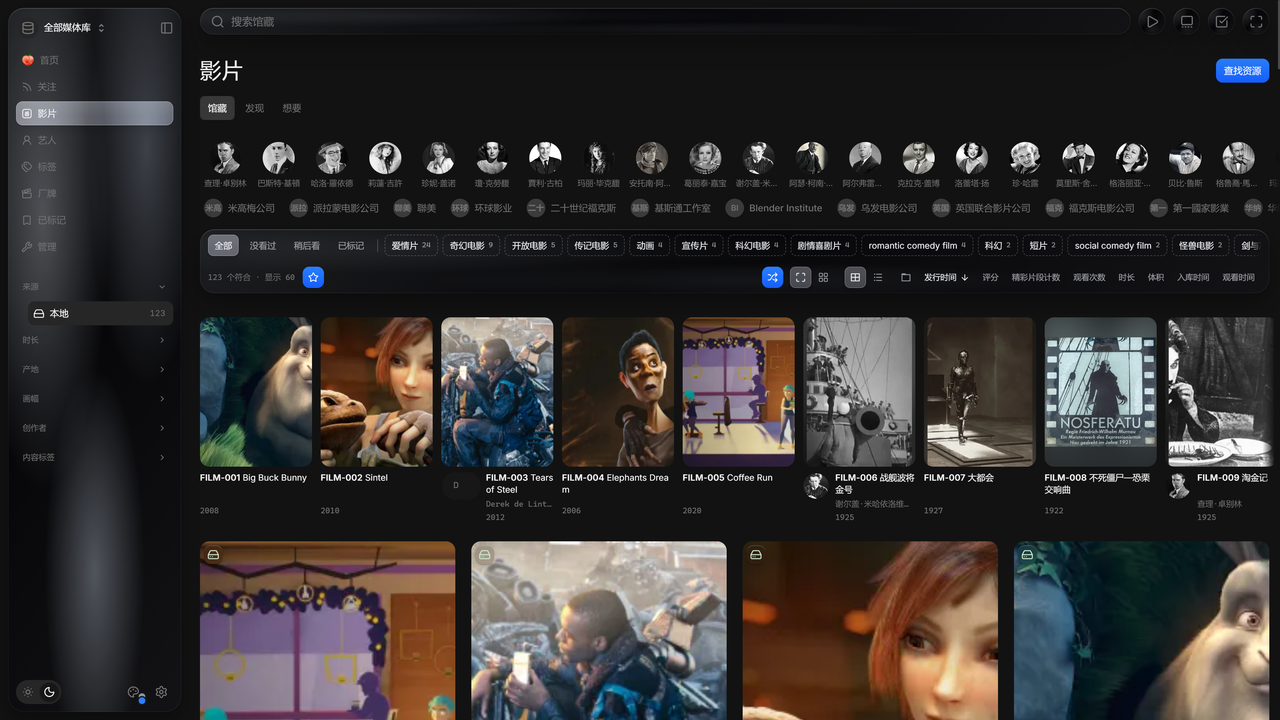](https://demo.peach.video)++Movie demo data; see [asset credits and licenses](https://peach.video/en/credits/). More screenshots are in the [GitHub README](https://github.com/peach-mitao/peach#screenshots).++## Features++- **Metadata scraping**: recognize video codes, read NFO files and fill titles, performers, studios and covers from multiple sources while keeping your edits.+- **Local and cloud libraries**: browse mounted folders, SMB shares and CloudDrive2 cloud mounts in one library. Scanning is read-only and media stays where it is.+- **Playback and history**: stream in the browser with subtitles, playback speed, resume and timeline previews.+- **Follows and discovery**: track performer and creator updates, discover titles and manage a want list.+- **Library management**: manage tags, duplicates, versions and parts; metadata and watch history stay in your data volume.+- **Any device**: manage and watch from a desktop, tablet or phone browser.++## Image and tags++| Item | Value |+| --- | --- |+| Image | `longmeidao/peach` |+| Version tags | One per release, built from the release commit |+| `edge` | Moves to the latest complete release |+| Platform | `linux/amd64`; ARM NAS is not yet verified |+| User | UID/GID `1000`, non-root |+| Port | `8900/tcp` |+| `/data` | Settings, database, credentials and image cache; must be persistent |+| `/media` | Your media, mounted read-only by default |++The image includes Peach, the web UI, FFmpeg, FFprobe, OpenSSL and the amane scraping runtime. It runs headless; there is no desktop tray in the container.++## Quick start with Docker Compose++This example targets a Linux host with Docker Engine and Docker Compose. The media folder must already exist and be readable by UID 1000. If you use CloudDrive2, finish binding and mounting your cloud drives on the host first.++Save this as `compose.yaml` in an empty folder:++```yaml+services:+ peach:+ image: longmeidao/peach:${PEACH_VERSION:-edge}+ init: true+ restart: unless-stopped+ stop_grace_period: 75s+ ports:+ - "${PEACH_BIND:-127.0.0.1}:${PEACH_PORT:-8900}:8900"+ volumes:+ - peach-data:/data+ - type: bind+ source: ${PEACH_MEDIA_ROOT:?Set PEACH_MEDIA_ROOT in .env to an existing media folder}+ target: /media+ read_only: true+ bind:+ propagation: rslave+ create_host_path: false++volumes:+ peach-data:+```++Save `.env` next to it and replace the path with the absolute media path on your host:++```dotenv+PEACH_MEDIA_ROOT=/absolute/path/to/media+PEACH_BIND=127.0.0.1+PEACH_PORT=8900+```++Pull the image:++```console+docker compose pull+```++Start Peach:++```console+docker compose up -d+```++Show the first sign-in token. It is private, so run this in your own terminal only:++```console+docker compose exec peach peach token+```++Open `http://127.0.0.1:8900` on the host, or reach it through a private VPN or SSH tunnel. Sign in, set an access password, then add a media folder inside the container, such as `/media`, on the settings page.++## NAS and LAN access++`PEACH_BIND=127.0.0.1` only accepts connections from the host itself. To open Peach from another computer, set `PEACH_BIND` to the NAS's LAN IP, recreate the container and open `http://<NAS LAN IP>:<PEACH_PORT>`. Set an access password first. The image has no multi-user accounts; for public hosting, read the [security policy](https://github.com/peach-mitao/peach/blob/master/SECURITY.md).++On NAS container UIs, run `peach token` in the Peach container's terminal to get the sign-in token.++## Updating++Run `docker compose pull` and `docker compose up -d` again. Keep the `peach-data` volume: deleting it removes your settings, database and watch history. Hardware transcoding, CloudDrive2 networking, path mapping and diagnostics are covered in the [Docker guide](https://github.com/peach-mitao/peach/blob/master/docs/DOCKER.md).++## License++[AGPL-3.0-or-later](https://github.com/peach-mitao/peach/blob/master/LICENSE). Third-party components, including the bundled amane runtime, retain their own licenses.++Manage only media you own or are authorized to use, subject to laws, copyright and source-platform access, age and regional restrictions. Peach does not provide video resources or access to paid content.