
Build AI methods with your coding agent, then run them anywhere: as an MCP for chatbots, as a webapp for people, or via API for your software.
feature/Hosted-first-quick-start · L-260921-6a2e9f — quick start opens on the mthds CLI (#1240)
Louis Choquel19ed87043c60
diff --git a/CHANGELOG.md b/CHANGELOG.mdindex 652ff08a4..8e04e2fab 100644--- a/CHANGELOG.md+++ b/CHANGELOG.md@@ -8,6 +8,7 @@### Changed+- **The README leads with the hosted route**: its quick start is the onboarding region included from `Pipelex/.github` — sign up at app.pipelex.com, then the Pipelex plugin in Claude Code or Codex or the Pipelex MCP in ChatGPT or Claude — and the runtime's own install, configuration and first run follow under their own heading, **Run it yourself**. The CV batch screening walkthrough moved from the README to the cookbook in the documentation.- **A run's `analytics_groups` is renamed `extras` (Breaking)**: the base library no longer names an analytics concept in its run model or its job-preparation signatures. `RunMetadata.analytics_groups`, the runtime-bridge payload's `analytics_groups`, and the `analytics_groups` parameter of `pipeline_run_setup`, `prepare_pipe_job`, `PipelexKernel.make` and `PipelexRunner` are now `extras`: an opaque `dict[str, str]` of labels the host attaches to a run, which the library never reads by name. The module `pipelex.system.analytics_groups` is now `pipelex.system.run_extras`, with `validate_run_extras`, `RUN_EXTRAS_KEY_PATTERN`, `RUN_EXTRAS_VALUE_PATTERN` and `RUN_EXTRAS_MAX_ENTRIES`, and the span attribute `pipelex.run.analytics_groups` is now `pipelex.run.extras` (`PipelexSpanAttr.RUN_EXTRAS`). Behaviour is unchanged: the mapping is validated where it enters under the same bounds, and telemetry still forwards it whole as the PostHog groups of each capture. There is no alias; a host passing `analytics_groups` must pass `extras` instead.- **Pipelex's own telemetry stream receives the run's `user_id` as it is**: the Gateway stream sent a one-way digest of the caller taken inside the Gateway-key hash, and carried a `deployment` group instead of the run's own groups. It now resolves identity like the operator's identified stream — the run's `user_id` is the PostHog `distinct_id` and its `extras` ride the groups facet — so a host's events and the runtime's land on the same person and the same organization. The `NAMESPACED` identity policy and the `deployment` group type are removed. Anything that names no caller still reports under the Gateway-key hash.- **`BundleValidatorProtocol.validate_bundles` requires `caller_identity` (Breaking)**: a validator is handed who asked for the validation, `None` meaning nobody, so a hosted `/validate` attributes its telemetry to its caller. Every validator implementation must accept the argument, and a host must pass it — `caller_identity=self.caller_identity` from a `PipelexMTHDSProtocol` runner. `validate_bundles_in_process`, `validate_bundle`, `dry_run_pipe_in_process` and the `BundleValidator` sweep methods gain an optional `caller_identity` of their own.diff --git a/README.md b/README.mdindex fe2aa06b0..0f7c6cdcf 100644--- a/README.md+++ b/README.md@@ -1,552 +1,233 @@<div align="center">- <a href="https://www.pipelex.com/"><img src="https://raw.githubusercontent.com/Pipelex/pipelex/main/.github/assets/logo.png" alt="Pipelex Logo" width="400" style="max-width: 100%; height: auto;"></a>-- <br/>- <br/>- <br/>- <h2 align="center">Build & Run AI Methods</h2>- <p align="center">A method is a reusable, typed AI procedure — declared in a <code>.mthds</code> file and executed by Pipelex.<br/>-Each step is explicit, each output is structured, and every run is repeatable.</p>+ <h1 align="center"><a href="https://www.pipelex.com/"><img src="https://raw.githubusercontent.com/Pipelex/pipelex/main/.github/assets/logo.png" alt="Pipelex" width="400" style="max-width: 100%; height: auto;"></a></h1>+ <h2 align="center">Turn your expertise into an AI-powered App/MCP/API</h2>+ <p align="center">Pipelex runs your AI methods. Write a method once: a webapp runs it for your team or as SaaS for your customers, your agent runs it over MCP, your software runs it over the API.</p><div><a href="https://go.pipelex.com/demo"><strong>Demo</strong></a> -<a href="https://docs.pipelex.com/"><strong>Documentation</strong></a> -<a href="https://mthds.sh"><strong>Hub</strong></a> -- <a href="https://github.com/Pipelex/pipelex/issues"><strong>Report Bug</strong></a> -- <a href="https://github.com/Pipelex/pipelex/discussions"><strong>Feature Request</strong></a>+ <a href="https://go.pipelex.com/discord"><strong>Discord</strong></a></div><br/><p align="center">- <a href="LICENSE"><img src="https://img.shields.io/badge/License-Elastic--2.0-blue.svg" alt="Elastic License 2.0"></a>+ <a href="https://github.com/Pipelex/pipelex/blob/main/LICENSE"><img src="https://img.shields.io/badge/License-Elastic--2.0-blue.svg" alt="Elastic License 2.0"></a><a href="https://github.com/Pipelex/pipelex/tree/main/tests"><img src="https://img.shields.io/endpoint?url=https://raw.githubusercontent.com/Pipelex/pipelex/main/.badges/tests.json" alt="Tests"></a>- <a href="https://pypi.org/project/pipelex/"><img src="https://img.shields.io/pypi/v/pipelex?logo=pypi&logoColor=white&color=blue&style=flat-square"- alt="PyPI – latest release"></a>- <br/>- <a href="https://go.pipelex.com/discord"><img src="https://img.shields.io/badge/Discord-5865F2?logo=discord&logoColor=white" alt="Discord"></a>- <a href="https://www.youtube.com/@PipelexAI"><img src="https://img.shields.io/badge/YouTube-FF0000?logo=youtube&logoColor=white" alt="YouTube"></a>- <a href="https://pipelex.com"><img src="https://img.shields.io/badge/Homepage-03bb95?logo=google-chrome&logoColor=white&style=flat" alt="Website"></a>- <a href="https://github.com/Pipelex/pipelex-cookbook/tree/main"><img src="https://img.shields.io/badge/Cookbook-5a0dad?logo=github&logoColor=white&style=flat" alt="Cookbook"></a>- <a href="https://docs.pipelex.com/"><img src="https://img.shields.io/badge/Docs-03bb95?logo=read-the-docs&logoColor=white&style=flat" alt="Documentation"></a>- <a href="https://docs.pipelex.com/changelog/"><img src="https://img.shields.io/badge/Changelog-03bb95?logo=git&logoColor=white&style=flat" alt="Changelog"></a>- <br/>- <br/>+ <a href="https://pypi.org/project/pipelex/"><img src="https://img.shields.io/pypi/v/pipelex?logo=pypi&logoColor=white&color=blue&style=flat-square" alt="PyPI – latest release"></a>+ </p></div>-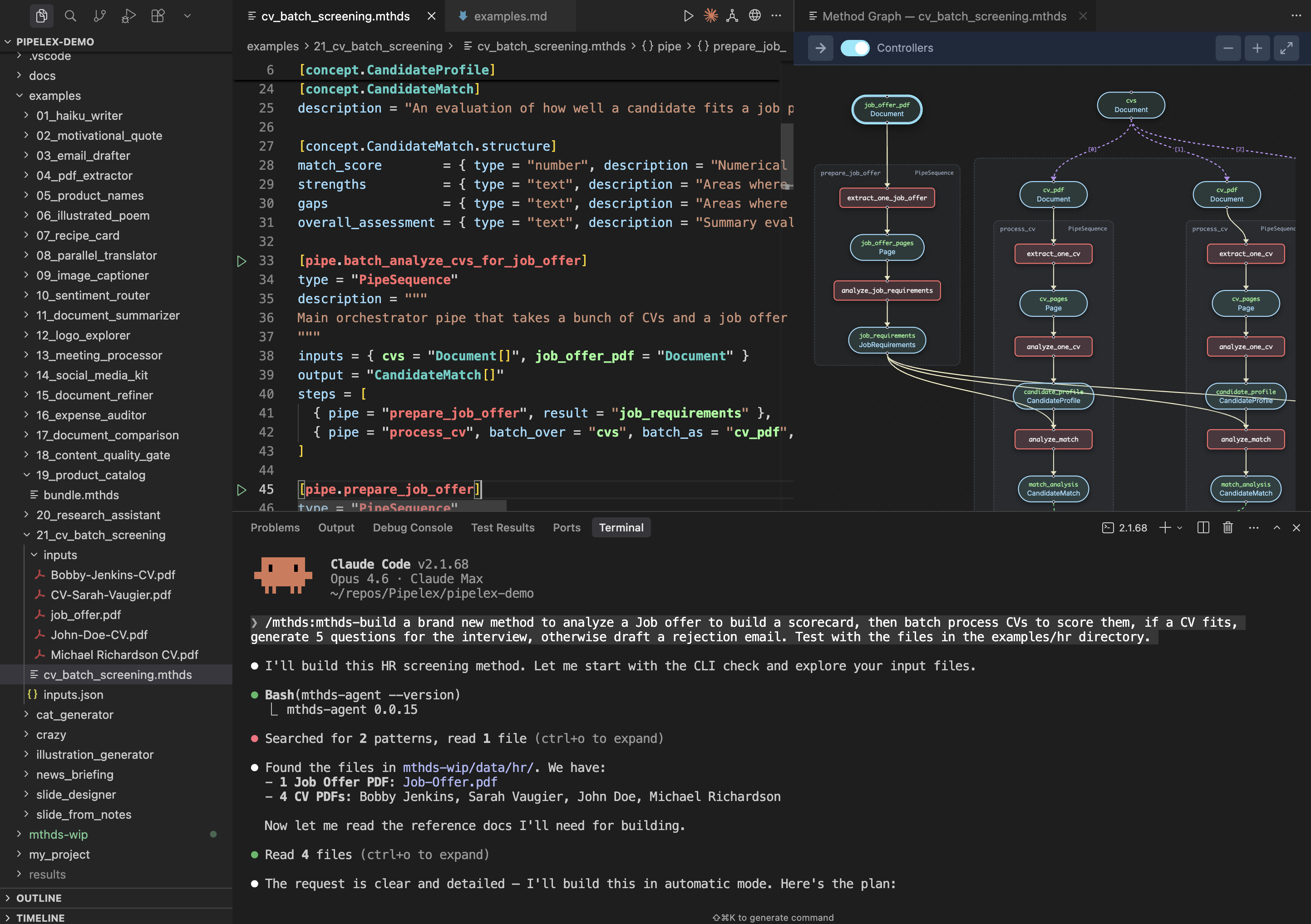+<!-- onboarding: front-door -->+<!-- Generated from the Pipelex onboarding source; this region is replaced from https://raw.githubusercontent.com/Pipelex/.github/main/onboarding/rendered/front-door.md — do not edit it here. -->+## Quick start+Pipelex runs your AI methods — write a method once, then run it from your agent via MCP, turn it into a webapp, or use it via API in any software.-## What a Method Looks Like+**1. Sign up at [app.pipelex.com](https://app.pipelex.com).**-```toml-[pipe.summarize_article]-type = "PipeLLM"-inputs = { article = "Text", audience = "Text" }-output = "Text"-prompt = "Summarize $article in three bullet points for $audience."-```+**2. Install the Pipelex plugin in your coding agent.** The plugin is how you build methods: it gives your agent the skills that write and run them, a hook that checks every edit, and the Pipelex tools.-From here, Pipelex handles model routing across 60+ models, structured output parsing, and pipeline orchestration.+<details open><summary><b>Claude Code</b></summary>-## Why Methods?+```bash+claude plugin marketplace add Pipelex/pipelex-plugins+claude plugin install pipelex@pipelex-plugins+```-| | |-|---|---|-| **Declarative** — Human-readable `.mthds` files that work across models | **Typed** — Semantic types: AI understands what you mean, every input/output connects with purpose |-| **Repeatable** — Deterministic orchestration with controlled room for AI creativity | **Composable** — Chain pipes into sequences, nest methods inside methods, share with the community |+Claude Code asks for an API key when you enable the plugin, and stores it in your OS keychain — create one in your console at [app.pipelex.com](https://app.pipelex.com). The skills, the hook that checks every edit and the Pipelex tools load with it; nothing else to install.-# Quick Start+Claude Code also loads what you have added to your Claude account, so if the Pipelex MCP is there, turn it off in Claude Code with `/mcp`: an agent with the plugin never takes both, since they register the same tool names.-## With Claude Code (Recommended)+</details>-Paste this into Claude Code:+<details><summary><b>Codex</b></summary>-```-Install mthds: run bash -c 'npm install -g mthds && mthds-agent bootstrap && claude plugin marketplace add mthds-ai/mthds-plugins && claude plugin install mthds@mthds-plugins'. Then tell me to /reload-plugins.+```bash+codex plugin marketplace add Pipelex/pipelex-plugins+export PIPELEX_API_KEY=plx_sk_... # create one in your console at app.pipelex.com```-Build your first method:+Restart Codex, run `/plugins` to install `pipelex`, and trust the plugin hook on first run. Requires Codex 0.141 or later.-```-/mthds-build A method to summarize articles with key takeaways for different audiences-```+</details>-Run it:+**3. Ask your agent for the method you want.**-```-/mthds-run-```+> Design a method that reads an invoice PDF and returns the supplier, the total and the line items. Then run it on `~/Downloads/invoice.pdf` and save it to my Pipelex account.++`/pipelex-design` writes the method, the hook checks it on every edit, `/pipelex-run` starts it and prints a run id you can come back to, and `/pipelex-catalog` saves it to your account, where your chatbot can run it too.-## With Codex+**Run your methods from your chatbot.** The Pipelex MCP is a connector for your chatbot (ChatGPT, Claude): it gives it access to the Pipelex service, so it can list the methods saved in your account and run them right in the conversation. Your methods become your chatbot's tools. To build a method, use the Pipelex plugin in a coding agent such as Claude Code or Codex, as in steps 2 and 3 above.-Paste this into Codex:+Add the Pipelex MCP in your chatbot's settings by the address below — in Claude, that is **Add custom connector** — then sign in with your Pipelex account when asked. Nothing to install and no key: the Pipelex MCP runs on your signed-in session.```-Install mthds: run bash -c 'npm install -g mthds && mthds-agent bootstrap && mthds-agent codex install-hook && mthds-agent codex apply-config && codex plugin marketplace add mthds-ai/mthds-plugins'. Then tell me to restart Codex and run /plugins to install mthds.+https://mcp.pipelex.com/mcp```-Install the [VS Code extension](https://go.pipelex.com/vscode) for `.mthds` syntax highlighting and flowchart visualization.--## From the Terminal--```bash-npm install -g mthds-mthds-agent bootstrap-pipelex init-```+Then ask your chatbot:-Install the [VS Code extension](https://go.pipelex.com/vscode) for `.mthds` syntax highlighting and flowchart visualization.+> What methods do I have?+>+> Run the invoice method on https://example.com/invoice.pdf-Verify everything is set up correctly:+You get a run id straight away, and you can ask for its status, its results or the files it produced at any time.-```bash-pipelex doctor-```+Give the file as a URL the Pipelex MCP can reach. In ChatGPT you can attach it to the conversation instead and ask for a run on it; Claude has no way yet to hand the Pipelex MCP a file you attached.-## Standalone CLI+**The other two ways.** Turn the method into a webapp with the [method-app template](https://github.com/Pipelex/pipelex-method-apps), or use it via API in any software through `POST /v1/start` — in TypeScript with [`@pipelex/sdk`](https://www.npmjs.com/package/@pipelex/sdk), in Python with [`pipelex-sdk`](https://pypi.org/project/pipelex-sdk/), or with any HTTP client.-If you just need the Pipelex CLI without agent integration:+**Next:** [what Pipelex is](https://go.pipelex.com/product) · [documentation](https://go.pipelex.com/docs) · [your console](https://app.pipelex.com) · [Discord](https://go.pipelex.com/discord)-```bash-uv tool install pipelex-pipelex init-```+Prefer to run it yourself? This repository is the Pipelex runtime — its own install and configuration are below.+<!-- /onboarding -->-## Configure AI Access+## What a method looks like-- **Pipelex Gateway (Recommended)** — Free credits, single API key for LLMs, OCR / document extraction, and image generation across all major providers. [Get your key](https://app.pipelex.com/), add `PIPELEX_GATEWAY_API_KEY=your-key-here` to `~/.pipelex/.env`, run `pipelex init`.-- **Bring Your Own Keys** — Use existing API keys from OpenAI, Anthropic, Google, Mistral, etc. See [Configure AI Providers](https://docs.pipelex.com/latest/setup/configure-ai-providers/).-- **Local AI** — Ollama, vLLM, LM Studio, or llama.cpp — no API keys required. See [Configure AI Providers](https://docs.pipelex.com/latest/setup/configure-ai-providers/).+A method is a reusable, typed AI procedure, written in [MTHDS](https://mthds.ai/latest/), an open standard, and saved as a `.mthds` file. Each step is explicit, each output is structured, and every run is repeatable.+```toml+domain = "articles"+main_pipe = "summarize_article"-# Real-World Example: CV Batch Screening+[pipe.summarize_article]+type = "PipeLLM"+description = "Summarize an article for a given audience"+inputs = { article = "Text", audience = "Text" }+output = "Text"+prompt = "Summarize $article in three bullet points for $audience."+```-A production method that takes a stack of CVs and a job offer PDF, extracts and analyzes each, then scores how well each candidate matches the role.+From here, Pipelex handles model routing across providers, structured output parsing, and pipeline orchestration.-**cv_batch_screening.mthds**+| | |+|---|---|+| **Declarative** — Human-readable `.mthds` files that work across models | **Typed** — Semantic types: AI understands what you mean, every input/output connects with purpose |+| **Repeatable** — Deterministic orchestration with controlled room for AI creativity | **Composable** — Chain pipes into sequences, nest methods inside methods, share with the community |-```toml-[pipe.batch_analyze_cvs_for_job_offer]-type = "PipeSequence"-description = """-Main orchestrator pipe that takes a bunch of CVs and a job offer in PDF format, and analyzes how they match.-"""-inputs = { cvs = "Document[]", job_offer_pdf = "Document" }-output = "CandidateMatch[]"-steps = [- { pipe = "prepare_job_offer", result = "job_requirements" },- { pipe = "process_cv", batch_over = "cvs", batch_as = "cv_pdf", result = "match_analyses" },-]-```+## Run it yourself-<details>-<summary><b>View concepts, supporting pipes, flowchart, and run commands</b></summary>+This repository is the Pipelex runtime: the Python package that reads a `.mthds` file and runs it. Install it and everything happens on your own machine, against the model providers you choose.-**Concepts:**+### Install-```toml-[concept.CandidateProfile]-description = "A structured summary of a job candidate's professional background extracted from their CV."--[concept.CandidateProfile.structure]-skills = { type = "text", description = "Technical and soft skills possessed by the candidate", required = true }-experience = { type = "text", description = "Work history and professional experience", required = true }-education = { type = "text", description = "Educational background and qualifications", required = true }-achievements = { type = "text", description = "Notable accomplishments and certifications" }--[concept.JobRequirements]-description = "A structured summary of what a job position requires from candidates."--[concept.JobRequirements.structure]-required_skills = { type = "text", description = "Skills that are mandatory for the position", required = true }-responsibilities = { type = "text", description = "Main duties and tasks of the role", required = true }-qualifications = { type = "text", description = "Required education, certifications, or experience levels", required = true }-nice_to_haves = { type = "text", description = "Preferred but not mandatory qualifications" }--[concept.CandidateMatch]-description = "An evaluation of how well a candidate fits a job position."--[concept.CandidateMatch.structure]-match_score = { type = "number", description = "Numerical score representing overall fit percentage between 0 and 100", required = true }-strengths = { type = "text", description = "Areas where the candidate meets or exceeds requirements", required = true }-gaps = { type = "text", description = "Areas where the candidate falls short of requirements", required = true }-overall_assessment = { type = "text", description = "Summary evaluation of the candidate's suitability", required = true }+```bash+uv tool install pipelex+pipelex init+pipelex doctor```-<details>-<summary><b>Click to view the supporting pipes implementation</b></summary>+`pipelex init` writes your `~/.pipelex` configuration and offers to install the editor extension; `pipelex doctor` reports what is configured and what is missing.-```toml-[pipe.prepare_job_offer]-type = "PipeSequence"-description = """-Extracts and analyzes the job offer PDF to produce structured job requirements.-"""-inputs = { job_offer_pdf = "Document" }-output = "JobRequirements"-steps = [- { pipe = "extract_one_job_offer", result = "job_offer_pages" },- { pipe = "analyze_job_requirements", result = "job_requirements" },-]--[pipe.extract_one_job_offer]-type = "PipeExtract"-description = "Extracts text content from the job offer PDF document"-inputs = { job_offer_pdf = "Document" }-output = "Page[]"-model = "@default-text-from-pdf"--[pipe.analyze_job_requirements]-type = "PipeLLM"-description = """-Parses and summarizes the job requirements from the extracted job offer content, identifying required skills, responsibilities, qualifications, and nice-to-haves-"""-inputs = { job_offer_pages = "Page" }-output = "JobRequirements"-model = "$writing-factual"-system_prompt = """-You are an expert HR analyst specializing in parsing job descriptions. Your task is to extract and summarize job requirements into a structured format.-"""-prompt = """-Analyze the following job offer content and extract the key requirements for the position.--@job_offer_pages-"""--[pipe.process_cv]-type = "PipeSequence"-description = "Processes one application"-inputs = { cv_pdf = "Document", job_requirements = "JobRequirements" }-output = "CandidateMatch"-steps = [- { pipe = "extract_one_cv", result = "cv_pages" },- { pipe = "analyze_one_cv", result = "candidate_profile" },- { pipe = "analyze_match", result = "match_analysis" },-]--[pipe.extract_one_cv]-type = "PipeExtract"-description = "Extracts text content from the CV PDF document"-inputs = { cv_pdf = "Document" }-output = "Page[]"-model = "@default-text-from-pdf"--[pipe.analyze_one_cv]-type = "PipeLLM"-description = """-Parses and summarizes the candidate's professional profile from the extracted CV content, identifying skills, experience, education, and achievements-"""-inputs = { cv_pages = "Page" }-output = "CandidateProfile"-model = "$writing-factual"-system_prompt = """-You are an expert HR analyst specializing in parsing and summarizing candidate CVs. Your task is to extract and structure the candidate's professional profile into a structured format.-"""-prompt = """-Analyze the following CV content and extract the candidate's professional profile.--@cv_pages-"""--[pipe.analyze_match]-type = "PipeLLM"-description = """-Evaluates how well the candidate matches the job requirements, calculating a match score and identifying strengths and gaps-"""-inputs = { candidate_profile = "CandidateProfile", job_requirements = "JobRequirements" }-output = "CandidateMatch"-model = "$writing-factual"-system_prompt = """-You are an expert HR analyst specializing in candidate-job fit evaluation. Your task is to produce a structured match analysis comparing a candidate's profile against job requirements.-"""-prompt = """-Analyze how well the candidate matches the job requirements. Evaluate their fit by comparing their skills, experience, and qualifications against what the position demands.--@candidate_profile--@job_requirements--Provide a comprehensive match analysis including a numerical score, identified strengths, gaps, and an overall assessment.-"""-```+Some providers and features need an extra:-</details>+- `anthropic`: Anthropic/Claude support for text generation+- `google`: Google models (Vertex) support for text generation+- `google-genai`: Google Gemini API support for text and image generation+- `mistralai`: Mistral AI support for text generation and OCR+- `bedrock`: Amazon Bedrock support for text generation+- `fal`: Image generation through fal+- `linkup`: Web search with Linkup+- `docling`: OCR with Docling-<details>-<summary><b>View the pipeline flowchart</b></summary>--```mermaid-flowchart LR- %% Pipe and stuff nodes within controller subgraphs- subgraph sg_n_8b2136e3fe["batch_analyze_cvs_for_job_offer"]- subgraph sg_n_91d5d6dc7c["prepare_job_offer"]- n_fde22777cb["analyze_job_requirements"]- s_f9f703fbb4(["job_requirements<br/>JobRequirements"]):::stuff- n_b8469c838f["extract_one_job_offer"]- s_d998350046(["job_offer_pages<br/>Page"]):::stuff- end- subgraph sg_n_f8d5afb7cd["process_cv_batch"]- subgraph sg_n_6e53e16369["process_cv"]- n_c18aded200["analyze_match"]- s_5c911f7e54(["match_analysis<br/>CandidateMatch"]):::stuff- n_a7ed00ac24["analyze_one_cv"]- s_c5ae714e89(["candidate_profile<br/>CandidateProfile"]):::stuff- n_d24f39aa60["extract_one_cv"]- s_427beb5195(["cv_pdf<br/>Document"]):::stuff- s_f1f80289df(["cv_pages<br/>Page"]):::stuff- end- subgraph sg_n_2cfb7a32c8["process_cv"]- n_f6a25d1769["analyze_match"]- s_ea99eee6ed(["match_analysis<br/>CandidateMatch"]):::stuff- n_f48b73fbee["analyze_one_cv"]- s_e1ffee913e(["candidate_profile<br/>CandidateProfile"]):::stuff- n_d16f2fe381["extract_one_cv"]- s_041bb18fb4(["cv_pdf<br/>Document"]):::stuff- s_5fbba7194a(["cv_pages<br/>Page"]):::stuff- end- subgraph sg_n_08a7186be9["process_cv"]- n_937e750ea4["analyze_match"]- s_bb41a103f0(["match_analysis<br/>CandidateMatch"]):::stuff- n_786a2969d5["analyze_one_cv"]- s_c47fe821d7(["candidate_profile<br/>CandidateProfile"]):::stuff- n_38f0cfd11c["extract_one_cv"]- s_2634ece93d(["cv_pdf<br/>Document"]):::stuff- s_44e253b325(["cv_pages<br/>Page"]):::stuff- end- end- end-- %% Pipeline input stuff nodes (no producer)- s_9b7e74ac51(["job_offer_pdf<br/>Document"]):::stuff-- %% Data flow edges: producer -> stuff -> consumer- n_a7ed00ac24 --> s_c5ae714e89- n_b8469c838f --> s_d998350046- n_f48b73fbee --> s_e1ffee913e- n_d16f2fe381 --> s_5fbba7194a- n_fde22777cb --> s_f9f703fbb4- n_d24f39aa60 --> s_f1f80289df- n_38f0cfd11c --> s_44e253b325- n_786a2969d5 --> s_c47fe821d7- n_c18aded200 --> s_5c911f7e54- n_f6a25d1769 --> s_ea99eee6ed- n_937e750ea4 --> s_bb41a103f0- s_c5ae714e89 --> n_c18aded200- s_9b7e74ac51 --> n_b8469c838f- s_d998350046 --> n_fde22777cb- s_e1ffee913e --> n_f6a25d1769- s_427beb5195 --> n_d24f39aa60- s_041bb18fb4 --> n_d16f2fe381- s_2634ece93d --> n_38f0cfd11c- s_5fbba7194a --> n_f48b73fbee- s_f9f703fbb4 --> n_c18aded200- s_f9f703fbb4 --> n_f6a25d1769- s_f9f703fbb4 --> n_937e750ea4- s_f1f80289df --> n_a7ed00ac24- s_44e253b325 --> n_786a2969d5- s_c47fe821d7 --> n_937e750ea4-- %% Batch edges: list-item relationships- s_52d84618d0(["match_analyses<br/>CandidateMatch"]):::stuff- s_5c911f7e54 -."[0]".-> s_52d84618d0- s_ea99eee6ed -."[1]".-> s_52d84618d0- s_bb41a103f0 -."[2]".-> s_52d84618d0-- %% Style definitions- classDef failed fill:#ffcccc,stroke:#cc0000- classDef stuff fill:#fff3e6,stroke:#cc6600,stroke-width:2px- classDef controller fill:#e6f3ff,stroke:#0066cc-- %% Subgraph depth-based coloring- style sg_n_08a7186be9 fill:#fffde6- style sg_n_2cfb7a32c8 fill:#fffde6- style sg_n_6e53e16369 fill:#fffde6- style sg_n_8b2136e3fe fill:#e6f3ff- style sg_n_91d5d6dc7c fill:#e6ffe6- style sg_n_f8d5afb7cd fill:#e6ffe6+Name the ones you need when you install, or take them all:++```bash+uv tool install "pipelex[anthropic,google,google-genai,mistralai,bedrock,fal,linkup,docling]"```-</details>+### Configure AI Access-### Run Your Method+- **Pipelex Gateway (Recommended)** — Free credits, single API key for LLMs, OCR / document extraction, and image generation across all major providers. [Get your key](https://app.pipelex.com/), add `PIPELEX_GATEWAY_API_KEY=your-key-here` to `~/.pipelex/.env`, run `pipelex init`.+- **Bring Your Own Keys** — Use existing API keys from OpenAI, Anthropic, Google, Mistral, etc. See [Configure AI Providers](https://docs.pipelex.com/latest/setup/configure-ai-providers/).+- **Local AI** — Ollama, vLLM, LM Studio, or llama.cpp — no API keys required. See [Configure AI Providers](https://docs.pipelex.com/latest/setup/configure-ai-providers/).-**Via CLI:**+**Privacy & Telemetry** — Pipelex Gateway collects only technical data (model names, token counts, latency) — never prompts or business data. If you want to avoid Gateway telemetry, disable `pipelex_gateway` and use your own provider keys or local AI instead. [Learn more](https://docs.pipelex.com/latest/setup/telemetry/)-```bash-pipelex run bundle cv_batch_screening.mthds --inputs inputs.json-```+### Run a method-Create an `inputs.json` file with your PDF URLs:+Save the method above as `summarize.mthds` and its inputs as `inputs.json`:```json{- "cvs": {- "concept": "native.Document",- "content": [- { "url": "https://pipelex-web.s3.amazonaws.com/demo/John-Doe-CV.pdf" },- { "path": "inputs/Jane-Smith-CV.pdf" }- ]- },- "job_offer_pdf": {- "concept": "native.Document",- "content": {- "url": "https://pipelex-web.s3.amazonaws.com/demo/Job-Offer.pdf"- }- }+ "article": "Paste the text of an article here.",+ "audience": "busy executives"}```-**Via Python:**--```python-import asyncio-from pipelex.core.stuffs.document_content import DocumentContent-from pipelex.pipelex import Pipelex-from pipelex.pipeline.runner import PipelexRunner--# Generated by: `pipelex build structures bundle cv_batch_screening.mthds`-from structures.cv_batch_screening__candidate_match import CandidateMatch---async def run_pipeline() -> list[CandidateMatch]:- runner = PipelexRunner()- response = await runner.execute_pipeline(- pipe_code="batch_analyze_cvs_for_job_offer",- inputs={- "cvs": {- "concept": "Document",- "content": [- DocumentContent(url="https://pipelex-web.s3.amazonaws.com/demo/John-Doe-CV.pdf"),- DocumentContent(path="inputs/Jane-Smith-CV.pdf"),- ],- },- "job_offer_pdf": {- "concept": "native.Document",- "content": DocumentContent(url="https://pipelex-web.s3.amazonaws.com/demo/Job-Offer.pdf"),- },- },- )- pipe_output = response.pipe_output- print(pipe_output)- return pipe_output.main_stuff_as_items(item_type=CandidateMatch)---Pipelex.make()-asyncio.run(run_pipeline())+Then run it:++```bash+pipelex run bundle summarize.mthds --inputs inputs.json```-</details>+The result is written under `results/`. For a method with several steps, typed concepts and a batch, run from the CLI and from Python, read [CV batch screening, step by step](https://docs.pipelex.com/latest/cookbook/cv-batch-screening/).+### Editor extension-## See Pipelex in Action+`.mthds` syntax highlighting and flowchart visualization: the [VS Code Marketplace](https://marketplace.visualstudio.com/items?itemName=pipelex.pipelex), or the [Open VSX Registry](https://open-vsx.org/extension/Pipelex/pipelex) for Cursor, Windsurf and other VS Code forks. `pipelex init` offers to install it when it detects your IDE.-**Claude Code builds your AI Method**+## See Pipelex in action++**Claude Code builds your AI method**<a href="https://go.pipelex.com/demo"><img src="https://go.pipelex.com/demo-thumbnail" alt="Pipelex Demo" width="500" style="max-width: 100%; height: auto;"></a>-## IDE Extension--We **highly** recommend installing our extension for `.mthds` syntax highlighting in your IDE:--- **VS Code**: Install from the [VS Code Marketplace](https://marketplace.visualstudio.com/items?itemName=pipelex.pipelex)-- **Cursor, Windsurf, and other VS Code forks**: Install from the [Open VSX Registry](https://open-vsx.org/extension/Pipelex/pipelex), or search for "Pipelex" directly in your extensions tab--Running `pipelex init` will also offer to install the extension automatically if it detects your IDE.--## Run Anywhere+## Run anywhereThe same `.mthds` file runs from multiple execution targets:| Target | How ||--------|-----|| **CLI** | `pipelex run bundle method.mthds --inputs inputs.json` |-| **Python** | `PipelexRunner().execute_pipeline(...)` |-| **TypeScript / Node** | [`mthds`](https://www.npmjs.com/package/mthds) SDK calling a Pipelex API server |-| **REST API** | Self-hosted API server |-| **MCP** | Model Context Protocol — agents call methods as tools |-| **n8n** | Pipelex node for workflow automation |--## Use Pipelex from TypeScript--For Node, Next.js, or any TypeScript app, call a Pipelex API server via the [`mthds`](https://www.npmjs.com/package/mthds) npm SDK (source: [`mthds-js`](https://github.com/mthds-ai/mthds-js)). Self-host the source-available [`pipelex-api`](https://github.com/Pipelex/pipelex-api) and point the SDK at your instance. A Pipelex-hosted runner at `api.pipelex.com` is also available in private beta — [join the waitlist](https://go.pipelex.com/waitlist).--```bash-npm install mthds-```+| **Python** | `PipelexMTHDSProtocol().execute(...)` |+| **TypeScript / Node** | [`@pipelex/sdk`](https://www.npmjs.com/package/@pipelex/sdk) against the hosted API, or [`mthds`](https://www.npmjs.com/package/mthds) against any MTHDS API |+| **REST API** | Self-host [`pipelex-api`](https://github.com/Pipelex/pipelex-api); the hosted API is the one in the Quick start above |+| **MCP** | The [Pipelex MCP](https://github.com/Pipelex/pipelex-mcp): your chatbot runs the methods saved in your account |+| **n8n** | [`n8n-nodes-pipelex`](https://github.com/Pipelex/n8n-nodes-pipelex) for workflow automation |-Fastest way to get started: fork the [`pipelex-starter-js`](https://github.com/Pipelex/pipelex-starter-js) template — a Next.js 16 + TypeScript app with three working demos (text entity extraction, PDF summary, image generation). Click *Use this template* on GitHub.---# The MTHDS Ecosystem+## The ecosystem| | Description | Link ||---|---|---|-| **MTHDS Standard** | The open standard specification — language, package system, and typed concepts | [mthds.ai](https://mthds.ai/latest/) |+| **MTHDS standard** | The open standard specification — language, package system, and typed concepts | [mthds.ai](https://mthds.ai/latest/) || **MTHDS Hub** | Discover and share methods — browse packages, search by signature | [mthds.sh](https://mthds.sh) |-| **MTHDS Plugins** | Claude Code plugin — commands to build, run, edit, check, fix, and publish methods | [github.com/mthds-ai/mthds-plugins](https://github.com/mthds-ai/mthds-plugins) |-| **Package System** | Versioned dependencies, lock files with SHA-256 integrity, cross-package references via `->` | [Packages docs](https://mthds.ai/latest/packages/structure/) |-| **Know-How Graph** | Typed discovery — "I have X, I need Y" — find methods or chains by typed signature | [Know-How Graph](https://mthds.ai/latest/know-how-graph/) |--<details>-<summary><b>View MTHDS skills</b></summary>--| Command | Description |-|---------|-------------|-| `/mthds-build` | Build new AI method bundles from scratch |-| `/mthds-run` | Execute methods and interpret their JSON output |-| `/mthds-edit` | Modify existing methods — change pipes, update prompts, add steps |-| `/mthds-check` | Validate bundles for issues (read-only) |-| `/mthds-fix` | Auto-fix validation errors |-| `/mthds-explain` | Walk through execution flow in plain language |-| `/mthds-inputs` | Prepare inputs: templates, synthetic data, user files |-| `/mthds-install` | Install method packages from GitHub or local dirs |-| `/mthds-pkg` | Package management — init, deps, lock, install, update |-| `/mthds-publish` | Publish methods to the hub |-| `/mthds-share` | Share methods on social media |--</details>---## Examples & Cookbook+| **Pipelex plugin** | The Pipelex plugin for Claude Code and Codex: skills that build and run methods, a hook that checks every edit, and the Pipelex tools | [github.com/Pipelex/pipelex-plugins](https://github.com/Pipelex/pipelex-plugins) |+| **Pipelex MCP** | The Pipelex MCP, which ChatGPT or Claude adds to run the methods saved in your account | [github.com/Pipelex/pipelex-mcp](https://github.com/Pipelex/pipelex-mcp) |+| **Method library** | Public methods to run by their address or to fork — `github.com/Pipelex/methods/<method_name>` | [github.com/Pipelex/methods](https://github.com/Pipelex/methods) |+| **TypeScript starter** | A Next.js app that runs methods through `@pipelex/sdk`, with worked examples to copy | [github.com/Pipelex/pipelex-starter-js](https://github.com/Pipelex/pipelex-starter-js) |-Explore real-world examples in our **Cookbook** repository:+## Documentation-[](https://github.com/Pipelex/pipelex-cookbook/tree/main)+- [docs.pipelex.com](https://docs.pipelex.com/): the Pipelex documentation, from the MTHDS language tutorial to the CLI reference.+- [CV batch screening, step by step](https://docs.pipelex.com/latest/cookbook/cv-batch-screening/): a production method with its concepts, its pipes and its flowchart, and how to run it from the CLI and from Python.+- [The cookbook](https://github.com/Pipelex/pipelex-cookbook): methods to clone, run and adapt.+- [The MTHDS standard](https://mthds.ai/latest/): the language a method is written in.+- [The changelog](https://docs.pipelex.com/latest/changelog/).-Clone it, fork it, and experiment with production-ready methods for various use cases.+## Develop-## Optional Features--The package supports the following additional features:--- `anthropic`: Anthropic/Claude support for text generation-- `google`: Google models (Vertex) support for text generation-- `mistralai`: Mistral AI support for text generation and OCR-- `bedrock`: Amazon Bedrock support for text generation-- `fal`: Image generation with Black Forest Labs "FAL" service-- `linkup`: Web search with Linkup-- `docling`: OCR with Docling--Install all extras:+To work on Pipelex itself, fork and clone the repository, then:```bash-uv pip install "pipelex[anthropic,google,google-genai,mistralai,bedrock,fal,linkup,docling]"+make install # create .venv and install the dependencies+make check # formatting, lint and type checks+make test # the unit tests```------**Privacy & Telemetry** — Pipelex Gateway collects only technical data (model names, token counts, latency) — never prompts or business data. If you want to avoid Gateway telemetry, disable `pipelex_gateway` and use your own provider keys or local AI instead. [Learn more](https://docs.pipelex.com/latest/setup/telemetry/)+The [contributing guide](https://github.com/Pipelex/pipelex/blob/main/CONTRIBUTING.md) says how to configure `.env`, name a branch and open a pull request.-**Contributing** — We welcome contributions! See our [Contributing Guidelines](CONTRIBUTING.md).+## Community-**Community** — [](https://go.pipelex.com/discord) [GitHub Issues](https://github.com/Pipelex/pipelex/issues) · [Discussions](https://github.com/Pipelex/pipelex/discussions) · [Documentation](https://docs.pipelex.com/)+Ask questions and share what you build on [Discord](https://go.pipelex.com/discord), report a bug in [GitHub Issues](https://github.com/Pipelex/pipelex/issues), propose an idea in [Discussions](https://github.com/Pipelex/pipelex/discussions), and watch demos on [YouTube](https://www.youtube.com/@PipelexAI).## License-This project is licensed under the Elastic License 2.0 (ELv2); see [LICENSE](LICENSE) for the terms, and the [license page](https://docs.pipelex.com/latest/license/) for how Pipelex reads them. Runtime dependencies are distributed under their own licenses via PyPI.+The Pipelex runtime is source-available under the Elastic License 2.0 (ELv2); see [LICENSE](https://github.com/Pipelex/pipelex/blob/main/LICENSE) for the terms, and the [license page](https://docs.pipelex.com/latest/license/) for how Pipelex reads them. Runtime dependencies are distributed under their own licenses via PyPI.---diff --git a/docs/cookbook/cv-batch-screening.md b/docs/cookbook/cv-batch-screening.mdnew file mode 100644index 000000000..bc942d333--- /dev/null+++ b/docs/cookbook/cv-batch-screening.md@@ -0,0 +1,325 @@+---+title: "CV Batch Screening Example"+description: "Screen a stack of CVs against a job offer with a multi-step Pipelex method that extracts each document, analyzes it and scores the match."+---++# Example: CV Batch Screening++A production method that takes a stack of CVs and a job offer PDF, extracts and analyzes each, then scores how well each candidate matches the role.++## What it demonstrates++- Typed concepts with inline structures (`CandidateProfile`, `JobRequirements`, `CandidateMatch`)+- Nested `PipeSequence` controllers, one preparing the job offer and one processing each CV+- Batching over a list of documents (`batch_over` / `batch_as`)+- Document extraction with `PipeExtract`, followed by structured analysis with `PipeLLM`++## The method: `cv_batch_screening.mthds`++### The main pipe++```toml+domain = "cv_batch_screening"+main_pipe = "batch_analyze_cvs_for_job_offer"++[pipe.batch_analyze_cvs_for_job_offer]+type = "PipeSequence"+description = """+Main orchestrator pipe that takes a bunch of CVs and a job offer in PDF format, and analyzes how they match.+"""+inputs = { cvs = "Document[]", job_offer_pdf = "Document" }+output = "CandidateMatch[]"+steps = [+ { pipe = "prepare_job_offer", result = "job_requirements" },+ { pipe = "process_cv", batch_over = "cvs", batch_as = "cv_pdf", result = "match_analyses" },+]+```++### Concepts++```toml+[concept.CandidateProfile]+description = "A structured summary of a job candidate's professional background extracted from their CV."++[concept.CandidateProfile.structure]+skills = { type = "text", description = "Technical and soft skills possessed by the candidate", required = true }+experience = { type = "text", description = "Work history and professional experience", required = true }+education = { type = "text", description = "Educational background and qualifications", required = true }+achievements = { type = "text", description = "Notable accomplishments and certifications" }++[concept.JobRequirements]+description = "A structured summary of what a job position requires from candidates."++[concept.JobRequirements.structure]+required_skills = { type = "text", description = "Skills that are mandatory for the position", required = true }+responsibilities = { type = "text", description = "Main duties and tasks of the role", required = true }+qualifications = { type = "text", description = "Required education, certifications, or experience levels", required = true }+nice_to_haves = { type = "text", description = "Preferred but not mandatory qualifications" }++[concept.CandidateMatch]+description = "An evaluation of how well a candidate fits a job position."++[concept.CandidateMatch.structure]+match_score = { type = "number", description = "Numerical score representing overall fit percentage between 0 and 100", required = true }+strengths = { type = "text", description = "Areas where the candidate meets or exceeds requirements", required = true }+gaps = { type = "text", description = "Areas where the candidate falls short of requirements", required = true }+overall_assessment = { type = "text", description = "Summary evaluation of the candidate's suitability", required = true }+```++### Supporting pipes++```toml+[pipe.prepare_job_offer]+type = "PipeSequence"+description = """+Extracts and analyzes the job offer PDF to produce structured job requirements.+"""+inputs = { job_offer_pdf = "Document" }+output = "JobRequirements"+steps = [+ { pipe = "extract_one_job_offer", result = "job_offer_pages" },+ { pipe = "analyze_job_requirements", result = "job_requirements" },+]++[pipe.extract_one_job_offer]+type = "PipeExtract"+description = "Extracts text content from the job offer PDF document"+inputs = { job_offer_pdf = "Document" }+output = "Page[]"+model = "@default-text-from-pdf"++[pipe.analyze_job_requirements]+type = "PipeLLM"+description = """+Parses and summarizes the job requirements from the extracted job offer content, identifying required skills, responsibilities, qualifications, and nice-to-haves+"""+inputs = { job_offer_pages = "Page" }+output = "JobRequirements"+model = "$writing-factual"+system_prompt = """+You are an expert HR analyst specializing in parsing job descriptions. Your task is to extract and summarize job requirements into a structured format.+"""+prompt = """+Analyze the following job offer content and extract the key requirements for the position.++@job_offer_pages+"""++[pipe.process_cv]+type = "PipeSequence"+description = "Processes one application"+inputs = { cv_pdf = "Document", job_requirements = "JobRequirements" }+output = "CandidateMatch"+steps = [+ { pipe = "extract_one_cv", result = "cv_pages" },+ { pipe = "analyze_one_cv", result = "candidate_profile" },+ { pipe = "analyze_match", result = "match_analysis" },+]++[pipe.extract_one_cv]+type = "PipeExtract"+description = "Extracts text content from the CV PDF document"+inputs = { cv_pdf = "Document" }+output = "Page[]"+model = "@default-text-from-pdf"++[pipe.analyze_one_cv]+type = "PipeLLM"+description = """+Parses and summarizes the candidate's professional profile from the extracted CV content, identifying skills, experience, education, and achievements+"""+inputs = { cv_pages = "Page" }+output = "CandidateProfile"+model = "$writing-factual"+system_prompt = """+You are an expert HR analyst specializing in parsing and summarizing candidate CVs. Your task is to extract and structure the candidate's professional profile into a structured format.+"""+prompt = """+Analyze the following CV content and extract the candidate's professional profile.++@cv_pages+"""++[pipe.analyze_match]+type = "PipeLLM"+description = """+Evaluates how well the candidate matches the job requirements, calculating a match score and identifying strengths and gaps+"""+inputs = { candidate_profile = "CandidateProfile", job_requirements = "JobRequirements" }+output = "CandidateMatch"+model = "$writing-factual"+system_prompt = """+You are an expert HR analyst specializing in candidate-job fit evaluation. Your task is to produce a structured match analysis comparing a candidate's profile against job requirements.+"""+prompt = """+Analyze how well the candidate matches the job requirements. Evaluate their fit by comparing their skills, experience, and qualifications against what the position demands.++@candidate_profile++@job_requirements++Provide a comprehensive match analysis including a numerical score, identified strengths, gaps, and an overall assessment.+"""+```++### Flowchart++```mermaid+flowchart LR+ %% Pipe and stuff nodes within controller subgraphs+ subgraph sg_n_8b2136e3fe["batch_analyze_cvs_for_job_offer"]+ subgraph sg_n_91d5d6dc7c["prepare_job_offer"]+ n_fde22777cb["analyze_job_requirements"]+ s_f9f703fbb4(["job_requirements<br/>JobRequirements"]):::stuff+ n_b8469c838f["extract_one_job_offer"]+ s_d998350046(["job_offer_pages<br/>Page"]):::stuff+ end+ subgraph sg_n_f8d5afb7cd["process_cv_batch"]+ subgraph sg_n_6e53e16369["process_cv"]+ n_c18aded200["analyze_match"]+ s_5c911f7e54(["match_analysis<br/>CandidateMatch"]):::stuff+ n_a7ed00ac24["analyze_one_cv"]+ s_c5ae714e89(["candidate_profile<br/>CandidateProfile"]):::stuff+ n_d24f39aa60["extract_one_cv"]+ s_427beb5195(["cv_pdf<br/>Document"]):::stuff+ s_f1f80289df(["cv_pages<br/>Page"]):::stuff+ end+ subgraph sg_n_2cfb7a32c8["process_cv"]+ n_f6a25d1769["analyze_match"]+ s_ea99eee6ed(["match_analysis<br/>CandidateMatch"]):::stuff+ n_f48b73fbee["analyze_one_cv"]+ s_e1ffee913e(["candidate_profile<br/>CandidateProfile"]):::stuff+ n_d16f2fe381["extract_one_cv"]+ s_041bb18fb4(["cv_pdf<br/>Document"]):::stuff+ s_5fbba7194a(["cv_pages<br/>Page"]):::stuff+ end+ subgraph sg_n_08a7186be9["process_cv"]+ n_937e750ea4["analyze_match"]+ s_bb41a103f0(["match_analysis<br/>CandidateMatch"]):::stuff+ n_786a2969d5["analyze_one_cv"]+ s_c47fe821d7(["candidate_profile<br/>CandidateProfile"]):::stuff+ n_38f0cfd11c["extract_one_cv"]+ s_2634ece93d(["cv_pdf<br/>Document"]):::stuff+ s_44e253b325(["cv_pages<br/>Page"]):::stuff+ end+ end+ end++ %% Pipeline input stuff nodes (no producer)+ s_9b7e74ac51(["job_offer_pdf<br/>Document"]):::stuff++ %% Data flow edges: producer -> stuff -> consumer+ n_a7ed00ac24 --> s_c5ae714e89+ n_b8469c838f --> s_d998350046+ n_f48b73fbee --> s_e1ffee913e+ n_d16f2fe381 --> s_5fbba7194a+ n_fde22777cb --> s_f9f703fbb4+ n_d24f39aa60 --> s_f1f80289df+ n_38f0cfd11c --> s_44e253b325+ n_786a2969d5 --> s_c47fe821d7+ n_c18aded200 --> s_5c911f7e54+ n_f6a25d1769 --> s_ea99eee6ed+ n_937e750ea4 --> s_bb41a103f0+ s_c5ae714e89 --> n_c18aded200+ s_9b7e74ac51 --> n_b8469c838f+ s_d998350046 --> n_fde22777cb+ s_e1ffee913e --> n_f6a25d1769+ s_427beb5195 --> n_d24f39aa60+ s_041bb18fb4 --> n_d16f2fe381+ s_2634ece93d --> n_38f0cfd11c+ s_5fbba7194a --> n_f48b73fbee+ s_f9f703fbb4 --> n_c18aded200+ s_f9f703fbb4 --> n_f6a25d1769+ s_f9f703fbb4 --> n_937e750ea4+ s_f1f80289df --> n_a7ed00ac24+ s_44e253b325 --> n_786a2969d5+ s_c47fe821d7 --> n_937e750ea4++ %% Batch edges: list-item relationships+ s_52d84618d0(["match_analyses<br/>CandidateMatch"]):::stuff+ s_5c911f7e54 -."[0]".-> s_52d84618d0+ s_ea99eee6ed -."[1]".-> s_52d84618d0+ s_bb41a103f0 -."[2]".-> s_52d84618d0++ %% Style definitions+ classDef failed fill:#ffcccc,stroke:#cc0000+ classDef stuff fill:#fff3e6,stroke:#cc6600,stroke-width:2px+ classDef controller fill:#e6f3ff,stroke:#0066cc++ %% Subgraph depth-based coloring+ style sg_n_08a7186be9 fill:#fffde6+ style sg_n_2cfb7a32c8 fill:#fffde6+ style sg_n_6e53e16369 fill:#fffde6+ style sg_n_8b2136e3fe fill:#e6f3ff+ style sg_n_91d5d6dc7c fill:#e6ffe6+ style sg_n_f8d5afb7cd fill:#e6ffe6+```++## Run the method++### From the CLI++```bash+pipelex run bundle cv_batch_screening.mthds --inputs inputs.json+```++Create an `inputs.json` file with your PDF URLs:++```json+{+ "cvs": {+ "concept": "native.Document",+ "content": [+ { "url": "https://pipelex-web.s3.amazonaws.com/demo/John-Doe-CV.pdf" },+ { "url": "inputs/Jane-Smith-CV.pdf" }+ ]+ },+ "job_offer_pdf": {+ "concept": "native.Document",+ "content": {+ "url": "https://pipelex-web.s3.amazonaws.com/demo/Job-Offer.pdf"+ }+ }+}+```++### From Python++```python+import asyncio+from pathlib import Path++from pipelex.core.stuffs.document_content import DocumentContent+from pipelex.pipelex import Pipelex+from pipelex.pipeline.runner import PipelexMTHDSProtocol++# Generated by: `pipelex build structures cv_batch_screening.mthds`+from structures.structures import CandidateMatch+++async def run_pipeline() -> list[CandidateMatch]:+ runner = PipelexMTHDSProtocol()+ response = await runner.execute(+ mthds_contents=[Path("cv_batch_screening.mthds").read_text(encoding="utf-8")],+ inputs={+ "cvs": {+ "concept": "Document",+ "content": [+ DocumentContent(url="https://pipelex-web.s3.amazonaws.com/demo/John-Doe-CV.pdf"),+ DocumentContent(url="inputs/Jane-Smith-CV.pdf"),+ ],+ },+ "job_offer_pdf": {+ "concept": "native.Document",+ "content": DocumentContent(url="https://pipelex-web.s3.amazonaws.com/demo/Job-Offer.pdf"),+ },+ },+ )+ pipe_output = response.pipe_output+ print(pipe_output)+ return pipe_output.main_stuff_as_items(item_type=CandidateMatch)+++Pipelex.make()+asyncio.run(run_pipeline())+```diff --git a/docs/cookbook/index.md b/docs/cookbook/index.mdindex dbf4970a2..c25274cfe 100644--- a/docs/cookbook/index.md+++ b/docs/cookbook/index.md@@ -28,6 +28,7 @@ We strongly encourage you to clone the [Pipelex Cookbook repository](https://git- [**Gantt Chart**](./extract-gantt.md) — Extract tasks and dates from Gantt chart images using divide-and-conquer.- [**Markdown from Document**](./extract-markdown.md) — Simple document-to-markdown using shared method packages.- [**Slides from Presentation**](./extract-slides.md) — Extract slide content and descriptions with vision analysis.+- [**CV Batch Screening**](./cv-batch-screening.md) — Extract a stack of CVs and a job offer, then score each candidate against the role.## Visual Generationdiff --git a/mkdocs.yml b/mkdocs.ymlindex f6a571797..d6fbd556e 100644--- a/mkdocs.yml+++ b/mkdocs.yml@@ -209,6 +209,7 @@ plugins:- cookbook/extract-gantt.md: "Extract Gantt Chart"- cookbook/extract-markdown.md: "Extract Markdown from Document"- cookbook/extract-slides.md: "Extract Slides from Presentation"+ - cookbook/cv-batch-screening.md: "CV Batch Screening"- cookbook/design-slides.md: "Design Slides"- cookbook/generate-image.md: "Generate Image"- cookbook/gen-synthetic-data.md: "Generate Synthetic Data"@@ -422,6 +423,7 @@ nav:- Gantt Chart: cookbook/extract-gantt.md- Markdown from Document: cookbook/extract-markdown.md- Slides from Presentation: cookbook/extract-slides.md+ - CV Batch Screening: cookbook/cv-batch-screening.md- Visual Generation:- Design Slides: cookbook/design-slides.md- Generate Image: cookbook/generate-image.md