
Playwright is a framework for Web Testing and Automation. It allows testing Chromium, Firefox and WebKit with a single API.
TypeScript automationchromechromiume2e-testingelectronend-to-end-testingfirefoxjavascriptplaywrighttesttest-automationtestingtesting-toolswebwebkit
docs(network): polish network docs (#1826)
Pavel Feldman08c8a74e0951
diff --git a/docs/input.md b/docs/input.mdindex 0740adde50..64ec68d057 100644--- a/docs/input.md+++ b/docs/input.md@@ -1,4 +1,4 @@-# Input cheat sheet+# Working with input## Fill out the form, enter text```js@@ -23,11 +23,10 @@ await page.fill('#local', '2020-03-02T05:15');#### API reference-- [`page.fill(selector, value[, options])`](https://github.com/microsoft/playwright/blob/master/docs/api.md#pagefillselector-value-options) — on the main frame-- [`frame.fill(selector, value[, options])`](https://github.com/microsoft/playwright/blob/master/docs/api.md#framefillselector-value-options) — on a specific frame-- [`elementHandle.fill(value[, options])`](https://github.com/microsoft/playwright/blob/master/docs/api.md#elementhandlefillvalue-options) — on a particular element+- [`page.fill(selector, value[, options])`](./api.md#pagefillselector-value-options) — on the main frame+- [`frame.fill(selector, value[, options])`](./api.md#framefillselector-value-options) — on a specific frame+- [`elementHandle.fill(value[, options])`](./api.md#elementhandlefillvalue-options) — on a particular element-<br/><br/>## Check / uncheck the checkbox@@ -44,14 +43,13 @@ This is the easiest way to check and uncheck a checkbox. This method can be used#### API reference-- [`page.check(selector[, options])`](https://github.com/microsoft/playwright/blob/master/docs/api.md#pagecheckselector-options) — on the main frame-- [`page.uncheck(selector[, options])`](https://github.com/microsoft/playwright/blob/master/docs/api.md#pageuncheckselector-options) — on the main frame-- [`frame.check(selector[, options])`](https://github.com/microsoft/playwright/blob/master/docs/api.md#framecheckselector-options) — on a specific frame-- [`frame.uncheck(selector[, options])`](https://github.com/microsoft/playwright/blob/master/docs/api.md#frameuncheckselector-options) — on a specific frame-- [`elementHandle.check(value[, options])`](https://github.com/microsoft/playwright/blob/master/docs/api.md#elementhandleuncheckoptions) — on a particular element-- [`elementHandle.uncheck(value[, options])`](https://github.com/microsoft/playwright/blob/master/docs/api.md#elementhandleuncheckoptions) — on a particular element+- [`page.check(selector[, options])`](./api.md#pagecheckselector-options) — on the main frame+- [`page.uncheck(selector[, options])`](./api.md#pageuncheckselector-options) — on the main frame+- [`frame.check(selector[, options])`](./api.md#framecheckselector-options) — on a specific frame+- [`frame.uncheck(selector[, options])`](./api.md#frameuncheckselector-options) — on a specific frame+- [`elementHandle.check(value[, options])`](./api.md#elementhandleuncheckoptions) — on a particular element+- [`elementHandle.uncheck(value[, options])`](./api.md#elementhandleuncheckoptions) — on a particular element-<br/><br/>## Select an option@@ -88,11 +86,10 @@ page.selectOption('select#colors', option);#### API reference-- [`page.selectOption(selector, values[, options])`](https://github.com/microsoft/playwright/blob/master/docs/api.md#pageselectoptionselector-values-options) — on the main frame-- [`frame.selectOption(selector, values[, options])`](https://github.com/microsoft/playwright/blob/master/docs/api.md#frameselectoptionselector-values-options) — on a specific frame-- [`elementHandle.selectOption(values[, options])`](https://github.com/microsoft/playwright/blob/master/docs/api.md#elementhandleselectoptionvalues-options) — on a particular element+- [`page.selectOption(selector, values[, options])`](./api.md#pageselectoptionselector-values-options) — on the main frame+- [`frame.selectOption(selector, values[, options])`](./api.md#frameselectoptionselector-values-options) — on a specific frame+- [`elementHandle.selectOption(values[, options])`](./api.md#elementhandleselectoptionvalues-options) — on a particular element-<br/><br/>## Type character by character@@ -106,12 +103,11 @@ Sometimes it is important to type into the focused field character by character,#### API reference-- [`page.type(selector, text[, options])`](https://github.com/microsoft/playwright/blob/master/docs/api.md#pagetypeselector-text-options) — on the main frame-- [`frame.type(selector, text[, options])`](https://github.com/microsoft/playwright/blob/master/docs/api.md#frametypeselector-text-options) — on a specific frame-- [`elementHandle.type(text[, options])`](https://github.com/microsoft/playwright/blob/master/docs/api.md#elementhandletypetext-options) — on a particular element-- [`keyboard.type(text[, options])`](https://github.com/microsoft/playwright/blob/master/docs/api.md#keyboardtypetext-options) — wherever the current focus is+- [`page.type(selector, text[, options])`](./api.md#pagetypeselector-text-options) — on the main frame+- [`frame.type(selector, text[, options])`](./api.md#frametypeselector-text-options) — on a specific frame+- [`elementHandle.type(text[, options])`](./api.md#elementhandletypetext-options) — on a particular element+- [`keyboard.type(text[, options])`](./api.md#keyboardtypetext-options) — wherever the current focus is-<br/><br/>## Press a key, enter keyboard shortcut@@ -165,7 +161,7 @@ Note that you still need to specify the capital `A` in `Shift-A` to produce the#### API reference-- [`page.press(selector, key[, options])`](https://github.com/microsoft/playwright/blob/master/docs/api.md#pagepressselector-key-options) — on the main frame-- [`frame.press(selector, key[, options])`](https://github.com/microsoft/playwright/blob/master/docs/api.md#framepressselector-key-options) — on a specific frame-- [`elementHandle.press(key[, options])`](https://github.com/microsoft/playwright/blob/master/docs/api.md#elementhandlepresskey-options) — on a particular element-- [`keyboard.press(key[, options])`](https://github.com/microsoft/playwright/blob/master/docs/api.md#keyboardpresskey-options) — wherever the current focus is+- [`page.press(selector, key[, options])`](./api.md#pagepressselector-key-options) — on the main frame+- [`frame.press(selector, key[, options])`](./api.md#framepressselector-key-options) — on a specific frame+- [`elementHandle.press(key[, options])`](./api.md#elementhandlepresskey-options) — on a particular element+- [`keyboard.press(key[, options])`](./api.md#keyboardpresskey-options) — wherever the current focus isdiff --git a/docs/network.md b/docs/network.mdindex f55b0402e3..326b06018a 100644--- a/docs/network.md+++ b/docs/network.md@@ -1,7 +1,5 @@# Working With Network-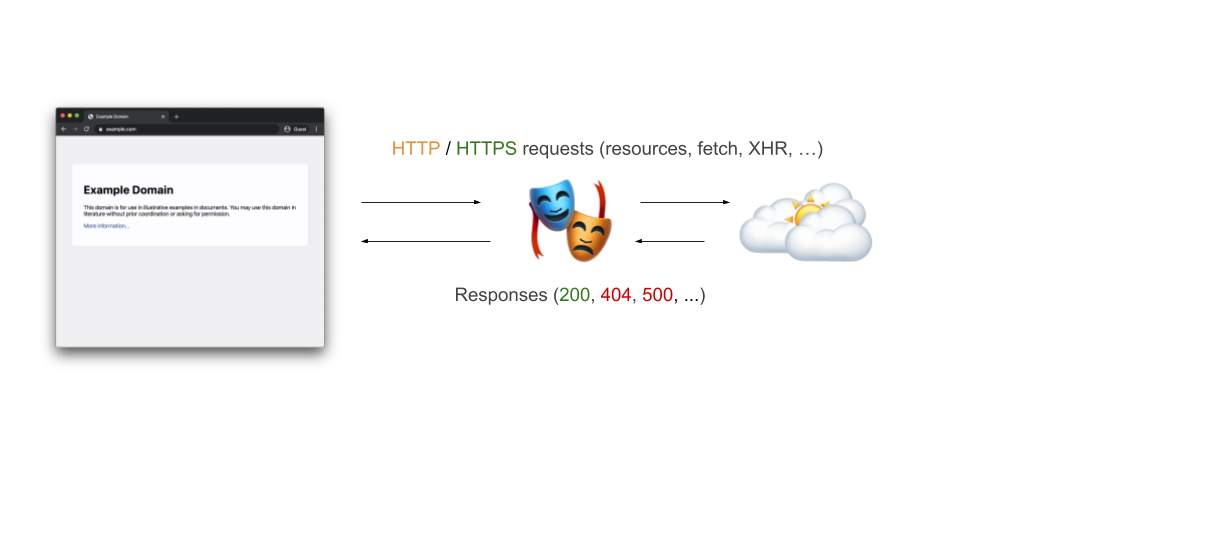-Playwright provides APIs to **monitor** and **modify** network traffic, both HTTP and HTTPS.Any requests that page does, including [XHRs](https://developer.mozilla.org/en-US/docs/Web/API/XMLHttpRequest) and[fetch](https://developer.mozilla.org/en-US/docs/Web/API/Fetch_API) requests, can be tracked and modified.@@ -13,26 +11,56 @@ Any requests that page does, including [XHRs](https://developer.mozilla.org/en-U## Monitor all network activity in page```js-const page = await browser.newPage();-page.on('request', request => console.log('>>', request.method(), request.url()));-page.on('response', response => console.log('<<', response.status(), response.url()));-await page.goto('https://example.com');+const { chromium, webkit, firefox } = require('playwright');++(async () => {+ const browser = await chromium.launch();+ const page = await browser.newPage();++ // Subscribe to 'request' and 'response' events.S+ page.on('request', request =>+ console.log('>>', request.method(), request.url()));+ page.on('response', response =>+ console.log('<<', response.status(), response.url()));+ await page.goto('https://example.com');++ await browser.close();+})();```#### API reference+- [`Request`](./api.md#class-request)+- [`Response`](./api.md#class-response)- [`event: 'request'`](./api.md#event-request)- [`event: 'response'`](./api.md#event-response)-- [`request.method()`](./api.md#requestmethod)-- [`request.url()`](./api.md#requesturl)+<br/>-## Wait for a response from API endpoint after button click+## Wait for a network response after the button click```jsconst [response] = await Promise.all([page.waitForResponse('/api/fetch_data'),- page.click('button[type=submit]'),+ page.click('button#update'),+]);+```++The snippet above clicks a button and waits for the network response that matches the given pattern.++#### Variations++```js+// User glob URL pattern+const [response] = await Promise.all([+ page.waitForResponse('**/*'),+ page.click('button#update'),+]);++// User pattern predicate+const [response] = await Promise.all([+ page.waitForResponse(url => url.includes(token)),+ page.click('button#update'),]);```@@ -41,9 +69,9 @@ const [response] = await Promise.all([- [`page.waitForRequest(urlOrPredicate[, options])`](./api.md#pagewaitforrequesturlorpredicate-options)- [`page.waitForResponse(urlOrPredicate[, options])`](./api.md#pagewaitforresponseurlorpredicate-options)+<br/>--## Mock API endpoint with test data+## Mock API endpoint with the test data```jsawait page.route('/api/fetch_data', route => route.fulfill({@@ -56,15 +84,30 @@ await page.goto('https://example.com');You can also use [`browserContext.route`](./api.md#browsercontextrouteurl-handler) to mockAPI endpoints for all the pages in the context.+#### Variations++```js+// Set up route on the entire browser context.+// It will apply to popup windows and opened links.++await browserContext.route('/api/login', route => route.fulfill({+ status: 200,+ body: 'accept',+}));+await page.goto('https://example.com');+```+#### API reference-- [`page.route(url, handler)`](./api.md#pagerouteurl-handler)- [`browserContext.route(url, handler)`](./api.md#browsercontextrouteurl-handler)-- [`route.fulfill(response)`](./api.md#routefulfillresponse)-+- [`browserContext.unroute(url[, handler])`](./api.md#browsercontextunrouteurl-handler)+- [`page.route(url, handler)`](./api.md#pagerouteurl-handler)+- [`page.unroute(url[, handler])`](./api.md#pageunrouteurl-handler)+- [`Route`](./api.md#class-route)+<br/>-## Abort all images to speedup page load+## Abort selected requests```jsconst page = await browser.newPage();@@ -72,8 +115,17 @@ await page.route('**/*.{png,jpg,jpeg}', route => route.abort());await page.goto('https://example.com');```-You can also use [`browserContext.route`](./api.md#browsercontextrouteurl-handler) to abort-images for all pages in the context, including popups.+#### Variations++```js+// Abort requests based on their type.++await page.route('**/*', route => {+ return route.request().resourceType() === 'image' ?+ route.abort() : route.continue();+});+await page.goto('https://chromium.org');+```#### API reference@@ -81,7 +133,33 @@ images for all pages in the context, including popups.- [`browserContext.route(url, handler)`](./api.md#browsercontextrouteurl-handler)- [`route.abort([errorCode])`](./api.md#routeaborterrorcode)+<br/>++## Modify selected requests+++```js+await page.route('**/*', route => {+ const headers = route.request().headers();+ delete headers['X-Secret'];+ route.continue({headers});+});+await page.goto('https://chromium.org');+```++You can continue requests with modifications. Example above removes an HTTP header from the outgoing requests.++#### Variations++```js+// Continue requests as POST.++await page.route('**/*', route =>+ route.continue({method: 'POST'}));+await page.goto('https://chromium.org');+```+<br/>## Setup [HTTP authentication](https://developer.mozilla.org/en-US/docs/Web/HTTP/Authentication)diff --git a/src/network.ts b/src/network.tsindex 99a76d8427..5e9efcacdd 100644--- a/src/network.ts+++ b/src/network.ts@@ -151,7 +151,7 @@ export class Request {}headers(): {[key: string]: string} {- return this._headers;+ return { ...this._headers };}response(): Promise<Response | null> {@@ -291,7 +291,7 @@ export class Response {}headers(): object {- return this._headers;+ return { ...this._headers };}finished(): Promise<Error | null> {