
Playwright is a framework for Web Testing and Automation. It allows testing Chromium, Firefox and WebKit with a single API.
TypeScript automationchromechromiume2e-testingelectronend-to-end-testingfirefoxjavascriptplaywrighttesttest-automationtestingtesting-toolswebwebkit
docs: release notes 1.43 for js (#30128)
Dmitry Gozman757f308475dc
diff --git a/docs/src/release-notes-js.md b/docs/src/release-notes-js.mdindex 423dcc9b60..1133bb9f18 100644--- a/docs/src/release-notes-js.md+++ b/docs/src/release-notes-js.md@@ -6,6 +6,81 @@ toc_max_heading_level: 2import LiteYouTube from '@site/src/components/LiteYouTube';+## Version 1.43++### New APIs++- Method [`method: BrowserContext.clearCookies`] now supports filters to remove only some cookies.++ ```js+ // Clear all cookies.+ await context.clearCookies();+ // New: clear cookies with a particular name.+ await context.clearCookies({ name: 'session-id' });+ // New: clear cookies for a particular domain.+ await context.clearCookies({ domain: 'my-origin.com' });+ ```++- New mode `retain-on-first-failure` for [`property: TestOptions.trace`]. In this mode, trace is recorded for the first run of each test, but not for retires. When test run fails, the trace file is retained, otherwise it is removed.++ ```js title=playwright.config.ts+ import { defineConfig } from '@playwright/test';++ export default defineConfig({+ use: {+ trace: 'retain-on-first-failure',+ },+ });+ ```++- New property [`property: TestInfo.tags`] exposes test tags during test execution.++ ```js+ test('example', async ({ page }) => {+ console.log(test.info().tags);+ });+ ```++- New method [`method: Locator.contentFrame`] converts a [Locator] object to a [FrameLocator]. This can be useful when you have a [Locator] object obtained somewhere, and later on would like to interact with the content inside the frame.++ ```js+ const locator = page.locator('iframe[name="embedded"]');+ // ...+ const frameLocator = locator.contentFrame();+ await frameLocator.getByRole('button').click();+ ```++- New method [`method: FrameLocator.owner`] converts a [FrameLocator] object to a [Locator]. This can be useful when you have a [FrameLocator] object obtained somewhere, and later on would like to interact with the `iframe` element.++ ```js+ const frameLocator = page.frameLocator('iframe[name="embedded"]');+ // ...+ const locator = frameLocator.owner();+ await expect(locator).toBeVisible();+ ```++### UI Mode Updates++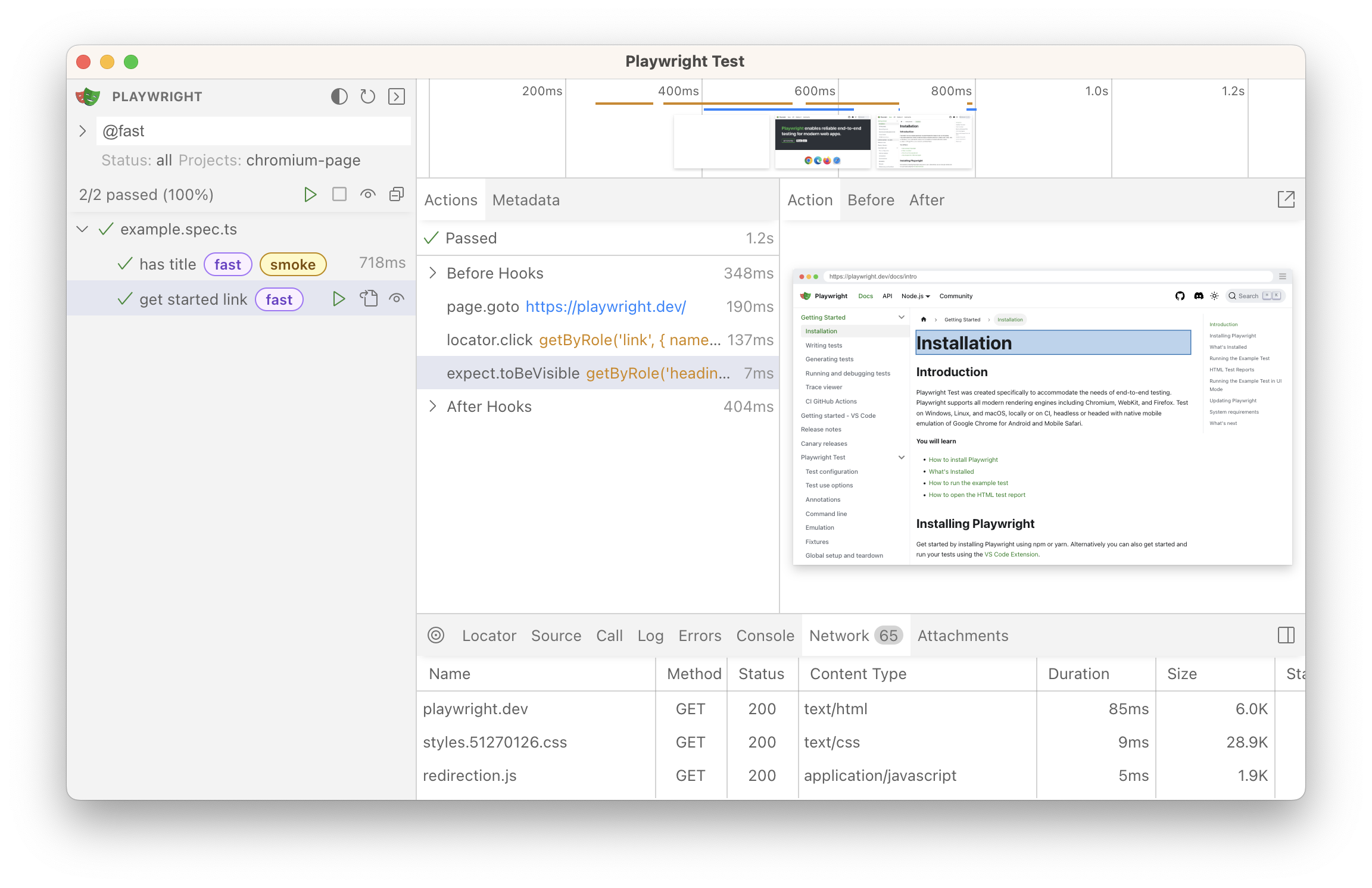++* See tags in the test list.+* Filter by tags by typing `@fast` or clicking on the tag itself.+* New shortcuts:+ - "F5" to run tests.+ - "Shift F5" to stop running tests.+ - "Ctrl `" to toggle test output.++### Browser Versions++* Chromium 124.0.6367.8+* Mozilla Firefox 124.0+* WebKit 17.4++This version was also tested against the following stable channels:++* Google Chrome 123+* Microsoft Edge 123+## Version 1.42<LiteYouTube