
Playwright is a framework for Web Testing and Automation. It allows testing Chromium, Firefox and WebKit with a single API.
TypeScript automationchromechromiume2e-testingelectronend-to-end-testingfirefoxjavascriptplaywrighttesttest-automationtestingtesting-toolswebwebkit
docs: add release notes for 1.38 (#27028)
Andrey Lushnikove367b5a0c0d9
diff --git a/docs/src/release-notes-js.md b/docs/src/release-notes-js.mdindex b434f08b6b..69785b08bb 100644--- a/docs/src/release-notes-js.md+++ b/docs/src/release-notes-js.md@@ -6,6 +6,84 @@ toc_max_heading_level: 2import LiteYouTube from '@site/src/components/LiteYouTube';+## Version 1.38++### UI Mode Updates++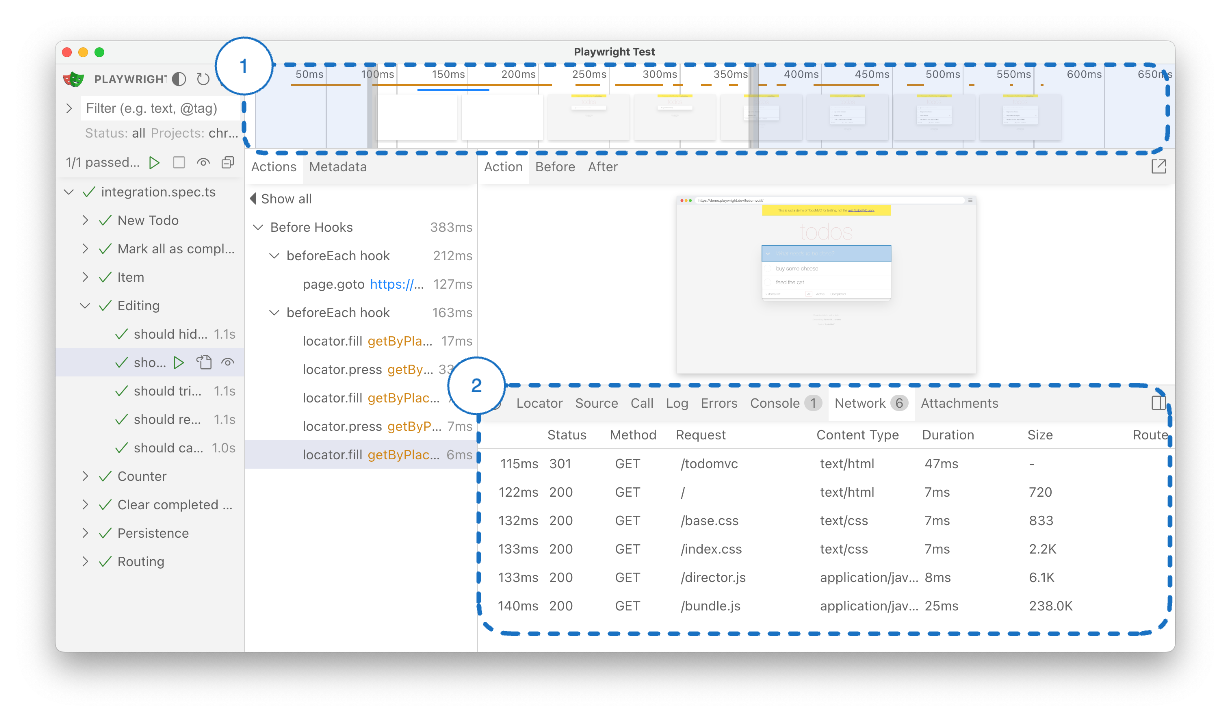++1. Zoom into time range.+1. Network panel redesign.++### New APIs++- [`event: BrowserContext.webError`]+- [`method: Locator.pressSequentially`]+- The [`method: Reporter.onEnd`] now reports `startTime` and total run `duration`.++### Deprecations++* The following methods were deprecated: [`method: Page.type`], [`method:+ Frame.type`], [`method: Locator.type`] and [`method: ElementHandle.type`].+ Please use [`method: Locator.fill`] instead which is much faster. Use+ [`method: Locator.pressSequentially`] only if there is a special keyboard+ handling on the page, and you need to press keys one-by-one.+* The method [`method: SnapshotAssertions.toMatchSnapshot#1`] is deprecated in+ favor of [`method: PageAssertions.toHaveScreenshot#1`] and [`method:+ LocatorAssertions.toHaveScreenshot#1`].++### Breaking Changes: Playwright no longer downloads browsers automatically++> **Note**: If you are using `@playwright/test` package, this change does not affect you.++Playwright recommends to use `@playwright/test` package and download browsers via `npx playwright install` command. If you are following this recommendation, nothing has changed for you.++However, up to v1.38, installing the `playwright` package instead of `@playwright/test` did automatically download browsers. This is no longer the case, and we recommend to explicitly download browsers via `npx playwright install` command.++**v1.37 and earlier**++`playwright` package was downloading browsers during `npm install`, while `@playwright/test` was not.++**v1.38 and later**++`playwright` and `@playwright/test` packages do not download browsers during `npm install`.++**Recommended migration**++Run `npx playwright install` to download browsers after `npm install`. For example, in your CI configuration:++```yml+- run: npm ci+- run: npx playwright install --with-deps+```++**Alternative migration option - not recommended**++Add `@playwright/browser-chromium`, `@playwright/browser-firefox` and `@playwright/browser-webkit` as a dependency. These packages download respective browsers during `npm install`. Make sure you keep the version of all playwright packages in sync:++```json+// package.json+{+ "devDependencies": {+ "playwright": "1.38.0",+ "@playwright/browser-chromium": "1.38.0",+ "@playwright/browser-firefox": "1.38.0",+ "@playwright/browser-webkit": "1.38.0"+ }+}+```++### Browser Versions++* Chromium 117.0.5938.62+* Mozilla Firefox 117.0+* WebKit 17.0++This version was also tested against the following stable channels:++* Google Chrome 116+* Microsoft Edge 116+## Version 1.37<LiteYouTube