
PRINTFILM: AI short-video marketing and AI short-drama creation platform
docs: 新增英文 README,并补充 GitHub 中英互链
yi81e245f3b9b1
diff --git a/README.md b/README.mdindex 0b8c356..6ca59cf 100644--- a/README.md+++ b/README.md@@ -1,5 +1,7 @@# PRINTFILM+**Languages:** [中文](README.md) | [English](README_EN.md)+[](https://github.com/yi1108/printfilm)[](LICENSE)diff --git a/README_EN.md b/README_EN.mdnew file mode 100644index 0000000..355aad9--- /dev/null+++ b/README_EN.md@@ -0,0 +1,267 @@+# PRINTFILM++**Languages:** [中文](README.md) | [English](README_EN.md)++[](https://github.com/yi1108/printfilm)+[](LICENSE)++> **Turn stories into videos you can ship** — AI short drama and AI short video, from script to final cut.++A template-driven creation platform: topic / script → storyboard → image gen → video gen → final compose. Voice-over is generated with Seedance at render time — no separate TTS step.++**Source:** [github.com/yi1108/printfilm](https://github.com/yi1108/printfilm) · **Version** 0.2.0++## Screenshots++**Studio**++++**AI short video** — history, storyboard, final cut++| Project history | Storyboard studio | Final preview |+|:---:|:---:|:---:|+|  |  |  |++**AI short drama** — projects, episodes, scripts, storyboards, assets++| Project list | Episode workspace | Script parse |+|:---:|:---:|:---:|+|  |  |  |++| Storyboard edit | Asset library | Admin |+|:---:|:---:|:---:|+|  |  |  |++## Core features++### 1. AI short drama++From a one-liner to episode-ready video, with reusable characters and scenes.++- Outline / plot summary / full script+- Asset library: characters, scenes, props+- Parse into shots, then edit on the storyboard canvas+- Details: [docs/EPISODE_RULES.md](docs/EPISODE_RULES.md)++### 2. AI short video++Pick a template and run the storyboard pipeline — good for marketing and explainers.++- 20+ built-in style templates+- `full` (image + video + compose) or `image_text` (stills — faster and cheaper)+- Per-shot redraw / regenerate video; jobs keep running after you leave the page+- Final cut composed with FFmpeg++### 3. Tools hub++One-shot capabilities without the full pipeline: text-to-image, image-to-image, image-to-product, text-to-video, video-to-video, e-commerce collage.++### 4. Admin console and open API++Users, orders, templates, task center, model routing. Open API `/api/v1` for image / video generation (Bearer or `X-Api-Key`).++## Workflow++```+Enter a topic or script+ → Storyboard+ → Image generation+ → Video generation (Seedance includes voice-over)+ → FFmpeg final compose+```++You can redo any single shot at each stage; progress shows on the history page.++## Technical highlights++- **Two product lines, one generation stack** — drama and short video share the same upstream+- **In-process task platform** — scheduler / executor / poller; no separate Celery worker+- **Swappable models** — configure TokenFree keys and models in admin; no code changes+- **One-command Docker** — public images, pull without login+- **Optional billing** — off by default; usage-based when enabled — see [docs/BILLING.md](docs/BILLING.md)++## Tech stack++| Layer | Stack |+|-------|-------|+| Backend | Python 3.12 · FastAPI · SQLAlchemy · PostgreSQL · Redis |+| Frontend | React 19 · TypeScript · Vite 8 (admin: Tailwind + shadcn) |+| AI | TokenFree New API (text / image / video) |+| Deploy | Full-stack Docker images, or local three processes + middleware containers |++## Quick start (Docker)++You only need [Docker Desktop](https://www.docker.com/products/docker-desktop/) (or Docker Engine + Compose). Images live in Aliyun ACR `gcc` public namespace — **no login required to pull**.++### 1. Clone and prepare env++```bash+git clone https://github.com/yi1108/printfilm.git+cd printfilm++cp deploy/.env.docker.example deploy/.env.docker+```++Edit `deploy/.env.docker` and change at least these three:++| Variable | Notes |+|----------|-------|+| `POSTGRES_PASSWORD` | DB password (do not keep the example default) |+| `SECRET_KEY` | Long random string (session / key encryption) |+| `OPENAI_API_KEY` / `ARK_API_KEY` | TokenFree API Key (same key in both fields) |++No key yet, just want the UI? Set `ARK_MOCK=true`.++### 2. Start++```bash+docker compose --env-file deploy/.env.docker up -d+```++Wait about half a minute (web / admin start after the API health check passes).++| Service | URL |+|---------|-----|+| App | http://localhost:8080 |+| Admin | http://localhost:8081 |+| API / docs | http://localhost:8000 · `/docs` |+| Health | http://localhost:8000/api/health |++Common commands:++```bash+docker compose --env-file deploy/.env.docker ps # status+docker compose --env-file deploy/.env.docker logs -f api # logs+docker compose --env-file deploy/.env.docker down # stop (keep volumes)+```++### 3. Register and admin++| Role | How |+|------|-----|+| User | Open the app → `/auth` and register with email |+| Admin | Register that email first → set `ADMIN_BOOTSTRAP_EMAILS=your@email` in `.env.docker` → `docker compose --env-file deploy/.env.docker up -d --force-recreate api` (**promotes only; does not create accounts**) |++No built-in demo accounts; change secrets immediately for production.++### 4. Update to latest images++```bash+docker compose --env-file deploy/.env.docker pull+docker compose --env-file deploy/.env.docker up -d+```++### 5. Build from source (optional)++When you changed frontend/backend code, or cannot pull from ACR:++```bash+docker compose --env-file deploy/.env.docker -f docker-compose.full.yml up -d --build+```++## Configure TokenFree API Key++The open-source build routes text / image / video through **TokenFree New API** (OpenAI-compatible: `https://www.tokenfree.com/v1`). Without a key you can only use `ARK_MOCK=true` for the UI — real generation will not work.++### A. Get a key from TokenFree++1. Open [https://www.tokenfree.com](https://www.tokenfree.com) and sign in.+2. Go to **API keys / Tokens** in the console (some deployments use `/token` or `/keys`).+3. Click **Create**, name it (e.g. `printfilm`), set quota / expiry as needed.+4. **Copy the full key immediately** (looks like `sk-…`, shown once).+5. Confirm the account has balance/quota and the models you need appear in the list.++> Treat the key like a password. Do not commit it to Git or paste it in chat. If leaked, revoke and recreate it in the TokenFree console.++### B. Write into Docker env (recommended for first self-host)++Edit `deploy/.env.docker`:++```env+OPENAI_API_KEY=sk-your-key+OPENAI_BASE_URL=https://www.tokenfree.com/v1+ARK_API_KEY=sk-your-key+ARK_MOCK=false+MODEL_LLM=kimi-k2.6+MODEL_IMAGE=seedream-5-0-pro+MODEL_VIDEO=seedance-2-5+```++Use the **same** value for `OPENAI_API_KEY` and `ARK_API_KEY`. Recreate the API container:++```bash+docker compose --env-file deploy/.env.docker up -d --force-recreate api+```++Open http://localhost:8000/api/health — `ark_mock` should be `false`.++### C. Set key in admin (recommended for day-to-day key changes)++1. Log in as admin at http://localhost:8081 .+2. Open **System settings → Models** (routing / TokenFree channel).+3. Paste the API Key into the TokenFree channel and save.+4. Adjust default text / image / video models as needed; changes apply immediately — usually no `.env` edit required.++Keys saved in admin are encrypted in the database; when migrating hosts, back up the DB or re-enter the key.++### D. Troubleshooting++| Symptom | Fix |+|---------|-----|+| Image / video says key not configured | Check `.env.docker` is not still `replace-me`, or that the admin channel has a key |+| `ark_mock: true` | Set `ARK_MOCK=false`, ensure key is non-empty, then `--force-recreate api` |+| 401 / insufficient quota | Check key status and balance in TokenFree console |+| Model 404 | Pick a model id that TokenFree actually lists in admin |++## Use cases++- Short video / acquisition clips: turn selling points into ad-ready shorts+- Short drama: outline to episodes with consistent characters and scenes+- One-shot image/video: generate directly from the tools hub+- Self-host: pull Docker images and run on your own machine++## Layout++```+backend/ FastAPI, pipeline, billing, task runtime+frontend/ User app+admin/ Ops console+deploy/ Env examples, middleware compose+docs/ Standards and topic docs+docker-compose.yml One-command public images+docker-compose.full.yml Build from source+```++## Community++- GitHub: https://github.com/yi1108/printfilm+- WeChat: add **`gitpp88`** (note “join group”): deploy help / drama chat / template sharing++## Star History++[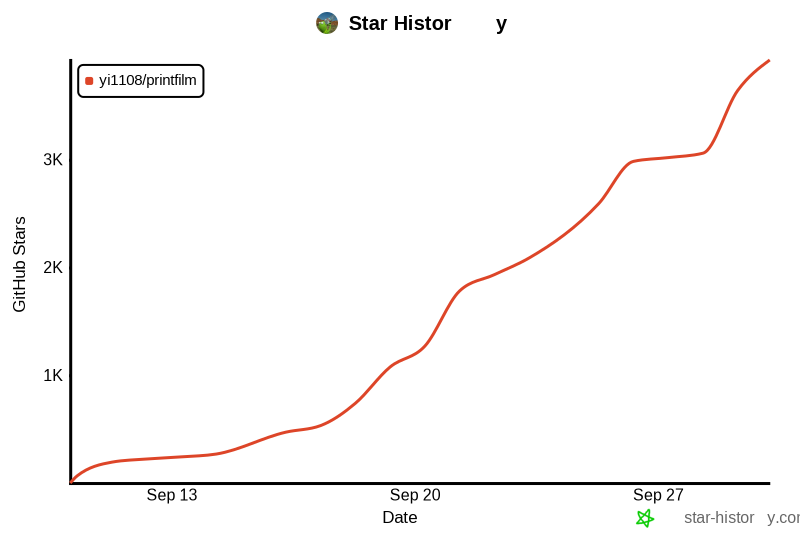](https://www.star-history.com/#yi1108/printfilm&Date)++## More docs++| Doc | Content |+|-----|---------|+| [docs/STANDARDS.md](docs/STANDARDS.md) | Engineering standards |+| [docs/BILLING.md](docs/BILLING.md) | Billing and Epay |+| [docs/EPISODE_RULES.md](docs/EPISODE_RULES.md) | Drama episode rules |+| [docs/SEEDANCE_2_5.md](docs/SEEDANCE_2_5.md) | Seedance parameters |+| [deploy/README.md](deploy/README.md) | Local middleware and ops |++## Contributing++Issues / PRs welcome. Before submitting, follow [docs/STANDARDS.md](docs/STANDARDS.md): Simplified Chinese product copy, function comments, server-side pagination; do not commit `.env`, secrets, or generated media.++```bash+cd frontend && npm run lint+cd ../admin && npm run lint+cd ../backend && pytest+```++## License++[MIT License](LICENSE).