RAGFlow is an agent-native database: a Retrieval-Augmented Generation (RAG) engine that grew into context infrastructure.
Go agent-harnessagent-native-databaseagentic-aiagentic-retrievalagentic-searchaiai-agentscontext-enginecontext-engineeringcontext-managementharness-engineeringknowledge-compilationragretrieval-augmented-generationretrieval-harnesssearch-harness
sidebar_position: 1 slug: /use_memory sidebar_label: Create Memory title: Create Memory sidebar_custom_props: { categoryIcon: LucideBox }
Memory
This chapter describes how to create and configure memories in RAGFlow, view and manage messages, and save and retrieve memories in Agents. Memories are used to save conversation content and extraction results generated during Agent execution, helping Agents reuse historical context in subsequent conversations or tasks.
Create Memory
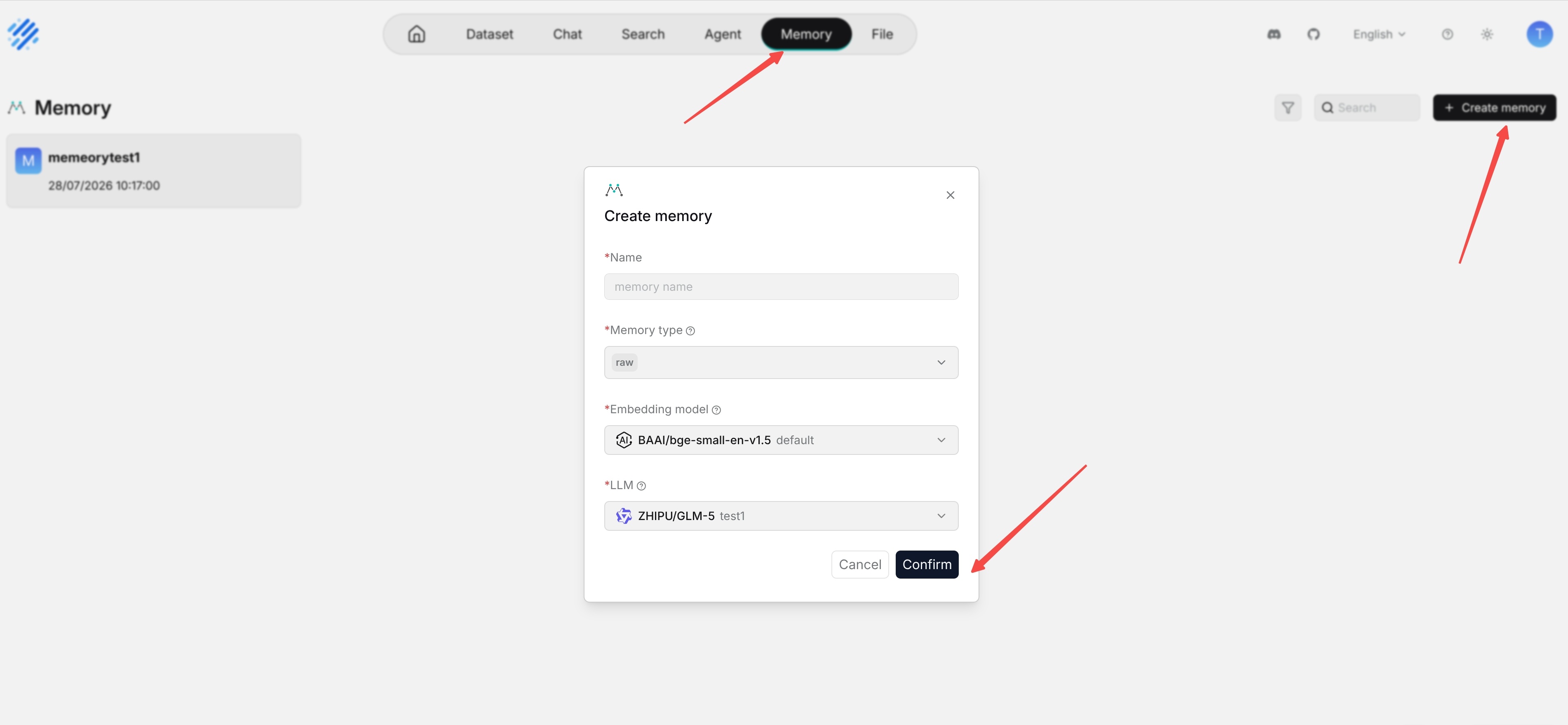
- Go to the Memory page.
- Click Create memory.
- Enter the memory name.
- Select the memory type, embedding model, and large language model.
- Click Confirm to create the memory.
- After confirmation, enter the memory list or details page.