
RAGFlow is an agent-native database: a Retrieval-Augmented Generation (RAG) engine that grew into context infrastructure.
Go agent-harnessagent-native-databaseagentic-aiagentic-retrievalagentic-searchaiai-agentscontext-enginecontext-engineeringcontext-managementharness-engineeringknowledge-compilationragretrieval-augmented-generationretrieval-harnesssearch-harness
Docs: Added share memory (#12647)
writinwaters2167e3a3c07b
diff --git a/docs/guides/memory/_category_.json b/docs/guides/memory/_category_.jsonnew file mode 100644index 0000000000..6ff7c8cf62--- /dev/null+++ b/docs/guides/memory/_category_.json@@ -0,0 +1,11 @@+{+ "label": "Memory",+ "position": 10,+ "link": {+ "type": "generated-index",+ "description": "Guides on using Memory."+ },+ "customProps": {+ "categoryIcon": "LucideBox"+ }+}diff --git a/docs/guides/memory/use_memory.md b/docs/guides/memory/use_memory.mdindex 05ffd0be3b..a1586d51da 100644--- a/docs/guides/memory/use_memory.md+++ b/docs/guides/memory/use_memory.md@@ -38,7 +38,7 @@ When the Memory reaches its storage limit and the automatic forgetting policy is## Enhance Agent context-Under **Retrieval** and **Message** component settings, a new Memory invocation capability is available. In the Message component, users can configure the Agent to write selected data into a designated Memory, while the Retrieval component can be set to read from that same Memory to answer future queries. This enables a simple Q&A bot Agent to accumulate context over time and respond with richer, memory-aware answers.+Under [Retrieval](../agent/agent_component_reference/retrieval.mdx) and [Message](../agent/agent_component_reference/message.mdx) component settings, a new Memory invocation capability is available. In the Message component, users can configure the Agent to write selected data into a designated Memory, while the Retrieval component can be set to read from that same Memory to answer future queries. This enables a simple Q&A bot Agent to accumulate context over time and respond with richer, memory-aware answers.### Retrieve from memory@@ -54,5 +54,12 @@ At the same time you have finished **Retrieval** component settings, select the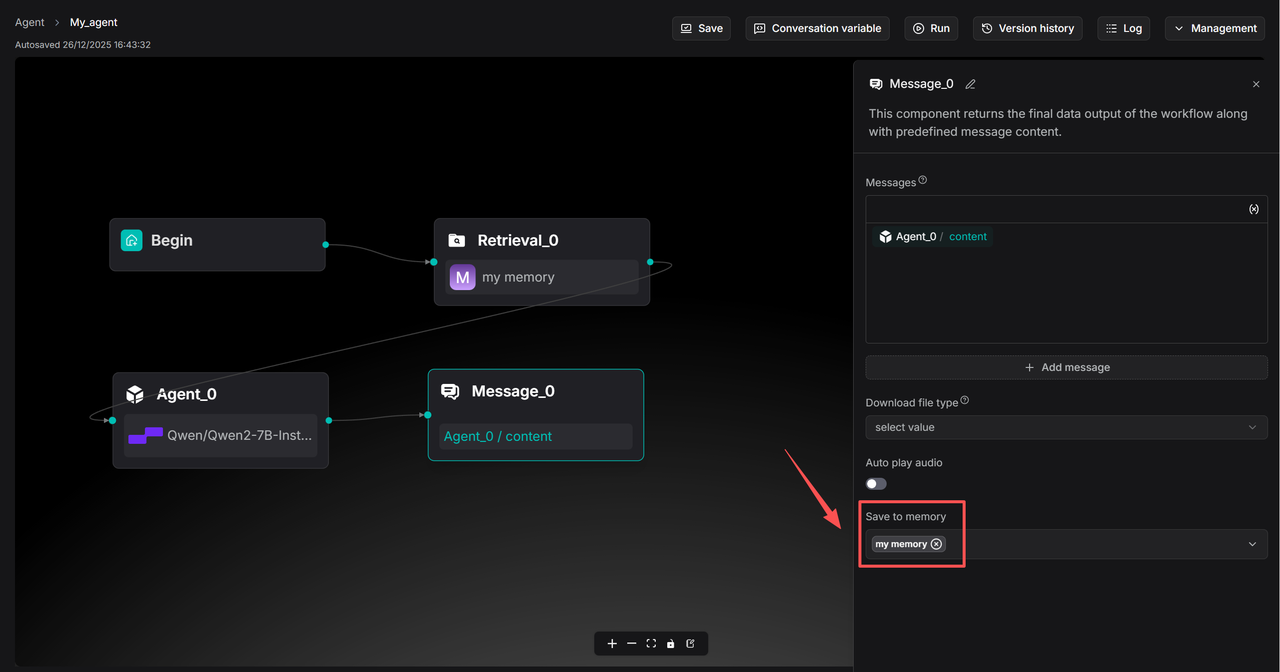+## Frequently asked questions++### Can I share my memory?++Yes, you can. Your memory can be shared between Agents. If you wish to share your memory with your team members, please ensure you have configured its team permissions. See [Share memory](../team/share_memory.md) for details.++diff --git a/docs/guides/team/share_memory.md b/docs/guides/team/share_memory.mdnew file mode 100644index 0000000000..2c41db492e--- /dev/null+++ b/docs/guides/team/share_memory.md@@ -0,0 +1,21 @@+---+sidebar_position: 9+slug: /share_memory+sidebar_custom_props: {+ categoryIcon: LucideShare2+}+---+# Share memory++Share a memory with your team members.++---++When ready, you may share your memory with your team members so that they can use it. Please note that your memories are not shared automatically; you must manually enable sharing by selecting the corresponding **Permissions** radio button:++1. Click the intended memory to open its editing canvas.+2. Click **Configurations**.+3. Change **Permissions** from **Only me** to **Team**.+4. Click **Save** to apply your changes.++*When completed, your team members will see your shared memories.*\ No newline at end of file