
RAGFlow is an agent-native database: a Retrieval-Augmented Generation (RAG) engine that grew into context infrastructure.
Go agent-harnessagent-native-databaseagentic-aiagentic-retrievalagentic-searchaiai-agentscontext-enginecontext-engineeringcontext-managementharness-engineeringknowledge-compilationragretrieval-augmented-generationretrieval-harnesssearch-harness
Docs: Added an Execute SQL tool reference (#10108)
writinwaters41e808f4e6ca
diff --git a/docs/guides/agent/agent_component_reference/execute_sql.md b/docs/guides/agent/agent_component_reference/execute_sql.mdnew file mode 100644index 0000000000..82233706a4--- /dev/null+++ b/docs/guides/agent/agent_component_reference/execute_sql.md@@ -0,0 +1,77 @@+---+sidebar_position: 25+slug: /execute_sql+---++# Execute SQL tool++A tool that execute SQL queries on a specified relational database.++---++The **Execute SQL** tool enables you to connect to a relational database and run SQL queries, whether entered directly or generated by the system’s Text2SQL capability via an **Agent** component. It currently supports three popular databases: MySQL, PostgreSQL, and MariaDB.++## Prerequisites++- A database instance properly configured and running.+- The database must be one of the following types:+ - MySQL+ - PostgreSQL+ - MariaDB++## Examples++You can pair an **Agent** component with the **Execute SQL** tool, with the **Agent** generating SQL statements and the **Execute SQL** tool handling database connection and query execution. An example of this setup can be found in the **SQL Assistant** Agent template shown below:++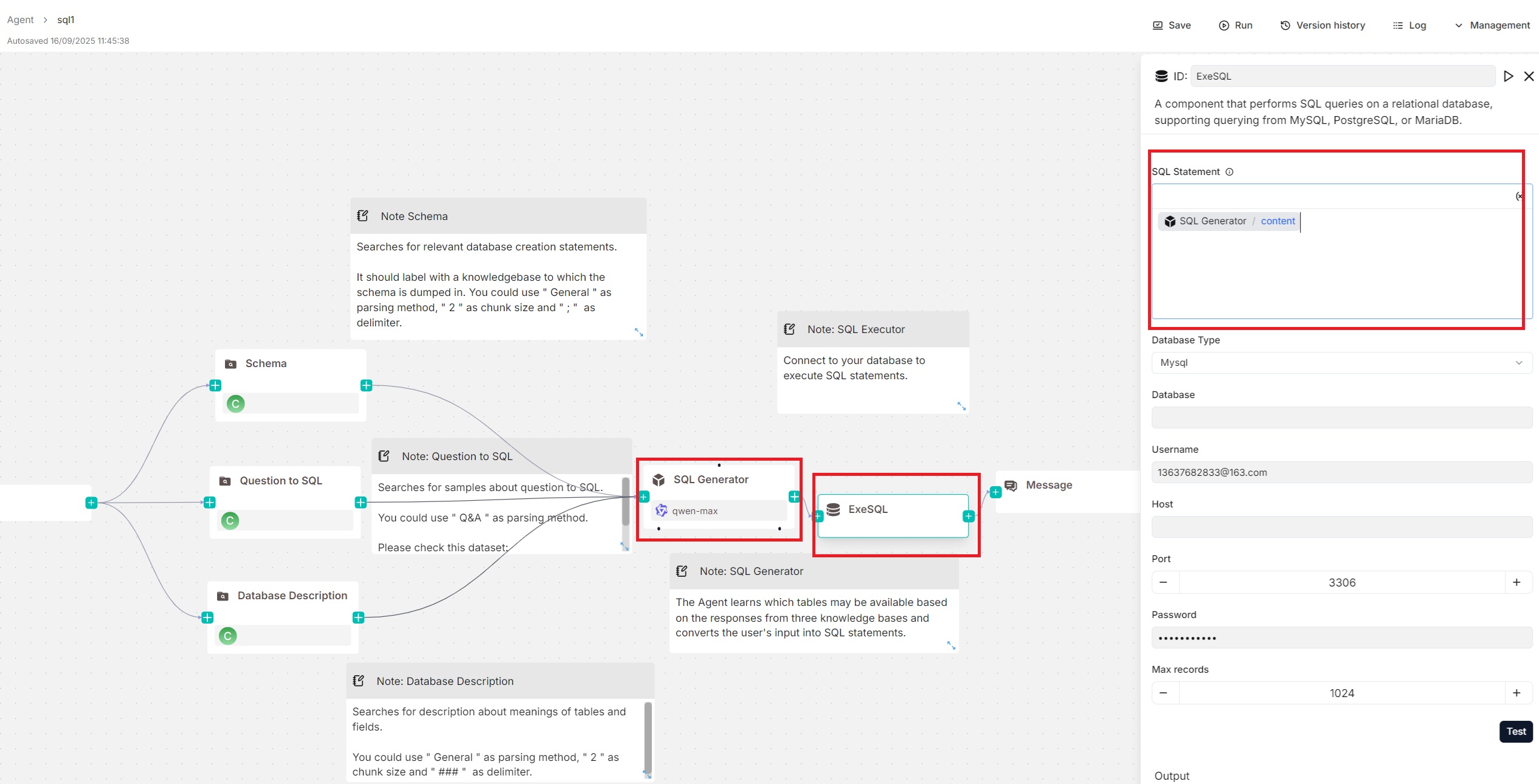++## Configurations++### SQL statement++This text input field allows you to write static SQL queries, such as `SELECT * FROM Table1`, and dynamic SQL queries using variables.++:::tip NOTE+Click **(x)** or type `/` to insert variables.+:::++For dynamic SQL queries, you can include variables in your SQL queries, such as `SELECT * FROM /sys.query`; if an **Agent** component is paired with the **Execute SQL** tool to generate SQL tasks (see the [Examples](#examples) section), you can directly insert that **Agent**'s output, `content`, into this field.++### Database type++The supported database type. Currently the following database types are available:++- MySQL+- PostreSQL+- MariaDB++### Database++Appears only when you select **Split** as method.++### Username++The username with access privileges to the database.++### Host++The IP address of the database server.++### Port++The port number on which the database server is listening.++### Password++The password for the database user.++### Max records++The maximum number of records returned by the SQL query to control response size and improve efficiency. Defaults to `1024`.++### Output++The **Execute SQL** tool provides two output variables:++- `formalized_content`: A string. If you reference this variable in a **Message** component, the returned records are displayed as a table.+- `json`: An object array. If you reference this variable in a **Message** component, the returned records will be presented as key-value pairs.\ No newline at end of filediff --git a/docs/release_notes.md b/docs/release_notes.mdindex 0691c81f19..ad9f291dfd 100644--- a/docs/release_notes.md+++ b/docs/release_notes.md@@ -30,7 +30,7 @@ Released on September 10, 2025.- Agent:- Agent Performance Optimized: Improves planning and reflection speed for simple tasks; optimizes concurrent tool calls for parallelizable scenarios, significantly reducing overall response time.- - Four framework-level prompt blocks are available in the **System prompt** section, enabling customization and overriding of prompts at the framework level, thereby enhancing flexibility and control. See [here](./guides/agent/agent_component_reference/agent.mdx#advanced-usage).+ - Four framework-level prompt blocks are available in the **System prompt** section, enabling customization and overriding of prompts at the framework level, thereby enhancing flexibility and control. See [here](./guides/agent/agent_component_reference/agent.mdx#system-prompt).- **Execute SQL** component enhanced: Replaces the original variable reference component with a text input field, allowing users to write free-form SQL queries and reference variables.- Chat: Re-enables **Reasoning** and **Cross-language search**.