
RAGFlow is an agent-native database: a Retrieval-Augmented Generation (RAG) engine that grew into context infrastructure.
Go agent-harnessagent-native-databaseagentic-aiagentic-retrievalagentic-searchaiai-agentscontext-enginecontext-engineeringcontext-managementharness-engineeringknowledge-compilationragretrieval-augmented-generationretrieval-harnesssearch-harness
Updated CN readme (#2661)
writinwaters4b8ecba32b17
diff --git a/README.md b/README.mdindex 3b6daac4dc..9ecee3b905 100644--- a/README.md+++ b/README.md@@ -220,30 +220,30 @@ This image is approximately 1 GB in size and relies on external LLM and embeddingit clone https://github.com/infiniflow/ragflow.gitcd ragflow/pip3 install huggingface-hub-python3 download_deps.py # embedding models+python3 download_deps.pydocker build -f Dockerfile.slim -t infiniflow/ragflow:dev-slim .```## 🪚 Build the Docker image including embedding models-This image includes embedding models and is approximately 9 GB in size, and so relies on external LLM services only.+This image is approximately 9 GB in size. As it includes embedding models, it relies on external LLM services only.```bashgit clone https://github.com/infiniflow/ragflow.gitcd ragflow/pip3 install huggingface-hub-python3 download_deps.py # embedding models+python3 download_deps.pydocker build -f Dockerfile -t infiniflow/ragflow:dev .```## 🔨 Launch service from source for development-1. Install Poetry, or skip this step if it is already installed:+1. Install Poetry, or skip this step if it is already installed:```bashcurl -sSL https://install.python-poetry.org | python3 -```-2. Clone the source code and install Python dependencies:+2. Clone the source code and install Python dependencies:```bashgit clone https://github.com/infiniflow/ragflow.gitcd ragflow/@@ -251,7 +251,7 @@ docker build -f Dockerfile -t infiniflow/ragflow:dev .~/.local/bin/poetry install --sync --no-root # install RAGFlow dependent python modules```-3. Launch the dependent services (MinIO, Elasticsearch, Redis, and MySQL) using Docker Compose:+3. Launch the dependent services (MinIO, Elasticsearch, Redis, and MySQL) using Docker Compose:```bashdocker compose -f docker/docker-compose-base.yml up -d```@@ -262,13 +262,13 @@ docker build -f Dockerfile -t infiniflow/ragflow:dev .```In **docker/service_conf.yaml**, update mysql port to `5455` and es port to `1200`, as specified in **docker/.env**.-4. If you cannot access HuggingFace, set the `HF_ENDPOINT` environment variable to use a mirror site:+4. If you cannot access HuggingFace, set the `HF_ENDPOINT` environment variable to use a mirror site:```bashexport HF_ENDPOINT=https://hf-mirror.com```-5. Launch backend service:+5. Launch backend service:```bashsource .venv/bin/activateexport PYTHONPATH=$(pwd)@@ -284,7 +284,7 @@ docker build -f Dockerfile -t infiniflow/ragflow:dev .8. Launch frontend service:```bashnpm run dev- ```+ ```_The following output confirms a successful launch of the system:_diff --git a/README_ja.md b/README_ja.mdindex 9d7876ef58..a574d22705 100644--- a/README_ja.md+++ b/README_ja.md@@ -194,6 +194,84 @@> $ docker-compose up -d> ```+## 🪛 Build the Docker image without embedding models++This image is approximately 1 GB in size and relies on external LLM and embedding services.++```bash+git clone https://github.com/infiniflow/ragflow.git+cd ragflow/+pip3 install huggingface-hub+python3 download_deps.py+docker build -f Dockerfile.slim -t infiniflow/ragflow:dev-slim .+```++## 🪚 Build the Docker image including embedding models++This image includes embedding models and is approximately 9 GB in size, and so relies on external LLM services only.++```bash+git clone https://github.com/infiniflow/ragflow.git+cd ragflow/+pip3 install huggingface-hub+python3 download_deps.py+docker build -f Dockerfile -t infiniflow/ragflow:dev .+```++## 🔨 Launch service from source for development++1. Install Poetry, or skip this step if it is already installed:+ ```bash+ curl -sSL https://install.python-poetry.org | python3 -+ ```++2. Clone the source code and install Python dependencies:+ ```bash+ git clone https://github.com/infiniflow/ragflow.git+ cd ragflow/+ export POETRY_VIRTUALENVS_CREATE=true POETRY_VIRTUALENVS_IN_PROJECT=true+ ~/.local/bin/poetry install --sync --no-root # install RAGFlow dependent python modules+ ```++3. Launch the dependent services (MinIO, Elasticsearch, Redis, and MySQL) using Docker Compose:+ ```bash+ docker compose -f docker/docker-compose-base.yml up -d+ ```++ Add the following line to `/etc/hosts` to resolve all hosts specified in **docker/service_conf.yaml** to `127.0.0.1`:+ ```+ 127.0.0.1 es01 mysql minio redis+ ```+ In **docker/service_conf.yaml**, update mysql port to `5455` and es port to `1200`, as specified in **docker/.env**.++4. If you cannot access HuggingFace, set the `HF_ENDPOINT` environment variable to use a mirror site:++ ```bash+ export HF_ENDPOINT=https://hf-mirror.com+ ```++5. Launch backend service:+ ```bash+ source .venv/bin/activate+ export PYTHONPATH=$(pwd)+ bash docker/launch_backend_service.sh+ ```++6. Install frontend dependencies:+ ```bash+ cd web+ npm install --force+ ```+7. Configure frontend to update `proxy.target` in **.umirc.ts** to `http://127.0.0.1:9380`:+8. Launch frontend service:+ ```bash+ npm run dev+ ```++ _The following output confirms a successful launch of the system:_++ 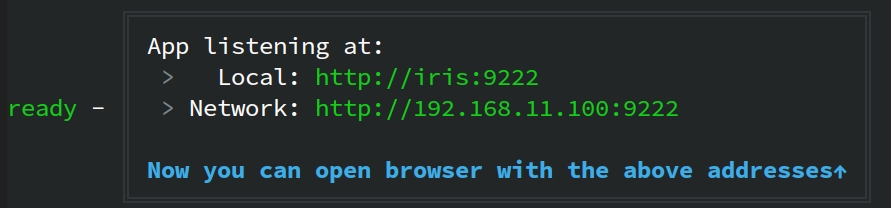+## 📚 ドキュメンテーション- [Quickstart](https://ragflow.io/docs/dev/)diff --git a/README_ko.md b/README_ko.mdindex 4112a9b343..47e5222986 100644--- a/README_ko.md+++ b/README_ko.md@@ -199,6 +199,84 @@> $ docker-compose up -d> ```+## 🪛 Build the Docker image without embedding models++This image is approximately 1 GB in size and relies on external LLM and embedding services.++```bash+git clone https://github.com/infiniflow/ragflow.git+cd ragflow/+pip3 install huggingface-hub+python3 download_deps.py+docker build -f Dockerfile.slim -t infiniflow/ragflow:dev-slim .+```++## 🪚 Build the Docker image including embedding models++This image includes embedding models and is approximately 9 GB in size, and so relies on external LLM services only.++```bash+git clone https://github.com/infiniflow/ragflow.git+cd ragflow/+pip3 install huggingface-hub+python3 download_deps.py+docker build -f Dockerfile -t infiniflow/ragflow:dev .+```++## 🔨 Launch service from source for development++1. Install Poetry, or skip this step if it is already installed:+ ```bash+ curl -sSL https://install.python-poetry.org | python3 -+ ```++2. Clone the source code and install Python dependencies:+ ```bash+ git clone https://github.com/infiniflow/ragflow.git+ cd ragflow/+ export POETRY_VIRTUALENVS_CREATE=true POETRY_VIRTUALENVS_IN_PROJECT=true+ ~/.local/bin/poetry install --sync --no-root # install RAGFlow dependent python modules+ ```++3. Launch the dependent services (MinIO, Elasticsearch, Redis, and MySQL) using Docker Compose:+ ```bash+ docker compose -f docker/docker-compose-base.yml up -d+ ```++ Add the following line to `/etc/hosts` to resolve all hosts specified in **docker/service_conf.yaml** to `127.0.0.1`:+ ```+ 127.0.0.1 es01 mysql minio redis+ ```+ In **docker/service_conf.yaml**, update mysql port to `5455` and es port to `1200`, as specified in **docker/.env**.++4. If you cannot access HuggingFace, set the `HF_ENDPOINT` environment variable to use a mirror site:++ ```bash+ export HF_ENDPOINT=https://hf-mirror.com+ ```++5. Launch backend service:+ ```bash+ source .venv/bin/activate+ export PYTHONPATH=$(pwd)+ bash docker/launch_backend_service.sh+ ```++6. Install frontend dependencies:+ ```bash+ cd web+ npm install --force+ ```+7. Configure frontend to update `proxy.target` in **.umirc.ts** to `http://127.0.0.1:9380`:+8. Launch frontend service:+ ```bash+ npm run dev+ ```++ _The following output confirms a successful launch of the system:_++ +## 📚 문서- [Quickstart](https://ragflow.io/docs/dev/)diff --git a/README_zh.md b/README_zh.mdindex d9196c6267..7dd8504112 100644--- a/README_zh.md+++ b/README_zh.md@@ -192,6 +192,84 @@> $ docker compose -f docker-compose-CN.yml up -d> ```+## 🪛 源码编译 Docker 镜像(不含 embedding 模型)++本 Docker 镜像大小约 1 GB 左右并且依赖外部的大模型和 embedding 服务。++```bash+git clone https://github.com/infiniflow/ragflow.git+cd ragflow/+pip3 install huggingface-hub+python3 download_deps.py+docker build -f Dockerfile.slim -t infiniflow/ragflow:dev-slim .+```++## 🪚 源码编译 Docker 镜像(包含 embedding 模型)++本 Docker 大小约 9 GB 左右。由于已包含 embedding 模型,所以只需依赖外部的大模型服务即可。++```bash+git clone https://github.com/infiniflow/ragflow.git+cd ragflow/+pip3 install huggingface-hub+python3 download_deps.py+docker build -f Dockerfile -t infiniflow/ragflow:dev .+```++## 🔨 以源代码启动服务++1. 安装 Poetry。如已经安装,可跳过本步骤:+ ```bash+ curl -sSL https://install.python-poetry.org | python3 -+ ```++2. 下载源代码并安装 Python 依赖:+ ```bash+ git clone https://github.com/infiniflow/ragflow.git+ cd ragflow/+ export POETRY_VIRTUALENVS_CREATE=true POETRY_VIRTUALENVS_IN_PROJECT=true+ ~/.local/bin/poetry install --sync --no-root # install RAGFlow dependent python modules+ ```++3. 通过 Docker Compose 启动依赖的服务(MinIO, Elasticsearch, Redis, and MySQL):+ ```bash+ docker compose -f docker/docker-compose-base.yml up -d+ ```++ 在 `/etc/hosts` 中添加以下代码,将 **docker/service_conf.yaml** 文件中的所有 host 地址都解析为 `127.0.0.1`:+ ```+ 127.0.0.1 es01 mysql minio redis+ ```+ 在文件 **docker/service_conf.yaml** 中,对照 **docker/.env** 的配置将 mysql 端口更新为 `5455`,es 端口更新为 `1200`。++4. 如果无法访问 HuggingFace,可以把环境变量 `HF_ENDPOINT` 设成相应的镜像站点:++ ```bash+ export HF_ENDPOINT=https://hf-mirror.com+ ```++5. 启动后端服务:+ ```bash+ source .venv/bin/activate+ export PYTHONPATH=$(pwd)+ bash docker/launch_backend_service.sh+ ```++6. 安装前端依赖:+ ```bash+ cd web+ npm install --force+ ```+7. 配置前端,将 **.umirc.ts** 的 `proxy.target` 更新为 `http://127.0.0.1:9380`:+8. 启动前端服务:+ ```bash+ npm run dev+ ```++ _以下界面说明系统已经成功启动:_++ +## 📚 技术文档- [Quickstart](https://ragflow.io/docs/dev/)