
RAGFlow is an agent-native database: a Retrieval-Augmented Generation (RAG) engine that grew into context infrastructure.
Go agent-harnessagent-native-databaseagentic-aiagentic-retrievalagentic-searchaiai-agentscontext-enginecontext-engineeringcontext-managementharness-engineeringknowledge-compilationragretrieval-augmented-generationretrieval-harnesssearch-harness
Docs: Added webhook specific configuration tips (#12802)
writinwaters80a16e71df5e
diff --git a/docs/guides/agent/agent_component_reference/begin.mdx b/docs/guides/agent/agent_component_reference/begin.mdsimilarity index 68%rename from docs/guides/agent/agent_component_reference/begin.mdxrename to docs/guides/agent/agent_component_reference/begin.mdindex daa50b711a..1368efebdb 100644--- a/docs/guides/agent/agent_component_reference/begin.mdx+++ b/docs/guides/agent/agent_component_reference/begin.md@@ -27,6 +27,50 @@ Mode defines how the workflow is triggered.- Conversational: The agent is triggered from a conversation.- Task: The agent starts without a conversation.+- Webhook: Receive external HTTP requests via webhooks, enabling automated triggers and workflow initiation.+ *When selected, a unique Webhook URL is generated for the current agent.*++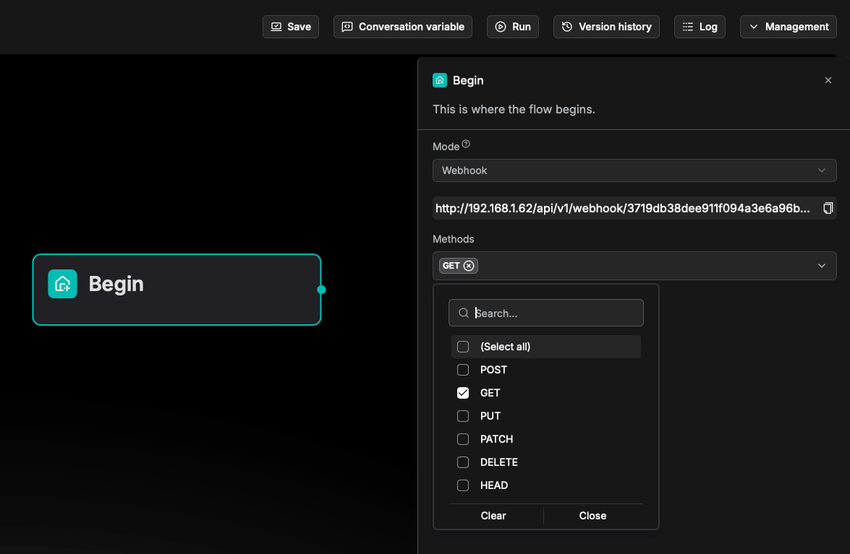++### Methods++The supported HTTP methods. Available only when **Webhook** is selected as **Mode**.+++### Security++The authentication method to choose, available *only* when **Webhook** is selected as **Mode**. Including:++- **token**: Token-based authentication.+- **basic**: Basic authentication.+- **jwt**: JWT authentication.++### Schema++The schema defines the data structure for HTTP requests received by the system in **Webhook** mode. It configurations include:++- Content type:+ - `application/json`+ - `multipart/form-data`+ - `application/x-www-form-urlencoded`+ - `text-plain`+ - `application/octet-stream`+- Query parameters+- Header parameters+- Request body parameters++### Response++Available only when **Webhook** is selected as **Mode**.++The response mode of the workflow, i.e., how the workflow respond to external HTTP requests. Supported options:++- **Accepted response**: When an HTTP request is validated, a success response is returned immediately, and the workflow runs asynchronously in the background.+ - When selected, you configure the corresponding HTTP status code and message in the **Begin** component.+ - The HTTP status code to return is in the range of `200-399`.+- **Final response**: The system returns the final processing result only after the entire workflow completes.+ - When selected, you configure the corresponding HTTP status code and message in the [message](./message.md) component.+ - The HTTP status code to return is in the range of `200-399`.### Opening greetingdiff --git a/docs/guides/agent/agent_component_reference/message.mdx b/docs/guides/agent/agent_component_reference/message.mdsimilarity index 67%rename from docs/guides/agent/agent_component_reference/message.mdxrename to docs/guides/agent/agent_component_reference/message.mdindex 7f51029f12..45e9324dd5 100644--- a/docs/guides/agent/agent_component_reference/message.mdx+++ b/docs/guides/agent/agent_component_reference/message.md@@ -15,6 +15,10 @@ As the final component of the workflow, a Message component returns the workflow## Configurations+### Status++The HTTP status code (`200` ~ `399`) to return when the entire workflow completes. Available *only* when you select **Final response** as **Execution mode** in the [Begin](./begin.md) component.+### MessagesThe message to send out. Click `(x)` or type `/` to quickly insert variables.@@ -23,7 +27,7 @@ Click **+ Add message** to add message options. When multiple messages are suppl### Save to memory-Select the corresponding Memory in the **Message** component under **Save to Memory**:+Save the conversation to specified memories. Expand the dropdown list to either select all available memories or specified memories: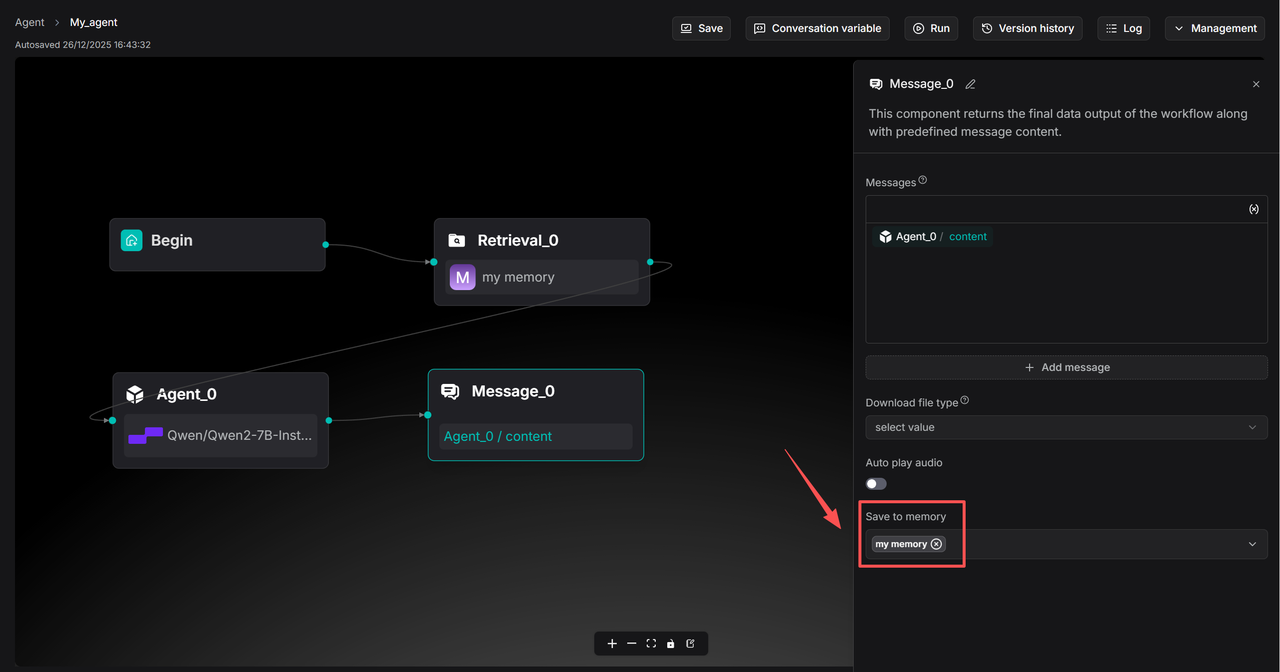\ No newline at end of file