
RAGFlow is an agent-native database: a Retrieval-Augmented Generation (RAG) engine that grew into context infrastructure.
Go agent-harnessagent-native-databaseagentic-aiagentic-retrievalagentic-searchaiai-agentscontext-enginecontext-engineeringcontext-managementharness-engineeringknowledge-compilationragretrieval-augmented-generationretrieval-harnesssearch-harness
Update version info to v0.14.1 (#3720)
Jin Hai834c4d81f38d
diff --git a/README.md b/README.mdindex 1314ad7e80..106d7b5e59 100644--- a/README.md+++ b/README.md@@ -20,7 +20,7 @@<img alt="Static Badge" src="https://img.shields.io/badge/Online-Demo-4e6b99"></a><a href="https://hub.docker.com/r/infiniflow/ragflow" target="_blank">- <img src="https://img.shields.io/badge/docker_pull-ragflow:v0.14.0-brightgreen" alt="docker pull infiniflow/ragflow:v0.14.0">+ <img src="https://img.shields.io/badge/docker_pull-ragflow:v0.14.1-brightgreen" alt="docker pull infiniflow/ragflow:v0.14.1"></a><a href="https://github.com/infiniflow/ragflow/releases/latest"><img src="https://img.shields.io/github/v/release/infiniflow/ragflow?color=blue&label=Latest%20Release" alt="Latest Release">@@ -176,14 +176,14 @@ releases! 🌟```> - To download a RAGFlow slim Docker image of a specific version, update the `RAGFLOW_IMAGE` variable in *- *docker/.env** to your desired version. For example, `RAGFLOW_IMAGE=infiniflow/ragflow:v0.14.0-slim`. After+ *docker/.env** to your desired version. For example, `RAGFLOW_IMAGE=infiniflow/ragflow:v0.14.1-slim`. Aftermaking this change, rerun the command above to initiate the download.> - To download the dev version of RAGFlow Docker image *including* embedding models and Python libraries, update the`RAGFLOW_IMAGE` variable in **docker/.env** to `RAGFLOW_IMAGE=infiniflow/ragflow:dev`. After making this change,rerun the command above to initiate the download.> - To download a specific version of RAGFlow Docker image *including* embedding models and Python libraries, updatethe `RAGFLOW_IMAGE` variable in **docker/.env** to your desired version. For example,- `RAGFLOW_IMAGE=infiniflow/ragflow:v0.14.0`. After making this change, rerun the command above to initiate the+ `RAGFLOW_IMAGE=infiniflow/ragflow:v0.14.1`. After making this change, rerun the command above to initiate thedownload.> **NOTE:** A RAGFlow Docker image that includes embedding models and Python libraries is approximately 9GB in sizediff --git a/README_id.md b/README_id.mdindex a11f51a481..3fa6262c06 100644--- a/README_id.md+++ b/README_id.md@@ -20,7 +20,7 @@<img alt="Lencana Daring" src="https://img.shields.io/badge/Online-Demo-4e6b99"></a><a href="https://hub.docker.com/r/infiniflow/ragflow" target="_blank">- <img src="https://img.shields.io/badge/docker_pull-ragflow:v0.14.0-brightgreen" alt="docker pull infiniflow/ragflow:v0.14.0">+ <img src="https://img.shields.io/badge/docker_pull-ragflow:v0.14.1-brightgreen" alt="docker pull infiniflow/ragflow:v0.14.1"></a><a href="https://github.com/infiniflow/ragflow/releases/latest"><img src="https://img.shields.io/github/v/release/infiniflow/ragflow?color=blue&label=Rilis%20Terbaru" alt="Rilis Terbaru">@@ -169,14 +169,14 @@ Coba demo kami di [https://demo.ragflow.io](https://demo.ragflow.io).```> - Untuk mengunduh versi tertentu dari image Docker RAGFlow slim, perbarui variabel `RAGFlow_IMAGE` di *- *docker/.env** sesuai dengan versi yang diinginkan. Misalnya, `RAGFLOW_IMAGE=infiniflow/ragflow:v0.14.0-slim`.+ *docker/.env** sesuai dengan versi yang diinginkan. Misalnya, `RAGFLOW_IMAGE=infiniflow/ragflow:v0.14.1-slim`.Setelah mengubah ini, jalankan ulang perintah di atas untuk memulai unduhan.> - Untuk mengunduh versi dev dari image Docker RAGFlow *termasuk* model embedding dan library Python, perbaruivariabel `RAGFlow_IMAGE` di **docker/.env** menjadi `RAGFLOW_IMAGE=infiniflow/ragflow:dev`. Setelah mengubah ini,jalankan ulang perintah di atas untuk memulai unduhan.> - Untuk mengunduh versi tertentu dari image Docker RAGFlow *termasuk* model embedding dan library Python, perbaruivariabel `RAGFlow_IMAGE` di **docker/.env** sesuai dengan versi yang diinginkan. Misalnya,- `RAGFLOW_IMAGE=infiniflow/ragflow:v0.14.0`. Setelah mengubah ini, jalankan ulang perintah di atas untuk memulai unduhan.+ `RAGFLOW_IMAGE=infiniflow/ragflow:v0.14.1`. Setelah mengubah ini, jalankan ulang perintah di atas untuk memulai unduhan.> **CATATAN:** Image Docker RAGFlow yang mencakup model embedding dan library Python berukuran sekitar 9GBdan mungkin memerlukan waktu lebih lama untuk dimuat.diff --git a/README_ja.md b/README_ja.mdindex 1d2afc233a..e1854d1547 100644--- a/README_ja.md+++ b/README_ja.md@@ -20,7 +20,7 @@<img alt="Static Badge" src="https://img.shields.io/badge/Online-Demo-4e6b99"></a><a href="https://hub.docker.com/r/infiniflow/ragflow" target="_blank">- <img src="https://img.shields.io/badge/docker_pull-ragflow:v0.14.0-brightgreen" alt="docker pull infiniflow/ragflow:v0.14.0">+ <img src="https://img.shields.io/badge/docker_pull-ragflow:v0.14.1-brightgreen" alt="docker pull infiniflow/ragflow:v0.14.1"></a><a href="https://github.com/infiniflow/ragflow/releases/latest"><img src="https://img.shields.io/github/v/release/infiniflow/ragflow?color=blue&label=Latest%20Release" alt="Latest Release">@@ -148,9 +148,9 @@$ docker compose -f docker-compose.yml up -d```- > - 特定のバージョンのRAGFlow slim Dockerイメージをダウンロードするには、**docker/.env**内の`RAGFlow_IMAGE`変数を希望のバージョンに更新します。例えば、`RAGFLOW_IMAGE=infiniflow/ragflow:v0.14.0`とします。この変更を行った後、上記のコマンドを再実行してダウンロードを開始してください。+ > - 特定のバージョンのRAGFlow slim Dockerイメージをダウンロードするには、**docker/.env**内の`RAGFlow_IMAGE`変数を希望のバージョンに更新します。例えば、`RAGFLOW_IMAGE=infiniflow/ragflow:v0.14.1`とします。この変更を行った後、上記のコマンドを再実行してダウンロードを開始してください。> - RAGFlowの埋め込みモデルとPythonライブラリを含む開発版Dockerイメージをダウンロードするには、**docker/.env**内の`RAGFlow_IMAGE`変数を`RAGFLOW_IMAGE=infiniflow/ragflow:dev`に更新します。この変更を行った後、上記のコマンドを再実行してダウンロードを開始してください。- > - 特定のバージョンのRAGFlow Dockerイメージ(埋め込みモデルとPythonライブラリを含む)をダウンロードするには、**docker/.env**内の`RAGFlow_IMAGE`変数を希望のバージョンに更新します。例えば、`RAGFLOW_IMAGE=infiniflow/ragflow:v0.14.0`とします。この変更を行った後、上記のコマンドを再実行してダウンロードを開始してください。+ > - 特定のバージョンのRAGFlow Dockerイメージ(埋め込みモデルとPythonライブラリを含む)をダウンロードするには、**docker/.env**内の`RAGFlow_IMAGE`変数を希望のバージョンに更新します。例えば、`RAGFLOW_IMAGE=infiniflow/ragflow:v0.14.1`とします。この変更を行った後、上記のコマンドを再実行してダウンロードを開始してください。> **NOTE:** 埋め込みモデルとPythonライブラリを含むRAGFlow Dockerイメージのサイズは約9GBであり、読み込みにかなりの時間がかかる場合があります。diff --git a/README_ko.md b/README_ko.mdindex 923b10362a..0ad751e21e 100644--- a/README_ko.md+++ b/README_ko.md@@ -20,7 +20,7 @@<img alt="Static Badge" src="https://img.shields.io/badge/Online-Demo-4e6b99"></a><a href="https://hub.docker.com/r/infiniflow/ragflow" target="_blank">- <img src="https://img.shields.io/badge/docker_pull-ragflow:v0.14.0-brightgreen" alt="docker pull infiniflow/ragflow:v0.14.0">+ <img src="https://img.shields.io/badge/docker_pull-ragflow:v0.14.1-brightgreen" alt="docker pull infiniflow/ragflow:v0.14.1"></a><a href="https://github.com/infiniflow/ragflow/releases/latest"><img src="https://img.shields.io/github/v/release/infiniflow/ragflow?color=blue&label=Latest%20Release" alt="Latest Release">@@ -152,9 +152,9 @@$ docker compose -f docker-compose.yml up -d```- > - 특정 버전의 RAGFlow slim Docker 이미지를 다운로드하려면, **docker/.env**에서 `RAGFlow_IMAGE` 변수를 원하는 버전으로 업데이트하세요. 예를 들어, `RAGFLOW_IMAGE=infiniflow/ragflow:v0.14.0-slim`으로 설정합니다. 이 변경을 완료한 후, 위의 명령을 다시 실행하여 다운로드를 시작하세요.+ > - 특정 버전의 RAGFlow slim Docker 이미지를 다운로드하려면, **docker/.env**에서 `RAGFlow_IMAGE` 변수를 원하는 버전으로 업데이트하세요. 예를 들어, `RAGFLOW_IMAGE=infiniflow/ragflow:v0.14.1-slim`으로 설정합니다. 이 변경을 완료한 후, 위의 명령을 다시 실행하여 다운로드를 시작하세요.> - RAGFlow의 임베딩 모델과 Python 라이브러리를 포함한 개발 버전 Docker 이미지를 다운로드하려면, **docker/.env**에서 `RAGFlow_IMAGE` 변수를 `RAGFLOW_IMAGE=infiniflow/ragflow:dev`로 업데이트하세요. 이 변경을 완료한 후, 위의 명령을 다시 실행하여 다운로드를 시작하세요.- > - 특정 버전의 RAGFlow Docker 이미지를 임베딩 모델과 Python 라이브러리를 포함하여 다운로드하려면, **docker/.env**에서 `RAGFlow_IMAGE` 변수를 원하는 버전으로 업데이트하세요. 예를 들어, `RAGFLOW_IMAGE=infiniflow/ragflow:v0.14.0` 로 설정합니다. 이 변경을 완료한 후, 위의 명령을 다시 실행하여 다운로드를 시작하세요.+ > - 특정 버전의 RAGFlow Docker 이미지를 임베딩 모델과 Python 라이브러리를 포함하여 다운로드하려면, **docker/.env**에서 `RAGFlow_IMAGE` 변수를 원하는 버전으로 업데이트하세요. 예를 들어, `RAGFLOW_IMAGE=infiniflow/ragflow:v0.14.1` 로 설정합니다. 이 변경을 완료한 후, 위의 명령을 다시 실행하여 다운로드를 시작하세요.> **NOTE:** 임베딩 모델과 Python 라이브러리를 포함한 RAGFlow Docker 이미지의 크기는 약 9GB이며, 로드하는 데 상당히 오랜 시간이 걸릴 수 있습니다.diff --git a/README_zh.md b/README_zh.mdindex f2710d81e5..ee22fa597d 100644--- a/README_zh.md+++ b/README_zh.md@@ -20,7 +20,7 @@<img alt="Static Badge" src="https://img.shields.io/badge/Online-Demo-4e6b99"></a><a href="https://hub.docker.com/r/infiniflow/ragflow" target="_blank">- <img src="https://img.shields.io/badge/docker_pull-ragflow:v0.14.0-brightgreen" alt="docker pull infiniflow/ragflow:v0.14.0">+ <img src="https://img.shields.io/badge/docker_pull-ragflow:v0.14.1-brightgreen" alt="docker pull infiniflow/ragflow:v0.14.1"></a><a href="https://github.com/infiniflow/ragflow/releases/latest"><img src="https://img.shields.io/github/v/release/infiniflow/ragflow?color=blue&label=Latest%20Release" alt="Latest Release">@@ -149,9 +149,9 @@$ docker compose -f docker-compose.yml up -d```- > - 如果你想下载并运行特定版本的 RAGFlow slim Docker 镜像,请在 **docker/.env** 文件中找到 `RAGFLOW_IMAGE` 变量,将其改为对应版本。例如 `RAGFLOW_IMAGE=infiniflow/ragflow:v0.14.0-slim`,然后再运行上述命令。+ > - 如果你想下载并运行特定版本的 RAGFlow slim Docker 镜像,请在 **docker/.env** 文件中找到 `RAGFLOW_IMAGE` 变量,将其改为对应版本。例如 `RAGFLOW_IMAGE=infiniflow/ragflow:v0.14.1-slim`,然后再运行上述命令。> - 如果您想安装内置 embedding 模型和 Python 库的 dev 版本的 Docker 镜像,需要将 **docker/.env** 文件中的 `RAGFLOW_IMAGE` 变量修改为: `RAGFLOW_IMAGE=infiniflow/ragflow:dev`。- > - 如果您想安装内置 embedding 模型和 Python 库的指定版本的 RAGFlow Docker 镜像,需要将 **docker/.env** 文件中的 `RAGFLOW_IMAGE` 变量修改为: `RAGFLOW_IMAGE=infiniflow/ragflow:v0.14.0`。修改后,再运行上面的命令。+ > - 如果您想安装内置 embedding 模型和 Python 库的指定版本的 RAGFlow Docker 镜像,需要将 **docker/.env** 文件中的 `RAGFLOW_IMAGE` 变量修改为: `RAGFLOW_IMAGE=infiniflow/ragflow:v0.14.1`。修改后,再运行上面的命令。> **注意:** 安装内置 embedding 模型和 Python 库的指定版本的 RAGFlow Docker 镜像大小约 9 GB,可能需要更长时间下载,请耐心等待。4. 服务器启动成功后再次确认服务器状态:diff --git a/docs/guides/configure_knowledge_base.md b/docs/guides/configure_knowledge_base.mdindex aef6ad5165..457062b34c 100644--- a/docs/guides/configure_knowledge_base.md+++ b/docs/guides/configure_knowledge_base.md@@ -103,7 +103,7 @@ RAGFlow features visibility and explainability, allowing you to view the chunkin2. Hover over each snapshot for a quick view of each chunk.-3. Double click the chunked texts to add keywords or make *manual* changes where necessary:+3. Double-click the chunked texts to add keywords or make *manual* changes where necessary:@@ -111,7 +111,7 @@ RAGFlow features visibility and explainability, allowing you to view the chunkinYou can add keywords to a file chunk to increase its ranking for queries containing those keywords. This action increases its keyword weight and can improve its position in search list.:::-4. In Retrieval testing, ask a quick question in **Test text** to double check if your configurations work:+4. In Retrieval testing, ask a quick question in **Test text** to double-check if your configurations work:_As you can tell from the following, RAGFlow responds with truthful citations._@@ -128,7 +128,7 @@ RAGFlow uses multiple recall of both full-text search and vector search in its c## Search for knowledge base-As of RAGFlow v0.14.0, the search feature is still in a rudimentary form, supporting only knowledge base search by name.+As of RAGFlow v0.14.1, the search feature is still in a rudimentary form, supporting only knowledge base search by name.diff --git a/docs/guides/deploy_local_llm.mdx b/docs/guides/deploy_local_llm.mdxindex 5dcaefc5a0..76c8543c6e 100644--- a/docs/guides/deploy_local_llm.mdx+++ b/docs/guides/deploy_local_llm.mdx@@ -108,7 +108,7 @@ Click on your logo **>** **Model Providers** **>** **System Model Settings** toUpdate your chat model accordingly in **Chat Configuration**:-> If your local model is an embedding model, update it on the configruation page of your knowledge base.+> If your local model is an embedding model, update it on the configuration page of your knowledge base.## Deploy a local model using Xinference@@ -161,7 +161,7 @@ Click on your logo **>** **Model Providers** **>** **System Model Settings** toUpdate your chat model accordingly in **Chat Configuration**:-> If your local model is an embedding model, update it on the configruation page of your knowledge base.+> If your local model is an embedding model, update it on the configuration page of your knowledge base.## Deploy a local model using IPEX-LLMdiff --git a/docs/guides/develop/acquire_ragflow_api_key.md b/docs/guides/develop/acquire_ragflow_api_key.mdindex 82243fff8a..b5d1bccc3f 100644--- a/docs/guides/develop/acquire_ragflow_api_key.md+++ b/docs/guides/develop/acquire_ragflow_api_key.md@@ -7,7 +7,7 @@ slug: /acquire_ragflow_api_keyA key is required for the RAGFlow server to authenticate your requests via HTTP or a Python API. This documents provides instructions on obtaining a RAGFlow API key.-1. Click your avatar on the top right corner of the RAGFlow UI to access the configuration page.+1. Click your avatar in the top right corner of the RAGFlow UI to access the configuration page.2. Click **API** to switch to the **API** page.3. Obtain a RAGFlow API key:diff --git a/docs/guides/manage_files.md b/docs/guides/manage_files.mdindex 9756c62beb..0e13998adf 100644--- a/docs/guides/manage_files.md+++ b/docs/guides/manage_files.md@@ -81,4 +81,4 @@ RAGFlow's file management allows you to download an uploaded file:-> As of RAGFlow v0.14.0, bulk download is not supported, nor can you download an entire folder.+> As of RAGFlow v0.14.1, bulk download is not supported, nor can you download an entire folder.diff --git a/docs/guides/manage_team_members.md b/docs/guides/manage_team_members.mdindex f87377411e..f6c958b93f 100644--- a/docs/guides/manage_team_members.md+++ b/docs/guides/manage_team_members.md@@ -17,7 +17,7 @@ By default, each RAGFlow user is assigned a single team named after their name.Team members are currently *not* allowed to invite users to your team, and only you, the team owner, is permitted to do so.:::-To enter the **Team** page, click on your avatar on the top right corner of the page **>** Team:+To enter the **Team** page, click on your avatar in the top right corner of the page **>** Team:diff --git a/docs/guides/run_health_check.md b/docs/guides/run_health_check.mdindex fece257582..af6d8491a3 100644--- a/docs/guides/run_health_check.md+++ b/docs/guides/run_health_check.md@@ -5,7 +5,7 @@ slug: /run_health_check# Run health check on RAGFlow's dependencies-Double check the health status of RAGFlow's dependencies.+Double-check the health status of RAGFlow's dependencies.The operation of RAGFlow depends on four services:@@ -16,7 +16,7 @@ The operation of RAGFlow depends on four services:If an exception or error occurs related to any of the above services, such as `Exception: Can't connect to ES cluster`, refer to this document to check their health status.-You can also click you avatar on the top right corner of the page **>** System to view the visualized health status of RAGFlow's core services. The following screenshot shows that all services are 'green' (running healthily). The task executor displays the *cumulative* number of completed and failed document parsing tasks from the past 30 minutes:+You can also click you avatar in the top right corner of the page **>** System to view the visualized health status of RAGFlow's core services. The following screenshot shows that all services are 'green' (running healthily). The task executor displays the *cumulative* number of completed and failed document parsing tasks from the past 30 minutes: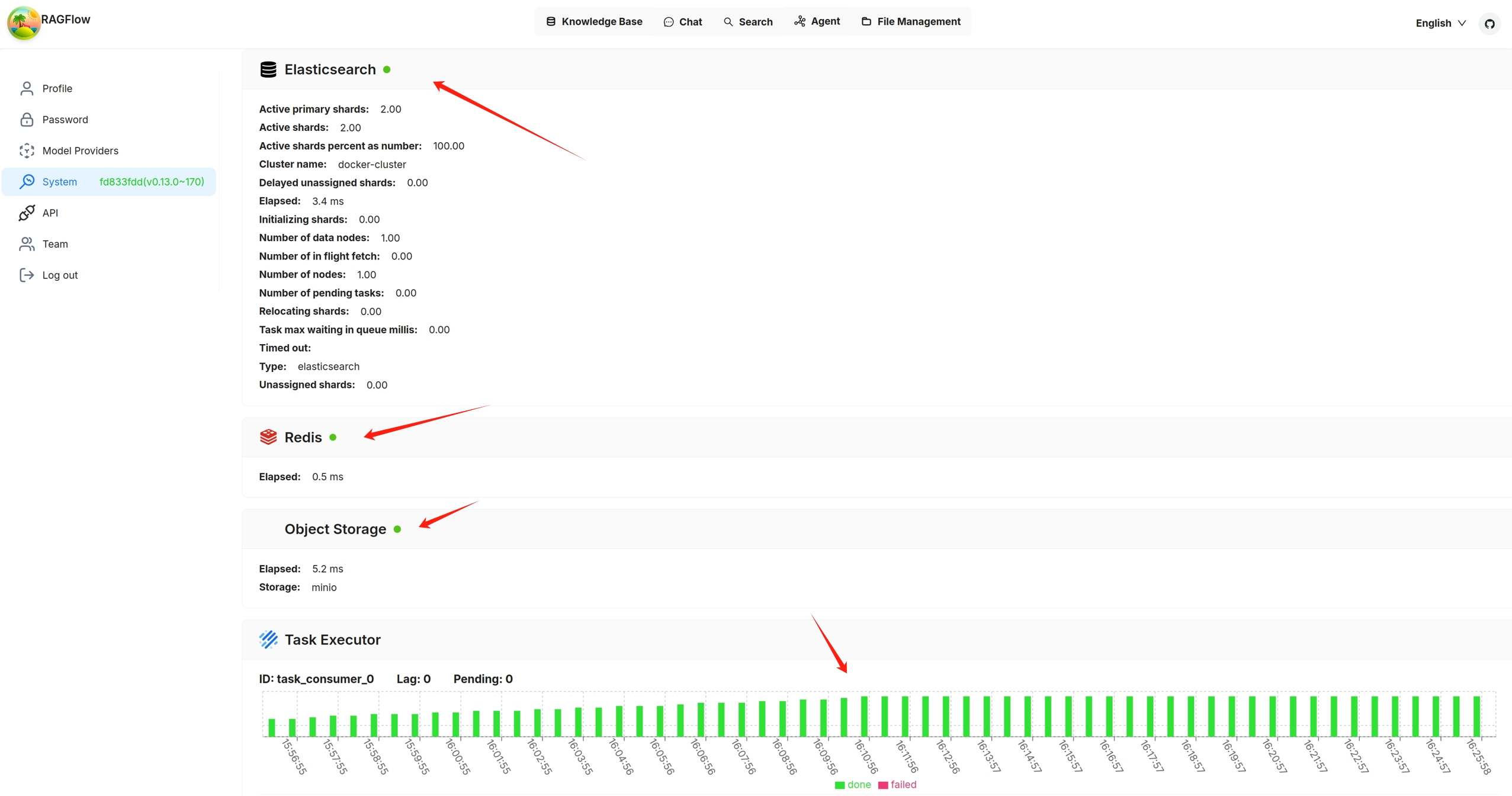diff --git a/docs/guides/start_chat.md b/docs/guides/start_chat.mdindex 81115bd806..2120cca802 100644--- a/docs/guides/start_chat.md+++ b/docs/guides/start_chat.md@@ -19,7 +19,7 @@ You start an AI conversation by creating an assistant.- **Assistant name** is the name of your chat assistant. Each assistant corresponds to a dialogue with a unique combination of knowledge bases, prompts, hybrid search configurations, and large model settings.- **Empty response**:- - If you wish to *confine* RAGFlow's answers to your knowledge bases, leave a response here. Then when it doesn't retrieve an answer, it *uniformly* responds with what you set here.+ - If you wish to *confine* RAGFlow's answers to your knowledge bases, leave a response here. Then, when it doesn't retrieve an answer, it *uniformly* responds with what you set here.- If you wish RAGFlow to *improvise* when it doesn't retrieve an answer from your knowledge bases, leave it blank, which may give rise to hallucinations.- **Show Quote**: This is a key feature of RAGFlow and enabled by default. RAGFlow does not work like a black box. instead, it clearly shows the sources of information that its responses are based on.- Select the corresponding knowledge bases. You can select one or multiple knowledge bases, but ensure that they use the same embedding model, otherwise an error would occur.diff --git a/docs/guides/upgrade_ragflow.mdx b/docs/guides/upgrade_ragflow.mdxindex 31d19d91d6..e329e579a3 100644--- a/docs/guides/upgrade_ragflow.mdx+++ b/docs/guides/upgrade_ragflow.mdx@@ -62,16 +62,16 @@ To upgrade RAGFlow, you must upgrade **both** your code **and** your Docker imaggit clone https://github.com/infiniflow/ragflow.git```-2. Switch to the latest, officially published release, e.g., `v0.14.0`:+2. Switch to the latest, officially published release, e.g., `v0.14.1`:```bash- git checkout v0.14.0+ git checkout v0.14.1```3. Update **ragflow/docker/.env** as follows:```bash- RAGFLOW_IMAGE=infiniflow/ragflow:v0.14.0+ RAGFLOW_IMAGE=infiniflow/ragflow:v0.14.1```4. Update the RAGFlow image and restart RAGFlow:diff --git a/docs/quickstart.mdx b/docs/quickstart.mdxindex 355747f055..b3c6721e83 100644--- a/docs/quickstart.mdx+++ b/docs/quickstart.mdx@@ -32,9 +32,9 @@ This section provides instructions on setting up the RAGFlow server on Linux. If<details><summary>1. Ensure <code>vm.max_map_count</code> ≥ 262144:</summary>- `vm.max_map_count`. This value sets the maximum number of memory map areas a process may have. Its default value is 65530. While most applications require fewer than a thousand maps, reducing this value can result in abmornal behaviors, and the system will throw out-of-memory errors when a process reaches the limitation.+ `vm.max_map_count`. This value sets the maximum number of memory map areas a process may have. Its default value is 65530. While most applications require fewer than a thousand maps, reducing this value can result in abnormal behaviors, and the system will throw out-of-memory errors when a process reaches the limitation.- RAGFlow v0.14.0 uses Elasticsearch for multiple recall. Setting the value of `vm.max_map_count` correctly is crucial to the proper functioning of the Elasticsearch component.+ RAGFlow v0.14.1 uses Elasticsearch or [Infinity](https://github.com/infiniflow/infinity) for multiple recall. Setting the value of `vm.max_map_count` correctly is crucial to the proper functioning of the Elasticsearch component.<TabsdefaultValue="linux"@@ -184,9 +184,9 @@ This section provides instructions on setting up the RAGFlow server on Linux. If$ docker compose -f docker-compose.yml up -d```- > - To download a RAGFlow slim Docker image of a specific version, update the `RAGFlOW_IMAGE` variable in **docker/.env** to your desired version. For example, `RAGFLOW_IMAGE=infiniflow/ragflow:v0.14.0-slim`. After making this change, rerun the command above to initiate the download.+ > - To download a RAGFlow slim Docker image of a specific version, update the `RAGFlOW_IMAGE` variable in **docker/.env** to your desired version. For example, `RAGFLOW_IMAGE=infiniflow/ragflow:v0.14.1-slim`. After making this change, rerun the command above to initiate the download.> - To download the dev version of RAGFlow Docker image *including* embedding models and Python libraries, update the `RAGFlOW_IMAGE` variable in **docker/.env** to `RAGFLOW_IMAGE=infiniflow/ragflow:dev`. After making this change, rerun the command above to initiate the download.- > - To download a specific version of RAGFlow Docker image *including* embedding models and Python libraries, update the `RAGFlOW_IMAGE` variable in **docker/.env** to your desired version. For example, `RAGFLOW_IMAGE=infiniflow/ragflow:v0.14.0`. After making this change, rerun the command above to initiate the download.+ > - To download a specific version of RAGFlow Docker image *including* embedding models and Python libraries, update the `RAGFlOW_IMAGE` variable in **docker/.env** to your desired version. For example, `RAGFLOW_IMAGE=infiniflow/ragflow:v0.14.1`. After making this change, rerun the command above to initiate the download.:::tip NOTEA RAGFlow Docker image that includes embedding models and Python libraries is approximately 9GB in size and may take significantly longer time to load.