
RAGFlow is an agent-native database: a Retrieval-Augmented Generation (RAG) engine that grew into context infrastructure.
Go agent-harnessagent-native-databaseagentic-aiagentic-retrievalagentic-searchaiai-agentscontext-enginecontext-engineeringcontext-managementharness-engineeringknowledge-compilationragretrieval-augmented-generationretrieval-harnesssearch-harness
docs: updates docs word with latest UI (#21521)
YanZhanga43cac2615f6
diff --git a/docs/guides/dataset/configuration.md b/docs/guides/dataset/configuration.mdindex c9c06073d8..276c1c92fe 100644--- a/docs/guides/dataset/configuration.md+++ b/docs/guides/dataset/configuration.md@@ -12,15 +12,14 @@ sidebar_custom_props: {## Basic Information-The configuration page is used to maintain the core configuration of a dataset. Basic information includes **Name**, **Language**, **Avatar**, **Description**, **Embedding model**, **PageRank**, and **Tag sets**.+The configuration page is used to maintain the core configuration of a dataset. Basic information includes **Name**, **Language**, **Avatar**, **Description**, **Embedding model**, **PageRank**.- **Name**: The dataset name. It can still be modified after creation and is used in list cards and the detail page title.- **Language**: The primary language of the dataset. The language setting affects language assumptions during parsing and model processing.- **Avatar**: The dataset avatar. Image uploads are supported, and the maximum image size is 4 MB.- **Description**: The dataset description, used to describe the material scope, business purpose, or maintenance notes.-- **Embedding model**: The model used to vectorize chunks. Changing the embedding model after content has already been parsed usually affects the index and should be handled carefully.+- **Embedding model**: The model used to vectorize chunks. Before the dataset contains chunks, you can change the model directly. Once chunks exist, selecting a different model on the configuration page triggers a compatibility check against sampled existing vectors. The vector dimensions must match, and the average cosine similarity must be at least 0.9. If the check fails, the previous selection is restored. Saving a model change does not automatically re-embed existing chunks.- **PageRank**: Sets the dataset's PageRank score. During retrieval, this score is added to the hybrid similarity score of matched chunks in the dataset, increasing their ranking weight. This is suitable when content from a specific dataset needs higher priority during retrieval across multiple datasets.-- **Tag sets**: Used to associate one or more tag sets with a dataset and add tags to chunks in bulk based on text similarity. During retrieval, queries are also automatically associated with corresponding tags, improving retrieval accuracy with tag information. A tag set must be generated as a sample before use.## Parsing Method@@ -41,7 +40,6 @@ The following built-in parsing methods are available:- **Laws**: Designed for legal documents in DOCX, PDF, and TXT formats. Chunk boundaries are identified based on the structural characteristics of legal documents.- **Presentation**: Designed for presentations in PDF and PPTX formats. Each page or slide is typically treated as an individual chunk.- **One**: Treats the entire document as a single chunk. This method is suitable for relatively short documents when the complete context needs to be preserved.-- **Tag**: Used to create a tag set. A dataset using this method provides tags for chunks and queries in other datasets and does not directly participate in the RAG retrieval process.- **Audio**: An audio parsing method for audio files such as WAV, MP3, AAC, FLAC, and OGG. It uses an ASR model to transcribe audio into text and then generates chunks from the transcription.- **Email**: An email parsing method for email files such as EML and MSG. It extracts content including the sender, recipients, subject, body, and attachments, and generates chunks from the extracted content.@@ -314,7 +312,7 @@ The pipeline must be created and configured in **Agent > Ingestion Pipeline** inUsage:-1. Create and configure an **Ingestion Pipeline** in **Agent > Pipeline**.+1. Create and configure an **Ingestion Pipeline** in **Agent > Ingestion Pipeline**.2. Go to **Dataset > Configuration** and select **Pipeline** as the parsing method.3. Select the pipeline to use from the pipeline list.4. Save the configuration. Afterward, documents in the dataset are processed according to the selected pipeline.diff --git a/docs/guides/dataset/dataset_overview.md b/docs/guides/dataset/dataset_overview.mdindex 7359cfda29..e9a506b4ad 100644--- a/docs/guides/dataset/dataset_overview.md+++ b/docs/guides/dataset/dataset_overview.md@@ -18,7 +18,7 @@ In terms of responsibility, a dataset is more than a "folder". It converts raw d## Basic Information-The configuration page allows you to manage the core settings of a knowledge base. Basic information includes the name, language, avatar, description, permissions, embedding model, PageRank, and tag sets.+The configuration page allows you to manage the core settings of a knowledge base. Basic information includes the name, language, avatar, description, permissions, embedding model and PageRank.- **Name**: The name of the knowledge base. It can be changed after creation and is displayed on knowledge base cards and detail page headers.- **Language**: The primary language of the knowledge base. This setting affects the language assumptions used during parsing and model processing.diff --git a/docs/quickstart.mdx b/docs/quickstart.mdxindex 387dab1bc6..254f9a420c 100644--- a/docs/quickstart.mdx+++ b/docs/quickstart.mdx@@ -92,18 +92,12 @@ RAGFlow also supports deploying models locally using Ollama or vLLM, but this paTo add and configure an LLM:-1. Click on your logo on the top right of the page **>** **Model providers**.+1. Open **User settings** from your avatar, then select **Model providers**.+2. In **Available models**, select a provider and create a provider instance.+3. Enter the instance name and required connection information, such as **API Key** and **Base URL**. Select or add the models you need, verify them, and save the instance.+4. Under **Set default models**, select a Chat model and an Embedding model. Configure other model types as needed.-2. Click on the desired LLM and update the API key accordingly.--3. Click **Set default models** to select the default models:-- - Chat model,- - Embedding model,- - Image-to-text model,- - and more.--> Some models, such as the image-to-text model **qwen-vl-max**, are subsidiary to a specific LLM. And you may need to update your API key to access these models.+See [Configure Model Providers](./guides/models/llm_api_key_setup.md) for provider-specific fields and screenshots.## Create your first dataset@@ -111,29 +105,20 @@ You can upload files to a dataset in RAGFlow and parse them into chunks. A datasTo create your first dataset:-1. Click the **Dataset** tab in the top middle of the page **>** **Create dataset**.--2. Input the name of your dataset and click **OK** to confirm your changes.+1. Select **Datasets** in the navigation bar, then click **Create dataset**.+2. Enter **Name**, select **Embedding model**, and choose **Parse type**. For a first dataset, select **Built-in** and a parsing method suitable for your files. To use **Pipeline**, first create an **Ingestion Pipeline** in **Agent > Ingestion Pipeline**, then select it in the creation dialog.+3. Click **Save**, open the dataset, and review its **Configuration** before uploading files.- _You are taken to the **Configuration** page of your dataset._+ See [Dataset List and Creation](./guides/dataset/dataset_list_and_creation.md) and [Dataset Configuration](./guides/dataset/configuration.md) for details.- 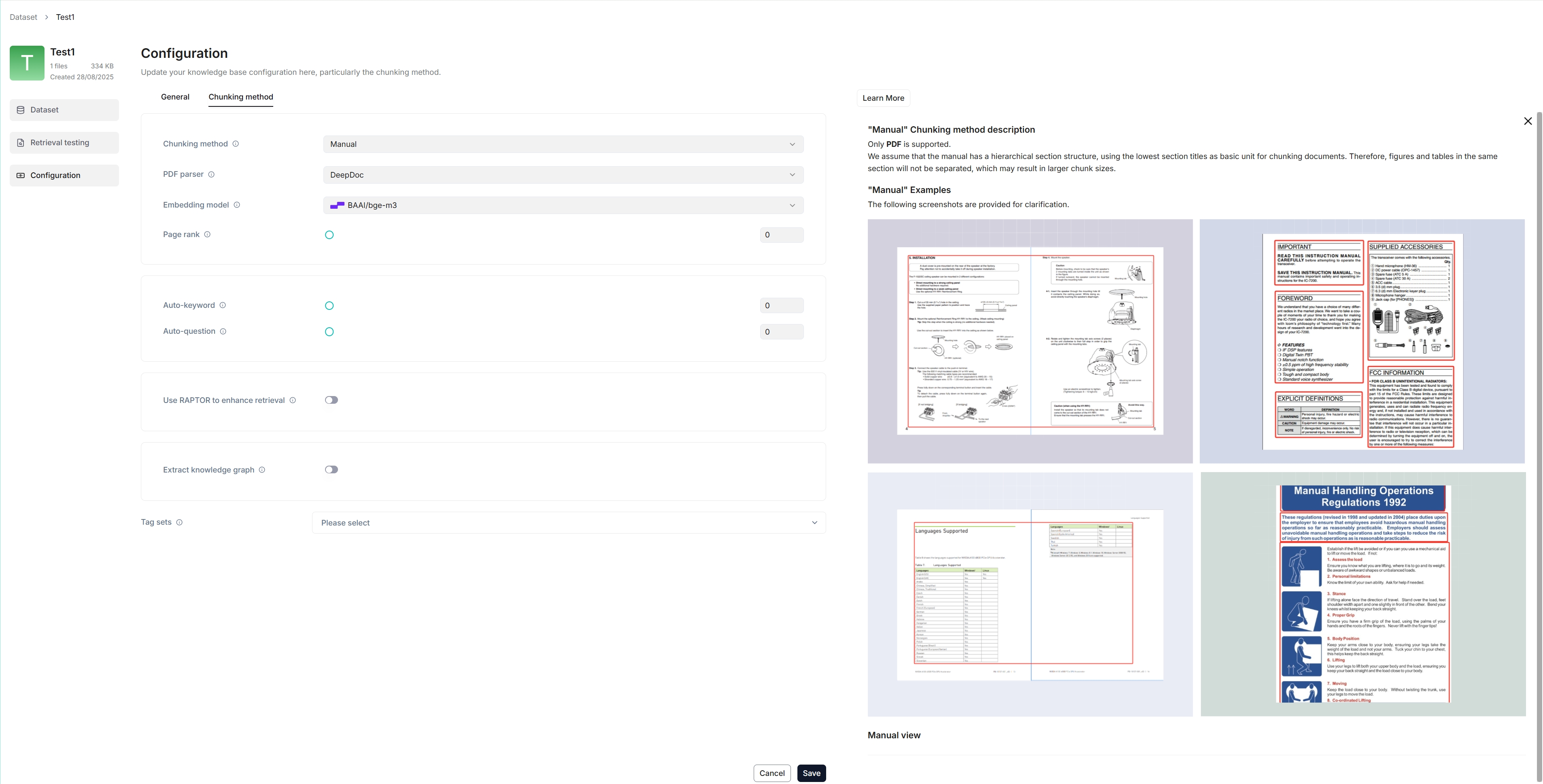--3. RAGFlow offers multiple chunk templates that cater to different document layouts and file formats. Select the embedding model and chunking method (template) for your dataset.-- :::danger IMPORTANT- Once you have selected an embedding model and used it to parse a file, you are no longer allowed to change it. The obvious reason is that we must ensure that all files in a specific dataset are parsed using the *same* embedding model (ensure that they are being compared in the same embedding space).+ :::caution IMPORTANT+ Choose the embedding model before parsing files. Before the dataset contains chunks, you can change the model directly. Once chunks exist, selecting a different model on the configuration page triggers a compatibility check against sampled existing vectors. The vector dimensions must match, and the average cosine similarity must be at least 0.9. If the check fails, the previous selection is restored. Saving a model change does not automatically re-embed existing chunks.:::- _You are taken to the **Dataset** page of your dataset._--4. Click **+ Add file** **>** **Local files** to start uploading a particular file to the dataset.--5. In the uploaded file entry, click the play button to start file parsing:+4. Open the dataset's **Files** page. Click **Add file > Upload file**, select local files, and confirm the upload. Enable **Parse on creation** to start parsing automatically.+5. If parsing was not started during upload, select the uploaded documents and click **Run**. Wait for parsing to complete before using them in Chat.- 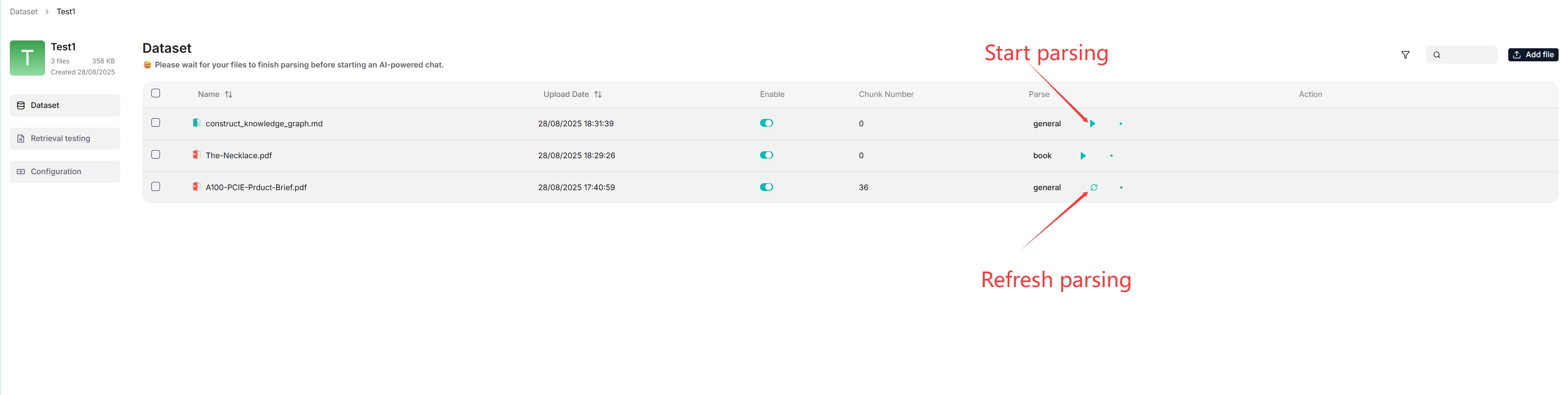-- If parsing stalls, check the `ragflow-cpu` service logs with the Compose command above for ingestion errors.+ See [Files: Dataset Document Management](./guides/dataset/files_dataset_document_management.md) for upload and parsing options. If parsing stalls, check the document's **Logs** and the `ragflow-cpu` service logs for ingestion errors.## Intervene with file parsing@@ -165,25 +150,13 @@ RAGFlow features visibility and explainability, allowing you to view the chunkinConversations in RAGFlow are based on a particular dataset or multiple datasets. Once you have created your dataset and finished file parsing, you can go ahead and start an AI conversation.-1. Click the **Chat** tab in the middle top of the page **>** **Create chat** to create a chat assistant.-2. Click the created chat app to enter its configuration page.- > RAGFlow lets you choose a chat model for each dialogue. You can configure the defaults under **Set default models**.--3. Update **Chat setting** on the right of the configuration page:-- - Name your assistant and specify your datasets.- - **Empty response**:- - If you wish to *confine* RAGFlow's answers to your datasets, leave a response here. Then when it doesn't retrieve an answer, it *uniformly* responds with what you set here.- - If you wish RAGFlow to *improvise* when it doesn't retrieve an answer from your datasets, leave it blank, which may give rise to hallucinations.--4. Update **System prompt** or leave it as is for the beginning.--5. Select a chat model in the **Model** dropdown list.--6. Now, let's start the show:-- 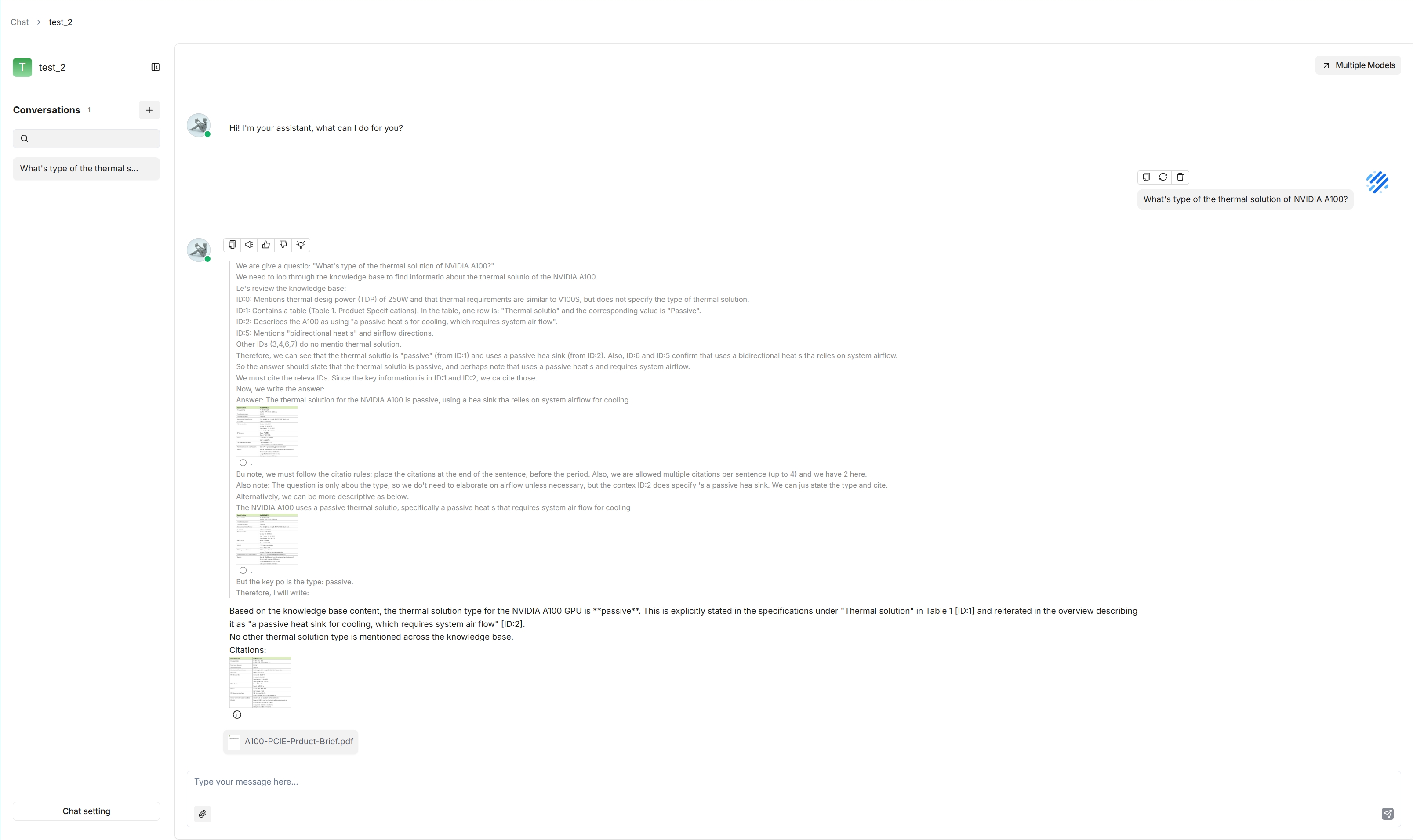+1. Select **Chat** in the navigation bar, then click **Create chat**.+2. Enter a name and confirm creation.+3. Open **Chat setting**, select the dataset you parsed, and choose a chat model. You can configure model defaults under **User settings > Model providers > Set default models**.+4. Review the **System prompt** and retrieval settings. Set **Empty response** to the message you want returned when no answer can be found, or leave it blank to allow the model to generate a response without matching dataset content.+5. Save the settings, open the chat window, and ask a question about your documents. Select **Naive** for straightforward questions or **Agentic** for questions requiring deeper investigation.+See [Feature Overview and Creation](./guides/chat/feature_overview_and_creation.md) for Chat creation screenshots and [Chat Configuration](./guides/chat/chat_configuration.md) for the available settings.:::tip NOTERAGFlow also offers an HTTP API for integrating its capabilities into your applications:diff --git a/docs/references/glossary.mdx b/docs/references/glossary.mdxindex 63d92d244a..a561ce30f8 100644--- a/docs/references/glossary.mdx+++ b/docs/references/glossary.mdx@@ -31,7 +31,7 @@ Agentic Retrieval is a retrieval approach designed for complex questions.Unlike one-time retrieval, it incorporates model reasoning to analyze user queries and, when necessary, perform steps such as question decomposition, retrieval, and evidence checking to obtain more comprehensive context for answer generation.-In Chat, different Thinking levels can be used to control the processing depth of Agentic Retrieval.+In Chat, select **Agentic** from the Thinking menu to use Agentic Retrieval. The **Naive** mode performs retrieval without complex analysis.**Auto keyword**@@ -442,11 +442,12 @@ Temperature is a parameter that controls randomness in model generation.Lower values generally make outputs more stable and deterministic, while higher values increase diversity and randomness. The exact effect depends on the model being used.-**Thinking level**+**Thinking mode**-Thinking level controls the depth of retrieval and reasoning used by Chat when processing a question.+Thinking mode determines how Chat investigates available data before answering. Select **Naive** or **Agentic** from the Thinking menu near the message box.-RAGFlow provides different Thinking levels. Higher levels can perform deeper question analysis and retrieval processing and are suitable for complex questions that require multi-step analysis or more comprehensive supporting evidence, but they generally require more processing time and model invocations.+- **Naive**: Performs retrieval without complex analysis and is suitable for straightforward factual questions. It generally responds faster.+- **Agentic**: Uses a retrieval agent to search the corpus, read documents in depth, and combine evidence across documents before answering. It is suitable for comparisons and multi-step research, but generally takes longer and invokes the model more often.**Timeline**