
RAGFlow is an agent-native database: a Retrieval-Augmented Generation (RAG) engine that grew into context infrastructure.
Go agent-harnessagent-native-databaseagentic-aiagentic-retrievalagentic-searchaiai-agentscontext-enginecontext-engineeringcontext-managementharness-engineeringknowledge-compilationragretrieval-augmented-generationretrieval-harnesssearch-harness
Docs: How to connect to an MCP server as a client (#10043)
writinwatersb9b278d44144
diff --git a/docs/guides/agent/agent_component_reference/agent.mdx b/docs/guides/agent/agent_component_reference/agent.mdxindex f31cb3c6c9..d02617a738 100644--- a/docs/guides/agent/agent_component_reference/agent.mdx+++ b/docs/guides/agent/agent_component_reference/agent.mdx@@ -26,6 +26,84 @@ An **Agent** component is essential when you need the LLM to assist with summari2. If your Agent involves dataset retrieval, ensure you [have properly configured your target knowledge base(s)](../../dataset/configure_knowledge_base.md).+## Quickstart++### 1. Click on an **Agent** component to show its configuration panel++The corresponding configuration panel appears to the right of the canvas. Use this panel to define and fine-tune the **Agent** component's behavior.++### 2. Select your model++Click **Model**, and select a chat model from the dropdown menu.++:::tip NOTE+If no model appears, check if your have added a chat model on the **Model providers** page.+:::++### 3. Update system prompt (Optional)++The system prompt typically defines your model's role. You can either keep the system prompt as is or customize it to override the default.+++### 4. Update user prompt++The user prompt typically defines your model's task. You will find the `sys.query` variable auto-populated. Type `/` or click **(x)** to view or add variables.++In this quickstart, we assume your **Agent** component is used standalone (without tools or sub-Agents below), then you may also need to specify retrieved chunks using the `formalized_content` variable:++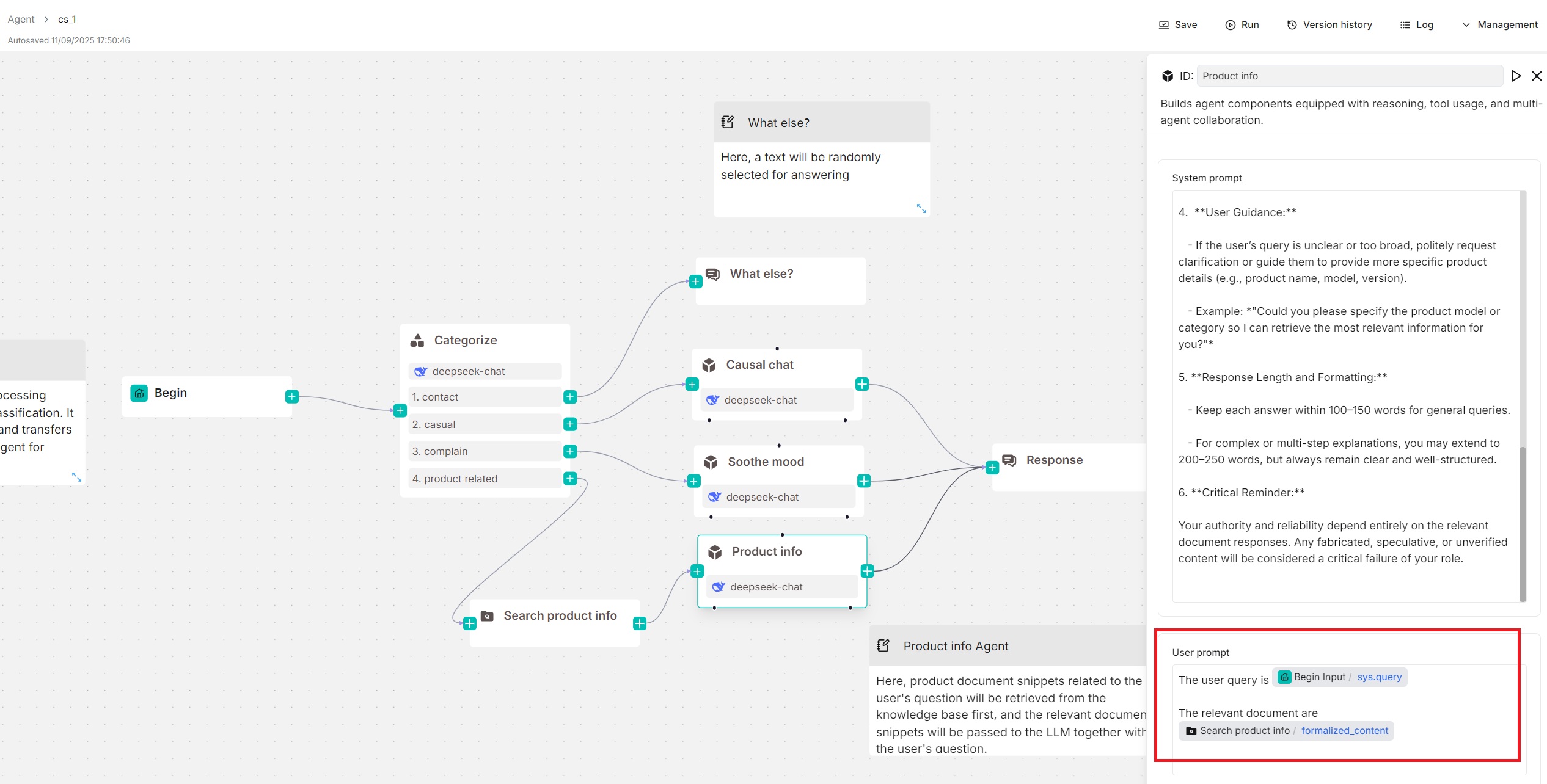++### 5. Skip Tools and Agent++The **+ Add tools** and **+ Add agent** sections are used *only* when you need to configure your **Agent** component as a planner (with tools or sub-Agents beneath). In this quickstart, we assume your **Agent** component is used standalone (without tools or sub-Agents beneath).++### 6. Choose the next component++When necessary, click the **+** button on the **Agent** component to choose the next component in the worflow from the dropdown list.++## Connect to an MCP server as a client++:::danger IMPORTANT+In this section, we assume your **Agent** will be configured as a planner, with a Tavily tool beneath it.+:::++### 1. Navigate to the MCP configuration page++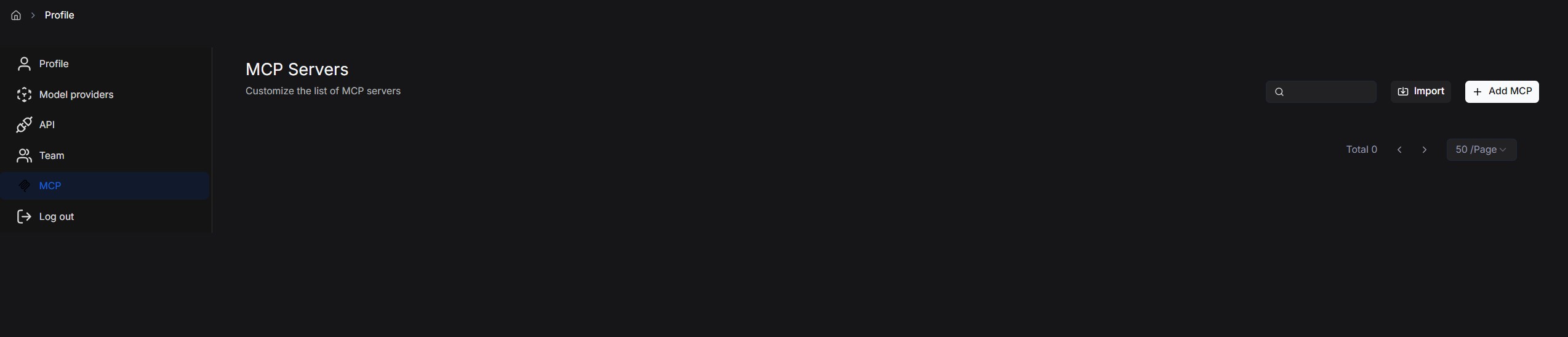++### 2. Configure your Tavily MCP server++Update your MCP server's name, URL (including the API key), server type, and other necessary settings. When configured correctly, the available tools will be displayed.++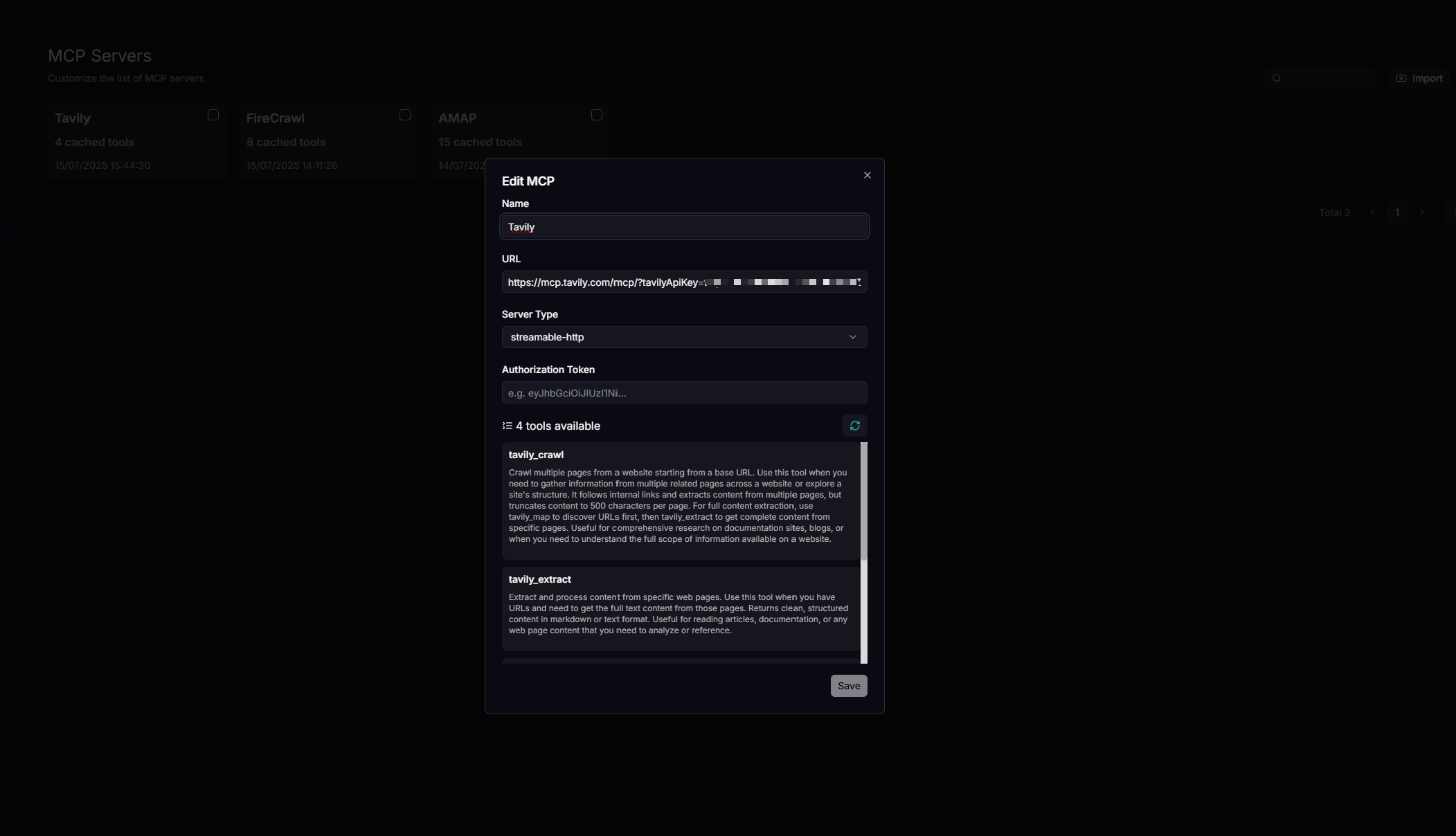++### 3. Navigate to your Agent's editing page++### 4. Connect to your MCP server++1. Click **+ Add tools**:++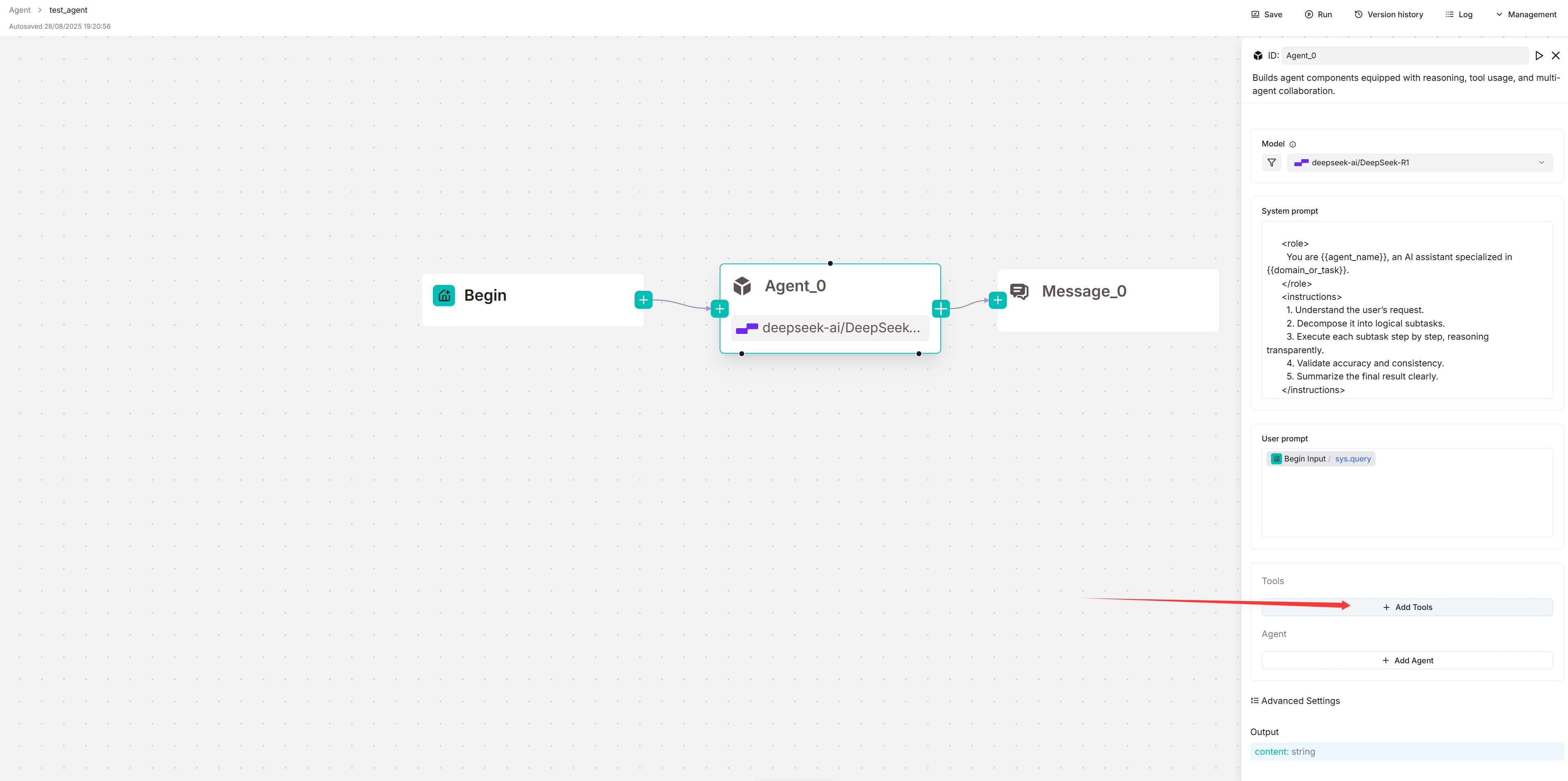++2. Click **MCP** to show the available MCP servers.++3. Select your MCP server:++ *The target MCP server appears below your Agent component, and your Agent will autonomously decide when to invoke the available tools it offers.*++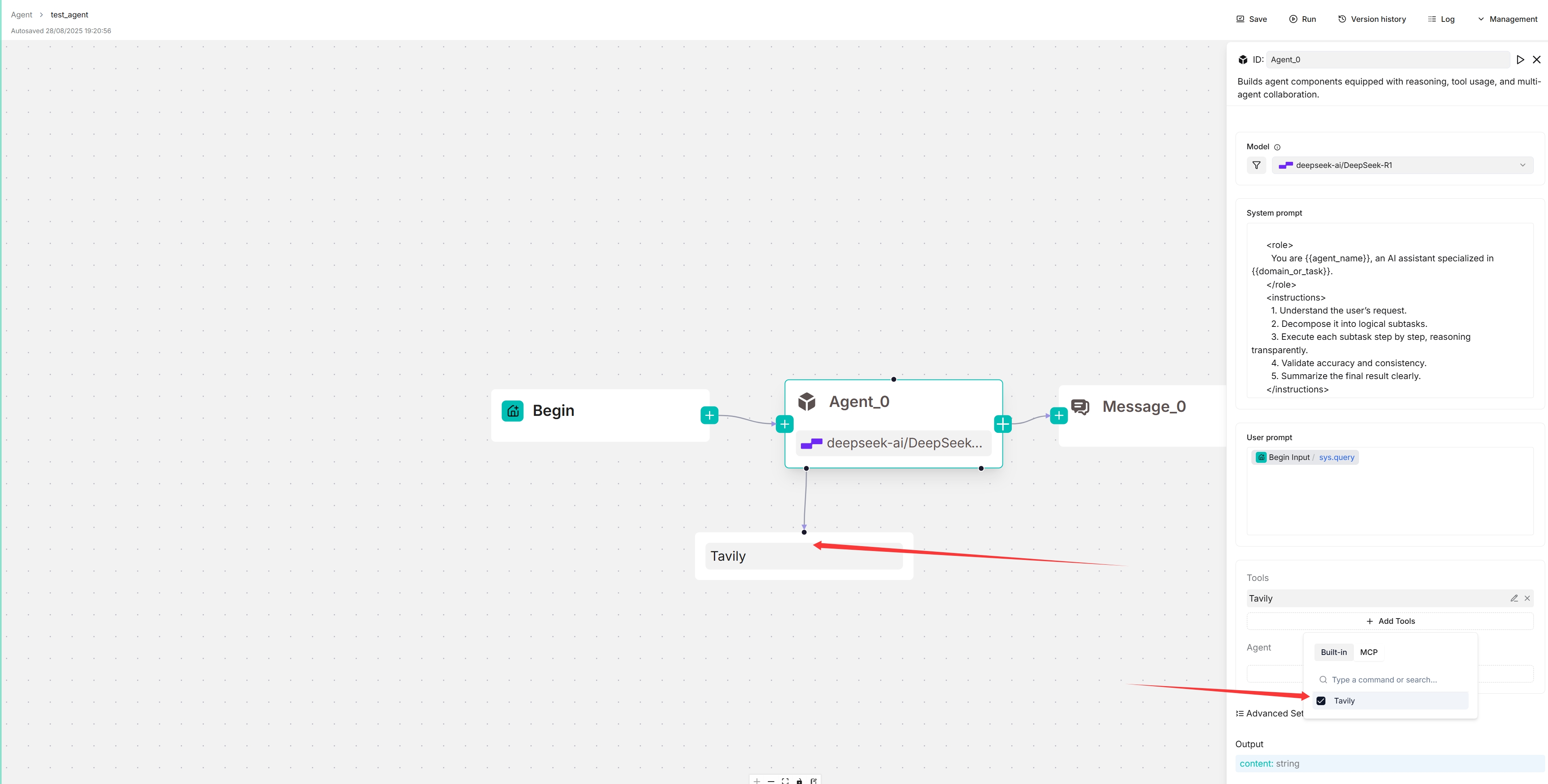++### 5. Update system prompt to specify trigger conditions (Optional)++To ensure reliable tool calls, you may specify within the system prompt which tasks should trigger each tool call.++### 6. View the availabe tools of your MCP server++On the canvas, click the newly-populated Tavily server to view and select its available tools:++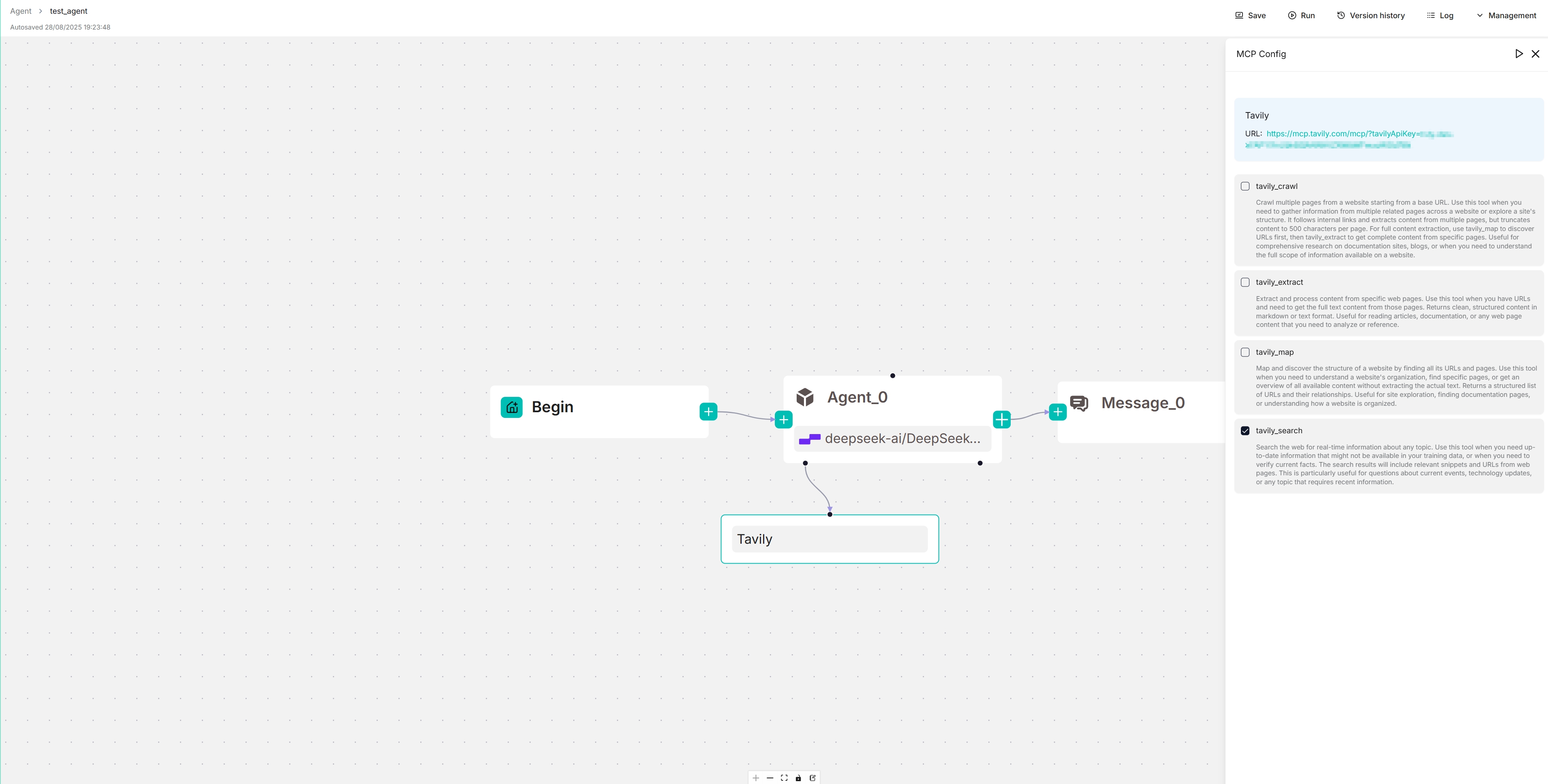++## Configurations### Model@@ -69,7 +147,7 @@ An **Agent** component relies on keys (variables) to specify its data inputs. It#### Advanced usage-From v0.20.5 onwards, four framework-level prompt blocks are available in the **System prompt** field. Type `/` or click **(x)** to view them; they appear under the **Framework** entry in the dropdown menu.+From v0.20.5 onwards, four framework-level prompt blocks are available in the **System prompt** field, enabling you to customize and *override* prompts at the framework level. Type `/` or click **(x)** to view them; they appear under the **Framework** entry in the dropdown menu.- `task_analysis` prompt block- This block is responsible for analyzing tasks — either a user task or a task assigned by the lead Agent when the **Agent** component is acting as a Sub-Agent.@@ -100,6 +178,12 @@ From v0.20.5 onwards, four framework-level prompt blocks are available in the **- `citation_guidelines` prompt block- Reference design: [citation_prompt.md](https://github.com/infiniflow/ragflow/blob/main/rag/prompts/citation_prompt.md)+*The screenshots below show the framework prompt blocks available to an **Agent** component, both as a standalone and as a planner (with a Tavily tool below):*++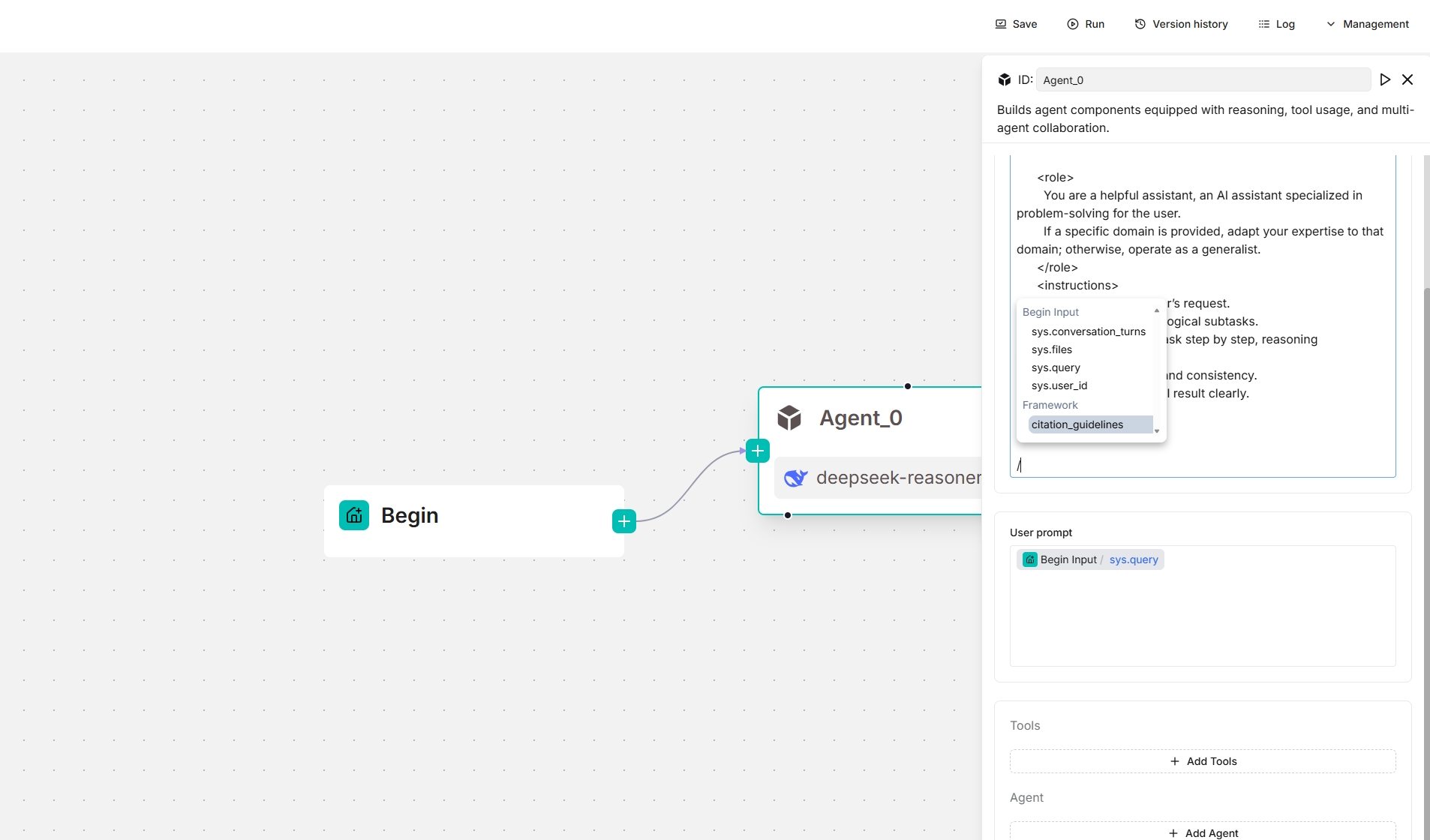++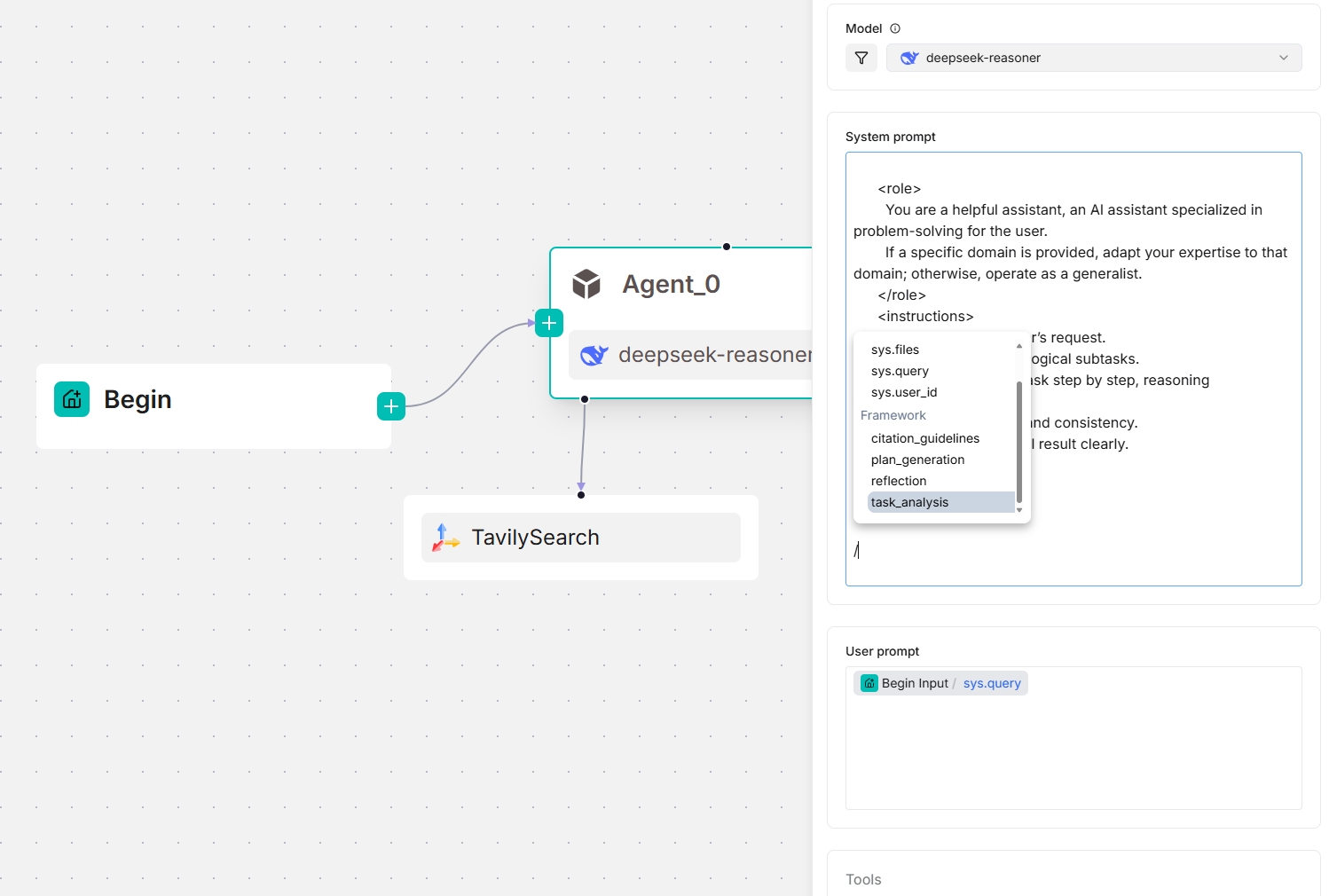+### User promptThe user-defined prompt. Defaults to `sys.query`, the user query. As a general rule, when using the **Agent** component as a standalone module (not as a planner), you usually need to specify the corresponding **Retrieval** component’s output variable (`formalized_content`) here as part of the input to the LLM.@@ -129,7 +213,7 @@ Defines the maximum number of attempts the agent will make to retry a failed tasThe waiting period in seconds that the agent observes before retrying a failed task, helping to prevent immediate repeated attempts and allowing system conditions to improve. Defaults to 1 second.-### Max rounds+### Max reflection roundsDefines the maximum number reflection rounds of the selected chat model. Defaults to 1 round.diff --git a/docs/references/http_api_reference.md b/docs/references/http_api_reference.mdindex 791701ebf2..b112e86187 100644--- a/docs/references/http_api_reference.md+++ b/docs/references/http_api_reference.md@@ -1856,7 +1856,7 @@ curl --request POST \- `false`: Disable highlighting of matched terms (default).- `"cross_languages"`: (*Body parameter*) `list[string]`The languages that should be translated into, in order to achieve keywords retrievals in different languages.-- `"metadata_condition"`: (*Body parameter*), `object`+- `"metadata_condition"`: (*Body parameter*), `object`The metadata condition for filtering chunks.#### Responsediff --git a/docs/references/python_api_reference.md b/docs/references/python_api_reference.mdindex 1d788f6aba..79c62424bb 100644--- a/docs/references/python_api_reference.md+++ b/docs/references/python_api_reference.md@@ -977,7 +977,7 @@ The languages that should be translated into, in order to achieve keywords retri##### metadata_condition: `dict`-filter condition for meta_fields+filter condition for `meta_fields`.#### Returnsdiff --git a/docs/release_notes.md b/docs/release_notes.mdindex 550bae5dd6..0691c81f19 100644--- a/docs/release_notes.md+++ b/docs/release_notes.md@@ -28,11 +28,11 @@ Released on September 10, 2025.### Improvements-- Agent Performance Optimized: Improved planning and reflection speed for simple tasks; optimized concurrent tool calls for parallelizable scenarios, significantly reducing overall response time.-- Agent Prompt Framework exposed: Developers can now customize and override framework-level prompts in the system prompt section, enhancing flexibility and control.-- Execute SQL Component Enhanced: Replaced the original variable reference component with a text input field, allowing free-form SQL writing with variable support.-- Chat: Re-enabled Reasoning and Cross-language search.-- Retrieval API Enhanced: Added metadata filtering support to the [Retrieve chunks](https://ragflow.io/docs/dev/http_api_reference#retrieve-chunks) method.+- Agent:+ - Agent Performance Optimized: Improves planning and reflection speed for simple tasks; optimizes concurrent tool calls for parallelizable scenarios, significantly reducing overall response time.+ - Four framework-level prompt blocks are available in the **System prompt** section, enabling customization and overriding of prompts at the framework level, thereby enhancing flexibility and control. See [here](./guides/agent/agent_component_reference/agent.mdx#advanced-usage).+ - **Execute SQL** component enhanced: Replaces the original variable reference component with a text input field, allowing users to write free-form SQL queries and reference variables.+- Chat: Re-enables **Reasoning** and **Cross-language search**.### Added models@@ -44,8 +44,22 @@ Released on September 10, 2025.### Fixed issues- Dataset: Deleted files remained searchable.-- Chat: Unable to chat with an Ollama model.-- Agent: Resolved issues including cite toggle failure, task mode requiring dialogue triggers, repeated answers in multi-turn dialogues, and duplicate summarization of parallel execution results.+- Chat: Unable to chat with an Ollama model.+- Agent:+ - A **Cite** toggle failure.+ - An Agent in task mode still required a dialogue to trigger.+ - Repeated answers in multi-turn dialogues.+ - Duplicate summarization of parallel execution results.++### API changes++#### HTTP APIs++- Adds a body parameter `"metadata_condition"` to the [Retrieve chunks](./references/http_api_reference.md#retrieve-chunks) method, enabling metadata-based chunk filtering during retrieval. [#9877](https://github.com/infiniflow/ragflow/pull/9877)++#### Python APIs++- Adds a parameter `metadata_condition` to the [Retrieve chunks](./references/python_api_reference.md#retrieve-chunks) method, enabling metadata-based chunk filtering during retrieval. [#9877](https://github.com/infiniflow/ragflow/pull/9877)## v0.20.4