
RAGFlow is an agent-native database: a Retrieval-Augmented Generation (RAG) engine that grew into context infrastructure.
Go agent-harnessagent-native-databaseagentic-aiagentic-retrievalagentic-searchaiai-agentscontext-enginecontext-engineeringcontext-managementharness-engineeringknowledge-compilationragretrieval-augmented-generationretrieval-harnesssearch-harness
Initial draft of Create a General-purpose chatbot (#2411)
writinwatersbdcf195b201f
diff --git a/docs/guides/agentic_rag/agentic_rag_introduction.md b/docs/guides/agentic_rag/agentic_rag_introduction.mdindex 4bd85a5794..7941896a87 100644--- a/docs/guides/agentic_rag/agentic_rag_introduction.md+++ b/docs/guides/agentic_rag/agentic_rag_introduction.md@@ -51,9 +51,9 @@ Please review the flowing description of the RAG-specific components before you| Component | Description || -------------- | ------------------------------------------------------------ |-| **Retrieval** | A component that retrieves information from a specified knowledge base and returns 'Empty response' if no information is found. Ensure the correct knowledge base is selected. |+| **Retrieval** | A component that retrieves information from specified knowledge bases and returns 'Empty response' if no information is found. Ensure the correct knowledge bases are selected. || **Generate** | A component that prompts the LLM to generate responses. You must ensure the prompt is set correctly. |-| **Answer** | A component that serves as the interface between human and bot, receiving user inputs and displaying the agent's responses. |+| **Answer** | A component that serves as the interface between human and the bot, receiving user inputs and displaying the agent's responses. || **Categorize** | A component that uses the LLM to classify user inputs into predefined categories. Ensure you specify the name, description, and examples for each category, along with the corresponding next component. || **Message** | A component that sends out a static message. If multiple messages are supplied, it randomly selects one to send. Ensure its downstream is **Answer**, the interface component. || **Relevant** | A component that uses the LLM to assess whether the upstream output is relevant to the user's latest query. Ensure you specify the next component for each judge result. |diff --git a/docs/guides/agentic_rag/general_purpose_chatbot.md b/docs/guides/agentic_rag/general_purpose_chatbot.mdnew file mode 100644index 0000000000..3da49ac9cc--- /dev/null+++ b/docs/guides/agentic_rag/general_purpose_chatbot.md@@ -0,0 +1,102 @@+---+sidebar_position: 2+slug: /general_purpose_chatbot+---++# Create and configure a general-purpose chatbot agent++Chatbot is one of the most common AI scenarios. However, effectively understanding user queries and responding appropriately remains a challenge. RAGFlow's general-purpose chatbot agent is our attempt to tackle this longstanding issue.++This chatbot closely resembles the chatbot introduced in [Start an AI chat](../start_chat.md), but with a key difference - it introduces a reflective mechanism that allows it to improve the retrieval from the target knowledge bases by rewriting the user's query.++This document provides guides on creating such a chatbot using our chatbot template.++## Prerequisites++1. Ensure you have properly set the LLM to use. See the guides on [Configure your API key](../llm_api_key_setup.md) or [Deploy a local LLM](../deploy_local_llm.mdx) for more information.+2. Ensure you have a knowledge base configured and the corresponding files properly parsed. See the guide on [Configure a knowledge base](../configure_knowledge_base.md) for more information.+3. Make sure you have read the [Introduction to Agentic RAG](./agentic_rag_introduction.md).++## Create a chatbot agent from template++To create a general-purpose chatbot agent using our template:++1. Click the **Agent** tab in the middle top of the page to show the **Agent** page.+2. Click **+ Create agent** on the top right of the page to show the **agent template** page.+3. On the **agent template** page, hover over the card on **General-purpose chatbot** and click **Use this template**.+ *You are now directed to the **no-code workflow editor** page.*++ ++:::tip NOTE+RAGFlow's no-code editor spares you the trouble of coding, making agent development effortless.+:::++## Understand each component in the template++Here’s a breakdown of each component and its role and requirements in the chatbot template:++- **Begin**+ - Function: Sets the opening greeting for the user.+ - Purpose: Establishes a welcoming atmosphere and prepares the user for interaction.++- **Answer**+ - Function: Serves as the interface between human and the bot.+ - Role: Acts as the downstream component of **Begin**.+ - Note: Though named "Answer", it does not engage with the LLM.++- **Retrieval**+ - Function: Retrieves information from specified knowledge base(s).+ - Requirement: Must have `knowledgebases` set up to function.++- **Relevant**+ - Function: Assesses the relevance of the retrieved information from the **Retrieval** component to the user query.+ - Process:+ - If relevant, it directs the data to the **Generate** component for final response generation.+ - Otherwise, it triggers the **Rewrite** component to refine the user query and redo the retrival process.++- **Generate**+ - Function: Prompts the LLM to generate responses based on the retrieved information.+ - Note: The prompt settings allow you to control the way in which the LLM generates responses. Be sure to review the prompts and make necessary changes.++- **Rewrite**:+ - Function: Refines a user query when no relevant information from the knowledge base is retrieved.+ - Usage: Often used in conjunction with **Relevant** and **Retrieval** to create a reflective/feedback loop.++## Configure your chatbot agent++1. Click **Begin** to set an opening greeting:+ ++2. Click **Retrieval** to select the right knowledge base(s) and make any necessary adjustments:+ ++3. Click **Generate** to configure the LLM's summarization behavior:+ 3.1. Confirm the model.+ 3.2. Review the prompt settings. If there are variables, ensure they match the correct component IDs:+ ++4. Click **Relevant** to review or change its settings:+ *You may retain the current settings, but feel free to experiment with changes to understand how the agent operates.*+ ++5. Click **Rewrite** to select a different model for query rewriting or update the maximum loop times for query rewriting:+ 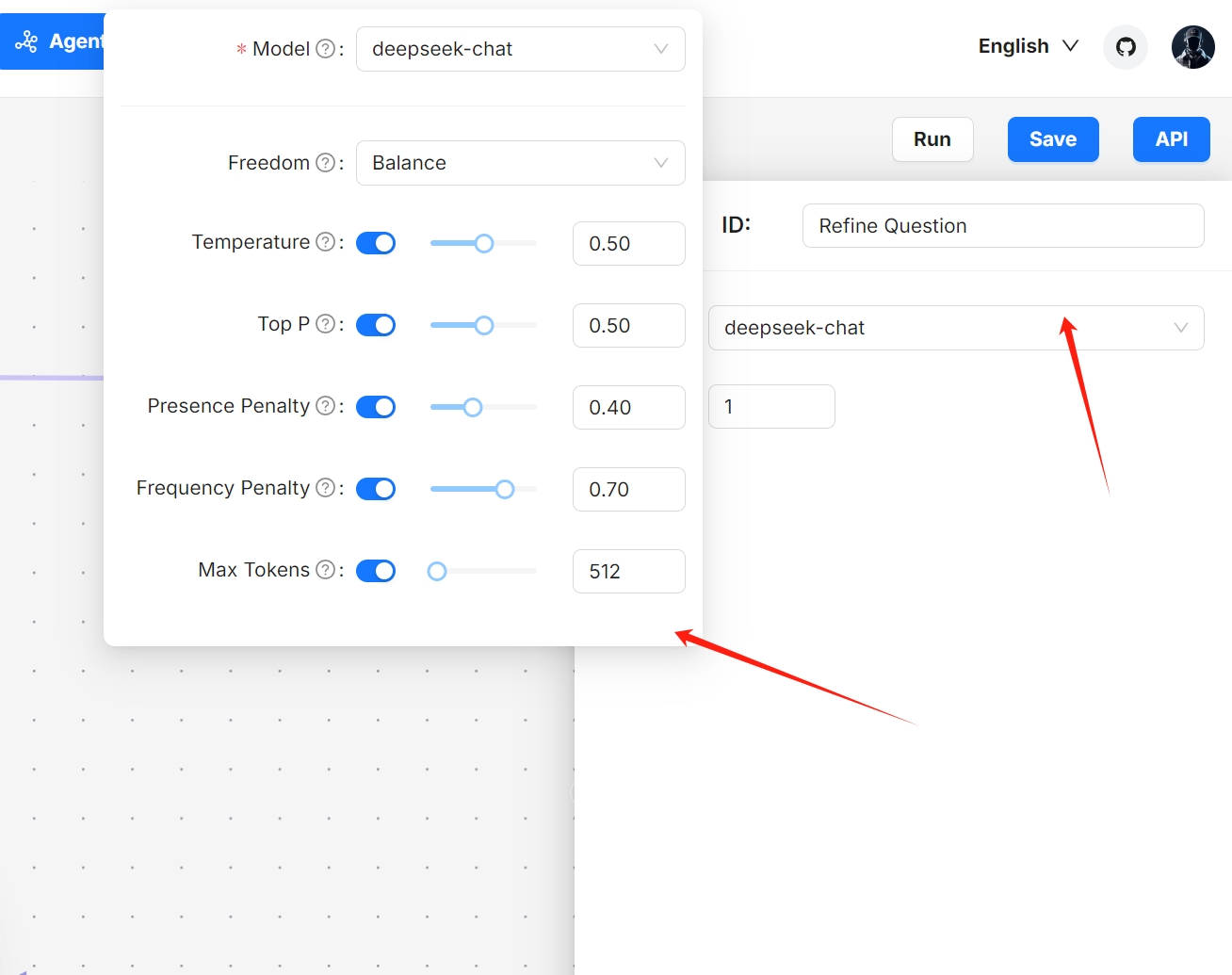+ ++:::danger NOTE+Increasing the maximum loop times may significantly extend the time required to receive the final response.+:::++1. Update your workflow where you see necessary.++2. Click to **Save** to apply your changes.+ *Your agent appears as one of the agent cards on the **Agent** page.*++## Test your chatbot agent++1. Find your chatbot agent on the **Agent** page:+ ++2. Experiment with your questions to verify if this chatbot functions as intended:+ \ No newline at end of file