
RAGFlow is an agent-native database: a Retrieval-Augmented Generation (RAG) engine that grew into context infrastructure.
Go agent-harnessagent-native-databaseagentic-aiagentic-retrievalagentic-searchaiai-agentscontext-enginecontext-engineeringcontext-managementharness-engineeringknowledge-compilationragretrieval-augmented-generationretrieval-harnesssearch-harness
Docs: Refactored Retrieval component reference (#9862)
writinwatersdd8e660f0a15
diff --git a/docs/guides/agent/agent_component_reference/retrieval.mdx b/docs/guides/agent/agent_component_reference/retrieval.mdxindex 6c4ec54261..8bbad4374c 100644--- a/docs/guides/agent/agent_component_reference/retrieval.mdx+++ b/docs/guides/agent/agent_component_reference/retrieval.mdx@@ -9,19 +9,70 @@ A component that retrieves information from specified datasets.## Scenarios-A **Retrieval** component is essential in most RAG scenarios, where information is extracted from designated knowledge bases before being sent to the LLM for content generation. As of v0.20.4, a **Retrieval** component can operate either as a workflow component or as a tool of an **Agent**, enabling the Agent to control its invocation and search queries.+A **Retrieval** component is essential in most RAG scenarios, where information is extracted from designated knowledge bases before being sent to the LLM for content generation. A **Retrieval** component can operate either as a standalone workflow module or as a tool for an **Agent** component. In the latter role, the **Agent** component has autonomous control over when to invoke it for query and retrieval.-## Configurations+The following screenshot shows a reference design using the **Retrieval** component, where the component serves as a tool for an **Agent** component. You can find it from the **Report Agent Using Knowledge Base** Agent template.++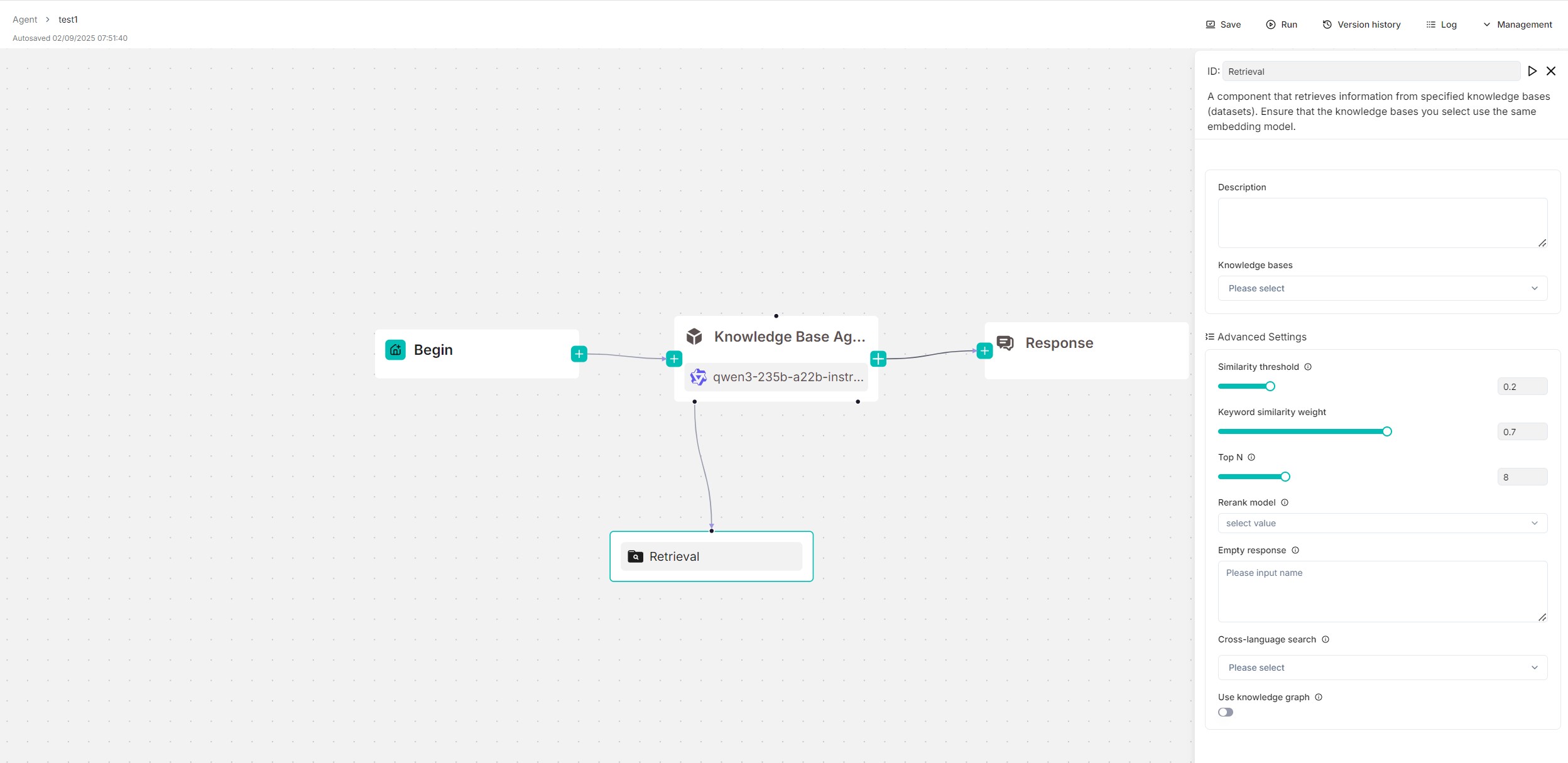++## Prerequisites++Ensure you [have properly configured your target knowledge base(s)](../../dataset/configure_knowledge_base.md).++## Quickstart++### 1. Click on a **Retrieval** component to show its configuration panel++The corresponding configuration panel appears to the right of the canvas. Use this panel to define and fine-tune the **Retrieval** component's search behavior.++### 2. Input query variable(s)++The **Retrieval** component relies on query variables to specify its queries.++:::caution IMPORTANT+- If you use the **Retrieval** component as a standalone workflow module, input query variables in the **Input Variables** text box.+- If it is used as a tool for an **Agent** component, input the query variables in the **Agent** component's **User prompt** field.+:::++By default, you can use `sys.query`, which is the user query and the default output of the **Begin** component. All global variables defined before the **Retrieval** component can also be used as query statements. Use the `(x)` button or type `/` to show all the available query variables.++### 3. Select knowledge base(s) to query++You can specify one or multiple knowledge bases to retrieve data from. If selecting mutiple, ensure they use the same embedding model.++### 4. Expand **Advanced Settings** to configure the retrieval method++By default, a combination of weighted keyword similarity and weighted vector cosine similarity is used during retrieval. If a rerank model is selected, a combination of weighted keyword similarity and weighted reranking score will be used for retrieval.++As a starter, you can skip this step to stay with the default retrieval method.++:::caution WARNING+Using a rerank model will *significantly* increase the system's response time. If you must use a rerank model, ensure you use a SaaS reranker; if you prefer a locally deployed rerank model, ensure you start RAGFlow with **docker-compose-gpu.yml**.+:::++### 5. Enable cross-language search++If your user query is different from the languages of the knowledge bases, you can select the target languages in the **Cross-language search** dropdown menu. The model will then translates queries to ensure accurate matching of semantic meaning across languages.+++### 6. Test retrieval results++Click the triangle button on the top of canvas to test the retrieval results.++### 6. Choose the next component++When necessary, click the **+** button on the **Retrieval** component to choose the next component in the worflow from the dropdown list.-Click on a **Retrieval** component to open its configuration window.++## Configurations### Query variables*Mandatory*-Select the query source for retrieval.+Select the query source for retrieval. Defaults to `sys.query`, which is the default output of the **Begin** component.-The **Retrieval** component relies on query variables to specify its data inputs (queries). All global variables defined before the **Retrieval** component are available in the dropdown list.+The **Retrieval** component relies on query variables to specify its queries. All global variables defined before the **Retrieval** component can also be used as queries. Use the `(x)` button or type `/` to show all the available query variables.### Knowledge bases@@ -72,8 +123,23 @@ Select one or more languages for cross‑language search. If no language is sele### Use knowledge graph+:::caution IMPORTANT+Before enabling this feature, ensure you have properly [constructed a knowledge graph from each target knowledge base](../../dataset/construct_knowledge_graph.md).+:::+Whether to use knowledge graph(s) in the specified knowledge base(s) during retrieval for multi-hop question answering. When enabled, this would involve iterative searches across entity, relationship, and community report chunks, greatly increasing retrieval time.### OutputThe global variable name for the output of the **Retrieval** component, which can be referenced by other components in the workflow.+++## Frequently asked questions++### How to reduce response time?++Go through the checklist below for best performance:++- Leave the **Rerank model** field empty.+- If you must use a rerank model, ensure you use a SaaS reranker; if you prefer a locally deployed rerank model, ensure you start RAGFlow with **docker-compose-gpu.yml**.+- Disable **Use knowledge graph**.diff --git a/docs/quickstart.mdx b/docs/quickstart.mdxindex dc32930713..2056ae2226 100644--- a/docs/quickstart.mdx+++ b/docs/quickstart.mdx@@ -267,7 +267,7 @@ RAGFlow also supports deploying LLMs locally using Ollama, Xinference, or LocalATo add and configure an LLM:-1. Click on your logo on the top right of the page **>** **Model providers**。+1. Click on your logo on the top right of the page **>** **Model providers**.2. Click on the desired LLM and update the API key accordingly.@@ -286,7 +286,7 @@ You are allowed to upload files to a knowledge base in RAGFlow and parse them inTo create your first knowledge base:-1. Click the **Knowledge Base** tab in the top middle of the page **>** **Create knowledge base**.+1. Click the **Dataset** tab in the top middle of the page **>** **Create dataset**.2. Input the name of your knowledge base and click **OK** to confirm your changes.@@ -330,7 +330,7 @@ RAGFlow features visibility and explainability, allowing you to view the chunkin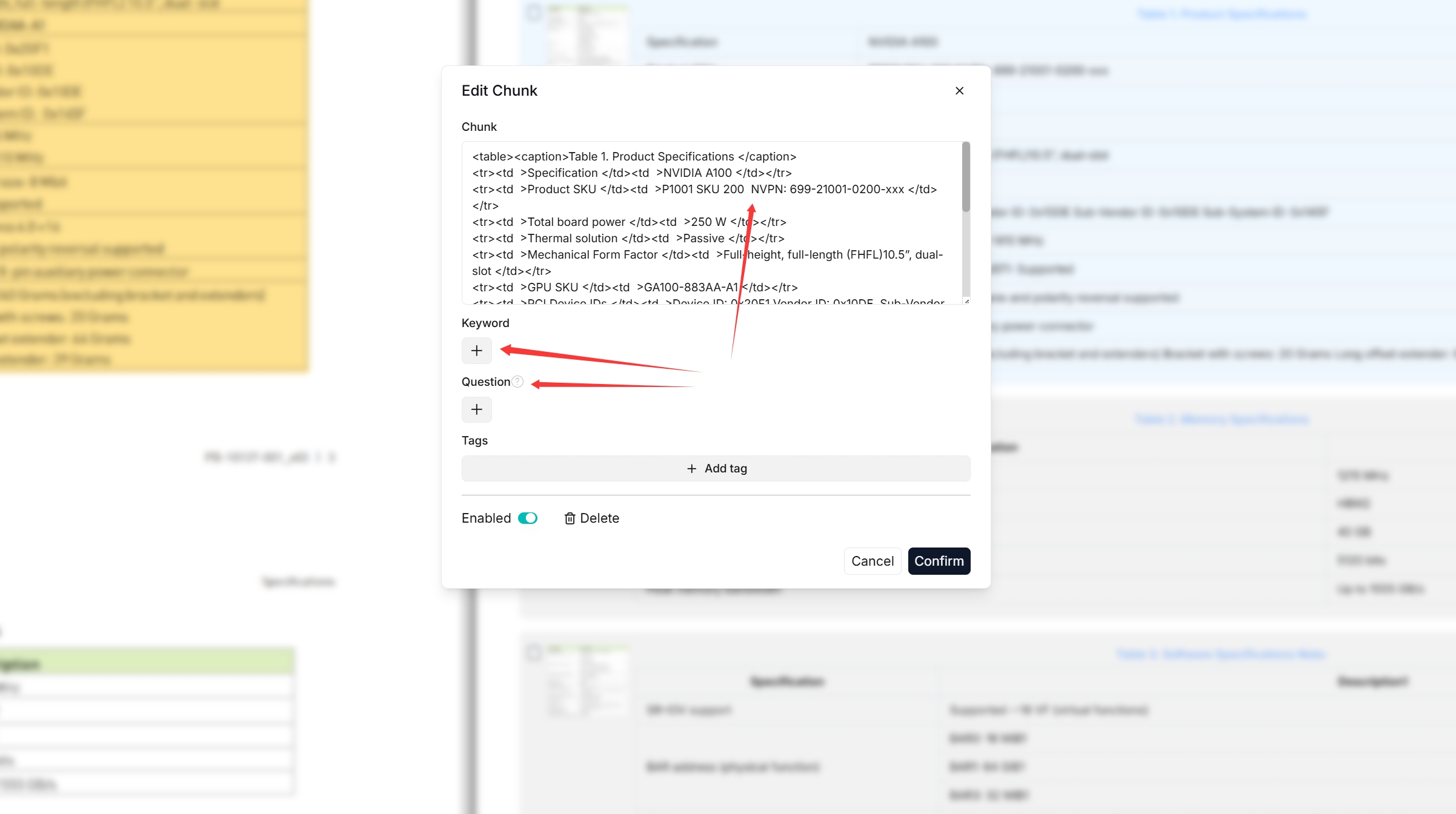:::caution NOTE-You can add keywords to a file chunk to improve its ranking for queries containing those keywords. This action increases its keyword weight and can improve its position in search list.+You can add keywords or questions to a file chunk to improve its ranking for queries containing those keywords. This action increases its keyword weight and can improve its position in search list.:::4. In Retrieval testing, ask a quick question in **Test text** to double check if your configurations work: