
YC (S26) | Open Computer History | Continuously record your company computer work, map your workflows, help you find work worth automating, and power your agents' context
Rust agentsagiaiai-memoryaudio-recordingcomputer-visionhermeshermes-agentllmlocal-ailocal-firstmachine-learningmcpmultimodalopenclawprivacyrewindscreen-recordingspeech-to-textycombinator
docs, fix sideload branch
Louis Beaumontae6ea038a2dc
diff --git a/content/docs/pages/docs/api-reference.mdx b/content/docs/pages/docs/api-reference.mdxindex 6a096733d..0542b0feb 100644--- a/content/docs/pages/docs/api-reference.mdx+++ b/content/docs/pages/docs/api-reference.mdx@@ -79,6 +79,88 @@ curl "http://localhost:3030/search?content_type=ui&app_name=chrome"<MotionDiv delay={0.5}>+### advanced filtering & querying guide++the search api provides powerful filtering capabilities, but there are important considerations to understand for effective usage.++#### content type combinations++you can combine different content types using the `+` operator:++```bash+# Search across both OCR and audio content+curl "http://localhost:3030/search?content_type=ocr+audio&q=meeting"++# Search across all content types+curl "http://localhost:3030/search?content_type=all&q=meeting"++# Search across UI elements and audio+curl "http://localhost:3030/search?content_type=ui+audio&q=meeting"+```++#### filtering limitations and best practices++- **single value filters**: most filter parameters (`app_name`, `window_name`) accept only single string values, not arrays+ ```bash+ # CORRECT: Single app name+ curl "http://localhost:3030/search?content_type=ocr&app_name=chrome"++ # INCORRECT: Will only use the last value+ curl "http://localhost:3030/search?content_type=ocr&app_name=chrome&app_name=firefox"+ ```++- **window vs. app name**: be consistent in how you filter+ ```bash+ # Filter by application name (e.g., "Chrome", "Firefox")+ curl "http://localhost:3030/search?content_type=ocr&app_name=chrome"++ # Filter by window title (e.g., "Google - Meeting Notes")+ curl "http://localhost:3030/search?content_type=ocr&window_name=meeting%20notes"+ ```++- **url filtering**: to filter by URL (for browser content), use the window_name parameter with the URL pattern+ ```bash+ # Filter content from a specific website+ curl "http://localhost:3030/search?content_type=ocr&window_name=github.com"+ ```++- **timestamp formats**: use ISO 8601 format for timestamps+ ```bash+ # Filter by date range+ curl "http://localhost:3030/search?content_type=ocr&start_time=2024-05-01T00:00:00Z&end_time=2024-05-02T23:59:59Z"+ ```++- **speaker filtering**: only applicable to audio content+ ```bash+ # Multiple speakers must be comma-separated+ curl "http://localhost:3030/search?content_type=audio&speaker_ids=1,2,3"+ ```++#### combining multiple filters++you can combine multiple filters to narrow your search:++```bash+# Find "meeting" mentions in Chrome from a specific date range+curl "http://localhost:3030/search?q=meeting&content_type=ocr&app_name=chrome&start_time=2024-05-01T00:00:00Z&end_time=2024-05-02T23:59:59Z"+```++#### pagination best practices++for large result sets, use pagination to improve performance:++```bash+# First page (20 results)+curl "http://localhost:3030/search?content_type=ocr&limit=20&offset=0"++# Second page (next 20 results)+curl "http://localhost:3030/search?content_type=ocr&limit=20&offset=20"+```++</MotionDiv>++<MotionDiv delay={0.7}>+### audio devices api- **endpoint**: `/audio/list`@@ -98,7 +180,7 @@ curl "http://localhost:3030/search?content_type=ui&app_name=chrome"</MotionDiv>-<MotionDiv delay={0.7}>+<MotionDiv delay={0.9}>### monitors api@@ -122,7 +204,7 @@ curl "http://localhost:3030/search?content_type=ui&app_name=chrome"</MotionDiv>-<MotionDiv delay={0.9}>+<MotionDiv delay={1.1}>### tags api@@ -149,7 +231,7 @@ curl "http://localhost:3030/search?content_type=ui&app_name=chrome"</MotionDiv>-<MotionDiv delay={1.1}>+<MotionDiv delay={1.3}>### pipes api@@ -293,7 +375,7 @@ curl "http://localhost:3030/speakers/similar?speaker_id=123&limit=5"</MotionDiv>-<MotionDiv delay={1.3}>+<MotionDiv delay={1.5}>### health api@@ -396,6 +478,10 @@ curl "http://localhost:3030/stream/frames?start_time=2024-03-10T12:00:00Z&end_ti- **method**: `post`- **description**: control keyboard and mouse input programmatically+requires building the backend with the `experimental` feature flag.++`cargo build --release --features experimental`+##### request body:```json{diff --git a/content/docs/pages/docs/architecture.mdx b/content/docs/pages/docs/architecture.mdxindex b6066dca2..6a41a11e1 100644--- a/content/docs/pages/docs/architecture.mdx+++ b/content/docs/pages/docs/architecture.mdx@@ -9,6 +9,42 @@ screenpipe's architecture handles continuous screen and audio capture, local dat</MotionDiv><MotionDiv delay={0.1}>++## conceptual overview++at its core, screenpipe acts as a bridge between your digital activities and AI systems, creating a memory layer that provides context for intelligent applications. here's how to think about it:++### capturing layer++- **screen recording**: captures visual content at configurable frame rates+- **audio recording**: captures spoken content from multiple sources+- **ui monitoring**: (experimental) captures accessibility metadata about UI elements++### processing layer++- **ocr engines**: extract text from screen recordings (apple native, windows native, tesseract, unstructured)+- **stt engines**: convert audio to text (whisper, deepgram)+- **speaker identification**: identifies and labels different speakers+- **pii removal**: optionally redacts sensitive information++### storage layer++- **sqlite database**: stores metadata, text, and references to media+- **media files**: stores the actual mp4/mp3 recordings+- **embeddings**: (coming soon) vector representations for semantic search++### retrieval layer++- **search api**: filtered content retrieval for applications+- **streaming apis**: real-time access to new content+- **memory apis**: structured access to historical context++### extension layer (pipes)++- **pipes ecosystem**: extensible plugins for building applications+- **pipe sdk**: typescript interface for building custom pipes+- **pipe runtime**: sandboxed execution environment for pipes+## diagram overview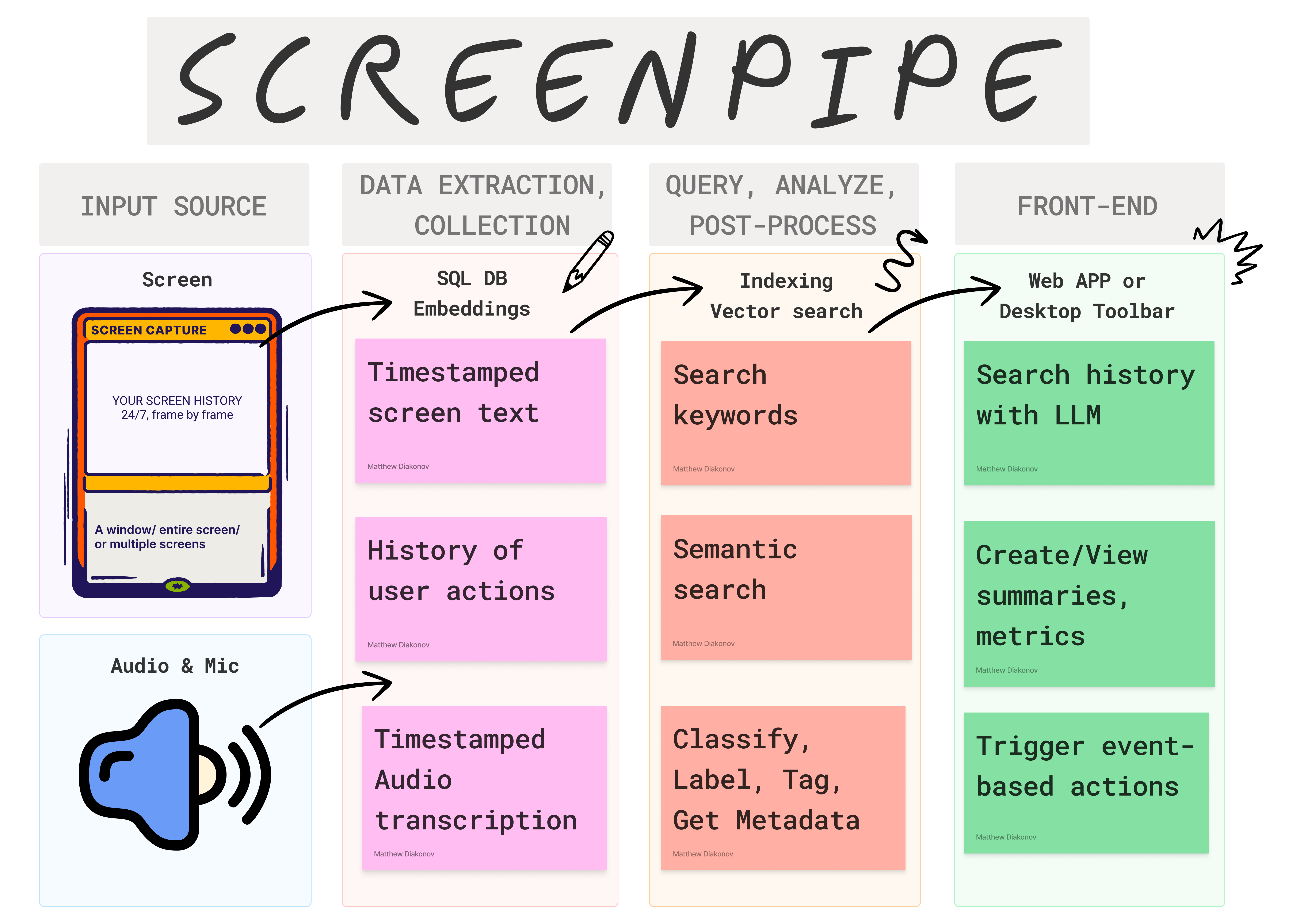@@ -23,6 +59,35 @@ this modular architecture makes screenpipe adaptable to various use cases, from<MotionDiv delay={0.2}>+### data flow & lifecycle++here's the typical data flow through the screenpipe system:++1. **capture**+ - screen is captured at the configured fps (default 1.0, or 0.5 on macos)+ - audio is captured in chunks (default 30 seconds)+ - ui events are optionally captured (macos only currently)++2. **processing**+ - captured frames are processed through OCR to extract text+ - audio chunks are processed through STT to generate transcriptions+ - speaker identification is applied to audio transcriptions++3. **storage**+ - processed data is stored in the local sqlite database+ - raw media files are stored in the configured data directory+ - metadata is indexed for efficient retrieval++4. **retrieval**+ - applications query the database through the REST API+ - real-time data can be streamed through SSE endpoints+ - pipes can access data through the typescript SDK++5. **extension**+ - pipes process the data to create higher-level abstractions+ - pipes can integrate with external services (LLMs, etc.)+ - pipes can control the system through the input API+### data abstraction layers@@ -42,6 +107,90 @@ this layered approach enables both granular access to raw data and sophisticated</MotionDiv>+### session and state management++screenpipe maintains several types of state:++1. **session state**+ - managed by the core screenpipe server+ - controls recording status, device selection, etc.+ - accessible through the health API endpoint++2. **configuration state**+ - stored in the settings database+ - controls behavior of the core system+ - accessible through the settings API++3. **pipe state**+ - each pipe maintains its own state+ - stored in the pipe's local storage or in screenpipe's settings+ - isolated from other pipes for security++understanding the different state models is important for building robust applications. The health API (`/health`) is particularly useful for checking the system's current state and ensuring services are running correctly.++### database schema++screenpipe uses a SQLite database with the following main tables:++- **frames**: stores metadata about captured screen frames+- **ocr_results**: stores text extracted from frames+- **audio_chunks**: stores metadata about audio recordings+- **transcriptions**: stores text transcribed from audio+- **speakers**: stores identified speakers and their metadata+- **ui_elements**: stores UI elements captured from the screen+- **settings**: stores application configuration+- **pipes**: stores installed pipes and their configuration++detailed schema information is available by querying the database directly:++```bash+sqlite3 ~/.screenpipe/db.sqlite .schema+```++### integration patterns++developers typically interact with screenpipe in one of these patterns:++1. **retrieval pattern**: query for relevant context based on the current task+ ```typescript+ const context = await pipe.queryScreenpipe({+ q: "meeting notes",+ contentType: "all",+ limit: 10+ })+ ```++2. **streaming pattern**: process events as they occur+ ```typescript+ for await (const event of pipe.streamVision()) {+ // Process each new screen event+ }+ ```++3. **augmentation pattern**: enhance user experience with context+ ```typescript+ // When user asks about a recent meeting+ const meetingContext = await pipe.queryScreenpipe({+ q: "meeting",+ contentType: "audio"+ })++ // Use context to generate response+ const response = await generateResponse(userQuery, meetingContext)+ ```++4. **automation pattern**: take actions based on context+ ```typescript+ // Monitor for specific content+ for await (const event of pipe.streamVision()) {+ if (event.data.text.includes("meeting starting")) {+ // Take action like sending notification+ }+ }+ ```++understanding these patterns will help you design effective applications that leverage screenpipe's capabilities.+## statusdiff --git a/content/docs/pages/docs/faq.mdx b/content/docs/pages/docs/faq.mdxindex 0a82d571a..8a1c02724 100644--- a/content/docs/pages/docs/faq.mdx+++ b/content/docs/pages/docs/faq.mdx@@ -34,6 +34,37 @@- We're constantly exploring new use cases and welcome community input!</details>+<details>+ <summary>How do I manage screenpipe sessions?</summary>++ - **starting a session**:+ - macOS: use the system tray icon or run `screenpipe` in terminal+ - windows: launch from start menu or run `screenpipe` in command prompt+ - linux: run `screenpipe` in terminal++ - **checking if session is running**:+ ```bash+ curl localhost:3030/health+ # If running, you'll get a health status response+ # If not running, you'll get a connection refused error+ ```++ - **stopping a session**:+ - macOS: cmd+option+x or right-click tray icon and select "quit"+ - windows: right-click tray icon and select "exit"+ - linux: ctrl+c in terminal++ - **troubleshooting**:+ - if ctrl+c doesn't work to stop a terminal session, try:+ ```bash+ # Find screenpipe process ID+ ps aux | grep screenpipe+ # Kill the process+ kill -9 [PID]+ ```+ - if the server starts but API calls fail, check if another instance is already running+</details>+<details><summary>Can I run screenpipe on remote/virtual machines?</summary>@@ -72,3 +103,27 @@- community contributions welcome- find us on [github](https://github.com/mediar-ai/screenpipe)</details>++<details>+ <summary>How do I troubleshoot common installation issues?</summary>++ - **missing dependencies**:+ - linux: install `ffmpeg` and required libraries+ - macOS: ensure XCode tools are installed+ - windows: ensure VS C++ redistributable is installed++ see our [complete troubleshooting guide](/docs/troubleshooting) for more details.+</details>++<details>+ <summary>Does screenpipe work with frameworks other than Next.js?</summary>++ - yes! while our examples mainly use next.js, you can use any framework:+ - **react**: yes+ - **vue/svelte/etc**: yes+ - **electron/tauri**: yes+ - **python**: yes+ - **ruby/php/etc**: yes++ - example pipe templates for other frameworks coming soon!+</details>diff --git a/content/docs/pages/docs/sdk-reference.mdx b/content/docs/pages/docs/sdk-reference.mdxindex ae63f781c..5bf59d300 100644--- a/content/docs/pages/docs/sdk-reference.mdx+++ b/content/docs/pages/docs/sdk-reference.mdx@@ -97,8 +97,115 @@ const results = await pipe.queryScreenpipe({})```+### common usage patterns++#### fetching recent screen activity++```typescript+// Get the last hour of screen activity from Chrome+const oneHourAgo = new Date(Date.now() - 60 * 60 * 1000).toISOString()+const now = new Date().toISOString()++const results = await pipe.queryScreenpipe({+ contentType: "ocr",+ startTime: oneHourAgo,+ endTime: now,+ appName: "chrome",+ limit: 50,+ includeFrames: true, // include base64 encoded images+})++// Process results+for (const item of results.data) {+ console.log(`At ${item.content.timestamp}:`)+ console.log(`Text: ${item.content.text}`)++ if (item.content.frame) {+ // You could display or process the base64 image+ // e.g., <img src={`data:image/png;base64,${item.content.frame}`} />+ }+}+```++#### searching for specific content++```typescript+// Search for "meeting notes" in all applications+const results = await pipe.queryScreenpipe({+ q: "meeting notes",+ contentType: "all", // search across ocr, audio and ui+ limit: 20,+})++// Process results based on content type+for (const item of results.data) {+ if (item.type === "OCR") {+ console.log(`Screen text: ${item.content.text}`)+ } else if (item.type === "Audio") {+ console.log(`Audio transcript: ${item.content.transcription}`)+ console.log(`Speaker: ${item.content.speaker_id}`)+ } else if (item.type === "UI") {+ console.log(`UI element: ${item.content.element_type}`)+ }+}+```++#### building a timeline of user activity++```typescript+// Get a full day of activity+const startOfDay = new Date()+startOfDay.setHours(0, 0, 0, 0)++const endOfDay = new Date()+endOfDay.setHours(23, 59, 59, 999)++// Get both screen and audio data+const results = await pipe.queryScreenpipe({+ contentType: "ocr+audio",+ startTime: startOfDay.toISOString(),+ endTime: endOfDay.toISOString(),+ limit: 1000, // Get a large sample+})++// Group by hour for timeline visualization+const timelineByHour = {}++for (const item of results.data) {+ const timestamp = new Date(item.content.timestamp)+ const hour = timestamp.getHours()++ // Initialize hour bucket if needed+ if (!timelineByHour[hour]) {+ timelineByHour[hour] = {+ screenEvents: 0,+ audioEvents: 0,+ apps: new Set(),+ }+ }++ // Update counts+ if (item.type === "OCR") {+ timelineByHour[hour].screenEvents++++ if (item.content.app_name) {+ timelineByHour[hour].apps.add(item.content.app_name)+ }+ } else if (item.type === "Audio") {+ timelineByHour[hour].audioEvents+++ }+}++// Now timelineByHour can be used to build a visualization+console.log(timelineByHour)+```+### input control api+requires building the backend with the `experimental` feature flag.++`cargo build --release --features experimental`+```typescript// type textawait pipe.input.type("hello world")@@ -113,6 +220,39 @@ await pipe.input.moveMouse(100, 200)await pipe.input.click("left") // "left" | "right" | "middle"```+#### automating repetitive tasks++```typescript+// Example: Automate filling a form+async function fillForm() {+ // Move to input field and click+ await pipe.input.moveMouse(300, 200)+ await pipe.input.click("left")++ // Type name+ await pipe.input.type("John Doe")++ // Tab to next field+ await pipe.input.press("tab")++ // Type email+ await pipe.input.type("[email protected]")++ // Tab to next field+ await pipe.input.press("tab")++ // Type message+ await pipe.input.type("This is an automated message")++ // Submit form+ await pipe.input.press("tab")+ await pipe.input.press("enter")+}++// Call the function+await fillForm()+```+### realtime streams```typescript@@ -130,20 +270,91 @@ for await (const event of pipe.streamVision(true)) { // true to include images}```+#### real-time meeting summarizer++```typescript+import OpenAI from 'openai'++const openai = new OpenAI({+ apiKey: process.env.OPENAI_API_KEY,+})++async function summarizeMeeting() {+ let transcript = ""+ let summaryBuffer = ""+ let lastSummaryTime = Date.now()++ // Stream transcriptions in real-time+ for await (const chunk of pipe.streamTranscriptions()) {+ const text = chunk.choices[0].text+ transcript += text + " "++ // Generate summary every 30 seconds+ if (Date.now() - lastSummaryTime > 30000 && transcript.length > 200) {+ const summary = await openai.chat.completions.create({+ model: "gpt-3.5-turbo",+ messages: [+ {+ role: "system",+ content: "You summarize meeting transcripts concisely."+ },+ {+ role: "user",+ content: `Summarize this meeting transcript: ${transcript}`+ }+ ]+ })++ summaryBuffer = summary.choices[0].message.content+ lastSummaryTime = Date.now()++ // Display or store the summary+ console.log("Meeting Summary Update:", summaryBuffer)+ }+ }+}++// Start summarizing+summarizeMeeting().catch(console.error)+```++#### real-time screen activity monitor++```typescript+async function monitorScreenActivity() {+ // Monitor screen content in real-time+ for await (const event of pipe.streamVision(true)) {+ // Check if we're looking at important apps+ const appName = event.data.app_name?.toLowerCase() || ""+ const text = event.data.text?.toLowerCase() || ""++ // Example: Detect when looking at email+ if (+ appName.includes("outlook") ||+ appName.includes("gmail") ||+ text.includes("inbox") ||+ text.includes("compose email")+ ) {+ console.log("Email activity detected at", new Date().toLocaleTimeString())++ // You could log this, send notifications, etc.+ }++ // Example: Track time spent in different applications+ // This would require keeping state between events+ }+}++// Start monitoring+monitorScreenActivity().catch(console.error)+```+### notifications (desktop)```typescriptawait pipe.sendDesktopNotification({title: "meeting starting",body: "your standup begins in 5 minutes",- actions: [- {- id: "join",- label: "join meeting"- }- ],- timeout: 5000,- persistent: false})```@@ -177,7 +388,7 @@ import type {NotificationOptions,Settings,// ... and more-} from '@screenpipe/js' // or @screenpipe/browser+} from '@screenpipe/js' // or '@screenpipe/browser'```key types include:@@ -224,6 +435,62 @@ try {}```+### integrating with llms++```typescript+import OpenAI from 'openai'+import { pipe } from '@screenpipe/js'++const openai = new OpenAI({+ apiKey: process.env.OPENAI_API_KEY,+})++async function getContextAndQueryLLM(query) {+ // First, get relevant context from screenpipe+ const oneHourAgo = new Date(Date.now() - 60 * 60 * 1000).toISOString()+ const now = new Date().toISOString()++ const results = await pipe.queryScreenpipe({+ q: query, // Use the user's query to find relevant content+ contentType: "all",+ startTime: oneHourAgo,+ endTime: now,+ limit: 20,+ })++ // Extract text from results+ let contextText = ""+ for (const item of results.data) {+ if (item.type === "OCR") {+ contextText += `[Screen Text]: ${item.content.text}\n`+ } else if (item.type === "Audio") {+ contextText += `[Audio Transcript]: ${item.content.transcription}\n`+ }+ }++ // Now query the LLM with context+ const llmResponse = await openai.chat.completions.create({+ model: "gpt-4",+ messages: [+ {+ role: "system",+ content: "You are a helpful assistant that answers questions based on the user's recent activity."+ },+ {+ role: "user",+ content: `Here is context from my recent computer activity:\n\n${contextText}\n\nNow, answer this question: ${query}`+ }+ ]+ })++ return llmResponse.choices[0].message.content+}++// Example usage+const answer = await getContextAndQueryLLM("What was that meeting about?")+console.log(answer)+```+### examplescheck out our [production pipe examples](https://github.com/mediar-ai/screenpipe/tree/main/pipes) to see real-world usage of the sdk:@@ -239,7 +506,6 @@ these examples demonstrate best practices and common patterns when building with</MotionDiv>-<MotionDiv delay={0.7}>### settings managementdiff --git a/pipes/rewind/package.json b/pipes/rewind/package.jsonindex 0b223a163..15dfa9eee 100644--- a/pipes/rewind/package.json+++ b/pipes/rewind/package.json@@ -1,6 +1,6 @@{"name": "rewind",- "version": "0.1.10",+ "version": "0.1.11","private": true,"scripts": {"dev": "next dev --turbopack",diff --git a/screenpipe-core/src/pipes.rs b/screenpipe-core/src/pipes.rsindex 11ed740b7..f364b380d 100644--- a/screenpipe-core/src/pipes.rs+++ b/screenpipe-core/src/pipes.rs@@ -1132,17 +1132,15 @@ fn get_raw_github_url(url: &str) -> anyhow::Result<String> {let parsed_url = Url::parse(url)?;if parsed_url.host_str() == Some("github.com") {let path_segments: Vec<&str> = parsed_url.path_segments().unwrap().collect();- if path_segments.len() >= 5 && path_segments.contains(&"tree") {+ if path_segments.len() >= 4 && path_segments.contains(&"tree") {// Find the position of "tree" in the pathlet tree_pos = path_segments.iter().position(|&s| s == "tree").unwrap();let owner = path_segments[0];let repo = path_segments[1];- // Everything after "tree" until the next major section is the branch- // Join with "/" to handle branches with slashes like "feature/branch-name"- let branch_end = path_segments.len();- let branch = path_segments[(tree_pos + 1)..branch_end].join("/");+ // The branch is just the segment after "tree"+ let branch = path_segments[tree_pos + 1];let raw_url = format!("https://api.github.com/repos/{}/{}/git/trees/{}?recursive=1",