
Open Source Platform for DTC, B2B Commerce, Marketplaces & Omnichannel. REST APIs, TypeScript SDKs, and production-ready Next.js storefront. Self-host it. Own your data. No vendor lock-in. Zero platform fees.
Ruby b2b-commercee-commerceecommerceecommerce-apiecommerce-frameworkecommerce-platformheadlessheadless-commerceheadless-ecommercemarketplacemulti-tenantmulti-vendormulti-vendor-ecommerceopen-sourcespree-commerce
Added documentation on sections and blocks (WIP)
Damian Legawiecc346a09cc12a
diff --git a/docs/developer/storefront/blocks.mdx b/docs/developer/storefront/blocks.mdxnew file mode 100644index 0000000000..f8c518f50c--- /dev/null+++ b/docs/developer/storefront/blocks.mdx@@ -0,0 +1,20 @@+---+title: "Blocks"+description: "Learn how to utilize blocks to build your Spree Storefront"+---++<Warning>Documentation on blocks is coming soon</Warning>++Blocks are the lowest level of components in Spree Storefront. They are nested inside sections.++Similarly to sections each block can be customized in terms of its content, styles, and layout.++Every block has a set of default preferences, such as:++* `text_alignment`+* `container_alignment`+* `size`+* `width_desktop`+* `top_padding`+* `bottom_padding`+diff --git a/docs/developer/storefront/images.mdx b/docs/developer/storefront/images.mdxindex b1435fa3ae..a9e0707dc0 100644--- a/docs/developer/storefront/images.mdx+++ b/docs/developer/storefront/images.mdx@@ -3,9 +3,9 @@ title: Images & Assets in Spree StorefrontsidebarTitle: "Images & Assets"----<Warning>+<Info>You need to be on Spree 5.0.1 or higher to use these helpers. If you're on 5.0.0 please run `bundle update spree` to update your Spree version.-</Warning>+</Info>Spree comes with a handful of helper methods to make it easier to work with images and assets.diff --git a/docs/developer/storefront/links.mdx b/docs/developer/storefront/links.mdxindex 2114ffc0c2..409c4c3122 100644--- a/docs/developer/storefront/links.mdx+++ b/docs/developer/storefront/links.mdx@@ -3,5 +3,6 @@ title: "Links"sidebarTitle: "Links"----Links are used to create the navigation of the storefront. They can be assigned to Sections and Blocks.+<Warning>Documentation on links is coming soon</Warning>+Links are used to create the navigation of the storefront. They can be assigned to Sections and Blocks.diff --git a/docs/developer/storefront/pages.mdx b/docs/developer/storefront/pages.mdxindex bdb142f3c0..d77879c15d 100644--- a/docs/developer/storefront/pages.mdx+++ b/docs/developer/storefront/pages.mdx@@ -8,16 +8,16 @@ description: "Learn how to create and use pages in your Spree storefront"Spree Storefront comes with a full set of built-in pages that you can customize via page builder.-| Page | Description | Class | Controller |+| Page | Description | Class | URL ||------|-------------|-------|------------|-| Home | The main landing page of your store | [Spree::Pages::Homepage](https://github.com/spree/spree/blob/main/core/app/models/spree/pages/homepage.rb) | Spree::HomeController |-| Product Details | Individual product display page | [Spree::Pages::ProductDetails](https://github.com/spree/spree/blob/main/core/app/models/spree/pages/product_details.rb) | Spree::ProductsController `show` action |-| Taxon | Shows products filtered by taxon | [Spree::Pages::Taxon](https://github.com/spree/spree/blob/main/core/app/models/spree/pages/taxon.rb) | Spree::TaxonsController |-| Search Results | Displays search results for products | [Spree::Pages::SearchResults](https://github.com/spree/spree/blob/main/core/app/models/spree/pages/search_results.rb) | Spree::SearchController |-| Shop All | Shows all products | [Spree::Pages::ShopAll](https://github.com/spree/spree/blob/main/core/app/models/spree/pages/shop_all.rb) | Spree::ProductsController `index` action |-| Blog | Shows your store's blog posts and articles | [Spree::Pages::PostList](https://github.com/spree/spree/blob/main/core/app/models/spree/pages/post_list.rb) | Spree::PostsController `index` action |-| Post | Individual blog post | [Spree::Pages::Post](https://github.com/spree/spree/blob/main/core/app/models/spree/pages/post.rb) | Spree::PostsController `show` action |-| Password | Password page, when password protected storefront is enabled | [Spree::Pages::Password](https://github.com/spree/spree/blob/main/core/app/models/spree/pages/password.rb) | Spree::PasswordController |+| Home | The main landing page of your store | [Spree::Pages::Homepage](https://github.com/spree/spree/blob/main/core/app/models/spree/pages/homepage.rb) | `/` |+| Product Details | Individual product display page | [Spree::Pages::ProductDetails](https://github.com/spree/spree/blob/main/core/app/models/spree/pages/product_details.rb) | `/products/:id` |+| Taxon | Shows products filtered by taxon | [Spree::Pages::Taxon](https://github.com/spree/spree/blob/main/core/app/models/spree/pages/taxon.rb) | `/t/:permalink` |+| Search Results | Displays search results for products | [Spree::Pages::SearchResults](https://github.com/spree/spree/blob/main/core/app/models/spree/pages/search_results.rb) | `/search` |+| Shop All | Shows all products | [Spree::Pages::ShopAll](https://github.com/spree/spree/blob/main/core/app/models/spree/pages/shop_all.rb) | `/products` |+| Blog | Shows your store's blog posts and articles | [Spree::Pages::PostList](https://github.com/spree/spree/blob/main/core/app/models/spree/pages/post_list.rb) | `/posts` |+| Post | Individual blog post | [Spree::Pages::Post](https://github.com/spree/spree/blob/main/core/app/models/spree/pages/post.rb) | `/posts/:permalink` |+| Password | Password page, when password protected storefront is enabled | [Spree::Pages::Password](https://github.com/spree/spree/blob/main/core/app/models/spree/pages/password.rb) | `/` |All of these page can be fully customized via page builder. You can add/remove sections, etc.@@ -27,6 +27,16 @@ We're planning to add page builder support for the following pages in the next S- Checkout- Account+## Sections++Each page is made of [sections](/developer/storefront/sections). Sections are the building blocks of a page. They are used to create the page content.++You can fetch page sections using:++```ruby+current_page.sections+```+## Custom Landing Pages in the AdminYou can easily create your own landing pages by going to to the `Admin -> Storefront -> Pages` and clicking on the `New Page` button. More on this in the [Create a Landing Page](/user/storefront/create-page) guide. Each custom landing page can be customized via page builder.diff --git a/docs/developer/storefront/sections-blocks.mdx b/docs/developer/storefront/sections-blocks.mdxdeleted file mode 100644index 6de0a29694..0000000000--- a/docs/developer/storefront/sections-blocks.mdx+++ /dev/null@@ -1,17 +0,0 @@-----title: "Sections & Blocks"-description: "Learn how to create and use sections and blocks in your Spree storefront"------Sections are the building blocks of the pages. They are used to create the structure of the pages and themes.--Each theme comes with a set of default sections, but you can create your own custom sections as well.--## Default Sections-------diff --git a/docs/developer/storefront/sections.mdx b/docs/developer/storefront/sections.mdxnew file mode 100644index 0000000000..31d2d64596--- /dev/null+++ b/docs/developer/storefront/sections.mdx@@ -0,0 +1,109 @@+---+title: "Sections"+description: "Learn how to utilize sections to build your Spree Storefront"+---++Sections are the building blocks of all pages in Spree Storefront.++There are two types of sections:++<CardGroup cols={2}>+ <Card title="Layout sections">+ * eg. Header, Footer+ * Present on all pages+ </Card>+ <Card title="Content sections">+ * eg. Hero, Featured Products+ * Present on specific pages+ * can be managed via the Page Builder+ </Card>+</CardGroup>++Let's take a look at the page structure of Spree Storefront:++<Frame>+<img src="/images/developer/storefront/page_structure.png" />+</Frame>+As you can see, the page is divided into sections. Each section is a component that is used to create the page.+Most sections are containers that consist of multiple blocks which you can manage via the Page Builder (add/customize/remove/change their order).++## Layout Sections++We have two types of layout sections - Header and Footer. As the name suggests, they are rendered at the top and bottom of the page respectively. Between them, we have a main content area that is used to render the page sections.++### Header sections++#### [Announcement Bar](https://github.com/spree/spree/blob/main/core/app/models/spree/page_sections/announcement_bar.rb)++<Frame>+<img src="/images/developer/storefront/announcement_bar.png" />+</Frame>++#### [Header](https://github.com/spree/spree/blob/main/core/app/models/spree/page_sections/header.rb)++<Frame>+<img src="/images/developer/storefront/header.png" />+</Frame>++Header is one of the most important sections in the storefront. It is used to display the store's logo, navigation menu, search bar, cart icon, and user menu.++Header can have a simple one-level navigation menu or a more complex multi-level menu (aka mega menu)++### Footer sections++#### [Newsletter](https://github.com/spree/spree/blob/main/core/app/models/spree/page_sections/newsletter.rb)++<Frame>+<img src="/images/developer/storefront/newsletter.png" />+</Frame>++#### [Footer](https://github.com/spree/spree/blob/main/core/app/models/spree/page_sections/footer.rb)++<Frame>+<img src="/images/developer/storefront/footer.png" />+</Frame>+++## Content Sections++<Warning>Documentation on content sections is coming soon</Warning>++## Architecture++Each section consists of:++- ActiveRecord model, eg. [Spree::PageSections::ImageWithText](https://github.com/spree/spree/blob/main/core/app/models/spree/page_sections/image_with_text.rb)+- Storefront view (to render the section in the storefront), eg. [app/views/themes/default/spree/page_sections/image_with_text.html.erb](https://github.com/spree/spree/blob/main/storefront/app/views/themes/default/spree/page_sections/_image_with_text.html.erb)+- Admin page builder form (to configure the section in the admin panel), eg. [app/views/spree/admin/page_sections/image_with_text/_form.html.erb](https://github.com/spree/spree/blob/main/admin/app/views/spree/admin/page_sections/forms/_image_with_text.html.erb)++### Active Record Model++Each section's model inherit from [Spree::PageSection](https://github.com/spree/spree/blob/main/core/app/models/spree/page_section.rb) abstract model class.++#### Associations++Each sections has many blocks and links. You can call them via `section.blocks` and `section.links` respectively.++Section belongs to a polymorphic parent model called `pageable` which can be either `Spree::Page` (content sections) or `Spree::Theme` (layout sections).++You can access section's theme by calling `section.theme`.++#### Preferences++Each section has set of default [preferences](/developer/customization/model-preferences)++| Name | Description | Default Value |+| --- | --- | --- |+| `text_color` | Color of text in the section | `nil` - uses theme's text color |+| `background_color` | Background color of the section | `nil` - uses theme's background color |+| `border_color` | Color of section borders | `nil` - uses theme's border color |+| `top_padding` | Padding space above section content (in pixels) | `40` |+| `bottom_padding` | Padding space below section content (in pixels) | `40` |+| `top_border_width` | Width of top border (in pixels) | `1` |+| `bottom_border_width` | Width of bottom border (in pixels) | `0` |++Particular sections can introduce their own preferences. For example, `Spree::PageSections::ImageWithText` has `desktop_image_alignment` and `vertical_alignment` preferences.++## Creating a new section++<Warning>Documentation on creating a new section is coming soon</Warning>\ No newline at end of filediff --git a/docs/developer/storefront/storefront.mdx b/docs/developer/storefront/storefront.mdxindex 4e45f45bdf..528df763b6 100644--- a/docs/developer/storefront/storefront.mdx+++ b/docs/developer/storefront/storefront.mdx@@ -7,7 +7,7 @@ Spree 5 ships with a new mobile-first storefront that is fully customizable & th## Architecture-New Storefront consists of:+Spree Storefront consists of:<CardGroup><Card title="Themes" href="/developer/storefront/themes">@@ -29,9 +29,9 @@ New Storefront consists of:## Page Builder-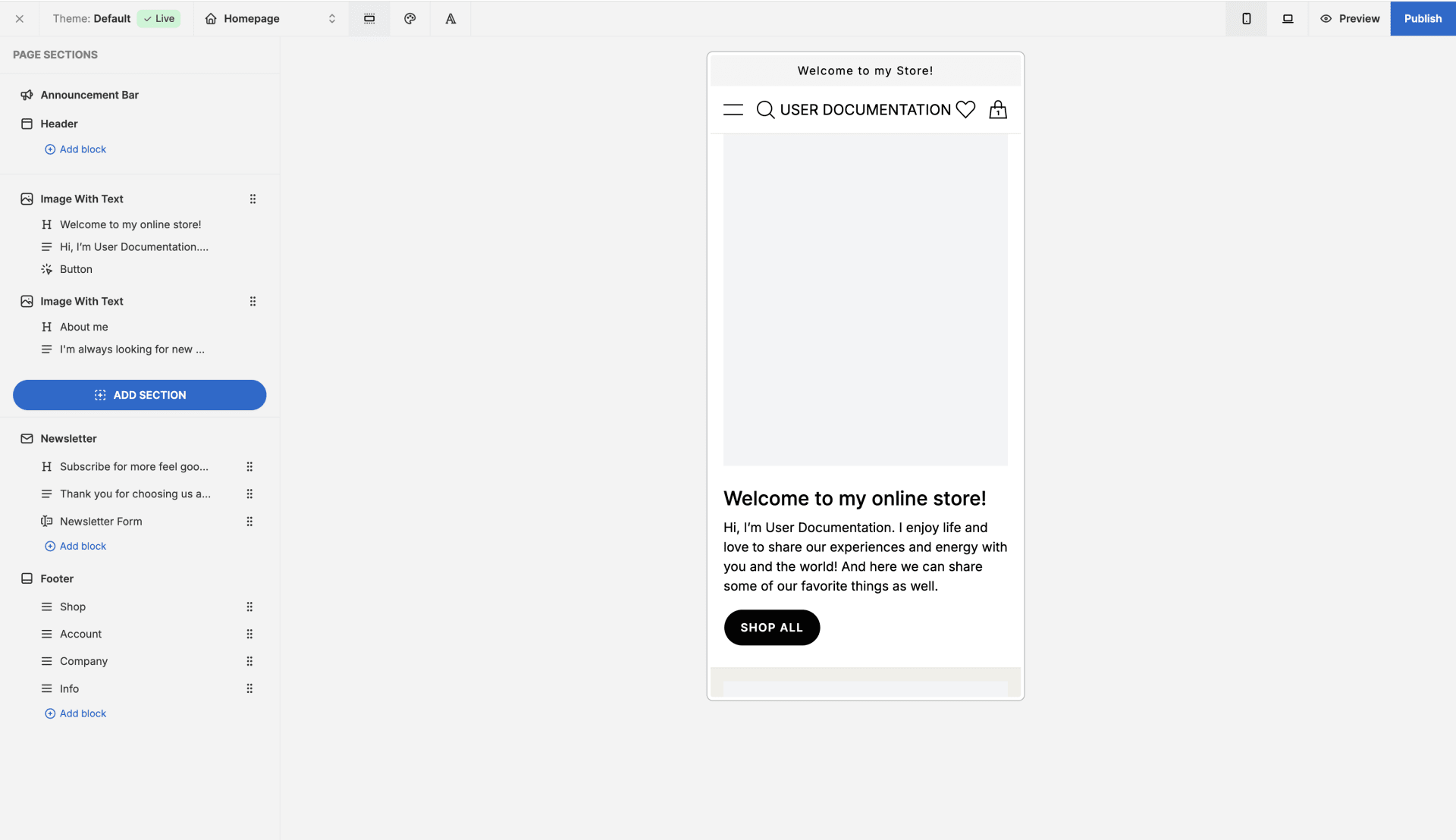-The new storefront comes with a visual Page Builder that allows non-developers to build pages using a drag-and-drop interface, as a part of Spree Admin Dashboard (provided via `spree_admin` gem). This allows your team to create new pages and sections, modify existing ones, and add new blocks to the pages in a no-code way.++You can learn more about the Page Builder in the [User Documentation](/user/storefront/theme-editor).diff --git a/docs/docs.json b/docs/docs.jsonindex a8a7388561..3ed3b4cba5 100644--- a/docs/docs.json+++ b/docs/docs.json@@ -49,7 +49,8 @@"developer/storefront/storefront","developer/storefront/themes","developer/storefront/pages",- "developer/storefront/sections-blocks",+ "developer/storefront/sections",+ "developer/storefront/blocks","developer/storefront/links","developer/storefront/images","developer/storefront/custom-javascript",diff --git a/docs/images/developer/storefront/announcement_bar.png b/docs/images/developer/storefront/announcement_bar.pngnew file mode 100644index 0000000000..7f34f52f1aBinary files /dev/null and b/docs/images/developer/storefront/announcement_bar.png differdiff --git a/docs/images/developer/storefront/footer.png b/docs/images/developer/storefront/footer.pngnew file mode 100644index 0000000000..22014b3d78Binary files /dev/null and b/docs/images/developer/storefront/footer.png differdiff --git a/docs/images/developer/storefront/header.png b/docs/images/developer/storefront/header.pngnew file mode 100644index 0000000000..0e6186653fBinary files /dev/null and b/docs/images/developer/storefront/header.png differdiff --git a/docs/images/developer/storefront/newsletter.png b/docs/images/developer/storefront/newsletter.pngnew file mode 100644index 0000000000..45795c91f8Binary files /dev/null and b/docs/images/developer/storefront/newsletter.png differdiff --git a/docs/images/developer/storefront/page_structure.png b/docs/images/developer/storefront/page_structure.pngnew file mode 100644index 0000000000..f4ba8240f3Binary files /dev/null and b/docs/images/developer/storefront/page_structure.png differ