
Open Source Platform for DTC, B2B Commerce, Marketplaces & Omnichannel. REST APIs, TypeScript SDKs, and production-ready Next.js storefront. Self-host it. Own your data. No vendor lock-in. Zero platform fees.
Ruby b2b-commercee-commerceecommerceecommerce-apiecommerce-frameworkecommerce-platformheadlessheadless-commerceheadless-ecommercemarketplacemulti-tenantmulti-vendormulti-vendor-ecommerceopen-sourcespree-commerce
Docs fixes
Damian Legawiecd430ac673a17
diff --git a/docs/developer/advanced/adding_spree_to_rails_app.mdx b/docs/developer/advanced/adding_spree_to_rails_app.mdxindex c75611190c..04b46558e2 100644--- a/docs/developer/advanced/adding_spree_to_rails_app.mdx+++ b/docs/developer/advanced/adding_spree_to_rails_app.mdx@@ -23,9 +23,7 @@ Add these lines to your project `Gemfile`:spree_opts = { 'github': 'spree/spree', 'branch': 'main' }gem 'spree', spree_opts # core, API, and CLIgem 'spree_admin', spree_opts # Admin panel (optional)-gem 'spree_storefront', spree_opts # Storefront (optional)gem 'spree_emails', spree_opts # transactional emails (optional)-gem 'spree_sample', spree_opts # dummy data like products, taxons, etc (optional)```And run the following command to install the gems:@@ -66,45 +64,35 @@ bin/rails g spree:admin:installbin/rails g spree:admin:devise # if using Devise authentication```-### Install Storefront (optional)--```bash-bin/rails g spree:storefront:install-bin/rails g spree:storefront:devise # if using Devise authentication-```--## 3. Add sample data (optional)+### Add sample data (optional)To add sample data to your store, run:```bash-bin/rake spree_sample:load+bin/rake spree:load_sample_data```-This will add some products, categories, and will setup a checkout flow to your store.+This will add some products, categories and multiple markets to your store.-## 4. Exploring Your Store+## Accessing Admin Panel-Feel free to explore your store. You can do so because Spree comes with a default pre-built Storefront and Admin Panel.+Navigate to [http://localhost:3000/admin](http://localhost:3000/admin) and log in with the default credentials:-### Logging into the Admin Dashboard--Use your browser window to navigate to [http://localhost:3000/admin](http://localhost:3000/admin). You can log in with the default credentials:- - login: `[email protected]`- - password: `spree123`+| | |+|---|---|+| **Email** | `[email protected]` |+| **Password** | `spree123` |Upon successful authentication, you should see the admin screen:-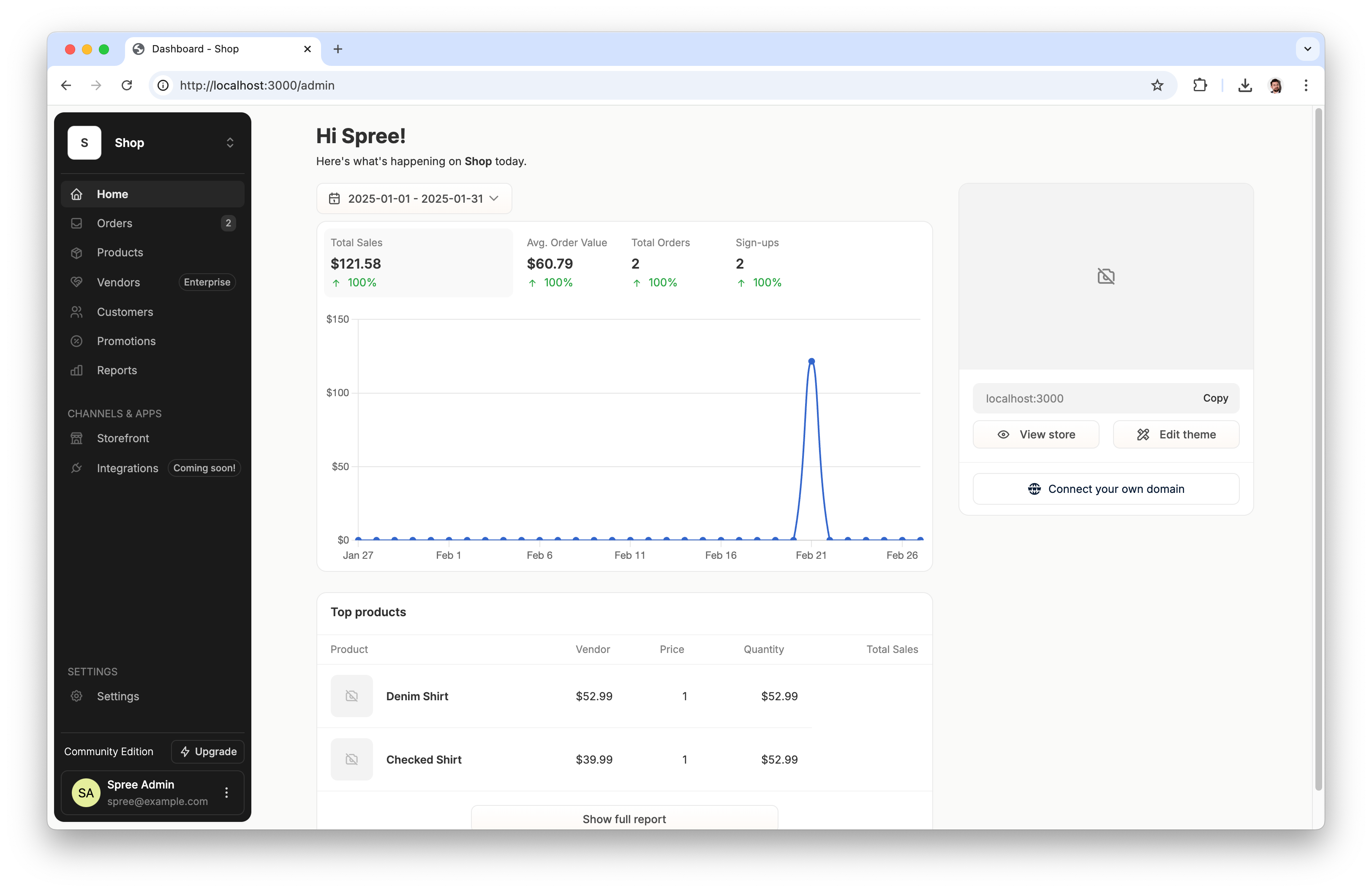--Feel free to explore some of the Admin Panel features that Spree has to offer and to verify that your installation is working properly.+<Frame caption="Spree Admin Dashboard">+ <img src="/images/spree_admin_dashboard.png" />+</Frame>-### Browsing Storefront--Spree comes with a default pre-built Storefront. You can access it by navigating to [http://localhost:3000](http://localhost:3000).+----You can later customize this Storefront or choose another one if you prefer Next.js or Vue.js.+Congrats! You've set up your Spree Commerce and it's looking amazing!-## All Done!+Give Spree a [GitHub Star](https://github.com/spree/spree)<Icon icon="star" iconType="solid" color="#FFD43B" />, why dont't ya? Thank you for supporting Spree open-source! <Icon icon="heart" iconType="solid" color="#FF0000" />-Congrats! You've set up your Spree Commerce and it's looking amazing! Need support or want to give some feedback? You can join our [community](https://slack.spreecommerce.org/) or drop us an email at [[email protected]](mailto:[email protected]).+Need support or want to give some feedback? Join our [community](https://slack.spreecommerce.org/) with 6000+ members or drop us an email at [[email protected]](mailto:[email protected]).diff --git a/docs/developer/deployment/docker.mdx b/docs/developer/deployment/docker.mdxindex 637e6cdf79..f44b68f19d 100644--- a/docs/developer/deployment/docker.mdx+++ b/docs/developer/deployment/docker.mdx@@ -16,8 +16,8 @@ docker pull ghcr.io/spree/spree:latest| Tag | Description ||-----|-------------|| `latest` | Latest stable release |-| `5.1.3` | Specific version |-| `5.1` | Latest patch for a minor version |+| `5.4.0` | Specific version |+| `5.4` | Latest patch for a minor version |Browse all tags on the [GitHub Packages page](https://github.com/spree/spree/pkgs/container/spree).diff --git a/docs/developer/upgrades/4.10-to-5.0.mdx b/docs/developer/upgrades/4.10-to-5.0.mdxindex f091bd0e11..0cd96f6150 100644--- a/docs/developer/upgrades/4.10-to-5.0.mdx+++ b/docs/developer/upgrades/4.10-to-5.0.mdx@@ -10,10 +10,13 @@ description: This guide covers upgrading a Spree 4.10 application to Spree 5.0.Spree 5.0 is a major upgrade that introduces many breaking changes. The major changes are:- Dropped support for Rails < 7.2-- Dropped support for Spree Auth Devise gem (now using Devise gem directly via generator)-- Completely new modern mobile-friendly Storefront (old customizations won't work)-- Completely new Admin Dashboard (old customizations won't work)+- Dropped support for Spree Auth Devise gem (now using Devise gem directly via generator, you're in more control of the authentication now)+- Completely new Admin Dashboard (old customizations unfortunately won't work)- Completely new native Stripe extension+- [Spree 5.1](https://github.com/spree/spree/releases/tag/v5.1.0) includes native [Gift Cards](/developer/core-concepts/store-credits-gift-cards), Admin Staff Management & Invitations+- [Spree 5.2](https://github.com/spree/spree/releases/tag/v5.2.0) includes [Metafields](/developer/core-concepts/metafields), CSV Importer, Store Policies & Newsletter Subscribers+- [Spree 5.3](https://github.com/spree/spree/releases/tag/v5.3.0) includes new highly flexible [Pricing Engine](/user/manage-products/price-lists) for B2B, Wholesale and Volume discounts, [Events & Subscribers Engine](/developer/core-concepts/events), [Webhooks](/developer/core-concepts/webhooks), [Customer Groups](/user/customers/customer-groups)+- [Spree 5.4](https://github.com/spree/spree/releases/tag/v5.4.0) includes new [API v3](/api-reference/store-api) and [Next.js Storefront](https://github.com/spree/storefront)## Prerequisites@@ -50,13 +53,12 @@ bin/rake spree:install:migrations && bin/rails db:migrate### 4. Add new Spree gems```bash-bundle add spree_storefront spree_admin spree_stripe+bundle add spree_admin spree_stripe```And run the following generators:```bash-bin/rails g spree:storefront:installbin/rails g spree:admin:installbin/rails g spree_stripe:install```diff --git a/docs/developer/upgrades/5.1-to-5.2.mdx b/docs/developer/upgrades/5.1-to-5.2.mdxindex fbb9e45e9d..fba431b942 100644--- a/docs/developer/upgrades/5.1-to-5.2.mdx+++ b/docs/developer/upgrades/5.1-to-5.2.mdx@@ -65,14 +65,6 @@ Remember that you will need to update your API calls to fetch metafields instead--header 'Accept: application/vnd.api+json'```-### Migrate Product Details pages to PDP 2.0 with blocks and metafields--Spree 5.2 greatly enhances the product details page management in page builder with block support and metafields. To ensure your existing product details pages are migrated to the new system, run the following command:-- ```bash- bin/rake db:migrate_product_details_pages- ```-This works great with our default storefront theme. If you're using a custom theme, you will need to adjust your templates.### Migrate store policies@@ -95,7 +87,19 @@ This will migrate your current data to the new format.`current_store.policies` won't work anymore, you will need to use `current_store.links` instead.</Warning>-### Update Storefront to Tailwind v4 or stay on v3+### Migrate Product Details pages to PDP 2.0 with blocks and metafields (Optional)++<Info>Only applicable if you're using `spree_storefront` gem.</Info>++Spree 5.2 greatly enhances the product details page management in page builder with block support and metafields. To ensure your existing product details pages are migrated to the new system, run the following command:++ ```bash+ bin/rake db:migrate_product_details_pages+ ```++### Update Storefront to Tailwind v4 or stay on v3 (Optional)++<Info>Only applicable if you're using `spree_storefront` gem.</Info>Spree 5.2 introduces Tailwind v4 support for the Storefront. Tailwind v4 is a major upgrade from Tailwind v3.