
The Postgres development platform. Supabase gives you a dedicated Postgres database to build your web, mobile, and AI applications.
TypeScript aialternativeauthdatabasedenoembeddingsexamplefirebasenextjsoauth2pgvectorpostgispostgrespostgresqlpostgrestrealtimesupabasevectorswebsockets
chore: change dashboard links to new url
Greg Richardson26be8af74591
diff --git a/DEVELOPERS.md b/DEVELOPERS.mdindex 1a4e1a1e27c..26618c6f400 100644--- a/DEVELOPERS.md+++ b/DEVELOPERS.md@@ -69,11 +69,11 @@ To contribute code to [Supabase](https://supabase.com), you must fork the [SupabThen visit, and edit, any of the following sites:-| Site | Directory | Scope name | Description | Local development server |-| ---------------------------------------------- | ------------ | ---------- | ------------------------------------ | -------------------------- |-| [supabase.com](https://supabase.com) | `/apps/www` | www | The main website | http://localhost:3000 |-| [app.supabase.com](https://app.supabase.com) | `/studio` | studio | Studio dashboard | http://localhost:8082 |-| [supabase.com/docs](https://supabase.com/docs) | `/apps/docs` | docs | Guides and Reference (Next.js based) | http://localhost:3001/docs |+| Site | Directory | Scope name | Description | Local development server |+| -------------------------------------------------------- | ------------ | ---------- | ------------------------------------ | -------------------------- |+| [supabase.com](https://supabase.com) | `/apps/www` | www | The main website | http://localhost:3000 |+| [supabase.com/dashboard](https://supabase.com/dashboard) | `/studio` | studio | Studio dashboard | http://localhost:8082 |+| [supabase.com/docs](https://supabase.com/docs) | `/apps/docs` | docs | Guides and Reference (Next.js based) | http://localhost:3001/docs |#### Running sites individuallydiff --git a/README.md b/README.mdindex b71944fad9c..61f7e504e26 100644--- a/README.md+++ b/README.md@@ -40,7 +40,7 @@ To see how to Contribute, visit [Getting Started](./DEVELOPERS.md)## Status- [x] Alpha: We are testing Supabase with a closed set of customers-- [x] Public Alpha: Anyone can sign up over at [app.supabase.com](https://app.supabase.com). But go easy on us, there are a few kinks+- [x] Public Alpha: Anyone can sign up over at [supabase.com/dashboard](https://supabase.com/dashboard). But go easy on us, there are a few kinks- [x] Public Beta: Stable enough for most non-enterprise use-cases- [ ] Public: General Availability [[status](https://supabase.com/docs/guides/getting-started/features#feature-status)]@@ -56,7 +56,7 @@ Supabase is a combination of open source tools. We’re building the features of**Architecture**-Supabase is a [hosted platform](https://app.supabase.com). You can sign up and start using Supabase without installing anything.+Supabase is a [hosted platform](https://supabase.com/dashboard). You can sign up and start using Supabase without installing anything.You can also [self-host](https://supabase.com/docs/guides/hosting/overview) and [develop locally](https://supabase.com/docs/guides/local-development).@@ -260,4 +260,3 @@ Our approach for client libraries is modular. Each sub-library is a standalone i- [Ukrainian / Українська](/i18n/README.uk.md)- [Vietnamese / Tiếng Việt](/i18n/README.vi-vn.md)- [List of translations](/i18n/languages.md) <!--- Keep only this -->-diff --git a/apps/docs/components/MDX/database_setup.mdx b/apps/docs/components/MDX/database_setup.mdxindex 2a6e853f9c2..c54b9b32f84 100644--- a/apps/docs/components/MDX/database_setup.mdx+++ b/apps/docs/components/MDX/database_setup.mdx@@ -12,7 +12,7 @@ Your database will be available in less than a minute.**Finding your credentials:**-You can find your project credentials inside the project [settings](https://app.supabase.com/project/_/settings/), including:+You can find your project credentials inside the project [settings](https://supabase.com/dashboard/project/_/settings/), including:-- [Database credentials](https://app.supabase.com/project/_/settings/database): connection strings and connection pooler details.-- [API credentials](https://app.supabase.com/project/_/settings/database): your serverless API URL and `anon` / `service_role` keys.+- [Database credentials](https://supabase.com/dashboard/project/_/settings/database): connection strings and connection pooler details.+- [API credentials](https://supabase.com/dashboard/project/_/settings/database): your serverless API URL and `anon` / `service_role` keys.diff --git a/apps/docs/components/MDX/project_setup.mdx b/apps/docs/components/MDX/project_setup.mdxindex 2003a3a2220..d7b095e1288 100644--- a/apps/docs/components/MDX/project_setup.mdx+++ b/apps/docs/components/MDX/project_setup.mdx@@ -8,7 +8,7 @@ Before we start building we're going to set up our Database and API. This is as### Create a project-1. [Create a new project](https://app.supabase.com) in the Supabase Dashboard.+1. [Create a new project](https://supabase.com/dashboard) in the Supabase Dashboard.1. Enter your project details.1. Wait for the new database to launch.@@ -24,7 +24,7 @@ Now we are going to set up the database schema. We can use the "User Management><TabPanel id="dashboard" label="Dashboard">-1. Go to the [SQL Editor](https://app.supabase.com/project/_/sql) page in the Dashboard.+1. Go to the [SQL Editor](https://supabase.com/dashboard/project/_/sql) page in the Dashboard.2. Click **User Management Starter**.3. Click **Run**.@@ -41,5 +41,5 @@ Now we are going to set up the database schema. We can use the "User ManagementNow that you've created some database tables, you are ready to insert data using the auto-generated API.We just need to get the Project URL and `anon` key from the API settings.-1. Go to the [API Settings](https://app.supabase.com/project/_/settings/api) page in the Dashboard.+1. Go to the [API Settings](https://supabase.com/dashboard/project/_/settings/api) page in the Dashboard.1. Find your Project `URL`, `anon`, and `service_role` keys on this page.diff --git a/apps/docs/components/MDX/social_provider_settings_supabase.mdx b/apps/docs/components/MDX/social_provider_settings_supabase.mdxindex 38e0d9e5bfe..394673df620 100644--- a/apps/docs/components/MDX/social_provider_settings_supabase.mdx+++ b/apps/docs/components/MDX/social_provider_settings_supabase.mdx@@ -1,6 +1,6 @@-- Go to your [Supabase Project Dashboard](https://app.supabase.com)+- Go to your [Supabase Project Dashboard](https://supabase.com/dashboard)- In the left sidebar, click the `Authentication` icon (near the top)-- Click on [`Providers`](https://app.supabase.com/project/_/auth/providers) under the Configuration section+- Click on [`Providers`](https://supabase.com/dashboard/project/_/auth/providers) under the Configuration section- Click on **{props.provider}** from the accordion list to expand and turn **{props.provider} Enabled** to ON- Enter your **{props.provider} Client ID** and **{props.provider} Client Secret** saved in the previous step- Click `Save`diff --git a/apps/docs/components/MDX/social_provider_setup.mdx b/apps/docs/components/MDX/social_provider_setup.mdxindex 4e32c3bf401..e6c1fe7e6dc 100644--- a/apps/docs/components/MDX/social_provider_setup.mdx+++ b/apps/docs/components/MDX/social_provider_setup.mdx@@ -2,7 +2,7 @@ The next step requires a callback URL, which looks like this:`https://<project-ref>.supabase.co/auth/v1/callback`-- Go to your [Supabase Project Dashboard](https://app.supabase.com)+- Go to your [Supabase Project Dashboard](https://supabase.com/dashboard)- Click on the `Authentication` icon in the left sidebar-- Click on [`Providers`](https://app.supabase.com/project/_/auth/providers) under the Configuration section+- Click on [`Providers`](https://supabase.com/dashboard/project/_/auth/providers) under the Configuration section- Click on **{props.provider}** from the accordion list to expand and you'll find your **Redirect URL**, you can click `Copy` to copy it to the clipboarddiff --git a/apps/docs/components/MDX/storage_management.mdx b/apps/docs/components/MDX/storage_management.mdxindex e8f0184b88e..ce28a1684c8 100644--- a/apps/docs/components/MDX/storage_management.mdx+++ b/apps/docs/components/MDX/storage_management.mdx@@ -7,7 +7,7 @@ triggers. Note that it is not sufficient to delete the objects from the`storage.objects` table because that would orphan and leak the actual storage objects inthe S3 backend. Instead, invoke the storage API within Postgres via the `http` extension.-Enable the [http extension for the `extensions` schema](https://app.supabase.com/project/_/database/extensions) in the Dashboard.+Enable the [http extension for the `extensions` schema](https://supabase.com/dashboard/project/_/database/extensions) in the Dashboard.Then, define the following SQL functions in the SQL Editor to deletestorage objects via the API:diff --git a/apps/docs/docs/ref/api/api.mdx b/apps/docs/docs/ref/api/api.mdxindex 371041af0bd..70bb75ee9f6 100644--- a/apps/docs/docs/ref/api/api.mdx+++ b/apps/docs/docs/ref/api/api.mdx@@ -15,7 +15,7 @@ The Management API is in `beta`. It is usable in it's current state, but it's li## AuthenticationAll API requests require a Supabase Personal token to be included in the Authorization header: `Authorization Bearer <supabase_personal_token`.-To generate or manage your API token, visit your [account](https://app.supabase.com/account/tokens) page.+To generate or manage your API token, visit your [account](https://supabase.com/dashboard/account/tokens) page.Your API tokens carry the same privileges as your user account, so be sure to keep it secret.```bashdiff --git a/apps/docs/docs/ref/api/introduction.mdx b/apps/docs/docs/ref/api/introduction.mdxindex 68d27b6e1b8..d372ac668da 100644--- a/apps/docs/docs/ref/api/introduction.mdx+++ b/apps/docs/docs/ref/api/introduction.mdx@@ -23,7 +23,7 @@ hideTitle: true## AuthenticationAll API requests require a Supabase Personal token to be included in the Authorization header: `Authorization Bearer <supabase_personal_token`.- To generate or manage your API token, visit your [account](https://app.supabase.com/account/tokens) page.+ To generate or manage your API token, visit your [account](https://supabase.com/dashboard/account/tokens) page.Your API tokens carry the same privileges as your user account, so be sure to keep it secret.```bashdiff --git a/apps/docs/docs/reference/api.mdx b/apps/docs/docs/reference/api.mdxindex 371041af0bd..70bb75ee9f6 100644--- a/apps/docs/docs/reference/api.mdx+++ b/apps/docs/docs/reference/api.mdx@@ -15,7 +15,7 @@ The Management API is in `beta`. It is usable in it's current state, but it's li## AuthenticationAll API requests require a Supabase Personal token to be included in the Authorization header: `Authorization Bearer <supabase_personal_token`.-To generate or manage your API token, visit your [account](https://app.supabase.com/account/tokens) page.+To generate or manage your API token, visit your [account](https://supabase.com/dashboard/account/tokens) page.Your API tokens carry the same privileges as your user account, so be sure to keep it secret.```bashdiff --git a/apps/docs/pages/guides/ai/examples/headless-vector-search.mdx b/apps/docs/pages/guides/ai/examples/headless-vector-search.mdxindex 467d3788a38..31cabb29dcf 100644--- a/apps/docs/pages/guides/ai/examples/headless-vector-search.mdx+++ b/apps/docs/pages/guides/ai/examples/headless-vector-search.mdx@@ -37,7 +37,7 @@ There are 3 steps to build similarity search inside your documentation:### Prepare your database-To prepare, create a [new Supabase project](https://database.new) and store the database and API credentials, which you can find in the project [settings](https://app.supabase.com/_/settings).+To prepare, create a [new Supabase project](https://database.new) and store the database and API credentials, which you can find in the project [settings](https://supabase.com/dashboard/_/settings).Now we can use the [Headless Vector Search](https://github.com/supabase/headless-vector-search#set-up) instructions to set up the database:@@ -46,7 +46,7 @@ Now we can use the [Headless Vector Search](https://github.com/supabase/headless3. Apply the database migrations: `supabase db push`4. Set your OpenAI key as a secret: `supabase secrets set OPENAI_KEY=sk-xxx`5. Deploy the Edge Functions: `supabase functions deploy --no-verify-jwt`-6. Expose `docs` schema via API in Supabase Dashboard [settings](https://app.supabase.com/project/_/settings/api) > `API Settings` > `Exposed schemas`+6. Expose `docs` schema via API in Supabase Dashboard [settings](https://supabase.com/dashboard/project/_/settings/api) > `API Settings` > `Exposed schemas`### Ingest your documentationdiff --git a/apps/docs/pages/guides/ai/examples/huggingface-image-captioning.mdx b/apps/docs/pages/guides/ai/examples/huggingface-image-captioning.mdxindex 1f891655d85..163422ee325 100644--- a/apps/docs/pages/guides/ai/examples/huggingface-image-captioning.mdx+++ b/apps/docs/pages/guides/ai/examples/huggingface-image-captioning.mdx@@ -20,15 +20,15 @@ We can combine Hugging Face with [Supabase Storage](https://supabase.com/storage## Setup-- Open your Supabase project dashboard or [create a new project](https://app.supabase.com/projects).-- [Create a new bucket](https://app.supabase.com/project/_/storage/buckets) called `images`.+- Open your Supabase project dashboard or [create a new project](https://supabase.com/dashboard/projects).+- [Create a new bucket](https://supabase.com/dashboard/project/_/storage/buckets) called `images`.- Generate TypeScript types from remote Database.- Create a new Database table called `image_caption`.- Create `id` column of type `uuid` which references `storage.objects.id`.- Create a `caption` column of type `text`.- Regenerate TypeScript types to include new `image_caption` table.- Deploy the function to Supabase: `supabase functions deploy huggingface-image-captioning`.-- Create the Database Webhook in the [Supabase Dashboard](https://app.supabase.com/project/_/database/hooks) to trigger the `huggingface-image-captioning` function anytime a record is added to the `storage.objects` table.+- Create the Database Webhook in the [Supabase Dashboard](https://supabase.com/dashboard/project/_/database/hooks) to trigger the `huggingface-image-captioning` function anytime a record is added to the `storage.objects` table.## Generate TypeScript Typesdiff --git a/apps/docs/pages/guides/ai/examples/nextjs-vector-search.mdx b/apps/docs/pages/guides/ai/examples/nextjs-vector-search.mdxindex b340a6607b6..017eb68ec95 100644--- a/apps/docs/pages/guides/ai/examples/nextjs-vector-search.mdx+++ b/apps/docs/pages/guides/ai/examples/nextjs-vector-search.mdx@@ -22,13 +22,13 @@ We assume that you have a Next.js project with a collection of `.mdx` files nest## Create a project-1. [Create a new project](https://app.supabase.com) in the Supabase Dashboard.+1. [Create a new project](https://supabase.com/dashboard) in the Supabase Dashboard.1. Enter your project details.1. Wait for the new database to launch.## Prepare the database-Let's prepare the database schema. We can use the "OpenAI Vector Search" quickstart in the [SQL Editor](https://app.supabase.com/project/_/sql), or you can copy/paste the SQL below and run it yourself.+Let's prepare the database schema. We can use the "OpenAI Vector Search" quickstart in the [SQL Editor](https://supabase.com/dashboard/project/_/sql), or you can copy/paste the SQL below and run it yourself.<Tabsscrollable@@ -38,7 +38,7 @@ Let's prepare the database schema. We can use the "OpenAI Vector Search" quickst><TabPanel id="dashboard" label="Dashboard">-1. Go to the [SQL Editor](https://app.supabase.com/project/_/sql) page in the Dashboard.+1. Go to the [SQL Editor](https://supabase.com/dashboard/project/_/sql) page in the Dashboard.2. Click **OpenAI Vector Search**.3. Click **Run**.diff --git a/apps/docs/pages/guides/ai/google-colab.mdx b/apps/docs/pages/guides/ai/google-colab.mdxindex c3e02029842..d6edee7ba26 100644--- a/apps/docs/pages/guides/ai/google-colab.mdx+++ b/apps/docs/pages/guides/ai/google-colab.mdx@@ -17,7 +17,7 @@ export const meta = {Google Colab is a hosted Jupyter Notebook service. It provides free access to computing resources, including GPUs and TPUs, and is well-suited to machine learning, data science, and education. We can use Colab to manage collections using [Supabase Vecs](/docs/guides/ai/vecs-python-client).-In this tutorial we'll connect to a database running on the Supabase [platform](https://app.supabase.com/). If you don't already have a database, you can create one here: [database.new](https://database.new).+In this tutorial we'll connect to a database running on the Supabase [platform](https://supabase.com/dashboard/). If you don't already have a database, you can create one here: [database.new](https://database.new).## Create a new notebook@@ -39,7 +39,7 @@ pip install vecs## Connect to your database-Find the Postgres connection string for your Supabase project in the [database settings](https://app.supabase.com/_/settings/database) of the dashboard. Copy the "URI" format, which should look something like `postgresql:/postgres:<password>@<host>:5432/postgres`+Find the Postgres connection string for your Supabase project in the [database settings](https://supabase.com/dashboard/_/settings/database) of the dashboard. Copy the "URI" format, which should look something like `postgresql:/postgres:<password>@<host>:5432/postgres`Create a new code block below the install block (`ctrl+m b`) and add the following code using the Postgres URI you copied above:@@ -79,7 +79,7 @@ collection.upsert()```-This will create a table inside your database within the `vecs` schema, called `colab_collection`. You can view the inserted items in the [Table Editor](https://app.supabase.com/project/_/editor/), by selecting the `vecs` schema from the schema dropdown.+This will create a table inside your database within the `vecs` schema, called `colab_collection`. You can view the inserted items in the [Table Editor](https://supabase.com/dashboard/project/_/editor/), by selecting the `vecs` schema from the schema dropdown.diff --git a/apps/docs/pages/guides/ai/integrations/llamaindex.mdx b/apps/docs/pages/guides/ai/integrations/llamaindex.mdxindex 59db32b9cd3..b1aa7f80b2a 100644--- a/apps/docs/pages/guides/ai/integrations/llamaindex.mdx+++ b/apps/docs/pages/guides/ai/integrations/llamaindex.mdx@@ -52,7 +52,7 @@ Replace the `DB_CONNECTION` with your own connection string for your database, wNow all that's left is to step through the notebook. You can do this by clicking the "execute" button (`ctrl+enter`) at the top left of each code cell. The notebook guides you through the process of creating a collection, adding data to it, and querying it.-You can view the inserted items in the [Table Editor](https://app.supabase.com/project/_/editor/), by selecting the `vecs` schema from the schema dropdown.+You can view the inserted items in the [Table Editor](https://supabase.com/dashboard/project/_/editor/), by selecting the `vecs` schema from the schema dropdown.diff --git a/apps/docs/pages/guides/ai/quickstarts/face-similarity.mdx b/apps/docs/pages/guides/ai/quickstarts/face-similarity.mdxindex 6996f4c1046..160ed479b6d 100644--- a/apps/docs/pages/guides/ai/quickstarts/face-similarity.mdx+++ b/apps/docs/pages/guides/ai/quickstarts/face-similarity.mdx@@ -49,7 +49,7 @@ Replace the `DB_CONNECTION` with your own connection string for your database, wNow all that's left is to step through the notebook. You can do this by clicking the "execute" button (`ctrl+enter`) at the top left of each code cell. The notebook guides you through the process of creating a collection, adding data to it, and querying it.-You can view the inserted items in the [Table Editor](https://app.supabase.com/project/_/editor/), by selecting the `vecs` schema from the schema dropdown.+You can view the inserted items in the [Table Editor](https://supabase.com/dashboard/project/_/editor/), by selecting the `vecs` schema from the schema dropdown.diff --git a/apps/docs/pages/guides/ai/quickstarts/hello-world.mdx b/apps/docs/pages/guides/ai/quickstarts/hello-world.mdxindex 7b678dc1d20..d612ed23d86 100644--- a/apps/docs/pages/guides/ai/quickstarts/hello-world.mdx+++ b/apps/docs/pages/guides/ai/quickstarts/hello-world.mdx@@ -49,7 +49,7 @@ Replace the `DB_CONNECTION` with your own connection string for your database, wNow all that's left is to step through the notebook. You can do this by clicking the "execute" button (`ctrl+enter`) at the top left of each code cell. The notebook guides you through the process of creating a collection, adding data to it, and querying it.-You can view the inserted items in the [Table Editor](https://app.supabase.com/project/_/editor/), by selecting the `vecs` schema from the schema dropdown.+You can view the inserted items in the [Table Editor](https://supabase.com/dashboard/project/_/editor/), by selecting the `vecs` schema from the schema dropdown.diff --git a/apps/docs/pages/guides/ai/quickstarts/text-deduplication.mdx b/apps/docs/pages/guides/ai/quickstarts/text-deduplication.mdxindex 8d20cf9cca4..d15cbbd1289 100644--- a/apps/docs/pages/guides/ai/quickstarts/text-deduplication.mdx+++ b/apps/docs/pages/guides/ai/quickstarts/text-deduplication.mdx@@ -50,7 +50,7 @@ Replace the `DB_CONNECTION` with your own connection string for your database, wNow all that's left is to step through the notebook. You can do this by clicking the "execute" button (`ctrl+enter`) at the top left of each code cell. The notebook guides you through the process of creating a collection, adding data to it, and querying it.-You can view the inserted items in the [Table Editor](https://app.supabase.com/project/_/editor/), by selecting the `vecs` schema from the schema dropdown.+You can view the inserted items in the [Table Editor](https://supabase.com/dashboard/project/_/editor/), by selecting the `vecs` schema from the schema dropdown.diff --git a/apps/docs/pages/guides/ai/vector-columns.mdx b/apps/docs/pages/guides/ai/vector-columns.mdxindex d941c164302..7c768606e0b 100644--- a/apps/docs/pages/guides/ai/vector-columns.mdx+++ b/apps/docs/pages/guides/ai/vector-columns.mdx@@ -23,7 +23,7 @@ Vectors in Supabase are enabled via [pgvector](https://github.com/pgvector/pgvec><TabPanel id="dashboard" label="Dashboard">-1. Go to the [Database](https://app.supabase.com/project/_/database/tables) page in the Dashboard.+1. Go to the [Database](https://supabase.com/dashboard/project/_/database/tables) page in the Dashboard.2. Click on **Extensions** in the sidebar.3. Search for "vector" and enable the extension.diff --git a/apps/docs/pages/guides/api.mdx b/apps/docs/pages/guides/api.mdxindex 7ca9052585d..5ac4bc65ba3 100644--- a/apps/docs/pages/guides/api.mdx+++ b/apps/docs/pages/guides/api.mdx@@ -50,7 +50,7 @@ Reference:## GraphQL API [#graphql-api-overview]Supabase uses [pg_graphql](https://supabase.github.io/pg_graphql/) to expose a GraphQL API endpoint at `https://<project_ref>.supabase.co/graphql/v1/`.-You can introspect and query the GraphQL API of an existing Supabase project within Studio [here](https://app.supabase.com/project/_/api/graphiql),+You can introspect and query the GraphQL API of an existing Supabase project within Studio [here](https://supabase.com/dashboard/project/_/api/graphiql),or navigate there manually at `API Docs > GraphQL > GraphiQL`.The GraphQL interface is automatically reflected from your database's schema and supports:@@ -72,11 +72,11 @@ Reference:Supabase provides a Realtime API using [Realtime](https://github.com/supabase/realtime). You can use this to listen to database changes over websockets.Realtime leverages PostgreSQL's built-in logical replication. You can manage your Realtime API simply by managing Postgres publications.-Go to your project's [Replication section](https://app.supabase.com/project/_/database/replication) to get started.+Go to your project's [Replication section](https://supabase.com/dashboard/project/_/database/replication) to get started.## API URL and Keys-You can find the API URL and Keys in the [Dashboard](https://app.supabase.com/project/_/settings/api).+You can find the API URL and Keys in the [Dashboard](https://supabase.com/dashboard/project/_/settings/api).<video width="99%" muted playsInline controls={true}><sourcediff --git a/apps/docs/pages/guides/api/api-keys.mdx b/apps/docs/pages/guides/api/api-keys.mdxindex 3f9869586f5..be0be2b2771 100644--- a/apps/docs/pages/guides/api/api-keys.mdx+++ b/apps/docs/pages/guides/api/api-keys.mdx@@ -6,9 +6,9 @@ export const meta = {description: 'Securing your Serverless API with Postgres Row Level Security.',}-Supabase provides two default keys when you create a project: an `anon` key, and a `service_role` key. You can find both keys in the [API Settings](https://app.supabase.com/project/_/settings/api).+Supabase provides two default keys when you create a project: an `anon` key, and a `service_role` key. You can find both keys in the [API Settings](https://supabase.com/dashboard/project/_/settings/api).-The Serverless APIs are designed to work with Postgres Row Level Security (RLS). These keys both map to Postgres roles. You can find an `anon` user and a `service_role` user in the [Roles](http://app.supabase.com/project/_/database/roles) section of the dashboard.+The Serverless APIs are designed to work with Postgres Row Level Security (RLS). These keys both map to Postgres roles. You can find an `anon` user and a `service_role` user in the [Roles](http://supabase.com/dashboard/project/_/database/roles) section of the dashboard.The keys are both long-lived JWTs. If you decode these keys, you will see that they contain the "role", an "issued date", and an "expiry date" ~10 years in the future.diff --git a/apps/docs/pages/guides/api/creating-routes.mdx b/apps/docs/pages/guides/api/creating-routes.mdxindex 15c52ee156c..170f843d788 100644--- a/apps/docs/pages/guides/api/creating-routes.mdx+++ b/apps/docs/pages/guides/api/creating-routes.mdx@@ -22,7 +22,7 @@ This creates a corresponding route `todos` which can accept `GET`, `POST`, `PATC><TabPanel id="dashboard" label="Dashboard">-1. Go to the [Table editor](https://app.supabase.com/project/_/editor) page in the Dashboard.+1. Go to the [Table editor](https://supabase.com/dashboard/project/_/editor) page in the Dashboard.1. Click **New Table** and create a table with the name `todos`.1. Click **Save**.1. Click **New Column** and create a column with the name `task` and type `text`.@@ -54,7 +54,7 @@ create tableEvery Supabase project has a unique API URL. Your API is secured behind an API gateway which requires an API Key for every request.-1. Go to the [Settings](https://app.supabase.com/project/_/settings/general) page in the Dashboard.+1. Go to the [Settings](https://supabase.com/dashboard/project/_/settings/general) page in the Dashboard.2. Click **API** in the sidebar.3. Find your API `URL`, `anon`, and `service_role` keys on this page.@@ -198,7 +198,7 @@ By default Realtime is disabled on your database. Let's turn on Realtime for the><TabPanel id="dashboard" label="Dashboard">-1. Go to the [Database](https://app.supabase.com/project/_/database/tables) page in the Dashboard.+1. Go to the [Database](https://supabase.com/dashboard/project/_/database/tables) page in the Dashboard.2. Click on **Replication** in the sidebar.3. Control which database events are sent by toggling **Insert**, **Update**, and **Delete**.4. Control which tables broadcast changes by selecting **Source** and toggling each table.diff --git a/apps/docs/pages/guides/api/quickstart.mdx b/apps/docs/pages/guides/api/quickstart.mdxindex 77cf1736953..a9c73ab8c44 100644--- a/apps/docs/pages/guides/api/quickstart.mdx+++ b/apps/docs/pages/guides/api/quickstart.mdx@@ -16,9 +16,9 @@ We'll create a database table called `todos` for storing tasks. This creates a c<StepHikeCompact.Step step={1}><StepHikeCompact.Details title="Set up a Supabase project with a 'todos' table">- [Create a new project](https://app.supabase.com) in the Supabase Dashboard.+ [Create a new project](https://supabase.com/dashboard) in the Supabase Dashboard.- After your project is ready, create a table in your Supabase database. You can do this with either the Table interface or the [SQL Editor](https://app.supabase.com/project/_/sql).+ After your project is ready, create a table in your Supabase database. You can do this with either the Table interface or the [SQL Editor](https://supabase.com/dashboard/project/_/sql).</StepHikeCompact.Details>@@ -110,7 +110,7 @@ We'll create a database table called `todos` for storing tasks. This creates a c<StepHikeCompact.Step step={4}><StepHikeCompact.Details title="Fetch the data">- Find your API URL and Keys in your Dashboard [API Settings](https://app.supabase.com/project/_/settings/api). You can now query your "todos" table by appending `/rest/v1/todos` to the API URL.+ Find your API URL and Keys in your Dashboard [API Settings](https://supabase.com/dashboard/project/_/settings/api). You can now query your "todos" table by appending `/rest/v1/todos` to the API URL.Copy this block of code, substitute `<PROJECT_REF>` and `<ANON_KEY>`, then run it from a terminal.diff --git a/apps/docs/pages/guides/api/rest/auto-generated-docs.mdx b/apps/docs/pages/guides/api/rest/auto-generated-docs.mdxindex d8b48f9ae71..329654aa88d 100644--- a/apps/docs/pages/guides/api/rest/auto-generated-docs.mdx+++ b/apps/docs/pages/guides/api/rest/auto-generated-docs.mdx@@ -6,9 +6,9 @@ export const meta = {description: 'Supabase provides documentation that updates automatically.',}-Supabase generates documentation in the [Dashboard](https://app.supabase.com) which updates as you make database changes.+Supabase generates documentation in the [Dashboard](https://supabase.com/dashboard) which updates as you make database changes.-1. Go to the [API](https://app.supabase.com/project/_/api) page in the Dashboard.+1. Go to the [API](https://supabase.com/dashboard/project/_/api) page in the Dashboard.2. Select any table under **Tables and Views** in the sidebar.3. Switch between the JavaScript and the cURL docs using the tabs.diff --git a/apps/docs/pages/guides/api/securing-your-api.mdx b/apps/docs/pages/guides/api/securing-your-api.mdxindex 5887a6a33b8..e10524f0733 100644--- a/apps/docs/pages/guides/api/securing-your-api.mdx+++ b/apps/docs/pages/guides/api/securing-your-api.mdx@@ -22,7 +22,7 @@ To enable RLS on any table:><TabPanel id="dashboard" label="Dashboard">-1. Go to the [Authentication](https://app.supabase.com/project/_/auth/users) page in the Dashboard.+1. Go to the [Authentication](https://supabase.com/dashboard/project/_/auth/users) page in the Dashboard.2. Click on **Policies** in the sidebar.3. Select **Enable RLS** to enable Row Level Security.diff --git a/apps/docs/pages/guides/auth.mdx b/apps/docs/pages/guides/auth.mdxindex f12e0178821..f215fbad07c 100644--- a/apps/docs/pages/guides/auth.mdx+++ b/apps/docs/pages/guides/auth.mdx@@ -64,7 +64,7 @@ You can enable third-party providers with the click of a button by navigating to### Redirect URLs and wildcards-When using third-party providers, the [Supabase client library](/docs/reference/javascript/auth-signinwithoauth#sign-in-using-a-third-party-provider-with-redirect) redirects the user to the provider. When the third-party provider successfully authenticates the user, the provider redirects the user to the Supabase Auth callback URL where they are further redirected to the URL specified in the `redirectTo` parameter. This parameter defaults to the [`SITE_URL`](/docs/reference/auth/config#site_url). You can modify the `SITE_URL` or add additional [redirect URLs](https://app.supabase.com/project/_/auth/url-configuration).+When using third-party providers, the [Supabase client library](/docs/reference/javascript/auth-signinwithoauth#sign-in-using-a-third-party-provider-with-redirect) redirects the user to the provider. When the third-party provider successfully authenticates the user, the provider redirects the user to the Supabase Auth callback URL where they are further redirected to the URL specified in the `redirectTo` parameter. This parameter defaults to the [`SITE_URL`](/docs/reference/auth/config#site_url). You can modify the `SITE_URL` or add additional [redirect URLs](https://supabase.com/dashboard/project/_/auth/url-configuration).You can use wildcard match patterns to support preview URLs from providers like Netlify and Vercel. See the [full list of supported patterns](https://pkg.go.dev/github.com/gobwas/glob#Compile). Use [this tool](https://www.digitalocean.com/community/tools/glob?comments=true&glob=http%3A%2F%2Flocalhost%3A3000%2F%2A%2A&matches=false&tests=http%3A%2F%2Flocalhost%3A3000&tests=http%3A%2F%2Flocalhost%3A3000%2F&tests=http%3A%2F%2Flocalhost%3A3000%2F%3Ftest%3Dtest&tests=http%3A%2F%2Flocalhost%3A3000%2Ftest-test%3Ftest%3Dtest&tests=http%3A%2F%2Flocalhost%3A3000%2Ftest%2Ftest%3Ftest%3Dtest) to test your patterns.diff --git a/apps/docs/pages/guides/auth/auth-captcha.mdx b/apps/docs/pages/guides/auth/auth-captcha.mdxindex 59f0d901318..fac1bdf87d1 100644--- a/apps/docs/pages/guides/auth/auth-captcha.mdx+++ b/apps/docs/pages/guides/auth/auth-captcha.mdx@@ -51,7 +51,7 @@ In the Settings page, look for the **Sitekey** section and copy the key.## Enable Captcha protection for your Supabase project-Navigate to the **[Authentication](https://app.supabase.com/project/_/settings/auth)** page in the Supabase Dashboard and find the **Enable Captcha protection** toggle under the **Security and Protection** section.+Navigate to the **[Authentication](https://supabase.com/dashboard/project/_/settings/auth)** page in the Supabase Dashboard and find the **Enable Captcha protection** toggle under the **Security and Protection** section.diff --git a/apps/docs/pages/guides/auth/auth-email-templates.mdx b/apps/docs/pages/guides/auth/auth-email-templates.mdxindex a82c244000b..8a3a0eedcc7 100644--- a/apps/docs/pages/guides/auth/auth-email-templates.mdx+++ b/apps/docs/pages/guides/auth/auth-email-templates.mdx@@ -22,7 +22,7 @@ The templating system provides the following variables for use:| `{{ .ConfirmationURL }}` | Contains the confirmation URL. For example, a signup confirmation URL would look like: `https://project-ref.supabase.co/auth/v1/verify?token={{ .TokenHash }}&type=signup&redirect_to=https://example.com/path` . || `{{ .Token }}` | Contains a 6-digit One-Time-Password (OTP) that can be used instead of the `{{. ConfirmationURL }}` . || `{{ .TokenHash }}` | Contains a hashed version of the `{{ .Token }}`. This is useful for constructing your own email link in the email template. |-| `{{ .SiteURL }}` | Contains your application's Site URL. This can be configured in your project's [authentication settings](https://app.supabase.com/project/_/auth/url-configuration). |+| `{{ .SiteURL }}` | Contains your application's Site URL. This can be configured in your project's [authentication settings](https://supabase.com/dashboard/project/_/auth/url-configuration). |## Limitationsdiff --git a/apps/docs/pages/guides/auth/auth-email.mdx b/apps/docs/pages/guides/auth/auth-email.mdxindex ce29b1e970b..2aa114b48a2 100644--- a/apps/docs/pages/guides/auth/auth-email.mdx+++ b/apps/docs/pages/guides/auth/auth-email.mdx@@ -10,13 +10,13 @@ export const meta = {Setting up Email logins for your Supabase application.-- Add Email authenticator to your [Supabase Project](https://app.supabase.com)+- Add Email authenticator to your [Supabase Project](https://supabase.com/dashboard)- Add the login code to your application - [JavaScript](https://github.com/supabase/supabase-js) | [Flutter](https://github.com/supabase/supabase-flutter)## Configure email settings-1. For [Site URL](https://app.supabase.com/project/_/auth/url-configuration), enter the final (hosted) URL of your app.-1. For [Auth Providers](https://app.supabase.com/project/_/auth/providers), **enable email provider**.+1. For [Site URL](https://supabase.com/dashboard/project/_/auth/url-configuration), enter the final (hosted) URL of your app.+1. For [Auth Providers](https://supabase.com/dashboard/project/_/auth/providers), **enable email provider**.<Admonition type="info" label="Self hosting">diff --git a/apps/docs/pages/guides/auth/auth-helpers/nextjs-pages.mdx b/apps/docs/pages/guides/auth/auth-helpers/nextjs-pages.mdxindex 11d7f549a42..14738f73071 100644--- a/apps/docs/pages/guides/auth/auth-helpers/nextjs-pages.mdx+++ b/apps/docs/pages/guides/auth/auth-helpers/nextjs-pages.mdx@@ -60,7 +60,7 @@ yarn add @supabase/auth-helpers-react## Set up environment variables-Retrieve your project URL and anon key in your project's [API settings](https://app.supabase.com/project/_/settings/api) in the Dashboard to set up the following environment variables. For local development you can set them in a `.env.local` file. See an [example](https://github.com/supabase/auth-helpers/blob/main/examples/nextjs/.env.local.example).+Retrieve your project URL and anon key in your project's [API settings](https://supabase.com/dashboard/project/_/settings/api) in the Dashboard to set up the following environment variables. For local development you can set them in a `.env.local` file. See an [example](https://github.com/supabase/auth-helpers/blob/main/examples/nextjs/.env.local.example).```bash .env.localNEXT_PUBLIC_SUPABASE_URL=your-supabase-urldiff --git a/apps/docs/pages/guides/auth/auth-helpers/nextjs.mdx b/apps/docs/pages/guides/auth/auth-helpers/nextjs.mdxindex 99ceaa1f86b..b7c1287de34 100644--- a/apps/docs/pages/guides/auth/auth-helpers/nextjs.mdx+++ b/apps/docs/pages/guides/auth/auth-helpers/nextjs.mdx@@ -43,7 +43,7 @@ This creates a new Next.js app configured with:### Declare Environment Variables-Retrieve your project's URL and anon key from your [API settings](https://app.supabase.com/project/_/settings/api), and create a `.env.local` file with the following environment variables:+Retrieve your project's URL and anon key from your [API settings](https://supabase.com/dashboard/project/_/settings/api), and create a `.env.local` file with the following environment variables:```bash .env.localNEXT_PUBLIC_SUPABASE_URL=your-supabase-url@@ -87,7 +87,7 @@ yarn add @supabase/auth-helpers-nextjs### Declare Environment Variables-Retrieve your project's URL and anon key from your [API settings](https://app.supabase.com/project/_/settings/api), and create a `.env.local` file with the following environment variables:+Retrieve your project's URL and anon key from your [API settings](https://supabase.com/dashboard/project/_/settings/api), and create a `.env.local` file with the following environment variables:```bash .env.localNEXT_PUBLIC_SUPABASE_URL=your-supabase-urldiff --git a/apps/docs/pages/guides/auth/auth-helpers/remix.mdx b/apps/docs/pages/guides/auth/auth-helpers/remix.mdxindex 80b91640f8e..c2e092a2ab2 100644--- a/apps/docs/pages/guides/auth/auth-helpers/remix.mdx+++ b/apps/docs/pages/guides/auth/auth-helpers/remix.mdx@@ -54,7 +54,7 @@ This library supports the following tooling versions:## Set up environment variables-Retrieve your project URL and anon key in your project's [API settings](https://app.supabase.com/project/_/settings/api) in the Dashboard to set up the following environment variables. For local development you can set them in a `.env` file. See an [example](https://github.com/supabase/auth-helpers/blob/main/examples/remix/.env.example).+Retrieve your project URL and anon key in your project's [API settings](https://supabase.com/dashboard/project/_/settings/api) in the Dashboard to set up the following environment variables. For local development you can set them in a `.env` file. See an [example](https://github.com/supabase/auth-helpers/blob/main/examples/remix/.env.example).```bash .envSUPABASE_URL=YOUR_SUPABASE_URL@@ -765,7 +765,7 @@ export default function Index() {</Tabs>-> Ensure you have [enabled replication](https://app.supabase.com/project/_/database/replication) on the table you are subscribing to.+> Ensure you have [enabled replication](https://supabase.com/dashboard/project/_/database/replication) on the table you are subscribing to.## Migration Guidediff --git a/apps/docs/pages/guides/auth/auth-helpers/sveltekit.mdx b/apps/docs/pages/guides/auth/auth-helpers/sveltekit.mdxindex 8137d96df44..a9d4a883784 100644--- a/apps/docs/pages/guides/auth/auth-helpers/sveltekit.mdx+++ b/apps/docs/pages/guides/auth/auth-helpers/sveltekit.mdx@@ -21,10 +21,10 @@ npm install @supabase/auth-helpers-sveltekit### Declare Environment Variables-Retrieve your project's URL and anon key from your [API settings](https://app.supabase.com/project/_/settings/api), and create a `.env.local` file with the following environment variables:+Retrieve your project's URL and anon key from your [API settings](https://supabase.com/dashboard/project/_/settings/api), and create a `.env.local` file with the following environment variables:```bash .env.local-# Find these in your Supabase project settings https://app.supabase.com/project/_/settings/api+# Find these in your Supabase project settings https://supabase.com/dashboard/project/_/settings/apiPUBLIC_SUPABASE_URL=https://your-project.supabase.coPUBLIC_SUPABASE_ANON_KEY=your-anon-key```diff --git a/apps/docs/pages/guides/auth/auth-magic-link.mdx b/apps/docs/pages/guides/auth/auth-magic-link.mdxindex 89d960b7235..a47794fed45 100644--- a/apps/docs/pages/guides/auth/auth-magic-link.mdx+++ b/apps/docs/pages/guides/auth/auth-magic-link.mdx@@ -17,8 +17,8 @@ Setting up Magic Link logins for your Supabase application.## Add Magic Link into your Supabase Project-1. For [Site URL](https://app.supabase.com/project/_/auth/url-configuration), enter the final (hosted) URL of your app.-1. For [Auth Providers](https://app.supabase.com/project/_/auth/providers), **enable email provider**.+1. For [Site URL](https://supabase.com/dashboard/project/_/auth/url-configuration), enter the final (hosted) URL of your app.+1. For [Auth Providers](https://supabase.com/dashboard/project/_/auth/providers), **enable email provider**.## Add login code to your client appdiff --git a/apps/docs/pages/guides/auth/auth-password-reset.mdx b/apps/docs/pages/guides/auth/auth-password-reset.mdxindex c4ecc97d2b7..1b81df20c2a 100644--- a/apps/docs/pages/guides/auth/auth-password-reset.mdx+++ b/apps/docs/pages/guides/auth/auth-password-reset.mdx@@ -17,8 +17,8 @@ export const meta = {Supabase provides a convenient method [`.resetPasswordForEmail`](/docs/reference/javascript/auth-resetpasswordforemail)to reset a user password. This method takes a parameter of `redirectTo` which we will use to pass an absolute URL tothe update password page. This URL must be saved in your-allowed [Redirect URLs](https://app.supabase.com/project/_/auth/url-configuration) list found at-[Authentication > Redirect Configuration](https://app.supabase.com/project/_/auth/url-configuration) or it won't+allowed [Redirect URLs](https://supabase.com/dashboard/project/_/auth/url-configuration) list found at+[Authentication > Redirect Configuration](https://supabase.com/dashboard/project/_/auth/url-configuration) or it won'tredirect the user.```ts@@ -45,8 +45,8 @@ await supabase.auth.updateUser({ password: new_password })Supabase provides a convenient method [`.resetPasswordForEmail`](/docs/reference/javascript/auth-resetpasswordforemail)to reset a user password. This method takes a parameter of `redirectTo` which we will use to pass an absolute URL tothe callback page along with a query parameter to the update password page. This URL must be saved in your-allowed [Redirect URLs](https://app.supabase.com/project/_/auth/url-configuration) list found at-[Authentication > Redirect Configuration](https://app.supabase.com/project/_/auth/url-configuration) or it won't+allowed [Redirect URLs](https://supabase.com/dashboard/project/_/auth/url-configuration) list found at+[Authentication > Redirect Configuration](https://supabase.com/dashboard/project/_/auth/url-configuration) or it won'tredirect the user.```tsdiff --git a/apps/docs/pages/guides/auth/phone-login/messagebird.mdx b/apps/docs/pages/guides/auth/phone-login/messagebird.mdxindex 38651a9876d..273b4870944 100644--- a/apps/docs/pages/guides/auth/phone-login/messagebird.mdx+++ b/apps/docs/pages/guides/auth/phone-login/messagebird.mdx@@ -24,7 +24,7 @@ We'll cover:What you'll need:- A MessageBird account (sign up here: https://dashboard.messagebird.com/en/sign-up)-- A Supabase project (create one here: https://app.supabase.com)+- A Supabase project (create one here: https://supabase.com/dashboard)- A mobile phone capable of receiving SMS## Steps@@ -49,7 +49,7 @@ You will need the following values to get started:- Live API Key / Test API Key- MessageBird originator-Now go to the Auth > Settings page in the Supabase dashboard (https://app.supabase.com/project/YOUR-PROJECT-REF/auth/settings).+Now go to the Auth > Settings page in the Supabase dashboard (https://supabase.com/dashboard/project/YOUR-PROJECT-REF/auth/settings).You should see an option to enable Phone Signup.@@ -68,7 +68,7 @@ Now the backend should be setup, we can proceed to add our client-side code!The SMS message sent to a phone containing an OTP code can be customized. This is useful if you need to mention a brand name or display a website address.-Go to Auth > Templates page in the Supabase dashboard (https://app.supabase.com/project/YOUR-PROJECT-REF/auth/templates).+Go to Auth > Templates page in the Supabase dashboard (https://supabase.com/dashboard/project/YOUR-PROJECT-REF/auth/templates).Use the variable `.Code` in the template to display the code.@@ -276,7 +276,7 @@ The user does not have a password therefore will need to sign in via this method## Resources- [MessageBird Signup](https://dashboard.messagebird.com/en/sign-up)-- [Supabase Dashboard](https://app.supabase.com)+- [Supabase Dashboard](https://supabase.com/dashboard)- [Supabase Row Level Security](/docs/guides/auth#row-level-security)export const Page = ({ children }) => <Layout meta={meta} children={children} />diff --git a/apps/docs/pages/guides/auth/phone-login/twilio.mdx b/apps/docs/pages/guides/auth/phone-login/twilio.mdxindex 2b6fd7f2b18..d4bae16558c 100644--- a/apps/docs/pages/guides/auth/phone-login/twilio.mdx+++ b/apps/docs/pages/guides/auth/phone-login/twilio.mdx@@ -25,7 +25,7 @@ We'll cover:What you'll need:- A Twilio account (sign up here: https://www.twilio.com/try-twilio)-- A Supabase project (create one here: https://app.supabase.com)+- A Supabase project (create one here: https://supabase.com/dashboard)- A mobile phone capable of receiving SMS## Video@@ -68,7 +68,7 @@ You should now be able to see all three values you'll need to get started:-Now go to the Auth > Settings page in the Supabase dashboard (https://app.supabase.com/project/YOUR-PROJECT-REF/auth/settings).+Now go to the Auth > Settings page in the Supabase dashboard (https://supabase.com/dashboard/project/YOUR-PROJECT-REF/auth/settings).You should see an option to enable Phone Signup:@@ -86,7 +86,7 @@ Now the backend should be setup, we can proceed to add our client-side code!The SMS message sent to a phone containing an OTP code can be customized. This is useful if you need to mention a brand name or display a website address.-Go to Auth > Templates page in the Supabase dashboard (https://app.supabase.com/project/YOUR-PROJECT-REF/auth/templates).+Go to Auth > Templates page in the Supabase dashboard (https://supabase.com/dashboard/project/YOUR-PROJECT-REF/auth/templates).Use the variable `.Code` in the template to display the OTP code. Here's an example in the SMS template.@@ -350,7 +350,7 @@ let { data, error } = await supabase.auth.verifyOtp({## Resources- [Twilio Signup](https://www.twilio.com/try-twilio)-- [Supabase Dashboard](https://app.supabase.com)+- [Supabase Dashboard](https://supabase.com/dashboard)- [Supabase Row Level Security](/docs/guides/auth#row-level-security)export const Page = ({ children }) => <Layout meta={meta} children={children} />diff --git a/apps/docs/pages/guides/auth/phone-login/vonage.mdx b/apps/docs/pages/guides/auth/phone-login/vonage.mdxindex 5ebe1de41d0..0e6a1b86061 100644--- a/apps/docs/pages/guides/auth/phone-login/vonage.mdx+++ b/apps/docs/pages/guides/auth/phone-login/vonage.mdx@@ -24,7 +24,7 @@ We'll cover:What you'll need:- A Vonage account (sign up here: https://dashboard.nexmo.com/sign-up)-- A Supabase project (create one here: https://app.supabase.com)+- A Supabase project (create one here: https://supabase.com/dashboard)- A mobile phone capable of receiving SMS## Steps@@ -49,7 +49,7 @@ Select the country you want a number for. You will need a mobile phone number wi### Configure Supabase-Now go to the Auth > Settings page in the Supabase dashboard (https://app.supabase.com/project/YOUR-PROJECT-REF/auth/settings).+Now go to the Auth > Settings page in the Supabase dashboard (https://supabase.com/dashboard/project/YOUR-PROJECT-REF/auth/settings).You should see an option to enable Phone Signup.@@ -61,7 +61,7 @@ Now the backend should be setup, we can proceed to add our client-side code!The SMS message sent to a phone containing an OTP code can be customized. This is useful if you need to mention a brand name or display a website address.-Go to Auth > Templates page in the Supabase dashboard (https://app.supabase.com/project/YOUR-PROJECT-REF/auth/templates).+Go to Auth > Templates page in the Supabase dashboard (https://supabase.com/dashboard/project/YOUR-PROJECT-REF/auth/templates).Use the variable `.Code` in the template to display the code.@@ -269,7 +269,7 @@ The user does not have a password therefore will need to sign in via this method## Resources- [Vonage Signup](https://dashboard.nexmo.com/sign-up)-- [Supabase Dashboard](https://app.supabase.com)+- [Supabase Dashboard](https://supabase.com/dashboard)- [Supabase Row Level Security](/docs/guides/auth#row-level-security)export const Page = ({ children }) => <Layout meta={meta} children={children} />diff --git a/apps/docs/pages/guides/auth/quickstarts/nextjs.mdx b/apps/docs/pages/guides/auth/quickstarts/nextjs.mdxindex 104cf7c5b28..f57d831b083 100644--- a/apps/docs/pages/guides/auth/quickstarts/nextjs.mdx+++ b/apps/docs/pages/guides/auth/quickstarts/nextjs.mdx@@ -12,9 +12,9 @@ export const meta = {<StepHikeCompact.Step step={1}><StepHikeCompact.Details title="Create a new Supabase project">- [Launch a new project](https://app.supabase.com) in the Supabase Dashboard.+ [Launch a new project](https://supabase.com/dashboard) in the Supabase Dashboard.- Your new database has a table for storing your users. You can see that this table is currently empty by running some SQL in the [SQL Editor](https://app.supabase.com/project/_/sql).+ Your new database has a table for storing your users. You can see that this table is currently empty by running some SQL in the [SQL Editor](https://supabase.com/dashboard/project/_/sql).</StepHikeCompact.Details>@@ -52,7 +52,7 @@ export const meta = {<StepHikeCompact.Step step={3}><StepHikeCompact.Details title="Declare Supabase Environment Variables">- Rename `.env.local.example` to `.env.local` and populate with [your project's URL and Anon Key](https://app.supabase.com/project/_/settings/api).+ Rename `.env.local.example` to `.env.local` and populate with [your project's URL and Anon Key](https://supabase.com/dashboard/project/_/settings/api).</StepHikeCompact.Details>diff --git a/apps/docs/pages/guides/auth/quickstarts/react.mdx b/apps/docs/pages/guides/auth/quickstarts/react.mdxindex 1ac392a873b..3dfdc081c80 100644--- a/apps/docs/pages/guides/auth/quickstarts/react.mdx+++ b/apps/docs/pages/guides/auth/quickstarts/react.mdx@@ -12,9 +12,9 @@ export const meta = {<StepHikeCompact.Step step={1}><StepHikeCompact.Details title="Create a new Supabase project">- [Launch a new project](https://app.supabase.com) in the Supabase Dashboard.+ [Launch a new project](https://supabase.com/dashboard) in the Supabase Dashboard.- Your new database has a table for storing your users. You can see that this table is currently empty by running some SQL in the [SQL Editor](https://app.supabase.com/project/_/sql).+ Your new database has a table for storing your users. You can see that this table is currently empty by running some SQL in the [SQL Editor](https://supabase.com/dashboard/project/_/sql).</StepHikeCompact.Details>@@ -68,7 +68,7 @@ export const meta = {<StepHikeCompact.Step step={4}><StepHikeCompact.Details title="Set up your login component">- In `index.js`, create a Supabase client using your [Project URL and public API (anon) key](https://app.supabase.com/project/_/settings/api).+ In `index.js`, create a Supabase client using your [Project URL and public API (anon) key](https://supabase.com/dashboard/project/_/settings/api).You can configure the Auth component to display whenever there is no session inside `supabase.auth.getSession()`diff --git a/apps/docs/pages/guides/auth/row-level-security.mdx b/apps/docs/pages/guides/auth/row-level-security.mdxindex 3ae2fd0ac1d..cef4f4280e8 100644--- a/apps/docs/pages/guides/auth/row-level-security.mdx+++ b/apps/docs/pages/guides/auth/row-level-security.mdx@@ -317,7 +317,7 @@ Initializing a client with a Service Key will not override RLS if a user token i### Testing policies-To test policies on the database itself (i.e., from the [SQL Editor](https://app.supabase.com/project/_/sql) or from `psql`) without switching to your frontend and logging in as different users, you can utilize the following helper SQL procedures ([credits](https://github.com/supabase/supabase/issues/7311#issuecomment-1398648114)):+To test policies on the database itself (i.e., from the [SQL Editor](https://supabase.com/dashboard/project/_/sql) or from `psql`) without switching to your frontend and logging in as different users, you can utilize the following helper SQL procedures ([credits](https://github.com/supabase/supabase/issues/7311#issuecomment-1398648114)):```sqlgrant anon, authenticated to postgres;diff --git a/apps/docs/pages/guides/auth/server-side-rendering.mdx b/apps/docs/pages/guides/auth/server-side-rendering.mdxindex 9bcd4a75e41..362197b60ba 100644--- a/apps/docs/pages/guides/auth/server-side-rendering.mdx+++ b/apps/docs/pages/guides/auth/server-side-rendering.mdx@@ -51,7 +51,7 @@ server redirects the user back to your single-page app.<Admonition type="tip">-You can configure [redirects URLs](https://app.supabase.com/project/_/auth/url-configuration) in the Supabase Dashboard. You can use [wildcard match patterns](/docs/guides/auth#redirect-urls-and-wildcards)+You can configure [redirects URLs](https://supabase.com/dashboard/project/_/auth/url-configuration) in the Supabase Dashboard. You can use [wildcard match patterns](/docs/guides/auth#redirect-urls-and-wildcards)like `*` and `**` to allow redirects to different forms of URLs.</Admonition>diff --git a/apps/docs/pages/guides/auth/social-login/auth-apple.mdx b/apps/docs/pages/guides/auth/social-login/auth-apple.mdxindex 8f72a47a5d2..3f85b324278 100644--- a/apps/docs/pages/guides/auth/social-login/auth-apple.mdx+++ b/apps/docs/pages/guides/auth/social-login/auth-apple.mdx@@ -17,7 +17,7 @@ Apple OAuth consists of six broad steps:- Obtaining a `Services Id` - this will serve as the `client_id`.- Obtaining a `secret key` that will be used to get our `client_secret`.- Generating the `client_secret` using the `secret key`.-- Add your `client id` and `client secret` keys to your [Supabase Project](https://app.supabase.com).+- Add your `client id` and `client secret` keys to your [Supabase Project](https://supabase.com/dashboard).- Add the login code to your [Supabase JS Client App](https://github.com/supabase/supabase-js).## Access your Apple Developer accountdiff --git a/apps/docs/pages/guides/auth/social-login/auth-bitbucket.mdx b/apps/docs/pages/guides/auth/social-login/auth-bitbucket.mdxindex 57ae235d2bb..a1e9abf21d2 100644--- a/apps/docs/pages/guides/auth/social-login/auth-bitbucket.mdx+++ b/apps/docs/pages/guides/auth/social-login/auth-bitbucket.mdx@@ -13,7 +13,7 @@ To enable Bitbucket Auth for your project, you need to set up a BitBucket OAuthSetting up Bitbucket logins for your application consists of 3 parts:- Create and configure a Bitbucket OAuth Consumer on [Bitbucket](https://bitbucket.org)-- Add your Bitbucket OAuth Consumer keys to your [Supabase Project](https://app.supabase.com)+- Add your Bitbucket OAuth Consumer keys to your [Supabase Project](https://supabase.com/dashboard)- Add the login code to your [Supabase JS Client App](https://github.com/supabase/supabase-js)## Access your Bitbucket accountdiff --git a/apps/docs/pages/guides/auth/social-login/auth-discord.mdx b/apps/docs/pages/guides/auth/social-login/auth-discord.mdxindex 061f93b43e2..3ee781c798f 100644--- a/apps/docs/pages/guides/auth/social-login/auth-discord.mdx+++ b/apps/docs/pages/guides/auth/social-login/auth-discord.mdx@@ -13,7 +13,7 @@ To enable Discord Auth for your project, you need to set up a Discord ApplicatioSetting up Discord logins for your application consists of 3 parts:- Create and configure a Discord Application [Discord Developer Portal](https://discord.com/developers)-- Add your Discord OAuth Consumer keys to your [Supabase Project](https://app.supabase.com)+- Add your Discord OAuth Consumer keys to your [Supabase Project](https://supabase.com/dashboard)- Add the login code to your [Supabase JS Client App](https://github.com/supabase/supabase-js)## Access your Discord accountdiff --git a/apps/docs/pages/guides/auth/social-login/auth-facebook.mdx b/apps/docs/pages/guides/auth/social-login/auth-facebook.mdxindex f5c7deac8df..d0dd5855c73 100644--- a/apps/docs/pages/guides/auth/social-login/auth-facebook.mdx+++ b/apps/docs/pages/guides/auth/social-login/auth-facebook.mdx@@ -13,7 +13,7 @@ To enable Facebook Auth for your project, you need to set up a Facebook OAuth apSetting up Facebook logins for your application consists of 3 parts:- Create and configure a Facebook Application on the [Facebook Developers Site](https://developers.facebook.com)-- Add your Facebook keys to your [Supabase Project](https://app.supabase.com)+- Add your Facebook keys to your [Supabase Project](https://supabase.com/dashboard)- Add the login code to your [Supabase JS Client App](https://github.com/supabase/supabase-js)## Access your Facebook Developer accountdiff --git a/apps/docs/pages/guides/auth/social-login/auth-github.mdx b/apps/docs/pages/guides/auth/social-login/auth-github.mdxindex 5ba9d43c440..87236125962 100644--- a/apps/docs/pages/guides/auth/social-login/auth-github.mdx+++ b/apps/docs/pages/guides/auth/social-login/auth-github.mdx@@ -13,7 +13,7 @@ To enable GitHub Auth for your project, you need to set up a GitHub OAuth applicSetting up GitHub logins for your application consists of 3 parts:- Create and configure a GitHub OAuth App on [GitHub](https://github.com)-- Add your GitHub OAuth keys to your [Supabase Project](https://app.supabase.com)+- Add your GitHub OAuth keys to your [Supabase Project](https://supabase.com/dashboard)- Add the login code to your [Supabase JS Client App](https://github.com/supabase/supabase-js)## Access your GitHub accountdiff --git a/apps/docs/pages/guides/auth/social-login/auth-gitlab.mdx b/apps/docs/pages/guides/auth/social-login/auth-gitlab.mdxindex 8934a57b5db..5d4801f4c41 100644--- a/apps/docs/pages/guides/auth/social-login/auth-gitlab.mdx+++ b/apps/docs/pages/guides/auth/social-login/auth-gitlab.mdx@@ -13,7 +13,7 @@ To enable GitLab Auth for your project, you need to set up a GitLab OAuth applicSetting up GitLab logins for your application consists of 3 parts:- Create and configure a GitLab Application on [GitLab](https://gitlab.com)-- Add your GitLab Application keys to your [Supabase Project](https://app.supabase.com)+- Add your GitLab Application keys to your [Supabase Project](https://supabase.com/dashboard)- Add the login code to your [Supabase JS Client App](https://github.com/supabase/supabase-js)## Access your GitLab accountdiff --git a/apps/docs/pages/guides/auth/social-login/auth-google.mdx b/apps/docs/pages/guides/auth/social-login/auth-google.mdxindex ef5d4ccffb0..7b73157b460 100644--- a/apps/docs/pages/guides/auth/social-login/auth-google.mdx+++ b/apps/docs/pages/guides/auth/social-login/auth-google.mdx@@ -13,7 +13,7 @@ To enable Google Auth for your project, you need to set up a Google OAuth applicSetting up Google logins for your application consists of 3 parts:- Create and configure a Google Project on the [Google Cloud Platform Console](https://console.cloud.google.com/home/dashboard)-- Add your Google OAuth keys to your [Supabase Project](https://app.supabase.com)+- Add your Google OAuth keys to your [Supabase Project](https://supabase.com/dashboard)- Add the login code to your [Supabase JS Client App](https://github.com/supabase/supabase-js)## Access your Google Cloud Platform accountdiff --git a/apps/docs/pages/guides/auth/social-login/auth-linkedin.mdx b/apps/docs/pages/guides/auth/social-login/auth-linkedin.mdxindex 30dc5a41d73..d81b1f7ad79 100644--- a/apps/docs/pages/guides/auth/social-login/auth-linkedin.mdx+++ b/apps/docs/pages/guides/auth/social-login/auth-linkedin.mdx@@ -13,7 +13,7 @@ To enable LinkedIn Auth for your project, you need to set up a LinkedIn OAuth apSetting up LinkedIn logins for your application consists of 3 parts:- Create and configure a LinkedIn Project and App on the [LinkedIn Developer Dashboard](https://www.linkedin.com/developers/apps).-- Add your LinkedIn `client_id` and `client_secret` to your [Supabase Project](https://app.supabase.com).+- Add your LinkedIn `client_id` and `client_secret` to your [Supabase Project](https://supabase.com/dashboard).- Add the login code to your [Supabase JS Client App](https://github.com/supabase/supabase-js).## Access your LinkedIn Developer accountdiff --git a/apps/docs/pages/guides/auth/social-login/auth-notion.mdx b/apps/docs/pages/guides/auth/social-login/auth-notion.mdxindex fcdecce78ee..df59c508485 100644--- a/apps/docs/pages/guides/auth/social-login/auth-notion.mdx+++ b/apps/docs/pages/guides/auth/social-login/auth-notion.mdx@@ -13,7 +13,7 @@ To enable Notion Auth for your project, you need to set up a Notion ApplicationSetting up Notion logins for your application consists of 3 parts:- Create and configure a Notion Application [Notion Developer Portal](https://www.notion.so/my-integrations)-- Retrieve your OAuth client ID and OAuth client secret and add them to your [Supabase Project](https://app.supabase.com)+- Retrieve your OAuth client ID and OAuth client secret and add them to your [Supabase Project](https://supabase.com/dashboard)- Add the login code to your [Supabase JS Client App](https://github.com/supabase/supabase-js)## Create your notion integrationdiff --git a/apps/docs/pages/guides/auth/social-login/auth-slack.mdx b/apps/docs/pages/guides/auth/social-login/auth-slack.mdxindex 78c4429aea1..48859c3a5ca 100644--- a/apps/docs/pages/guides/auth/social-login/auth-slack.mdx+++ b/apps/docs/pages/guides/auth/social-login/auth-slack.mdx@@ -13,7 +13,7 @@ To enable Slack Auth for your project, you need to set up a Slack OAuth applicatSetting up Slack logins for your application consists of 3 parts:- Create and configure a Slack Project and App on the [Slack Developer Dashboard](https://api.slack.com/apps).-- Add your Slack `API Key` and `API Secret Key` to your [Supabase Project](https://app.supabase.com).+- Add your Slack `API Key` and `API Secret Key` to your [Supabase Project](https://supabase.com/dashboard).- Add the login code to your [Supabase JS Client App](https://github.com/supabase/supabase-js).## Access your Slack Developer accountdiff --git a/apps/docs/pages/guides/auth/social-login/auth-spotify.mdx b/apps/docs/pages/guides/auth/social-login/auth-spotify.mdxindex ac6099c8c1b..f65374571f1 100644--- a/apps/docs/pages/guides/auth/social-login/auth-spotify.mdx+++ b/apps/docs/pages/guides/auth/social-login/auth-spotify.mdx@@ -13,7 +13,7 @@ To enable Spotify Auth for your project, you need to set up a Spotify OAuth applSetting up Spotify logins for your application consists of 3 parts:- Create and configure a Spotify Project and App on the [Spotify Developer Dashboard](https://developer.spotify.com/dashboard/).-- Add your Spotify `API Key` and `API Secret Key` to your [Supabase Project](https://app.supabase.com).+- Add your Spotify `API Key` and `API Secret Key` to your [Supabase Project](https://supabase.com/dashboard).- Add the login code to your [Supabase JS Client App](https://github.com/supabase/supabase-js).## Access your Spotify Developer accountdiff --git a/apps/docs/pages/guides/auth/social-login/auth-twitch.mdx b/apps/docs/pages/guides/auth/social-login/auth-twitch.mdxindex 9b6b30acf26..6b4951f880d 100644--- a/apps/docs/pages/guides/auth/social-login/auth-twitch.mdx+++ b/apps/docs/pages/guides/auth/social-login/auth-twitch.mdx@@ -13,7 +13,7 @@ To enable Twitch Auth for your project, you need to set up a Twitch ApplicationSetting up Twitch logins for your application consists of 3 parts:- Create and configure a Twitch Application [Twitch Developer Console](https://dev.twitch.tv/console)-- Add your Twitch OAuth Consumer keys to your [Supabase Project](https://app.supabase.com)+- Add your Twitch OAuth Consumer keys to your [Supabase Project](https://supabase.com/dashboard)- Add the login code to your [Supabase JS Client App](https://github.com/supabase/supabase-js)## Access your Twitch Developer accountdiff --git a/apps/docs/pages/guides/auth/social-login/auth-twitter.mdx b/apps/docs/pages/guides/auth/social-login/auth-twitter.mdxindex a2ce6204ec2..d681313a3e3 100644--- a/apps/docs/pages/guides/auth/social-login/auth-twitter.mdx+++ b/apps/docs/pages/guides/auth/social-login/auth-twitter.mdx@@ -13,7 +13,7 @@ To enable Twitter Auth for your project, you need to set up a Twitter OAuth applSetting up Twitter logins for your application consists of 3 parts:- Create and configure a Twitter Project and App on the [Twitter Developer Dashboard](https://developer.twitter.com/en/portal/dashboard).-- Add your Twitter `API Key` and `API Secret Key` to your [Supabase Project](https://app.supabase.com).+- Add your Twitter `API Key` and `API Secret Key` to your [Supabase Project](https://supabase.com/dashboard).- Add the login code to your [Supabase JS Client App](https://github.com/supabase/supabase-js).## Access your Twitter Developer accountdiff --git a/apps/docs/pages/guides/auth/social-login/auth-zoom.mdx b/apps/docs/pages/guides/auth/social-login/auth-zoom.mdxindex fe4c9bec315..9e2f9792dcc 100644--- a/apps/docs/pages/guides/auth/social-login/auth-zoom.mdx+++ b/apps/docs/pages/guides/auth/social-login/auth-zoom.mdx@@ -13,7 +13,7 @@ To enable Zoom Auth for your project, you need to set up a Zoom OAuth applicatioSetting up Zoom logins for your application consists of 3 parts:- Create and configure a Zoom OAuth App on [Zoom App Marketplace](https://marketplace.zoom.us/)-- Add your Zoom OAuth keys to your [Supabase Project](https://app.supabase.com)+- Add your Zoom OAuth keys to your [Supabase Project](https://supabase.com/dashboard)- Add the login code to your [Supabase JS Client App](https://github.com/supabase/supabase-js)## Access your Zoom Developer accountdiff --git a/apps/docs/pages/guides/auth/sso/auth-sso-saml.mdx b/apps/docs/pages/guides/auth/sso/auth-sso-saml.mdxindex 72760555797..2fb4589052d 100644--- a/apps/docs/pages/guides/auth/sso/auth-sso-saml.mdx+++ b/apps/docs/pages/guides/auth/sso/auth-sso-saml.mdx@@ -15,7 +15,7 @@ Supabase Auth supports enterprise-level Single Sign-On (SSO) for any identity pr- PingIdentity- OneLogin-If you're having issues with identity provider software not on this list, please [open a support ticket](https://app.supabase.com/support/new).+If you're having issues with identity provider software not on this list, please [open a support ticket](https://supabase.com/dashboard/support/new).## Prerequisites@@ -23,7 +23,7 @@ This guide requires the use of the [Supabase CLI](/docs/guides/cli). Please makeYou can use the `supabase sso` [subcommands](/docs/reference/cli/supabase-sso) to manage your project's configuration.-SAML 2.0 support is disabled by default on Supabase projects. You can configure this on the [Auth Providers](https://app.supabase.com/project/_/auth/providers) page on your project.+SAML 2.0 support is disabled by default on Supabase projects. You can configure this on the [Auth Providers](https://supabase.com/dashboard/project/_/auth/providers) page on your project.Please note that SAML 2.0 support is offered on plans Pro and above. Check the [Pricing](https://supabase.com/pricing) page for more information.@@ -130,7 +130,7 @@ CREATE POLICY "View organization settings."## Managing SAML 2.0 connections-Once you've enabled SAML 2.0 support on your project via the [Auth Providers](https://app.supabase.com/project/_/auth/providers) page in the dashboard, you can use the [Supabase CLI](/docs/reference/cli/supabase-sso) to add, update, remove and view information about identity providers.+Once you've enabled SAML 2.0 support on your project via the [Auth Providers](https://supabase.com/dashboard/project/_/auth/providers) page in the dashboard, you can use the [Supabase CLI](/docs/reference/cli/supabase-sso) to add, update, remove and view information about identity providers.### Add a connection@@ -287,7 +287,7 @@ supabase sso remove <provider-id> --project-ref <your-project>If successful, the details of the removed identity provider will be shown. All user accounts from that identity provider will be immediately logged out. User information will remain in the system, but it will no longer be possible for any of those accounts to be accessed in the future, even if you add the connection again.-If you need to reassign those user accounts to another identity provider, please [open a support ticket](https://app.supabase.com/support/new).+If you need to reassign those user accounts to another identity provider, please [open a support ticket](https://supabase.com/dashboard/support/new).A [list of all](/docs/reference/cli/supabase-sso-list) registered identity providers can be displayed by running:@@ -364,7 +364,7 @@ Should you run into this problem, it is most likely a misconfiguration issue **oAt this time it is not possible to extract the RSA private key used by your project's Supabase Auth server. This is done to keep the private key as secure as possible, given that SAML does not offer an easy way to rotate keys without disrupting service. (Please use a SAML 2.0 Metadata URL whenever possible for this reason!)-If you really need access to the key, please [open a support ticket](https://app.supabase.com/support/new) and we'll try to support you as best as possible.+If you really need access to the key, please [open a support ticket](https://supabase.com/dashboard/support/new) and we'll try to support you as best as possible.export const Page = ({ children }) => <Layout meta={meta} children={children} />diff --git a/apps/docs/pages/guides/cli/managing-environments.mdx b/apps/docs/pages/guides/cli/managing-environments.mdxindex c3e41a404c4..8c8646cfe1c 100644--- a/apps/docs/pages/guides/cli/managing-environments.mdx+++ b/apps/docs/pages/guides/cli/managing-environments.mdx@@ -23,7 +23,7 @@ Make sure you have these installed on your local machine:To get started:-- Create a [Supabase project](https://app.supabase.com) or use an existing one+- Create a [Supabase project](https://supabase.com/dashboard) or use an existing one- Initialize a local Git repository<div className="video-container">@@ -53,7 +53,7 @@ supabase link --project-ref $PROJECT_IDYou can get your `$PROJECT_ID` from your project's dashboard URL:```-https://app.supabase.com/project/<project-id>+https://supabase.com/dashboard/project/<project-id>```If you're using an existing Supabase project, you might have made schema changes through the Dashboard.diff --git a/apps/docs/pages/guides/database.mdx b/apps/docs/pages/guides/database.mdxindex 5bff7cc1a89..440277b9a8b 100644--- a/apps/docs/pages/guides/database.mdx+++ b/apps/docs/pages/guides/database.mdx@@ -98,7 +98,7 @@ Read about resetting your database password [here](/docs/guides/database/managin## Next steps- Read more about [Postgres](https://www.postgresql.org/about/)-- Sign in: [app.supabase.com](https://app.supabase.com)+- Sign in: [supabase.com/dashboard](https://supabase.com/dashboard)export const Page = ({ children }) => <Layout meta={meta} children={children} />diff --git a/apps/docs/pages/guides/database/arrays.mdx b/apps/docs/pages/guides/database/arrays.mdxindex 5bef947cfa9..0ac61fcd68c 100644--- a/apps/docs/pages/guides/database/arrays.mdx+++ b/apps/docs/pages/guides/database/arrays.mdx@@ -20,7 +20,7 @@ Create a test table with a text array (an array of strings):><TabPanel id="dashboard" label="Dashboard">-1. Go to the [Table editor](https://app.supabase.com/project/_/editor) page in the Dashboard.+1. Go to the [Table editor](https://supabase.com/dashboard/project/_/editor) page in the Dashboard.1. Click **New Table** and create a table with the name `arraytest`.1. Click **Save**.1. Click **New Column** and create a column with the name `textarray`, type `text`, and select **Define as array**.@@ -49,7 +49,7 @@ create table arraytest (><TabPanel id="dashboard" label="Dashboard">-1. Go to the [Table editor](https://app.supabase.com/project/_/editor) page in the Dashboard.+1. Go to the [Table editor](https://supabase.com/dashboard/project/_/editor) page in the Dashboard.1. Select the `arraytest` table.1. Click **Insert row** and add `["Harry", "Larry", "Moe"]`.1. Click **Save.**@@ -85,7 +85,7 @@ const { data, error } = await supabase><TabPanel id="dashboard" label="Dashboard">-1. Go to the [Table editor](https://app.supabase.com/project/_/editor) page in the Dashboard.+1. Go to the [Table editor](https://supabase.com/dashboard/project/_/editor) page in the Dashboard.1. Select the `arraytest` table.You should see:diff --git a/apps/docs/pages/guides/database/connecting-to-postgres.mdx b/apps/docs/pages/guides/database/connecting-to-postgres.mdxindex 10f810293f8..d63aa46aa2d 100644--- a/apps/docs/pages/guides/database/connecting-to-postgres.mdx+++ b/apps/docs/pages/guides/database/connecting-to-postgres.mdx@@ -23,7 +23,7 @@ Supabase provides auto-updating [APIs](/docs/guides/database/api). This is the e## Direct connections-Every Supabase project provides a full Postgres database. You can connect to the database using [any tool which supports Postgres](#integrations). You can find the connection string in the [Database settings](https://app.supabase.com/project/_/settings/database) inside the dashboard:+Every Supabase project provides a full Postgres database. You can connect to the database using [any tool which supports Postgres](#integrations). You can find the connection string in the [Database settings](https://supabase.com/dashboard/project/_/settings/database) inside the dashboard:1. Go to the `Settings` section.2. Click `Database`.@@ -38,7 +38,7 @@ Every Supabase project provides a full Postgres database. You can connect to the## Connection Pooler-Every Supabase project comes with PgBouncer for connection pooling. A connection pooler is useful for managing a large number of _temporary_ connections. For example, if you are using [Prisma](/docs/guides/integrations/prisma), Drizzle, Kysely, or anything deployed to a Serverless environment (AWS Lambdas or Edge Functions). You can find the connection pool config in the [Database settings](https://app.supabase.com/project/_/settings/database) inside the dashboard:+Every Supabase project comes with PgBouncer for connection pooling. A connection pooler is useful for managing a large number of _temporary_ connections. For example, if you are using [Prisma](/docs/guides/integrations/prisma), Drizzle, Kysely, or anything deployed to a Serverless environment (AWS Lambdas or Edge Functions). You can find the connection pool config in the [Database settings](https://supabase.com/dashboard/project/_/settings/database) inside the dashboard:1. Go to the `Settings` section.2. Click `Database`.diff --git a/apps/docs/pages/guides/database/extensions.mdx b/apps/docs/pages/guides/database/extensions.mdxindex 8b729b6ba73..68271fbc284 100644--- a/apps/docs/pages/guides/database/extensions.mdx+++ b/apps/docs/pages/guides/database/extensions.mdx@@ -19,7 +19,7 @@ Supabase has pre-installed some of the most useful open source extensions.><TabPanel id="dashboard" label="Dashboard">-1. Go to the [Database](https://app.supabase.com/project/_/database/tables) page in the Dashboard.+1. Go to the [Database](https://supabase.com/dashboard/project/_/database/tables) page in the Dashboard.2. Click **Extensions** in the sidebar.3. Enable or disable an extension.diff --git a/apps/docs/pages/guides/database/extensions/http.mdx b/apps/docs/pages/guides/database/extensions/http.mdxindex 7f686ed8e7b..89ad11ae91f 100644--- a/apps/docs/pages/guides/database/extensions/http.mdx+++ b/apps/docs/pages/guides/database/extensions/http.mdx@@ -45,7 +45,7 @@ You can use the `http` extension to make these network requests from Postgres.><TabPanel id="dashboard" label="Dashboard">-1. Go to the [Database](https://app.supabase.com/project/_/database/tables) page in the Dashboard.+1. Go to the [Database](https://supabase.com/dashboard/project/_/database/tables) page in the Dashboard.2. Click on **Extensions** in the sidebar.3. Search for "http" and enable the extension.diff --git a/apps/docs/pages/guides/database/extensions/hypopg.mdx b/apps/docs/pages/guides/database/extensions/hypopg.mdxindex 18688e276e4..b272e9e40e0 100644--- a/apps/docs/pages/guides/database/extensions/hypopg.mdx+++ b/apps/docs/pages/guides/database/extensions/hypopg.mdx@@ -20,7 +20,7 @@ The motivation for HypoPG is to allow users to quickly search for an index to im><TabPanel id="dashboard" label="Dashboard">-1. Go to the [Database](https://app.supabase.com/project/_/database/tables) page in the Dashboard.+1. Go to the [Database](https://supabase.com/dashboard/project/_/database/tables) page in the Dashboard.2. Click on **Extensions** in the sidebar.3. Search for "hypopg" and enable the extension.diff --git a/apps/docs/pages/guides/database/extensions/pg_graphql.mdx b/apps/docs/pages/guides/database/extensions/pg_graphql.mdxindex e4a27cb523c..eee0cfb1103 100644--- a/apps/docs/pages/guides/database/extensions/pg_graphql.mdx+++ b/apps/docs/pages/guides/database/extensions/pg_graphql.mdx@@ -24,7 +24,7 @@ For more information about how the SQL schema is reflected into a GraphQL schema><TabPanel id="dashboard" label="Dashboard">-1. Go to the [Database](https://app.supabase.com/project/_/database/tables) page in the Dashboard.+1. Go to the [Database](https://supabase.com/dashboard/project/_/database/tables) page in the Dashboard.2. Click on **Extensions** in the sidebar.3. Search for "pg_graphql" and enable the extension.diff --git a/apps/docs/pages/guides/database/extensions/pg_hashids.mdx b/apps/docs/pages/guides/database/extensions/pg_hashids.mdxindex ad02c19b1ff..2b413c1533f 100644--- a/apps/docs/pages/guides/database/extensions/pg_hashids.mdx+++ b/apps/docs/pages/guides/database/extensions/pg_hashids.mdx@@ -18,7 +18,7 @@ export const meta = {><TabPanel id="dashboard" label="Dashboard">-1. Go to the [Database](https://app.supabase.com/project/_/database/tables) page in the Dashboard.+1. Go to the [Database](https://supabase.com/dashboard/project/_/database/tables) page in the Dashboard.2. Click on **Extensions** in the sidebar.3. Search for "pg_hashids" and enable the extension.diff --git a/apps/docs/pages/guides/database/extensions/pg_jsonschema.mdx b/apps/docs/pages/guides/database/extensions/pg_jsonschema.mdxindex 4cf54f21a19..1fba7fa77fc 100644--- a/apps/docs/pages/guides/database/extensions/pg_jsonschema.mdx+++ b/apps/docs/pages/guides/database/extensions/pg_jsonschema.mdx@@ -18,7 +18,7 @@ export const meta = {><TabPanel id="dashboard" label="Dashboard">-1. Go to the [Database](https://app.supabase.com/project/_/database/tables) page in the Dashboard.+1. Go to the [Database](https://supabase.com/dashboard/project/_/database/tables) page in the Dashboard.2. Click on **Extensions** in the sidebar.3. Search for "pg_jsonschema" and enable the extension.diff --git a/apps/docs/pages/guides/database/extensions/pg_stat_monitor.mdx b/apps/docs/pages/guides/database/extensions/pg_stat_monitor.mdxindex 232bbb116e0..8e050767f7d 100644--- a/apps/docs/pages/guides/database/extensions/pg_stat_monitor.mdx+++ b/apps/docs/pages/guides/database/extensions/pg_stat_monitor.mdx@@ -24,7 +24,7 @@ For more information on query optimization, check out the [query performance gui><TabPanel id="dashboard" label="Dashboard">-1. Go to the [Database](https://app.supabase.com/project/_/database/tables) page in the Dashboard.+1. Go to the [Database](https://supabase.com/dashboard/project/_/database/tables) page in the Dashboard.2. Click on **Extensions** in the sidebar.3. Search for "pg_stat_monitor" and enable the extension.diff --git a/apps/docs/pages/guides/database/extensions/pg_stat_statements.mdx b/apps/docs/pages/guides/database/extensions/pg_stat_statements.mdxindex cb64a901b0c..34cbb3af35b 100644--- a/apps/docs/pages/guides/database/extensions/pg_stat_statements.mdx+++ b/apps/docs/pages/guides/database/extensions/pg_stat_statements.mdx@@ -34,7 +34,7 @@ For more information on query optimization, check out the [query performance gui><TabPanel id="dashboard" label="Dashboard">-1. Go to the [Database](https://app.supabase.com/project/_/database/tables) page in the Dashboard.+1. Go to the [Database](https://supabase.com/dashboard/project/_/database/tables) page in the Dashboard.2. Click on **Extensions** in the sidebar.3. Search for "pg_stat_statements" and enable the extension.diff --git a/apps/docs/pages/guides/database/extensions/pgaudit.mdx b/apps/docs/pages/guides/database/extensions/pgaudit.mdxindex 0352fb6d131..3b780c1e4e8 100644--- a/apps/docs/pages/guides/database/extensions/pgaudit.mdx+++ b/apps/docs/pages/guides/database/extensions/pgaudit.mdx@@ -20,7 +20,7 @@ PGAudit grants fine grain control over which statements and objects are emitted><TabPanel id="dashboard" label="Dashboard">-1. Go to the [Database](https://app.supabase.com/project/_/database/tables) page in the Dashboard.+1. Go to the [Database](https://supabase.com/dashboard/project/_/database/tables) page in the Dashboard.2. Click on **Extensions** in the sidebar.3. Search for "pgaudit" and enable the extension.diff --git a/apps/docs/pages/guides/database/extensions/pgcron.mdx b/apps/docs/pages/guides/database/extensions/pgcron.mdxindex 8b4b5016c4d..72f7fe98256 100644--- a/apps/docs/pages/guides/database/extensions/pgcron.mdx+++ b/apps/docs/pages/guides/database/extensions/pgcron.mdx@@ -21,7 +21,7 @@ The `pg_cron` extension is a simple cron-based job scheduler for PostgreSQL that><TabPanel id="dashboard" label="Dashboard">-1. Go to the [Database](https://app.supabase.com/project/_/database/tables) page in the Dashboard.+1. Go to the [Database](https://supabase.com/dashboard/project/_/database/tables) page in the Dashboard.2. Click on **Extensions** in the sidebar.3. Search for "pg_cron" and enable the extension.diff --git a/apps/docs/pages/guides/database/extensions/pgjwt.mdx b/apps/docs/pages/guides/database/extensions/pgjwt.mdxindex 1643f7e8ca4..fcc0bc9d427 100644--- a/apps/docs/pages/guides/database/extensions/pgjwt.mdx+++ b/apps/docs/pages/guides/database/extensions/pgjwt.mdx@@ -18,7 +18,7 @@ The [pgjwt](https://github.com/michelp/pgjwt) (PostgreSQL JSON Web Token) extens><TabPanel id="dashboard" label="Dashboard">-1. Go to the [Database](https://app.supabase.com/project/_/database/tables) page in the Dashboard.+1. Go to the [Database](https://supabase.com/dashboard/project/_/database/tables) page in the Dashboard.2. Click on **Extensions** in the sidebar.3. Search for "pgjwt" and enable the extension.diff --git a/apps/docs/pages/guides/database/extensions/pgnet.mdx b/apps/docs/pages/guides/database/extensions/pgnet.mdxindex 5a93b7a48b5..0bd90aecd16 100644--- a/apps/docs/pages/guides/database/extensions/pgnet.mdx+++ b/apps/docs/pages/guides/database/extensions/pgnet.mdx@@ -26,7 +26,7 @@ It differs from the `http` extension in that it is asynchronous by default. This><TabPanel id="dashboard" label="Dashboard">-1. Go to the [Database](https://app.supabase.com/project/_/database/tables) page in the Dashboard.+1. Go to the [Database](https://supabase.com/dashboard/project/_/database/tables) page in the Dashboard.2. Click on **Extensions** in the sidebar.3. Search for "pg_net" and enable the extension.diff --git a/apps/docs/pages/guides/database/extensions/pgrepack.mdx b/apps/docs/pages/guides/database/extensions/pgrepack.mdxindex bea7f7474b2..8fac1c675ff 100644--- a/apps/docs/pages/guides/database/extensions/pgrepack.mdx+++ b/apps/docs/pages/guides/database/extensions/pgrepack.mdx@@ -35,7 +35,7 @@ Get started with pg_repack by enabling the extension in the Supabase Dashboard.><TabPanel id="dashboard" label="Dashboard">-1. Go to the [Database](https://app.supabase.com/project/_/database/tables) page in the Dashboard.+1. Go to the [Database](https://supabase.com/dashboard/project/_/database/tables) page in the Dashboard.2. Click on **Extensions** in the sidebar.3. Search for "pg_repack" and enable the extension.diff --git a/apps/docs/pages/guides/database/extensions/pgroonga.mdx b/apps/docs/pages/guides/database/extensions/pgroonga.mdxindex 669c5d7829b..e8256f4d3cb 100644--- a/apps/docs/pages/guides/database/extensions/pgroonga.mdx+++ b/apps/docs/pages/guides/database/extensions/pgroonga.mdx@@ -18,7 +18,7 @@ export const meta = {><TabPanel id="dashboard" label="Dashboard">-1. Go to the [Database](https://app.supabase.com/project/_/database/tables) page in the Dashboard.+1. Go to the [Database](https://supabase.com/dashboard/project/_/database/tables) page in the Dashboard.2. Click on **Extensions** in the sidebar.3. Search for "pgroonga" and enable the extension.diff --git a/apps/docs/pages/guides/database/extensions/pgrouting.mdx b/apps/docs/pages/guides/database/extensions/pgrouting.mdxindex 73a047fb362..34b9612bb39 100644--- a/apps/docs/pages/guides/database/extensions/pgrouting.mdx+++ b/apps/docs/pages/guides/database/extensions/pgrouting.mdx@@ -32,7 +32,7 @@ The core functionality of `pgRouting` is a set of path finding algorithms includ><TabPanel id="dashboard" label="Dashboard">-1. Go to the [Database](https://app.supabase.com/project/_/database/tables) page in the Dashboard.+1. Go to the [Database](https://supabase.com/dashboard/project/_/database/tables) page in the Dashboard.2. Click on **Extensions** in the sidebar.3. Search for "pgrouting" and enable the extension.diff --git a/apps/docs/pages/guides/database/extensions/pgsodium.mdx b/apps/docs/pages/guides/database/extensions/pgsodium.mdxindex 8e5f92ff5fe..15028024222 100644--- a/apps/docs/pages/guides/database/extensions/pgsodium.mdx+++ b/apps/docs/pages/guides/database/extensions/pgsodium.mdx@@ -63,7 +63,7 @@ It also enables some Postgres specific features including:><TabPanel id="dashboard" label="Dashboard">-1. Go to the [Database](https://app.supabase.com/project/_/database/tables) page in the Dashboard.+1. Go to the [Database](https://supabase.com/dashboard/project/_/database/tables) page in the Dashboard.2. Click on **Extensions** in the sidebar.3. Search for "pgsodium" and enable the extension.diff --git a/apps/docs/pages/guides/database/extensions/pgtap.mdx b/apps/docs/pages/guides/database/extensions/pgtap.mdxindex 219eedd11ee..42d4521687e 100644--- a/apps/docs/pages/guides/database/extensions/pgtap.mdx+++ b/apps/docs/pages/guides/database/extensions/pgtap.mdx@@ -25,7 +25,7 @@ Let's cover some basic concepts:><TabPanel id="dashboard" label="Dashboard">-1. Go to the [Database](https://app.supabase.com/project/_/database/tables) page in the Dashboard.+1. Go to the [Database](https://supabase.com/dashboard/project/_/database/tables) page in the Dashboard.2. Click on **Extensions** in the sidebar.3. Search for "pgtap" and enable the extension.diff --git a/apps/docs/pages/guides/database/extensions/pgvector.mdx b/apps/docs/pages/guides/database/extensions/pgvector.mdxindex e9ce3274f8d..b142920f358 100644--- a/apps/docs/pages/guides/database/extensions/pgvector.mdx+++ b/apps/docs/pages/guides/database/extensions/pgvector.mdx@@ -33,7 +33,7 @@ This is particularly useful if you're building on top of OpenAI's [GPT-3](https:><TabPanel id="dashboard" label="Dashboard">-1. Go to the [Database](https://app.supabase.com/project/_/database/tables) page in the Dashboard.+1. Go to the [Database](https://supabase.com/dashboard/project/_/database/tables) page in the Dashboard.2. Click on **Extensions** in the sidebar.3. Search for "vector" and enable the extension.diff --git a/apps/docs/pages/guides/database/extensions/plpgsql_check.mdx b/apps/docs/pages/guides/database/extensions/plpgsql_check.mdxindex a064f463df6..647ca16fc03 100644--- a/apps/docs/pages/guides/database/extensions/plpgsql_check.mdx+++ b/apps/docs/pages/guides/database/extensions/plpgsql_check.mdx@@ -18,7 +18,7 @@ export const meta = {><TabPanel id="dashboard" label="Dashboard">-1. Go to the [Database](https://app.supabase.com/project/_/database/tables) page in the Dashboard.+1. Go to the [Database](https://supabase.com/dashboard/project/_/database/tables) page in the Dashboard.2. Click on **Extensions** in the sidebar.3. Search for "plpgsql_check" and enable the extension.diff --git a/apps/docs/pages/guides/database/extensions/plv8.mdx b/apps/docs/pages/guides/database/extensions/plv8.mdxindex bac280e8d78..77c55e87d7d 100644--- a/apps/docs/pages/guides/database/extensions/plv8.mdx+++ b/apps/docs/pages/guides/database/extensions/plv8.mdx@@ -25,7 +25,7 @@ It can be used for database functions, triggers, queries and more.><TabPanel id="dashboard" label="Dashboard">-1. Go to the [Database](https://app.supabase.com/project/_/database/tables) page in the Dashboard.+1. Go to the [Database](https://supabase.com/dashboard/project/_/database/tables) page in the Dashboard.2. Click on **Extensions** in the sidebar.3. Search for "plv8" and enable the extension.diff --git a/apps/docs/pages/guides/database/extensions/postgis.mdx b/apps/docs/pages/guides/database/extensions/postgis.mdxindex 9ff6e55db30..da0562db7af 100644--- a/apps/docs/pages/guides/database/extensions/postgis.mdx+++ b/apps/docs/pages/guides/database/extensions/postgis.mdx@@ -26,7 +26,7 @@ You can get started with PostGIS by enabling the PostGIS extension in your Supab><TabPanel id="dashboard" label="Dashboard">-1. Go to the [Database](https://app.supabase.com/project/_/database/tables) page in the Dashboard.+1. Go to the [Database](https://supabase.com/dashboard/project/_/database/tables) page in the Dashboard.2. Click on **Extensions** in the sidebar.3. Search for "postgis" and enable the extension.diff --git a/apps/docs/pages/guides/database/extensions/rum.mdx b/apps/docs/pages/guides/database/extensions/rum.mdxindex bfe5ede32ee..bf83786732c 100644--- a/apps/docs/pages/guides/database/extensions/rum.mdx+++ b/apps/docs/pages/guides/database/extensions/rum.mdx@@ -39,7 +39,7 @@ You can get started with rum by enabling the extension in your Supabase dashboar><TabPanel id="dashboard" label="Dashboard">-1. Go to the [Database](https://app.supabase.com/project/_/database/tables) page in the Dashboard.+1. Go to the [Database](https://supabase.com/dashboard/project/_/database/tables) page in the Dashboard.2. Click on **Extensions** in the sidebar.3. Search for "rum" and enable the extension.diff --git a/apps/docs/pages/guides/database/extensions/timescaledb.mdx b/apps/docs/pages/guides/database/extensions/timescaledb.mdxindex 265e8662ad4..b6daaed4814 100644--- a/apps/docs/pages/guides/database/extensions/timescaledb.mdx+++ b/apps/docs/pages/guides/database/extensions/timescaledb.mdx@@ -20,7 +20,7 @@ export const meta = {><TabPanel id="dashboard" label="Dashboard">-1. Go to the [Database](https://app.supabase.com/project/_/database/tables) page in the Dashboard.+1. Go to the [Database](https://supabase.com/dashboard/project/_/database/tables) page in the Dashboard.2. Click on **Extensions** in the sidebar.3. Search for "timescaledb" and enable the extension.diff --git a/apps/docs/pages/guides/database/extensions/uuid-ossp.mdx b/apps/docs/pages/guides/database/extensions/uuid-ossp.mdxindex b270fdd581f..f07cde1ede4 100644--- a/apps/docs/pages/guides/database/extensions/uuid-ossp.mdx+++ b/apps/docs/pages/guides/database/extensions/uuid-ossp.mdx@@ -23,7 +23,7 @@ This makes them particularly well suited as Primary Keys. It is occasionally ref><TabPanel id="dashboard" label="Dashboard">-1. Go to the [Database](https://app.supabase.com/project/_/database/tables) page in the Dashboard.+1. Go to the [Database](https://supabase.com/dashboard/project/_/database/tables) page in the Dashboard.2. Click on **Extensions** in the sidebar.3. Search for "uuid-ossp" and enable the extension.diff --git a/apps/docs/pages/guides/database/extensions/wrappers.mdx b/apps/docs/pages/guides/database/extensions/wrappers.mdxindex 34305abd1cb..5d99f88ea08 100644--- a/apps/docs/pages/guides/database/extensions/wrappers.mdx+++ b/apps/docs/pages/guides/database/extensions/wrappers.mdx@@ -36,7 +36,7 @@ from><TabPanel id="dashboard" label="Dashboard">-1. Go to the [Database](https://app.supabase.com/project/_/database/tables) page in the Dashboard.+1. Go to the [Database](https://supabase.com/dashboard/project/_/database/tables) page in the Dashboard.2. Click on **Extensions** in the sidebar.3. Search for "wrappers" and enable the extension.diff --git a/apps/docs/pages/guides/database/json.mdx b/apps/docs/pages/guides/database/json.mdxindex 46e60985db4..2016d9854d1 100644--- a/apps/docs/pages/guides/database/json.mdx+++ b/apps/docs/pages/guides/database/json.mdx@@ -46,7 +46,7 @@ create table books (</TabPanel><TabPanel id="dashboard" label="Dashboard">-1. Go to the [Table Editor](https://app.supabase.com/project/_/editor) page in the Dashboard.+1. Go to the [Table Editor](https://supabase.com/dashboard/project/_/editor) page in the Dashboard.2. Click **New Table** and create a table called `books`.3. Include a primary key with the following properties and click save:@@ -112,7 +112,7 @@ values</TabPanel><TabPanel id="dashboard" label="Dashboard">-1. Go to the [Table Editor](https://app.supabase.com/project/_/editor) page in the Dashboard.+1. Go to the [Table Editor](https://supabase.com/dashboard/project/_/editor) page in the Dashboard.2. Select the `books` table in the sidebar.3. Click **+ Insert row** and add 5 rows with the following properties:diff --git a/apps/docs/pages/guides/database/managing-passwords.mdx b/apps/docs/pages/guides/database/managing-passwords.mdxindex 79e51176195..f96c00437ac 100644--- a/apps/docs/pages/guides/database/managing-passwords.mdx+++ b/apps/docs/pages/guides/database/managing-passwords.mdx@@ -13,7 +13,7 @@ If you use special symbols in your postgres password, you must remember to [perc## Changing your project passwordWhen you created your project you were also asked to enter a password. This is actually the password for your database, specifically for the `postgres` user.-You can update this from the Dashboard under the [database settings](https://app.supabase.com/project/_/settings/database) page.+You can update this from the Dashboard under the [database settings](https://supabase.com/dashboard/project/_/settings/database) page.## Creating a secure passworddiff --git a/apps/docs/pages/guides/database/overview.mdx b/apps/docs/pages/guides/database/overview.mdxindex c4f59398be9..80ddf753488 100644--- a/apps/docs/pages/guides/database/overview.mdx+++ b/apps/docs/pages/guides/database/overview.mdx@@ -100,7 +100,7 @@ Read about resetting your database password [here](/docs/guides/database/managin## Next steps- Read more about [Postgres](https://www.postgresql.org/about/)-- Sign in: [app.supabase.com](https://app.supabase.com)+- Sign in: [supabase.com/dashboard](https://supabase.com/dashboard)export const Page = ({ children }) => <Layout meta={meta} children={children} />diff --git a/apps/docs/pages/guides/database/postgres/dropping-all-tables-in-schema.mdx b/apps/docs/pages/guides/database/postgres/dropping-all-tables-in-schema.mdxindex 602db8f9822..734c7b132e0 100644--- a/apps/docs/pages/guides/database/postgres/dropping-all-tables-in-schema.mdx+++ b/apps/docs/pages/guides/database/postgres/dropping-all-tables-in-schema.mdx@@ -27,7 +27,7 @@ end $$;This query works by listing out all the tables in the given schema and then executing a `drop table` for each (hence the `for... loop`).-You can run this query using the [SQL Editor](https://app.supabase.com/project/_/sql) in the Supabase Dashboard, or via `psql` if you're [connecting directly to the database](/docs/guides/database/connecting-to-postgres#direct-connections).+You can run this query using the [SQL Editor](https://supabase.com/dashboard/project/_/sql) in the Supabase Dashboard, or via `psql` if you're [connecting directly to the database](/docs/guides/database/connecting-to-postgres#direct-connections).export const Page = ({ children }) => <Layout meta={meta} children={children} />diff --git a/apps/docs/pages/guides/database/postgres/first-row-in-group.mdx b/apps/docs/pages/guides/database/postgres/first-row-in-group.mdxindex ba0297f903c..362f987d34c 100644--- a/apps/docs/pages/guides/database/postgres/first-row-in-group.mdx+++ b/apps/docs/pages/guides/database/postgres/first-row-in-group.mdx@@ -25,7 +25,7 @@ The expected output we want is:| 3 | Brighton | 34 || 2 | Liverpool | 84 |-From the [SQL Editor](https://app.supabase.com/project/_/sql), you can run a query like:+From the [SQL Editor](https://supabase.com/dashboard/project/_/sql), you can run a query like:```sqlselect distinctdiff --git a/apps/docs/pages/guides/database/postgres/indexes.mdx b/apps/docs/pages/guides/database/postgres/indexes.mdxindex 60e7a3e2eeb..33087ac1a8a 100644--- a/apps/docs/pages/guides/database/postgres/indexes.mdx+++ b/apps/docs/pages/guides/database/postgres/indexes.mdx@@ -29,7 +29,7 @@ create table persons (<Admonition>-All the queries in this guide can be run using the [SQL Editor](https://app.supabase.com/project/_/sql) in the Supabase Dashboard, or via `psql` if you're [connecting directly to the database](/docs/guides/database/connecting-to-postgres#direct-connections).+All the queries in this guide can be run using the [SQL Editor](https://supabase.com/dashboard/project/_/sql) in the Supabase Dashboard, or via `psql` if you're [connecting directly to the database](/docs/guides/database/connecting-to-postgres#direct-connections).</Admonition>diff --git a/apps/docs/pages/guides/database/postgres/which-version-of-postgres.mdx b/apps/docs/pages/guides/database/postgres/which-version-of-postgres.mdxindex 3a04c7ce06a..28273954fbe 100644--- a/apps/docs/pages/guides/database/postgres/which-version-of-postgres.mdx+++ b/apps/docs/pages/guides/database/postgres/which-version-of-postgres.mdx@@ -8,7 +8,7 @@ export const meta = {It's important to know which version of PostgreSQL you are running as each major version has different features and may cause breaking changes. You may also need to update your schema when [upgrading](https://www.postgresql.org/docs/current/pgupgrade.html) or downgrading to a major Postgres version.-Run the following query using the [SQL Editor](https://app.supabase.com/project/_/sql) in the Supabase Dashboard:+Run the following query using the [SQL Editor](https://supabase.com/dashboard/project/_/sql) in the Supabase Dashboard:```sqlselectdiff --git a/apps/docs/pages/guides/database/replication.mdx b/apps/docs/pages/guides/database/replication.mdxindex ba9939d6793..6d32aebf95b 100644--- a/apps/docs/pages/guides/database/replication.mdx+++ b/apps/docs/pages/guides/database/replication.mdx@@ -11,11 +11,11 @@ Replication is a technique for copying the data from one database to another. Su- Spreading out the "load." For example, if your database has a lot of reads, you might want to split it between two databases.- Reducing latency. For example, you may want one database in London to serve your European customers, and one in New York to serve the US.-Replication is done through _publications_, a method of choosing which changes to send to other systems (usually another Postgres database). Publications can be managed in the [Dashboard](https://app.supabase.com) or with SQL.+Replication is done through _publications_, a method of choosing which changes to send to other systems (usually another Postgres database). Publications can be managed in the [Dashboard](https://supabase.com/dashboard) or with SQL.## Manage publications in the Dashboard-1. Go to the [Database](https://app.supabase.com/project/_/database/tables) page in the Dashboard.+1. Go to the [Database](https://supabase.com/dashboard/project/_/database/tables) page in the Dashboard.2. Click on **Replication** in the sidebar.3. Control which database events are sent by toggling **Insert**, **Update**, and **Delete**.4. Control which tables broadcast changes by selecting **Source** and toggling each table.diff --git a/apps/docs/pages/guides/database/tables.mdx b/apps/docs/pages/guides/database/tables.mdxindex d8f7b5ca3bf..730b3fcd977 100644--- a/apps/docs/pages/guides/database/tables.mdx+++ b/apps/docs/pages/guides/database/tables.mdx@@ -48,7 +48,7 @@ and run the SQL queries yourself./></video>-1. Go to the [Table Editor](https://app.supabase.com/project/_/editor) page in the Dashboard.+1. Go to the [Table Editor](https://supabase.com/dashboard/project/_/editor) page in the Dashboard.2. Click **New Table** and create a table with the name `todos`.3. Click **Save**.4. Click **New Column** and create a column with the name `task` and type `text`.diff --git a/apps/docs/pages/guides/database/webhooks.mdx b/apps/docs/pages/guides/database/webhooks.mdxindex 9cada9989cb..f08bcb3b289 100644--- a/apps/docs/pages/guides/database/webhooks.mdx+++ b/apps/docs/pages/guides/database/webhooks.mdx@@ -33,7 +33,7 @@ Database Webhooks were previously known as Function Hooks.## Creating a webhook-1. Create a new [Database Webhook](https://app.supabase.com/project/_/database/hooks) in the Dashboard.+1. Create a new [Database Webhook](https://supabase.com/dashboard/project/_/database/hooks) in the Dashboard.1. Give your Webhook a name.1. Select the table you want to hook into.1. Select one or more events (table inserts, updates, or deletes) you want to hook into.diff --git a/apps/docs/pages/guides/functions/debugging.mdx b/apps/docs/pages/guides/functions/debugging.mdxindex 9b18d06b1fd..6b1d46d1eda 100644--- a/apps/docs/pages/guides/functions/debugging.mdx+++ b/apps/docs/pages/guides/functions/debugging.mdx@@ -6,7 +6,7 @@ export const meta = {description: 'Debug Edge Functions in production.',}-You can debug your deployed Edge Functions using the ["Functions" section](https://app.supabase.com/project/_/functions) of the Dashboard. There are two debugging tools available:+You can debug your deployed Edge Functions using the ["Functions" section](https://supabase.com/dashboard/project/_/functions) of the Dashboard. There are two debugging tools available:- Invocations: shows the Request and Response for each execution.- Logs: shows any platform events, including deployments and errors.diff --git a/apps/docs/pages/guides/functions/kysely-postgres.mdx b/apps/docs/pages/guides/functions/kysely-postgres.mdxindex 765946a81ef..3987a77e45d 100644--- a/apps/docs/pages/guides/functions/kysely-postgres.mdx+++ b/apps/docs/pages/guides/functions/kysely-postgres.mdx@@ -24,7 +24,7 @@ Combining Kysely with Deno Postgres gives you a convenient developer experienceFind the example on [GitHub](https://github.com/supabase/supabase/tree/master/examples/edge-functions/supabase/functions/kysely-postgres)-Get your database connection credentials from your [Supabase Dashboard](https://app.supabase.com/project/_/settings/database) and store them in an `.env` file:+Get your database connection credentials from your [Supabase Dashboard](https://supabase.com/dashboard/project/_/settings/database) and store them in an `.env` file:```bash .envDB_HOSTNAME=diff --git a/apps/docs/pages/guides/functions/troubleshooting.mdx b/apps/docs/pages/guides/functions/troubleshooting.mdxindex d083f360f18..5bdaad00dd9 100644--- a/apps/docs/pages/guides/functions/troubleshooting.mdx+++ b/apps/docs/pages/guides/functions/troubleshooting.mdx@@ -8,7 +8,7 @@ export const meta = {## Unable to call Edge Function-If you're unable to call your Edge Function or are experiencing any CORS issues, even though you followed the [CORS guide](/docs/guides/functions/cors), please head over to [app.supabase.com/project/\_/functions](https://app.supabase.com/project/_/functions), select your function from the list & click Logs. Do you see any errors listed there?+If you're unable to call your Edge Function or are experiencing any CORS issues, even though you followed the [CORS guide](/docs/guides/functions/cors), please head over to [supabase.com/dashboard/project/\_/functions](https://supabase.com/dashboard/project/_/functions), select your function from the list & click Logs. Do you see any errors listed there?There are two debugging tools available: Invocations and Logs. Invocations shows the Request and Response for each execution, while Logs shows any platform events, including deployments and errors.@@ -21,7 +21,7 @@ There are two debugging tools available: Invocations and Logs. Invocations shows## Edge Function takes too long to respond-- Head over to [app.supabase.com/project/\_/functions](https://app.supabase.com/project/_/functions), select your function from the list & click Logs.+- Head over to [supabase.com/dashboard/project/\_/functions](https://supabase.com/dashboard/project/_/functions), select your function from the list & click Logs.- In the looks, look for the `booted` event and check if they have consistent boot times.- If the boot times are similar, it's likely an issue with your function's code, like a large dependency etc.- If only some of the `booted` events are slow, please find the affected `region` in the metadata and submit a support request via the "Help" button at the top.diff --git a/apps/docs/pages/guides/getting-started/local-development.mdx b/apps/docs/pages/guides/getting-started/local-development.mdxindex 58c08b547b6..07f364c69de 100644--- a/apps/docs/pages/guides/getting-started/local-development.mdx+++ b/apps/docs/pages/guides/getting-started/local-development.mdx@@ -369,7 +369,7 @@ The last step is deploying these changes to a live Supabase project.## Deploy your project-You've been developing your project locally, making changes to your tables via migrations. It's time to deploy your project to the Supabase Platform and start scaling up to millions of users! Head over to [Supabase](https://app.supabase.com) and create a new project to deploy to.+You've been developing your project locally, making changes to your tables via migrations. It's time to deploy your project to the Supabase Platform and start scaling up to millions of users! Head over to [Supabase](https://supabase.com/dashboard) and create a new project to deploy to.### Link your project@@ -377,7 +377,7 @@ Associate your project with your remote project using [`supabase link`](/docs/re```bashsupabase link --project-ref <project-id>-# You can get <project-id> from your project's dashboard URL: https://app.supabase.com/project/<project-id>+# You can get <project-id> from your project's dashboard URL: https://supabase.com/dashboard/project/<project-id>supabase db remote commit# Capture any changes that you have made to your remote database before you went through the steps above@@ -401,7 +401,7 @@ Deploy any local database migrations using [`db push`](/docs/reference/cli/usagesupabase db push```-Visiting your live project on [Supabase](https://app.supabase.com), you'll see a new `employees` table, complete with the `department` column you added in the second migration above.+Visiting your live project on [Supabase](https://supabase.com/dashboard), you'll see a new `employees` table, complete with the `department` column you added in the second migration above.### Deploy Edge Functionsdiff --git a/apps/docs/pages/guides/getting-started/quickstarts/flutter.mdx b/apps/docs/pages/guides/getting-started/quickstarts/flutter.mdxindex ef3ad59dc21..56fa3a0e891 100644--- a/apps/docs/pages/guides/getting-started/quickstarts/flutter.mdx+++ b/apps/docs/pages/guides/getting-started/quickstarts/flutter.mdx@@ -13,9 +13,9 @@ export const meta = {<StepHikeCompact.Step step={1}><StepHikeCompact.Details title="Set up a Supabase project with sample data">- [Create a new project](https://app.supabase.com) in the Supabase Dashboard.+ [Create a new project](https://supabase.com/dashboard) in the Supabase Dashboard.- After your project is ready, create a table in your Supabase database using the [SQL Editor](https://app.supabase.com/project/_/sql) in the Dashboard. Use the following SQL statement to create a `countries` table with some sample data.+ After your project is ready, create a table in your Supabase database using the [SQL Editor](https://supabase.com/dashboard/project/_/sql) in the Dashboard. Use the following SQL statement to create a `countries` table with some sample data.</StepHikeCompact.Details>@@ -79,7 +79,7 @@ export const meta = {<StepHikeCompact.Details title="Initialize the Supabase client">- Open `lib/main.dart` and edit the main function to initialize Supabase using your [project URL and public API (anon) key](https://app.supabase.com/project/_/settings/api).+ Open `lib/main.dart` and edit the main function to initialize Supabase using your [project URL and public API (anon) key](https://supabase.com/dashboard/project/_/settings/api).</StepHikeCompact.Details>diff --git a/apps/docs/pages/guides/getting-started/quickstarts/nextjs.mdx b/apps/docs/pages/guides/getting-started/quickstarts/nextjs.mdxindex b8f12ac7d8a..b586d9ff914 100644--- a/apps/docs/pages/guides/getting-started/quickstarts/nextjs.mdx+++ b/apps/docs/pages/guides/getting-started/quickstarts/nextjs.mdx@@ -13,9 +13,9 @@ export const meta = {<StepHikeCompact.Step step={1}><StepHikeCompact.Details title="Set up a Supabase project with sample data">- [Create a new project](https://app.supabase.com) in the Supabase Dashboard.+ [Create a new project](https://supabase.com/dashboard) in the Supabase Dashboard.- After your project is ready, create a table in your Supabase database using the [SQL Editor](https://app.supabase.com/project/_/sql) in the Dashboard.+ After your project is ready, create a table in your Supabase database using the [SQL Editor](https://supabase.com/dashboard/project/_/sql) in the Dashboard.Use the following SQL statement to create a `countries` table with some sample data.@@ -64,7 +64,7 @@ export const meta = {<StepHikeCompact.Step step={3}><StepHikeCompact.Details title="Declare Supabase Environment Variables">- Rename `.env.local.example` to `.env.local` and populate with [your project's URL and Anon Key](https://app.supabase.com/project/_/settings/api).+ Rename `.env.local.example` to `.env.local` and populate with [your project's URL and Anon Key](https://supabase.com/dashboard/project/_/settings/api).</StepHikeCompact.Details>diff --git a/apps/docs/pages/guides/getting-started/quickstarts/nuxtjs.mdx b/apps/docs/pages/guides/getting-started/quickstarts/nuxtjs.mdxindex 60c3a3ee0f5..5c49766f513 100644--- a/apps/docs/pages/guides/getting-started/quickstarts/nuxtjs.mdx+++ b/apps/docs/pages/guides/getting-started/quickstarts/nuxtjs.mdx@@ -13,9 +13,9 @@ export const meta = {<StepHikeCompact.Step step={1}><StepHikeCompact.Details title="Set up a Supabase project with sample data">- [Create a new project](https://app.supabase.com) in the Supabase Dashboard.+ [Create a new project](https://supabase.com/dashboard) in the Supabase Dashboard.- After your project is ready, create a table in your Supabase database using the [SQL Editor](https://app.supabase.com/project/_/sql) in the Dashboard. Use the following SQL statement to create a `countries` table with some sample data.+ After your project is ready, create a table in your Supabase database using the [SQL Editor](https://supabase.com/dashboard/project/_/sql) in the Dashboard. Use the following SQL statement to create a `countries` table with some sample data.</StepHikeCompact.Details>@@ -78,7 +78,7 @@ export const meta = {<StepHikeCompact.Step step={4}><StepHikeCompact.Details title="Query data from the app">- In `src/App.vue`, create a Supabase client using your [Project URL and public API (anon) key](https://app.supabase.com/project/_/settings/api).+ In `src/App.vue`, create a Supabase client using your [Project URL and public API (anon) key](https://supabase.com/dashboard/project/_/settings/api).Replace the existing content in your `src/App.vue` file with the following code.diff --git a/apps/docs/pages/guides/getting-started/quickstarts/reactjs.mdx b/apps/docs/pages/guides/getting-started/quickstarts/reactjs.mdxindex 02422ea1927..e56d031baa0 100644--- a/apps/docs/pages/guides/getting-started/quickstarts/reactjs.mdx+++ b/apps/docs/pages/guides/getting-started/quickstarts/reactjs.mdx@@ -13,9 +13,9 @@ export const meta = {<StepHikeCompact.Step step={1}><StepHikeCompact.Details title="Set up a Supabase project with sample data">- [Create a new project](https://app.supabase.com) in the Supabase Dashboard.+ [Create a new project](https://supabase.com/dashboard) in the Supabase Dashboard.- After your project is ready, create a table in your Supabase database using the [SQL Editor](https://app.supabase.com/project/_/sql) in the Dashboard. Use the following SQL statement to create a `countries` table with some sample data.+ After your project is ready, create a table in your Supabase database using the [SQL Editor](https://supabase.com/dashboard/project/_/sql) in the Dashboard. Use the following SQL statement to create a `countries` table with some sample data.</StepHikeCompact.Details>@@ -77,7 +77,7 @@ export const meta = {<StepHikeCompact.Step step={4}><StepHikeCompact.Details title="Query data from the app">- In `App.jsx`, create a Supabase client using your [Project URL and public API (anon) key](https://app.supabase.com/project/_/settings/api).+ In `App.jsx`, create a Supabase client using your [Project URL and public API (anon) key](https://supabase.com/dashboard/project/_/settings/api).Add a `getCountries` function to fetch the data and display the query result to the page.diff --git a/apps/docs/pages/guides/getting-started/quickstarts/redwoodjs.mdx b/apps/docs/pages/guides/getting-started/quickstarts/redwoodjs.mdxindex 9398ef662c5..3c0a0f5f9f3 100644--- a/apps/docs/pages/guides/getting-started/quickstarts/redwoodjs.mdx+++ b/apps/docs/pages/guides/getting-started/quickstarts/redwoodjs.mdx@@ -12,7 +12,7 @@ export const meta = {<StepHikeCompact.Step step={1}><StepHikeCompact.Details title="Setup your new Supabase Project">- [Create a new project](https://app.supabase.com) in the Supabase Dashboard.+ [Create a new project](https://supabase.com/dashboard) in the Supabase Dashboard.<Admonition type="important">Be sure to make note of the Database Password you used as you will need this later to connect to your database.@@ -27,7 +27,7 @@ export const meta = {<StepHikeCompact.Step step={2}><StepHikeCompact.Details title="Gather Database Connection Strings">- After your project is ready, gather the following information about your [database connections](https://app.supabase.com/project/_/settings/database):+ After your project is ready, gather the following information about your [database connections](https://supabase.com/dashboard/project/_/settings/database):* Connection String (port 5432)* Connection Pooling / Connection String (port 6543)diff --git a/apps/docs/pages/guides/getting-started/quickstarts/solidjs.mdx b/apps/docs/pages/guides/getting-started/quickstarts/solidjs.mdxindex 29890f4e269..76a7819cc8d 100644--- a/apps/docs/pages/guides/getting-started/quickstarts/solidjs.mdx+++ b/apps/docs/pages/guides/getting-started/quickstarts/solidjs.mdx@@ -13,9 +13,9 @@ export const meta = {<StepHikeCompact.Step step={1}><StepHikeCompact.Details title="Set up a Supabase project with sample data">- [Create a new project](https://app.supabase.com) in the Supabase Dashboard.+ [Create a new project](https://supabase.com/dashboard) in the Supabase Dashboard.- After your project is ready, create a table in your Supabase database using the [SQL Editor](https://app.supabase.com/project/_/sql) in the Dashboard. Use the following SQL statement to create a `countries` table with some sample data.+ After your project is ready, create a table in your Supabase database using the [SQL Editor](https://supabase.com/dashboard/project/_/sql) in the Dashboard. Use the following SQL statement to create a `countries` table with some sample data.</StepHikeCompact.Details>@@ -77,7 +77,7 @@ export const meta = {<StepHikeCompact.Step step={4}><StepHikeCompact.Details title="Query data from the app">- In `App.jsx`, create a Supabase client using your [Project URL and public API (anon) key](https://app.supabase.com/project/_/settings/api).+ In `App.jsx`, create a Supabase client using your [Project URL and public API (anon) key](https://supabase.com/dashboard/project/_/settings/api).Add a `getCountries` function to fetch the data and display the query result to the page.diff --git a/apps/docs/pages/guides/getting-started/quickstarts/sveltekit.mdx b/apps/docs/pages/guides/getting-started/quickstarts/sveltekit.mdxindex f4989365455..bedaa50314c 100644--- a/apps/docs/pages/guides/getting-started/quickstarts/sveltekit.mdx+++ b/apps/docs/pages/guides/getting-started/quickstarts/sveltekit.mdx@@ -13,9 +13,9 @@ export const meta = {<StepHikeCompact.Step step={1}><StepHikeCompact.Details title="Set up a Supabase project with sample data">- [Create a new project](https://app.supabase.com) in the Supabase Dashboard.+ [Create a new project](https://supabase.com/dashboard) in the Supabase Dashboard.- After your project is ready, create a table in your Supabase database using the [SQL Editor](https://app.supabase.com/project/_/sql) in the Dashboard. Use the following SQL statement to create a `countries` table with some sample data.+ After your project is ready, create a table in your Supabase database using the [SQL Editor](https://supabase.com/dashboard/project/_/sql) in the Dashboard. Use the following SQL statement to create a `countries` table with some sample data.</StepHikeCompact.Details>@@ -77,7 +77,7 @@ export const meta = {<StepHikeCompact.Step step={4}><StepHikeCompact.Details title="Create the Supabase client">- Create a `/src/lib` directory in your SvelteKit app, create a file called `supabaseClient.js` and add the following code to initialize the Supabase client with your [project URL and public API (anon) key](https://app.supabase.com/project/_/settings/api).+ Create a `/src/lib` directory in your SvelteKit app, create a file called `supabaseClient.js` and add the following code to initialize the Supabase client with your [project URL and public API (anon) key](https://supabase.com/dashboard/project/_/settings/api).</StepHikeCompact.Details>diff --git a/apps/docs/pages/guides/getting-started/quickstarts/vue.mdx b/apps/docs/pages/guides/getting-started/quickstarts/vue.mdxindex b353d6ef35d..adb2715d03c 100644--- a/apps/docs/pages/guides/getting-started/quickstarts/vue.mdx+++ b/apps/docs/pages/guides/getting-started/quickstarts/vue.mdx@@ -13,9 +13,9 @@ export const meta = {<StepHikeCompact.Step step={1}><StepHikeCompact.Details title="Set up a Supabase project with sample data">- [Create a new project](https://app.supabase.com) in the Supabase Dashboard.+ [Create a new project](https://supabase.com/dashboard) in the Supabase Dashboard.- After your project is ready, create a table in your Supabase database using the [SQL Editor](https://app.supabase.com/project/_/sql) in the Dashboard. Use the following SQL statement to create a `countries` table with some sample data.+ After your project is ready, create a table in your Supabase database using the [SQL Editor](https://supabase.com/dashboard/project/_/sql) in the Dashboard. Use the following SQL statement to create a `countries` table with some sample data.</StepHikeCompact.Details>@@ -77,7 +77,7 @@ export const meta = {<StepHikeCompact.Step step={4}><StepHikeCompact.Details title="Create the Supabase client">- Create a `/src/lib` directory in your Vue app, create a file called `supabaseClient.js` and add the following code to initialize the Supabase client with your [project URL and public API (anon) key](https://app.supabase.com/project/_/settings/api).+ Create a `/src/lib` directory in your Vue app, create a file called `supabaseClient.js` and add the following code to initialize the Supabase client with your [project URL and public API (anon) key](https://supabase.com/dashboard/project/_/settings/api).</StepHikeCompact.Details>diff --git a/apps/docs/pages/guides/getting-started/tutorials/with-flutter.mdx b/apps/docs/pages/guides/getting-started/tutorials/with-flutter.mdxindex 70e6ef4c153..36cd58b94e3 100644--- a/apps/docs/pages/guides/getting-started/tutorials/with-flutter.mdx+++ b/apps/docs/pages/guides/getting-started/tutorials/with-flutter.mdx@@ -48,7 +48,7 @@ We can setup deep links with just a minor tweak on our Flutter application.We will use `io.supabase.flutterquickstart` as the scheme, and `login-callback` as the host for our deep link in this example, but you can change it to whatever you would like.-First, add `io.supabase.flutterquickstart://login-callback/` as a new [redirect URL](https://app.supabase.com/project/_/auth/url-configuration) in the Dashboard.+First, add `io.supabase.flutterquickstart://login-callback/` as a new [redirect URL](https://supabase.com/dashboard/project/_/auth/url-configuration) in the Dashboard.diff --git a/apps/docs/pages/guides/integrations/appsmith.mdx b/apps/docs/pages/guides/integrations/appsmith.mdxindex f65602ef9fc..fcc582c185a 100644--- a/apps/docs/pages/guides/integrations/appsmith.mdx+++ b/apps/docs/pages/guides/integrations/appsmith.mdx@@ -17,7 +17,7 @@ Let’s get started!## Step 1: Set up your Backend on Supabase-- On the [Supabase dashboard](https://app.supabase.com), click `New project` and set the name to **Support Dashboard**+- On the [Supabase dashboard](https://supabase.com/dashboard), click `New project` and set the name to **Support Dashboard**diff --git a/apps/docs/pages/guides/integrations/auth0.mdx b/apps/docs/pages/guides/integrations/auth0.mdxindex f22ce35ba82..c379072a409 100644--- a/apps/docs/pages/guides/integrations/auth0.mdx+++ b/apps/docs/pages/guides/integrations/auth0.mdx@@ -21,7 +21,7 @@ The full code example for this guide can be found [here](https://github.com/dijoIf you don’t have an Auth0 account, create one [here](https://auth0.com/signup).-You will also need a Supabase account, which can be created by signing in [here](https://app.supabase.com/).+You will also need a Supabase account, which can be created by signing in [here](https://supabase.com/dashboard/).## Step 1: Creating an Auth0 tenant@@ -61,7 +61,7 @@ Click `Save` to update the settings.## Step 3: Creating a Supabase project-From your [Supabase dashboard](https://app.supabase.com/), click `New project`.+From your [Supabase dashboard](https://supabase.com/dashboard/), click `New project`.Enter a `Name` for your Supabase project.@@ -75,7 +75,7 @@ Click `Create new project`.## Step 4: Creating data in Supabase-From the sidebar menu in the [Supabase dashboard](https://app.supabase.com/), click `Table editor`, then `New table`.+From the sidebar menu in the [Supabase dashboard](https://supabase.com/dashboard/), click `Table editor`, then `New table`.Enter `todo` as the `Name` field.diff --git a/apps/docs/pages/guides/integrations/authsignal.mdx b/apps/docs/pages/guides/integrations/authsignal.mdxindex 65d83b22d01..3782ff36d3a 100644--- a/apps/docs/pages/guides/integrations/authsignal.mdx+++ b/apps/docs/pages/guides/integrations/authsignal.mdx@@ -42,7 +42,7 @@ Finally, to configure the sign-in action to always challenge, go [here](https://## Step 2: Creating a Supabase project-From your [Supabase dashboard](https://app.supabase.com/), click `New project`.+From your [Supabase dashboard](https://supabase.com/dashboard/), click `New project`.Enter a `Name` for your Supabase project and enter or generate a secure `Database Password`, then click `Create new project`.diff --git a/apps/docs/pages/guides/integrations/cloudflare-workers.mdx b/apps/docs/pages/guides/integrations/cloudflare-workers.mdxindex 352e8d9590f..1e84255cc52 100644--- a/apps/docs/pages/guides/integrations/cloudflare-workers.mdx+++ b/apps/docs/pages/guides/integrations/cloudflare-workers.mdx@@ -29,7 +29,7 @@ You should now see the database integration options. On the Supabase card, clickAfter reviewing and accepting the terms, you will be shown the option to connect and a Supabase popup should appear.-Follow the flow by selecting your Supabase Org and the Project you wish to connect to. If you don't have any projects yet, head over to the [Supabase Dashboard](https://app.supabase.com) to create one.+Follow the flow by selecting your Supabase Org and the Project you wish to connect to. If you don't have any projects yet, head over to the [Supabase Dashboard](https://supabase.com/dashboard) to create one.@@ -68,7 +68,7 @@ export default {}```-The snippet above assumes you already have a `countries` table. Run the following in the [SQL Editor in the Supabase Dashboard](https://app.supabase.com/project/_/sql) if you wish to install this demo schema:+The snippet above assumes you already have a `countries` table. Run the following in the [SQL Editor in the Supabase Dashboard](https://supabase.com/dashboard/project/_/sql) if you wish to install this demo schema:```sqlcreate table countries (diff --git a/apps/docs/pages/guides/integrations/fezto.mdx b/apps/docs/pages/guides/integrations/fezto.mdxindex 60007bc3ed3..7d4aea901e3 100644--- a/apps/docs/pages/guides/integrations/fezto.mdx+++ b/apps/docs/pages/guides/integrations/fezto.mdx@@ -20,7 +20,7 @@ export const meta = {# Setup-In the [Supabase control panel](https://app.supabase.com/), open your project and click the Settings cog icon, and then "API".+In the [Supabase control panel](https://supabase.com/dashboard/), open your project and click the Settings cog icon, and then "API".You will need:1. From the Project URL copy the project ID from https://your-project-id.supabase.codiff --git a/apps/docs/pages/guides/integrations/forestadmin.mdx b/apps/docs/pages/guides/integrations/forestadmin.mdxindex 910a42f3473..9cad5468d67 100644--- a/apps/docs/pages/guides/integrations/forestadmin.mdx+++ b/apps/docs/pages/guides/integrations/forestadmin.mdx@@ -23,7 +23,7 @@ If you already have a Supabase project set up, simply go to the Project Settings-If you don't have anything set up on Supabase yet, you can [create a Project](https://app.supabase.com/new/_) in just a few seconds. Once done, just go to the Database tab and create your first table.+If you don't have anything set up on Supabase yet, you can [create a Project](https://supabase.com/dashboard/new/_) in just a few seconds. Once done, just go to the Database tab and create your first table.diff --git a/apps/docs/pages/guides/integrations/illa.mdx b/apps/docs/pages/guides/integrations/illa.mdxindex 3dbe3b53616..e06768370cc 100644--- a/apps/docs/pages/guides/integrations/illa.mdx+++ b/apps/docs/pages/guides/integrations/illa.mdx@@ -11,7 +11,7 @@ This tutorial outlines the process of creating an Admin Panel using ILLA Builder### Step 1: Set up your Back end on Supabase-On the [Supabase dashboard](https://app.supabase.com/projects), click `New project` and set the name to adminPanel.+On the [Supabase dashboard](https://supabase.com/dashboard/projects), click `New project` and set the name to adminPanel.@@ -41,7 +41,7 @@ As seen in the below screenshot, we have built a simple admin panel.### Step 3: Connect to Supabase and config CRUD-Note down the database connection information under [Project Settings](https://app.supabase.com/project/hdcfnsxpwwgboqomdrhp/settings/database) in Supabase.+Note down the database connection information under [Project Settings](https://supabase.com/dashboard/project/hdcfnsxpwwgboqomdrhp/settings/database) in Supabase.diff --git a/apps/docs/pages/guides/integrations/passage.mdx b/apps/docs/pages/guides/integrations/passage.mdxindex 46ebc61ba1e..11645eec8a2 100644--- a/apps/docs/pages/guides/integrations/passage.mdx+++ b/apps/docs/pages/guides/integrations/passage.mdx@@ -15,7 +15,7 @@ The full code example for this guide can be found [here](https://github.com/passNext.js is a web application framework built on top of React. We will be using it for this example, as it allows us to write server-side logic within our application. Passage’s [frontend elements](https://docs.passage.id/frontend/passage-element) and [Node.js SDK](https://docs.passage.id/backend/overview/node) are designed to work for Next.js.-For this guide, you will need a Passage account which can be created [here](https://console.passage.id/register), and a Supabase account which can be created [here](https://app.supabase.com/).+For this guide, you will need a Passage account which can be created [here](https://console.passage.id/register), and a Supabase account which can be created [here](https://supabase.com/dashboard/).## 1. Create a Passage applicationIn the [Passage Console](https://console.passage.id), create a new application with the following configuration:@@ -31,7 +31,7 @@ In the [Passage Console](https://console.passage.id), create a new application w## 2. Create and configure a Supabase project#### Create a new project-In the [Supabase dashboard](https://app.supabase.com/), click `New Project`.+In the [Supabase dashboard](https://supabase.com/dashboard/), click `New Project`.Enter a name for your project and create a secure database password.#### Create a table schemadiff --git a/apps/docs/pages/guides/integrations/picket.mdx b/apps/docs/pages/guides/integrations/picket.mdxindex 55f7c755e57..32c7eeb4155 100644--- a/apps/docs/pages/guides/integrations/picket.mdx+++ b/apps/docs/pages/guides/integrations/picket.mdx@@ -34,7 +34,7 @@ We're done for now! We'll revisit this project when we are setting up environmen## Step 2: Create a Supabase Project-From your [Supabase dashboard](https://app.supabase.com/), click `New project`.+From your [Supabase dashboard](https://supabase.com/dashboard/), click `New project`.Enter a `Name` for your Supabase project.@@ -50,7 +50,7 @@ Click `Create new project`.### Create a `todos` Table-From the sidebar menu in the [Supabase dashboard](https://app.supabase.com/), click `Table editor`, then `New table`.+From the sidebar menu in the [Supabase dashboard](https://supabase.com/dashboard/), click `Table editor`, then `New table`.Enter `todos` as the `Name` field.diff --git a/apps/docs/pages/guides/integrations/plasmic.mdx b/apps/docs/pages/guides/integrations/plasmic.mdxindex 38440d5f194..b9aff882039 100644--- a/apps/docs/pages/guides/integrations/plasmic.mdx+++ b/apps/docs/pages/guides/integrations/plasmic.mdx@@ -27,7 +27,7 @@ At a high level,## Step 1: Set up your Backend on Supabase-- On the [Supabase dashboard](https://app.supabase.com/), click `New project` and set the name of the project.+- On the [Supabase dashboard](https://supabase.com/dashboard/), click `New project` and set the name of the project.By default, Supabase will already be set up for user signups with email, with users being stored in a `users` table.diff --git a/apps/docs/pages/guides/integrations/snaplet.mdx b/apps/docs/pages/guides/integrations/snaplet.mdxindex 74297c2670b..4ebd21ea77e 100644--- a/apps/docs/pages/guides/integrations/snaplet.mdx+++ b/apps/docs/pages/guides/integrations/snaplet.mdx@@ -74,7 +74,7 @@ Create a snapshot of your production database. This is what you’re going to reYour data target is where you want Snaplet to restore the captured snapshot of your production project. This would most likely be either your staging or developer Supabase project. If you don’t already have a developer database setup on Supabase, create a new data target by setting up a new project on Supabase. To create a new project, follow the steps below:-1. Go to [app.supabase.com](https://app.supabase.com/)+1. Go to [supabase.com/dashboard](https://supabase.com/dashboard/)2. Click on “new project”3. Enter your project details4. Wait for the new database to launchdiff --git a/apps/docs/pages/guides/integrations/stytch.mdx b/apps/docs/pages/guides/integrations/stytch.mdxindex a76eacfeaa3..9b8b25f2516 100644--- a/apps/docs/pages/guides/integrations/stytch.mdx+++ b/apps/docs/pages/guides/integrations/stytch.mdx@@ -39,7 +39,7 @@ After pressing **Confirm**, the redirect URLs dashboard will update to show your## Step 2: Create a Supabase project-From your [Supabase dashboard](https://app.supabase.com/), click **New project**.+From your [Supabase dashboard](https://supabase.com/dashboard/), click **New project**.Enter a `Name` for your Supabase project.@@ -51,7 +51,7 @@ Click **Create new project**. It may take a couple minutes for your project to b## Step 3: Creating data in Supabase-Once your Supabase project is provisioned, click Table editor, then New table. This tool is available from the sidebar menu in the [Supabase dashboard](https://app.supabase.com/).+Once your Supabase project is provisioned, click Table editor, then New table. This tool is available from the sidebar menu in the [Supabase dashboard](https://supabase.com/dashboard/).Enter `expenses` as the **Name** field.diff --git a/apps/docs/pages/guides/integrations/supertokens.mdx b/apps/docs/pages/guides/integrations/supertokens.mdxindex 1d23791f1d9..d38b4c56f4f 100644--- a/apps/docs/pages/guides/integrations/supertokens.mdx+++ b/apps/docs/pages/guides/integrations/supertokens.mdx@@ -19,7 +19,7 @@ You can find a demo app using SuperTokens, Supabase and Nexts.js on [Github](htt## Step 1: Create a new Supabase project-From your [Supabase dashboard](https://app.supabase.com/), click `New project`.+From your [Supabase dashboard](https://supabase.com/dashboard/), click `New project`.Enter a `Name` for your Supabase project.@@ -33,7 +33,7 @@ Click `Create new project`.## Step 2: Creating tables in Supabase-From the sidebar menu in the [Supabase dashboard](https://app.supabase.com/), click `Table editor`, then `New table`.+From the sidebar menu in the [Supabase dashboard](https://supabase.com/dashboard/), click `Table editor`, then `New table`.Enter `users` as the `Name` field.diff --git a/apps/docs/pages/guides/integrations/vercel.mdx b/apps/docs/pages/guides/integrations/vercel.mdxindex dc147aa119e..451eba1fe63 100644--- a/apps/docs/pages/guides/integrations/vercel.mdx+++ b/apps/docs/pages/guides/integrations/vercel.mdx@@ -13,7 +13,7 @@ If you don’t have a Vercel account, create one [here](https://vercel.com/signu## Step 1: Create a Supabase project-This guide could use an existing Supabase project, but to create the `todo` demo from scratch, navigate to [Supabase](https://app.supabase.com/), click `Sign In` and authenticate with GitHub to login or register a new account.+This guide could use an existing Supabase project, but to create the `todo` demo from scratch, navigate to [Supabase](https://supabase.com/dashboard/), click `Sign In` and authenticate with GitHub to login or register a new account.From the Supabase dashboard, click `New project` and select an organization.diff --git a/apps/docs/pages/guides/platform.mdx b/apps/docs/pages/guides/platform.mdxindex 7a38fa2b167..9740bc439b6 100644--- a/apps/docs/pages/guides/platform.mdx+++ b/apps/docs/pages/guides/platform.mdx@@ -9,7 +9,7 @@ export const meta = {Supabase is a hosted platform which makes it very simple to get started without needing to manage any infrastructure.-Visit [app.supabase.com](https://app.supabase.com) and sign in to start creating projects.+Visit [supabase.com/dashboard](https://supabase.com/dashboard) and sign in to start creating projects.## Projectsdiff --git a/apps/docs/pages/guides/platform/access-control.mdx b/apps/docs/pages/guides/platform/access-control.mdxindex fd33555ad4e..9ec8c238436 100644--- a/apps/docs/pages/guides/platform/access-control.mdx+++ b/apps/docs/pages/guides/platform/access-control.mdx@@ -22,12 +22,12 @@ Create a separate organization if you need to restrict access to certain project## Manage team membersTo invite others to collaborate, visit your organization's team settings in the-[Dashboard](https://app.supabase.com/projects) to send an invite link to+[Dashboard](https://supabase.com/dashboard/projects) to send an invite link toanother user's email. The invite expires after 24 hours.### Transferring ownership of an organization-Each Supabase organization can have one or more owners. If you no longer want be an owner of an organization, click **Leave team** in the members view (`https://app.supabase.com/org/<org-slug>/settings#team`) of your organization.+Each Supabase organization can have one or more owners. If you no longer want be an owner of an organization, click **Leave team** in the members view (`https://supabase.com/dashboard/org/<org-slug>/settings#team`) of your organization.However, you can only leave an organization when there is _at least one other owner_.If you are transferring ownership of your organization to someone else, you will need to invite the new member with the **Owner** role. You can leave the organization after they've accepted the invitation.diff --git a/apps/docs/pages/guides/platform/backups.mdx b/apps/docs/pages/guides/platform/backups.mdxindex 21aef92557b..3385c859537 100644--- a/apps/docs/pages/guides/platform/backups.mdx+++ b/apps/docs/pages/guides/platform/backups.mdx@@ -43,7 +43,7 @@ The PostgreSQL utility [pg_dumpall](https://www.postgresql.org/docs/current/app--You can access daily backups in the [Scheduled backups](https://app.supabase.com/project/_/database/backups/scheduled) settings in the Dashboard. Pro plan projects can access the last 7 days' worth of daily backups while Enterprise plan projects can access up to 30 days' worth of daily backups. Users can restore their project to any one of the backups or download them as a zipped SQL file.+You can access daily backups in the [Scheduled backups](https://supabase.com/dashboard/project/_/database/backups/scheduled) settings in the Dashboard. Pro plan projects can access the last 7 days' worth of daily backups while Enterprise plan projects can access up to 30 days' worth of daily backups. Users can restore their project to any one of the backups or download them as a zipped SQL file.### Restoration Process [#daily-backups-restoration-process]@@ -77,7 +77,7 @@ By default, WAL files are backed up at two minute intervals. If these files cros-You can access PITR in the [Point in Time](https://app.supabase.com/project/_/database/backups/pitr) settings in the Dashboard. The recovery period of a project is indicated by the earliest and latest points of recoveries displayed in your preferred timezone. If need be, the maximum amount of this recovery period can be modified accordingly.+You can access PITR in the [Point in Time](https://supabase.com/dashboard/project/_/database/backups/pitr) settings in the Dashboard. The recovery period of a project is indicated by the earliest and latest points of recoveries displayed in your preferred timezone. If need be, the maximum amount of this recovery period can be modified accordingly.Note that the latest restore point of the project could be significantly far from the current time. This occurs when there has not been any recent activity in the database, and therefore no WAL file backups have been made recently. This is perfectly fine as the state of the database at the latest point of recovery would still be indicative of the state of the database at the current time given that no transactions have been made in between.diff --git a/apps/docs/pages/guides/platform/compute-add-ons.mdx b/apps/docs/pages/guides/platform/compute-add-ons.mdxindex 1ef540c6ee7..d3bd4ad528a 100644--- a/apps/docs/pages/guides/platform/compute-add-ons.mdx+++ b/apps/docs/pages/guides/platform/compute-add-ons.mdx@@ -31,7 +31,7 @@ All Postgres instances on Supabase are dedicated applications running inside ded## Compute upgrades [#upgrades]-When considering compute upgrades, assess whether your bottlenecks are hardware-constrained or software-constrained. For example, you may want to look into [optimizing the number of connections](/docs/guides/platform/performance#optimizing-the-number-of-connections) or [examining query performance](/docs/guides/platform/performance#examining-query-performance). When you're happy with your Postgres instance's performance, then you can focus on additional compute resources. For example, you can load test your application in staging to understand your compute requirements. You can also start out on a smaller tier, [create a report](https://app.supabase.com/project/_/reports) in the Dashboard to monitor your CPU utilization, and upgrade later as needed+When considering compute upgrades, assess whether your bottlenecks are hardware-constrained or software-constrained. For example, you may want to look into [optimizing the number of connections](/docs/guides/platform/performance#optimizing-the-number-of-connections) or [examining query performance](/docs/guides/platform/performance#examining-query-performance). When you're happy with your Postgres instance's performance, then you can focus on additional compute resources. For example, you can load test your application in staging to understand your compute requirements. You can also start out on a smaller tier, [create a report](https://supabase.com/dashboard/project/_/reports) in the Dashboard to monitor your CPU utilization, and upgrade later as needed## Disk IO@@ -58,7 +58,7 @@ Smaller compute instances can burst up to their largest throughput and IOPS forIf you need consistent disk performance, choose the 4XL or larger compute add-on which has the same baseline and maximum disk throughput and IOPS.-If you're unsure of how much throughput or IOPS your application requires, you can load test your project and inspect these [metrics in the Dashboard](https://app.supabase.com/project/_/reports). If the `Disk IO % consumed` stat is more than 1%, it indicates that your workload has burst beyond the baseline IO throughput during the day. If this metric goes to 100%, the workload has used up all available disk budget and will revert to baseline performance. Projects that use any disk budget are good candidates for upgrading to a larger compute add-on with higher baseline throughput.+If you're unsure of how much throughput or IOPS your application requires, you can load test your project and inspect these [metrics in the Dashboard](https://supabase.com/dashboard/project/_/reports). If the `Disk IO % consumed` stat is more than 1%, it indicates that your workload has burst beyond the baseline IO throughput during the day. If this metric goes to 100%, the workload has used up all available disk budget and will revert to baseline performance. Projects that use any disk budget are good candidates for upgrading to a larger compute add-on with higher baseline throughput.export const Page = ({ children }) => <Layout meta={meta} children={children} />diff --git a/apps/docs/pages/guides/platform/custom-domains.mdx b/apps/docs/pages/guides/platform/custom-domains.mdxindex f968556bde6..d885515b0e7 100644--- a/apps/docs/pages/guides/platform/custom-domains.mdx+++ b/apps/docs/pages/guides/platform/custom-domains.mdx@@ -7,7 +7,7 @@ export const meta = {video: 'https://www.youtube.com/v/6rcGnW_Mh-0',}-Custom domains allow you to present a branded experience to your users. Custom domains are available as a [add-on for projects on a paid plan](https://app.supabase.com/project/_/settings/billing/subscription?panel=customDomain). Setting up a custom domain requires [Owner or Admin permissions](/docs/guides/platform/access-control#manage-team-members) for the project. Currently, you must use a subdomain (e.g., `api.example.com`, rather than `example.com`) for the purposes of this guide.+Custom domains allow you to present a branded experience to your users. Custom domains are available as a [add-on for projects on a paid plan](https://supabase.com/dashboard/project/_/settings/billing/subscription?panel=customDomain). Setting up a custom domain requires [Owner or Admin permissions](/docs/guides/platform/access-control#manage-team-members) for the project. Currently, you must use a subdomain (e.g., `api.example.com`, rather than `example.com`) for the purposes of this guide.<div className="video-container"><iframe@@ -20,7 +20,7 @@ Custom domains allow you to present a branded experience to your users. Custom d## Configure a Custom Domain using the Supabase Dashboard-Follow the **Custom Domains** steps in the [General Settings](https://app.supabase.com/project/_/settings/general) page in the Dashboard to set up a custom domain for your project.+Follow the **Custom Domains** steps in the [General Settings](https://supabase.com/dashboard/project/_/settings/general) page in the Dashboard to set up a custom domain for your project.## Configure a Custom Domain using the Supabase CLI@@ -100,7 +100,7 @@ To get started:1. [Install](/docs/guides/resources/supabase-cli) the Supabase CLI 1.22.0+.1. [Log in](/docs/guides/resources/supabase-getting-started/local-development#log-in-to-the-supabase-cli) to your Supabase account using the CLI.1. Ensure that you have [Owner or Admin permissions](/docs/guides/platform/access-control#manage-team-members) for the project you'd like to set up a vanity subdomain for.-1. Ensure that your project has a paid subscription (Pro/Pay as you go/Enterprise plan) in the [Billing page of the Dashboard](https://app.supabase.com/project/_/settings/billing/subscription).+1. Ensure that your project has a paid subscription (Pro/Pay as you go/Enterprise plan) in the [Billing page of the Dashboard](https://supabase.com/dashboard/project/_/settings/billing/subscription).## Configure a Vanity Subdomaindiff --git a/apps/docs/pages/guides/platform/database-size.mdx b/apps/docs/pages/guides/platform/database-size.mdxindex df4515ee663..7acb07040f8 100644--- a/apps/docs/pages/guides/platform/database-size.mdx+++ b/apps/docs/pages/guides/platform/database-size.mdx@@ -6,7 +6,7 @@ export const meta = {description: 'Understanding how database size applies to your subscription.',}-Database size refers to the _monthly average storage usage_, as reported by Postgres. This metric is reported in your project's [billing usage](https://app.supabase.com/project/_/settings/billing/usage) and is updated daily. As you read this document we will refer to "database size" and "disk size":+Database size refers to the _monthly average storage usage_, as reported by Postgres. This metric is reported in your project's [billing usage](https://supabase.com/dashboard/project/_/settings/billing/usage) and is updated daily. As you read this document we will refer to "database size" and "disk size":- "Database size" is the total size of used storage from your database.- "Disk Storage size" describes the size of the underlying available storage.@@ -23,7 +23,7 @@ selectfrom pg_database;```-This value is reported in the [database report page](https://app.supabase.com/project/_/reports/database).+This value is reported in the [database report page](https://supabase.com/dashboard/project/_/reports/database).Database Space is consumed primarily by your data, indexes, and materialized views. You can reduce your disk size by removing any of these and running a Vacuum operation.@@ -61,12 +61,12 @@ Pro and Enterprise projects have auto-scaling Disk Storage.Disk Storage expands automatically when the database reaches 90% of the disk size. The disk is expanded to be 50% larger (e.g., 8GB -> 12GB). Auto-scaling can only take place once every 6 hours. If within those 6 hours you reach 95% of the disk space, your project will enter read-only mode.-The maximum Disk Storage Size for Pro plan is 64TB. If you need more than this, [contact us](https://app.supabase.com/support/new) to learn more about the Enterprise plan.+The maximum Disk Storage Size for Pro plan is 64TB. If you need more than this, [contact us](https://supabase.com/dashboard/support/new) to learn more about the Enterprise plan.-The Disk Storage Size can also be manually expanded in [Database settings page](https://app.supabase.com/project/_/settings/database). The maximum default you can expand the Disk Storage to is 200GB. If you wish to manually expand it any more than 200GB, please [contact us](https://app.supabase.com/support/new) to discuss expanding the 200GB limit.+The Disk Storage Size can also be manually expanded in [Database settings page](https://supabase.com/dashboard/project/_/settings/database). The maximum default you can expand the Disk Storage to is 200GB. If you wish to manually expand it any more than 200GB, please [contact us](https://supabase.com/dashboard/support/new) to discuss expanding the 200GB limit.<Admonition type="info">-You may want to import a lot of data into your database which requires multiple disk expansions; for example, uploading more than 1.5x the current size of your database storage will put your database into [read-only mode](#read-only-mode). If so, it is highly recommended you increase the Disk Storage Size manually on the [Database settings page](https://app.supabase.com/project/_/settings/database).+You may want to import a lot of data into your database which requires multiple disk expansions; for example, uploading more than 1.5x the current size of your database storage will put your database into [read-only mode](#read-only-mode). If so, it is highly recommended you increase the Disk Storage Size manually on the [Database settings page](https://supabase.com/dashboard/project/_/settings/database).Due to provider restrictions, disk expansions can occur only once every six hours. During the six-hour window, the disk cannot be resized again.@@ -76,7 +76,7 @@ Due to provider restrictions, disk expansions can occur only once every six hourFree Plan projects enter [read-only](#read-only-mode) mode when you exceed the 500mb limit. Once in read-only mode, you have several options:-- [Upgrade to the Pro or Enterprise plan](https://app.supabase.com/project/_/settings/billing/subscription) to enable auto-scaling and expand beyond the 500mb database size limit.+- [Upgrade to the Pro or Enterprise plan](https://supabase.com/dashboard/project/_/settings/billing/subscription) to enable auto-scaling and expand beyond the 500mb database size limit.- [Disable read-only mode](#disabling-read-only-mode) and reduce your database size.### Read-only mode@@ -87,7 +87,7 @@ In read-only mode, clients will encounter errors such as `cannot execute INSERT### Disabling read-only mode-You can manually override read-only mode to reduce disk size. To do this, run the following in the [SQL Editor](https://app.supabase.com/project/_/sql):+You can manually override read-only mode to reduce disk size. To do this, run the following in the [SQL Editor](https://supabase.com/dashboard/project/_/sql):```sqlSETdiff --git a/apps/docs/pages/guides/platform/going-into-prod.mdx b/apps/docs/pages/guides/platform/going-into-prod.mdxindex 6f8ce75f135..01282f836b9 100644--- a/apps/docs/pages/guides/platform/going-into-prod.mdx+++ b/apps/docs/pages/guides/platform/going-into-prod.mdx@@ -34,8 +34,8 @@ After developing your project and deciding it's Production Ready, you should run- Perform load testing (preferably on a staging env)- Tools like [k6](https://k6.io/) can simulate traffic from many different users.- Upgrade your database if you require more resources. If you need anything beyond what is listed, contact [email protected].-- If you are expecting a surge in traffic (for a big launch) [contact support](https://app.supabase.com/support/new) with more details about your launch. We'll keep an eye on your project.-- If you expect your database size to be > 4 GB, [enable](https://app.supabase.com/project/_/settings/billing/subscription?panel=pitr) the Point in Time Recovery (PITR) addon. Daily backups can take up resources from your database when the backup is in progress. PITR is more resource efficient, since only the changes to the database are backed up.+- If you are expecting a surge in traffic (for a big launch) [contact support](https://supabase.com/dashboard/support/new) with more details about your launch. We'll keep an eye on your project.+- If you expect your database size to be > 4 GB, [enable](https://supabase.com/dashboard/project/_/settings/billing/subscription?panel=pitr) the Point in Time Recovery (PITR) addon. Daily backups can take up resources from your database when the backup is in progress. PITR is more resource efficient, since only the changes to the database are backed up.## Availability@@ -49,12 +49,12 @@ After developing your project and deciding it's Production Ready, you should run- You can set up your own backup systems using tools like [pg_dump](https://www.postgresqltutorial.com/postgresql-backup-database/) or [wal-g](https://github.com/wal-g/wal-g).- Nightly backups for Pro plan projects are available on the Supabase dashboard for up to 7 days.- Point in Time Recovery (PITR) allows a project to be backed up at much shorter intervals. This provides users an option to restore to any chosen point of up to seconds in granularity. In terms of Recovery Point Objective (RPO), Daily Backups would be suitable for projects willing to lose up to 24 hours worth of data. If a lower RPO is required, enable PITR.-- Upgrading to the Supabase Pro plan will give you [access to our support team](https://app.supabase.com/support/new).+- Upgrading to the Supabase Pro plan will give you [access to our support team](https://supabase.com/dashboard/support/new).## Rate Limiting, Resource Allocation, & Abuse Prevention- Supabase employs a number of safeguards against bursts of incoming traffic to prevent abuse and help maximize stability across the platform- - If you're expecting high load events including production launches or heavy load testing, or prolonged high resource usage please give us at least 2 weeks notice. You can do this by opening a ticket via the [support form](https://app.supabase.com/support/new).+ - If you're expecting high load events including production launches or heavy load testing, or prolonged high resource usage please give us at least 2 weeks notice. You can do this by opening a ticket via the [support form](https://supabase.com/dashboard/support/new).### Auth Rate Limits@@ -74,7 +74,7 @@ After developing your project and deciding it's Production Ready, you should run### Realtime Quotas- Review the [Realtime quotas](/docs/guides/realtime/quotas).-- If you need quotas increased you can always [contact support](https://app.supabase.com/support/new).+- If you need quotas increased you can always [contact support](https://supabase.com/dashboard/support/new).### Abuse Preventiondiff --git a/apps/docs/pages/guides/platform/logs.mdx b/apps/docs/pages/guides/platform/logs.mdxindex 5ca95f3624a..cbf4486c460 100644--- a/apps/docs/pages/guides/platform/logs.mdx+++ b/apps/docs/pages/guides/platform/logs.mdx@@ -23,35 +23,35 @@ Supabase provides a logging interface specific to each product. You can use simp><TabPanel id="api" label="API">-[API logs](https://app.supabase.com/project/_/database/api-logs) show all network requests and response for the REST and GraphQL [APIs](../../guides/database/api).+[API logs](https://supabase.com/dashboard/project/_/database/api-logs) show all network requests and response for the REST and GraphQL [APIs](../../guides/database/api).</TabPanel><TabPanel id="postgres" label="Postgres">-[Postgres logs](https://app.supabase.com/project/_/logs/postgres-logs) show queries and activity for your [database](../../guides/database).+[Postgres logs](https://supabase.com/dashboard/project/_/logs/postgres-logs) show queries and activity for your [database](../../guides/database).</TabPanel><TabPanel id="auth" label="Auth">-[Auth logs](https://app.supabase.com/project/_/logs/auth-logs) show all server logs for your [Auth usage](../../guides/auth).+[Auth logs](https://supabase.com/dashboard/project/_/logs/auth-logs) show all server logs for your [Auth usage](../../guides/auth).</TabPanel><TabPanel id="storage" label="Storage">-[Storage logs](https://app.supabase.com/project/_/logs/storage-logs) shows all server logs for your [Storage API](../../guides/storage).+[Storage logs](https://supabase.com/dashboard/project/_/logs/storage-logs) shows all server logs for your [Storage API](../../guides/storage).</TabPanel><TabPanel id="realtime" label="Realtime">-[Realtime logs](https://app.supabase.com/project/_/logs/realtime-logs) show all server logs for your [Realtime API usage](../../guides/realtime).+[Realtime logs](https://supabase.com/dashboard/project/_/logs/realtime-logs) show all server logs for your [Realtime API usage](../../guides/realtime).<Admonition type="note">@@ -64,7 +64,7 @@ Realtime connections are not logged by default. Turn on [Realtime connection log</TabPanel><TabPanel id="functions" label="Edge Functions">-For each [Edge Function](https://app.supabase.com/project/_/functions), logs are available under the following tabs:+For each [Edge Function](https://supabase.com/dashboard/project/_/functions), logs are available under the following tabs:**Invocations**@@ -89,10 +89,10 @@ By default, query logs are disabled for new Supabase projects, as they can reveaTo enable query logs:-1. [Enable the pgAudit extension](https://app.supabase.com/project/_/database/extensions).-2. [Restart your project](https://app.supabase.com/project/_/settings/general) using the **Fast database reboot** option.+1. [Enable the pgAudit extension](https://supabase.com/dashboard/project/_/database/extensions).+2. [Restart your project](https://supabase.com/dashboard/project/_/settings/general) using the **Fast database reboot** option.3. Configure `pgaudit.log` (see below). Perform a fast reboot if needed.-4. View your query logs under [Logs > Postgres Logs](https://app.supabase.com/project/_/logs/postgres-logs).+4. View your query logs under [Logs > Postgres Logs](https://supabase.com/dashboard/project/_/logs/postgres-logs).### Configuring `pgaudit.log`@@ -165,7 +165,7 @@ const supabase = createClient('https://xyzcompany.supabase.co', 'public-anon-key## Logs Explorer-The [Logs Explorer](https://app.supabase.com/project/_/logs-explorer) exposes logs from each part of the Supabase stack as a separate table that can be queried and joined using SQL.+The [Logs Explorer](https://supabase.com/dashboard/project/_/logs-explorer) exposes logs from each part of the Supabase stack as a separate table that can be queried and joined using SQL.diff --git a/apps/docs/pages/guides/platform/migrating-and-upgrading-projects.mdx b/apps/docs/pages/guides/platform/migrating-and-upgrading-projects.mdxindex 6d660a14a90..6472e628044 100644--- a/apps/docs/pages/guides/platform/migrating-and-upgrading-projects.mdx+++ b/apps/docs/pages/guides/platform/migrating-and-upgrading-projects.mdx@@ -19,7 +19,7 @@ In some cases, access to new features require upgrading or migrating your SupabaWhen you pause and restore a project, the restored database includes the latest features. This method _does_ include downtime, so be aware that your project will be inaccessible for a short period of time.-1. On the [General Settings](https://app.supabase.com/project/_/settings/general) page in the Dashboard, click **Pause project**. You will be redirected to the home screen as your project is pausing. This process can take several minutes.+1. On the [General Settings](https://supabase.com/dashboard/project/_/settings/general) page in the Dashboard, click **Pause project**. You will be redirected to the home screen as your project is pausing. This process can take several minutes.1. After your project is paused, click **Restore project**. The restoration can take several minutes depending on how much data your database has. You will receive an email once the restoration is complete.## Migrate your project@@ -30,7 +30,7 @@ Migrating projects can be achieved using the Supabase CLI. This is particularly- Install [Postgres](https://www.postgresql.org/download/) so you can run `psql` and `pg_dump`.- Install [Supabase CLI](https://supabase.com/docs/guides/cli#installation).-- Create a new [Supabase project](https://app.supabase.com).+- Create a new [Supabase project](https://supabase.com/dashboard).- Install [Docker Desktop](https://www.docker.com) for your platform.- Set environment variables for the old project's database URL as `$OLD_DB_URL` and the new project's as `$NEW_DB_URL`.To find the database URL for a project, go to the project's dashboard page [Project Settings/Database](https://supabase.com/dashboard/project/_/settings/database) and look at `Connection string / URI`. For example, to set the `$OLD_DB_URL` you would run `export OLD_DB_URL=postgresql://postgres:[YOUR-PASSWORD]@db.[YOUR-PROJECT-REF#].supabase.co:5432/postgres`.@@ -49,8 +49,8 @@ supabase db dump --db-url "$OLD_DB_URL" -f data.sql --data-onlyIn your new project:-1. Enable [Database Webhooks](https://app.supabase.com/project/_/database/hooks) if you enabled them in your old project.-2. Enable any [extensions](https://app.supabase.com/project/_/database/extensions) that were enabled in your old project.+1. Enable [Database Webhooks](https://supabase.com/dashboard/project/_/database/hooks) if you enabled them in your old project.+2. Enable any [extensions](https://supabase.com/dashboard/project/_/database/extensions) that were enabled in your old project.Then run the following command from your terminal:@@ -66,12 +66,12 @@ psql \Notes:-- If you have created any [custom roles](https://app.supabase.com/project/_/database/roles) with `login` attribute, you have to manually set their passwords in the new project.+- If you have created any [custom roles](https://supabase.com/dashboard/project/_/database/roles) with `login` attribute, you have to manually set their passwords in the new project.- If you receive any permission errors when running `supabase db dump --db-url "$OLD_DB_URL" -f schema.sql`, you may need to edit the `schema.sql` file and change any lines saying `OWNER TO "supabase_admin"` to `OWNER TO "postgres"`.### Enable publication on tables-Replication for Realtime is disabled for all tables in your new project. On the [Replication](https://app.supabase.com/project/_/database/replication) page in the Dashboard, select your new project and enable replication for tables that were enabled in your old project.+Replication for Realtime is disabled for all tables in your new project. On the [Replication](https://supabase.com/dashboard/project/_/database/replication) page in the Dashboard, select your new project and enable replication for tables that were enabled in your old project.### Migrate Storage objectsdiff --git a/apps/docs/pages/guides/platform/network-restrictions.mdx b/apps/docs/pages/guides/platform/network-restrictions.mdxindex 062ea2b2dec..8d7fe089fcb 100644--- a/apps/docs/pages/guides/platform/network-restrictions.mdx+++ b/apps/docs/pages/guides/platform/network-restrictions.mdx@@ -8,7 +8,7 @@ export const meta = {<Admonition type="note">-Network Restrictions is currently in beta and is slowly being made available to all projects. [Contact support](https://app.supabase.com/support/new) if you'd like to request early access.+Network Restrictions is currently in beta and is slowly being made available to all projects. [Contact support](https://supabase.com/dashboard/support/new) if you'd like to request early access.</Admonition>diff --git a/apps/docs/pages/guides/platform/performance.mdx b/apps/docs/pages/guides/platform/performance.mdxindex 7d136438441..f6ea605e6fa 100644--- a/apps/docs/pages/guides/platform/performance.mdx+++ b/apps/docs/pages/guides/platform/performance.mdx@@ -142,7 +142,7 @@ from pg_statio_user_tables;This shows the ratio of data blocks fetched from the Postgres [shared_buffers](https://www.postgresql.org/docs/15/runtime-config-resource.html#RUNTIME-CONFIG-RESOURCE-MEMORY) cache against the data blocks that were read from disk/OS cache.-If either of your index or table hit rate are < 99% then this can indicate your compute plan is too small for your current workload and you would benefit from more memory. [Upgrading your compute](./compute-add-ons) is easy and can be done from your [project dashboard](https://app.supabase.com/project/_/settings/billing/subscription).+If either of your index or table hit rate are < 99% then this can indicate your compute plan is too small for your current workload and you would benefit from more memory. [Upgrading your compute](./compute-add-ons) is easy and can be done from your [project dashboard](https://supabase.com/dashboard/project/_/settings/billing/subscription).### Optimizing poor performing queries@@ -189,7 +189,7 @@ FATAL: remaining connection slots are reserved for non-replication superuser conIn such a scenario, you can consider:-- [upgrading to a larger compute add-on](https://app.supabase.com/project/_/settings/billing)+- [upgrading to a larger compute add-on](https://supabase.com/dashboard/project/_/settings/billing)- configuring your clients to use fewer connections- manually configuring the database for a higher number of connectionsdiff --git a/apps/docs/pages/guides/platform/shared-responsibility-model.mdx b/apps/docs/pages/guides/platform/shared-responsibility-model.mdxindex 9e624b7ec9c..2ff4ac625ac 100644--- a/apps/docs/pages/guides/platform/shared-responsibility-model.mdx+++ b/apps/docs/pages/guides/platform/shared-responsibility-model.mdx@@ -44,7 +44,7 @@ Supabase places very few guard-rails around your database. That gives you a lotYou are responsible for using best-practices to optimize and manage your database: adding indexes, adding filters on large queries, using caching strategies, optimizing your database queries, and managing connections to the database.-You are responsible of provisioning enough compute to run the workload that your application requires. The Supabase Dashboard provides [observability tooling](https://app.supabase.com/project/_/reports/database) to help with this.+You are responsible of provisioning enough compute to run the workload that your application requires. The Supabase Dashboard provides [observability tooling](https://supabase.com/dashboard/project/_/reports/database) to help with this.export const Page = ({ children }) => <Layout meta={meta} children={children} />diff --git a/apps/docs/pages/guides/platform/spend-cap.mdx b/apps/docs/pages/guides/platform/spend-cap.mdxindex 708147dec79..2e2cbf23049 100644--- a/apps/docs/pages/guides/platform/spend-cap.mdx+++ b/apps/docs/pages/guides/platform/spend-cap.mdx@@ -25,12 +25,12 @@ Supabase charges for certain usage line items in your project. Those line itemsYou can view the pricing, and free quota allowance of each line item on the [pricing page](/pricing).-You can monitor your usage and costs using the [Usage section of your project](https://app.supabase.com/project/_/settings/billing/usage) in the dashboard.+You can monitor your usage and costs using the [Usage section of your project](https://supabase.com/dashboard/project/_/settings/billing/usage) in the dashboard.This will show you how much you have spent so far in the current billing cycle, as well as an estimate of your expected total cost for the cycle based on your current usage.## How can I turn the Spend Cap on or off?-To set up a Spend Cap in your project, navigate to the [Subscription section](https://app.supabase.com/project/_/settings/billing/subscription) of your project.+To set up a Spend Cap in your project, navigate to the [Subscription section](https://supabase.com/dashboard/project/_/settings/billing/subscription) of your project.From there, you can click on "Change subscription" to select the plan you want to use and, at the same time, turn on or off the Spend Cap.## What happens when the Spend Cap is on?@@ -46,7 +46,7 @@ This additional usage will be charged based on the line item's cost per unit out<Admonition type="note">-When your Spend Cap is **off**, we recommend monitoring your consumption and costs using the [Usage section of your project](https://app.supabase.com/project/_/settings/billing/usage) in the dashboard.+When your Spend Cap is **off**, we recommend monitoring your consumption and costs using the [Usage section of your project](https://supabase.com/dashboard/project/_/settings/billing/usage) in the dashboard.</Admonition>diff --git a/apps/docs/pages/guides/platform/ssl-enforcement.mdx b/apps/docs/pages/guides/platform/ssl-enforcement.mdxindex 2c20dcffa1d..2f9162da44b 100644--- a/apps/docs/pages/guides/platform/ssl-enforcement.mdx+++ b/apps/docs/pages/guides/platform/ssl-enforcement.mdx@@ -7,7 +7,7 @@ export const meta = {<Admonition type="note">-Postgres SSL Enforcement is currently in beta and is slowly being made available to all projects. [Contact support](https://app.supabase.com/support/new) if you'd like to request early access.+Postgres SSL Enforcement is currently in beta and is slowly being made available to all projects. [Contact support](https://supabase.com/dashboard/support/new) if you'd like to request early access.</Admonition>diff --git a/apps/docs/pages/guides/platform/sso/azure.mdx b/apps/docs/pages/guides/platform/sso/azure.mdxindex c1a888fc220..5554752b071 100644--- a/apps/docs/pages/guides/platform/sso/azure.mdx+++ b/apps/docs/pages/guides/platform/sso/azure.mdx@@ -80,10 +80,10 @@ Basic SAML Configuration shown](/docs/img/sso-azure-step-06-2.png)**Make sure you input these additional settings.**-| Setting | Value |-| ----------- | -------------------------------------- |-| Sign on URL | `https://app.supabase.com/sign-in-sso` |-| Relay State | `https://app.supabase.com` |+| Setting | Value |+| ----------- | -------------------------------------------- |+| Sign on URL | `https://supabase.com/dashboard/sign-in-sso` |+| Relay State | `https://supabase.com/dashboard` |Finally, click the _Save_ button to save the configuration.@@ -118,7 +118,7 @@ SSO setup has been completed for your enterprise, you can ask some of yourusers to sign in via their Azure AD account.You ask them to enter their email address on the [Sign in with-SSO](https://app.supabase.com/sign-in-sso) page.+SSO](https://supabase.com/dashboard/sign-in-sso) page.If sign in is not working correctly, please reach out to your support contactat Supabase for further guidance.diff --git a/apps/docs/pages/guides/platform/sso/gsuite.mdx b/apps/docs/pages/guides/platform/sso/gsuite.mdxindex 3995999c687..c7e1c11e92e 100644--- a/apps/docs/pages/guides/platform/sso/gsuite.mdx+++ b/apps/docs/pages/guides/platform/sso/gsuite.mdx@@ -53,7 +53,7 @@ Fill out these serivce provider details on the next screen.| -------------- | --------------------------------------------------- || ACS URL | `https://alt.supabase.io/auth/v1/sso/saml/acs` || Entity ID | `https://alt.supabase.io/auth/v1/sso/saml/metadata` |-| Start URL | `https://app.supabase.com` |+| Start URL | `https://supabase.com/dashboard` || Name ID format | PERSISTENT || Name ID | _Basic Information > Primary email_ |@@ -113,7 +113,7 @@ one of those users to help you out in testing the setup.It often helps to ask them to log out of their Google account and log back in.Ask them to enter their email addres in the [Sign in with-SSO](https://app.supabase.com/sign-in-sso) page.+SSO](https://supabase.com/dashboard/sign-in-sso) page.If sign in is not working correctly, please reach out to your support contactat Supabase.diff --git a/apps/docs/pages/guides/platform/sso/okta.mdx b/apps/docs/pages/guides/platform/sso/okta.mdxindex 1d3cdf7d17b..1446783d9a2 100644--- a/apps/docs/pages/guides/platform/sso/okta.mdx+++ b/apps/docs/pages/guides/platform/sso/okta.mdx@@ -37,15 +37,15 @@ These settings let Supabase use SAML 2.0 properly with your Okta application.Make sure you enter this information exactly as shown on in this table andscreenshot.-| Setting | Value |-| ---------------------------------------------- | ---------------------------------------------------- |-| Single sign-on URL | `https://app.supabase.com/auth/v1/sso/saml/acs` |-| Use this for Recipient URL and Destination URL | ✔️ |-| Audience URI (SP Entity ID) | `https://app.supabase.com/auth/v1/sso/saml/metadata` |-| Default RelayState | `https://app.supabase.com` |-| Name ID format | EmailAddress |-| Application username | Email |-| Update application username on | Create and update |+| Setting | Value |+| ---------------------------------------------- | ---------------------------------------------------------- |+| Single sign-on URL | `https://supabase.com/dashboard/auth/v1/sso/saml/acs` |+| Use this for Recipient URL and Destination URL | ✔️ |+| Audience URI (SP Entity ID) | `https://supabase.com/dashboard/auth/v1/sso/saml/metadata` |+| Default RelayState | `https://supabase.com/dashboard` |+| Name ID format | EmailAddress |+| Application username | Email |+| Update application username on | Create and update |@@ -102,7 +102,7 @@ SSO setup has been completed for your enterprise, you can ask some of yourusers to sign in via their Okta account.You ask them to enter their email address on the [Sign in with-SSO](https://app.supabase.com/sign-in-sso) page.+SSO](https://supabase.com/dashboard/sign-in-sso) page.If sign in is not working correctly, please reach out to your support contactat Supabase for further guidance.diff --git a/apps/docs/pages/guides/platform/troubleshooting.mdx b/apps/docs/pages/guides/platform/troubleshooting.mdxindex ded993cb92a..001b78510a0 100644--- a/apps/docs/pages/guides/platform/troubleshooting.mdx+++ b/apps/docs/pages/guides/platform/troubleshooting.mdx@@ -22,35 +22,35 @@ The most common class of issues that causes HTTP timeouts and 5xx response codesEach Supabase project is provisioned with [segregated compute resources](../platform/compute-add-ons). This allows the project to serve unlimited requests, as long as they can be handled using the resources that have been provisioned. Complex queries, or queries that process larger amounts of data, will require higher amounts of resources. As such, the amount of resources that can handle a high volume of simple queries (or queries involving small amounts of data), will likely be unable to handle a similar volume of complex queries.-You can view the resource utilization of your Supabase Project using the [reports in the Dashboard](https://app.supabase.com/project/_/reports/database).+You can view the resource utilization of your Supabase Project using the [reports in the Dashboard](https://supabase.com/dashboard/project/_/reports/database).Some common solutions for this issue are:-- [Upgrading](https://app.supabase.com/project/_/settings/billing/subscription) to a [larger compute add-on](../platform/compute-add-ons) in order to serve higher volumes of traffic.+- [Upgrading](https://supabase.com/dashboard/project/_/settings/billing/subscription) to a [larger compute add-on](../platform/compute-add-ons) in order to serve higher volumes of traffic.- [Optimizing the queries](../platform/performance#examining-query-performance) being executed.- [Using fewer Postgres connections](../platform/performance#configuring-clients-to-use-fewer-connections) can reduce the amount of resources needed on the project.-- [Restarting](https://app.supabase.com/project/_/settings/general) the database. This only temporarily solves the issue by terminating any ongoing workloads that might be tying up your compute resources.+- [Restarting](https://supabase.com/dashboard/project/_/settings/general) the database. This only temporarily solves the issue by terminating any ongoing workloads that might be tying up your compute resources.If your [Disk IO budget](../platform/compute-add-ons#disk-io) has been drained, you will need to either wait for it to be replenished the next day, or upgrade to a larger compute add-on to increase the budget available to your project.## Unable to connect to your Supabase Project-Symptom: You're unable to connect to your Postgres database directly, but can open the Project in the [Supabase Dashboard](https://app.supabase.com/project/_/).+Symptom: You're unable to connect to your Postgres database directly, but can open the Project in the [Supabase Dashboard](https://supabase.com/dashboard/project/_/).### Too many open connections-Errors about too many open connections can be _temporarily_ resolved by [restarting the database](https://app.supabase.com/project/_/settings/general). However, this won't solve the underlying issue for a permanent solution.+Errors about too many open connections can be _temporarily_ resolved by [restarting the database](https://supabase.com/dashboard/project/_/settings/general). However, this won't solve the underlying issue for a permanent solution.- If you're receiving a `No more connections allowed (max_client_conn)` error:- Configure your applications and services to [use fewer connections](../platform/performance#configuring-clients-to-use-fewer-connections).- - [Upgrade](https://app.supabase.com/project/_/settings/billing/subscription) to a [larger compute add-on](../platform/compute-add-ons) to increase the number of available connections.+ - [Upgrade](https://supabase.com/dashboard/project/_/settings/billing/subscription) to a [larger compute add-on](../platform/compute-add-ons) to increase the number of available connections.- If you're receiving a `sorry, too many clients already` or `remaining connection slots are reserved for non-replication superuser connections` error message in addition to the above suggestions, switch to using the [connection pooler](/docs/guides/database/connecting-to-postgres#connection-pool) instead.### Connection refused-If you receive a `connection refused` error after a few initial failed connection attempts, your client has likely been temporarily blocked in order to protect the database from brute-force attacks. You can wait 30 minutes before trying again with the correct password, or you can [contact support](https://app.supabase.com/support/new) with your client's IP address to manually unblock you.+If you receive a `connection refused` error after a few initial failed connection attempts, your client has likely been temporarily blocked in order to protect the database from brute-force attacks. You can wait 30 minutes before trying again with the correct password, or you can [contact support](https://supabase.com/dashboard/support/new) with your client's IP address to manually unblock you.-If you're also unable to open the project using the [Supabase Dashboard](https://app.supabase.com/project/_/), review the solutions for [under-provisioned projects](#under-provisioned-resources).+If you're also unable to open the project using the [Supabase Dashboard](https://supabase.com/dashboard/project/_/), review the solutions for [under-provisioned projects](#under-provisioned-resources).export const Page = ({ children }) => <Layout meta={meta} children={children} />diff --git a/apps/docs/pages/guides/realtime/bring-your-own-database.mdx b/apps/docs/pages/guides/realtime/bring-your-own-database.mdxindex 57600f9cf2c..db805ba7b22 100644--- a/apps/docs/pages/guides/realtime/bring-your-own-database.mdx+++ b/apps/docs/pages/guides/realtime/bring-your-own-database.mdx@@ -11,7 +11,7 @@ Realtime Database Changes works with any Postgres database that has logical repl<Admonition type="note">-After setting up your database for Realtime, [submit a support ticket](https://app.supabase.com/support/new) if you want to use your database with hosted Supabase Realtime.+After setting up your database for Realtime, [submit a support ticket](https://supabase.com/dashboard/support/new) if you want to use your database with hosted Supabase Realtime.</Admonition>diff --git a/apps/docs/pages/guides/realtime/postgres-changes.mdx b/apps/docs/pages/guides/realtime/postgres-changes.mdxindex 59f2b65c22f..ea72540662d 100644--- a/apps/docs/pages/guides/realtime/postgres-changes.mdx+++ b/apps/docs/pages/guides/realtime/postgres-changes.mdx@@ -27,7 +27,7 @@ select## Replication Setup-You can do this in the [Replication](https://app.supabase.com/project/_/database/replication) section in the Dashboard or with the [SQL editor](https://app.supabase.com/project/_/sql):+You can do this in the [Replication](https://supabase.com/dashboard/project/_/database/replication) section in the Dashboard or with the [SQL editor](https://supabase.com/dashboard/project/_/sql):```sqlbegin;@@ -334,7 +334,7 @@ You may choose to sign your own tokens to customize claims that can be checked iIn order for this to work you must pass `apikey` in both Realtime's `headers` and `params` when creating the client.The `apikey` in `params` must be either the `anon` or `service_role` token that Supabase provides for every project.-You can find these tokens under [Project API keys](https://app.supabase.com/project/_/settings/api) in your project's dashboard.+You can find these tokens under [Project API keys](https://supabase.com/dashboard/project/_/settings/api) in your project's dashboard.This will authenticate your request in the API gateway.<Admonition type="caution">diff --git a/apps/docs/pages/guides/realtime/quickstart.mdx b/apps/docs/pages/guides/realtime/quickstart.mdxindex cd20604b756..de92b99f588 100644--- a/apps/docs/pages/guides/realtime/quickstart.mdx+++ b/apps/docs/pages/guides/realtime/quickstart.mdx@@ -31,7 +31,7 @@ npm install @supabase/supabase-jsIn [multiplayer.dev](https://multiplayer.dev), client's cursor positions are sent to other clients in the room. However, cursor positions will be randomly generated for this example.-You need to get the public `anon` access token from your project's [API settings](https://app.supabase.com/project/_/settings/api). Then you can set up the Supabase client and start sending a client's cursor positions to other clients in channel `room1`:+You need to get the public `anon` access token from your project's [API settings](https://supabase.com/dashboard/project/_/settings/api). Then you can set up the Supabase client and start sending a client's cursor positions to other clients in channel `room1`:```jsconst { createClient } = require('@supabase/supabase-js')diff --git a/apps/docs/pages/guides/realtime/quotas.mdx b/apps/docs/pages/guides/realtime/quotas.mdxindex dc083129c4f..a27fc95755c 100644--- a/apps/docs/pages/guides/realtime/quotas.mdx+++ b/apps/docs/pages/guides/realtime/quotas.mdx@@ -9,7 +9,7 @@ export const meta = {<Admonition type="note">-Upgrade your plan to increase your quotas. Without a spend cap, or on an Enterprise plan, some quotas are still in place to protect budgets. All quotas are configurable per project. [Contact support](https://app.supabase.com/support/new) if you need your quotas increased. Our cluster supports millions of concurrent connections and message throughput for production workloads.+Upgrade your plan to increase your quotas. Without a spend cap, or on an Enterprise plan, some quotas are still in place to protect budgets. All quotas are configurable per project. [Contact support](https://supabase.com/dashboard/support/new) if you need your quotas increased. Our cluster supports millions of concurrent connections and message throughput for production workloads.</Admonition>@@ -26,7 +26,7 @@ Upgrade your plan to increase your quotas. Without a spend cap, or on an Enterpr| **Broadcast payload size KB** | 256 | 3,000 | 3,000 | 3,000 | 3,000 || **Postgres change payload size KB ([**read more**](#postgres-changes-payload-quota))** | 1,024 | 1,024 | 1,024 | 1,024 | 1,024 |-Beyond the Free and Pro plan you can customize your quotas by [contacting support](https://app.supabase.com/support/new).+Beyond the Free and Pro plan you can customize your quotas by [contacting support](https://supabase.com/dashboard/support/new).## Client-Side Limiting@@ -46,7 +46,7 @@ Use the [Realtime Inspector](https://realtime.supabase.com/inspector/new) to rep### Backend Logs-If your project is being limited by a quota, check your [Realtime logs](https://app.supabase.com/project/_/database/realtime-logs).+If your project is being limited by a quota, check your [Realtime logs](https://supabase.com/dashboard/project/_/database/realtime-logs).### WebSocket Errorsdiff --git a/apps/docs/pages/guides/resources/migrating-to-supabase/amazon-rds.mdx b/apps/docs/pages/guides/resources/migrating-to-supabase/amazon-rds.mdxindex b81e0266558..3a2f4315d65 100644--- a/apps/docs/pages/guides/resources/migrating-to-supabase/amazon-rds.mdx+++ b/apps/docs/pages/guides/resources/migrating-to-supabase/amazon-rds.mdx@@ -23,10 +23,10 @@ Supabase's core is Postgres, enabling the use of row-level security and providin## Retrieve your Supabase Host [#retrieve-supabase-host]-1. If you're new to Supabase, [create a project](https://app.supabase.com).-1. Go to the [Database settings](https://app.supabase.com/project/_/settings/database) for your project in the Supabase Dashboard.+1. If you're new to Supabase, [create a project](https://supabase.com/dashboard).+1. Go to the [Database settings](https://supabase.com/dashboard/project/_/settings/database) for your project in the Supabase Dashboard.1. Under **Connection Info**, note your Host (`$SUPABASE_HOST`).-1. Save your password or [reset it](https://app.supabase.com/project/_/settings/database) if you forgot it.+1. Save your password or [reset it](https://supabase.com/dashboard/project/_/settings/database) if you forgot it.@@ -95,7 +95,7 @@ pgloader config.load<Admonition type="caution">-- If you plan on migrating a database larger than 6 GB, we recommend [contacting support](https://app.supabase.com/support/new) to ensure that you'll have the proper disk size pre-provisioned. You can read more about how the disk is managed on Supabase on the [Database usage](/docs/guides/platform/database-size#disk-management).+- If you plan on migrating a database larger than 6 GB, we recommend [contacting support](https://supabase.com/dashboard/support/new) to ensure that you'll have the proper disk size pre-provisioned. You can read more about how the disk is managed on Supabase on the [Database usage](/docs/guides/platform/database-size#disk-management).- We also recommend upgrading to at least a [Large instance](/docs/guides/platform/compute-add-ons) for the migration (you can downgrade later) to avoid running out of IO-Budget.</Admonition>diff --git a/apps/docs/pages/guides/resources/migrating-to-supabase/firebase-auth.mdx b/apps/docs/pages/guides/resources/migrating-to-supabase/firebase-auth.mdxindex 2a4aa49db48..9b898785f38 100644--- a/apps/docs/pages/guides/resources/migrating-to-supabase/firebase-auth.mdx+++ b/apps/docs/pages/guides/resources/migrating-to-supabase/firebase-auth.mdx@@ -32,7 +32,7 @@ git clone https://github.com/supabase-community/firebase-to-supabase.git}```-1. Go to the [Database settings](https://app.supabase.com/project/_/settings/database) for your project in the Supabase Dashboard.+1. Go to the [Database settings](https://supabase.com/dashboard/project/_/settings/database) for your project in the Supabase Dashboard.1. Under **Connection Info**, copy the Host string and replace the entry in your `supabase-service.json` file.1. Enter the password you used when you created your Supabase project in the `password` entry in the `supabase-service.json` file.diff --git a/apps/docs/pages/guides/resources/migrating-to-supabase/firebase-storage.mdx b/apps/docs/pages/guides/resources/migrating-to-supabase/firebase-storage.mdxindex 1516dd2537b..6159663db96 100644--- a/apps/docs/pages/guides/resources/migrating-to-supabase/firebase-storage.mdx+++ b/apps/docs/pages/guides/resources/migrating-to-supabase/firebase-storage.mdx@@ -21,7 +21,7 @@ git clone https://github.com/supabase-community/firebase-to-supabase.git```1. In the `/storage` directory, rename [supabase-keys-sample.js](https://github.com/supabase-community/firebase-to-supabase/blob/main/storage/supabase-keys-sample.js) to `supabase-keys.js`.-1. Go to your Supabase project's [API settings](https://app.supabase.com/project/_/settings/api) in the Dashboard.+1. Go to your Supabase project's [API settings](https://supabase.com/dashboard/project/_/settings/api) in the Dashboard.1. Copy the **Project URL** and update the `SUPABASE_URL` value in `supabase-keys.js`.1. Under **Project API keys**, copy the **service_role** key and update the `SUPABASE_KEY` value in `supabase-keys.js`.@@ -57,7 +57,7 @@ To process in batches using multiple command-line executions, you must use the s<Admonition type="note">-If the bucket doesn't exist, it's created as a `non-public` bucket. You must set permissions on this new bucket in the [Supabase Dashboard](https://app.supabase.com/project/_/storage/buckets) before users can download any files.+If the bucket doesn't exist, it's created as a `non-public` bucket. You must set permissions on this new bucket in the [Supabase Dashboard](https://supabase.com/dashboard/project/_/storage/buckets) before users can download any files.</Admonition>diff --git a/apps/docs/pages/guides/resources/migrating-to-supabase/firestore-data.mdx b/apps/docs/pages/guides/resources/migrating-to-supabase/firestore-data.mdxindex 24dd49fa488..c8d30b87b40 100644--- a/apps/docs/pages/guides/resources/migrating-to-supabase/firestore-data.mdx+++ b/apps/docs/pages/guides/resources/migrating-to-supabase/firestore-data.mdx@@ -31,7 +31,7 @@ git clone https://github.com/supabase-community/firebase-to-supabase.git}```-1. Go to the [Database settings](https://app.supabase.com/project/_/settings/database) for your project in the Supabase Dashboard.+1. Go to the [Database settings](https://supabase.com/dashboard/project/_/settings/database) for your project in the Supabase Dashboard.1. Under **Connection Info**, copy the Host string and replace the entry in your `supabase-service.json` file.1. Enter the password you used when you created your Supabase project in the `password` entry in the `supabase-service.json` file.diff --git a/apps/docs/pages/guides/resources/migrating-to-supabase/heroku.mdx b/apps/docs/pages/guides/resources/migrating-to-supabase/heroku.mdxindex f2ed7478c6d..930ded5270a 100644--- a/apps/docs/pages/guides/resources/migrating-to-supabase/heroku.mdx+++ b/apps/docs/pages/guides/resources/migrating-to-supabase/heroku.mdx@@ -36,8 +36,8 @@ Alternatively, use the [Heroku to Supabase migration tool](https://migrate.supab## Retrieve your Supabase Host [#retrieve-supabase-host]-1. If you're new to Supabase, [create a project](https://app.supabase.com).-1. Go to the [Database settings](https://app.supabase.com/project/_/settings/database) for your project in the Supabase Dashboard.+1. If you're new to Supabase, [create a project](https://supabase.com/dashboard).+1. Go to the [Database settings](https://supabase.com/dashboard/project/_/settings/database) for your project in the Supabase Dashboard.1. Under **Connection Info**, note your Host (`$SUPABASE_HOST`).## Export your Heroku database to a file [#export-heroku-database]@@ -69,7 +69,7 @@ Run `pg_dump --help` for a full list of options.<Admonition type="caution">-- If you plan on migrating a database larger than 6 GB, we recommend [contacting support](https://app.supabase.com/support/new) to ensure that you'll have the proper disk size pre-provisioned. You can read more about how the disk is managed on Supabase on the [Database usage](/docs/guides/platform/database-size#disk-management).+- If you plan on migrating a database larger than 6 GB, we recommend [contacting support](https://supabase.com/dashboard/support/new) to ensure that you'll have the proper disk size pre-provisioned. You can read more about how the disk is managed on Supabase on the [Database usage](/docs/guides/platform/database-size#disk-management).- We also recommend upgrading to at least a [Large instance](/docs/guides/platform/compute-add-ons) for the migration (you can downgrade later) to avoid running out of IO-Budget.</Admonition>diff --git a/apps/docs/pages/guides/resources/migrating-to-supabase/render.mdx b/apps/docs/pages/guides/resources/migrating-to-supabase/render.mdxindex 6d0eae2c6de..2eb6dd79214 100644--- a/apps/docs/pages/guides/resources/migrating-to-supabase/render.mdx+++ b/apps/docs/pages/guides/resources/migrating-to-supabase/render.mdx@@ -27,10 +27,10 @@ Example:## Retrieve your Supabase Host [#retrieve-supabase-host]-1. If you're new to Supabase, [create a project](https://app.supabase.com).-1. Go to the [Database settings](https://app.supabase.com/project/_/settings/database) for your project in the Supabase Dashboard.+1. If you're new to Supabase, [create a project](https://supabase.com/dashboard).+1. Go to the [Database settings](https://supabase.com/dashboard/project/_/settings/database) for your project in the Supabase Dashboard.1. Under **Connection Info**, note your Host (`$SUPABASE_HOST`).-1. Save your password or [reset it](https://app.supabase.com/project/_/settings/database) if you forgot it.+1. Save your password or [reset it](https://supabase.com/dashboard/project/_/settings/database) if you forgot it.@@ -85,7 +85,7 @@ Run `pg_dump --help` for a full list of options.<Admonition type="caution">-- If you plan on migrating a database larger than 6 GB, we recommend [contacting support](https://app.supabase.com/support/new) to ensure that you'll have the proper disk size pre-provisioned. You can read more about how the disk is managed on Supabase on the [Database usage](/docs/guides/platform/database-size#disk-management).+- If you plan on migrating a database larger than 6 GB, we recommend [contacting support](https://supabase.com/dashboard/support/new) to ensure that you'll have the proper disk size pre-provisioned. You can read more about how the disk is managed on Supabase on the [Database usage](/docs/guides/platform/database-size#disk-management).- We also recommend upgrading to at least a [Large instance](/docs/guides/platform/compute-add-ons) for the migration (you can downgrade later) to avoid running out of IO-Budget.</Admonition>diff --git a/apps/docs/pages/guides/self-hosting.mdx b/apps/docs/pages/guides/self-hosting.mdxindex 4a6fdd2919d..aadf096723b 100644--- a/apps/docs/pages/guides/self-hosting.mdx+++ b/apps/docs/pages/guides/self-hosting.mdx@@ -7,7 +7,7 @@ export const meta = {There are several ways to use Supabase:-- [Supabase Cloud](https://app.supabase.com): you don't need to deploy anything. We will manage and scale your infrastructure.+- [Supabase Cloud](https://supabase.com/dashboard): you don't need to deploy anything. We will manage and scale your infrastructure.- [Docker](/docs/guides/self-hosting/docker): deploy to your own infrastructure.### Communitydiff --git a/apps/docs/pages/guides/storage/cdn.mdx b/apps/docs/pages/guides/storage/cdn.mdxindex 8a96b745eb2..57f39faab52 100644--- a/apps/docs/pages/guides/storage/cdn.mdx+++ b/apps/docs/pages/guides/storage/cdn.mdx@@ -7,7 +7,7 @@ export const meta = {sidebar_label: 'CDN',}-All assets uploaded to Supabase Storage are cached on a Content Delivery Network (CDN) to improve the latency for users all around the world. CDNs are a geographically distributed set of servers or **nodes** which caches content from an **origin server**. For Supabase Storage, the origin is the storage server running in the [same region as your project](https://app.supabase.com/project/_/settings/general). Aside from performance, CDNs also help with security and availability by mitigating Distributed Denial of Service and other application attacks.+All assets uploaded to Supabase Storage are cached on a Content Delivery Network (CDN) to improve the latency for users all around the world. CDNs are a geographically distributed set of servers or **nodes** which caches content from an **origin server**. For Supabase Storage, the origin is the storage server running in the [same region as your project](https://supabase.com/dashboard/project/_/settings/general). Aside from performance, CDNs also help with security and availability by mitigating Distributed Denial of Service and other application attacks.## Basic CDNdiff --git a/apps/docs/pages/guides/storage/quickstart.mdx b/apps/docs/pages/guides/storage/quickstart.mdxindex 118bd2513dd..15421921b23 100644--- a/apps/docs/pages/guides/storage/quickstart.mdx+++ b/apps/docs/pages/guides/storage/quickstart.mdx@@ -29,7 +29,7 @@ client libraries. Here we create a bucket called "avatars":><TabPanel id="dashboard" label="Dashboard">-1. Go to the [Storage](https://app.supabase.com/project/_/storage/buckets) page in the Dashboard.+1. Go to the [Storage](https://supabase.com/dashboard/project/_/storage/buckets) page in the Dashboard.2. Click **New Bucket** and enter a name for the bucket.3. Click **Create Bucket**.@@ -86,7 +86,7 @@ You can upload a file from the Dashboard, or within a browser using our JS libra><TabPanel id="dashboard" label="Dashboard">-1. Go to the [Storage](https://app.supabase.com/project/_/storage/buckets) page in the Dashboard.+1. Go to the [Storage](https://supabase.com/dashboard/project/_/storage/buckets) page in the Dashboard.2. Select the bucket you want to upload the file to.3. Click **Upload File**.4. Select the file you want to upload.@@ -137,7 +137,7 @@ You can download a file from the Dashboard, or within a browser using our JS lib><TabPanel id="dashboard" label="Dashboard">-1. Go to the [Storage](https://app.supabase.com/project/_/storage/buckets) page in the Dashboard.+1. Go to the [Storage](https://supabase.com/dashboard/project/_/storage/buckets) page in the Dashboard.2. Select the bucket that contains the file.3. Select the file that you want to download.4. Click **Download**.@@ -184,7 +184,7 @@ To restrict access to your files you can use either the Dashboard or SQL.><TabPanel id="dashboard" label="Dashboard">-1. Go to the [Storage](https://app.supabase.com/project/_/storage/buckets) page in the Dashboard.+1. Go to the [Storage](https://supabase.com/dashboard/project/_/storage/buckets) page in the Dashboard.2. Click **Policies** in the sidebar.3. Click **Add Policies** in the `OBJECTS` table to add policies for Files. You can also create policies for Buckets.4. Choose whether you want the policy to apply to downloads (SELECT), uploads (INSERT), updates (UPDATE), or deletes (DELETE).diff --git a/apps/docs/pages/learn/auth-deep-dive/auth-deep-dive-jwts.mdx b/apps/docs/pages/learn/auth-deep-dive/auth-deep-dive-jwts.mdxindex d33020220ed..d621ec7ade2 100644--- a/apps/docs/pages/learn/auth-deep-dive/auth-deep-dive-jwts.mdx+++ b/apps/docs/pages/learn/auth-deep-dive/auth-deep-dive-jwts.mdx@@ -191,7 +191,7 @@ Now that you understand what JWTs are and where they're used in Supabase, you ca- [Part Three: Policies](../../learn/auth-deep-dive/auth-policies)- [Part Four: GoTrue](../../learn/auth-deep-dive/auth-gotrue)- [Part Five: Google Oauth](../../learn/auth-deep-dive/auth-google-oauth)-- Sign up for Supabase: [app.supabase.com](https://app.supabase.com)+- Sign up for Supabase: [supabase.com/dashboard](https://supabase.com/dashboard)export const Page = ({ children }) => <Layout meta={meta} children={children} />diff --git a/apps/docs/pages/learn/auth-deep-dive/auth-google-oauth.mdx b/apps/docs/pages/learn/auth-deep-dive/auth-google-oauth.mdxindex c2b91673f74..d10f98e5d73 100644--- a/apps/docs/pages/learn/auth-deep-dive/auth-google-oauth.mdx+++ b/apps/docs/pages/learn/auth-deep-dive/auth-google-oauth.mdx@@ -97,7 +97,7 @@ For any support please get in touch at beta at [supabase.com](https://supabase.c- Watch [Part Three: Policies](../../learn/auth-deep-dive/auth-policies)- Watch [Part Four: GoTrue](../../learn/auth-deep-dive/auth-gotrue){/* <!-- - Watch [Part Five: Google Oauth](../../learn/auth-deep-dive/auth-google-oauth) --> */}-- Sign up for Supabase: [app.supabase.com](https://app.supabase.com)+- Sign up for Supabase: [supabase.com/dashboard](https://supabase.com/dashboard)export const Page = ({ children }) => <Layout meta={meta} children={children} />diff --git a/apps/docs/pages/learn/auth-deep-dive/auth-gotrue.mdx b/apps/docs/pages/learn/auth-deep-dive/auth-gotrue.mdxindex ed9dd72dec7..a9531106ed8 100644--- a/apps/docs/pages/learn/auth-deep-dive/auth-gotrue.mdx+++ b/apps/docs/pages/learn/auth-deep-dive/auth-gotrue.mdx@@ -78,7 +78,7 @@ In the next guide we'll be looking at how to setup external OAuth providers: Wat- Watch [Part Three: Policies](../../learn/auth-deep-dive/auth-policies){/* <!-- Watch [Part Four: GoTrue](../../learn/auth-deep-dive/auth-gotrue) --> */}- Watch [Part Five: Google Oauth](../../learn/auth-deep-dive/auth-google-oauth)-- Sign up for Supabase: [app.supabase.com](https://app.supabase.com)+- Sign up for Supabase: [supabase.com/dashboard](https://supabase.com/dashboard)export const Page = ({ children }) => <Layout meta={meta} children={children} />diff --git a/apps/docs/pages/learn/auth-deep-dive/auth-policies.mdx b/apps/docs/pages/learn/auth-deep-dive/auth-policies.mdxindex 94fe1602450..b75e75aa2d0 100644--- a/apps/docs/pages/learn/auth-deep-dive/auth-policies.mdx+++ b/apps/docs/pages/learn/auth-deep-dive/auth-policies.mdx@@ -44,7 +44,7 @@ http://localhost:3000/#access_token=eyJhbGciOiJIUzI1NiIsInR5cCI6IkpXVCJ9.eyJhdWQLet's break this up so that it's easier to read:```jsx-// the base url - whatever you set in the Auth Settings in app.supabase.com dashboard+// the base url - whatever you set in the Auth Settings in supabase.com/dashboard dashboardhttp://localhost:3000/// note we use the '#' (fragment) instead of '?' query param@@ -183,7 +183,7 @@ You can get as creative as you like with these policies.{/* <!-- Watch [Part Three: Policies](../../learn/auth-deep-dive/auth-policies) --> */}- Watch [Part Four: GoTrue](../../learn/auth-deep-dive/auth-gotrue)- Watch [Part Five: Google Oauth](../../learn/auth-deep-dive/auth-google-oauth)-- Sign up for Supabase: [app.supabase.com](https://app.supabase.com)+- Sign up for Supabase: [supabase.com/dashboard](https://supabase.com/dashboard)export const Page = ({ children }) => <Layout meta={meta} children={children} />diff --git a/apps/docs/pages/learn/auth-deep-dive/auth-row-level-security.mdx b/apps/docs/pages/learn/auth-deep-dive/auth-row-level-security.mdxindex c75b446e972..6f660a2d733 100644--- a/apps/docs/pages/learn/auth-deep-dive/auth-row-level-security.mdx+++ b/apps/docs/pages/learn/auth-deep-dive/auth-row-level-security.mdx@@ -128,7 +128,7 @@ In the next guide we will look at using Policies in combination with User Accoun- Watch [Part Three: Policies](../../learn/auth-deep-dive/auth-policies)- Watch [Part Four: GoTrue](../../learn/auth-deep-dive/auth-gotrue)- Watch [Part Five: Google Oauth](../../learn/auth-deep-dive/auth-google-oauth)-- Sign up for Supabase: [app.supabase.com](https://app.supabase.com)+- Sign up for Supabase: [supabase.com/dashboard](https://supabase.com/dashboard)export const Page = ({ children }) => <Layout meta={meta} children={children} />diff --git a/apps/www/_alternatives/supabase-vs-firebase.mdx b/apps/www/_alternatives/supabase-vs-firebase.mdxindex ac4f8fd444c..d4b262f3947 100644--- a/apps/www/_alternatives/supabase-vs-firebase.mdx+++ b/apps/www/_alternatives/supabase-vs-firebase.mdx@@ -66,4 +66,4 @@ We also have guides and tools for [migrating Firebase Auth to Supabase Auth](httThese are by far the most complete Firebase to Postgres migration tools available anywhere on the web.-You can [try Supabase for free](https://app.supabase.com). If you require Enterprise level support with your project or migration, please get in touch using our [Enterprise contact form](https://forms.supabase.com/enterprise).+You can [try Supabase for free](https://supabase.com/dashboard). If you require Enterprise level support with your project or migration, please get in touch using our [Enterprise contact form](https://forms.supabase.com/enterprise).diff --git a/apps/www/_blog/2020-05-01-supabase-alpha-april-2020.mdx b/apps/www/_blog/2020-05-01-supabase-alpha-april-2020.mdxindex 964cfe71934..59816be570d 100644--- a/apps/www/_blog/2020-05-01-supabase-alpha-april-2020.mdx+++ b/apps/www/_blog/2020-05-01-supabase-alpha-april-2020.mdx@@ -11,7 +11,7 @@ tags:date: '06-01-2020'----Now in [Supabase](https://app.supabase.com):+Now in [Supabase](https://supabase.com/dashboard):- Set up Postgres in less than 2 minutes- Auto-generated APIs! (they are a bit flaky, go easy)@@ -58,6 +58,6 @@ Send realtime database changes to other systems, like queues or webhooks (Slack## Follow us-Start using Supabase today: [app.supabase.com](https://app.supabase.com)+Start using Supabase today: [supabase.com/dashboard](https://supabase.com/dashboard)Make sure to star us on github! [github.com/supabase/supabase](https://github.com/supabase/supabase)diff --git a/apps/www/_blog/2020-06-01-supabase-alpha-may-2020.mdx b/apps/www/_blog/2020-06-01-supabase-alpha-may-2020.mdxindex fc9d49b9ba6..b3db04f166c 100644--- a/apps/www/_blog/2020-06-01-supabase-alpha-may-2020.mdx+++ b/apps/www/_blog/2020-06-01-supabase-alpha-may-2020.mdx@@ -56,6 +56,6 @@ This one is still very unstable, but we wanted to ship it anyway. It's a little## Follow us-Start using Supabase today: [app.supabase.com](https://app.supabase.com)+Start using Supabase today: [supabase.com/dashboard](https://supabase.com/dashboard)Make sure to star us on github! [github.com/supabase/supabase](https://github.com/supabase/supabase)diff --git a/apps/www/_blog/2020-07-01-supabase-alpha-june-2020.mdx b/apps/www/_blog/2020-07-01-supabase-alpha-june-2020.mdxindex 4baf3f31a58..f8a2d6a8e1a 100644--- a/apps/www/_blog/2020-07-01-supabase-alpha-june-2020.mdx+++ b/apps/www/_blog/2020-07-01-supabase-alpha-june-2020.mdx@@ -93,7 +93,7 @@ We have a number of small improvements:### Get started-- Start using Supabase today: [app.supabase.com](https://app.supabase.com)+- Start using Supabase today: [supabase.com/dashboard](https://supabase.com/dashboard)- Make sure to [star us on GitHub](https://github.com/supabase/supabase)- Follow us [on Twitter](https://twitter.com/supabase)- Become a [sponsor](https://github.com/sponsors/supabase)diff --git a/apps/www/_blog/2020-07-10-alpha-launch-postmortem.mdx b/apps/www/_blog/2020-07-10-alpha-launch-postmortem.mdxindex f0186212be6..50484573981 100644--- a/apps/www/_blog/2020-07-10-alpha-launch-postmortem.mdx+++ b/apps/www/_blog/2020-07-10-alpha-launch-postmortem.mdx@@ -51,7 +51,7 @@ We have since migrated our middleware to multiple ECS clusters, globally load-baWe serve our marketing site ([supabase.io](/)) from Netlify. It's a static-build [Docusaurus (v2)](https://v2.docusaurus.io/) site, so it had no problems (apart from one developer in Russia who couldn't access the site - it looks like some of Netlify's IP addresses are blocked there).-We serve our app ([app.supabase.com](https://app.supabase.com)) using Vercel, and the login system uses Auth0. These were both rock-solid. Before the launch we noticed that Vercel was extremely slow on their free plan, and once we upgraded to their Pro Plan for multi-region deploys it solved performance issues. It looks like they are changing their plans again so buyer beware.+We serve our app ([supabase.com/dashboard](https://supabase.com/dashboard)) using Vercel, and the login system uses Auth0. These were both rock-solid. Before the launch we noticed that Vercel was extremely slow on their free plan, and once we upgraded to their Pro Plan for multi-region deploys it solved performance issues. It looks like they are changing their plans again so buyer beware.## The Baddiff --git a/apps/www/_blog/2020-08-02-supabase-alpha-july-2020.mdx b/apps/www/_blog/2020-08-02-supabase-alpha-july-2020.mdxindex 3d450ab4765..4dbc736616a 100644--- a/apps/www/_blog/2020-08-02-supabase-alpha-july-2020.mdx+++ b/apps/www/_blog/2020-08-02-supabase-alpha-july-2020.mdx@@ -79,7 +79,7 @@ We have a number of small improvements:### Get started-- Start using Supabase today: [app.supabase.com](https://app.supabase.com)+- Start using Supabase today: [supabase.com/dashboard](https://supabase.com/dashboard)- Make sure to [star us on GitHub](https://github.com/supabase/supabase)- Follow us [on Twitter](https://twitter.com/supabase)- Become a [sponsor](https://github.com/sponsors/supabase)diff --git a/apps/www/_blog/2020-08-05-supabase-auth.mdx b/apps/www/_blog/2020-08-05-supabase-auth.mdxindex 404b0e1d0de..708b0d4d099 100644--- a/apps/www/_blog/2020-08-05-supabase-auth.mdx+++ b/apps/www/_blog/2020-08-05-supabase-auth.mdx@@ -95,6 +95,6 @@ Supabase has a culture of shipping early and often. Our Auth release is another### Get started-Supabase Auth is ready for you to start using today, free of charge: [app.supabase.com](https://app.supabase.com)+Supabase Auth is ready for you to start using today, free of charge: [supabase.com/dashboard](https://supabase.com/dashboard)To see the full power of our auth system, watch [this demo](https://youtu.be/2oqIZW5S-lQ) where I deploy a secure, real-time slack clone to Vercel in less than 3 minutes.diff --git a/apps/www/_blog/2020-09-03-supabase-alpha-august-2020.mdx b/apps/www/_blog/2020-09-03-supabase-alpha-august-2020.mdxindex 14678e98687..d33c6c02d6f 100644--- a/apps/www/_blog/2020-09-03-supabase-alpha-august-2020.mdx+++ b/apps/www/_blog/2020-09-03-supabase-alpha-august-2020.mdx@@ -91,7 +91,7 @@ Our focus now is to move from Alpha to Beta. This involves stabilising our Auth### Get started-- Start using Supabase today: [app.supabase.com](https://app.supabase.com)+- Start using Supabase today: [supabase.com/dashboard](https://supabase.com/dashboard)- Make sure to [star us on GitHub](https://github.com/supabase/supabase)- Follow us [on Twitter](https://twitter.com/supabase)- Become a [sponsor](https://github.com/sponsors/supabase)diff --git a/apps/www/_blog/2020-10-03-supabase-alpha-september-2020.mdx b/apps/www/_blog/2020-10-03-supabase-alpha-september-2020.mdxindex f5af4a662ae..f24e466253c 100644--- a/apps/www/_blog/2020-10-03-supabase-alpha-september-2020.mdx+++ b/apps/www/_blog/2020-10-03-supabase-alpha-september-2020.mdx@@ -99,7 +99,7 @@ Our focus now is to move from Alpha to Beta and we'll be improving stability, re### Get started-- Start using Supabase today: [app.supabase.com](https://app.supabase.com/)+- Start using Supabase today: [supabase.com/dashboard](https://supabase.com/dashboard/)- Make sure to [star us on GitHub](https://github.com/supabase/supabase)- Follow us [on Twitter](https://twitter.com/supabase)- Become a [sponsor](https://github.com/sponsors/supabase)diff --git a/apps/www/_blog/2020-10-30-improved-dx.mdx b/apps/www/_blog/2020-10-30-improved-dx.mdxindex d13ca01f614..786a45c585d 100644--- a/apps/www/_blog/2020-10-30-improved-dx.mdx+++ b/apps/www/_blog/2020-10-30-improved-dx.mdx@@ -111,7 +111,7 @@ To summarise the steps:### Get started-- Start using Supabase today: [app.supabase.com](https://app.supabase.com/)+- Start using Supabase today: [supabase.com/dashboard](https://supabase.com/dashboard/)- Make sure to [star us on GitHub](https://github.com/supabase/supabase)- Follow us [on Twitter](https://twitter.com/supabase)- Become a [sponsor](https://github.com/sponsors/supabase)diff --git a/apps/www/_blog/2020-11-02-supabase-alpha-october-2020.mdx b/apps/www/_blog/2020-11-02-supabase-alpha-october-2020.mdxindex 158b81d22d5..e3778d5ba34 100644--- a/apps/www/_blog/2020-11-02-supabase-alpha-october-2020.mdx+++ b/apps/www/_blog/2020-11-02-supabase-alpha-october-2020.mdx@@ -79,7 +79,7 @@ Our focus is still moving from Alpha to Beta and we'll be improving stability, r### Get started-- Start using Supabase today: [app.supabase.com](https://app.supabase.com/)+- Start using Supabase today: [supabase.com/dashboard](https://supabase.com/dashboard/)- Make sure to [star us on GitHub](https://github.com/supabase/supabase)- Follow us [on Twitter](https://twitter.com/supabase)- Become a [sponsor](https://github.com/sponsors/supabase)diff --git a/apps/www/_blog/2020-12-01-supabase-alpha-november-2020.mdx b/apps/www/_blog/2020-12-01-supabase-alpha-november-2020.mdxindex a4bb7858a82..15fd74a13b0 100644--- a/apps/www/_blog/2020-12-01-supabase-alpha-november-2020.mdx+++ b/apps/www/_blog/2020-12-01-supabase-alpha-november-2020.mdx@@ -76,7 +76,7 @@ Look out for a big announcement on December 3rd. We'll also be presenting in the### Get started-- Start using Supabase today: [app.supabase.com](https://app.supabase.com/)+- Start using Supabase today: [supabase.com/dashboard](https://supabase.com/dashboard/)- Make sure to [star us on GitHub](https://github.com/supabase/supabase)- Follow us [on Twitter](https://twitter.com/supabase)- Become a [sponsor](https://github.com/sponsors/supabase)diff --git a/apps/www/_blog/2021-01-02-supabase-beta-december-2020.mdx b/apps/www/_blog/2021-01-02-supabase-beta-december-2020.mdxindex 3b5f726509a..c78910380ec 100644--- a/apps/www/_blog/2021-01-02-supabase-beta-december-2020.mdx+++ b/apps/www/_blog/2021-01-02-supabase-beta-december-2020.mdx@@ -102,7 +102,7 @@ We also have something exciting planned with Vercel and Stripe ... [stay tuned](### Get started-- Start using Supabase today: [app.supabase.com](https://app.supabase.com/)+- Start using Supabase today: [supabase.com/dashboard](https://supabase.com/dashboard/)- Make sure to [star us on GitHub](https://github.com/supabase/supabase)- Follow us [on Twitter](https://twitter.com/supabase)- Become a [sponsor](https://github.com/sponsors/supabase)diff --git a/apps/www/_blog/2021-02-02-supabase-beta-january-2021.mdx b/apps/www/_blog/2021-02-02-supabase-beta-january-2021.mdxindex 976c96f08b6..7fce0b1eabf 100644--- a/apps/www/_blog/2021-02-02-supabase-beta-january-2021.mdx+++ b/apps/www/_blog/2021-02-02-supabase-beta-january-2021.mdx@@ -123,7 +123,7 @@ We're ramping up to "Launch week" at the end of Q1, where we will be giving you### Get started-- Start using Supabase today: [app.supabase.com](https://app.supabase.com/)+- Start using Supabase today: [supabase.com/dashboard](https://supabase.com/dashboard/)- Make sure to [star us on GitHub](https://github.com/supabase/supabase)- Follow us [on Twitter](https://twitter.com/supabase)- Subscribe to our [YouTube channel](https://www.youtube.com/c/supabase)diff --git a/apps/www/_blog/2021-02-27-cracking-postgres-interview.mdx b/apps/www/_blog/2021-02-27-cracking-postgres-interview.mdxindex dbdc69fc6ee..f90e44dff41 100644--- a/apps/www/_blog/2021-02-27-cracking-postgres-interview.mdx+++ b/apps/www/_blog/2021-02-27-cracking-postgres-interview.mdx@@ -155,7 +155,7 @@ where first_name like "S%";If you can reason about most of the topics in this post then you'll be in a very strong position to impress with your answers to PostgreSQL interview questions. As with all programming topics however, the real learning starts when you put these things into practice. At Supabase we offer a very very fast (the fastest?) way to spin up a PostgreSQL database and start querying it, and our browser based SQL editor is getting more powerful every day.-[Get started on Supabase for free here](https://app.supabase.com)+[Get started on Supabase for free here](https://supabase.com/dashboard)Thanks Steve Chavez for providing all the good bits of this post :)diff --git a/apps/www/_blog/2021-03-02-supabase-beta-february-2021.mdx b/apps/www/_blog/2021-03-02-supabase-beta-february-2021.mdxindex 750370d5c7a..1f327482d37 100644--- a/apps/www/_blog/2021-03-02-supabase-beta-february-2021.mdx+++ b/apps/www/_blog/2021-03-02-supabase-beta-february-2021.mdx@@ -103,7 +103,7 @@ Waiting for Supabase Storage? Here's a sneak peek for the upcoming Launch Week a### Get started-- Start using Supabase today: [app.supabase.com](https://app.supabase.com/)+- Start using Supabase today: [supabase.com/dashboard](https://supabase.com/dashboard/)- Make sure to [star us on GitHub](https://github.com/supabase/supabase)- Follow us [on Twitter](https://twitter.com/supabase)- Subscribe to our [YouTube channel](https://www.youtube.com/c/supabase)diff --git a/apps/www/_blog/2021-03-05-postgres-as-a-cron-server.mdx b/apps/www/_blog/2021-03-05-postgres-as-a-cron-server.mdxindex 307339e3a02..f71abee8d97 100644--- a/apps/www/_blog/2021-03-05-postgres-as-a-cron-server.mdx+++ b/apps/www/_blog/2021-03-05-postgres-as-a-cron-server.mdx@@ -211,7 +211,7 @@ If you're familiar with `C`, you could also help `@pramsey` to implement async fThere are plenty of ways to run cron jobs these days. You can trigger them from your local machine. You can install them on a VPS. You can schedule Serverless functions. You can use a paid service. You can use GitHub Actions.-Is Postgres the best place to put your cron jobs? `¯\_(ツ)_/¯`. Postgres databases are free on Supabase and since it takes only one minute to [get started](https://app.supabase.com/), why not make your next cron server a Postgres database?+Is Postgres the best place to put your cron jobs? `¯\_(ツ)_/¯`. Postgres databases are free on Supabase and since it takes only one minute to [get started](https://supabase.com/dashboard/), why not make your next cron server a Postgres database?## More Postgres resourcesdiff --git a/apps/www/_blog/2021-03-11-using-supabase-replit.mdx b/apps/www/_blog/2021-03-11-using-supabase-replit.mdxindex 49dca993283..f5ef05d1413 100644--- a/apps/www/_blog/2021-03-11-using-supabase-replit.mdx+++ b/apps/www/_blog/2021-03-11-using-supabase-replit.mdx@@ -133,4 +133,4 @@ We look forward to showing off some more Supabase + Replit examples.You can find my example repl here: [https://repl.it/@awalias/supabase-test#index.js](https://repl.it/@awalias/supabase-test#index.js)-Supabase has a free plan, head over to [https://app.supabase.com](https://app.supabase.com) to get started.+Supabase has a free plan, head over to [https://supabase.com/dashboard](https://supabase.com/dashboard) to get started.diff --git a/apps/www/_blog/2021-03-29-pricing.mdx b/apps/www/_blog/2021-03-29-pricing.mdxindex f8300653ca4..1b0ccc104be 100644--- a/apps/www/_blog/2021-03-29-pricing.mdx+++ b/apps/www/_blog/2021-03-29-pricing.mdx@@ -77,7 +77,7 @@ In the next few days, you will see your usage appear in the dashboard with an upCheck back throughout the week to see what else we're launching [here](/blog/launch-week).-Sign up for the Supabase Beta [here](https://app.supabase.com).+Sign up for the Supabase Beta [here](https://supabase.com/dashboard).And check out the full pricing details [here](/pricing). And we'd love to hear your opnions on our Pricing! You can let us know via [email protected].diff --git a/apps/www/_blog/2021-03-30-supabase-storage.mdx b/apps/www/_blog/2021-03-30-supabase-storage.mdxindex ad9b96c392d..72921f565af 100644--- a/apps/www/_blog/2021-03-30-supabase-storage.mdx+++ b/apps/www/_blog/2021-03-30-supabase-storage.mdx@@ -169,4 +169,4 @@ You may be itching to get started tinkering around with our new Supabase storage- A better editor to make authoring policies easier and less error prone.- Reach out to us if you would like to help out with adding storage support in one of the [community maintained client libraries](/docs/reference/javascript/installing).-Take it for a spin on our [dashboard](https://app.supabase.com/) and let us know what you think!+Take it for a spin on our [dashboard](https://supabase.com/dashboard/) and let us know what you think!diff --git a/apps/www/_blog/2021-03-31-supabase-cli.mdx b/apps/www/_blog/2021-03-31-supabase-cli.mdxindex ea8d4c94ed8..9b3236d738f 100644--- a/apps/www/_blog/2021-03-31-supabase-cli.mdx+++ b/apps/www/_blog/2021-03-31-supabase-cli.mdx@@ -224,4 +224,4 @@ Head over to the [Self Hosting Docs](/docs/guides/self-hosting) for a more complIf you require any assistance feel free to reach out in our [github discussions](https://github.com/supabase/supabase/discussions) or at [email protected].-Check out the CLI VI [launched Monday 15th August, 2022](/blog/supabase-cli-v1-and-admin-api-beta), contribute to the [CLI repo](https://github.com/supabase/cli), or go here for the [hosted version](https://app.supabase.com).+Check out the CLI VI [launched Monday 15th August, 2022](/blog/supabase-cli-v1-and-admin-api-beta), contribute to the [CLI repo](https://github.com/supabase/cli), or go here for the [hosted version](https://supabase.com/dashboard).diff --git a/apps/www/_blog/2021-04-02-supabase-pgbouncer.mdx b/apps/www/_blog/2021-04-02-supabase-pgbouncer.mdxindex 474d9c485bc..df6aa688c0e 100644--- a/apps/www/_blog/2021-04-02-supabase-pgbouncer.mdx+++ b/apps/www/_blog/2021-04-02-supabase-pgbouncer.mdx@@ -92,7 +92,7 @@ This is the most granular option. Connections are returned to the pool after eve## What's next?-Try out connection pooling now with a new project in the [dashboard.](https://app.supabase.com) For now, we do not have any plans to port this over to older projects.+Try out connection pooling now with a new project in the [dashboard.](https://supabase.com/dashboard) For now, we do not have any plans to port this over to older projects.Eventually, we will expose more PgBouncer settings to the UI such as `Pool Size`. At the moment it is set to `15`.diff --git a/apps/www/_blog/2021-04-06-supabase-beta-march-2021.mdx b/apps/www/_blog/2021-04-06-supabase-beta-march-2021.mdxindex 607625976b6..1d766dbf8dc 100644--- a/apps/www/_blog/2021-04-06-supabase-beta-march-2021.mdx+++ b/apps/www/_blog/2021-04-06-supabase-beta-march-2021.mdx@@ -116,7 +116,7 @@ For this we are working on our own [Workflow engine](/blog/supabase-workflows),### Get started-- Start using Supabase today: [app.supabase.com](https://app.supabase.com/)+- Start using Supabase today: [supabase.com/dashboard](https://supabase.com/dashboard/)- Make sure to [star us on GitHub](https://github.com/supabase/supabase)- Follow us [on Twitter](https://twitter.com/supabase)- Subscribe to our [YouTube channel](https://www.youtube.com/c/supabase)diff --git a/apps/www/_blog/2021-05-03-supabase-beta-april-2021.mdx b/apps/www/_blog/2021-05-03-supabase-beta-april-2021.mdxindex 342404f552e..817491cccb4 100644--- a/apps/www/_blog/2021-05-03-supabase-beta-april-2021.mdx+++ b/apps/www/_blog/2021-05-03-supabase-beta-april-2021.mdx@@ -39,7 +39,7 @@ We're a developer tool, which means that Dark Mode is [extremely popular](https:While Dark mode is great, for some people it's not an option. Dark Mode is difficult to use for developers with astigmatisms,or even just working in brightly-lit environments.-So today we're shipping Light Mode. Access it in the settings of your [Dashboard](https://app.supabase.com).+So today we're shipping Light Mode. Access it in the settings of your [Dashboard](https://supabase.com/dashboard).<video width="99%" autoPlay muted playsInline controls={true}><source src="/images/blog/april-2021/light-mode.mp4" type="video/mp4" />@@ -171,7 +171,7 @@ We're also working on our [Workflows engine](/blog/supabase-workflows). This is### Get started-- Start using Supabase today: [app.supabase.com](https://app.supabase.com/)+- Start using Supabase today: [supabase.com/dashboard](https://supabase.com/dashboard/)- Make sure to [star us on GitHub](https://github.com/supabase/supabase)- Follow us [on Twitter](https://twitter.com/supabase)- Subscribe to our [YouTube channel](https://www.youtube.com/c/supabase)diff --git a/apps/www/_blog/2021-06-02-supabase-beta-may-2021.mdx b/apps/www/_blog/2021-06-02-supabase-beta-may-2021.mdxindex 7106971fe2f..efbc1237b6d 100644--- a/apps/www/_blog/2021-06-02-supabase-beta-may-2021.mdx+++ b/apps/www/_blog/2021-06-02-supabase-beta-may-2021.mdx@@ -125,7 +125,7 @@ We're planning another Launch Week at the end of July. We'll probably have a qui### Get started-- Start using Supabase today: [app.supabase.com](https://app.supabase.com/)+- Start using Supabase today: [supabase.com/dashboard](https://supabase.com/dashboard/)- Make sure to [star us on GitHub](https://github.com/supabase/supabase)- Follow us [on Twitter](https://twitter.com/supabase)- Subscribe to our [YouTube channel](https://www.youtube.com/c/supabase)diff --git a/apps/www/_blog/2021-07-02-supabase-beta-june-2021.mdx b/apps/www/_blog/2021-07-02-supabase-beta-june-2021.mdxindex d773a6caaed..508ef1e3269 100644--- a/apps/www/_blog/2021-07-02-supabase-beta-june-2021.mdx+++ b/apps/www/_blog/2021-07-02-supabase-beta-june-2021.mdx@@ -165,7 +165,7 @@ Let's goooooo.### Get started-- Start using Supabase today: [app.supabase.com](https://app.supabase.com/)+- Start using Supabase today: [supabase.com/dashboard](https://supabase.com/dashboard/)- Make sure to [star us on GitHub](https://github.com/supabase/supabase)- Follow us [on Twitter](https://twitter.com/supabase)- Subscribe to our [YouTube channel](https://www.youtube.com/c/supabase)diff --git a/apps/www/_blog/2021-07-26-supabase-postgres-13.mdx b/apps/www/_blog/2021-07-26-supabase-postgres-13.mdxindex 521b70b1739..97a7196fd37 100644--- a/apps/www/_blog/2021-07-26-supabase-postgres-13.mdx+++ b/apps/www/_blog/2021-07-26-supabase-postgres-13.mdx@@ -119,7 +119,7 @@ Each offering will be available for both the `x86` and `arm` architectures.## Try PostgreSQL 13-Try the new features of PostgreSQL 13.3 today by creating a [new project](https://app.supabase.com/) on Supabase.+Try the new features of PostgreSQL 13.3 today by creating a [new project](https://supabase.com/dashboard/) on Supabase.## More Postgres resourcesdiff --git a/apps/www/_blog/2021-07-27-storage-beta.mdx b/apps/www/_blog/2021-07-27-storage-beta.mdxindex 8b3029e4155..65530661f15 100644--- a/apps/www/_blog/2021-07-27-storage-beta.mdx+++ b/apps/www/_blog/2021-07-27-storage-beta.mdx@@ -160,4 +160,4 @@ We have a few production applications using Supabase Storage. Wataru is using StWe're planning a Content Delivery Network for faster downloads, as well as basic transformation and optimization support for media files (like resizing, etc). We will continue our Kaizen on smaller improvements like allowing configurable upload limits and improving service stability and scalability.-Anything else you want to see or can help implement in Storage? Reach out on our [Discord channel](https://discord.supabase.com/) and give Storage a try by [creating a project](https://app.supabase.com/) on Supabase!+Anything else you want to see or can help implement in Storage? Reach out on our [Discord channel](https://discord.supabase.com/) and give Storage a try by [creating a project](https://supabase.com/dashboard/) on Supabase!diff --git a/apps/www/_blog/2021-07-28-supabase-auth-passwordless-sms-login.mdx b/apps/www/_blog/2021-07-28-supabase-auth-passwordless-sms-login.mdxindex 10728c41e42..91e6eefeedf 100644--- a/apps/www/_blog/2021-07-28-supabase-auth-passwordless-sms-login.mdx+++ b/apps/www/_blog/2021-07-28-supabase-auth-passwordless-sms-login.mdx@@ -103,4 +103,4 @@ The next major item on the list is MFA (Multi-Factor Authentication) - which incFind out how Mobbin is using Supabase Auth to [manage 200,000 users](/blog/mobbin-supabase-200000-users).Anything else you want to see or can help implement in Auth? Reach out on-[Discord](https://discord.supabase.com/) and give Auth a try by [creating a project](https://app.supabase.com/) on Supabase!+[Discord](https://discord.supabase.com/) and give Auth a try by [creating a project](https://supabase.com/dashboard/) on Supabase!diff --git a/apps/www/_blog/2021-07-29-supabase-reports-and-metrics.mdx b/apps/www/_blog/2021-07-29-supabase-reports-and-metrics.mdxindex 38a0498539e..29697955fc6 100644--- a/apps/www/_blog/2021-07-29-supabase-reports-and-metrics.mdx+++ b/apps/www/_blog/2021-07-29-supabase-reports-and-metrics.mdx@@ -122,4 +122,4 @@ Where to begin?- Longer time periods: view historical data going back several months.- Interactive widgets: view-only reports are fine, but we wouldn't be a Postgres company if we didn't allow you to write your own SQL queries.-Any other metrics you want to see in your projects? Reach out on our [Discord channel](https://discord.supabase.com/) and give Supabase a try by [creating a project](https://app.supabase.com/).+Any other metrics you want to see in your projects? Reach out on our [Discord channel](https://discord.supabase.com/) and give Supabase a try by [creating a project](https://supabase.com/dashboard/).diff --git a/apps/www/_blog/2021-07-30-supabase-functions-updates.mdx b/apps/www/_blog/2021-07-30-supabase-functions-updates.mdxindex 32079802098..3afc7f39665 100644--- a/apps/www/_blog/2021-07-30-supabase-functions-updates.mdx+++ b/apps/www/_blog/2021-07-30-supabase-functions-updates.mdx@@ -246,7 +246,7 @@ This is only the beginning! First we'll thoroughly test it and make a stable rel## Get started today-Database Webhooks is enabled today on all [new projects](https://app.supabase.com). Find it under Database > Alpha Preview > Database Webhooks.+Database Webhooks is enabled today on all [new projects](https://supabase.com/dashboard). Find it under Database > Alpha Preview > Database Webhooks.diff --git a/apps/www/_blog/2021-08-12-supabase-beta-july-2021.mdx b/apps/www/_blog/2021-08-12-supabase-beta-july-2021.mdxindex 244b30497a8..2c9e5fcd225 100644--- a/apps/www/_blog/2021-08-12-supabase-beta-july-2021.mdx+++ b/apps/www/_blog/2021-08-12-supabase-beta-july-2021.mdx@@ -136,7 +136,7 @@ Security, stability, performance ... and Functions.## Get started-- Start using Supabase today: [app.supabase.com](https://app.supabase.com/)+- Start using Supabase today: [supabase.com/dashboard](https://supabase.com/dashboard/)- Make sure to [star us on GitHub](https://github.com/supabase/supabase)- Follow us [on Twitter](https://twitter.com/supabase)- Subscribe to our [YouTube channel](https://www.youtube.com/c/supabase)diff --git a/apps/www/_blog/2021-09-10-supabase-beta-august-2021.mdx b/apps/www/_blog/2021-09-10-supabase-beta-august-2021.mdxindex 545489aebc5..19f20678472 100644--- a/apps/www/_blog/2021-09-10-supabase-beta-august-2021.mdx+++ b/apps/www/_blog/2021-09-10-supabase-beta-august-2021.mdx@@ -159,7 +159,7 @@ By the time we're done, Supabase will be production-ready for all use cases.## Get started-- Start using Supabase today: [app.supabase.com](https://app.supabase.com/)+- Start using Supabase today: [supabase.com/dashboard](https://supabase.com/dashboard/)- Make sure to [star us on GitHub](https://github.com/supabase/supabase)- Follow us [on Twitter](https://twitter.com/supabase)- Subscribe to our [YouTube channel](https://www.youtube.com/c/supabase)diff --git a/apps/www/_blog/2021-10-04-supabase-beta-sept-2021.mdx b/apps/www/_blog/2021-10-04-supabase-beta-sept-2021.mdxindex 893881ea4c7..0d6fd247156 100644--- a/apps/www/_blog/2021-10-04-supabase-beta-sept-2021.mdx+++ b/apps/www/_blog/2021-10-04-supabase-beta-sept-2021.mdx@@ -125,7 +125,7 @@ We're warming up for another Launch Week! Last time was "[Launch Week II: the SQ## Get started-- Start using Supabase today: **[app.supabase.com](https://app.supabase.com/)**+- Start using Supabase today: **[supabase.com/dashboard](https://supabase.com/dashboard/)**- Make sure to **[star us on GitHub](https://github.com/supabase/supabase)**- Follow us **[on Twitter](https://twitter.com/supabase)**- Subscribe to our **[YouTube channel](https://www.youtube.com/c/supabase)**diff --git a/apps/www/_blog/2021-10-19-replenysh-time-to-value-in-less-than-24-hours.mdx b/apps/www/_blog/2021-10-19-replenysh-time-to-value-in-less-than-24-hours.mdxindex 1b83c2f4e73..b656195aa48 100644--- a/apps/www/_blog/2021-10-19-replenysh-time-to-value-in-less-than-24-hours.mdx+++ b/apps/www/_blog/2021-10-19-replenysh-time-to-value-in-less-than-24-hours.mdx@@ -74,4 +74,4 @@ Replenysh clients include brands with global recognition and millions of custome## Supabase help Replenysh continue to scale-Supabase turbo-charged Replenysh's development time with a seamless end-user mobile login experience. They are ready to help major brands engage with their users through participation in the circular economy. With Supabase, the team knows they have a slick auth experience, reduced DevOps overhead, and can continue to scale with Postgres. You can test out the Supabase developer experience today by [starting a new project on the free plan!.](https://app.supabase.com/)+Supabase turbo-charged Replenysh's development time with a seamless end-user mobile login experience. They are ready to help major brands engage with their users through participation in the circular economy. With Supabase, the team knows they have a slick auth experience, reduced DevOps overhead, and can continue to scale with Postgres. You can test out the Supabase developer experience today by [starting a new project on the free plan!.](https://supabase.com/dashboard/)diff --git a/apps/www/_blog/2021-10-28-supabase-series-a.mdx b/apps/www/_blog/2021-10-28-supabase-series-a.mdxindex d25724eb472..b3e93d61761 100644--- a/apps/www/_blog/2021-10-28-supabase-series-a.mdx+++ b/apps/www/_blog/2021-10-28-supabase-series-a.mdx@@ -263,7 +263,7 @@ If you want to help us build the future of cloud-native Postgres, join us:## Get started-- Start using Supabase today: **[app.supabase.com](https://app.supabase.com/)**+- Start using Supabase today: **[supabase.com/dashboard](https://supabase.com/dashboard/)**- Make sure to **[star us on GitHub](https://github.com/supabase/supabase)**- Follow us **[on Twitter](https://twitter.com/supabase)**- Subscribe to our **[YouTube channel](https://www.youtube.com/c/supabase)**diff --git a/apps/www/_blog/2021-11-05-supabase-beta-october-2021.mdx b/apps/www/_blog/2021-11-05-supabase-beta-october-2021.mdxindex b6e75148a87..301f0d2808b 100644--- a/apps/www/_blog/2021-11-05-supabase-beta-october-2021.mdx+++ b/apps/www/_blog/2021-11-05-supabase-beta-october-2021.mdx@@ -174,7 +174,7 @@ Now we're going even bigger with the third installment: `Launch Week III: The Tr## Get started-- Start using Supabase today: **[app.supabase.com](https://app.supabase.com/)**+- Start using Supabase today: **[supabase.com/dashboard](https://supabase.com/dashboard/)**- Make sure to **[star us on GitHub](https://github.com/supabase/supabase)**- Follow us **[on Twitter](https://twitter.com/supabase)**- Subscribe to our **[YouTube channel](https://www.youtube.com/c/supabase)**diff --git a/apps/www/_blog/2021-11-26-supabase-how-we-launch.mdx b/apps/www/_blog/2021-11-26-supabase-how-we-launch.mdxindex 5623fc7f56f..33a42edaad2 100644--- a/apps/www/_blog/2021-11-26-supabase-how-we-launch.mdx+++ b/apps/www/_blog/2021-11-26-supabase-how-we-launch.mdx@@ -114,6 +114,6 @@ In some ways, running Supabase is like launching many startups at the same time,Running an accelerator model may also be why we've had success [hiring so many other founders](https://about.supabase.com/careers/founders). We're able to give a high degree of autonomy to individuals when it comes to managing projects and initiatives. If this kind of work environment sounds interesting to you, we have tons of [open roles](https://about.supabase.com/careers). We've already hired people who joined because they "couldn't stand to watch another Launch Week from the sidelines" and team members often quote experiencing their first Launch Week as one of the highlights of their Supabase journey so far. It clearly has benefits that extend beyond just growth and user activation.-Make sure you follow us on [Twitter](https://twitter.com/supabase), join our [Discord](https://discord.supabase.com), or [sign up for Supabase](https://app.supabase.com) in order to keep up to date on all things Supabase.+Make sure you follow us on [Twitter](https://twitter.com/supabase), join our [Discord](https://discord.supabase.com), or [sign up for Supabase](https://supabase.com/dashboard) in order to keep up to date on all things Supabase.Supabase is the Open Source Firebase Alternative.diff --git a/apps/www/_blog/2021-11-28-whats-new-in-postgres-14.mdx b/apps/www/_blog/2021-11-28-whats-new-in-postgres-14.mdxindex 3aa4704e6eb..789c219489a 100644--- a/apps/www/_blog/2021-11-28-whats-new-in-postgres-14.mdx+++ b/apps/www/_blog/2021-11-28-whats-new-in-postgres-14.mdx@@ -159,7 +159,7 @@ Indeed, there's a lot more to explore in the latest PostgreSQL, and we've barelyThere's no better way to experience some of these features than by trying them out for yourself.You can check out these new features within your Supabase project without having to perform a local installation.-Explore the [Supabase dashboard now](https://app.supabase.com) and get started with your new project.+Explore the [Supabase dashboard now](https://supabase.com/dashboard) and get started with your new project.## More Postgres resourcesdiff --git a/apps/www/_blog/2021-12-15-beta-november-2021-launch-week-recap.mdx b/apps/www/_blog/2021-12-15-beta-november-2021-launch-week-recap.mdxindex 708d30aeaf5..7c59cb05b24 100644--- a/apps/www/_blog/2021-12-15-beta-november-2021-launch-week-recap.mdx+++ b/apps/www/_blog/2021-12-15-beta-november-2021-launch-week-recap.mdx@@ -109,7 +109,7 @@ We hit 25K stars!! [github.com/supabase/supabase](http://github.com/supabase/sup## Get started-- Start using Supabase today: **[app.supabase.com](https://app.supabase.com/)**+- Start using Supabase today: **[supabase.com/dashboard](https://supabase.com/dashboard/)**- Make sure to **[star us on GitHub](https://github.com/supabase/supabase)**- Follow us **[on Twitter](https://twitter.com/supabase)**- Subscribe to our **[YouTube channel](https://www.youtube.com/c/supabase)**diff --git a/apps/www/_blog/2022-01-20-supabase-beta-december-2021.mdx b/apps/www/_blog/2022-01-20-supabase-beta-december-2021.mdxindex 39b36792c28..1d569ae30b8 100644--- a/apps/www/_blog/2022-01-20-supabase-beta-december-2021.mdx+++ b/apps/www/_blog/2022-01-20-supabase-beta-december-2021.mdx@@ -28,9 +28,9 @@ We had a ton of awesome projects [submitted for our Holiday Hackdays](/blog/holiWe just added pg_sodium as an extension inside all postgres instances.Which means you can easily do encryption, decryption, hashing, and cryptographic signing from within your postgres functions and queries.-Enable it from the Database > Extensions tab in the [Supabase Dashboard](https://app.supabase.com).+Enable it from the Database > Extensions tab in the [Supabase Dashboard](https://supabase.com/dashboard).-[](https://app.supabase.com)+[](https://supabase.com/dashboard)## PostgreSQL Videos@@ -166,7 +166,7 @@ Check out some of our other community stats in our latest [Series A Blog Post](/## Get started-- Start using Supabase today: **[app.supabase.com](https://app.supabase.com/)**+- Start using Supabase today: **[supabase.com/dashboard](https://supabase.com/dashboard/)**- Make sure to **[star us on GitHub](https://github.com/supabase/supabase)**- Follow us **[on Twitter](https://twitter.com/supabase)**- Subscribe to our **[YouTube channel](https://www.youtube.com/c/supabase)**diff --git a/apps/www/_blog/2022-02-22-supabase-beta-january-2022.mdx b/apps/www/_blog/2022-02-22-supabase-beta-january-2022.mdxindex a8b72dc03bc..4df59e1763b 100644--- a/apps/www/_blog/2022-02-22-supabase-beta-january-2022.mdx+++ b/apps/www/_blog/2022-02-22-supabase-beta-january-2022.mdx@@ -200,7 +200,7 @@ Of course, we can’t tell you what will happen (perhaps because we don’t know## Get started-- Start using Supabase today: **[app.supabase.com](https://app.supabase.com/)**+- Start using Supabase today: **[supabase.com/dashboard](https://supabase.com/dashboard/)**- Make sure to **[star us on GitHub](https://github.com/supabase/supabase)**- Follow us **[on Twitter](https://twitter.com/supabase)**- Subscribe to our **[YouTube channel](https://www.youtube.com/c/supabase)**diff --git a/apps/www/_blog/2022-03-29-graphql-now-available.mdx b/apps/www/_blog/2022-03-29-graphql-now-available.mdxindex 730c7438d4d..64883bde8fd 100644--- a/apps/www/_blog/2022-03-29-graphql-now-available.mdx+++ b/apps/www/_blog/2022-03-29-graphql-now-available.mdx@@ -228,7 +228,7 @@ As a result of these optimizations, the throughput of a “hello world” equiva</aside>-To enable GraphQL in your Supabase instance, enable `pg_graphql` from the [dashboard](https://app.supabase.com/).+To enable GraphQL in your Supabase instance, enable `pg_graphql` from the [dashboard](https://supabase.com/dashboard/).<video width="99%" autoPlay muted playsInline controls={true}><sourcediff --git a/apps/www/_blog/2022-03-30-supabase-enterprise.mdx b/apps/www/_blog/2022-03-30-supabase-enterprise.mdxindex 64b8df250bd..d874659c3b1 100644--- a/apps/www/_blog/2022-03-30-supabase-enterprise.mdx+++ b/apps/www/_blog/2022-03-30-supabase-enterprise.mdx@@ -264,7 +264,7 @@ saved to disk for increased performance. These views update periodically at a ca## Next steps-Get started today with all of our Enterprise Features on [app.supabase.com](https://app.supabase.com), or [contact the Supabase Enterprise team](/contact/enterprise)+Get started today with all of our Enterprise Features on [supabase.com/dashboard](https://supabase.com/dashboard), or [contact the Supabase Enterprise team](/contact/enterprise)if you want to access our Enterprise features.[^1]: Updated on May 31 2022 for accuracy: Changed to accurately reflect the log periods we advertise on our [pricing page](/pricing).diff --git a/apps/www/_blog/2022-04-15-beta-update-march-2022.mdx b/apps/www/_blog/2022-04-15-beta-update-march-2022.mdxindex 0092cbf5198..5d0b8c9d458 100644--- a/apps/www/_blog/2022-04-15-beta-update-march-2022.mdx+++ b/apps/www/_blog/2022-04-15-beta-update-march-2022.mdx@@ -102,7 +102,7 @@ We hit 30K stars!!: [github.com/supabase/supabase](http://github.com/supabase/su## Get started-- Start using Supabase today: **[app.supabase.com](https://app.supabase.com/)**+- Start using Supabase today: **[supabase.com/dashboard](https://supabase.com/dashboard/)**- Make sure to **[star us on GitHub](https://github.com/supabase/supabase)**- Follow us **[on Twitter](https://twitter.com/supabase)**- Subscribe to our **[YouTube channel](https://www.youtube.com/c/supabase)**diff --git a/apps/www/_blog/2022-06-07-beta-update-may-2022.mdx b/apps/www/_blog/2022-06-07-beta-update-may-2022.mdxindex a35cc7d2a77..50640009fd1 100644--- a/apps/www/_blog/2022-06-07-beta-update-may-2022.mdx+++ b/apps/www/_blog/2022-06-07-beta-update-may-2022.mdx@@ -32,9 +32,9 @@ We are making another enterprise feature available for all of our users. Our Pro## Improved Policy Editor-The Policy editor now includes a “Target roles” field. We now have a strong recommendation to use this over the auth.role() = 'authenticated' technique. In one customer’s database, this reduced a query from 46 seconds to 7 milliseconds. Sometimes even we get it wrong - luckily you can trust that Postgres has it right. [Check it out](https://app.supabase.com/project/_/auth/policies).+The Policy editor now includes a “Target roles” field. We now have a strong recommendation to use this over the auth.role() = 'authenticated' technique. In one customer’s database, this reduced a query from 46 seconds to 7 milliseconds. Sometimes even we get it wrong - luckily you can trust that Postgres has it right. [Check it out](https://supabase.com/dashboard/project/_/auth/policies).-[](https://app.supabase.com/project/_/auth/policies)+[](https://supabase.com/dashboard/project/_/auth/policies)## State of DB 2022@@ -121,7 +121,7 @@ If you made it this far in the blog post you deserve a treat. [Follow us on Twit## Get started with Supabase-- Start using Supabase today: **[app.supabase.com](https://app.supabase.com/)**+- Start using Supabase today: **[supabase.com/dashboard](https://supabase.com/dashboard/)**- Make sure to **[star us on GitHub](https://github.com/supabase/supabase)**- Follow us **[on Twitter](https://twitter.com/supabase)**- Subscribe to our **[YouTube channel](https://www.youtube.com/c/supabase)**diff --git a/apps/www/_blog/2022-06-15-loading-data-supabase-python.mdx b/apps/www/_blog/2022-06-15-loading-data-supabase-python.mdxindex e85bfbaf7ed..0794013aa2a 100644--- a/apps/www/_blog/2022-06-15-loading-data-supabase-python.mdx+++ b/apps/www/_blog/2022-06-15-loading-data-supabase-python.mdx@@ -31,7 +31,7 @@ Before we dive in, let's look at some prerequisites you'll need:## Loading data into Supabase using Python-Supabase is built for developers, and you can [get started for free](https://app.supabase.com) using your existing Github account. Once your Supabase account is set up, you will access the Supabase dashboard. From here, go to All Project > New Project.+Supabase is built for developers, and you can [get started for free](https://supabase.com/dashboard) using your existing Github account. Once your Supabase account is set up, you will access the Supabase dashboard. From here, go to All Project > New Project.diff --git a/apps/www/_blog/2022-06-29-visualizing-supabase-data-using-metabase.mdx b/apps/www/_blog/2022-06-29-visualizing-supabase-data-using-metabase.mdxindex e56f9040781..e25afc9cdc6 100644--- a/apps/www/_blog/2022-06-29-visualizing-supabase-data-using-metabase.mdx+++ b/apps/www/_blog/2022-06-29-visualizing-supabase-data-using-metabase.mdx@@ -40,7 +40,7 @@ After Metabase is launched, select your preferred language and add your contact-You will be prompted to add the necessary connection information to your Supabase project. Go to your [Supabase project](https://app.supabase.com/) and hit _Settings > Database to get the database info_.+You will be prompted to add the necessary connection information to your Supabase project. Go to your [Supabase project](https://supabase.com/dashboard/) and hit _Settings > Database to get the database info_.@@ -131,7 +131,7 @@ Data visualization empowers organizations to turn unused data into actionable in-With our [free plan Supabase account](https://app.supabase.com/), you can start a new project today and use Metabase to visualize your app data.+With our [free plan Supabase account](https://supabase.com/dashboard/), you can start a new project today and use Metabase to visualize your app data.If you have any questions please reach out via [Twitter](https://twitter.com/supabase) or join our [Discord](https://discord.supabase.com).diff --git a/apps/www/_blog/2022-06-30-flutter-tutorial-building-a-chat-app.mdx b/apps/www/_blog/2022-06-30-flutter-tutorial-building-a-chat-app.mdxindex 75ab9900c5b..69b8f04fa13 100644--- a/apps/www/_blog/2022-06-30-flutter-tutorial-building-a-chat-app.mdx+++ b/apps/www/_blog/2022-06-30-flutter-tutorial-building-a-chat-app.mdx@@ -70,7 +70,7 @@ Run `flutter pub get` to install the packages. Note that you will have to termin### Creating a new Supabase project-If you do not have a Supabase account yet, do not worry, you can [get started for free](https://app.supabase.com/).+If you do not have a Supabase account yet, do not worry, you can [get started for free](https://supabase.com/dashboard/).You will be prompted to sign in using your Github account with a big green button, so let's go ahead and press it. Proceed with the sign up process and once you are done, you will be taken to a list of projects. You can go ahead and create a new project by pressing the “New Project” button at the top.diff --git a/apps/www/_blog/2022-07-05-beta-update-june-2022.mdx b/apps/www/_blog/2022-07-05-beta-update-june-2022.mdxindex 697ef0cd2ee..864531352bb 100644--- a/apps/www/_blog/2022-07-05-beta-update-june-2022.mdx+++ b/apps/www/_blog/2022-07-05-beta-update-june-2022.mdx@@ -143,7 +143,7 @@ If you made it this far in the blog post you deserve a treat. [Follow us on Twit## Get started-- Start using Supabase today: **[app.supabase.com](https://app.supabase.com/)**+- Start using Supabase today: **[supabase.com/dashboard](https://supabase.com/dashboard/)**- Make sure to **[star us on GitHub](https://github.com/supabase/supabase)**- Follow us **[on Twitter](https://twitter.com/supabase)**- Subscribe to our **[YouTube channel](https://www.youtube.com/c/supabase)**diff --git a/apps/www/_blog/2022-08-03-supabase-beta-update-july-2022.mdx b/apps/www/_blog/2022-08-03-supabase-beta-update-july-2022.mdxindex 5f7812d4c91..280975a1653 100644--- a/apps/www/_blog/2022-08-03-supabase-beta-update-july-2022.mdx+++ b/apps/www/_blog/2022-08-03-supabase-beta-update-july-2022.mdx@@ -48,7 +48,7 @@ The new hCpatcha integration allows you to implement captcha functionality for a-We've started updating our settings UI, starting with the Auth settings. You'll now see updated UI for setting up your [Auth providers](https://app.supabase.com/project/_/auth/providers), [Email templates](https://app.supabase.com/project/_/auth/templates), and [SMTP config](https://app.supabase.com/project/_/auth/url-configuration).+We've started updating our settings UI, starting with the Auth settings. You'll now see updated UI for setting up your [Auth providers](https://supabase.com/dashboard/project/_/auth/providers), [Email templates](https://supabase.com/dashboard/project/_/auth/templates), and [SMTP config](https://supabase.com/dashboard/project/_/auth/url-configuration).## Quick product announcements@@ -111,7 +111,7 @@ If you made it this far in the blog post you deserve a treat. [Follow us on Twit## Get started-- Start using Supabase today: **[app.supabase.com](https://app.supabase.com/)**+- Start using Supabase today: **[supabase.com/dashboard](https://supabase.com/dashboard/)**- Make sure to **[star us on GitHub](https://github.com/supabase/supabase)**- Follow us **[on Twitter](https://twitter.com/supabase)**- Subscribe to our **[YouTube channel](https://www.youtube.com/c/supabase)**diff --git a/apps/www/_blog/2022-08-09-slack-consolidate-slackbot-to-consolidate-messages.mdx b/apps/www/_blog/2022-08-09-slack-consolidate-slackbot-to-consolidate-messages.mdxindex 19467bf5009..a6b231ab537 100644--- a/apps/www/_blog/2022-08-09-slack-consolidate-slackbot-to-consolidate-messages.mdx+++ b/apps/www/_blog/2022-08-09-slack-consolidate-slackbot-to-consolidate-messages.mdx@@ -120,7 +120,7 @@ Now, we are done with Slack for now. Let's create some buffer tables in Supabase## Creating Tables in Supabase-Create an account [here](https://app.supabase.com/) (if you don't have one yet).+Create an account [here](https://supabase.com/dashboard/) (if you don't have one yet).We will be using Supabase's [database](https://supabase.com/docs/guides/database) and the Python [client Libraries](https://supabase.com/docs/guides/client-libraries#managing-data). First, we will create one table to store the channels that are being watched and where they are going to send the message which works analogously to a multiplexer circuit. Since you may want to watch several channels but split them into a smaller buffer e.g VIP / Enterprise, etc.@@ -187,7 +187,7 @@ The picture shows the UI in Supabase to insert a new row to the database table.**Method 2:**-Go to [SQL Editor](https://app.supabase.com/project/_/sql) and run insert commands:+Go to [SQL Editor](https://supabase.com/dashboard/project/_/sql) and run insert commands:Inserting a public channel named #support-channel to be monitored:@@ -226,7 +226,7 @@ Notes:You need to get the supabase URL and API keys from here:-[https://app.supabase.com/project/\_/settings/api](https://app.supabase.com/project/_/settings/api)+[https://supabase.com/dashboard/project/\_/settings/api](https://supabase.com/dashboard/project/_/settings/api)diff --git a/apps/www/_blog/2022-08-15-supabase-cli-v1-and-admin-api-beta.mdx b/apps/www/_blog/2022-08-15-supabase-cli-v1-and-admin-api-beta.mdxindex f316a907770..b811b5c5e38 100644--- a/apps/www/_blog/2022-08-15-supabase-cli-v1-and-admin-api-beta.mdx+++ b/apps/www/_blog/2022-08-15-supabase-cli-v1-and-admin-api-beta.mdx@@ -121,11 +121,11 @@ Of course, the types aren't very useful on its own, you need some way to consumeThe CLI is the first consumer of our new Management API. Over the next few weeks, we'll be adding the endpoints needed to programmatically manage your Supabase projects and organizations. This is ideal for CI/CD workflows and spinning up test environments.-Here's an example of deploying a new project from the command line (generate your access token from the [Supabase Dashboard](https://app.supabase.com/account/tokens)).+Here's an example of deploying a new project from the command line (generate your access token from the [Supabase Dashboard](https://supabase.com/dashboard/account/tokens)).```bashcurl 'https://api.supabase.com/v1/projects' \- -H 'Authorization: Bearer <[your-access-token](https://app.supabase.com/account/tokens)>' \+ -H 'Authorization: Bearer <[your-access-token](https://supabase.com/dashboard/account/tokens)>' \-H "Content-Type: application/json" \-d '{"name": "my-project", "organization_id": "cool-green-pqdr0qc", "region": "us-east-1", "plan": "free", "db_pass": "********"}'```diff --git a/apps/www/_blog/2022-08-18-supabase-realtime-multiplayer-general-availability.mdx b/apps/www/_blog/2022-08-18-supabase-realtime-multiplayer-general-availability.mdxindex 519c4528e9f..e70b47b6d54 100644--- a/apps/www/_blog/2022-08-18-supabase-realtime-multiplayer-general-availability.mdx+++ b/apps/www/_blog/2022-08-18-supabase-realtime-multiplayer-general-availability.mdx@@ -24,7 +24,7 @@ Here are the key takeaways:- We've added [Broadcast](https://supabase.com/docs/guides/realtime/broadcast) and [Presence](https://supabase.com/docs/guides/realtime/presence) to our Realtime server. You can use these features with the new [supabase-js](https://supabase.com/docs/reference/javascript/next) release.- All active Supabase projects on the free plan have access to the these features.- All new Supabase projects created from August 18th have access to these features.-- We will work with all other projects to migrate to the new Realtime over the next few weeks. If you want immediate access, [reach out](https://app.supabase.com/support/new).+- We will work with all other projects to migrate to the new Realtime over the next few weeks. If you want immediate access, [reach out](https://supabase.com/dashboard/support/new).- [Chris McCord](https://twitter.com/chris_mccord), the creator of Phoenix Framework, is now a technical advisor.## Backgrounddiff --git a/apps/www/_blog/2022-08-19-supabase-vault.mdx b/apps/www/_blog/2022-08-19-supabase-vault.mdxindex d635b36ffb9..0afd1bcd907 100644--- a/apps/www/_blog/2022-08-19-supabase-vault.mdx+++ b/apps/www/_blog/2022-08-19-supabase-vault.mdx@@ -17,7 +17,7 @@ Vault is a thin usability-layer on top of [pgsodium](https://github.com/michelp/❇️ UPDATE JUNE 2023 ❇️-Vault is now available on every Supabase project. [Check it out](https://app.supabase.com/project/_/settings/vault/secrets)+Vault is now available on every Supabase project. [Check it out](https://supabase.com/dashboard/project/_/settings/vault/secrets)</div>diff --git a/apps/www/_blog/2022-08-24-building-a-realtime-trello-board-with-supabase-and-angular.mdx b/apps/www/_blog/2022-08-24-building-a-realtime-trello-board-with-supabase-and-angular.mdxindex c63debb9185..f674ba663dc 100644--- a/apps/www/_blog/2022-08-24-building-a-realtime-trello-board-with-supabase-and-angular.mdx+++ b/apps/www/_blog/2022-08-24-building-a-realtime-trello-board-with-supabase-and-angular.mdx@@ -46,7 +46,7 @@ Ready for a wild adventure? Then let's begin inside our Supabase account!## Creating the Supabase Project-First of all we need a new Supabase project. If you don't have a Supabase account yet, you can [get started for free](https://app.supabase.com/)!+First of all we need a new Supabase project. If you don't have a Supabase account yet, you can [get started for free](https://supabase.com/dashboard/)!In your dashboard, click "New Project" and leave it to the default settings, but make sure you keep a copy o your Database password!diff --git a/apps/www/_blog/2022-09-07-supabase-beta-update-august-2022.mdx b/apps/www/_blog/2022-09-07-supabase-beta-update-august-2022.mdxindex 31a6206daec..13ca18a5f0f 100644--- a/apps/www/_blog/2022-09-07-supabase-beta-update-august-2022.mdx+++ b/apps/www/_blog/2022-09-07-supabase-beta-update-august-2022.mdx@@ -146,7 +146,7 @@ If you made it this far in the blog post you deserve a treat. [Follow us on Twit## Get started-- Start using Supabase today: **[app.supabase.com](https://app.supabase.com/)**+- Start using Supabase today: **[supabase.com/dashboard](https://supabase.com/dashboard/)**- Make sure to **[star us on GitHub](https://github.com/supabase/supabase)**- Follow us **[on Twitter](https://twitter.com/supabase)**- Subscribe to our **[YouTube channel](https://www.youtube.com/c/supabase)**diff --git a/apps/www/_blog/2022-10-05-supabase-beta-update-september-2022.mdx b/apps/www/_blog/2022-10-05-supabase-beta-update-september-2022.mdxindex 8c418b43f0f..f1b3add99a3 100644--- a/apps/www/_blog/2022-10-05-supabase-beta-update-september-2022.mdx+++ b/apps/www/_blog/2022-10-05-supabase-beta-update-september-2022.mdx@@ -96,7 +96,7 @@ If you made it this far in the blog post you deserve a treat. [Follow us on Twit## Get started-- Start using Supabase today: **[app.supabase.com](https://app.supabase.com/)**+- Start using Supabase today: **[supabase.com/dashboard](https://supabase.com/dashboard/)**- Make sure to **[star us on GitHub](https://github.com/supabase/supabase)**- Follow us **[on Twitter](https://twitter.com/supabase)**- Subscribe to our **[YouTube channel](https://www.youtube.com/c/supabase)**diff --git a/apps/www/_blog/2022-11-02-supabase-beta-update-october-2022.mdx b/apps/www/_blog/2022-11-02-supabase-beta-update-october-2022.mdxindex 5d43f927826..4c2250b41d4 100644--- a/apps/www/_blog/2022-11-02-supabase-beta-update-october-2022.mdx+++ b/apps/www/_blog/2022-11-02-supabase-beta-update-october-2022.mdx@@ -116,7 +116,7 @@ If you made it this far in the blog post you deserve a treat. [Follow us on Twit## Get started-- Start using Supabase today: **[app.supabase.com](https://app.supabase.com/)**+- Start using Supabase today: **[supabase.com/dashboard](https://supabase.com/dashboard/)**- Make sure to **[star us on GitHub](https://github.com/supabase/supabase)**- Follow us **[on Twitter](https://twitter.com/supabase)**- Subscribe to our **[YouTube channel](https://www.youtube.com/c/supabase)**diff --git a/apps/www/_blog/2022-11-17-fetching-and-caching-supabase-data-in-next-js-server-components.mdx b/apps/www/_blog/2022-11-17-fetching-and-caching-supabase-data-in-next-js-server-components.mdxindex 01c432a7212..9dac31c3ece 100644--- a/apps/www/_blog/2022-11-17-fetching-and-caching-supabase-data-in-next-js-server-components.mdx+++ b/apps/www/_blog/2022-11-17-fetching-and-caching-supabase-data-in-next-js-server-components.mdx@@ -52,9 +52,9 @@ Each folder within the `app` directory represents a route in our application. Ea> Learn more about [Page](https://beta.nextjs.org/docs/api-reference/file-conventions/page), [Layout](https://beta.nextjs.org/docs/api-reference/file-conventions/layout), [Loading](https://beta.nextjs.org/docs/api-reference/file-conventions/loading) and [Error](https://beta.nextjs.org/docs/api-reference/file-conventions/error) components in the [Next.js beta docs](https://beta.nextjs.org/docs).-Before we jump into fetching data, we need some data to fetch. Let’s [create a new Supabase project](https://app.supabase.com).+Before we jump into fetching data, we need some data to fetch. Let’s [create a new Supabase project](https://supabase.com/dashboard).-Once your instance is up and running, head over to the [SQL Editor](https://app.supabase.com/project/_/sql), paste in the following snippet and click `RUN`.+Once your instance is up and running, head over to the [SQL Editor](https://supabase.com/dashboard/project/_/sql), paste in the following snippet and click `RUN`.```sqlcreate table if not exists posts (@@ -85,7 +85,7 @@ NEXT_PUBLIC_SUPABASE_URL=your-supabase-urlNEXT_PUBLIC_SUPABASE_ANON_KEY=your-supabase-anon-key```-> The values for these can be found in [your project’s API settings](https://app.supabase.com/project/_/settings/api).+> The values for these can be found in [your project’s API settings](https://supabase.com/dashboard/project/_/settings/api).Lastly, we need to create a Supabase client. Create a file at `utils/supabase.ts` with the following content:@@ -382,7 +382,7 @@ But now we have loading spinners! Yuck!# Realtime-Realtime allows us to subscribe to changes in Supabase — inserted, updated or deleted posts — and update our UI dynamically. In order to receive realtime events, we need to [enable replication](https://app.supabase.com/project/_/database/replication) on the posts table.+Realtime allows us to subscribe to changes in Supabase — inserted, updated or deleted posts — and update our UI dynamically. In order to receive realtime events, we need to [enable replication](https://supabase.com/dashboard/project/_/database/replication) on the posts table.Let’s merge the two previous concepts and fetch the initial state of our posts in a Server Component, and then render a Client Component to do client-y things — like subscribe to changes in the DB and update the UI dynamically:diff --git a/apps/www/_blog/2022-12-16-custom-domain-names.mdx b/apps/www/_blog/2022-12-16-custom-domain-names.mdxindex 79ca54ad805..2578158b3c7 100644--- a/apps/www/_blog/2022-12-16-custom-domain-names.mdx+++ b/apps/www/_blog/2022-12-16-custom-domain-names.mdx@@ -30,7 +30,7 @@ your users instead interact withToday, we're making Custom Domains generally available, and they're now accessible as a paid add-on through the Supabase dashboard.-Get your custom domain in the [Dashboard](https://app.supabase.com/project/_/settings/general)+Get your custom domain in the [Dashboard](https://supabase.com/dashboard/project/_/settings/general)# Vanity Subdomainsdiff --git a/apps/www/_blog/2022-12-16-launch-week-6-community-day.mdx b/apps/www/_blog/2022-12-16-launch-week-6-community-day.mdxindex eb485c2bb11..07d0e9921fb 100644--- a/apps/www/_blog/2022-12-16-launch-week-6-community-day.mdx+++ b/apps/www/_blog/2022-12-16-launch-week-6-community-day.mdx@@ -87,7 +87,7 @@ In [this community spotlight video](https://youtube.com/EdYQ9fF-hz4), [Thang HuuOver the past few years, we've had a number of people ask if we can add Full Text Search for other languages. PGroonga has been on our radar for a long time now, so when we reached out to them we were surprised to learn that _no_ Postgres platform currently supports them. Today we're fixing this by becoming the first.-PostgreSQL of course features excellent [Full Text Search](https://supabase.com/docs/guides/database/full-text-search) out-the-box, but it can be lacking if you need to search against languages with non-Roman characters such as Japanese, Chinese and so on. For this you can use the PGroonga extension! It's already installed on all new projects, just head to the [Database tab](https://app.supabase.com/project/_/database/extensions) on the dashboard and search or scroll for 'PGroonga' and hit enable to get started. Once enabled you can head to [their excellent documentation](https://pgroonga.github.io/tutorial/) on how to start making queries.+PostgreSQL of course features excellent [Full Text Search](https://supabase.com/docs/guides/database/full-text-search) out-the-box, but it can be lacking if you need to search against languages with non-Roman characters such as Japanese, Chinese and so on. For this you can use the PGroonga extension! It's already installed on all new projects, just head to the [Database tab](https://supabase.com/dashboard/project/_/database/extensions) on the dashboard and search or scroll for 'PGroonga' and hit enable to get started. Once enabled you can head to [their excellent documentation](https://pgroonga.github.io/tutorial/) on how to start making queries.PGroonga is backed by a collection of incredible maintainers, contributors, and a broad and diverse [community](https://pgroonga.github.io/community/).diff --git a/apps/www/_blog/2022-12-16-postgres-point-in-time-recovery.mdx b/apps/www/_blog/2022-12-16-postgres-point-in-time-recovery.mdxindex dbce9c96b54..a566c13a3e0 100644--- a/apps/www/_blog/2022-12-16-postgres-point-in-time-recovery.mdx+++ b/apps/www/_blog/2022-12-16-postgres-point-in-time-recovery.mdx@@ -17,7 +17,7 @@ When we announced Point-in-Time a few months ago, it was only available for EntePro-plan projects created from August 2022 onwards (excluding Northeast Asia / Seoul region), can now enable Point In Time Recovery (PITR) from the dashboard. Projects must have the "Small" compute add-on to ensure that PITR operates smoothly behind the scenes.-For older projects, don't worry - we're working on making it available for everybody. In the meantime, if you would like to have PITR enabled for your ineligible project, reach out directly [here](https://app.supabase.com/support/new), or stay tuned for further updates.+For older projects, don't worry - we're working on making it available for everybody. In the meantime, if you would like to have PITR enabled for your ineligible project, reach out directly [here](https://supabase.com/dashboard/support/new), or stay tuned for further updates.## What is Point in Time Recovery?@@ -39,7 +39,7 @@ While all Pro-plan projects and above are backed up on a daily basis, this means## Getting started-Enabling Point in Time Recovery can be done [in the Dashboard](https://app.supabase.com/project/_/settings/billing/subscription?panel=pitr). Retention for backups used by PITR is set to up to 7 days by default but could be increased to up to 28 days via self-serve.+Enabling Point in Time Recovery can be done [in the Dashboard](https://supabase.com/dashboard/project/_/settings/billing/subscription?panel=pitr). Retention for backups used by PITR is set to up to 7 days by default but could be increased to up to 28 days via self-serve.## More Launch Week 6diff --git a/apps/www/_blog/2022-12-16-vault-now-in-beta.mdx b/apps/www/_blog/2022-12-16-vault-now-in-beta.mdxindex ef7a62d1640..fcc9bbec397 100644--- a/apps/www/_blog/2022-12-16-vault-now-in-beta.mdx+++ b/apps/www/_blog/2022-12-16-vault-now-in-beta.mdx@@ -22,7 +22,7 @@ Vault is a new Postgres extension and accompanying Supabase UI that makes it saf❇️ UPDATE JUNE 2023 ❇️-Supabase Vault is now available on every Supabase project. [Check it out](https://app.supabase.com/project/_/settings/vault/secrets)+Supabase Vault is now available on every Supabase project. [Check it out](https://supabase.com/dashboard/project/_/settings/vault/secrets)</div>@@ -89,7 +89,7 @@ Privacy is becoming one of the most important features in a modern product. Supa### Using the Vault-To learn how to use Supabase Vault, check out the [docs](https://supabase.com/docs/guides/database/vault). Supabase Vault is now available on all [Supabase projects](https://app.supabase.com/project/_/settings/vault/secrets) (some projects will have to enable via request).+To learn how to use Supabase Vault, check out the [docs](https://supabase.com/docs/guides/database/vault). Supabase Vault is now available on all [Supabase projects](https://supabase.com/dashboard/project/_/settings/vault/secrets) (some projects will have to enable via request).## More Launch Week 6diff --git a/apps/www/_blog/2023-03-09-supabase-beta-update-february-2023.mdx b/apps/www/_blog/2023-03-09-supabase-beta-update-february-2023.mdxindex 6b43011f606..42d8126000c 100644--- a/apps/www/_blog/2023-03-09-supabase-beta-update-february-2023.mdx+++ b/apps/www/_blog/2023-03-09-supabase-beta-update-february-2023.mdx@@ -18,7 +18,7 @@ There’s something for everybody this month: AI, Auth, Database, Edge FunctionsThe most popular GraphQL IDE/API explorer is now built into the dashboard! You can now explore and query your GraphQL API produced by `pg_graphql`.-[Try it now](https://app.supabase.com/project/_/api/graphiql).+[Try it now](https://supabase.com/dashboard/project/_/api/graphiql).## Supabase + OpenAI search@@ -52,7 +52,7 @@ We rewrote the Postgres Dockerfile with multi-stage builds so that each extensioWe've improved database role management. You can create, update, and delete database roles through the dashboard. Just one small step towards column-level security-[Check it out.](https://app.supabase.com/project/_/editor)+[Check it out.](https://supabase.com/dashboard/project/_/editor)## API docs in the table editor@@ -60,7 +60,7 @@ We've improved database role management. You can create, update, and delete dataAPI docs got a light touchup and were moved to the table editor. You can now look up API methods and generate & download type files right there ✨-[Check it out.](https://app.supabase.com/project/_/editor)+[Check it out.](https://supabase.com/dashboard/project/_/editor)## Quick product updates@@ -70,9 +70,9 @@ API docs got a light touchup and were moved to the table editor. You can now loo- **Database**: supabase-js now infers the response type from your query. If the inferred type is incorrect, you can use `.returns<MyType>()` to override it. [Doc](https://supabase.com/docs/reference/javascript/db-returns)-- **Dashboard**: Improved database roles management, you can now create, update and delete database roles through the dashboard. [Dashboard](https://app.supabase.com/project/_/database/roles)+- **Dashboard**: Improved database roles management, you can now create, update and delete database roles through the dashboard. [Dashboard](https://supabase.com/dashboard/project/_/database/roles)-- **Dashboard**: We've provided a reference panel showing all available paths that can be queried from each respective source that improves the Logs Explorer experience. [Dashboard](https://app.supabase.com/project/_/logs/explorer)+- **Dashboard**: We've provided a reference panel showing all available paths that can be queried from each respective source that improves the Logs Explorer experience. [Dashboard](https://supabase.com/dashboard/project/_/logs/explorer)- **Edge Functions**: upgraded to Deno 1.30.3, that supports TypeScript 4.9.x and introduces `satisfies`. Thanks to [Benjamin Dobell](https://github.com/Benjamin-Dobell) 🙏. [PR](https://github.com/supabase/functions-relay/pull/30)diff --git a/apps/www/_blog/2023-04-13-supabase-auth-sso-pkce.mdx b/apps/www/_blog/2023-04-13-supabase-auth-sso-pkce.mdxindex e8783c245d3..ecf8951c8e1 100644--- a/apps/www/_blog/2023-04-13-supabase-auth-sso-pkce.mdx+++ b/apps/www/_blog/2023-04-13-supabase-auth-sso-pkce.mdx@@ -39,7 +39,7 @@ Building SSO into your application isn't necessarily hard, but does come with so### Getting Started with SAML 2.0-To get started, enable the [“SAML 2.0“](https://app.supabase.com/project/phcnitosaawbzytgyznx/auth/providers) [authentication method in the dashboard](https://app.supabase.com/project/_/auth/providers). We've added new commands to the [Supabase CLI](https://supabase.com/docs/guides/cli) to help with the configuration process:+To get started, enable the [“SAML 2.0“](https://supabase.com/dashboard/project/phcnitosaawbzytgyznx/auth/providers) [authentication method in the dashboard](https://supabase.com/dashboard/project/_/auth/providers). We've added new commands to the [Supabase CLI](https://supabase.com/docs/guides/cli) to help with the configuration process:```bash$ supabase sso --helpdiff --git a/apps/www/_customers/mobbin.mdx b/apps/www/_customers/mobbin.mdxindex 6a8345ed0c7..ae7c0334ee8 100644--- a/apps/www/_customers/mobbin.mdx+++ b/apps/www/_customers/mobbin.mdx@@ -98,4 +98,4 @@ Migrating to Supabase helped the team at Mobbin instantly improve the end-user eThey now add new features with confidence, and they continue to help creators all over the globe find inspiration for their next project.You can [check out Mobbin on their website](https://mobbin.design/browse/ios/apps).-[Sign up](https://app.supabase.com/) for Supabase's free plan and set up a scalable backend in less than 2 minutes.+[Sign up](https://supabase.com/dashboard/) for Supabase's free plan and set up a scalable backend in less than 2 minutes.diff --git a/apps/www/_customers/replenysh.mdx b/apps/www/_customers/replenysh.mdxindex ca6aef5898f..4d70d4674b3 100644--- a/apps/www/_customers/replenysh.mdx+++ b/apps/www/_customers/replenysh.mdx@@ -88,4 +88,4 @@ Replenysh clients include brands with global recognition and millions of custome## Supabase help Replenysh continue to scale-Supabase turbo-charged Replenysh's development time with a seamless end-user mobile login experience. They are ready to help major brands engage with their users through participation in the circular economy. With Supabase, the team knows they have a slick auth experience, reduced DevOps overhead, and can continue to scale with Postgres. You can test out the Supabase developer experience today by [starting a new project on the free plan!.](https://app.supabase.com)+Supabase turbo-charged Replenysh's development time with a seamless end-user mobile login experience. They are ready to help major brands engage with their users through participation in the circular economy. With Supabase, the team knows they have a slick auth experience, reduced DevOps overhead, and can continue to scale with Postgres. You can test out the Supabase developer experience today by [starting a new project on the free plan!.](https://supabase.com/dashboard)diff --git a/apps/www/components/Hero/Hero.tsx b/apps/www/components/Hero/Hero.tsxindex c53be844c4c..a309e4087f1 100644--- a/apps/www/components/Hero/Hero.tsx+++ b/apps/www/components/Hero/Hero.tsx@@ -44,7 +44,11 @@ const Hero = () => {</p></div><div className="flex items-center gap-2">- <Link href="https://app.supabase.com" as="https://app.supabase.com" passHref>+ <Link+ href="https://supabase.com/dashboard"+ as="https://supabase.com/dashboard"+ passHref+ ><a onClick={() => sendTelemetryEvent(gaEvents['www_hp_hero_startProject'])}><Button size="medium" className="text-white">Start your projectdiff --git a/apps/www/pages/support-policy.mdx b/apps/www/pages/support-policy.mdxindex 6631e79e070..643adcd8f8d 100644--- a/apps/www/pages/support-policy.mdx+++ b/apps/www/pages/support-policy.mdx@@ -49,7 +49,7 @@ Limited technical support is accessible for Supabase customers utilizing paid Su## Official Support Channels-- Web and Dashboard: Support is available exclusively through the Supabase help feature in the dashboard or this website -[https://app.supabase.com/support/new](https://app.supabase.com/support/new)+- Web and Dashboard: Support is available exclusively through the Supabase help feature in the dashboard or this website -[https://supabase.com/dashboard/support/new](https://supabase.com/dashboard/support/new)- Email: If for some reason you are unable to access the dashboard or ticket from you can contact support by emailing [email protected] from a registered Supabase account email address## Community Supportdiff --git a/examples/ai/image_search/README.md b/examples/ai/image_search/README.mdindex 9169427c1f4..317c24becc1 100644--- a/examples/ai/image_search/README.md+++ b/examples/ai/image_search/README.md@@ -28,7 +28,7 @@ We're implementing two methods in the [`/image_search/main.py` file](/image_sear## Run on hosted Supabase project-- Set `DB_CONNECTION` with the connection string from your hosted Supabase Dashboard: https://app.supabase.com/project/_/settings/database > Connection string > URI+- Set `DB_CONNECTION` with the connection string from your hosted Supabase Dashboard: https://supabase.com/dashboard/project/_/settings/database > Connection string > URI## Attributionsdiff --git a/examples/ai/llamaindex/llamaindex.ipynb b/examples/ai/llamaindex/llamaindex.ipynbindex 4bcfa36b7bf..28d80026a4f 100644--- a/examples/ai/llamaindex/llamaindex.ipynb+++ b/examples/ai/llamaindex/llamaindex.ipynb@@ -1,189 +1,189 @@{- "cells": [- {- "attachments": {},- "cell_type": "markdown",- "id": "4f3b89c3",- "metadata": {},- "source": [- "[](https://colab.research.google.com/github/supabase/supabase/blob/master/examples/ai/llamaindex/llamaindex.ipynb)"- ]+ "cells": [+ {+ "attachments": {},+ "cell_type": "markdown",+ "id": "4f3b89c3",+ "metadata": {},+ "source": [+ "[](https://colab.research.google.com/github/supabase/supabase/blob/master/examples/ai/llamaindex/llamaindex.ipynb)"+ ]+ },+ {+ "attachments": {},+ "cell_type": "markdown",+ "id": "2a1f181d-feeb-4b29-aabc-67a75234b92c",+ "metadata": {},+ "source": [+ "# Supabase + LlamaIndex\n",+ "\n",+ "In this example we'll use PostgreSQL + pgvectors with [LlamaIndex's Supabase Vector Store](https://gpt-index.readthedocs.io/en/latest/examples/vector_stores/SupabaseVectorIndexDemo.html#setup-openai).\n"+ ]+ },+ {+ "attachments": {},+ "cell_type": "markdown",+ "id": "3cab93f5-10d0-47c5-9f4e-64921461e7e2",+ "metadata": {},+ "source": [+ "## Install Dependencies"+ ]+ },+ {+ "cell_type": "code",+ "execution_count": 1,+ "id": "a41bc3e4-ea52-43aa-9239-a431b49f029e",+ "metadata": {},+ "outputs": [],+ "source": [+ "!pip install -qU vecs datasets llama_index html2text"+ ]+ },+ {+ "cell_type": "code",+ "execution_count": null,+ "id": "0026437c",+ "metadata": {},+ "outputs": [],+ "source": [+ "import logging\n",+ "import sys\n",+ "\n",+ "# Uncomment to see debug logs\n",+ "# logging.basicConfig(stream=sys.stdout, level=logging.DEBUG)\n",+ "# logging.getLogger().addHandler(logging.StreamHandler(stream=sys.stdout))\n",+ "\n",+ "from llama_index import SimpleWebPageReader, StorageContext\n",+ "from llama_index.indices.vector_store import VectorStoreIndex\n",+ "from llama_index.vector_stores import SupabaseVectorStore\n",+ "import textwrap\n",+ "import html2text"+ ]+ },+ {+ "attachments": {},+ "cell_type": "markdown",+ "id": "7a95a440",+ "metadata": {},+ "source": [+ "# Set up OpenAI\n",+ "\n",+ "LlamaIndex uses OpenAI GPT-3 `text-davinci-003` model. Let's store that in an environment variable:"+ ]+ },+ {+ "cell_type": "code",+ "execution_count": null,+ "id": "ca2437d3",+ "metadata": {},+ "outputs": [],+ "source": [+ "import os\n",+ "os.environ['OPENAI_API_KEY'] = \"[your_openai_api_key]\""+ ]+ },+ {+ "attachments": {},+ "cell_type": "markdown",+ "id": "4dbd176f-3b4e-4d41-a72d-1e1affe6ecae",+ "metadata": {},+ "source": [+ "## Load the Dataset\n",+ "\n",+ "Let's load a small data set of Paul Graham's essays:"+ ]+ },+ {+ "cell_type": "code",+ "execution_count": null,+ "id": "dc6b0bc2-b95f-4190-bf77-fa2dc57fc247",+ "metadata": {},+ "outputs": [],+ "source": [+ "essays = [\n",+ " 'paul_graham_essay.txt'\n",+ "]\n",+ "documents = SimpleWebPageReader().load_data([f'https://raw.githubusercontent.com/supabase/supabase/master/examples/ai/llamaindex/data/{essay}' for essay in essays])\n",+ "print('Document ID:', documents[0].doc_id, 'Document Hash:', documents[0].doc_hash)"+ ]+ },+ {+ "attachments": {},+ "cell_type": "markdown",+ "id": "955b2700-8242-40eb-ac3f-d479a0312693",+ "metadata": {},+ "source": [+ "## Create an index in Supabase\n",+ "\n",+ "Let's store Paul Graham's essays in Supabase. You can find the Postgres connection string in the [Database Settings](https://supabase.com/dashboard/_/settings/database) of your Supabase project. This will work with all Postgres providers that support pgvector."+ ]+ },+ {+ "cell_type": "code",+ "execution_count": 5,+ "id": "ce9bc85b-e844-407c-a0ad-ccf6af3c8866",+ "metadata": {},+ "outputs": [],+ "source": [+ "\n",+ "# Substitute your connection string here\n",+ "DB_CONNECTION = \"postgresql://postgres:password@localhost:5431/db\"\n",+ "\n",+ "vector_store = SupabaseVectorStore(\n",+ " postgres_connection_string=DB_CONNECTION, \n",+ " collection_name='base_demo'\n",+ ")\n",+ "storage_context = StorageContext.from_defaults(vector_store=vector_store)\n",+ "index = VectorStoreIndex.from_documents(documents, storage_context=storage_context)"+ ]+ },+ {+ "attachments": {},+ "cell_type": "markdown",+ "id": "9e82862d-440a-4f66-9ed7-0eaa6a0f4062",+ "metadata": {},+ "source": [+ "## Query the index\n",+ "\n",+ "We can now ask questions using our index."+ ]+ },+ {+ "cell_type": "code",+ "execution_count": 7,+ "id": "d2771545-d209-4ceb-a222-ed139a4620f2",+ "metadata": {},+ "outputs": [],+ "source": [+ "query_engine = index.as_query_engine()\n",+ "\n",+ "# Ask a question\n",+ "response = query_engine.query(\"What did the author do growing up?\")\n",+ "\n",+ "# Print the response\n",+ "print(response)"+ ]+ }+ ],+ "metadata": {+ "kernelspec": {+ "display_name": "Python 3 (ipykernel)",+ "language": "python",+ "name": "python3"+ },+ "language_info": {+ "codemirror_mode": {+ "name": "ipython",+ "version": 3+ },+ "file_extension": ".py",+ "mimetype": "text/x-python",+ "name": "python",+ "nbconvert_exporter": "python",+ "pygments_lexer": "ipython3",+ "version": "3.11.2"+ }},- {- "attachments": {},- "cell_type": "markdown",- "id": "2a1f181d-feeb-4b29-aabc-67a75234b92c",- "metadata": {},- "source": [- "# Supabase + LlamaIndex\n",- "\n",- "In this example we'll use PostgreSQL + pgvectors with [LlamaIndex's Supabase Vector Store](https://gpt-index.readthedocs.io/en/latest/examples/vector_stores/SupabaseVectorIndexDemo.html#setup-openai).\n"- ]- },- {- "attachments": {},- "cell_type": "markdown",- "id": "3cab93f5-10d0-47c5-9f4e-64921461e7e2",- "metadata": {},- "source": [- "## Install Dependencies"- ]- },- {- "cell_type": "code",- "execution_count": 1,- "id": "a41bc3e4-ea52-43aa-9239-a431b49f029e",- "metadata": {},- "outputs": [],- "source": [- "!pip install -qU vecs datasets llama_index html2text"- ]- },- {- "cell_type": "code",- "execution_count": null,- "id": "0026437c",- "metadata": {},- "outputs": [],- "source": [- "import logging\n",- "import sys\n",- "\n",- "# Uncomment to see debug logs\n",- "# logging.basicConfig(stream=sys.stdout, level=logging.DEBUG)\n",- "# logging.getLogger().addHandler(logging.StreamHandler(stream=sys.stdout))\n",- "\n",- "from llama_index import SimpleWebPageReader, StorageContext\n",- "from llama_index.indices.vector_store import VectorStoreIndex\n",- "from llama_index.vector_stores import SupabaseVectorStore\n",- "import textwrap\n",- "import html2text"- ]- },- {- "attachments": {},- "cell_type": "markdown",- "id": "7a95a440",- "metadata": {},- "source": [- "# Set up OpenAI\n",- "\n",- "LlamaIndex uses OpenAI GPT-3 `text-davinci-003` model. Let's store that in an environment variable:"- ]- },- {- "cell_type": "code",- "execution_count": null,- "id": "ca2437d3",- "metadata": {},- "outputs": [],- "source": [- "import os\n",- "os.environ['OPENAI_API_KEY'] = \"[your_openai_api_key]\""- ]- },- {- "attachments": {},- "cell_type": "markdown",- "id": "4dbd176f-3b4e-4d41-a72d-1e1affe6ecae",- "metadata": {},- "source": [- "## Load the Dataset\n",- "\n",- "Let's load a small data set of Paul Graham's essays:"- ]- },- {- "cell_type": "code",- "execution_count": null,- "id": "dc6b0bc2-b95f-4190-bf77-fa2dc57fc247",- "metadata": {},- "outputs": [],- "source": [- "essays = [\n",- " 'paul_graham_essay.txt'\n",- "]\n",- "documents = SimpleWebPageReader().load_data([f'https://raw.githubusercontent.com/supabase/supabase/master/examples/ai/llamaindex/data/{essay}' for essay in essays])\n",- "print('Document ID:', documents[0].doc_id, 'Document Hash:', documents[0].doc_hash)"- ]- },- {- "attachments": {},- "cell_type": "markdown",- "id": "955b2700-8242-40eb-ac3f-d479a0312693",- "metadata": {},- "source": [- "## Create an index in Supabase\n",- "\n",- "Let's store Paul Graham's essays in Supabase. You can find the Postgres connection string in the [Database Settings](https://app.supabase.com/_/settings/database) of your Supabase project. This will work with all Postgres providers that support pgvector."- ]- },- {- "cell_type": "code",- "execution_count": 5,- "id": "ce9bc85b-e844-407c-a0ad-ccf6af3c8866",- "metadata": {},- "outputs": [],- "source": [- "\n",- "# Substitute your connection string here\n",- "DB_CONNECTION = \"postgresql://postgres:password@localhost:5431/db\"\n",- "\n",- "vector_store = SupabaseVectorStore(\n",- " postgres_connection_string=DB_CONNECTION, \n",- " collection_name='base_demo'\n",- ")\n",- "storage_context = StorageContext.from_defaults(vector_store=vector_store)\n",- "index = VectorStoreIndex.from_documents(documents, storage_context=storage_context)"- ]- },- {- "attachments": {},- "cell_type": "markdown",- "id": "9e82862d-440a-4f66-9ed7-0eaa6a0f4062",- "metadata": {},- "source": [- "## Query the index\n",- "\n",- "We can now ask questions using our index."- ]- },- {- "cell_type": "code",- "execution_count": 7,- "id": "d2771545-d209-4ceb-a222-ed139a4620f2",- "metadata": {},- "outputs": [],- "source": [- "query_engine = index.as_query_engine()\n",- "\n",- "# Ask a question\n",- "response = query_engine.query(\"What did the author do growing up?\")\n",- "\n",- "# Print the response\n",- "print(response)"- ]- }- ],- "metadata": {- "kernelspec": {- "display_name": "Python 3 (ipykernel)",- "language": "python",- "name": "python3"- },- "language_info": {- "codemirror_mode": {- "name": "ipython",- "version": 3- },- "file_extension": ".py",- "mimetype": "text/x-python",- "name": "python",- "nbconvert_exporter": "python",- "pygments_lexer": "ipython3",- "version": "3.11.2"- }- },- "nbformat": 4,- "nbformat_minor": 5+ "nbformat": 4,+ "nbformat_minor": 5}diff --git a/examples/ai/vector_hello_world.ipynb b/examples/ai/vector_hello_world.ipynbindex 6ff9a5a655b..7749e2a755a 100644--- a/examples/ai/vector_hello_world.ipynb+++ b/examples/ai/vector_hello_world.ipynb@@ -57,7 +57,7 @@"\n","Before you can interact with vecs, create the client to communicate with Postgres.\n","\n",- "Note: In Supabase go to [Database Settings](https://app.supabase.com/project/_/settings/database) to get your Postgres connection string."+ "Note: In Supabase go to [Database Settings](https://supabase.com/dashboard/project/_/settings/database) to get your Postgres connection string."]},{diff --git a/examples/edge-functions/README.md b/examples/edge-functions/README.mdindex e0f895d4ca1..a0abd494560 100644--- a/examples/edge-functions/README.md+++ b/examples/edge-functions/README.md@@ -31,7 +31,7 @@ Note: when testing locally, the select dropdown doesn't have any effect, and inv## Deploy- Generate access token and log in to CLI- - Navigate to https://app.supabase.com/account/tokens+ - Navigate to https://supabase.com/dashboard/account/tokens- Click "Generate New Token"- Copy newly created token- Run `supabase login`@@ -56,7 +56,7 @@ This example includes a create-react-app in the [`./app/`](./app/) directory whi- `cd app`- `cp .env.example .env`-- Fill in your env vars from https://app.supabase.com/project/_/settings/api+- Fill in your env vars from https://supabase.com/dashboard/project/_/settings/api- `npm install`- `npm start`diff --git a/examples/edge-functions/supabase/functions/huggingface-image-captioning/README.md b/examples/edge-functions/supabase/functions/huggingface-image-captioning/README.mdindex ff9f36b6229..ae9492692b9 100644--- a/examples/edge-functions/supabase/functions/huggingface-image-captioning/README.md+++ b/examples/edge-functions/supabase/functions/huggingface-image-captioning/README.md@@ -8,8 +8,8 @@ Putting this together with [Supabase Storage](https://supabase.com/storage) and## Setup-1. Open your Supabase project dashboard or [create a new project](https://app.supabase.com/projects).-2. [Create a new bucket](https://app.supabase.com/project/_/storage/buckets) called `images`.+1. Open your Supabase project dashboard or [create a new project](https://supabase.com/dashboard/projects).+2. [Create a new bucket](https://supabase.com/dashboard/project/_/storage/buckets) called `images`.3. Generate TypeScript types from remote Database.4. Create a new Database table called `image_caption`.@@ -18,7 +18,7 @@ Putting this together with [Supabase Storage](https://supabase.com/storage) and5. Regenerate TypeScript types to include new `image_caption` table.6. Deploy the function to Supabase: `supabase functions deploy huggingface-image-captioning`.-7. Create the Database Webhook in the [Supabase Dashboard](https://app.supabase.com/project/_/database/hooks) to trigger the `huggingface-image-captioning` function anytime a record is added to the `storage.objects` table.+7. Create the Database Webhook in the [Supabase Dashboard](https://supabase.com/dashboard/project/_/database/hooks) to trigger the `huggingface-image-captioning` function anytime a record is added to the `storage.objects` table.## Generate TypeScript Typesdiff --git a/examples/slack-clone/nextjs-slack-clone/README.md b/examples/slack-clone/nextjs-slack-clone/README.mdindex 34d93ead559..103321b7032 100644--- a/examples/slack-clone/nextjs-slack-clone/README.md+++ b/examples/slack-clone/nextjs-slack-clone/README.md@@ -6,7 +6,7 @@ This is a full-stack Slack clone example using:- Next.js.- [Supabase.js](https://supabase.com/docs/library/getting-started) for user management and realtime data syncing.- Backend:- - [app.supabase.com](https://app.supabase.com/): hosted Postgres database with restful API for usage with Supabase.js.+ - [supabase.com/dashboard](https://supabase.com/dashboard/): hosted Postgres database with restful API for usage with Supabase.js.## Demo@@ -19,7 +19,7 @@ This is a full-stack Slack clone example using:### 1. Create new project-Sign up to Supabase - [https://app.supabase.com](https://app.supabase.com) and create a new project. Wait for your database to start.+Sign up to Supabase - [https://supabase.com/dashboard](https://supabase.com/dashboard) and create a new project. Wait for your database to start.### 2. Run "Slack Clone" Quickstart@@ -39,7 +39,7 @@ The `anon` key is your client-side API key. It allows "anonymous access" to your### 4. Deploy the Next.js client-[](https://vercel.com/new/git/external?repository-url=https%3A%2F%2Fgithub.com%2Fsupabase%2Fsupabase%2Ftree%2Fmaster%2Fexamples%2Fslack-clone%2Fnextjs-slack-clone&env=NEXT_PUBLIC_SUPABASE_URL,NEXT_PUBLIC_SUPABASE_KEY&envDescription=Find%20the%20Supabase%20URL%20and%20key%20in%20the%20your%20auto-generated%20docs%20at%20app.supabase.com&project-name=supabase-slack-clone&repo-name=supabase-slack-clone)+[](https://vercel.com/new/git/external?repository-url=https%3A%2F%2Fgithub.com%2Fsupabase%2Fsupabase%2Ftree%2Fmaster%2Fexamples%2Fslack-clone%2Fnextjs-slack-clone&env=NEXT_PUBLIC_SUPABASE_URL,NEXT_PUBLIC_SUPABASE_KEY&envDescription=Find%20the%20Supabase%20URL%20and%20key%20in%20the%20your%20auto-generated%20docs%20at%20supabase.com/dashboard&project-name=supabase-slack-clone&repo-name=supabase-slack-clone)Here, we recommend forking this repo so you can deploy through Vercel by clicking the button above. When you click the button, replace the repo URL with your fork's URL.@@ -49,7 +49,7 @@ You will be asked for a `NEXT_PUBLIC_SUPABASE_URL` and `NEXT_PUBLIC_SUPABASE_KEY-On [app.supabase.com](https://app.supabase.com), you can go to Authentication -> Settings to change your auth settings for your project if necessary. Here, you can change the site URL, which is used for determining where to redirect users after they confirm their email addresses or attempt to use a magic link to log in.+On [supabase.com/dashboard](https://supabase.com/dashboard), you can go to Authentication -> Settings to change your auth settings for your project if necessary. Here, you can change the site URL, which is used for determining where to redirect users after they confirm their email addresses or attempt to use a magic link to log in.Here, you can also enable external oauth providers, such as Google and GitHub.diff --git a/examples/todo-list/nextjs-todo-list/README.md b/examples/todo-list/nextjs-todo-list/README.mdindex 83ba22e28bd..5a97dbd8e56 100644--- a/examples/todo-list/nextjs-todo-list/README.md+++ b/examples/todo-list/nextjs-todo-list/README.md@@ -5,7 +5,7 @@- [Tailwind](https://tailwindcss.com/) for styling and layout.- [Supabase.js](https://supabase.com/docs/library/getting-started) for user management and realtime data syncing.- Backend:- - [app.supabase.com](https://app.supabase.com/): hosted Postgres database with restful API for usage with Supabase.js.+ - [supabase.com/dashboard](https://supabase.com/dashboard/): hosted Postgres database with restful API for usage with Supabase.js.## Deploy with Vercel@@ -17,7 +17,7 @@ The Vercel deployment will guide you through creating a Supabase account and pro### 1. Create new project-Sign up to Supabase - [https://app.supabase.com](https://app.supabase.com) and create a new project. Wait for your database to start.+Sign up to Supabase - [https://supabase.com/dashboard](https://supabase.com/dashboard) and create a new project. Wait for your database to start.### 2. Run "Todo List" Quickstartdiff --git a/examples/todo-list/sveltejs-todo-list/README.md b/examples/todo-list/sveltejs-todo-list/README.mdindex 3cf49342979..e3382248761 100644--- a/examples/todo-list/sveltejs-todo-list/README.md+++ b/examples/todo-list/sveltejs-todo-list/README.md@@ -4,11 +4,11 @@- Svelte, TypeScript- [Supabase.js](https://supabase.com/docs/library/getting-started) for user management and realtime data syncing.- Backend:- - [app.supabase.com](https://app.supabase.com/): hosted Postgres database with restful API for usage with Supabase.js.+ - [supabase.com/dashboard](https://supabase.com/dashboard/): hosted Postgres database with restful API for usage with Supabase.js.### 1. Create new project-Sign up to Supabase - [https://app.supabase.com](https://app.supabase.com) and create a new project. Wait for your database to start.+Sign up to Supabase - [https://supabase.com/dashboard](https://supabase.com/dashboard) and create a new project. Wait for your database to start.### 2. Run "Todo List" Quickstartdiff --git a/examples/user-management/angular-user-management/README.md b/examples/user-management/angular-user-management/README.mdindex a775ac247f8..ce3960057b4 100644--- a/examples/user-management/angular-user-management/README.md+++ b/examples/user-management/angular-user-management/README.md@@ -26,7 +26,7 @@ Run `ng e2e` to execute the end-to-end tests via a platform of your choice. To u### 1. Create new project-Sign up to Supabase - [https://app.supabase.com](https://app.supabase.com) and create a new project. Wait for your database to start.+Sign up to Supabase - [https://supabase.com/dashboard](https://supabase.com/dashboard) and create a new project. Wait for your database to start.### 2. Run "User Management" Quickstartdiff --git a/examples/user-management/expo-user-management/README.md b/examples/user-management/expo-user-management/README.mdindex 4a5b4db3142..69dd32c9fa4 100644--- a/examples/user-management/expo-user-management/README.md+++ b/examples/user-management/expo-user-management/README.md@@ -8,7 +8,7 @@### 1. Create new project-Sign up to Supabase - [https://app.supabase.com](https://app.supabase.com) and create a new project. Wait for your database to start.+Sign up to Supabase - [https://supabase.com/dashboard](https://supabase.com/dashboard) and create a new project. Wait for your database to start.### 2. Run "User Management Starter" Quickstart@@ -59,41 +59,61 @@ This is a trimmed-down schema, with the policies:```sql-- Create a table for Public Profiles-create table profiles (- id uuid references auth.users not null,- updated_at timestamp with time zone,- username text unique,- avatar_url text,- website text,- primary key (id),- unique(username),- constraint username_length check (char_length(username) >= 3)-);-alter table profiles enable row level security;-create policy "Public profiles are viewable by everyone."- on profiles for select- using ( true );-create policy "Users can insert their own profile."- on profiles for insert- with check ( auth.uid() = id );-create policy "Users can update own profile."- on profiles for update- using ( auth.uid() = id );+create table+ profiles (+ id uuid references auth.users not null,+ updated_at timestamp+ with+ time zone,+ username text unique,+ avatar_url text,+ website text,+ primary key (id),+ unique (username),+ constraint username_length check (char_length(username) >= 3)+ );++alter table+ profiles enable row level security;++create policy "Public profiles are viewable by everyone." on profiles for+select+ using (true);++create policy "Users can insert their own profile." on profiles for insert+with+ check (auth.uid () = id);++create policy "Users can update own profile." on profiles for+update+ using (auth.uid () = id);+-- Set up Realtime!begin;- drop publication if exists supabase_realtime;- create publication supabase_realtime;++drop+ publication if exists supabase_realtime;++create publication supabase_realtime;+commit;-alter publication supabase_realtime add table profiles;++alter+ publication supabase_realtime add table profiles;+-- Set up Storage!-insert into storage.buckets (id, name)-values ('avatars', 'avatars');-create policy "Avatar images are publicly accessible."- on storage.objects for select- using ( bucket_id = 'avatars' );-create policy "Anyone can upload an avatar."- on storage.objects for insert- with check ( bucket_id = 'avatars' );+insert into+ storage.buckets (id, name)+values+ ('avatars', 'avatars');++create policy "Avatar images are publicly accessible." on storage.objects for+select+ using (bucket_id = 'avatars');++create policy "Anyone can upload an avatar." on storage.objects for insert+with+ check (bucket_id = 'avatars');```## Authorsdiff --git a/examples/user-management/nextjs-user-management/README.md b/examples/user-management/nextjs-user-management/README.mdindex 071613de927..ece27d41a1d 100644--- a/examples/user-management/nextjs-user-management/README.md+++ b/examples/user-management/nextjs-user-management/README.md@@ -19,7 +19,7 @@ This demonstrates how to use:- Supabase [Auth Helpers for Next.js](https://supabase.com/docs/guides/auth/auth-helpers/nextjs).- Supabase [pre-built Auth UI for React](https://supabase.com/docs/guides/auth/auth-helpers/auth-ui).- Backend:- - [app.supabase.com](https://app.supabase.com/): hosted Postgres database with restful API for usage with Supabase.js.+ - [supabase.com/dashboard](https://supabase.com/dashboard/): hosted Postgres database with restful API for usage with Supabase.js.## Instant deploy@@ -29,7 +29,7 @@ The Vercel deployment will guide you through creating a Supabase account and pro### 1. Create new project-Sign up to Supabase - [https://app.supabase.com](https://app.supabase.com) and create a new project. Wait for your database to start.+Sign up to Supabase - [https://supabase.com/dashboard](https://supabase.com/dashboard) and create a new project. Wait for your database to start.### 2. Run "User Management" Quickstartdiff --git a/examples/user-management/react-user-management/README.md b/examples/user-management/react-user-management/README.mdindex 0990adad871..dc81b1490a6 100644--- a/examples/user-management/react-user-management/README.md+++ b/examples/user-management/react-user-management/README.md@@ -15,13 +15,13 @@ This demonstrates how to use:- [Create React App](https://reactjs.org/docs/create-a-new-react-app.html) - a React toolchain.- [Supabase.js](https://supabase.com/docs/library/getting-started) for user management and realtime data syncing.- Backend:- - [app.supabase.com](https://app.supabase.com/): hosted Postgres database with restful API for usage with Supabase.js.+ - [supabase.com/dashboard](https://supabase.com/dashboard/): hosted Postgres database with restful API for usage with Supabase.js.## Build from scratch### 1. Create new project-Sign up to Supabase - [https://app.supabase.com](https://app.supabase.com) and create a new project. Wait for your database to start.+Sign up to Supabase - [https://supabase.com/dashboard](https://supabase.com/dashboard) and create a new project. Wait for your database to start.### 2. Run "User Management" Quickstart@@ -65,45 +65,65 @@ This is a trimmed-down schema, with the policies:```sql-- Create a table for Public Profiles-create table profiles (- id uuid references auth.users not null,- updated_at timestamp with time zone,- username text unique,- avatar_url text,- website text,- primary key (id),- unique(username),- constraint username_length check (char_length(username) >= 3)-);-alter table profiles enable row level security;-create policy "Public profiles are viewable by everyone."- on profiles for select- using ( true );-create policy "Users can insert their own profile."- on profiles for insert- with check ( auth.uid() = id );-create policy "Users can update own profile."- on profiles for update- using ( auth.uid() = id );+create table+ profiles (+ id uuid references auth.users not null,+ updated_at timestamp+ with+ time zone,+ username text unique,+ avatar_url text,+ website text,+ primary key (id),+ unique (username),+ constraint username_length check (char_length(username) >= 3)+ );++alter table+ profiles enable row level security;++create policy "Public profiles are viewable by everyone." on profiles for+select+ using (true);++create policy "Users can insert their own profile." on profiles for insert+with+ check (auth.uid () = id);++create policy "Users can update own profile." on profiles for+update+ using (auth.uid () = id);+-- Set up Realtime!begin;- drop publication if exists supabase_realtime;- create publication supabase_realtime;++drop+ publication if exists supabase_realtime;++create publication supabase_realtime;+commit;-alter publication supabase_realtime add table profiles;++alter+ publication supabase_realtime add table profiles;+-- Set up Storage!-insert into storage.buckets (id, name)-values ('avatars', 'avatars');-create policy "Avatar images are publicly accessible."- on storage.objects for select- using ( bucket_id = 'avatars' );-create policy "Anyone can upload an avatar."- on storage.objects for insert- with check ( bucket_id = 'avatars' );+insert into+ storage.buckets (id, name)+values+ ('avatars', 'avatars');++create policy "Avatar images are publicly accessible." on storage.objects for+select+ using (bucket_id = 'avatars');++create policy "Anyone can upload an avatar." on storage.objects for insert+with+ check (bucket_id = 'avatars');```## Authors- [Supabase](https://supabase.com)-Supabase is open source. We'd love for you to follow along and get involved at https://github.com/supabase/supabase\ No newline at end of file+Supabase is open source. We'd love for you to follow along and get involved at https://github.com/supabase/supabasediff --git a/examples/user-management/solid-user-management/README.md b/examples/user-management/solid-user-management/README.mdindex c9d3f6002db..cf43c79c593 100644--- a/examples/user-management/solid-user-management/README.md+++ b/examples/user-management/solid-user-management/README.md@@ -31,7 +31,7 @@ Your app is ready to be deployed!### 1. Create new project-Sign up to Supabase - [https://app.supabase.com](https://app.supabase.com) and create a new project. Wait for your database to start.+Sign up to Supabase - [https://supabase.com/dashboard](https://supabase.com/dashboard) and create a new project. Wait for your database to start.### 2. Run "User Management" Quickstart@@ -68,41 +68,61 @@ This is a trimmed-down schema, with the policies:```sql-- Create a table for Public Profiles-create table profiles (- id uuid references auth.users not null,- updated_at timestamp with time zone,- username text unique,- avatar_url text,- website text,- primary key (id),- unique(username),- constraint username_length check (char_length(username) >= 3)-);-alter table profiles enable row level security;-create policy "Public profiles are viewable by everyone."- on profiles for select- using ( true );-create policy "Users can insert their own profile."- on profiles for insert- with check ( auth.uid() = id );-create policy "Users can update own profile."- on profiles for update- using ( auth.uid() = id );+create table+ profiles (+ id uuid references auth.users not null,+ updated_at timestamp+ with+ time zone,+ username text unique,+ avatar_url text,+ website text,+ primary key (id),+ unique (username),+ constraint username_length check (char_length(username) >= 3)+ );++alter table+ profiles enable row level security;++create policy "Public profiles are viewable by everyone." on profiles for+select+ using (true);++create policy "Users can insert their own profile." on profiles for insert+with+ check (auth.uid () = id);++create policy "Users can update own profile." on profiles for+update+ using (auth.uid () = id);+-- Set up Realtime!begin;- drop publication if exists supabase_realtime;- create publication supabase_realtime;++drop+ publication if exists supabase_realtime;++create publication supabase_realtime;+commit;-alter publication supabase_realtime add table profiles;++alter+ publication supabase_realtime add table profiles;+-- Set up Storage!-insert into storage.buckets (id, name)-values ('avatars', 'avatars');-create policy "Avatar images are publicly accessible."- on storage.objects for select- using ( bucket_id = 'avatars' );-create policy "Anyone can upload an avatar."- on storage.objects for insert- with check ( bucket_id = 'avatars' );+insert into+ storage.buckets (id, name)+values+ ('avatars', 'avatars');++create policy "Avatar images are publicly accessible." on storage.objects for+select+ using (bucket_id = 'avatars');++create policy "Anyone can upload an avatar." on storage.objects for insert+with+ check (bucket_id = 'avatars');```## Authorsdiff --git a/examples/user-management/svelte-user-management/README.md b/examples/user-management/svelte-user-management/README.mdindex d53c5f1667f..62e6038e035 100644--- a/examples/user-management/svelte-user-management/README.md+++ b/examples/user-management/svelte-user-management/README.md@@ -29,7 +29,7 @@ Your app is ready to be deployed!### 1. Create new project-Sign up to Supabase - [https://app.supabase.com](https://app.supabase.com) and create a new project. Wait for your database to start.+Sign up to Supabase - [https://supabase.com/dashboard](https://supabase.com/dashboard) and create a new project. Wait for your database to start.### 2. Run "User Management" Quickstart@@ -66,41 +66,61 @@ This is a trimmed-down schema, with the policies:```sql-- Create a table for Public Profiles-create table profiles (- id uuid references auth.users not null,- updated_at timestamp with time zone,- username text unique,- avatar_url text,- website text,- primary key (id),- unique(username),- constraint username_length check (char_length(username) >= 3)-);-alter table profiles enable row level security;-create policy "Public profiles are viewable by everyone."- on profiles for select- using ( true );-create policy "Users can insert their own profile."- on profiles for insert- with check ( auth.uid() = id );-create policy "Users can update own profile."- on profiles for update- using ( auth.uid() = id );+create table+ profiles (+ id uuid references auth.users not null,+ updated_at timestamp+ with+ time zone,+ username text unique,+ avatar_url text,+ website text,+ primary key (id),+ unique (username),+ constraint username_length check (char_length(username) >= 3)+ );++alter table+ profiles enable row level security;++create policy "Public profiles are viewable by everyone." on profiles for+select+ using (true);++create policy "Users can insert their own profile." on profiles for insert+with+ check (auth.uid () = id);++create policy "Users can update own profile." on profiles for+update+ using (auth.uid () = id);+-- Set up Realtime!begin;- drop publication if exists supabase_realtime;- create publication supabase_realtime;++drop+ publication if exists supabase_realtime;++create publication supabase_realtime;+commit;-alter publication supabase_realtime add table profiles;++alter+ publication supabase_realtime add table profiles;+-- Set up Storage!-insert into storage.buckets (id, name)-values ('avatars', 'avatars');-create policy "Avatar images are publicly accessible."- on storage.objects for select- using ( bucket_id = 'avatars' );-create policy "Anyone can upload an avatar."- on storage.objects for insert- with check ( bucket_id = 'avatars' );+insert into+ storage.buckets (id, name)+values+ ('avatars', 'avatars');++create policy "Avatar images are publicly accessible." on storage.objects for+select+ using (bucket_id = 'avatars');++create policy "Anyone can upload an avatar." on storage.objects for insert+with+ check (bucket_id = 'avatars');```## Authorsdiff --git a/examples/user-management/sveltekit-user-management/README.md b/examples/user-management/sveltekit-user-management/README.mdindex 0cb8d23aa43..57ff0a09664 100644--- a/examples/user-management/sveltekit-user-management/README.md+++ b/examples/user-management/sveltekit-user-management/README.md@@ -4,7 +4,7 @@### 1. Create new project-Sign up to Supabase - [https://app.supabase.com](https://app.supabase.com) and create a new project. Wait for your database to start.+Sign up to Supabase - [https://supabase.com/dashboard](https://supabase.com/dashboard) and create a new project. Wait for your database to start.### 2. Run "User Management" Quickstartdiff --git a/i18n/README.ar.md b/i18n/README.ar.mdindex c527ed5d2c1..207bc4d1e8b 100644--- a/i18n/README.ar.md+++ b/i18n/README.ar.md@@ -35,7 +35,7 @@## الحالة- [x] طور الألفا: نحن نختبر Supabase مع مجموعة مغلقة من العملاء-- [x] طور الألفا العام: يمكن لأي شخص الاشتراك في [app.supabase.com](https://app.supabase.com). لكن تحلى بالصبر ، فهناك بعض العقد الصغيرة.+- [x] طور الألفا العام: يمكن لأي شخص الاشتراك في [supabase.com/dashboard](https://supabase.com/dashboard). لكن تحلى بالصبر ، فهناك بعض العقد الصغيرة.- [x] طور البيتا العام: مستقر بدرجة كافية لمعظم حالات الاستخدام غير المتعلقة بالمؤسسات- [ ] الطور العام: جاهز للإنتاج@@ -49,7 +49,7 @@ Supabase عبارة عن مجموعة من الأدوات مفتوحة المص**الهيكلة الحالية**-(supabase) هي [منصة مستضافة](https://app.supabase.com), يمكنك التسجيل والبدأ باستخدامها دون الحاجة لتثبيت أي شئ. يمكنك أيضا [استضافتها ذاتيا](https://supabase.com/docs/guides/hosting/overview) و [تطويرها داخليا](https://supabase.com/docs/guides/local-development).+(supabase) هي [منصة مستضافة](https://supabase.com/dashboard), يمكنك التسجيل والبدأ باستخدامها دون الحاجة لتثبيت أي شئ. يمكنك أيضا [استضافتها ذاتيا](https://supabase.com/docs/guides/hosting/overview) و [تطويرها داخليا](https://supabase.com/docs/guides/local-development).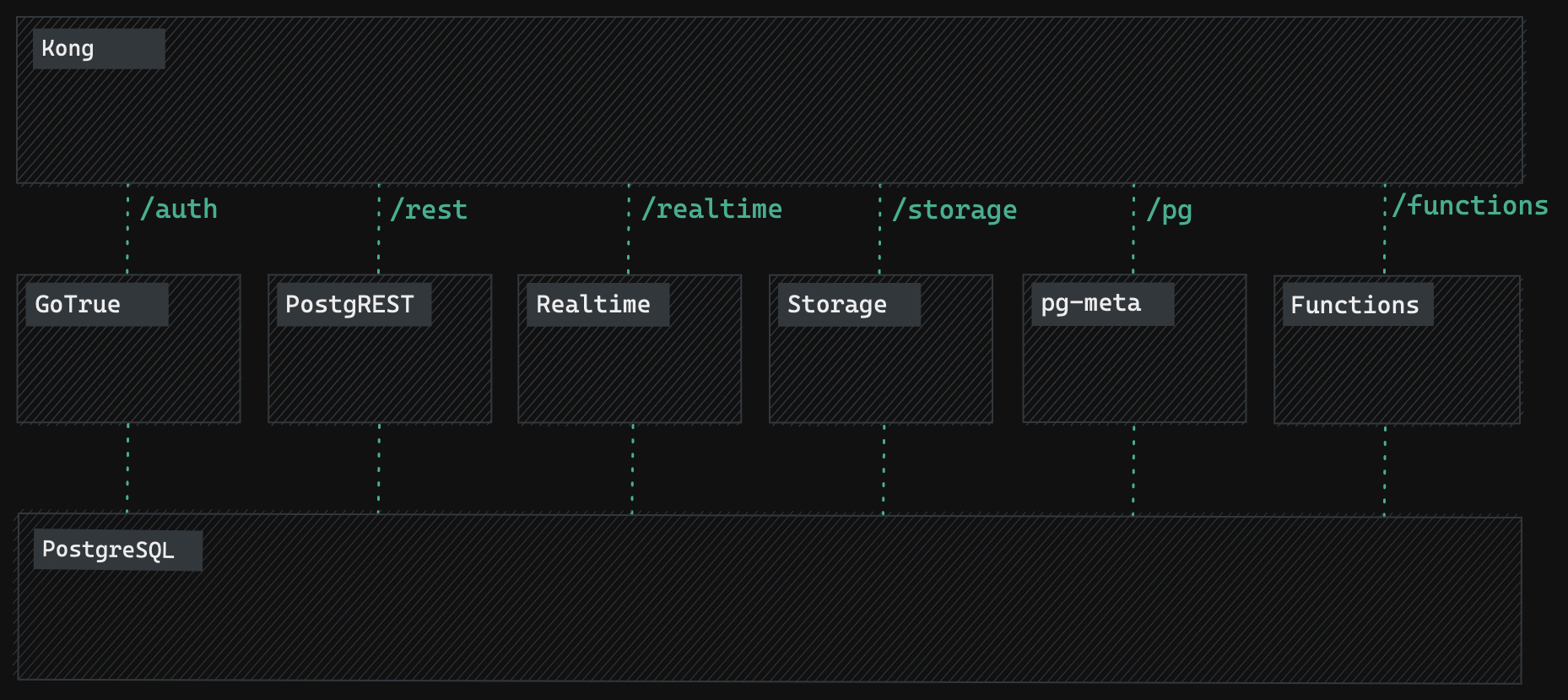diff --git a/i18n/README.bg.md b/i18n/README.bg.mdindex 37b90e633c1..e6e2592881b 100644--- a/i18n/README.bg.md+++ b/i18n/README.bg.md@@ -39,7 +39,7 @@## Статус- [x] Алфа: Тестваме Supabase със затворен набор от клиенти-- [x] Публична алфа: Всеки може да се регистрира на адрес [app.supabase.com](https://app.supabase.com). Но не се притеснявайте от нас, има няколко проблема+- [x] Публична алфа: Всеки може да се регистрира на адрес [supabase.com/dashboard](https://supabase.com/dashboard). Но не се притеснявайте от нас, има няколко проблема- [x] Публична бета версия: Достатъчно стабилна за повечето случаи на използване извън предприятията- [ ] Публична: Обща наличност [[статус](https://supabase.com/docs/guides/getting-started/features#feature-status)]@@ -55,7 +55,7 @@ Supabase е комбинация от инструменти с отворен**Архитектура**-Supabase е [хоствана платформа](https://app.supabase.com). Можете да се регистрирате и да започнете да използвате Supabase, без да инсталирате нищо.+Supabase е [хоствана платформа](https://supabase.com/dashboard). Можете да се регистрирате и да започнете да използвате Supabase, без да инсталирате нищо.Можете също така да [самостоятелно хоствате](https://supabase.com/docs/guides/hosting/overview) и [да разработвате локално](https://supabase.com/docs/guides/local-development).diff --git a/i18n/README.bn.md b/i18n/README.bn.mdindex 298cdd07688..220d342c70a 100644--- a/i18n/README.bn.md+++ b/i18n/README.bn.md@@ -39,7 +39,7 @@## স্ট্যাটাস- [x] আলফা: আমরা কাছের গ্রাহকদের সাথে Supabase পরীক্ষা করছি-- [x] পাবলিক আলফা: যে কেউ [app.supabase.com](https://app.supabase.com) এ সাইন আপ করতে পারেন। কিন্তু আমাদের উপর সহজ যান, কয়েক kinks আছে+- [x] পাবলিক আলফা: যে কেউ [supabase.com/dashboard](https://supabase.com/dashboard) এ সাইন আপ করতে পারেন। কিন্তু আমাদের উপর সহজ যান, কয়েক kinks আছে- [x] পাবলিক বেটা: বেশিরভাগ নন-এন্টারপ্রাইজ ব্যবহারের ক্ষেত্রে যথেষ্ট স্থিতিশীল- [ ] পাবলিক: প্রোডাকশন রেডি@@ -55,7 +55,7 @@ Supabase হল ওপেন সোর্স টুলের সংমিশ্**স্থাপত্য**-সুপাবেস হল একটি [হোস্ট করা প্ল্যাটফর্ম](https://app.supabase.com)। আপনি সাইন আপ করে এবং কিছু ইনস্টল না করে সুপাবেস ব্যবহার শুরু করতে পারেন।+সুপাবেস হল একটি [হোস্ট করা প্ল্যাটফর্ম](https://supabase.com/dashboard)। আপনি সাইন আপ করে এবং কিছু ইনস্টল না করে সুপাবেস ব্যবহার শুরু করতে পারেন।এছাড়াও আপনি [স্ব-হোস্ট](https://supabase.com/docs/guides/hosting/overview) এবং [ডেভেলপ লোকালি](https://supabase.com/docs/guides/local-development) করতে পারেন।diff --git a/i18n/README.ca.md b/i18n/README.ca.mdindex 86e7fb7d894..09e655f1a76 100644--- a/i18n/README.ca.md+++ b/i18n/README.ca.md@@ -33,7 +33,7 @@ Per a veure la documentació completa, visita [supabase.com/docs](https://supaba## Estat- [x] Alfa: Estem provant Supabase amb un cercle tancat de clients.-- [x] Alfa pública: Qualsevol pot registrar-se a [app.supabase.com](https://app.supabase.com). Però sigues flexible amb nosaltres; encara poden existir obstacles.+- [x] Alfa pública: Qualsevol pot registrar-se a [supabase.com/dashboard](https://supabase.com/dashboard). Però sigues flexible amb nosaltres; encara poden existir obstacles.- [x] Beta pública: Prou estable per a la majoria dels casos no empresarials.- [ ] Públic: Llest per a producció.@@ -49,7 +49,7 @@ Supabase és una combinació d’eines de codi obert. Estem construint les funci**Arquitectura actual**-Supabase és una [plataforma allotjada](https://app.supabase.com). Et pots registrar i començar a utilitzar Supabase sense instal·lar res. També podeu tenir una [_host_ pròpia](https://supabase.com/docs/guides/hosting/overview) i [desenvolupar localment](https://supabase.com/docs/guides/local-development).+Supabase és una [plataforma allotjada](https://supabase.com/dashboard). Et pots registrar i començar a utilitzar Supabase sense instal·lar res. També podeu tenir una [_host_ pròpia](https://supabase.com/docs/guides/hosting/overview) i [desenvolupar localment](https://supabase.com/docs/guides/local-development).diff --git a/i18n/README.cs.md b/i18n/README.cs.mdindex b36f8c2e2b2..2ee5648eebd 100644--- a/i18n/README.cs.md+++ b/i18n/README.cs.md@@ -39,7 +39,7 @@ Chcete-li zjistit, jak přispívat, navštivte stránku [Začínáme](../DEVELOP## Stav- [x] Alfa: Testujeme Supabase s uzavřenou skupinou zákazníků-- [x] Veřejná alfa: [app.supabase.com](https://app.supabase.com). Ale buďte na nás mírní, je tu několik zádrhelů+- [x] Veřejná alfa: [supabase.com/dashboard](https://supabase.com/dashboard). Ale buďte na nás mírní, je tu několik zádrhelů- [x] Veřejná beta verze: Dostatečně stabilní pro většinu případů použití mimo podniky- [ ] Veřejná: Všeobecná dostupnost [[status](https://supabase.com/docs/guides/getting-started/features#feature-status)]@@ -55,7 +55,7 @@ Supabase je kombinací nástrojů s otevřeným zdrojovým kódem. Funkce Fireba**Architektura**-Supabase je [hostovaná platforma](https://app.supabase.com). Můžete se zaregistrovat a začít používat Supabase, aniž byste museli cokoli instalovat.+Supabase je [hostovaná platforma](https://supabase.com/dashboard). Můžete se zaregistrovat a začít používat Supabase, aniž byste museli cokoli instalovat.Můžete také [hostovat sami](https://supabase.com/docs/guides/hosting/overview) a [vyvíjet lokálně](https://supabase.com/docs/guides/local-development).diff --git a/i18n/README.da.md b/i18n/README.da.mdindex 29ad065205f..9312c336ab0 100644--- a/i18n/README.da.md+++ b/i18n/README.da.md@@ -39,7 +39,7 @@ For at se, hvordan man bidrager, besøg [Getting Started](../DEVELOPERS.md)## Status- [x] Alpha: Vi tester Supabase med et lukket sæt af kunder-- [x] Offentlig Alpha: Alle kan tilmelde sig på [app.supabase.com](https://app.supabase.com). Men vær forsigtig med os, der er et par knuder+- [x] Offentlig Alpha: Alle kan tilmelde sig på [supabase.com/dashboard](https://supabase.com/dashboard). Men vær forsigtig med os, der er et par knuder- [x] Public Beta: Stabil nok til de fleste ikke-virksomhedsrelaterede brugssager- [ ] Public: Public: Generel tilgængelighed [[status](https://supabase.com/docs/guides/getting-started/features#feature-status)]@@ -55,7 +55,7 @@ Supabase er en kombination af open source-værktøjer. Vi opbygger funktionerne**Arkitektur**-Supabase er en [hosted platform](https://app.supabase.com). Du kan tilmelde dig og begynde at bruge Supabase uden at installere noget.+Supabase er en [hosted platform](https://supabase.com/dashboard). Du kan tilmelde dig og begynde at bruge Supabase uden at installere noget.Du kan også [selv hoste](https://supabase.com/docs/guides/hosting/overview) og [udvikle lokalt](https://supabase.com/docs/guides/local-development).diff --git a/i18n/README.de.md b/i18n/README.de.mdindex 045b0c76e33..76d4c573239 100644--- a/i18n/README.de.md+++ b/i18n/README.de.md@@ -39,7 +39,7 @@ Wie Sie einen Beitrag leisten können, erfahren Sie unter [Erste Schritte](../DE## Status- [x] Alpha: Wir testen Supabase mit einer geschlossenen Gruppe von Kunden-- [x] Öffentliche Alpha: Jeder kann sich unter [app.supabase.com](https://app.supabase.com) anmelden. Aber seien Sie nachsichtig mit uns, es gibt noch ein paar Macken+- [x] Öffentliche Alpha: Jeder kann sich unter [supabase.com/dashboard](https://supabase.com/dashboard) anmelden. Aber seien Sie nachsichtig mit uns, es gibt noch ein paar Macken- [x] Öffentliche Beta: Stabil genug für die meisten nicht-unternehmerischen Anwendungsfälle- [Öffentlich: Allgemeine Verfügbarkeit [[status](https://supabase.com/docs/guides/getting-started/features#feature-status)]@@ -55,7 +55,7 @@ Supabase ist eine Kombination aus Open-Source-Tools. Wir entwickeln die Funktion**Architektur**-Supabase ist eine [gehostete Plattform](https://app.supabase.com). Sie können sich anmelden und Supabase verwenden, ohne etwas zu installieren.+Supabase ist eine [gehostete Plattform](https://supabase.com/dashboard). Sie können sich anmelden und Supabase verwenden, ohne etwas zu installieren.Sie können auch [selbst hosten](https://supabase.com/docs/guides/hosting/overview) und [lokal entwickeln](https://supabase.com/docs/guides/local-development).diff --git a/i18n/README.el.md b/i18n/README.el.mdindex 2989656164d..ab2a9e0d4c6 100644--- a/i18n/README.el.md+++ b/i18n/README.el.md@@ -39,7 +39,7 @@## Κατάσταση- [x] Alpha: Δοκιμάζουμε το Supabase με ένα κλειστό σύνολο πελατών-- [x] Δημόσια Alpha: [app.supabase.com](https://app.supabase.com). Αλλά να είστε προσεκτικοί μαζί μας, υπάρχουν μερικές ατέλειες+- [x] Δημόσια Alpha: [supabase.com/dashboard](https://supabase.com/dashboard). Αλλά να είστε προσεκτικοί μαζί μας, υπάρχουν μερικές ατέλειες- [x] Δημόσια Beta: Αρκετά σταθερό για τις περισσότερες περιπτώσεις μη επιχειρηματικής χρήσης- [ ] Δημόσια: [[status](https://supabase.com/docs/guides/getting-started/features#feature-status)]@@ -55,7 +55,7 @@**Αρχιτεκτονική**-Η Supabase είναι μια [φιλοξενούμενη πλατφόρμα](https://app.supabase.com). Μπορείτε να εγγραφείτε και να αρχίσετε να χρησιμοποιείτε το Supabase χωρίς να εγκαταστήσετε τίποτα.+Η Supabase είναι μια [φιλοξενούμενη πλατφόρμα](https://supabase.com/dashboard). Μπορείτε να εγγραφείτε και να αρχίσετε να χρησιμοποιείτε το Supabase χωρίς να εγκαταστήσετε τίποτα.Μπορείτε επίσης να κάνετε [αυτο-ξενάγηση](https://supabase.com/docs/guides/hosting/overview) και [ανάπτυξη τοπικά](https://supabase.com/docs/guides/local-development).diff --git a/i18n/README.es.md b/i18n/README.es.mdindex 658c0a45fa9..7ef62c5b19d 100644--- a/i18n/README.es.md+++ b/i18n/README.es.md@@ -39,7 +39,7 @@ Para ver cómo contribuir, visite [Getting Started](../DEVELOPERS.md)## Estado- [x] Alfa: Estamos probando Supabase con un grupo cerrado de clientes-- [x] Alfa público: Cualquiera puede registrarse en [app.supabase.com](https://app.supabase.com). Pero no te pases, hay algunos problemas+- [x] Alfa público: Cualquiera puede registrarse en [supabase.com/dashboard](https://supabase.com/dashboard). Pero no te pases, hay algunos problemas- [Beta pública: Suficientemente estable para la mayoría de los casos de uso no empresariales- [Público: Disponibilidad general [[status](https://supabase.com/docs/guides/getting-started/features#feature-status)]@@ -55,7 +55,7 @@ Supabase es una combinación de herramientas de código abierto. Estamos constru**Arquitectura**-Supabase es una [plataforma alojada](https://app.supabase.com). Puedes registrarte y empezar a usar Supabase sin instalar nada.+Supabase es una [plataforma alojada](https://supabase.com/dashboard). Puedes registrarte y empezar a usar Supabase sin instalar nada.También puede [autoalojarse](https://supabase.com/docs/guides/hosting/overview) y [desarrollar localmente](https://supabase.com/docs/guides/local-development).arquitectura](https://github.com/supabase/supabase/blob/master/apps/docs/public/img/supabase-architecture.png)diff --git a/i18n/README.et.md b/i18n/README.et.mdindex 88ff040404a..32aea36daa7 100644--- a/i18n/README.et.md+++ b/i18n/README.et.md@@ -39,7 +39,7 @@ Et näha, kuidas panustada, külastage [Getting Started](../DEVELOPERS.md)## Staatus- [x] Alpha: Me testime Supabase'i suletud kliendikogumiga-- [x] Avalik Alpha: Igaüks saab registreeruda aadressil [app.supabase.com](https://app.supabase.com). Kuid olge meiega ettevaatlikud, seal on mõned veidrused+- [x] Avalik Alpha: Igaüks saab registreeruda aadressil [supabase.com/dashboard](https://supabase.com/dashboard). Kuid olge meiega ettevaatlikud, seal on mõned veidrused- [x] Avalik beeta: Piisavalt stabiilne enamiku mitte-ettevõtluskasutuse jaoks- [ ] Avalik: Üldine kättesaadavus [[status](https://supabase.com/docs/guides/getting-started/features#feature-status)]@@ -55,7 +55,7 @@ Supabase on avatud lähtekoodiga tööriistade kombinatsioon. Me ehitame Firebas**Arhitektuur**-Supabase on [hostitud platvorm](https://app.supabase.com). Võite registreeruda ja alustada Supabase'i kasutamist ilma midagi installimata.+Supabase on [hostitud platvorm](https://supabase.com/dashboard). Võite registreeruda ja alustada Supabase'i kasutamist ilma midagi installimata.Võite ka [ise hostida](https://supabase.com/docs/guides/hosting/overview) ja [arendada lokaalselt](https://supabase.com/docs/guides/local-development).diff --git a/i18n/README.fa.md b/i18n/README.fa.mdindex 631741f2364..87c4adc1f3f 100644--- a/i18n/README.fa.md+++ b/i18n/README.fa.md@@ -34,7 +34,7 @@## وضعیت- [x] آلفا: در حال تست Supabase با گروه محدود از کاربران هستیم.-- [x] آلفای عمومی: همه میتواند برای استفاده از طریق [app.supabase.com](https://app.supabase.com) ثبتنام کنند. اما سخت نگیرید، ممکن است مشکلات معدودی وجود داشته باشد.+- [x] آلفای عمومی: همه میتواند برای استفاده از طریق [supabase.com/dashboard](https://supabase.com/dashboard) ثبتنام کنند. اما سخت نگیرید، ممکن است مشکلات معدودی وجود داشته باشد.- [x] بتای عمومی: قابل اتکا برای اکثر استفادههای غیر-تجاری میباشد.- [ ] عمومی: آماده برای استفاده تجاری.@@ -50,7 +50,7 @@**معماری فعلی**-Supabase یک [پلتفرم میزبانیشده](https://app.supabase.com) است. شما میتوانید بدون نصب چیزی، ثبتنام و شروع به استفاده از Supabase کنید. ما هنوز در حال ساختن تجربهی توسعه local هستیم - این تمرکز اصلی فعلی ما علاوه بر اتکاپذیری است.+Supabase یک [پلتفرم میزبانیشده](https://supabase.com/dashboard) است. شما میتوانید بدون نصب چیزی، ثبتنام و شروع به استفاده از Supabase کنید. ما هنوز در حال ساختن تجربهی توسعه local هستیم - این تمرکز اصلی فعلی ما علاوه بر اتکاپذیری است.diff --git a/i18n/README.fi.md b/i18n/README.fi.mdindex 57451117237..98966d05bbe 100644--- a/i18n/README.fi.md+++ b/i18n/README.fi.md@@ -39,7 +39,7 @@ Jos haluat nähdä, miten osallistuminen tapahtuu, käy osoitteessa [Getting Sta## Status- [x] Alpha: Testaamme Supabasea suljetulla asiakasjoukolla-- [x] Julkinen Alpha: Kuka tahansa voi rekisteröityä osoitteessa [app.supabase.com](https://app.supabase.com). Mutta olkaa varovaisia, sillä on vielä muutamia ongelmia+- [x] Julkinen Alpha: Kuka tahansa voi rekisteröityä osoitteessa [supabase.com/dashboard](https://supabase.com/dashboard). Mutta olkaa varovaisia, sillä on vielä muutamia ongelmia- [x] Julkinen beta: Tarpeeksi vakaa useimpiin ei-yrityskäyttötapauksiin- [ ] Julkinen: Yleinen saatavuus [[status](https://supabase.com/docs/guides/getting-started/features#feature-status)]@@ -55,7 +55,7 @@ Supabase on yhdistelmä avoimen lähdekoodin työkaluja. Rakennamme Firebasen om**Arkkitehtuuri**-Supabase on [hosted platform](https://app.supabase.com). Voit rekisteröityä ja aloittaa Supabasen käytön asentamatta mitään.+Supabase on [hosted platform](https://supabase.com/dashboard). Voit rekisteröityä ja aloittaa Supabasen käytön asentamatta mitään.Voit myös [itse isännöidä](https://supabase.com/docs/guides/hosting/overview) ja [kehittää paikallisesti](https://supabase.com/docs/guides/local-development).diff --git a/i18n/README.fr.md b/i18n/README.fr.mdindex 40832f97256..6c50af2eb98 100644--- a/i18n/README.fr.md+++ b/i18n/README.fr.md@@ -39,7 +39,7 @@ Pour savoir comment contribuer, visitez [Getting Started](../DEVELOPERS.md)## Statut- [x] Alpha : Nous testons Supabase avec un groupe fermé de clients-- [x] Alpha publique : Tout le monde peut s'inscrire sur [app.supabase.com](https://app.supabase.com). Mais allez-y doucement, il y a quelques problèmes+- [x] Alpha publique : Tout le monde peut s'inscrire sur [supabase.com/dashboard](https://supabase.com/dashboard). Mais allez-y doucement, il y a quelques problèmes- [x] Bêta publique : Suffisamment stable pour la plupart des cas d'utilisation hors entreprise- [ ] Public : Disponibilité générale [[status](https://supabase.com/docs/guides/getting-started/features#feature-status)]@@ -55,7 +55,7 @@ Supabase est une combinaison d'outils open source. Nous construisons les fonctio**Architecture**-Supabase est une [plateforme hébergée](https://app.supabase.com). Vous pouvez vous inscrire et commencer à utiliser Supabase sans rien installer.+Supabase est une [plateforme hébergée](https://supabase.com/dashboard). Vous pouvez vous inscrire et commencer à utiliser Supabase sans rien installer.Vous pouvez également [auto-héberger](https://supabase.com/docs/guides/hosting/overview) et [développer localement](https://supabase.com/docs/guides/local-development).diff --git a/i18n/README.gr.md b/i18n/README.gr.mdindex f607515d9ad..a1d41628b10 100644--- a/i18n/README.gr.md+++ b/i18n/README.gr.md@@ -32,7 +32,7 @@ To [Supabase](https://supabase.com) είναι μια εναλλακτική λ## Κατάσταση- [x] Alpha: Δοκιμάζουμε το Supabase με ένα κλειστό σύνολο πελατών-- [x] Public Alpha: Όλοι μπορούν να εγγραφούν στο [app.supabase.com](https://app.supabase.com). Αλλά μην μας κρίνετε "σκληρά", υπάρχουν ακόμα μερικά λαθάκια (bugs) εδώ και εκεί+- [x] Public Alpha: Όλοι μπορούν να εγγραφούν στο [supabase.com/dashboard](https://supabase.com/dashboard). Αλλά μην μας κρίνετε "σκληρά", υπάρχουν ακόμα μερικά λαθάκια (bugs) εδώ και εκεί- [x] Public Beta: Αρκετά σταθερό για για τις περισσότερες περιπτώσεις χρήσης μη εταιρικού χαρακτήρα (non-enterprise)- [ ] Public: Έτοιμο για Production@@ -48,7 +48,7 @@ To [Supabase](https://supabase.com) είναι μια εναλλακτική λ**Τρέχουσα αρχιτεκτονική**-Το Supabase είναι ένα [hosted platform](https://app.supabase.com) (φιλοξενούμενη πλατφόρμα). Μπορείτε να εγγραφείτε και να αρχίσετε να χρησιμοποιείτε το Supabase χωρίς να εγκαταστήσετε τίποτα. Εξακολουθούμε να αναπτύσουμε την εμπειρία της τοπικής ανάπτυξης (Local Development) - αυτή είναι τώρα η βασική μας εστίαση, μαζί με τη σταθερότητα της πλατφόρμας.+Το Supabase είναι ένα [hosted platform](https://supabase.com/dashboard) (φιλοξενούμενη πλατφόρμα). Μπορείτε να εγγραφείτε και να αρχίσετε να χρησιμοποιείτε το Supabase χωρίς να εγκαταστήσετε τίποτα. Εξακολουθούμε να αναπτύσουμε την εμπειρία της τοπικής ανάπτυξης (Local Development) - αυτή είναι τώρα η βασική μας εστίαση, μαζί με τη σταθερότητα της πλατφόρμας.diff --git a/i18n/README.gu.md b/i18n/README.gu.mdindex 6cdfa48c251..5ab1a6558e8 100644--- a/i18n/README.gu.md+++ b/i18n/README.gu.md@@ -33,7 +33,7 @@## સ્થિતિ- [x] આલ્ફા: અમે ગ્રાહકોના બંધ સમૂહ સાથે સુપાબેઝનું પરીક્ષણ કરી રહ્યા છીએ-- [x] જાહેર આલ્ફા: કોઈ પણ [app.supabase.com](https://app.supabase.com) પર જઈને સાઈન-અપ કરી શકે છે. પણ થોડો સંયમ રાખશો, હજુ અમુક સમસ્યાઓ છે+- [x] જાહેર આલ્ફા: કોઈ પણ [supabase.com/dashboard](https://supabase.com/dashboard) પર જઈને સાઈન-અપ કરી શકે છે. પણ થોડો સંયમ રાખશો, હજુ અમુક સમસ્યાઓ છે- [x] જાહેર બીટા: મોટાભાગના નોન-એન્ટરપ્રાઇઝ યુઝ-કેસેટ્સ માટે અનુરૂપ- [ ] જાહેર: પ્રોડક્શન માટે તૈયાર@@ -49,7 +49,7 @@**વર્તમાન સ્થાપત્ય**-સુપાબેઝ એક [હોસ્ટેડ પ્લેટફોર્મ](https://app.supabase.com) છે. તમે સાઇન અપ કરી શકો છો અને કંઈપણ ઇન્સ્ટોલ કર્યા વગર સુપાબેઝનો ઉપયોગ શરૂ કરી શકો છો. અમે હજી પણ સ્થાનિક ડેવલપમેન્ટ અનુભવ બનાવી રહ્યા છીએ - પ્લેટફોર્મ સ્થિરતાની સાથે હવે આ અમારું મુખ્ય લક્ષ્ય છે.+સુપાબેઝ એક [હોસ્ટેડ પ્લેટફોર્મ](https://supabase.com/dashboard) છે. તમે સાઇન અપ કરી શકો છો અને કંઈપણ ઇન્સ્ટોલ કર્યા વગર સુપાબેઝનો ઉપયોગ શરૂ કરી શકો છો. અમે હજી પણ સ્થાનિક ડેવલપમેન્ટ અનુભવ બનાવી રહ્યા છીએ - પ્લેટફોર્મ સ્થિરતાની સાથે હવે આ અમારું મુખ્ય લક્ષ્ય છે.diff --git a/i18n/README.he.md b/i18n/README.he.mdindex a5f94810b61..984f3784e7f 100644--- a/i18n/README.he.md+++ b/i18n/README.he.md@@ -34,7 +34,7 @@## סטטוס- [x] אלפא: בוחנים את המערכת מול מאגר סגור של לקוחות-- [x] אלפא פומבית: כל אחד יכול להרשם ב[app.supabase.com](https://app.supabase.com). אבל תהיו עדינים, יהיו בעיות.+- [x] אלפא פומבית: כל אחד יכול להרשם ב[supabase.com/dashboard](https://supabase.com/dashboard). אבל תהיו עדינים, יהיו בעיות.- [x] בטא פומבית: יציב מספיק לרוב הלקוחות הלא-ארגוניים.- [ ] יציב: מתאים לשימוש הכלל.@@ -50,7 +50,7 @@ Supabase הוא שילוב של כלי קוד פתוח. אנו בונים את**ארכיטקטורה נוכחית**-Supabase היא [תשתית ענן](https://app.supabase.com)+Supabase היא [תשתית ענן](https://supabase.com/dashboard). את\ה יכול\ה להירשם ולהתחיל להשתמש ב- Supabase מבלי להתקין שום דבר. אנו עדיין עובדים על לייצר את חוויית הפיתוח המקומית - בזה אנחנו מתמקדים, יחד עם יציבות המערכת.diff --git a/i18n/README.hi.md b/i18n/README.hi.mdindex c130554f541..035fb287238 100644--- a/i18n/README.hi.md+++ b/i18n/README.hi.md@@ -39,7 +39,7 @@## स्थिति- [x] अल्फा: हम चुनिंदा ग्राहकों के साथ सुपरबास का परीक्षण कर रहे हैं-- [x] सार्वजनिक अल्फा: कोई भी [app.supabase.com](https://app.supabase.com) के जरिए शामिल हो सकता है। लेकिन हम पर आसान हो जाओ, कुछ मोड़ हैं।+- [x] सार्वजनिक अल्फा: कोई भी [supabase.com/dashboard](https://supabase.com/dashboard) के जरिए शामिल हो सकता है। लेकिन हम पर आसान हो जाओ, कुछ मोड़ हैं।- [x] सार्वजनिक बीटा: अधिकांश गैर-एंटरप्राइज़ उपयोग-मामलों के लिए पर्याप्त स्थिर- [ ] सार्वजनिक: उत्पादन-तैयार@@ -55,7 +55,7 @@**वर्तमान वास्तुकला**-सुपाबसे [होस्टेड प्लेटफार्म](https://app.supabase.com). आप साइन अप कर सकते हैं और कुछ भी स्थापित किए बिना सुपाबसे का उपयोग करना शुरू कर सकते हैं। हम अभी भी स्थानीय विकास का अनुभव पैदा कर रहे हैं - यह अब मंच स्थिरता के साथ-साथ हमारा मुख्य फोकस है।+सुपाबसे [होस्टेड प्लेटफार्म](https://supabase.com/dashboard). आप साइन अप कर सकते हैं और कुछ भी स्थापित किए बिना सुपाबसे का उपयोग करना शुरू कर सकते हैं। हम अभी भी स्थानीय विकास का अनुभव पैदा कर रहे हैं - यह अब मंच स्थिरता के साथ-साथ हमारा मुख्य फोकस है।diff --git a/i18n/README.hu.md b/i18n/README.hu.mdindex ebe3ed2f6fe..896e9b33fe4 100644--- a/i18n/README.hu.md+++ b/i18n/README.hu.md@@ -39,7 +39,7 @@ A Contribute-hoz való hozzájáruláshoz látogasson el a [Getting Started](../## Állapot- [x] Alpha: A Supabase-t egy zárt ügyfélkörrel teszteljük-- [x] Nyilvános alfa: Bárki regisztrálhat az [app.supabase.com](https://app.supabase.com) oldalon. De legyetek óvatosak velünk, van még néhány hiba+- [x] Nyilvános alfa: Bárki regisztrálhat az [supabase.com/dashboard](https://supabase.com/dashboard) oldalon. De legyetek óvatosak velünk, van még néhány hiba- [x] Nyilvános béta: Elég stabil a legtöbb nem vállalati felhasználási esethez- [ ] Nyilvános: Általános elérhetőség [[status](https://supabase.com/docs/guides/getting-started/features#feature-status)]@@ -55,7 +55,7 @@ A Supabase nyílt forráskódú eszközök kombinációja. A Firebase funkcióit**Architektúra**-A Supabase egy [hosztolt platform](https://app.supabase.com). Regisztrálhat és elkezdheti használni a Supabase-t anélkül, hogy bármit telepítene.+A Supabase egy [hosztolt platform](https://supabase.com/dashboard). Regisztrálhat és elkezdheti használni a Supabase-t anélkül, hogy bármit telepítene.Önállóan is [hosztolhat](https://supabase.com/docs/guides/hosting/overview) és [fejleszthet helyben](https://supabase.com/docs/guides/local-development).diff --git a/i18n/README.id.md b/i18n/README.id.mdindex 311312da070..e8cb7df5e14 100644--- a/i18n/README.id.md+++ b/i18n/README.id.md@@ -39,7 +39,7 @@ Untuk melihat bagaimana cara berkontribusi, kunjungi [Memulai](../DEVELOPERS.md)## Status- [x] Alpha: Kami sedang menguji Supabase dengan sekumpulan pelanggan tertutup-- [x] Alpha Publik: Siapa pun dapat mendaftar di [app.supabase.com](https://app.supabase.com). Tapi jangan khawatir, ada beberapa hal yang perlu diperhatikan+- [x] Alpha Publik: Siapa pun dapat mendaftar di [supabase.com/dashboard](https://supabase.com/dashboard). Tapi jangan khawatir, ada beberapa hal yang perlu diperhatikan- [x] Public Beta: Cukup stabil untuk sebagian besar kasus penggunaan non-perusahaan- [Publik: Ketersediaan Umum [[status](https://supabase.com/docs/guides/getting-started/features#feature-status)]@@ -55,7 +55,7 @@ Supabase adalah kombinasi dari alat sumber terbuka. Kami membangun fitur-fitur F**Arsitektur**-Supabase adalah [platform yang di-host](https://app.supabase.com). Anda bisa mendaftar dan mulai menggunakan Supabase tanpa menginstal apa pun.+Supabase adalah [platform yang di-host](https://supabase.com/dashboard). Anda bisa mendaftar dan mulai menggunakan Supabase tanpa menginstal apa pun.Anda juga bisa [menghosting sendiri](https://supabase.com/docs/guides/hosting/overview) dan [mengembangkan secara lokal](https://supabase.com/docs/guides/local-development).diff --git a/i18n/README.it.md b/i18n/README.it.mdindex 594947a7a28..6c8494b52ca 100644--- a/i18n/README.it.md+++ b/i18n/README.it.md@@ -39,7 +39,7 @@ Per vedere come contribuire, visitate [Getting Started](../DEVELOPERS.md)## Stato- [Alfa: Stiamo testando Supabase con un gruppo chiuso di clienti-- [x] Alfa pubblica: Chiunque può iscriversi all'indirizzo [app.supabase.com](https://app.supabase.com). Ma andateci piano, ci sono alcuni problemi+- [x] Alfa pubblica: Chiunque può iscriversi all'indirizzo [supabase.com/dashboard](https://supabase.com/dashboard). Ma andateci piano, ci sono alcuni problemi- [x] Beta pubblica: Abbastanza stabile per la maggior parte degli usi non aziendali- [ ] Pubblico: Disponibilità generale [[status](https://supabase.com/docs/guides/getting-started/features#feature-status)]@@ -55,7 +55,7 @@ Supabase è una combinazione di strumenti open source. Stiamo costruendo le funz**Architettura**-Supabase è una [piattaforma ospitata](https://app.supabase.com). È possibile registrarsi e iniziare a usare Supabase senza installare nulla.+Supabase è una [piattaforma ospitata](https://supabase.com/dashboard). È possibile registrarsi e iniziare a usare Supabase senza installare nulla.È anche possibile [auto-ospitare](https://supabase.com/docs/guides/hosting/overview) e [sviluppare localmente](https://supabase.com/docs/guides/local-development).diff --git a/i18n/README.ja.md b/i18n/README.ja.mdindex d10d9c3354e..3dc032bc36b 100644--- a/i18n/README.ja.md+++ b/i18n/README.ja.md@@ -39,7 +39,7 @@## ステータス- [x] アルファ:Supabase をクローズドな顧客セットでテストしています。-- [x] Public Alpha:誰でも [app.supabase.com](https://app.supabase.com) でサインアップすることができます。しかし、いくつかの問題がありますので、ご容赦ください。+- [x] Public Alpha:誰でも [supabase.com/dashboard](https://supabase.com/dashboard) でサインアップすることができます。しかし、いくつかの問題がありますので、ご容赦ください。- [x] パブリックベータ版:企業以外のほとんどのユースケースで十分に安定している。- [ ] パブリック:一般公開 [[ステータス](https://supabase.com/docs/guides/getting-started/features#feature-status)]。@@ -55,7 +55,7 @@ Supabase は、オープンソースツールの組み合わせです。私た**アーキテクチャー**-Supabase は[hosted platform](https://app.supabase.com)です。サインアップすれば、何もインストールすることなく Supabase を使い始めることができます。+Supabase は[hosted platform](https://supabase.com/dashboard)です。サインアップすれば、何もインストールすることなく Supabase を使い始めることができます。また、[セルフホスト](https://supabase.com/docs/guides/hosting/overview)や[ローカル開発](https://supabase.com/docs/guides/local-development)も可能です。diff --git a/i18n/README.jp.md b/i18n/README.jp.mdindex dd14a029389..ae7e4d456f7 100644--- a/i18n/README.jp.md+++ b/i18n/README.jp.md@@ -39,7 +39,7 @@## ステータス- [x] Alpha: 限られたユーザーで Supabase をテストしています。-- [x] Public Alpha: 誰でも[app.supabase.com](https://app.supabase.com)から登録ができます。ただし、バグなどがある可能性がありますので、ご容赦ください。+- [x] Public Alpha: 誰でも[supabase.com/dashboard](https://supabase.com/dashboard)から登録ができます。ただし、バグなどがある可能性がありますので、ご容赦ください。- [x] Public Beta: 企業以外のほとんどのユースケースに耐えうる十分な安定性を確保。- [ ] Public: 実用的な用途に対応@@ -55,7 +55,7 @@ Supabase は、オープンソースのツールを組み合わせてできて**現在のアーキテクチャ**-Supabase は[ホスティングされたプラットフォーム](https://app.supabase.com)です。登録するだけで、何もインストールせずに使い始めることができます。+Supabase は[ホスティングされたプラットフォーム](https://supabase.com/dashboard)です。登録するだけで、何もインストールせずに使い始めることができます。さらに、 [セルフホスティング](https://supabase.com/docs/guides/hosting/overview) や [ローカル開発](https://supabase.com/docs/guides/local-development)も可能です。diff --git a/i18n/README.ko.md b/i18n/README.ko.mdindex 7777db14f21..f70b96349eb 100644--- a/i18n/README.ko.md+++ b/i18n/README.ko.md@@ -39,7 +39,7 @@## 상태- [x] 알파: 비공개 고객들을 대상으로 Supabase를 테스트 중입니다-- [x] 공개 알파: 누구나 [app.supabase.com](https://app.supabase.com)에서 가입할 수 있습니다. 하지만 몇 가지 불편한 점이 있습니다+- [x] 공개 알파: 누구나 [supabase.com/dashboard](https://supabase.com/dashboard)에서 가입할 수 있습니다. 하지만 몇 가지 불편한 점이 있습니다- [x] 공개 베타: 대부분의 비기업용 사용 사례에 충분히 안정적입니다- [ ] 공개: 일반 사용 가능 [[상태](https://supabase.com/docs/guides/getting-started/features#feature-status)]@@ -55,7 +55,7 @@ Supabase는 오픈 소스 도구의 조합입니다. 저희는 엔터프라이**아키텍처**-Supabase는 [호스팅 플랫폼](https://app.supabase.com)입니다. 가입만 하면 아무것도 설치하지 않고 Supabase를 사용할 수 있습니다.+Supabase는 [호스팅 플랫폼](https://supabase.com/dashboard)입니다. 가입만 하면 아무것도 설치하지 않고 Supabase를 사용할 수 있습니다.자체 호스팅](https://supabase.com/docs/guides/hosting/overview) 및 [로컬 개발](https://supabase.com/docs/guides/local-development)도 가능합니다.아키텍처](https://github.com/supabase/supabase/blob/master/apps/docs/public/img/supabase-architecture.png)diff --git a/i18n/README.lt.md b/i18n/README.lt.mdindex f14f8c9e554..e19a3d53882 100644--- a/i18n/README.lt.md+++ b/i18n/README.lt.md@@ -39,7 +39,7 @@ Norėdami sužinoti, kaip prisidėti, apsilankykite [Getting Started](../DEVELOP## Statusas- [x] Alfa: Bandome "Supabase" su uždaru klientų rinkiniu-- [x] Viešoji Alfa versija: [app.supabase.com](https://app.supabase.com). Tačiau neskubėkite su mumis, yra keletas trūkumų+- [x] Viešoji Alfa versija: [supabase.com/dashboard](https://supabase.com/dashboard). Tačiau neskubėkite su mumis, yra keletas trūkumų- [x] Viešoji beta versija: Pakankamai stabili daugeliui ne įmonių naudojimo atvejų- [ ] Vieša: Bendras prieinamumas [[statusas](https://supabase.com/docs/guides/getting-started/features#feature-status)]@@ -55,7 +55,7 @@ Norėdami sužinoti, kaip prisidėti, apsilankykite [Getting Started](../DEVELOP**Architektūra**-Supabase yra [prieglobos platforma](https://app.supabase.com). Galite užsiregistruoti ir pradėti naudotis "Supabase" nieko neįdiegę.+Supabase yra [prieglobos platforma](https://supabase.com/dashboard). Galite užsiregistruoti ir pradėti naudotis "Supabase" nieko neįdiegę.Taip pat galite [savarankiškai talpinti](https://supabase.com/docs/guides/hosting/overview) ir [kurti vietoje](https://supabase.com/docs/guides/local-development).diff --git a/i18n/README.lv.md b/i18n/README.lv.mdindex 055040a9986..d58a7e3f79e 100644--- a/i18n/README.lv.md+++ b/i18n/README.lv.md@@ -39,7 +39,7 @@ Lai uzzinātu, kā veikt iemaksas, apmeklējiet [Getting Started](../DEVELOPERS.## Statuss- [x] Alfa: Mēs testējam Supabase ar slēgtu klientu kopu-- [x] Publiskā alfa versija: [app.supabase.com](https://app.supabase.com). Bet nesteidzieties, ir dažas nepilnības+- [x] Publiskā alfa versija: [supabase.com/dashboard](https://supabase.com/dashboard). Bet nesteidzieties, ir dažas nepilnības- [x] Publiskā beta versija: Pietiekami stabila lielākajai daļai ar uzņēmumu nesaistītu lietošanas gadījumu- [ ] Publisks: Vispārēja pieejamība [[statuss](https://supabase.com/docs/guides/getting-started/features#feature-status)]]@@ -55,7 +55,7 @@ Supabase ir atvērtā koda rīku kombinācija. Mēs veidojam Firebase funkcijas,**Arhitektūra**-Supabase ir [izvietota platforma](https://app.supabase.com). Jūs varat reģistrēties un sākt izmantot Supabase, neko neinstalējot.+Supabase ir [izvietota platforma](https://supabase.com/dashboard). Jūs varat reģistrēties un sākt izmantot Supabase, neko neinstalējot.Jūs varat arī [pašmāju resursus](https://supabase.com/docs/guides/hosting/overview) un [izstrādāt lokāli](https://supabase.com/docs/guides/local-development).diff --git a/i18n/README.ms.md b/i18n/README.ms.mdindex e4657cd9ecd..6aa0aecc787 100644--- a/i18n/README.ms.md+++ b/i18n/README.ms.md@@ -32,7 +32,7 @@ Untuk dokumentasi lengkap, layari [supabase.com/docs](https://supabase.com/docs)## Status- [x] Alpha: Kami menguji Supabase dengan sejumlah pelanggan secara tertutup-- [x] Public Alpha: Sesiapa sahaja boleh mendaftar di [app.supabase.com](https://app.supabase.com). Tetapi, mohon bersabar kerana mungkin ada masalah+- [x] Public Alpha: Sesiapa sahaja boleh mendaftar di [supabase.com/dashboard](https://supabase.com/dashboard). Tetapi, mohon bersabar kerana mungkin ada masalah- [x] Public Beta: Cukup stabil untuk kebanyakan kes penggunaan bukan perusahaan- [ ] Public: Bersedia untuk pengeluaran@@ -48,7 +48,7 @@ Supabase adalah gabungan alat sumber terbuka. Kami membina ciri Firebase menggun**Seni bina semasa**-Supabase ialah [platform yang dihoskan](https://app.supabase.com). Anda boleh mendaftar dan mula menggunakan Supabase tanpa memasang apa-apa.+Supabase ialah [platform yang dihoskan](https://supabase.com/dashboard). Anda boleh mendaftar dan mula menggunakan Supabase tanpa memasang apa-apa.Anda juga boleh [host sendiri](https://supabase.com/docs/guides/hosting/overview) dan [lokal](https://supabase.com/docs/guides/local-development).diff --git a/i18n/README.nb-no.md b/i18n/README.nb-no.mdindex aa31d37e222..94c1a44386d 100644--- a/i18n/README.nb-no.md+++ b/i18n/README.nb-no.md@@ -32,7 +32,7 @@ Besøk [supabase.com/docs](https://supabase.com/docs) for full dokumentasjon.## Status- [x] Alpha: Vi tester Supabase med en lukket gruppe kunder-- [x] Offentlig Alpha: Hvem som helst kan registrere seg på [app.supabase.com](https://app.supabase.com). Merk at enkelte feil og quirks kan forekomme.+- [x] Offentlig Alpha: Hvem som helst kan registrere seg på [supabase.com/dashboard](https://supabase.com/dashboard). Merk at enkelte feil og quirks kan forekomme.- [x] Offentlig Beta: Stabilt nok for de fleste ikke-enterprise-bruksområder- [ ] Offentlig: Produksjonsklar@@ -48,7 +48,7 @@ Supabase er en samling av open source-verktøy. Vi bygger funksjonaliteten til F**Nåværende arkitektur**-Supabase er en [hostet plattform](https://app.supabase.com). Du kan registrere deg og begynne å bruke Supabase uten å installere noe. Vi holder fortsatt på å bygge verktøy for lokalt bruk – dette er nå vårt kjernefokus, i tillegg til plattformstabilitet.+Supabase er en [hostet plattform](https://supabase.com/dashboard). Du kan registrere deg og begynne å bruke Supabase uten å installere noe. Vi holder fortsatt på å bygge verktøy for lokalt bruk – dette er nå vårt kjernefokus, i tillegg til plattformstabilitet.diff --git a/i18n/README.nb.md b/i18n/README.nb.mdindex 4cade662e60..7e6b83b6eac 100644--- a/i18n/README.nb.md+++ b/i18n/README.nb.md@@ -39,7 +39,7 @@ For å se hvordan du kan bidra, gå til [Getting Started](../DEVELOPERS.md)## Status- [x] Alpha: Vi tester Supabase med en lukket gruppe kunder-- [x] Offentlig Alpha: Alle kan registrere seg på [app.supabase.com](https://app.supabase.com). Men vær snill med oss, det er noen små problemer+- [x] Offentlig Alpha: Alle kan registrere seg på [supabase.com/dashboard](https://supabase.com/dashboard). Men vær snill med oss, det er noen små problemer- [x] Offentlig beta: Stabilt nok for de fleste brukstilfeller som ikke er for bedrifter- [ ] Offentlig: Generell tilgjengelighet [[status](https://supabase.com/docs/guides/getting-started/features#feature-status)]@@ -55,7 +55,7 @@ Supabase er en kombinasjon av verktøy med åpen kildekode. Vi bygger funksjonen\*\*Arkitektur-Supabase er en [vertsplattform](https://app.supabase.com). Du kan registrere deg og begynne å bruke Supabase uten å installere noe.+Supabase er en [vertsplattform](https://supabase.com/dashboard). Du kan registrere deg og begynne å bruke Supabase uten å installere noe.Du kan også [selv være vert](https://supabase.com/docs/guides/hosting/overview) og [utvikle lokalt](https://supabase.com/docs/guides/local-development).arkitektur](https://github.com/supabase/supabase/blob/master/apps/docs/public/img/supabase-architecture.png)diff --git a/i18n/README.ne.md b/i18n/README.ne.mdindex 65fae41f714..38a20bbb8fb 100644--- a/i18n/README.ne.md+++ b/i18n/README.ne.md@@ -32,7 +32,7 @@## स्थिति- [x] अल्फा: हामी ग्राहकहरु को एक सानो समूह संग सुपाबेस परीक्षण गर्दैछौं।-- [x] सार्वजनिक अल्फा: सबैले [app.supabase.com](https://app.supabase.com) मा साइनअप गर्न सक्दछन्। तर तपाईं केहि अवरोधहरू प्राप्त गर्न सक्नुहुन्छ।+- [x] सार्वजनिक अल्फा: सबैले [supabase.com/dashboard](https://supabase.com/dashboard) मा साइनअप गर्न सक्दछन्। तर तपाईं केहि अवरोधहरू प्राप्त गर्न सक्नुहुन्छ।- [x] सार्वजनिक बीटा: अधिकतर गैर-उद्यम प्रयोगका मामलाहरुका लागि पर्याप्त स्थिर।- [ ] सार्वजनिक: उत्पादन प्रयोगको लागि तयार।@@ -48,7 +48,7 @@**वर्तमान योजना**-सुपाबेस एक [होस्ट गरिएको प्लेटफर्म](https://app.supabase.com) हो। तपाई आफै साइन अप गर्न सक्नुहुन्छ र कुनै स्थापना बिना सुपाबेस प्रयोग गर्न सक्नुहुन्छ। हामी अझै स्थानीय विकासको अनुभव सिर्जना गर्दैछौं। यो प्लेटफर्म स्थिरताको साथ हाम्रो मूल फोकस हो।+सुपाबेस एक [होस्ट गरिएको प्लेटफर्म](https://supabase.com/dashboard) हो। तपाई आफै साइन अप गर्न सक्नुहुन्छ र कुनै स्थापना बिना सुपाबेस प्रयोग गर्न सक्नुहुन्छ। हामी अझै स्थानीय विकासको अनुभव सिर्जना गर्दैछौं। यो प्लेटफर्म स्थिरताको साथ हाम्रो मूल फोकस हो।diff --git a/i18n/README.nl.md b/i18n/README.nl.mdindex e450d973b4f..71404c96d52 100644--- a/i18n/README.nl.md+++ b/i18n/README.nl.md@@ -39,7 +39,7 @@ Om te zien hoe u kunt bijdragen, bezoek [Aan de slag](../DEVELOPERS.md)## Status- [Alpha: We testen Supabase met een gesloten groep klanten-- [x] Publieke Alpha: Iedereen kan zich aanmelden op [app.supabase.com](https://app.supabase.com). Maar doe het rustig aan, er zijn een paar kinken+- [x] Publieke Alpha: Iedereen kan zich aanmelden op [supabase.com/dashboard](https://supabase.com/dashboard). Maar doe het rustig aan, er zijn een paar kinken- [Publieke Beta: Stabiel genoeg voor de meeste niet-bedrijfsmatige toepassingen- [Publiek: General Availability [[status](https://supabase.com/docs/guides/getting-started/features#feature-status)]@@ -55,7 +55,7 @@ Supabase is een combinatie van open source tools. We bouwen de functies van Fire**Architectuur**-Supabase is een [gehost platform](https://app.supabase.com). U kunt zich aanmelden en Supabase gebruiken zonder iets te installeren.+Supabase is een [gehost platform](https://supabase.com/dashboard). U kunt zich aanmelden en Supabase gebruiken zonder iets te installeren.U kunt ook [zelf hosten](https://supabase.com/docs/guides/hosting/overview) en [lokaal ontwikkelen](https://supabase.com/docs/guides/local-development).architectuur](https://github.com/supabase/supabase/blob/master/apps/docs/public/img/supabase-architecture.png)diff --git a/i18n/README.pl.md b/i18n/README.pl.mdindex 774f0e4b84f..8ba151c9c40 100644--- a/i18n/README.pl.md+++ b/i18n/README.pl.md@@ -39,7 +39,7 @@ Aby zobaczyć, jak wnieść swój wkład, odwiedź [Getting Started](../DEVELOPE## Status- [x] Alpha: Testujemy Supabase z zamkniętą grupą klientów-- [x] Publiczna wersja alfa: Każdy może zarejestrować się na stronie [app.supabase.com](https://app.supabase.com). Ale spokojnie, jest kilka niedociągnięć+- [x] Publiczna wersja alfa: Każdy może zarejestrować się na stronie [supabase.com/dashboard](https://supabase.com/dashboard). Ale spokojnie, jest kilka niedociągnięć- [x] Publiczna beta: Wystarczająco stabilna dla większości przypadków użycia innych niż korporacyjne- [] Public: Ogólna dostępność [[status](https://supabase.com/docs/guides/getting-started/features#feature-status)]@@ -55,7 +55,7 @@ Supabase to połączenie narzędzi open source. Tworzymy funkcje Firebase przy u**Architektura**-Supabase jest [platformą hostowaną](https://app.supabase.com). Możesz zarejestrować się i zacząć korzystać z Supabase bez instalowania czegokolwiek.+Supabase jest [platformą hostowaną](https://supabase.com/dashboard). Możesz zarejestrować się i zacząć korzystać z Supabase bez instalowania czegokolwiek.Możesz także [self-host](https://supabase.com/docs/guides/hosting/overview) i [rozwijać lokalnie](https://supabase.com/docs/guides/local-development).diff --git a/i18n/README.pt-PT.md b/i18n/README.pt-PT.mdindex 873ea251662..223f2e80bc0 100644--- a/i18n/README.pt-PT.md+++ b/i18n/README.pt-PT.md@@ -39,7 +39,7 @@ Para ver como contribuir, visite [Getting Started](../DEVELOPERS.md)## Status- [x] Alfa: Estamos a testar o Supabase com um conjunto fechado de clientes-- [x] Alfa Público: Qualquer pessoa pode inscrever-se em [app.supabase.com](https://app.supabase.com). Mas vá com calma, ainda há alguns problemas+- [x] Alfa Público: Qualquer pessoa pode inscrever-se em [supabase.com/dashboard](https://supabase.com/dashboard). Mas vá com calma, ainda há alguns problemas- [x] Beta Público: Estável o suficiente para a maioria dos casos de uso não empresarial- [ ] Público: Disponibilidade geral [[status](https://supabase.com/docs/guides/getting-started/features#feature-status)]@@ -55,7 +55,7 @@ O Supabase é uma combinação de ferramentas de código aberto. Estamos a const**Arquitectura**-Supabase é uma [plataforma alojada](https://app.supabase.com). Pode registar-se e começar a usar o Supabase sem instalar nada.+Supabase é uma [plataforma alojada](https://supabase.com/dashboard). Pode registar-se e começar a usar o Supabase sem instalar nada.Pode também [auto-hospedar](https://supabase.com/docs/guides/hosting/overview) e [desenvolver localmente](https://supabase.com/docs/guides/local-development).diff --git a/i18n/README.pt-br.md b/i18n/README.pt-br.mdindex 2feecb44a37..df9207a25f4 100644--- a/i18n/README.pt-br.md+++ b/i18n/README.pt-br.md@@ -39,7 +39,7 @@ Para ver como contribuir, visite [Getting Started](../DEVELOPERS.md)## Status- [x] Alfa: Estamos testando o Supabase com um conjunto fechado de clientes-- [x] Alfa público: Qualquer pessoa pode se registrar em [app.supabase.com](https://app.supabase.com). Mas vá com calma, pois há alguns problemas+- [x] Alfa público: Qualquer pessoa pode se registrar em [supabase.com/dashboard](https://supabase.com/dashboard). Mas vá com calma, pois há alguns problemas- [x] Beta público: Estável o suficiente para a maioria dos casos de uso não corporativos- [ ] Público: Disponibilidade geral [[status](https://supabase.com/docs/guides/getting-started/features#feature-status)]@@ -55,7 +55,7 @@ Supabase é uma combinação de ferramentas de código aberto. Estamos desenvolv**Arquitetura**-Supabase é uma [plataforma hospedada](https://app.supabase.com). Você pode se registrar e começar a usar o Supabase sem instalar nada.+Supabase é uma [plataforma hospedada](https://supabase.com/dashboard). Você pode se registrar e começar a usar o Supabase sem instalar nada.Você também pode [auto-hospedar](https://supabase.com/docs/guides/hosting/overview) e [desenvolver localmente](https://supabase.com/docs/guides/local-development).diff --git a/i18n/README.pt.md b/i18n/README.pt.mdindex 13090596cc4..e282d2847a1 100644--- a/i18n/README.pt.md+++ b/i18n/README.pt.md@@ -32,7 +32,7 @@ Para ver a documentação completa, visite [supabase.com/docs](https://supabase.## Status- [x] Alpha: estamos a testar o Supabase com um grupo fechado de clientes-- [x] Alpha Público: Qualquer pessoa pode se inscrever em [app.supabase.com](https://app.supabase.com). Mas vai com calma, ainda existem alguns problemas.+- [x] Alpha Público: Qualquer pessoa pode se inscrever em [supabase.com/dashboard](https://supabase.com/dashboard). Mas vai com calma, ainda existem alguns problemas.- [x] Beta público: estável o suficiente para a maioria dos casos de uso não empresarial- [ ] Público: pronto para produção@@ -48,7 +48,7 @@ Supabase é uma combinação de ferramentas de código aberto. Estamos a constru**Arquitetura atual**-Supabase é uma [plataforma hospedada](https://app.supabase.com). Podes-te inscrever e começar a usar o Supabase sem instalar nada. Ainda estamos a criar a experiência de desenvolvimento local - esse é nosso foco atual, juntamente com a estabilidade da plataforma.+Supabase é uma [plataforma hospedada](https://supabase.com/dashboard). Podes-te inscrever e começar a usar o Supabase sem instalar nada. Ainda estamos a criar a experiência de desenvolvimento local - esse é nosso foco atual, juntamente com a estabilidade da plataforma.diff --git a/i18n/README.ro.md b/i18n/README.ro.mdindex bea1096dffa..6d2c762f76a 100644--- a/i18n/README.ro.md+++ b/i18n/README.ro.md@@ -39,7 +39,7 @@ Pentru a vedea cum să contribui, vizitați [Getting Started](../DEVELOPERS.md)## Status- [x] Alpha: Testăm Supabase cu un set închis de clienți-- [x] Public Alpha: Oricine se poate înscrie la [app.supabase.com](https://app.supabase.com). Dar fiți blânzi cu noi, există câteva probleme+- [x] Public Alpha: Oricine se poate înscrie la [supabase.com/dashboard](https://supabase.com/dashboard). Dar fiți blânzi cu noi, există câteva probleme- [x] Public Beta: Suficient de stabilă pentru majoritatea cazurilor de utilizare non-întreprindere- [ ] Public: Disponibilitate generală [[status](https://supabase.com/docs/guides/getting-started/features#feature-status)]@@ -55,7 +55,7 @@ Supabase este o combinație de instrumente open source. Construim caracteristici**Arhitectură**-Supabase este o [platformă găzduită](https://app.supabase.com). Vă puteți înscrie și puteți începe să utilizați Supabase fără a instala nimic.+Supabase este o [platformă găzduită](https://supabase.com/dashboard). Vă puteți înscrie și puteți începe să utilizați Supabase fără a instala nimic.Puteți, de asemenea, [auto-hosting](https://supabase.com/docs/guides/hosting/overview) și [dezvolta local](https://supabase.com/docs/guides/local-development).diff --git a/i18n/README.ru.md b/i18n/README.ru.mdindex 138157fbfb5..169ca49d090 100644--- a/i18n/README.ru.md+++ b/i18n/README.ru.md@@ -39,7 +39,7 @@## Статус- [x] Альфа: Мы тестируем Supabase с закрытым набором клиентов-- [x] Публичная Альфа: Любой желающий может зарегистрироваться на [app.supabase.com](https://app.supabase.com). Но будьте с нами помягче, есть несколько недоработок+- [x] Публичная Альфа: Любой желающий может зарегистрироваться на [supabase.com/dashboard](https://supabase.com/dashboard). Но будьте с нами помягче, есть несколько недоработок- [x] Публичная бета-версия: Достаточно стабильна для большинства случаев использования не на предприятиях- [ ] Public: Общая доступность [[статус](https://supabase.com/docs/guides/getting-started/features#feature-status)]@@ -55,7 +55,7 @@ Supabase - это комбинация инструментов с открыт\*\*Архитектура-Supabase - это [размещенная платформа](https://app.supabase.com). Вы можете зарегистрироваться и начать использовать Supabase, ничего не устанавливая.+Supabase - это [размещенная платформа](https://supabase.com/dashboard). Вы можете зарегистрироваться и начать использовать Supabase, ничего не устанавливая.Вы также можете [самостоятельно размещать](https://supabase.com/docs/guides/hosting/overview) и [разрабатывать локально](https://supabase.com/docs/guides/local-development).diff --git a/i18n/README.si.md b/i18n/README.si.mdindex 3790a19a124..ed1b2f45b74 100644--- a/i18n/README.si.md+++ b/i18n/README.si.md@@ -32,7 +32,7 @@## තත්ත්වය- [x] Alpha: අප දැනට Supabase විවෘත නොවන පාරිභෝගිකයන් සමඟ පරීක්ෂා කරනවා-- [x] Public Alpha: ඕනෑම කෙනෙකුට [app.supabase.com](https://app.supabase.com) මඟින් සම්බන්ධ විය හැකිය.නමුත් හෙමිහිට පරීක්ෂා කරන්න, දැනට kinks කිහිපයක් පමණයි ඇත්තේ+- [x] Public Alpha: ඕනෑම කෙනෙකුට [supabase.com/dashboard](https://supabase.com/dashboard) මඟින් සම්බන්ධ විය හැකිය.නමුත් හෙමිහිට පරීක්ෂා කරන්න, දැනට kinks කිහිපයක් පමණයි ඇත්තේ- [x] Public Beta: non-enterprise භාවිතයන් ගොඩකට ස්ථාවරයි- [ ] Public: භාවිතා කිරීම සඳහා සූදානම්@@ -48,7 +48,7 @@ Supabase යනු විවෘත පරිශීලක උපාංග කි**Current architecture**-Supabase යනු [hosted platform](https://app.supabase.com) එකකි.ඔබට දැන් සම්බන්ධ වී කිසිම දෙයක් install නොකර Supabase භාවිත කල හැකිය.අප තවමත් local development අත්දැකීම සාදමින් සිටියි- මෙය තමයි අපේ දැනට ප්රධාන අරමුණ,platform එකේ ස්ථාවර බව සමඟ.+Supabase යනු [hosted platform](https://supabase.com/dashboard) එකකි.ඔබට දැන් සම්බන්ධ වී කිසිම දෙයක් install නොකර Supabase භාවිත කල හැකිය.අප තවමත් local development අත්දැකීම සාදමින් සිටියි- මෙය තමයි අපේ දැනට ප්රධාන අරමුණ,platform එකේ ස්ථාවර බව සමඟ.diff --git a/i18n/README.sk.md b/i18n/README.sk.mdindex 4d6675b4ed3..1b58505a2f0 100644--- a/i18n/README.sk.md+++ b/i18n/README.sk.md@@ -39,7 +39,7 @@ Ak chcete zistiť, ako prispievať, navštívte stránku [Začíname](../DEVELOP## Stav- [x] Alfa: Testujeme Supabase s uzavretým súborom zákazníkov-- [x] Verejná alfa: [app.supabase.com](https://app.supabase.com). Ale buďte na nás mierni, je tu niekoľko zádrheľov+- [x] Verejná alfa: [supabase.com/dashboard](https://supabase.com/dashboard). Ale buďte na nás mierni, je tu niekoľko zádrheľov- [x] Verejná beta verzia: Dostatočne stabilná pre väčšinu prípadov použitia, ktoré nie sú určené pre podniky- [ ] Verejná: Všeobecná dostupnosť [[status](https://supabase.com/docs/guides/getting-started/features#feature-status)]@@ -55,7 +55,7 @@ Supabase je kombináciou nástrojov s otvoreným zdrojovým kódom. Funkcie Fire**Architektúra**-Supabase je [hostovaná platforma](https://app.supabase.com). Môžete sa zaregistrovať a začať používať Supabase bez toho, aby ste čokoľvek inštalovali.+Supabase je [hostovaná platforma](https://supabase.com/dashboard). Môžete sa zaregistrovať a začať používať Supabase bez toho, aby ste čokoľvek inštalovali.Môžete tiež [samostatne hosťovať](https://supabase.com/docs/guides/hosting/overview) a [vyvíjať lokálne](https://supabase.com/docs/guides/local-development).diff --git a/i18n/README.sl.md b/i18n/README.sl.mdindex a4aa4b8a3a3..90199ad7bbc 100644--- a/i18n/README.sl.md+++ b/i18n/README.sl.md@@ -39,7 +39,7 @@ Za celotno dokumentacijo obiščite [supabase.com/docs](https://supabase.com/doc## Status- [x] Alfa: Testiramo bazo Supabase z zaprtim naborom strank-- [x] Javna alfa: [app.supabase.com](https://app.supabase.com). Vendar nas ne obremenjujte, saj je še nekaj pomanjkljivosti+- [x] Javna alfa: [supabase.com/dashboard](https://supabase.com/dashboard). Vendar nas ne obremenjujte, saj je še nekaj pomanjkljivosti- [x] Javna beta različica: Dovolj stabilna za večino primerov uporabe, ki niso povezani s podjetji- [ ] Javna: Splošna razpoložljivost [[status](https://supabase.com/docs/guides/getting-started/features#feature-status)]@@ -55,7 +55,7 @@ Supabaza je kombinacija odprtokodnih orodij. Funkcije Firebase gradimo z odprtok**Arhitektura**-Supabase je [gostovana platforma](https://app.supabase.com). Prijavite se lahko in začnete uporabljati bazo Supabase, ne da bi kar koli namestili.+Supabase je [gostovana platforma](https://supabase.com/dashboard). Prijavite se lahko in začnete uporabljati bazo Supabase, ne da bi kar koli namestili.Lahko tudi [gostujete sami](https://supabase.com/docs/guides/hosting/overview) in [razvijate lokalno](https://supabase.com/docs/guides/local-development).diff --git a/i18n/README.sq.md b/i18n/README.sq.mdindex c80feffbf47..efa85dc895a 100644--- a/i18n/README.sq.md+++ b/i18n/README.sq.md@@ -32,7 +32,7 @@ Për dokumentimin e plotë, vizitoni [supabase.com/docs](https://supabase.com/do## Statusi- [x] Alfa: Ne po testojmë Supabase me një grup të mbyllur klientësh-- [x] Publike Alpha: Gjithkush mund të regjistrohet në [app.supabase.com](https://app.supabase.com). Por shkoni lehtë për ne, ka disa ngërçe+- [x] Publike Alpha: Gjithkush mund të regjistrohet në [supabase.com/dashboard](https://supabase.com/dashboard). Por shkoni lehtë për ne, ka disa ngërçe- [x] Publike Beta: Mjaft e qëndrueshme për shumicën e rasteve të përdorimit për jo ndërmarrjet- [ ] Publike: Gati për Prodhim / Publikim@@ -48,7 +48,7 @@ Supabase është një kombinim i mjeteve që janë projekte të hapura (open sou**Arkitektura Aktuale**-Supabase është një [platform hostimi](https://app.supabase.com). Ti mundesh të regjistrohesh dhe të fillosh ta përdorish Supabase duke mos instaluar asgjë. Poashtu ne jemi duke punuar për ta ndërtuar eksperiencën për zhvillim lokal, por kjo nuk është fokusi ynë kryesorë dhe thelbësor, së bashku me stabilitetin e platformës.+Supabase është një [platform hostimi](https://supabase.com/dashboard). Ti mundesh të regjistrohesh dhe të fillosh ta përdorish Supabase duke mos instaluar asgjë. Poashtu ne jemi duke punuar për ta ndërtuar eksperiencën për zhvillim lokal, por kjo nuk është fokusi ynë kryesorë dhe thelbësor, së bashku me stabilitetin e platformës.diff --git a/i18n/README.sr.md b/i18n/README.sr.mdindex 27817cb4662..6963294caba 100644--- a/i18n/README.sr.md+++ b/i18n/README.sr.md@@ -39,7 +39,7 @@ Da vidite kako možete doprineti razvoju, posetite [Getting Started](../DEVELOPE## Status- [x] Alfa: Testiramo Supabase sa zatvorenim setom klijenata-- [x] Javna Alfa: Bilo ko može da se prijavi na [app.supabase.com](https://app.supabase.com). Ali ne budite grubi, biće nekih poteškoća+- [x] Javna Alfa: Bilo ko može da se prijavi na [supabase.com/dashboard](https://supabase.com/dashboard). Ali ne budite grubi, biće nekih poteškoća- [x] Javna Beta: Dovoljno stabilno za većinu ne-enterprise projekata- [ ] Objavljeno: spremno za produkciju@@ -55,7 +55,7 @@ Supabase je kombinacija open source alata. Razvijamo funkcionalnosti Firebase-a**Arhitektura**-Supabase je [hostovana platforma](https://app.supabase.com). Možete se prijaviti i početi sa korišćenjem Supabase-a bez instaliranja bilo čega.+Supabase je [hostovana platforma](https://supabase.com/dashboard). Možete se prijaviti i početi sa korišćenjem Supabase-a bez instaliranja bilo čega.Takođe možete da [hostujete sami](https://supabase.com/docs/guides/hosting/overview) i da [razvijate u lokalu](https://supabase.com/docs/guides/local-development).diff --git a/i18n/README.sv.md b/i18n/README.sv.mdindex 32f3399207f..c287cfce07d 100644--- a/i18n/README.sv.md+++ b/i18n/README.sv.md@@ -39,7 +39,7 @@ För att se hur man bidrar, besök [Getting Started](../DEVELOPERS.md)## Status- [Alpha: Vi testar Supabase med en sluten grupp av kunder-- [x] Public Alpha: Vem som helst kan registrera sig på [app.supabase.com](https://app.supabase.com). Men var försiktig med oss, det finns några problem+- [x] Public Alpha: Vem som helst kan registrera sig på [supabase.com/dashboard](https://supabase.com/dashboard). Men var försiktig med oss, det finns några problem- [x] Public Beta: Stabil nog för de flesta användningsområden som inte är företag- [ ] Public: Allmän tillgänglighet [[status](https://supabase.com/docs/guides/getting-started/features#feature-status)]]@@ -55,7 +55,7 @@ Supabase är en kombination av verktyg med öppen källkod. Vi bygger funktioner**Arkitektur**-Supabase är en [värdplattform](https://app.supabase.com). Du kan registrera dig och börja använda Supabase utan att installera något.+Supabase är en [värdplattform](https://supabase.com/dashboard). Du kan registrera dig och börja använda Supabase utan att installera något.Du kan också [självhosta](https://supabase.com/docs/guides/hosting/overview) och [utveckla lokalt](https://supabase.com/docs/guides/local-development).diff --git a/i18n/README.ta.md b/i18n/README.ta.mdindex 89cab1c35b2..6f72a22c642 100644--- a/i18n/README.ta.md+++ b/i18n/README.ta.md@@ -39,7 +39,7 @@## நிலை- [x] ஆல்ஃபா: நாங்கள் வாடிக்கையாளர்களின் மூடிய தொகுப்புடன் சுபாபேஸை சோதிக்கிறோம்-- [x] பொது ஆல்ஃபா: எவரும் [app.supabase.com](https://app.supabase.com) இல் பதிவு செய்யலாம், ஆனால் எங்களுக்கு எளிதாக செல்லுங்கள், ஒரு சில கின்க்ஸ் உள்ளன+- [x] பொது ஆல்ஃபா: எவரும் [supabase.com/dashboard](https://supabase.com/dashboard) இல் பதிவு செய்யலாம், ஆனால் எங்களுக்கு எளிதாக செல்லுங்கள், ஒரு சில கின்க்ஸ் உள்ளன- [x] பொது பீட்டா: பெரும்பாலான அல்லாத நிறுவன பயன்பாட்டு-வழக்குகளுக்கு போதுமான நிலையானது- [ ] பொது: உற்பத்தி-தயார்@@ -55,7 +55,7 @@**கட்டிடக்கலை**-சுபாபேஸ் ஒரு [ஹோஸ்ட் செய்யப்பட்ட தளம்](https://app.supabase.com). எதையும் நிறுவாமல் நீங்கள் பதிவுசெய்து Supabase ஐப் பயன்படுத்தத் தொடங்கலாம்.+சுபாபேஸ் ஒரு [ஹோஸ்ட் செய்யப்பட்ட தளம்](https://supabase.com/dashboard). எதையும் நிறுவாமல் நீங்கள் பதிவுசெய்து Supabase ஐப் பயன்படுத்தத் தொடங்கலாம்.நீங்கள் [சுய ஹோஸ்ட்](https://supabase.com/docs/guides/hosting/overview) மற்றும் [உள்நாட்டில் உருவாக்க](https://supabase.com/docs/guides/local-development) ஆகியவற்றையும் செய்யலாம்.diff --git a/i18n/README.th.md b/i18n/README.th.mdindex 6c92a9fe38f..d9d092c349f 100644--- a/i18n/README.th.md+++ b/i18n/README.th.md@@ -32,7 +32,7 @@## Status- [x] Alpha: เรากำลังทดสอบ Supabase ในวงผู้ใช้ที่จำกัด-- [x] Public Alpha: ทุกคนสามารถลงชื่อเข้าใช้ได้ที่ [app.supabase.com](https://app.supabase.com) แต่อย่าพึ่งไว้ใจมากนะ ระบบยังไม่สมบูรณ์+- [x] Public Alpha: ทุกคนสามารถลงชื่อเข้าใช้ได้ที่ [supabase.com/dashboard](https://supabase.com/dashboard) แต่อย่าพึ่งไว้ใจมากนะ ระบบยังไม่สมบูรณ์- [x] Public Beta: เสถียรมากพอสำหรับการใช้งานแบบทั่วไป (ไม่ใช่องค์กร)- [ ] Public: พร้อมสำหรับการใช้งาน@@ -48,7 +48,7 @@ Supabase สร้างขึ้นมาจากการรวมกัน**สถาปัตยกรรม**-Supabase เป็น [hosted platform](https://app.supabase.com). คุณสามารถลงทะเบียนและเริ่มใช้งาน Supabase ได้เลยโดยไม่ต้องติดตั้งอะไรเพิ่มเติม นอกเหนือไปจากนั้นเรากำลังพัฒนาระบบเพื่อการพัฒนาเว็บบน local (local development experience) ที่เป็นจุดมุ่งหมายของเราในตอนนี้ รวมถึงความมั่นคงของระบบ+Supabase เป็น [hosted platform](https://supabase.com/dashboard). คุณสามารถลงทะเบียนและเริ่มใช้งาน Supabase ได้เลยโดยไม่ต้องติดตั้งอะไรเพิ่มเติม นอกเหนือไปจากนั้นเรากำลังพัฒนาระบบเพื่อการพัฒนาเว็บบน local (local development experience) ที่เป็นจุดมุ่งหมายของเราในตอนนี้ รวมถึงความมั่นคงของระบบdiff --git a/i18n/README.tr.md b/i18n/README.tr.mdindex aa13dbe847d..ca781dcf7ae 100644--- a/i18n/README.tr.md+++ b/i18n/README.tr.md@@ -39,7 +39,7 @@ Nasıl Katkıda bulunacağınızı görmek için [Başlarken](../DEVELOPERS.md)## Durum- [Alfa: Supabase'i kapalı bir müşteri grubuyla test ediyoruz-- [Halka Açık Alfa: Herkes [app.supabase.com](https://app.supabase.com) adresinden kaydolabilir. Ama bize karşı sakin olun, birkaç karışıklık var+- [Halka Açık Alfa: Herkes [supabase.com/dashboard](https://supabase.com/dashboard) adresinden kaydolabilir. Ama bize karşı sakin olun, birkaç karışıklık var- [x] Genel Beta: Kurumsal olmayan kullanım durumlarının çoğu için yeterince kararlı- [ ] Genel: Genel Kullanılabilirlik [[status](https://supabase.com/docs/guides/getting-started/features#feature-status)]@@ -55,7 +55,7 @@ Supabase açık kaynak araçlarının bir birleşimidir. Firebase'in özellikler**Mimari**-Supabase [barındırılan bir platformdur](https://app.supabase.com). Supabase'e kaydolabilir ve hiçbir şey yüklemeden kullanmaya başlayabilirsiniz.+Supabase [barındırılan bir platformdur](https://supabase.com/dashboard). Supabase'e kaydolabilir ve hiçbir şey yüklemeden kullanmaya başlayabilirsiniz.Ayrıca [self-host](https://supabase.com/docs/guides/hosting/overview) ve [yerel olarak geliştirebilirsiniz](https://supabase.com/docs/guides/local-development).diff --git a/i18n/README.uk.md b/i18n/README.uk.mdindex 844b85c98f7..7986e487b41 100644--- a/i18n/README.uk.md+++ b/i18n/README.uk.md@@ -39,7 +39,7 @@## Статус- [x] Альфа: Ми тестуємо Supabase із закритим набором клієнтів-- [x] Публічна альфа-версія: Будь-хто може зареєструватися на [app.supabase.com](https://app.supabase.com). Але будьте обережні з нами, є кілька нюансів+- [x] Публічна альфа-версія: Будь-хто може зареєструватися на [supabase.com/dashboard](https://supabase.com/dashboard). Але будьте обережні з нами, є кілька нюансів- [x] Публічна бета-версія: Достатньо стабільна для більшості непідприємницьких випадків використання- [ ] Загальнодоступна: Загальна доступність [[статус](https://supabase.com/docs/guides/getting-started/features#feature-status)]@@ -55,7 +55,7 @@ Supabase - це комбінація інструментів з відкрит**Архітектура**-Supabase - це [хостингова платформа](https://app.supabase.com). Ви можете зареєструватися і почати використовувати Supabase без встановлення.+Supabase - це [хостингова платформа](https://supabase.com/dashboard). Ви можете зареєструватися і почати використовувати Supabase без встановлення.Ви також можете [самостійно хостити](https://supabase.com/docs/guides/hosting/overview) і [розробляти локально](https://supabase.com/docs/guides/local-development).diff --git a/i18n/README.vi-vn.md b/i18n/README.vi-vn.mdindex ff362a85a74..8611c028312 100644--- a/i18n/README.vi-vn.md+++ b/i18n/README.vi-vn.md@@ -39,7 +39,7 @@## Trạng thái- [x] Alpha: Chúng tôi đang thử nghiệm Supabase với một nhóm người dùng kín-- [x] Public Alpha: Bất kỳ ai cũng có thể đăng ký tại [app.supabase.com](https://app.supabase.com). Nhưng hãy bình tĩnh với chúng tôi, sẽ có một vài lỗi nhỏ.+- [x] Public Alpha: Bất kỳ ai cũng có thể đăng ký tại [supabase.com/dashboard](https://supabase.com/dashboard). Nhưng hãy bình tĩnh với chúng tôi, sẽ có một vài lỗi nhỏ.- [x] Public Beta: Đủ ổn định cho hầu hết các trường hợp sử dụng không dành cho môi trường doanh nghiệp (production)- [ ] Public: Sẵn sàng cho môi trường doanh nghiệp (production)@@ -55,7 +55,7 @@ Supabase là sự kết hợp của các công cụ mã nguồn mở. Các tính**Kiến trúc**-Supabase là một [nền tảng lưu trữ cơ sở dữ liệu](https://app.supabase.com). Bạn có thể đăng ký và bắt đầu sử dụng Supabase mà không cần cài đặt bất kỳ thứ gì.+Supabase là một [nền tảng lưu trữ cơ sở dữ liệu](https://supabase.com/dashboard). Bạn có thể đăng ký và bắt đầu sử dụng Supabase mà không cần cài đặt bất kỳ thứ gì.Bạn cũng có thể [tự quản lý](https://supabase.com/docs/guides/hosting/overview) và [phát triển cục bộ](https://supabase.com/docs/guides/local-development).diff --git a/i18n/README.zh-cn.md b/i18n/README.zh-cn.mdindex 86acbcd758a..9b3fac393cd 100644--- a/i18n/README.zh-cn.md+++ b/i18n/README.zh-cn.md@@ -39,7 +39,7 @@## 状态- [x] Alpha:我们正在与一组封闭的客户测试 Supabase-- [x] Public Alpha:任何人都可以在 [app.supabase.com](https://app.supabase.com)上注册。只是务必手下留情,还有一些纠结的地方。+- [x] Public Alpha:任何人都可以在 [supabase.com/dashboard](https://supabase.com/dashboard)上注册。只是务必手下留情,还有一些纠结的地方。- [x] Public Beta:足够稳定,适合大多数非企业使用场景- [ ] Public:生产就绪@@ -55,7 +55,7 @@ Supabase 是一个开源工具的组合。我们正在使用企业级的开源**当前架构**-Supabase 是一个[托管平台](https://app.supabase.com)。你可以注册并开始使用 Supabase,而无需安装任何软件。+Supabase 是一个[托管平台](https://supabase.com/dashboard)。你可以注册并开始使用 Supabase,而无需安装任何软件。你也可以[自托管](https://supabase.com/docs/guides/hosting/overview)和[本地开发](https://supabase.com/docs/guides/local-development)。diff --git a/i18n/README.zh-tw.md b/i18n/README.zh-tw.mdindex 4dbe8985113..5d649655224 100644--- a/i18n/README.zh-tw.md+++ b/i18n/README.zh-tw.md@@ -39,7 +39,7 @@## 状态- [x] 阿尔法:我们正在与一组封闭的客户测试 Supabase。-- [x] 公开阿尔法:任何人都可以在[app.supabase.com](https://app.supabase.com)上注册。但请对我们宽容一些,有一些小问题。+- [x] 公开阿尔法:任何人都可以在[supabase.com/dashboard](https://supabase.com/dashboard)上注册。但请对我们宽容一些,有一些小问题。- [x] 公开测试版:足够稳定,适合大多数非企业使用的情况。- [] 公开:普遍可用 [状态](https://supabase.com/docs/guides/getting-started/features#feature-status)@@ -55,7 +55,7 @@ Supabase 是一个开源工具的组合。我们正在使用企业级的开源**架构**-Supabase 是一个[托管平台](https://app.supabase.com)。你可以注册并开始使用 Supabase,无需安装任何东西。+Supabase 是一个[托管平台](https://supabase.com/dashboard)。你可以注册并开始使用 Supabase,无需安装任何东西。你也可以[自我托管](https://supabase.com/docs/guides/hosting/overview)和[本地开发](https://supabase.com/docs/guides/local-development)。diff --git a/spec/examples/examples.yml b/spec/examples/examples.ymlindex 4960cd5d206..d0c62aa01ca 100644--- a/spec/examples/examples.yml+++ b/spec/examples/examples.yml@@ -5406,7 +5406,7 @@ functions:title: 'from.getPublicUrl()'$ref: '@supabase/storage-js.packages/StorageFileApi.default.getPublicUrl'notes: |- - The bucket needs to be set to public, either via [updateBucket()](/docs/reference/javascript/storage-updatebucket) or by going to Storage on [app.supabase.com](https://supabase.com/dashboard), clicking the overflow menu on a bucket and choosing "Make public"+ - The bucket needs to be set to public, either via [updateBucket()](/docs/reference/javascript/storage-updatebucket) or by going to Storage on [supabase.com/dashboard](https://supabase.com/dashboard), clicking the overflow menu on a bucket and choosing "Make public"- RLS policy permissions required:- `buckets` table permissions: none- `objects` table permissions: nonediff --git a/spec/supabase_csharp_v0.yml b/spec/supabase_csharp_v0.ymlindex 001beb98c19..51055d4964d 100644--- a/spec/supabase_csharp_v0.yml+++ b/spec/supabase_csharp_v0.yml@@ -1060,7 +1060,7 @@ functions:Retrieve URLs for assets in public bucketstitle: 'from.getPublicUrl()'notes: |- - The bucket needs to be set to public, either via [UpdateBucket()](/docs/reference/csharp/storage-updatebucket) or by going to Storage on [app.supabase.com](https://supabase.com/dashboard), clicking the overflow menu on a bucket and choosing "Make public"+ - The bucket needs to be set to public, either via [UpdateBucket()](/docs/reference/csharp/storage-updatebucket) or by going to Storage on [supabase.com/dashboard](https://supabase.com/dashboard), clicking the overflow menu on a bucket and choosing "Make public"- Policy permissions required:- `buckets` permissions: none- `objects` permissions: nonediff --git a/spec/supabase_dart_v0.yml b/spec/supabase_dart_v0.ymlindex 5cba1f8eb6e..d44745e7711 100644--- a/spec/supabase_dart_v0.yml+++ b/spec/supabase_dart_v0.yml@@ -78,10 +78,10 @@ functions:description: |Creates a new user.notes: |- - By default, the user will need to verify their email address before logging in. If you would like to change this, you can disable "Email Confirmations" by going to Authentication -> Settings on [app.supabase.com](https://supabase.com/dashboard)+ - By default, the user will need to verify their email address before logging in. If you would like to change this, you can disable "Email Confirmations" by going to Authentication -> Settings on [supabase.com/dashboard](https://supabase.com/dashboard)- If "Email Confirmations" is turned on, a user is returned but session will be null- If "Email Confirmations" is turned off, both a `user` and a `session` will be returned- - When the user confirms their email address, they will be redirected to localhost:3000 by default. To change this, you can go to Authentication -> Settings on [app.supabase.com](https://supabase.com/dashboard)+ - When the user confirms their email address, they will be redirected to localhost:3000 by default. To change this, you can go to Authentication -> Settings on [supabase.com/dashboard](https://supabase.com/dashboard)examples:- id: sign-upname: Sign up.@@ -106,7 +106,7 @@ functions:notes: |- A user can sign up via email, phone number.- If you provide `email` without a `password`, the user will be sent a magic link.- - The magic link's destination URL is determined by the SITE_URL config variable. To change this, you can go to Authentication -> Settings on [app.supabase.com](https://supabase.com/dashboard)+ - The magic link's destination URL is determined by the SITE_URL config variable. To change this, you can go to Authentication -> Settings on [supabase.com/dashboard](https://supabase.com/dashboard)- Similarly, if you provide `phone` without a `password`, the user will be sent a one time password.- If you are looking to sign users in with OAuth in Flutter apps, go to [`signInWithProvider()`](/docs/reference/dart/v0/auth-signinwithprovider).examples:@@ -1073,7 +1073,7 @@ functions:Retrieve URLs for assets in public bucketstitle: 'from.getPublicUrl()'notes: |- - The bucket needs to be set to public, either via [updateBucket()](/docs/reference/javascript/storage-updatebucket) or by going to Storage on [app.supabase.com](https://supabase.com/dashboard), clicking the overflow menu on a bucket and choosing "Make public"+ - The bucket needs to be set to public, either via [updateBucket()](/docs/reference/javascript/storage-updatebucket) or by going to Storage on [supabase.com/dashboard](https://supabase.com/dashboard), clicking the overflow menu on a bucket and choosing "Make public"- Policy permissions required:- `buckets` permissions: none- `objects` permissions: nonediff --git a/spec/supabase_dart_v1.yml b/spec/supabase_dart_v1.ymlindex 5b1cfcece67..a79cf7c84b5 100644--- a/spec/supabase_dart_v1.yml+++ b/spec/supabase_dart_v1.yml@@ -1216,7 +1216,7 @@ functions:Retrieve URLs for assets in public bucketstitle: 'from.getPublicUrl()'notes: |- - The bucket needs to be set to public, either via [updateBucket()](/docs/reference/javascript/storage-updatebucket) or by going to Storage on [app.supabase.com](https://supabase.com/dashboard), clicking the overflow menu on a bucket and choosing "Make public"+ - The bucket needs to be set to public, either via [updateBucket()](/docs/reference/javascript/storage-updatebucket) or by going to Storage on [supabase.com/dashboard](https://supabase.com/dashboard), clicking the overflow menu on a bucket and choosing "Make public"- Policy permissions required:- `buckets` permissions: none- `objects` permissions: nonediff --git a/spec/supabase_js_v1.yml b/spec/supabase_js_v1.ymlindex 702c9661638..d4a43a60efe 100644--- a/spec/supabase_js_v1.yml+++ b/spec/supabase_js_v1.yml@@ -82,10 +82,10 @@ functions:title: 'signUp()'$ref: '@supabase/gotrue-js.GoTrueClient.signUp'notes: |- - By default, the user will need to verify their email address before logging in. If you would like to change this, you can disable "Email Confirmations" by going to Authentication -> Settings on [app.supabase.com](https://supabase.com/dashboard)+ - By default, the user will need to verify their email address before logging in. If you would like to change this, you can disable "Email Confirmations" by going to Authentication -> Settings on [supabase.com/dashboard](https://supabase.com/dashboard)- If "Email Confirmations" is turned on, a `user` is returned but `session` will be null- If "Email Confirmations" is turned off, both a `user` and a `session` will be returned- - When the user confirms their email address, they will be redirected to localhost:3000 by default. To change this, you can go to Authentication -> Settings on [app.supabase.com](https://supabase.com/dashboard)+ - When the user confirms their email address, they will be redirected to localhost:3000 by default. To change this, you can go to Authentication -> Settings on [supabase.com/dashboard](https://supabase.com/dashboard)- If signUp() is called for an existing confirmed user:- If "Enable email confirmations" is enabled on the "Authentication" -> "Settings" page, an obfuscated / fake user object will be returned.- If "Enable email confirmations" is disabled, an error with a message "User already registered" will be returned.@@ -147,7 +147,7 @@ functions:notes: |- A user can sign up either via email or OAuth.- If you provide `email` without a `password`, the user will be sent a magic link.- - The magic link's destination URL is determined by the SITE_URL config variable. To change this, you can go to Authentication -> Settings on [app.supabase.com](https://supabase.com/dashboard)+ - The magic link's destination URL is determined by the SITE_URL config variable. To change this, you can go to Authentication -> Settings on [supabase.com/dashboard](https://supabase.com/dashboard)- Specifying a `provider` will open the browser to the relevant login page.examples:- id: sign-in-with-email-and-password@@ -1521,7 +1521,7 @@ functions:title: 'from.getPublicUrl()'$ref: '@supabase/storage-js."lib/StorageFileApi".StorageFileApi.getPublicUrl'notes: |- - The bucket needs to be set to public, either via [updateBucket()](/docs/reference/javascript/storage-updatebucket) or by going to Storage on [app.supabase.com](https://supabase.com/dashboard), clicking the overflow menu on a bucket and choosing "Make public"+ - The bucket needs to be set to public, either via [updateBucket()](/docs/reference/javascript/storage-updatebucket) or by going to Storage on [supabase.com/dashboard](https://supabase.com/dashboard), clicking the overflow menu on a bucket and choosing "Make public"- Policy permissions required:- `buckets` permissions: none- `objects` permissions: nonediff --git a/spec/supabase_js_v2.yml b/spec/supabase_js_v2.ymlindex 81d284826f8..baa6871ad00 100644--- a/spec/supabase_js_v2.yml+++ b/spec/supabase_js_v2.yml@@ -4890,7 +4890,7 @@ functions:title: from.getPublicUrl()$ref: '@supabase/storage-js.packages/StorageFileApi.default.getPublicUrl'notes: |- - The bucket needs to be set to public, either via [updateBucket()](/docs/reference/javascript/storage-updatebucket) or by going to Storage on [app.supabase.com](https://supabase.com/dashboard), clicking the overflow menu on a bucket and choosing "Make public"+ - The bucket needs to be set to public, either via [updateBucket()](/docs/reference/javascript/storage-updatebucket) or by going to Storage on [supabase.com/dashboard](https://supabase.com/dashboard), clicking the overflow menu on a bucket and choosing "Make public"- RLS policy permissions required:- `buckets` table permissions: none- `objects` table permissions: nonediff --git a/spec/supabase_kt_v0.yml b/spec/supabase_kt_v0.ymlindex ebac308c3fb..a66690dd786 100644--- a/spec/supabase_kt_v0.yml+++ b/spec/supabase_kt_v0.yml@@ -3643,7 +3643,7 @@ functions:title: from.getPublicUrl()$ref: '@supabase/storage-js.packages/StorageFileApi.default.getPublicUrl'notes: |- - The bucket needs to be set to public, either via [updateBucket()](/docs/reference/kotlin/storage-updatebucket) or by going to Storage on [app.supabase.com](https://supabase.com/dashboard), clicking the overflow menu on a bucket and choosing "Make public"+ - The bucket needs to be set to public, either via [updateBucket()](/docs/reference/kotlin/storage-updatebucket) or by going to Storage on [supabase.com/dashboard](https://supabase.com/dashboard), clicking the overflow menu on a bucket and choosing "Make public"- RLS policy permissions required:- `buckets` table permissions: none- `objects` table permissions: nonediff --git a/spec/supabase_py_v2.yml b/spec/supabase_py_v2.ymlindex 5e3cf4277bb..e99bb5128e2 100644--- a/spec/supabase_py_v2.yml+++ b/spec/supabase_py_v2.yml@@ -782,7 +782,7 @@ functions:- id: from-get-public-urltitle: 'from_.get_public_url()'notes: |- - The bucket needs to be set to public, either via [updateBucket()](/docs/reference/javascript/storage-updatebucket) or by going to Storage on [app.supabase.com](https://supabase.com/dashboard), clicking the overflow menu on a bucket and choosing "Make public"+ - The bucket needs to be set to public, either via [updateBucket()](/docs/reference/javascript/storage-updatebucket) or by going to Storage on [supabase.com/dashboard](https://supabase.com/dashboard), clicking the overflow menu on a bucket and choosing "Make public"- RLS policy permissions required:- `buckets` table permissions: none- `objects` table permissions: none